Tag: Build Pipeline

  • It’s a Toolchain!

    It’s a Toolchain!

    I was talking with some friends the other day, and we got to discussing how inaccurate the word “toolchain” is. We pundits–and even a lot of marketers–use the word toolchain regularly and, while it’s not a terrible encapsulation of what we’re doing, it is, at best, a hasty generalization. There are a lot of reasons for this.

    The biggest reason is that “your toolchain” can have meaning when talking to a single DevOps team, but an organization rarely has just one. And increasingly, even single teams will use different tools depending upon the project they’re currently focused on. There are a lot of languages, targets, environments, specialized tools, frameworks, etc. that are unique and interdependent. Any organization that actually ends up reaching “one toolchain” will keep that honor only until the next merger. Or until the next project starts up. Because in the end, IT is about solving problems and while some things like OSes get standardized, others do not, as they are focused on solving those problems.

    Then we have the variations. Even ‘one’ toolchain is really not the same chain of tools; it is the same CI/CD tool managing a pool of others. This has really interesting connotations for the idea of the “weakest link in the chain,” whether we’re talking security, compliance or testing, because the weakest link might depend on which tools are spawned this run. To take an easy example that doesn’t overlap with the biggest reason above—targeting containers for test and virtual machines (VMs) for deployment. Some organizations do this type of thing regularly due to licensing or space issues. Two different deployment steps in ‘one’ toolchain. There are more instances like this than you would think. “This project uses make, that one uses cmake” is an example of the type of scenarios we’re talking about. These minor variations are handled by what gets called from CI.

    Finally, most of the real-life organizations I stay in touch with are both project-based and are constantly evolving. That makes both of the above scenarios the norms, not the exceptions. While they would love to have one stack and one toolchain for all projects, no one realistically sees that happening anytime soon. Some organizations that crank out precisely one type of application for one type of audience (dynamic web apps for a particular market, for example) can get to a single DevOps toolchain, but most do not.

    A windbag like myself claiming that we’re using the wrong term—and that toolchains should always be plural when having these discussions—does not make it important. I do think it matters though because what is useful for one toolchain is not for the next. The oldest, most established and, arguably, most thorough code analysis tools are for C/C++. Talking about how we have a solution to help add testing to your toolchain is not terribly useful if the point is to extoll the virtues of those code analysis tools and the audience is full of people from primarily Python or Go shops.

    Right now, important tools for you to consider are those that make your work easier. Consolidation should be high on your list of priorities; we have far too many DevOps tools. Merging should be a consideration. Yes, Python and Ruby have different needs, but if there is a single tool that can offer build or test for either based on information contained in the pipeline, grab it so two toolsets don’t bifurcate your build process.

    And keep kicking it. Seriously. In the grand scheme of things, we’re entering a bit of a rough patch in IT, but you all have been managing to keep the org online and functioning for plenty of rough years. Don’t stop now. Your users would thank you if they weren’t annoyed by that spelling error on the button of the “About” page. So I’ll do it for them. Thank you.

  • The Basics of DevSecOps Adoption

    The Basics of DevSecOps Adoption

    Embracing DevOps is essential, but keeping the software delivery and deployment pipeline safe has become more critical than ever. While attackers are keen on getting into your Docker containers or Kubernetes clusters, securing your images, pods and clusters can deter attackers. Securing your artifacts, deployment workloads and production environments remains critical today. While we have many tools to get these jobs done, it is vital to understand DevSecOps and its related factors.

    DevSecOps has become a mass movement today. But what makes it so important?

    What is DevSecOps?

    DevSecOps addresses software development security via the mindset that everyone is responsible for security at every stage in the development process.

    DevSecOps is a culture and an evolution where security is given the utmost priority in the software development life cycle (SDLC). Security is everyone’s responsibility, and inspection is done at each stage of the development cycle. Basically, implementing a process for inspecting, scanning and reviewing code by developers at predetermined checkpoints to immediately tackle any identified bugs or vulnerabilities. One of the most challenging parts of the transition from DevOps to DevSecOps lies in building more open and communicative teams.

    Why DevSecOps?

    Using DevSecOps, security becomes an integral part of the planning, coding, building, testing, deployment and production stages. DevSecOps makes continuous testing the default for developers and security professionals to deliver more secure features to the market more quickly.

    In many organizations, most development, operations or DevOps teams see security or security teams as a roadblock to getting things done faster; delaying features. In traditional DevOps implementations, the security aspect was missing, DevSecOps was introduced to stress the priority of security in DevOps.

    The Importance of DevSecOps

    Let’s take Uber’s security breach in 2017 as an example. Personal details and information of 57 million customers and over 600,000 drivers was exposed. Uber paid a $100,000 ransom to hackers in an attempt to get them to delete the breached data. This breach happened because engineers failed to secure and update the credentials they were using on GitHub.

    Similarly, in 2018, Tesla’s Cloud was hijacked and used to mine cryptocurrency by abusing a vulnerability in the company’s Kubernetes cluster. A significant amount of FedEx data was also exposed in the same way, affecting 119,000 individuals.

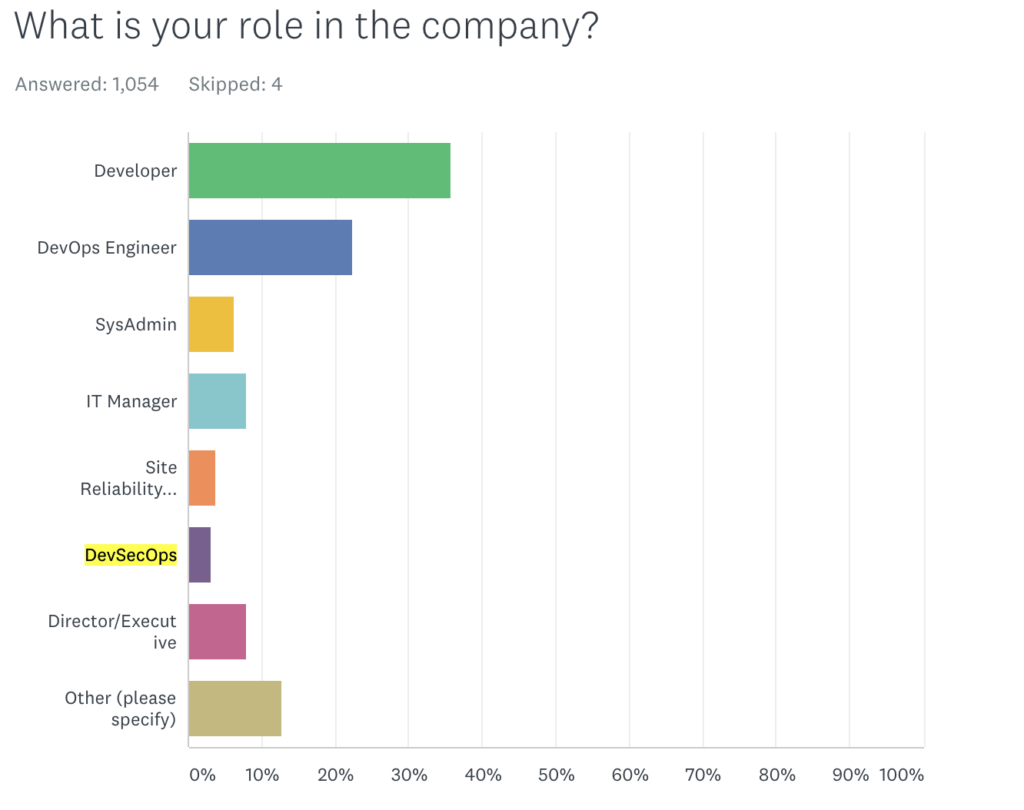
    Logz.io’s annual DevOps Pulse 2020 survey revealed that, out of 1,000 respondents, only 3% indicated their development methodology as DevSecOps, hinting at the slow pace of DevSecOps adoption in the industry.


    Image source: Logz.io

    DevSecOps Best Practices

    Adopt a Shift Left Approach

    Shifting security left helps organizations secure each stage of the development life cycle. This refers to starting testing earlier in the SDLC. The goal here is to enhance quality, cut down long test cycles and reduce the likelihood of unpleasant security surprises at the end of the development cycle or in production.

    Include a Threat Modeling Mechanism

    It is essential to implement a threat modeling mechanism in DevOps workflows since it helps developers and security professionals to view software from an attacker’s perspective. It makes developers more careful while writing code and encourages them to more closely follow code writing and review best practices. Threat assessment or threat modeling will also help identify potential vulnerabilities in system design and architecture, and acts as a crucial part of successful security integration in the SDLC.

    Mandate Developer Training

    Training developers on the importance of security is a critical best practice. Making sure each developer who writes, tests and deploys code understands that security is part of their job description is a priority. Training developers on security best practices, how to embed security, check for vulnerabilities and use appropriate security tools will improve overall security knowledge and increase its application within the organization. 

    Use Available Security Vulnerability Tools

    A vulnerability is considered a flaw in the code, application dependencies, external libraries, licenses used or operating system (OS) packages. There are a number of static and dynamic application security tools that can help the development team to find and address bugs and vulnerabilities as early as possible in the development pipeline. Many are automated to reduce the time it takes for developers to find these flaws.

    Sponsor Bug Bounties

    Bug bounty programs and rewards motivate external and internal security experts to experiment with the platform, analyze, think outside the box and report any major bugs and security flaws found. 

    Security-as-Code

    Security-as-code is the next evolution in DevOps, where security is fully embedded in the development processes. This practice implements security and secure coding practices in the earliest stage of development. With security-as-code, developers will be able to identify vulnerable code ahead of time and add security checkpoints/measures to tackle such irregularities. 

    DevSecOps Tools

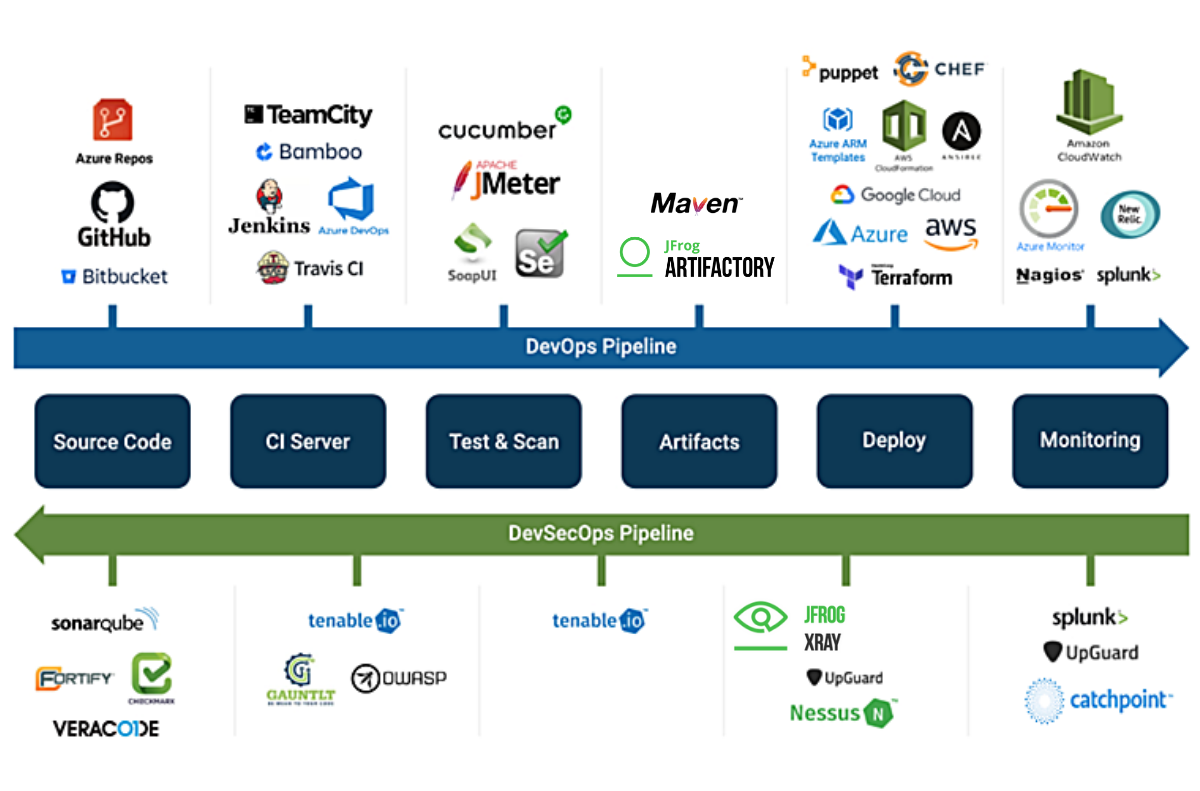
    When we talk about DevSecOps, the software development cycle involves multiple checkpoints to identify bugs and any other vulnerabilities and resolve them so that the application works as designed. The aim is to deploy software with quality and confidence, and this is achieved by using various tools at different stages.


    Image credits: CatchPoint

    Organizations can choose to use the type of security tools that best work for their needs from their preferred vendor. While the security tools themselves are critical for detecting vulnerabilities in the application through the DevSecOps pipeline, monitoring is also considered an integral part of this process. It not only lets developers analyze and evaluate security vulnerabilities from the end user’s viewpoint, but it can help identify breaches and anomalies after an application is in production.

    DevSecOps Pipeline

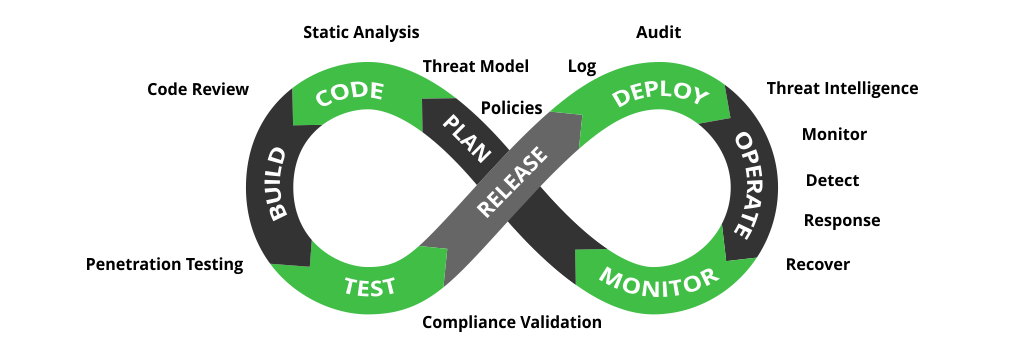
    While DevOps focuses on speed and agility, DevSecOps adds a layer of security throughout the software development life cycle. A DevSecOps pipeline adds security activities to every stage of the development process, not simply tacking it on to the end as an afterthought. This is achieved by integrating security checkpoints, controls, policies, tools and techniques from the beginning of the DevOps pipeline until the end. These additions facilitate automated security controls at each stage of the software delivery pipeline.

    Image credits: JFrog

    In his swampUP conference keynote The Divine and Felonious Nature of Cyber Security, John Willis shared some valuable DevSecOps best practices, including:

    • Treat security issues as you would software issues.
    • Adopt a “security-as-code” approach to enable the automation of security.
    • Build security controls and vulnerability detection into CI/CD pipelines.
    • Automate security testing as part of the build process.
    • Proactively monitor the security of production deployments.

    Embedding security earlier in your software development life cycle will yield bug-free features and satisfied customers. Have security checkpoints at each stage and make sure developers understand that security is everyone’s responsibility, including theirs. Manage your software and build artifacts, scanning and securing them at every stage of the pipeline using appropriate tools and techniques. Happy DevSecOpsing!

  • DevSecOps Implementation: Static Analysis

    DevSecOps Implementation: Static Analysis

    One of the things I’ve done for Accelerated Strategies Group recently is looking into DevSecOps toolsets. This is a fun area for me, as development and security fit together well in my mind. Having a separate security group is useful, even necessary in some scenarios, but letting developers crank out code and looking for vulnerabilities only after has always seemed terribly inefficient. Whenever I’ve managed developers, security training is just part of the package I bring. It’s far easier to write it well the first time (the equivalent of shift-left) than rewrite it.

    I won’t name names here—this is work I did for ASG, it is not mine to give away—but I will talk about DevSecOps today, and moving into the future. I’m planning three to four installments for this series, discussing the different aspects of DevSecOps tools.

    For clarity, we’re defining DevSecOps tools as “developer-enabled security tools.” This means that in some way, they help developers improve overall security posture while leaving them to be developers. We all know security has to shift left in every way if it’s to be useful in a DevOps world, but most organizations haven’t seriously started the move to shift security. Hopefully, this series helps.

    Depending upon which financial analyst firm you prefer, projections are that the DevSecOps market will grow 28% to 33% a year for the next few years. While this is good news for DevSecOps vendors, it implies very few organizations have systemically adopted DevSecOps, or there would not be room for that level of growth.

    Whether a traditional team or a DevOps team, the static analysis portion of DevSecOps is (generally) easy to set up and configure and most products offer feedback at both coding time and build time. IDE plugins have come a long way, some even offering advice as-you-code and others allowing developers to run on-demand static scans of their work. The industry as a whole has worked hard to lower the false-positive rates that made most organizations reluctant to deploy them broadly, and prioritization of issues is possible in the best products, making identification and remediation pretty easy. Try a pilot out: Pick a vendor and project, grab the IDE plug-in and check out what they can do. Most do not yet directly support code smells, but I suspect that is coming rapidly, as the systems are already designed to look at source and determine issues. Adding to the collection of possible issues will be a differentiator that quickly turns into a market requirement.

    Things to check for:

    • Language support: Do the languages you use have a scanner? While most of the tools on the market offer support for a breadth of languages, there are differences, so check the corner cases. This truly is a make or break decision—the best product on the market is useless to your org if it doesn’t support the languages you use.
    • IDE integration: This is pretty straightforward, are the IDEs your developers use day in and day out supported? Most of these tools offer command-line variants also, so it is possible that even without support directly in the IDE, the security functionality of a given product dictates that command-line is better. In that scenario, a process to ensure developers are even running scans is a good idea.
    • Vulnerabilities detected: At a minimum, support for whatever is currently in the National Vulnerability Database (NVD) should be required, along with OWASP compliance. Most vendors offer support beyond the NVD, so a bit of research to see what types of vulnerabilities are detected will be in order.
    • Click-through support: With IDE plug-ins, one of the great strengths of scanning is the ability of the developer to simply click on the vulnerability in the results list and go to the offending code. Make certain this works—and works as advertised.
    • False-positive rate: This has historically been a problem, but the industry has brought it down overall. Ask your prospective vendors to share their numbers. Our experience shows low single-digits for a percent, which is far better than the past, but still leaves room for improvement.

    The other part of static analysis is plugging static analysis into the build process. Most of these products have integrations into the most popular build management tools. Scanning the entirety of the application allows the static analysis to see a broader vision of the app and note issues with interactions between portions written by different developers. Reporting for build-time scans is generally at the application/team level, and the best tools will show results of development-time scans side by side with build-time scans if you want them to.

    Things to check for:

    • Language support: Again with the languages. It’s pretty simple here: The core of the application may be built using languages a given vendor supports but critical parts might not. Integration is where that becomes a real issue. Make sure what needs scanning can get scanned.
    • Integrations: Most of these tools offer automated scans through integration with build tools or manual scans that the build manager can kick off. Automation is preferred by a long shot, so check if your tool of choice is integrated into your organization’s build tooling.
    • Depth: We’re not going to get into source composition analysis (SCA) here—that’s for another blog—but we are going to observe that vulnerabilities can come from your source’s sources. How far does the scanning tool trace in a static analysis situation? Is it deep enough to cover a given application’s integrations and inter-relationships? While SCA will detect a lot that static scanning won’t, things such as “unsafe values sent to [insert external API]” should be available in static code analysis.
    • Reporting: This is where you’ll find the most variety in popular tools. Look at their reporting and click-through support to find what best suits your needs.
    • False-positive rate: Same as IDE integrations above—make certain it is low enough for your organization’s comfort.
    • Scan run location: This is becoming a differentiator in the space—do you want your scans run in the cloud? In the data center? Some mix of both? Check your vendors; there are significant differences in the level of support for these options.

    This is just the tip of the iceberg, of course. It is an entire market segment, and static analysis tools have been around a long time. Many organizations have not taken dev-time security seriously yet, even though we all know we need to; I’m just offering a place to get started.

    DevSecOps just makes sense. Static scanning is mature and generally well-integrated. This is a great place to start shifting security left. We get it: Developers don’t want to be security analysts or they’d have filled one of those many security openings. But IDE integration makes these scanning tools more interactive and less intrusive, showing developers how to do it securely as they code. This is great to me because good coding practices will become second nature with real-time, on-the-spot reminders and pointers. It also means that if the developer acts upon the tool’s recommendations, the code is developed more securely the first time and there will be no need to revisit it for security proofing.

    You’re all keeping the lights on in a terribly tough time. DevSecOps attempts to make it more likely that your astounding work isn’t interrupted. It just makes sense to get these tools to protect your organization’s portfolio and your hard work.