Tag: Bitbucket

  • Atlassian Bitbucket CI/CD Cloud Service Aims for the Enterprise

    Atlassian Bitbucket CI/CD Cloud Service Aims for the Enterprise

    Atlassian today outlined its strategy to increase the appeal of the Bitbucket continuous integration/continuous delivery (CI/CD) cloud service among enterprise IT organizations. Atlassian said it plans to focus on four core pillars: Performance, management, extensibility and security and compliance, starting with an update scheduled for the third quarter.

    Dan Tao, head of engineering for Bitbucket Cloud and Compass at Atlassian, said the overall goal is to make it simpler to use the Bitbucket Cloud service running on the Amazon Web Services (AWS) cloud at scale as organizations increase the rate at which they build and deploy software.

    Atlassian is still supporting the Bitbucket Server and Data Center editions of the platform, but it’s apparent more organizations are shifting software development to the cloud, he noted. Atlassian is now moving to not only simplify migrations to the cloud by, for example, providing a Bitbucket Cloud Migration Assistant tool, but it is also moving to ensure applications can be developed at scale.

    Achieving that goal includes making use of a more advanced diff algorithm that is four times faster in larger DevOps environments, he added.

    Other planned enhancements include the ability to execute CI/CD workflows via Bitbucket pipelines, the ability to reuse multi-step pipelines across repositories, tighter administration integration with other Atlassian applications, the ability to encrypt data at rest and integration with the Snyk tool for discovering vulnerabilities in software to improve security.

    Finally, the Bitbucket Cloud service will also soon support Bitbucket Mesh, a distributed storage capability that is already employed in Bitbucket Data Center.

    Overall, Atlassian sees the migration to the cloud as a means to not only make DevOps workflows more accessible to a wider range of organizations, but also give organizations that have already invested in DevOps the opportunity to streamline those processes, said Tao.

    Many DevOps teams today maintain complex platforms with custom integrations that they need to maintain and support. Atlassian provides DevOps teams the option to either employ an integrated platform or use connectors it has created as part of the Atlassian Open DevOps framework to make it simpler for teams to use whatever mix of tools they prefer, he added. In either case, the total cost of maintaining a DevOps environment can be significantly reduced, said Tao.

    It’s not clear to what degree organizations that have already invested in DevOps are considering replacing their existing CI/CD platforms. However, as the pressure to accelerate the rate at which software is built and deployed steadily increases, the pressure to further automate DevOps workflows also builds. At the same time, DevOps teams are now being asked to integrate security gateways that require additional custom integrations within legacy platforms that they would need to support alongside existing integrations.

    At the very least, more organizations than ever are weighing their DevOps options. The issue, of course, is that the total cost of switching out DevOps platforms is not inconsequential given the current dependency on existing workflows.

  • Atlassian Unfurls Bevy of DevOps Updates

    Atlassian Unfurls Bevy of DevOps Updates

    Atlassian today made a dozen updates to its DevOps portfolio as part of an effort to better unify workflows spanning disparate tools.

    Suzie Prince, head of product for Bitbucket at Atlassian, said the latest updates are intended to enable DevOps teams to streamline workflows without requiring everyone in the organization to standardize on the same set of tools.

    Updates to the Atlassian DevOps portfolio include DevOps Automation Triggers, which makes it possible to create automation to keep development activities synchronized, such as reassigning issues surfaced in the Jira project management application from Atlassian to code review or sending a message to a Slack channel.

    Atlassian DevOps

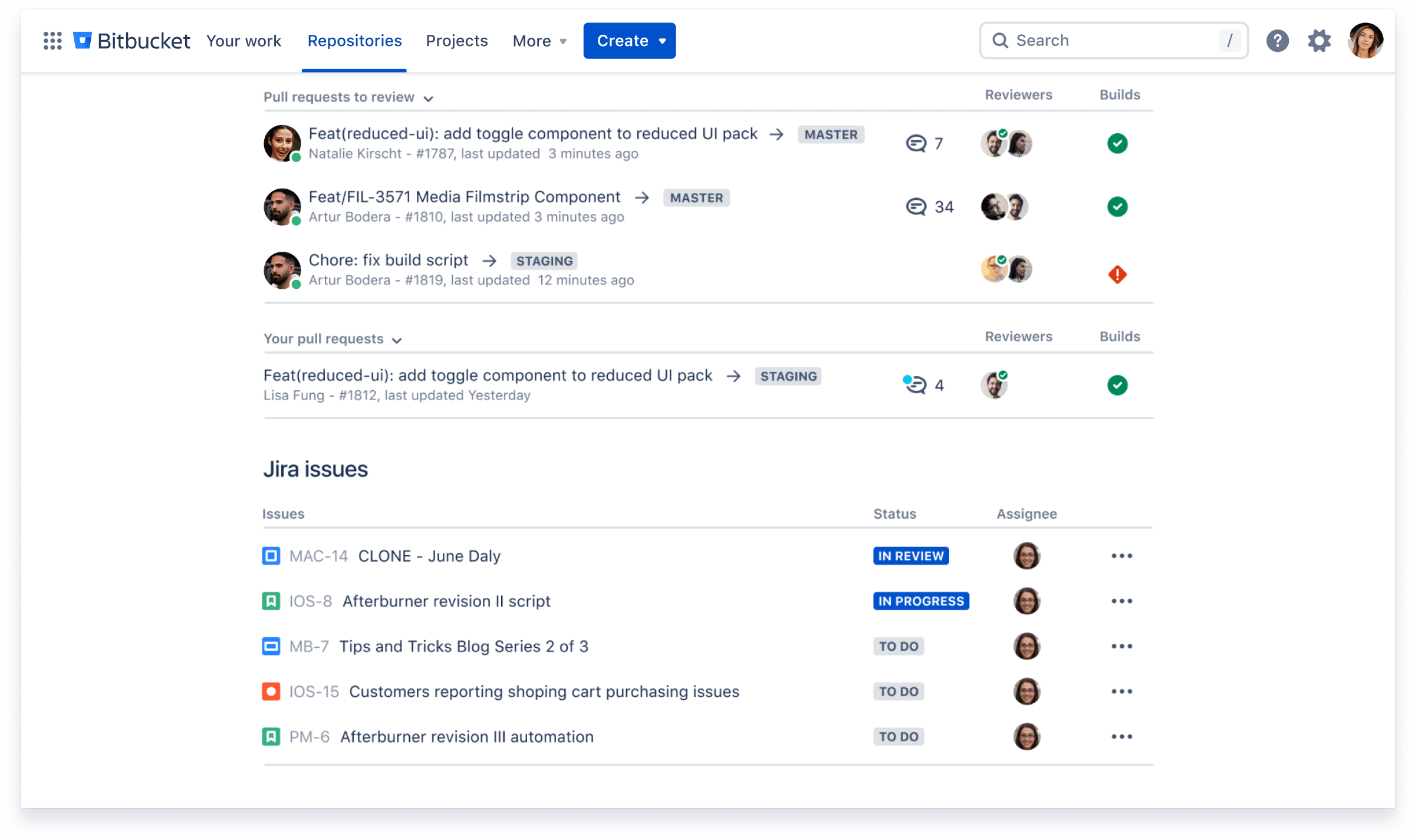
    The Bitbucket repository from Atlassian has also been updated to make it easier and faster to review code changes after a pull request. New features such as a consolidated list of tasks, integrated Jira issue creation and activity feed filters make it possible for developers to complete their code reviews faster and juggle multiple pull requests at once, said Prince. A Your Work dashboard in Bitbucket Cloud has also been expanded to include assigned Jira issues.

    The Atlassian VS Code integration is also being made available to make it easier for developers who use the Microsoft integrated development environment to more easily track and visualize Bitbucket Pipelines.

    A Code Insights in Bitbucket Cloud has also been added to bring scanning, testing and analysis tools into the code review process, including Mabl for test automation and Sentry for automated monitoring. Bitbucket is also now providing integration with Snyk scanning tools to make it easier to discover vulnerabilities.

    Available in a preview mode is an automated change management capability across Jira Service Desk Cloud and Bitbucket Pipelines that can be used to pause CI/CD processes, create a change request in Jira Service Desk and trigger deployment once it is approved.

    A Risk Assessment Engine in Jira Service Desk Cloud also allows IT teams to score the risk of a change and automatically approve and deploy low-risk changes. A Change Management View has also been added to Jira Service Desk Cloud to streamline approvals for high-risk changes by pulling all of the relevant information together in traceable change requests.

    Atlassian has also tightened integration between its Opsgenie incident management software and Bitbucket Cloud to centralize alerts and filters. Via an Incident Investigation Dashboard, members of a DevOps team can look at the deployment that happened right before the incident, add it as a potential cause, and contact the developer who made the change if it needs to be rolled back.

    The company has also extended integrations with Slack and Statuspage to facilitate both members of DevOps teams and external stakeholders.

    Finally, Atlassian is making available a resources hub to make it easier to share DevOps best practices, templates and guides.

    Prince said it’s not ever going to be feasible for most organizations to standardize on one set of DevOps tools. The goal should be to enable organizations to construct DevOps processes in ways that allow developers to employ whatever tool is their favorite at the moment. Only then will organizations get developers to buy into a DevOps process that doesn’t necessarily change the way they are most comfortable working, she noted.

    The challenge, of course, is often getting IT leaders to be as equally comfortable with what, from their perspective, might be an experiment in controlled chaos.

  • Anaxi Adds Reporting Capabilities to ALM Tool

    Anaxi Adds Reporting Capabilities to ALM Tool

    Anaxi today announced it has added reporting capabilities to its namesake application lifecycle management (ALM) tool that make it possible to update stakeholders about the status of software development projects residing in repositories such as GitHub and Bitbucket Cloud as well as project management applications such as Jira.

    Company CEO Marc Verstaen said reporting capabilities will make it easier to employ Anaxi to, for example, keep business leaders apprised of updates to software development initiatives by enabling IT leaders to generate a report similar to how business leaders today employ a business intelligence (BI) application to share sales forecasts.

    The Anaxi tool is designed to provide IT leaders with a single tool for tracking progress being made across multiple DevOps platforms. Verstaen said as more organizations begin to realize they are really software companies, interest in software delivery management tools is on the rise. The reporting challenge IT leaders face is the information they need to create a holistic report lies in multiple repositories because of the inherently fragmented nature of the DevOps tool chain, he said.

    To make it easier to adopt Anaxi, the ALM tool Data employs the same credentials organizations have created to access GitHub, Bitbucket and Jira. The Anaxi app connects directly to a user’s GitHub or Bitbucket repositories and Jira projects to ensure data privacy and security. Any action performed on the Anaxi applications is written back on GitHub, Bitbucket and Jira to maintain consistency across projects involving multiple team members.

    At its core, Anaxi is pulling metadata from DevOps tools to apply analytics to track individual developer productivity and team performance. IT leaders can, for example, analyze how much code has been added and removed, refactoring and code churn on a weekly basis. Anaxi can be used either in place of a project management application or as a complement to an existing project management tool to make analytics more accessible.

    The primary goal is to make it easier for IT leaders to identify DevOps bottlenecks and prioritize projects in a way that advances business goals. Too many organizations are writing more code than ever only to discover projects are being held up because a single component on which every other module depends is behind schedule. Many of the developers writing that code could have been working on other projects if IT leaders had been made aware of changes that needed to be made to the schedule based on the anticipated delay to another project. Anaxi essentially applies predictive analytics to software development projects to determine based on past histories the likelihood of a deadline being met, Verstaen said.

    Armed with that intelligence, IT leaders can either proactively reallocate how resources or allocated or inform business stakeholders to changes in delivery schedules. In either case, Versaten says the goal is to enable IT leaders to avert any software development crisis that might arise.

    The Anaxi app is free to use by teams of up to 10 members. Teams of more than 10 users will be required to adopt a premium plan priced at $19 per month per user.

    — Mike Vizard

  • Atlassian Integrates DevOps Portfolio

    Atlassian Integrates DevOps Portfolio

    At its Atlassian Summit 2019 conference, Atlassian announced updates to all the DevOps tools that make up Atlassian Data Center as well as upgrades to its Opsgenie incident management software to provide deeper integration with the rest of the company’s portfolio.

    At the same time, Atlassian revealed it has rebranded the AgileCraft business planning application it acquired earlier this year to Jira Agile.

    New capabilities added to Atlassian Data Center include the ability to set up smart mirror farms for Bitbucket Data Center; content delivery network (CDN) support for Jira Software, Confluence, Bitbucket and Jira Service Desk Data Center; rate limiting for Bitbucket, Jira Software and Jira Service Desk Data Center; issue archiving for Jira Software and Jira Service Desk Data Center; templates for deploying on Microsoft Azure and Amazon Web Services public cloud; and a mobile application for Jira Server and Data Center.

    Atlassian Data Center now incorporates Jira Software 8.0, Confluence 7.0, Bitbucket 6.0, Jira Service Desk 4.0 and Portfolio 3.0. The latest version of Jira Software 8.0 now executes advanced searches using Jira Query Language (JQL) 31% faster on average, while agile boards load two times faster and re-indexing times are now 71% faster. The latest version of Confluence adds support for multimedia files and additional analytics tools to the content management platform.

    The Atlassian Cloud service has also been expanded to increase the user limit to 5,000, with an early access program signaling an intention to bring that up to 10,000 users soon.

    Meanwhile, specific capabilities being added to OpsGenie include support for incident timelines to track response activities and key events; postmortems to help discover root causes and track remediation activities, a user interface that aligns with the rest of the Atlassian portfolio that fosters bi-directional workflow, the ability to automatically trigger events, integration with Slack collaboration software, the ability to encrypt data and Statuspage services integration to make it possible to share alerts with third-party services. Atlassian has also rebranded its Automation Actions to Opsgenie Actions; the company acquired Opsgenie last fall.

    Berkay Mollamustafaoglu, co-founder and head of product for Opsgenie, said now that Opsgenie is part of the larger Atlassian product family there’s clearly more focus on helping organizations integrate best DevOps practices with more structured processes based on the ITIL format. The latest version of the ITIL format provides makes those processes more flexible, but there’s still plenty of room for Atlassian to improve the tenor of the conversation across what has become a bi-modal IT operations environment. As the level of synchronization across those processes increases, the amount of fatigue IT operations teams experience lessens as the number of alerts that need to be correlated across multiple platforms decreases, Mollamustafaoglu noted. In fact, rather than convening in a physical “war room” to resolve a issue, most incidents will increasingly be resolved via online chats, he said.

    It may take a while before a period of détente emerges between advocates of DevOps and ITIL processes inevitably emerges. In the meantime, the more IT services management (ITSM) platforms become integrated with one another, the easier it becomes to achieve that goal. In fact, the major obstacle that needs to be overcome are much more likely to cultural rather than the level of integration that can be achieved using any specific ITSM platform.

    — Mike Vizard

  • Atlassian Adds Pre-Configured Pipelines to Bitbucket CI/CD

    Atlassian Adds Pre-Configured Pipelines to Bitbucket CI/CD

    One of the primary reasons DevOps processes have not been widely adopted across the enterprise is that building pipelines across all the tools required is a painstaking effort. As a result, most pipelines today are constructed using manual pipelines. However, Atlassian has announced it is now making available pre-configured Bitbucket Pipelines that DevOps teams can access via a simple drag-and-drop interface.

    Harpreet Singh, head of product for Bitbucket Cloud at Atlassian, said DevOps teams that rely on the Atlassian Bitbucket continuous integration/continuous deployment (CI/CD) platform will be able to employ a series of pre-configured Bitbucket Pipelines built by Atlassian or one of its third-party partners, rather than having to manually build every pipeline.

    The goal is to make it much easier for DevOps teams to incorporate, for example, a new cloud platform into an existing set of DevOps processes without waiting for someone on the DevOps team to write, test and validate a script, said Singh. IT vendors that have worked with Atlassian to create Bitbucket Pipelines include Google Cloud, Microsoft, Slack and Amazon Web Services (AWS).

    One of the ironies of DevOps is that while CI/CD platforms make it easier to build and deploy applications, constructing the CI/CD platform can be exceedingly complex. A recent survey conducted by Atlassian found DevOps teams rely on 4.3 tools to move code from development into production environments. A full 62 percent of respondents reported they resort to performing manual testing due to insufficient automated test coverage, additional manual processes or a lack of build/deployment pipeline automation.

    While some organizations might have the engineering resources required to build pipelines, he noted, the average IT organization can’t afford to hire operations specialists that have the requisite programming skills required to build pipelines manually.

    Best of all, noted Singh, the pre-configured Bitbucket Pipelines that Atlassian makes available will be maintained and updated by their original authors.

    It’s too early to say to what impact pre-configured pipelines is likely to have on DevOps adoption in the enterprise. But most enterprise IT organizations won’t significantly alter their process until it becomes relatively easy to make that transition. Enterprise IT organizations have relied on administrators to manage IT for decades, and most of those administrators wouldn’t know where to begin if asked to manually construct a pipeline. The few enterprise developers who might be able to build those pipelines are simply to busy writing application code. The result is a paralysis that prevents organizations from modernizing their application development and deployment processes.

    Of course, any meaningful change in the enterprise also involves a chicken-and-egg debate. Lacking skills and tools, enterprise IT organizations are unable to overcome internal inertia, which in turn results in conservative IT organizations preferring to rely on known processes no matter how inefficient they might be. The real challenge facing IT leaders trying to advance DevOps adoption is to remove as many excuses for resisting change whenever and wherever possible, starting with how pipelines are constructed and maintained.

    — Mike Vizard

  • Picking a Git for the Enterprise

    Picking a Git for the Enterprise

    Some of my Agile and DevOps transformation work, not surprisingly, involves helping clients with tooling adoption—to set up, scale and operate across the organization. This blog piece is about a recent experience of setting up Git across a client organization.

    Git, as most of you are aware, is a fundamental building block for many of the modern engineering practices associated with Agile and DevOps. Software configuration management tools such as Git, in simple words, allow you to track and manage your software code and configuration changes in the most-effective, efficient and distributed way. Git, as the choice of source control, has remained steadfast over the years, while other tools across various categories of DevOps tools have seen their fortunes go up and down with the ever-changing technology landscape of DevOps tools. In fact, one new buzzword is GitOps—some even calling it the next stage of evolution for DevOps.

    Origins of Git

    More than a decade ago , the Linux community faced a challenge  because none of the existing revision control tools met their need for a distributed version control tool. And from that need Git was born. In the words of the creator of Git, Linus Torvalds, “The main issues with SCMs is the politics around who can make changes.” Ever since its creation, Git has radically changed the notion of software configuration management (SCM), by enabling engineers to work remotely and autonomously. (If you are new to Git and interested in exploring more about Git and its features, Atlassian has a tutorial and GitHub has a list of resources.)

    Git and More

    While Git as the core product is fundamentally the same whichever flavor your prefer—GitHub, GitLab or Bitbucket—the wrapper around it determines the important non-functional characteristics such as operatability, security, usability and maintainability. Our quest for an enterprise-scale Git focused on the wrapper and not the core product itself, as much has been written, debated and documented on the core product of Git itself already. The value and relevance to enterprises is in the wrapper that these productsplatforms provide.

    We looked at the core product and related offerings; as you can imagine, the three tooling vendors have different positioning and taking different directions with the future road map for their respective tools. Bitbucket’s strength lies in the fact that Atlassian is bundling the product with the omnipresent Jira Software and Confluence. GitLab’s road map seems to be taking the product beyond Git and into the idea of a single product for your entire pipeline automation, from concept to cash. GitHub, which is being acquired by Microsoft, is increasingly relying on the strength of integrations with other tools and the workflow capability the company is bundling with it.

    (I avoid an overemphasis on the commercial aspect in this blog; however, I’m not ignoring it completely. Part of the reason is due to the fact that enterprise pricing is not entirely transparent and may vary wildly depending on organization’s negotiating capability, the scale of usage, future potential and marketable track records as perceived by the tooling vendors. This blog is also not meant to be a feature by feature comparison, as this is something you can Google and find out yourself very easily.)


    The Verdict

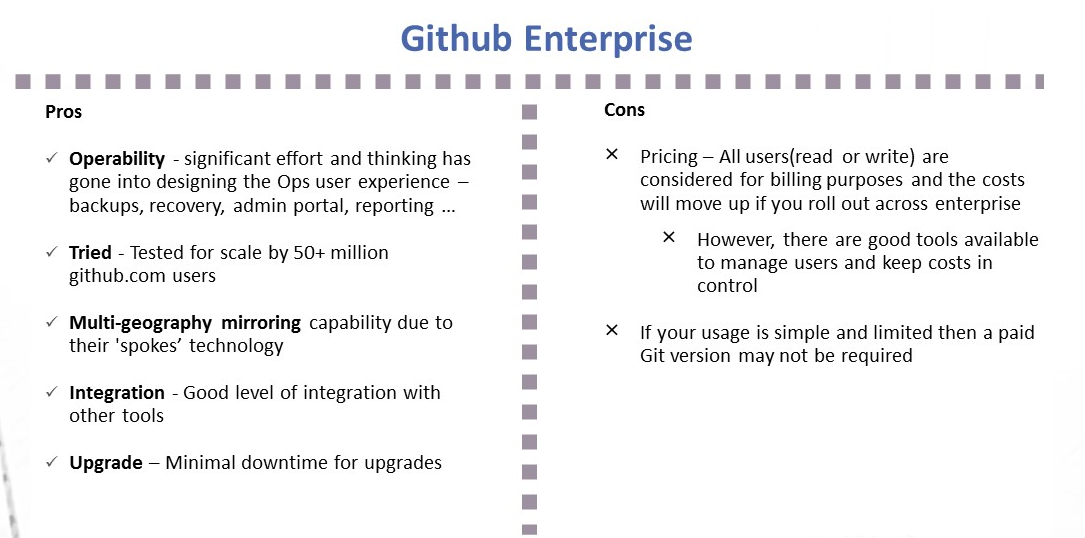
    Github Enterprise pros and cons
    Image1; Github Enterprise – Pros and Cons
    Gitlab Ultimate and features
    Image 2:  Gitlab Ultimate – Pros and Cons

    My Recommendation: It Depends

    1. I liked the vision of GitLab as a single-stop tooling platform for continuous integration/continuous delivery (CI/CD), which goes beyond source control. I think the tool is simple and intuitive to use and great for small to midsized setups or even large enterprises that are focused on having smaller and autonomous teams.
    2. GitHub seems to be well-suited for large and complex enterprises with significant outsourced and offshore-based technology teams.

    I would love to hear your views on what has been your thinking with regards to choosing a Git-based product for your enterprise or teams. Meanwhile, here are some links you might find useful in your decision-making:

    1. Why and how GitLab abandoned Microsoft Azure for Google Cloud – https://venturebeat.com/2018/04/06/why-and-how-gitlab-abandoned-microsoft-azure-for-google-cloud/
    2. Tooling integrations of GitLab – https://docs.gitlab.com/ee/integration/README.html#doc-nav%20for%20list%20of%20integrations
    3. GitHub add-ons are listed at Addons are listed at https://github.com/marketplace
    4. Security and scalability info of GitHub is at https://github.com/jonico/github_security_and_scalability_overview
    5. Products that integrate with GitHub platform – https://github.com/works-with
    6. Pricing of GitLab – https://about.gitlab.com/pricing/

    — Aditya Vadaganadam

  • Atlassian Tightens Security for Bitbucket

    Atlassian Tightens Security for Bitbucket

    Collaboration is part of the foundation of developing code in a DevOps environment. The ability to share code or leverage snippets from open-source projects enables developers to be more productive and efficient—creating better software, faster. Sharing code with others doesn’t necessarily mean you want it exposed to the public, though, which is why Atlassian recently introduced some new security controls for Bitbucket.

    A platform like Bitbucket has a number of advantages in terms of collaboration and efficiency, but many organizations are reluctant (if not adamantly opposed) to putting potentially sensitive code out in the cloud. Atlassian added IP whitelisting and two-step verification to help organizations limit access to code. The IP whitelisting allows customers to restrict access to code to only designated IPs, while the two-step verification ensures it will take more than a simple password compromise for an unauthorized user to gain access to code.

    Security policies obviously vary from company to company and industry to industry, but some organizations have a strict policy against working from home or require specific security controls or a secure VPN connection to allow users to connect. The IP whitelisting feature of the Bitbucket Premium plan gives companies the ability to designate which IPs can connect and limit access.

    “For Limpid Logic customers, remote access and IP whitelisting are sometimes a legal requirement, especially for clients in highly regulated industries such as finance and health care. Our work often deals with sensitive intellectual property that requires limited geographic access to repos from a few specific IPs,” said Bachir El Khoury, managing director at Limpid Logic. “IP whitelisting is exactly what we need within our business and we’re thrilled to see this security feature in Bitbucket.”

    The second new security feature is two-step verification. The problem with the traditional access control of a username and password is that it is easily compromised. Usernames often follow a simple and predictable pattern, and passwords have been shown in data breach after data breach to be a poor security control. They’re often far too easy to guess or crack, and even “strong” passwords are not invulnerable. That’s where a second layer of authentication can help.

    Atlassian introduced the option for administrators to require two-step verification in Bitbucket. A Bitbucket blog post explains, “When you enable this option for your team, users will need to have two-step verification enabled in order to interact (view, push, clone, etc.) with your account’s private content: repositories, team settings, issue trackers, wikis, and snippets. If a user doesn’t have two-step verification enabled at the time of access, they’ll see instructions on how to enable two-step verification in the UI and continue.”

    Both of the new security features are part of the Bitbucket Premium plan. The features are available as a free trial pending upcoming price changes. Once the changes are implemented, the cost for Bitbucket Premium will be $5 per user per month. You can sign up for Bitbucket here, and learn more about how to configure and use IP whitelisting and two-step verification here.

    — Tony Bradley

  • Continuous Delivery: The Atlassian Way

    Continuous Delivery: The Atlassian Way

    Sonatype’s Mark Miller (@TSWAlliance) caught up with Ian Buchanan (@devpartisan) for our 2016 DevOps Leadership Series. Ian discussed his experiences at Atlassian, including continuous delivery, ChatOps, and use of tools such as Bamboo, Nexus, Puppet and Datadog.

    https://www.youtube.com/watch?v=MgRaYKHGqeQ

    Buchanan: I’m Ian Buchanan. I’m a Developer Partisan at Atlassian, which is developer advocacy for our developer tools.

    Miller: Ian, most people know Atlassian from solutions like JIRA and Bitbucket.

    Buchanan: Yeah, I focus mostly on Bitbucket and Bamboo. Bamboo’s our continuous integration and deployment tool.

    Miller: Good. One of the subjects we talked a little about at dinner last night is how Atlassian is using Nexus. Can you give us some background on that?

    Buchanan: Yeah, that’s right. Well, we’re a big Java shop. We have been for a very long time and have a lot of Maven dependencies for external reasons; we also store a lot of our own internally developed libraries in our Nexus repository.

    _________________

     We’re a big Java shop. We have been for a very long time … we store a lot of our own internally developed libraries in our Nexus repository.

    _________________

     Miller: As far as a binary repository, are you using it for anything other than components?

    Buchanan: Not that I’m aware of. I know that we’ve recently started to get into Docker quite a bit and Nexus is a good fit for that as well. I don’t know the extent which we’re using Nexus for that purpose yet, as Docker’s still quite new for us.

    Miller: What does your continuous integration pipeline look like?

    Buchanan: It certainly varies by product in the details. Of course, we have our own continuous integration product, Bamboo. Bamboo is the most pervasive tool we have.

    For the Java stuff it’s pretty simple pipeline where libraries get built and published into Nexus so that they can be used downstream. We also have some interesting, newer cloud products that are built with Python. A lot of the deployments, whether they are Java or Python stuff, are handled by Bamboo’s deployment projects. They pull artifacts from Nexus and put them into production.

     _________________

    A lot of the deployments, whether they are Java or Python stuff, are handled by Bamboo’s deployment projects. They pull artifacts from Nexus and put them into production.

     _________________

    Miller: Are you guys using continuous delivery in house for your workflow?

    Buchanan: We’re in an interesting position that I think I see a lot of companies in. We have some behind-the-firewall products (our server products) and then we also have cloud products. In the cloud side, continuous delivery is used when we want to go very fast. But we also have to balance that with the approach we take for our server products so that they don’t fork terribly. We have continuous delivery up until there’s a product delivered. At that point, there is another kind of pick up—where the cloud products engage with other things like Puppet and Ansible to configure the environments with products that other people can pick up and run on premises.

    Miller: I was talking to your team in San Francisco. How are you guys using ChatOps with HipChat?

    Buchanan: I’ve been talking about ChatOps for quite some time. We do a lot of very interesting things with ChatOps. They play a very important part of our continuous delivery pipeline in that we publish build results in there. People can see when pull requests are ready and check those out. We get to see what’s happening from production as well. We have integration with Datadog; it tells us some of the monitoring things that are going on. It’s not just information coming into the chat room. There are also commands that folks can issue to make the continuous delivery pipeline move along. There are certain stages where you can type a command to our ChatOps and they will perform the necessary actions. Much of the deployment and change management happens in a ChatOps context.

    _________________

     There are certain stages where you can type a command to our ChatOps and they will perform the necessary actions. Much of the deployment and change management happens in a ChatOps context.

     _________________

     Miller: Anything coming up in the future you guys are working on that’d be fun?

    Buchanan: Well, a lot of the innovation really happens at our quarterly “Ship It” events. That’s where our developers spend 24 hours doing whatever kind of innovation interests them. A lot of time is spent scratching an itch they have. Some of the things that I saw there were about having more information coming back upstream, not just into the chat rooms, but into JIRA where more of the longer-term tracking is going on. They’re experimenting a lot with putting more information into JIRA.

    Miller: Nice. Final question, if you were going to be a superhero, would it be Dev, Sec or Ops?

    Buchanan: I’ve played Dev roles and Ops roles and I almost feel like I know those much more. But from a lot of the sessions at DevNexus, I have to feel like Sec is the superhero. They’re the superheroes because they solve some unsolvable problems in a lot of ways. But I don’t feel ready to play that role at the moment, myself.

    Miller: It’s interesting. I agree with you that they are unsung heroes. Most of the time they just get hammered for what they’re doing.

    Buchanan: That’s true. Yesterday I was in a session about securing REST endpoints. The speaker went through problems with BASIC off , DIGEST off and J2EE—all of these things which we use in our products. At the end we’re left with, “What is the answer?”

    Well, the answer is that for each of these, there are different problems. So we have to identify the right context. We have to understand where some things are broken, know that those things aren’t perfect, and design for that imperfection. That’s a mindset that we have to carry through dev, ops and sec. I hope more security folks step up and start telling those stories.