Tag: backup

  • US DoJ Makes PyPI Give Up User Data ¦ Tape Storage: Not Dead

    US DoJ Makes PyPI Give Up User Data ¦ Tape Storage: Not Dead

    Welcome to The Long View—where we peruse the news of the week and strip it to the essentials. Let’s work out what really matters.

    This week: PyPI complies with a “string of subpoenas,” and LTO continues to grow, despite predictions of its demise. (more…)

  • Why Do You Need GitHub Backup?

    Why Do You Need GitHub Backup?

    You’ve probably heard the joke that there are two types of people in IT: Those who do backups and those who will start. Though it’s still valid, this joke has become less relevant to businesses and professionals. The IT industry has been increasing expenditures on security for years, and backup is a critical area. However, despite the growing awareness of the need for backups and the wide availability of modern backup solutions, the problem still exists. The number of security breaches is growing, and the topic of data security looks like an endless arms race. So what can organizations do?

    First, let’s analyze some data and trends. Year over year, the number of cyberattacks, especially ransomware, is increasing. The year 2020 saw attacks intensifying due to the pandemic and the sudden shift to remote work, for which, unfortunately, not everyone was prepared. Once organizations got better at enabling effective work-from-home models, the hope was that everything could settle into a new normal. Unfortunately, the new norm became these increased attacks.

    It’s a bit like the metaphysical yin and yang—two opposing but complementary forces. One drives the other. Suffice it to say that the estimated cost of the global damage caused by ransomware in 2021 is as high as $20B! And a ransomware attack occurs, on average, every 11 seconds around the world.

    According to an Identity Theft Resource Center (ITRC) report, by the end of September 2021, there were more incidents of this type than during all of 2020. The authors of the report emphasized that they found 26 cases where cloud databases were unsecured. As a result, hackers were able to access confidential data belonging to 99 million people.

    Git Threats: Are my Bitbucket/GitLab/GitHub Repositories Secure? 

    Back in May 2019, ransomware attacks impacted hundreds of repositories on GitHub, GitLab and Bitbucket. The attack wiped away all the data and left only one piece of information: The amount of ransom demanded and a method of payment. Eventually, most of the data was recovered but the cost and the amount of time spent recovering from the attack was enormous.

    According to the Cisco Benchmark Study, approximately 40% of companies experienced downtime longer than eight hours due to a major failure. And 39% reported that at least half of their systems had been affected by a serious breach. According to IBM, the total average cost of a data protection breach on a global basis is as much as $3.86M, and the highest ransom demanded by cybercriminals in 2020 was $15 million. These numbers are scary. On the other hand, in most cases of successful ransomware attacks, the ransom is ultimately not paid; even if organizations do not pay the ransom, the mere fact that they fell victim and experienced failure or downtime can be very expensive.

    GitHub as Backup Tool

    GitHub provides many useful security tools. However, we must be aware of two things: What does GitHub backup really mean and what are its features? And what responsibility do cloud services providers have versus users’ responsibility for security? Let’s start with the latter.

    Most cloud service providers (including Amazon, Microsoft, Google, IBM, Salesforce, GitHub or Atlassian) operate on the basis of the so-called shared responsibility model. Users of cloud services most often assume that providers are fully responsible for their protection. However, providers are primarily responsible only for ensuring the security and availability of infrastructure, software and access, period. Users are responsible for the security of the business data stored as part of these services. So users themselves have to take care of backup and disaster recovery plans and solutions. In short: Providers are responsible for the security of the cloud itself and users are responsible for data security in the cloud. And at this point, it is worth pointing out that, according to data from the UK’s CybSafe, in 2019, 90% of data breaches were caused by user error.

    It can happen to any of us—a ransomware attack, phishing, loss of access to a GitHub account or an entire computer or simply overwriting another developer’s work in a repository. It affects both individual users and large corporations. In July of 2019, Ubuntu Security reported that the credentials for a company-owned GitHub account were compromised. Hackers used these compromised credentials to create repositories, issues, pull requests, etc. The attack did not cause a major crash, but repairing the damage took some work and restoring some repositories or issue trackers to the previous state was difficult.

    There are some common features any good backup should have:

    • Automation (i.e. daily backups)
    • AES encryption with its own encryption key
    • Versioning
    • Long-term data retention
    • Disaster recovery process
    • Easy monitoring (audit logs, email notifications)
    • Central management
    • Multi-tenancy (to manage admins, privileges and roles)
    • Scalability

    Based on these criteria, GitHub (and other similar hosting services) cannot be considered a proper backup tool. GitHub is a great open source project, but its purpose is completely different.

    How to Back Up Manually

    Since the cloud service itself is not enough, how can you take care of GitHub backup? Well, you could do it on your own. And often, especially in small businesses, this is the preferred method. It may seem like a good idea at first. Knowing Git well, we can create appropriate scripts that create backups for us that give us full control over what is happening without having to pay anyone for it. But this is very risk and not profitable in the long run. Disk space costs money; our employees’ time to create scripts and perform the backup is another cost. And the most important thing, in this case, is that these scripts must be maintained and updated all the time, so they constantly generate additional costs. Any change in such a script may cause an error and, as a result, deprive an organization of a working backup. Of course you could also create an appropriate mechanism to test it, but that’s an additional cost. Manual GitHub backups do not end with writing a single script.

    I’ve experienced this myself. In one project, backups were generated using such a script and then kept on our own servers. It was cheaper this way. But we did not have any validation of the created backup. One day, while updating the backup scripts, we did a manual test and it turned out that we had a serious problem—the backup was created correctly but its name did not change, so we kept overwriting the same archive constantly! The effect? It turned out that we didn’t have any copies older than one month! Luckily for us, they weren’t needed because the systems and databases were working properly at that time and there weren’t any incidents, but it makes me cringe just thinking about “What if …?”

    All in all, manually writing backup scripts is not a very good idea for many reasons. The low cost of this solution is only theoretical; with time, the cost of maintaining this mechanism increases and, in practice, often only one or two people are responsible for it, which creates additional risk. Okay, you might have more control, but overall you are wasting time and money. The backup itself is also not enough, because you need a proper restoration solution for systems or data in the event of an incident. There’s also the question of how to create a backup of the script that creates the backup? Are you sure you cannot make better use of your employees’ working time?

    How Much Does it Cost?

    It is difficult to accurately measure this; it all depends on the level of complexity of systems, the number of repositories, the skills of your team, etc. However, you can estimate how much the lack of access to services or programmers’ downtime will cost. You can also calculate the development and maintenance costs of writing, testing, maintaining and updating your own backup scripts. The history of GitHub attacks and crashes shows that the data is usually recoverable, which is good news. On the other hand, the time when services are unavailable or when teams are unable to work can be very costly.

    Third-Party GitHub Backup Tools

    Another solution—and, in my opinion, a better one—is to use third-party backup software.

    In fact, in the GitHub documentation, it is recommended:

     “Backing up a repository: You can use the API or a third-party tool to back up your repository.”

    If you can use the GitHub API, why do you need a third-party GitHub backup tool? Well, first of all, such applications are created by experts in a given field who have knowledge, experience and stay up-to-date on the current security trends. Second, these solutions are ready and available right away; you don’t have to spend time and money reinventing the wheel. Yes, there is a cost, but in the long run (taking into account the factors described earlier) the cost usually turns out to be much lower than a bespoke solution. Outsourcing backup management responsibilities may be incredibly beneficial and will allow us to focus on developing our business instead of managing GitHub repository backup all over again.

    When it comes to backup, be smart. If external third-party tools allow us to develop our products faster and more efficiently, then we should not hesitate to use them. And never forget to implement proper backups and disaster recovery plans. Taking care of it today will help ensure a more secure future.

  • Fast Object Storage Key to Backup and DR Strategy

    Fast Object Storage Key to Backup and DR Strategy

    The massive shift to remote work necessitated by the COVID-19 pandemic kickstarted many companies’ digital transformation. While this transition had already begun for most organizations, the pandemic sped up the timeline. These events also had an impact on how storage and backup is done. Let’s look at why the right storage solution is key to your backup and disaster recovery strategy, especially when it comes to today’s work-from-home and hybrid scenarios.

    Hybrid Cloud and Storage

    While most companies have moved to the cloud in some form or another, many are relying on a hybrid approach. Enterprises may want to maintain their primary data storage on-premises for performance, security and compliance reasons. The public cloud, though, offers compelling services that can enhance this on-premises data.

    Using both the public cloud and on-premises storage allows for hybrid cloud use cases that are changing the way enterprise IT leaders think about data management and data protection. Enterprises are implementing hybrid cloud architectures to take advantage of cloud archive services, to maintain full copies of their on-premises data for disaster recovery, to protect against ransomware attacks, to take advantage of cloud service bursting and more.

    Businesses retain greater control over their private data by using hybrid cloud services. An organization can store sensitive data on a private cloud or local data center and, at the same time, make use of the robust computational resources of a managed public cloud. A hybrid cloud relies on a single plane of management, unlike a multi-cloud strategy that forces administrators to manage each cloud environment separately.

    Remote Work has Changed the Backup and Recovery Game

    Companies risk losing their most valuable assets – their data – if they lack strong backup and recovery infrastructure. Data loss affects businesses directly, when assets can no longer be leveraged, or indirectly, via loss of customer confidence and regulatory fines and penalties.

    The shift to remote work means that the way storage and backup is done has also changed. If the majority of a workforce is remote now, how do you back up laptops? How do you back up phones? Previously, employees would go to an office and their laptop and other devices would get backed up there – but now, that’s not the case. And with remote work in place for the long haul for many companies, backup methods have to change and adapt.

    Remote work opens up greater risks of information being stolen or lost. If an employee is at home, for instance, and they lose a file on their computer – and they’re used to having their computer backed up by the company – how do they restart that backup? If they have to go through IT, that seemingly simple act can take weeks.

    Self-Service Backup and Recovery

    Organizations need to have more flexibility – a way for individuals to perform backups in a self-service way without having to deal with centralized IT. In this way, people can protect their data themselves.

    With the right storage solution, authentication is built in; storage and backup are designed with security and data protection in mind. Unlike other storage solutions, object storage gives you your own keys and your own passwords, and you only see what you should. It’s very well protected. It’s also very siloed, so that employees can only do what the company wants them to be able to do, and they only have the minimum access they need. So, object storage can help organizations adopt a more fine-grained authentication and security posture; more so than with a typical file storage solution.

    In addition, having this kind of solution in place opens opportunities to provide your employees with the kind of self-service backup and recovery they need in a remote world where speed is of the essence and efficiency is front-and-center.

    Success in a Hybrid World

    The shift to the cloud is in full swing for many organizations, brought on by a variety of business factors and accelerated, in many instances, by the pandemic. It makes sense that the hybrid storage approach would become popular, as organizations naturally want to keep certain kinds of data close to the vest for security and/or compliance reasons. Performance is another consideration when it comes to where data should be stored.

    This gives organizations a lot to think and strategize about – including how to handle backup and recovery in a WFH world. Remote work increases security threats, so organizations need the option to empower employees to protect their own data. Object storage makes this possible with both speed and efficiency. There are many options available today for both cloud and storage configurations, so consider the above points when making decisions that will affect the security, compliance and performance needs of your organization.

  • How to Properly Approach Automation

    How to Properly Approach Automation

    Imagine if you backed out of your driveway, tapped the gas and BAM! You are at work. Nothing to worry about along the way, no traffic congestion, no other cars to worry about, etc.

    That is, unfortunately, how many of us approach automation. “Fire and forget” is real, until a problem crops up. I could talk about some complex environments, such as ARA, in a containerized environment with multiple languages, accessing mobility-limited databases and targeting several client platforms, for example.

    But we’ll keep it simple, and I’ll make an admission. Backup was one area where we at Ingrained Tech fell into the fire-and-forget trap. One part of our backup system runs desktops out to a server, the server (and other servers) out to a NAS and the NAS out to the cloud. I don’t think our security peeps will freak out if I mention we use duplicity for this backup and Backblaze for our backup cloud. Backblaze is a dream to use compared to others we’ve looked at, and the pricing is competitive, so it suits our needs well.

    A few weeks ago, we realized that while backups were completing successfully and verification was fine, it was taking nearly the entire week to do our weeklies. That’s bad news. We back up terabytes of data, but this is 2020, and our drive IO/Network can handle it. We started by looking at both of those things, and sure enough, it was drive IO causing our problems.

    Unsurprisingly, reading the disk and creating a collection of encrypted tarballs (a super-simplification of what duplicity does, but gets the point across) on those same disks was causing problems. After investigating, the one build that occurs on that server was suffering from backups stretching out, too. We had seen occasional issues with the build, but nothing jumped out as the source, and it was only one night every month or two. It was on our list. You know, the same prioritized list you have. And this build wasn’t nightly-critical. You get the idea.

    This was a relatively urgent problem, as soon as last week’s backup would not be complete when this week’s tried to start. Not good.

    We took our DevOps mentality to the problem and discovered a simple solution that solves the issues. The backup NAS is RAID 50, so it can handle a lot more abuse than the server that was slowing down backups. So, we took the simple expedient of rsyncing the source server to the NAS, then using duplicity to tar and encrypt before sending it on to the cloud buckets. Internally, we do not believe we need to encrypt backups because if someone is in our network, all of that data is laying around. By putting duplicity and both the tar function and the encryption function onto the backup NAS, we moved it to a far less busy system. Backup times dropped from days to hours instantly, and our unrelated build problems went away.

    We have to rework the automation somewhat to make sure validation is, well, actually validating the data is correct. But we’re well on our way to having a stable, faster system.

    How does this fit with DevOps? We see the same thing happening often in the automation rush of DevOps. Yesterday’s best solution is not necessarily tomorrow’s best solution. “Automate and watch” should be the catch-phrase. Improvement comes from both DevOps culture and paying attention to changes in the tools market.

    As Alan pointed out, someone will eventually win the end-to-end DevOps rush—since I feel the urge to inject my opinion on who stands the best chances, expect a blog on this topic soon. Until then, knowing what your options are and how to best achieve your goals–even on problems that were “solved” last year–is your best path for continued improvement. Yes, it means rework, but just like reworking your code, the point is to streamline things, get closer to your organization’s goals and keep improving after the low-hanging fruits of DevOps have been gathered. The rate of improvement in several areas of DevOps is stunning, so you may find you actually like a new tool better than the one you chose a couple years ago. And remember, knowledge is power.

    — Don Macvittie

  • Veeam Updates Backup and Recovery Platform

    Veeam Updates Backup and Recovery Platform

    Veeam today announced the general availability of version 10 of the Veeam Availability Suite, which, among more than 150 enhancements, adds support for network-attached storage (NAS) systems, additional ransomware protection via an ability to create immutable backups in the cloud, an ability to recover multiple virtual machines simultaneously and a set of application programming interfaces (APIs) for mining data.

    Danny Allan, chief technology officer and senior vice president of product strategy for Veeam, said IT organizations are looking for more efficient methods of protecting data, as there is no longer enough time in the day to back up petabytes of data.

    Veeam now provides the ability to back up massive amounts of unstructured data residing in NAS systems by only updating the primary backup file with the most recent changes made to data on the NAS platform, said Allan. That approach, he noted, also curtails costs because it substantially reduces the amount of data that needs to be replicated across a network.

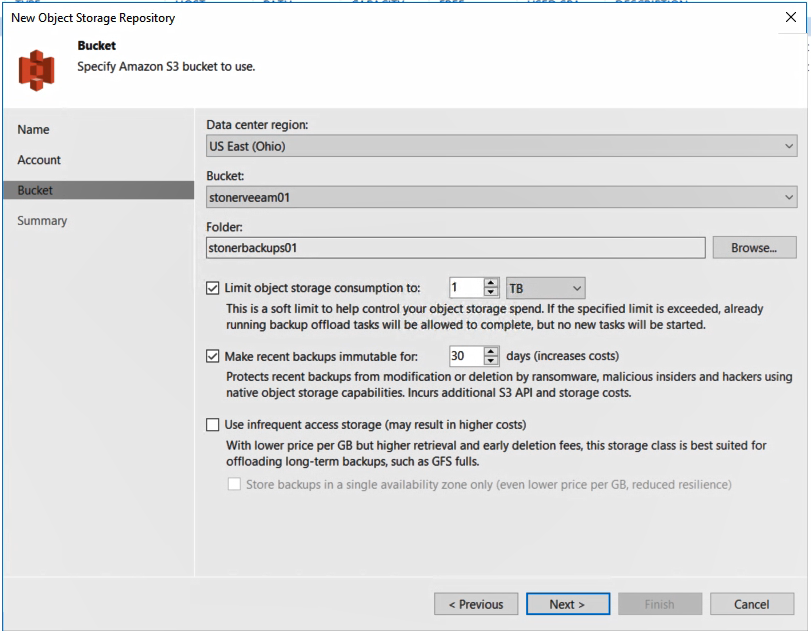
    backup and recoveryAt the same time, Allan said backup and recovery platforms are playing a more strategic role in the battle to combat ransomware. Veeam Availability Suite v10 users can create an immutable copy of data that can reside in any platform that supports the S3 API defined by Amazon Web Services (AWS). Dubbed S2 Object Lock, the offering was developed with the goal of creating a pristine image of a data set that can be recovered in the event of a ransomware attack that a cybercriminal or malicious insider has employed to encrypt an organization’s data.
    In addition, Veeam is moving to lower disaster recovery costs by making it possible to recover multiple virtual machines simultaneously in the event of a data center outage.

    Finally, an API now makes it possible for analytics applications to access data stored using Veeam Availability Suite.

    Fresh off being acquired by the venture capital firm Insight Partners for $5 billion, Veeam is moving to expand its core capabilities for backing up virtual machines to create a data management platform that will span multiple clouds. The goal is to create a platform for managing data across a hybrid cloud computing environment, Allan said.

    With organizations now routinely managing petabytes of data, competition among backup and recovery vendors has never been more fierce. Each provider of backup and recovery tools is, to one degree or another, evolving into becoming a data management platform, a process that largely began when IT teams stared using backup tools to migrate large amounts of data into the public cloud. Now the providers of those tools see an opportunity to enable IT teams to move data not just in and out of clouds but also between them.

    It’s too early to say how this battle will play out. Backup and recovery is one of those rare categories of software that refuses to be consolidated even as new startups launch regularly. It’s not uncommon for most IT organizations to employ multiple backup and recovery tools from different vendors. Less clear is how long the tendency to employ multiple tools will persist, but as new capabilities are added to each backup and recovery tool the pressure on the other tools to continue to prove their value continues to intensify.

    — Mike Vizard

  • When Bad Things Happen to Good Clouds: Why You Need a Recovery Plan

    When Bad Things Happen to Good Clouds: Why You Need a Recovery Plan

    Amazon S3 storage service recently experienced a widespread five-hour outage in its East Coast availability zone. Many next-generation consumer and business applications rely on a cloud storage, so the S3 outage quickly cascaded and temporarily crippled organizations from Netflix to Slack.

    Cloud outages like this are normal, and notable because they affect so many businesses. The last significant AWS outage was in August 2016. While Amazon S3 is architected for data durability, that doesn’t equal fast recoverability during an outage. As good as cloud platforms are, they still leave a few gaps:

    • Availability zones don’t equal recoverability. S3 is designed to withstand a site outage within a zone, but as the most recent outage shows, networking issues can lead to a widespread outage across an entire region.
    • Data still needs to be backed up. As we noted in a previous blog post, even Amazon recommends backing up data.
    • Recovery can be slow and tedious. It’s one thing to back up data. It’s another thing entirely to recover it. It can take hours or days to recover data after a failure—especially for hyperscale applications and databases.
    • Data is often in one “basket.” If backup data is stored in the same cloud service as the primary data, in the same availability zone, there’s no way to recover data during a widespread outage.
    • Data can get compromised or enter an inconsistent state. The cloud itself doesn’t protect data from application- or database-level corruption, or human error.

    A data backup, recovery and continuity strategy needs to be designed with the cloud in mind. To make sure you can recover quickly, even from a cloud outage:

    • Keep backup data in another service or region. Failures like this one often affect an entire region. A backup and recovery strategy needs to include the ability to recover in another region, cloud service or even a private cloud.
    • Have a fast recovery process. Traditional backup solutions and scripting-based approaches can’t recover data quickly, particularly if the application needs to be recovered to a different topology.
    • Have point-in-time recovery. Since data can get compromised at the early stages of an outage, being able to restore applications quickly to a point in time is important as well.

    The cloud as-a-service architecture is more resilient than traditional infrastructure, and gives you agility. But when failures do happen, they are also entirely out of your control. Don’t ignore recoverability and resiliency of the data because it’s in the cloud, and don’t expect the same recovery processes and tools to work on next-generation, hyperscale applications.

    — Shalabh Goyal

  • Protecting Data in Public Cloud and Hybrid Cloud

    Protecting Data in Public Cloud and Hybrid Cloud

    Backup, business continuity (BC) and disaster recovery (DR) have all been a critical part of IT for over 30 years—ever since we began relying on technology to run our businesses. Traditional solutions were designed for the world of on-premises infrastructure and structured applications and relational databases. But the world is changing. In the last blog, I talked about the era of digital transformation and the impetus it has on rethinking and reinventing the fundamental backup and recovery architecture for workloads moving to the cloud and applications being born in the cloud.

    What Changed? Reinventing Backup and Recovery

    Application and data platforms are undergoing the biggest transformation since the dawn of computing. There are several forces at work:

    • New applications. The third-generation applications are geo-distributed, scale across multiple systems, always on and typically are deployed in a cloud-first model.
    • Existing applications are moving to the cloud. They aren’t going away, but companies are moving some or all of them to the cloud. They still need backup and recovery.
    • RPO and RTO windows are shrinking: Enterprises want “always-on” and gone are the days when you could do nightly backups.
    • Smaller companies will go all-in on public cloud. SMBs don’t want to be in the business of IT. They’ve been driving the rapid growth of cloud applications and platforms.
    • Enterprises will build hybrid clouds. Enterprises will deploy applications and data across on-premises and public cloud environments. Scale, compliance and other factors mean they’ll need to keep some systems on-premises.
    • Everyone will use multiple clouds. No one will bet their business on one cloud or one provider. Even now, enterprises are splitting workloads across clouds or cloud and on-premises. Development and test may use one cloud, while the same application might be deployed in a private cloud or a different public cloud.

    Cloud’s Impact on Backup, Recovery and Continuity

    Cloud gives organizations much more agility, operational savings, and a pay-as-you go model. Public cloud providers can also build much more resilient infrastructure. Amazon guarantees 99.95 percent availability for EC2 and 99.99 percent for S3; S3 is designed for 11 nines of data durability, with multiple availability zones. Because the cloud is so reliable—and cheap—it’s quickly becoming a backup target for on-premises data. But that shouldn’t trick us into believing backup and recovery are “built-in” when we run applications in the cloud. Even Amazon itself recommends backup services for all AWS-native applications and cloud databases.

    While service availability and data resiliency addresses infrastructure business continuity and disaster recovery, it doesn’t provide point-in-time recovery or application level intelligence for backup and recovery. As good as the cloud platforms are, they don’t protect against logical errors. And research shows 8 out of 10 errors are logical errors—data corruption, user errors.

    Existing Backup Products and the Cloud

    As we noted above, traditional backup and recovery products don’t meet the needs of cloud applications—even for existing applications that have moved to the cloud, and not just because they were built in a different era. Cloud and distributed architectures present several other challenges:

    • Cloud breaks the media server based architecture of traditional solutions. Cloud applications and data don’t reside on a specific array or disk, so you can’t easily back up what you can’t see. Backups also don’t capture configuration data in the cloud, such as AWS Cloud Formation templates.
    • Cloud doesn’t speak the same language. Legacy solutions talk to tape, disk or virtual disks. Backup and recovery in the cloud means integrating with the right protocols, such as the S3 API or Google Cloud Storage.
    • Backup appliances can’t be moved to the cloud. Existing backup appliances such as EMC Data Domain or NetBackup that work extremely well on-premises can’t be picked up and moved to the cloud.
    • Traditional backup agents won’t scale. If you could get a backup agent running in the cloud, it wouldn’t scale well across dozens or possibly hundreds of nodes.
    • VM is not the right layer of abstraction: This is precisely why the core principle of the Datos IO CODR architecture is a scalable application-centric view of data management and data protection that distinguishes it from conventional approaches. This is the exact reason why the CODR architecture introspects application data and uses global semantic de-duplication to achieve storage efficiencies, instead of relying on traditional de-duplication techniques which treat data as an opaque object (such as a VM or a LUN). The benefit of this approach is fine-grained and highly space-efficient data protection that can span clouds over network links.
    • Cloud Gateway or Migration Services: Unidirectional only.

    Data Protection Must Be Reinvented

    The problem of backup and recovery of cloud applications is novel as there are three critical things a cloud backup and recovery architecture should have:

    • Elastic compute only. The architecture should scale efficiently on elastic compute instances. There shouldn’t be any CapEx costs for servers or appliances.
    • No media servers. Backing up large, scale-out databases requires direct a parallel streaming architecture for data movement between the database and secondary storage. Legacy backup architectures rely on media servers that quickly would become choke points. Direct parallel streaming also allows the data to remain available in native formats.
    • Semantic deduplication. Scale-out application databases typically have a 3x replication factor. If you back up individual nodes or even manage to snapshot the whole database, two-thirds of the backup data is redundant. Over time, backups will be 75 percent to 80 percent inefficient without semantic deduplication that works across a distributed architecture.

    — Shalabh Goyal

  • Evolving Data Requirements in Multi-Cloud Environments

    Evolving Data Requirements in Multi-Cloud Environments

    By design or by accident, multi-cloud is a reality that most enterprise IT teams have to cope with today. Multi-cloud (or, cross-cloud, as Dell EMC calls it) refers to an IT model where an organization uses services of one or more public cloud service providers, sometimes in addition to using its own data centers. In a multi-cloud model, different clouds may be used in different stages of the application life cycle such as test/dev and production, and for different types of applications such as traditional structured applications and next-gen cloud applications. Nonetheless, IT leaders face challenges in identifying data management tools they need to embrace the multi-cloud environment to improve application agility, reduce operational hassles and enhance application resilience. In this blog, I will discuss how enterprises are using a multi-cloud model and the requirements it places on next-generation data protection products.

    One common reason for multi-cloud is to support geo-replicated applications to enable global reach of e-commerce organizations. In such a scenario, a production database may reside on a private cloud behind an enterprise firewall and replicated to multiple regions in a public cloud to service reads (i.e. consumers are shopping on these e-commerce sites) from different regions at low latency. Such a configuration also protects against disasters at the data center level because the database and application are replicated to public cloud (with multiple availability zones).

    Another use case is to service the requirements of production environment versus test and development environments using different clouds. While security, control and performance optimization may mandate a production environment to stay within a private data center, agility, access to new capabilities such as Google BigQuery and developer preferences may drive application development teams to use a public cloud service providers.

    Finally, using a multi-cloud model could also be driven by the IT strategy of an enterprise to prevent overdependence (or, vendor lock-in) on any one public cloud service provider. To hedge the risks and get leverage, an enterprise may balance its application workloads across multiple cloud providers—for example, deploy Tier-1 applications on one cloud and Tier-2 applications on another. It is a real phenomenon we are seeing with enterprise customers! However, a multi-cloud model presents the following unique challenges to enterprises.

    • Data protection in multi-cloud environment: Legacy data protection (backup and recovery, archiving, replication) products were architected for on-premises environments and optimized to work with legacy applications. Using legacy backup and recovery tools for next-generation applications in a public cloud environment is equivalent to fitting a round peg in a square hole. For one, legacy products don’t leverage the elastic and scalable compute and storage that is available in public cloud. True infrastructure-independent (software-only and elastic compute-based) data protection products that may be deployed in heterogenous environments are required as enterprises look to migrate applications to the cloud.
    • DevOps agility: Moving data across clouds for disaster recovery or to refresh test & development environments with production data is another key requirement for enterprises. Doing so in a multi-cloud environment is not an easy task given the challenges in moving data over the WAN. There are also differences in configuration between test/dev and production environments. Further, the test/dev environments may not be as large as production environment so sub-sampling is required. Finally, personally identifiable data needs to be masked before it leaves the production firewall.
    • Ease of management and governance: Finally, federated management is required for applications and workloads running across multiple clouds. It is extremely inefficient to get familiar with different management tools and their intricacies.

    This is by no means a complete list. There are several other requirements, such as support for cloud storage with consistent performance, handling of identity access and management processes and so on. The point is that data protection needs to be re-thought in the context of multi-cloud environments.

    — Shalabh Goyal

  • Backup and Recovery for Distributed Databases

    Backup and Recovery for Distributed Databases

    Over the past five years, applications have undergone a paradigm shift. They now require more agility, scalability and availability. The key trends in this era are driven by the use of social platforms, mobile devices and software as a service (SaaS).

    Being able to ingest large amounts of data from various sources and process that data in real-time to deliver contextual information or business insights is a major competitive advantage. To meet these new application requirements, organizations are forced to look beyond traditional relational databases. This has resulted in a slew of new database systems that are distributed and scale-out in nature, can be deployed on commodity hardware and offer tunable consistency-versus-performance trade-offs. It’s important to note that to cater to the agility requirements, database-as-a-service model in cloud is being adopted as well.

    To show just how big the shift to distributed databases is, below is a Keyword Search Trend graph showing the sharp rise in NoSQL search.

    screen-shot-2016-09-27-at-2-03-59-pmThe implication of this is that requirements for data protection have changed forever, driven by this data-centric world (web-scale applications and distributed databases). Organizations are collecting vast amounts of data and seek to drive more value from that data to make better and faster business decisions. Most distributed and cloud databases already provide replication capability and thus satisfy the availability requirements of data protection. However, data protection requirements for scalable point-in-time backup and recovery need to be addressed. Without point-in-time backups, organizations are at substantial risk of losing data due to human error, logical corruption and other operational failures. Traditional backup solutions were built to address the requirements of relational databases that used shared storage and had the ACID transaction model. Unfortunately, they fall well short in addressing the point-in-time backup requirements of distributed databases (local storage, eventual consistency and the elastic nature of infrastructure).

    As database architecture has fundamentally changed to meet new application requirements, data protection needs to be redefined and rearchitected as well. The following are the new requirements for data protection.

    • Take a durable point-in-time backup copy of an eventually consistent database; we call it “versioning” the new paradigm of data protection for this new distributed era: backups to snapshots to replication to copy data management to versioning
    • Minimize time to recover from failures (low RTO)
    • Scale with the growing needs of application
    • Enable easy refresh of test/dev environments for continuous development
    • Provide operational resiliency in event of failures
    • Provide deployment flexibility in public cloud or on-premises data center

    Most organizations are investing in enterprise-grade point-in-time backup and recovery products so they may deploy and scale their next-generation application on distributed databases with confidence. In the next five years, it will be exciting to watch companies redefine the data protection technologies to meet the requirements of next-generation applications.

    — Jeannie Liou