Let’s talk about a real problem that all of us have faced at one point or another: keeping track of a single thread of work across many disparate tools. Regardless of the industry a company operates in, as a company grows it accumulated back-office applications that support of the business.
Many knowledge-based companies have some sort of communication tool, project tracker and support tracker, all designed to help improve business process. Conversations suffice until they do not, and tools are implemented as the need arises. Every added tool has its purpose, solves a critical need and makes you and/or your team more productive.
At some point however, this changes. Discovery becomes a major issue, as usage patterns between different tools leaves silos of data. It becomes difficult to correlate the different company pipelines that ultimately drive your business—the pipeline to care and communicate for customers, the pipeline to deliver new features, and the human interfaces involved in each. This is only intensified by team members who work on different projects with different tools and people, team members who work in different time zones, the sheer quantity of work to be done …
How many ways can you name how not just conversations are lost, but context as well?
Commonly, teams attempt to solve this in a few ways:
- Rules! Specific guidelines (sometimes suggestions, sometimes mandatory) on how and where to have conversations and to store data.
- Integrate! Write data transforms to move data from system X to system Y as necessary.
- Go all in! Choose a suite of tools that takes care of all of these for you.
- Make it problem for “Future You” — It’s fine as is, and not really an issue.
At StackStorm, we ran into this problem. We have two ticketing systems (GitHub issues and Jira), a service desk tool (reamaze), and a chat client (Slack). The solution we use at StackStorm is one that I borrowed from my time at GitHub. One of my colleagues set up a really cool hook into Hubot that listened in our chat rooms for conversations we were having related to a GitHub Issue, a Pull Request or even a code commit. When someone mentions one of these things, Hubot would grab a chat log plank, and cross-link the permalink to the Issue or Pull Request.

But, that’s just GitHub. Context matters across all tools, and gives team members additional flexibly in learning and gaining knowledge on their own. So, we took our Support Tool, re:Amaze, and did the same thing.

- In times of speed, breadcrumbs allow you to piece together puzzles from where travelers have once voyaged. It may not be the entire puzzle, but having background greatly helps.
- In times of documentation, those breadcrumbs allow you to use the same investigative skills to assemble a better history.
This is one part of a set of behaviors that helps create a dynamic web of information. By seamlessly having a mechanism to associate conversations and issues/pr/tickets/whatever, it becomes much easier for conversations to happen whenever they need to (serendipitous interactions ftw) and still get context to team members when they’re available.
This matters because: There is only one system.
Before we get started …
Full disclosure: I am affiliated with StackStorm, the company building StackStorm the tool. That being said, the ultimate goal here is to illustrate the pattern of how to harness the recent chat culture change using an event-driven framework with the hopes of regaining just a modicum of sanity in your daily life. If you’re interested in learning more about StackStorm and how it ties into the overall automated troubleshooting and autoremeditaion space, take a look at our ChatOps Pitfalls and Tips by Dmitri Zimine. That should give you a good background on why we used StackStorm instead of, say, just a small script.
Ok, on to business!
The Sensor
This workflow begins with a sensor. Inside of the StackStorm-Slack integration is a sensor class that connects to the Slack Real-Time Messaging API. The first place to begin is with Sensors. The official Slack pack contains a sensor that uses the Slack RTM to connect to Slack and listen for messages in rooms it is associated with. Each message is then sent as an “event” to StackStorm, and I can create rules that will trap certain events and kick off.
Rules
Now that the sensor is emitting triggers into the system, I need to find a way to take an action when someone mentions an issue or ticket. The mechanism here is via a rule. Rules check triggers emitted into the system via sensors against a series of checks, and then executes an action or workflow if matched. A trigger can match to many rules.
Let’s create a rule to watch Slack for discussions related to reamaze

The first element in the criteria block is trigger.text. In the rule, the trigger itself is just referred to as trigger as opposed to slack.message.text. We want to see if the text properly contains a pattern related to our reamaze issue tracker. I chose contains out of the large list of comparison operators, and made sure the pattern matches what I’m looking for.
Last but not least is the action block. This block is basically the next operation. Here, I can choose a single action or a workflow to kick off, and even grab data from the trigger payload to pass to the action. In this case, I opted to create a new workflow for my purposes here, and made sure to grab a few keywords that I needed to do processing.
At this point, I have a rule matching and now I need to create the action necessary to process the trigger.
Actions and Workflows
Next, we get to creating the actions. The goal is to ensure that anytime a discussion randomly breaks out about a re:Amaze support ticket, that @estee-tew posts the Slack permalink to the support ticket. With the trigger payload extracted in the above rule, the workflow will need to:
- Take the text of a user comment and extract reamaze issue URL.
- Calculate the Slack Permalink URL of the matched message from the collected data.
- Post the Slack Permalink on the matched reamaze issue ticket.
Inside the reamaze pack, I can see that I have the ability to create_message. This action takes three parameters: slug,message, and visibility. In our rule above, the action that was kicked off when the criteria matched desired slack messages is stackstorm.crosslink_slack_to_reamaze. As of right now, this does not exist, so that is the next step. For brevity’s sake, you can take a look at the action metadata on GitHub.
---
chain:
  -
    name: "get_permalink"
    ref: "stackstorm.get_slack_message_permalink"
    params:
      channel: "{{channel}}"
      timestamp: "{{timestamp}}"
    publish:
      permalink: "{{get_permalink.result}}"
    on-success: "sanitize_message"
  -
    name: "sanitize_message"
    ref: "stackstorm.sanitize_slack_message"
    params:
      text: "{{text}}"
    publish:
      sanitized_text: "{{sanitize_message.result}}"
    on-success: "get_reamaze_slug"
  -
    name: "get_reamaze_slug"
    ref: "stackstorm.get_reamaze_slug"
    params:
      text: "{{sanitized_text}}"
    publish:
      slug: "{{get_reamaze_slug.result.slug}}"
    on-success: "crosslink_slack_to_reamaze"
  -
    name: "crosslink_slack_to_reamaze"
    ref: "reamaze.create_message"
    params:
      slug: "{{slug}}"
      message: "{{permalink}}"
      visibility: "internal"
This is a simple Action Chain, inasmuch as it just does one task after another. The tasks here are designed to be small and portable so they can be reused. Let’s quickly inspect each of the actions and walk through what it is that lies before us now.
Step 1: Permalink to chat history
The goal is to create a way to crosslink a Slack permalink, so let’s start there. This starts with the get_permalink action above. While the history permalink is not in the trigger payload (or even in the official API, for that matter), Slack permalinks actually are not too terribly difficult to figure out. The first action takes two parameters (channel and timestamp), and then spits us out our permalink. We know we’re going to publish the permalink variable that now can be globally used in the workflow in the future. In addition, the next step takes us to the sanitize_message task. You can take a look at the python code for this action upstream.
Step 2: Get support issue data
The next step actually happens in two tasks: sanitize_message and get_reamaze_slug. The immediate next step,sanitize_message, is necessary to clean up the output from Slack. In the message payload, URL data is sent to us as a special “escape sequence,” which doesn’t do the rest of the actions much good. This action, detailed below, is simple enough to be reused in several other workflows. Again, take a look at the action itself: The run() method in this python-runner task is the entry point from StackStorm, and this cleans up the text and returns it back as a plain URL, which we can then pass to the next action, get_reamaze_slug. This returned information gets us what we need to call our final action, reamaze.create_message. We’re able to publish the permalink slug that was shared and discussed in chat. Now we know what is being discussed.
Step 3: Post the crosslink
In this step, a the link is actually created. Here we are! The finish line! Woot! The only thing that is essential to do is to make sure we only set the note as an Internal Only note to avoid sending weird links to our friends. The next step is thecrosslink_slack_to_reamaze action. At this point, we have all the data we need, so it’s just execution.
Permalink from Slack. Crosspost to re:Amaze
and now, with GitHub…
The premise is simple enough. Included in the upstream repository also includes examples for how to setup similar context mapping with StackStorm. Take a look at https://github.com/stackstorm-packs/st2-crosslink_chat_with_applications. Same process, code reuse, and the same end effect.

Unknowns
- This workflow is not for everyone.
- We expose internal-only links that are not accessible by users, and it may be confusing to see random links in issues around GitHub. Why?! What are they?!
- Aliens!?
There are many more that will come up, but the key factor to address here is that it’s not difficult to put this together, and it’s not that difficult to change. And that’s ok. We’ll have questions to be answered, but being able to try something out super quickly was indeed satisfying. (In truth, the workflow went up faster than this blog. :P)
Wrap-up
For many reasons, it isn’t feasible to capture many fluid conversations in many different tools. The answer is not to move data around, but to leverage humans and provide them a helping hand. This is by no means a solution, but it does provide less friction in the daily work. Over time, add enough of these friction reducers, and then suddenly it’s no longer a panic issue. This also reinforces the idea that there is not a collection of systems, but rather a single system. The single company. The tools you selected are obviously necessary, as we defined at the beginning, but tools should not be dictating the communication structures of your teams, but rather informing them. Removing the ability for silos to form allows data in both bits and ideas to flow and move around. This can even be expanded to do much more.
Until next time!
About the Author/James Fryman
 Now a senior DevOps engineer at StackStorm, James most recently worked at GitHub assisting in the development and curation of systems scaling within the Operations group. James is also a frequent speaker on the topic of automation at conferences throughout the world.

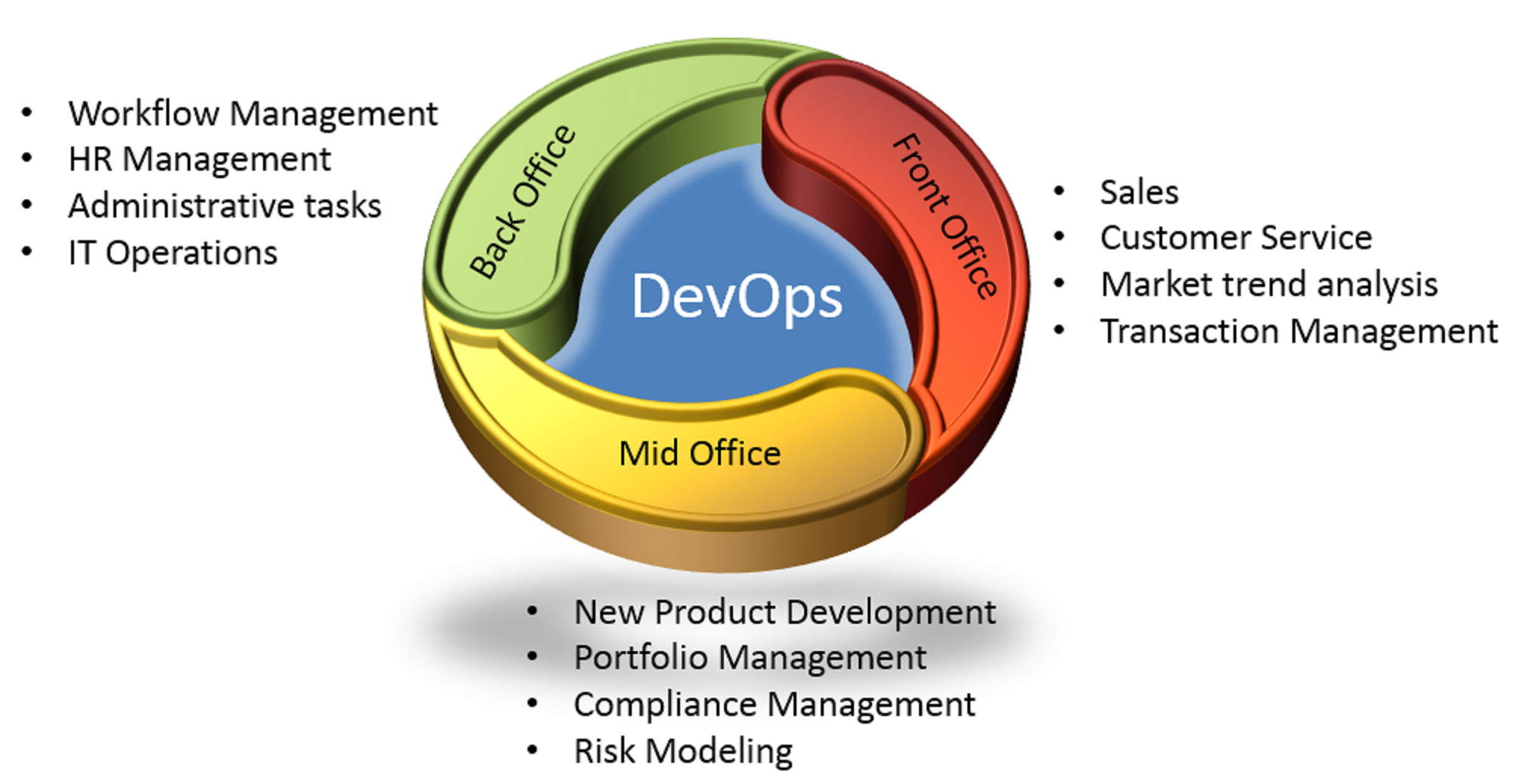
 In similar terms, RBI [Reserve Bank of India] recommends aligning the IT Development, Quality Assurance & Operations. The above picture is a recommendation of the organizational structure by RBI. This greatly improves the collaboration within the teams and help them move towards a common goal.