Tag: Azure DevOps

  • Free Tiers and Open Source LLMs – Mana for Developers, Platform Engineers and QA

    Free Tiers and Open Source LLMs – Mana for Developers, Platform Engineers and QA

    Development rarely follows one straight path. You sketch ideas, prototype, test, swap tools, iterate, and repeat. The increasing availability of free, limited-use AI tiers and locally run open-source AI LLMs is accelerating that loop. These tiers are not marketing fluff. They are practical on-ramps for developers and engineers. They offer the freedom to test, compare, and refine without upfront cost.

    Free Tiers For The Taking

    GitHub provides a free Copilot tier: up to 2,000 code completions per month, plus 50 premium requests (chat / “agent mode”) interactions. Available in VS Code, Visual Studio, JetBrains IDEs, and more. It includes access to Claude 3.5 Sonnet and GPT-4o models. (https://github.com/features/copilot/plans, https://docs.github.com/copilot/concepts/copilot-billing/about-individual-copilot-plans-and-benefits)

    Anthropic’s Claude is free to use on the web, iOS, Android, and desktop with usage limits. Its API is not free. (https://www.anthropic.com/pricing, https://docs.anthropic.com)

    OpenAI’s GPT-5 is available to free ChatGPT users with strict usage caps. Its API requires prepaid credits, minimum $5. (https://www.wired.com/story/openais-gpt-5-is-here, https://help.openai.com/en/articles/8264644-how-can-i-set-up-prepaid-billing)

    New AWS accounts get up to $200 in credits valid for six months. Generative AI services like Bedrock move to pay-as-you-go after that. (https://aws.amazon.com/about-aws/whats-new/2025/07/aws-free-tier-credits-month-free-plan)

    Google Cloud AI Studio and Firebase are free to access. The Gemini API has a free tier with lower rate limits; paid tiers offer higher capacity. (https://ai.google.dev/gemini-api/docs/pricing)

    Cursor offers a free plan with usage limits. Windsurf provides monthly prompt credits across free and paid plans. (https://cursor.com/pricing, https://docs.windsurf.com/windsurf/accounts/usage)

    Why This Matters to Developers

    Flexible Model Switching: You can test multiple models (GPT-4o, Claude) without changing workflow or integration. That removes friction from choosing the best fit for your task.

    Rapid Prototyping: No billing setup. You can try ideas, logic paths, and prompt styles immediately.

    Cost-Effective Scaling: Validate with free tiers. When it works, choose paid tiers intentionally, not by guesswork.

    Hybrid Model Approaches: Use GPT-5 or o1 for reasoning tasks, then cheaper models like Llama for bulk processing. Free access to each lets you refine that pipeline.

    AI in Your DevOps Pipeline

    Free models pair neatly with toolchains:

    • GitHub Actions could use a free model to auto-generate release notes, analyze test failures, or lint code.

    • Microsoft Azure DevOps can use GitHub Copilot Chat and Azure OpenAI Service to assist in pipeline creation, YAML authoring, and automated documentation generation.

    • Google Cloud Build can use Gemini to generate deployment docs or config templates.

    • AWS CodePipeline could incorporate Bedrock calls for compliance checks or IaC validation.

    • CLI tools across platforms can invoke these models for tasks like refactoring YAML, generating manifests, or annotating dashboards.

    These are just a few examples of how these tools can be used with AI models. Running these in staging pipelines gives you low-risk experimentation before you roll out to production.

    Go Local

    Open-source and locally run LLMs such as OpenAI’s GPT-OSS, Meta’s Llama 3, and Mistral’s Mixtral are giving developers new options for building AI-driven applications without relying entirely on cloud APIs. These models can be downloaded, hosted on personal hardware, or deployed within private infrastructure, allowing full control over data, latency, and customization.

    Running models locally means teams can experiment with fine-tuning for domain-specific tasks, integrate AI into environments with limited internet connectivity, and meet strict compliance or privacy requirements.

    While local models may not match the scale or capability of their largest cloud-based counterparts, they offer a powerful balance of cost efficiency, adaptability, and independence that can be especially valuable for development, testing, and edge computing scenarios.

    Who Else Should Care

    It’s not just about developers: Test Engineers can generate synthetic test data, edge-case inputs, and test scripts. DevOps Engineers can automate pipeline scaffolding, log review, and incident summaries. Platform Engineers can prototype developer automation, self-service templates, and internal documentation.

    Getting early hands-on experience helps you understand where AI adds value and where it doesn’t.

    If you code, automate, build pipelines, test, or run platforms, start exploring these free AI tiers today. Plug models into your editor, Actions workflows, test frameworks, and CLI tools. Use them on real tasks, not just sample prompts. Track what works, what stumbles.

    Experimentation costs almost nothing. Delay could cost your team time and innovation.

    Recent articles by Mitch Ashley:
    Kubernetes, AI, APIs, and YAML – A Future 2.0?
    We’re Not Being Replaced. We’re Inventing What Comes Next, Including Ourselves
    AI and You: Don’t Wait… Or Be Weight


    Mitch Ashley is VP and Practice Lead of Software Lifecycle Engineering at The Futurum Group. The voice of “AI across the SDLC”, Mitch is a serial-CTO, speaker, advisor, entrepreneur, and product creator. He leads analyst coverage of the Software Development Cycle (SDLC), with emphasis on AI-native and agent development, cloud-native, DevOps, platform engineering, and software security.

    See Mitch’s analyst research on the Futurum website.

    Subscribers can access Mitch’s Software Engineering Lifecycle practice, decision-maker data, insight reports, and advisories through the Futurum Intelligence Platform.

  • Google Calls Microsoft Azure Anti-Competitive ¦ Gen-Z Can’t Email

    Google Calls Microsoft Azure Anti-Competitive ¦ Gen-Z Can’t Email

    Welcome to The Long View—where we peruse the news of the week and strip it to the essentials. Let’s work out what really matters.

    This week: Google complains to the FTC about Microsoft market abuses, and new graduates don’t know how to office. (more…)

  • DevSecOps in Azure

    DevSecOps in Azure

    DevSecOps is everywhere, and chances are your organization is shifting toward this convergence of development, security and operations. In an on-premises environment, you build your own DevSecOps process by mixing and matching existing and new tools. However, in the cloud, much of the environment is determined by your cloud provider. Microsoft’s Azure cloud is known for its robust security capabilities. Specifically, Microsoft has developed a set of capabilities and services that can help you ease into a DevSecOps workflow without much effort. The tools are pre-integrated and support everything from CI/CD to identity management. Let’s see how they work.

    What is DevSecOps?

    Security is an important part of DevOps. But it can be challenging to ensure that software developed in a CI/CD process is really secure.

    DevSecOps is an organizational pattern that can make this possible, even at high development velocity. It is an approach the DevOps team can use to prevent security issues from the outset of the development life cycle, ensuring their software is not only high quality but also secure and resilient to failure.

    DevSecOps is a discipline that combines application development, security, operations and infrastructure-as-code (IaC) with an automated continuous delivery cycle. Here are three practices that can help a team move towards a DevSecOps process:

    • Focus on average detection and recovery times—These metrics show how long it took to detect a breach and how long it took to recover. This can be tracked through continuous field testing. Improving these indicators should be an important consideration when evaluating potential policies.
    • Defense in depth—Every component in the architecture should be secure so that if and when attackers manage to compromise the system, there are multiple security measures and controls holding them back. This puts an end to the notion of a ‘secure perimeter’ that the organization must defend at all costs. Each component must have its own secure micro-perimeter—this is a zero-trust approach.
    • Continuous learning—Teams should conduct regular assessments of security practices and their environment, especially after security incidents. Every time a security incident is discovered and resolved, the team must evaluate what went wrong in the development life cycle, explore how it enabled the incident and identify ways to improve the process.

    Features and Services That Enable DevSecOps in Azure

    The Azure cloud provides several built-in capabilities that make it possible to adopt a DevSecOps process.

    1. Azure DevOps

    Azure DevOps provides developer services that enable teams to plan tasks, collaborate on code development and build and deploy applications. Azure DevOps supports a collaborative culture and process in which developers, project managers and contributors work together to develop software. You can use Azure DevOps Services in the cloud or Azure DevOps Server on-premises.

    2. Build and Deploy Containers With Azure Pipelines

    You can integrate Azure Pipelines, the Azure cloud’s CI/CD solution, with your Kubernetes clusters. Use the same YAML document to build multi-stage CI/CD pipelines.

    Azure Pipelines lets you track metadata, such as commit hashes and issue numbers, from Azure Boards into container images. This provides direct traceability from any security issue to a specific change made in development. It also provides clear, easy-to-read documentation that can improve the feedback loop between development, operations and security teams.

    3. Run and Debug Containers with Dev Spaces

    When developing Kubernetes applications, there is a need to test applications locally and understand how they interact with dependent services. You may need to develop and test multiple services in collaboration with other developers or teams.

    Azure provides Bridge to Kubernetes, which lets you run and debug code on your development machine while connecting to your Kubernetes cluster. You can test your code end-to-end, set breakpoints on code running on the cluster and share your development cluster among team members. This makes it possible to test and resolve Kubernetes security issues in a realistic environment before deploying to production.

    4. Manage Identities and Access with Azure AD

    The Microsoft Identity Platform takes the Azure Active Directory (Azure AD) developer platform one step further. It allows applications to accept logins from any Microsoft identity, and obtain tokens that can be used to call Microsoft APIs or APIs created by other developers. This creates a large, interoperable ecosystem.

    Azure Active Directory B2C provides B2C identity services—customers get single sign-on (SSO) access to applications and APIs using their preferred social, enterprise or local account ID. Another option is to integrate Azure AD with on-premises Active Directory for hybrid and Azure migration scenarios.

    You can also use Azure Role-Based Access Control (RBAC) to manage access to cloud resources. RBAC lets you manage who can access your Azure resources, what they can do with them, and which regions can access them.

    You can also use the Microsoft Identity Platform to protect DevOps tools themselves, including native support for Azure DevOps and integration with GitHub Enterprise.

    5. Manage Keys and Secrets with Azure Key Vault

    Exposed secrets are a severe security issue that is very common in modern applications. Azure Key Vault lets you manage the distribution of secrets by storing them centrally in Azure Key Vault. Key Vault greatly reduces the chance of accidentally disclosing secrets. With Key Vault, application developers no longer need to store credentials or other sensitive information in their application code.

    6. Azure Policy and Azure Security Center

    Azure Policy lets you specify a default allowed configuration that is automatically applied to all cloud resources. This can avoid misconfigurations that violate security policies. Azure Policy works on the basis of desired state configuration (also known as declarative configuration), letting you specify to what degree resources and services should be secured and whether to alert or block/modify deployments in Azure if they don’t meet the policy.

    When using Azure in multi-tenant mode, policies can be applied at the management group, subscription or resource group level. You can define specific policies and enforce compliance requirements for test, staging, and production environments.

    The Azure Security Center (ASC) and Advisor can also be easily integrated into the DevOps process. ASC makes it possible to augment event streams in Azure with threat intelligence or analysis by third-party security tools.

    7. Penetration Testing

    Penetration testing is the recommended method for examining your environment for infrastructure or application configuration vulnerabilities that could create vulnerabilities that an attacker could exploit.

    An Azure penetration test should check for vulnerabilities on endpoints, apply fuzzing (malformed input) to discover business logic vulnerabilities, and perform port scanning to identify network vulnerabilities.

    Microsoft provides specific guidance for penetration testing in Azure with recommended products and penetration testing service providers.

    8. Configuration and Infrastructure Scanning

    To ensure security for cloud subscriptions and resource configuration across multiple subscriptions, you can use the tenant security solution part of the Secure DevOps Kit for Azure (AzSK).

    In addition, you can leverage Microsoft security technologies like Microsoft Defender for Cloud and Microsoft Sentinel. These solutions provide monitoring and security features designed to detect and alert on unusual events or configurations that require investigation and possible remediation.

    Conclusion

    In this article, I introduced DevSecOps and showed how the Azure cloud provides a range of services that let you easily implement DevSecOps practices. These include:

    • Azure DevOps: The venerable toolset with strong support for DevSecOps environments.
    • Azure Pipelines: The home-grown CI/CD product.
    • Azure AD: A comprehensive zero-trust identity management solution.
    • Azure Policy and Security Center: Enables unified control over security policies for cloud automation and security visibility over cloud workloads.

    I hope this will be useful as you take your first steps to practice DevSecOps in the cloud.

  • A Closer Look at Azure DevOps

    A Closer Look at Azure DevOps

    Microsoft’s Azure DevOps Server is emerging as one of the most popular cloud application development environments. Like most continuous integration/continuous delivery (CI/CD) platforms, it provides features such as version control, reporting, project management, automated builds, and testing. It covers all aspects of the application life cycle and enables DevOps. Here’s a closer look at this cloud computing environment.

    Azure DevOps provides a number of different developer services that allow DevOps teams to plan work, collaborate on code development and build and deploy applications. It is highly collaborative and brings together developers, project managers and individual contributors to develop software. It allows organizations to create and improve products much faster than with traditional software development approaches.

    Services or Server?

    Teams can work in the cloud using Azure DevOps Services or on-premises using Azure DevOps Server.

    The cloud offering, Azure DevOps Services, is a scalable, reliable and globally available hosted service. It’s backed by a 99.9% SLA, is monitored by Microsoft’s 24/7 operations team and is available in local data centers around the world.

    The on-premises offering, Azure DevOps Server, is built on a SQL Server back end. The on-premises version is preferable when organizations need their data to stay within their network or when they want access to SQL Server reporting services that integrate with Azure DevOps Server data and tools.

    Although both offerings provide the same essential services, Azure DevOps Services offers some added benefits:

    • Simplified server management.
    • Immediate access to the new features and updates.
    • Improved connectivity with remote sites.
    • A transition from capital expenditures (servers, etc.) to operational expenditures (subscriptions).

    There are also some other key differences depending on your organization’s or your team’s needs. These can also be helpful if you’re migrating from on-premises to the cloud:

    Differences in Specific Feature Areas

    Although Azure DevOps Services is a hosted version of Azure DevOps Server, there are some feature differences. Some Server features aren’t supported in Services; for example, Azure DevOps Services doesn’t integrate with SQL Server Analysis Services to support reporting. Process customization and reporting also differ in their support.

    Integrated Features

    Azure DevOps provides integrated features that can be accessed through a web browser or an IDE client. One or more of the following standalone services can be used based on your organization’s business needs:

    • Azure Repos: Azure repos provides Git repositories or Team Foundation Version Control (TFVC) for source control.
    • Azure Pipelines: This service provides build and release services to support continuous integration and continuous delivery of applications.
    • Azure Boards: This suite of Agile tools supports planning and tracking work, code defects and issues using Kanban and Scrum methods.
    • Azure Test Plans: Azure Test Plans provides several tools to test applications, including manual/exploratory testing and continuous testing.
    • Azure Artifacts: These allow teams to share packages such as Maven, npm, NuGet and more from both public and private sources and integrate package sharing into pipelines.

    Use of the following collaboration tools is also supported:

    • Customizable team dashboards with configurable widgets to share information, progress and trends.
    • Built-in wikis for sharing information.
    • Configurable notifications.

    Azure DevOps supports adding extensions and integrating with other popular services, such as Campfire, Slack, Trello, UserVoice and more. In addition, DevOps teams can also develop their own custom extensions.

    Azure DevOps Services supports integration with GitHub and GitHub Enterprise Server code repositories. Azure DevOps Server supports integration with GitHub Enterprise Server repositories.

    Getting Started

    When you sign up for Azure DevOps, you must first register an organization, project and version control type. DevOps teams can create multiple projects and differentiate them with separate names and access permissions. Projects can be set to public or private. Teams can also use Azure Boards for collaboration and project management, and can also configure use of Agile practices. After setting up your team, you can use the platform to begin deploying your applications to Azure.

    In addition to a collaborative environment, Azure DevOps provides access to an Azure Pipeline service that supports multiple languages and platforms. The Azure DevOps pipeline is a set of services that are grouped into individual projects. 

    Additionally, Azure Test Plans feature facilitates automated testing. It is also possible to set up deployment pipelines with different components for multiple applications. 

    Azure Pipeline can track work status, manage backlogs and create custom reports. With the help of the Azure DevOps pipeline, developers can create, manage and deploy their projects in a single environment. With this solution, DevOps teams will have a single point of contact and can communicate with each other.

  • WhiteSource Tightens Code Scanning Tool Integration with Azure DevOps

    WhiteSource Tightens Code Scanning Tool Integration with Azure DevOps

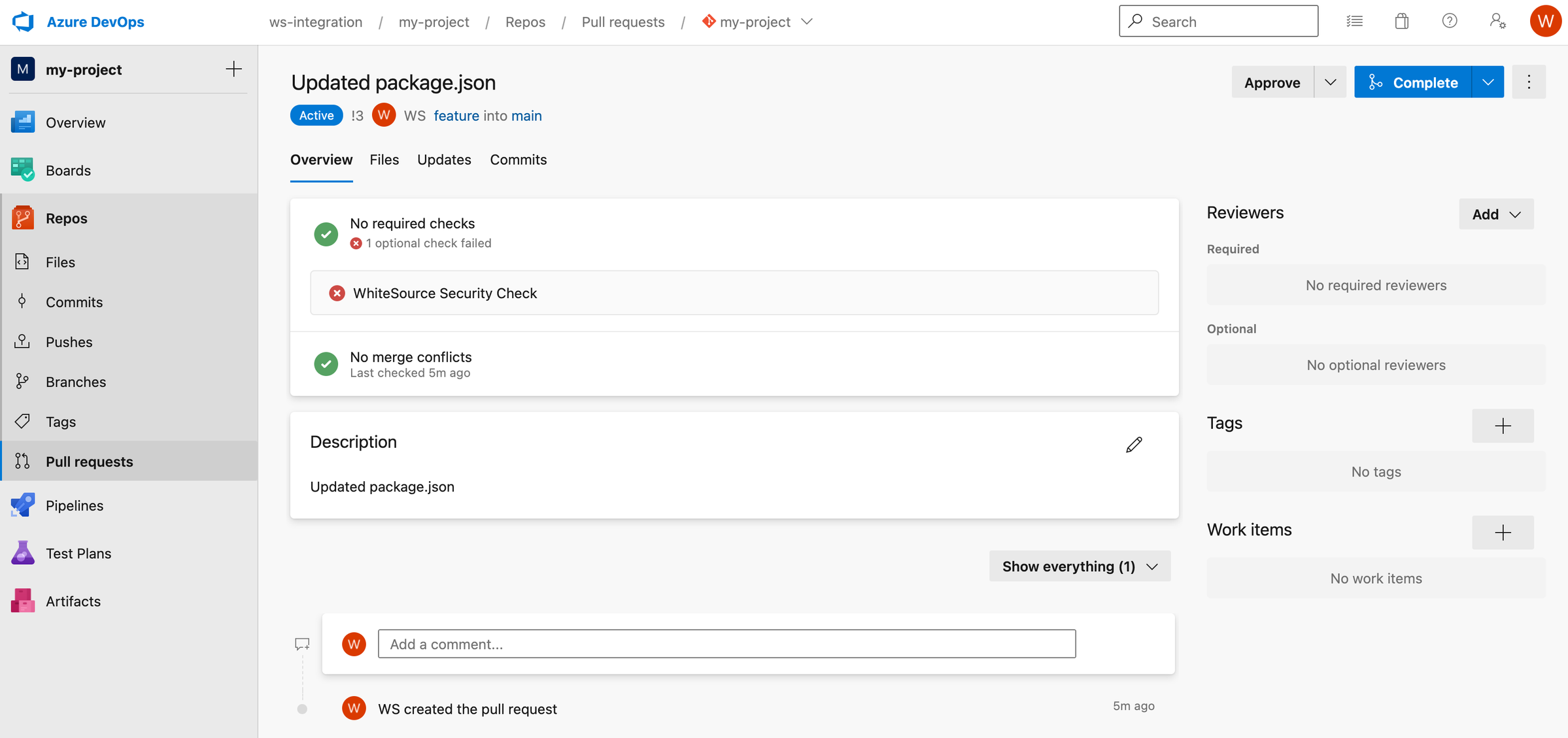
    WhiteSource has added the Microsoft Azure DevOps platform to the list of continuous integration/continuous delivery (CI/CD) platforms its open source vulnerability scanning tools natively supports.

    Susan St. Clair, director of product management for WhiteSource, said while developers are always encouraged to scan for vulnerabilities, it’s more effective if organizations implement scanning by default every time there is a merge request. That approach reduces friction because organizations become much less dependent on developers to scan for vulnerabilities within the context of a larger DevSecOps workflow, she added.

    WhiteSource also provides a merge confidence feature that uses crowdsourced data to show how likely it is that an open source component can be updated without breaking the build. Merge confidence includes data on upgrade age, adoption and compatibility to create a confidence score.

    The WhiteSource integrations make it possible for DevOps teams to detect all open source components being used and automatically enforce security policies directly from their repository. DevOps teams are provided with vulnerability and misconfiguration alerts and license violations along with detailed remediation guidance, including suggested fixes and prioritization advice, within an existing workflow versus being required to switch to a tool that has a separate user interface (UI) they need to learn.

    Should a merge request introduce a new error, the developer is given immediate feedback to resolve any newly introduced vulnerabilities before the request is completed. That approach to separating feature branches and mainline branches prevents interruptions to workflows. The enterprise edition of the WhiteSource tool also automatically generates pull requests in the repository to update vulnerable open source components to the lowest non-vulnerable version.

    WhiteSource also supports code repositories such as GitHub, GitHub Packages, JFrog, Bitbucket and GitLab. The Azure DevOps platform is gaining traction as more application development projects are being managed via the cloud following the onset of the COVID-19 pandemic, noted St. Clair.

    As more organizations begin to embrace DevSecOps workflows each of them will need to decide how far left they want to shift responsibility for application security. In theory, each developer is now being held more accountable for every one of their applications that gets deployed in a production environment. In practice, most developers lack the expertise required to ensure applications are secure.

    There are, of course, more concerns being raised about the security of software supply chains that include open source software in the wake of the recent disclosure of zero-day vulnerabilities in the widely-used Log4j logging tool. Many of the maintainers of smaller open source projects lack the resources required to ensure there are no inadvertent vulnerabilities that could be exploited by cybercriminals. More challenging still, many developers may have used an older version of that software that has known vulnerabilities.

    It’s not clear how open source software will ultimately be made more secure. In the meantime, however, it’s clear the onus for ensuring the security of that software is on the DevOps teams that employ it.