Welcome to The Long View—where we peruse the news of the week and strip it to the essentials. Let’s work out what really matters.
This week, four things that caught my eye from Amazon Web Services’ re:Invent 2022 conference: SnapStart turbocharges Lambda, Graviton3E ARM HPC SoC, AWS continues hiring, and AWS’s origin story. (more…)
Monitoring AWS Lambda can be a complex and potentially costly endeavor. Here’s what you need to know to stay on track and on budget
Organizations are already experiencing a shift toward serverless cloud computing. According to the O’Reilly “Serverless Survey 2019,” around 40% of respondents said they had implemented serverless architecture. Forrester “Global Business Technographics” Developer 2019 found that 49% of companies are using it or planning to use it in the next 12 months.
AWS leads the way in this space. According to Serverless.com, 96% of respondents choose AWS Lambda over Azure Functions and Google Cloud Functions. AWS Lambda helps us to design a lightweight and robust application architecture that can be built and deployed without any hassle. However, nothing comes for free. There are several, potentially costly, complexities when monitoring AWS Lambda. Fortunately, there is an array of solutions.
Logging
By default, AWS Lambda’s stdout and stderr messages are sent to CloudWatch Logs, where every function has its log group. A log group is a collection of log streams (sequence of log events) that can be stored as long as you want. Storage of logs costs USD 0.03/GB and data ingestion costs around USD 0.50/GB.
It is common practice to break up your Lambdas into single responsibility functions. This means, for example, if you need one Lambda to read a certain object and another to write it, you’re setting up two separate functions. However, this also means two log groups.
This creates a challenge when you want to analyze your application’s output log. There is no direct way to log queries across multiple log groups. In response to this, AWS enabled CloudWatch Log Insights to conduct cross-log querying. While this brought many of the improvements users wanted and needed, analyzing multiple log groups together meant a higher cost for queries. This prohibitive cost model encouraged many to look to external services.
Tracing
AWS X-Ray enables you to trace the underlying components of your application and helps you to dig out the fundamental reason behind distributed issues. It has quickly become an essential troubleshooting and optimization tool for engineers.
For example, cold start latency can be problematic for AWS Lambda functions with slow startup times. Although you can counter this by enabling Provisioned Concurrency, you will need to pay extra.
If you have budget constraints and still want to resolve the issue, X-Ray might help you eliminate or at least optimize your application by removing the bottleneck. It lets you know, among other things, if your application is consuming more time during initialization or invocation. You can find X-Ray SDK on AWS Lambda for Go, Java, Node.js, Python and .NET.
Debugging
Traditional architecture and serverless architectures are as different as day and night. Serverless requires changes across the software engineering spectrum, including debugging.
A serverless application is a combination of various services or resources within infrastructure, which can include tools such as AWS API Gateway, CloudWatch and SNS. Such distribution of web services helps avoid a single point of failure (SPOF), but this design creates a problem. Debugging or replicating an issue on a local machine is not always feasible, and debugging a production application is always a dangerous proposition.
Moreover, the abstraction of AWS Lambda makes debugging complicated, as you don’t have direct access to the underlying OS. Hunting down dispersed logs adds to this overhead. As your serverless infrastructure scales, it becomes difficult to identify the root cause.
To combat this, developers can use AWS native tools such as CloudWatch, X-Ray or Serverless Application Model (also known as SAM). Any of these tools on their own can be difficult to use; together, however, they form a powerful debugging suite.
Outside of the AWS-native toolset, some tools provide further assistance with debugging. For example, the Serverless framework, which is an open source tool to develop and deploy serverless applications over AWS, lets you see your live application’s function log, for example:
Monitoring
Robust monitoring ensures the smooth operation of an application and helps to detect issues quickly. In traditional infrastructure, metrics only appear from a handful of sources, so collecting them together is less of a challenge. In a serverless architecture, this problem is much more complex.
AWS gives you the freedom of converting CloudWatch Logs to metrics. These metrics can be filtered, measured and, when a threshold is crossed, alerted on. You can define a metric filter by choosing a log group created by your serverless function and target the log stream. This enables you to create a visual reference for your log events. Every custom metric you create will cost $0.30/10000 metrics per month.
Metric filters can be a powerful tool, but it can also be a bit overwhelming to set up everything, and there are certain bottlenecks as well. For instance, you can’t parameterize metric names, which forces you to create a filter for every custom metric you want to track. There is also a hard limit of 100 metric filters per log group, which restricts you as your application evolves.
Other than this, AWS resources are tightly coupled with each other, which makes AWS-native monitoring tools a fine choice when you need to monitor individual AWS resources or Lambda functions. To get an infrastructure-wide view and to monitor other third-party tools, a centralized logging approach is necessary to take full advantage of the log data.
Conclusion
There is no denying that serverless tooling quickly unlocks high availability, scalability and cost optimization. To make the most of this new paradigm, engineers need to build a robust and reliable monitoring system. The ability to manage log data streaming from many components, detect and trace issues on the fly, and deliver accurate insights to keep on improving the application is crucial to remain online and competitive.
While serverless solutions give access to many of the technical features we need, the dangers of vendor lock-in and the power of third-party providers must be considered if you want to scale your organization and its infrastructure smoothly.
Stephen Pinkerton, a product manager for Datadog, said that number shows serverless computing frameworks are being employed by mainstream IT organizations far more widely than initially might be thought, given the relative age of serverless computing frameworks.
The report finds the median Lambda function invoked by Datadog customers runs for about 800 milliseconds. Nearly one-fifth of functions execute within 100 milliseconds, while about one-third execute within 400 milliseconds. One-quarter of Lambda functions have an average execution time of more than three seconds, while 12% require 10 seconds or more. The duration of Lambda functions is notable because serverless latency impacts not just application performance but also costs. Lambda pricing is based on “GB-seconds” of compute time, which is the memory allocated to your function multiplied by the duration of its invocations.
Not surprisingly, the report notes 47% of functions are configured to run with the minimum memory setting of 128MB. By contrast, only 14% of functions have a memory allocation greater than 512MB, even though AWS will allow up to 3,008MB per function.
As part of an effort to further limit costs, most organizations are not employing a function to call another function and then waiting for a response, which would incur billable invocation time. Rather, serverless functions are making asynchronous calls via a message queue. Functions that are stateless most often read from or write to a separate persistent data store.
Amazon DynamoDB, a document database based on a key-value store architecture, is the most widely used persistent form of storage accessed, followed by an instance of the SQL databases provided by AWS as a service, and then the Amazon S3 cloud storage service.
The Amazon Simple Queue Service (SQS) is the top choice for a message queue for Lambda requests, followed by Amazon Kinesis and Amazon Simple Notification Service (SNS).
The report also notes each Lambda function has a configurable timeout setting, ranging from 1 second to 15 minutes. Two-thirds of configured timeouts are 60 seconds or less. By default, Lambda customers are also limited to 1,000 concurrent executions of all functions in any given region. Only 4.2% of all functions have a configured concurrency limit. A total of 88.6% of companies running Lambda make use of concurrency limits for at least one function in their environment.
In terms of programming languages employed, Python and JavaScript in the form of Node.js are the most widely used on Lambda, the report finds. Nearly half of Datadog customers running Lambda (47%) employ Python, while 39% run Node.js. Python 3 outweighs Python 2, which has reached end of life, by a factor of two to one.
Finally, the report notes there is a high correlation between organizations that have adopted containers and those employing serverless computing frameworks. Nearly 80% of organizations in AWS that are running containers have adopted Lambda. However, Pinkerton says that correlation at this point has more to do with the willingness of organizations to employ leading-edge technologies than it does any effort to weave together containers and serverless computing frameworks.
Pinkerton also surmises the primary reason organizations are employing Lambda is to accelerate application performance. However, it’s also worth noting serverless computing frameworks also tend to reduce to the size of an application by relying on external functions to run code that is not frequently invoked outside the core application.
Datadog plans to evaluate usage of serverless computing frameworks on other cloud platforms once they achieve enough critical mass. In the meantime, it’s clear serverless computing frameworks are rapidly becoming an extension of any DevOps pipeline.
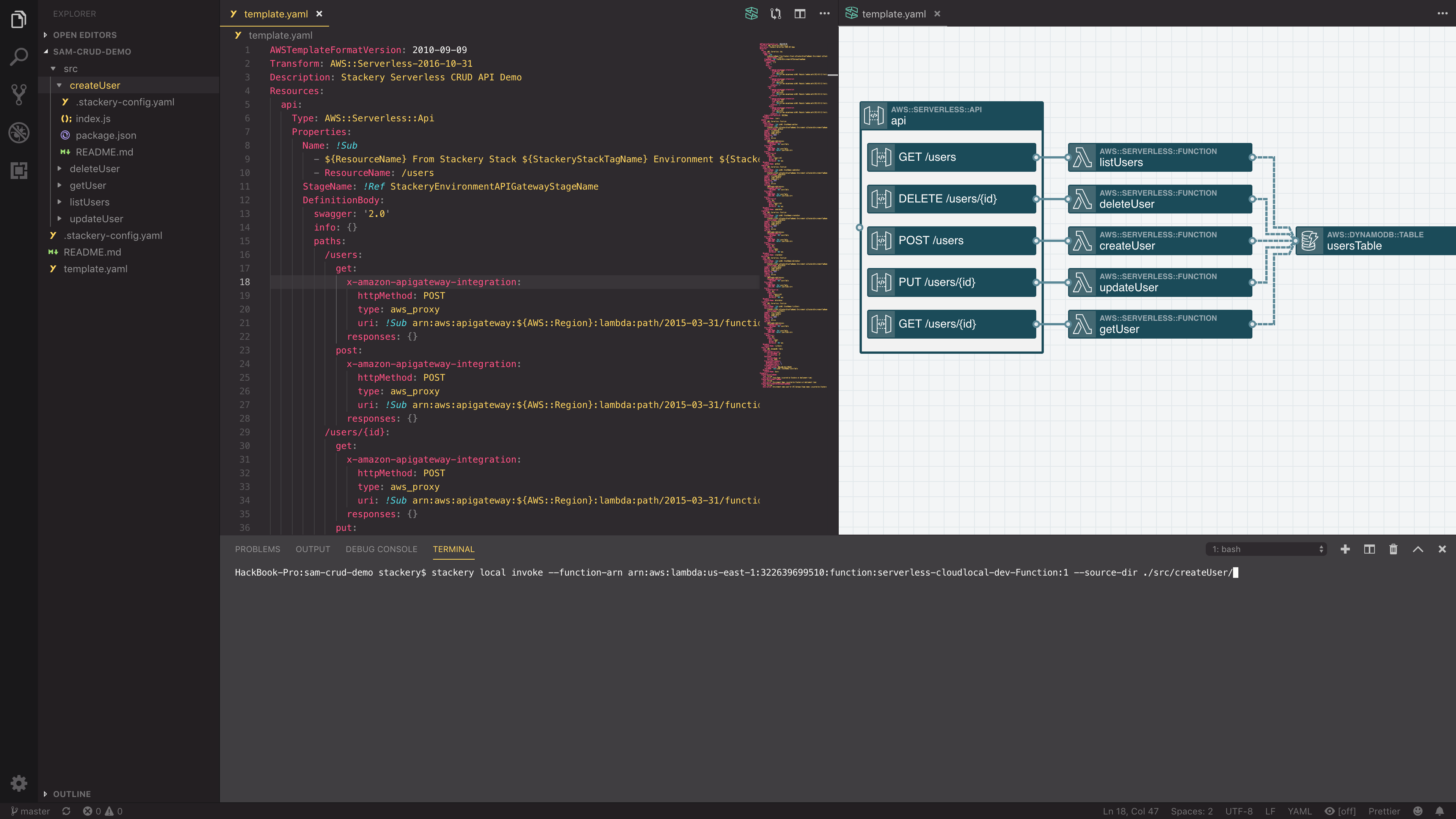
Stackery today announced a plug-in capability that will allow developers to build and debug code destined to run on the Lambda serverless computing service provided by Amazon Web Services (AWS) from within an integrated development environment (IDE) running on a local machine.
Company CTO Chase Douglas said the latest Stackery tool can be dropped into any IDE, either via a Stackery VS Code Serverless Tools Plug-In that automates installation or a manual installation process, regardless of the programming language being employed. The goal is to make it easier for DevOps teams to construct workflows that include AWS serverless computing frameworks, which now are expanding rapidly, he said. In total, the Stackery tools can invoke any one of 86 AWS CloudFormation-compatible resources.
Stackery provides a set of visual tools that make it easier to write functions for the AWS Lambda service without having to know how to create YAML files to manipulate infrastructure as code. This latest offering extends that capability to local environments, which will allow DevOps teams to work offline on their laptops and make changes without having to make every change on the AWS cloud over an internet connection. This capability does not require customers to set up a Stackery account to use it.
Right now, Stackery is squarely focused on providing those tools for AWS environments, but Thomas said eventually those tools will be extended to other serverless computing environments.
The goal is to provide DevOps teams with tools that make all serverless computing frameworks more accessible to both developers and IT operations teams, Douglas said.
Serverless computing frameworks are gaining in popularity because they make it easier for developers to invoke additional IT infrastructure resources to kick off, for example, an analytics module whenever a certain event occurs within their application. That capability reduces the amount of code developers need to include in their core applications. Serverless computing frameworks are usually employed to run stateless processes for a very short amount of time, while containers and virtual machines continue to be relied on for running longer running applications. But for DevOps, that creates another layer of abstraction to include within the context of a larger continuous integration/continuous deployment workflow.
Most organizations are already struggling with mastering the workflows they employ to manage the building and deployment of applications using containers and virtual machines, so any new abstraction layer of compute resources need to incorporate within the workflows easily if the providers of that service hope to achieve mainstream adoption among DevOps practitioners. Long-term, of course, the expectation is all these processes will be completely automated, which means developers only will have to ever worry about writing business logic.
In the meantime, it’s likely to be a while before DevOps shops are invoking multiple serverless computing frameworks running on different clouds, much less automating them on end to end. That day, however, may not be as far off as people today might assume.
The Apache Software Foundation (ASF) announced today that the OpenWhisk serverless computing framework has now become a high-level open source project.
Matt Rutkowski, CTO for serverless technologies and advocacy for IBM, said with this announcement, organizations looking to implement an open source serverless computing framework on-premises or in a public cloud now can have confidence the OpenWhisk project is sustainable beyond the handful of vendors, including IBM, that launched it.
IT organizations of all sizes are embracing serverless computing frameworks as a way to invoke application programming interfaces (APIs) to make additional compute resources available on-demand based on an event. For example, rather than having to embed a lot of additional analytics code within their application, developers alternatively might invoke a serverless computing framework such as OpenWhisk to run analytics whenever necessary.
The most widely used serverless computing framework today is the Lambda service from Amazon Web Services (AWS). However, rival cloud service providers have been embracing various open source alternatives to provide similar capabilities. At the same time, some internal IT operations teams are deploying serverless computing frameworks to provide similar capabilities within an internal IT environment.
Regardless of the approach, Rutkowski said hooks to serverless computing frameworks soon will become ubiquitous hooks within continuous integration/continuous deployment environments. In fact, DevOps environments are likely to expose multiple hooks to different serverless computing frameworks as cloud computing becomes more hybrid, he noted. Plugging in multiple serverless computing frameworks should be relatively trivial because the difference in application programming interface (API) parameters between different serverless computing frameworks is minimal, he added.
While interest in serverless computing has been running high, deciding which open source serverless computing framework to embrace has been something of a challenge. There are at least a half-dozen active serverless computing frameworks, with new ones being added regularly while other projects fade away. The Cloud Native Computing Foundation (CNCF) has made a point of not endorsing any one serverless computing framework in the expectation that many will be adopted for various use cases. Instead, the CNCF has thrown its weight behind a Knative project that provides the middleware required to integrate Kubernetes clusters with multiple serverless computing frameworks.
Those serverless computing frameworks have already had a profound impact on containerized applications. The first generation of containerized applications was largely stateless. Now stateless functions increasingly are being processed via a serverless computing framework, while stateful applications based on containers that tend to run longer are just now starting to be deployed in production environments.
Of course, the one fact many IT organizations fail to appreciate is that serverless computing frameworks are built using containers. A serverless computing framework is really a higher-level abstraction of a container platform. The challenge organizations will face now is teaching developers when to rely on a more traditional container platform versus invoking a serverless computing framework to run a child process, for example.
Whatever path those developers choose, the one thing that is for certain is existing DevOps processes will need to be adjusted accordingly.
Although most users will never realize it, with every digital data entry and exchange servers are consuming substantial quantities of energy to file, store and sustain that data’s availability.
While the average consumer or office worker doesn’t consider the economic or environmental impact they have, IT and C-Suite teams are awakening to the problem and the awareness among energy concerns, legislators and thought leaders is growing. From the expanding troves of transactional data for AI to each video streamed on a smartphone or to a social media platform, hyperconnected companies are hungry to collect, understand, feed and leverage data on our digital habits. In today’s infrastructure models, data centers continuously burn through processing power to be ever-ready to those workloads—even when demand falls during regular off-peak periods.
That’s one of the two real pushes behind the shift from legacy to new serverless infrastructures: waste, both environmental and economic.
The world is waking up to the realization that the digital economy is consuming disproportionate levels of energy, putting new pressures on their organizations, their region’s energy infrastructures and, ultimately, on the planet.
A recent report from Climate Change News predicts billions of internet-connected devices could produce 3.5% of global emissions within 10 years and the communications industry could use 20% of all the world’s electricity by 2025. In fact, data from statistics portal Statista notes the energy consumption of Facebook usage alone amounted to about 2.46TW hours in 2017, compared to 532GW hours in 2011.
In the U.S. alone, data centers consume an astounding 90 billion kWh of electricity per year, the approximate annual output of 34 (500MW) coal-burning power plants. The data center consumption costs are baked in—organizations pay for always-on computing power to meet peak need regardless of how demand may fluctuate.
The Promise and Potential of Serverless
Cutting Energy Consumption: Serverless compute technology such as Amazon’s AWS Lambda or Microsoft’s Azure Functions are native cloud architectures designed to decrease consumption and increase agility and innovation.
It provides a more efficient function-as-a-service (FaaS) consumption model that enables organizations to pay for what they use, rather than constant peak demand charges.
Some of the economic impacts of serverless are obvious: Organizations that host their own servers have reconciled themselves to paying for those servers running at full power while sitting idle for much of the time. It’s like keeping your car constantly running, regardless of whether you’re going anywhere.
In contrast, serverless not only promises far greater energy efficiency from the macro-infrastructure perspective, it also is event-driven. Organizations pay by the computing power consumed, so their costs reflect their actual server usage rather than paying for always-on capacity.
The Shift Is On, From Managing Infrastructures to Solving Problems
Reduced energy consumption and cost efficiencies are important for organizations and the planet. Two other major promises serverless offers are the ability to let organizations focus on creating applications and services without chaining them to infrastructure and innovation opportunities.
Organizations shift the focus of their IT resources away from infrastructure maintenance—the provisioning, patching, operating system maintenance, managing runtimes and capacity planning overhead—to solving business problems. This means the focus of the organization’s IT resources can shift from managing infrastructure maintenance burdens to doing what IT was always meant to do: solve actual business problems.
But there’s another aspect to serverless that’s even more exciting.
Unlocking ‘Vendor Lock’ and Unleashing Innovation
Every great technology breakthrough inevitably tears through old barriers and accelerates innovation. Serverless is no different.
Furnace is a good example. It’s a new open source, serverless, streaming data processing platform for building big data solutions that are cloud platform and language-agnostic.
It supports the use of applications that run natively in AWS Lambda, Microsoft Azure and Google Cloud, passporting data between platforms. Using coding languages including JavaScript, Node, Python and Golang, a growing community of developers are creating constructs to connect cloud-based applications.
Some of the most urgently needed application construct types we’re likely to see in the near term will be for extracting and anonymizing old proprietary data for GDPR compliance, and for honeypot data collection and manipulation, with Elasticsearch and Redshift. Other application foundational on-ramps are in development.
According to Danny Waite, CTO for the Furnace Ignite organization, the Serverless Furnace source platform was architected to allow deployment and data traversal into and across various cloud, on-premises and hybrid environments, putting the underlying efficiencies of serverless to work on practical applications.
The application development platform is optimized to ingest massive volumes of data from different sources and in various formats. The Furnace open source community is soliciting feedback and community developers are working on various projects, with plans for constructs to harness and tap into the massive stores of now-untouched IoT data, among other sources.
Greener, Cleaner, Streamlined Computing
Serverless is a driver for ecologically greener, operationally cleaner and innovation-driving new computing. Its reduced data-center energy consumption, pay-per-use event-driven model, openness to innovation and seemingly unique ability to help align historical data with new regulatory requirements are all arguments for a shift in thinking and embrace of serverless. The improved economics are another compelling reason, though likely not a primary one for data-driven organizations.
Serverless communities such as Furnace Ignite are emerging with tools and techniques for adoption. The Furnace application development platform has been architected in a way that allows it to be deployed into various infrastructures, such as cloud, on-premises or within hybrid environments, with the ability to ingest huge volumes of data from different sources, in various formats, so developers can take that data and make it useable. The whole process can be done with speed and agility and removes all the nuances normally associated with working with streaming data.
Serverless platforms such as Furnace will continue to be developed to drive DevOps and meet the needs of the opensource community.
With serverless, you delegate the responsibility of running your infrastructure to a platform provider as much as possible. This frees your engineers to focus on building what your customers want from you—the features that differentiate your business from your competitors’. For this philosophy to work, however, the platform needs to not only give you the tools to build those features, but also deliver the performance that will keep engineers satisfied.
Yes, services such as AWS Lambda are powerful, but they have a number of well-documented limitations that make them unsuitable for some workloads. These include:
Cold starts and high latency make them unsuitable for real-time applications that require consistent and millisecond-level response times.
The pay-per-invocation model makes them costly in high throughput scenarios.
The event-driven model, coupled with a max execution time or data size restrictions, makes them unsuitable for long-running tasks or heavy data or AI processing.
They are limited to triggers and event sources that are specific to the cloud provider.
Enter Nuclio, an open source serverless platform that is built on top of Kubernetes and comes in both managed platform-as-a-service (PaaS) and self-hosted flavors. In this post, we will compare Nuclio with AWS Lambda, see how Nuclio addresses the above limitations and explore the new use cases Nuclio is unlocking, such as:
High throughput data processing pipelines or ETL.
Serving machine learning models in real time.
Real-time applications such as multiplayer games.
Long-running jobs and services.
Nuclio vs. AWS Lambda
Concurrency
One of the biggest shifts from traditional application development to AWS Lambda is how concurrency is managed. An Express.js web application running in a container/VM can handle multiple requests concurrently. In other words, your application manages its own concurrency. You scale the application by increasing the number of concurrent requests it can handle (scaling up) and then increasing the number of containers (scaling out).
Figure 1: Traditional applications scale up the currency within the application, then scale out the number of nodes running the application.
With AWS Lambda, concurrency is managed by the platform, and a concurrent execution would process only one request at a time—much like an actor in the actor model, which would process one message at a time. The application can scale out by increasing the number of concurrent executions of the function.
Lambda’s concurrency model has its advantages:
It simplifies application development. Concurrency is a constant source of bugs and performance issues, as developers struggle with writing highly concurrent applications.
It allows you to price each invocation individually because you don’t have resource contention from handling concurrent requests. This enables the pay-per-use pricing model and is one of the cornerstones of findev.
Still, Lambda also has some disadvantages:
You can’t make use of idle CPU cycles when a function is waiting on IO. Since most functions are IO-heavy, this results in significant inefficiencies.
It requires more scaling, which means more cold starts. To handle X concurrent requests, you need X concurrent executions, which equates to X cold starts. This makes it nearly impossible to achieve predictable performance.
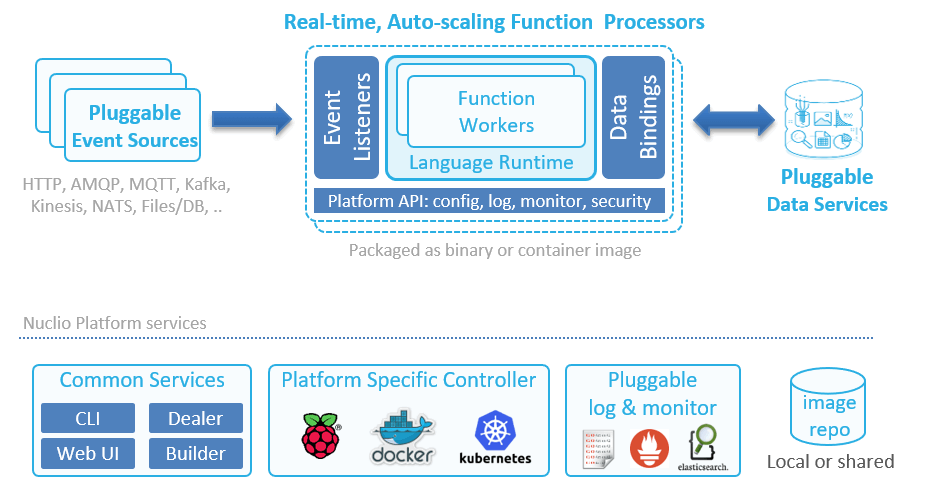
Nuclio, on the other hand, can scale up as well as out. A function processor (analogous to a container) can host multiple function workers. Each worker is then able to process one message at a time. This system supports concurrency within the same processor, and then autoscales the number of replicas of the processor based on load.
Figure 2: The architecture of a Nuclio function.
Another interesting difference between Lambda and Nuclio is that Nuclio lets you specify both the minimum and maximum number of replicas. And as an aside, Nuclio also supports GPUs.
Figure 3: Nuclio lets you configure both the minimum and maximum number of replicas.
With Lambda, you can configure a reserved concurrency for a function, which (counterintuitively) sets its max concurrent executions. But there is no way to tell the system to always keep a certain number of concurrent executions running at all times. The system always scales to zero when there is no traffic—behavior that is highly undesirable for systems that experience regular spikes in traffic.
For example, my employer, DAZN, is in the sports streaming business. We see huge spikes in traffic all the time, as millions of users flood in seconds before a sporting event starts.
Figure 4: Sports streaming platforms, such as DAZN, experience huge spikes in traffic just before a sporting event kicks off.
Without the ability to configure the minimum number of concurrent executions, these spikes result in large numbers of cold starts. Also, in these cases, Lambda has to scale out the number of concurrent executions quickly to meet the surge in demand. Here, we also run into the 500/minute limit on how quickly Lambda is able to scale out. As such, we are currently not able to use Lambda on the critical path of our system, which has to shoulder these spikes.
With Nuclio, you can programmatically update the minimum replica count prior to the event so that when the spikes come, you don’t have to worry about hitting scaling limits or enduring the performance hit from cold starts. You can also tell Nuclio to scale to zero immediately via API calls, which saves resources.
Figure 5: Adjusting the minimum number of replicas enables you to deal with predictable spikes in traffic.
Timeout
Another major difference between Lambda and Nuclio is how timeout is handled. With Lambda, an invocation can run for up to 15 minutes. While it’s possible for you to use recursive functions or step functions to extend this limit, both approaches have their own problems. As such, Lambda functions are great for event-driven architectures and performing short, ephemeral tasks.
With Nuclio, there is no max execution time. The containers can keep on running, which in turn allows you to go beyond the constraints of the event-driven model. You can now turn a function into a long-running service, which unlocks some interesting use cases such as long-running ETL jobs and training machine learning (ML) models.
Caching State Between Invocations
Both Lambda and Nuclio functions accept an event and context during an invocation.
Figure 6: Both Nuclio and Lambda functions accept an invocation event and context as arguments.
With Lambda, the context object is ephemeral and does not persist between invocations. If you want to persist data between invocations (e.g. static configurations, database connections), then you need to declare them as global variables outside of the function handler.
With Nuclio, the execution context itself is persisted between invocations and can be used to cache state. The context object also includes a built-in logger, which supports structured logging with JSON and four log levels: DEBUG, INFO, WARN and ERROR.
You can configure the default log level for a function and can even override this default log level per invocation—which is very useful for debugging. You also have the ability to export your logs to external services such as Elasticsearch.
Figure 7: With Nuclio, you can select the default log level for every function.Figure 8: You can also override the default log level for an invocation.
In addition, there are hooks for performing context initialization, which is called before the first invocation on the function. This allows you to perform initialization logic before the container is put into active use and removes the dreaded cold start problem that Lambda suffers from.
Data Volumes and Persistent Data Connections
With Lambda, functions only run when they are triggered by events. Furthermore, concurrent executions are garbage-collected when they have been idle for a few minutes. This behavior makes life difficult when you are working with relational database management systems (RDBMS) and other systems that require persistent connections. Indeed, a set of guidelines has been developed to help you avoid the many pitfalls of using Lambda with RDBMS. Furthermore, Lambda doesn’t allow you to use persistent data in standard file system mounts, which forces you to copy to/from object storage before working on large files such as images, logs, ML models, etc.
With Nuclio, however, you can use the context object to maintain persistent connections to databases. Since the context is maintained at the processor level, you get better reuse, as they are shared across invocations. You can also take care of other aspects of data-fetching with data bindings, including batching and caching, which helps improve IO performance of the application. Additionally, you can mount volumes to functions, which is useful for working with ML models or Tensorflow, and you can mount Kubernetes secrets as volumes. Indeed, Nuclio supports all of the volume types that Kubernetes supports.
Runtimes
Both Lambda and Nuclio support popular languages such as Go, Node.js, Python, .Net Core, Java and Ruby. Also, both platforms offer a way for you to customize the execution runtime.
With Lambda, you can create a custom runtime and distribute it through AWS Lambda Layers. This lets you introduce additional language runtimes that are not natively supported by the Lambda platform. Several vendors have published runtimes for PHP, Rust, Erlang and Elixir, to name a few.
With Nuclio, you can run functions on your own Docker image (see Figure 9), which can come from a private image repository. This allows you to tailor the execution environment itself.
You can also support additional language runtimes through a Shell function, which allows you to handle invocation events with any executable binary. See this example for more details.
Figure 9: Nuclio lets you run functions on top of your own Docker image, which can come from a private image repository.
Nuclio ships with 13 triggers, including cron, HTTP, Kafka, Kinesis and RabbitMQ. Since Nuclio is open source, you can also write your own trigger for services that you want to integrate with and leverage other people’s contributions. The HTTP trigger gives you an easy way to integrate Nuclio with other event sources that support HTTP as target, such as SNS. Also, since Nuclio supports the CNCF CloudEvents standard, it can arguably support many more event sources that are CloudEvents-compliant.
Nuclio triggers are all normalized to the same Event object. This removes the need to understand the specific event signature for each event source, which is often confusing when working with Lambda. It also makes it easy to switch a function between different triggers.
Built-In HTTP Trigger
With Lambda, you need to use API Gateway to create an HTTP endpoint for your functions. API Gateway is a feature-rich service, but it’s also complicated and often costs more to run than the Lambda invocations themselves. It also adds another source of latency to your API, which, at the minimum, is around 5ms to 10ms, and it can overhead spike to more than 100ms. This cost and latency overhead make it unsuitable for applications with high throughput or hard real-time requirements.
With Nuclio, every function gets a private HTTP interface by default. To expose the endpoint publicly, you need to specify an HTTP trigger similar to API Gateway. However, unlike API Gateway, this HTTP trigger does not incur extra costs and has minimal latency overhead.
Figure 10: With Nuclio, every function gets a private HTTP interface by default.
Unlocking New Use Cases with Nuclio
As you can see from our comparison, Nuclio differs from Lambda in a number of important areas, such as its concurrency model and that it has no max execution time. This opens the door to a whole range of use cases. Let’s take a moment to look at a few.
High-Throughput Data Processing Pipelines or APIs
For a high-throughput API, the cost of both API Gateway and Lambda is drastically higher than an equivalent application running in containers. This cost discrepancy has lead many to rewrite their applications.
Nuclio’s concurrency model makes more efficient use of available resources, which significantly reduces operational cost when running at scale. Functions have built-in HTTP interfaces so you also don’t need to pay for an expensive API Gateway service.
The ability to mount a volume to your function also lets you read and write data to/from a mounted volume at high speed and enables building stateful applications. Again, you can’t do this with Lambda today, as it doesn’t allow you to attach Amazon Elastic File System (Amazon EFS) volumes to functions.
These features make it economically feasible to run high-throughput and high-performance APIs on Nuclio functions. The same can also be said about high-throughput data processing pipelines that have to process multiple terabytes of data per hour.
APIs with Predictable Spikes in Traffic
Nuclio gives you the ability to configure a minimum number of replicas. This allows systems that experience predictable spikes in traffic to reserve sufficient resources ahead of time and avoid degrading the user experience when the spikes happen. Examples include food ordering services such as Just Eat or Deliveroo or sports streaming services such as DAZN.
At the same time, Nuclio still lets you scale to zero by setting the minimum number of replicas to zero. It gives you the control to optimize for resource usage or latency, depending on the situation.
Real-Time Applications
Nuclio does not suffer from cold starts and is able to deliver consistent and sub-millisecond response times on invocations. This makes it a suitable solution for applications with a hard, real-time requirement such as multiplayer games and real-time bots.
Serving Machine Learning Models in Real Time
To serve ML models in real time, you need to have both strong and predictable API latency and the ability to load and work with ML models that often are large in size (GBs).
Nuclio lets you attach Kubernetes volumes to your functions, and there are no size limits on these volumes. Combined with the performance characteristics, it’s possible to implement these demanding workloads with Nuclio functions.
Nuclio also has native integration with Jupyter, and lets you automatically deploy Jupyter notebooks and ML models as Nuclio functions.
Long-Running Jobs and Services
Nuclio does not impose a max execution timeout on function invocations. This allows you to turn your functions into long-running services and perform long-running ETL jobs.
Nuclio’s init_context() hook lets you create long-running services, such as an application that constantly reads off a Twitter feed (e.g. loads the TwythonStreamer with the context, which is polling an external service, versus becoming triggered by an event).
Conclusion
As we discussed, Nuclio is one of the few open source solutions that are also business-viable. It has key architectural advantages for higher performance or data-driven applications, including:
Nuclio is cloud-agnostic. It can be used in multi-cloud/hybrid-cloud scenarios. You can also run Nuclio on a laptop using plain Docker, which makes debugging easier.
Nuclio’s concurrency model and the ability to mount file volumes lets you build high-performance APIs and high-throughput data processing pipelines.
Nuclio gives you greater control over the concurrency of your application, which makes it viable even for applications with very spiky traffic.
Nuclio’s execution contexts are persisted between invocations, and it doesn’t impose a max execution time on invocations. This allows you to create long-running stateful applications such as ETL jobs.
Nuclio lets you attach Kubernetes volumes to your functions and has no limitations on the size of the volume. This makes it possible for you to work with large ML models that often are GBs in size. Nuclio also has native integration with Jupyter and can automatically deploy your Jupyter notebooks and models as functions.
Nuclio provides a good out-of-the-box developer experience. It has a built-in logger with structured logging support, and you can easily export your logs to an external log aggregation service.
If you are looking for a serverless platform that is not tied to a specific cloud provider, Nuclio is worth a look.
New Integrations With AWS Lambda Offer Developers Improved Monitoring and Correlate Key Performance Indicators for Better Visibility Into Building Serverless Applications
REDWOOD CITY, CA–(Marketwired – May 25, 2016) – Sumo Logic, a leading cloud-native, machine data analytics service, today announced the availability of its Sumo Logic App for Amazon Web Services (AWS) Lambda allowing DevOps and developers to monitor the health of all AWS Lambda functions and better manage the associated costs. In addition, the Sumo Logic Lambda blueprint is now available to route Amazon CloudWatch logs to Sumo Logic for advanced analysis and real-time visualization. The Sumo Logic App and integration enable deeper, real-time visibility into building serverless applications and optimizing AWS deployments.
“At The Washington Post, it’s critical that we can get a real-time picture of our app performance and stability since the user experience is paramount,” said Hardip Singh, mobile development manager for The Washington Post. “With the AWS Lambda function built from the blueprint for Sumo Logic, we were able to trigger and route our Amazon CloudWatch logs to Sumo Logic for analysis, accelerating our ability to connect with users to troubleshoot potential issues that arise.”
AWS Lambda lets developers run code at scale with high availability, without provisioning or managing servers. Users pay only for the compute time they consume, while running code for virtually any type of application or backend service with zero administration. Integration with Sumo Logic’s cloud-native machine data analytics platform allows developers to:
Analyze operational and performance trends across all the AWS Lambda functions in an account;
Gain visibility into the costs of AWS Lambda functions and optimize resources where appropriate;
Track the adoption and performance for different versions of a single AWS Lambda function such as resizing an application to fit a mobile device, tablet or laptop, which can help evaluate the impact of that particular function.
“AWS Lambda changes the way developers design and scale their dynamic applications built on the AWS Cloud,” said Tim Wagner, General Manager, AWS Serverless Compute, Amazon Web Services, Inc. “Sumo Logic has made it even easier for DevOps teams and developers to troubleshoot and monitor modern applications. With today’s release, they can analyze large volumes of data at scale, gaining top-to-bottom visibility in both development and production environments for serverless applications. Using the Sumo Logic app for AWS Lambda, developers can monitor the health of their AWS Lambda functions while easily gaining insights into usage and costs.”
Sumo Logic helps developers and DevOps teams accelerate the development and deployment of applications in a modern software delivery lifecycle. Its machine data analytics platform is the industry’s first to natively ingest, index and analyze structured metrics data and unstructured log data together in real-time, transforming a variety of data types into real-time continuous intelligence for modern applications and business insights.
“Development teams are adopting real-time analytic technologies that are integrated with the modern DevOps toolchain to improve all aspects of their application lifecycle,” said Bruno Kurtic, Founding VP of Product and Strategy at Sumo Logic. “As experts in helping organizations build, run and secure modern applications, Sumo Logic delivers a cloud-native, machine data analytics platform that gives AWS users operational insights into their AWS Lambda functions as well as other application components running on AWS so they can quickly and cost-effectively monitor, troubleshoot, and scale their applications.”
Additional Resources
Read the blog to get a deeper look at how the Sumo Logic App for AWS Lambda works
Learn more about the Sumo Logic App for AWS Lambda
About Sumo Logic Sumo Logic is a secure, cloud-native, machine data analytics service, delivering real-time, continuous intelligence from structured, semi-structured and unstructured data across the entire application lifecycle and stack. More than 1,000 customers around the globe rely on Sumo Logic for the analytics and insights to build, run and secure their modern applications and cloud infrastructures. With Sumo Logic, customers gain a multi-tenant, service-model advantage to accelerate their shift to continuous innovation, increasing competitive advantage, business value and growth.
Founded in 2010, Sumo Logic is a privately held company based in Redwood City, CA and is backed by Accel Partners, DFJ, Greylock Partners, IVP, Sequoia Capital and Sutter Hill Ventures. For more information, visit www.sumologic.com.
Over the last few years Amazon has gradually raised its compute capacity and provided the user with a set of advanced analytical and structural services. For each service, you can expand precisely for the amount of resources you actually need and shall pay for each resource usage at the end of each month.
In the spotlight, Amazon EC2 instances which carry along an entire surplus of attributes to help you in deploying, managing and scaling up your applications, Reserved Instances(RI) are another feature making itself really useful in resource management. In this blog we will see what actually are these Reserved Instances also known as RI and why are they named so and how are they cost effective.
Reserved Instances:
Reserved Instances are the best money saving technique considering cloud costs. Here’s the catch ” they require no methodological optimization effort, no Devops wizardry and no auto scaling structure”.
RI gives you the power to escalate the roof of your savings by encountering all your business’s call.
1). Term: 1 or 3 years is time period proposed by AWS for Reserved Instances usage.
2). Region: Reserved Instances are accessible in all AWS regions. They are also obtainable in Amazon VPC and Dedicated Instances.
3). Operating System: Platforms for which Reserved Instances can be purchased are Microsoft SQL Server, Amazon EC2 running Linux/UNIX, Microsoft Windows Server, SUSE Linux and Red Hat Enterprise Linux.
4). Payment Option: There are three payment alternatives provided by RI which are as follows:
a). Upfront Option: With upfront payment you pay in once for whole RI and you get an extensive discount over On-Demand Instance pricing.
b). Partial Upfront Option: In this payment option, you are charged a discounted hourly rate as a low upfront payment for the Instance for time span of the RI term.
c). No Upfront Option: This option provides a discounted hourly rate for the time span of the term and does not require any upfront payment.
Why Is It called “Reserved”?
These Instances are named as “Reserved Instances” as they reserve the server capacity. They provide you with a formal assurance that you will be able to launch these RI fully whenever you need them without a popup of insufficient capacity, any time you attempt to start an EC2 instance.
HOW RESERVED INSTANCES WORK:
I assume the information above makes you well acquainted with what Reserved Instances are and why they are named so. Now lets consider their functioning.
To work with your reserved capacity, directly launch an EC2 instance with the same configuration as the reserved capacity that you are capable of purchasing. Instance comprises of varying combinations of platform type, memory, storage, availability zone and instance type. As long as you have an active Reserved Instance, AWS will automatically apply the discounted hourly rate for your EC2 instances. If at any point your purchased Reserved Instance gets expired, then at this situation you will be charged on the basis of On-Demand pricing until and unless you purchase new Reserved Instance of the same capacity.
All these reservations are applied at the infrastructure level. Once you have a single account, your reservation will be shared amongst the different instances based on run-time. Incase you are a multiple account holder under the same parent account, your reservation gets shared across all accounts.
There’s also an option available to purchase as well as sell these Reserved Instances through the EC2 Reserved Instance Marketplace thus providing you with the flexibility to sell unused Reserved Instances to any other businesses and organizations.
Benefits:
1). Cost Effective: RI equips you with a sufficient discount which is nearly around 75% when compared to On-Demand Instance pricing.
2). Modifiable: If there arises a situation where you are required to change the zone of your RI then it can be easily done by moving your RI to another available Zone within the same region, by changing its Network Platform as well as instance size of your reservation to another size of the same instance type at no extra cost.
3). Reliable: To build up your confidence, RI supplies you with a capacity reservation to launch the number of instances you have stockpiled when you need them.
4). Easy to use: RI usage is similar to that of EC2. While evaluating the bill , system will undoubtedly apply RI rates to reduce your costs.
5). Marketplace Available:If you want to impose any sudden or planned changes than RI marketplace gives you the opportunity to sell these Reserved Instances.
Reserved Instance Pricing:
It’s pretty undoubted that if used with a fair setup, RI helps you to save dollars on AWS in many ways. But if you purchase a massive number of RI in an AWS region, you will automatically be receiving discounts on your upfront fees and hourly fees for future purchase of RI in that AWS region.
The figure below represents the RI Tiers pricing list:
Fig: 1
So far Amazon Web Services has created exceptionally compelling and powerful features with the Reserved Instances. They not only provide cost benefits but even warranty on the capacity. Though, to be flexible it requires cautious guardianship of your cloud substructure and reservation inventory. So go ahead with reserved instances if you’re looking to deploy a wide scope of apps and websites with a long term no hassle approach.