Tag: automation

  • Technology’s effect on religion

    Technology’s effect on religion

    Today being Good Friday, with Easter being Sunday and in the midst of Passover; it is a time for reflection. Instead of thinking about DevOps, today I ponder life and religion. What comes to mind is the future of religion in these technological times. The number of Americans with a religious affiliation continues to decline, less and less of us make an appearance at a Synagogue, Church or any house of worship for that matter. In my childhood we would at the very least make an appearance a few holidays a year, notably at the annual pancake breakfast.

    From the calculator to the computer, from mobile devices and the Internet, advances in technology are creating monumental changes in our lives and in turn the way religion is practiced.  The universal acceptance of mobile devices, like the iPhone and iPad, is provoking a profound social change. The dependence on these devices is eliminating the individuals need for traditional religion and going to traditional houses of worship. The problem is, without the traditional religious brick and mortar upbringing, the youth of today forgo a key element of the religious experience. Religion was never just about a supreme being, the social gathering and interaction of those with similar beliefs and values is also a critical part of the experience. Religion is losing the youth.

    It seems there are now thousands of apps which allow parishioners to bring Bible quotes, Torah-chanting practice and Buddhist prayer wheels anywhere, anytime day or night. My concern is how many of our youth are downloading religious apps as opposed to angry birds. The challenge is how to mobilize religion while still achieving all the religious personal support and socialization benefits that are realized from real life interaction in attending a place of worship. Is the virtual congregation a realistic way to gather people and practice religion? I have a hard time thinking the young will embrace religion without the real life experience which creates the feeling of being at peace with oneself.

    The virtual congregation will be effective fill in for those who have already experienced religion in the traditional sense. Worshippers who cannot find their way to their house of worship for services will pray online with their fellow believers via the latest technology, confident that the other worshipers are doing the same on their devices. How powerful that will be is the question, it has been relatively effective via Television. But those are already followers seeking religious celebrities, not new believers.

    There is no denying religious leaders who conduct services via technology to a geographically wide spread audience will notice a significant difference in how worshippers experience the event. Religion is very much an emotional event and technology can be a non starter for the holy rollers. Gathering around technology in smaller groups may be an answer.

    The religious apathy of the young produces a serious problem for religious leaders looking to grow shrinking congregations. The lack of formal religious upbringing has lost many of the young and younger worshippers that do exist expect any religious event  to embrace technology use. Device multitasking has become such a pervasive part of their life that quiet,  hard cover book based religious ceremonies seem awkward and therefore not compelling.

    Technology may represent the end of traditional religious worship, and the beginning of a new age of worship, the form of which no one can reasonably predict or control. The bottom line is if you look at technology and say how does this change people going to house of worship? You miss the point, because religion is a much deeper set of beliefs. The question is without new young followers, what does the future hold for organized religions?

    If you would like say something; email parker@devops.com and don’t forget to comment here.


  • Microsoft bridges the gap between Azure and DevOps

    Microsoft bridges the gap between Azure and DevOps

    DevOps can be easy for a startup. Many of the concepts and principles of DevOps come quite naturally to a fresh company just getting started. It’s a different story, however, for large, established enterprises trying to wrap their arms around this DevOps thing. For IT admins working in Microsoft’s Azure cloud platform, though, things just got a lot easier thanks to the integration of Chef and Puppet Labs.

    Many organizations are heavily invested in the Microsoft ecosystem. IT teams and administrators are familiar with Windows domains, Active Directory, Hyper-V, and Azure. They know how to write scripts and leverage PowerShell to get things done, but they’re much less familiar with the core principles of DevOps, or common DevOps automation tools like Chef and Puppet Labs.

    One of the driving forces of DevOps is the ability—or perhaps necessity—to automate those tasks that can be automated so IT resources are freed up to focus on more important tasks. Deploying and configuring virtual servers and applications is necessary, but it can also be tedious, and it is a task that can be easily automated using DevOps tools.

    The arrangement also works the other way. Smaller companies that are already familiar with, and invested in DevOps may need to scale to a platform like Azure. They should be able to build on what they’ve started, and continue to use the tools they’re familiar with as the company migrates to Microsoft’s Azure.

    One of the main attractions of Microsoft Azure is the degree of flexibility, choice and control it gives customers. Microsoft Azure’s partnership with Puppet and Chef allows customers to choose from an array of existing technologies and communities to easily deploy, configure, automate and manage their VMs.

    According to a Microsoft spokesperson Puppet Labs and Chef complement and extend Microsoft technologies such as Resource Groups and PowerShell Desired State Configuration (DSC) to offer more options for customers to migrate existing or deploy new applications to the cloud. The partnership offers Microsoft the ability to support Linux and UNIX environments, and also alleviates the concerns that organizations already using Puppet or Chef will have about abandoning their investment. Now, they can continue to use their Puppet modules or Chef recipes in Azure.

    Luke Kanies, CEO of Puppet Labs believes the integration of Puppet Labs and Azure will help Microsoft IT admins by making it easier to deploy applications across any platform or cloud environment. Kanies explained in a press release, “Our goal is to help you automate the configuration and ongoing management of your machines and the software running on them, so you spend less of your time firefighting and running simple scripts across a thousand machines, and more time getting great software in front of your users.”

    I spoke with Kanies about the difference in dynamics between a small company and a large enterprise. He told me that in a small company it’s much easier to communicate and coordinate resources, and the cost of failure of any particular project is much lower. For a large, established enterprise, however, there is assumedly a large base of existing customers, and there is more fear and worry about possibly disrupting normal operations.

    I also had a chat with Ken Cheney, VP of business development for Chef. His philosophy mirrors a lot of what Kanies described. Cheney told me that emerging companies have the luxury of starting from ground zero with a clean slate. There aren’t yet any established processes to navigate. The challenge is trying to transform an organization with established processes, and a team of existing developers over to a DevOps mentality. Integrating DevOps into Azure helps organizations to meet that challenge.

    DevOps adds an element of speed and simplicity that makes it easier for larger enterprises to be more agile. Using tools like Puppet Labs and Chef enables IT admins to add speed as a core requirement for infrastructure projects without disrupting or conflicting with other requirements—like security and stability.

    Ultimately, the new alliance illustrates Microsoft’s commitment to empower Azure customers with the best-in-class configuration and automation tools by embracing the technologies, communities and ecosystems that developers know and love. Combining Azure with powerful and popular platforms like Chef and Puppet Labs bridges the gap between traditional IT and DevOps—enabling old school IT admins to embrace DevOps, and DevOps startups to mature and evolve into larger enterprises.

  • From here to there: practical first DevOps steps

    From here to there: practical first DevOps steps

    I’m a bad programmer.

    There, I got that out of the way.

    The truth is, I’m a sysadmin that writes code infrequently, on an island, and out of disciplined requirement, release, or QA practices. I need to run an ETL that kicks a file transfer. I’ll write some code. I’ve got a workflow that needs a crappy but functional web UI. Now I’m a developer. But in between these kinds of projects are days, and sometimes weeks of meetings and planning and dozens of things that are not code, which means by the time I come back to actual programming, I’m starting fresh every time.

    I don’t think I’m alone. I think there are a lot of sysadmins in the world with functional perl chops, but because they don’t code daily, they don’t approach problems with an inherently code-focused approach. Systems are still running, the internet is still on, so this way of solving problems must be OK. It is, but there are drawbacks.

    Rolling changes out to 4 dozen of your 8 dozen systems and verifying each received a 4 line change to that logship script with scp? Good luck with that. The old SA just left, and now you need to find all his stuff? GLHF. Some report hasn’t been sending for 4 days, what changed?! Yeah… yeah.

    Where software development got it right

    Great systems need three things: consistent configuration, maintainability, auditability. Good dev & deploy practices get you all three. Version control systems like git provide a great mechanism to manage code, version, and collaborate in reliable and predictable ways. Issue trackers, like Jira or Rally that integrate with version control let you easily tie specific changes back to the original reason for the change. Deployment systems like Jenkins and Capistrano give you one stop interfaces to track what got deployed where and when and by whom.

    Take it as given that few SA teams are using all of these approaches for their work today. Probably you’ve got a ticket system, and you definitely get yelled at if you don’t comment your scripts. Maybe those comments link back to the work order number? Migrating what you do today to a more DevOps focused approach isn’t going to happen overnight. So how do you start?

    Version control or GTFO – Yeah. I know. It’s on the list! No. Stop what you are doing, and gather all of your nginx.conf’s, your limits.conf, pg_hba.conf, and commit them to a git repo. I can’t emphasize this enough – if you are not enforcing version control in your systems administration team you’ll reap the whirlwind.

    Change, Commit, Test. Welcome to the new DevOps discipline. You’re going to hate it at first, but 7 months from now when the webservers are flopping because somebody changed something, you’ll be grateful for a quick and reliable rollback.

    Puppet or Chef or Ansible – get a basic setup. One master, three nodes. My starting point here was user management, I setup a basic user-add class, and let it manage ssh keys. Let that soak for a couple weeks and slowly roll it out to the rest of your infrastructure. Ten bucks says you find a dozen hosts with inconsistent UID’s that you’ve been meaning to fix for years.

    Once that feels comfortable, move some basic scripts into your setup, roll those out slowly. Take the db configurations, commit them to the repo, and move ’em over to configuration mangaement too. The point is, moving to configuration management systems is not an atomic event across your entire infrastructure, iterate against it. Make small weekly changes that roll up to quarterly progress.

    Here’s where the rubber meets the road:

    “Git is going to suck because deploying is so much easier when you just vim a file on a server” – Every Sysadmin Ever

    If you’ve got a repo, and you’ve got say, puppet… it’s a pretty easy step to have commits to that repo pulled and auto-deployed to your puppet managed nodes. Which means rollbacks can be too.

    Pay off your tech debt – I don’t have to tell you about the 4 dozen scripts you’ve got out there, unmanaged, brittle, and needing constant tweaks to keep them lined up with system changes. These are the bread and butter of system administrators, and can provide a great opportunity to implement change. Next time you have to touch that script for a new SCP server, stop. Stop! Do this instead:

    • check it in to your git repo, with some meaningful comments about what it does
    • add it to your configuration management system (puppet/chef/ansible)
    • if it’s bash or perl, rewrite it as python. It’s going to take a bit more time to rewrite all your scripts, but spending this time gets you more comfortable writing code regularly, and gets you more familiar with a modern scripting language.

    Walk the path

    Whatever your system or your goals, the hardest part of adopting DevOps approaches is going to come down to time. Reading through this myself, I’m struck by what an insensitive jerk I am. “Hey guys I know you totally have tons of free time, just starting doing everything you regularly do but add a ton of extra work too. Kthxbai”. The reality is, I probably am a jerk, but you don’t have to think about moving to DevOps as a shining city on a hill that you can reach with enough late nights. It’s a journey, a path, a way, not a place to arrive.

    Find a way to start making small changes to your existing processes that line up with the best of the development world. Decide to add 10% more time to a proposed project to allow for it to be handled with these methods. If you begin to turn your steps onto the DevOps path, you’ll quickly realize you’ve already arrived at your destination.


  • Continuous integration for better security

    Continuous integration for better security

    One of the big advantages to smaller deploys and continuous integration is that it can make it easier to provide more proactive security. In short, continuous integration (and the associated automated testing it enables) makes it easier to focus your security team on analyzing areas where the security risk is higher.

    If the notion of rapid development, rapid deployment, and continuous integration make your security team nervous you may be able to get them engaged by sharing proven ideas from companies who’ve made this approach work well in the real world.   For example, I was recently flipping through a presentation from Etsy on SlideShare, and discovered a clear explanation of how continuous integration enables better security.

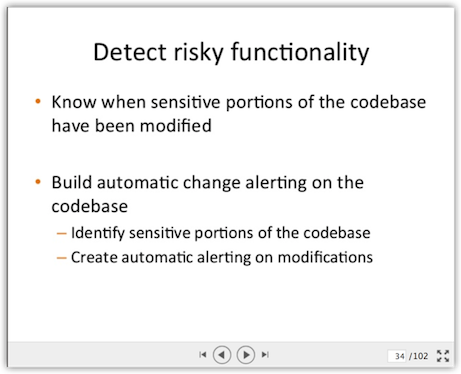
    Slide34At right, you see slide 34 from this (very long but clear) deck. this is the first in a series of slides that talks about how you can identify high-risk areas of code, then use those designations to drive  automated checks for changes to those areas of code.  The power comes in when you automatically alert the security team that someone has just check in code which changes one of the high-risk areas.

    This seems like a commonsense way to focus high attention on high risk.

    Another positive benefit of this approach is that it forces the conversation upfront about what constitutes a high-risk area code. This is an opportunity to get security, ops, and the business on the same page about where risk is likely to occur. When you incorporate this approach with periodic reviews of where things stand, it allows you to refine your approach to automated analysis based on your experience. In other words, during post-incident review if you discover one of those”Gee I wish I’d known that I had of time” sorts of situations, you can add a check into the automation library that looks for those conditions in the future. This sort of continuous improvement model benefits everyone.

    Oh, by the way – one of the scenarios this approach can check for is the introduction of new third-party libraries. In today’s climate of elevated concern over third-party risk (as well as fears of security flaws in open-source components) having that capability can be a very good thing.

    What about you? How are you integrating continuous security checks into your continuous integration?

  • Automation versus Orchestration

    Automation versus Orchestration

    Yes, Virginia, there is a difference.

    One of the things devops practitioners are tasked with is the provisioning and configuration of all sorts of infrastructure.  Application servers, web servers, load balancers, proxies and database servers are among the lengthy (and no doubt growing) list of “boxes” devops needs to get up and running to support just about any given application today. One of the key value propositions of a devops approach to operations is that it can reduce the time it takes to get applications to market by getting them up and running in production faster. That’s increasingly important as we move into the Era of Things, driven by extreme connectivity of everything, because all those “things” need are going to need to be talking to applications on the back side.

    So speed is of the essence, but not at the cost of accuracy. We’re encouraged, then, to automate tasks and orchestrate processes to achieve that speed. The side effect of codification of tasks is higher accuracy (aka fewer mistakes).

    So far so good.

    But you may notice that I have (and will continue to) clearly delineate between “automate” and “orchestrate”, between “task” and “process”.

    The reason for that is that, simply, they are not the same thing. We should strive not to confuse these two because while the two share some benefits, there are other benefits that are achievable only by one or the other – or the combination thereof.

    Process optimization, for example, can’t be achieved by simple automation. Automation is concerned with a single task – launching a web server, configuring a web server, stopping a service. Orchestration, however, is concerned with automating, if you will, the execution of a workflow – of a process. A provisioning process may be comprised of multiple tasks and involve multiple systems. An “application” is not just a single server, after all, it’s likely several servers – web, app and database in a traditional three-tier architecture.

    The goal of orchestration is not just to automatically execute a service, which brings speed to the deployment process and gets applications into production faster. It also affords an opportunity to streamline – to optimize – those processes for even greater gains in deployment velocity.

    One of the simplest ways to optimize a process is to eliminate repetitive steps. This entry on Vagrant explains it fairly well :

    “We could just SSH in and install a webserver and be on our way, but then every person who used Vagrant would have to do the same thing. Instead, Vagrant has built-in support for automated provisioning. Using this feature, Vagrant will automatically install software when you vagrant up so that the guest machine can be repeatably created and ready-to-use.” [emphasis mine]

    — Vagrant Docs “Getting Started | Provisioning”

    Now certainly the step of installing a web server on a new box with vagrant is hardly all that time consuming, it’s just a single line of text. But every line of text must be manually typed, and that introduces the possibility of fat fingering the command, which either consumes time in fixing it or introduces an error into the system. Neither are desirable results.

    automate-orchestrate

    Ensuring that the process is repeatable and orchestrated by automating all the tasks that comprise that process an optimize it by eliminating redundancy. That results in greater deployment velocity.

    Recognizing that processes should be comprised of composable tasks offers a higher degree of reuse across operations. The task of provisioning and configuration a web server with the appropriate base software means consistency, aka standardization, across all applications. Processes that take advantage of standardization result in greater infrastructure stability, another benefit often cited by organizations that have adopted a devops approach to operations.

    iweek-devops-stability

    The key here is to recognize the difference between automation and orchestration and how they relate to one another. Automation is about codifying tasks and orchestration is about codifying processes. Orchestration takes advantage of automation by reusing these basic building blocks.

    There is a difference, and done right, the two play off one another to result in streamlined, more accurate execution of operational processes that speed up successful application deployments.

  • No DevOps Roadmap? No Problem.

    No DevOps Roadmap? No Problem.

    I’m a huge fan of The Phoenix Project and I’m honored to count Gene Kim both as one of my professional inspirations and also as a personal friend. There is, however, a dangerous precipice inside of the Phoenix Project that, if misunderstood, could cause many DevOps practitioners and enterprise IT shops a daunting problem in adopting and progressing in the ways of DevOps.

    Roadmap or Roadblock?

    One of the main concepts discussed in both Kim’s The Phoenix Project and Goldratt’s The Goal is “the bottleneck” and what what to do about it. The basic premise explained is that all actions to increase throughput before a bottleneck, pile work up at the bottleneck and all actions to increase throughput after a bottleneck create a void of work to address after the bottleneck. The logical conclusion from this idea is that: in order to have a net positive effect on throughput, action must be taken at the, holistically viewed, tightest constraint on throughput within the operational system.

    This concept model is both accurate and valuable as the IT shop and the manufacturing floor have a lot in common. The power of this concept model, also happens to be where the aforementioned dangerous precipice is revealed – getting alignment on which bottlenecks to focus on can turn into a multi-month effort in many enterprises which can require consultants, workshops, deep-dives, process studies and other activities that are at once highly valuable and not always likely to be approved by a shop that has not fully bought in to the three ways of DevOps.

    One of the lesser understood secrets of corporate america is that even when you have formal authority, permission is required to do almost anything of substance. One “no” from the wrong party can kill even the most promising initiatives. This “veto effect” doesn’t require an absolute “no” either. Much like a parent saying “let me think about it”, the veto effect only requires the absence of a “yes”. This absence can take the form of “maybe”, “let me think about it”, “let’s wait and see”, or even a “run this by the other department heads and see what they think”.

    Given that any reasonably sophisticated roadmap takes more than a few weeks to develop, vett and roadshow around a medium to large enterprise, a mature DevOps roadmap suffers from a classic chicken/egg paradox for many organizations. I extend my deepest sympathies to those who have found that a clear and easily understood roadmap can somehow both provide and require the catalyst to consensus and permission to proceed in the ways of DevOps. You can take heart, however, in the fact that neither you, nor DevOps, are alone in this conundrum as this is what can be referred to as “the corporate condition” that we must all bear.

    While company may not always provide solace to the miserable, there is however, another way.

    Just Follow the Sun

    What is this one side road still available to you that has the power to relieve almost any non-alignment traffic jam? Start heading west! Just like the American pioneers, you can start following the sun to the wide open spaces of DevOps land where automation is plentiful and provable performance gains via instrumentation are gold. All you need is one or two comrades with some skills worthy of the road ahead and you can be off!

    Just because you can’t get the unix team to automate environment creation, doesn’t mean you can’t head west and automate your build processes. Just because you can’t automate your entire production deployment doesn’t mean you can’t head west and automate your performance testing and benchmarking processes. Just because you can’t get everyone to agree on the tightest constraint, doesn’t mean you can’t head west and alleviate the ones you already know about. To head west on any of these things, you don’t need full concensus, you only need a traveling partner or two.

    The Trail Has Already Been Marked

    For mid to large size enterprises, a true DevOps transformation happens over the course of three or more years. Allowing a lack of consensus to become a total standstill is not the right answer. The tool at your disposal to overcome the veto affect is public consciousness.

    Take UX design principles for example. It was less than a decade ago that design activities were considered a luxury item that produced pretty pictures; and then Apple happened and tipped public consciousness over. How many people are willing to casually veto design now?

    When public consciousness to the value of DevOps tips over, it will no longer be you going to the powers that be to get the “OK to proceed”. It will be them coming to you and asking “what is taking so long?”. In that one moment, you’ll be able to fire back at them: “Here’s my roadmapping proposal. I’d love to have you be my business owner!”

  • DevOps Is Free? Sure I’ll Support It

    DevOps Is Free? Sure I’ll Support It

    One of the biggest misnomers about DevOps is that since it’s all about process and communications there aren’t any costs associated with adoption. Sure, you can probably gain some improvement by simply modifying your current methods for delivering IT services in your organization, however, DevOps is about more than just modest improvements.

    Let’s explore why organizations that are succeeding with DevOps are succeeding over traditional IT approaches. From the article, “Fresh Stats Comparing Traditional IT and DevOps-Oriented Productivity,” also on devopsy.kinsta.cloud, we see that DevOps is driving down time spent on tasks where there is no value being added to the business, such as support, deploying changes, communication and firefighting. Time spent on these tasks reduce opportunities from innovation and responding to business needs, leading the business to view IT in an unfavorable manner unable to help them meet current business demands.

    Where DevOps-oriented teams do spend time is on automating repetitive tasks so that they don’t continually consume time, self-improvement and innovation. Instead of treating IT like assembly line workers capable of only completing the task at their station, which causes friction and increases turnover, DevOps-oriented organizations foster an environment where workers are rewarded for ensuring quality and reducing overhead.

    image-for-devops-com-byline

    So, where are the costs associated with becoming a DevOps-oriented organization?

    • Training / Education – DevOps transformational activities takes funds and requires outside training and, possibly, consulting. For businesses that desire to move forward but are stuck in the Catch-22 that is keeping the bus rolling while trying to paint it, it can be daunting to make the necessary changes. Getting past this point often requires groups trained in helping businesses make these types of transformations.
    • Tooling – There’s some great Open Source tools that can help drive continuous integration, automation and orchestration. However, the worst thing that can happen is that getting these tools to work the way you need them to ends up consuming resources and time that you’re trying to give back to driving business value. The supported versions of these tools will provide software support and deliver tested versions, which will minimize unnecessary disruptions.
    • Updates / Refresh – Older versions of some infrastructure components or software packages may not support automation efforts. Since this is a key element of DevOps, it may be a requirement to do a technical refresh or software update.
    • Platform Changes – Alas, the big kahuna, the platform change may be a necessary action to enable your IT team to become more agile and alleviate some operational challenges. The cloud is a perfect example of a platform change that supports DevOps. A platform change can be very expensive, but the long-term benefits need to be weighed; especially if it speeds transformation of your IT team into one that is agile and more quickly addressing the needs of the business.

    So, can you do DevOps without any financial outlay? Probably so, but the benefit received will be nominal, your team will most likely feel shorted and look to work for a business that has fully committed to a DevOps approach and the real time consuming sinks in your business will continue to exist eating your IT budget like a bear eating salmon in preparation for winter hibernation.

  • Deployment and Monitoring Automation with glu

    Deployment and Monitoring Automation with glu

    glu is a free/open source deployment and monitoring automation platform. glu is a project that was started at LinkedIn mid-2009 to address the exponentially growing needs of deploying the set of applications and services that make up the LinkedIn experience. Although some projects like Chef and Puppet existed at the time, they were mostly good at configuring the infrastructure (creating users, installing java, etc…). glu lives in a higher space: provisioning dynamic applications on an ensemble of machines (change often, real-time failure detection, etc…).

    glu is in the application deployment space

    First, let’s start with some definition: when I say application, I mean a piece of code that usually needs to run, and usually offers some form of api to talk to (which, at a lower level, is a socket listening on a port). Equivalent terminology is service or server. For example, a webapp server is an application. Although glu can also deal with one-off programs (run, do some computation and then stop) or infrastructure (perl, java, etc…), it is not optimized to handle these use cases and other projects are better at this task (Chef/Puppet).

    What is particular about applications in general, is that they tend to change a lot more often than infrastructure. In the age of continuous deployment, it is not uncommon sometimes to have the same application updated and deployed several times a day!

    glu has been designed to handle this use case: deploy applications to an arbitrary large set of nodes:

    • efficiently
    • with minimum/no human interaction
    • securely
    • in a reproducible manner
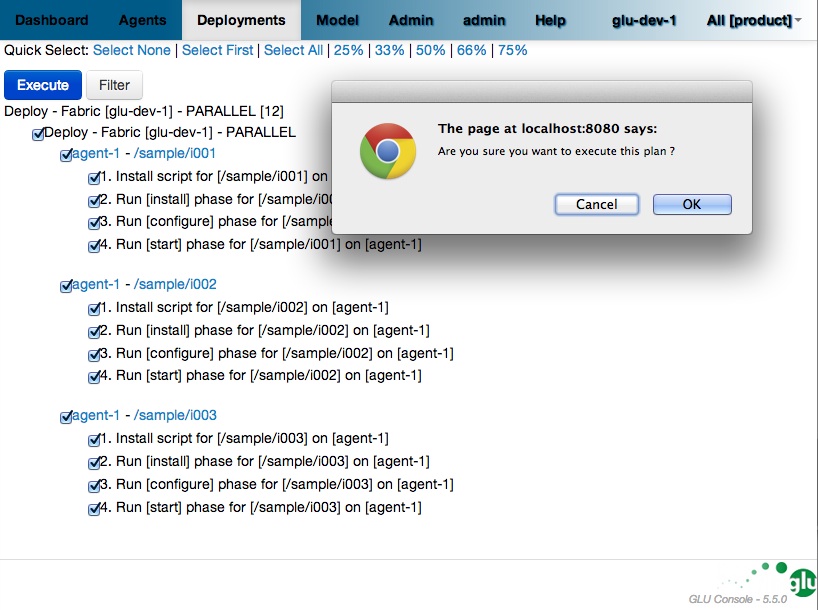
    glu executes a deployment
    simply click “OK”!

    glu is in the application monitoring space

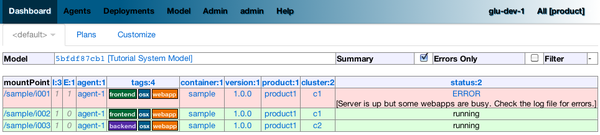
    Once an application is up and running, many failures can happen from the low level hardware crashing to the application itself misbehaving. This is the nature of it, nothing is perfect, things will crash one way or another. So it is very important to monitor the state of the system in general in order to be able to react appropriately. glu has been designed to give a full view of the set of nodes on which you have deployed applications. When something goes wrong, you can know in a near real-time basis. You can then decide on the proper course of action like restarting the failed application on the node it crashed, or downgrading it to the previous version and redeploying the previous version to all the appropriate nodes. As a side note, you can also build a full monitoring solution on top of glu as explained in this blog post.

    glu detects failure

    glu is a platform

    It is very hard to build a one-size-fit-all solution. This is why glu has been designed to be a platform in order for you to build the solution that fits your environment and workflow on top of glu:

    • glu offers a REST api so that you can control glu yourself via a simple and documented api. For example, glu is not auto-reactive by design (which means that if something fails, glu will tell you about the failure, but it will not act on its own about it), but using the REST api, it is fairly easy to build a reactive solution on top of it.
    • the console (which is the main UI / REST api), is highly customizable (plugins to change the behavior of some features, css tweaks to let you change the look of it, etc…)
    • glu comes with its own package/distribution builder which lets you customize every component to suit your own needs (as simple as changing the port numbers or as complex as providing your own specializations).
    • glu does not dictate what a deployment mean to you, nor how to model your own system (clusters, groups, etc…), nor how to model your workflow (aka state machine in glu’s terminology). You are in control and you decide.

    glu in practice

    glu is not an academic exercise. glu has been built and successfully deployed at LinkedIn early 2010 prior to being released as open source. glu helps LinkedIn manage the complexity of releasing hundreds of applications/services on a 1000+ node environment (numbers from 2010). Other big names like Orbitz and Outbrain are using glu for their deployment needs.

    Over the years, glu has been refined and enhanced in order to support more use cases but the core and fundamental concepts on which glu was based originally and that I briefly introduced in this post are still what makes glu what it is!

    How to start with glu?

    If you want to take a look at glu, the best is to head to the main documentation page. I would also recommend to download glu and try the tutorial which gives you a feel of what glu is capable.

  • Don’t Let the (April Fools Day) Joke Be on You

    Don’t Let the (April Fools Day) Joke Be on You

    As much as seasonal increases in demand for on-line resources are discussed, the one day that’s often overlooked is April Fools Day.

    It’s the day the Internet loses its mind and your best bet is take everything not just with a grain of salt, but with the entire shaker.

    The use of April Fools’ Day to promote brand awareness and bring some laughter into the world as everyone tries to outdo everyone else in a bid to be named the King of Fools is well known. This is no more a surprise today than is Black Friday, Cyber Monday or Super Bowl Sunday.

    So it behooves those participating in the tom foolery to be prepared. That means being ready to handle an increased demand for whatever it is you’re offering up for consumption. This is where devops shines; where automation and orchestration and a demand-driven scalability strategy is your best answer. Because you can’t be sure your offering is going to go viral, but you can be sure it won’t if any piece of the application delivery chain breaks under the pressure.

    In other words, this is unacceptable:

    err-db-conn

    What might have gone viral may end up languishing as just another overlooked and forgotten attempt because of a lack of database resources and a failed scaling strategy.

    One of the key aspects of devops is that it should approach scalability with a comprehensive view of how each piece of the delivery chain needs to scale – and when. Thresholds and metrics collected from each domain of an application architecture must be correlated and understood in the context of how it impacts capacity so that it can be automatically scaled – or at least addressed – on demand.

    Maybe that means devops must advise a cloud-based approach to handling demand for such days. Maybe that means a bit more preparation and integration across the entire application delivery chain to ensure the load balancing service is basing its decisions on the right variables such that resources are maximized and enable greater scale across the application. Maybe that means throwing up a cache to reduce the pressure on web and application servers, or taking advantage of a CDN.

    Regardless of the approach to how you’re going to scale, devops practitioners should be driving the process to ensure that on April Fools Day – or any well-known high demand generation day – the joke is not on them.

  • From Simple Automation to DevOps Like a Boss

    From Simple Automation to DevOps Like a Boss

    Automation as We Know It Today

    If you haven’t been hiding in a cave in the last year or two, you’ve probably heard the terms DevOps and infrastructure automation more than once… But even today, infrastructure automation is mostly focused on setup and deployment of complex systems. For example, if you’d like to deploy your application to the cloud, you would likely automate the steps of provisioning the cloud resources, installing the right components on top of these, and then orchestrating the startup of your components – or better known as – cloud orchestration. Take even the simplest application that has a web server and database. After installing and configuring everything, you’d first need to ensure that the database is started, and only then the web server. You’d also need to propagate specific runtime information from the database to the web server, such as the database’s host and port. This stage, for the most part, is where most automation processes focus on today.

    DevOps: Stage Two

    Automation, however, can do much more for you. Let’s imagine, following your initial automation of the setup and deployment of our your application, that you want to make changes to your infrastructure or application. For example if you have a patch you’d like to install to the database or operating system, or if you want to update a piece of your code on your cluster of web servers. Both of these concerns involve pretty complex processes that you need to automate. For an infrastructure upgrade, you would typically roll out the upgrade server by server, take down one server at a time, update it, then restart it. Even though it doesn’t happen very often, there’s still a lot of benefit in automating this process and minimizing the chances of human errors. Pushing new code is a bit different. For starters, you do it much more often, even a few times a day. Also, (no offence), it is likely that the stability and quality of your code is lower than that of an approved patch to the OS or database. So the risk of something going wrong if you don’t automate is even higher with this process. That’s why there are common automation strategies that help you deal with this risk. Two such strategies are the Canary Instance strategy and the blue/green strategy. The former derives its name from the mining days, when a canary bird was sent out into the mine before the miners, to check if the air was toxic or not. So in this fashion, a “canary instance” is chosen, the new code is pushed to that instance alone, and then a number of sanity tests are performed. If these pass, the code is then pushed to a few more instances. If all goes well again, the code is then sent to the rest of the infrastructure. In the latter strategy (A/B), the code is sent to only a part of the servers. In an even more sophisticated approach, the code is only enabled to a portion of the users, for example, a certain geography or time of day. All of this ties into how to setup and manage an ongoing system. But although this process, as well the infrastructure upgrade, can get quite complex, especially when dealing with large scale, live systems, in most organization code pushes and upgrades are still not automated. But there are more than a few companies that are blazing the trail for the rest of us.

    The Plot Thickens – Monitoring Like a Boss

    So once you finally saw the light, put in your sweat and tears and managed to automate your setup, upgrades and code pushes. What’s next? This where it really becomes interesting, and where you can really take your business to the next level, with the monitoring of the entire system, and eventually, what you do with the aggregated data.

    More to come…

    In my next post I’ll discuss the different levels of monitoring and logging to get the to promised land of proactive DevOps.  And then…take that even further.  So stay tuned.