Tag: automation

  • Red Hat Brings Ansible Automation to Google Cloud

    Red Hat Brings Ansible Automation to Google Cloud

    Red Hat today announced that the Red Hat Ansible Automation Platform is now available on Google Cloud to simplify the management of yet another cloud platform.

    Using the Ansible Automation Platform, it’s now possible for IT teams that invoke Google Cloud to access pre-integrated services such as Google Virtual Private Cloud, security groups, load balancers and compute and instance groups.

    Pete Cruz, head of product and technical marketing for Red Hat Advanced Cluster Management for Red Hat, said Google Cloud—alongside existing support for rival cloud services—will make it simpler to consistently apply automation across multiple cloud and on-premises IT environments.

    In addition, IT teams can also count the consumption of the Ansible Automation Platform toward any existing enterprise spend agreements with Google.

    Ansible has emerged as a de facto standard for IT automation and is widely embraced by IT vendors and cloud service providers. That level of support has fostered the creation of a level of automation content that is now unrivaled by any other automation framework, noted Cruz.

    In the meantime, the pressure to automate IT processes is building during uncertain economic times. As IT environments continue to become more complex—thanks, in part, to the rise of cloud-native applications—many IT organizations are finding it more challenging to convince business executives to hire additional full-time employees. As a result, many of those IT organizations are now looking to automate as many processes as possible as more workloads are distributed from the network edge to the cloud.

    Rather than create a single playbook to automate every IT process on an end-to-end basis, organizations generally mix-and-match content created by others to automate workflows across highly distributed computing environments, noted Cruz.

    The biggest challenge when automating IT processes is simply overcoming inertia. Many processes are still manual simply because they always have been. In other cases, IT teams are still relying on undocumented scripts created by IT administrators who have left the organization. As the IT environment continues to evolve, it’s not likely those scripts will continue to scale.

    One way or another, IT is becoming more automated. The irony is that after using IT to automate almost every business process imaginable, it’s only recently that IT teams are getting around to automating their own workflows. Many of the rote tasks that used to be performed by entry-level personnel have been steadily disappearing thanks to automation.

    DevOps teams, of course, have always been ruthlessly committed to automating as many IT processes as possible in the name of efficiency. The rise of Ansible, however, makes it easier for every IT organization to achieve that same goal because they don’t have to wait for a specialist to create a playbook to automate a process. An Ansible playbook that can be easily customized or extended often already exists. The real issue may simply be knowing where to look for it.

  • Automation Challenges Holding DevOps Back

    Automation Challenges Holding DevOps Back

    A survey of 500 IT and engineering leaders in the U.S. published today finds organizations build an average of 6.7 internal applications per year themselves in addition to investing in 7.7 separate platforms to build applications.

    Commissioned by Internal, a provider of platforms for building application development environments, the survey also found organizations are spending 40% of their time building and maintaining these internal tools and workflows. While more than three-quarters (76%) of respondents said that this work is necessary, it distracts from building applications that drive business revenue. A total of 82% said a lack of true flexibility and customization is the top reason so much time is spent on building and managing internal tools and workflows.

    A full 94% of respondents said they want a more collaborative platform that enables technical and non-technical users to build internal tools/workflows faster together. The survey also found 91% of respondents believe a platform that encompasses application development and workflow automation would save development time.

    Internal CEO Arisa Amano said one thing that holds IT teams back is that managing the platforms used to build applications requires too much programming expertise. Internal is making a case for a graphical approach to building application development environments so IT administrators can easily construct them using a drag-and-drop interface on behalf of an application development team. That approach makes it possible to allocate more programming resources to building applications, she said.

    More organizations than ever are revisiting how applications are built as the number of projects increases despite an uncertain global economy, noted Amano. Organizations of all sizes are reluctant to hire additional full-time engineers even as digital transformation initiatives demand a growing number of custom applications, she added. The only way to effectively address those conflicting goals is to adopt a platform that automates much of the workflow associated with building an application development environment, said Amano.

    It’s not clear how willing DevOps teams are to replace the platforms they use today to build those environments, but many organizations are still relying on bespoke platforms they built and continue to maintain. Many of those platforms are made up of a collection of tools that DevOps teams cobbled together over the years. However, many of the software engineers that initially built those integrations may have since moved on and the documentation left behind is likely to be scant, noted Amano.

    Most DevOps teams in 2023 will continue investing in higher automation levels to accelerate application development. The quandary they all face is whether to continue to invest in the platforms they have already or migrate to a platform that makes it simpler to build and maintain an application environment using automated workflows built and maintained by a vendor. Regardless of what they choose, it’s certain the days when organizations could afford to throw engineers at every integration challenge have come to an end.

  • Looking Ahead, 2023 Edition

    Looking Ahead, 2023 Edition

    DevOps is in a perpetual state of change that keeps all of us engaged and busy, but makes a mess of things overall. Do you cloud-first? Are your APIs GraphQL yet? Are you doing SDN to connect to the VPN so you can put files on the CDN and build closer to the market? Sorry, had to do it. You get the point.

    The point is that the ground is forever changing under us, and often things that seem straightforward are not. Like “cloud-native,” including Kubernetes. Yeah, I get it, you mean software-defined infrastructure that works well with infrastructure-as-code (IaC); this field is confusing enough—calling it cloud is dumb when, these days, cloud has a specific meaning in the minds of IT.

    In our current round of change, a few patterns are showing up. Automation is king. Sometimes it is sold as AI/ML because those are the buzzwords of the day, but it is just continuing the trend of automation to make IT more responsive and predictable. We are rapidly approaching a point where the entirety of the application development/deployment process can be automated reliably and configured to create predictable results. By that I mean that development has more assistance writing code, test has more assistance running tests and processing results, deployment environments can be grabbed from application release automation/orchestration tooling and the final product all of that means that builds can be deployed with very little human interaction unless something breaks.

    Highly automated systems are a prerequisite of high-volume output, though – automobile factories are the easiest example of that statement. My problem is that we don’t seem to be asking “Should we be high-volume producers?” Does the average enterprise require non-stop development? I think that the initial answer is yes, and the more considered answer is “Only because the business wants more, consistently.”

    At some point, the gains we received from DevOps need to be looked at from the “What value is added?” perspective. And that is a business function with IT input. Before SaaS and DevOps made IT easier (to get something running; not minimizing our work here), the business had to consider carefully if it needed that application or that change to an existing one. Today, that consideration is pretty much “Because we want it, put it on the backlog.” But all of our new development adds to our technical debt. While the wave of automation we have been living through since “The Pheonix Project” was first published is keeping us ahead of the curve, we will inevitably need to consider flattening the curve. I suggest that the time is now.

    Getting started with this is actually pretty easy. For many organizations, simply stating, “We do not need two ways to do that” will yield benefits quickly. Other organizations will have to ask “Why can’t we use the functionality of existing tools/apps to do that?” and yet others will need to ask the business, “Do we even need to do that?” Prioritization still exists, and management does an okay job of pushing back at all of the organizations I talk to. Still, at some point it goes beyond “prioritize your wishlist,” and IT managers will have to start asking if a project is even necessary–even if doing so makes waves.

    Continue to rock it, but we’re past time to look for redundancy, synergy and misdirection. There is more complexity coming, and more sweet solutions to problems (both known and unknown) are right around the corner. But, as I’ve said before, simplify as you go because you need to be able to handle the next wave, and eventually, automation won’t cover the gap.

  • Atlassian Extends Automation Framework’s Reach

    Atlassian Extends Automation Framework’s Reach

    Atlassian this week extended its namesake automation framework to include its Confluence collaboration software. In addition, it’s now possible to automatically create bi-directional branches in Bitbucket, GitHub or GitLab platforms from within the company’s Jira project management application.

    At the same time, it’s now possible to automatically generate feature flags from within Jira through integration with the feature management platform created by LaunchDarkly and automate alert and incident responses stemming from the Amazon Web Services (AWS) cloud.

    Dilani Kahawala, head of product for the automation platform at Atlassian, said these extensions to the Atlassian Automation framework are part of a larger ongoing effort to remove the silos within software engineering teams and the rest of the business.

    DevOps teams, for example, will now be able to expand the number of those automated actions being taken because change requests can be automatically created. Atlassian estimated that IT teams will spend 25% less time managing change requests and save 115 hours per month.

    To save more time, templates that automatically create Wiki pages in Confluence can be spun up at the completion of every sprint.

    Since it first launched for Jira in 2020, Atlassian claims more than 10 billion automated actions have been executed across the Atlassian platform.

    Kahawala said as more organizations realize how dependent they are on software to drive revenue, the need to close the divide between software engineering teams becomes much more pressing. She noted that changes to the timetable for one project can have a cascading effect across the entire business. At a time when organizations are counting on digital business transformation initiatives to remain competitive, the speed at which organizations share updates across silos is critical, said Kahawala.

    At the same time, organizations are also striving to become more productive in an uncertain global economy. Automating rote tasks makes it possible for development teams to spend more time writing code, added Kahawala.

    Less clear right now is whether businesses can absorb the pace of change that is enabled by modern software development. Historically, business leaders complained that their dependency on IT was holding the business back because it took too long for IT teams to implement changes. Today, however, many organizations routinely deliver code updates to mission-critical applications daily. While not every delivery may involve a major new update, it’s apparent that the pace of innovation is now occurring at speeds many organizations find challenging to absorb.

    As organizations continue to adopt best DevOps practices, the pace of innovation is only going to accelerate further. The challenge—and the opportunity—is to ruthlessly eliminate as many manual tasks as possible to accelerate the pace of innovation. After all, software engineering pros have better ways to spend their time than manually creating yet another branch in a continuous integration/continuous delivery (CI/CD) platform or, worse yet, reenter data into a project management application.


    Join the makers of Jira for a brand-new (free) Agile & DevOps event. Atlassian Presents: Unleash is designed to help your team collaborate from discovery to delivery to running great software. Get first access and “cheat codes” to the newest Jira Software features and products from Atlassian; network with peers, industry experts, and Atlassian product leaders; and solve real-life challenges around your Jira and toolchain configuration and workflow. Live in Berlin or digitally on February 9. Register for free.

  • State of DevOps Report Finds a Rise in Platform Engineering

    State of DevOps Report Finds a Rise in Platform Engineering

    The speed of software development velocity is increasing, and to enable this, platform engineering is emerging to evolve the DevOps practice. Interest in platform engineering is rising—so much so that Puppet emphasized platform engineering in its 2023 State of DevOps Report.

    A whopping 94% of respondents agreed that platform engineering is helping their organizations better realize the benefits of DevOps. The move toward platform engineering has increased over time, bringing benefits such as increased release velocity, reliability and efficiency.

    Below, we’ll highlight some of the key takeaways from the report. We’ll define what platform engineering is and highlight its benefits. We’ll also consider obstacles on the path to embracing a platform-based development culture.

    Platform Engineering Supplants DevOps

    DevOps has been in use for a decade or more at most institutions, maturing steadily with new automation and infrastructure abstraction. The latest evolution of DevOps is a practice known as platform engineering—51% of organizations have already adopted this practice within the last three years and 93% said it’s a step in the right direction.

    Platform engineering is the discipline of designing and building self-service capabilities to minimize cognitive load for developers and to enable fast-flow software delivery.

    In essence, platform engineering is the process of creating standardized, self-service infrastructure that helps developers get up and running quickly. These self-service platforms typically handle capabilities like deployment (43%), operation of infrastructure (43%), monitoring production applications (42%) and security and compliance (42%).

    These shared internal platforms are maintained by a central platform team that embraces a product mindset to iterate the technology based on user feedback.

    State of Platform Engineering

    Platform engineering is relatively new— 27% of platform teams have formed within the last two to three years. Notably, big tech companies hopped on the bandwagon years ago, and non-tech companies are now following. Regardless, 70% believed their timing was “just right.”

    The goals of a platform engineering team are numerous. According to the Puppet report, 54% said problem-solving is the top goal. This is followed by educating and empowering developer teams (47%), setting best practices (46%) and optimizing iteration (44%). A platform engineering team’s scope of work is primarily focused on automating workflows and building and managing infrastructure.

    The ‘correct’ number of internal platforms is a moving target. The majority of organizations (57%) have between two and four platforms, and 30% have five or more internal self-service platforms. This demonstrates that although platform engineering is somewhat centralized, it’s also flexible to the needs of an organization.

    Benefits and Hurdles

    So, what are some benefits as opposed to traditional DevOps? Well, the most common benefit is improved system reliability, at 60%. This tracks, as a standardized platform could reduce human error and missteps in the development workflow. Following this benefit is improving efficiency (59%), speeding up delivery time (58%) and improving workflow and process standards (57%).

    The most common driver of adoption is increasing the speed of delivery. Slight more than half of respondents (51%) said development speed has somewhat increased since the inception of the platform team, and 42% say it’s increased by “a great deal.” Other top drivers include the need to scale, free up engineering time, control infrastructure spending and avoid duplication across teams. Those with more mature adoption tend to be more satisfied with the result, indicating that results increased over time.

    Of course, no new technological introduction comes without its hurdles, and platform engineering is not immune from certain pain points. For example, 34% said that cycle time is slower than expected. This might be due to nascent industry adoption and a lack of best practices.

    Just under one-third (32%) also noticed resistance to platform team adoption, and 32% reported a lack of communication around changes. Organizations will likely have to increase transparency and reduce siloing to encourage productive platform adoption that satisfies the needs of various stakeholders.

    According to the report, product management skills can help realize these goals. Some of the most fundamental product management skills here include strong communication skills (61%), problem-solving expertise (60%) and the ability to foster collaboration (54%). Many companies will also have to convince senior management to invest in platform engineering—nearly half agreed that senior management doesn’t yet understand its value.

    Future Outlook

    Confidence around platform engineering is increasing, especially for teams with mature DevOps approaches. As a result, the practice will likely gain more traction in the coming year—71% of respondents reported their firm plans to hire people with platform engineering experience over the next 12 months.

    Over the next year, organizations that adopt the practice will want to increase awareness of platform capabilities and set expectations across the organization. This will also include setting governance policies and satisfying the needs of specific developers, departments and the organization as a whole.

    Above, we’ve scratched the surface of the current state of platform engineering, its benefits and its pain points. For plenty of other insights, you can pick up a copy of The State of DevOps Report 2023: Platform Engineering Edition from Puppet by Perforce here.

  • DevOps Must Embrace Automation in 2023

    DevOps Must Embrace Automation in 2023

    A survey of 500 engineering and software development professionals in the U.S. suggests more DevOps teams than ever need to resolve to embrace automation at a deeper level in the new year.

    The survey, sponsored by Chronosphere, a provider of an observability platform, found engineers spend, on average, more than 10 hours per week attempting to triage and understand incidents. That equates to a quarter of a 40-hour workweek.

    Overall, 96% of respondents said they spend most of their time resolving low-level issues, with 88% reporting that amount of time negatively impacts them and their careers because so much time is spent troubleshooting IT issues.

    Over a third (33%) said those issues disrupted their personal life with 39% of respondents admitting they are frequently stressed out. Just under a quarter (22%) said they want to quit.

    Chronosphere CEO Martin Mao said much of the stress DevOps teams encounter results from reliance on DevOps platforms that organizations built themselves. Platforms built and supported by a vendor today typically provide higher levels of automation that reduce overall stress levels, he added.

    The survey found that 40% of respondents frequently get alerts from their observability solution without enough context to triage the incident. A total of 59% said half of the incident alerts they receive from their current observability solution aren’t actually helpful or usable, with 49% reporting they struggled with inconsistent performance using their current approach to observability. Nearly half (45%) said their current observability solution requires a lot of manual time and labor.

    Overall, 42% of those using a vendor solution said they experienced high-severity incidents quarterly or more compared to 61% relying on a platform they built. Among organizations not using a vendor solution, the majority said they would consider doing so to enhance team productivity (61%) or improve reliability (54%).

    Stress levels are likely to increase as organizations deploy emerging cloud-native applications. A full 87% of respondents said cloud-native architectures had increased the complexity of discovering and troubleshooting incidents.

    During challenging economic times, it’s more critical for DevOps leaders to understand the total cost of building and maintaining platforms, said Mao. Many organizations decided to build their own platform at a time when there was no other viable option. The manual processes required to support those platforms result in a higher cost of labor that impedes the ability to scale workflows cost-effectively, he noted.

    It’s not clear how big an appetite for change any organization that has built their own DevOps platforms may have in 2023. The challenge is that the initial cost of swapping in a commercial platform may appear high given the fact that the legacy platform is already deployed. However, the cost of the acquisition of a new platform needs to be weighed against the total cost of ongoing operations. A lot of soft costs show up in, for example, higher turnover rates for DevOps professionals that are likely to find a more rewarding job elsewhere that is less tedious. One way or another, at the start of 2023, it’s apparent there are more hard DevOps questions than ever that need to be asked and answered.

  • Prioritizing Product Security With DevSecOps

    Prioritizing Product Security With DevSecOps

    Building software with strong security can no longer be an afterthought for organizations. The need for a reliable cybersecurity posture has proven vital amid the constant attacks we’re seeing across industries, all over the world. Product-specific security is top of mind for most companies, and a successful product security practice requires integrating with the ethos of the engineering team—DevSecOps. Consider a three-fold strategy, which has proven successful again and again in the industry.

    It consists of first creating a culture of security, with all stakeholders understanding the priorities, strategies, and business value. Second, teams must integrate security with the software development life cycle (SDLC). It’s not enough to shift left–organizations must shift their thinking from shift left to shift everywhere. And lastly, monitoring product systems at all times is non-negotiable. In a 24/7/365 world, there must be teams to watch over security 24/7/365. Part of the engineering deliverable becomes providing data to these teams so that they can have all eyes on the products, always.

    A Successful Practice Starts With the Culture

    In building a strong culture, the goal is to make the entire engineering team a part of the mission. This includes putting a product security team in place to support engineering needs as well as providing continuous education with resources available for addressing any eventuality.

    While every organization has its own unique needs, considerations and approaches to creating a product security team, these five roles are highly recommended:

    1. Technical Product Manager (TPM): Responsible for driving security priorities in planning
    2. Security Architect: Sits on the Architecture Review Board and ensures architecture and design have security processes incorporated
    3. AppSec Engineer: Responsible for implementing the security development life cycle
    4. Adversarial Engineer: Hammers on the attack surfaces to identify weaknesses
    5. Security Champions: Engineers from each Scrum team with an interest in supporting their teams with security fundamentals; they are instrumental in scaling out the overall product security effort

    Creating and executing an engaging security education program is also pivotal to winning over the hearts and minds of employees. Consider initiatives such as in-depth security boot camps, vulnerability-of-the-month presentations, capture-the-flag (CTF) contests and security consultation programs.

    Integrating Security Into the SDLC

    From a high level, all SDLCs consist of planning, development and release, and each phase should have its own set of security controls.

    Planning: The product security TPM is responsible for working with the product management team to determine security priorities–derived from sources like risk reduction, executive priorities, customer requests, security findings and regulatory requirements. Determining what is most important is key.

    Development: Much of the heavy product security lifting comes during the development phase, which includes implementing threat modeling, security baselines and automated scanning.

    Threat modeling: The process of identifying potential threats in a system. Once identified, the threat modeling team can create mitigations, and results are integrated into penetration testing to verify that the threats did not make it into implementation. It’s most efficient to test models during the architecture phase before coding begins to avoid rework and Band-Aids. For example, a company may have a policy disallowing access to port 22 from the Internet. Threat modeling automation can detect violations in the design and notify the owning team asking them to close the port. Tools that support this use case include IriusRisk and ThreatModeler, as well as Microsoft Threat Modeling Tool, which is a free option but does not include automation.

    Security Baselines: Teams should create secured images that are fully patched, meet security policies and have mandatory security agents preinstalled. Doing this for both OS images and containers allows developers to get a level of security for “free” and avoid ongoing security reviews. Baselines should automatically update and flow into CI/CD systems.

    Automated scanning: To keep up with Agile processes, scanning should be automated and have a low number of false positives. In fact, it is better to report on fewer issues than kill credibility with a lot of noise. Continuous tuning will increase the fidelity rule sets and helpful tools include static application security testing (SAST), software composition analysis (SCA), and dynamic application security testing (DAST). Automation is critical to securing applications that use a CI/CD development process and providing security right at the code push is invaluable–developers get immediate feedback, not a ticket weeks later when they likely have forgotten important context. Integrating these tools into build pipelines is a solved problem.

    For example, the below YAML demonstrates automating source scans for embedded secrets (e.g., passwords and keys).

    sast:secrets-detection:
    extends: .sast:secrets-detection
    stage: deployment:development

    Release: When teams reach the release phase, adversarial testing becomes an important component. Penetration testing can be in-house, outsourced or both. An internal red team will have a better understanding of the technology and, therefore, have a broader scope than external security partners. For example, they test across product boundaries, test processes and people and test live production systems. For a mature product, consider a bug bounty program. This will invite white hat hackers to find weaknesses in exchange for cash. But “mature products” is essential; otherwise, the number of payouts will become overwhelming.

    24/7 Monitoring

    As mentioned earlier, 24/7 monitoring is key, especially for any cloud-based technology. A dedicated security operations center (SOC) can help, scrutinizing for threats against the company, employees and customers. The SOC’s responsibilities are much broader than those of a product security team, and they allow product security folks to sleep well at night. Security teams should configure systems, load balancers, public cloud platforms and networks to feed data directly into the security information and event management (SIEM) system. The SOC can then respond to custom automated alerts that identify any data anomalies that are being streamed to them.

    As products–and technology overall–become more advanced, the way organizations secure them must do so as well. The perfect security approach varies from business to business, but empowering IT, engineering and security teams is a beneficial first step to identifying, optimizing and integrating security for both employees and customers.

  • 5 Tips to Consider When Introducing Infrastructure Automation

    5 Tips to Consider When Introducing Infrastructure Automation

    Although we discuss infrastructure automation often, the fact is that a lot of manual processes still exist throughout DevOps. Whether it’s rewriting scripts to spin up new servers, updating cloud-native policies or configuring computing environments, manual toil is an all-too-common reality. To make matters worse, engineers commonly create lengthy scripts that work in isolation but are too bulky to be reusable by other developers working with slightly different constraints.

    More infrastructure automation is the key to increasing deployment agility, but setting aside time to automate your daily workflow can easily take a back burner, especially when developers are already behind on their long list of to-dos. So, for the time-pressed, where should they start? What exactly should be automated? And how can we effectively reuse and share automation to help other areas of the business?

    I recently connected with John Laffey, technical product marketing director, Puppet. Laffey has thirty years’ worth of tech support and engineering operations knowledge under his belt and was “doing DevOps before it was called DevOps.” He shared with me five helpful tips to think about when introducing more infrastructure automation into your workflows. Below, we’ll expand on each of those points and consider other best practices around automation as the industry moves toward platform engineering.

    1. Automate Things That Interrupt Your Day

    First, Laffey recommended starting with the things that are easy to fix. These are the tedious actions that interrupt your day. Perhaps a disk runs out of space and troubleshooting takes 15 or 20 minutes. Minor interruptions like this might seem like part of the job, but they definitely add up over time.

    2. Automate Things You Can Reuse

    Secondly, try not to automate things for an ultra-specific purpose, said Laffey. Instead, focus on building automation that is more generic and can have more value to others. This follows the DevOps mantra of teamwork and collaboration. One-off automation that is too verbose or specific to a certain condition won’t apply well across groups.

    3. Automate Stuff That Doesn’t Change Much

    Next, automate the infrastructure that isn’t prone to change. These are fairly reliable things that you’re sure will be part of your systems for the foreseeable future. Because if a component does end up having to be updated often, supporting the automation could be more hassle than it’s worth. “Don’t trade fixing problems for fixing automation,” said Laffey.

    4. Start Small

    Here’s some sage advice applicable to most new projects with a big scope—start small. Laffey recommended starting by automating the easy stuff that has proven immediate value. These tasks should be modular and do one specific thing, like rebooting a machine or draining a log file. “Automate things in chunks that you can put into a toolchain.”

    Too often, teams try to automate everything all at once. But by taking big bites, you can quickly get off track and potentially add to technical debt. If you keep things modular, you’ll find it easier to change and reuse this automation.

    5. Share and Be Open

    This last tidbit is more of a cultural change—don’t code so that you’re the only one who knows about it! Sometimes, engineers don’t necessarily want the world to know about the automation they create. They might worry about automating their job away. Yet, Laffey said, these worries are misplaced. There will always be more work to do, and automating toil away can free up time to help you focus on more exciting projects.

    So, Laffey encouraged DevOps and SREs to be open about the automation they create. Ensure they’re well documented and stored in a centralized repository to allow other departments to reuse your code. This can avoid the duplication of having five different versions of the same script written in different languages within the same organization!

    Next Step: Move From Scripts to Industry-Standard Tooling

    It can be challenging to argue for investing time and energy into infrastructure automation, especially when engineers are hard-pressed to keep the lights on. Yet, small gains in automation can make huge waves in the long term.

    Eventually, said Laffey, you’ll want to move away from using scripts within your toolchain, which he describes as a low-end DevOps maturity. But as you update your process, you’ll want to replace these scripts with more modern industry-standard tools like Terraform or Puppet’s DSL. He recommended slowly revamping scripts in a toolchain as you update them one by one. “Start where you are and avoid a monolithic approach.”

    In essence, platform engineering, Laffey explained, is wrapping DevOps principles at a higher level to make them more efficient. And we will likely see an increased emphasis on infrastructure automation as platform engineering gains more mindshare. “It’s going to become a necessity.”

  • AWS Previews Amazon CodeCatalyst to Automatically Create Dev Environments

    AWS Previews Amazon CodeCatalyst to Automatically Create Dev Environments

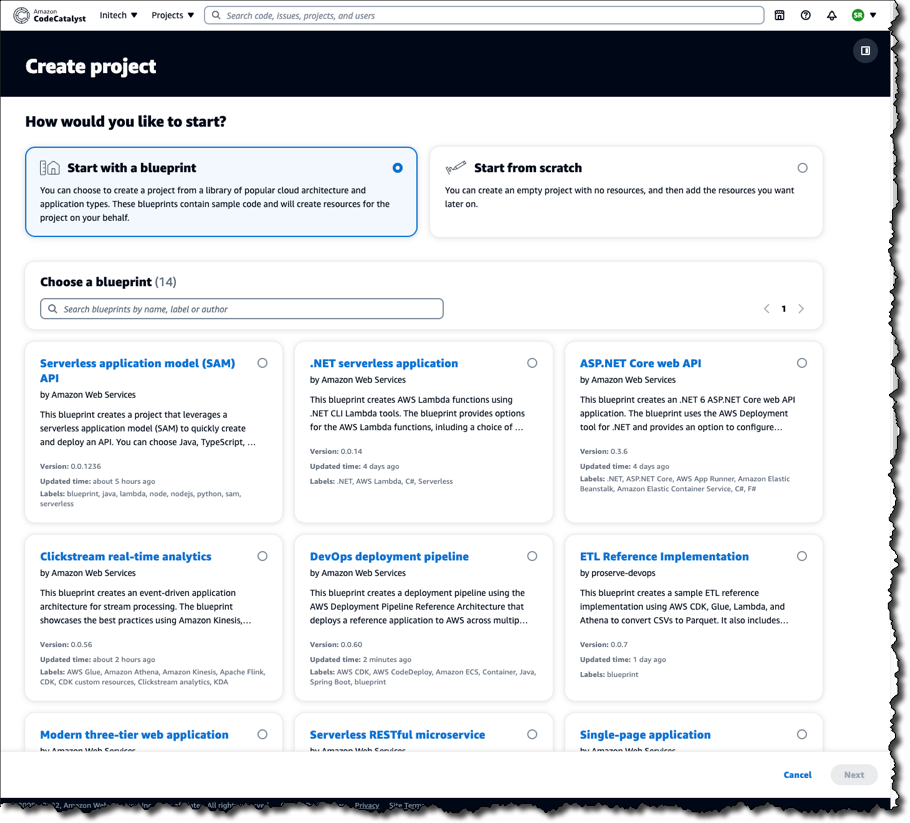
    Amazon Web Services (AWS) this week launched a preview release of the Amazon CodeCatalyst framework that leverages blueprints to automatically provision and configure developer environments in its cloud.

    Announced at the AWS re:Invent 2022 conference, Amazon CodeCatalyst takes advantage of a Project Blueprints tool to launch a source code repository and a project management tracker that are then used to create build and release pipelines. DevOps teams can use either the tools provided by AWS or substitute an instance of, for example, GitHub or the Jira project management software.

    Amazon CTO Werner Vogels told conference attendees the goal is to reduce the friction that developers currently encounter whenever they need to launch a new development project. As part of that effort, Amazon CodeCatalyst promises to make it simpler to consistently replicate development environments using scaffolds in addition to providing dashboards and search capabilities for tracking changes across commits, pull requests and deployments.

    Amazon CodeCatalyst uses a devfile to define the configuration of an environment that comes in four resizable instance options made up of two, four, eight or 16 virtual CPUs. The devfile defines and configures all the resources needed to code, test and debug a project. Devfiles, which are added to the source code repository by the selected blueprint, can also be modified.

    Collectively, those capabilities make it possible to deploy sample TypeScript, Python, Java, .NET, JavaScript, React, Angular and Vue code running in a few minutes. Developers can work with the AWS Cloud9 integrated development environment (IDE) or use tools such as JetBrains IntelliJ IDEA Ultimate, PyCharm Pro, GoLand and Visual Studio Code on their local machine. Developers, as a result, can simply switch between multiple codebases or collaborate with other developers as needed.

    The pipelines can be run on pre-provisioned builds in the cloud or organizations can opt to deploy their own container environments. Developers can incorporate build actions that are built in or provided by AWS partners in addition to incorporating GitHub Actions to compose fully automated pipelines that can be configured using either a visual editor or YAML files. Build and release pipelines enable deployment on Amazon Elastic Container Service (Amazon ECS), AWS Lambda and Amazon Elastic Compute Cloud (Amazon EC2) services.

    In general, Vogels advocated that IT teams should build event-driven applications that are loosely coupled to make it simpler to add new capabilities to existing applications running at scale without impacting the entire codebase. To make it simpler to build those types of applications, AWS added an Amazon EventBridge Pipes tool that creates point-to-point integrations between event producers and consumers in a way that eliminates the need to write that code. AWS also made available in preview a graphical AWS Application Composer tool that makes it simpler to design, configure and build serverless applications using infrastructure-as-code (IaC) definitions.

    It’s not clear to what degree developers will be embracing event-driven applications. As a programming model, event-driven architectures have been around for decades. The issue has been those applications also have tended to be among the most challenging to build and maintain. AWS is now clearly signaling its intent to make building those applications a lot easier.