Tag: automation

  • VMware Preps Generative AI Assistants to Automate IT Workflows

    VMware Preps Generative AI Assistants to Automate IT Workflows

    At its VMware Explore 2023 conference today, VMware previewed what will become a suite of intelligent assistants that use generative artificial intelligence (AI) to automate the management of a wide range of IT tasks.

    Krish Prasad, senior vice president and general manager for cloud infrastructure at VMware, said VMware will eventually build out assistants for managing individual platforms such as VMware vSphere and the integrated VMware Cloud Foundation (VCF) platform through which the company aggregates those offerings into a single platform.

    VMware is creating those assistants, also known as co-pilots, using multiple large language models (LLMs) that the company uses to train AI models using code written by site reliability engineers (SREs), said Prasad. That approach ensures that the recommendations being made along with the code generated are of the highest quality, he added.

    That approach will enable IT teams to identify configuration drift that might be adversely impacting performance or that could create a cybersecurity risk, for example, noted Prasad. The first of those assistants is being made available in beta for VMware Tanzu, a platform based on Kubernetes. VMware is also building an assistant for its NSX virtual networking software that analyzes security events to generate policies and rules that can be applied to firewalls in real-time as threats are identified.

    It will then be up to each IT team to decide whether to implement those recommendations. Over time, it’s clear that the management of IT infrastructure is going to become increasingly automated as confidence in those recommendations increases, he added. In fact, the ultimate goal is to fulfill the promise of ‘lights-out’ IT management, said Prasad.

    In effect, advances such as these will lead to the democratization of DevOps workflows as it becomes simpler to manage IT infrastructure at scale. IT organizations will be able to invest more resources in building and deploying applications rather than hiring specialists to manage IT infrastructure, noted Prasad.

    In fact, the pace at which applications are built and deployed should dramatically increase in the months ahead, Prasad predicted.

    The rise of generative AI creates a unique opportunity for IT teams to become more relevant than ever to their organizations. It will soon be possible to build and deploy a wide range of distributed applications capable of processing and analyzing data at the point where it is created and consumed.

    While generative artificial intelligence (AI) has captured the popular imagination, it’s becoming apparent that multiple forms of AI will soon be used together to automate DevOps workflows at levels of unprecedented scale.

    Machine learning algorithms, of course, are already used by many organizations to automate everything from analyzing log data to identifying security issues to surfacing patterns in tests made using multiple regression, function and unit testing tools. With the rise of generative AI, it is now possible to automatically generate code and create summaries of reports that multiple stakeholders can more easily understand. Generative AI doesn’t replace the need for previous use cases involving machine learning algorithms. Instead, generative AI makes use of a form of deep learning algorithms to create different types of AI models.

    As a result, DevOps workflows will soon be invoking multiple classes of AI models to automate workflows in ways that should enable IT teams to automate processes at unprecedented levels of scale.

  • System Initiative Open Sources Digital Twin Tool for DevOps

    System Initiative Open Sources Digital Twin Tool for DevOps

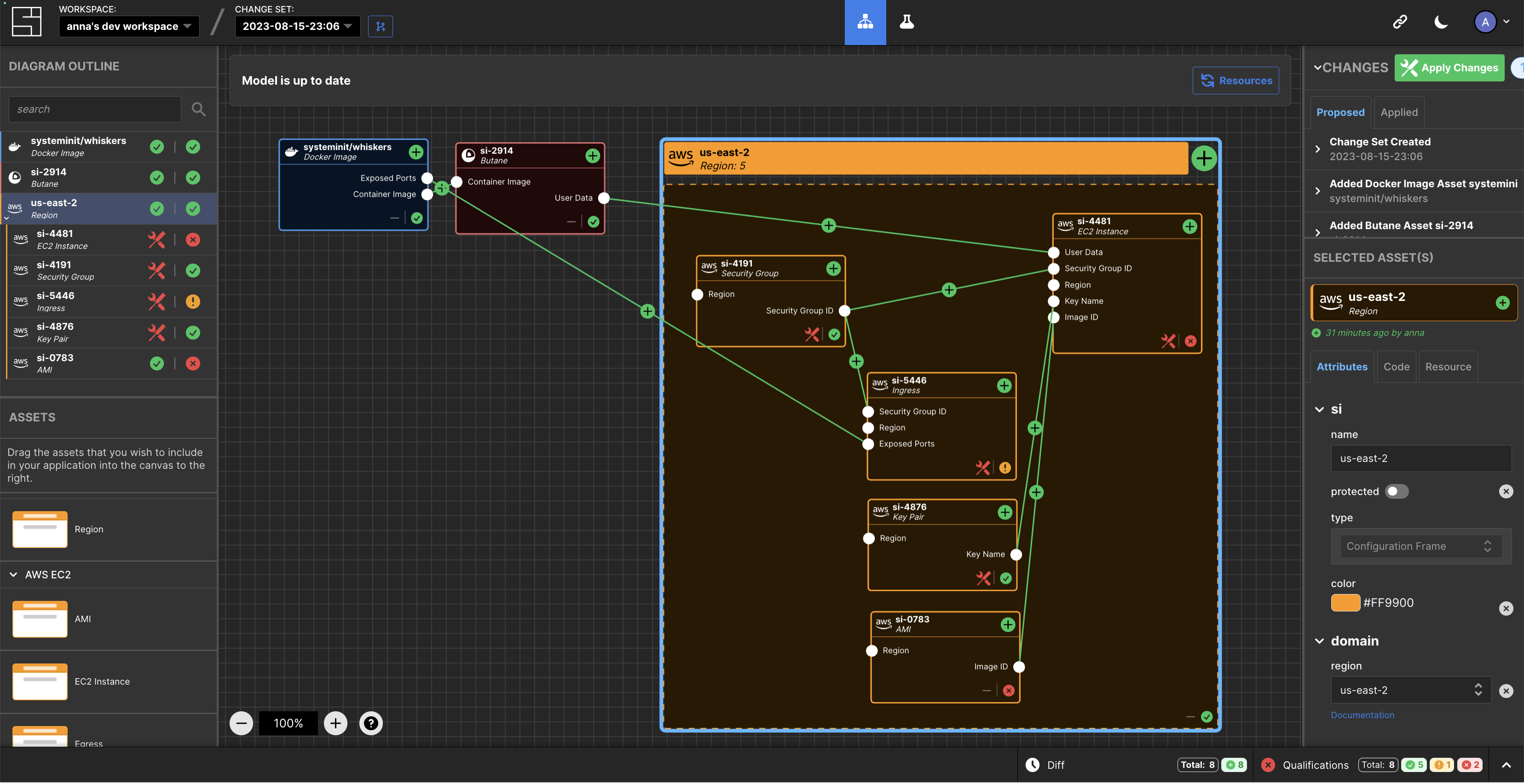
    System Initiative (SI) today announced it is making the digital twin tool it developed to manage DevOps workflows available under an open source Apache 2.0 license.

    Company CEO Adam Jacob said the approach will enable third parties to contribute to a project that is still early in its development cycle while SI provides commercial support via a subscription service.

    SI has developed a tool that creates a digital twin of a DevOps environment that provides a level of abstraction that makes it simpler to manage complex workflows at scale.

    At the core of that effort are models of IT environments created by the SI platform accessed via a visual interface. The automation framework built into the platform uses the relationships between models to infer configuration dynamically and generates typescript code that a DevOps team can then apply to automate a task.

    Feedback loops are provided in real-time to give insight into the viability of a configuration, in addition to eliminating the need for state files to track and ‘plan’ versus ‘apply’ stages.

    This approach streamlines a lot of the complexity that creates bottlenecks in DevOps workflows in what heralds the arrival of a new DevOps 2.0 era, said Jacob.

    In general, SI is making a case for an alternative approach to managing DevOps as the existing platforms and framework are fundamentally broken, added Jacob. Models that create digital twins of DevOps environments represent the arrival of a new era of software development and deployment, he noted.

    As more organizations realize their dependency on software to drive digital processes many are then looking to improve the productivity of developers and the DevOps teams that support them. Unfortunately, many DevOps teams are supporting DevOps workflows using custom code that varies widely in quality. Rather than rely on a DevOps engineer to write code, the SI digital twin tool will create code that can be applied more consistently to create DevOps workflows programmatically.

    One of the reasons few organizations today have fully automated DevOps across the application development and deployment process is that it’s simply too difficult to achieve using legacy tools and DevOps platforms. It’s not clear to what degree a digital twin approach to managing DevOps will resolve that issue, but when coupled with the arrival of artificial intelligence (AI) capabilities the way DevOps is managed is clearly about to transform.

    It may take a while for that transition to occur, but DevOps teams that have historically embraced automation are at the very least going to aggressively experiment with technologies that promise to eliminate much of the drudgery that makes DevOps more tedious than need be. The issue, as always, will be determining which technologies live up to the current level of hype being generated in a way that can be easily adopted.

  • Considering Scriptless Automation: iOS App Dev in 2023

    Considering Scriptless Automation: iOS App Dev in 2023

    According to Statista, over 31,000 apps were released on Apple’s App Store in March 2023. As impressive as that is, it’s considerably smaller than the number of apps submitted to the Apple store during the same month.

    And it’s probably less than the number of apps removed from the App Store.

    Why?

    According to Apple, most submissions fail because of common issues like bugs, crashes, incompleteness, placeholder data and broken links.

    But getting app approval is just one of many challenges faced by iOS developers today.

    Contemporary iOS App User Expectations

    The truth is, even if you slip by Apple, there’s an even greater critic to be concerned about: Your audience. Users are much less forgiving and have high expectations. If your app isn’t perfect, you’ll lose your chance at meaningful adoption and your users will just go elsewhere.

    For iOS users, perfect is simply the status quo, and users have grown to expect it. In practice, this means that apps must be stable across devices and versions, see regular improvements. and provide a great user experience at all times.

    Seamless experience between devices, versions and iterations
    iOS users expect the same experience across multiple devices. From one iPhone to the next, from version to version and from screen size to screen size. It’s the responsibility of developers to prioritize a consistent experience across devices.

    Fast release cycles and regular updates
    Contemporary app users demand feature-rich applications that go above and beyond the simple functions they expect from an app. Given the statistics above, chances are that the competition is fierce. Achieving success usually requires an efficient and speedy release cycle with more planning, more deployments and more testing.

    Easy and frictionless user experience
    User experience (UX) and functionality are one of the big reasons iOS adoption is so strong. People have come to expect high quality from anything under the Apple banner: Users expect an intuitive and trouble-free user experience on every app with which they interact. Every user’s experience needs to be intuitive, issue free and consistent with other iOS applications.

    Challenges Abound

    Meeting those escalating user expectations comes with a wide variety of challenges. For example:

    Device landscape fragmentation
    With so many device types and form factors in circulation, how do you test across all of them? With dozens of iterations of the iPhone combined with an array of versions, screen sizes and configurations, app developers need a way to test on enough devices to cover the majority of their user bases.

    This leads many developers to turn to simulators and emulators to cover devices they lack access to.

    This poses another problem. Simulators aren’t perfect. A simulator doesn’t replicate the functions of the actual device; it can only mimic certain aspects of an iOS device. And it simply can’t effectively mimic hardware, component functionality or network.

    Using a simulator, you can’t test how an application will respond to factors like low battery, a rising network spike, or limited memory, not to mention GPS and camera functionality. You also can’t monitor usage metrics or run meaningful performance tests.

    Real devices present their own challenge. The vast majority of the time, developers will have to worry about the cost of acquiring, storing, maintaining and updating devices. In addition, they’ll have to centralize and control access to them. In an increasingly remote workforce, it’s not a great strategy.

    Manual tests
    Today, most organizations are over-reliant on manual testing. The result? Running test cases becomes the bottleneck that holds up releases. Sure, manual testing is unavoidable in some cases, but their ad-hoc, inconsistent nature leaves room for error. No matter how detailed the instructions may be, people test differently, and that’s a disaster waiting to happen in today’s complex software world.

    Maintaining complex test scripts
    If you’re automating test cases, you’ve experienced the pain of maintaining code-based test scripts. Every release requires coinciding updates to countless unit tests, integration tests and UI tests. The smallest changes can break test cases, causing false negatives and more deployment delays.

    On top of that, you’ve also got to worry about retaining talent that understands your language-specific testing framework. Given the economic uncertainties of today, that’s certainly not a good situation to be in.

    Constant iOS updates
    Each year sees Apple deliver iOS major releases and a variety of minor releases, patches and bug fixes. Organizations have to test after two release cycles: Their own and Apple’s. Failure to do so can lead to compatibility and App Store compliance issues.

    App store guidelines
    As I mentioned above, Apple maintains strict guidelines for any apps published on the App Store. Excellent testing can mean the difference between releasing an app or waiting another few weeks for the next approval. When time is money, this adds up fast.

    Security at scale
    As requirements change, scope increases and features add up, it’s easy to see how it can become more and more challenging to monitor for potential security flaws. In turn, testing needs to be continually updated to reflect the latest security risks.

    A Shift Toward Scriptless Solutions

    Scriptless automation is part of a growing industry of no-code automation tools, often dubbed the no-code revolution. It’s everything test automation is without the reliance on code-based frameworks.

    Scriptless test automation involves recording user interactions with app elements, asserting expected outcomes and assessing the results. The test is then automated, templatized and extended to test other scenarios.

    With scriptless test automation, you can walk through test cases step by step. Some tools even allow you to test on live devices and choose from real iOS devices that are hosted in the cloud.

    Scriptless testing allows you to:

    ● Easily reuse and templatize test scripts. Scriptless automation makes it easier to reuse test cases, create templates and compose new test cases.

    ● Enable faster time to value. Write test cases quicker, make changes without knowing how to write code and integrate directly with your CI/CD tool. As soon as you make changes to your application, your testing team is right there. Some no-code testing tools can analyze your source code and identify testing gaps so that you can address them right away.

    ● Untangle the web of code-based dependencies. With scriptless iOS test automation, testers don’t have to lift and shift their code every time they make a big change. Instead, the no-code framework provides a visual, easily-navigated UI that tells you simply what’s passing, what’s failing and what needs to be updated.

    ● Improve collaboration between teams. Scriptless iOS test automation improves collaboration between testers and developers by making it easy for all teams to visualize test cases.

    Real Device Testing

    When the pain points of fragmentation meet the shortcomings of simulation, developers are wise to test on real devices. At the end of the day, live device testing is the only way to accurately capture an end user’s experience.

    Yet it’s no secret that managing your own device lab is expensive and unrealistic for modern remote work environments. A real device cloud setup solves this problem: A device cloud hosts devices for you that you can access from your desktop, from anywhere.

    Given the ever-increasing complications of today’s mobile app landscape and the incredibly cut-throat mobile app landscape, it’s worth keeping in mind that you may only get one chance at making the right impression on your audience. Getting testing right is the key.

    Into the Future

    Everyone expects more. As a competitive organization, you have to do more with less: Fewer resources, less time and less room for error. Scriptless automation and real device testing won’t guarantee that your app stands out from the crowd, but it will certainly help.


  • Automation in DevOps: Advancements, Platforms and Examples

    Automation in DevOps: Advancements, Platforms and Examples

    Automation is the backbone of DevOps. By facilitating seamless integration and continuous delivery, it revolutionizes the ways organizations deliver software, products and services. When applied correctly, automation can significantly enhance productivity, reduce time-to-market, improve software quality and minimize the risk of human error.

    A range of automation tools support these goals, each tailored to a specific aspect of the software development life cycle (SDLC).

    From code integration to testing and deployment, these tools optimize processes and enable the rapid and reliable release of software. In this article, we will explore the role of automation in the DevOps landscape.

    The Importance of Automation in DevOps

    Automation in DevOps is the process of designing, developing and deploying software and systems with minimal human intervention. The goal is to streamline the software development life cycle from design, development and testing to deployment and management.

    Automation provides several benefits:

    1. Speed and efficiency: Automation enables quick development and deployment of software, which results in faster delivery of features and fixes to customers.
    2. Reliability: Automated systems are less prone to human error, resulting in more reliable code deployment and management.
    3. Consistency: Automation guarantees that routine tasks are performed the same way every time, ensuring consistent results.
    4. Reduced cost: Automation eliminates the need for manual intervention in routine tasks, leading to a reduction in operating costs.
    5. Increased productivity: By taking over routine tasks, automation frees up the team to focus on more critical, high-level tasks.

    Automation in DevOps: An Overview

    Automation in DevOps encapsulates various stages, from development and testing to integration, deployment, and monitoring. The process is often referred to as a DevOps pipeline, a set of practices aimed at reducing development times and improving software quality.

    ● Development: Automation begins at the development phase with tools for source control (like Git), which help developers manage and track code changes.
    ● Integration: The next step is continuous integration, where tools like Jenkins automate the build process, allowing teams to identify issues early in the development life cycle.
    ● Testing: Automated testing tools (like Selenium) streamline the testing process, ensuring that the code is error-free and ready for deployment.
    ● Deployment: Continuous deployment tools (like Kubernetes) automate the deployment process, providing fast, consistent and repeatable deployments.
    ● Documenting: Technical documentation is automated with tools like Scriversi to ensure updated, error-free documentation through each version and release.
    ● Monitoring: Finally, automated monitoring tools (like Prometheus) offer real-time insights into the application’s performance, facilitating proactive troubleshooting.

    Automation’s main objective is to minimize manual intervention, thus reducing the risk of errors, improving efficiency and fostering a culture of shared responsibility.

    Examples of Automation in DevOps

    1. Continuous Integration/Continuous Deployment (CI/CD): CI/CD is a critical element of DevOps automation. With CI, developers merge their changes back to the main branch as often as possible. The CI/CD server automatically builds and tests every change. For example, Jenkins, a popular open source automation server, allows developers to automate various stages of their build pipeline.

    2. Infrastructure-as-Code (IaC): This practice involves managing and provisioning computing infrastructure with machine-readable script files rather than physical hardware configuration or interactive configuration tools. For instance, Terraform, an open source IaC software tool, provides a consistent CLI workflow to manage hundreds of cloud services.

    3. Configuration Management: This is the process of maintaining a system’s configuration in a known, consistent state. For example, Ansible, a configuration management tool, helps to automate software provisioning, configuration management and application deployment.

    4. Monitoring and Logging: Automated monitoring and logging systems gather data on how software and hardware are performing and alert the team to any problems. One example is Prometheus, a popular open source monitoring and alerting toolkit.

    5. Technical Documentation: Proper documentation is crucial in the software development process. Yet, it is often overlooked or not updated frequently due to time constraints or the tedious nature of the work. When automated, it simplifies and automates the process of creating and maintaining technical documents.

    Final Thoughts

    In the world of DevOps, automation is not a luxury but a necessity. By automating repetitive and error-prone tasks, teams can focus on what they do best: creating innovative solutions that meet customer needs. From CI/CD, IaC and configuration management to monitoring and logging, automation simplifies the software development process, reduces human error and enhances speed and efficiency. Tools like Jenkins, Terraform, Ansible, Prometheus and Scriversi support this trend, providing various automation capabilities that make the DevOps approach more efficient and effective.

  • Automation or Concatenation?

    Automation or Concatenation?

    We’ve been in a period of mergers and acquisitions for a while in the DevOps and DevSecOps spaces, and it seems to be heating up even more. Combined with products expanding to cover a more broad segment of the software development life cycle (SDLC) and strategic partnerships to cover more of the SDLC, it is starting to look like our automation efforts are going to be increasingly driven by vendors. Those efforts will be more concatenation than automation–though technically the same in perception, they vary wildly in implementation, and we should be planning for it.

    Build Versus Buy

    We have always struggled with build versus buy, and we have always struggled with best-of-breed versus overarching solution set. The entire hype of Every. Single. Vendor. Claiming to be a platform is partially driven by the latter argument. Putting “platform” in your marketing does not make a vendor better at those things outside its historical strengths, though, so that movement is doomed to fail for most organizations. Some were already moving to be a platform and had assembled–by M&A or by internal development–an impressive platform already, and those were successful because they were good at a breadth of things. The best of them are continuing this trend. I try to avoid plugging vendors here, but I think an example is in order in this case.

    Akamai’s recent purchase of NeoSec is the poster child for vendors doing the platform thing super well but not resting on their laurels. I’ve followed Akamai’s security offerings for years, and the platform has impressive functionality, but NeoSec is exactly what they needed. It plugs a couple of holes in their security offerings and brings a whole customer base into the Akamai fold. That’s what I’m talking about when I refer to the good ones.

    The problem is the acquisition and expansion of offerings trend is starting to gain a lot of steam, and not every vendor jumping on the bandwagon does the job as well as Akamai does.

    This leaves enterprise IT staff responsible for DevOps and DevSecOps – even straight security staff – with a new set of issues. Best-of-breed is taking a hit again, and overarching solutions are on the rise. The difference is the breadth that some of these new “platforms” offer is massive. And we know that even the good ones will have better and worse parts of the overall solution. So IT now has to start considering what vendors call a feature and how it individually compares to the competition. This will require more up-front work for evaluators. Now, a larger (and growing) list of “features” that were once “products” has to be considered piece-by-piece against the competition, and organizations must evaluate the feasibility (and cost) of implementing two (or even multiple) massive platforms to get the most critical functionality needed.

    As of this writing, point solutions that do one thing extremely well are holding up, but the trend is obvious. Those markets will be subsumed into larger offerings that may not do as well at other parts of the overall problem. Evaluators will have to be more careful and consider their options with an eye to the larger infrastructure and problem domain. Do you want a single vendor doing all of the steps of DevOps or responsible for every aspect of application security? That will be an individual decision and, if not, how the final solution/architecture looks will be a more complex discussion.

    Integration and Automation

    In our quest for integration and automation, many vendors are responding with the concatenation of tools to solve the automation part. You’ll be stuck figuring out if they’re doing it well enough for the org.

    But that’s not a problem you can’t resolve. You’ve been rocking it through staffing issues, lockdowns, growth and shrinking… Just keep rocking it. Choose the solution that makes the overall best sense for your organization, get it running and take a break; head to the beach for some relaxation time. Or whatever you do to clear your head – because the next problem will still be there when you get back, and it’s better to be relaxed when you tackle it.

  • Five Great DevOps Job Opportunities

    Five Great DevOps Job Opportunities

    devopsy.kinsta.cloud is now providing a weekly DevOps jobs report through which opportunities for DevOps professionals will be highlighted to better serve our audience.

    Our goal in these challenging economic times is to make it easier for DevOps professionals to advance their careers.

    Of course, the pool of available DevOps talent is still relatively constrained, so when one DevOps professional takes on a new role it tends to create an opportunity for others.

    The five job postings shared this week are selected based on the company looking to hire, the vertical industry segment and, naturally, the pay scale being offered.

    We’re also committed to providing additional insights into the state of the DevOps job market. In the meantime, for your consideration:

    Indeed.com

    ServiceNow
    San Diego, California
    Senior Software Engineer – DevOps
    $119,970 to $204,030

    LinkedIn

    Fox Tech
    New York, New York
    Senior DevOps Engineer
    $118,000 to $157,500

    SimplyHired.com

    GM Financial
    Arlington, Texas
    DevOps Automation Engineer III
    $113,000 to $143,000

    CareerBuilder.com

    Edward Jones
    Henley, Missouri
    DevOps Technical Architect
    $109,696 to $186,781

    Dice.com

    Suremind Solutions
    St. Louis, Missouri
    DevOps/Site Reliability Engineer (SRE)
    $100,000 to $140,000

  • Are LLMs Leading DevOps Into a Tech Debt Trap?

    Are LLMs Leading DevOps Into a Tech Debt Trap?

    Everyone thought AI would free us from toil. Unfortunately, that’s not true. What it will do, however, is lead to an explosion of technical debt. Some of the most alluring uses of LLMs have the potential to lead to some of the worst outcomes for enterprises and their DevOps and platform engineering teams.

    SK Ventures and Adrian Cockcroft raised the alarm bells in their warning posts about the tipping points LLM introduced into work and society. And in my own Gluecon 2023 presentation, I challenged just how powerful and disruptive the new generation of AI/ML will be for ITOps and DevOps efforts.

    Working Faster is not Working Smarter

    There is no doubt that LLMs are powerful and will change how we think about expertise and knowledge work.  While they are not truly innovating, their ability to draw on such a vast pool of human expertise makes it difficult to distinguish from true creative work. Since they are unbounded, they will cheerfully use the knowledge to churn out terabytes of functionally correct but bespoke code.

    It’s easy to imagine a future where LLMs crank out DevOps scripts 10x faster. We will be supercharging our ability to produce complex, untested automation at a pace never seen before! On the surface, this seems like a huge productivity boost because we (mistakenly) see our job as focused on producing scripts instead of working systems.

    But we already have an overabundance of duplicated and difficult-to-support automation. This ever-expanding surface of technical debt is one of the major reasons that ITOps teams are mired in complexity and are forever underwater. Generating even more scripts, even if they were better written, does not reverse the trend.

    Can AI/ML Avoid This Technical Debt Trap?

    It depends on how we use the expertise in the models. Instead of asking it to generate new code, we could ask it to interpret and modify existing code. For the first time, we have tools to take down the “not invented here” barriers we’ve created because of the high cognitive load of understanding code. If we can help people work more effectively with existing code, then we can actually converge and reuse our systems. By helping us expand and operate within our working systems base, LLMs could actually help us maintain less code.

    Imagine if the teams in your organization were invested in collaborating around shared systems! We haven’t done this well today because it takes significantly more time and effort. Today, LLMs have thrown out those calculations.

    Taking this just one more step, we can see how improved reuse paves the way for reduction of the number of architectural patterns. If we improve our collaboration and investment in sharing code, then there is increased ROI in making shared patterns and platforms work. I see that as a tremendous opportunity for LLMs to improve operations in a meaningful way.

    It comes down to whether we ignore complexity by replacing it or embrace complexity by understanding it. I see this as a choice between independence or collaboration, as illustrated by the table below.

    LLM Driving Independence

    LLM Driving Collaboration

    Create new code

    Interpret existing code

    Replace existing code

    Maintain existing code

    Design new architectures

    Be a guide and mentor

    Build new stacks

    Evaluate alternatives

    Bypass documentation

    Improve documentation

    Can AI Help us Collaborate?

    We keep taking the same hardware and software components and then building unique systems. That variation makes it impossible to leverage each other’s work. At its heart, the reusability problem lies in the difficulty of understanding systems, and that makes it nearly impossible for us to work together, collaborate, reuse and accelerate.

    Breaking this cycle has been our mission at RackN for nearly a decade. We’ve seen tremendous ROI from availability, reliability and speed when customers are able to leverage standardized infrastructure pipelines. We’ve seen firsthand that it is possible to guide teams into collaboration with sufficient guidance, mentoring and training. Collaboration creates 10x outcomes even without AI, but it takes building expertise, deliberate effort and leadership discipline to implement.

    Why does collaboration create 10x ROI?  It works because true innovation actually comes from understanding and building on top of systems rather than rebuilding them from scratch over and over again. The key is being able to leverage LLMs to better understand existing automation and platforms instead of creating yet another bespoke stack.

    Enterprises Should use LLMs to Drive Collaboration

    I believe that the most effective enterprises will use these tools to elevate their IT leaders and architects to focus on collaboration and reuse. They must actually direct them to produce less bespoke automation; instead, they can use expertise in these tools to find and maintain existing systems. LLM presents options, but collaboration requires new thinking and strong leadership.

  • How TestOps Enhances DevOps and Software Development

    How TestOps Enhances DevOps and Software Development

    Businesses increasingly use DevOps and TestOps practices to develop and deliver high-quality software products. In this article, I will explore the concept of TestOps, its integration with DevOps and the benefits of implementing automated testing to enhance product quality, accelerate release cycles and increase the transparency of CI/CD processes.

    Why DevOps and TestOps Should be Integrated

    TestOps, a combination of testing and operations, is a software development methodology emphasizing the importance of integrating testing throughout the development life cycle. On the other hand, DevOps focuses on bridging the gap between development and operations to achieve faster delivery and higher-quality products.

    The key benefits of seamlessly integrating TestOps and DevOps include the following:

    • Enhanced product quality and accelerated release cycles
    • Increased transparency and efficiency in CI/CD processes
    • Faster bug detection (shifting left)
    • Improved user experience and reduced amount of bugs in the final product

    By properly setting up TestOps, companies can make their DevOps processes more efficient, transparent and bug-free. Well-integrated testing in the CI/CD process allows for faster bug detection, ultimately saving companies resources, money and time.

    Detailed Benefits of Integrating TestOps With DevOps

    Organizations can reap several benefits by seamlessly integrating testing into the deployment pipeline. In this section, I will outline the key goals of integrating TestOps with DevOps and how they contribute to the success of software development projects.

    Integration of DevOps and TestOps for Seamless Shift Left

    Integrating DevOps and TestOps aims to facilitate shift-left testing, enabling organizations to identify and address issues early in development. By incorporating testing from the outset, organizations can achieve the following goals:

    • Early bug detection and prevention through continuous testing: By conducting continuous testing throughout the development cycle, potential bugs and issues can be detected and addressed early on, reducing the likelihood of significant problems arising later.
    • Ensuring clean and efficient code deployment: Integration of TestOps with DevOps enables organizations to establish streamlined processes for code deployment, ensuring that the code is clean, efficient and free from defects, thereby improving the overall quality of the product. By such integration, tests will suit each phase in the deployment process, meaning that the only relevant parts will run when needed and take only required resources.

    Empowering Bug-Free Software Development With TestOps

    TestOps, when integrated with DevOps, empowers organizations to develop bug-free software and enhance product quality by offering distinct bug detection, cost savings and resource optimization advantages. The following benefits can be realized through this integration:

    • Rapid bug identification and resolution: TestOps practices enable organizations to quickly detect and address bugs during the testing phase, minimizing the impact on the development timeline and preventing defects from reaching the end user.
    • Significant cost savings and improved customer experience: Proactively identifying and resolving defects during the testing phase with TestOps reduces post-production defects, leading to cost savings associated with bug fixes and an enhanced overall customer experience.
    • Empowering testers and optimizing resource utilization: The integration of TestOps with DevOps ensures efficient testing activities and resource allocation, contributing to the delivery of higher-quality end products that meet or exceed customer expectations.

    How to Get Started With Test Automation

    While the process of integrating TestOps with DevOps can vary depending on the maturity of the company and the project, certain key steps can be taken to ensure success:

    1. Analyzing critical paths: Identify the essential processes and areas that require testing and prioritize them accordingly.
    2. Starting with small chunks: Begin by changing one area at a time and gradually expand the scope of your testing as you gain confidence in the process.
    3. Reviewing existing tests: Review logs and artifacts of existing tests to identify areas that require improvement or additional testing.
    4. Finding the right specialists: Ensure you have the right specialists on your team to help you with the integration process.

    Also, it is essential to consider the following factors when defining a test automation strategy:

    1. Release frequency and the requirement for diverse test types: Determine the frequency of releases and the types of tests required to ensure that your automated testing strategy is tailored to your needs.
    2. Availability and usability of tools: Choose testing tools that are reliable and easy to use and that can be integrated seamlessly with your existing DevOps tools.
    3. Product maturity: Decide whether to incorporate automated testing from the outset or during the transition to CI/CD, depending on the maturity of your product.
    4. CI/CD environments and testing data: Establish the necessary testing infrastructure and provisioning test environments early to ensure your automated testing process runs smoothly.
  • Tabnine Unveils Beta of Generative AI Automated Testing Tool

    Tabnine Unveils Beta of Generative AI Automated Testing Tool

    Tabnine this week made available in beta a tool that enables developers to use natural language to interact with the artificial intelligence (AI) models embedded within its test automation platform.

    Brandon Jung, vice president of ecosystems for Tabnine, said Tabnine Chat extends generative AI capabilities the company developed to make it simpler for developers to invoke its test automation platform from within their integrated development environment (IDE).

    In addition to making it possible to search a codebase more efficiently, that capability can also be used to explain how a piece of code functions, said Jung.

    Developers can also generate new code via a natural language interface using Tabnine Chat in the same way other generative AI tools do, he added.

    In addition to developing its own LLMs, Tabnine previously announced it will be integrating LLMs provided by Google as part of a strategy to mix and match LLMs regardless of where they are hosted.

    Unlike general-purpose LLMs, the ones used by Tabnine were trained using a narrower base of testing code that the company curated using tests made freely available on the internet. No customer data was used to create any of those tests, so developers do not need to worry their code may inadvertently be accessed by anyone else, noted Jung.

    In general, as AI makes test creation simpler, tests will be run more frequently, said Jung. Over time, those AI capabilities and more frequent tests should significantly improve the overall quality of applications running in production environments, he added.

    It’s now only a matter of time before generative AI is applied across the entire software development life cycle (SDLC). Testing, however, may be one area where it will have the earliest impact.

    In the meantime, the debate over the impact generative AI will have on DevOps continues. Some proponents contend most of the software engineering process is about to become automated, while others suggest there will always be a need for a human to be in the loop of any process automated using AI models. Much of the current level of toil associated with DevOps today will be reduced, but the need for software engineers to manage the overall process will remain, they contend.

    The one thing that is certain is that the pace at which applications are built and deployed is about to be greatly accelerated. Prior to rise of generative AI, testing processes were barely keeping pace, so as more code is created with the help of AI, the need for similar advances in testing will become acute.

    There is as much irrational exuberance about AI as there is fear and loathing, but DevOps teams that committed early on to ruthless automation will naturally be at the forefront of adoption. The immediate challenge is assessing what functions will be automated and the impact those changes will have on the way DevOps teams are currently structured. Ultimately, the goal is to eliminate as many of the bottlenecks that conspire to slow application development and deployment while simultaneously improving the quality of the application experience.