Tag: authentication

  • Apple Outage Outrage | Linux Random Redo | Okta Hacked (or Not)

    Apple Outage Outrage | Linux Random Redo | Okta Hacked (or Not)

    Welcome to The Long View—where we peruse the news of the week and strip it to the essentials. Let’s work out what really matters.

    This week: Why Apple services were down, Linux gets a huge RNG overhaul, and we wonder if Okta was hacked again. (more…)

  • Authentication in Serverless Apps—What Are the Options?

    Authentication in Serverless Apps—What Are the Options?

    Serverless applications are growing in popularity among DevOps engineers. They provide a convenient, predictable way to run simple processes like CI/CD builds or automation scripts with no need to stand up infrastructure. They are also commonly used to deploy microservices. However, serverless applications present unique security challenges, one of them being authentication. 

    How can you ensure services communicate with other services or with the outside world only if authorized to do so? How can you ensure users can conveniently and securely access multiple instances of a serverless function?

    In serverless applications, there are many components interacting—not only end users and applications but also cloud vendors and applications. This is why common authentication methods, such as single factor, two-factor and multifactor authentication offer only a bare minimum foundation. Serverless authentication requires a zero-trust mentality—no connection should be trusted, even communication between internal components of an application should be authenticated and validated.

    To properly secure serverless authentication, you also need to use authentication and authorization protocols, configure secure intraservice permissions and monitor and control incoming and outgoing access. In this article, I’ll cover all these briefly and demonstrate a practical example—setting up authentication in the AWS serverless ecosystem.

    What Are the Most Common Authentication Methods?

    Here is an outline of the standard authentication methods used by most applications.

    Single-Factor Authentication

    Also called primary authentication, this is the most prevalent and straightforward type of authentication. Single-factor authentication asks for only one authentication method; for example, a security PIN, password or PIV card, to gain access to a service or system.

    These methods are solid in relation to familiarity and usability; however, they are generally linked to poor security and credentials can readily be stolen or guessed through phishing, data breaches or by using keyloggers.

    Two-Factor Authentication

    Two-factor authentication (2FA) adds another layer of intricacy, as it needs an additional factor to authenticate a user’s identity. Common verification methods include one-time passwords, tokens created by a registered device or PIN numbers. The presence of two verification methods significantly improves your level of security. 

    Multifactor Authentication

    This is the most complex process of authentication. It makes use of two or more independent factors to verify a user’s identity and authorize access to the system. In common scenarios, multifactor authentication (MFA) makes use of at least two of the following factors:

    • A PIN or password (something known)
    • Security token or mobile phone (something owned)
    • FaceID or fingerprint (something you are)
    • Location information, typing speed or the like (something you can do) 

    Authentication and Authorization Protocols

    An authentication protocol is a communication protocol that protects authentication data as it transfers between two entities. It enables a receiving entity to authenticate a connecting entity as well as authenticate itself to a connecting entity. This is achieved by declaring the type of information required for authentication and syntax.

    There are several types of authentication and authorization protocols, including:

    • Lightweight Directory Access Protocol (LDAP)—a software protocol that enables anyone to find data about individuals, organizations, and resources like files and devices within a network. LDAP allows this whether a user uses the public internet or a corporate intranet.
    • The Security Assertion Markup Language (SAML)—an open standard that allows sharing security information about authentication, authorization and identity across several different systems. 
    • Open Authorization (OAuth)—an open standard authorization framework designed for token-based authorization established over the internet. OAuth enables third-party services to use end-user account information without exposing user account credentials to the third party. This blog post can help you understand the differences between SAML and OAuth.
    • OpenID—enables authentication services and websites to exchange security information in a standardized manner. OpenID Connect—the newest version of the protocol—provides improved identity management, support for mobile application development, and interoperability. Learn more in the official OIDC FAQ.

    Secure Authentication on Serverless

    In serverless systems, there are four forms of access—four forms of communication that should be secured. An individual service won’t have to include all four, but the categories that it does feature should be well-protected. 

    Intraservice Access

    Creating a system by uniting serverless services has many advantages. However, you should consider the security of every additional service. 

    A service with excess permissions is a liability. Unnecessary permissions provide excessive access to data, actions or services, and a bug might let malicious users exploit that service and use its permissions to endanger your system. Hence, you should give careful consideration to the permissions required by each service.

    Effectively overseeing intraservice access permissions is often an overwhelming job. Luckily, all of the top-tier cloud providers have native access management services to make this task simpler. AWS has AWS IAM, Azure has Azure Active Directory and Google Cloud Platform (GCP) provides Cloud IAM. 

    Incoming Access

    A network is made accessible through a SaaS offering to external users. Access will be restricted, and every user will require the official credentials to achieve that access. 

    However, this brings up the same problems raised above—the secrets must be stored somewhere. You cannot manage how your users access and store the credentials that you provide them with; therefore, you should assume that their credentials are not being kept securely and that they may be compromised at any point.

    This would appear to be an unmanageable issue, but there is a solution—to provide temporary credentials. This means that even if the secrets were revealed, they would expire shortly afterwards. 

    The cloud providers have services for this. Google Cloud IAM offers short-lived credentials, AWS IAM lets you create temporary credentials and Azure Active Directory lets you configure expiration dates for its signatures that have shared access.

    Outgoing Access

    When your organization’s serverless function has access to an external third-party service, it typically needs some sort of access credentials. These credentials need to be kept somewhere, but this storage is sometimes not as secure as it should be. Today, certain web applications continue to store secrets in databases, text files or hardcoded within the function code. 

    Cloud providers have services for securely retaining credentials and secrets. AWS has AWS Secrets Manager, Azure offers Azure Key Vault and GCP offers Google Cloud Secret Manager.

    End User and Customer Access

    The issues with this access type are akin to those for incoming access, though the solution is different. Whether in B2B or (particularly) B2C environments, not many users would put up with a requirement to continuously regenerate or refresh their credentials. Thus, another approach is needed. 

    The top-tier cloud providers all have a user authentication service—Azure Active Directory B2C, AWS Cognito and Google Identity Platform. You should also consider using third-party end-user verification, as this will help you avoid vendor lock-in. Third-party offerings also tend to offer a better developer experience. The most common third-party authentication providers are Okta and Auth0.

    AWS Lambda Authentication Solution Example

    Amazon Cognito offers managed authentication and authorization that can help you build secure web services in a serverless architecture. It is typically used in combination with Amazon API Gateway when building complex serverless applications that require permission control.

    For example, a payroll system may have a manager and two additional employees. The three employees can use their unique usernames and passwords to log into the payroll system—this process is called authentication.

    To retrieve paystubs, the three employees undergo role-based authentication:

    REST API GET /api/employee/{employee_id}/paystubs

    However, the permissions they get through this process should be unique to their needs. This may involve setting up the following conditions:

    • The manager can access the paystubs of all employees.
    • Employees cannot access the paystubs of other employees, only their own. 

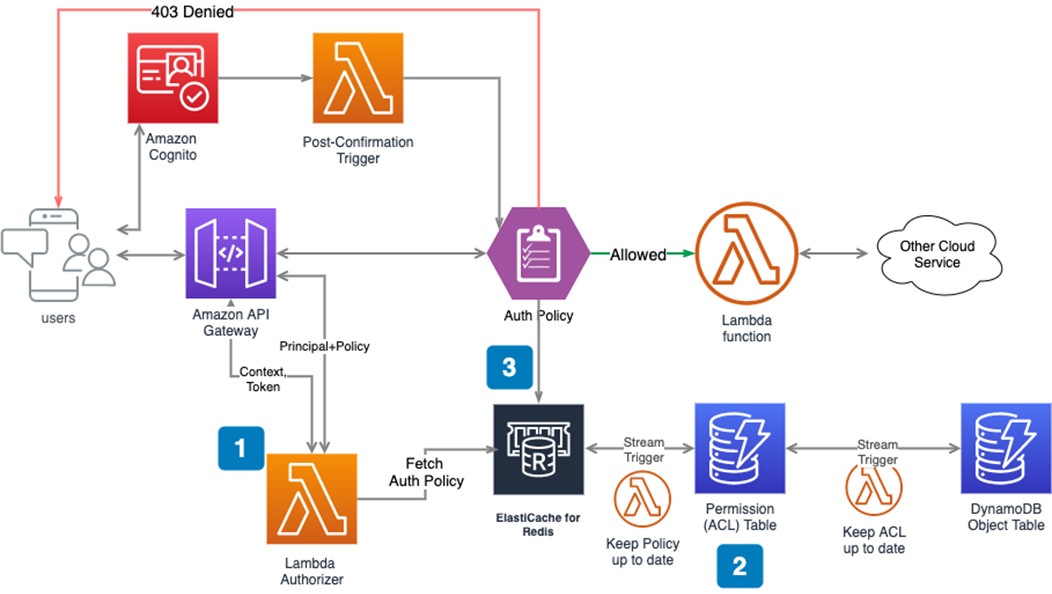
    You can use AWS managed services to fulfill the above requirements and also meet future scaling needs.

    Image Source: AWS

    Step One: Setting Up AWS Lambda Authorizer

    The Lambda authorizer is the brain that centrally determines whether the requester has the relevant permissions for the requested API resources.

    Here’s how you can set it up:

    • Navigate to the Amazon API Gateway and create an authorizer.
    • Select the API resources you want to secure and assign the AWS Lambda function to them.
    • Configure your new AWS Lambda authorizer.

    Step Two: Building User Access Control List (ACL)

    It is crucial to establish user permissions and keep them up-to-date. The approach might differ according to your identity provider. Here is an example of the process if you use Amazon Cognito as your IDP. 

    1. Initialize the ACL

    Every user has a unique ID, so you can describe each user’s permissions by inserting items in the permission table in Amazon DynamoDB when you register with Cognito. The DynamoDB permission table stores the access control list for all users, although the implementation may differ based on the use case. 

    For this example, let’s use a single integer ID for each employee (the UUID strings in real applications tend to be much longer). 

    Manager:

    uuid: xxxx-xxx-xxx-xxxx-xxxxxxxx

    employee: {“allow”: [“/5”,”/5/*”]}

    paystubs: {“allow”:[1,2]}

    Employee 1: 

    uuid: xxxx-xxx-xxx-xxxx-xxxxxxxx

    employee: {“allow”: [“/6”,”/6/*”]}

    paystubs: {“allow”:[3,4]}

    Employee 2: 

    uuid: xxxx-xxx-xxx-xxxx-xxxxxxxx

    employee: {“allow”: [“*”],”deny”:[“/7”,”/7/*”]} // employee_id=7 is the manager of employee 2

    paystubs: {“allow”:[1,2,3,4]}

    2. Manage the Access Control List (ACL)

    The user permissions in a complex project are constantly changing. Employees can be promoted, demoted or terminated, with different access requirements depending on their changing roles. A new manager, for example, needs access to all pay stubs, which means you have to create a new pay stub object for every employee. 

    You can manage user permissions using the Amazon DynamoDB stream:

    Lambda functions can easily be integrated when you insert or modify items in the permissions table. A Lambda function might include code that modifies permissions according to changes to the role of a user.

    3. Build an ACL policy

    Once you’ve established an ACL with user permissions for every object, you should create an authorization policy document. The Lambda function authorizer uses this policy to evaluate whether user API requests should be allowed or denied.

    Amazon API Gateway offers a mechanism for evaluating policies internally. internal policy evaluation mechanism. The Gateway will automatically evaluate any policy JSON returned by the authorizer. For details about Lambda authorizer’s output standard, see this document.

    In this article, I covered the basics of authentication in serverless applications:

    • Single-factor authentication
    • Two-factor authentication
    • Multifactor authentication
    • Intraservice access
    • Outgoing access
    • Incoming access
    • A real-life example with Amazon Cognito

    I hope this will be of help as you gain a better understanding of authentication and authorization techniques that help secure serverless applications.

  • Why Was Facebook Vulnerable to an Authentication Exploit?

    Why Was Facebook Vulnerable to an Authentication Exploit?

    What Happened:

    As part of a bug bounty program, the AppSecure cybersecurity research team found a vulnerability on the authentication mechanism of Facebook. It gave them the ability to potentially gain full control of the social media giant’s more than 1 billion users. The team won a $15,000 bounty for its discovery.

    This vulnerability was found on a niche API, which reminds us that in many cases the most interesting bugs don’t exist on main APIs but on secondary ones that have fewer protection mechanisms in place.

    Anand Prakash, CEO of AppSecure and who was credited with finding the bug, explained what he found: “This gave me full access to other user accounts by setting a new password. I was able to view messages, their credit/debit cards stored under their payment section, personal photos, and other private information.”

    Even though the vulnerability was discovered in 2016, similar weaknesses have been discovered — and in many cases exploited — ever since. Here is a closer look at the Facebook case and lessons to be learned in modern application development.

    Technical Details

    The vulnerability exploited the password recovery mechanism on Facebook. The steps of the process were:

    1. The user starts the “forgot password” process by using their email address.
    2. Facebook sends a text message with a temporary 6-digit secret token to the user.
    3. The user enters the received temporary code, and the browser sends an API call to “POST facebook.com/recover/as/code/” with the secret token.

    Facebook had implemented an anti-brute force mechanism on this API that blocked the user after 10 failed attempts. However, during their research, the AppSecure team found that the same API endpoint existed on different API hosts, under “beta.facebook.com” and “mbasic.beta.facebook.com.” These API hosts didn’t implement the anti-brute force mechanism, allowing the attacker to easily iterate through the secret token and reset the victim’s password.

    Why Current Security Solutions Can’t Detect It

    Keeping track of your APIs it’s not an easy task. Modern organizations might have dozens or even hundreds of API hosts for different environments, regions, or versions. Each API host can expose multiple API endpoints that are related to authentication processes including login, forgot password, and one-time login link. Many security solutions in the market focus on protecting your main APIs and don’t have enough visibility into the less common or less used APIs (such as Facebook’s beta API in the example above). Sophisticated attackers choose to target those niche APIs.

    How Traceable Solves the Problem

    Traceable AI monitors all APIs including the different environments, versions, and regions. For each API host, we automatically and manually detect the authentication endpoints that your APIs expose (including login, forgot password, etc).

    This granular understanding of the API structure allows us to set very strict protection for your most sensitive assets.

    Interested to learn more?

    Watch our recorded demo and see Traceable Defense AI in action!

  • Okta Adds Free Developer Edition to AppSec Service

    Okta Adds Free Developer Edition to AppSec Service

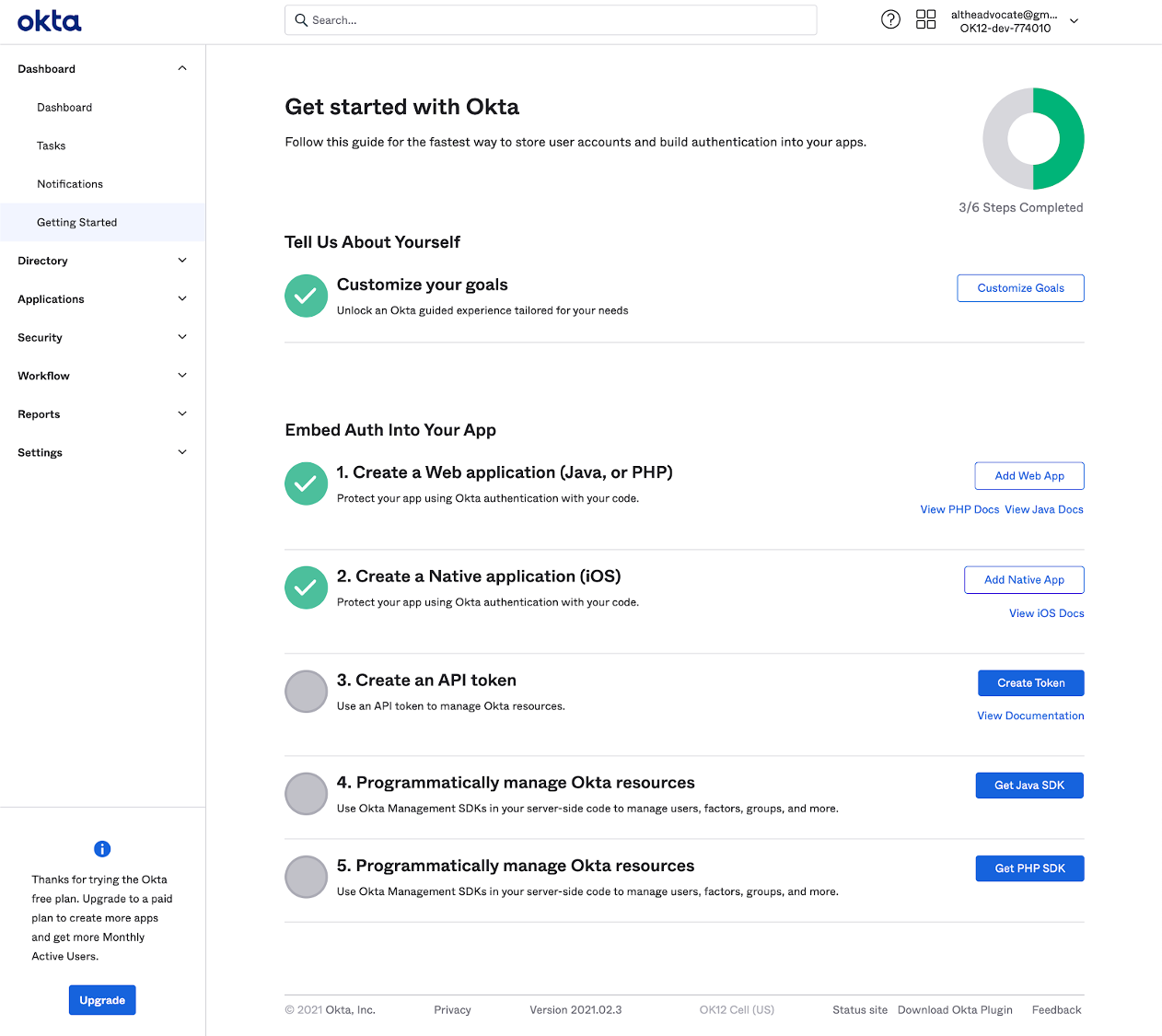
    Okta this week lowered the barrier to adoption of DevSecOps best practices by making available an Okta Starter Developer Edition to enable developers to embed Okta authentication, authorization and user management capabilities into applications at no cost for up to 15,000 monthly active users.

    Randall Degges, head of developer advocacy for Okta, said interest in identity management among developers is rising as a method for implementing zero-trust initiatives that better secure application environments. Rather than having to embed and maintain authentication and authorization themselves Okta is making a case for developers to invoke an application programming interface (API) to access a service that provides those capabilities on demand, noted Degges.

    The Okta Starter Developer Edition, announced at an online Oktane21 event, reduces the friction developers encounter as they look to embed identity management capabilities, such as multifactor authentication, into their applications, Degges said. Developers can, for example, access enhanced documentation and sample applications as well as new integrations with Kong, Heroku and Terraform platforms and tools, alongside integrations with multiple continuous integration and continuous delivery (CI/CD) platforms.

    In general, Degges said, the shifting of responsibility left toward developers is happening at a much faster rate because the level of appreciation for security among developers is now a lot higher. Identity management capabilities are simply another API that developers can now invoke as part of a DevOps workflow, noted Degges.

    The Okta Starter Developer Edition comes on the heels of the announcement of the acquisition of Auth0, a provider of authentication and authorization services that can be easily embedded within an application. That $6.5 billion deal, however, is not expected to close until summer.

    In the meantime, Okta is moving forward with the Okta Starter Developer Edition that could eventually create a large pool of applications that will one day consume Okta services for a fee as they scale. The more applications an organization deploys, the more likely it becomes that they will have more than 15,000 active users per month.

    In the meantime, the level of experimentation involving digital business transformation initiatives is likely to increase. Developers will be able to demonstrate to their often skeptical cybersecurity counterparts that their concerns have been addressed before an application is deployed in a production environment.

    It’s not clear what impact access to initially free identity management services might have on the adoption of DevSecOps best practices. In many cases, developers will take advantage of a service like Okta simply to address a requirement. Their appreciation for how that service fits within the context of a larger DevSecOps workflow might not be all that high.

    Nevertheless, the state of application security should improve in the months and years ahead. In fact, some developers may opt to update existing applications that, at present, do not meet zero-trust requirements to take advantage of identity management services that can be invoked via an API. Alternatively, the may also decide to replace authentication capabilities that are challenging for them to maintain and update with an API that calls a service. Regardless of the path forward, the historic divide between developers and cybersecurity teams appears to be finally narrowing.

  • The Best IAM Practices for DevOps

    The Best IAM Practices for DevOps

    Through identity and access management (IAM), it is possible to assign policies that determine whether a user and the role can access particular services or not. An IAM system is also supposed to maintain the principle of least privilege (POLP), which grants the roles and users the permission to access certain resources. As a business focuses on ensuring the IAM is secure, some of the issues that come about include experimenting using new forms of technology, building fast and reducing friction across teams.

    As the scope and number of IAM objects grow, it may be hard to answer questions such as:

    • Are there inline policies?
    • Which policies are assigned to groups?
    • Can another person assume the role of other principles or users?

    As a developer, there are different approaches you can use to ensure the IAM configuration is auditable, tidy and right-sized. Automation plays a key role in this case.

    Below are the best IAM practices for DevOps:

    Use Strong Passwords

    The majority of the users will opt for an easy password. In such an instance, a hacker can easily gain access with minimal effort. Users should create passwords that are highly secure by adhering to the following measures:

    • The password should have 14 characters or more.
    • Include one uppercase alphabet, one special character and non-alphabet characters.
    • Avoid reusing the same password.
    • Don’t use dictionary words.
    • Utilize password-generation tolls.

    Use Third-party Tools to Enhance Security

    For better results, it is advisable to look beyond the service. For example, tools are available that can automate the creation of the IAM policies, making it possible to save a considerable amount of administration time. However, such tools help to eliminate risks while accelerating different management tasks. The administrators should monitor them since they lack flexibility. Update such tools regularly to ensure they are always useful.

    IAM Permissions Review Using Access Levels

    The IAM policies should be reviewed and monitored to ensure efficient security. Such policies grant access to permissions needed to execute certain actions as per particular requirements. Policy summary can help to review policies that issue details regarding access level for specific services. The access levels include read, list, permission management, tagging and write.

    Use Multifactor Authentication

    IAM users should have access to multifactor authentication, which ensures response generation on the user’s device, part of the authentication process. To sign in, the user requires the response generated on the device and the right credentials. If the password is compromised, the account’s resources will be secure because of multifactor authentication.

    The response can be developed in the following manner:

    • A code is generated using U2F keys after tapping on the device.
    • For hardware devices, the response code is generated on the device. You’ll key in the code during the sign-in process.

    Get Rid of Unnecessary Credentials

    A good security practice should audit the user credentials regularly and get rid of the users who are not active. Credential reports help keep track of the access keys and the password’s life cycle. The report includes the date of creation, user details and when a password was last used or changed. If you’re using a password-rotation policy, you’ll receive a reminder that you should change your password. The auditor can download the credential report and perform additional tasks as per the requirements.

    Rotate Credentials Regularly

    Change access keys and passwords regularly for all IAM users and place a password policy in place. Also, IAM users should be enlightened about how frequently they should change the passwords.

    Never Share Your Account Credentials

    Avoid sharing your credentials. If anyone needs to access certain resources, you can create IAM users for them. In such an instance, you can assign permissions to different users.

    Monitor User Activities

    Organizations should monitor the activities of all the users to get a better view of cloud activities. By doing so, it will be possible to find any threats. A cloud access security broker (CASB) can provide cross-cloud visibility meant to monitor user activity and offer threat protection.

    Create a Strategic Plan for IAM

    After compiling identities and mapping the access points, you should decide the permissions to keep and change. Every organization should determine its priorities and liaise with the stakeholders while formulating a strategic plan regarding IAM. Put in place a common decision-making framework.

    Most firms usually start with privileged accounts. Since such accounts belong to the administrators, they are considered high-value targets for hackers.

    An account that has unnecessary access privileges is termed as a security liability. The risks are high if such an account can gain access to sensitive pieces of information. It is always good to determine who has access to the database or different applications.

    Come up with an Agile System

    Companies are dynamic since they do merge and acquire other firms. Departments are also reorganized in some instances, and people are also assigned new roles. The issue arises when you fail to notify the IT department.

    The change is constant; however, security lags since the access updates are limited to a specific time frame. Hackers can take advantage of such loopholes, making companies suffer from a massive data breach, which costs the firm a significant amount of money.

    Consider Unstructured Data

    Although managing access to applications such as emails is important, it is good to consider the information these applications contain. Ensure you assess the information beforehand to determine who can access it. Failure for an organization to keep track of unstructured data makes it hard to decide whether it’s being stored or transmitted securely.

    Some of these apps require social security and credit card numbers. Sending such information through an unencrypted email poses a data breach at some point. It’s, therefore, advisable to keep track of unstructured data.

    Conclusion: IAM Best Practices

    IAM comprises different pieces of the cloud security issue. By adhering to each of the practices above, it is possible to ensure tight security in the DevOps toolchain.

  • Okta Offers PASETO as Alternative to JSON Tokens

    Okta Offers PASETO as Alternative to JSON Tokens

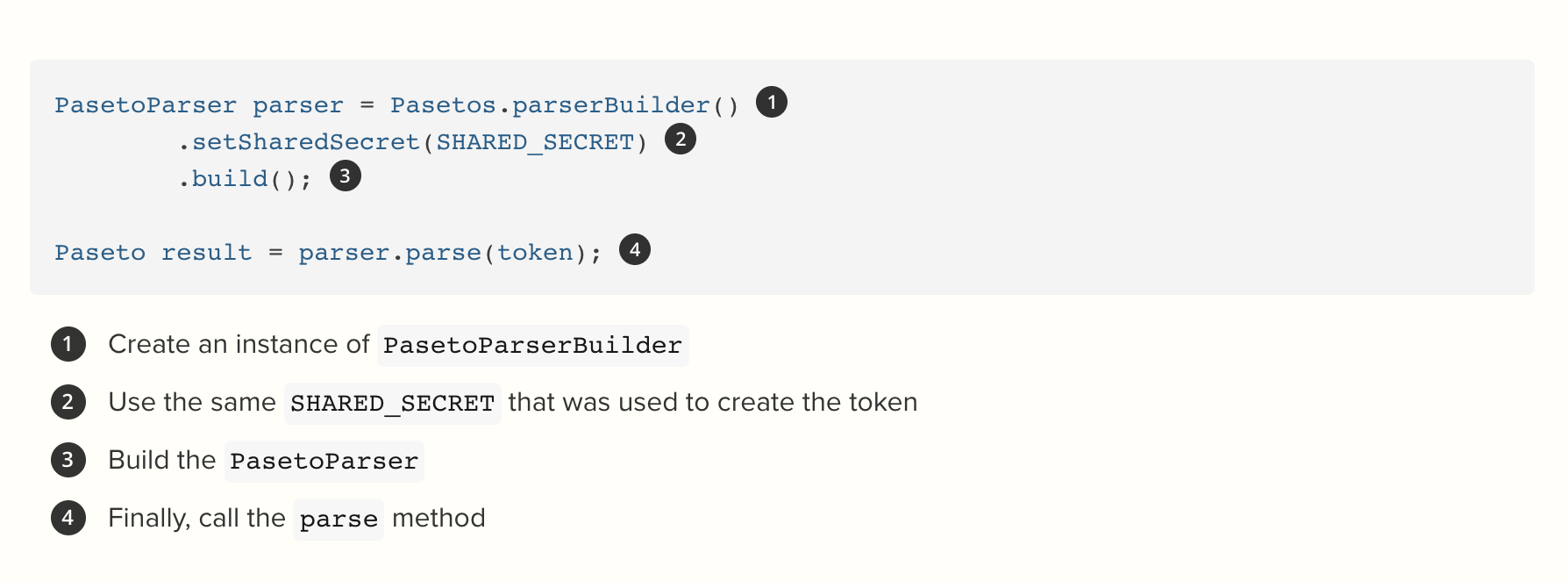
    Okta today launched an open source library for using Platform-Agnostic Security Tokens (PASETO) as an alternative to JSON Web Tokens (JWT) to authenticate end users.

    Randall Degges, head of evangelism for Okta, said PASETO is quickly emerging as an easier, more secure implementation of the JWT specification. PASETO is a draft specification created by Scott Arciszewski that reduces the scope of the Javascript Object Signing and Encryption (JOSE) family of specifications in a way that makes it easier for developers to embrace tokens to secure application access.

    Okta is trying to make it easy for developers to employ PASETO using a library written in Java, dubbed JPASETO, that has half the lines of code JWT token written in Java and is supported by a vendor, he said.

    While JWT tokens have been widely adopted, they are easy to misconfigure, which Degges noted has resulted in the recent discovery of many JWT vulnerabilities. Part of the fault for those vulnerabilities lies with the JWT specification itself, he added; JWTs support a wide range of cryptographic algorithms, including an option that employs no cryptography at all.

    In contrast, Degges said PASETOs are more cryptographically resilient and far easier to employ. The PASETO specification defines two types of tokens: local and public. Local tokens are always symmetrically encrypted with a shared secret key, which means no one can view the contents of a local PASETO unless they have the correct secret key. Public tokens are readable by anyone and are validated with a public key. There is no “none” option; there can’t be a security token that is not encrypted, he said.

    All PASETO formats are designed to be tamper-proof. The entire message is authenticated, so validation will fail if anything in the token changes, added Degges.

    That approach ensures higher levels of application security while at the same time aiding in the adoption of best DevSecOps practices using Okta’s JPASETO library, which can be incorporated easily into the application development process, he noted.

    In recent years software tokens such as JWT have gained traction as a way to implement two-factor authentication in place of creating a session in the server and returning a cookie. When a user successfully logs in using their credentials, a JSON Web Token is returned and must be saved locally.

    Software tokens, however, can still be vulnerable to attacks that either duplicate the underlying cryptographic software or phishing attacks that trick end users into giving up a password. There is no such thing as perfect security; however, software tokens provide a critical layer of security that should be employed much more widely.

    It’s not clear to what degree PASETO will further that goal. Many organizations may even mandate the use of either JWT or PASETO as part of their overall approach to DevSecOps. Regardless of approach, it’s clear that continuing to rely on sessions and cookies to authenticate end users is an antiquated approach to authentication that is not only more difficult to implement and manage but also ultimately less secure.

  • CNCF Elevates SPIFFE Spec to Secure App Services

    CNCF Elevates SPIFFE Spec to Secure App Services

    The Technical Oversight Committee (TOC) of the Cloud Native Computing Foundation (CNCF) announced that the open source Secure Production Identity Framework For Everyone (SPIFFE) specification and the SPIFFE Runtime Environment (SPIRE) have become incubation-level hosted projects.

    Andrew Harding, SPIRE maintainer and a principal software engineer at Hewlett Packard Enterprise (HPE), said the elevation of a potential standard to authenticate software services using cryptographic identities that are platform-agnostic could go a long way toward advancing the adoption of best DevSecOps practices.

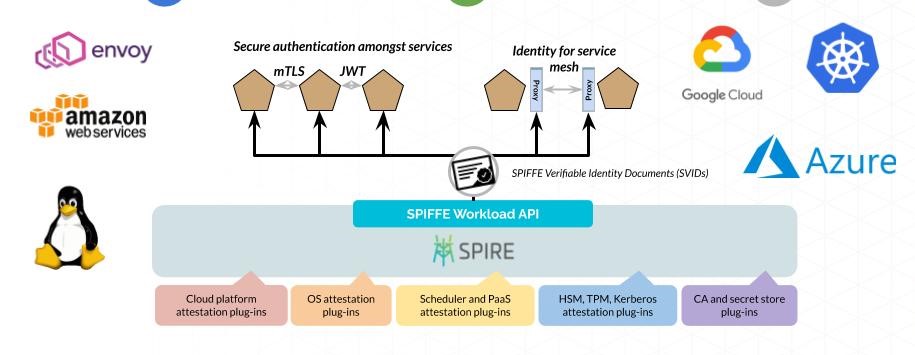
    At the core of SPIFFE specification are short-lived cryptographic identity documents known as SVIDs that are invoked via an application programming interface (API). Workloads employ an SVID when authenticating to other workloads by establishing a TLS connection or by signing and verifying a JSON web token (JWT).

    Previously a sandbox level project, the SPIFFE specification is designed to reduce reliance on hard-coded secrets to authenticate application services, Harding said. Instead, developers will be able to more easily invoke multi-factor authentication to issue and verify identities for any type of application service. Each service is given its own identity, he noted.

    Amazon, Bloomberg, Google, HPE, Pinterest, Square, TransferWise and Uber are all contributors to SPIFFE. Since joining the CNCF last year contributors to SPIRE have added support for Amazon Web Services (AWS), Google Cloud Platform (GCP), Microsoft Azure, Kubernetes and bare-metal servers.

    SPIFFE and SPIRE are designed to work across both monolithic and microservices-based applications. The latter are not likely to completely replace the former anytime soon, so IT organizations need a consistent approach to authentication regardless of how an application is built, noted Harding. SPIFFE and SPIRE together enable an IT organization to implement a zero-trust architecture spanning multiple applications, he said.

    Ultimately, Harding said the goal is to enable better application security without compromising flexibility. As an added benefit, SPIFFE and SPIRE don’t require developers to share application secrets to enable interoperability between services running on different platforms. That’s because SPIRE doesn’t generate SPIFFE identities that can be used to authenticate to other systems nor does it store existing keys such as a database password on behalf of a workload. Each SVID generated is unique to the service use case.

    As the number of services and platforms being employed continues to increase, it’s not practical to continue to rely on approaches to authentication that rely on hard coding. The level of dependency that exists between services requires a more frictionless approach to authentication.

    It may be a very long time before reliance on tokens such as passwords disappear. However, it’s clear specifications such as SPIFFE, in the long run, will transform application security. The challenge now is not only getting developers to appreciate a new approach but also convincing skeptical cybersecurity teams that long have relied on some form of hard or soft token to secure applications. Given the number of times those tokens are misplaced or lost, there are more than a few IT help desk professionals wishing tokens would become obsolete sooner than later.

  • Conjur up some agile, automated authorization management

    Conjur up some agile, automated authorization management

    One issue that has plagued IT since its inception is adding and removing authorized users. Most network and application security rely on somehow validating credentials to confirm that an individual is authorized to access the resources, but in a rapidly changing environment it is a serious challenge to keep authorization and authentication systems up to date. Conjur hopes to solve that problem.

    What is Conjur? In a nutshell, Conjur is an API-backed virtual appliance that makes cloud infrastructure projects possible by giving DevOps teams the ability to manage permissions and authorizations in a secure, automated, and well-audited way. In other words, Conjur allows for automated authorization management.

    Kevin O’Brien, part of the founding team at Conjur, shared some thoughts on Conjur, the issues the company seeks to address, and how Conjur can make life easier for DevOps teams. “As we’ve grown into the market, we’ve seen a lot of DevOps teams struggling with the same kind of authorizations problems, either slowing or killing cloud initiatives outright. For the ones that make it off the ground, they have to build a tangled web of handwritten scripts or hacked together key/certificate/user/access management inside of toolchains that are designed for other purposes (things like Puppet, Ansible, Docker, Chef, Salt, GitHub, etc.).”

    Conjur provides a dedicated platform for conducting authorizations without relying on insecure alternatives. Rather than trying to force old authorization technologies and ideas—like Active Directory—into a radically new environment—like an agile DevOps infrastructure, organizations can leverage Conjur.

    Conjur helps simplify and automate tasks like moving SSH keys out of insecure locations such as on-disk storage, or in Docker images, or GitHub repositories, and consolidating them on the secure, encrypted Conjur server. Conjur can manage secrets, including SSL certificates, across their entire lifecycle—from provisioning to replacement—with minimal downtime. And, Conjur maintains a comprehensive audit log of its activities.

    O’Brien relayed the story of one Conjur customer. This customer provides data analytics products for healthcare organizations, and solves complex computational problems with a focus on reducing health costs. The customer wanted to integrate DevOps concepts and culture into its business model, but ran into some stumbling blocks.

    “They were running into an issue where they wanted to begin using an AWS-based clustered genomics product, which would have allowed them to automate a large portion of their analytics, but were being told by their insurance payers that moving client data into that environment would be an impediment to doing business, because they couldn’t provide sufficiently granular access rights (the product used passwordless SSH keys),” explained O’Brien. “The insurance companies saw that as an ePHI issue, and absent a more sophisticated control and auditing, it was a no-go.”

    This company used Conjur to replace the default authorization mechanism in the project with a “Conjurized” access check, which allowed it to store the relevant keys in ephemeral storage and manage permissions through Conjur rather than by embedding them in code throughout their product set. Along with the audit capabilities, this meant that it had effectively taken a show-stopping design and circumvented it in a matter of weeks, without relying on key distribution or having to spend any time building an in-house solution.

    Conjur even has a solution dedicated to “DevOps and User Enablement.” O’Brien described it, “At a macro level, we’re solving a problem that is unique to DevOps and cloud: unlike the on-premise infrastructure of 20 years ago, protected by an Active Directory/LDAP system that handled authorization, role-based access control, and so on, there’s no way to translate that to the rapidly changing infrastructure that teams deal with today.”

    User enablement, in the end, is about driving innovation and speed. Conjur claims to make that possible (and more automated), without sacrificing security or auditability, or requiring a lot of custom work to use.