Tag: artificial intellegence

  • AI ‘is Getting Worse’ ¦ AI ‘Will Lose India Jobs’ (Probably Isn’t ¦ Probably Won’t)

    AI ‘is Getting Worse’ ¦ AI ‘Will Lose India Jobs’ (Probably Isn’t ¦ Probably Won’t)

    Welcome to The Long View—where we peruse the news of the week and strip it to the essentials. Let’s work out what really matters.

    This week, a conundrum: On the one hand, researchers say ChatGPT is losing the plot; and on the other, we hear outsourced coding jobs in India will be replaced by AI. (more…)

  • How AI is Changing DevOps for the Better

    How AI is Changing DevOps for the Better

    Managing a DevOps environment involves a high degree of complexity. The rapid proliferation of data has made it difficult for DevOps teams to effectively onboard, ingest and unlock data and implement information to make good business decisions and deliver delightful experiences. Imagine a team poring over troves of information to identify critical factors that triggered an event—they would end up investing long hours to interpret and analyze the information.

    The future of DevOps will be AI-driven. It’s fair to say that it’s challenging for human intelligence to harness large volumes of highly complex data. Consequently, AI-powered solutions will become the number one choice for integrating and analyzing data and transforming how teams develop, deliver, deploy and manage applications.

    By 2023, 40% of DevOps teams will leverage application and infrastructure monitoring solutions with built-in AI capabilities, Gartner noted. Currently, in times of disruption, Gartner predicts the AIOps market will grow at breakneck speed, between $300 million and $500 million per year.

    Let us explore how AI and DevOps are intertwined before we explore how AI is transforming DevOps.

    DevOps and AI are Intertwined

    AI and DevOps are intertwined. Integrating AI in a DevOps environment boosts the overall performance and efficiency of an organization.

    AI and ML-powered solutions enable DevOps teams to onboard, map and integrate large volumes of customer or partner data with accuracy and speed. That is to say, business users find it easier to drive processes like data onboarding, data mapping and data integration, thus improving ease of doing business and delivering improved customer experience (CX).

    Organizations that rely on AI-powered solutions no longer need to devote long hours to custom coding and EDI mapping to analyze large volumes of data. The time saved can be used to focus on more important, innovation-driven tasks.

    AI also boosts automation, allows users to address and resolve issues in both data and applications and facilitates better cooperation among teams.

    4 Ways AI is Transforming DevOps

    The efficacy of DevOps correlates with an upward shift in AI. It can empower even non-technical business users to create connections and drive transactions at the speed of business. As a result, it brings non-technical business users to the forefront of business, thus freeing IT and developer teams to focus on more important tasks. Business users can leverage machine learning algorithms to collect data from different parts of DevOps systems and then map and integrate it in minutes through predictions.

    Here are four ways AI is transforming DevOps:

    1. Improved data access: The lack of free access to complex data streams is a challenge for DevOps teams. AI enables business users to access all the siloed data and harness its true potential for better insights delivery and decision-making. AI-powered tools can gather data from various sources for consistent and repeatable analysis.
    1. Faster data integration: AI and ML-enabled technologies enable non-technical business users to execute data mapping and data integration in minutes instead of months. As non-technical users drive operations, IT becomes free to take up governance and instead focus on more high-value tasks. Thus, not only can AI help business users integrate data faster to deliver experiences and value but also enables IT teams to drive innovation and growth.
    1. Higher implementation efficiency: With the support of AI, businesses can perform more tasks with less human intervention and minimal coding. This reduces the burden laid on IT or developer teams, enabling them to concentrate more on innovation and creativity.
    1. Better security: As security is essential to facilitate a successful software implementation, DevSecOps is a fundamental aspect of software development. Organizations must bolster their security systems to guard against an increase in threats. AI can play a vital role here. It can enhance DevSecOps and boost security by recording threats and executing ML-based anomaly detection through a central logging architecture. By combining AI and DevOps, business users can maximize performance and prevent breaches and thefts.

    Accelerating development cycles while making sure data is interpreted and analyzed properly is a challenge faced by DevOps teams today. Artificial intelligence-powered solutions are helping organizations transform every stage of DevOps building cycles without burdening IT teams or adding costs. Ergo, AI can enable users to transform the DevOps environment, deliver delightful experiences and grow revenue.

  • Shift Left … With In-Sprint UI Test Automation (?!?)

    Shift Left … With In-Sprint UI Test Automation (?!?)

    UI testing is really the most intuitive testing approach imaginable: Just find someone who can represent the target user and let them poke around in the interface they use for their daily work—the UI. It’s natural. It’s intuitive. And it’s still the predominant method used for testing most software releases today.

    This human-driven testing can never stop. Having smart testers creatively explore the UI using their creative, analytical minds to uncover issues that disrupt the user experience is absolutely essential. But it’s also essential to perform a level of regimented, routine checking with each change to ensure the modifications don’t introduce strange side effects. Performing such tedious checking at the required frequency and speed would be torture for human testers. Hence, the push toward test automation.

    You would think, then, that the natural place to start with test automation would be to automate the most natural of all testing: humans interacting with the UI. Not so: UI test automation is actually one of the most dreadfully difficult test automation approaches.

    Tests automated at the UI level historically have a fair share of issues. They’re slow to run. They’re fast to break. They’re somewhat technical and tedious to create even for common modern technologies such as web and mobile. They’re much more difficult to create when you have to deal with custom desktop applications, packaged applications, extremely old technologies, extremely new technologies or Citrix/remote applications. And creating automated UI tests typically requires a fully implemented—and stable—UI.

    If you’re aiming for in-sprint test automation, this means that tests need to be implemented in that tiny sliver of time between when developers complete the final UI code (with a successful build) and when the sprint is supposed to be completed. Guess what? That rarely happens. Within the sprint, teams can certainly tackle human UI testing (a.k.a. exploratory testing). But automated UI testing? That’s often delayed until a later sprint … and/or scrapped altogether.

    Clearly, there are a lot of issues with UI test automation. But if you really think about these issues, it all boils down to one thing: The test automation doesn’t think like a human:

    • A human can interact with an application’s UI quite rapidly (the human eye can process 24 images per second).
    • A human is not derailed by interface changes. Something such as a reimplemented drop-down menu or a new way to display results won’t phase a human tester at all.
    • A human brain can interact with extremely old technologies (such as mainframes and COBOL-based apps) along with whatever new technology happens to be released tomorrow. And if your application is migrated from a monolith to a microservices architecture, the same tester’s brain can still test its UI in exactly the same manner.
    • A human tester might not recognize whether the application is installed on their machine or is accessed via desktop-virtualization. They can test its UI just the same.
    • A human doesn’t really need to wait for a fully implemented (and stable) UI implementation. They can start working on their tests the moment a rough prototype is available. And they can start performing tests as soon as the UI is at least kinda—If the underlying technical implementation is still shifting a bit, it’s not necessarily a showstopper.

    So, if the key problems with UI test automation stem from the fact that human intelligence is greater than test automation, why not try to address those problems with the next best thing: artificial intelligence. By tapping the power of AI, we can achieve UI test automation that’s as smart and resilient as a human, but as efficient and scalable as a machine.

    For this to work, the technology must learn how to understand user interfaces in the same way that a human can. For example, it needs to know that a drop-down is a drop-down just by “looking” at it. With that accomplished, you—well, any human, really—can define test automation by simply providing a natural language explanation of what business process should be tested (e.g., “Enter 10,000 in the list price input, click the confirm button, then … “).  AI-driven test automation can take it from there. There’s no need to deal with shadow DOMs, web assemblies and the like. Emulated tables on SAP can be automated without any special customization. It’s not going to fail the next time there’s a minor UI tweak, and you won’t have to rebuild your tests if the application is reimplemented in a new technology.

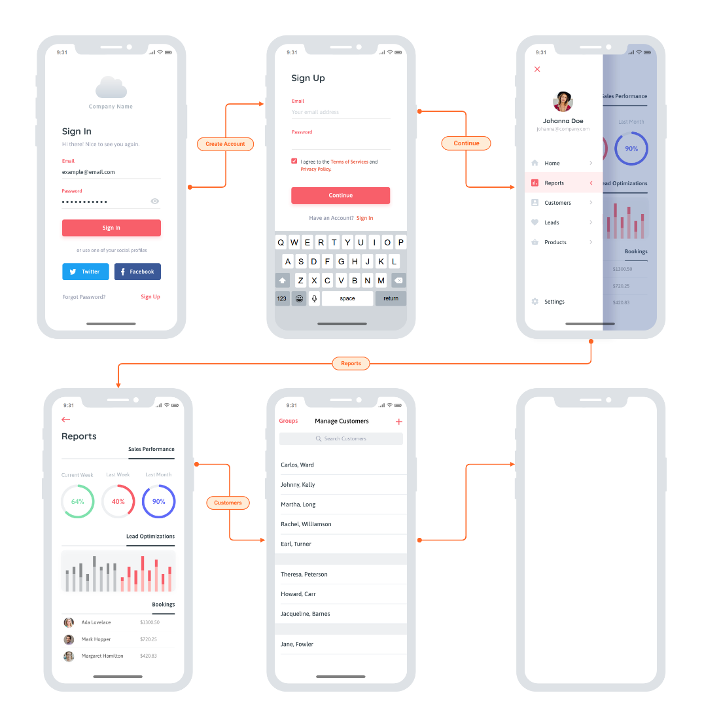
    In terms of shift left, you can start implementing your UI tests as soon as the team sketches out a rough prototype or mockup. Advanced UX designs like this are a great starting point:

    You really could start anywhere though. Even more rudimentary whiteboard sketches would enable you to start on UI test automation without waiting on the actual implementation. This means less crunch time each release and ultimately eliminates the ripple effect of testing delays, unfinished stories and “hardening sprints.” And it enables an interesting flavor of TDD: Start running these automated UI tests before implementation begins, then have developers write code that makes them pass.

    The catch? It’s not so easy to make UI test automation so easy. Two things to watch out for: accuracy and speed. For this to work, the technology must be able to accurately recognize and interact with UI controls that it’s never seen before. This requires visual object detection as well as optical character recognition (OCR). And that’s the easy part; the difficult part is doing this at speed. For a while now, AI-driven automation solutions have been struggling to come close to the speed of human processing. On average, you’re looking at tools processing 1.8 images per second, while humans can handle 25. You don’t need automation that mimics human speed, though—you need to beat it. If you want this UI testing to run as part of your continuous testing as a core part of your CI/CD process it needs to vastly surpass the speed of the human eye and the human brain.

    Once you overcome that little challenge, AI-driven UI testing will remove a lot of not-so-artificial conflict on Agile dev teams:

    • Testers waiting on developers to finish the UI so they can start implementing tests—and avoid the dreaded crunch time at the end of sprints.
    • Developers waiting on testers to finish tests so that the user story is deemed “done done” within the current sprint.
    • All the retro finger-pointing you get when delayed or unfinished testing results in unfinished user stories.

    I admit: when you first tell the team that UI test automation will help you complete testing sooner, it could be a hard sell. But after a few rounds of having UI test automation ready before developers write a line of code, I’m confident that you’ll find some real support for this artificial intelligence-driven testing approach.