Tag: ara

  • Finishing the Pipeline: Monitoring, Tools, Automation and …

    Finishing the Pipeline: Monitoring, Tools, Automation and …

    It is true that DevOps has grown to be the beast in the room. I’ll co-opt the “cloudwashing” term to call it “DevOps-washing” because it seems every tool you’ve ever used to develop and deploy applications now has a DevOps angle to it. For example, the Jenkins update center is kind of overwhelming. While I can’t be certain, there’s a chance that our new coffee maker has a plugin for Jenkins.

    But it’s also true that DevOps really is coming of age. The success of Jenkins is largely based on CI/CD, and the tools built both up and downstream from it are folding in more and more of the DevOps process, making life easier—if not exactly easy—for IT.

    Even with platforms, the choices are growing and the automation is, too. Whether one of the major cloud vendors, where deployment can be fully automated or hyperconverged infrastructure and where deployment can be fully automated, we’re moving toward a future of not caring about physical infrastructure but rather, “Can I get a connection to it?” Of course, it’s not that simple, but running Docker or Kubernetes on hyperconverged infrastructure means we have on-demand deployment, and the cloud does much the same.

    Tooling for monitoring is also getting better, whether you are monitoring user experience or a particular API’s CPU usage. For the most part, we are not yet to the point where automation can deal with the majority of alerts from monitoring, but that boundary is being pushed daily. We certainly can tool our systems—both the infrastructure and the app sides—to offer us more data about application health than we’ve been able to get in the past. From physical hardware all the way up through containers we have a wealth of options for monitoring, and application monitoring is getting even more attention than infrastructure monitoring.

    Heading Down the Trail: Monitoring and More

    Which leaves one wondering where this is bound. Let’s assume that the areas that are a bit behind—like over-arching network configuration from ARA tools—catch up. They will, and that’s pretty obvious, so I’m trying to remove the short-term roadblocks to talk about what we might be planning for and facing moving forward.

    If we can assume a place to deploy that has reasonably unlimited capacity—such as the cloud, where cost is the limit, or hyper-converged, where capacity is a limit but expandable in chunks—and we can assume that ARA is running the Dev/Test side, then pairing it to a preferred server configuration (be that VM or container, depending on app, group, company, etc), and pushing out the deploy, then we’re left with the monitoring piece, and automating the responses to monitoring issues. That is growing, too.

    Right now, the standard in the DevOps world for a server that is malfunctioning in some way is to kill it and start a new instance. This often masks real-world problems, and if it appears to “fix” the problem, reduces the priority of resolving what went wrong. This is, in a nutshell, the real error for Cloudbleed. They were seeing servers spew errors, when one appeared to core, they simply started another. It allowed a simple programming error to persist over months and become a security issue.

    So the next great leap will be to find a quick way for monitoring to determine exactly where problems are occurring, and force a developer to fix it. There are tools that can auto-generate bug reports, but they’re rudimentary at this point in time, and we need them to be more advanced. There will also always be the trade-off of how much in resources you use for monitoring when the point of the app has nothing to do with monitoring. And like so many things, the hidden cost of keeping that monitoring up to date will be a technical debt—one of many that the DevOps community seems slow to acknowledge.

    There Always Seems to be More

    On the “time we waste” side, the fight over internal/external needs to end. The fact is that internal cloud isn’t going anywhere anytime soon, and if you’re running in containers, you don’t have to care. My company is currently looking at a tool that can run hundreds of containers in a very (physically) small space. We can deploy to the cloud or deploy there, as long as we have container templates. It doesn’t matter what the business need forces us to use; containers really will run pretty much everywhere. It does no one any good, harping about internal/external. A deployed app is a deployed app.

    Now, talking about the differences in networking between internal/cloud, external/cloud, and container manager (regardless of where it sits): That is a discussion worth having.

    — Don Macvittie

  • DevOps and Data Portability

    DevOps and Data Portability

    You have a classic car. You’re in the middle of restoring it, and it looks mighty sweet. Paint is polished, wheels are stock, hubcaps (or spokes) are shiny, engine is completely restored to original spec.

    But it has no gas tank.

    A bit of a stark comparison, but that’s where we’re at with application release automation (ARA)—at least in terms of portability. And where we’re likely to stay.

    Hold on, I’m a Fan

    Before the DevOps aficionados get out the torches and pitchforks, let me be completely clear that I’m a huge fan of ARA, and explain again why.

    Tools such as Jenkins allow DevOps teams to automate the entire build/test stack—or, as much of it as their organization requires. That is a huge step forward, for all the reasons we’ve covered in the past, including the one I think is often overlooked or underemphasized. With frequent build/test feedback, the code is still fresh in the developers’ head when they learn of problems. Most of the time, they are fixing before moving on to the next task, which is a huge plus compared to waterfall, where many problems show up long after the developer in question has forgotten what the code is doing because they’re off on other things.

    Likewise, tools such as Puppet, Ansible and Chef (to name a few) allow DevOps and security to set standards via script, and use those scripts to deploy over and over. This has all the benefits we’ve discussed, too—speed of delivery, reduction of human error, repeatability that becomes stability, etc. This gives operations the ability to answer, “Is server X set up to do this new thing?” by looking in deploy scripts and quickly updating things if the answer is no, but X will be required going forward. That’s one of my favorite bits of Application Provisioning.

    Riding the Gap

    For those unfamiliar, ARA simply bridges the gap between DEVops and devOPS. Tying code being released to platforms and configurations it will be released under. It has the ability to rapidly re-target a release to a new environment, and it can do predictable and repeatable releases, offering the benefits of application provisioning for the actual release segment. Most tools do this by tying together your favorite build tools and provisioning tools, and giving Ops a control panel that can manage the process end-to-end.

    The benefits are huge. Particularly for Operations and Security (who have another place to standardize and insert essential monitoring), but also for development because it offers one further step in testing and by doing so reduces the surprises six months down the road, when you’ve forgotten what

    Bubblegum += 10

    Is in your code for.

    So don’t take my intro as offensive. I am a fan. But I’m a realist. There is no panacea.

    It’s About the Data (as Always)

    The two weakest parts of most ARA systems are server provisioning and data issues. Server provisioning is setting up OS/hardware, and many ARA systems tend to assume you magically did elsewhere, but this problem is only an issue in highly physical environments and there are tools to handle the problem; they’re just not integrated well with most ARA systems. Data issues are the bigger problem.

    It’s cool that we can drag and drop a couple boxes, and magically switch our deployment from inside the DC to a cloud provider in the time it takes the ARA to build/deploy. But we all know that’s not how the world works. Now you have an application, complete with database that is correctly configured and security that does AAA solidly … and no data.

    “Just move the data, then!” the choir sings. No, that’s really not how it works in an enterprise. Data itself is an object of security and compliance, and some source databases are so massive that moving them is a nearly impossible chore in and of itself. Amazon tips its hat to this fact with its import/export service.

    This was the reason why I gut reacted to the “No more physical data centers!” crowd back in the midst of the hype with an eye roll. The amount of data stored in data centers is staggering, and often not portable at all. Add to this the fact that such data isn’t going to reduce, and we have a quandary.

    What About Moving Forward?

    Sometimes, it is necessary to accept that the current state is not changeable, but take steps to improve the future state. I don’t see this as a reasonable approach in this case, because the rules of data aren’t changing in a way to change future state in a positive way. We’re generating more data every day, and that data will end up stored somewhere. Be careful where you store it, think long-term strategic. Having ARA doesn’t magically make that data portable, so make sure that where you store it today, while it’s small, is where you’ll want to store it in five years, when it is a massive, largely immobile asset.

    What to do … What to do

    Use ARA to multitarget all of those apps that are portable without terabytes of data, and make sure data generation/collection/analysis apps are on the architecture you will want them on moving forward. ARA offers a ton of other benefits, so data portability isn’t a deal breaker—or even a significant negative, since you probably already knew some datasets weren’t going anywhere—but don’t expect miracles out of it. It can’t make your large datasets portable, so don’t expect it will. And use it to target the platform your organization feels is most appropriate for apps that will generate or collect a lot of data.

    — Don Macvittie

  • XebiaLabs Shows Off ARA, More at Jenkins World

    XebiaLabs Shows Off ARA, More at Jenkins World

    In this third spotlight on companies attending Jenkns World, another worth checking out came to mind, so I am taking a look at what XebiaLabs intends to do while there. XebiaLabs is one of the leading application release automation (ARA) vendors, and has a long history of working with Jenkins, so it’s a little more mainstream than the other companies I’ve written about.

    But the thing is that Jenkins’ and XebiaLabs’ tools do work well together, offering an end-to-end build/deploy process that is repeatable and can be repurposed for different targets or different applications.

    While Jenkins handles CI/CD, XebiaLabs ties in the deployment pieces to complete the picture and make a streamlined system. When I experimented with XL Release and XL Deploy, I used them to call Jenkins as part of the release process. Interestingly, you can also call them from within Jenkins, which dovetails well with what another vendor I looked at—CloudCoreo—is doing. The ability to control the process from Jenkins is nice and has uses in the early development phases, but XebiaLabs raises the level of release management—something Jenkins is not doing (yet). The bit that ties CI/CD to automated deployment should be running the show, IMO. But I can imagine environments where kicking off all the build/release cycle from within a Jenkins job would be the preference.

    Anyway, on to what XebiaLabs is doing at Jenkins World!

    Key for XebiaLabs this year will be showcasing its DevOps platform, which is both XL products and talking about how the company is advancing integration between these products and Jenkins. Its recent Templates as Code (the link is to an earlier version, from January, but talks about its goals with Templates as Code, so it’s a good start if this is new to you) implementation that made it easier for developers to work with its products is being enhanced, and I’d love it if someone took a look at it and told me what they think. I can probably get someone at XebiaLabs on the phone to talk about it, but real users often have a better take on suitability in the wild.

    The important bit for many of you will be XebiaLabs’ Periodic Table of DevOps Tools, which I know several people would love to have as a poster in their office. For cool factor, it’s hard to beat. The company will have tubes with the periodic table available, so drop by to snag one. Last year it ran out of them relatively quickly, so be early. Bonus points to anyone who snags an extra and sends it to me for my office (ha ha).

    Aside from the Periodic Table of DevOps, XebiaLabs also will have copies of “The DevOps Handbook,” which I recommend. For those who haven’t read it, the format is different than “The Phoenix Project,” but it is the next logical step in that progression. Finally, the company will have its own book, “The IT Manager’s Guide to Continuous Delivery,” which I haven’t read, but having read XebiaLabs’ corporate blog for a while now, I predict will have some good ideas in it.

    I admit an interest in how recent changes to XebiaLabs’ DevOps platform improve the experience across the org (or don’t improve it). I haven’t used its tools since the new “pipeline as code” changes were introduced in January, so I honestly have no idea. If you go and stick around for a demo, let me know what you think.

    — Don Macvittie

  • Don’t Underestimate the Work

    Don’t Underestimate the Work

    It is relatively common in human endeavor to attempt to figure out how much work will be involved in a project, and be wrong. The more complex the work being done and the organizational system doing it, the further off estimates can be. This was one of the drivers for both Agile and DevOps: to take smaller steps with less dependencies and complexity.

    The complexity problem is true in the path to application release automation (ARA) as well. ARA merges continuous test/continuous delivery with deployment automation, but both of these toolsets are complex and continuing to evolve. When you think about it, it is somewhat amazing that ARA can handle the breadth of functionality it is covering, while both sides are shifting and growing as well as it does.

    Construction Crane
    Construction Crane, compliments of Pixabay

    When you approach ARA, you should make certain you have a handle on the amount of work that it will take to get the system up and running. It’s not simple, even if you’re already using a full CI/CD environment. But it’s worth the work, so here are some of the things to watch out for.

    Multiple Targets

    First on the hit list is on the deployment side. One of the strengths of ARA is the ability to deploy to any environment. The ARA system has to know about each environment in enough detail to enable deployment on it. It must know how to deploy servers, where to get OS, what needs to be added on to the OS, and how to get the application onto these systems. Increasingly, programmable network elements and security configuration fall into this category also. While tools such as Chef and Terraform can help in this regard, if you’re not already using them, they’ll have to be configured if not already, and then linked into your ARA tool. Understanding the path from here to there is critical to early success with ARA.

    Databases

    This is one of the more vexing problems. While most ARA tools offer the ability to configure databases and database connections, your datasets generally don’t hop around so easily. So if you’re testing and deploying on separate networks, you’ll need to make sure that the relevant tables are on those networks. This struggle impacts moves to the cloud, changes from a fully test network to production or any other change that requires the database server be accessible when it hasn’t been in the past. The work to solve these problems is pretty wide. In some cases, such as purely internal or purely cloud, merely routing from the relevant app instances to the database server will do it; but, in the case of across-the-internet changes, it will take a lot more work. Make certain you understand what challenges you will face before moving.

    Tooling Sets

    Much of the external needs of an application are baked into the app build process through tools such as NPM or Git. But those tools don’t cover everything necessary for the entire app ecosystem. Agents, per-tool databases, small tools used occasionally—make certain you have a list of what makes the app work, and make certain they’re configured to be built in by the ARA tool. This sounds obvious, but watching a team learn by trying to deploy and fix broken parts only to do it again is not only painful, it also leaves a “Did we get everything?” impression. I saw one app break on deploy because the team didn’t include curl. Yes, curl in the deployment. Test had it in the environment, production did not.

    Get an inventory of both application development dependencies (libraries, etc.) and deployment dependencies (databases, reporting tools, agents for monitoring, etc.), and save yourself some pain.

    Decrease Your Work by Asking Questions

    ARA gives you a repeatable build/deploy process that can be used to target the environments you need while reducing manual scripting and steps. But before you throw in, sit with your vendor’s tech people and ask them to walk you through stumbling points, they likely know far more gotchas than I do, because it’s their job, and unless you got the new guy for an SE, have probably seen more. And getting ARA up and fully functional quickly allows you to focus on other DevOps needs, such as improving automated testing.

    — Don Macvittie

  • Manual Intervention or Release Automation? That is the Question

    Manual Intervention or Release Automation? That is the Question

    When it comes to launching nuclear weapons, there are a variety of steps and a variety of fail-safe mechanisms, all designed to ensure that those pushing the button really want to do what the nuclear launch system is designed to do.

    I fear it is some sort of mini-Godwin argument to equate nuclear warfare with releasing code, but bear with me, since we do say, “That nuked the system!” when things go horribly wrong, so I am willing to make the argument.

    There are those in the DevOps community—and more in the ARA community specifically—who want you to automate every step between development and release. While I fully understand the mentality, there are definitely applications for which you don’t want to go live without someone saying, “Yes, this is truly ready,” just as you don’t want to launch nukes without the president (in the United States) saying, “Yes, we really intend to do this.”

    It’s a Tiny Bit

    An associate of mine pointed out the obvious fallacy of “eliminate manual intervention”: both infrastructure as code and the code itself is manual. The biggest bottleneck to release is still actually creating something. So telling people not to insert the occasional sanity check at a critical juncture in the process is kind of … silly.

    Manual Intervention is Warranted at Times

    Take the easy example. Do you want nuclear plants to release new code to their controls without final review and approval? No? Well, if your application is your breadbasket, or even has a significant impact on the business, why would you want code released without a manual approval step? You shouldn’t. The belief in DevOps circles that anything is recoverable, and speed is everything has a built-in self-destruct. Pendulums swing on the type of chaos that can be created if you release and your customers lose the ability to use your app.

    Just prioritize the approval process, and make the process push-button—a “Yes, we are ready to do this,” that authorized individuals can push and finish the deploy. We’re talking about minutes in the most well-run environments, and days (pessimistic estimate, weeks) in more complex, less-thorough environments. It’s not a huge investment, and it’s a step outside of CI/CD that really only impacts release automation. Most enterprise grade companies aren’t deploying a zillion times a day, so it won’t have to be a bottleneck.

    In short, relaxing what we tolerated, reducing short-term goals and automating large portions of the develop/test/deploy environment are all great steps forward. But take a look at your business and determine what possible impacts a given app can have on your business, and the state of the automation, before deciding whether releasing to the wild without approvals is a good idea. Quite often it is not, no matter what the pundits say. But also quite often it is. I don’t want to leave the impression I’m against full process automation; I’m just in favor of getting approvals when the organization’s livelihood is on the line and the solution is a complex one.

    Seek Balance

    As always, you have to ask yourself, Who knows your business and your business’ systems better, the pundit or you? There is a balance here; the pundits have some great ideas, but the business has balancing needs.

    As automation continues to grow, the number of apps requiring approvals before release no doubt will continue to decrease, but don’t let the fad impact your bottom line. DevOps is not about itself, but rather the business and its needs.

    — Don Macvittie

  • appOrbit: End-to-End Hypercloud

    appOrbit: End-to-End Hypercloud

    As cloud and DevOps have heated up, enterprise need for cloud portability and deeper DevOps integration have become pretty clear. The need for portability to avoid cloud lock-in has been a desire of enterprise cloud users from day one. A variety of people are attempting to address this need, but the market is still very much evolving.

    In the area of DevOps integration, the two topics currently causing struggles are security and networking. Continuous deployment inevitably requires both to be part of the DevOps package, and those are the newest additions to the field, so it is still maturing.

    Enter appOrbit

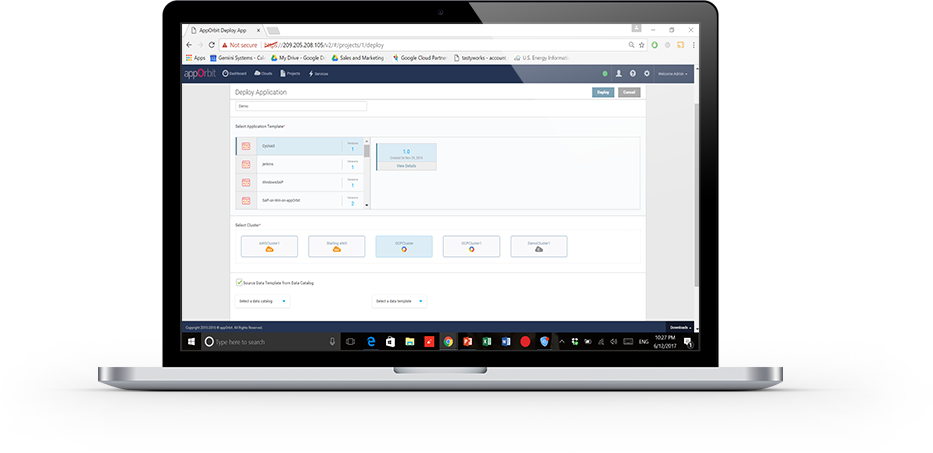
    appOrbit recently came out of stealth mode with an overarching architecture to enable hypercloud and extend the DevOps process across the entirety of the dev/test/deploy ecosystem. The idea is to offer a platform that doesn’t care what languages or deployment tools you use, or even what databases you’ve tossed data into, and covers the process from first line of code to management and monitoring post-deployment.
    That’s a big claim, so I got on the phone with appOrbit to poke around a bit. Better would be to take the time and use the toolset, but I’ll settle for our questions about the traditional weak spaces in the process, and about how they achieve some of the company’s claims. For now.

    My first impression was that this was application release automation/application release management (ARA/ARM), and Rahul Ravulur, CEO of appOrbit told me I wasn’t far off; I just wasn’t thinking big enough. A large part of the process is ARA, but additionally, appOrbit worries about networking, security policy and long-term monitoring and management, all while offering deployment portability.

    Finally, the End Game is in Sight

    From the beginnings of the Ops side of the DevOps movement (what I like to call devOPS), the end goal was pretty obvious: to improve the entirety of the process. It was clearly going to take time—good network engineers are wizards that can make a network do astounding things—and we had to figure out how to make that more repeatable. On the DEVops side, repeatable was relatively painless: We already did a predefined sequence of steps over and over; the point was to break them into smaller iterations and automate what was ripe for automation. Much of Ops was the same, but networking and security had many more variables to take into account, and less history of “here’s a prescribed sequence, do it.”

    If appOrbit can do as it claims—and its customer list includes some customers I’ve worked with that probably wouldn’t be there if the product was vaporware—then we’re seeing the culmination start. The culmination will include limitless portability, sort of a “we don’t care where you deploy, just tell us and we’ll do it”; it will include development tool agnosticism—“We don’t care what tools you used, we’ll deploy it”; and it will include complete solutions—“We’ll move your data, we’ll move your app, we’ll configure the target network, we’ll run the security checks relevant to the target platform.” It sounds like appOrbit has traveled quite far down that path already.

    What, Exactly, Did You Intend?

    One interesting bit appOrbit talked to me about and I’d like to take out for a spin is the idea of adding “intents” to security and networking. Tell it what you’re after, and through a combination of built-in functionality and plug-ins it will deploy your application as you intended. For things like opening a port, this seems pretty straightforward, but security and networking are complex topics. What is/isn’t covered by security policies/intents? What if my intent is for the system to create a VPN, lock down all the ports, then open just a few and connect the VPN back into the data center over an encrypted port? Who manages certs? Where does it get the credentials to get back into the data center? What happens if I take this whole VPN-based deployment and decide to put it inside the data center after all? Do I have to rework the networking intents to remove the VPN? The questions are endless.

    But assume this is the beginning of a road that truly can end up with “deploy anywhere, and deploy as you intended.” That’s what we’ve been waiting for, and it’s inevitable, so I for one am glad to see us set off meaningfully down the path.

    Improvement Makes Movement

    The mere act of someone talking about having pulled all this together will be good for customers. Ravulur’s stress that “a lot of what we do is ARA” will no doubt make ARA vendors step up their attempts to be as inclusive as appOrbit is, and the market will move forward. appOrbit’s use case of “legacy app migration” without changing the app alone offers an avenue for enterprises to begin to move to new platforms. That in and of itself will be a help to the huge number of enterprises that want to move to a more modern environment but aren’t ready or able to rewrite entire systems. And again, it will spur on competitors—in this case in the application provisioning space, most likely—to try and implement similar functionality in a relatively short time frame.

    Beyond Hope

    In a nutshell, I hope that appOrbit can do all that it claims, but even if it falls short in some areas (I honestly have only touched on a few of the areas it has pulled together; there’s a lot here), it is a step forward, and I think the company will drive the market more toward the end goal of application portability from both the Dev and deployment sides, while automating a more complete solution.

    To me, that’s all good. Not everyone is pure cloud, and a far fewer number want to be pure public cloud brand X. The automation tools I’ve been knee-deep in all have been massively complex under the covers, and no doubt this one is, too; simplifying automation so it is easy to adapt to a given environment is a huge part of the task these tools perform. Figuring out the weaknesses is what we customers have to do, but in the end, we’re moving forward.

    I, for one, will look for a chance to play with appOrbit’s toys, validate some of its claims, and see how well it suits enterprise needs. But I don’t have a timeline, so if you’re interested, you should check them out yourself.

    — Don Macvittie

  • Continuous Delivery vs. Continuous Deployment

    Continuous Delivery vs. Continuous Deployment

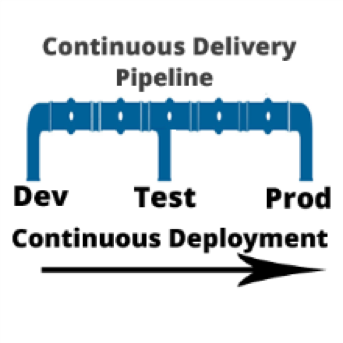
    I am often asked, “if we are using a continuous integration (CI) server and adopting a continuous delivery pipeline, where does continuous deployment fit in?” Good question. In a nutshell, continuous delivery engines such as CloudBees or Blue Ocean are designed to trigger the execution of CI workflows across the dev, test and prod environments. Continuous deployment is called as part of the CI workflow to do the actual release of code out to endpoints. Continuous deployment can be managed by application release automation tools or supported by one-off scripts. Regardless of how sophisticated the deployment step of your CI workflow is, it is still continuous deployment.

    To understand both continuous delivery and continuous deployment, one must go back to their roots, continuous integration. CI is a key component of Agile practice.  Agile developers understand the importance of adopting a methodology that can manage smaller incremental software changes to release software, and therefore business value, to end users quicker and cheaper.  The activities of deploying to testing and production historically have been in the hands of testing and data center teams, separate from Development. But in the Agile practice, these activities cannot be separated from development. The concept of separate development, testing and production teams is a waterfall concept, not an Agile concept. In Agile, everyone is on the same team. This means that testing and production teams must become part of the Agile process.
    Mastering Agile’s last Mile

    Ultimately, the goal of continuous delivery is to accelerate release cycles and get new code out to production fast. However, for most companies this is not happening. Developers and testers may have embraced continuous delivery, but when it comes to production, the code is moved to a staging area where it languishes until production is ready to perform the update. The last mile of Agile is not achieved. And we are back to where we started: waterfall.

    There are many reasons for the production roadblock. Lets’ review the top four.

    • Agents: Both open-source and commercial CI servers are agent-based. An agent based system works fine for developers and can be tolerated by testing. However, production teams are not that excited about installing yet another agent on to the production end points. For this reason, production team use their own method of deploying code. Therefore, the deployment scripts used for releasing code to dev and test are not used by production. The way they see it: Production does not want a deployment process that requires them to re-configure their data center environments with agent from a development tool.
    • Scripts: Production teams want input and visibility. One-off scripts obfuscate the deployment process. For this reason, production teams will write their own scripts. Scripts simply do not have the intelligence needed to meet the audit, rollback and transparency requirements needed by production teams. Production teams perform many steps manually. This takes time and cannot be done in an agile cadence. The result: Great code languishes in staging areas. Production stays several releases behind what continuous test has approved.
    • Cost, cost, cost: Most of what developers create in a continuous delivery workflow comes from open-source or consumption-based licensing models (think Jenkins and Jira). Tools that can achieve continuous deployment such as application release automation solutions are far to expensive for one development team to acquire and incorporate into the CI workflow. These types of tools are sold at the CIO level and cost upwards of $250,000. Production teams are often hesitant to purchases these tools, as the high cost equals high risk. And ‘one ring to rule them all’ does not work. This type of operational tool acquisition is waterfall-based and does not fit into the leaner Agile DevOps tooling. The result: One-off scripts continue to be used and dev and test. Production does not adopt agile.
    • Sustainability: During waterfall, a production release was performed as infrequent as two times per year, or at most once per quarter (considered aggressive). In other words, production is staffed to support a production release on an infrequent basis. With agile, the demand for production releases increases 10-fold. Instead of doing at most four releases a year, they may be required to do four releases a month. Production cannot keep up the agile pace. They are staffed for waterfall.

    Automating Continuous Deployment: Key to Maturing Continuous Delivery

    Continuous delivery cannot be successful without continuous deployment. If you want to roll code out to end users faster, the deployment process itself must be modernized. Using the same one-off scripts that were used in the waterfall approach will not achieve your CD goals.

    Continuous deployment automation is performed by a new set of agile DevOps tools called application release automation, or ARA. ARA solutions are designed to support a model-driven software deployment that allows development, test and production teams to use the same process without the need for one-off deploy scripts. ARA adds all of the features and functions needed to support continuous delivery and data center deployment requirements. ARA is designed to fully perform the heavy lifting of software releases including application packaging, release versioning, database updates, server configuration management, calendaring, roll-forward, rollback, security access and auditing.

    ARA solutions are called by a templated CI workflow that is defined by the development team. The workflow is moved up the pipeline and adapts to the changes at the various pipeline stages (System Test, Integration Test, Pre-Production, Production, etc.)  Because the process is driven by the ARA tool and not a script, the changes are automatically addressed across the pipeline reducing the workload for all teams and supporting frequent changes that can be easily traced and audited down to the server inventory level, including the production environment.

    Developers, Get Your Hands on Deployment Automation Tool       

    To achieve a repeatable CD pipeline that supports production, developers must embrace the automation of continuous deployment at development. The dysfunction however is the outrageously high cost of ARA tools. Developers don’t buy expensive operational solutions. More ARA solutions must be offered on a consumption-based model or offered as open source with the ‘out of the box’ integrations into CI/CD. When considering the purchase of an ARA solution, look for agentless models that can be implemented one project team at a time. Embracing this level of corporate process change must be done project by project. The operational big bang approach does not work well in an agile practice. Not everyone can use the same solution. However,  if done correctly, there are big benefits.

    ARA is a process that strengthens the foundation of the continuous delivery pipeline and is core to the agile DevOps initiative.   It facilitates agile practices by allowing the testing teams and data center teams the tools needed to become more agile and accept the frequency of changes being pushed across the pipeline by Development. Ultimately, the goal is repeatability across the pipeline, pulling together Dev and Ops.

    About the Author / Tracy Ragan

    Tracy Ragan is CEO and Co-Founder of DeployHub. Tracy has extensive experience in the development and implementation of business applications. It was during her consulting experiences that she recognized the lack of build and release management procedures for the distributed platform that had long been considered standard on the mainframe and UNIX.  Tracy has worked with hundreds of development teams in implementing a team-centric standardized build to release process. Connect with her on LinkedIn.
  • Think of the Future When Building Delivery

    Think of the Future When Building Delivery

    We’re in a strange state of the pendulum swing right now, where speed of delivery is king and all else seems to take a back seat. Many orgs even place quality behind speed in the claim that “we’ll get it right later,” but I’m talking about the more universal rush to deploy and the infrastructures we’re building to do it.

    In short, look around your organization. Do you have apps more than 10 years old? Are you working on the same type of app? Then spin your mind ahead and consider what it will be like for someone in that time.

    Future-Proofing Delivery

    You cannot stop the advance of technology, but you can make the environment adaptable. There are some easy tricks to provide for the future when it comes to your DevOps toolset.

    COBOL Still Needed. Source: Hackerrank.com

    Virtually Perfect

    First, build your continuous integration/continuous deployment/application release automation (CI/CD/ARA) architecture on virtual machines (VMs) or cloud instances. If your standard is containers, then use them—but on top of a VM. The reason is simple: Given the vagaries of business environment and IT priorities, a fully installed VM gives you a buffer—you have everything needed to run the environment in a contained package. Containers alone won’t be good enough, as the underlying OS impacts container operations. As an extreme example, the switch to Red Hat Enterprise Linux (RHEL) 7.0 was massive and broke things. A DevOps environment based solely on containers would break with it, while a VM running RHEL  5 or 6X would keep clipping along, as long as your virtualization environment ran.

    Get Versions In-House

    While the executables for any CI/CD/ARA toolset and development languages will be in-house, there is far more to a modern development environment than just those parts. The libraries/modules your code relies on must be available. Increasingly, we pull them on build, but that becomes a problem when suddenly they are significantly changed or downright missing. There is a market of hosted, verified module vendors out there these days that guarantee availability of a given version of each module they support, and that is an option; however, a better one is to pull them once and put them into your own enterprise repository. Is it another thing to maintain? Yes. But it might save your project from having to emergency patch—and frankly, that kind of insurance is worth it.

    Choose Wisely

    Like any relatively new market, there are a lot of CI/CD/ARA toolsets out there. Do evaluations; don’t just grab the one that a team member likes or is familiar with. Look at the longevity and stability of the project/vendor as much as the tool, because we’re talking about hedging for the future. In the early days (and even occasionally today), open source aficionados would say “We have the source, we’ll do fine,” which is technically true, but most organizations aren’t in the business of maintaining their dev/deploy tools and don’t want to be, so a little research goes a long way.

    Plan as Though You Chose Poorly

    Know what you’ll do if, in spite of evaluations, the project/product you chose goes away. While it’s not CI/CD, I was on a team that selected Mambo right before the big team split that created Joomla and doomed Mambo. Our choice was intelligently made based upon available information, but things still came around to burn us. And it could happen to your choice, too, whether you choose open source or commercial. So have an idea of what you would do in that scenario and document it. If we adopt enough IT tools, it’s guaranteed that some of them will fail over time, so this is not a totally wasted exercise. And should you ever need it, knowing what the plan is before things are falling apart helps keep level heads.

    Quality Over Speed

    Remember that time to delivery is super hugely important, and for decades was not given the credence it deserves. But as I mentioned above, recognize that right now the pendulum has swung so far the other way that many shops have a “just get it out, we’ll make it better later” mentality. Don’t join in where your DevOps environment is concerned. The architecture you are constructing should be for the long run—unless you enjoy rebuilding it regularly and the delays to production code such rebuilding threatens, then ignore this point.

    Security, Security, Security

    DevOps and security has had a rough relationship, but let’s talk about your DevOps environment instead of security’s impact on rapid delivery. Once you’ve thrown all of your build into one easy-to-use tool, the risk from a successful outsider or a risky insider is commensurately larger. Use tools that support role-based access control (RBAC) and make sure application programming interfaces (APIs) are properly locked down. Give security the time it needs to build a list of recommendations for DevOps toolsets that will protect them in almost any eventuality. Because the combined ability to mess with the build process and the deployment process through one automated toolset is powerful and dangerous, make sure you’re monitoring and it’s secure.

    Consider a Modicum of Standardization

    In my entire career, “We are an X shop” has never seemed to work. I’ve been at places that tried to use a single database vendor or a single development language, and inevitably, other forces override these directives. But there is a benefit to keeping the number of languages or database variants down, and that benefit is most felt in the CI/CD space. Keeping track of which DB goes with this project, or keeping that DB up to date—or determining the new release will introduce incompatibilities—all falls on the DevOps environments. Keeping the amount of accumulated future change down is in the organization’s best interests.

    Make Cool Stuff

    Every time I think I’ve maxed out on awe, something new comes along. We are on the cusp of fully automated build/test/deploy with ARA tools calling both CI/CD tools and application provisioning tools. Keep pushing the edge, give vendors your feedback or projects your mods, and making it better. Because there’s a fundamental change here that we want to see through to the end. And I love playing with the toys.

    — Don Macvittie

  • 6 Big, Bad Mistakes in Configuration Management, Part 2

    6 Big, Bad Mistakes in Configuration Management, Part 2

    In Part One of my article on big, bad mistakes in configuration management, I reviewed the dangers of using the wrong tools for the configuration management job. Provisioning management tools, application release automation tools and continuous integration tools each have their place in your DevOps toolchain. But they should not be used as a substitute for ongoing configuration management. In this article I am focused less on misusing tools and more on bad practices, limited thinking and short-sightedness that should be avoided.

    Mistake No. 4: Direct Server Access to Production

    This one may not bite you … until it does. I’ve worked with many companies where developers have direct access to Production. This is not good. And, in many cases, it is a violation of compliance policies. Please don’t take offense, my developer friends. You shouldn’t want direct access to Production. I find that 9 times out of 10, your code is not the problem—the configuration is the problem. However, you’re being asked to log directly into the server to do comparisons between your environment (where it worked just fine) and Production. This leads to the, “How did he fix it?” problem, and it leads to the dreaded typos and other manual errors. I’ve witnessed companies lose millions of dollars in a matter of minutes because someone logged directly into a server and made an incorrect configuration change.

    The question is, How do you cut off direct access to Production? How do you quickly find configuration differences between environments without logging into the server? The answer is a good configuration management solution that quickly shows differences between the environments for all your tiers. This is easy when you’re doing file-to-file comparisons, but what about registry key comparisons, or WebSphere comparisons? Find a configuration management tool that gives you visibility fast, exactly when you need it, for the important parts of the stack that keep your applications running. And insist on a configuration management solution with robust RBAC (role-based access control) over what changes can be made, where and when they can be made, who can make them and even who can approve them.

    Mistake No. 5: Leaving Your DBAs Out of the Picture

    The majority of companies I work with have completely disconnected database and middleware teams—the DBAs don’t really know what the middleware team is doing and the middleware team has no visibility into what the DBAs are doing. I believe there are a couple reasons for this: people and technology. We won’t worry about the people aspect today, other than to say that each team thinks the other team is “quirky” J. From the technology aspect, traditional tools simply do not provide configuration visibility into both the middleware and the database tier. So the DBAs end up having one toolset, and the middleware team a completely different toolset. This prevents collaboration, orchestrated releases, and the complete configuration picture that’s needed to make sure your application is fully configured, performing, and running correctly.

    This is a big problem. In fact 37 percent of survey respondents admitted that they relied on scripting and manual processes to determine which databases were used by which applications in their ecosystems. And another 38 percent admitted they don’t even have a way to determine this information. Talk about blindfolds! My advice is to find a solution that both middleware and database teams can use. That doesn’t necessarily mean the DBAs will replace their favorite tools, but they’re now involved in the process, allowing that collaboration and orchestration that was missing.

    Also, if you use a single, integrated configuration management solution your management, middleware, OS and DBA teams will all have visibility into every aspect that makes the application run. The middleware team can see if there are schema changes that may be causing an application issue as opposed to spending hours looking for a middleware configuration issue they’ll never find, or vice versa. Having one unified tool cuts down on the mean time to diagnose because you can see all the tiers in one place.

    Mistake No. 6: Focusing Only a Single Part of the Stack

    The previous “big, bad mistake” segues nicely into this one: focusing on just a single part of the stack. There are many tiers supporting your application, and we’ve touched on several in this series—namely middleware, database and OS. Within each tier you may be supporting different technologies. Some applications may be running on IIS with a SQL Server back end while others run on WebSphere with an Oracle back end. Then you have the operating system settings to worry about: making sure registry keys are set, system services have the right accounts, filesystem permissions are accurate, all the correct versions of Linux packages are installed, etc.

    Based on a lack of comprehensive coverage up and down the application stack, many companies have chosen to explore configuration management tools for just a single part of it. These point tools tend to focus on the most business-critical applications, the one where they hit the most configuration issues or simply the one that’s most difficult to manage. This is not necessarily a bad thing to do, but take care not to be too single-minded. Try not to choose a configuration management solution that works well for one part of the stack but not others, or that works very well in one environment (Linux/Unix), but not very well in another (Windows). Managing these disparate point solutions, with maddening gaps and overlaps in coverage, can be exhausting.

    Choose a tool that’s extensible to other parts of the stack, business or other teams. My suggestion is to make a list of all present and future technologies you use that need configuration management support. Divide them into different parts of the stack and then rank them from “most onerous to manage and/or most business critical” to “nice to have.” Refer to this list when evaluating configuration management tools so you don’t lose sight of the forest from the trees. Make sure the tool can support all your top items and ask about their road map for your “nice to haves.”

    Tune into our upcoming webinar, which will touch on these topics as well.

    About the Author / Kristy McDougal

    Kristy McDougal leads Product and Sales Engineering for Orca, an application release and configuration automation solution for DevOps teams. Prior to launching Orca, Kristy was a Senior Pre-Sales Consultant within BMC Software’s worldwide DevOps specialist team. Before BMC, Kristy held technical positions at VaraLogix, Virtual Bridges, Global Foundries and Advanced Micro Devices. Her experience includes Unix systems administration, systems engineering, pre-sales consulting and post-sales services. Kristy is ITIL Foundation-certified and is an electrical engineering graduate of the University of Texas at Austin.
  • 6 Big, Bad Mistakes in Configuration Management, Part 1

    6 Big, Bad Mistakes in Configuration Management, Part 1

    Configuration problems come in many flavors. Some are mere nuisances. Often though, configuration errors can lead to more serious mishaps like application performance problems, policy compliance violations or even security vulnerabilities. They can often go undetected, quietly doing their damage in the background while everyone’s attention is focused elsewhere.

    Unfortunately, I find that configuration management is an area where many companies either 1) put it as a “last to solve” on their priority list (when arguably it’s quite important), or 2) try to solve it with a do-it-yourself fix, but in a way that’s not always extensible or that doesn’t end up working with their DevOps toolchain.

    Usually, I find configuration issues stemming from the age old problem: using the wrong tool for the job. In this blog I’ll address six big, bad mistakes of configuration management. (For the sake of brevity, three will be addressed here and three in an upcoming blog.)

    Before I get into it, though, there are so many definitions of configuration management that it warrants a brief summary so we’re all on the same page. I’m talking about the ongoing configuration management of the infrastructure tiers supporting your applications—the middleware, database and OS-level configurations that keep your applications’ lights on and everyone happy.

    Mistake No. 1: Only Considering Provisioning

    Notice I just mentioned the word “ongoing” in my definition of configuration management. I find that so often people forget to take the ever-important “ongoing” into consideration. I have many conversations with folks wanting to implement a “provisioning tool.” On the surface, they think they need just that: a tool that provisions infrastructure including all the tiers of the application. But when I probe further, what they’re really wanting is something that provisions and then continues to monitor, manage and fix. There’s a big difference there.

    Some tools do great at provisioning but lack the visibility and “ongoing” configuration management needs. Think of a provisioning tool as waving a bat at a piñata. Yes, you can “blow away your environment” and start over, but that blindfold prevents true visibility and ongoing interaction.

    When looking for configuration management, be sure to focus on your current and future needs. Do you just need a provisioning tool? Or do you need an ongoing configuration management tool? Or both? Most tools that tout doing both do one much better than the other, so be sure to do your research.

    Mistake No. 2: Using an ARA Tool to Manage Configurations

    In a previous position I spent quite a bit of time onsite with clients helping them automate their application deployment processes. What I found is that around 80 percent of “application deployment” tasks are actually configuration tasks. The application deployment is the easy part; it’s the configuration management aspect that causes all of the headaches. I would spend the majority of my time onsite hurriedly writing little scripts that would be hurriedly inserted into the deployment process that would set the application pool, restart the service, change a heap size, etc. I had to write the scripts because application deployment products are workflow automation engines with process wrapped around them. They are not meant to be infrastructure configuration management products.

    It bears repeating: Traditional application deployment solutions are not meant to be infrastructure configuration management products. They can get you part of the way there, but 1) you’ll need to script it all, which is not extensible and defeats the true purpose of a tool, and 2) they simply catapult your application (one way only!) into the next environment (i.e. Test to Staging, Staging to Prod), so you can forget about the “ongoing” piece we discussed above. Compare that one-way catapult launch to the complexity of routinely engineering one safe launch (and landing!!!) after another on an aircraft carrier on the open seas. A mission-critical task like this requires advanced technologies, visibility, communication and coordination to account for constantly changing environmental factors.

    Mistake No. 3: Using a CI or Build Automation Tool When You Need Configuration Management

    As bad as misusing an application release tool when you really needed a configuration management solution, it’s even worse using a continuous integration tool for this. Like many DevOps solutions, CI tools are particularly helpful for developers. CI tools like Jenkins and Bamboo require Dev teams to share or check in their updated code into a repository. The CI tool then detects potential problems early by automatically verifying builds for the developer. From the Dev team’s perspective, there is no more wondering if their code is going to work, and they spend less time debugging and redoing. The financial benefits of CI and the early warning system they provide should be obvious and considered a must-have for developers.

    But while detecting coding errors early saves a lot of hassle for the Dev and Test teams, Ops teams do not directly benefit from CI. Here’s why: Operations teams are concerned with the application release into Production environments and then the ongoing configuration management of the entire application stack including the application, middleware, database and operating system. Once the (application) baton is passed to them, they require visibility into and intelligence about the application’s operating environments—well after Dev and UAT. As good as they are for Dev teams, CI tools are simply not equipped to provide ongoing operations support, visibility and coordination in Production that modern Configuration Management solutions provide.

    These are just a few big, bad mistakes in configuration management and they focus largely on misusing tools beyond their intended scope. I will follow up with a Part II companion article that addresses configuration management practices to be avoided.

    Tune into our upcoming webinar, which will touch on these topics as well.

    About the Author / Kristy McDougal

    Kristy McDougal leads Product and Sales Engineering for Orca, an application release and configuration automation solution for DevOps teams. Prior to launching Orca, Kristy was a Senior Pre-Sales Consultant within BMC Software’s worldwide DevOps specialist team. Before BMC, Kristy held technical positions at VaraLogix, Virtual Bridges, Global Foundries and Advanced Micro Devices. Her experience includes Unix systems administration, systems engineering, pre-sales consulting and post-sales services. Kristy is ITIL Foundation-certified and is an electrical engineering graduate of the University of Texas at Austin.