Tag: apps

  • 4 Best Practices for Entertainment App Testing

    4 Best Practices for Entertainment App Testing

    Entertainment apps represent a broad category of software, ranging from mobile games, to social media platforms, to streaming video apps and beyond.

    However, all entertainment apps share a few key traits in common:

    They typically host dynamic content that is unique for each user. This makes entertainment apps different from apps where most or all of what each user sees is the same.

    They host rich multimedia content including, in many cases, streaming audio and video.

    They are often created by vendors operating in highly competitive markets, where a poor user experience can send users flocking to competitors’ apps. There is no shortage of apps out there for gaming, video streaming and so on, and if your app fails to perform, your users can easily convert to a competing solution.

    For these reasons, teams responsible for testing entertainment apps must develop a testing strategy tailored to the unique challenges of these applications. Traditional testing tools and methodologies aren’t enough for running tests that support an excellent end-user experience for entertainment software.

    With that reality in mind, let’s take a look at four best practices to follow when testing entertainment apps. These strategies go a long way toward ensuring that entertainment apps deliver the end-user experience that is necessary for maximizing user engagement and retaining users, no matter how complex or dynamic the apps happen to be.

    Testing for Video and Audio Syncing

    An easy – and all too common – way to shred the user experience in an entertainment app is to stream videos where the visual and audio streams go out of sync with each other. Videos need to be perfectly in sync with audio to keep users happy.

    Of course, the challenge that testers face is that most testing frameworks don’t offer an easy means of evaluating whether visual and audio content are in sync with each other, especially when the content is streamed. Frameworks that let you evaluate when content initially loads or when it updates aren’t enough for analyzing sync between visual and audio streams. As a result, teams have traditionally resorted to testing for sync manually, or not testing it at all.

    Fortunately, there’s a better way. Using AI, you can run tests that automatically identify lag between video and audio. In turn, you can detect problems that may cause streams to go out of sync, then fix them before your users experience sync issues.

    Minimize Test Latency

    When you have an entertainment app where content changes in real-time, your tests need to be able to execute and display results in real-time, too. But that’s difficult to do if network latency issues prevent data from moving between your test cloud and your testing tools quickly enough to provide real-time results.

    There are two ways to solve this challenge. First, you could run tests on on-premises devices in order to avoid network latency problems. Alternatively, if you want to take advantage of a test cloud while still achieving real-time results, you can optimize network traffic in a way that minimizes latency and allows test data to flow between your test cloud and your testing tools in a few dozen milliseconds–as opposed to the hundreds of milliseconds traditionally required for packets to flow from tools to the device cloud, and then back again.

    Test Across Geographies

    The way a user based in, say, Barcelona experiences an entertainment app might be quite different from the way one located in New York or Tokyo experiences the same app. The reason why is that the network hops over which data needs to travel, as well as the efficiency of the carrier network that delivers the data, which can have a major impact on how quickly content loads and is streamed. For media-rich entertainment apps, latency and bandwidth limitations can be particularly problematic.

    For this reason, you should be testing your entertainment apps from the perspective of users spread across the world. Doing so allows you to represent multiple geographies and carrier networks in your tests, ensuring that your app performs properly not just from the location where your testing team is located, but from all of the locations where your actual users reside.

    Test for Multiple Screen Resolutions

    Variations in screen resolution can have a significant impact on how content is rendered. Attempting to display content at a screen resolution that software developers didn’t plan for can result in pixelated images, distorted images or images that aren’t fully visible.

    That’s why you should be testing how content on your entertainment app is rendered under different screen resolutions. Testing for just one or a handful of resolutions isn’t enough.

    You can perform these tests manually, by reviewing content rendering by hand. A better approach, however, is to take advantage of AI tools that can automatically compare renderings of the same content under different screen resolutions to detect inconsistencies. That’s a much faster, more efficient, and more scalable way to ensure your content appears as users expect it to.

    Conclusion

    Entertainment apps are a unique category of software, and they require a unique testing strategy. Testing teams need to test for factors that aren’t important for most other types of apps, such as evaluating whether video and audio streams are in sync. They also need to minimize latency during testing and test across multiple geographic locations and screen resolutions. Practices like these are the only means of ensuring that entertainment apps deliver the user experience necessary to succeed in highly competitive niches.

  • 3 Steps to Jumpstart Your App Modernization Journey

    3 Steps to Jumpstart Your App Modernization Journey

    Like organizing your garage, modernizing your applications can seem daunting before you start, but you know it will pay off once done. So, instead of thinking about this project as a technical challenge, let’s look at it in the wider context of the business. Just as getting rid of old junk in your garage frees up the space you need for things you actually use, modernizing your apps helps your business run more efficiently and scale more easily. Based on my experience with many application modernization projects, here’s how developers can best approach app modernization, including what you’ll need from your team and technology, six key ways to tackle the task and how to prioritize.

    Start With a Business Assessment

    Before you can make any changes to your applications themselves, you need to lay out a plan based on your company’s needs. That means assessing every application in your portfolio, not just as individual properties but in the way they interconnect.

    Like most developers and engineers, when you have a technical background, it’s tempting to build a strategy around the most exciting technical opportunities. But the purpose of all the applications your company uses is to enhance the business. For example, your organization is likely considering an app modernization initiative to better serve customers and clients; to increase revenue or cut costs.

    That means when you approach modernization from a business perspective, you should prioritize apps based on business value. Large modernization projects can get complicated, so you won’t necessarily be able to complete this process for every app.

    When it comes to large-scale, complex applications, the effort required to modernize every piece is significant. So, it’s important to decide what applications are of the highest value and plan your modernization efforts starting there.

    There are several business-focused questions to consider, such as:

    • What are the business’ needs now and in the future?
    • Which problems are we trying to solve as an organization and as a department?
    • What capabilities does the business need to add in order to grow?
    • What does the business need to do to better support customers?

    Smaller organizations may be able to modernize every app and component. But if you’re in a large business or an enterprise, you will have to choose the apps and components that are most critical to the business goals. Of course, if you’re successful with the first crop of applications, it’s more likely you’ll get the go-ahead to move on to other apps and components.

    It’s important to stress how important this kind of assessment and planning process is. You need to get that business buy-in for that ultimate alignment and for delivering the most value for your business in the shortest amount of time.

    Choose Your Application Modernization Program

    Different applications require different modernization approaches, some of which are more labor-intensive than others. Here are six methods (the six Rs) used to modernize an app and how to assess which one is right in each case:

    • Retain: If an application is working as well as it possibly can in its current environment, leave it alone. This is rare, but it does happen.
    • Rehost: In the case of apps that already work well, you’re more likely to want to move them to a new platform than leave them completely untouched.
    • Retire: If an app no longer serves a useful purpose, is outdated or runs on technology that no longer exists, retire it.
    • Repurchase: Switching apps from perpetual licenses to software-as-a-service (SaaS), subscription-style models means less hardware maintenance, easier access to updates and cloud storage for all users.
    • Replatform: Transfer an app from a hardware-based option to the cloud, with a few small changes.
    • Refactor: The most work-intensive option—and the most interesting! This is the coding equivalent of a movie remake, in which you update the code to improve performance, availability, security and more.

    Follow App Modernization Best Practices

    All right. You’ve got leadership buy-in and you’ve categorized all your business’ apps according to the six Rs we mentioned above. Now, the real work begins. There are app modernization best practices to follow as you continue on this journey. Most importantly, remember that the effectiveness of your modernization efforts comes down to two key components: Your team and your tech. Here’s what you need from both for a successful mission.

    Deploy the Most Advanced Technology

    The underlying purpose of application modernization is to bring your apps up-to-date with the latest cloud technology. For the best results, you need to use the best available tech. There are a few elements of modern cloud technology you should consider. Serverless infrastructure is one. With serverless, you can make large-scale changes in real-time without having to maintain servers.

    Data management is another area where you should employ cutting-edge tech. You can use purpose-built databases that best suit different types of data for faster and more efficient processes.

    Autoscaling is also a key benefit of moving to the cloud. Be sure to factor in the need to scale from the start of your modernization project to avoid bottlenecks further down the line.

    Hire an Agile Team

    The most advanced tools in the world are useless if the people using them aren’t sufficiently trained or skilled. When hiring a team, look for agility. Application modernization processes are a lot of work. You need a team that moves quickly in order to hit your deadlines.

    Culture and responsibility, as well as ownership are also important. A demanding work environment requires open communication and people who will take responsibility for their part in the system. Consistency is another crucial factor. Involve the people who will be responsible for managing the apps from the start of the modernization process. This makes it easier for them to continue the work once the app is ready.

    Summary

    Getting the most out of your application modernization project requires the right tools, personnel and services. And while taking your first steps into the cloud can seem intimidating, by following tried-and-true best practices, you can stay on the right path toward a big payoff in the cloud.

  • Low-Code SaaS Solutions Need Security at Their Core

    Low-Code SaaS Solutions Need Security at Their Core

    Faster integrations. Accelerated software delivery. Elevated user experiences. These are only three of the benefits organizations gain by incorporating low-code platforms, apps and solutions into software development and business process management.

    Low-code platforms aren’t new, but demand for the technology soared in the last two years as companies were challenged to meet stakeholder demand for more digital transformation. With low-code tools, companies find they can expand digital transformation efforts through faster business application delivery. In addition, the time it takes to innovate is dramatically reduced with low-code tools.

    Low-code solutions are no passing trend. In their recent report on global cloud revenue, Gartner predicted that by 2025, the use of low-code and no-code will “nearly triple,” adding that “70% of new applications developed by organizations will use low-code or no-code technologies, up from less than 25% in 2020.”

    Low-code solutions give organizations the ability to produce working solutions and integrations with more speed and agility than more traditional on-premises development. Integration used to be a labor-intensive IT process requiring custom development on both sides of the integration. As more organizations adopt a “buy versus build” approach to software development, they are turning to self-service and other solutions with “out of the box” functionality to increase speed and efficiency. In addition, the vendor-developed components of low-code tools also offer a better user experience.

    Rising Demand for Low-Code, Platform-based Solutions

    As organizations expand their product and service offerings, the demand for low-code, platform-based solutions will increase. SaaS and PaaS solutions with a low-code focus can be effective for organizations looking for accelerated functionality. Often these tools include pre-built models and templates that businesses can quickly implement and easily duplicate for flexibility and versatility.

    The ability to create seamless integrations with other applications is a must. Best-of-breed low-code platforms enable intelligent integration between multiple applications using graphical user interfaces (GUI) as well as industry-standard interfaces such as JSON and APIs within vendor-supplied environments. Intuitive visual user interfaces and drag-and-drop features allow businesses to customize the solution to meet their needs and preferences.

    But along with ease of use and rapid functionality, organizations must look for low-code tools with security built-in.

    Security: A Priority for Low-Code Tools

    Security must be a top priority for organizations using low-code tools in any capacity, from using a low-code platform for application development or using a no-code SaaS solution for business process automation.

    Anytime an organization introduces outside applications or any third-party API integration to an environment, the organization is entirely dependent on the vendor’s security implementation. This is especially true when combining various solutions to create a unified product or service. If the vendor doesn’t take security seriously, other parts of a solution could be exposed to risk because of a weakness in another area.

    Problems can get in either intentionally or unintentionally, as demonstrated with the recent Apache Log4j vulnerability. The bug in this commonly used routine was found to have massive potential for cybersecurity attacks. As CNET cautioned, “The vulnerability in the widely used software could be used by cyberattackers to take over computer servers, potentially putting everything from consumer electronics to government and corporate systems at risk of a cyberattack.”

    Ways to Remedy Security Risks of Low-code Tools

    Organizations can’t make assumptions about the security of every tool, solution or platform they bring into their environment. They must complete their own due diligence for security in the software development pipeline or any time a 3rd party app or tool is introduced.

    One critical step to addressing security is incorporating DevSecOps and shifting security left in the software development pipeline. The Log4j vulnerability put the need for DevSecOps in the spotlight. Taking a shift left approach and implementing security earlier and more often in the DevOps process can help to catch more potential vulnerabilities. It’s critical to introduce DevSecOps early in the development cycle, or organizations risk missing a bug or vulnerability. In the development cycle, security isn’t an antivirus scenario; all code must be scanned for vulnerabilities.

    Organizations also need to employ due diligence when exploring options and solutions to bring into their environments. Look for solutions with security at their core. Before integrating any low-code solution, examine the vendor’s approach to security.

    Some security measures to look for when considering vendors or solutions include:

    • All communications should utilize at least TLS 1.2 (transport layer security) and comply with industry standards for certificates and encryption keys.
    • All hashing should be using current accepted standards with HMAC, they should be enforcing security rules on passwords such as only storing password hashes and requiring 2FA if they interact directly with customer accounts.

    Low-code platforms and tools have the ability to accelerate digital transformation efforts without having to rely on hand-coded, on-premises solutions. The potential for time savings and cost savings is significant, but it’s important for organizations to ensure they’re not compromising security when choosing solutions.

  • Distributed Data and Apps: What About Your Infra?

    Distributed Data and Apps: What About Your Infra?

    Technological and operational shifts are required to accommodate the shift to distributed data and apps

    You’ve read how modern companies are disrupting their legacy peers by pursuing a data-driven culture …

    1. Chick-fil-A’s edge use case allows the company to transform its fast-food restaurants.
    2. An industry-first, software-only mobile infrastructure by Rakuten Mobile.
    3. Tesla Autopilot functionality getting ever so close to Level 5, with new features and enhancements pushed to vehicles almost bi-weekly.

    There are myriad, but the common thread is this: These are software-first companies in their categories. And why are they software-first? They are data-driven.

    Their secret sauce is the continuous pursuit to process and extract insights from data to drive their business decisions and operational efficiencies. So if that’s the recipe, why aren’t incumbents doing it?

    Distributed Data & Apps, Oh My!

    The Trend

    Data is becoming increasingly distributed in the enterprise, and for multiple reasons, including:

    • Digital transformation of business processes wherever they’re needed—at the branch, the factory, the store … even the car or plane.
    • The distribution of workloads and clusters themselves due to modern app architecture and deployment trends, including microservices, containers and multi-cloud.

    As a result, distributed apps and data in the enterprise typically require the following:

    • Real-time responses.
    • Hyper-localization (aka edge).
    • Near-zero downtime.
    • Intelligent management and security.

    To address the above, there are technological and operational shifts required. Those changes can be summarized below:

    What if We Have Legacy Infrastructure in Place?

    To recap: Apps are changing, driven by critical business needs. ← Read above.

    These changes have a significant impact on enterprise architectures in where apps run and how those apps and data are connected, secured and operated. The properties for dealing with the requirements of distributed apps and data are driving the following shifts:

    1. WHERE — Multiple Clouds and Edge
      Data gravity for performance reasons, risk reductions, edge AI use cases, etc.
    2. HOW — Hybrid Applications
      Containerization of apps and serverless environments, as well as the need to connect/discover legacy apps are driving new architectural, network and security challenges.
    3. HOW — Layer 3 (Network) → Layer 7 (App/Proxy/API)
      Connectivity is changing from traditional network-level (IP) access to app-to-app communication using REST/gRPC APIs which are usually delivered over HTTPS (TCP/443).

    Apps Have Changed. So Have the Required Capabilities for Networking and Securing Them

    • App-2-App Networking: Microservices and containers communicate to each other in addition to the end user and over wider locations, making reliability/performance an even greater consideration.
    • Higher-layer Security: App-to-app and microservices architectures require zero-trust at the API layer because that’s how they communicate.
    • API-first: Apps are written to be API producers and consumers on day 1. This has fundamental implications on how those APIs are delivered, connected and secured.

    To summarize: There are several technical and architectural trends (driven by business needs) around the types of applications, their locality and the means of how they are delivered/accessed. As they converge, it is creating major challenges for traditional networking, security and app services infrastructures.

    Why Today’s Infra Is Obsolete for Modern Apps

    Legacy Vendors, Limited Approaches = Mixed Results (at Best)

    Today’s enterprise architecture has become increasingly complex for app delivery

    OK, I’ll write what you’re thinking: Your router/switch vendor is obsolete. Your firewall is obsolete. Your load balancer/ADC is obsolete. The operational tools and services to manage this at scale are obsolete.

    When it comes to distributed apps and the need to process distributed data, traditional networking and security tools (and their operations) are unsustainable.

    Your Load Balancer/ADC Isn’t in Kansas Anymore …

    Legacy application delivery controllers or ADC (aka “the modern load balancer”) were designed to efficiently and securely deliver web-based monolithic apps directly to end users with the highest performance possible. They were:

    • Optimized for monolithic apps accessed directly by end users, whether SaaS and internet apps or enterprise web apps hosted in a public cloud or private data center.
    • Either hardware- or software-based, though recently evolved to software offerings such as NGINX and Avi, which can be deployed in multiple clusters and public clouds.
    • Limited in operational simplicity and end-to-end visibility when operating at scale in a distributed environment. They can’t be centrally managed (think SaaS) and don’t provide end-to-end observability across clusters, end-to-end policy management, etc.
    • Limited or no API capabilities. While newer software versions such as NGINX may have limited API gateway capabilities, most don’t. And none have API auto-discovery and control. Older ADCs were a combination of hardware or software solutions focused on delivering apps at L4 up to L7 from a traffic management basis. Modern apps have moved beyond this, and so must your app networking and security infra.

    Don’t believe me? Let me give you a real-world example to help calibrate where I’m coming from.

    Architecture for distributed HD mapping processing


    Above is an example architecture of an auto manufacturer looking to retrofit its existing and planned electric vehicle (EV) stations to collect HD mapping and process it at scale.

    Let’s analyze the workflow and requirements:

    1. EVs (taxis, rideshare and/or vehicles agreed to share and process data) drive in and a video sensor picks up on the make, model, VIN, license plate, etc.—any identifiable data.
    2. Query a backend database, typically hosted in a private cloud (for security and compliance reasons). Get the necessary credentials to access the vehicle’s local Wi-Fi.
    3. Offload the data to the EV station. Process locally what’s needed; the rest is sent to AWS for large-scale mapping analytics.
    4. Now add to this requirement that EV owners for business reasons or regulatory reasons would like to lease that EV compute to other automotive companies, law/government enforcement to access the EV stations in a secure, multi-tenanted and auditable way.
    5. Now multiply this need across 25,000 EV stations!

    The Oh Sh*t! Moment — Real-World Example

    There were multiple options and proposals put forward, insourced through various teams or outsourced through system integrators. Below is an example of one of those proposals:

    Traditional app networking architecture


    Let’s Summarize:

    • Infrastructure — 1 x public cloud vendor, 2 x private DCs, 5 x Software/Hardware Vendors (router/SD-WAN, firewall, load balancer, API gateway) across all locations (public, private and edge).
    • Application Management — 1 x vendor with inbuilt tooling for LCM of apps
    • Operational Model — Different tooling across environments (public, private and edge), different software/management systems for each vendor and service.
    • Configuration Models — Different configurations for services and vendors to achieve a holistic outcome.
    • Security/Auditing — Security across vertical software/vendor layers; along with horizontal visibility and management challenges (i.e. many locations).

    I’ll let someone else make the TCO on why the above is a nightmare (or this can be a topic for another post), but let’s assume for a moment you find a business model that actually works in your favor because you have an army of lawyers to make sure the vendors (the ones with deep pockets) bear the burden. But is this really a positive outcome for your business, employees or customers?

    Modern App Networking + Security for the Modern Enterprise

    A modern enterprise infra architecture for distributed apps


    A new generation of infrastructure platform (aka “modern”) is what’s needed for networking and securing modern apps, and it must be more app- and API-centric than your traditional ADCs. This is similar to how ADCs were an evolution of vanilla L4 load balancers over a decade ago.

    Here is a potential list of things to look for as you begin researching a modern infra stack and service for app networking and security:

    • Integrated stack for Layer 3-7 networking and security — a high-performance service that can be used to deliver secure app-2-app connectivity.
    • SaaS-first operations — everything from deploying a stack (site) to full lifecycle management of the software and its services. Think configuring a load balancer or reverse-proxy within minutes across 10,000 locations. Or a single pane of glass for your DevOps, NetOps, Dev and SecOps teams.
    • Intent-based policy — a single expression of intent across all layers starting from Layer 3 → 7 → API. A user can configure (and enforce) network connectivity, network firewall, forward proxy, load balancing, service policies, WAF, API Gateway (AuthZ/AuthZ, API service-2-service policies), etc.
    • End-to-end and bottoms-up observability — a single pane of glass for all teams to view metrics, logs and alerts from networking, firewalls, load balancers, API Gateway, etc.

    Here’s another example:


    Finishing Up

    To circle back, networking and security for modern apps requires a new kind of thinking … aka modern (or cloud-native) infrastructure. As apps become more distributed, your architecture, infrastructure and operations teams must adapt … and that includes modern app networking and security.

    This article is part of a series of articles from sponsors of KubeCon + CloudNativeCon 2020 North America

  • How to Build a Home-Screen Worthy CX

    How to Build a Home-Screen Worthy CX

    I’ve built apps, in some shape or form, for about 20 years now. During this time, I’ve always started the same way—design the user interface, build the backend services and connect everything together, adding in appropriate logic along the way. Recently, however, I’ve noticed that my design philosophy has changed. It’s less about how screen A interacts with screen B and more about how the app works naturally with the way the user interacts with everything else on their phone and the world around them. 

    Consumer expectations of apps have changed to something far less rigid than individual app silos. It got me thinking, what does this new consumer experience mean for app developers like me? I realized that I had started designing apps based around this notion that I wanted my apps to be worthy of being on someone’s home-screen. The more I thought about it though, the home-screen was my way of defining a design philosophy that I had unknowingly been building for. 

    Get on the Home-Screen

    The Google.com homepage used to be considered the most valuable space on the internet. Today, this is the home-screen of mobile phones, with companies such as Facebook, Google, Apple and Amazon all battling for dominance. In fact,  2 in 3 users in the U.S. keep their most used app front and center on the home-screen, with 21% of 18-34 year olds deleting apps because they didn’t like the way it looked on their home-screen. That’s a scary thought.

    As much as we would love to create the next app which users can add to their home-screen, the likelihood of that is pretty slim. It doesn’t mean you can’t tap into the success of these apps, though. Rather than trying to build an app which competes against social giants, you can use their reach to get your service in the hands of more users.

    When designing your UI, don’t think of your app as a walled garden that users have to open to use. To be successful, think about the CX of your service as it may appear in other apps—specifically those already on the home-screen. Digital disruptors, such as Lime and Uber, are leading the charge through integrations with apps like Google Maps.

    We are also seeing more traditional companies like Spirit Airlines allowing airlines to buy flights and change reservations directly through WhatsApp. Vero, the new kid on the social media block with an estimated 3 million users since it’s launch in March 2018, offers app developers an amazing opportunity for their service to be discovered early, and secure a place on the home-screen.

    Build for the Message, Not the App

    With social media now a part of the fabric of our lives, it is no surprise that communications and social apps are the most popular category of mobile apps. This gives mobile app developers a huge opportunity to improve the CX of their apps—as it is a pretty safe bet that almost every user has the capability to receive some sort of social media message, and every single phone has the ability to send and receive text messages. 

    When building your next app, in addition to designing the screens, make sure you design the message flow. Ask yourself, is the message urgent? If so, utilize text messages or push notifications to immediately capture a user’s attention. If the message is not urgent and more likely something a user may want to search for, rather than forcing the user to log into your app to find an order or receipt, why not use email as that archival system of record? With nearly 4 billion email accounts worldwide, and 90% of users checking their emails at least once a day, even if a user doesn’t have your app installed, they will still be able to find important records about your service. What’s more, most customers want the option to choose which channel they receive messages on. Knowing a user’s preferred channel for engagement helps developers build a better experience.

    The Lock-Screen Is the Next Battleground

    Let’s take a step further. What happens if you design the app without a UI at all? Doing so removes all of the distractions and forces you to think about how a user will gain value from your app. What are the services you need? What is the process you would follow? How will you get users’ attention? This last point—attention—is critical. With people’s attention span lasting approximately 8 seconds, building your app to grab someone’s attention at the right time is important. We’ve all been bombarded with spam and robocalls that constantly fight for a slice of that 8 seconds. Our natural inclination is to block out all messages. To solve this, I’ve started designing my apps around the notion of getting on the lock-screen.

    If you think about it, the lock-screen is even more valuable than your phone’s home-screen. To have your app or message appear on the home-screen, the user has to explicitly allow it, thereby signaling the importance of your service. This is incredibly powerful for an app developer to consider, especially when wearables, smart homes, connected devices, cars, etc., continue to grow and expand the potential surface that your users could engage with your app. Next time you build an app, consider how your app will grab someone’s attention via the lock-screen, then challenge yourself to think how you would do it if there was no UI at all.

    Winning the CX Battle

    A home-screen worthy design breaks down the boundaries of traditional mobile app development. Gone are the rigid constraints that a user must do everything with your app. By approaching app design that leverages how users already expect to interact with their phones—preferred apps, preferred channels and immediate attention—developers can make something different, something more engaging, something that immediately adds more value to the customer. When consumer expectations change, you’ll already be two steps ahead of everyone else.

    — Quinton Wall

  • Bots: ‘Like a CLI on Steroids’

    Bots: ‘Like a CLI on Steroids’

    Overheard in a Palo Alto coffee shop:

    “… so, we tokenize the utterances, lemmatize the tokens, vectorize with StarSpace embedding, and run the featurized input through the neural net. The softmax activation layer tells us what the user intent was.”

    “Sorry, you what the what and then what?”

    “Or, you can say the user types commands, the bot interprets those and takes the appropriate action.”

    “Oh, now I get it; it’s like a CLI on steroids!” 

    Calling a chatbot “a CLI” is like referring to a mobile phone as “a portable wireless teletype”:  not even close to a complete representation, yet not entirely wrong. Like a smartphone, a well-trained bot will do as much or as little as the user requires of it.

    Historical Perspective

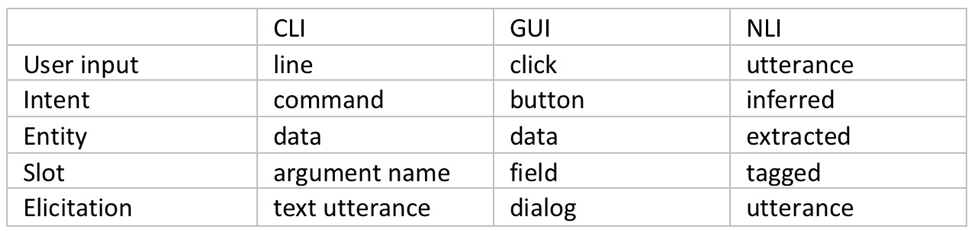
    The command-line interface (CLI) dominated human-computer interaction for a few decades, until the growing number of options software offered made GUI the new favorite way of talking to computers. Both of these interaction models are based on human to human communication: the operator communicates “an intent” complete with some input “entities,” each inserted in its “slot.”  This is exactly how bots operate, so how is a bot not just another UI?

    Fig. 1: User Interface Elements

    Bots as UI

    While a user interface is merely a human-readable catalog of machine’s capabilities and a set of input slots tightly coupled to a specific application, an NLI-enabled bot acts as our agent: it infers the intent (even multiple intents) from a natural language utterance, identifies any entities in that utterance, such as food: pizza, toppings: (olives, pepperoni) and fulfills that intent, be it by talking to Pizza Hut’s API or by calling the local pizza shop on the phone. Or even by making the pizza itself.

    NLI bots have already made quite an impact on the sales and support side, but how suitable are bot agents for more technical work? How would a chatbot perform in the DevOps world, replete with esoteric terms and complicated interfaces?

    Although there is a lot less training material available (after all, more people eat pizza than reconfigure Kubernetes clusters), there are also a lot fewer ways to express a technical intent, so in the end the technical bots are easier to train and make fewer mistakes than their sales brethren. But is a bot’s ability to classify an intent to deploy a new EC2 instance of specific flavor enough to make hardcore DevOps techies give up their favorite CLI?

    Beyond Interface: Advantages of Bot-assisted System Interaction

    Context memory: Whether a bot remembers your favorite pizza toppings, or you have to say “pepperoni and mushrooms” a couple of times a week is of little consequence. However, if your input looks like this:

    I’m sure you’d rather not have to type that ever again. The machine learning models of the leading bot platforms not only remember your slot values, they also remember the context in which those values were entered, so a well-trained bot is always able to suggest an appropriate value when looking to fill a slot.

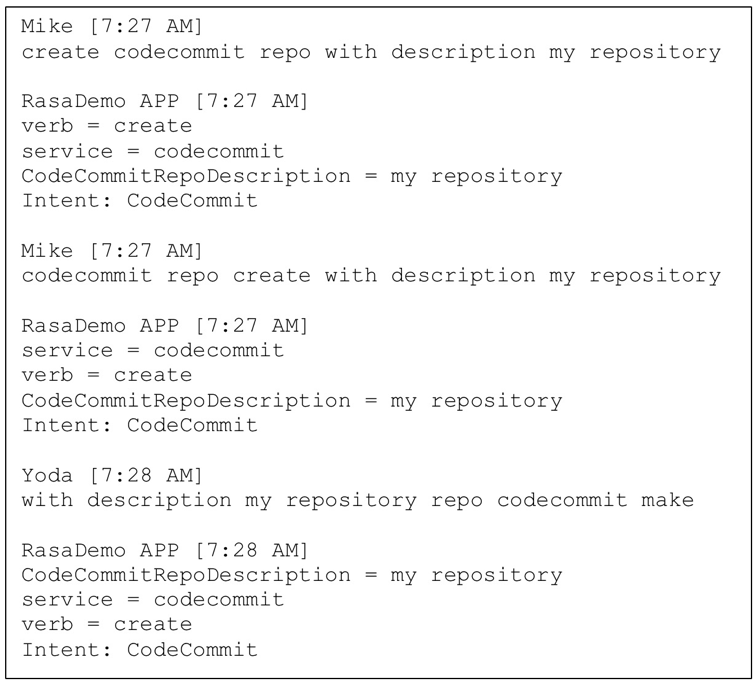
    Natural language understanding: Just like a human would not be fooled by variations in the word order or use of synonyms, neither would a well-designed bot. Not having to remember the exact syntax or even spelling translates into higher efficiency.

    Fig. 2: Intent classification and slot tagging

    Continuous training and improvement: The more time a bot spends with a team, the better it gets at its task of helping members of that team, not only due to filling its context memory with details about team members and tasks, but also because of reinforcement learning. In addition to the initial training corpus of data, most contemporary bot platforms feature interactive training mode, wherein a human user can provide a real-time feedback on the bot’s performance.

    Seamless automation: Since it’s an agent rather than a mere translation layer, the bot remembers successfully fulfilled intents and chaining those into a sequence, with or without slot elicitation, with or without branching and decision making is significantly simpler and easier than even the simplest of scripts.

    Collaboration platform integration: Teams typically meet in a collaboration platform such as Slack, WebEx or MS Teams, decide what needs to be done, then go and do it. With a bot on their team, they can get right to the “doing” part without leaving the collab platform; avoiding context-switching improves productivity.

    Built-in analytics: A bot’s main job is to classify intents, fill slots and invoke fulfillment. However, in its spare time it could listen in and take notes. At the end of an event (release, incident, outage, etc.) it could use its NLP savviness to provide a linguistic breakdown of the event: How many questions were asked? How many answers? How many statements? Or, even, What was the level of profanity use as compared to the average? This kind of summary provides benefits for parts of the company beyond bot’s original team.

    Conclusion

    Bots can and do increase productivity in a software development or operations environment. Automation is important, but when done through traditional means such as scripting, its high cost often causes it to be prioritized behind other tasks. The use of an NLI-enabled bot as an agent for interfacing with various back-end systems not only ensures the very best in user interface (“CLI on steroids”), but also minimizes the need to switch contexts and significantly lowers the cost of automation.

    More importantly, the emerging agent-facilitated process control prepares us for the next phase in the human-machine interaction: the post-app world.

    Bots will help us navigate the new world of commoditized services that will replace the familiar apps. They will track our experience and base future selections on our satisfaction with their past choices. What more can we ask for? Aren’t most of humanity’s dreams centered on intent (wish) fulfillment? What are the wish-fulfilling creatures from the fairy tales if not expressions of human desire for the perfect bot?

    — Mike Dimitroff

  • The Challenges of Digital Experience Monitoring

    The Challenges of Digital Experience Monitoring

    One of the great ironies of DevOps is that the better you are, the less likely it becomes that anyone will ever see your best work. If the code is supremely elegant, the app runs flawlessly, the servers do not lag and users and managers rarely say anything because that is exactly the experience they expect.

    People become aware of you only when something goes wrong—and at that point, they are rarely full of compliments. The experience means everything to them.

    Digital experience is the foundation of how online companies compete in the contemporary global market. That is why digital experience monitoring (DEM) has been recognized by Gartner as the most significant foundational process within application performance monitoring (APM). DEM is designed to improve not only your app but the entire experience that the user has in interacting with your brand online.

    If you’re unfamiliar with the DEM category, check out my primer here.

    DEM is the technological response to one of the oldest problems in business: not being able to be everywhere at once. On the digital side, the challenges of delivering the best possible performance across the widest scope fall into three spheres:

    • The problem of divergent user tech
    • The problem of network propagation
    • The problem of splintered responsibilities

    Let’s take a closer look at how DEM engages with each problem on its own turf.

    Divergent User Tech

    The mobile OS wars have settled on two champions for the time being: iOS and Android. As of February, those two account for 99.6 percent of mobile sales. Of course, from a DevOps perspective, nothing is that easy.

    Within iOS, around 79 percent of devices are on iOS 10, and another 16 percent are on iOS 9. The other 5 percent are scattered across various earlier versions. On the Android side, version 6 Marshmallow has the largest share at 31.3 percent of the market, and there are a plethora of other versions out there. Then you have to worry about the mind-boggling variety of hardware.

    For every combination of device and OS running your app, there are also users going to your mobile website on a handful of browsers. The numbers for February 2017 show 55.2 percent of the market is on Chrome, and 29.84 percent are looking at you through Safari. That leaves 14.96 percent of the market to be divided up among the default Android browser, Opera Mini, IE (at 1.02 percent, as hard as that is to believe) and many other contenders. It is significant to note here that the market leader did not even exist five years ago, so any apps you build now must be designed to work on browsers that haven’t been invented yet.

    The second subset of problems within the user tech consideration is geographic variation. How your app runs on 4G LTE in the city will be very different from 3G in rural areas. While Atlanta was judged to be the fastest city in the nation with downloads averaging 16.9 Mbps, users in the capital of Washington, D.C., can only work at 9.2 Mbps.

    The final subset covers issues related to the connection medium: Wi-Fi, cellular data, NFC, Bluetooth, ZigBee, WiMAX, HSPA, EV-DO, etc. It should be clear that there may be wide variations in digital experience based on the connectivity medium of various features within your app.

    Network Propagation

    It is not always the user’s fault. Old-school IT support tends to start with that assumption, but there are times when the problem originates within your own network or results from network latency generated by external errors.

    Everything that is happening on your servers, from DDoS attacks to viral videos to presentations in the conference room, could impact the performance of your app. As microservices becomes the dominant design model, it has become more common to see distributed applications get hung up in communications across the network. How will you track down which team is at fault or even assign fault when communications between microservices break down? The bigger question is, how will you correlate what happened on the front end with what happened on the back end?

    Splintered Responsibilities

    The second set of problems implies the third, which has to do with establishing a more unified view of your digital experience beyond just the IT world or whichever departments are involved. If your app involves contractors or third parties, the bigger view is larger than your company itself.

    It takes a paradigm shift to see your app as a unified tool. You have to assign a central command that takes a unified approach to keeping internal and external teams in agreement. This is the level where a team will determine the proper processes to launch at a moment’s notice and mitigate the damage from issues in real time.

    A central command outpost running DEM is needed to ensure a swift diagnosis of the performance anomalies. Then the DevOps team can resolve the issues and deploy fixes with minimal disruption to whatever the end user wants to do. Ideally, you want to do it with zero downtime or at least an SLA of nine 9’s (0.0864 milliseconds of downtime per day).

    About the Author / Kevin Goldberg

    Kevin Goldberg works in marketing at SolarWinds working on the Monitoring Cloud team. Prior to SolarWinds, he worked at AppDynamics and WalkMe. Follow his ramblings on Twitter at @Kevin_Goldberg.