Tag: applications

  • 9 Essential Ingredients for Modern Enterprise Applications

    9 Essential Ingredients for Modern Enterprise Applications

    Digital transformation. It’s the latest in a series of buzz phrases intended to describe how enterprises are embarking on top-to-bottom modernization of their IT environments. It’s easy to see why it’s a hot topic. Emerging technologies including cloud, containers, microservices and distributed applications hold the promise of greater flexibility, lower cost and faster release cycles. The benefits to companies that make this journey can be enormous.

    Unfortunately, making this journey can take years with today’s manual processes and antiquated tools. Not to mention that most IT budgets are at least 80 percent focused on keeping the lights on. Application modernization projects can be extremely complicated since legacy, monolithic enterprise applications are intrinsically dependent on underlying infrastructure and data stores. Cloning complex application environments, including critical production data, for upgrades or testing often can take days or weeks, slowing down cycles and contributing to lower quality releases. Even new applications are too often designed with infrastructure dependencies, trapping organizations onto specific cloud, server or container vendors. This vendor lock-in reduces choice and leaves IT organizations open to unexpected price hikes down the road.

    The truth is that the way we have designed, built, deployed and managed enterprise applications needs to change. Business-critical software is too often built in monolithic blocks that are nearly impossible to move to new infrastructure or storage options without lots of effort and time. The applications are hard to upgrade since updating even one small portion means rebuilding and retesting the entire thing. Managing the various versions of the discrete application modules and the resulting testing permutations can be quite challenging. It’s not unusual to hear from CIOs that they feel trapped in a world where they can only reasonably expect to update critical enterprise applications just twice a year at most.

    Business needs to move faster. There’s no reason why release cycles, even for enterprise applications, couldn’t be every few days instead of months. Application quality should actually be better in this world. Continuous delivery models such as DevOps should be an integral part of the process. And security should not be an afterthought; it should be built-in. To accomplish this, the future of enterprise applications must look very different from today.

    What are the essential ingredients for modern enterprise application platforms and tools in this new world? Here are a few suggestions.

    Complete Portability, Without Code Change

    Enterprise applications must be abstracted and separated from any dependency on underlying infrastructure, including sources of data. By abstracting the functions of an application into components that can run anywhere, it’s possible to then move the application to different infrastructure combinations, without changing a single line of code. It’s only through complete portability between cloud environments, container tools and servers that IT organizations will break vendor lock-in and gain the flexibility required to move their applications to vendors that offer the best combination of price, performance, reliability and features.

    On-Demand

    All enterprise applications should be on-demand, meaning the provisioning of new instances should be hands-free and fully automated. This implies tight integration with orchestration tools that most companies are already using to provision infrastructure. The key difference here is that the provisioning of storage options also needs to be fully automated. This is made possible by the fact that modern applications won’t have any dependencies on the specific data stores they rely on. This on-demand nature is not restricted to technical teams but includes business users that can easily perform user acceptance testing by simply provisioning full-fledged application environments.

    Self-Healing

    Modern enterprise applications should be self-healing, which means applications not only should have measurable data points to define their health but can then react based on these metrics. They must be able to scale up (or down) based on performance characteristics up to a certain cost threshold, restart on a healthy node in case of infrastructure bottlenecks and cache or deploy closer to the user based on latent use performance.

    Composable (DevOps-friendly)

    All enterprise applications should consist of a number of building blocks: APIs, web servers with content, databases seeded with data, security policies, the operating system, network configurations, deployment configurations and application binaries. By breaking apart monolithic enterprise applications into smaller components that can then act as independent services, IT organizations gain the flexibility to upgrade and automatically deploy individual components through standard DevOps processes and orchestration tools. The services can run anywhere desired, giving flexibility of choice in infrastructure or sources of data. And developers can use a point-and-click UI to pull pre-defined components together to build larger functions of an application.

    Model, Snapshot and Clone

    Once an application is separated into its essential components, a catalog can be maintained that makes it easy to create new versions of the application. Developers, test engineers and DevOps teams can then pick and choose whatever combinations of components they need to create or clone complex application environments for testing or deployment. The state of the application environments can be snapshotted, cloned and replicated. This cloning process should be efficient and quick. This dramatically speeds up development and testing processes, which to-date have been largely manual.

    Scalable

    Scaling application and infrastructure environments automatically, on-demand, and in near real-time is one of the essential capabilities that makes modern infrastructure so valuable. Any solution that is used to develop, test, deploy and manage enterprise applications should offer these same capabilities, giving the ultimate in cost flexibility, performance and scalability. As containers are moving quickly from the lab into production environments, look for a container-based solution that complements this strategy.

    Security is Included

    Application security should not be tacked on after deployment. This slows down continuous delivery processes like DevOps and creates friction between development/ops and the security team. Instead, security should be considered an essential component of the overall application environment and treated the same as any other component and baked into the application from the start.

    Push-Button Upgrades

    Upgrading enterprise applications should be made much easier by taking a point-and-click, push-button approach through a modern UI and integration with continuous deployment tools. Once an application is blueprinted into its various components, using a modern UI to choose versions and assemble the final application becomes entirely possible, saving time and reducing manual errors.

    Single-Pane-of-Glass Application Management

    By taking an end-to-end view of the enterprise application development, testing, deployment and management process, it’s now possible to create a “single pane of glass” console that gives development and deployment teams a powerful way to manage what’s been deployed to various infrastructures in the organization. With this approach, it’s also now possible to collect invaluable utilization and cost metrics which can help an IT organization continuously improve their portfolio.

    Enterprise applications of the future are going to look very different from today’s monolithic behemoths. By leveraging new technologies and processes, IT organizations will be able to dramatically speed up their modernization efforts and release cycles, improving competitive position. The inherent cost savings of this approach will be transformational as well, as IT budgets shift toward net-new innovation, not just keeping the lights on. The future looks bright indeed.

    About the Author / Rahul Ravulur

    Rahul Ravulur is the cofounder and CEO of appOrbit, which was founded in 2014. Most recently, he was the Director of Product Management at VMware managing the Availability suite of products. Before that, Rahul managed the vCenter Server and Client set of products with a special focus on scalability and extensibility to chart the evolution of vCenter to a broad virtualization management platform. Prior to VMware, Rahul held engineering leadership roles at BMC Software and Marimba.

  • Avoiding Application Integration Fails

    Avoiding Application Integration Fails

    Trying to integrate applications on your own can eat your project alive. A seemingly simple project may look harmless when you start, but in the end do-it-yourself software delivery tool integrations can devour your entire software process.

    The problem may be that building simple integrations appears easy. How hard can an integration be? But let’s look at what typically happens with integrations down the road using the example of one developer’s story.

    A developer needs to send defects from Zendesk to JIRA, so he builds a one-way integration based on a workflow action (just a trigger). Soon enough, he realizes he is now managing two tools, and keeping them updated has become a big issue—a very manual process and a huge time-sink. So he designs something to support two-way updates. But that’s just the beginning; each tool changes every few months and an integration that seemed so simple on the surface becomes very complicated.

    Then our developer tries to modify a simple JIRA workflow. Again, it seems straightforward, but it’s not, because the tools involved are constantly changing. There are complexities with workflows, and organizations undertake endpoint system upgrades. As a result, one change to the tool breaks everything he’s done. On top of this, it’s difficult now for him to know the hierarchy or how one item relates to another.

    He starts to consider some of the challenges he’s facing. He needs to consider how the description is written in each tool. They are all different, so how does he make sure he conveys the information correctly every time? And each “simple” integration seems to create more pain points, creating auditability and traceability problems. Meanwhile, he has to manage other tools that are continually added to the mix.

    He’s taken a look at both API and custom-tool approaches. He’s found that API integrations are brittle or they become too popular and then have to be maintained for an entire organization. But the alternative—custom tools—typically fall apart quickly.

    And what happens when our developer decides to leave the company? There’s no one left who knows how to maintain the integrations he created. Meanwhile, new tool replacements mean someone has to build new integrations—and the puzzle becomes even more complicated.

    This short scenario illustrates the unexpected challenges developers face in creating and maintaining integrations. The cost of building and maintaining tool integrations in an always-evolving landscape is deceptively high. And when an integration fails and the organization suffers critical downtime, costs (and tempers) skyrocket.

    Many of the common pitfalls are readily evident, such as rich text problems, but the following three areas may be the most challenging to developers addressing integration issues and can’t be easily avoided:

    • Endpoint system upgrades and schema changes
    • Workflow rules and differences
    • Relationships

    Endpoint system upgrades and schema changes: Much of the time, a different team from the one that developed an integration will perform the upgrade. Perhaps a new field was added. Regardless, simple changes to APIs can blow up an integration. API responses may change formats or the expected values for a field may change. When the team upgrades the system the URL may change, so avoiding duplicates is tough. So, too, is ensuring that the change is seamless. Changing some of the underlying features could result in unexpected behavior (and it will be hard to detect where the problem actually is). It may be that JIRA made API changes that caused custom select fields and comments to fail when using the “old way”; however, other features may continue to work as expected, making this failure silent.

    Workflow rules and differences: Workflows are the complexities between systems. It is hard enough to reconcile teams, let alone the tools they use. Tools may require you to enter required fields, and this can constantly change. And workflows may not match up at all. How can you handle these differences without bouncing field values and allowing complex mappings to reconcile these? What happens when a system has a special action to change a status and fields are required at the same time, but the other system is open and doesn’t reflect this?

    Because of these issues, it is critical to get the teams being integrated (e.g. testing and development) to discuss workflows and where the two teams align. These teams need to understand where workflows overlap so they can undertake proper integrations.

    Relationships: These are not always apparent. As you grow and want traceability, you need to have synchronized relationships. How does this requirement trace to a test? How will you manage those relationships? The tools don’t match the way they manage relationships. Some allow one value, others multiple. Some allow relationships across projects and types, others are more restrictive. In addition to the rules of the system, how do you know what items to link once you have synchronized the artifacts? What happens if only one side of the link is synchronized or the items are not synchronized in the order that you expected?

    Getting this all right requires intelligent systems that can look at one system and translate properly to another

    Avoiding Integration Pitfalls

    The first obvious step in avoiding pitfalls is to identify what they will be and when they’ll pop up. To do this, focus not just on the current problem, but also on the future. Consider the bigger picture, understanding that systems constantly change and teams work differently so there will be additional layers of complexity in any integration project down the road.

    As such, my best advice is for development organizations to focus on the software their organizations are counting on them to deliver, not creating and managing tools to build that software. Put internal resources to work in IT areas where you can create competitive advantage for your company. And consider using third parties to address issues such as integrations.

    About the Author / Shawn Minto

    Shawn Minto is the senior director of Technical Services and Support at Tasktop and one of the original team members working with CEO and co-founder, Mik Kersten, on Mylyn prior to Tasktop’s founding.  Shawn began his career at Tasktop as a software engineer, working on all aspects of the product and directly with our customers to support their needs. Currently he works with customers to understand their tool environments and offers suggestions on how to best leverage Tasktop through deployments and support. In his free time, he enjoys being outside, cooking, and renovation projects. Connect with him on LinkedIn and Twitter.

  • Microsoft Woos Development Partners

    Microsoft Woos Development Partners

    If Microsoft has its way, many more DevOps processes will revolve around the cadence at which the company upgrades its applications. At its Inspire 2017 conference, the tech behemoth announced an ISV Cloud Embed initiative designed to entice more developers to add value by extending application functionality it has already developed and deployed in the cloud.

    Rather than reinvent the same functionality over again, Microsoft will provide developers with access to its application at price points that are as much as 50 percent less than what an end user might pay, notes Alysa Taylor, general manager for Microsoft Business Applications and Industry. In addition, the company is promising to help software developer partners reach 100 million commercial active users of Office 365 and Dynamic 365 customers through the Microsoft AppSource online store.

    The specific software modules the company is providing developers access to under this program include:

    • Dynamics 365 Embedded: a suite of business applications the company is hoping third-party developers will customize and extend across a variety of vertical industries.
    • Microsoft Flow Embedded: Makes it possible to customize workflows to automate business processes within their application.
    • PowerApps Embedded: Provides access to extensions that make it easier to deliver an application via a browser or as a mobile application.
    • Power BI Embedded: Allows users to easily embed fully interactive reports and dashboards.

    This latest initiative is a logical extension of the work the company has been doing to entice developers to employ Microsoft Office as the front end for accessing a wide variety of back-end services.

    The challenge IT organizations that go down this path will face is aligning the pace of DevOps with the rate at which the company is updating its applications.

    Microsoft is not the only IT vendor that presents this DevOps challenge. The more a software developer invokes APIs, the more complicated managing the DevOps process can become. The whole concept of continuous integration/continuous deployment (CI/CD) can get sorely tested when control over when the back-end services being invoked via an API are updated.

    In effect, software developers are being asked to make a buy-versus-build decision. To entice developers to make a buy, the company not only provides a common API framework, but also developers will be able to take advantage of any investments it makes in artificial intelligence across the entire Microsoft application portfolio.

    Taylor says Microsoft is committed to working with partners to eliminate any competitive friction. The company is in the process of implementing a massive reorganization under which the company’s core technology groups are being aligned around four technology groups: Modern Workplace, Business Applications, Applications and Infrastructure, and Data and AI. The rest of the company is then being organized around a go-to-market strategy that is focused on education, financial services, government, healthcare, manufacturing and retail industry segments. Microsoft is looking for partners that can apply their own intellectual property to extend its core applications into each of those segments, says Taylor.

    It remains to be seen just how well partnering with Microsoft can work on a practical DevOps level. But the one thing that is clear is that there will be no shortage of software developers who are about to find out.

    — Mike Vizard

  • How AI Impacts DevOps Pipelines

    How AI Impacts DevOps Pipelines

    The rise of machine- and deep-learning algorithms is about to create some interesting data-gravity challenges for IT operations teams. Over most of the last decade IT operations teams have been caught up in a public- versus private-cloud computing debate that has mostly been species. The truth is that most organizations wind up employing both. But as IT organizations are just now getting used to that multi-cloud reality, the rise of machine- and deep-learning algorithms to create a new generation of advanced artificial intelligence (AI) applications are about to add some significant nuances to managing the DevOps pipeline.

    New applications tend to be built and deployed where they can access the most relevant data. Most of the data employed by the average enterprise resides on-premises today. But it’s clear that the data being created in various types of cloud services is growing at a faster rate, thereby altering data gravity forces across the enterprise.

    To get the most value out of that, developers are now building a new generation of advanced applications that employ machine- and deep-learning algorithms. In most cases those algorithms are being deployed wherever data happens to reside. For example, Salesforce just announced at its Salesforce TRAILHEADX 2017 conference that it is making available additional APIs to the Salesforce Einstein Platform Services for building custom applications that can now be infused with sentiment analysis, the ability to detect objects and understand customer intent.

    Michael Machado, director of product management for Salesforce Einstein, says that the success of any AI initiative will come down to both the amount and quality of the data being accessed. As a CRM application consisting of a mix of structured and unstructured data concerning customers, Salesforce represents an attractive platform for building AI applications. In fact, to facilitate the building of applications, Salesforce also is making it simpler for developers to collaborate across multiple alliances in addition to providing access to DevOps tools from Atlassian and Github.

    But CRM applications are only one element of the typical application portfolio. The more data that any set of algorithms can be applied against, the faster the application learns and the more accurate it becomes. As developers build the next generation of applications, they are going to want to be able to access as much data as possible. For many IT organizations, that will mean the applications will be hybrid almost by definition—attempting to centralize all their data will prove to be impractical as well as prohibitively expensive. Constructing application pipelines spanning multiple data sources, however, requires a very mature set of DevOps processes.

    Arguably, the rise of these next-generation applications might finally force the DevOps issue inside most organizations. Most have been able to manage application development on various cloud platforms in isolation. Going forward, that may no longer be practical, as developers seek to incorporate more data sources within their application environment. The challenge IT operations teams will need to wrestle with is providing timely access to that data in way that doesn’t ultimately compromise their performance.

    — Mike Vizard

  • 13 Best Practices of Successful Software Testing Projects

    13 Best Practices of Successful Software Testing Projects

    Thorough testing is vital for quality assurance, and best practices in software testing can yield high-end software at the end. The current post is giving fine clues regarding the prevailing best practices in software testing projects. 

    Recent cyberattacks have proved that security has paramount importance for any software life cycle. The best QA and testing practices can help software development companies to cut the worst incidents considerably.

    Here are 13 best practices to ensure successful software testing projects.

    Rely Only on a Controlled Security Environment for Testing

    Today, many software development companies and freelancers prefer cloud-based testing to capitalize on the cloud’s benefits. Unfortunately, the cloud has tons of vulnerabilities, particularly when the public cloud is in use.

    Software development agencies instead should invest on testing infrastructure and create a secure testing environment locally to avoid the internet and cloud-based vulnerabilities.

    For mobile app testing, regional testing labs and libraries are the best alternatives, where manual and automated testing take place securely and safely.

    Carry Tests Throughout the Software Development Cycle

    Testing only on the QA stage of the software designing process is an inadequate approach. Testing must carry with each major output/feature of the software. Plan the testing schedule right from the beginning stage of the development process.

    Early testing can catch bugs early and cut the defects early. It improves the quality of software and cuts the labor in the final stage of QA, and reduces the cost of quality maintenance. Moreover, it builds the confidence among the team of developers to include some innovations in the product.

    Break Tests in Small Fractions

    When you carry tests frequently and throughout the cycle, take smaller tests to save time and resources. Many tests are longer than we think, so carry such tests in smaller fractions such as UI testing, function testing, security testing, UX testing and so on.

    Write Tests for Maximum Coverage

    Write all types of tests to cover the maximum, if 100 percent is not possible. When you write test cases for valid conditions as well as unexpected conditions/behavior of apps under the test, you can cover maximum.

    Moreover, write test cases in the requirements step for analysis and designing step, too. This way, your requirements also become testable.

    Carry Regression Tests

    You must recognize and segregate your test cases for regression testing. A quick and effective manual regression testing is beneficial for the quality assurance of the. During regression testing, use a bug graph (number of bugs against time for different modules) to predict the most possible buggy part of the app.

    Programmers Should Not Write Tests

    Technically, tests must be written before coding. Programmers should not write tests or test cases for their own code to reduce  the chances of biased tests or a lack of creativity in the test. Tests should carry tests with own perspectives.

    Note and Report All Tests

    When you carry manual testing or automated testing, keep records of all tests. Note all test progress and observations in a file, and incorporate these observations into the final test reports. Thus, you can release absolutely unambiguous test reports and required details.

    Some of the things that should be noted include the bug’s symptoms, the effects it exerts on the entire system, and all possible solutions to make testing meaningful.

    Clean the Test Code Prior to Final Release of Software Product

    When an application under the test requires changes in core code to carry a test successfully, it must be cleaned once the testing process is completed. Therefore, record-keeping of testing code is a highly beneficial practice. In addition, save time and resources by cleaning the testing code from the core code at the time of the deployment of the final application.

    Isolate the Application from Developers

    During the development stage, designers and developers make constant changes mostly in a collaborative manner, particularly when the MVC paradigm has followed. Testing the application within the development environment is not advisable. For unbiased and complete testing, you must isolate the application from the design and programming environment for a declared period of testing.

    Customize Testing

    Write custom testing solutions for each project according to needs and their possible use cases. A module in an app running on a smartphone has different use cases than the tablet environment, so write the test accordingly.

    Accumulated Skilled Testers

    Highly skilled testers in the team is a welcome move for the success. Your testing team must have functional and automated testers with the latest testing skills in their respective areas.

    Similarly, for performance testing, you should have mixed talents with skills on LoadRunner and JMeter testing. Moreover, you should look for additional skills in your testing team such as UFT, HP ALM, Selenium and other open-source tools for advanced testing.

    Build a Target Operating Model for Testing

    Define testing processes, methods, tools, RACI matrix and communications for your testing project. Acknowledge all developers and team members of the QA department regarding these, their project goals and the responsibilities allocated to them.

    The process is termed as the target operating model for testing, and it helps in the successful entry of any new team member to work toward the common objectives.

    Have a Mix of In-house and Offshore Teams

    Collecting a testing team with required skills and investing in testing infrastructure is not always possible with all software development companies, particularly in developed countries where wages are higher.

    Therefore, you have to rely on outsourcing testing/QA team and their infrastructure. However, not all kinds of testing are possible with offshore teams, and you have to mix the tests and talents with offshore and onshore for successful testing.

    For instance, the behavior of the consumers/users of some products are different between the west and the east, and you need to carry such test cases in the west with the help of local or in-house team through applications that were built by the offshore team.

    Conclusion

    We have explored the best practices to enhance the testing projects for better quality and security of your software in the modern age. Experienced and expert software testing developers are mandatory to hit your testing goals.

    About the Author / Tarang Vyas

    Tarang Vyas is a head of the development team at software development company Perception System. He has been in the industry for 15 years. Connect with him on LinkedIn.

  • Node.js Becoming More DevOps-Friendly

    Node.js Becoming More DevOps-Friendly

    Over the last several years use of Node.js has exploded across the enterprise, as developers moved to embrace a variant of Javascript that made it easier to build both client and server-side applications. However, every time it is upgraded, all the dependencies between it and application modules written in C or C++ breaks.

    To solve that problem, the Node.js Foundation is making available on an experimental basis a Node.js API (N-API), developed collaboratively by Google, IBM, Intel, Microsoft, nearFrom, NodeSource and other contributors. The API will be in Node.js 8, and promises to eliminate the need to update all those dependencies. Pending additional testing, it is expected to be given Long Term Support (LTS) status later this year.

    At the same time, The Linux Foundation is adding new features to experimental tracing and async tracking features. A diagnostics API will make it easier to monitor the operation of the Node.js event loop across the complete life cycle of a service request. Finally, an inspector core module, which allows developers to leverage the debug protocol used by the Google Chrome inspector to inspect currently running JavaScript code, is also being added.

    Each of these new capabilities are nice to have on their own. But collectively, they signal the beginning of a maturation process in the Node.js community. Increased use of Javascript in general—and Node.js especially—have arguably caused many enterprise IT organizations re-evaluate their DevOps processes. Developers using Node.js have been able to increase the number of applications they could develop considerably. Since then, the number of languages being employed within the enterprise has exploded.

    Mark Hinkle, executive director of the Node.js Foundation, says moving forward there will be more focus on reducing the friction surrounding upgrades of Node.js applications as part of an effort to further expand the ecosystem. Many organizations commonly end up supporting multiple versions running across a variety of applications. Hinkle says N-API is a step in helping to reduce the maintenance costs associated with supporting those applications. In an ideal world, the foundation would be gathering additional input from DevOps experts pursuant to achieving that goal. In most IT organizations, the care and feeding of Node.js applications is still left in the hands of IT operations teams after the apps are deployed in production.

    In the meantime, Hinkle says its performance continues to improve. Naturally, there’s a corresponding relationship between better performance and the number of use cases for which it will be considered. Of course, that doesn’t mean Java and other legacy programming languages won’t be used to develop new applications. But it does means that in terms of the number of programming languages employed across the enterprise, it’s now a polyglot universe.

    — Mike Vizard

  • Tailoring Enterprise Collaboration: Strategies for Success

    Tailoring Enterprise Collaboration: Strategies for Success

    In the age of SCRUM, Agile and DevOps, developers collaborate with their peers and colleagues more than ever before. Many developers already use a variety of collaboration tools on a daily basis, such as a team messaging application, an online discussion forum, or an open code repository.

    But while developers love to collaborate, it can be easy for them to forget that not everyone collaborates the same way. By focusing solely on collaboration products and solutions that work well for their development teams, developers are missing the opportunity to provide tailor-made collaboration capabilities to the applications they’re building, or to their entire company or organization. When it comes to developing collaboration capabilities for their organization, developers often fall short of business expectations, as their own personal needs differ from their constituents.

    Tailor-Made Collaboration

    Here are three recommendations on how to tailor a collaboration solution that will fit well for an entire organization:

    Beware of the “One Size Fits All” Approach

    Today’s array of collaboration tools is more sophisticated than many developers realize. In fact, incorrect assumptions about which platforms are “best of breed” result in rolling out collaboration technology that may have technical but not business, appeal. As many developers hold the keys to the platforms that are eventually put into practice within their organization, this leaves executives at the hands of those who often see collaboration platforms as group chat spaces and wikis for sharing code.

    However, other lines of business don’t only collaborate with chats or wikis. A business with thousands of employees located around the world cannot only use general correspondence streams to acquire the information they need to successfully do their jobs. It is unrealistic to expect that messaging platforms alone can support groups of people across departments who do not necessarily understand one another. For instance, IT and Marketing departments’ daily operations are far from the same—so then why would a “one size fits all” approach for workplace teamwork be successful?

    Developers must look beyond topline technologies and examine a full range of collaboration solutions that can also provide centralized repositories for information, customized landing pages and unified communication capabilities.

    Identify and Understand Communication Gaps in Business Processes

    As departments differ, mindsets across organizations vary as well. The developer creating the back end of the platform operates in a unique workflow and framework from those utilizing the platform. It is, therefore, critical to demonstrate a clear integration between different levels of the organization to create a unified understanding of how people work.

    Individuals who rely on each other to accomplish tasks need to interact in a variety of ways, including through a centrally located platform to converse on ideas and join forces on project development. To create useful online spaces, developers should attend meetings with other teams to truly understand their needs. By doing so, they will gain perspective on how their peers operate in the workplace, and develop a platform that is increasingly applicable and effective.

    Build a Plan for Scale and Growth

    By better understanding business needs, developers can predict the appropriate scaling requirements for their collaboration solution. Scaling a collaboration solution may involve setting up workspaces and areas for mass access to thousands or tens of thousands of people, but many of the leading tools cannot scale past several thousand users. For global businesses with multiple constituents and varying workflows, messaging-based approaches may not suffice on their own, as they are not scalable methods to distribute content to a high volume of people.

    Ultimately, enterprise collaboration work patterns are shifting toward more speed, and developers are at the heart of the transition. However, being overly reliant on the technical appeal of specific collaboration tools will not lead to the best outcomes for the business.  Developers need to design and build collaboration solutions that not only assist their colleagues to communicate, but also help drive collaboration that impacts business outcomes at scale. By understanding the nature of the way an organization needs to collaborate, developers can provide solutions that directly contribute to increased revenue, empowering them as strategic partners in organizational change.

    About the Author / Stephen Hamrick

    Stephen Hamrick is VP Product Management, Collaboration Software at SAP. Based in Palo Alto, California, Steve leads the product management, user experience, and documentation teams for enterprise social software products at SAP. He has spent the last 20 years of his career in the enterprise software technology industry, focused primarily on collaboration and social software. Connect with him on LinkedIn and Twitter.

  • The Perfect Combination: Imperative Orchestration, Declarative Automation

    The Perfect Combination: Imperative Orchestration, Declarative Automation

    There are two fundamental approaches of how to design automation processes, declarative (also often known as model) and imperative (also often known as workflow or procedural).

    The purpose of this article is to explain the principles of each, explore a little of how they work, try to highlight some of the strengths and weaknesses and explore how they can be used together. I don’t think one size fits all—based on your requirements and some of what is explored below you may use a combination of the two, even if some of the tooling you use leans toward one way or the other.

    Declarative/Model-Based Automation

    The fundamental of the declarative model is that of desired state. The principle is that we declare, using a model, what a system should look like. The model is “data driven,” which allows data, in the form of attributes or variables, to be injected into the model at runtime to bring it to a desired state. A declarative process should not require the user to be aware of the current state; it will usually bring it to a required state using a concept known as idempotent.

    Idempotent

    What this basically means is that if you deploy version 10 of a component to a development environment and it is currently at version 8, changes 9 and 10 will be applied. If you deploy the same release to a test environment where version 5 is installed, changes 6 through 10 will be applied, and if you deploy it to a production system where it has never been deployed, it will apply changes 1 through 10. Each of the deployment processes brings it to the same state regardless of where they were initially. The user, therefore, does not need to be aware of the current state.

    Maintaining State

    Once we have a model for our infrastructure or applications, any future changes required are made to the model. This means that as a model changes over time—and may have a current, past or future state. This raises the question of how can a model be applied to a target system, how can it know what changes to make? This is not always easy to answer and is not the same for every platform and runtime you are managing.

    State Management

    It’s hard to cover a broad subject like this without making some generalizations—and there are some in this section. There are broadly three methods used to keep an environment or system and its desired state models in line:

    Maintain an inventory of what has been deployed. This where we maintain the state of what has been deployed, and what is in the desired state of a release, and only apply the difference.

    For example:

    1. My release or ‘desired state’ contains database updates: 1.sql, 2.sql, 3.sql, 4.sql, 5.sql
    2. My example test system has had 1.sql, 2.sql, 3.sql already deploy (recorded in my inventory)
    3. Automation determines to only run 4.sql and 5.sql

    Use Case: This type of state management is particularly useful for things such as databases or systems that requires updates from a propriety API where the state of the target cannot always be easily determined.

    Validate/compare the desired state with what has been been deployed. As a simple illustration, we may want to determine if important_file.xml from my desired state deployment exists on the target system and whether it looks the same as the one in my package.

    1. If it doesn’t exist – create it / copy it, etc.
    2. If it does, determine whether it is different
    3. If it is different, how do I update it (converge, copy over, etc.)?

    Use Case: Probably the most widely used implementation is to simply manage the files that many cloud-native runtimes use to store configuration definitions, such as ssh keys for a server or xml files to manage a java runtime such as tomcat. This also can be used to maintain runtimes that are managed via an API; for instance, What is my heap or config item for my WebSphere Server? Is this what it should be? If it is doing nothing, set it to correct desired state value.

    Just make it so. There are occasions when we don’t really care about what exists. The most obvious example here is anything that is stateless, such as a container. There are probably very few example of why you would want to run any automation within a container to change its state; you would just want to instantiate a new one that has the new configuration you require.

    Imperative/Procedural/Workflow-Based Automation

    The fundamental of what often is referred to as workflow, procedural or imperative approach is that a series of actions are executed in a specific order to achieve an outcome. For an application deployment, this is where the process of “how the application needs to be deployed” is defined, and a series of steps in the workflow are executed to deploy the entire application.

    A standard example might include:

    • Some pre-install/validation steps
    • Some install/update steps
    • Finally, some validation to verify what we have automated has worked as expected.

    The often-cited criticism of this approach is that we end up with lots of separate workflows that layer changes onto our infrastructure and applications—and the relationship between these procedures are not maintained. The user, therefore, needs to be aware of the current state of a target before they know which workflow to execute. That means the principle of desired state/idempotent is hard to maintain—and each of the workflows are tightly coupled to the applications.

    The reality here is that the situation is not black and white. Puppet is an example of what is seen as a Declarative automation tool, while Chef is said to be Imperative. Do they both support concepts of desired state and are idempotent? The answer is, of course, Yes. Is it possible to use a workflow tool to design a tightly coupled release that is not idempotent? The answer is, again, yes.

    What are the Benefits of Workflows?

    The benefit of using a workflow is that we are able to define relationship and dependencies for our units of automation—and orchestrate them together. In the example above, we can create a workflow to perform pre-install, installation and post-install steps, perhaps adding additional conditional steps if it’s in a particular environment such as production (disable a monitoring system, additional security configurations, etc.).

    Procedural workflows also allow us to, for example, deploy component A & B on Server1, then deploy component C or Server2 and then continue to deploy D on Server1. This give us much greater control in orchestrating multi-component releases.

    It is often suggested that the choice is between Imperative- and Declarative-Based Deployment. However, these two approaches are not mutually exclusive.

    Workflow for Applications

    One of the issues in the world of DevOps is the lack of a consistent lexicon or terminology. Just ask someone who works in the industry what their definition of an environment is or what the term application means to them. My guess is you will get differing answers.

    To me, an application is made up of components and a release is generally in the form of an application that is created from multiple versioned components. Now, depending on the organization you work in, you may or may not recognize the definition I have given—and if everything in your world is a stateless loosely coupled microservice on a cloud native platform, then this may be the case. If you work  in a more traditional enterprise organization, you will more likely recognize the requirement for multi-component release orchestration, requiring procedural or workflow processes to handle the coordination and dependencies between the different components.

    Model for Components

    When it comes to deploying a specific component, I think it’s hard to argue against the benefits of using a Declarative or model-based approach. The concept of something being Idempotent—I can deploy any version to any target system if it has never been deployed to before, if we want to introduce a new change to an already existing environment or even if we want to roll a unit of automation back—is hard to argue against for its consistency and simplicity.

    Imperative Orchestration & Declarative Automation

    The future of IT Operations is doubtless based on things such as stateless microservices running in fungible containers, using Kubernetes watchers to trigger event-driven automation, much as the future of retail is for Amazon to deliver milk to my IoT-connected refrigerator using a drone.

    That being said, most of us still live in the present and have the need, for some time to come, at least, to address some of the automation and orchestration challenges that exist in today’s IT landscape. With this in mind, a combination of Declarative (or model-driven) units of automation, coordinated by Imperative (or workflow-based) Orchestration can be used to achieve this. An imperative/workflow-based orchestrator also will allow you to executive not only declarative automation, but also autonomous imperative units of automation should you need to.

    My recommendation is that an application workflow defines the order and dependencies of components being deployed. The Declarative Model for a component determines what action needs to be taken to bring a target system into compliance with the model.

    It is hard to underestimate the importance of desired state—it has changed the way we look at system and application updates and drastically improved the visibility, audit and control of IT systems. Any progressive organization looking to move to a continuous delivery/deployment model or implement things such as autoscaling or “deploy and destroy” for development or testing purposes will benefit from the use of declarative/model-based automation.

    However, a model-based approach does not answer all the difficult questions around orchestration. This, in my opinion (for the moment, at least) is best achieved using Imperative, Procedural or Workflows processes.

    About the Author / Dave Sayers

    Dave Sayers is a co-founder and technical services director of MidVision, a provider of Release Automation and Continuous Delivery Software. He works closely with customers and partners on DevOps and Automation initiaitves throughout Europe and North America and is responsible for devising and managing the partner and channel strategy. Connect with him on LinkedIn.

  • Confessions from Fannie Mae, Liberty Mutual and Capital One

    Confessions from Fannie Mae, Liberty Mutual and Capital One

    Learn from real-world stories from presenters at the All Day DevOps conference …

    True Story

    Over the past few years, Fannie Mae transformed the way in which it delivered software. Deploys increased from 1,200 per month to 15,000 per month.  At the same time, productivity increased by 28 percent while costs were reduced by 30 percent.

    But, how did Fannie Mae do it?

    During the All Day DevOps conference, more than 13,500 practitioners from around the world came together to learn from their peers in the industry. Barry Snyder, senior manager of DevOps at Fannie Mae, was one of 57 practitioners who shared his real-world journey through his enterprise transformation.

    Choke Point or Checkpoint?

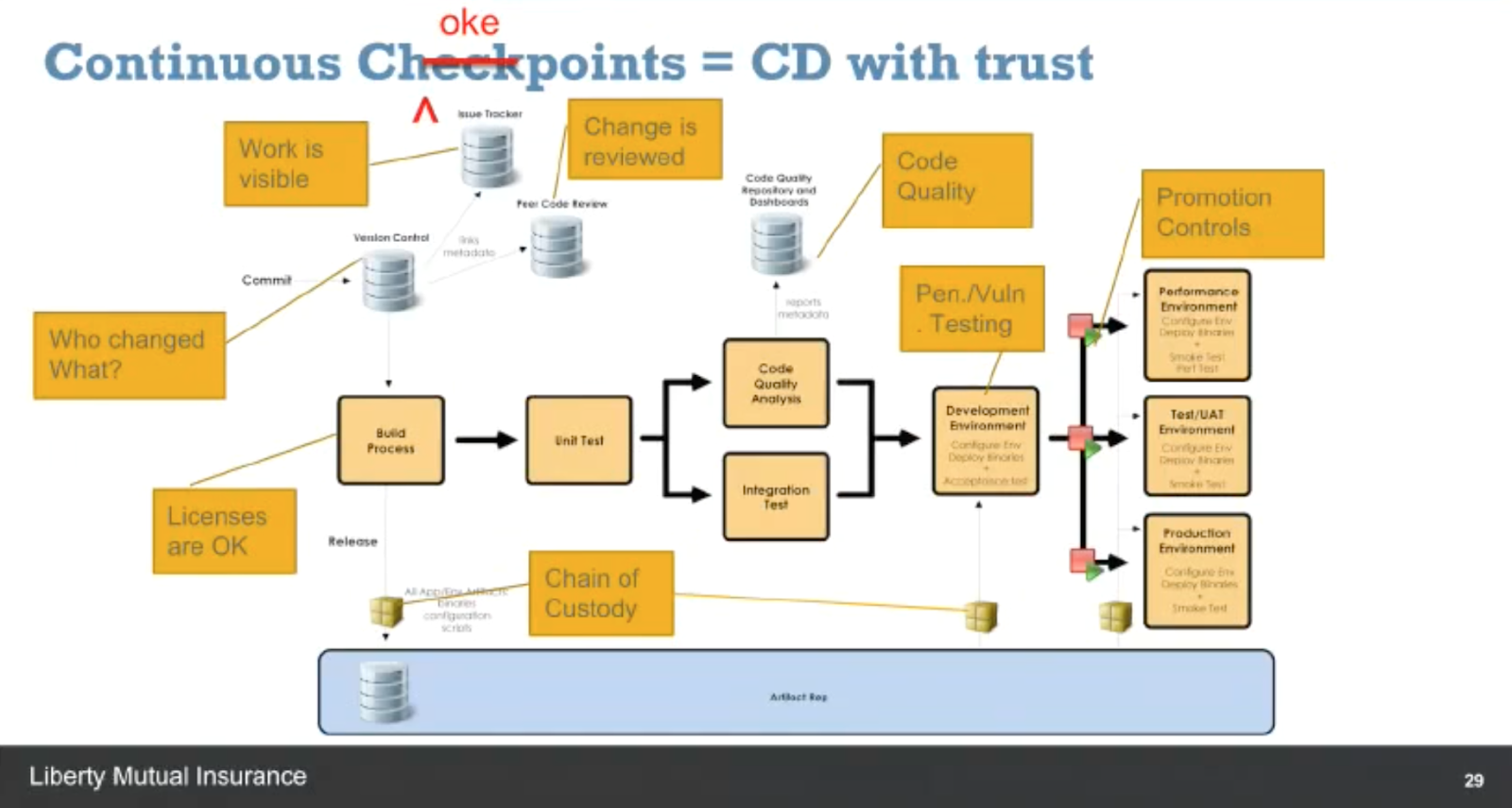
    Eddie Webb, director of Software Delivery Platforms at Liberty Mutual, also shared his organization’s journey into DevOps.  Eddie described how Liberty Mutual evolved its organization, tool chain and processes to go from 20 percent of builds being deployed to 60 percent over the past 18 months. He described how the company documented its value delivery chain and identified all of its choke points in the continuous delivery process that would need to be automated to achieve its new velocity and quality targets.

    Screen Shot 2016-12-05 at 11.35.04 AM.png

    Run the Gauntlet

    The All Day DevOps conference recorded more than 57 practitioner-led sessions (30 minutes each) including those from Barry and Eddie. Every session is now posted online and is free to watch. The conference itself had three tracks: CI/CD, Automated Security and Modern Infrastructure, including:

    • Application Secret Management with KMS – Andrey Utis of Capital One
    • Getting out of the Job Jungle with Jenkins – Damien Coraboeuf of Clear2Pay
    • Serverful Computing – Taking One for the Team – Paul Czarkowski of Blue Box Group

    One of the best ways to learn about DevOps is to hear from the experiences of others who have run the gauntlet. Take 30 minutes this morning, at lunch or at home this evening to watch your first online session with All Day DevOps On-Demand.

    — Derek E. Weeks

  • Citizen Developer Movement Gains Steam

    Citizen Developer Movement Gains Steam

    It’s been about a year since we covered how the rise of the consumerization of IT had extended beyond cloud services and devices to application development and the advent of the Citizen Developer from rarity to mainstream. The momentum of citizen developers in the enterprise has only increased in the past year. And the move is proving to provide much needed faster time to market for enterprise apps.

    According to the “QuickBase annual State of Citizen Development Report,” a survey completed this summer of 153 North American enterprises that develop and use custom business applications, the need to rapidly develop new apps is one of the leading reasons why non-developers in business roles are rolling up their sleeves and developing some of the apps their companies need.

    As readers of devopsy.kinsta.cloud are aware, app backlogs are a big concern. Reportedly, many organizations have app backlogs that range from weeks to months to years. Rather than wait for an IT department that is struggling to meet—or even catch up with—app demand (largely fueled by the thirst for mobile apps), they are turning to low-code and no-code development platforms that enable anyone to develop without understanding a formal language.

    How do enterprises support citizen development? They do it mostly by providing employees a place to build apps in cloud-based, low-code platforms. Some of the highlights from the QuickBase report include:

    • Developing a custom application using traditional development methods requires more than two months on average for 67 percent and more than six months for 31 percent of application builders.
    • Citizen development platforms are seen as capable of developing 26 different custom applications for a variety of top use cases including asset management, project management, IT help desk, inventory management, contact management, workforce management, service management, compliance management, contract management and facilities management.
    • Organizations consider the top benefit of no-code citizen development to be the ability to maintain and update applications faster than the more than two months required by 35 percent of traditional developers.

    The acceleration of app development and the fact that citizen developers help to move app ideas from the bottom up in an organization are why many IT leaders say citizen development is a catalyst of the innovation enterprises need. As Michael Beckley, CTO of Appian relayed to associate Tony Bradley in his story, “Citizen Developers Can Benefit an Organization“: “The best-designed products have always been built with the needs of the user from the outset. Who better than citizen developers to design software that enables organizations to transform customer experiences, launch compelling new products and manage risk efficiently? Citizen developers are motivated by the opportunity to create a new reality, not merely accepting the workplace as they found it.

    “Citizen developers are most successful when supported by IT,” Beckley continued. “One critical area where IT can help is in promoting reuse and modularity in the applications and business processes that citizen developers build.”

    That’s the key to success, going forward, in my view: The organizations that succeed with citizen development will be those that wholeheartedly embrace the movement and cultivate it, with IT’s help and guidance.

    In the QuickBase survey, among the broad population of app developers surveyed, the majority reported being able to deliver their apps in less than a month. Compare that to traditional IT developers alone, 67 percent of whom reported it takes more than two months to build an app and 31 percent reported more than six months. This is probably why 80 percent of respondents said that development speed was one of the top reasons for embracing citizen developers: The QuickBase survey found that 42 percent of their users are able to build apps at twice the speed of traditional development.

    With results like that, it’s just a matter of time before every large organization embraces citizen developers to clear app backlogs and innovate more rapidly.

    — George V. Hulme