Tag: application release automation

  • Boots and Sandals: Know the Market

    Boots and Sandals: Know the Market

    Boots and sandals are basically the same thing—something to protect your feet while you walk about. The thing is that they are intended for slightly different purposes. You wouldn’t wear sandals outside in the middle of a Wisconsin winter*, and you wouldn’t wear boots to your day off, hanging at the beach. The thing is that boots and sandals have been around forever, and it is relatively simple to gauge the merits of each in a given setting. The same is not true of DevOps tools.

    Cowboy Boot Sandals.

    * Every few years there is a news report about someone found only in sandals in sub-zero weather, they’re not the norm, and there’s a reason they’re in the news.

    Rate of Change

    The rate at which DevOps markets are maturing is a pace that few enterprises can keep up with. When both development processes and operations processes are changing, new tools are being introduced and the two groups are increasingly working in tandem to support the business, yet another market space is not what they want to study and yet another tool in the tool chain is not something that they want to just “pop in.”

    But the DevOps space is young, and there is a lot coming that can help achieve the goals. I have had reason to look into application release automation (ARA), cloud security auditing and global file systems (GFS) in the last few months, and all three bring something to the table in terms of helping IT adapt and automate. The problem is that in each case, the market is a bit muddied. ARA must explain why it does more than Jenkins alone, cloud security auditing must explain why it is better than calling the cloud vendor APIs to do the same task, and GFS must explain why it is more than a cloud storage gateway and how that helps the enterprise.

    And they can. But when considering them, you need to do the research and figure out the market and how that market applies to your organization. Which is a bit unfortunate. devopsy.kinsta.cloud and other sites can help by talking about the tools over time, and the vendors’ own promotional pages can help you understand what gap they’re filling, but it’s legwork (though, in many cases, the legwork is worth it). ARA marries app provisioning tools with CI tools, giving a unified workflow, for example. And it makes the deployment process more agile. If you are running many projects that deploy on a regular (not hourly or even weekly, but regular) basis that you may one day want to deploy to a different environment, ARA can help, along with the wealth of other functionality it provides, bridging the two sides of the DevOps coin is probably its largest driver. The same type of thing is possible with the other two toolsets I mentioned, but trying to keep this short enough to read, so will leave it to those interested in GFS or Cloud Security Auditing to research them.

    The Key is Knowing Why and Which

    In the end, if you’re building out DevOps, you want to automate the process as much as possible. That means as the markets mature, you will want to explore what’s new. These tools can help many organizations provide a smoother or more secure process, but knowing the reason the market exists is the first step, and only then can you decide if you want to evaluate products. They do not all help all customers, so seeing which are right for you—there is no need for either GFS or Cloud Security Auditing if you are a single office with no cloud presence, for example—will help you narrow which toolsets might improve your DevOps efforts.

    And whatever you do, don’t buy the “sandal cowboy boot” of IT. It might look good, but won’t be very useful in either of the environments it’s intended for. 😉

    — Don Macvittie

  • 6 Big, Bad Mistakes in Configuration Management, Part 2

    6 Big, Bad Mistakes in Configuration Management, Part 2

    In Part One of my article on big, bad mistakes in configuration management, I reviewed the dangers of using the wrong tools for the configuration management job. Provisioning management tools, application release automation tools and continuous integration tools each have their place in your DevOps toolchain. But they should not be used as a substitute for ongoing configuration management. In this article I am focused less on misusing tools and more on bad practices, limited thinking and short-sightedness that should be avoided.

    Mistake No. 4: Direct Server Access to Production

    This one may not bite you … until it does. I’ve worked with many companies where developers have direct access to Production. This is not good. And, in many cases, it is a violation of compliance policies. Please don’t take offense, my developer friends. You shouldn’t want direct access to Production. I find that 9 times out of 10, your code is not the problem—the configuration is the problem. However, you’re being asked to log directly into the server to do comparisons between your environment (where it worked just fine) and Production. This leads to the, “How did he fix it?” problem, and it leads to the dreaded typos and other manual errors. I’ve witnessed companies lose millions of dollars in a matter of minutes because someone logged directly into a server and made an incorrect configuration change.

    The question is, How do you cut off direct access to Production? How do you quickly find configuration differences between environments without logging into the server? The answer is a good configuration management solution that quickly shows differences between the environments for all your tiers. This is easy when you’re doing file-to-file comparisons, but what about registry key comparisons, or WebSphere comparisons? Find a configuration management tool that gives you visibility fast, exactly when you need it, for the important parts of the stack that keep your applications running. And insist on a configuration management solution with robust RBAC (role-based access control) over what changes can be made, where and when they can be made, who can make them and even who can approve them.

    Mistake No. 5: Leaving Your DBAs Out of the Picture

    The majority of companies I work with have completely disconnected database and middleware teams—the DBAs don’t really know what the middleware team is doing and the middleware team has no visibility into what the DBAs are doing. I believe there are a couple reasons for this: people and technology. We won’t worry about the people aspect today, other than to say that each team thinks the other team is “quirky” J. From the technology aspect, traditional tools simply do not provide configuration visibility into both the middleware and the database tier. So the DBAs end up having one toolset, and the middleware team a completely different toolset. This prevents collaboration, orchestrated releases, and the complete configuration picture that’s needed to make sure your application is fully configured, performing, and running correctly.

    This is a big problem. In fact 37 percent of survey respondents admitted that they relied on scripting and manual processes to determine which databases were used by which applications in their ecosystems. And another 38 percent admitted they don’t even have a way to determine this information. Talk about blindfolds! My advice is to find a solution that both middleware and database teams can use. That doesn’t necessarily mean the DBAs will replace their favorite tools, but they’re now involved in the process, allowing that collaboration and orchestration that was missing.

    Also, if you use a single, integrated configuration management solution your management, middleware, OS and DBA teams will all have visibility into every aspect that makes the application run. The middleware team can see if there are schema changes that may be causing an application issue as opposed to spending hours looking for a middleware configuration issue they’ll never find, or vice versa. Having one unified tool cuts down on the mean time to diagnose because you can see all the tiers in one place.

    Mistake No. 6: Focusing Only a Single Part of the Stack

    The previous “big, bad mistake” segues nicely into this one: focusing on just a single part of the stack. There are many tiers supporting your application, and we’ve touched on several in this series—namely middleware, database and OS. Within each tier you may be supporting different technologies. Some applications may be running on IIS with a SQL Server back end while others run on WebSphere with an Oracle back end. Then you have the operating system settings to worry about: making sure registry keys are set, system services have the right accounts, filesystem permissions are accurate, all the correct versions of Linux packages are installed, etc.

    Based on a lack of comprehensive coverage up and down the application stack, many companies have chosen to explore configuration management tools for just a single part of it. These point tools tend to focus on the most business-critical applications, the one where they hit the most configuration issues or simply the one that’s most difficult to manage. This is not necessarily a bad thing to do, but take care not to be too single-minded. Try not to choose a configuration management solution that works well for one part of the stack but not others, or that works very well in one environment (Linux/Unix), but not very well in another (Windows). Managing these disparate point solutions, with maddening gaps and overlaps in coverage, can be exhausting.

    Choose a tool that’s extensible to other parts of the stack, business or other teams. My suggestion is to make a list of all present and future technologies you use that need configuration management support. Divide them into different parts of the stack and then rank them from “most onerous to manage and/or most business critical” to “nice to have.” Refer to this list when evaluating configuration management tools so you don’t lose sight of the forest from the trees. Make sure the tool can support all your top items and ask about their road map for your “nice to haves.”

    Tune into our upcoming webinar, which will touch on these topics as well.

    About the Author / Kristy McDougal

    Kristy McDougal leads Product and Sales Engineering for Orca, an application release and configuration automation solution for DevOps teams. Prior to launching Orca, Kristy was a Senior Pre-Sales Consultant within BMC Software’s worldwide DevOps specialist team. Before BMC, Kristy held technical positions at VaraLogix, Virtual Bridges, Global Foundries and Advanced Micro Devices. Her experience includes Unix systems administration, systems engineering, pre-sales consulting and post-sales services. Kristy is ITIL Foundation-certified and is an electrical engineering graduate of the University of Texas at Austin.

  • 6 Big, Bad Mistakes in Configuration Management, Part 1

    6 Big, Bad Mistakes in Configuration Management, Part 1

    Configuration problems come in many flavors. Some are mere nuisances. Often though, configuration errors can lead to more serious mishaps like application performance problems, policy compliance violations or even security vulnerabilities. They can often go undetected, quietly doing their damage in the background while everyone’s attention is focused elsewhere.

    Unfortunately, I find that configuration management is an area where many companies either 1) put it as a “last to solve” on their priority list (when arguably it’s quite important), or 2) try to solve it with a do-it-yourself fix, but in a way that’s not always extensible or that doesn’t end up working with their DevOps toolchain.

    Usually, I find configuration issues stemming from the age old problem: using the wrong tool for the job. In this blog I’ll address six big, bad mistakes of configuration management. (For the sake of brevity, three will be addressed here and three in an upcoming blog.)

    Before I get into it, though, there are so many definitions of configuration management that it warrants a brief summary so we’re all on the same page. I’m talking about the ongoing configuration management of the infrastructure tiers supporting your applications—the middleware, database and OS-level configurations that keep your applications’ lights on and everyone happy.

    Mistake No. 1: Only Considering Provisioning

    Notice I just mentioned the word “ongoing” in my definition of configuration management. I find that so often people forget to take the ever-important “ongoing” into consideration. I have many conversations with folks wanting to implement a “provisioning tool.” On the surface, they think they need just that: a tool that provisions infrastructure including all the tiers of the application. But when I probe further, what they’re really wanting is something that provisions and then continues to monitor, manage and fix. There’s a big difference there.

    Some tools do great at provisioning but lack the visibility and “ongoing” configuration management needs. Think of a provisioning tool as waving a bat at a piñata. Yes, you can “blow away your environment” and start over, but that blindfold prevents true visibility and ongoing interaction.

    When looking for configuration management, be sure to focus on your current and future needs. Do you just need a provisioning tool? Or do you need an ongoing configuration management tool? Or both? Most tools that tout doing both do one much better than the other, so be sure to do your research.

    Mistake No. 2: Using an ARA Tool to Manage Configurations

    In a previous position I spent quite a bit of time onsite with clients helping them automate their application deployment processes. What I found is that around 80 percent of “application deployment” tasks are actually configuration tasks. The application deployment is the easy part; it’s the configuration management aspect that causes all of the headaches. I would spend the majority of my time onsite hurriedly writing little scripts that would be hurriedly inserted into the deployment process that would set the application pool, restart the service, change a heap size, etc. I had to write the scripts because application deployment products are workflow automation engines with process wrapped around them. They are not meant to be infrastructure configuration management products.

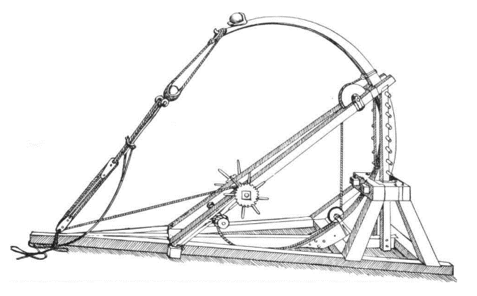
    It bears repeating: Traditional application deployment solutions are not meant to be infrastructure configuration management products. They can get you part of the way there, but 1) you’ll need to script it all, which is not extensible and defeats the true purpose of a tool, and 2) they simply catapult your application (one way only!) into the next environment (i.e. Test to Staging, Staging to Prod), so you can forget about the “ongoing” piece we discussed above. Compare that one-way catapult launch to the complexity of routinely engineering one safe launch (and landing!!!) after another on an aircraft carrier on the open seas. A mission-critical task like this requires advanced technologies, visibility, communication and coordination to account for constantly changing environmental factors.

    Mistake No. 3: Using a CI or Build Automation Tool When You Need Configuration Management

    As bad as misusing an application release tool when you really needed a configuration management solution, it’s even worse using a continuous integration tool for this. Like many DevOps solutions, CI tools are particularly helpful for developers. CI tools like Jenkins and Bamboo require Dev teams to share or check in their updated code into a repository. The CI tool then detects potential problems early by automatically verifying builds for the developer. From the Dev team’s perspective, there is no more wondering if their code is going to work, and they spend less time debugging and redoing. The financial benefits of CI and the early warning system they provide should be obvious and considered a must-have for developers.

    But while detecting coding errors early saves a lot of hassle for the Dev and Test teams, Ops teams do not directly benefit from CI. Here’s why: Operations teams are concerned with the application release into Production environments and then the ongoing configuration management of the entire application stack including the application, middleware, database and operating system. Once the (application) baton is passed to them, they require visibility into and intelligence about the application’s operating environments—well after Dev and UAT. As good as they are for Dev teams, CI tools are simply not equipped to provide ongoing operations support, visibility and coordination in Production that modern Configuration Management solutions provide.

    These are just a few big, bad mistakes in configuration management and they focus largely on misusing tools beyond their intended scope. I will follow up with a Part II companion article that addresses configuration management practices to be avoided.

    Tune into our upcoming webinar, which will touch on these topics as well.

    About the Author / Kristy McDougal

    Kristy McDougal leads Product and Sales Engineering for Orca, an application release and configuration automation solution for DevOps teams. Prior to launching Orca, Kristy was a Senior Pre-Sales Consultant within BMC Software’s worldwide DevOps specialist team. Before BMC, Kristy held technical positions at VaraLogix, Virtual Bridges, Global Foundries and Advanced Micro Devices. Her experience includes Unix systems administration, systems engineering, pre-sales consulting and post-sales services. Kristy is ITIL Foundation-certified and is an electrical engineering graduate of the University of Texas at Austin.

  • Release Automation: Delivering the Big Quality Payoff

    Release Automation: Delivering the Big Quality Payoff

    Have you ever gone down the path of testing the latest release of an application only to find out that you had the wrong version?

    Maybe you accidentally grabbed the wrong build or you didn’t have the correct configuration file for the environment you were testing against—or your database wasn’t updated correctly, or the script you were using was still pointing to a prior version of the software.

    Whatever the case, we can agree that keeping track of all the various artifacts, database schema changes, configuration parameters and other components needed to accurately test and deploy an application is both time-consuming and prone to errors.

    Today, many companies are looking to DevOps, continuous delivery and agile development methodologies to shorten their application delivery cycles and reduce the number of errors and the costs associated with application deployment processes. Nearly all enterprise companies are software companies, and their mere existence depends on delivering differentiating products and services via software to their customers.

    It’s imperative to be able to react to customer demands and competitive pressures quickly, if not immediately, to stay ahead of the competition. Gone are the days of yearly release cycles.

    Today we see companies deploying new capabilities into production environments on a monthly, weekly or even daily basis. At some companies, hundreds, if not thousands, of deployments are occurring across dev, test and production environments daily. The old methodologies we once used simply can’t support this type of volume and cadence.

    Employing Release Automation

    So, how are these companies transitioning to this new way of thinking? In a word—automation; specifically, by automating early and often.

    Everything about your release process is a candidate for automation. This includes environment provisioning and configuration automation, build automation, test automation and release and deployment automation.

    A customer of ours recently implemented CA Release Automation, and within eight weeks had automated 90 percent of its deployments. Deployments that once took more than five hours and a team of people now take a matter of minutes.

    “This not only saves us a huge amount of time, but it also mitigates the risk of human error being introduced by manual processes,” said Tim Dallmann, platform engineer at Jewelers Mutual.

    Another customer, a major airline, implemented CA Release Automation and immediately reduced their production outages from an average of 237 over a three-month period, down to 15, seven, six and five over the following four months.

    And Molina Medicaid Solutions reduced their cost of human error by 90 percent, all the while responding quicker to emergency deployment requests and improving deployment quality.

    Automation is critical, but I believe these results prove that implementing a framework to manage and deploy release processes in addition to automation works even better.

    Increased Flexibility and Visibility

    Continuous delivery helps break down barriers often seen between development and operations teams. It provides, even forces, a more collaborative approach and automation is a key enabler of this.

    “One of the best things about automation is that it gives us the flexibility to skill-up end users—deployments in our test environments are no longer solely the responsibility of the operations or IT teams,” explained Dallmann.

    With an application release automation (ARA) solution, artifact, build, configuration and release processes are no longer tracked with spreadsheets or embedded in complicated scripts.

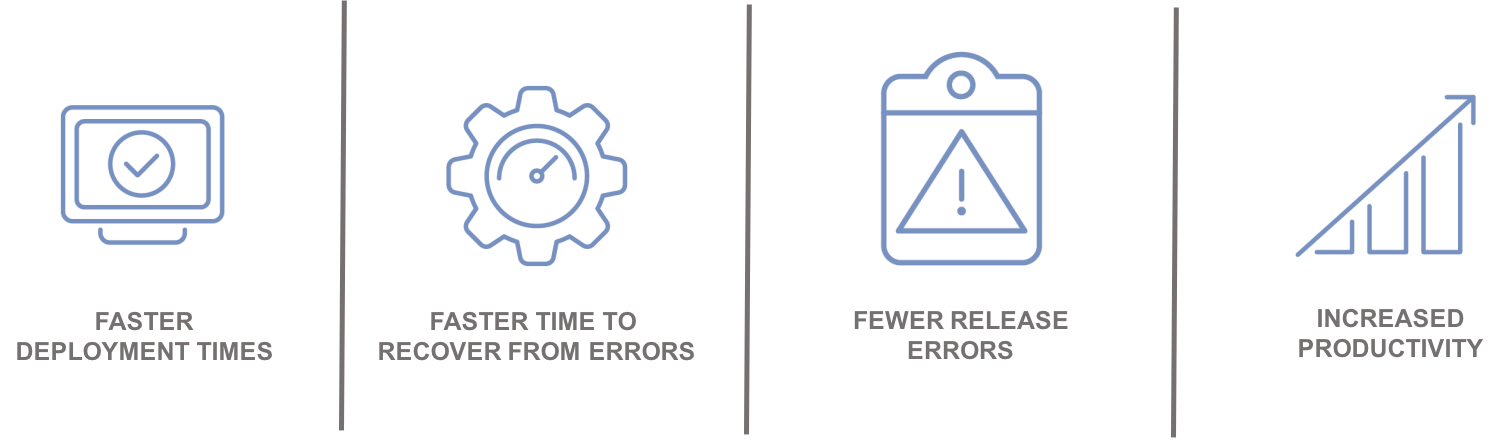
    Increased visibility into these processes ultimately enables all stakeholders to take a more active role in the release process, and access to real-time information can significantly reduce the amount of time and resources needed to resolve and recover from problems when they do occur.

    Automation leads to:

    Integrating with the Ecosystem

    An enterprise ARA solution can help you create a single control point to streamline all your application delivery processes for better predictability and reduced risk. A critical component of this is the ability to integrate and orchestrate tools and technologies required along the continuous delivery pipeline, including source control, automated testing tools, provisioning and configuration management solutions and change management and performance management solutions.

    Integration with an application lifecycle management solution can provide even further alignment, governance and traceability between development projects and what is ultimately being tested and promoted to production.

    “By integrating the two solutions, we will have a complete audit trail of deployments to help us understand how, where and by whom stories have changed,” said Phil Nickolai, director of application services at Jewelers Mutual.

    “What we really needed was a solution to streamline our whole way of working,” he said. “We had numerous people working on projects, competing for resources and causing complexity. Now we’re back in control and getting smarter every day.”

    The Time Is Now

    Let’s get rid of the problem that exists between the keyboard and information kept in spreadsheets, scripts or emails. Not only will you stop wasting time testing the wrong version of an application, but you can also ensure you have the right test data, the appropriate test cases and the correct configuration parameters for your environment.

    Stress-inducing release weekends and nights become a thing of the past. Developers can spend more time on developing innovative capabilities that generate revenue and keep customers coming back for more.

    — Tim Mueting

  • Integrating ARA into traditional RM

    Integrating ARA into traditional RM

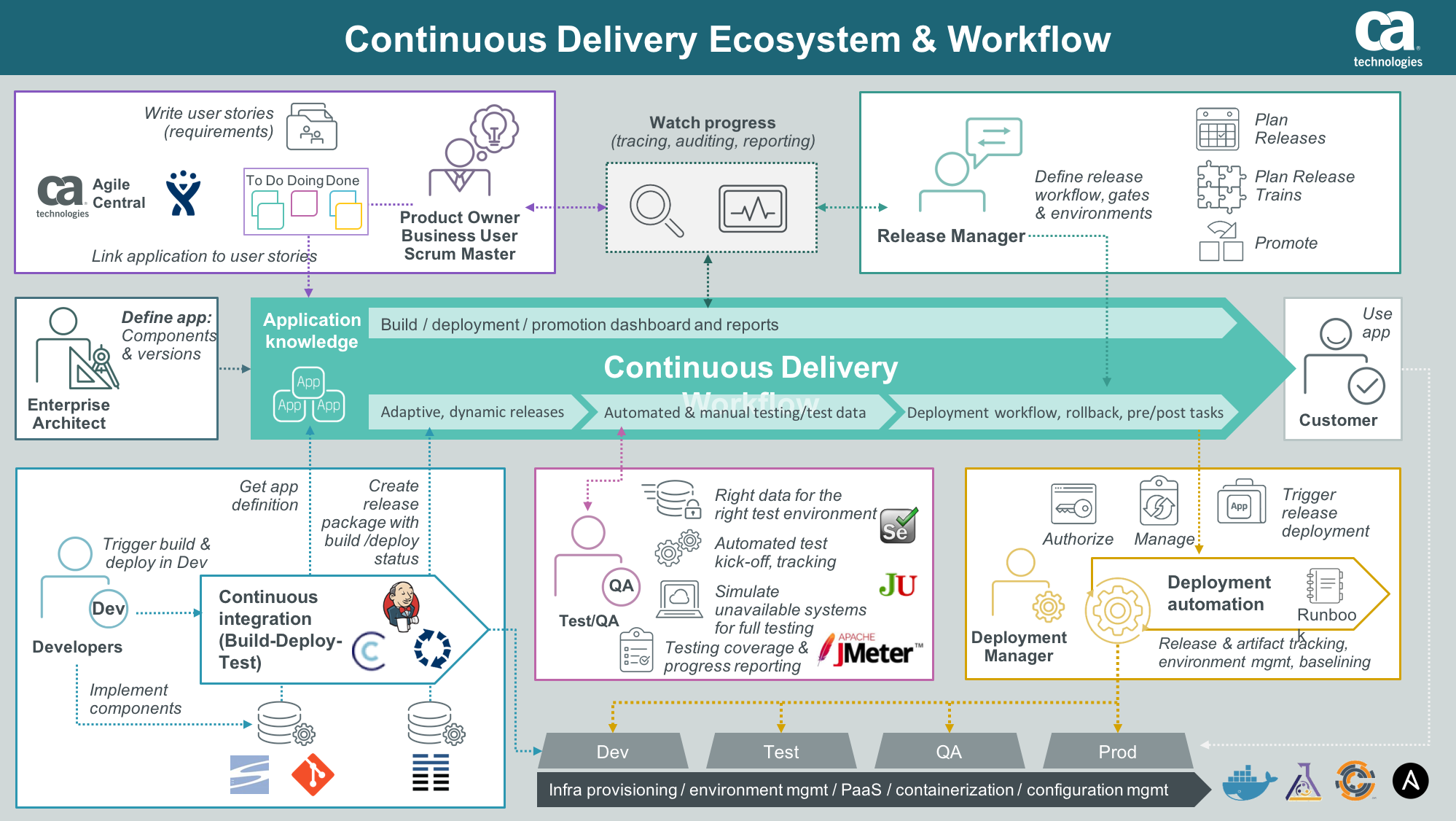
    Application Release Automation (ARA) is terminology that includes several DevOps constructs from a singular, application-centric point of view. In essence, ARA implies the automation of a single app from build through deployment (even if that deployment is to production). Of course, embedded or implied in that automation terminology is build automation or construction; deployment automation, which may include provisioning; and governance automation, which includes testing and approvals.

    If your company’s portfolio of applications is small, or if the applications are fully independent from each other, using ARA to describe your DevOps continuum is more or less a complete vernacular. However, if your application portfolio contains interdependencies; you need a coordinated/scheduled release event of multiple applications into production in a particular sequence or timing;or you are required to meet blanket compliance governance requirements that exceed the scope of a single app; you will need to learn how to integrate an ARA-based DevOps strategy with the more traditional discipline of Release Management (RM).

    Clarifying ARA

    One of the nicer implications of ARA thinking is that it places the value—or, accentuates the value—where it should be; that is, on the application. Automating infrastructure is great, but if no application rides on top of it, the infrastructure is essentially nothing more than unexplored capacity. Most CIOs are not fond of having excess computing capacity sitting idle. So the idea of ARA sets the focus of the automation where it should be: moving an “application” from construction to production release.

    ARA is also development methodology-neutral, which means the build, deployment, and releasing automation will look the same regardless of whether the code was prepared using Agile or Waterfall. Mind you, Agile tends to drive the need for speedier delivery systems, but even legacy development teams can find value in consistent delivery system automation once a build is ready to begin. It is, after all, consistency that reduces support costs by reducing errors and creating predictability, thereby improving quality. It also is consistency within the automation that permits scale, whereas variability in the automation deters scale.

    ARA also allows for depth within the stack. If code reigns at the top of the stack, then the operating system of the server reigns at the bottom (perhaps networking in the wine cellar and facilities management in the root cellar). ARA incorporates the notion of automating dependent layers of technology under the code such as database services, middleware or messaging services, perhaps the provisioning of a virtual machine, even down as far as configuring the OS, if needed.

    The practicality of moving down the stack however, is that the scope of change will continue to have a broader impact than a single app. I usually do not install a single instance of Oracle for each application I create; more often, I have several applications relying upon a single instance of my Oracle setup. So the actual changes I automate as I move down the stack tend to be more of a configuration adjustment. It is more likely my particular app needs a config change to accommodate it rather than a completely new install of a supporting technology component underneath my app. It is also worth noting that the frequency of change as you move down the stack slows down considerably compared with app code riding on it, and the cost or impact of change increases greatly, as you begin to impact a wider number of things riding on it.

    Deconstructing ARA

    ARA automation, then, includes all the traditional DevOps disciplines, but limiting them to the viewpoint of a single application as follows:

    Build Automation: This includes version-controlling each particular build. It also includes packaging all the component technologies to create a deployable package used for deployments throughout the software development life cycle (SDLC). The golden rule here is create a “build once, deploy many” philosophy in your build automation. Changes to code, included configuration files or dependent technology components down the stack must occur in the DEV class environment. Once the deployable package is completed to satisfaction in DEV, it will move unaltered through any other layers of testing environments before it gets to production for ultimate release.

    Deployment Automation: Since each deployable package is tightly version-controlled during its construction in build, there is now an ability to roll forward (normal deployment) or roll backward (revert to a prior version) in the event of failed testing in a given SDLC environment. Some of the common environment classes include integration testing, performance testing, user acceptance testing and pre-production quality assurance (QA) testing. Smart DevOps deployment tools utilize the ability to deploy (or overwrite) only the components that are out of sync with the versions listed within the deployable package. This smart deployment capability reduces time and ensures consistency with what “should” be there.

    Provisioning Automation: This is an offshoot of deployment automation. For those using virtual machine or cloud technologies, the deployment automation can include the ability to provision or set up an environment of any class on the fly. When testing is completed, the same environment can be decommissioned to not waste capacity or budgets. Provisioning bare-metal servers is precluded by human interactions, although what should go on them also can be fully automated once engineering is done with the physical work.

    Governance Automation: Even though substantial testing can and should occur in development, a significant amount of it must occur in other testing-class environments later in the SDLC progression. It is, therefore, a good idea to have the ability to isolate testing automation outside of both build and deployment templates or scripts, still making it callable or executable from an overall workflow manager (often included in the release orchestration or release automation tooling within DevOps). This gives the flexibility to run a series of tests without having to rebuild the application or redeploy the application just to kick it off. In addition to testing evaluation, there may be other process regulations driven by a governance team or compliance entity within the organization. All of these flags must be met and passed before final promotion to production.

    Integrating ARA with RM

    Dependency is the hobgoblin of simplicity. Applications that are fully independent of each other can utilize an ARA strategy and deploy into production as often as they want. No one else is impacted by this. But if a given application has dependencies upstream—I get my data from, or transact with, someone else—or downstream—my data is provided to someone else—then my path to production must include testing an application different from my own. Determining where the responsibility for failure lies now requires policy instead of just common sense. Synchronizing in-state changes where two dependent applications are now undergoing change at the same time requires policy to govern as well as more sophisticated SDLC testing environments to manage.

    When a wider view than just a single application is required, the traditional DevOps discipline of RM or its synonym release orchestration (RO) becomes the solution. RM allows for the sequencing of applications going into production to occur as needed. It allows for testing to occur when a dependency spiderweb is kicked off. RM allows for corporate governance to be applied universally to all applications attempting to enter production, instead of having to build it over and over again in each deployment script or template. RM can produce sophisticated logs designed to satisfy outside regulators for compliance history automation. These kinds of tools become invaluable when there must be a wider view of deployments to production beyond a single app at a time or in a small portfolio.

    Given this reality, the key to integrating ARA with RM is to ensure automation is constructed independently by discipline, and can be executed by discipline as needed. ARA encompasses or groups four disciplines together: build, deploy, provision and governance. RM uses the ARA package and extends it with other applications to create a needed sequence, or kicks off selective smaller units such as a testing package when needed to meet certain outside app change conditions based on dependencies. RM can selectively execute the automation ARA creates as it needs to to accommodate larger goals, while ARA continues to focus on keeping its own app as efficient as possible.

    Impacts to the Bottom Line

    There is no one right answer. There is only the perspective you hold within the DevOps continuum. Knowing that both ARA and RM are ultimately dependent on traditional DevOps disciplines offers flexibility on “how” you think about delivering innovation. In my opinion, ARA is simply the next evolution of automating build and deploy. It is a logical next step.

    There are other disciplines within DevOps, however, that might benefit from a wider view of the workflow required to move innovation to production. Take, for example, the integration of monitoring automation in the process, capacity on demand provisioning, security oversight and configuration management database (CMDB) integration—a wider view of how and where these services are integrated with DevOps might reduce the labor required to create them for each app, reinventing the wheel—or worrying the wheel has not been updated properly in a while. At its heart, DevOps attempts to create singular automations to perform tasks, increasing speed, reducing risks and improving quality.

    There is no immediate financial impact of this other than to pursue a strategy of single-app focus in an environment where a wider view would have been more ideal. Calculating the cost of that error is akin to picking six lotto numbers from the sky: It is always hard to know what might have been; at that point all one can do is wish.

    To continue the conversation, feel free to contact me.

  • Electric Cloud Positioned the Highest for Vision and Execution in Gartner’s New Application Release Automation Magic Quadrant


    SAN JOSE, Calif., August 3, 2016 – Electric Cloud (http://electric-cloud.com), the leader in DevOps Release Automation, today announced it has been positioned by Gartner, Inc. as a Leader in its 2016 Magic Quadrant for Application Release Automation.* In its Magic Quadrant (MQ) for ARA research, Gartner analysts interviewed customers and evaluated companies for the ‘Ability to Execute’ and a ‘Completeness of Vision’ of which Electric Cloud was the highest up and farther to the right. Download the full report at (http://electric-cloud.com/resources/whitepapers/gartner-magic-quadrant-application-release-automation/).


    “We are honored to be named a leader in the first-ever Gartner Magic Quadrant for Application Release Automation,” said Steve Brodie, CEO of Electric Cloud. “We feel the fact that Gartner has chosen to publish an ARA MQ validates the importance of this growing market, and believe our position in the ARA MQ speaks to our ability to help organizations of all sizes – all over the world – deliver better software, faster.”


    Gartner’s highly sought-after Magic Quadrant zeros in on three critical capabilities needed in order to qualify as a contender in its industry research on Application Release Automation. They are: 1) Automation 2) Environment Modeling and 3) Release Coordination.


    “IT organizations rarely manage application releases consistently across the entire life cycle, with individual efforts led by operations, development or combined DevOps teams,” noted Colin Fletcher and David Paul Williams in a July 2016 Gartner Research Report.* “ARA tools provide a combination of automation, environment modeling and release coordination capabilities to simultaneously improve the quality and velocity of application releases. These tools are a key part of enabling the DevOps goal of achieving continuous delivery with large numbers of rapid, small releases.”


    Electric Cloud’s ElectricFlow is the industry’s first and only end-to-end DevOps Release Automation platform that provides native, push-button support for advanced deployment strategies (such as Blue/Green, Canary, and Rolling Deployments). ElectricFlow enables IT to frequently and reliably deploy mission-critical applications at scale and avoid service interruptions to their end users (see news release dated 7/19/16 “Electric Cloud Announces Industry’s First End-to-end DevOps Release”).


    “DevOps is as much about culture as it is about technology,” Brodie adds. “To help address the cultural challenges our customers face, we launched a bi-monthly community video panel series called Continuous Discussions (#c9d9) and co-founded the twice sold-out DevOps Enterprise Summit with Gene Kim and IT Revolution. For two years in a row, these initiatives have provided environments that are conducive for leaders and practitioners in large organizations to share their experiences, discuss best practices and help each other learn and grow. These values also reflect our vision and what we’ve delivered with ElectricFlow – to help large enterprises bridge the gap between Dev and Ops.”


    For more information about ElectricFlow and to download the free Community Edition, please visit: (http://electric-cloud.com/products/electricflow)

    Share This: .@electriccloud named a leader in @Gartner_inc’s 2016 Magic Quadrant for Application Release Automation http://electric-cloud.com/blog/2016/08/gartner-announces-magic-quadrant-application-release-automation/ #DevOps

    *Gartner, Magic Quadrant for Application Release Automation, August 1, 2016

    *Gartner, Hype Cycle for Web-Scale IT, July 6, 2016.

    Gartner Disclaimer

    Gartner does not endorse any vendor, product or service depicted in its research publications, and does not advise technology users to select only those vendors with the highest ratings or other designation. Gartner research publications consist of the opinions of Gartner’s research organization and should not be construed as statements of fact. Gartner disclaims all warranties, expressed or implied, with respect to this research, including any warranties of merchantability or fitness for a particular purpose

    About Electric Cloud, Inc.

    Electric Cloud is the leader in DevOps Release Automation. We help organizations developing enterprise web/IT, mobile, and embedded systems deliver better software faster by automating and accelerating build, deployment, and release processes at scale. Leading organizations like Cisco, E*TRADE, Gap, GE, HP, Intel, Lockheed Martin, Sony and Qualcomm use Electric Cloud solutions and services to boost DevOps productivity and Agile throughput, while providing a scalable, auditable, predictable, and high-performance pathway to production.


  • What CIOs need to know about building deployment quality

    What CIOs need to know about building deployment quality

    Application Release Automation, or ARA, is the process of packaging and deploying applications (or updates to applications) in an automated, repeatable and consistent way.

    In today’s market landscape software has become a major differentiator for many businesses, across all industries and verticals. In a world of apps, Internet of Things and customers’ expectations to be always connected, – just about every company is now becoming a software company. Software development is now critical to the success of your product, and its delivery process needs to be fine-tuned and streamlined to ensure that you get quality software in the hands of your end users as quickly as possible.

    To understand how ARA can help you achieve higher quality software releases (which contribute to your bottom line), you must first understand the challenges you might face if your business is still using manual deployments, or other archaic methods. If that’s your case, though, you’re not alone: a survey we ran last year found that over 75 percent of deployments are still done manually, despite the many problems with this model, which is extremely brittle and error prone. This creates not only many failed deployments, but loss of hundreds of men hours trying to troubleshoot those failures. This is certainly painful in the mission critical production environment, but carries great cost long before we reach production. Even in the lower environments (such as testing or pre-production), 66 percent of respondents report its very time consuming just to troubleshoot why the failure occurred. As we promote code to be deployed in production- the stakes are higher. Costs of failed deployments, delayed releases and loss of men hours are exponentially aggravated when you add possible fines on top of that, cost of SLAs violations, customer churn, and loss of business. There’s no question the implications of failed deployments put a major dent in your bottom line, and with some companies – failed deployments have literally put them out of business.

    A prime example of how a failed release can have huge impacts on a business is the case of Knight Capital. Knight Capital WAS a financial firm. In August of 2012, they manually pushed out a new release to their software when the markets were down over the weekend. Monday morning came and when the market opened, their new software kicked in. The results were disastrous. They accumulated (extremely quickly and erroneously) a $9 billion [H1] position in the market – represented by the movement of 397 million stocks in just 45 minutes. Two hours later, when Knight was still chasing the culprit in their release process and trying to rollback to a previous version of the software, the New York Stock Exchange said, “We’re done waiting for you,” cut their hardline to the market and Knight couldn’t make any trades.

    The effects were disastrous and swift. Knight Capital endured a pre-tax loss of $440 million. Within weeks, Knight Capital was sold for pennies on the dollar – a failed release literally killed the company. While this is certainly a worst-case scenario, it is a great example of how it is necessary to understand that once you start talking about production environments, there is a lot of regulatory and best practices that have to be followed or big problems can occur.

    Why are manual deployments so problematic?

    First of all, manual deployments are error prone because each deployment has to be done by an actual human. Even the most veteran of developers or ops engineers make mistakes, and when you start talking in the hundreds (or thousands) of deployments, across complex stacks and configurations, an error is almost inevitable. While no system can fully-eliminate the potential for an issue, you can imagine that in a deployment process where many of the steps are automated – and therefore consistent across releases – your chances of an error are reduced dramatically.

    With manual deployments, it’s also difficult to achieve true, fine-grained, visibility and auditability into the entire deployment process of all the application’s components and their corresponding infrastructure or configuration. Once a deployment is pushed live, the only person who really knows how, exactly, the update was promoted from Testing to Production is the individual (or individuals) who performed the release. And as good as they might be in keeping notes, they’ll never be as comprehensive, or bulletproof, as an automated log that track every single component in the multi-stages deployment process.

    Manual deployments also are not adept at negotiating what is called the “Delivery Gap.” Essentially the delivery gap is the chasm that exists between three different factions of the software team. On one side there is the development team, which has a bunch of tools and practices they like to use. On the other side is Operations, which has their own set of tools and methods/requirements. Then, finally, there is the infrastructure, which spans across both Development and Operations and places requirements on both parties. So you have essentially three different players, using different tools, with difference practices and requirements, and negotiating between them is a tricky and difficult process. Ensuring there’s no configuration drift between infrastructure or app components across the different team, and ensuring consistency in deployment processes has proven difficult for humans to perform, particularly as each process includes hundreds – if not more – of artifacts, configuration files, dependencies and deployment requirements. For an automated process, however, consistency and repeatability are the default state.

    So now that we’ve established the pitfalls of manual deployment practices, let’s talk about how Application Release Automation can solve some of these issues and support higher quality software releases.

    We’ll start with the aforementioned “delivery gap.” Application Release Automation is a DevOps solution that bridges the gap between the Development teams and Operations teams. It does so by creating a solution that encompasses Continuous Integration, Configuration Management and Deployment practices that respect infrastructure, as well as operation’s needs and regulatory requirements. It achieves this because you can build these considerations into the automated process, which is recorded, logged and tracked by default. Rather than each deployment being a unique ‘snoflake’, software deployments become routine and predictable. It’s not on one person to mentally “flip the switch” and jump back and forth between groups to make sure everyone are satisfied. Rather, it is an automated process that takes everyone’s interests and requirements into account, and then makes sure everything fits within the infrastructure and configuration requirements.

    Furthermore, ARA is a “model-driven” approach that allows you to reuse existing templates, configurations and processes over and over to make your deployments consistent, and require minimal overhead for the initial set up of the process. This means you can deploy any version to any environment quickly, with push-button deployments. This not only increases the speed of deploying across different environments throughout your process, up until the final release to Production, but also allows for repeatability in a way manual deployments simply can’t. This is especially important when it comes to testing. Imagine if the framework of every update you deployed was identical – how much easier would that make testing? And how much easier would your tests be if they were all ran continuously and automatically? That is what ARA can offer.

    Additionally, with consistency, your deployments are very predictable. You know what the run times will be, allowing you to plan your development processes more accurately and efficiently. This means you can allocate time and resources in a way that maximizes your output – which allows your team members to spend more time on their core competencies and improving your product, versus having to manage the deployment process or the infrastructure.

    Along the same line, one of the key tenets of ARA is packaging. When you manually deploy updates, bits and pieces that comprise your application are being deployed (“moving”) at different times, creating a “noisy” process, with lots of dependencies, that’s difficult to manage. With ARA, everything is wrapped up in a tidy “package.” This effectively creates a “bill of materials” for your release and all dependencies and related configurations, which allows you to easily indicate what components of the application need to be deployed where, and in what order.

    Application Release Automation also solves the issue of having such a critical process to the company be dependent on what is often just one person – a “star student” in your team who “holds the keys” to the project and only he has the tribal knowledge and expertise to perform or debug a deployment. With ARA, there is an implicit transparency to the project that gives any team member the ability to access the system and deploy the software (pending the right security permissions, of course).

    Lastly, with ARA, you have complete visibility of the process from start to finish. If something goes awry, you have a much better view of where the error originated from, making recovering much faster and easier, and the damage much less significant.

    Ultimately, a successful ARA strategy eliminates the need to build and maintain custom scripts for application deployments, while simultaneously reducing configuration errors and downtime. It allows strategic allocation of resources, giving users the most “bang for their buck” from their developers and other IT professionals. Because of all these factors, Application Release Automation is a hugely effective strategy for increasing both the quality and speed of your deployments.

    About the Author/Anders Wallgren

    leadership-anders-wallgrenAnders Wallgren is Chief Technology Officer of Electric Cloud. Anders brings with him more than 15 years of in-depth experience designing and building commercial software. Prior to joining Electric Cloud, Anders held executive positions at Aceva, Archistra, and Impresse. Anders also held management positions at Macromedia (MACR), Common Ground Software and Verity (VRTY), where he played critical technical leadership roles in delivering award winning technologies such as Macromedia’s Director 7 and various Shockwave products.  Anders holds a B.SC from MIT.  Connect with Anders on LinkedIn or Twitter.

  • Overcoming Siebel Complexity to Achieve Agile and Continuous Deployments

    Overcoming Siebel Complexity to Achieve Agile and Continuous Deployments

    Siebel releases are complex. Executing one well is difficult. Extracting databases, migrating SRF repositories, deploying non-repository items and managing all the planned and unplanned outages is no small feat. Oh yeah, and there’s still that little thing called production. These deployments can easily take days and are updated infrequently, because the business can’t afford any downtime.

    Now there is a solution to meet the business needs – Automating your deployments with Application Release Automation.

    Join us on April 14 to learn from Anne Kootstra, Siebel CRM Consultant at Accenture, how they used Application Release Automation to shorten downtime of Siebel and increase quality and stability at a huge telecom provider in the Netherlands.

    Attend this complimentary webinar to learn how to:

    • Enable agile releases and deploy Siebel updates in just minutes
    • Reduce planned and unplanned downtime
    • Deploy the right artifacts and configuration settings for even the most complex environments
    • Prevent unauthorized access to production environments
    • Free up Siebel administrators and developers from release and deployment tasks


    Recording


    Your Host:

    alan_new_head_shotAlan Shimel, Editor-in-Chief of devopsy.kinsta.cloud.  An often-cited personality in the security and technology community and a sought-after speaker at industry and government events.  Alan has helped build several successful technology companies by combining a strong business background with a deep knowledge of technology.


    Panelists:

    Ralf_Pashen_Headshot_LargeRalf Paschen is currently running the solutions marketing department at Automic Software. Over the past years he has held a various number of positions in the software industry. Coming from a technical datacenter job role he moved into presales, sales to product management and product marketing in several software companies. He was responsible for the complete SAP portfolio for Automic and is now building the solutions marketing department to give customers and partners a clear understanding about the innovation value of the unique One Automation Platform.  You can connect with Ralf on LinkedIn: Ralf Paschen or Twitter: @RalfPaschen.


    Anne_Kootstra_HeadshotAnne Kootstra is with Accenture since 9.5 years and as Senior Siebel consultant responsible for huge customer implementations of Siebel CRM. He is part of the Accenture Netherlands delivery center and specialized in Siebel development and delivery.