Tag: application monitoring

  • Why Observability is Important for Development Teams

    Why Observability is Important for Development Teams

    Observability, which allows development teams to understand better how their systems behave in production, is critical to successful software delivery. According to Gartner, by 2026, 70% of organizations that successfully applied this practice will achieve shorter latency for decision-making, enabling competitive advantage for target business or IT processes.

    Observability allows development teams to identify and diagnose issues quickly to make decisions that improve overall software delivery performance. Let’s take a closer look at why this practice is critical for development teams.

    Differentiating Observability and Visibility

    To better understand observability, it’s essential to clear up a common misconception – that observability and visibility are the same. Two critical differences exist between the two. Visibility allows development teams to look at the surface-level aspects of an application or system. In contrast, observability provides deeper insight into what an application is doing in production. Being equipped with a deep knowledge of observability allows developers to be more productive within their respective organizations.

    Impact on Developer Productivity

    With observability, developers can identify and diagnose issues within applications quickly, giving them more time to fix bugs and time for resolution, which are both critical success factors for software delivery. Observability allows organizations to quickly identify and respond to potential problems, such as operational issues or security breaches, before they become issues that impact customers or users. While there is no such thing as perfect software, observability helps developers quickly find and fix issues, bottlenecks, inefficiencies, etc., so they can get back to doing what they love: Creating new software.

    With the benefits of observability, developers naturally gravitate toward tooling and technology. There are many tools available for developers to take advantage of, and development teams must learn how to use these tools to integrate them into their applications and services. Let’s explore some of the more popular options.

    The Shift to Cloud-Native Tools

    The shift to cloud-native tools is driven by the increasing popularity of cloud computing and its benefits, such as scalability, cost-effectiveness and flexibility. The move to cloud-native has made an enormous impact on observability efforts. Having good tooling and processes available positively impacts observability efforts because it’s a critical aspect of the developer communities’ systems. Overall, the shift to cloud-native tools is driven by the need for organizations to take advantage of the benefits of cloud computing and the need for more efficient and flexible deployment and scaling of applications.

    Some of the most common tools in observability include:

    These tools offer developers greater insight and knowledge into how applications behave. The cloud-native approach necessitates a new way to aggregate all of these operations.

    Conclusion

    With observability, developers can understand how their systems work in production. These systems act in different ways depending on the environments they run in. Therefore, organizations must do more to provide developers with sufficient observability because of the limited visibility into the overall system performance.

    Observability allows developers to act quickly and remedy issues before they go into production and organizations can better measure success relative to the application’s performance. Hours of developers’ time are spent manually debugging and troubleshooting when organizations could have a system in place to do this automatically and allow developers to get back to what they love doing most: Creating software. Observability helps organizations make better-informed decisions, improve operations and performance and achieve their objectives more effectively.

  • Broadcom Survey Reveals Spike in VSM Adoption

    Broadcom Survey Reveals Spike in VSM Adoption

    Value stream management (VSM) is gaining traction as organizations look to find ways to engage customers more efficiently via digital business transformation initiatives.

    A survey of 500 executives, IT and business leaders conducted by Dimensional Research on behalf of Broadcom published this week found 39% of respondents implemented a VSM platform with another 16% having some equivalent capability. Another 31% said their organizations is moving in the direction of adopting a VSM platform. A total of 60% of respondents indicated that they will be using VSM to deliver products in 2023, with 95% of organizations that have adopted VSM also engaged in digital transformation.

    Laureen Knudsen, chief transformation officer for Broadcom, said the primary goal is to close the divide that has emerged over the years between software development teams and the rest of the business. More than two-thirds of respondents (68%) reported there are disconnects between the business and software development.

    Overall, the Broadcom survey identified increasing customer value (58%), improving product quality (55%), reducing costs (51%), adding more customers (50%, increasing profits (49%) and increasing speed to market (45%) as the top strategic issues organizations face in 2023.

    The top benefits derived from investing in VSM were increased transparency (42%), improved organizational alignment (39%), faster solutions to customers (38%), data-driven decision-making (37%) and improved access to data (36%).

    VSM traces its lineage back to lean manufacturing methods, which called for each step of a manufacturing process to be continuously measured. As software development has evolved and organizations realize how dependent they are on software, there is a growing appreciation for the value of monitoring things such as the impact of missed software development deadlines on the business. At their core, VSM platforms aggregate DevOps metrics and then match them to a set of key performance indicators (KPIs) defined by business leaders. Once those metrics are gathered and correlated, organizations can apply advanced analytics. The goal is to apply algorithms and other forms of predictive analytics that will enable organizations to more easily identify the precise impact software development processes have on the business.

    Knudsen said the survey makes it clear a lack of discipline when it comes to software engineering now needs to be addressed as organizations realize how dependent they are on applications to engage customers. Many organizations have, for example, adopted flawed approaches to agile development that wind up creating chaos across the software development life cycle, she noted.

    Many organizations, for example, are unsure how much time development teams are spending on retiring the technical debt accrued within legacy applications versus actually working on developing new applications, Knudsen added.

    Business conditions tend to change rapidly, so aligning software development with corporate goals is difficult. Nearly three-quarters (72%) of respondents said they are frustrated by the state of the business and constant changes to strategy. Digital business transformation initiatives, however, will require organizations to adopt a more structured approach to software engineering, said Knudsen.

    The issue, of course, is the pace at which businesses are already being digitally transformed. The accelerated pace requires almost immediately re-engineering software development processes for them to succeed.

  • Datadog Dives Into Universal Service Monitoring

    Datadog Dives Into Universal Service Monitoring

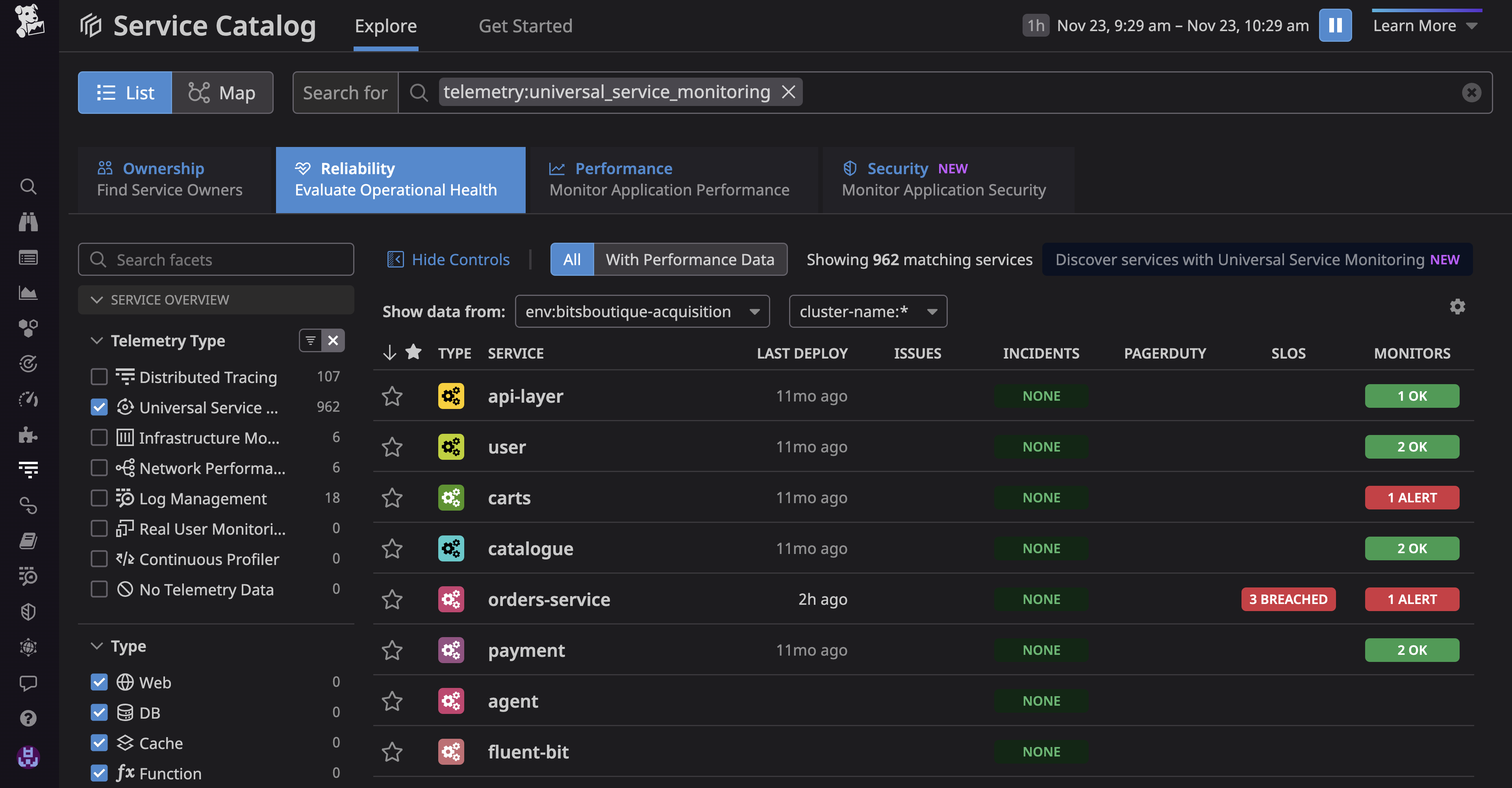
    Datadog, Inc. today made generally available a Universal Service Monitoring service that takes advantage of the extended Berkeley Packet Filtering (eBPF) microkernel in a Linux operating system to automatically detect all the services that make up an application environment without changes to the code used to construct them.

    Yrieix Garnier, vice president of product at Datadog, said as application environments continue to evolve IT teams are now trying to track not just individual microservices but also entire business processes such as order-to-cash. Before those services can be instrumented, however, DevOps teams need a simple way to discover them, he noted.

    Within the Linux operating system, eBPF makes it possible to employ a sandbox environment to identify and map the services that make up an application environment, including both internally developed and third-party services regardless of what programming languages were used to build them, added Garnier.

    DevOps teams also gain visibility into the health of every service and deployment through real-time request rate, error and duration (RED) metrics and correlated infrastructure metrics and application logs. They can then expand monitoring capabilities provided via Datadog agent software to employ distributed traces that can be correlated with observability data.

    The Datadog Universal Service Monitoring service is also integrated with the Service Catalog that Datadog makes available to determine which development team created a specific service.

    The goal is to close a visibility gap that has emerged as more IT organizations align their management efforts around specific application services in the age of digital transformation rather than the components that make up a service, noted Garnier.

    DevOps teams today are simultaneously being tasked with diving deeper into application environments to discover issues before services are disrupted and also tracking the services that span multiple application components. Collectively, the expectation is that DevOps teams will be able to ensure that application services are not just available but also consistently delivered. Ultimately, IT organizations are being tasked with removing much of the guesswork that has historically characterized the management of IT.

    Less clear is how much those shifts will ultimately drive the reorganization of IT teams that are still mostly organized around the platforms they support versus the services being delivered. However, as business leaders increasingly appreciate how dependent the overall organization is on application services, the need to manage them in a more comprehensive manner becomes apparent.

    In the meantime, DevOps teams are evaluating whether their existing tools and platforms enable them to accomplish that goal. Datadog is making a case for employing a service it manages on behalf of DevOps teams versus each DevOps team having to construct and maintain its own observability platform. Datadog, most recently, extended the reach of its namesake cloud-delivered monitoring and observability platform to address continuous testing, application security and cost management.

    It will be up to each organization to decide how best to achieve their observability goals. One thing that is certain is the current level of visibility they have into application environments is not nearly sufficient.

  • Grafana Labs Adds Visual Tools to Simplify Prometheus Queries

    Grafana Labs Adds Visual Tools to Simplify Prometheus Queries

    At its GrafanaCONline event, Grafana Labs today announced an update to the open source Grafana dashboard. The update adds visual query tools to make it easier for IT professionals of any skill level to launch queries against the Prometheus monitoring platform or the company’s Grafana Loki log aggregations framework.

    In addition, Grafana said the open source edition of Grafana OnCall, a scheduling and paging application, is now also available as open source software that can be used in on-premises IT environments. Previously, Grafana OnCall was only available as part of the managed Grafana Cloud service.

    Archana Kesavan, director of product marketing for Grafana Labs, said version 9.0 of the core Grafana platform makes Prometheus monitoring more accessible. Prometheus is being advanced under the auspices of the Cloud Native Computing Foundation (CNCF). It is most widely used in Kubernetes environments, but can also be used with monolithic applications. The latest version of Grafana adds support for an exemplars overlay for traces and Prometheus sparse histograms.

    Other capabilities added with this release include a dashboard preview and title search capability, support for envelope encryption by default, an expanded navigation bar and a revamped heatmap panel that renders more quickly than its predecessor.
    ‘

    Finally, the alert system that Grafana Labs first introduced as an option is now a default setting.

    Kesavan said in addition to making it easier to launch queries, the Grafana Labs approach also limits the ability of a poorly constructed query to impact clusters running Prometheus.

    In general, the adoption of Prometheus has risen alongside Kubernetes. At least initially, DevOps teams that adopt Kubernetes often employ Prometheus to monitor the platform. Less clear is the degree to which IT teams will continue to rely on Prometheus once cloud-native applications are deployed in a production environment. Many IT teams already have a monitoring platform they employ that they choose to extend to Kubernetes environments. Conversely, however, some organizations are opting to replace legacy tools with the Prometheus monitoring platform to monitor both Kubernetes environments and legacy monolithic applications.

    At the very least, Prometheus has established a de facto standard for collecting monitoring data from Kubernetes environments that can be queried by a wide variety of tools.

    One way or another there will soon be fleets of Kubernetes clusters deployed across the extended enterprise that will need to be monitored. DevOps teams will naturally need to decide for themselves how best to monitor those clusters and, ultimately, observe them in a way that enables queries to be launched and issues surfaced before they become a major problem.

    In the meantime, DevOps teams might want to consider consolidating many of the monitoring tools they use today as part of an effort to streamline operations. Rather than having to correlate events across a dozen tools to determine the root cause of an issue, the goal should be to have enough tools to ensure verification without spending hours sorting through conflicting reports.

  • Overcoming IT Complexity With Full-Stack Observability

    Overcoming IT Complexity With Full-Stack Observability

    Organizations embarking on digital transformation journeys tend to develop complex infrastructures. They update their legacy applications while adding multi-cloud, virtual and cloud-native capabilities. Eventually, IT pros find themselves managing diverse, complex and distributed networks including cloud, system, application and database infrastructures.

    To rein in the resulting complexity, organizations tend to amass monitoring and managing tools. The goal is to simplify systems oversight—but instead, silos tend to develop because teams use a wide variety of tools to manage their networks or infrastructures. 

    This piecemeal approach worsens operational blind spots and delays problem resolution. It also increases security exposures. Soon, overwhelmed IT pros can’t keep pace with app modernization or infrastructure dynamics because they’re awash in complexity.

    Though this scenario is common, it’s not inevitable. IT teams can ease their digital transformation journey by implementing an integrated and cost-effective full-stack, end-to-end monitoring service capable of overcoming complexity and silos. 

    Organizations require full-stack observability.

    How Observability Differs From Traditional Monitoring

    Observability goes beyond traditional monitoring. Traditional monitoring helps IT organizations understand the actual state of their infrastructure and applications. It captures and processes volumes of infrastructure and application telemetry data and notifications and displays which components are up, which ones are down and which ones have changed. 

    Usually, traditional monitoring focuses on a specific network, cloud or infrastructure. It tracks application and infrastructure elements so IT pros can identify anomalies and investigate problems as they arise.

    Monitoring relies on metrics-oriented dashboards built to assess telemetry data against manual or basic statistically relevant thresholds. Monitoring tools are invaluable, but they don’t offer cross-domain correlation, service delivery insight, operational dependencies, or predictability. Modern systems have complex multi-cloud environments and a deluge of telemetry data: This counts as a shortfall.

    Observability does more. It measures the internal states of systems by examining the outputs and looks at applications and systems in their entirety—from the end-user experience to server-side metrics and logs.

    But observability also includes monitoring as a critical element. To gain observability, you must first collect information through monitoring. Observability uses the insights and metrics generated through monitoring to understand what’s causing the issue at hand. 

    Monitoring aggregates and displays the data to determine whether the systems are operating as expected. The analysis of this information is compared with expected outcomes and objectives. This allows IT pros to understand the state of their infrastructure and applications. 

    Silos are thus avoided because complex environments are viewed in their entirety.

    Observability in Action

    Once in place, observability allows IT organizations to continuously improve performance, availability and digital experience across complex, diverse and distributed hybrid and cloud environments.

    With observability, organizations can quickly find and resolve anomalies. However, full-stack observability goes beyond monitoring and expedited problem resolution: It supplies insights, automated analytics and actionable intelligence through cross-domain data correlation, machine learning (ML) and artificial intelligence for IT operations (AIOps). It works across massive real-time and historical metrics, logs and trace data.

    Observability goes beyond the silos and the piecemeal approach associated with traditional monitoring. And when observability isn’t limited—when it includes ML and AIOps—it uses the large volume of gathered data and supplies insights, automated analytics and actionable intelligence to help IT staff expedite problem resolution. It also enables ITOps, DevOps and security organizations to achieve consistent, optimized and predictable business service delivery with continuously improved digital experience and IT productivity. 

    The result is customers and employees benefit from better-run systems. The technology provides organizations of all sizes and industries with comprehensive, integrated, and cost-effective functionality through cloud-connected on-premises or software as a service (SaaS) deployment flexibility.

    When embarking on digital transformation journeys, organizations don’t need further complexity—certainly not while they update legacy applications and add a plethora of modern services and capabilities to their stack. The key to reducing complexity is observability.

    Observability simplifies the transformation process. It reduces operational noise to benefit ITOps, DevOps and security teams. They can become more proactive in issue and anomaly detection to achieve optimum IT performance, compliance, and resilience. With full-stack observability, any organization—no matter its size or industry—can reduce IT complexity while readying itself for digital transformation.

  • New Relic Acquires CodeStream to Close Observability Gap

    New Relic Acquires CodeStream to Close Observability Gap

    New Relic today revealed it has acquired CodeStream as part of an effort to make observability data more accessible to developers.

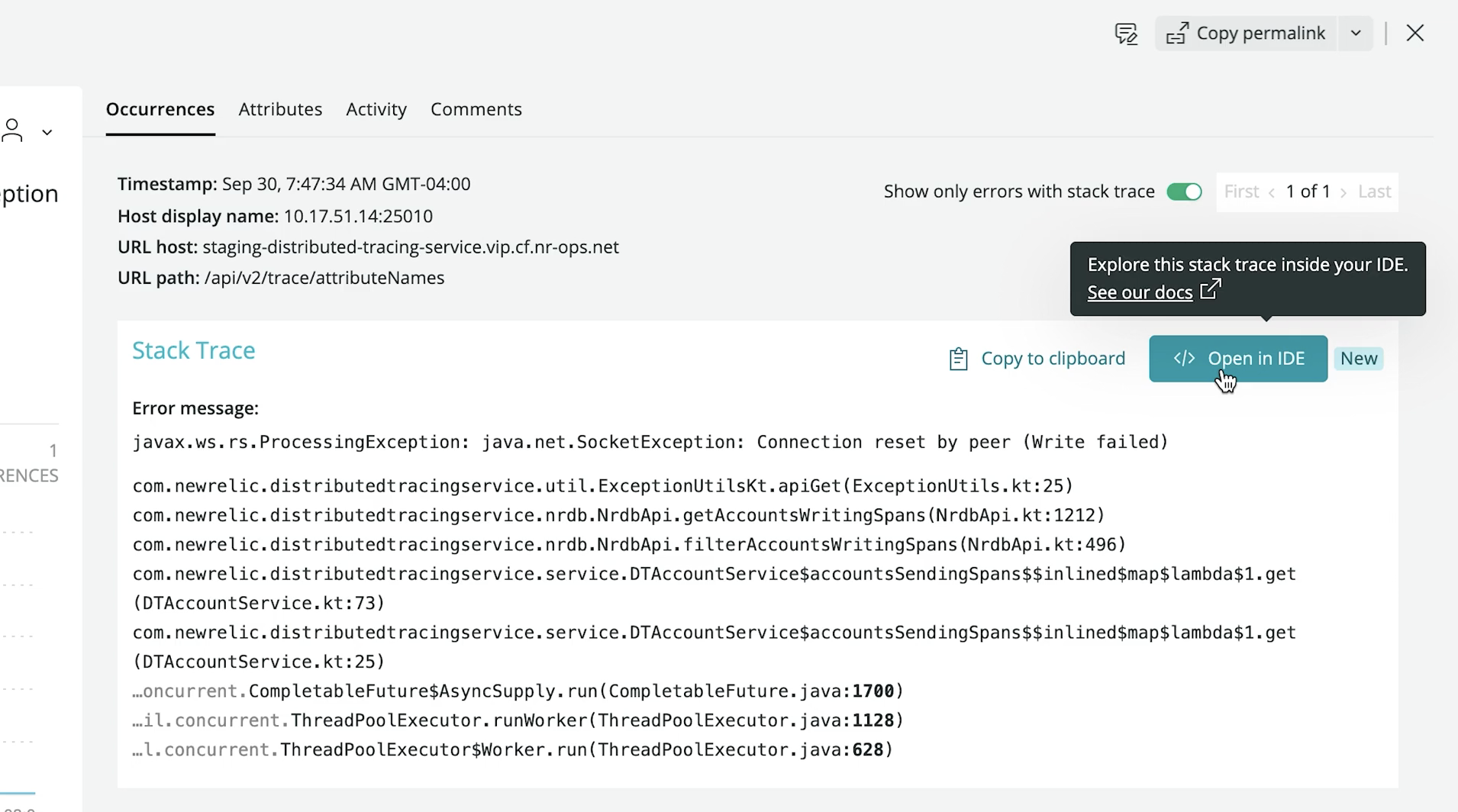
    Buddy Brewer, group vice president (GVP) and GM at New Relic said New Relic CodeStream makes application telemetry data collected via the New Relic One platform directly available within an integrated development environment (IDE), now including Microsoft VS Code. In addition, there are also integrations with Microsoft Teams and the GitHub repository.

    The goal is to close an observability gap that exists today between developers and IT operations teams that stems from a lack of developer visibility into production environments, he noted.

    Finally, New Relic is also announcing a core user pricing option for New Relic One that is aimed at developers. Starting at $49 per month, developers gain access to a core set of capabilities such as CodeStream integrations, errors inbox, logs, GraphQL application programming interfaces (APIs) and the ability to build and run custom applications on New Relic One.

    Peter Pezaris, CodeStream co-founder and CEO, now GVP and GM, strategy and developer tools at New Relic, said becoming part of New Relic will make it easier to bridge the divide that exists between most developers and IT operations teams by making it much easier for developers to see how their code is actually executing in a production environment. That capability will eliminate scenarios where code that runs just fine on a laptop executes poorly in a production environment, he added.

    Developers can also add inline code comments, trigger pull requests, request feedback and track issues directly from their IDE via integrations with a wide range of developer and communication tools. Developers also can switch from New Relic One into an IDE in a single click to navigate, triage and remediate production errors in the context of the code they wrote.

    New Relic is initially making New Relic CodeStream available for free—no credit card required—during a preview period that extends to January 12, 2022. Afterward, some of the more advanced features will require a paid user license once free tier limits are reached. Similarly, IT teams can also sign up for a free New Relic One account without entering a credit card to instrument their applications.

    As the responsibility for managing applications in production environments continues to shift left, Pezaris said it’s critical to give developers the tools they need to optimize code in a production environment.

    It’s not quite clear exactly how much responsibility for applications is shifting left toward developers; it differs from one organization to the next. Many are simply trying to reduce as much friction as possible between developers and their IT operations teams by providing more ‘connective tissue’ from New Relic that IT teams would have to otherwise write themselves, noted Pezaris.

    It may take some time to bridge the observability gap between developers and IT operations teams. Most IT operations teams are still coming to terms with what observability provides that existing IT monitoring tools don’t. Monitoring, at its core, focuses on predefined metrics to identify when a specific platform or application is performing within expectations. The metrics tracked generally focus on, for example, resource utilization. In contrast, observability combines metrics, logs and traces—a specialized form of logging—to instrument applications in a way that makes it simpler to troubleshot issues without having to rely solely on a limited set of metrics that have been pre-defined.

    In theory, at least, that level of observability should ultimately reduce the total number of incidents an IT operations team needs to fix by identifying issues long before they become an actual disruption.

  • Visualize Logs to Get More Value from Data

    Visualize Logs to Get More Value from Data

    Why do you keep logs? Regardless of the type of logs we’re talking about, you keep them because you expect them to provide some value for the organization. Maybe the logs will help you improve profitability; perhaps they will help you recover from downtime or perhaps they are expected to alert you to a security incident in progress. If you’re a system administrator or someone tasked with infrastructure reliability and maintenance, you’d agree that logs are critical. They represent the source of truth you go to for information about your server status and activity, website traffic, application performance and much more.

    No matter the intended purpose of logs or how you use them, the information in these logs should be easy to access and interpret. Today’s complex systems generate enormous amounts of log data, making it almost impossible to dig through tons of data in raw text files to find important information. Finding valuable information is immensely difficult in text logs but not in the visual world. This is precisely where log visualization comes into play. What if the data in your logs could transform into graphic shapes and patterns? Wouldn’t it be much easier and faster to decipher information from log data and understand it better?

    What are Logs, and What are They Used For?

    Before going any further, let’s make sure everyone is on the same page about the meaning of logs. A log is a textual, timestamped record that tells us what happened and when. DevOps engineers have to rely on a combination of logs from various system components and data sources to understand why an event occurred, and perhaps even predict future events.

    logs value unknown


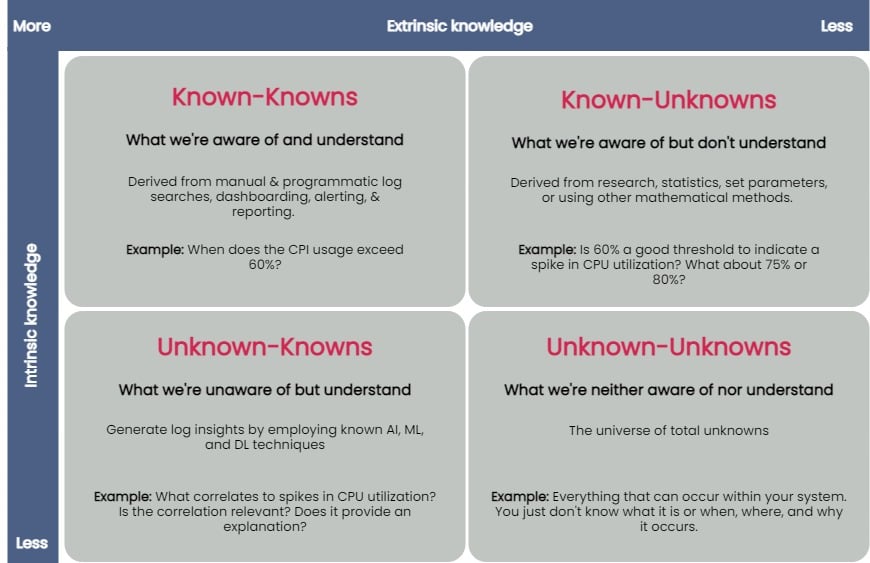
    You can taxonomize knowledge extracted from log data into four key groups: known-knowns, known-unknowns, unknown-knowns and unknown-unknowns. Manual and programmatic log searches, dashboarding, alerting and reporting manually extracted log fields are common ways to extract and analyze known-knowns. These methods assume that the engineer is already familiar with the data and knows where to look for answers. You can use statistics or other mathematical means to algorithmically resolve the known-unknowns, such as search terms and thresholds. The unknown-knowns are taken care of using AI/ML/DL techniques that generate log insights such as event correlations, log pattern clustering and known anomaly detection. But what about the unknown-unknowns?

    Uncovering Unknown-Unknowns

    With raw text logs, it’s relatively simple for engineers to conduct machine searches or set alerts upon encountering certain specific errors or specific types of behavior. However, to search through logs or even set up alerting parameters requires you to know what you’re looking for. If you have no idea what kind of errors or threshold limits for which you need to be alerted, it’s impossible to set these up.

    Modern applications are incredibly complicated, and one can not honestly understand everything about how they work or even always ask the right questions when things go wrong. But if an engineer reviewing logs doesn’t even know what to search for, it becomes impossible to figure out without an assistance tool like a purpose-built log visualization solution.

    For the most part, none of the techniques used to uncover the known-knowns, known-unknowns, and unknown-knowns of log data can help reveal the unknown-unknowns. An effective way of unraveling them is to rely on human intelligence to explore the unknown-unknowns space. Supplementing human intellect with a purpose-built log visualization tool can significantly help analyze the unknown-unknowns. Once you’ve recognized the unknown-unknowns, you can quickly feed this knowledge back into the appropriate, less esoteric groups (known-knowns, known-unknowns and unknown-knowns) and get more value from your log data.

    A good log visualization tool can aid in gathering knowledge from unknown-unknowns and can inform proactive log analysis or fast reactive log analysis use cases. Current log analysis practices center around reactiveness; the focus is to minimize and resolve issues after a problem has occurred. Using a log visualization tool, you can quickly isolate subtle and anomalous changes within a system by visualizing patterns generated from log data and exploring unknown-unknowns before an incident occurs.

    Current log visualizations are limited in display log count distribution and its variations. They do not visualize other log attributes or log combination attributes.

    All the UIs shown have similar function usage and displays. Drilling into an example of UI windows gives one the feeling of a typical log analytics practice. The figure below annotates different log analysis functions in the labeled, boxed area. None-visual log analytics functions such as search, tag, and log display are all required time-range input.

    log metrics annotate UI

    An ideal log visualization tool should not rely on just one information type. Log data is multifaceted. A log visualization tool can only begin to be valuable when it lets you focus on as many facets of log data as you can derive.

    Log Visual Pattern Discrimination

    The power of log visualizations comes from humans’ ability to recognize visual patterns. It’s hard to spot a pattern among raw log data, but it becomes easier once you can visualize that data.

    When an experienced DevOps operator looks at a log visualization, they can easily see where the anomaly is, even with no previous understanding of how the system works or where the anomaly might be coming from.

    Visualizations allow engineers to identify visual patterns and quickly understand what is going on in the system—whether it’s a hack in progress or an error causing a poor user experience. Visualizations are compelling, as they help shed light on important events, even if the engineer has no idea where to look or had no idea there was a hack going on in the first place.

    For instance, consider a scenario where a complex system generates millions of logs daily. Suppose we were to establish a baseline of the number of logs the system would generate when functioning normally. In that case, we’d have to take a daily count over a couple of weeks, or at least a month, to deduce a good-enough baseline.

    Even if we derive an acceptable baseline, we’d have to keep recording daily counts and compare it with this baseline to detect an anomaly. Doing this can be time-consuming and counterproductive as you might end up discovering an anomaly when it’s already too late to take any action.

    Once we plot logs daily on a graph, we can immediately figure out the baseline by observing it visually. Once we’ve visually established a baseline, we can instantly identify anomalies when we see values plotted above or below that established baseline. The following image visualizes logs ingested over ten days, illustrating how simple it is to establish baselines and identify when a system is doing something outside its usual behavior. This graph can deduce the baseline to be around 38,000 log records, with anything above denoting abnormal behavior within the system.

    log visualization

    Better Log Visualizations

    There are a few essential criteria for creating good log visualization analytics. They are:

    Use original log data. Data strategy is important. Most log data is unstructured by default, and many organizations tend to convert it to structured data before doing anything else with it. Doing so is a mistake, as you can lose vital pieces of information in the process. Good visualizations should be based directly on the logs exactly as the system produces them.

    Log data consistency. The format for the visualization should be consistent because if there are constantly changing variables, it becomes harder for humans involved to spot patterns.

    Choose robust log attributes and use them wisely. Instead of using just one log attribute for visualization (such as time distributed log density), you should look at visualizing more facets. Doing so gives analysts a better grasp of—and an intuitive understanding of—the log data set. For example, multiple pictures of an elephant taken from different angles help people understand elephants better than showing them only a single photo of an elephant taken from one angle. Similarly, if we break down logs by each of their attributes and then plot their frequency, we can better visualize how a system is performing. However, the attributes you pick are critical to providing valuable visualizations.

    With modern systems becoming even more complex, deciphering logs and uncovering unknown-unknowns will never be easy. The time is right to introduce new log visualization techniques to handle these unknown-unknowns. With log visualization becoming more user-friendly, you no longer need to count on people to be familiar with log interpretation or be aware of statistical, mathematical or AI techniques to analyze log data. Visualizing log data is not just a decision-making aid to human intelligence, discriminating between what is and isn’t acceptable and quickly identifying and remediating issues—the knowledge gained from unraveling the unknown-unknowns also helps advance AI/ML and automation techniques used to ascertain the knowns of your log data.

  • Observe Seeks to Put More IT Metrics in Context

    Observe Seeks to Put More IT Metrics in Context

    Observe, Inc. announced today it has updated it observability platform to add support for metrics based on time series data. In addition, the company is revamping how the platform generates alerts as part of an effort to surface more actionable intelligence.

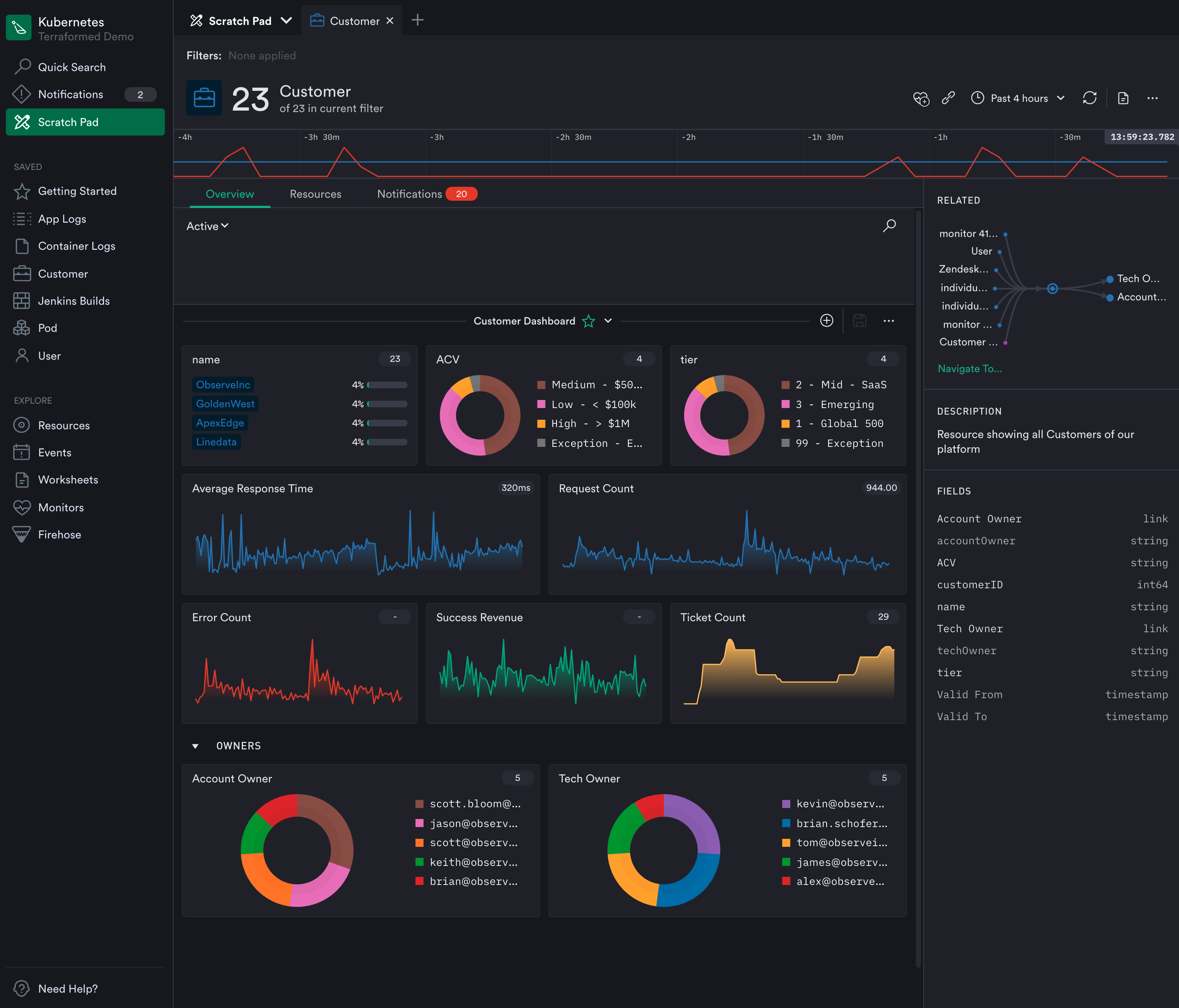
    Jeremy Burton, Observe CEO, said rival observability platforms require IT teams to sift through hundreds of metrics that are generated using elaborate tagging schemes that ultimately drive up the cost of storage. The Observe platform curates metrics by associating them with, for example, a customer, to provide more relevant context, Burton noted.

    That approach eliminates the need to present IT teams with overwhelming lists of metrics in addition to reducing storage costs by removing the need for a complex tagging scheme, added Burton.

    The latest update leverages that approach to metrics to only generate alerts based on curated metrics attached to customers, pods, shopping carts or containers. Rather than simply being alerted to a drop in response times, for example, the IT team can also easily see which customers or pods might be affected. That shift will reduce the volume of alerts that are already overflowing in email inboxes and across other communications platforms.

    Fresh from raising an additional $7 million, Observe today also revealed it has added 20 paying customers since launching the platform on top of the Snowflake cloud service residing on the Amazon Web Services (AWS) public cloud. Rather than reinventing the same core infrastructure, Observe is leveraging a data analytics engine that is already widely employed in IT environments.

    For now, Observe will continue to primarily focus on metrics as part of an effort to deliver insights in a form IT operations teams are prepared to consume today, said Burton. Over time, however, Observe will add support for distributed traces via tools such as OpenTelemetry and Jaeger as it adds additional application performance management (APM) capabilities, added Burton. Rather than telling IT operations teams they are managing IT in the wrong way, the goal is to meet IT operations teams where they are today, noted Burton.

    That strategy also enables the Observe platform to be employed to manage both monolithic and microservices-based applications running on Kubernetes clusters, noted Burton. The immediate goal is to provide IT teams with an alternative to legacy monitoring tools that provide more context at total lower cost by allowing IT organizations to rationalize tools that don’t tend to be especially well integrated, added Burton.

    In the longer term, Observe will also employ machine learning algorithms to collect data more efficiently. However, Burton said the company remains skeptical of visions of an IT future that depend on machine learning algorithms to continuously learn IT environments that are not only unique, but subject to frequent changes.

    Competition among observability platform providers is already fierce. Each IT team will need to decide what type of platform makes the most sense for them based on costs and their preference for specific capabilities one vendor might have that another doesn’t provide. One way or another, however, the way IT environments are managed will soon be changing for the better.

  • Leveraging AI in DevOps for Non-Linear Scaleup

    Leveraging AI in DevOps for Non-Linear Scaleup

    With technology evolving in leaps and bounds, AI is shaping the future of digital transformation for every business seeking speed, scalability, quality and flexibility.

    Since DevOps is on the verge of delivering exceptional software development environments, DevOps in AI is undeniably the next breakthrough in technology. We’ve witnessed every industry racing toward the adoption of AI to transform their business. To support this transformation, smart automation solutions coupled with AI implementations is becoming the new normal.

    So if you’re thinking about reinforcing your enterprise’s DNA by leveraging AI, DevOps principles for artificial intelligence are vital to these efforts. Here’s how businesses can unlock the true potential of AI and stay ahead of the curve.

    DevOps and AI

    DevOps has been s game-changer for numerous businesses. Applying AI can helps DevOps teams achieve the operational efficiency of machine learning (ML) models all the way through the journey from design to production.

    Artificial intelligence undeniably enhances automation and fast-tracks the performance of DevOps. Since the digital transformation process is quite challenging for diverse businesses, DevOps and AI ensures the right processes are in place that can further bring flexibility throughout the journey.

    DevOps enables continuous deployment and quick delivery of AI models via:

    • Speed: Improved overall development and delivery time by reducing unnecessary activities
    • Scalability: On demand and auto-scaling AI models
    • Quality: Boosting cleaning datasets and eventually promotes consistent learning that further enhances AI
    • Data monitoring: Decision making and computing helps handle huge amount of data with precise data monitoring

    Benefits of Integrating AI in DevOps

    There are endless benefits to integrating AI in DevOps.

    Analysis

    Data analysis is the key to business success, especially in times when there’s a huge list of competitors rushing to gain consumer trust. Since DevOps produces an enormous amount of data, it isn’t practical for humans to analyze the data without technological intervention.

    Artificial intelligence’s smart analytics eases the process by identifying and solving problems in a
    more systematic way, resulting in efficiency and increased consumer satisfaction.

    Data Correlation

    In the wider technology environment, development teams have their own set of issues and errors, which arrive while monitoring the processes. Since the communication scope is minimal and there’s a lack of mutual learning across teams, artificial intelligence can help to accelerate the learning cycle.

    Artificial intelligence helps to improve data insights from multiple platforms, which, in turn promotes better communication and establishes better data correlation.

    Failure Handling

    Machine learning is paving the way to better error resolution based on data, and eventually artificial intelligence will be able to predict signs of failure by examining patterns. Since humans cannot match the observation capabilities of AI, certain indicators of failure can only be analyzed through AI. This further enhances the overall development processes, as quick identification helps identify issues before they can impact the software development life cycle.

    Breaks Down Silos

    DevOps with AI has the ability to streamline business processes and establish proper communication among diverse systems, removing barriers that slow down the development and deployment processes. Furthermore, the ability to automate, continuously integrate and enhance communication helps business leaders to focus more on other aspects that can further accelerate business growth.

    Economic Growth

    Since the basic function of an AI-based model is automation, it can help businesses save money and enhance human resources. For any business, eliminating repetitive human work is a tough nut to crack. but a necessity when businesses are demanding continuous innovations. Artificial intelligence could be the best way for enterprises to cut costs and eventually helps the organization to use human resources more creatively and productively.

    Makes Software Intuitive

    Besides endless business benefits, AI-based software is more intuitive and user-friendly, since it prioritizes the reduction of human error. While DevOps is a well-known, reliable, business-driven approach for delivering software, intermingling artificial intelligence could enhance the user experience by integrating technology more deeply into the system.

    The perfect harmony of simplified interactions between humans and AI helps businesses achieve their desired goals of speed, efficiency, scalability and security.

    AI-driven systems are providing promising and scalable solutions for enterprises that are on a hunt
    for innovative and rapid ways to scale business growth. AI in DevOps is undoubtedly the best solution for accelerating growth through precise monitoring, automation and process improvement. This is the right time for businesses to ensure they operationalize artificial intelligence as a core business objective to stay ahead of their competitors.