Tag: application development

  • Application Development: Ripe for Encryption

    Application Development: Ripe for Encryption

    As businesses look to accelerate application innovation and move more and more workflows to the cloud, their needs can be at odds with the need to secure the data. This article will outline current challenges faced by application developers to protect data in this new cloud/DevOps environment. It will also provide insights on how to eliminate the burdens from the DevOps team while significantly improving the security of data stored in cloud databases.

    Cloud Migration

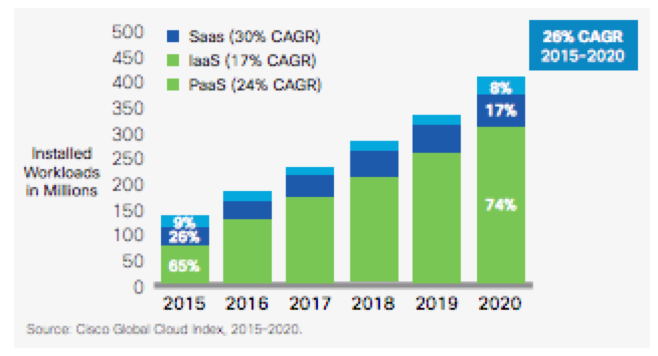
    Businesses are looking to accelerate application innovation and move more workflows to the cloud.  Cisco’s Global Cloud index projects a 26 percent growth rate of cloud workloads between 2015 and 2020. As this trend accelerates, IT project owners increasingly run into audit and compliance requirements that prevent transfer of sensitive data outside the traditional security perimeters. The overwhelming benefits of the cloud including the ability to obtain unlimited scalability of infrastructure, set up and tear down rapidly and gain cost advantages due to economies of scale make this trend impossible to contain.

    Application Development Challenges in the Cloud Era

    As applications migrate to the cloud, application developers are using microservices to accelerate application development because they dramatically reduce development time and help them focus on their key value proposition, be it hailing a cab or booking a place to stay. The success of microservice players including Twilio and Braintree demonstrate the benefits of delegating non-core features such as calling, messaging and payment processing to domain experts.

    Surprisingly, when it comes to something as critical as data security, enterprises still leave the burden on the application developers. This distracts them from working on business objectives as they worry about security problems such as how best to encrypt at data and when to change encryption keys—problems best handled by security domain experts.

    Securing Cloud Workloads

    As it turns out, encryption is not easy to incorporate into enterprise workflows. Encrypting application data prevents databases from processing it. Then there is the problem of managing keys, which could be lost or become stale. Encrypting cloud workloads brings a whole new set of challenges as the issue of control comes up. If the cloud vendor has access to the keys, what prevents them from being subjected to a subpoena from a government that is using national security as justification to decrypt the data? Add to that the complexity of migrating from on-premises databases to the cloud without risking the data.

    Pragmatic Approach

    A pragmatic approach to solving this problem is to use existing encryption solutions that provides the detection, classification, policy enforcement and monitoring of sensitive data at all times. These solutions can protect application data at a columnar level but easily integrate into existing enterprise workflows. Application developers can identify sensitive data based on a data classification matrix and the sensitive data is automatically protected as it is inserted into the database. Using existing cryptography techniques, that data can even be processed without ever being decrypted, ensuring the highest level of security.

    About the Author/ Ameesh Divatia

    Ameesh Divatia is CEO and Co-Founder of Baffle, developer of the world’s first solution for end-to-end database encryption. Ameesh is a serial entrepreneur with a track record of converting innovative ideas into successful businesses. Connect with him on LinkedIn.

  • DevOps Doesn’t Stop at the Database

    DevOps Doesn’t Stop at the Database

    DevOps has moved into the mainstream and practices such as continuous delivery now are being widely adopted. But what about the database? Applications often have a back-end database that needs to be developed and maintained at the same time.

    At first glance, there doesn’t seem to be an issue. The recent “State of Database DevOps Survey” from Redgate showed that 75 percent of companies have developers in their team who work across both applications and databases.

    Investigate a little deeper, however, and the cracks start to appear. The survey also showed that while version control is used by 81 percent of those in application development, it falls to 58 percent for the database. The same is true for continuous integration and automated deployments—39 percent and 33 percent for the application, 20 percent and 21 percent for the database.

    What’s going on? If developers are increasingly responsible for the database as well the application, why can’t the principles of DevOps be applied across both areas? That way, rather than the database being the problem at the end of the pipeline that can (and many times does) cause releases to fail, it becomes part of the pipeline.

    Especially when you consider that the biggest downside of traditional siloed database development is the downtime often experienced when introducing changes. That’s not to mention slowing down releases and preventing companies responding rapidly to changing business requirements.

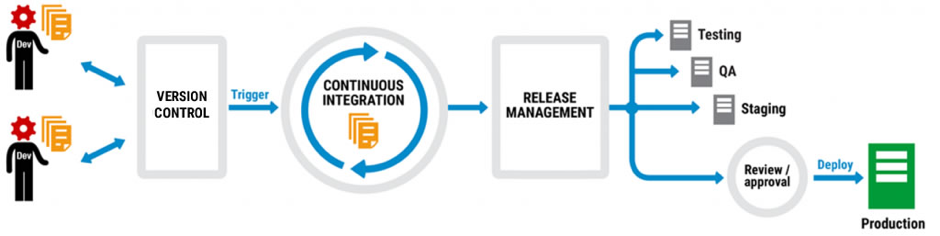
    A typical DevOps workflow looks something like this:

    Code is version-controlled so different developers can work on multiple branches at the same time. When it’s checked into the version control system (VCS), often at the end of each day, it triggers a continuous integration process that builds and validates the changes. Once the changes are complete, a release management tool then pushes them through the testing, QA and staging environments and there’s a final review before the changes are deployed to production.

    Not every company does all of this, but many do different parts of it and plan to extend DevOps practices into other areas. They might start with version control, for example, get the team accustomed to checking in changes, and then move on to continuous integration.

    It works too. The “2016 State of DevOps Report” from Puppet found that organizations practicing DevOps deploy 200 times more frequently, recover from failures 24 times faster, and have a 3 times lower change failure rate. DevOps has moved from a developer-led approach to one that businesses are actively encouraging.

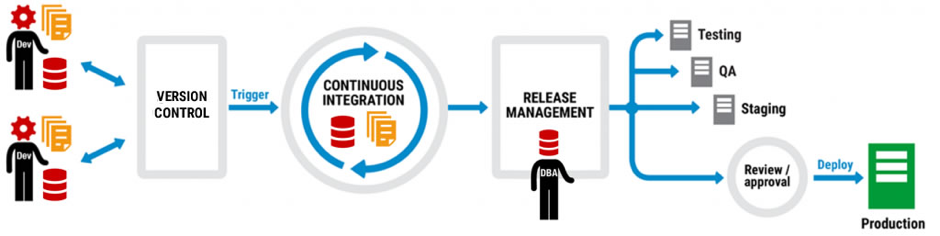
    Thing is, database development can be part of the same picture as application development. Let’s take another look at that DevOps workflow:

    The same workflow, but this time with database development included. Note that there are no extra boxes or arrows, there are no asterisks with caveats, and the only difference is that database development has been added to application development and a DBA has stepped in to the frame.

    But how can database development be added to the DevOps mix when it requires new tools, separate processes, a different mindset? The answer is to think about integration not separation, and extending the current infrastructure not replacing it.

    Application development teams, for example, will use a VCS like Team Foundation Server (TFS) or Git, a continuous integration system like TeamCity or Jenkins, and maybe a deployment automation tool like Octopus Deploy. They’ll also have a favored IDE for application development, probably Visual Studio, and if they do database development, they may well work in SQL Server Management Studio as well.

    Ask them to add to their workload with unfamiliar tools and development environments, or enforced policies and processes, and the shine of DevOps starts to lose its luster. What was freeing them to perform better is now tying them down to an unwelcome way of working.

    Ask them, on the other hand, to use the same tools and processes but extend their capability to database development and it’s a different story. If they already version application code using TFS, for example, there are database version control tools out there that plug into it so that database development becomes an additional part of the process, not an extra process.

    The same is true for continuous integration, release management and deployment. At every step of the DevOps workflow, database development can join application development so that it’s a natural partner rather than an unwelcome guest.

    But just how realistic is this approach? When development teams are already facing the challenge of introducing DevOps, is it a pipe dream to think the database will even be considered as part of the picture?

    According to Microsoft, no. When Visual Studio 2017 was launched in March, the Enterprise edition included Redgate Data Tools in the installer to make it easier for users to implement DevOps practices when building, deploying and maintaining their SQL Server databases.

    As Shawn Nandi, senior director for Cloud App Development and Data product marketing at Microsoft said at the time: “We think this is an important step forward to help companies extend DevOps practices to all parts of their applications.”

    So if you’re considering adopting DevOps, remember the database can be part of it, too.

    About the Author/Matt Hilbert

    Matt Hilbert is a technology writer at Redgate Software with 20 years’ experience working for lots of the world’s biggest tech companies – and many of the smallest. He has a particular fascination for emerging technologies and is on a continuing mission to decompile, untangle, and explain techspeak to a wider audience, and excite people about the endless possibilities technology offers.


  • IBM: DevOps, AI to Drive Digital Business Transformation

    IBM: DevOps, AI to Drive Digital Business Transformation

    Conventional wisdom holds that one of the biggest challenges organizations face today is a chronic shortage of application developers. But as artificial intelligence (AI) advances, the process of writing code will become more automated. But rather than there being not enough developers to write all the code necessary, the shortage will be in software engineers who can develop innovative systems.

    Bob Lord, chief digital officer for the Digital Business Group at IBM, says a glimpse of the future of application development is already being provided today. Instead of writing low-level code, most developers today simply combine modules to create new applications. Anytime new functionality is required, another module gets dropped into the application. The number of developers writing the low-level code needed to create those reusable modules is relatively few, says Lord.

    Over time, however, AI models will learn how to write that code. People will add value by providing the engineering expertise needed to combine modules to create an innovative application, Lord says. Naturally, most of the processes employed to deploy that software also will be automated. But IT operations teams will be needed to continuously train the AI systems being used to deploy that software. This is in much the same way that we need human pilots to fly a plane whenever something new or different occurs, despite the existence of autopilot technology.

    In general, Lord says, IT organizations would be well-advised to focus on three things:

    • They need to decide what architecture strategy is going to be employed to accelerate DevOps integration.
    • They need to develop a data strategy that drives digital business transformation.
    • They need to layer a cognitive computing strategy that employs advanced algorithms to maximize the business value of the data they’ve accumulated.

    While some organizations approach these issues in isolation, Lord says the reality is they’re all closely connected. Organizations are investing in DevOps not just to reduce costs—DevOps is about attaining a level of IT agility capable of driving digital business transformations. In fact, Lord believes the way IT organizations are measured will change: Rather than being rated on traditional IT metrics, they will be measured on how effective they were in attaining business goals—especially when to comes to velocity at which applications are rolled out and updated.

    In the meantime, Lord says, developers are starting to exercise more influence over the technologies organizations are employing to achieve those goals. Because of that issue, IBM is making an effort to get closer to the developer community. But as application development advances, many of those developers will be software engineers rather than people who write code, while IT operations teams will become teachers who train intelligent systems how to respond to the needs of deployed code.

    — Mike Vizard

  • Understanding the App Development Life Cycle

    Understanding the App Development Life Cycle

    More and more businesses nowadays are shifting to mobile. And that’s absolutely reasonable choice:

    • More than 50 percent of digital media consumption accounts for mobile apps;
    • Ninety percent of the time smartphone users spend on their mobiles goes to mobile apps;
    • A typical user has about 30 apps installed on his mobile and spends more than 35 hours a month using them;
    • Forty-two percent of the mobile purchases were completed from mobile apps;
    • Eighty-five percent of consumers prefer native mobile apps over a mobile website.

    When deciding on developing a mobile app, it’s important to picture the entire range of stages and procedures to go through.

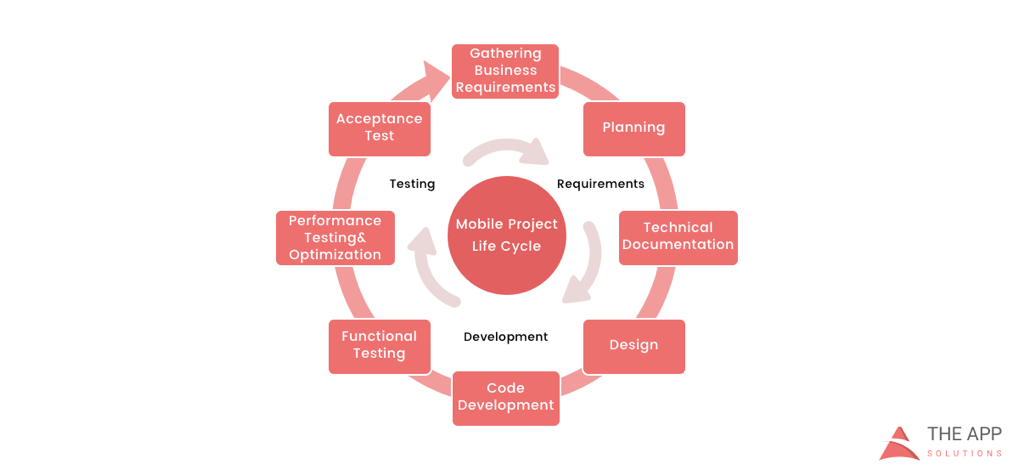
    According to the mobile app projects approach by The App Solutions, here is the life cycle of a typical development project, no matter the complexity:

    1. Planning stage (project manager, marketer, and business analyst are involved) – carrying out the business analysis and crafting mobile strategy.
    2. Technical documentation (covered by the technical writer) – describing all tech requirements and details.
    3. Prototyping (usually made by a UX/UI designer) – creating the sketch, wireframes, prototype and final app skins upon approval.
    4. Development (performed by the developers) – front-end and back-end segments of coding.
    5. Quality Assurance (usually performed continuously after each agile sprint is completed; followed by bug fixing) – testing tech requirements, device compatibility, interface, security aspects, etc.
    6. Publishing & Maintenance (covered by DevOps) – publishing to the app store, updates releases, infrastructure, and entire app maintenance.

    Planning stage

    When creating a mobile app, it is crucial to take time to go through the necessary research and planning steps.

    Business analysis:

    • Idea evaluation – a preliminary stage, when experts investigate the idea, correct it, give their advice and create a rough logics for it.
    • Competition analysis – study of activities of other players in the market.
    • SWOT-analysis – evaluation of strengths and weaknesses of the product, insights into opportunities and other aspects.
    • ROI calculation – assessment of the future app market performance help realize the real value and adjust budget accordingly.
    • Requirements scope – summing up requirements for the future product at all levels.

    Mobile strategy:

    • Market research – this study shows the overall situation on the market to help adjust the concept of the product to current demand.
    • Defining user personas – understanding who is your target audience is crucial in crafting advertising approach.
    • Technologies & tools assessment – study of specific tools required for the industry and select a set of technologies to meet the objectives of the project.
    • Complex promotion strategy – a step-by-step action plan for acquisition and retaining users.

    Technical documentation:

    Also known as a technical specification or a software documentation, this paper is a complex manual of your product, outlining requirements, business logic and leading your specialists through all stages of the project:

    • Makes your software universally understandable.
    • Provides flexibility for future changes.
    • Adds value to your app by providing a clear manual.
    • Helps to keep control of your own product.
    • Allows reusing existing parts of the developed application.

    Prototyping:

    Prototyping is a process of defining a concept in visual terms and evaluating how the app might develop to correct a misconception.

    • Creating a sketch – the draft version of your app on paper that sets up the main logic, number of screens and the way they interact with each other.
    • Creating wireframes – provides the visualization of the draft structure.
    • Creating a clickable prototype – helps to find out and analyze all possible use cases, discover logical breaks and technical inconsistencies in the original idea.
    • Designing app skins – collecting all wireframes and put them together to get the final design.

    Code Development:

    This segment usually consists of two main parts:

    • Front-end development – client-side development, creating a presentation layer of the software for a direct user interaction with it.
    • Back-end development – a server/database part of development, connecting a front-end part of the mobile app with the data access layer.

    Quality Assurance:

    In the agile development, it’s usually a continuous process following every sprint of development:

    • Compatibility testing – running the app on different devices and screen sizes.
    • Interface testing – checking the navigation, menu and buttons performance.
    • Device compatibility testing – checking how the app looks and performs on various screen sizes.
    • Low-level resources testing – examination of the app in conditions of low battery, slow internet connection, etc.
    • Security testing – provides quality assurance of users data safety.
    • Beta testing – giving users access to the app to get feedback.

    Publishing & Maintenance:

    • Publishing of the app and following updated versions to a chosen app store.
    • Infrastructure support – either you have admin panel to post on or cloud service attached, you’ll need to make sure it functions fully.
    • App store optimization – helping your app move onto the tops of search lists and this way gain more users.

    Making the Most of Your App Development Project

    Here are a few tips for getting the most out of your own app development project:

    • Mind what’s trendy + study the market and your target audience. It is a crucial preliminary stage that will impact literally every side of the project and every decision to make.
    • Specify as particularly as possible the product you expect to see at the end of the project. Defining the smallest features and functions of the software at the planning and prototyping points of the project will help find areas to save money on the actual development.
    • Negotiate your idea with various development teams (study the profile of the app development company and find evidence for their credibility, debate the best price). Make sure they hear you and understand what you mean—simply put, that you’re on the same page.

    About the Author / Charlie Shabe

    Charlie Shabe is a professional Digital Marketing Strategist. He has over 20 years Digital Marketing experience in helping global organizations use the Internet to drive their online visibility and generate leads. In addition to his PR and online marketing experience, Charlie is an expert in writing. Connect with him on Facebook and Twitter.

  • Veracode Makes DevSecOps Transition Easier for Developers

    Veracode Makes DevSecOps Transition Easier for Developers

    Following the formal acquisition of Veracode by CA Technologies, a much bigger effort to make security a more integrated element of DevOps has kicked off in earnest.

    Veracode recently unfurled an update to its application security platform aimed specifically at developers that provides security findings as each application module is scanned. Tim Jarrett, senior director of enterprise security strategy for Veracode, says the idea is to provide developers with that information from static analysis delivered via the Veracode platform as early in the application development lifecycle process as possible.

    Other new capabilities include support for custom cleansing functions to automate remediating issues involving common known vulnerabilities and an auto-scan capability that gets implemented any time a file is saved.

    Also with this release, Veracode is adding support for the Perl programming language that is still widely used for building web applications.

    Jarrett notes that organizations these days are holding developers more accountable for security issues that are easier to fix during the application development process. Addressing those same issues after an application is deployed in production not only exposes organizations to security threats, but can be much more expensive to fix.

    The challenge is that most organizations have yet to solve the riddle for getting developers to address security issues earlier in the application development cycle. Jarrett says far too many developers are conditioned to view IT security has being someone else’s job inside the organization. Veracode is trying to make it simple to address security issues using tools that make the process as frictionless as, say, relying on a spell checker to publish a higher-quality document.

    Obviously, there will never be perfect security. But far too many of the issues that IT security teams regularly deal with relate to known exploits. At a time when cybercriminals are making use of a variety of automated tools to discover those exploits, most IT security teams are outgunned. Worse yet, many IT organizations can’t even find qualified cybersecurity professionals to hire in the first place.

    On the plus side, however, as DevOps processes mature, many developers are now assuming complete responsibility for the maintenance of the code they write, including all security issues. This not only leads to higher-quality applications, it also results in those developers being more vigilant when it comes to address security issues they would otherwise need to address themselves once an application is deployed in production. In some quarters, this earlier focus on security in the application development and deployment process is referred to as DevSecOps. As a discipline within most IT organizations, however, DevSecOps remains relatively nascent.

    Of course, regulatory bodies are increasingly treating organizations that fall prey to security attacks less like victims. Instead, they are holding them accountable for ignoring best security practices by assessing fines for losing control over sensitive data. As those fines increase the blame for incurring those fines eventually cascades back to the developer. Given that changing climate, it might not be too long before developers recognize that embracing DevSecOps is in their own best interests.

    — Mike Vizard

  • Using DevOps for Non-Code Artifacts

    Using DevOps for Non-Code Artifacts


    Figure: Linking various aspects for an article that can be connected through the “DevOps way of working”

    Innovation lies at the intersection of two or more otherwise-non-related areas. A very intriguing such instance I recently read was of Charles Babbage and Ada Lovelace setting up the foundation of the modern programmable computer by taking the punch card from the loom industry and applying it to their analytical machine (see: Wikipedia or refer to the book, “The Innovators“). There have been numerous cases where one industry has taken up the best practices of another industry and aligned it to work well in a new use case. We don’t have to go far to look at such examples; the IT industry has picked up a lot of manufacturing industry best practices such lean and Kanban.

    Today a lot is being talked about DevOps in the IT world as the new model of software development and support. The DevOps way is being adopted by various teams and everybody is exploring how they can adopt it in their environment. Can we break down the “DevOps way” and extend its principles to some other areas of work?

    DevOps in its simplest definition serves one purpose: Enabling businesses to reach their consumers faster with innovations and new offerings, enabled by tools and automation. By incorporating lean principles, automating various steps and bringing all the stakeholders closer (biz-dev-test-sec-ops), the life cycle is aligned to release continuously. The main objective is to have a releasable version always ready to be pulled, rather than wait for long periods before the next increment is available. That way, releasing it for the end users becomes a simple business call and a non-event.

    How can we extend the DevOps principles to the benefit of other business functions?

    What is the natural process that comes to the mind for completing an assignment? Does it look some variety of the below figure?

    Figure: Generally followed process model for completing an assignment from start to complete. There might be one or two iterations of the output, that means feedback provided once or twice. Low collaboration between stakeholders results in sub-optimal output or significant rework and wastage.

    Some shortcomings in the above process are:

    • There are no defined interim timelines or, even if defined, are not tracked among other competing priorities
    • Feedback is received only once or twice in the whole cycle
    • Approving sub-par quality output to close in time
    • Results in a high cost of change because feedback is received on near the complete version
    • Generated artifacts are not maintained properly, thus reinventing the wheel every time

    Accommodating slight changes in the above process can offer significant improvements overall. The first step is to make the “outcome” at the center of all the other things (instead of “output”). By keeping the end result (outcome) at the center and aligning all other things around it, we ensure that the objective is clear.

    Figure: Suggested process flow model keeping outcome at the center and completing the assignment iteratively and continuously. Output can be picked up when all the stakeholders are satisfied. This model gives an opportunity to start socializing a work-in-progress version and get continuous feedback.

    What I am saying here effectively is that we put the entire focus on the outcome and make the process “iterative” and “continuous.” “Iterative” essentially means that you don’t aim to complete the work in near entirety before going for a review. You break down the task into logical steps which will incrementally show the reviewer the direction or approach you are taking toward the task completion. And continuous refers to the lean flow, enabling the outcome to not get stuck at any stage, and continuously being aware of and removing bottlenecks.

    Make every important outcome a time-boxed event and work toward its closure in an agile manner. One of the best ways to complete something proactive is by creating self-imposed deadlines. Agile (or scrum, specifically) provides a systematic way of putting deadlines in the whole life cycle (McKinsey Article – “Making your marketing organization agile: a step-by-step guide“).

    My belief is that the same concepts can be extended to any important assignment for effecting the outcome.

    Figure: Agile Scrum process which suggests maintaining the requirements in a backlog that is always kept prioritized. Then work in an iterative manner, generating output incrementally toward an ever-improving state, incorporating feedback continuously.

    The key thing to observe here is that sprint duration and ceremony frequency can be adjusted to make them much more frequent than the recommended one to four weeks.

    Some people consider agile-scrum unnecessary. Well, the concept of Minimum Viable Product (MVP) and creating a “continuous” flow in the development of work item can be brought in irrespective of whether a team follows an agile-scrum approach or not. I have drawn that parallel and created a universal model for any kind of artifact (non-code – such as marketing flyer, legal contracts, product documentation, customer presentations, reports etc.).

    Figure: A model for following the DevOps best practices of continuous feedback, collaboration, automation and continuously improving outcome in any type of work environment or team.

    Here the requirements can come from any source internal or external to the organization. The “source content management” should become the single source of truth for any final artifact; it will also be the versioning system to maintain a record of historic artifacts. The orchestration platform could be an advanced CMS tools, a utility application developed in-house or a simple cloud storage tool such as OneDrive, Google Drive, Dropbox or even plain file systems.

    There will have to be a set of process and policies that support this model. I have appended an indicative list below.

    Collaboration sits at the core of the entire model. Unless people come together and share continuous feedback, the DevOps way of working cannot succeed. The lifecycle stages are explained in the next section, but the main idea is to prototype fast, get continuous feedback, fail fast and always maintain a releasable version ready. Feedback should become an integral part of the entire system. Feedback captured internally or from external audience should be captured and stored along with the artifact version for which the feedback was received. The next time the iteration starts, because the artifact is a periodically updating work item (marketing campaign or sales pitch material) or is being enhanced (website content or product documentation), the latest artifact version along with its feedback should be taken into consideration.

    The lifecycle stages for good-to-have artifacts are presented below. These stages could be slightly different than the one indicated in the above model to suite your requirements:

    • Dev (Development environment): Individual contributors local machine. People work on their picked stories (as in agile: a broken down unit of work). This could be an individual or a group of people.
    • Int (Integration environment): All the individual pieces are stitched together to form one coherent outcome. There should be an artifact ‘owner’ (as in agile: product owner) identified, who will do this work on his system. This has scope for automation. It will benefit if done collaboratively.
    • Test (Testing environment): Receive review and feedback by the approver (could be the “owner” or business leader who gave original requirements). This stage has a scope for automation. From this stage onward, the content resides centrally on the source content management system.
    • Pre-Prod (Pre-production environment): Approved and finalized version rests here until sent for final audience’s use.
    • Prod (Production environment): Only those artifacts that are for end users are maintained here (published news item, signed contracts, delivered customer pitch, etc.). Maintain the version-controlled artifact. This stage also becomes the single source of truth for all artifacts. Maintain historic data for record-keeping. Market feedback is captured and stored along with each version.
    • Release & Ops Mgmt (Operations): The purpose of this stage is to ensuring periodic cleanup activities in the source content management system. Ensure periodic enhancements on the content and maintenance of production copies.

    Artifact lifecycle policies, to start. You may identify and add more as per your requirements:

    • Identify owner for each artifact. She would become approving authority for the content.
    • Prototype & fail fast (MVP). Follow agile methodologies as much as possible and adjust sprint duration for different content types.
    • Make feedback your bible. This is necessary for continuous improvement. Record the feedback and act on it.
    • Collaboration should be at the heart of the entire process. All involved individuals should be part of the entire artifact life cycle.
    • No e-mail content should ever be accepted for review, approval or final use. E-mail can be sent with a link for source content management.

    The purpose of this article was to draw a parallel with non-code artifacts so that DevOps philosophy can be understood with a non-development angle. It’s my hope that it is evident that DevOps is not something that can be adopted overnight, and it’s not just about implementing tools. People have to be aligned and trained for the new ways of working. It entails a lot of cultural change to be initiated. And finally, the benefits are better visible as the scale grows; however, small steps must be taken at the beginning to identify a model that is fit for your specific landscape.

    This is the first iteration of this article and it will surely undergo improvements. Feedback and ideas are welcome in comments below.

    About the Author / Kunal Gupta

    Kunal Gupta is Product Owner in IG Group for their Payments team. Prior to this Kunal managed AgileBase, a DevOps platform developed in and by Wipro, a global IT major. Kunal played a key role in defining and streamlining the roadmap for AgileBase platform, its pricing and positioning to global customers. Kunal has diverse experience in Technology Product and Services Industry spanning across Product Management, Presales, Sales, Campaign Management and Demand Generation. He has a worked for major customers in financial, technology, and manufacturing industry across U.S. and European markets. Connect with him on LinkedIn.

  • Meet the Citizen Developer

    Meet the Citizen Developer

    Much has been written on the rise of citizen developers, but little about who they are and why they choose to do what they do

    The enterprise is always thirsty for new applications. More than ever, this thirst seems unquenchable. Consider a recent market analysis from Global Market Insights, which expects the enterprise application market to grow at a rate of 7.6 percent annually from 2016 through 2024. That’s a clip swift enough to more than double its 2015 $150 billion market size by 2024.

    The demand for enterprise applications—and especially for mobile apps—is so high that most enterprise IT departments can’t meet it and often have backlogs of months to more than a year.

    We’ve written extensively about how the citizen developer is now stepping up to fill this gap. Citizen developers are helping enterprises to not only close the application demand gap but also innovate more rapidly. However, we haven’t seen much regarding the nature of these citizen developers—who they are and what makes them decide to tackle app development independent of IT.

    Recently, Apple subsidiary FileMaker Inc. surveyed hundreds of citizen developers within organizations ranging from five employees to more than 1,000 employees. Those surveyed either created or were involved in the creation of custom apps, didn’t classify themselves as IT professionals and were not full-time custom app developers.

    As we’ve written before, we consider the rise of the citizen developer to be an extension of the consumerization of the IT trend, which began with endpoint devices, evolved to include many cloud services and now encompasses citizen development. Just as  users began choosing which tablets and smartphones they would use for work, many staff members now are choosing, independently, to shun old-fashioned spreadsheets and endpoint databases for higher-level, cloud-based platforms that make it possible to build applications with little to no coding.

    Why do citizen developers choose to develop work apps on their own? According to the FileMaker survey, it’s because a sizable majority—83 percent—wanted to create a better way to work, while 63 percent wanted to be more productive and 42 percent wanted to help others in their organization. Only 12 percent of citizen developers had been asked by their boss to start building apps. Currently, the citizen developer movement is self-directed and self-motivated—41 percent started developing business apps to improve their skill sets.

    So who are these citizen developers? Not surprisingly, the majority are savvy computer users with no formal background in computer science or software engineering, and 34 percent play a management or supervisory role in their organization. When respondents were asked what three words colleagues would choose to describe them, about half chose “problem solver.” Other descriptors such as “creative,” “hard-working,” “organized” and “leader” also ranked high.

    The citizen developers also reported that citizen development had a significantly positive impact on their career. Nearly half, at 48 percent, cited increased satisfaction at work, while 42 percent found that the practice increased their confidence, 29 percent received more recognition within the organization and had more time to work on efforts they enjoyed, and 26 percent felt increased motivation at work.

    Finally, because citizen developers can spot a business need and fill it quickly with an app, they are helping to fill the application demand gap in many enterprises. Eighty-two percent of citizen developers said they witnessed a reduction in inefficient tasks, 71 percent reported an increase in team productivity, and 60 percent said their apps helped to reduce data entry.

    They’re building these apps quickly, too—often building their first app in less than three months, according to 71 percent of respondents. Only 12 percent reported it taking three to six months to do so. That type of accelerated app delivery—when the idea is conceived, designed, and delivered by the users who needs the functionality—will not only help to clear app backlogs but also could become a cauldron of internal innovation.

    — George V. Hulme

  • Tasktop Survey Shows Customer, Business Needs Must Align

    Tasktop Survey Shows Customer, Business Needs Must Align

    Recently, Tasktop surveyed 120 global IT professionals on their software delivery processes. The results were based on analysis obtained from its licensed Forrester Modern Application Assessment Tool, which helps organizations evaluate where they fall on the spectrum of modern software delivery and offers insight into what needs to happen next.

    The survey covered topics such as customer needs, application development and delivery objectives and strategies, business value, metrics, tools and more.

    Key Findings

    In spite of the increasing adoption of agile and DevOps initiatives, the survey identified the need for stronger alignment with customer and business needs and tools that increase coordination in the software delivery process.

    Developers, tech leads, project managers, chief technology officers and other IT titles surveyed reported the following:

    • Only 6 percent strongly agreed they could trace the contents of a software release back to business needs or customer satisfaction.
    • Just 9 percent strongly agreed their application development and delivery strategies were aligned with business strategies.
    • And, strikingly, a scant 15 percent strongly agreed their work management tools assist in coordinating the work of the software delivery team satisfaction.

    It seems that in spite of a strong industry drive toward being more responsive to the the needs of the business, there remain large gaps in how organizations realize the benefits of the tools they use to support these initiatives.

    Any parties interested in taking the survey and receiving an assessment can do so here.

    state-of-software-delivery-process-tasktop-infographic

    About the Author / Betty Zakheim ‎

    betty-zakheim-webBetty Zakheim is vice president of Industry Strategy at Tasktop and is the vertex between Tasktop’s customers, the company’s product team and marketing team. She has an extensive background in software development, software integration technologies and software development tools. As a software development manager, she was an early adaptor of “iterative development,” the precursor to Agile. As the VP of product management and marketing at InConcert (acquired by TIBCO), she pioneered the use of Business Process Management (then called “workflow) as the semantic framework for enterprise application integration. Connect with her on LinkedIn and Twitter.

  • Does Security Slow Down DevOps?

    Does Security Slow Down DevOps?

    Since the primary goal of DevOps is to eliminate bottlenecks to increase a company’s speed and efficiency, organizations tend to embrace new strategies that make DevOps even more efficient. However, when it comes to integrating security into DevOps, there is some debate whether such integrations help to improve the success rate of the DevOps process.

    The Security Dilemma

    Some arguments against integrating security into DevOps include:

    • Security and DevOps function better separately,
    • There is no need for security in DevOps, or
    • Security will somehow slow down the creativity driven by DevOps.

    Some say security integrated with DevOps stifles the work flow and innovation due to its restrictions. In other words, security can viewed as getting in the way of development, or being overbearing to the process, because it is not geared toward rapid development, but rather toward safety.

    Another Perspective

    Despite the arguments against integrating security with DevOps, security breaches because of neglecting safety during development can be a nightmare. For example, software or a website attacked via an overlooked vulnerability point, or a major bug to the code, costs the company in terms of time, money and competitive edge.

    Not only can it crash the product, but it also can halt sales or seriously damage the reputation of the product or site. If security is not integrated with the fast-paced DevOps team, security problems often are not solved or even detected until well after the product is released. This can make it very difficult for the security team to limit the negative effects of any security problem.

    The Benefits of Integration

    Security integrated with DevOps creates an opportunity for the security team to fix and identify problems or vulnerabilities before the product is launched—and before the stakes are suddenly much higher and much more costly.

    Integrating security into DevOps allows the security team to protect the code and the products from within, while they are being created.

    It can be compared to safety inspectors being part of a team that builds a railroad: Wouldn’t it be easier for them to identify any problems with the railroad while it is being built, rather than trying to fix them after a train crashes?

    Security from the Beginning

    It is true that DevOps and agile development involve being very adaptable to change and making rapid prototypes and new products that account for errors, flaws or even security risks. However, just because a DevOps team can move fast doesn’t mean the business won’t be more profitable if it can prevent security risks in the first place.

    Developers don’t possess the same knowledge and skills security professionals have. For that reason security professionals should be included in the development process to increase the chance of releasing a stronger and more effective product.

    The database specifically is an area that can spell disaster. Security and regulatory compliance should be a central component of DevOps for database to prevent unauthorized and undocumented changes to the database and a potentially disastrous security breach.

    It’s important to protect a developer’s creativity and workflow, but most companies have room to integrate more security into their DevOps team. Doing so might just save them from huge problems down the line.

    Next Steps

    Here are a few key steps to enable secure DevOps:

    1. Configure the dev, test and deployment environments identically.
    2. Make proactive changes to all environments automatically, significantly reducing the opportunity for engineers to make security mistakes.
    3. Create a secure process and determine roles and responsibilities as early as possible in development stage.
    4. Perform all vital secure connectivity reviews during the development process.
    5. Implement separation of duties across your entire release process.
    6. Fully automate your deployments to reduce the need for manual access and attended processes.
    7. Ensure your database does not become a compliance and security risk.

    About the Author/Yaniv Yehuda

    yaniv-e1404303491389Yaniv Yehuda is the co-founder and CTO of DBmaestro, an enterprise software development company focusing on database development and deployment technologies. Yaniv is also the co-founder and the head of development for Extreme Technology, an IT service provider for the Israeli market. Yaniv was a captain in Mamram, the Israel Defense Forces computer centers, where he served as a software engineering manager.

  • Q&A: CNCF on Instilling a DevOps Culture, Part 2

    Q&A: CNCF on Instilling a DevOps Culture, Part 2

    In part one of this two-part series, devopsy.kinsta.cloud introduced the Cloud Native Computing Foundation (CNCF), a nonprofit organization with 49 members engaged in promoting the development of cloud native applications. Let’s continue with the CNCF’s thoughts on instilling a DevOps culture.

    devopsy.kinsta.cloud: Why do developers need the freedom to choose how they build software? What kinds and levels of freedom? Is this about approaches, development tools or something else?

    Brian Grant: All of the above: approaches, tools, languages … Different solutions work better for different workloads, scenarios, environments and people. Even new applications developed from scratch to be cloud-native aren’t typically developed in a vacuum—their developers may be familiar with particular languages or tools, the new application may need to interact with legacy applications; it may need to be built with and/or deployed onto existing infrastructure, etc. Often developers need to be able to adopt new technologies or approaches incrementally.

    devopsy.kinsta.cloud: How do you recommend providing this freedom to developers? How do you help provide it?

    Grant: Containers provide an ideal mechanism for providing this freedom, since they can be used to deploy both new and legacy applications, written in any language, built by any tool, into any environment. It’s a goal of the CNCF to foster an ecosystem of composable technologies, such as Kubernetes that facilitate the management of container-packaged applications.

    devopsy.kinsta.cloud: How does this align with instilling a DevOps culture?

    Grant: Because containers are small and fast, one application can be packed in each container image. Consequently, immutable container images can be created at build/release time rather than deployment time, since each application doesn’t need to be composed with the rest of the application stack nor integrated into the production infrastructure environment. This empowers developers to deliver deployable artifacts to operations.

    devopsy.kinsta.cloud: How is code reuse a need of the developer?

    Craig McLuckie: The vast majority of the actual code that is run in any given deployment is written by others. Only a tiny fraction of code in any given instance is actually written by the developer. The rest is everything from common libraries, to full OSS subsystems, to commercial software that systems, to adjacent software projects that provide some business functions. Developers need a common way to integrate with existing systems (when it makes sense) or to find and reuse existing code in a way that is controlled and operations-friendly.

    devopsy.kinsta.cloud: How do you recommend giving developers the ability to reuse code? How does your organization help with this?

    McLuckie: CNCF stands behind two technologies that are critical to code reuse. The first is the use of containers, which represent an intrinsically easy and predictable way to reuse even a relatively complex piece of software. The second is microservices-based architecture that make it easy to wire together systems and reuse existing services versus having to build their own.

    devopsy.kinsta.cloud: How does this align with instilling a DevOps culture?

    McLuckie: Containers make operations far more predictable and reduce possible avenues of error when deploying and updating systems. Rather than run potentially error prone imperative configuration systems to reuse code, containers are simple, lightweight and predictable, and reduce the potential for errors.

    Microservices allow for better operations specialization and create systems that are more intrinsically agile and easy to evolve. They allow for smaller teams that are focused on delivering a specific function versus having to align around large system boundaries. This creates a more productive and operationally viable environment.

    devopsy.kinsta.cloud: What is cloud-native? What does that mean?

    McLuckie: For CNCF, ‘cloud native’ is about a new pattern of application development that was pioneered by the internet companies, but that is equally applicable to developers and operators running more traditional workloads.

    We see three common attributes that make systems ‘cloud-native’:

    Container-packaged: Applications and processes are run in software containers as a unit of application deployment, which facilitates reproducibility, transparency and resource isolation. This improves overall developer experience, fosters code and component reuse, and simplifies operations.

    Dynamically managed: Applications are actively scheduled and managed. This radically improves machine efficiency and resource utilization while reducing the costs associated with maintenance and operations.

    Microservices-oriented: Applications are loosely coupled, with dependencies explicitly specified. This significantly increases the overall agility and maintainability of applications.

    Together, these three capabilities allow developers to build systems that are intrinsically agile and scale well. They significantly reduce the operational complexity of running an application, allowing operators to be more focused on application-level concerns and relying heavily on smart systems to do the operations heavy lifting.