Tag: application development

  • How No-Code Software Development Speeds Digital Transformation

    How No-Code Software Development Speeds Digital Transformation

    More organizations are democratizing software development through no-code solutions that empower anyone to write applications

    In today’s fast-paced and digital business world, organizations must revise their goals and processes to achieve digital transformation and remain a viable business.

    However, most transformation efforts fail. Recent McKinsey research shows that 70% of complex, large-scale change programs don’t reach their stated goals. For most organizations, the complexity of the technology environment and the inability to swiftly implement necessary changes are major roadblocks.

    No-code solutions allow organizations to stay agile and accelerate their strategy execution by empowering power users (or business users) and developers to rapidly develop applications. Such solutions also improve the ability of IT to respond to business demands, shorten time-to-market and accelerate digital transformation.

    What Is a No-Code Solution?

    A no-code solution mitigates the need for manual programming in application development. Instead of writing lines of code, users can develop applications through simple point-and-click on specific components that can be arranged into logical sequences to create functional and feature-rich applications.

    The inherent value no-code software development is it accelerates and democratizes the application development process. With such a solution, your power users can build applications to solve critical business problems and automate tasks to increase productivity.

    5 Benefits of No-Code Software Development Solutions

    • Reduce the load on IT: As mentioned before, no-code solutions allow business users to build applications without any coding knowledge. By enabling such a change, the solution reduces the burden on the understaffed IT department. Applications to solve business challenges and increase productivity can be built quickly without relying on IT. This in turn allows the IT department to dedicate more time to business-critical apps and projects.
    • Accelerate development time: No-code solutions enable business users to take application development into their own hands; they don’t have to wait for their requests to be answered by the IT department. Tasks that used to take months (even years) to complete can now be done in a few hours or days, depending on its complexity. That is the level of acceleration a no-code solution can provide to the application development life cycle.
    • Ensure more targeted outcomes: The point-and-click configuration of no-code solutions empowers the business users and developers to quickly build solutions to meet their exact requirements and specifications. Such applications then can be updated on the fly. These aspects are important to keep the business competitive and agile. While a no-code solution allows the development of applications for immediate impact, it can also prove to be cost-efficient in the long run.
    • Fight shadow IT: When the IT department is unable to act on the requests of business users, those users start seeking solutions on their own. With the rapid rise of SaaS, they can quickly find an application to meet their needs. However, adopting such applications can lead to security vulnerabilities. A no-code solution enables businesses to eliminate the problem of shadow IT by allowing the business (power) users to develop their solutions to meet specific business needs while enabling IT to centrally control the data and user accesses.
    • Enable experimentation without risks: Experimentation is an essential part of digital transformation. No-code solutions allow organizations to test their ideas on a small scale to eliminate the setbacks. It empowers business users to experiment with their ideas, iterate projects efficiently and create solutions that can transform organizations and keep them adaptable to changes in the industry.

    To meet the challenges of digital transformation and remain competitive in the marketplace, organizations need to create an environment that enables agility and flexibility of the internal workflows and customer-facing operations. When powered by a comprehensive no-code solution, organizations can create an infrastructure that allows them to transform and innovate faster, which generates new growth opportunities and provides a competitive advantage.

  • Businesses Modernizing Apps in Wake of Pandemic

    Businesses Modernizing Apps in Wake of Pandemic

    A survey of 5,000 business decision-makers, IT decision-makers and app developers published suggests organizations are taking advantage of the crisis created by the global COVID-19 pandemic to accelerate the modernizing of apps using DevOps practices.

    Conducted by the market research firm Vanson Bourne, the survey finds 80% of respondents said organizations must modernize the technologies they use to develop and deploy software to be more successful. Nearly as many (79%) said their organization will not be able to deliver a best-in-class end user experience without successfully modernizing software development processes.

    In addition, 80% of respondents said embracing developer processes such as test and learn would enable organizations to work more effectively and efficiently.

    The survey also finds some organizations are not letting a proverbial good crisis go to waste. A total of 70% said they have good or excellent alignment between application development and IT teams, up from 64% prior to the pandemic. Alignment between business teams and application development (67%) and IT teams (67%) increased by 10% and 12% respectively since the start of the pandemic, according to the survey results.

    Sumit Dhawan, senior vice president and chief customer experience officer for VMware, said the need to make applications more accessible and reliable is accelerating a transition to the cloud. The survey finds the primary benefits of modernizing apps are enabling remote workforces (54%); pushing quick updates in response to changing landscape (42%); and maintaining reliable uptime (41%).

    The scope of application modernization initiatives varies widely. Some organizations are simply lifting and shifting existing application workloads along with the virtual machines they run on into the cloud. Others are refactoring applications to run natively on a different virtual machine platform provider by a cloud service provider. Others are wrapping existing applications in containers so they don’t have to be refactored when deployed on another virtual machine. Still others are employing containers and Kubernetes to develop entirely new microservices-based applications that tend to be more flexible and reliable than existing monolithic applications.

    Regardless of the path forward, the inability to physically access local data centers during the pandemic has accelerated a shift to the cloud that was occurring even before the pandemic hit. There still will be many applications that for performance, security and compliance reasons may need to remain in on-premises IT environments. However, it might not be long before IT organizations also modernize those applications to make them both more accessible, flexible and resilient.

    Most IT teams will find themselves managing microservices-based applications alongside modernized monolithic applications for years to come. Over time, however, many of those monolithic applications will be deconstructed into a core set of microservices.

    At the core of all those initiatives will be a set of best DevOps processes that each IT team defines for itself based on the nature of the application portfolio that needs to be developed, deployed, secured and maintained. The challenge now is determining which applications should be modernized versus simply replaced by either a software-as-a-service (SaaS) application or a custom cloud-native application that is a better fit for the purpose.

  • Snyk Report Finds Decline in Open Source Vulnerabilities

    Snyk Report Finds Decline in Open Source Vulnerabilities

    Snyk, a provider of tools for discovering and remediating vulnerabilities in open source code, today published a report that finds the number of new vulnerabilities discovered in open source software packages has declined 20% on a year-over-year basis. However, the bulk of the vulnerabilities being discovered are considered to be high severity, the report finds.

    Alyssa Miller, application security advocate for Snyk, said the decline represents a significant improvement as developers become more conscious of cybersecurity issues. As long as humans write code there will always be security issues; however, Miller said the latest report suggests improvements in open source security are likely to continue as more developers embed vulnerability scanning tools within their application development tools.

    Those tools enable developers to discover vulnerabilities in their code long before they ever find their way into a production environment, she noted.

    The Snyk report is based on a survey of 500 developers, security practitioners and IT operations staff and scans run by Snyk on open source software packages. It finds the top vulnerability currently impacting scanned projects is prototype pollution, which results in objects in JavaScript applications being modified, was found in nearly 27% of all the projects Snyk surveyed.

    Better-known vulnerabilities, such as cross-site scripting attacks, are still being reported in high numbers, but Snyk reported the number of projects actually being impacted by this class of vulnerabilities is fairly low. These threats appear to be getting caught and remediated much earlier than many lesser-known vulnerabilities, said Miller.


    Want to learn more? Tune in Tuesday, June 30, at 11 a.m. Eastern for The State of Open Source Security in DevSecOps Pipelines: A Panel Discussion, a devopsy.kinsta.cloud webinar hosted by Snyk


    The report notes the bulk of the vulnerabilities discovered continue to involve indirect dependencies (70%) within packages built using tools such as Node Package Manager (86%), Ruby (81%) and Java (74%). The survey also finds 60% of organizations do not fully inventory the dependency trees in their software.

    Despite the progress being made, Miller said it’s clear much work needs to be done. For example, the survey finds more than 30% do not review Kubernetes manifests for insecure configurations. Requirements for security-related resource controls in Kubernetes are also not widely implemented, according to the survey. Many container images labeled as final contain large numbers of known vulnerabilities—the 14.3 Node image had 642 known vulnerabilities, for example.

    In addition, 44% of the participants indicated that they are currently using Kubernetes to orchestrate their containers. Many respondents who said they use Kubernetes also employ Helm to package applications (40%). According to the report, 68% of stable Helm Charts contain an image with a high severity vulnerability.

    Ironically, Miller noted many of the same vulnerability issues that have derailed many “golden image” initiatives in the past decade appear to be manifesting themselves again in the age of containers.

    Finally, the survey finds 57% of respondents have implemented static code analysis tools (SAST), followed by employing security test cases during quality assurance (28%); dynamic application security testing (DAST) (20%); software composition analysis (19%); and threat modeling (19%).

    Despite that relatively low reliance on security tools in the development process, it’s clear progress is being made as DevOps teams and cybersecurity teams collaborate more closely. As more security tools are incorporated into the DevOps pipeline, application security should begin to improve at even faster rates.

  • 3 Reasons Why Traceability Should Be a DevOps Priority

    3 Reasons Why Traceability Should Be a DevOps Priority

    Traceability in DevOps is about ensuring clarity, accountability and the best possible end product for customers

    There’s a lot to think about when it comes to mobile DevOps. For a start, there’s the need for effective cooperation between members of different teams, perhaps even via team collaboration software for remote workers. With so many people working on DevOps, it’s easy for some to become siloed from their colleagues, hampering communication and undermining teamwork.

    Then there’s the wider question of DevOps strategy—deciding on a vision, setting goals and working out how to measure your success (or otherwise, as the case may be). One thing that has to be central to your strategy is traceability. You may have come across the term a few times before. It’s commonly used elsewhere in the business world, especially with regard to supply chains. Basically, what it means is keeping track of a commodity or product at every stage of the production process.

    Records of the product’s entire manufacturing and distribution history are kept so that the sources of any problems can later be determined and dealt with. Traceability thereby ensures that suppliers can act quickly and decisively in the event of a product recall, for example.

    Another advantage of traceability is that it provides additional transparency, which helps to maintain consumer confidence. As consumers are becoming increasingly aware of how products are sourced and manufactured, this is now an important consideration. It reassures consumers that manufacturers and suppliers are aware of their concerns and that they’re looking out for their best interests.

    traceability

    You can see already, then, how much of this also applies to mobile DevOps. Traceability in DevOps is about ensuring clarity, accountability and the best possible end product for the consumer. But it’s especially important in DevOps because speed is of the essence—there’s constant pressure to get apps developed, into the hands of users and then incorporate feedback as soon as possible. It goes without saying that this can lead to oversights and slip-ups that might otherwise be avoided.

    In addition, DevOps teams have sought to accelerate this process by allowing for greater decentralization and autonomy among their teams. The logic behind this is that it allows for quicker delivery and deployment. Screenshare solutions and other such technological fixes can help to facilitate closer collaboration. However, this easing of control can nevertheless create some potential for confusion in the development process. That may make it more difficult to maintain consistent coordination between developers and testers, and so on.

    Here we’ll list three of the key reasons why traceability should be a leading DevOps priority. All are based on the experiences of development teams and the challenges they’ve encountered.

    Cutting Down on Defects

    As we’ve already discussed, the pressures for faster software rollout and feedback can make it more likely for certain bugs to not be addressed as quickly or as effectively as might otherwise be the case. We’ve noted further that buggy apps can do a lot of damage to companies’ reputations by providing a shoddy and unreliable user experience.

    This can have serious repercussions—after all, word travels fast, especially on social media. It’s therefore in your interests to take whatever steps you can to make sure your software runs as smoothly and reliably as possible.

    Experience strongly suggests that the more rigorous your traceability processes are, the less prone to faults your apps will be. The completeness of your captured traceability information makes all the difference here.

    So, for example, EMR software developers will get great value out of more complete traceability info, as it will contribute to reducing the likely defect rate. This correlation between detailed traceability and defect rate can help to produce more reliable apps and improve efficiency by cutting out avoidable errors and bugs. You should actively solicit feedback from users where appropriate, and integrate this into your wider customer support package.

    Ensuring Compliance

    In other industries, thorough traceability is often a requirement set by regulatory bodies. This can be so that, in the event of a product needing to be recalled, the entire supply chain can be re-examined and the cause of the problem discovered. For example, food and feed businesses operating in the EU have been subject to compulsory traceability requirements since the General Food Law came into force in 2002. Similarly in DevOps, developers have to take regulatory compliance into account.

    Thus, robust and detailed traceability helps DevOps firms working across a variety of sectors in their efforts to comply. There are numerous industries where this is relevant, whether it be financial services (a well-known regulatory minefield), HR software, insurance or public sector contractors and healthcare firms, any of which may be subject to stringent traceability requirements.

    Tracing code is a common prerequisite insisted upon as part of compliance frameworks. For example, you won’t be able to complete the SOC 2 process integrity requirement unless you’re able to provide a complete, evidenced account for each code alteration in your application’s source code.

    Improving Speed Without Sacrificing Quality

    We’ve already discussed how there’s a delicate balancing act that needs to be struck in DevOps. That’s the balance between software rollout speed and the reliability of its performance. We’ve also noted how the increasing autonomy of different sections can hamper coordination between them; thus providing some benefits in terms of speed and rollout but often at the cost of the reliability and quality of the end product. The key here, then, is to find a way of threading the needle, ensuring that apps can be produced at a consistently quick rate while maintaining rigorous standards.

    This is where traceability comes in. It helps to not just enhance speed but also drive up standards. It allows developers to execute tasks more quickly while simultaneously improving the standard to which they do so.

    This also has a positive effect on overall efficiency levels, freeing up resources (i.e. members of the team) to take on other tasks for which they might be needed. Engineers working on contact center software, for instance, can benefit from better-maintained code by reusing or altering existing code depending on their needs.

    It’s worth noting again here that requirement-to-code traceability may be mandatory from a regulatory standpoint. It will depend on the industry in which you’re working. But even if it isn’t, it’s something that’s still worth doing. It can lead to dramatic improvements across the board, leaving as its legacy sharpened and more efficient processes that enhance your team performance, benefits clients and consumers, and—most importantly—deliver real gains for your bottom line.

    Having taken all this into consideration, then, you’ll need to think about exactly how to implement DevOps traceability. Certainly, when introducing traceability processes, you must do so with real care and consideration. Being too rash about implementation can either create bottlenecks, thus exacerbating or even causing problems which traceability otherwise ought to help resolve, and slowing down the overall speed of production.

    Make sure, then, that traceability is implemented in a way that takes the needs of developers seriously. To start with, draw up a guideline document offering developers a clear and concise explanation of what’s expected of them. Outline the traceability process and how it ties in with key objectives. Furthermore, give developers some autonomy in the choice of tools they use for traceability purposes. You might, for instance, make astute use of automation (such as automatic code checks, for example). This should help everyone reap the rewards of traceability and avoid any unnecessary implementation hiccups.

  • SolarWinds Extends APM Reach to Infrastructure

    SolarWinds Extends APM Reach to Infrastructure

    SolarWinds has updated its application performance management (APM) platform to provide more visibility into the IT infrastructure on which applications depend.

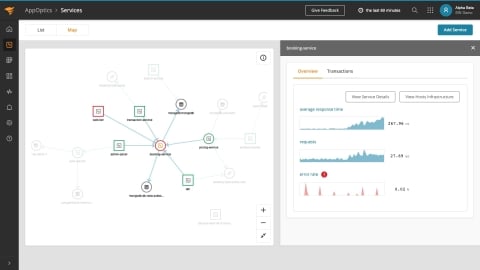
    Jim Hansen, vice president of products for application management at SolarWinds, said the AppOptics service map within SolarWinds APM Suite now enables DevOps teams to visualize dynamic relationships between services and their dependencies. IT teams can view metrics such as average latency, requests per minute, error rate and CPU usage as time series data within a service trace topology.

    DevOps teams can view which services and dependencies are causing resource constraints, surface unknown dependencies and misconfigurations in services and determine how business transactions are flowing across application services, said Hansen. The goal is to make it easier to conduct root cause analysis at a time when the dependencies between software and infrastructure have never been greater or complex.

    Hansen noted that in the wake of the economic downturn brought on by the COVID-19 pandemic there is a lot more interest in reducing the total cost of IT. In many cases, IT teams today are relying on separate tools to monitor applications and IT infrastructure, which often not only results in higher costs but also fails to provide enough context, he said.

    At the same time, responsibilities within IT teams are converging. According to a recent survey of 227 IT professionals in North America conducted by SolarWinds, 54% of respondents said they are spending more time managing applications and services than infrastructure and hardware. The survey also notes there are more IT teams than ever using log analytics (58%) and tracing (24%).

    SolarWinds has also added a web transaction recorder to its Pingdom monitoring tool to capture how an end user interacts with a web application without requiring developers to write and deploy scripts. The recorder captures each step made during a transaction and automatically translates the information into a script that can automatically play back, said Hansen.

    Finally. SolarWinds has enhanced its Loggly tool, adding the ability to automate indexing and parsing to deliver time to value faster, he said.

    Hansen said SolarWinds via its software-as-a-service (SaaS) platform, is trying to make APM simultaneously more affordable and accessible. The challenge is making it possible for IT teams to apply APM services more broadly even when consumption of those services scales up and down in ways that are not always predictable, noted Hansen.

    There are no shortages of options when it comes to APM platforms these days, and most are accessed via SaaS platforms. SolarWinds has been making the case for an APM service that costs substantially less than rivals while providing most of the functionality required by the average IT team. Many teams have limited their adoption of APM platforms to only their most mission-critical because of the cost involved. As APM services become more affordable, there should be a corresponding increase in reliance on APM services at a time when IT is becoming more complex to manage daily.

  • Pinpoint Dives Deeper into Software Delivery Analytics

    Pinpoint Dives Deeper into Software Delivery Analytics

    Pinpoint has extended its platform for managing software delivery to include the ability to analyze historical events to facility team reviews as well as more accurately predict where bottlenecks are likely to emerge based on the past performance of the DevOps team.

    Company CEO Jeff Haynie said the company’s namesake software is employed today mainly to identify existing software development bottlenecks. Pinpoint is now making greater use of machine learning algorithms and advanced analytics to surface additional insights and recommendations, he said.

    Designed to collect data from multiple tools and platforms spanning a DevOps process, Pinpoint automates most of the tedious tasks associated with collecting the metrics required to manage a distributed development team, Haynie said. With more developers working from home in the wake of the COVID-19 pandemic, that ability to collect metrics automatically also plays a key role in allowing application development managers to set more meaningful agendas for meetings that now occur via videoconference rather than in a physical conference room.

    In effect, the application development process can no longer be managed by simply walking around the office to find out what everyone is working on, he noted.

    The analytics should also serve to make events, otherwise known as ceremonies, more meaningful because they can include metrics detailing what was actually required to achieve a specific goal, he added.

    Ultimately, the goal for any DevOps team should not be to simply write more code faster. IT leaders need to make sure the right code is being delivered at the right time to ensure application development projects stay on track.

    Providers of various DevOps platforms have been investing in tools to manage the software delivery process. However, each of those offerings is optimized for a specific platform. The Pinpoint dashboard can be integrated with any platform, including Azure Team Foundation Server (TFS), GitLab, GitHub and Bitbucket. Assignments made in Pinpoint can also then be automatically reflected in these platforms as well as project management applications such as Jira, said Haynie.

    One of the biggest issues with software engineering is that, from a business perspective, it’s been a “black box” that has made it difficult to plan. The more dependent a business is on software, the more problematic that issue becomes. Many issues could be avoided if only there was more visibility into how software development resources are being applied when and where. In fact, as more organizations prioritize digital business transformation in the wake of the COVID-19 pandemic, the more critical it becomes to maximize use of limited software development resources.

    Of course, organizations have been trying to manage software development projects using spreadsheets and project management applications for decades. The tools are not likely to be replaced anytime soon simply because of the level of process inertia attached to them within most organizations. However, given the current state of application development, it should be apparent those tools are not enough to get the job done on time.

  • Rookout Extends Reach of Debugging Platform to On-Prem

    Rookout Extends Reach of Debugging Platform to On-Prem

    Rookout, a provider of a software-as-a-service (SaaS) platform designed to simplify the debugging of applications, has extended the reach of its tools into on-premises IT environments.

    Company CTO Liran Haimovitch said its new Data On-Prem capability extends the reach of a bytecode manipulation capability developed by Rookout to insert a snapshot capture of a specific line of code to an on-premises IT environment. This eliminates the need for DevOps teams to upload code and associated data to the Rookout platform manually.

    The Data On-Prem capability is made available via a software development kit (SDK) provided by Rookout, he said.

    Legacy approaches to debugging code are essentially broken because the processes employed to fix code are too cumbersome, said Haimovitch. Rookout is designed to collect full-stack data without requiring code to stop running or impact code execution. That approach allows developers to debug live code on the Rookout platform and then reinsert the code into their applications.

    Haimovitch said Rookout is making a case for transforming how application debugging is addressed within a DevOps process. Rather than relying on tools that need to be tightly integrated and maintained within a continuous integration/continuous deployment (CI/CD) pipeline, it will be easier for developers to debug live code on the Rookout platform, said Haimovitch.

    That approach will enable DevOps teams to go well beyond simple observability to embrace true understandability of how applications work down to individual lines of code, he added.

    Debugging applications has always been problematic. In an ideal world, developers would have a much better handle on what bugs need to be fixed earlier rather than later. By making it easier to debug live code, the number of issues that developers could address before an application is deployed in a production environment should increase. It may never be possible to address every issue before an application is deployed; however, the number of critical issues theoretically should decline. Many code issues go unaddressed simply because the effort required to debug that code is too great. Many developers too often put off fixing those issues until the next update usually because they are rushing to meet a delivery deadline.

    At the very least, developers should repeat the same mistakes less often as they work to debug live code.

    Regardless of how the debugging issue is addressed, issues within code in the age of microservices are starting to have a bigger impact. An issue within a line of code in a single microservice can have a cascading impact on all other elements of an application that depend on that microservice.

    Debugging application code is never going to be enjoyable. The challenge is finding a way to make the entire process less painful. There may come a day soon when machine and deep learning algorithms help automate much of the debugging process. In the meantime, DevOps teams might want to re-evaluate existing approaches to debugging code that clearly leave much to be desired.

  • Eggplant Injects AI Into Application Testing

    Eggplant Injects AI Into Application Testing

    Eggplant has infused its automated testing platform with deep learning algorithms that automatically identify and classify user interface (UI) elements such as buttons and text fields across any platform and then generate all the automation assets needed to instantly run a test.

    In addition, Eggplant has made it easier to visualize the overlap between common application failure patterns that can be used to automatically optimize testing.

    Finally, Eggplant has also revamped its own user interface to make it easier to deploy its platform across multiple test machines.

    Company CTO Gareth Smith said in the months and years ahead it’s apparent AI will be playing a much larger role in application testing. There are simply too many platforms on which application code is now being deployed for testing teams to keep pace manually.

    Each platform requires tweaks to the user interface to optimize the customer experience. At a time when many organizations are accelerating digital business transformation initiatives, the user application experience has never been more critical, he noted.

    Eggplant’s Digital Automation Intelligence (DAI) platform is designed to automate the entire testing lifecycle process as part of a larger best DevOps practice. The rate at which application tests can be built and run can be a bottleneck as applications are being built. The DAI platform looks to first automate the creation of UI tests and then launch them against application code to eliminate as much testing friction as possible, said Smith.

    IT teams also can track user behavior to create journeys based on user interactions with applications and store tests created using modeling tools provides by Eggplant in its cloud service. That approach not only accelerates the application development process, but it also serves to reduce the total cost of application development, which is critical at a time when IT budgets are squeezed because of the economic downturn brought on by the COVID-19 pandemic.

    As part of that effort, Eggplant provides DevOps teams with access to an application programming interface (API) through which they can self-service their own tests. That may not eliminate the need for a separate testing function within the application development process, but Smith noted it does make it easier for developers to discover potential issues on their own versus having to wait on application testers to discover them.

    Regardless of who conducts the testing, the rise of DevOps means there’s more application code to be tested than ever. As such, testing backlogs within many IT organizations are growing. The challenge is finding a way to conduct application testing that doesn’t result in application deadlines being missed. After all, when deadlines are missed, typically the first thing that gets scaled back is testing. Many DevOps teams convince themselves that any issues that come up can be addressed in the next update.

    Of course, once end users reject an application because issues were never discovered during testing, it’s not uncommon for an application to be rolled back. Rather than having to choose between those two evils, it might be better for all concerned to rely more on automation and AI to accelerate the testing process as much as possible.

  • Appian Infuses Low-Code Platform With AI

    Appian Infuses Low-Code Platform With AI

    Appian this week released an update to its low-code application development and deployment platform that employs artificial intelligence (AI) to recommend best next steps, including how to address cybersecurity issues.

    In addition, the latest version of Appian also makes it easier to incorporate robotic process automation (RPA) modules to automate rote tasks in addition to adding support for Google Cloud Document AI, which makes extracting documents for use within an application that employs RPA easier.

    Malcom Ross, vice president of product strategy for Appian, said the machine learning algorithms embedded with the Appian cloud platform make it possible to embrace best DevSecOps practices to accelerate the development of secure applications. With the rise of automated machine learning (autoML) it’s also becoming easier to automate the process of applying machine learning algorithms to application development and deployment, he said.

    While low-code platforms go a long way toward simplifying application-building, Ross said not enough attention is being paid to the deployment process. The goal is not necessarily to roll out more applications faster but to ensure whatever applications are deployed achieve a level of quality that eliminates the need to address cybersecurity issues post-deployment.

    Appian achieves that goal by running automated tests for an application, which now also include Appian Plug-ins to detect potential mismatches in plug-in versions or plug-ins that are missing.

    Ross said that when it comes to AI there always will be some trepidation. However, there are many manual tasks that many developers would just as soon see automated using AI. As AI becomes more widely relied on to drive consumer application experiences, the more acceptance there will be among IT teams to automate internal processes, he noted, adding cybersecurity is one area in which most developers will appreciate whatever help AI can provide.

    AI is not likely to replace the need for a DevOps team or cybersecurity professionals anytime soon. However, at a time when many organizations are massive amounts of economic pressure, it’s clear AI has a significant role to play in reducing the total cost of IT. Despite advances in IT automation, the cost of labor remains one of the most expensive elements of any IT budget. As such, IT organizations have a keen interest in making sure DevOps teams and cybersecurity teams are not wasting time on tasks that might be better handled by a machine.

    Obviously, the way AI systems and IT teams will interact with one another is still being defined. However, the one thing that is certain is platforms such as Appian will be making more recommendations about what needs to be done when. It may take some time for IT professionals to have confidence in those AI recommendations; however, in terms of mistakes that are routinely made it’s also apparent IT teams will soon be running out of excuses.

  • Logi Analytics Simplifies Dashboard Development

    Logi Analytics Simplifies Dashboard Development

    Logi Analytics launched a tool that promises to make it easier to design, build and embed interactive dashboards and data visualization within applications.

    Company CEO Steven Schneider said Logi Composer helps ease the task of creating data visualizations within the context of a DevOps workflow.

    Based on technology Logi Analytics gained via its acquisition of Zoomdata last year, Logi Composer enables DevOps teams to create interactive self-service dashboards for end users as part of a microservices architecture based on Docker containers, he said.

    To help achieve that goal, Logi Composer includes support for a range of Smart Data Connectors constructed as a set of microservices to access databases and other things.

    Schneider said as applications evolve developers increasingly are being required to embed business intelligence (BI) functionality within their application. However, he noted, most end users don’t want to move data into a separate BI application to analyze trends when they could be surfaced more easily within an application they are already using.

    The challenge has been finding a way to provide developers with a set of tools for building self-service visualizations in a modular fashion that makes them easier to build, maintain and update, he said.

    Of course, developers have been adding visualizations to applications for years. But most of those visualizations don’t let end users interrogate data—users now expect to be able to manipulate visualizations with a modern application at a much deeper level, said Schneider.

    A recent market study published by Dresner Advisory Services finds 62% of respondents consider self-service BI to be either “critical” or “very important.” A separate report published by Allied Market Research estimates the market for embedded analytics will generate revenues in excess of $60 billion by 2023.

    Data visualization is a critical aspect of every digital business transformation initiative. As organizations look to digitize more processes in the wake of the COVID-19 pandemic, the need for more robust data visualization capabilities within applications has become more acute. Most end users are unable to make sense of massive amounts of data without the aid of visualization tools.

    It’s unclear to what impact embedding BI capabilities within applications will have on standalone BI applications. There may always be analysts who want to pull data from multiple application sources to analyze trends. However, the bulk of users are likely to have their BI requirements met within an application that includes connectors to pull in external data when required. Applications that don’t include data visualization capabilities are not likely to be widely employed by users.

    Ultimately, embedded data visualization will reduce reliance on both spreadsheets and standalone BI applications. However, like most substantial changes to end user behavior, it may be a while before that cultural shift takes hold.

    In the meantime, DevOps teams should expect to see a lot more analytics functionality being embedded within applications. The challenge now is finding a way to streamline the development and deployment of those modules within the context of a larger application development project.