Tag: application development

  • Internal Makes On-Premises Edition of No-Code Tool Available

    Internal Makes On-Premises Edition of No-Code Tool Available

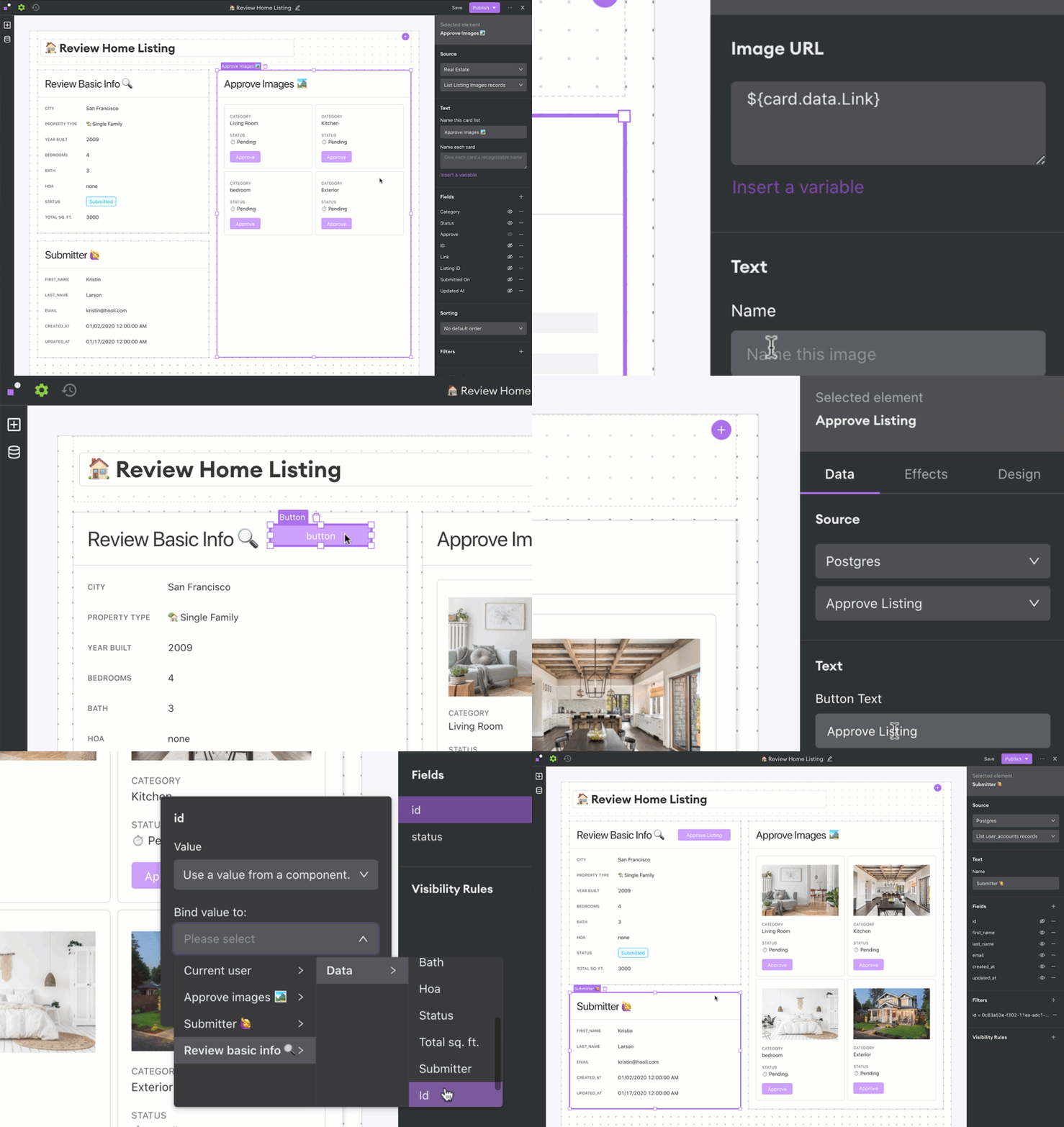
    Internal today launched an on-premises edition of its eponymous no-code development platform that promises to simplify application development backlog reduction for enterprise IT organizations.

    Arisa Amano, CEO of Internal, said many professional developers regularly find themselves building simple applications that, if given access to the right tools, could be built instead by end users. Internal was created to provide that capability either through a cloud service or, now, through an on-premises edition.

    The on-premises edition makes it simpler for developers to work with databases, application programming interfaces (APIs) and applications that reside behind a corporate firewall, Amano said.

    As organizations accelerate digital business transformation initiatives, professional developers are pressed to build and deploy more complex applications faster. Many lower-priority application development projects are sidelined simply because developers don’t have time to take them on. Internal, and other no-code and low-code application development tool providers, are making a strong case for enabling end users to build their own applications using graphical tools, or encouraging professional developers to use these tools to build less complex applications more quickly.

    A survey published by Internal finds 62% of respondents report their developers spend more than 25% of their time fulfilling requests to build internal tools. More than three-quarters of respondents (79%) said engineers use any extra time they can find to develop customer-facing features or other applications.

    Most of the projects filling application backlogs tend to involve workflows that span multiple applications running in a data center. The challenge organizations face is low-code and no-code tools that reside in the cloud can’t easily access that data. As such, Amano said there’s a clear need for a no-code tool that can be deployed in an on-premises IT environment.

    Of course, regardless of who builds the application, it still must be deployed. Challenges arise as developers build more applications, which must be concurrently deployed in production environments. The addition of no-code and low-code tools, and the applications created with those tools, will require organizations to rethink and refine their DevOps processes.

    Historically, professional developers have tended to view no-code and low-code tools as the application development equivalent of a black box preventing them from building reliable, robust applications that can scale. Many low-code and no-code applications that organizations build, however, are meant to used internally by a finite number of end users. At the same time, no-code and low-code tools become more robust with each major update.

    Whatever bias may exist, the current application development backlog in most organizations is only going to increase. Professional developers may prefer to write code at a lower level than a no-code or low-code tool allows; however, most business executives are more interested in application performance than in how it was constructed.

  • Why Boring Tech is Best to Avoid a Microservices Mess

    Why Boring Tech is Best to Avoid a Microservices Mess

    Microservices are all the rage. A Forrester study found that 76% of enterprises were rearchitecting applications for microservices.

    At the same time, microservices are definitely not a silver bullet. Among those already using microservices in production, one study found that 59% said each microservice added increased operational challenges such as data management. Even more concerning, the same report revealed that when asked to compare the difficulty of troubleshooting different environments, 73% said microservices were more difficult, and only 21% said they were easier than monoliths.

    But how did we end up like this? According to Matthew Sinclair, VP of engineering at BCG Digital Ventures, it is because that, as technologists, “we want to use the most modern tech, and sometimes we even want to do it with tech we’ve got no experience in. We see this with engineers, not because it’s the right thing to do but because they want to learn something new.”

    Sinclair, who was speaking as a part of an Indorse Engineering Leaders Online Panel, went on to point out how the problem becomes self-perpetuating: Customers hear about new tech—in this instance microservices—that will fix the problems they have with monoliths. They rave about microservices to software engineers, who also get excited about it and then go off and start adding microservices in software engineering projects.

    The problem is, there is just as much chance of getting into a tangle with microservices as there is with monoliths. That’s because people often start breaking things up into microservices too early—they’ve heard it will be a good idea and they’ve seen some of the benefits, so they try to apply it to everything. In doing so, they create what some might call a “micromess.”

    Avoiding the Micromess

    So, how do you avoid ending up in a micromess?

    You need to go back to the fundamentals. One way to look at it is understanding that microservices are distributed systems, something many people will have experience with. They should also be familiar with what another panelist, Oswaldo Hernandez Perez, engineering manager at Improbable, called the first law of distribution: “If you don’t need to do it, don’t do it.”

    So that means focusing on why you are building what you are building. What are you trying to achieve? This is a fundamental question that’s applicable to businesses of all sizes. What problem are you trying to solve, and how will your solution remove friction from its users’ lives?

    That’s what people care about. Even if you’re developing a niche app for a highly technical audience, they are unlikely to care too much about how it got to them, only that it did and it is fixing a problem for them.

    If the only way to achieve that is with microservices, then yes, you should definitely use them. If there is an alternative, then consider using that. Do not simply start breaking everything up into microservices just because that is what everyone is currently talking about.

    Don’t Stick Your Head in the Micromess

    Ultimately, microservices are an architectural pattern to reduce complexity. It does this, but it also adds complexity elsewhere. If used in isolation, then you’ll fix your complexity in one dimension and have it proliferate elsewhere. So, it is vital that you use the many other tools out there to minimize complexity across the entire organization.

    It goes back to the question: What problem are you trying to fix? The majority of businesses can do that with boring tech. Granted, the likes of Amazon and Google, which are cloud-native to their core, can use microservices, but even large enterprises should be asking themselves if it’s really the right choice for them.

    Established businesses are likely to have a significant legacy codebase, which needs integrating with. Again, microservices might not be appropriate in this situation—it might be worth saving them for cloud-native projects, and use boring tech to resolve the challenges within legacy IT.

    Do You Really Need Microservices?

    Time and time again, we come back to the fundamental question: What are you trying to fix with this product and/or technology? Not how, but what? What friction will you banish from the user’s life if they engage with your product? Only once you answer that question should you consider whether microservices is for you. Chances are, you may find you don’t need them by that point.

  • SAP Makes Available Free Cloud Tier to Build Applications

    SAP Makes Available Free Cloud Tier to Build Applications

    SAP announced that next year it will make available a free tier on SAP Cloud Platform for developers that are building applications.

    Announced at the SAP Tech-Ed conference, the free tier comes at a time when SAP is encouraging developers to use its applications as a foundation for digital business process transformation initiatives.

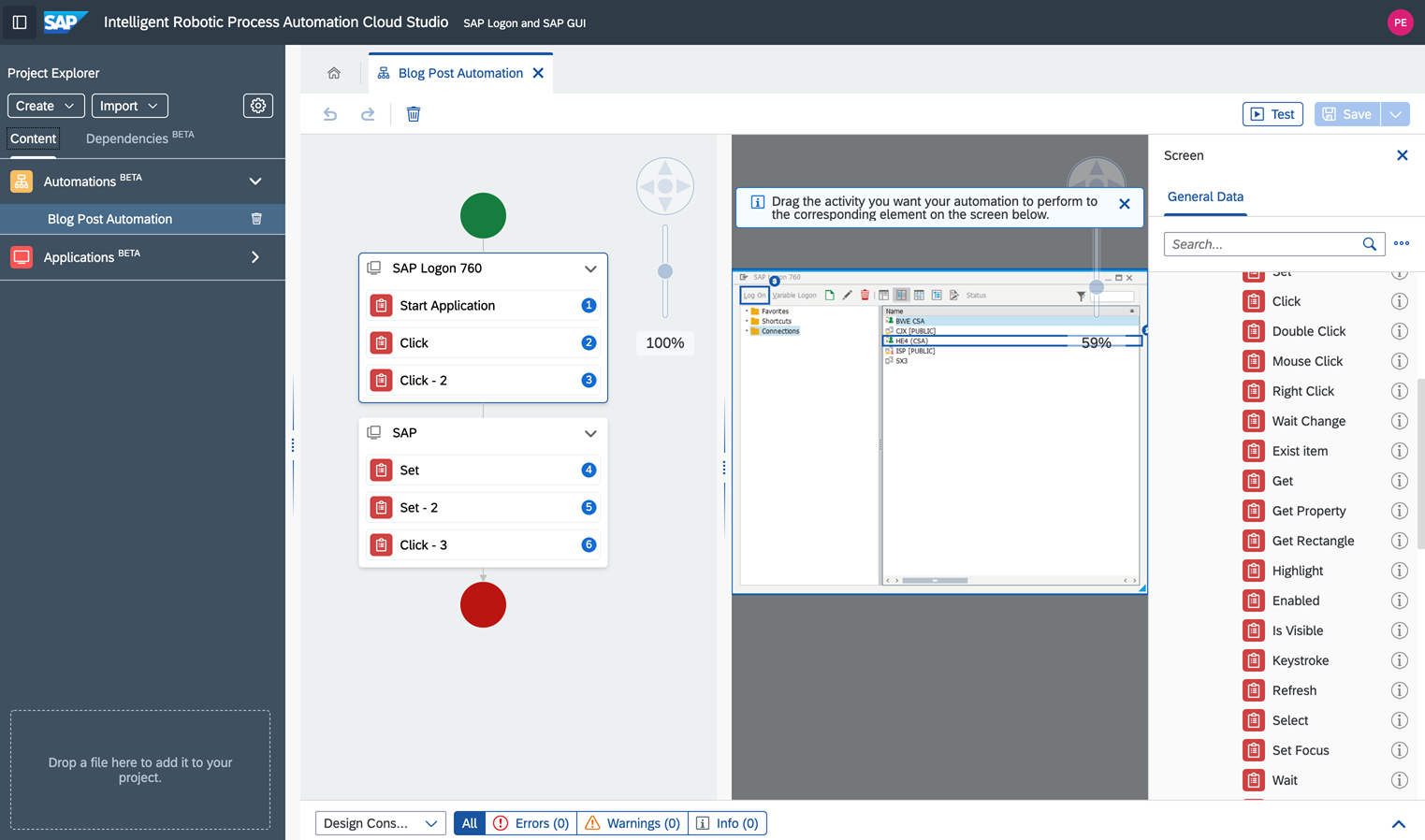
    As part of that effort, SAP is also extending the capabilities of the low-code tools it makes available to customize SAP Cloud Platform Workflow Management and SAP Intelligent Robotic Process Automation (RPA) 2.0 to make it easier to integrate these offerings with other applications. SAP beginning in January is also promised to include a limited edition of SAP Intelligent RPA in every SAP S/4HANA Cloud subscription.

    Finally, SAP is beta testing SAP Ruum, a set of no-code tools it plans to make available alongside the low-code tools it already includes in its portfolio of tools for building custom applications that extend the packaged applications it provides on-premises and in the cloud.

    At the heart of the SAP digital business transformation strategy is SAP Business Technology Platform, which makes it possible to share data across SAP applications via a common data and object model. SAP makes available SAP Cloud Platform to provide a distinct platform-as-a-service (PaaS) environment through which developers can build extensions to its applications.

    Most recently, SAP has made SAP Graph tools in beta offering as a complement to a revamped SAP API Business Hub that will be available in beta this month.

    Thomas Grassl, vice president and global head of developer relations and community for SAP, said the company is also embracing continuous integration/continuous delivery (CI/CD) platforms as it continues to encourage developers to move away from waterfall-based approaches to building and deploying applications.

    The free tier of resources SAP is providing developers will encourage organizations to experiment more at a time when many organizations are now quite certain what digital process may ultimately gain traction with their end customers and suppliers. SAP is also focusing on no-code and low-code tools to enable organizations to accelerate the development of those applications. SAP already has an existing partnership in place with Mendix, a unit of Siemens, to make available low-code tools.

    SAP’s biggest concern, of course, is that digital business transformation initiatives will revolve more around application platforms from Oracle, Salesforce, ServiceNow and Workday. Every major provider of enterprise applications offers low-code and no-code tools to customize their applications. Many enterprise IT organizations are employing these tools more widely to accelerate digital business initiatives as an alternative to building entire applications from the ground up.

    The challenge these organizations will soon encounter is that as the backlog of applications that need to be deployed starts to build, they will have to modernize their approaches to deploying applications to keep pace.

    As a dominant provider of enterprise applications, SAP is in a position to drive digital business transformation in a way that extends the reach and scope of its enterprise resource planning (ERP) portfolio. The issue is finding a way to accomplish that goal when organizations thanks to the COVID-19 pandemic have a pressing need to transform much sooner than later.

  • Why Secrets Management is Critical to DevOps Pipeline Security

    Why Secrets Management is Critical to DevOps Pipeline Security

    While valuable, secrets management also can be difficult for DevOps teams to employ. Here’s what you need to know

    Business is all about speed. Companies want to innovate and deliver functionality faster to remain competitive. This explains the increasing popularity of DevOps as a go-to model for rapid application delivery. A recent Gartner report indicated that DevOps adoption is a growing alternative to traditional waterfall and agile development methodologies, but also pointed to key challenges with security and compliance.

    For example, the report noted that DevOps practices encourage automation to achieve scale, but that security is traditionally manual, gate-driven and heavy on processes. In addition, the majority of developers have zero knowledge of secure coding, even many who are well-versed in agile and DevOps.

    But there is another critical component of data security for DevOps teams: secrets management. In DevOps, “secrets” are typically authentication credentials used in applications and services. This may include usernames and passwords, either system-to-system or database; API tokens; SSH keys; encryption keys; and so on. Secrets are the keys to your data and, when handled casually, can open the doors to a serious data breach or intellectual property theft.

    Secrets Management Presents Challenges

    Developers often inadvertently leave behind sensitive pieces of code embedded in applications, files and code repositories. One real-world example is the way in which some developers use GitHub, a hugely popular source-code management system and the largest source-code repository in the world. Most developers seem to use GitHub casually, leading to increased risk of insider threats and hacking incidents. In one such incident in 2016, hackers penetrated Uber’s source code repository via GitHub, accessing intellectual property, AWS credentials and the personal data of more than 7 million Uber drivers and 50 million customers.

    There are three main reasons why secrets management is challenging for DevOps teams:

    1. Secret sprawl. Increased adoption of the cloud-native development model and the emergence of multi-cloud infrastructures has led to a proliferation and decentralization of secrets. If left to their own devices, these secrets can sprawl over time, leading to data breaches and privacy concerns.

    2. A disparate set of tools. Many DevOps teams use different sets of tools for different phases of the development process and often struggle to have a centralized system that can integrate with all these tools and systems. Cloud-native secrets management tools are limited to the specific cloud provider and may not be effective in a multi-cloud scenario. An effective secrets management strategy should be able to integrate and work with every tool in the DevOps workflow and across cloud providers.

    3. DevOps blind spots. Most enterprises are unaware of where their secrets are located, who has access to them or whether the secrets have been changed. This lack of understanding of the functioning of the DevOps pipeline often increases the risk of an internal data breach.

    Today, most enterprises use containers to package and deploy applications. Gartner estimates that by 2022 nearly 75% of organizations will be running containerized applications in production. Oftentimes, in a container-driven environment, the groups responsible for developing applications are distinct from the groups in charge of deploying applications. Furthermore, database administrators by and large have (or should have) access to the keys, tokens and secrets.

    In this setting, a major challenge is how to enable application development and deployment in the presence of this segregation without compromising secrets. If a developer has a piece of code inside a container that requires access to a secret key, then this secret value can be hard-coded into the code itself or included as part of the container image. But both of these options have detrimental security implications because they expose secret values to all those who can view the source code or deployment parameters, thereby violating the principle of least privilege.

    Instead, secrets can be securely passed to the containerized code during actual runtime. Using a utility based on a container-orchestration system such as Kubernetes allows the secure transmission of secrets at runtime, meaning the secrets don’t need to be exposed while building or deploying the application. Rather, the utility can monitor the environment in real-time and inject secrets at runtime only when they are required.

    3 Things to Look for

    Regardless of the tools used in a development pipeline, protecting credentials and API keys from compromise is critical. Simply put, secrets must exist outside of the source code. When considering a secrets management solution, there are three things to look for:

    • A flexible deployment model, whether on-premises, natively in the cloud or any hybrid/multi-cloud combination.
    • A solution secured in a way that goes beyond a simple key-value store.
    • The ability to connect to other applications and services through open standards such as OAuth, OpenID (SAML), LDAP, Trustworthy JWT and PKI.

    A secrets management strategy that takes these factors into account maximizes an organization’s opportunities for success. And with the DevOps model as prevalent as it now is, it’s absolutely vital for teams to do so to significantly reduce the likelihood of breaches and ultimately improve business agility.

  • Design Systems: Development Choices for Meeting User Expectations

    Design Systems: Development Choices for Meeting User Expectations

    Modern software development trends involve design systems and modernization, and if we drill down further, the trend within the trend is about creating better user experiences. This means improving usability, emerging technology and performance enhancements. This is easier said than done. What does it mean for developers?

    Employing Design Systems

    What a designer sketches, a developer tries to replicate, often with varying degrees of success. When we introduce multiple screen sizes and form factors, the experience can vary greatly if the collaboration between design and development is not in sync. To combat this, many modern software development practices are beginning to employ the use of design systems to provide an outstanding experience to the end user and streamline processes internally.

    Typically, a design system consists of UI components and visual style guidelines, both in the form of reusable code and reusable design artifacts. The system could include UI patterns, foundational elements and design principles or guidelines. Many go as far as defining what tools should be used for optimal UI and UX. For example, one of the most widely known design systems—and most used, due to its open source nature—is Google’s Material Design.

    With a design system in place, developers and designers are singing from the same sheet of music. This eliminates many delays and inconsistencies and provides prescriptive guidance for both the visual and functional experience of the app. It allows developers to deliver the beautifully styled, feature-rich responsive experiences the end user has come to expect.

    Choices for Modernization

    For .NET developers, this could mean exploring Blazor, Microsoft’s answer to JavaScript, which allows developers to build interactive web UIs using C#. It could mean diving into.NET 5, which is the next step in building a unified platform, allowing developers to use it to target Windows, Linux, macOS, iOS, Android, watchOS, WebAssembly and more. Or, it could mean getting a jump on .NET MAUI, the welcome evolution of Xamarin.Forms, combining the best of Mono and .NET Core and allowing developers to build truly native desktop and mobile apps for any operating system from a single codebase and project system from their preferred IDE.

    For the JavaScript developer, modernization could mean looking toward Vue 3, which is a faster, smaller and more maintainable framework. Or, it could mean exploring Angular 10 and its warnings for CommonJS imports. Or maybe it’s truly understanding and appreciating the downplayed release of React 17, which now allows multiple versions of React on one page, making it easier to use React with other frameworks. Modernization is all about staying relevant, learning and leveraging the latest the industry can offer.

    Popular Frameworks

    For front-end development, React, Angular and Blazor are some of the most popular frameworks at the moment. Blazor is so new enough that you aren’t going to find anyone with years of experience, but it is a framework that is incredibly adaptable and easy to learn if you are C# developer.

    React and Angular are more mature and with their latest releases provide even more compelling reasons to build your web apps with them. The soft skills—the ability to communicate and collaborate—are some of the most in-demand skills today.

    Regardless of your front-end preferences, the proliferation of frameworks and new versions means that developers have more choices than ever for creating rich, interactive, modern experiences for multiple platforms and devices.

  • The Future of Application Development

    The Future of Application Development

    What lies ahead for application development? Can we look forward to a less hierarchical system?

    The current state of application development has an often overlooked problem: It’s inaccessible.

    Top tier companies such as Google, Microsoft, Apple and Facebook are at a major advantage. With their large capital, they can invest in innovative development tools and round up extensive workforces of leading talent to use them—which matters, especially amid an ongoing developer drought. Meanwhile, companies lacking these privileges must make do with a leaner toolset and smaller, less cherry-picked workforce—which is not to say that they don’t make smart, creative use of what’s available to them, but that they deserve to play ball on a more equal playing field.

    Unfortunately, the pandemic compounded this issue, at times bringing even greater advantages to the tech giants. To overcome what some consider a trend of software elitism, efforts have been made to accelerate the pace of application architecture for all. Employing no-code and low-code tools, for example, could help the smaller guys compete. However, as Robson Grieve, CMO of enterprise software company OutSystems sees it, “these latest approaches are mostly point solutions solving a limited set of problems.”

    I recently invited Grieve to share more of his take on this issue and how he envisions a future of application development that works inclusively for a wider set of companies.

    Application Development: The Other 99%

    “It’s frustrating that the best, most advanced development tools have traditionally only been accessible to the largest, richest companies,” said Grieve. “Everyone else suffers with ballooning backlogs and struggles to take advantage of the latest, greatest technologies.”

    While it may sound like a platform out of a Bernie Sanders speech, recognizing the advantages of the top 1% in the application development world brings up a valid line of questioning as to whether maintaining this status quo is really how we want to go forward. After all, wouldn’t it be better if more companies had access to the best technologies? Wouldn’t we all benefit from that?

    Creating a More Equal Playing Field in Application Development

    Luckily, we are already feeling the winds change in this department, as top tier companies are beginning to lose their stronghold on the crème de la crème of development tools. What’s beginning to change, Grieve believes, is “access to the most sophisticated tools and advanced technologies are being democratized … sophisticated, feature-rich, beautiful, and mission-critical applications are no longer the sole domain of the elites.”

    How is this being realized? In many ways, it’s coming from the makers of the development tools themselves, who are bringing careful thought and creativity to tool design. Some of the strongest approaches in Grieve’s eyes include the following:

    • Holistic approaches that streamline the most critical innovations into single, integrated platforms.
    • Low-code approaches that help accelerate development while retaining the power and expressiveness of traditional code.
    • Platform approaches that offer design, development, deployment, monitoring and management capabilities in one place.
    • Multi-functional approaches that serve a diverse team, support the full DevOps life cycle and, in effect, improve productivity and collaboration. For example, platforms crafted to serve the unique needs of UI/UX experts, business analysts, professional developers and architects.
    • Automated approaches that allow applications to be continuously updated and seamlessly modified once they’ve been deployed, using an AI-powered automation layer that underpins the tool, managing application dependencies and providing self-healing capabilities to ensure that regardless of what changes are made, the tool never breaks.

    One thing that stands out here, according to Grieve, is the idea that broad, multi-functional development platforms reign supreme. As Grieve noted, “the most valuable tools are the ones that solve the broadest set of problems.” In general, approaches that keep in mind security, scalability, reliability and availability will be robust solutions for diverse teams, both large and small. A bonus is if the tool is visually appealing and model-driven for the best ease of usability and user experience.

    All for One, and One for All

    The issue of software elitism is one problem that can be seen as a clear opportunity, and that opportunity is not being missed among the smartest makers of development tools. As Grieve said, “Modern application platforms have the potential to help the vast majority of the economy succeed by offering a better approach—one that takes state-of-the-art technology and makes it more approachable, accessible and adaptable.”

    Again, we see a version of AI democracy at play. This is an exciting shift for many companies and teams that exist outside the elite tier. As an example, Grieve said that instead of “procedural code or minimalistic point solutions,” modern applications platforms “harness the power of advanced technologies and AI to create efficiencies for companies outside of the tech bubble.”

    This could be one way to level the playing field and allow companies of all sizes to complete the work needed, shrink backlogs, overcome developer drought with tools that are friendlier to citizen developers, support team collaboration, accelerate efficiency, and—for the underdogs—compete with the big dogs.

    Looking to the Horizon

    So, what does Grieve see for the future of application development? To him, it is bright if we continue on the current trajectory. “More and more,” he said, “successful development projects will require business and IT to work together and collaborate closely.”

    This means investing in sophisticated technologies, with powerful built-in AI, that can help companies ensure that even though applications are built quickly and efficiently, they are built securely and reliably—and in ways that can be easily scaled and evolved.

    If this is all to be realized, Grieve forecasts that we can look forward to “a bright future that is welcoming of a much more diverse and representative community of people who build applications together to solve all the most pressing problems.” It’s an optimistic view, but one that many will welcome as a fresh breath of air in what have been some particularly trying times.

  • How to Cut Design Sprints in Half

    How to Cut Design Sprints in Half

    Any company that has created a product in the digital sphere will no doubt be familiar with the purpose of design sprints. Traditionally both back-end and front-end developers, designers, marketing teams and other stakeholders in the company come together over the course of five days to prototype ideas, gather insights on users and validate them before building solutions with company resources.

    Like most startups we are always extremely busy and getting people to work for five days felt like a lot—even two days was a stretch for some, so we decided to see if we could come up with a way to get the same results in a fraction of the time.

    Traditional design sprints are held over five key days to help:

    • Understand –  Map a challenge and particular focus area.
    • Ideate – Come up with many design solutions.
    • Decide – Turn those design solutions into a storyboard.
    • Prototype – Create a prototype based on those storyboards.
    • Test – See how live users interact with the prototype and learn to iterate further.

    For our design sprint this time, we wanted to test another approach for the first three steps in the process (understanding, ideating and deciding). Instead of taking three days to complete the majority of the design sprint, we wanted to test if we could deliver similar results in four hours. We did, handing off storyboards to our designer for testing and iterating with live users. This cut a normal five-day design sprint in half. This is how we did it.

    The Purpose of Our Design Sprint

    We were creating a top-secret brand new feature we wanted to add to our product that required the design sprint in the first place. At Usersnap, as a customer feedback company, it is probably no surprise that we use our product to collect feedback from people using our products, do extensive research on that feedback and take our findings directly to a design sprint for ideation and prototyping.

    Preparation Is Key for Shortened Design Sprints

    If you want to cut your design sprint in half, make sure you have the following in advance:

    1. Research on our target personas (we conducted 20 interviews and collected 130 survey responses).
    2. A clearly defined and agreed-upon challenge for your design sprint team to tackle.
    3. The deliverables at the end of the session.

    Desired outcome: Make sure everyone is clear and aligned on the challenge to tackle.

    You may wonder: “Why would you prepare these things beforehand when all of this could be discussed during the design sprint?”

    We wanted to give people time to sit with the challenge and have ideas to present during the design sprint, and save the time that was used just getting everyone up to speed.

    Understand (1 hour)

    Instead of a full day to understand the challenge, we used one hour. How is this possible, you ask? Our participants came prepared in advance and our in-house researchers had extensively analyzed the findings from our research stage.

    Presentations (15 minutes)

    First, each expert presented the findings of our target persona and their pain points. There were three researchers who each had five minutes to present the qualitative, quantitative and nuanced aspects of the persona’s pain points. With a short period of time, our researchers were forced to focus on the most important problems of our persona.

    While presenting, the other participants wrote down “How Might We’s” (HMWs) on post-it notes. HMWs frame challenges in question form and these post-it notes are integral to the ideation stage.

    Desired outcome: Understand the persona of the chosen design sprint challenge.

    Expert Interviews (45 minutes)

    Second, researchers were interviewed by the participants to learn more about the persona’s challenges. We set the timer for 15 minutes for each researcher and fired away with our questions.

    Desired outcome: Expand on particular points that participants wanted to know more about.

    While Q&A continued, respondents continued writing HMWs on post-it notes.

    Ideate (1.5 hours) and Decide (1.25 hours)

    Ideation and decision takes two days in total, according to the design sprint manual, and we gave ourselves less than three hours.

    Problems Worth Solving (30 minutes)

    First, we set the timer for three minutes, and all of us came up with our top three HMWs to put on the wall. When time expired, we presented our HMWs and placed them on the wall in order of our persona’s job steps. If a HMW is repeated, we either replaced it because it’s more relevant, or threw it away.

    From there, we all received three stickers, set the timer for three more minutes and proceeded to vote on which three HMWs were most relevant to the persona’s pain points. The voting is not meant to eliminate less relevant HMWs, but to clarify what the group thinks is most important.

    Desired outcome: Focus the group on problems to solve within the persona’s challenges.

    Crazy 8s (1 hour)

    Next, we did two rounds of Crazy 8s. At this point, we were breezing along, and even my own expectations were exceeded: We were getting close to designing something in a fraction of the time it normally takes!

    The steps to Crazy 8s are simple:

    1. Take a large piece of paper, and fold it into eight parts (“tiles”).
    2. Set the timer for eight minutes, and begin.
    3. Provide up to eight screen designs based on any of the HMWs written down (those that made it to the wall and those that didn’t).
      • Less than eight screen designs? No problem.
      • Want to present a flow with multiple tiles? Go for it.
    4. When the eight minutes are up, place each piece of paper on the wall.
    5. Present three of your eight ideas to the group and explain what problem the design should solve.
    6. Repeat the process a second time; combine ideas from others or expand on them.

    Desired outcome: Demonstrate how we could solve a problem related to the persona’s pain points.

    Decide (1.25 hours)

    Storyboards (1 hour, then 15 minutes)

    Next, we broke up the design sprint team into two groups, making sure there weren’t too many participants with substantial design sprint experience in a group.

    We set the timer for one hour, and each group came up with a storyboard flow with five sheets of paper. We didn’t give clear guidance on how to design the storyboard, but it should represent five key steps to reach a goal. If both groups approached the problem in the same way, it provided good insights on the nuances of the problem. If each group approached the problem differently, it provided perspective to the problem itself.

    Desired outcome: Design screens in an order that tackle the challenge of the design sprint for our persona.

    We then presented our storyboards. Each group had five minutes (set your timers!), and time for quick Q&A afterwards.

    Retrospective (15 minutes)

    Finally, it was time to conduct a quick retrospective. Each participant had three minutes to provide their thoughts:

    • What did you like?
    • What didn’t you like?
    • What could we improve?
    • Any additional comments?

    Handover for Prototyping and Testing

    From there, we handed the HMWs, Crazy 8s solutions and storyboards to our designer to develop a prototype, do user testing and iterate on the design. From previous prototypes, we knew that we would hear a lot of the same feedback from the participants. So we decided to change relevant and obvious flows right away and test an already modified version with the next participant. This process allowed us to achieve a more relevant flow in a shorter time.

    In the end, none of this was or would be possible without customer research. It was the foundation of our design sprint, and we used our own product to collect feedback and organize it in a way that gave us sound insights leading up to our design sprint.

    Those four hours yielded great results for the type of challenge we wanted to solve, and we didn’t use three days to get there. It took us longer to get to a tested prototype, but only one or two people were involved and they didn’t dedicate 100% of their time to the prototype iteration. This process fits better to our day-to-day schedule.

    Trimming Design Sprint Time

    We found the process very helpful and will do it again, always re-evaluating where we can improve. For anyone who would try this method:

    1. Be sharp and clear on the goal.
    2. Have well-prepared participants.
    3. Keep your timers handy.
    4. Question the quality of your results.
    5. Let us know if we’re onto something.

    Happy sprinting!

  • Accessibility and Feature Flags

    Accessibility and Feature Flags

    Being able-bodied is a temporary condition. Some of us are born with disabilities, and some of us develop them. At some point in your life, you will get old enough to need reading glasses, or you will break your arm, or you will develop hearing problems. Are you reading this page through glasses? Are you using a wrist brace or ergonomic mouse? Is your operating system set to dark mode? Those are all accessibility modifications.

    The Web Was Born Accessible

    One of the things I love and appreciate about the world wide web’s governing body, W3C, is that they are constantly working to make and keep the web open and accessible. The standards that browsers and other software use are derived from the W3C recommendations. Your current browser can serve pages from 1998 and they are perfectly legible, and even pretty, if the images were captured.

    The W3C has a group dedicated to accessibility, and their new set of standards, WCAG 2.2, will take effect this month. In December, a website’s accessibility will be rated based on the new standards.

    > WCAG 2.0 and WCAG 2.1 are stable, referenceable technical standards. They have 12 to 13 guidelines that are organized under four principles: perceivable, operable, understandable and robust. For each guideline, there are testable success criteria, which are at three levels: A, AA and AAA.

    There are lots of easy accessibility fixes for web pages, such as using semantic headings instead of text styling and using HTML buttons instead of DIVs. Many times, however, even the lowest level, A, is missing from an organization’s web pages. But like everything in software, progressive improvement and rapid feedback are more useful than a large transformation project that requires a massive commitment.

    Some Web Accessibility Needs Conflict

    Sometimes, accessibility needs conflict. For example, in the example users listing in the WCAG documentation, some of the users need their text to reflow around increased-size buttons and some users need the buttons to stay in a stable location for findability. If you’ve ever been frustrated when a phone update reorganizes all your apps, you can identify with how difficult it can be when an everyday interface changes without permission.

    Low-vision users are often helped by high-contrast text, black-on-white or white-on-black. However, users with dyslexia and other text-processing disabilities can find the contrast too jarring and need a lower contrast to help them read comfortably—something like dark grey on off-white. It’s difficult for a site or application to meet those conflicting needs, so users often have browser extensions or settings that help them manage their web experience.

    Site and application developers need to be aware that not everyone is using their site or app exactly the way the developer sees it. Users may have smaller screens, or be on a mobile device, or have installed browser extensions the developer has never heard of or imagined. This system works as long as we develop according to the accessibility standards that keep the web semantic. It seems contradictory that making the web accessible to machines helps humans, but it does because the humans are using the computer’s concepts to translate information in a way that works for them.

    How Feature Flags Can Help

    I’ve been thinking about how feature flags could make designing for accessibility easier, especially around the problem of trying to serve populations with different needs.

    When it is possible to serve everyone, that should be the default and the main page code. Everyone is served by standards such as semantic headings, image alt text and text that is not an image. Some people need further accommodations, such as reduced motion, tab navigation or large buttons. Those needs could be flag variants.

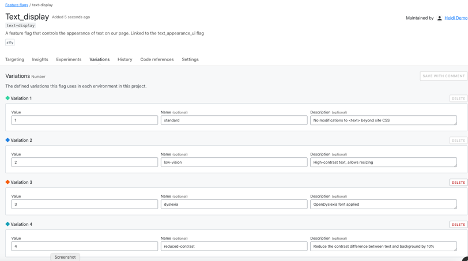
    In the image below, I have configured a flag with four variations for text display:

    • Standard (no changes to CSS behavior)
    • Low-vision (high contrast text, allow resizing)
    • Dyslexia (use OpenDyslexia font in CSS)
    • Reduced contrast (Reduce the contrast between text and background)

    This flag variation could be tied to a user-configurable setting so that every time they logged into the site, they would get the text the way they need it, even if they were on a different browser or device.

    That’s a simple example, of course. Ideally, developers and accessibility advocates would work together to determine which part of the site or app should be modified, and how it would work in combination with other modifications.

    Lack of Planning Is Technical Debt

    Even if your team doesn’t have user research or accessibility experts available all the time, you can code proactively to make room for them. Accessibility flags would be permanent—you wouldn’t want to remove them as you would a rollout flag. Since they are permanent, there is no harm in using them as a placeholder; they won’t add more testing demand empty than they will full.

    At the start of a project, most teams don’t have the resources to do everything they want, even though they know it will need to be done eventually. We don’t do localization for proof-of-concept applications, we don’t write API documentation for strictly internal tools. But if a product succeeds, then we do need to add those elements and they become technical debt that we have to pay off without adding new value to the product.

    One of the ways to reduce the cost of this debt is to add placeholders for future modifications. Trying to refactor an application with hard-coded interface elements to accept localization is like trying to add chocolate chips to cookies that are already baked—it’s much less effective. Using flags set to only return a default value (for now) is a way to plan for future changes in your code, without making the full investment.

    The Future Is Here

    The WCAG standards are not arbitrary or imposed without meaning. They exist to help everyone access the information, services and capacity they need. When we build sites that don’t meet those standards, we are losing customers, clients and users—and not in small numbers.

    Using feature flags to make your site accessible is a smaller, cheaper intervention than creating entirely separate sites. Feature flags also help build the framework to provide other elements of your site on an on-demand basis, allowing you to meet user needs with precision and efficiency.

  • The Role of DevOps Feedback Loops in Your Value Stream

    The Role of DevOps Feedback Loops in Your Value Stream

    Feedback loops are found in all systems, organic or inorganic. They propel the recirculation of hot or cold air to raise or lower temperatures; they drive the idea exchange that helps businesses fine-tune operating strategies. Yet, nowhere are feedback loops more important but also misunderstood than in software delivery.

    Attaining the “holy grail” of software development—gaining maximum efficiency and maintaining velocity while reducing or eliminating wait times and waste—involves a variety of value stream activities that generate complex feedback loops. These loops are not sequential. They must operate in tandem and in sync with one another within a constrained environment or delivery flow will be disrupted. Understanding, mapping and optimizing this “ecosystem” is essential to ensuring all feedback loops are timed appropriately and no software activity is thrown off schedule.

    Misperceptions of Software Feedback Loops

    Much confusion arises among business leaders regarding the role of feedback loops in software delivery because they are also invaluable in other business activities. There, feedback loops operate in both open and closed systems. A system, whether open or closed, is a set of elements that take inputs through a phased transition to the emergence of an output.

    For example, assume a bank is developing a new depositor service, and although it announces the service will be available soon, it does not solicit specific feedback on how the service will work. Even if it receives random feedback from the public, it is coming from outside the controlled environment. That’s an open system. If the bank hosts customer focus groups and monitors the outcomes of specific variables without any opportunity for outside influences to impact the process, the activity is taking place in a closed system.

    The use of a closed system, whether in business or software development, embraces the principles of systems thinking—the shift in mindset away from linear to circular. With systems thinking, there are a half-dozen defined components, one of which is feedback loops. Understanding feedback loops is an essential part of value stream management to achieve the goal of delivering value to customers faster.

    Feedback loops can have a very positive or negative impact on software flow because awareness of and action on effective feedback impacts all parts of the system. But, before software leaders and teams can address their feedback loops, they must identify them in the value stream and understand the causality of each loop. As you identify feedback loops, patterns start to develop. These patterns can be direct or indirect, and feedback may need to be amplified or throttled, automated or removed altogether based on the loop’s causality.

    Optimizing the System

    Right now, feedback loops are likely disrupting software delivery flow and impeding velocity for millions of companies around the globe because software professionals, from project managers to software engineers, don’t understand them. Even though they recognize that software activities are taking place and that one activity may impact others, they don’t adequately consider the fact that information and material flow are interconnected, as are request flow, development flow and operations flow. They don’t perceive that software delivery is like a three-dimensional game of chess, with the pieces moving around the board multi-dimensionally.

    They also haven’t analyzed their feedback loops in detail so they can adjust based on reality, not perception or plan. Even if they have mapped the flow and the loops, most are unaware of the severe negative consequences even a seemingly minor issue can cause.

    Follow a Real Example

    Here’s an example that mirrors real-life scenarios I have witnessed time and again. Assume that for a new feature request, Epic 1 has entered Intake. The project gets into the Design phase and other work starts moving across the organization. Since everything is interconnected, the User Story ends up in Backlog waiting for the Epic to be completed. Two more User Stories are completed but the Epic has not moved, so they all sit in Backlog.

    Once the Epic clears Design, the User Stories start moving to the Plan phase and the Epic can go straight to Development. Soon, User Stories are In Progress and Material Flow kicks in. Somebody is working on a sprint, and someone else is working on those two pieces of code to make the change or implement a story. The DevOps pipeline is flowing, but not as efficiently as it could.

    Let’s assume instead that teams and managers now understand the feedback loops, and they have been automated to the greatest extent possible. User Stories are automatically moving from Backlog to In Progress once the Epic enters Development.

    When code goes from Build to Test, if a defect is discovered, automated feedback loops can connect to the right User Story and move the code back to In Progress. The developer fixes the defect and it goes right back to In Progress. The company meets its release window.

    In addition, once these elements are connected, and everyone understands these loops, management gains traceability across the value stream, which makes everyone, including customers, happy.

    Beyond the Basics

    The effort described here may sound like a lot of work to the uninitiated, but in practice, the effort more than pays for itself. That’s a great thing because it doesn’t stop here. In our example, as in virtually every software project, there is a lot of valuable human feedback beyond what I have mapped. It could be the information flow from a product manager through a product owner and on to someone tasked with the development portfolio. Or it might flow from testers to the product owner.

    Companies don’t have to map all this flow, but they should understand and address its potential impact. Furthermore, as project specifics, customer mindsets and other variables change, teams should adjust accordingly. That may mean creating, amplifying, throttling or automating feedback loops—or removing them altogether.

    Once organizations have attained a solid footing, they can explore more options. For example, tools, especially with integrations between and among them, can propel and automate the feedback loops, but they should be aligned, from a systems perspective, with the organization’s project workflow.

    Final Thoughts

    Streamlining flow through more efficient feedback loops is only a piece of the puzzle, but it opens up new opportunities such as more easily recognizing and removing waste. It enables organizations to release software faster, which is an imperative for digital transformation.

    Even if they don’t develop software in-house, firms that use enterprise software, from Salesforce to SAP S/4HANA, often have teams that modify it. Plus, customers and end users are all clamoring for a no-touch, self-serve digital experience. If a firm doesn’t provide, its competitors will.

    In mastering the science of delivering quality code at the right level of velocity, companies propel greater innovation, deliver ROI faster, ensure higher quality with lower costs and deliver products that better fit their intended audience and use. They also position themselves to be value stream leaders, and that pleases everyone from the board room to the sales floor.

  • Mob Programming During a Pandemic: Lessons Learned

    Mob Programming During a Pandemic: Lessons Learned

    Despite limitations, mob programming can be effective, even during COVID-19

    The COVID-19 pandemic has many of us considering the long-term impact on our personal and working lives. Shaking hands with new colleagues or clients? Buffet lunches? I’ve recently wondered how social distancing will affect mob programming, which is a development practice we implemented at Bonitasoft late last year.

    What is mob programming? It’s a software development approach where an entire team gathers around one keyboard and one projector screen at once, according to Agile community organization Agile Alliance. It’s an extension of the idea of pair programming, which involves two team members collaborating to complete a development task in the same space.

    In an August 2013 CodeBetter.com post, Marcus Hammarberg, head of Quality & Curriculum at the School of Applied Technology in Sweden, equated mob programming to driving. The driver uses the keyboard, writing the code and following coding standards. Other team members are navigators, advisers and researchers who assist the driver and focus on higher-level tasks such as determining if the team is solving the right problem. They also tag in to take over as the driver.

    “I’m not saying that mob programming is for everyone, neither is pair programming,” Hammarberg write. “It might not be for all types of tasks either … But I am saying that getting your team into a room, with one computer and one screen, the whole team is working together on one feature—that there is no more effective way to get that feature out.”

    Of course, much has changed over the past several months, including people’s comfort level with being in close proximity. Before I get into my recommendations for how mob programming can work in the current situation, let me share why Bonitasoft embraced it to begin with and the benefits to my company.

    Embracing Mob Programming

    About a year ago, I saw Agile coach Woody Zuill deliver a presentation titled “Mob Programming: A Whole Team Approach,” at MixIT 2019. I was intrigued by what I saw as a promising development approach. However, I had my doubts about the effectiveness and logistics of gathering five people in front of one screen. I also suspected it wouldn’t be compatible with remote work—a premonition of today’s situation?

    Running development projects in sprints made it a low-risk investment, so I introduced mob programming to the other members of my five-person team, which is responsible for the development of the Bonita platform portal for delivery of applications and is comprised of a mix of introverts and extroverts. The team took a mob programming approach to design and test an application page. It was a medium complexity project built with Gradle, using the UI Designer web page development tool and tested with Cypress.

    After discussing the project’s objective and methodology, the team worked on a laptop and a standard-size screen in the open office space. Pros: Fast development completion, better implementation and good test coverage. Cons: Decreased focus because of lengthy discussion and the distraction of phone notifications, communication style differences and paused cross-cutting topics.

    My team members and I loved the result of mob programming but needed to iron out the format. We also skipped the first stage of agility in our excitement to try mob programming: starting with a strong framework and basic rules. These include spelling out the roles of the pilot, navigator and researchers on a team.

    Among other adjustments, we moved to a quieter spot in the office to work. We swapped out the small screen for a giant screen and replaced the laptop with a desktop, keyboard and mouse. We scheduled more breaks. We adhered to the basic rules. We rotated roles every 15 minutes, which meant all team members were more attentive and involved. Recognizing that timid team members might not speak up, we distributed speaking time more fairly. And we were more selective when choosing projects for the mob programming method (bug fixes, for instance, are best solved through pair programming).

    How We Benefited from Mob Programming

    The process required a little tweaking at the beginning but it was well worth it. We’ve realized a lot of benefits from the mob programming methodology. One of the biggest benefits is all the time we save on development projects. Mob programming eliminates merge conflicts, decreases the time spent in standup meetings and pull request reviews and reduces external interruptions (people are less willing to interrupt an entire group than just one dev working independently).

    Here are a few more mob programming benefits:

    • Global knowledge sharing: All members of a mob programming development team receive the same level of knowledge on new developments. New team members are able to quickly ramp up on the legacy code.
    • High-quality solutions: The solutions from mob programming efforts tend to be better tested with fewer bugs in the final product. Since the code is made modularly, it’s easy to modify if needed.
    • Team growth: Mob programming has taught us to communicate in a way that works best for each team member. We appreciate the diversity of thought and personality among team members rather than viewing it as a disadvantage.

    Can Mob Programming Work in a Pandemic?

    Now that you know why I recommend mob programming let’s look at whether it’s possible to continue using this methodology safely during the pandemic. Bonitasoft devs are all working remotely so I base this on experience. We apply the basic rules using videoconferencing tools and duplicate the development environment for everyone. Communicating via videoconferencing was an adjustment but it works. Each team can adapt mob programming to what works best for them over multiple iterations, whether they’re working in the same space or remotely.

    Here are a few mob programming tips:

    • Define when it involves remote work versus when it will involve everyone working in the same space (with social distancing procedures in place, of course).
    • Apply the basic rules strictly, so you have a solid foundation on which to build a mob programming practice.
    • Limit potential distractions by opting for a large screen, mouse and keyboard in a quiet location.
    • Factor free time into your non-sprint work schedule so that team members can check their email and work on other projects.
    • Define break times (the Pomodoro technique could be one option).

    Mob Programming is Worth Exploring … Even Now!

    During the past few months, I’ve learned a lot about mob programming and believe there’s a certain magic to it. At Bonitasoft, smart implementations have resulted from the development team embracing the value of collective intelligence and mob programming. We’re delivering projects faster and enjoying greater satisfaction in our work lives. With some adaptation, it’s possible to realize its value by adding it to your development methodology options.