Welcome to The Long View—where we peruse the news of the week and strip it to the essentials. Let’s work out what really matters.
This week: Google forces apps to make deleting users’ data easier, and the RISC-V drumbeat grows louder. (more…)

Welcome to The Long View—where we peruse the news of the week and strip it to the essentials. Let’s work out what really matters.
This week: Google forces apps to make deleting users’ data easier, and the RISC-V drumbeat grows louder. (more…)

Mobile apps have become the primary point of innovation for many companies, and skilled mobile developers are in high demand. The business asks developers to innovate fast using the latest smartphone features and capabilities to drive high download rates, wow their users, capture customers and grow their business. Dev teams facing constant pressure to move faster may push security to the back burner, focusing on required features and delivery dates the business demands. However, many dev teams have figured out how to innovate faster with security built in by ensuring that devs understand key security requirements and coding best practices. Working with hundreds of development teams on securing thousands of mobile apps, we found four common areas of security failure that can be addressed easily.
Mobile app devs may instinctually use Hypertext Transfer Protocol (HTTP) for network communications. However, HTTP puts private user information out in the open for threat actors to intercept. Developers can fix this common mistake by using HTTPS instead, which encrypts data sent to and from servers via industry-standard SSL. Android developers can use the available NetworkSecurityConfig file to set up a predetermined configuration for all network connections made within the app or manually incorporate HTTPS. iOS developers can use App Transport Security (ATS) as the default feature that enforces secure communications in iOS apps and prevents any insecure connections between the mobile app and the server from being completed.
Certificates add an additional layer of security to HTTPS connections by enforcing additional validations when performing a connection. Certificates include the certificate authority (CA) that signed it and the list of hostnames known or accepted by the application. Apps that validate these components when performing connections with the server significantly reduce the risk of a man-in-the-middle (MITM) attack that can steal credentials and sensitive data.
To verify a certificate has been issued by a valid CA, Android developers can reference the preconfigured list of CAs included on devices running the mobile operating system. Android developers can implement native classes such as HostnameVerifier to achieve proper hostname verification within their app.
iOS developers can leverage ATS that provides built-in validation, or use methods in the NSURLSession class to manually code these instead.
Attackers often use hardcoded info within the source code of a mobile app to take advantage of users. For instance, attackers can use credentials stored within app files to gain access to a user account. Attackers can also find hardcoded API keys or URLs to gather private data or take over an app entirely. Mobile app developers can prevent these areas from being compromised by not hardcoding keys, passwords and URLs into the source code. Encrypting transport and decrypting data on the backend also adds an extra layer of security.
Outdated cryptography algorithms like SHA-2, RC4 and DES allow attackers to easily break a seemingly secure mobile app. Using older algorithms may also make a mobile app non-compliant with industry regulations leaving an organization at risk of fines or legal jeopardy. Devs can avoid this problem for Android and iOS mobile apps by using the latest cryptography algorithms available, selecting those that are suitable for a specific app scenario. When signing your binary before publishing it to the store, use keys with a length of at least 2048 bits (preferably 4096 bits), and on Android use SecureRandom or SecRandomCopyBytes on iOS when generating random values for cryptographic implementations. Android devs can leverage the Keystore class and iOS devs can leverage Keychain services to store highly sensitive data. Devs should avoid insecure modes of operation, improperly generated cryptographic keys and initialization vectors (IVs) to guarantee that the information that is encrypted cannot be decrypted by a malicious actor.
Today’s mobile app users need confidence that mobile apps are built with security in mind. While building innovative mobile apps, developers have a responsibility to learn a practical set of secure coding best practices to protect their users (and their businesses).

When the folks at Testlio approached me to review their “State of App Testing 2020″ report, I had some mixed feelings. These reports can sometimes be too broad; they can say what is not, but not help a team decide where to go. Still, it would only cost me five minutes of my time to see if it was worth writing about, and it came highly recommended, so I took a look. I am glad I did. Today, I’ll analyze the report itself, hit some of the highlights from the survey results and provide some analysis to help you decide if the information is relevant for you—and what you should do about it.
First of all, the report is short. This is a feature. You won’t have to dig through 68 pages of information—six pages just doesn’t provide an opportunity to provide “fluff.” There are no long opening editorials by someone with an impressive title and list of hypothetical things that survey respondents pick between that will “become important” next year. Instead, Testlio simply anonymized its client information and re-used it to determine averages. This replaces the multiple-choice survey (which was likely filled out by someone abstracted from the work) with the actual data of the work. Testlio knows how often its customers’ applications go to production; it knows the scores of those applications in the Google and Apple stores. From that, the company can draw inferences in the relationship of shipping speed and quality. Finally, the report is grounded in a specific domain—that is, retail and business applications. The distinction between the domains is clear enough that readers won’t walk away trying something that won’t apply to their industry.
Let’s talk about what the report says.
In addition to Testlio’s data, the report borrows from other sources to draw a picture. One of the most important observations they made was a connection between quality, speed and customer adoption.
Quality Matters
I was amazed to read that 50% of users will not download an application with a 3-star rating, and 85% won’t download one with two stars. That isn’t a huge surprise, as I was recently brought into a project rescue for an application with 2.2 stars (and yes, thousands of ratings) in the Apple store. Trusting that data, that meant the application had less than half the potential users it could have—and the core reason for the app was not to sell a product but instead to promote brand loyalty.
That data creates a strong argument for an investment in quality in mobile software. Yet, it is also a lagging indicator of quality, the result of poor quality. Put differently, app store reviews are sort of an “aww, shoot” metric. We put the software into the wild and hope it scores well. If the score is good, we have a party. If it is bad, we say “aww, shoot.” Instead of lagging metrics, the result, my interest is in leading metrics, the cause. What actions can we take to improve the scores?
That’s when things get really interesting.
Release Speed Matters
The folks at Testlio grouped mobile applications into two categories: one group that released three times per month and another that released less often. (The average for the study was 2.4 releases per month.) I recently worked with a team that used something like the Scaled Agile Framework (SAFe) to manage deploys about once a quarter, with perhaps a patch in the middle.
As it turns out, the more frequently released software had higher review scores, about 7% on average. That’s a counterintuitive result worth examining. I am not suggesting you ship twice as often. However, it does make sense that teams that ship more frequently have a small amount of change between releases. That change is likely to be more localized. A large program with teams of teams that tries to integration-test at the end—say the last sprint out of six—is likely to have a lot of uncertainty. The developer who fixes a bug is unlikely to be the one that created it; the “fix” may have unintended consequences that are difficult to test out. At the very least, be very careful about slowing down release schedules in the name of quality, as the results may be lose-lose.
Let’s move on to device coverage.
Device Coverage Matters
Although they have an identical rating system, Testlio found Android OS applications across the board ranked slightly lower than their Apple iOS cousins. That is, the average score for the top 30 commercial and retail apps on iOS is 4.6 and 4.3 on Android. Personally, I think it is fantastic to have these hard numbers at the top of the field rather than opinions from a small group who responded to a survey. The challenge with this data, like the release cadences, is that you have to infer a reason. Testlio proposed three: that acceptance to the Apple Store itself is more difficult (Apple has internal tests); that as a premier brand, Apple has a “halo” effect; and that Android devices are simply too fragmented. With 24,000 different Android devices as of 2015 and too many to count now, it is likely that some older devices have some problems that could not be tested for; thus, a few bad reviews from rare models pulls down the scores.
One thing Testlio didn’t see shrinking was the size of the test group. The top 30 clients averaged 18 testers per week, and over the time of the survey had at least eight and as many as 38 testers. These would be the people who work on all the different devices checking for compatibility, in addition to doing the human testing that is not, or should not be, automated. What is changing is how those testers are deployed, for more visual inspection, flexing with project needs, instead of a defined group that will be a bottleneck some of the time and over-capacity at others. Personally, I’m a fan of the Agile, whole-team approach, but they make a case for test augmentation with flexibility in the mobile application space, which reminds me of Jon Bach’s chapter in the book, “How To Reduce The Cost of Software Testing.” As an editor on that book, I’ll be the first to admit we picked a terrible title. At the time, we were working through the ideas that would eventually come to be known as Lean Software Testing, which seems to be what Testlio is suggesting.
There’s a fair bit more to the survey, including the amount of device testing occurring, locations for test sourcing worldwide and how distributed testing is working, especially as remote work has become the norm.
As I said, I was pleased to see some hard data for once, and the challenge will be figuring out what we as an industry can make of it.
What do you think? Share your thoughts below.

A brilliant app idea demands no less a brilliant mobile development team. That means you have to take the time to search and recruit skilled Android developers and, correspondingly, overcome lots of challenges for this. Here are some tips to help you overcome the difficulties and mitigate possible problems in finding qualified Android developers.
It’s always a good idea to dive deeper into your employees’ responsibilities. So if you have no technical background, this section will be rather useful for you as it tells more about the skills of a proficient Android developer.
It’s worth mentioning that the technical skills of Android and iOS developers differ due to the OS differences. A particular set of technologies is used for each OS and if you want to hire iOS developers, you should check the skills they need to have according to the latest market demands.
In the IT industry, developers are divided into levels specifying their proficiency. These levels are:
Let’s consider Android developers responsibilities in more details.
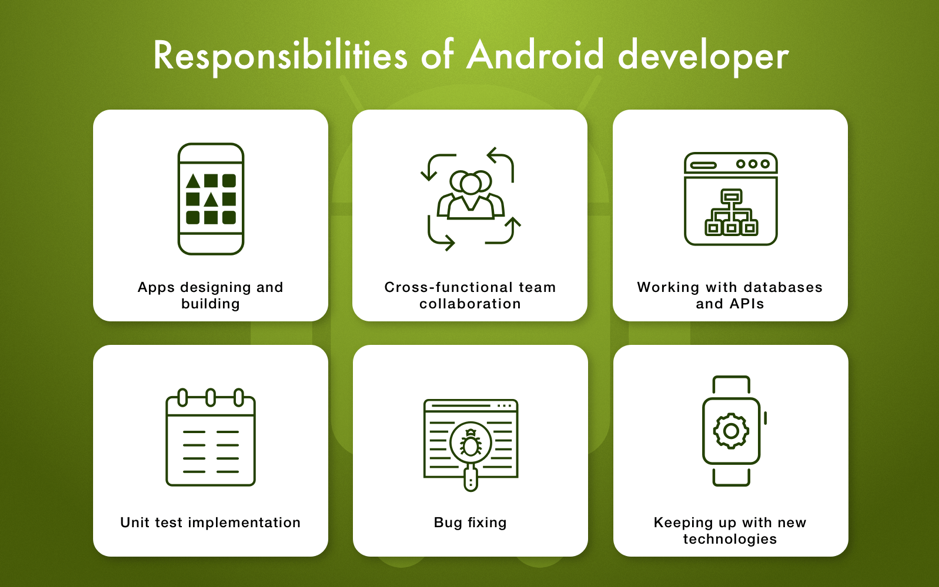
Developers have to re-create the app’s design as well as develop its functionality. Additionally, they should predict what bugs may occur and prevent their appearance.
In most cases, developers don’t work on a project alone. They are surrounded by other specialists and need to effectively collaborate with them in order to achieve a common goal: a well-functioning end product.
Android developers should be good enough at reading code written by other developers since they will have to work with external APIs and databases during their projects.
Modular testing is a kind of industry standard. Android developers have to perform it to test a certain part of the app’s functionality and fix any bugs. Unit testing is a part of agile software development that’s designed to create high-quality apps fast.
Android developers should make everything possible to deliver a bug-free and stable-working product.
There are several types of developers you can choose from. Which one to pick depends on your preferences and project.
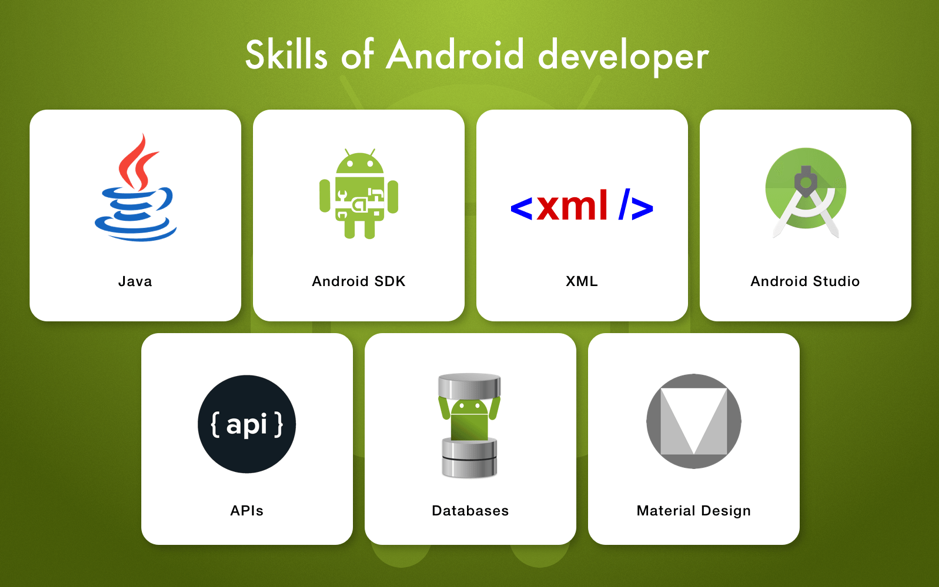
Android developers must have a set of technical skills that actually make the app development possible. Underneath, we’ve listed basic technologies every Android developer should be able to work with.
 Android Developer Rates
The price for IT services is typically indicated for one working hour. The prices also heavily depend on a region.
Now you know what it takes to find a qualified Android developer!

Animoto’s web and mobile platforms enable businesses and consumers to drag and drop stock and user-defined visual and audio elements to create videos via a tiered monthly subscription service. Animoto updates service features with increasing frequency—some of them several times a day.
“We have a broad range of applications and features including an online video maker application, where we enable users to import videos and video elements from all the known, established sources such as Facebook and through Dropbox,” says Siddharth (“Sid”) Jain, VP of Engineering at Animoto. “They can then export videos out to a variety of venues such as YouTube.”
Animoto must iterate new innovations continuously into its application/platform for high-quality yet simple video creation to compete with similar solutions in the marketplace such as WeVideo and Stupeflix. This fast-paced development process is challenging, since Animoto must update separate versions of its software for the web, Android OS and Apple iOS (both iPhone and iPad). “The mobile apps are largely consumer-focused for very easy, on-the-go, frictionless video creation and sharing, while our web apps feature server audiences of professional photographers, educators and small businesses,” says Jain.
In addition to testing service capabilities of different versions of the video maker application, Animoto must test the on-boarding/registration flow and the free product experience, where users get their first taste of Animoto. “We do lots of interesting things such as testing support for multiple currencies around the globe and running continuous multiple AB tests to ensure that the free product experience is working,” Jain notes.
Notable Animoto testing includes user funnel testing in a simulated user flow environment starting at sign-up and continuing through video creation, feature exploration and the upgrade experience. “We test this several times a day on the different platforms,” Jain says, noting Animoto tests for the seamless success of import and export of videos and video elements to and from Facebook, Dropbox and YouTube. “The emphasis is on ensuring the quality and consistency of the user experience, i.e., making sure that nothing goes out that breaks revenue in terms of service.”
Sauce Labs‘ cloud service helps Animoto scale up and out instantly to test Apple/iOS versions of its application so it can meet the high standards set by Apple and ensure fast inclusion of new app versions in the Apple App Store. This helps Animoto to compete by getting new innovations and features to market more quickly. “The biggest advantage to using Sauce Labs is that we don’t have to create or maintain a test lab internally,” says Jain.
This accelerated testing speed is especially important since the app must adapt to every new iOS version while maintaining backward compatibility. “It would be a very nightmarish thing to do this all manually,” he says.
In addition to faster testing, Sauce Labs is helping Animoto ensure that testing was delivering on its promises of software improvement through accurate feedback. “We used to be religious about doing extensive unit tests. Now we emphasize integration tests over unit tests because we got bit by unit tests that were all green even though the software functionality was broken,” says Jain. “Now we have a balance between unit and integration tests while frontloading the latter with tests of customer-facing functionality and collecting fine-grain feature use data.”
The comprehensive testing helps to ensure that users aren’t shying away from certain features and that features are not broken. Frontloading uncovers regressions very early so the Animoto developers dedicated to fixing them can catch them before they lead to breakage.
Sauce Labs helps Animoto shrink technical debt. “Debt rears its head in awkward ways. We do get surprised, but having good test coverage allows us to know where the app hot spots are and to have feedback to fix these and verify changes swiftly,” says Jain.
“We have been able to reduce testing time from three hours to under 30 minutes for some tests,” says Jain. “Thanks to Sauce Labs’ cloud, we added VM capacity, moving from 20 VMs to 45 VMs for the testing environment.”