Tag: Amazon

  • UK technology firm Cloudhouse sees three-fold revenue growth and expansion into the US

    Appoints Nick Coleman as CTO, and outlines its strategic growth plans

    London, UK – October 16, 2018 – Cloudhouse Technologies has seen over 300 per cent growth over the last 12 months, and expanded its business into the US – thanks, in part, to strategic partnerships with Microsoft and Amazon. As it looks to continue its growth and expand its global footprint, Cloudhouse has also appointed Nick Coleman as CTO.

    The company, which developed the innovative ‘Compatibility Container’ system, enables organisations to continue using their legacy applications safely and securely on new platforms and within the cloud without any code changes, even when they’re designed to run on unsupported versions of Windows and Citrix.

    This is because ‘containerizing’ legacy applications resolves the problems around running 32-bit Windows XP and 7, Windows Server 2003 and 2008, and Internet Explorer-based applications on modern secure and supported operating systems and platforms. In addition to reducing the risks associated with unsupported operating systems, using a Container approach also helps eliminate costly Extended Security Update agreements and can help further reduce operating costs by consolidating server infrastructure.

    Cloudhouse has recently expanded its operations into the United States and started to build a team in the region. Coleman’s appointment as CTO frees CEO and founder, Mat Clothier, to focus on the company’s growth plans, including those in the US market and other Global markets.

    Previously head of application management at Sopra Steria and vice president, technology, at CGI, Coleman brings a wealth of experience in service delivery and of working with customers who rely on Microsoft-based products. He will focus on developing Cloudhouse’s technology offerings, as well as looking at innovative ways to support its growing customer base.

    Nick Coleman, CTO, Cloudhouse, said: “Having spent the last 20 years delivering enterprise services, I understand the huge challenges organisations face when it comes to legacy applications. Thanks to our technology, along with strategic relationships with Microsoft, Amazon and Citrix, our product is uniquely positioned to help clients mitigate risk and move legacy applications to a more cost-effective, modern and secure environment.”

    Mat Clothier, CEO and founder, Cloudhouse, said: “This is a key time for Cloudhouse as we continue to grow our customer base and move into the US market. We’ve experienced significant growth as we work to support more organisations and bigger customers to mitigate the issues of legacy operating systems. Nick’s appointment will go a long way to support this momentum, and his experience with Microsoft users and service delivery will boost our offering – and means we can continue to create solutions that help customers use their preferred applications safely and securely, no matter what their age, original operating system or browser specification.”

    About Cloudhouse

    Cloudhouse Containers free enterprises from running unsupported Windows and Citrix platforms by making otherwise incompatible applications run on the newest platforms – whether they run on premise or in the cloud. Apps only need to be packaged once in stateless containers that handle application runtime, isolation, and full redirection. As a result, enterprises can complete Windows 10 or Cloud migration projects successfully. Cloudhouse is based in London.

    For further information,

    Visit: https://cloudhouse.com/resources/announcing-three-fold-revenue-growth

  • Complementary Technologies: Amazon RDS and PostgreSQL

    Complementary Technologies: Amazon RDS and PostgreSQL

    For enterprises in search of a relational database service that will effectively and consistently meet their requirements, Amazon RDS is probably worth a hard look. By making cloud-based relational databases straightforward to set up, operate and scale, Amazon RDS liberates businesses from the time-sink of internal database administration duties—in turn allowing for a clearer focus on product and business development. When it comes to selecting a database engine, organizations on Amazon RDS have a variety of choices, from Amazon’s own Aurora to MySQL, MariaDB, Oracle, Microsoft SQL Server and PostgreSQL.

    While each of these Amazon RDS database options have their pros and cons, I’m a fan of PostgreSQL for a number of reasons. PostgreSQL offers a feature-rich open source object-relational database engine that’s backed by 15 years of dedicated community development, a proven architecture and a well-earned reputation for reliability and data integrity. PostgreSQL more than matches MySQL’s speed and feature set, bringing to the database table than a standard SELECT, INSERT, UPDATE functionality. Driven by particularly strong community and third-party support, PostgreSQL regularly releases stable updates that enhance its performance and expand its features—which now include native JSON storage, native arrays and the ability to create custom data types, functions, and deeply customizable extensions to fulfill specific application needs.

    Utilizing Amazon RDS and PostgreSQL in tandem provides synergistic benefits, due in no small part to a number of design features intended to provide simplicity. Amazon Web Services includes a one-click interface for creating a PostgreSQL instance in the cloud. Amazon also offers its AWS Database Migration Service (DMS) integrated within the Amazon RDS service, which makes it easy to migrate an existing database over to PostgreSQL and import it as an Amazon RDS instance with zero downtime (and schedule the migration for whatever time a business finds most convenient). Amazon RDS also allows you to scale PostgreSQL databases up and down in the cloud within minutes; provides automatic replication for high availability and redundancy using Amazon Availability Zones; integrates easily with other AWS services such as Amazon Virtual Private Clouds; and makes it simple to set up and restore database backups using automatic snapshots.

    Scaling, In a Snap

    The pairing of Amazon RDS and PostgreSQL is well-suited to smooth growth as the demands placed on an organizations’ application increase, as the Amazon RDS platform allows you to scale instances both vertically and horizontally as necessary.

    Vertical scaling in Amazon RDS can be accomplished as follows:

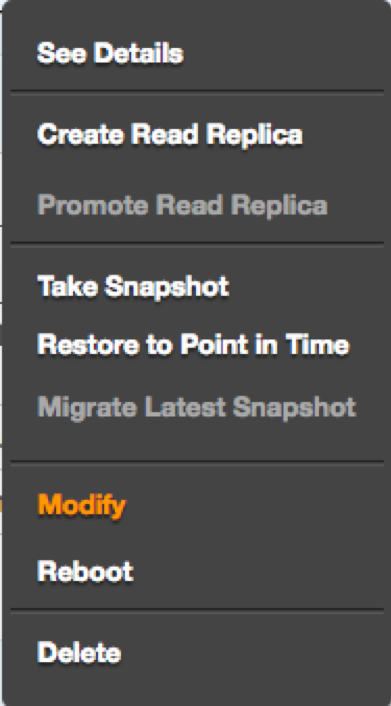
    From the RDS dashboard, select “Modify” from the list of options for your database instance:

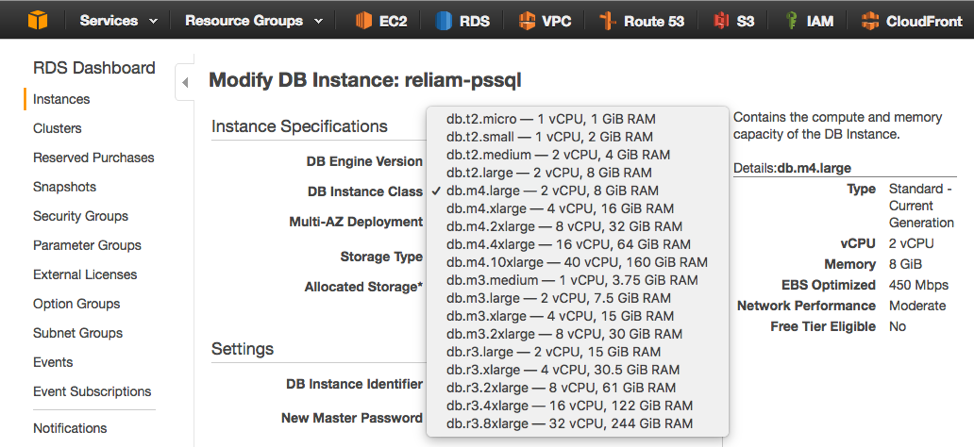
    Then, choose a new DB instance class:

    The process is now complete. Vertical scaling in Amazon RDS is that simple. Vertical scaling also occurs with little or no downtime when running a database using multiple availability zones, since the standby database will be upgraded first and followed by a failover to this upscaled database.

    Additionally, Amazon RDS provides an easy method for improving read performance by increasing scale horizontally, using read replicas as read-only copies synchronized to the master database.

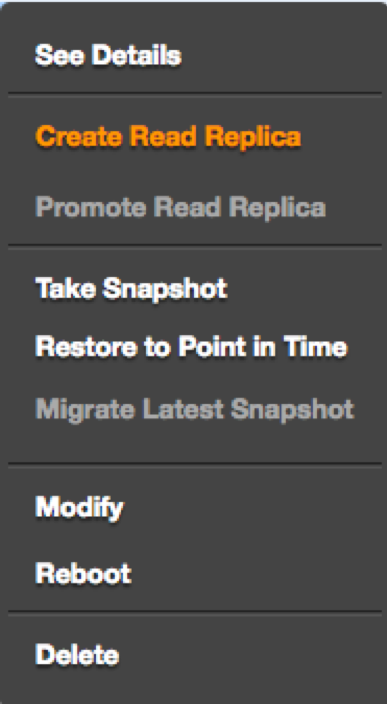
    From the dashboard, select “Create Read Replica” for the instance:

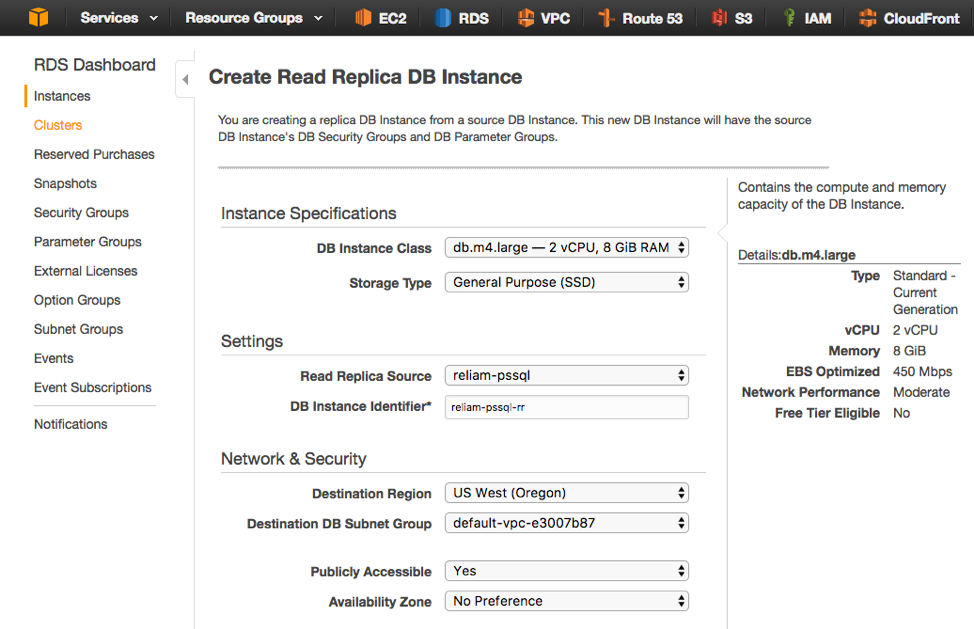
    On the next screen, select the instance size and the database instance name. It’s also possible to deploy read replicas to any region and availability zone:

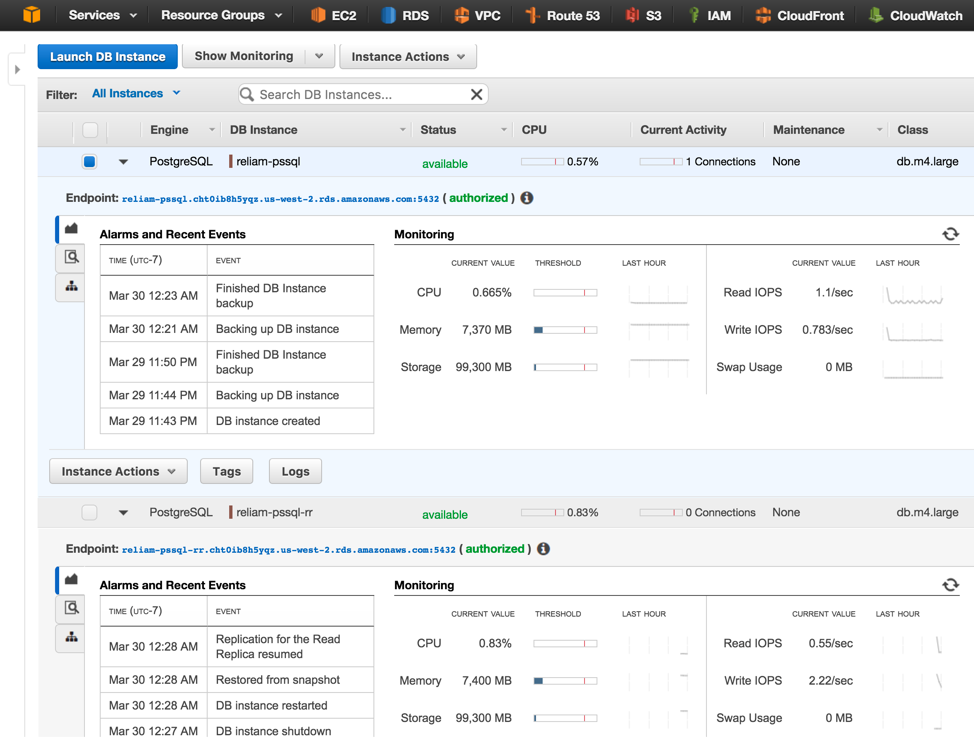
    In just minutes, increasing horizontal scale will be achieved:

    In my view, businesses can realize all the benefits of a simple, affordable, and versatile fully-managed database-as-a-service solution by teaming up Amazon RDS and PostgreSQL—one that can be set up in just minutes and scaled to any size a growing organization may come to require.

    — Fabricio Mariani

  • Building the Search Engine Users Expect

    Building the Search Engine Users Expect

    The search experience most of us are familiar with is Google’s. The company has raised the expectations of search, conditioning us to its level of user experience. However, most websites and mobile applications still don’t offer this kind of advanced search.

    Here are three things to consider to keep the search experience on your company website or mobile app competitive:

    Speed

    Amazon reports that every 100 millisecond in latency causes the company a 1 percent loss in sales. Google says that every 500 milliseconds in latency causes a 20 percent drop in traffic. In today’s “attention economy,” people won’t wait for a slow search when they can easily jump to a competitor’s site.

    How can you ensure optimal speed from your search engine?

    A robust infrastructure plays a key role in maximizing search speed. Search is quite resource-intensive, so start with solid hardware that maximizes performance when having big loads on CPU, solid state drive and memory. Beyond the hardware, the network also plays a huge role in search speed. Like a content delivery network, users need to be close to the search engine to have a truly interactive session; it is important to distribute the search in different regions if your users are distributed worldwide.

    User Experience

    Users also expect finding the content they need to be as intuitive as possible. Some search engines suggest queries to users based on their search input; however, this often falls short for several reasons:

    1. If you suggest queries, you have little to no control over the quality of the results compared to the original intention. It is very frustrating as a user to follow suggestions that lead to poor results.
    1. Suggesting queries, often accomplished by “did-you-mean” type proposals, introduces an unnecessary step in the user interaction, and we’ve already established that speed is an important factor in finding information. You should even consider allowing your search engine to handle typos on the fly without requesting further user validation.
    1. If a user searches for something very specific, the probability of your frequent queries including their exact answer is low. In this case, the user is getting to a search without any feedback, which makes it much more difficult to actually find the intended content.

    Many websites also encourage browsing activities based on an extensive site map. But expecting users to know and understand your site map to find the information or product they need is unrealistic.

    Instead, users most benefit from a search experience that displays requested information as they type, updating results in real time. For example, on an ecommerce website, you should display products, categories, brand or reviews instead of queries. You should also propose a rich display with a readable summary of information.

    Relevance

    Finally, relevance should be an important consideration in building a search engine, but relevance is a difficult topic to understand, let alone master. Many existing searches require extensive fine-tuning of their engine and may still not understand the impact each change has on the search results. It often happens when a marketing manager comes to see the tech team to ask for a fix on a specific query. The tech team tunes the search rankings to fix that specific query, unknowingly breaking dozens of other queries. This approach is an endless game that will never globally improve the engine.

    You should focus first on the different ways to enter a query (for example, “iphone,” “i-phone” and “i phone”), and be sure to retrieve the relevant information for all of them. You can then enrich results with business data such as the number of sales or number of times a product was put in a cart.

    About the Author/Julien Lemoine

    Julien Lemoine AlgoliaJulien is a search veteran who’s been working in the search landscape for over 10 years, with work experience in Thales and Exalead. He participated in the design of three different search engines prior to co-founding Algolia with Nicolas and is the author of the different algorithms responsible for Algolia’s super fast performance.

    Julien is also passionate about imparting knowledge and spent some time teaching at his Alma Mater, EPITA. He holds an engineering degree from the same institution.

  • Avoiding Common AWS Security Risks

    Avoiding Common AWS Security Risks

    According to IBM’s Cyber Security Intelligence Index, 95% of all security incidents involve human error. That’s beyond significant, and when rapidly deploying multiple iterations in a DevOps shop, that means there are lots of opportunities to fail.

    Our own independent analysis based on customer configuration data shows that security control mechanisms Amazon Web Services (AWS) makes available to its customers are not always being used consistently due to human error, creating unnecessary security exposures while operating workloads in cloud.

    In this article, we’ve highlighted the five of the most common AWS security risks detected in the first half of 2015, and share simple steps you can follow to address them.

    EBS volumes are missing optional EBS volume encryption…

    EBS volume encryption uses AES-256 and is a convenient mechanism for meeting data-at-rest encryption compliance mandates. An unencrypted EBS volume cannot be converted to an encrypted volume after creation. It is a setting that must be applied on creation of an EBS volume.

    EBS volumes contain no snapshots less than two weeks old…

    Snapshots are a low cost way to recover EBS volumes and they can be made while a system is online. We have seen a number of occasions where clients have benefited from snapshots in IR scenarios by enabling them to forensically analyze systems that had been compromised from recent snapshots in virtual private cloud sandboxes.

    Unused EC2 Security Groups…

    Keeping your EC2 security groups clean eliminates the risk that an unauthorized security group policy will be used by mistake to open attack surface. Often clients have had relatively new AWS users mistakenly launch EC2 instances using insecure security groups that lead to incidents. Practice good security hygiene and remove your unused EC2 security groups.

    Unused or unmaintained ELB Security Groups…

    Keeping your ELB security groups clean eliminates the risk that an unauthorized security group policy will be used by mistake to open attack surface. In large multi-tier architectures, ELBs frontend fleets of backend systems, and ELBs have security groups that should use authorized security group policy. Practice good security hygiene and remove unused ELB security groups.

    Global permissions to access TCP or UDP ports in a security group that is attached to an active instance/ELB…

    Restrict access to known static IP addresses or CIDR ranges within your control. Many clients have experienced scenarios where they found themselves conducting incident response efforts due to unauthorized EC2 instances that were launched using insecure globally accessible security group policies. Monitoring active security groups enables clients to shorten time to detection and time to remediation of firewall related vulnerabilities and enables clients to minimize attack surface.

    About the Author/Justin Lundy

    justinlundyJustin Lundy, CIO & CTO, co-founded Evident.io after leading Adobe’s Cloud Security efforts to identify, implement, and manage security controls and strategies during rapid adoption of the cloud at scale. He has spent more than a decade in the infosec industry, and is a subject-matter expert in multiple domains. Justin previously defended the castle at Adobe, MTV/Viacom, Sun, and CA.

  • Security automation with DevOps: show me the code!

    Security automation with DevOps: show me the code!

    Last week Andrew Storms put up a good post hinting at the promise of security automation in [SecDevOps: Security Automation By Example – The Firewall Change]. He included an example of automating a series of actions when a firewall rule is changed. It’s a good article, although I’m increasingly convinced there’s no such thing as SecDevOps. In my book, it’s all DevOps, but that’s fodder for another post (when I’m not battling a stomach bug). However, what Andrew describes is more of what I consider an automated assist. It isn’t necessarily full automation, since it triggers on a manual firewall rule change. Ideally we rarely manually change a firewall (or Security Group) rule, and rely more on self-configuring based on policies. Yeah, I know, the usual analyst BS, so here’s a bit of process, and a bit of code. Let’s approach this differently. Take Andrew’s process, but let’s have the security group or host firewall self configure based on the asset. My example is going to be Amazon Web Services specific, since I have some code snippets to show off how it works. (Sorry, I don’t have the time or intestinal fortitude to write out all the code today; seriously, where did this bug come from?!?) There are two techniques I generally see forming the core of dynamic Security Group policy enforcement:

    1. Tags
    2. Configuration Management integration

    Some cloud services, like AWS, support tags at the object (in this case, instance) level. These tags can tie internally to policies while also being consumable for external tools. Here is a policy I use that restricts access to an object if the “SecurityStatus” tag is “IR” (for “Incident Response”):

    {  
      "Version": "2012-10-17",  
      "Statement": [  
        {
          "Action": "*",
          "Condition": {  
            "StringEquals": {
              "ec2:ResourceTag/SecurityStatus": "IR"
              }
              },
              "Resource": [
              "*"
                          ],
              "Effect": "Deny"
          }
          ]  
        }         
    

    I could apply that tag manually or automatically, and in either case the instance can no longer be managed by any account this policy is applied to. Now this doesn’t help us change firewall/Security Group rules, since you can’t manage those directly in EC2 based on tags (but I had the policy handy to demo, so there you go). For that to work, you need to write your own code to scan for tags and then take actions. I don’t have exactly the right code examples on hand. but here are some snippets to get you close. Most of these are cribbed from my SecuritySquirrel proof of concept on GitHub. They are all in Ruby, using the AWS 2.0 developer preview SDK. First, to pull a list of all instances with a certain tag, you can use the following:

    def testing
     # testing some tag code
     instancelist = @@ec22.describe_tags(
     filters: [
     {
       name: "key",
       values: ["SecurityStatus"]
     }
     ]
     )
     puts instancelist.to_h
    end  
    

    That shows everything with the SecurityStatus tag (instances and values, shown as a hash), but you could also filter on value. From there, you could pull the instance IDs with a map (you might want to further filter only on instances, but if you made it this far you can figure that out):

     instances = instancelist.map(&:resource_id)  
    

    Then you can pump those into a method to change the Security Group. Here’s the one from SecuritySquirrel that places an instance into a “Quarantine” group:

    def quarantine
      #this method moves the provided instance into the Quarantine security group defined in the config file.
      puts ""
      puts "Quarantining #{@instance_id}..."
      quarantine = @@ec22.modify_instance_attribute(instance_id: "#{@instance_id}", groups: ["#{@QuarantineGroup}"])
      puts "#{@instance_id} moved to the Quarantine security group from your configuration settings."
    end  
    

    Want to trigger some scanning? Here’s a code snippet to trigger a Qualys scan on an instance from a virtual appliance in your AWS account (keep in mind, I’m skipping a bunch of important pieces, like configuring the service and authenticating):

      instance_IP = instance_details.reservations.first.instances.first.private_ip_address
     timestamp = Time.new
     scan =(HTTParty.post("https://qualysapi.qg2.apps.qualys.com/api/2.0/fo/scan/",
          :basic_auth => @qualysauth,
          :query => { 
            :action => "launch",
            :scan_title => "SecuritySquirrel Scan at #{timestamp}", 
            :ip => "#{instance_IP}",
            :option_title => "Initial Options",
            :iscanner_name =>  "us-west-2" 
          },
          :headers => { "X-Requested-With" => "ruby httparty"}))
          puts "Launching Qualys scan named: SecuritySquirrel Scan at #{timestamp}"  
    

    Or want to change the CloudPassage Halo host firewall rules? Well, that code uses a pre-release of their Ruby SDK, so I’ll save it for another day (I’m not employed by them, but they let me play with the pre-release gem). These examples are all based on tags, but remember that if you use a tool like Chef or Puppet you can do the exact same thing based on what software is configured and running within the instance. For example, you could create a policy to quarantine all SSL when the Heartbleed vulnerability hit by closing off port 443 on any server running the vulnerable OpenSSL package, then remove the rule when it is updated to the patched version. I’m a bit rusty since I don’t code every day, but I could probably pop that code off in an hour or two, it isn’t that hard. Also my tool is designed for demos, and doesn’t run in the background, but clearly you could have it running all the time, adjusting things based on tags or even attributes of software deployed in the instance. Security automation is insanely powerful. It can completely automate complex security tasks, or, as in Andrew’s example, supplement manual activities and policy changes. Hopefully my snippets give you some ideas, and pop me over any good examples if you are willing to share.

  • Using AWS CloudWatch for Anomaly Detection

    Using AWS CloudWatch for Anomaly Detection

    Based on my unscientific poll of friends, one of the least used and most overlooked features of AWS is CloudWatch.  Not only can CloudWatch be used to monitor the availability of your AWS services, but it can also be used as anomaly an detection tool. Did I mention that these feature are free?

    Since the holy grail of DevOps is to bring  the security and the operations teams together to meet the same goals in an automated fashion; Cloud Watch is a perfect DevOps tool. In fact, once it’s implemented for your environment  you are one step closer to the exalted state of SecDevOps.

    If you aren’t familiar with AWS CloudWatch then head on over to https://aws.amazon.com/cloudwatch/. As a quick introduction, here’s how AWS website describes the service:

    “Amazon CloudWatch provides monitoring for AWS cloud resources and the applications customers run on AWS. Developers and system administrators can use it to collect and track metrics, gain insight, and react immediately to keep their applications and businesses running smoothly. Amazon CloudWatch monitors AWS resources such as Amazon EC2 and Amazon RDS DB instances, and can also monitor custom metrics generated by a customer’s applications and services. With Amazon CloudWatch, you gain system-wide visibility into resource utilization, application performance, and operational health.”

    Let’s assume that both security and Ops teams need to be aware when weird things are happening with their servers and applications.  Events outside the norm (aka weird things) can be either be related to security or operational events; either way they may merit investigation. Here’s a simple CloudWatch  monitoring process you can use  to give you a heads up on events that could indicate someone is trying to exfiltrate data from your systems.

    Opening Scene

    Think about what kind of information attackers are after.  They want your intellectual property and your customer data because it can be converted to cold, hard cash.  Next, consider the architecture of your systems and where that data is stored. Most likely your treasures are stored in databases or Git repositories.

    Guess what? Attackers know that so that’s exactly what they are looking for.  Take a few minutes and think like an attacker bent on exfiltrating your data.  Obviously, the first thing you should do is carefully monitor your egress traffic for suspicious activity.  In addition, look for anomalies in traffic flows – they can also help determine if suspicious events are happening.  Amazon CloudWatch can help you do  both of these things.(Note: This process assumes you haven’t already been breached.)

     1. Enable CloudWatch

    2. Establish a baseline

    Review the historical data on a daily, weekly and monthly basis.  Soon you will start to see a trend in your egress bandwidth usage.  Start with eyeballing the min, max and average usage over time.  Put these in your favorite tracking tool (text file, spreadsheet, abacus, whatever).

    3. Configure alerts

    When you feel comfortable with your baseline, configure your first alert to send an email if traffic usage goes over the baseline.  Consider how “chatty” you want this event to be.  For example, alerting over the average baseline will often generate more alerts than alerts over maximum usage.  This is a tricky balance and you’ll need to make trade offs between missing problems and the time spent responding to potential false positives.

    4. Respond

    However you choose to respond is up to you.  I suggest you start with automatically opening a ticket in your tracking system so that someone will be sure to review the alert and make notes on their findings.

    5. Tune as needed

    Make a plan to review the alerts and the data on a regular basis.  Architecture and other changes to the system are going to change the baseline and the alerts may need to be reconfigured.

    Building and automating security into DevOps is a requirement that everyone should be working toward. It’s a theme I’m going to be returning to in future posts because it’s really important.

    AWS Cloudwatch is a free tool that you can help you get started automating security right now, so what are you waiting for?

  • devopsy.kinsta.cloud is Now an Official Media Sponsor of MongoDB World

    mongodbworlddevopsy.kinsta.cloud, the place where the world meets DevOps is happy to report that we will be an official media sponsor of the upcoming MongoDB World conference. The event is in NYC at the Sheraton New York Times Square, 811 7th Ave, New York, NY 10019 on June 23-25, 2014.

    devopsy.kinsta.cloud will be providing live coverage of the event throughout the conference. We will also have some interviews with speakers leading up to the event. Some of the headliners for MongoDB World are:

    mongoworldspeakers


    MongoDB World promises to be the best and biggest MongoDB event yet. devopsy.kinsta.cloud will be there to give you a bird’s eye view.

  • Google Starts Cloud World War I, DevOps Wins

    Google Starts Cloud World War I, DevOps Wins

    No matter the outcome, a cloud pricing war will leave DevOps the winner

    By now you probably saw the news and all of the buzz about how Google dropped its drawers eh, pricing on its cloud hosting. This is of course a direct shot at Amazon’s AWS. It’s about time someone with big enough stones (and a big enough data center) took on Bezos and his band of merry cloud makers.  But the real winner in all of this may in fact turn out to be DevOps.

    Of course this is just the first salvo in what promises to go down in history as Cloud War I. Amazon is not going to stand still.  They are perfectly willing to compete on price and in fact part of the AWS mystique is that it is the most cost effective solution (cheapest) out there.

    This will not be just a tit-for-tat move though. In announcing the price cuts Urs Hölzle, VP of TI at Google said, “”We think cloud pricing should track Moore’s Law, so we’re simplifying and reducing prices for our various on-demand, pay-as-you-go services by 30 to 85 percent.”  That means we are going to see cloud prices drop as the speed and power of chips goes up. That is good news! You can see Hölzle’s complete presentation including a cameo by SnapChat’s Bobby Murphy below (be warned this is about 1 hour and 20 minutes long).

    [youtube=http://www.youtube.com/watch?v=qokEYBNWA_0]

    Of course this begs the question, what about the other cloud providers.  How long can Rackspace sit up on its OpenStack perch before diving into this fray? What about Microsoft’s Azure? Redmond wants its piece of the cloud pie, does new CEO Satya Nadella have the stomach for this fight? Can they afford not to? The fact is that Microsoft has the girth and arsenal to compete here. Maybe Google starting this war is the opening they need to climb out of the tech cellar and be relevant again. Cisco just announced a billion dollar initiative to become a cloud powerhouse as well.  As big as a billion is though, that is penny stakes in this game I am afraid.

    Here is another one to watch, IBM’s SoftLayer. Fresh off of a 2b+ acquisition and pledging another billion in cloud dollars, IBM via SoftLayer has the profile to be a winner in this war as well.  They also have IBM’s minions out pushing the solutions. In fact Microsoft and SoftLayer/IBM may have the channels to win this thing in the long run (OK maybe not).

    So where does this leave DevOps? Think Switzerland.  From a DevOps perspective it really doesn’t make a difference which cloud provider emerges dominant. The cheaper and more attractive cloud becomes the more it will drive better DevOps tools, DevOps culture and philosophy.

    Of course there are those that say that if PaaS becomes the dominant cloud platform (and I think it will), that could spell trouble for DevOps.  As if somehow PaaS doesn’t need DevOps.  I say poppycock to that too. Maybe you won’t configure servers in a PaaS environment (and I am not conceding that either), but there will be plenty of places along path that will call for automation, continuous delivery, continuous monitoring and continuous management.  PaaS does not obliviate DevOps.

    That is not to say that applications are not king.  Applications are driving the cloud, DevOps and everything else tech today. A large reason why Google is so goo-goo over Cloud is because it drives more Android apps.  I think we will see more DevOps tools and practice around application development, configuration, management and monitoring. New Relic is already on it.  Anything related to Docker stands to do as well as munition and tank manufacturers did during WW II.

    So buckle in as it may get rough out there as these tech giants battle for cloud supremacy, there an will be winners and there will be losers.  It won’t be just the cloud providers either.  Wars create opportunity and those willing to take the chance will gain the most.

    But for DevOps it is all good. It is like we have a stash of chocolate and gold while we make watches here in Geneva. The war rages on around us but we need at the end of the day no matter what we win.

  • Data Driven Observations on AWS Usage from CloudCheckrs User Survey

    Data Driven Observations on AWS Usage from CloudCheckrs User Survey

    This is a guest post by Aaron Klein from CloudCheckr

    We were heartened when AWS made Trusted Advisor free for the month of March. This was an implicit acknowledgement of what many have long known: AWS is complex and can be challenging for users to provision and control their AWS infrastructure effectively.

    We took the AWS announcement as an opportunity to conduct an internal survey of our customers’ usage. We compared the initial assessments of 400 of our users’ accounts against our 125+ best practice checks for proper configurations and policies. Our best practice checks span 3 key categories: Cost, Availability, and Security.  We limited our survey to users with 10 or more running EC2 instances.  In aggregate, the users were running more than 16,000 EC2 instances.

    We were surprised to discover that nearly every customer (99%) experienced at least one serious exception.  Beyond this top level takeaway, our primary conclusion was that controlling cost may grab the headlines, but users also need to button up a number of availability and security issues.

    When considering availability, there were serious configuration issues that were common across a high percentage of users. Users repeatedly failed to optimally configure Auto Scaling and ELB. The failure to create sufficient EBS snapshots was an almost universal issue.

    Although users passed more of our security checks, the exceptions which did arise were serious. Many of the most commons security issues were found in configurations for S3, where nearly 1 in 5 users allowed unfettered access to their buckets through “Upload /Delete” or “Edit Permissions” set to everyone. As we explained in an earlier whitepaper, anyone using a simple bucket finder tool could locate and access these buckets.

    Beyond the numbers, we also interviewed customers to gather qualitative feedback from users on some of the more interesting data points.

    If the findings of this survey sparks questions about how well your AWS account is configured, CloudCheckr offers a free account that you can set up in minutes.  Simply enter read only credentials from your AWS account and CloudCheckr will assess your configurations and policies in just a few minutes:  https://app.cloudcheckr.com/LogOn/Registration

    Conclusions by Area

    Conclusions based upon Cost Exceptions:

    As noted, our sample was comprised of 16,047 instances. The sample group spent a total of $2,254,987 per month on EC2 (and its associated costs) for average monthly cost per customer of $7516. Of course, we noted the mismatch between quantity and cost – spot instances represent 8% of the quantity but only 1.4% of the cost. This is due to the significantly less expensive price of spot instances compared to on demand.

    When we looked at the Cost Exceptions, we found that 96% of all users experienced at least 1 exception (with many experiencing multiple exceptions). In total, we found that users who adopted our recommended instance sizing and purchasing type were able to save an average of $3974 per month for an aggregate total of $1,192,212 per month.

    This suggested that price optimization remains a large hurdle for AWS users who rely on native AWS tools. Users consistently fail to optimize purchasing and also fail to optimize utilization. These combined issues meant that the average customer pays nearly twice as much as necessary for resources to achieve proper performance for their technology.

    To further examine this behavior, we interviewed a number of customers.  We interviewed customers who exclusively purchased on-demand and customers who used multiple purchasing types.

    Here were their answers (summarized and consolidated):

    • Spot instances worry users – there is a general concern of: “what if the price spikes and my instance is terminated?” This fear exists despite the fact that spikes occur very rarely, warnings are available, and proper configuration can significantly mitigate this “surprise termination” risk.
    • It is difficult and time consuming to map the cost scenarios for purchasing reserved instances. The customers who did make this transition had cobbled together home grown spreadsheets as a way of supporting this business decision.  The ones who didn’t make this effort made a gut estimate that it wasn’t worth the time.  AWS was cost effective enough and the time and effort for modeling the transition was an opportunity cost taken away from building and managing their technology.
    • The intricacies of matching the configurations between on demand instances and reserved instances while taking into consideration auto scaling and other necessary configurations were daunting. Many felt it was not worth the effort.
    • Amazon’s own process for regularly lowering prices is a deterrent to purchasing RIs. This is especially true for RIs with a 3 year commitment.  In fact, within the customers who did purchase RI, none expressed a desire to purchase RIs with a 3 year commitment. All supported their decision by referencing the regular AWS price drops combined with the fact that they could not accurately predict their business requirements 3 years out.

    Conclusions based upon Availability Exceptions:

    We compared our users against our Availability best practices and found that nearly 98% suffered from at least 1 exception. We hypothesized that this was due to the overall complexity of AWS and interviewed some of our users for confirmation. Here is what we found from those interviews:

    • Users were generally surprised with the exceptions. They believed that they “had done everything right” but then realized that they underestimated the complexity of AWS.
    • Users were often unsure of exactly why something needed to be remedied. The underlying architecture of AWS continues to evolve and users have a difficult time keeping up to speed with new services and enhancements.
    • AWS dynamism played a large role in the number of exceptions. Users commented that they often fixed exceptions and, after a week of usage, found new exceptions had arisen.
    • Users remained very happy with the overall level of service from AWS. Despite the exceptions which could diminish overall availability, the users still found that AWS offered tremendous functionality advantages.

    Conclusion bases upon Security Exceptions:

    Finally, we looked at security. Here we found that 44% of our users had at least one serious exception present during the initial scan. The most serious and common exceptions occurred within S3 usage and bucket permissioning. Given the differences in cloud v. data center architecture, this was not entirely surprising. We interviewed our users about this area and here is what we found:

    • The AWS management console offered little functionality for helping with S3 security. It does not provide a use friendly means of monitoring and controlling S3 inventory and usage. In fact, we found that most of our users were surprised when the inventory was reported. They often had 300-500% more buckets, objects and storage than they expected.
    • Price = Importance, S3 is often an afterthought for users. Because it is so inexpensive users do not audit it as closely as EC2 and other more expensive services and rarely create and implement formal policies for S3 usage.  The time and effort required to log into each region one by one to collect S3 information and download data through the Management console was not worth the effort relative to spend.
    • Given the low cost and lack of formal policies, team members throw up high volumes of objects and buckets knowing that they can store huge amounts of data at a minimal cost.  Since users did not audit what they had stored, they could not determine the level of security.

    cloudforestfinal

    aaronkleinAuthor Info: Aaron is the Co-Founder/COO of CloudCheckr Inc. (CCI). With over 20 years of managerial experience and vision, he directs the company’s operations.

    Aaron has held key leadership roles at diverse organizations ranging from small entrepreneurial start-ups to multi-billion dollar enterprises. Aaron graduated from Brandeis University and holds a J.D. from SUNY Buffalo.

    Underlying Data Summary

    Cost:                                                                                                       Any exception 96%

    The total of 16,047 instances was broken in the following categories:

    • On Demand:       78%    (12,517 instances)
    • Reserved:             14%    (2,247 instances)
    • Spot:                        8%      (1,284 instances)

    The instance purchasing was broken down as follows:

    • On Demand:        89.7%  ($2,023,623)
    • Reserved:             8.9%     ($199,803)
    • Spot:                        1.4%     ($31,561)

    Common Cost Exceptions we found:

    • Idle EC2 Instances                                                                                                      36%
    • Underutilized EC2 Instances                                                                               84%
    • EC2 Reserved Instance Possible Matching Mistake                                             17%
    • Unused Elastic IP                                                                                                        59%


    Availability:                                                                                              Any exception 98%

    Here, broken out by service, are some highlights of common and serious exceptions that we found:

    Service Type:                                                                                      Customers with Exceptions

    EC2:                                                                                                           Any exception   95%


    • EBS Volumes That Need Snapshots                                                                91%
    • Over Utilized EC2 Instances                                                                                                   22%

    Auto Scaling:                                                                                              Any exception   66%


    • Auto Scaling Groups Not Being Utilized  For All EC2 Instances                       57%
    • All Auto Scaling Groups Not Utilizing Multiple Availability Zones                34%
    • Auto Scaling Launch Configuration Referencing Invalid Security Group                   22%
    • Auto Scaling Launch Configuration Referencing Invalid AMI                           18%
    • Auto Scaling Launch Configuration Referencing Invalid Key Pair                 16%

    ELB:                                                                                                        Any exception   42%


    • Elastic Load Balancers Not Utilizing Multiple Availability Zones                 37%
    • Elastic Load Balancers With Fewer Than Two Healthy Instances               21%

    Security:                                                                                                    Any exception   46%


    These were the most common exceptions that we found:

    • EC2 Security Groups Allowing Access To Broad IP Ranges                                 36%
    • S3 Bucket(s) With ‘Upload/Delete’ Permission Set To Everyone                   16%
    • S3 Bucket(s) With ‘View Permissions’ Permission Set To Everyone            24%
    • S3 Bucket(s) With ‘Edit Permissions’ Permission Set To Everyone               14%