Tag: all day devops

  • Embedding Ownership: A DevOps Best Practice

    Embedding Ownership: A DevOps Best Practice

    From where I sit in the DevOps community, there is often more focus on dev than on ops. Damon Edwards (@damonedwards) of SimplifyOps sought to change that with his talk, “Ops Happens: DevOps Beyond Deployment,” at the All Day DevOps conference.

    Damon dove right into the primary, systemic force behind most DevOps problems: silos. The product development process goes like this: Planning—>Dev—>Release—>Operate. The problem lies in the tendency of many enterprises to place similar functions together. Everyone ends up in a silo. Then walls build up between the silos. Eventually, people only know life in their silo, making handoffs even harder.

    We often find application knowledge and business intent are heavily emphasized on development side but light on the operations side. Likewise, operational knowledge is heavy on the ops side, but light on the development side. Furthermore, development has ownership but limited accountability, while operations has accountability but no ownership.

    While many enterprises are striving toward building cross-functional teams, the reality is that the transformations often stop short of truly integrating operations. The result?  Silos remain.

    So, one has to ask, why is this so hard?

    The reality is that enterprise operations are under tremendous pressure. One side is telling them to go faster and open it up, and the other side is telling them to be more secure and be more reliable. These are often seen as competing priorities.

    To solve this, enterprises need to “shift left” in the product development cycle operations activity as much as possible. They need to do as much as possible during development. For the deploy function, enterprises should be:

    1. Writing/running automated tests
    2. Writing/exercising deploy automation
    3. Running security scanning tools

    For the operate function, enterprises should be:

    1. Writing/exercising automated runbooks
    2. Writing/exercising monitoring/metrics
    3. Operational control (safely!)

    However, shifting operations to the left is much more difficult. How do you do it? Embed ownership.

    Let me repeat: embed ownership.

    First, those who build something define the procedures to fix it, and those who build something fix it when it breaks.

    That sounds simple, but raise questions:

    1. How do you safely and securely give out access?
    2. How do you enable the experts to contribute remediations?
    3. How do you give the experts visibility into operations?
    4. How do you do postmortems days/weeks/months later?

    Damon recommended four steps.

    Step 1: Establish a secure ops portal


    Step 2: Establish a software development life cycle (SDLC) for ops procedures

    Step 3: Connect with enterprise management systems

    Step 4: Make Compliance really happy

    Ticketmaster is a real-life of example of this working at a large, prominent scale. Ticketmaster calls its system, “Support at the Edge” and it involves:

    • Automated Ops procedures written/vetted by the delivery teams
    • Ops remained in full control of what can run and security policy
    • Empowered support teams with self-service ops tasks
    • Empowered developers with limited self-service operations
    • Combined with new incident response model

    Ticketmaster has seen transformative results. Before Support at the Edge, the average mean time to respond was 47 minutes. Now, support at the Edge has reduced that to just 3.8 minutes in addition to decreasing escalations 50 percent and overall support costs 55 percent. Ticketmaster has seen real results.

    Damon has more details in his talk, which you can watch online here. If you missed any of the other 30-minute long presentations from All Day DevOps, they are easy to find and available free of charge here.

    Finally, be sure to register you and the rest of your team for the 2017 All Day DevOps conference here. This year’s event will offer 96 practitioner-led sessions (no vendor pitches allowed).  It’s all free, online on Oct. 24.

    — Derek E. Weeks

  • All Day DevOps: Capital One Gives Credit Where It’s Due

    All Day DevOps: Capital One Gives Credit Where It’s Due

    Listening to his talk, it seems as though George Parris and his team at Capital One aren’t keeping “banker’s hours.” George is a Master Software Engineer, Retail Bank DevOps at Capital One. At the All Day DevOps conference, George gave a talk, titled “Meta Infrastructure as Code: How Capital One Automates our Automation Tools with an Immutable Jenkins,” describing how the team automated the DevOps pipeline for its online account opening project for Capital One, a major bank in the United States. Of course, there is a lot to learn from their experience.

    George started by pointing out that software development has evolved, coming a long way even in just the last few years. Developers now design, build, test and deploy, and they no longer build out physical infrastructure—they live in the cloud. Waterfall development is rapidly being replaced by Agile, infrastructure as code and DevOps practices.

    Where we see these technologies and methodologies implemented, IT operations teams are acting more like developers, designing how we launch our applications. At the same time, development teams are more responsible for uptime, performance and usability. And, Operations and Development work within the same tribe.

    George used the Capital One Online Account Opening project to discuss how they automate their automation tools, now a standard practices within their implementation methodology.

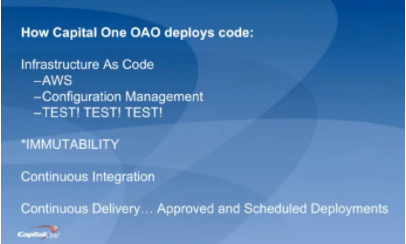
    For starters, George discussed how Capital One deploys code (hint: they aren’t building new data centers). They are primarily on AWS; they use configuration management systems to install and run their applications; and they “TEST, TEST, TEST, at all levels.” Pervasive throughout the system is immutability; that is, once created, the state of an object cannot change. As an example, if you need new server configurations, you create a new server and test it outside of production first.

    They use the continuous integration/continuous delivery model, so anyone working on code can contribute to the repositories that, in turn, initiate testing. Deployments are moved away from the scheduled release pattern. George noted that, because Capital One is a bank, regulations prevent its developers from initiating a production change. They use APIs with the product owners to automatically create tickets, and then product owners accept tickets, making the change in the production code. While this won’t apply to most environments, he brought it up to demonstrate how you can implement continuous delivery within these rules.

    Within all of this is the importance of automation. George outlined their four basic principles of automation and the key aspects of each:

    Principle #1 – Infrastructure as Code. They use AWS for hosting and everything is in a Cloud Formation Template, which is a way to describe your infrastructure using code. AWS now allows you to use CFTs to pass variable between stacks. Using code, every change can be tested first, and they can easily spin-up environments.

    Principle #2 – Configuration as Code. This is also known as configuration management systems (they use Chef and Ansible). There are no central servers, changes are version-controlled, and they use “innersourcing” for changes. For instance, if someone needs a change to a plugin, they can branch, update and create a pull request.

    Principle #3 – Immutability. Not allowing changes to servers once deployed prevents “special snowflakes” and regressions. Any changes are made in code and traverse a testing pipeline and code review before being deployed. This avoids what we all have experienced: the server that someone, who is no longer around, set up and tweaked differently than anything else and didn’t document what was done.

    Principle #4 – Backup and Restore Strategy. A backup is only as good as your restore strategy. You know the rest.

    George also dives into how they do continuous delivery/continuous integration in his talk, which you can watch online here.

    If you missed any of the other 30-minute long presentations from All Day DevOps, they are easy to find and available free of charge here.  Finally, be sure to register you and the rest of your team for the 2017 All Day DevOps conference here.  This year’s event will offer 96 practitioner-led sessions (no vendor pitches allowed).  It’s all free, online Oct. 24.

    — Derek E. Weeks

  • Container Considerations on Your DevOps Journey

    Container Considerations on Your DevOps Journey

    Containers are things for your things. That is true in the development world, too—containers are things for your software, and, like containers for your things, software containers can help you be organized, efficient and secure.

    Chris Morgan (@cmorgan_cloud), the Technical Director, OpenShift Partner Ecosystem at Red Hat, delivered a keynote at the 2016 All Day DevOps conference. Chris lives and breathes containers and recently discussed how they are transforming DevOps pipelines.

    Chris started with an encouraging figure: DevOps has a 74 percent adoption rate (at least on a path toward full adoption) at the enterprise level. The reason is that DevOps helps solve issues around:

    • Slow service delivery
    • Poor service quality
    • Frequent down times

    However, the needs of development and the desires of IT can often hamper full DevOps adoption, which is where containers can help. Containers allow apps to be easily shared and deployed with:

    • Consistent environment and tools
    • Predictable building tools
    • Faster deployment

    In short, containers can act as a common language between development and IT operations. And when configured properly, the operations team can utilize containers to assemble environments without compromising security.

    The survey that revealed a 74 percent adoption rate for DevOps in the enterprise also shows an 18 percent adoption rate of containers in the enterprise. Why the difference? Containers sometimes can be difficult to implement across multiple hosts.

    If you are gearing up to consider the use of containers across your IT environment, Chris offered up some things to consider:

    • Where do you store the container image?
    • Which container on which host? Which has enough capacity?
    • How do you monitor the health of the containers?
    • What do you do if a container crashes?
    • How can I address scale?

    When you have large apps that span multiple containers?

    • Which containers can access others?
    • Which containers should be deployed together?
    • How do I limit certain containers?
    • How do they find each other?
    • Is there malicious software on any containers?
    • How do I handle persistent storage?

    The bottom line is that you need more than just containers. You need a host, a platform, management and persistent storage.

    Is your organization ready to at least consider containers for DevOps? Chris reminded us, “Technology should not dictate the process. Identify the ideal process first, and then ensure the technology is flexible enough.” Start by finding some low-hanging fruit, assess skills and capabilities on your team and engage in a discovery session.

    Chris’ full keynote went into more detail, notably some solutions to implementing containers at the enterprise. You can watch Chris’ full All Day DevOps conference session (just 40 minutes) or you can view the other 56 presentations from the 2016 conference online and free of charge here.  This blog series is reviewing sessions from the 2016 All Day DevOps, which hosted over 13,500 registered attendees. Next week, look for “Ops Happens: DevOps Beyond Deployment” with Damon Edwards.

    Finally, be sure to register you and the rest of your team for the 2017 All Day DevOps conference here. This year’s event will offer 96 practitioner-led sessions (no vendor pitches allowed).  It’s all free, online Oct. 24.

    — Derek E. Weeks

  • DevOps: Trust, Obligations and Promises

    DevOps: Trust, Obligations and Promises

    Mark Burgess (@markburgess_osl) is a theoretical physicist, but in his keynote at the 2016 All Day DevOps conference, he talked more about economics and human interactives than physics. What does either have to do as the keynote for a conference on DevOps?

    Well, for a little more background, Mark Burgess is also the founder and former CTO of CFEngine, a configuration management and automation framework, and is the author of “Promise Theory.” While at CFEngine, Mark worked to apply a theory of how the autonomous agents in software interact with each other. Promise Theory was born.

    Exploring Promise Theory

    Promise Theory sits counter to obligation theories. Obligation theories view human interactions and behavior under the assumption that people (or agents, in the case of software) choose behavior based on their obligation to follow the rules. Agents are obligated to take a certain action. Promise theory contends the desire to follow the rules is voluntary and that agents can only be responsible for their own behavior, not the behavior of other agents.

    In his presentation, Mark started out looking at human behavior and trends in our society. For instance, with technological advances, our need for one another is decreasing, even as our interdependence through communication is increasing. For example, our smartphones enable us to do almost anything without the direct interaction of someone else.

    Looking at interactions in society, trust is the basis for our exchanges, working communities, and function as a society. He contends, “The promise is the source of intent by which all promises and observers may calibrate their expectations.” Money is an example of this. Money does not have intrinsic value, but we use it because we trust the backer will stand behind its value and it is more convenient than bartering goods. He explains that in the old monetary economy, banks and governments were the provider of trust; in the new service/IT economy, the service provider is the basis of trust.

    How Agents Make Promises

    How do you model this trust? Enter Promise Theory, which describes how agents make promises with each other and how this leads to trust between them. Mark outlines the “ingredients” of Promise Theory:

    1. Agents and super agents make promises in a scaling hierarchy.
    2. An agent can never make a promise about another agent’s behavior (only its own).
    3. An agent’s promise need not be accepted or used by its intended or unintended recipient!
    4. An agent makes its own valuations: what you have is only worth what another is willing to give you for it.
    5. Dependency invalidates promises.

    At the core of understanding this, you have to understand that collaboration is made up of semantics, what words mean and dynamics: all how things work.  And that our ever-increasing service economy is driving us to an explosion of semantics, because words matter so much more than the mechanics. As an example, Mark sketched the hierarchy of promise dependencies in the old and new economies. Looking at the old economy, where we have more dynamic money, the hierarchy is:

    Retail→ Money→ Banks→ Central Banks→ Government.

    In the new economy, where we have more semantic services, the hierarchy is:

    Client→ Network Availability→ Provider→ Internet Authorities→ Company/Service Organization.

    The Need for Cooperation

    None of these systems could work without cooperation at the bottom of it all. So, production is a cognitive process between the producer and the consumer, but also between the agents inside those organizations that have to interact. Often we create pipelines to describe these interactions, but the interdependencies within the systems are often much more complex than the pipeline can model.


    This is all just the tip of the iceberg. Mark has three books that dive into it in detail: “Thinking in Promises,” “In Search of Certainty,” and, “Promise Theory.”

    In the end, Mark made the point that technology does an excellent job of both binding us together and pulling us apart. We need to be careful that we don’t take ourselves out of the systems we create, or we could scale ourselves out of existence.

    devopsy.kinsta.cloud Supports the All Day DevOps Conference

    If this piqued your interest, you can watch Mark’s full All Day DevOps conference session (just 40 minutes).  When you do, you can view the other 56 presentations from the 2016 conference online and free of charge.  Finally, be sure to register you and the rest of your team for the 2017 All Day DevOps conference here.  This year’s event will offer 96 practitioner-led sessions (no vendor pitches allowed).  It’s free and online on Oct. 24.  devopsy.kinsta.cloud is a media sponsor for All Day DevOps 2017.

    — Derek E. Weeks

  • Securing Immutable Servers in a Serverless World

    Securing Immutable Servers in a Serverless World

    Snowflakes are beautiful, unique creations. But, let’s keep them in nature. They don’t belong in our server infrastructure. Snowflake servers, where every configuration is just a little different, can introduce unnecessary security vulnerabilities and complications. While common in IT infrastructure, in the DevOps realm, they are gradually becoming ancient history.

    At the recent All Day DevOps conference, Erlend Oftedal (@webtonull), with Blank and head of the OWASP Norway chapter, discussed the benefits of immutable infrastructure practices within serverless architectures. Erland walked us through the positive effects on security as well as offered insight on potential problems.

    Erlend outlined the progress from physical servers to immutable servers, discussing the benefits of each step and the concerns that lead to the next phase, ending with immutable servers—that is, they can’t be changed. Once set up, they are set. Automated processes coupled with immutability principles can eliminate snowflake servers.

    Immutability isn’t a new concept. Some classic examples include: live Linux CDs, internet cafes, schools, libraries, hotel business centers, etc. To set up immutable servers, Erlend outlines these steps:

    1. Find a suitable base image
    2. Build a specific image for the application (dependencies, application, secrets)
    3. Deploy image to server(s)
    4. Repeat steps 2-3 for new versions.

    Of course, this immediately raises questions.

    What about data? He notes that, because data inherently changes, data has to be stored externally.

    How do you deploy changes? Well, you don’t change the server. You take one out and put a new one in. If that one fails, roll back to the previous one.

    How do you manage secrets? You can build secrets in, leverage cloud key management or use third-party services.

    How do we apply security patches? If truly immutable, you deploy a new server with the patch. However, you can have a semi-immutable server that allows for automatically installing patches but still doesn’t allow for logins or manual changes.

    Speaking of security, what are the security advantages? For starters, if an attacker is in your server, it will be thrown out when you change servers, although it may come back if the vulnerability isn’t patched. It also allows for very specialized images by removing all unneeded packages. With these specialized images, you can more easily audit and monitor the system for unexpected file changes, logins and connections.

    Erlend discussed containers because they are a step closer to a serverless world. Containers isolate processes and all run on the same OS. Of course, you can make them immutable, but, whether they are or not, there are some key security best practices you’ll want to consider:

    • Don’t run as root inside container
    • Implement user namespaces so the root account within the container is separated from the root account outside the container
    • Utilize the least privileges necessary for capabilities and resources
    • Keep them up to date
    • Automate scanning using tools such as Sonatype Nexus, Twistlock, Clair or Aqua.
    • Separate untrusted and trusted containers

    Erlend also dove into serverless architecture. While there is debate over what exactly qualifies as serverless, there are five principles that Erlend highlighted:

    • Use a compute service to execute code on demand
    • Write single-purpose, stateless functions
    • Design push-based, event-driven pipelines
    • Create thicker, more powerful front ends
    • Embrace third-party services

    Migrating to immutable, serverless infrastructure is a topic to be discussed well beyond this blog post and even Erlend’s session. Whatever you do in the future, though, take his parting words to heart: “The cloud can solve many of your problems, but in the end you cannot transfer your responsibility for security.”

    Erlend’s session was packed with information. If this piqued your interest, you should watch his complete session in his full All Day DevOps conference session (just 30 minutes). The other 56 presentations from the All Day DevOps Conference are also available online, free of charge here.

    — Derek E. Weeks

  • From a Commodore 64 to DevSecOps

    From a Commodore 64 to DevSecOps

    We all know the story: a farm, a kid, a Commodore 64, and a modem maxing out at 300bps. A few unexpected phone bills later, and young Ian Allison is figuring out how to game the system so he can keep using his newfound gateway to the world of tech. According to Ian, that is where he began building the foundation of skills for his career in computer security.

    At the recent All Day DevOps conference, Ian (@iallison), now with Intuit, talked about his history of being “that” security guy. You know, the one who thinks developers don’t care about security or deadlines and, really, are just plain “stupid.” But, don’t worry, he is enlightened now and realizes that we all have the same goal: Everyone wants to build a secure system.

    Ian realized that “security doesn’t understand how developers or operations works. Security solves for security, but that leaves everyone else in their own place.” He started his enlightenment when his career path led him to a place called DevSecOps; that is, DevOps where security plays a more integral role.

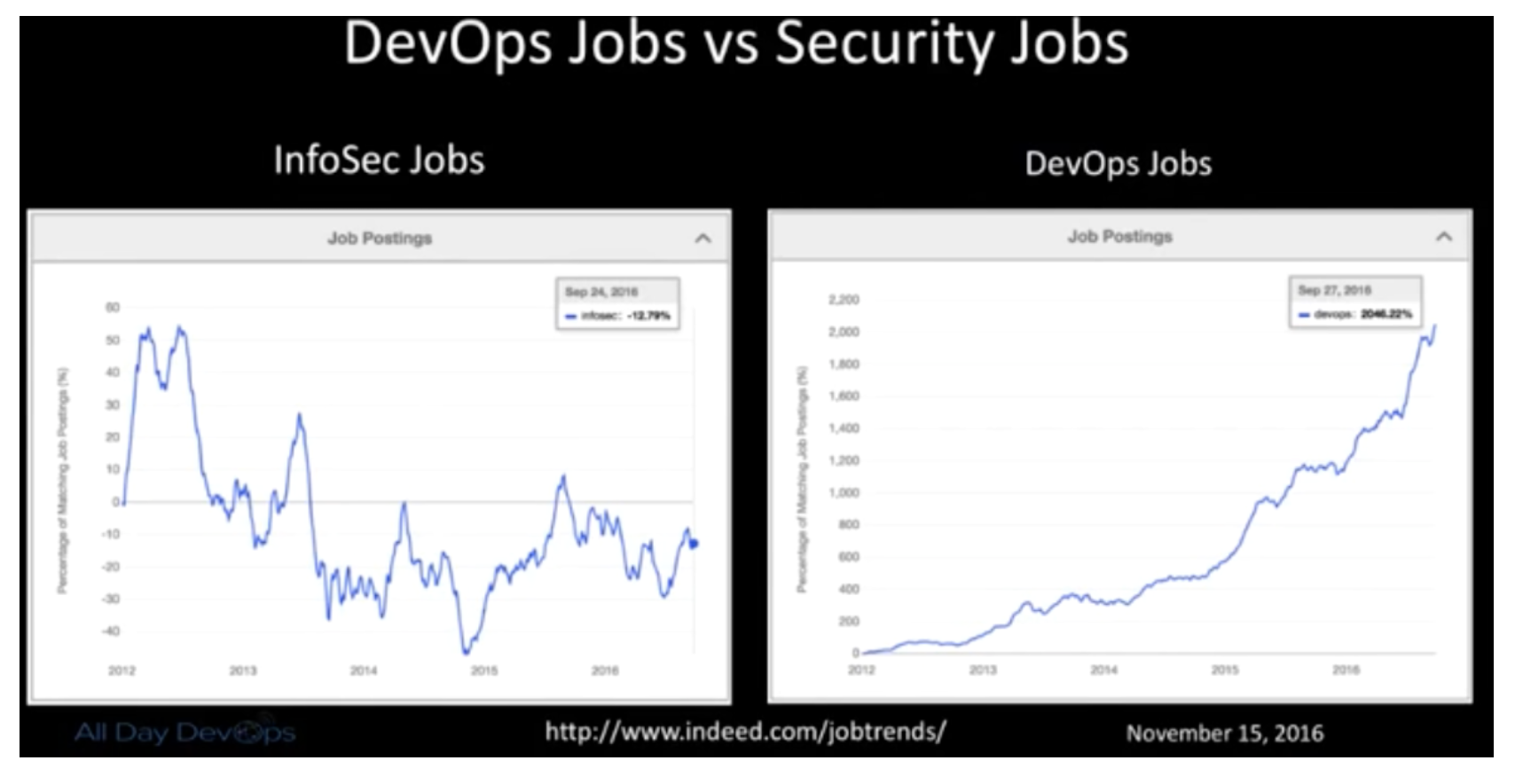
    Ian pointed out that traditional InfoSec relies on compliance, regulations, appliances and perimeter (CRAP). He then realized the selfishness of his own and his peer’s perspective: Remediation is left up to the developers, the feedback they get are 200-page scanner reports, and it only solves problems for security and compliance. It doesn’t help developers reach their shared goal of a secure system.

    DevOps creates an opportunity for security to get a better view into our infrastructure, operations and development efforts.  DevOps is not only fast, lean and efficient, but when done right, it is also collaborative and empathetic. Couple speed with collaboration and empathy, and DevSecOps can blossom.

    Here is the reality that Ian was facing: Scanners find the absolute bare minimum; bad default configs are a HUGE problem even with SaaS vendors; manual testing can uncover defects that have been hiding for year; and the attackers are more skilled and motivated.

    How do you implement it and make it better?

    • Allow Dev teams to assume the risk of their decisions.
    • No more Security exceptions or signoffs.
    • Security is everyone’s responsibility.
    • Test the crap out of your own stuff like an attacker would.

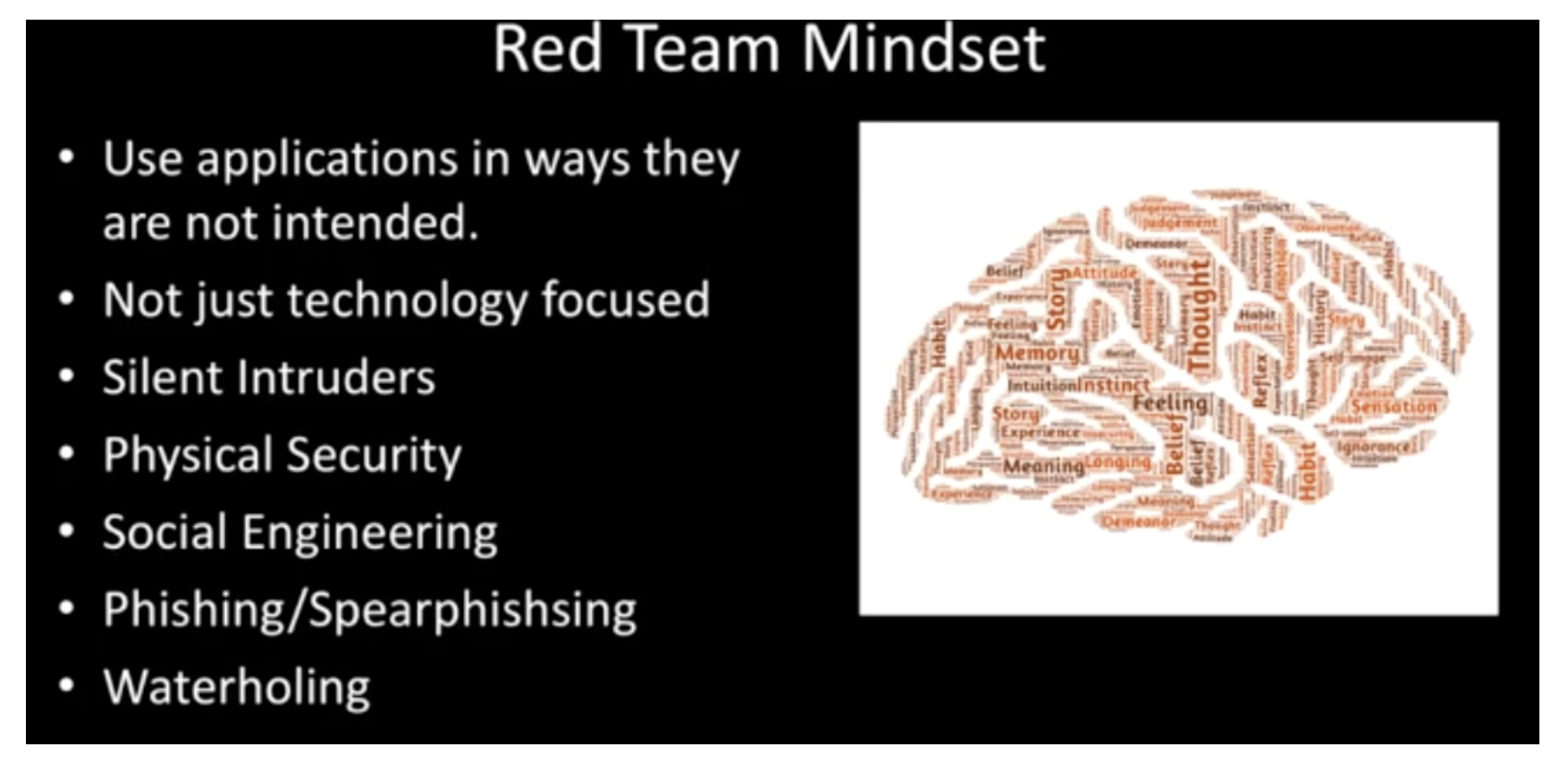
    At Intuit, Ian wanted to help build stronger bridges between development, operations and security teams.  To do this, he set up a Red Team to:

    • Use same tactics as attackers.
    • Only scope is “Don’t take down production.”
    • Need to adapt and evolve like an attacker.
    • Prove risks actually exist.
    • Should be writing their own exploits.
    • Should have ongoing campaigns that mimic attackers.

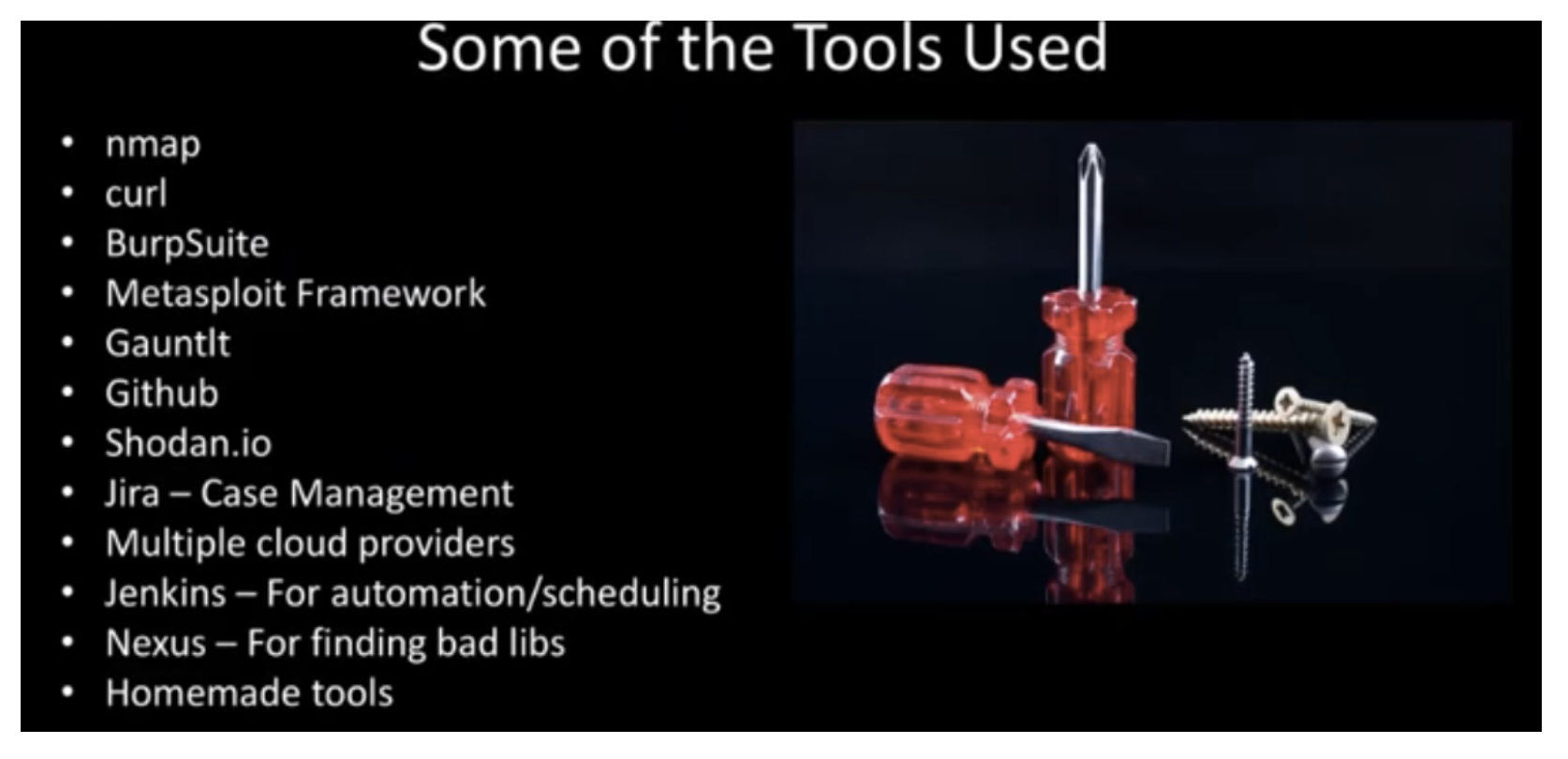
    The Red Team started small and lean and focused on the cloud. It worked like an Agile DevOps team, working manually with the use of some tools. In the end, the team found, reported and fixed thousands of vulnerabilities not found by scanners.

    Ian goes into more details and lessons learned in his full All Day DevOps conference session (just 30 minutes). The other 56 presentations from the All Day DevOps Conference are also available online, free-of-charge here.

    This blog series is reviewing sessions from the All Day DevOps conference from November which hosted more than 13,500 registered attendees. Last week I discussed, “System Hardening with Ansible.” Next week, look for my review of an awesome session by Erlend Oftedal:  “There is No Server: Immutable Infrastructure and Serverless Architecture.”

    — Derek E. Weeks

  • All Day DevOps: DevOps at Massive Scale

    All Day DevOps: DevOps at Massive Scale

    When you have a billion users, people notice. That’s where our story about DevOps and Yahoo! starts. For Kishore Jalleda and Gopal Mor, both engineers at Yahoo!, when something goes wrong on a Yahoo! page, people will notice. Correction: a lot of people will notice.

    Of course, Yahoo!, like all services on the internet, constantly improves its products. In fact, it has 100+ iterations and experiments happening at any given time. Some changes bring new innovation to the forefront and others alter the user experience.

    When iterations and experiments are served in front of loyal users who have become comfortable with a specific user experience, they sometimes react with a natural resistance to the change. When change causes, or appears to cause, breaks in service, the backlash can be crippling. Frequent spurts of backlash resulting from these changes became known to some Yahoo! Insiders as “the bad years.”

    At the recent All Day DevOps conference, Kishore and Gopal shared how Yahoo! turned to DevOps practices to recover from “the bad years.” In their presentation, “Launching Products at Massive Scale: The DevOps Way,” Kishore said, “DevOps is about eliminating technical, process and cultural barriers between idea and execution, using software.” Specific to each of these, Kishore recommends the following:

    Culture of ownership and excellence: Own life cycles within Development, fix root causes and have pride in the product.

    Processes: Design or engineer processes to be fast and agile. Work should be iterative, support learning and provide fast feedback cycles. Let the machines to the heavy lifting.

    Tools: Solve operations problems with software. Use open-source tools that are self-service, reusable, friendly and easy to use.

    At Yahoo!, the DevOps practice is built on three functional pillars: deliver products to market quickly; prevent defects from reaching customers; and, repair production issues quickly.

    Speaking of repairing production issues quickly, Gopal discussed resiliency. With its user base, downtime (or lack thereof) is critical to Yahoo! and the challenges are many:

    • Distributed multilayer architecture
    • 100s of subsystems
    • Complex request flow
    • Change is the only constant

    While it may be counterintuitive, Gopal demonstrated how the combined system is weaker than the weakest subsystem.

    To ensure optimum uptime, Gopal said we need to:

    1. Analyze the entire range of failure types
    2. Understand their rate and impact level
    3. Plan to cover all failure types
    4. Conduct fire drills – test, test and test.

    Specifically, how does Yahoo! ensure high availability? It maintains four layers of resiliency in the serving stack:

    Speculative retry – Deliver the page again after a predefined latency is exceeded. This addresses longtail latency and intermittent failures.

    Per-module fallback – Cache non-personalized modules to front-end servers and serve cached content for failed modules. You need to ensure the cache is refreshed often, that you implement strong validation of the cache’s data and you check for backward compatibility if the TTL is high.

    Fullpage failsafe – Cache the entire page without personalized data and ads and with minimal interaction. This is used when the entire page cannot be served. Yahoo! uses auto-scale AWS servers to serve these pages so its servers are not negatively affected.

    Failwhale page –  The “we will be right back” page that lets users know, yes, your internet is working, but our service isn’t – temporarily. Please try again. Obviously, a last resort, but a necessary one.

    There is a lot here and you don’t have to have a service at the scale of Yahoo! to benefit for the experience. You can dive into Kishore and Gopal’s full All Day DevOps conference session (just 30 minutes) to learn more about their learnings from the DevOps front lines. The other 56 presentations from the All Day DevOps Conference are also available online, free-of-charge here.

    This blog series is reviewing sessions from the All Day DevOps conference from November, which hosted over 13,500 registered attendees. Last week I discussed, “Docker, the New Ordinary.” Next week, look for “System Hardening Using Ansible,” from Akash Mahajan.

    — Derek E. Weeks

  • All Day DevOps: System Hardening with Ansible

    All Day DevOps: System Hardening with Ansible

    The DevOps pipeline is constantly changing.  Therefore, relevant security controls must be applied contextually.

    We want to be secure, but I think all of us would rather spend our time developing and deploying software. Keeping up with server updates and all of the other security tasks is like cleaning your home: you know it has to be done, but you really just want to enjoy your clean home. The good news is you can hire a “service” to keep your application security up to date, giving you more time to develop.

    At the recent All Day DevOps conference, Akash Mahajan (@makash), a founder/director at Appsecco, discussed hardening your system’s security with Ansible. In addition to his role at Appsecco, Akash is involved as a local leader with the Open Web Application Security Project (OWASP).

    Misconfiguration

    During his presentation, Akash mentioned the OWASP Top 10 Security Vulnerabilities list, zeroing in on No. 5: Security Misconfiguration. To determine if you comply with the guidelines, No. 5 on the list asks:

    • Is any of your software out of date?
    • Are there any unnecessary features enabled/installed including ports, services, accounts, pages or privileges?
    • Are default accounts and their passwords enabled/unchanged?
    • Are security settings and libraries not set to secure values?

    I am sure no one reading this article still uses the default administrator password, but can we say the same of your peers? Have you gotten around to installing the latest software patches on your server?


    Automation

    If a task can be automated, developers automate it. So we should automate our security tasks too, where we can. OWASP provides guidance here, suggesting you should:

    • Have a repeatable security hardening process.
    • Ensure your development, QA and production servers are configured identically but with different passwords.
    • Automate the process to minimize the effort required to setup a new secure environment.
    • Implement a process for deploying all new software updates and patches in a timely manner to each deployed environment.
    • Run scans and audits periodically to help detect future misconfigurations or missing patches.

    This is all part of security hardening, which is, “the process where we identify default configuration present on a system and apply changes that will change the configuration to secure values.” This can be applied to your network, transport, application, and kernel networking parameters.

    Ansible Playbooks

    Ansible is one of the solutions Akash likes to work with, but there are others solutions on the market that provide similar value. Without trying to endorse or evaluate one solution over another, let me share perspectives from Akash’s experience with his toolset.

    Why does he like it? It boils down to playbooks. An Ansible playbook is a codified security document, allowing you to describe the desired state of a system, rather than the specific steps of how to get to that state. As Akash points out, things change—it is better to have the end state described rather than have to change commands when the system changes.

    Other advantages of playbooks include:

    • Playbooks are written in YAML providing us with structure that we can learn and train on
    • Playbooks are text files, so we can use Git for version control
    • Managing playbooks is just like managing any software project
    • Playbooks are infrastructure as code but for security
    • Playbooks consist of roles, a key aspect of security
    • Numerous playbooks are available as open source

    The bottom line is you can—and you should—automate your security hardening process. Your users and other stakeholders will thank you and, most of all, you will thank yourself because you can spend more time on the things you love to do.

    Ansible is just one example of a solution that can be used to automate your security tasks. If you want to know more, Akash goes into further detail on getting started with Ansible in his full All Day DevOps conference session (just 30 minutes). The other 56 presentations from the All Day DevOps Conference are also available online, free of charge here.

    This blog series is reviewing sessions from the All Day DevOps conference from November which hosted over 13,500 registered attendees. Last week I discussed, “DevOps at Massive Scale.” Next week, look for “Operationalizing a Red Team for Fun and Profit,” delivered by Intuit’s own Ian Allison.

    — Derek E. Weeks

  • All Day DevOps: Exploring the New Ordinary

    All Day DevOps: Exploring the New Ordinary

    There you were. You heard about Docker, become mesmerized, floated into its new, special world … and then all chaos broke out. Things were not that easy and you scrambled for knowledge. Some folks saw the light and stepped forward, while others are still trying to figure the out the happy path home where containers will become part of their new ordinary.

    This is the true story of Daniël van Gils (@foldingbeauty), a developer at Cloud 66, and the 12 steps he laid out in his Docker journey. He shared this journey during his presentation at the recent All Day DevOps conference, and I’ll share a summary of his steps here. His journey will take you full-circle, from your “ordinary IT world” to the “very special container world” and back, to where the container world is the new ordinary.

    Containerization continues to be a hot topic in the software world, and one that is only going to grow and mature. As it matures, questions still abound:

    • How can you implement containerization into your organization?
    • Have you already started but run into roadblocks?
    • How can you be the hero of your organization’s journey?

    Daniël addressed this journey in his talk, “Docker Inside/Out,” at the recent All Day DevOps Conference.

    Daniël’s journey started in the Ordinary World (#1), the world you might be in now. You are at a conference, you read a book, you talk to some colleagues and you want to jump into containers. You receive the Call to Adventure (#2) … but you are human, you like the safe, you fear the unknown, so you want to Refuse the Call (#3).

    Thankfully, others—including Daniël—have taken the journey. They can take you under their wings, coddle you and then push you out of the nest. You Meet a Mentor (#4) and follow your heart. The heart is the good stuff—it is the core. Like most people probably would have, Daniël chose an artichoke to illustrate his point.

    The heart of the artichoke is the good stuff, but the outer leaves protect the heart and make up the whole artichoke. Each aspect of an organization has something that drives them—their heart:

    • Development – building elegantly performing code
    • Operations – stable, performing code
    • Business – delivering the right services to customers
    • Customers – consuming the service they want

    Your drive to satisfy the heart’s desire gives you the courage to Cross the Threshold (#5). You have a containerization machine, such as Docker. You put code in, creating nice little containers.


    Now that your infrastructure is set up, you test and know where your allies and enemies are (#6). The most important lesson here is that shortcuts are your enemy. Shortcuts are evil, promising a life of ease but delivering a life of pain.

    Daniël offers his Approach (#7) through the Docker journey to ensure you’re successful. You must KISSSSS:

    Keep It…

    • Slim – remove what you don’t need
    • Secure – ensure you have the latest updates; remove all secrets
    • Speedy – Follow best deployment practices and run performance tests
    • Stable – Use version numbers for your Docker files
    • Set – Immutable. Don’t put databases or complicated volumes into your containers. You can, but the the technology is still too new.

    The next steps in his journey cover Ordeals, Death and Rebirth (#8). Once you pass this point in the journey, you’ll understand what it takes to run Docker in production and have shown the proof of concepts. You’ll then reap the Rewards (#9) and have clear visibility to your Road Back (#10) to the new ordinary.

    For the successful heroes on this journey, now is your moment to shine.  The next steps: your Resurrection (#11) and to Return with Elixir (#12) where containers are now the new ordinary.

    If you want to learn more about Daniël’s Docker journey, be sure to watch his full All Day DevOps conference session (only 30 minutes). The other 56 presentations from the All Day DevOps Conference are available online, free-of-charge here.

    This blog series is reviewing sessions from the All Day DevOps conference from November, which hosted more than 13,500 registered attendees. Last week I discussed, “One Team, 5,000 Jobs: Life in the DevOps Jungle.” Next week, look for “Launching Products at Massive Scale: The DevOps Way” presented by Kishore Jalleda and Gopal Moore.

    — Derek E. Weeks

  • One Team, 5,000 Jobs: Life in the DevOps Jungle

    One Team, 5,000 Jobs: Life in the DevOps Jungle

    Damien has 5,000 jobs. While you might gasp at that workload, Damien is not stressing out. All 5,000 jobs are automated within his team’s Jenkins pipelines. How does he do it? Damien follows four key principles to keep his cool in the job jungle: self-service, security, simplicity and extensibility. But you might be surprised that one of his most important survival techniques is treating his pipeline as “not code.”

    At the recent All Day DevOps Conference, Damien Coraboeuf (@DamienCoraboeuf, nemerosa.com) discussed how his organization got out of the job jungle. Even with 5,000 jobs in Jenkins, Damien has a tiny team of six running it while supporting a large band of developers around the world.

    During his session, Damien laid out how a pipeline, the backbone of a Jenkins job, is constructed. Spoiler alert: It is pretty simple; hence, the magic of Jenkins. However, it gets complicated quickly, so Damien shared four principles his team strives toward:

    • Self-service. They don’t want the Jenkins team to be a bottleneck, and they don’t want to have to deploy an army just to run Jenkins.
    • Security. With teams of developers—many of whom they have never met—security and control is critical.
    • Simplicity. Developers can focus on developing rather than Jenkins.
    • Extensibility. As they grow and capabilities are dreamed up or implemented, their system needs to be able to adapt.

    Core to their implementation and their goals of self-service, simplicity and extensibility is the Job DSL Plugin. While Jenkins has a robust user experience, as jobs are added, it can get cumbersome and clumsy. The Job DSL Plugin brings order, automation and consistency to the jobs. Damien walks through the basics of the plugin and its benefits, noting that it treats the pipeline as code.

    Treating the pipeline as code allows the team to reuse code through versioned libraries and easily manage thousands of jobs. Requiring developers to manage more work as code does offer benefits, but giving that many people access to the code also produces security risks. So, Damien’s team actually treats the pipeline as “not code” by describing the pipeline using properties files. It also allows them to use the pipeline as metadata, so queries and reports are almost enjoyable.


    Damien’s team also utilizes the Seed plugin, which they maintain, to “help automate the generation and management of pipelines,” tighten security by keeping projects locked to teams and increase automation through hooks.

    The Seed plugin shares some functionality with the popular Pipeline plugin, which is maintained by a large community. However, the Pipeline plugin does not allow for treating the pipeline as “not code.” Damien’s vision is that one day Seed will be an extension of Pipeline.


    Damien’s team has done a tremendous job of running Jenkins across the enterprise. In fact, he just wrote me with an update that since November, his company has scaled to 7,000 jobs while still following the same principles.  If you want to learn more about how his team does it, be sure to watch his full All Day DevOps conference session (only 30 minutes). The other 56 presentations from the All Day DevOps Conference are available online, free of charge, here.

    — Derek E. Weeks