Tag: Agile software development

  • Businesses Must Bridge the Skills Gap to Succeed With Quantum Computing

    Businesses Must Bridge the Skills Gap to Succeed With Quantum Computing

    Quantum computing is poised to transform the way companies solve business problems. The technology needed to power this revolution is becoming a reality, with large developers like IBM making excellent progress toward building quantum-centric supercomputers. But while the technological barrier to deploying quantum is falling away, another obstacle remains: The lack of quantum skills in the labor market.

    Last year, Classiq commissioned a survey of over 500 professionals familiar with quantum technology, which highlighted a range of possible benefits that quantum computing will unlock, including cost savings, new revenue streams and competitive advantages for companies that successfully deploy the technology. But the survey also highlighted that the shortage of qualified engineers and scientists who can program quantum computers remains one of the biggest barriers to increased quantum deployments.

    This skills gap will not only prevent companies from leveraging the power of quantum computing but also lead to expensive competition for talent as businesses try to recruit the few quantum professionals available in the workforce. Why has this skills gap grown, and what can companies do about it?

    Coding for the Quantum Computing Era

    First, we need to understand what skills are missing that are contributing to a skills gap, as some readers may ask why existing programmers and computer engineers cannot meet this demand. Besides lacking the purely technical skills needed to code for quantum computing, such as creating quantum circuits and software, there is also a knowledge gap around how to solve business problems using a quantum computer.

    For instance, while many programmers trained in classical computing could figure out a way to design a program for portfolio optimization, they likely have no idea how to do the same using a quantum computer. They are unlikely to know where to start, how to check their results or even how to run their code on a quantum device.

    Coding for quantum computers is also more complicated than for classical computing. As each “qubit” can be one and zero simultaneously instead of either/or, writing the quantum code is more complex. Developers need to understand quantum concepts such as superpositions, so working in quantum requires new ways of thinking about problems and necessitates new ways of working.

    This last issue is compounded by a technology gap, as quantum programming has not been abstracted away as it has for classical programming – it is mostly still at the assembly language level. At this level, writing a few dozen lines of quantum programming is achievable but time-consuming, so creating complex quantum programs of hundreds or thousands of lines of code is almost impossible.

    Solving the Skills Gap

    The first instinct for companies wishing to leverage quantum technology is to hire their way out of this problem, but there are simply not enough Ph.D.-trained quantum experts in the market, and there is likely to be stiff competition for the few quantum-trained graduates coming out of university. Given the shortage, companies must instead consider how to train and upskill their staff.

    Convincing existing staff to take part in this training should not be an issue. Engineers and programmers are keen to learn – nearly 95% of respondents to our survey said they would like to be trained in quantum. Why is there such high demand? Not only is this new technology exciting, but many workers may hope to future-proof their jobs or increase their earning potential through quantum skills.

    Upskilling your workforce does not have to be expensive. There is already a wide range of open source material, such as the Qiskit development kit, designed to help people explore this new technology. For companies, a straightforward solution is to give their engineers the time and space to learn about quantum for themselves. Simply giving your existing coders permission and resources to learn about this technology and how it can benefit your business could prove to be a profitable long-term investment.

    The added advantage of upskilling your staff, rather than recruiting quantum Ph.D. graduates, is your existing workforce understands the sorts of problems your business needs to solve.

    Plus, new products are emerging that can help solve the technology gap and make it easier to code for the quantum era. Sophisticated low-code software can abstract away some of the complexity involved in writing quantum coding, which in turn will speed up the process of learning.

    But upskilling is only one thing to consider. Companies also need to invest in the resources and infrastructure around their emerging quantum talent. They need to build a team, identify use cases that can benefit from quantum technology and locate the right vendors and cloud providers that will allow them to test and simulate their quantum programs.

    The quantum revolution remains several years away, but companies need to make sure they have the skills and infrastructure ready to take advantage of this technology or risk being left behind by quantum-prepared competitors.

  • No-Code Automated Software Solves a Host of Problems

    No-Code Automated Software Solves a Host of Problems

    There’s a huge disconnect in corporate America, and it’s costing companies big time. The disconnect involves software testing, or, more precisely, the lack of it. More than nine out of 10 CEOs are confident that their company’s software is tested regularly, yet roughly eight out of 10 product testers reported that up to 40% of their software goes out the door with insufficient testing. This dichotomy came to light in the latest Leapwork survey of 500 CEOs and software testers.

    The consequences of untested software are potentially dire and far from hypothetical. Flawed software that delayed the launch of new car models contributed to the dismissal of Volkswagen CEO Herbert Diess, while Facebook saw its market cap value plummet by billions in 2021 when a software glitch came to light. 

    It’s not as if anyone is unaware of such risks: A whopping 95% of CEOs surveyed admitted they’re concerned about losing their jobs if a software failure occurs, while 76% of testers shared that concern. Those feelings are certainly valid, as more than three out of four CEOs reported that software failures damaged their companies’ reputations during the past five years.  

    Despite these realizations, CEOs seem willing to gamble. A full 85% said they considered it acceptable to release software that wasn’t adequately tested, as long as it can be patched later. That attitude has made patching standard operating procedure. More than half the testers said their teams spend five to 10 days a year patching software. 

    Why are organizations willing to take unnecessary risks by releasing software that’s potentially not ready for prime time? There are several common reasons—and a solution that many are overlooking. 

    The Problem with Manual Testing

    One of the major problems is the continued reliance on manual testing, which requires time and resources companies can’t afford. Only 43% of testers said they use automation to some extent in their testing, proving that the majority of testing is still a manual process.  

    That significantly slows product development, an issue for businesses anxious to get their products to market before the competition. Nearly 40% of CEOs said the time-consuming nature of manual testing is one of the primary reasons they release programs that haven’t been properly vetted. Testers clearly feel the crunch, with about one in three saying faster development cycles don’t allow enough time for testing. 

    Given the choice between rushing through testing or delaying a release, companies often roll the dice and opt for the former.  

    Two recent pandemic-related trends have made the situation even more difficult. More organizations are embracing digital platforms to cope with the effects of COVID-19 on their businesses, increasing the need for IT talent. At the same time, upheaval in the labor market has resulted in widespread resignations and job hopping, contributing to a serious shortage of skilled IT personnel. 

    The Coding Conundrum

    Even in this chaotic business climate, experienced software developers remain a hot commodity, with many career options at their fingertips. The competition for talent has left many IT teams scrambling and understaffed, making it difficult to produce high-quality software at a breakneck pace.  

    Eliminating the need for manual testing could relieve the pressure to a great extent. By automating testing, organizations can reduce the burden on staff and minimize the risk of errors caused by deadline pressures. That would allow more testing of more software in less time, which would help move product out the door and into the hands of customers. 

    But automated testing isn’t without its challenges, as many organizations have discovered. Many solutions that are billed as “low code” still demand coding skills beyond the capability of typical business users and testers. That need for coding is an obstacle that can drag down the pace of testing and make it difficult for business users to participate in the process.    

    That challenge grows as the need for ongoing maintenance expands. The test engineers who came on board to set up an automation solution can find themselves bogged down in maintaining code. As a result, speed to market continues to suffer. 

    Democratizing the Test Process

    There is a solution: true no-code test platforms. This type of solution allows both testers and business users to design, run and maintain tests without the need for coding. Business users who understand how the software deliverables are supposed to grow business can be intimately involved in testing, which enhances the quality and functionality of the product and the satisfaction of customers. 

    It also promotes speed. When testing is largely automated and more people are involved, it’s possible to test more software in less time. This eliminates bottlenecks and addresses the issue of scale. The use of automation on a no-code platform has been shown to speed time to market by a factor of 10—an improvement that largely eliminates the need to rush potentially flawed software to market without adequate testing.   

    Organizations can position themselves to meet the growing demand for digital solutions by revamping the way they test software. By eliminating manual testing and adopting an automated platform that doesn’t require coding skills, they can afford to test all their products thoroughly. The end result: They can minimize the risk of bugs that could undermine their success and threaten job security.  

  • Survey Surfaces Agile Development Challenges

    Survey Surfaces Agile Development Challenges

    A survey of 3,220 software development professionals published this week found that among the 80% of respondents that embraced Agile practices for building software, just under half are tracking on-time delivery (47%) and business objectives achieved (44%).

    The survey, conducted by Regina Corso Consulting on behalf of Digital.ai, a provider of a value stream management (VSM) platform. The survey also found a total of 19% of respondents were not sure what metrics were used to track software development progress.

    At the same time, 40% of respondents noted they are dissatisfied with Agile at their organization; a clash with company culture was listed as the leading cause (41%) of unsuccessful delivery. Half of respondents use a combination of Agile, waterfall and/or iterative processes, but 27% noted this combination of frameworks was a struggle for them.

    The survey also noted that just over a third of product and application owners (36%) that participated in the survey have adopted Agile.

    Derek Holt, general manager of Agile and DevOps at Digital.ai, said that percentage suggests that Agile principles are now being adopted beyond the engineering teams that construct software. As that appreciation for Agile principles continues to grow, the organizations these individuals work for also tend to start tracking value stream metrics, he added. That transition typically begins with a few pragmatic metrics before the organization matures enough to justify the adoption of a VSM platform, Holt noted.

    In time, however, that VSM platform not only helps organizations identify bottlenecks but also identifies potential quality issues and risks to the business, Holt added.

    Overall, the top three top Agile development priorities identified by respondents are to accelerate time-to-market (52%), delivery predictability (44%) and lower risk (31%). However, from a business perspective, the top three priorities are company goals (54%) and end customer satisfaction (43%) followed by time-to-deliver (35%).

    More than half (51%) of respondents, however, also noted that DevOps teams are not incorporating business feedback regularly. Well over half (58%) said the most valuable improvements to DevOps teams would be end-to-end visibility and traceability from business initiative through development, test and deployment to end users, while 55% said the ability to measure cycle time, wait time and bottlenecks would be an important improvement.

    Regarding Agile tools used, Scrum led the pack at 87%, followed by Kanban at 56% and Scrumban at 27%. The Scaled Agile Framework (SAFe) framework has been adopted by more than half of respondents (53%), while Scrum@Scale/Scrum of Scrums was adopted by 28% of respondents followed by Lean Management at 8%, according to survey respondents.

    The top benefit of Agile is increased collaboration (69%) followed by better alignment with the business (54%) and better work environment and increased visibility in the application development life cycle at 39% each.

    The debate over the merits of Agile frameworks, of course, remains fierce and no two organizations may ever have the same level of adoption. However, as the pressure to deliver quality software faster in the age of digital business transformation continues to mount, the more crucial it will become to align Agile and DevOps best practices.

  • CNCF Survey Predicts Growing Wasm Momentum

    CNCF Survey Predicts Growing Wasm Momentum

    A survey of 93 developers conducted by the Cloud Native Computing Foundation (CNCF) found more than a quarter (28%) are using WebAssembly (Wasm) in their cloud-native development projects, with another 36% planning to do so during the next six to 12 months.

    The survey, published this week, is effectively a straw poll that found 42% of respondents are developing or plan to develop server-side applications using Wasm, while 48% are combining or planning to combine server-side workloads with client-side applications.

    Originally developed five years ago by the World Wide Web Consortium (W3C) to create a common format for browsers executing JavaScript code, Wasm is now starting to be used to rapidly build lighter-weight applications that can be deployed on any server platform. The promise of being able to write an application once and deploy it anywhere is finally being realized some 25 years after the initial introduction of the Java programming language.

    The survey found 70% of respondents viewed Wasm runtimes as a disruptive emerging technology. The primary programming languages used in association with Wasm are Rust (59%), Go (47%) and JavaScript (46%), the survey found.

    Nearly two-thirds (63%) said they are both porting new applications using Wasm and migrating existing workloads, compared to 37% who said they were creating new applications only. The primary reason cited for migrating workloads to Wasm was application portability (78%), better security (77%) and improved runtime performance (70%).

    Security ranks high because existing approaches to building applications rely on the aggregation of software components that tend to lack distinct boundaries between them. As a result, it becomes relatively simple for malware to infect all the components of an application. Wasm code runs in a sandboxed environment that isolates execution environments in a way that eliminates the ability of malware to laterally move across an application environment.

    Target platforms for Wasm applications include serverless computing frameworks (63%), edge platforms (54%) and the web (52%), the survey found.

    The biggest barriers to adoption were tools (46%) and lack of standards (45%). Just over half (56%) of respondents said Wasm developer tools are missing features and are difficult to use. A full 81% said they would like to see vendors provide full-featured and stable Wasm tools and projects.

    Matt Butcher, CEO of Fermyon, a provider of a platform for building Wasm applications, said that while survey respondents most likely represented more advanced developers, it’s clear Wasm momentum is starting to build. Much like JavaScript before it, Wasm is about to jump from the client to server-side application environments, he noted.

    Less clear is whether Wasm represents the next era of cloud-native computing or is simply another type of software artifact that will be employed to build applications alongside other artifacts such as containers.

    Wasm isn’t necessarily going to replace existing approaches for building applications any time soon, but it does provide an alternative to serverless computing frameworks for developing lighter-weight applications that run faster. Existing serverless computing frameworks typically use containers that are much slower to start up than Wasm code running natively on a platform, which accounts for why developers are looking to embrace the format to improve overall application performance.

    One way or another, more Wasm code will soon be finding its way into DevOps pipelines. The issue is determining how to incorporate it alongside all the other code moving through those pipelines.

  • The Whats and Hows of APIs: A New Developer’s Guide 

    The Whats and Hows of APIs: A New Developer’s Guide 

    For those who are new developers, you may not know a lot about application programming interfaces (APIs). However, it is likely that you’ve used them before as a consumer or an end user, whether purchasing online, using business communication software to reach colleagues or sharing images from a monogram logo maker on social media platforms, for example. It makes knowing about them helpful, regardless of if you plan to make and use one yourself or want to understand how the tools you use work. 

    Although coding and developer tools can be daunting for the outside world, we’ll put APIs into a language that new developers (and even non-developers) can understand. In this guide, we’ll cover what APIs are and the different types that exist. You’ll also learn how they work and how you can use them. By the end, hopefully, you’ll be more comfortable with APIs and know how they impact you and your business.

    What Is an API?

    An application programming interface is a piece of coding used by developers to communicate between different devices, systems, or applications. It allows information to be passed on—allowing procedures to be followed across multiple platforms. Depending on the API, this could be transferring data, images, videos, text, files and other content, or allowing developers to connect through the use of backend-as-a-service (BaaS) to link their apps to the cloud. APIs are often used in a business context and for personal projects or other purposes. 

    Generally, APIs are concerned with the raw information and passing this on to another program rather than the appearance or visual side of these applications. Another set of coding is used instead to build the aesthetic and usability of the interface, while the API tends to be less visible to users. Nonetheless, they form an essential part of our technology stack today, allowing systems to integrate and become more agile, making applications easier for users to navigate.

    Image sourced from developers.facebook.com

    For example, when you refresh your omnichannel communications application, a request is sent to the API to check other linked programs for new messages on your social platforms or calls to your 800 numbers for business. These programs inform the API of new communications and send the appropriate data across. The API returns this data to the application you are using, enabling you to read the messages from here or notify you of no new calls.

    Types of API

    1. Private

    A private API is used internally within a team, created by developers who work for the company or organization. It can help make highly personalized APIs for the needs of your business and adapt the API as and when needed. Private APIs can’t be used or worked on by external developers, as it is purely for your in-house team. These APIs tend to focus on aiding your company’s productivity and project management across multiple applications.

    2. Partner

    Alternatively, partner APIs are used externally with companies that your business collaborates with. Often, this transfers information between businesses, such as within an affiliate scheme or for external postage of online orders. However, APIs can also share and update files such as your release of liability contract or emergency procedure templates. Developers from both companies can improve the API system to effectively share data between partners. 

    3. Open/Public

    Because they are not restricted to usage by specific businesses, open APIs (also known as public APIs) can be used by anyone. You may need a subscription to give you access to the API depending on how frequently you use it, although there are other APIs that are completely free to use. Once you’ve sorted out your access, any software developer can use the API to make changes and transfer information more easily between various software for several purposes. 

    Image sourced from mailchimp.com

    4. Composite

    By taking the responses of multiple programs and streamlining these onto one platform, composite APIs are essential for business and personal use. Or, vice versa, a composite API allows you to make requests of multiple platforms simultaneously. It is helpful for omnichannel management, tracking customer interactions, online faxing and purchases across various platforms. These tend to require little input from developers and are set up for anyone to use.  

    How to Use an API

    • Choose Your API

    As you may have gathered, APIs can be used for several purposes. When choosing your API, look for something relevant to the business that helps you complete the tasks you already do. The software and tools you use may have recommended APIs to try, or there may be APIs that similar businesses use. Do your research to ensure your API performs the right functions and works with your rephrasing tool, calendar software or other add-ons you use. 

    If you’re getting used to APIs, you may want to start with a free option. It means that if it doesn’t work as you hoped, you’ve not lost anything by trying. Many APIs have a free trial period or a free subscription tier with the basic functions, so you can get a feel for the API and decide if it works for your business. When you’re confident in your choice, you can invest in the other subscription tiers that tend to allow for additional users and added functionality.

    • Find Your API Key

    An API key identifies you as the user, authenticating your actions using the API and tracking your usage. It is crucial to have, particularly with subscription-based APIs, as without it you may not be able to perform certain actions, or your users of the API may be limited. Even if your API of choice is free to use and publicly accessible, there still may be an API key to keep your information and preferences stored and linked between your platforms. 

    Image sourced from developers.google.com

    Your API key may be issued as you sign up for the service, so remember this and ensure those in your business who need it can access it. Otherwise, you may need to request or pay for an API key, although this should be clear when you sign up for your chosen API. To increase your API security and avoid your preferences being altered, keep your API key private and limit who has access to it. If your account is hacked, you may need to request a new API key. 

    • Read the Instructions

    It can be easy to overlook the documentation and instructions an API comes with, assuming you’ll get the gist through practicing and by actually using it. Although this may be true to an extent, you could be missing out on useful functions or not using the API as effectively as possible. Likewise, you could get yourself into a mess, not properly setting resource requests and limits, leading to more issues for your business when using the API in the future.

    Set aside time to read the instructions and documents for your API or divide the workload between your management team. You may discover it comes with setup instructions or useful tutorials you can use with the rest of your teams. As you introduce more people to the API, the instructions ensure everyone uses it in the same way. It prevents confusion for your teams and enables them to build their confidence with the API more quickly. 

    • Set Up Your Requests

    Depending on the API, there may be suggested requests for you to set up or you may have to create and code your own. Following the instructions from your API can help with this, allowing your in-house developers to reach their full potential within the API and informing you of the coding structure to use. Nonetheless, there are plenty of tutorials online covering how to set up your API requests without relying on coding expertise.   

    Image sourced from developer.paypal.com

    Just because a request is possible doesn’t mean it’s always relevant to your business. Consider why you’re using an API and what you want it to do once you’ve set up your requests. If you’re new to using APIs, start with a few basic requests and build on these as you gain confidence and experience, using CI/CD best practices to ensure it runs well. It allows you to become familiar with using each request and ensure it works in the way that you intended it.

    Are You Ready to Use APIs?

    As technology progresses and software is developed, having APIs in place is becoming more helpful. Being able to communicate between applications can streamline your virtual receptionist service, incoming video calls and outgoing messages, for example, as well as accelerate cloud-native application development. Having one place to make your requests and display information from multiple platforms gives you more control in managing your tasks.

    If you’re still new to APIs, you don’t have to start using them for everything immediately. Take your time learning to use them for specific functions, getting familiar with them, and enabling your teams to adjust to using them. From this foundation, add new APIs or requests as they’re needed, personalizing them to your business and the tasks you complete. Over time, you’ll gain confidence in using APIs and build a strong network of requests to run your business effectively.


  • GitHub Adds Tools to Simplify Management of Software Development

    GitHub Adds Tools to Simplify Management of Software Development

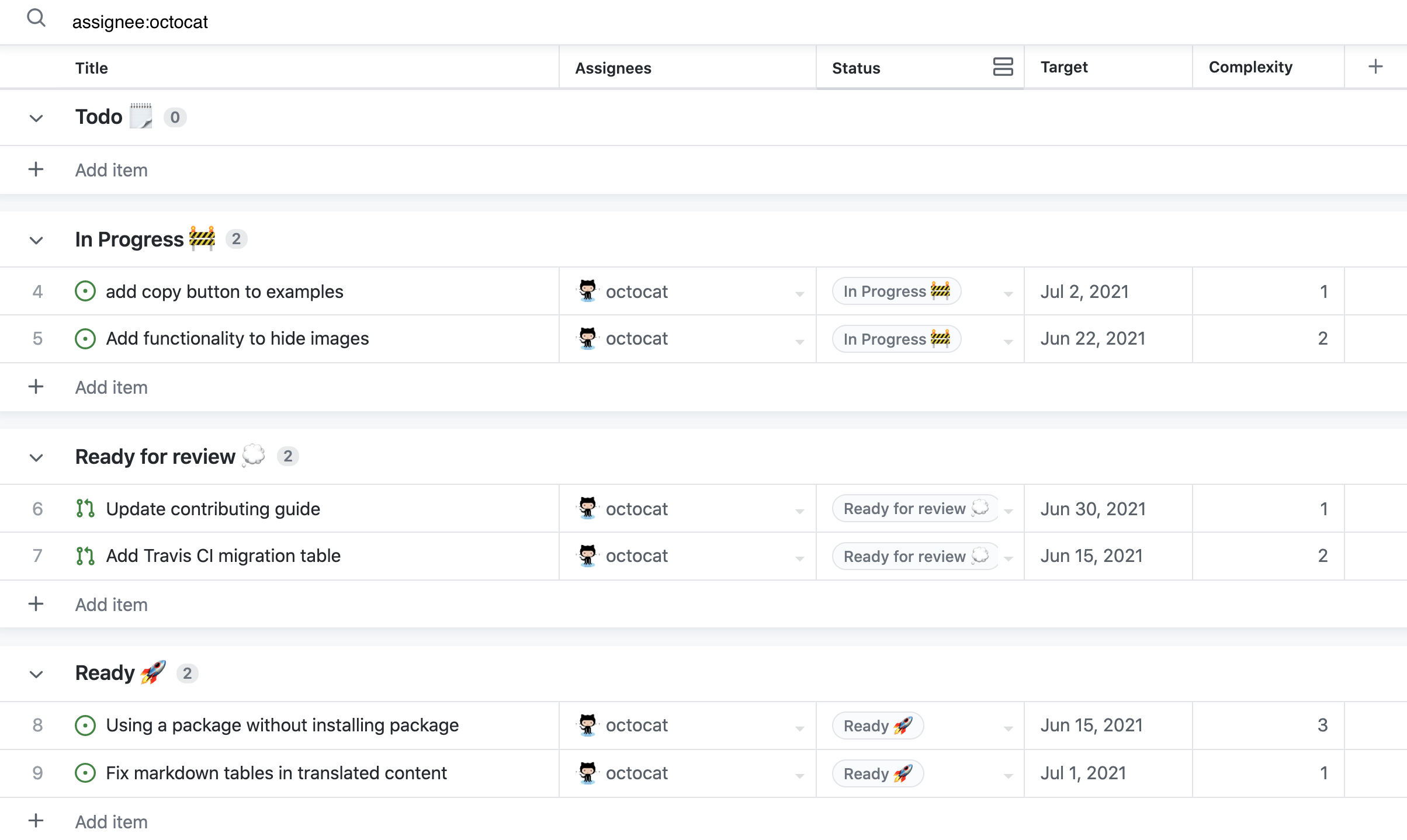
    GitHub has made generally available Projects powered by GitHub Issues, a set of tools for managing application development projects based on a spreadsheet interface.

    Mario Rodriguez, vice president of product management at GitHub, said these tools enable DevOps teams to more easily filter, sort and group issues and pull requests. That capability makes it possible to, for example, configure and track cycle velocity and current work status and create visualizations using cumulative flow diagrams.

    Over the course of the rest of this year, Rodriguez said GitHub also plans to add additional capabilities including custom triggers, conditionals and action logic along with a mobile edition of Projects powered by GitHub Issues.

    The overall goal is to provide DevOps teams with a set of project management tools that enable organizations to plan where they code, said Rodriguez. In many cases, that approach eliminates the need to deploy a separate set of project management applications, he added.

    As more organizations become dependent on software to drive digital business processes, it’s become apparent that managing all the ongoing application development projects has become a significant challenge. GitHub has been developing Projects powered by GitHub Issues to provide organizations with a set of tools that can be accessed not just by DevOps teams but also by application owners and business leaders to track the status of various projects, said Rodriguez.

    Most organizations have not reached the point where revenue growth is completely dependent on the rate at which software is developed and deployed, he noted. However, as DevOps teams more regularly engage other departments in the business, Projects powered by GitHub Issues can provide anyone with access to a spreadsheet-like application that is simple to use, said Rodriguez.

    In general, GitHub is committed to improving developer experiences at a time when organizations are competing for the best talent available, added Rodriguez. If salary and benefits are equal, the decision to work for one company versus another comes down to the quality of the application development experience, he noted.

    As the provider of the most widely-used code repository, GitHub has been extending the reach and capabilities of its platform to address a range of DevOps workflow issues. The issue that DevOps teams need to address is how to anchor those workflows to a code repository versus the continuous integration/continuous delivery (CI/CD) platforms they employ to build and deploy applications.

    Regardless of approach, there’s no doubt that DevOps teams can now construct more scalable workflows. That’s critical, because the number of concurrent application development initiatives that organizations are managing simultaneously has increased substantially in recent years. The underlying platforms used to manage those projects need to be extensible to prevent workflows from becoming overly rigid, said Rodriguez.

    It’s not clear to what degree business leaders appreciate the value of DevOps workflows, but as business processes continue to evolve, the ability to effectively compete could rest on the agility of an application development team.

  • Survey Shows Increased Reliance on DORA Metrics

    Survey Shows Increased Reliance on DORA Metrics

    A new survey found just under a quarter (23%) of respondents are now tracking all four of the DevOps metrics defined by the DevOps Research and Assessment Team (DORA), with another 17% now tracking three.

    The State of Developer Experience survey polled 129 IT professionals that play a role in software development and was conducted by LeanIX, a provider of a platform for managing the building of enterprise applications.

    Dominick Rose, vice president of product management and strategy for LeanIX, said the ability to track DORA metrics such as deployment frequency (77%), failure rate (73%), lead time for changes (63%) and mean-time-to-recovery (MTTR) (55%) are leading indicators of DevOps maturity.

    DORA metrics, which are defined and maintained by a unit of Google, are being used most frequently to drive agile planning (69%) and optimize continuous integration/continuous delivery (CI/CD) platforms (58%), the survey found.

    Overall, the survey revealed just under half of the respondents (47%) said their organization had a high level of DevOps maturity, defined as having adopted three or more DevOps working methods. Those working methods are: Being flexible to changes in customer needs; having implemented a CI/CD platform; all engineers build, ship and own their own code; teams are organized around topologies and each team is free to choose its own technology stack.

    Of course, each individual organization will determine for itself what level of DevOps depth is required. For example, not every organization would see the need for teams to be organized around topologies or be free to choose its own technology stack. In fact, Rose said the survey made it clear that larger enterprise IT organizations tended to have a lower overall level of DevOps maturity. One reason for that is many larger organizations are still employing legacy processes to build and deploy software, noted Rose.

    Most developers are also further along in terms of embracing continuous integration (CI) than IT operations teams are in adopting continuous delivery (CD), added Rose. However, as the number of applications being developed using low-code and no-code tools continues to increase, it’s only a matter of time before application delivery needs to become more automated, he said. Achieving that goal will become easier as more artificial intelligence (AI) is incorporated into IT operations, Rose added.

    Nevertheless, the survey made it clear there is still a long way to go in terms of bridging the divide between DevOps teams and the rest of the business, with only 20% of respondents indicating that they use a value stream management (VSM) platform to track engineering efficiency to tie development activities to actual business results.

    A total of 71% of respondents, however, tracked open support tickets as a measure of customer value, followed by 66% that tracked monthly users and 45% that tracked feature adoption.

    It remains to be seen how DevOps will be further promulgated throughout organizations but as more organizations realize how dependent they are on software, it then becomes a question of how fully they embrace DevOps best practices as the pace at which applications are being built and deployed continues to accelerate.

  • Trends in the API Industry

    Trends in the API Industry

    The application programming interface (API) economy is chugging along full steam ahead. The API management market alone is expected to expand 35% by 2025, supported by the sheer number of web APIs coming to market. APIs have become ubiquitous across microservices architectures, public product initiatives, SaaS platform offerings, IoT and partner-partner integrations.

    The industry has proliferated and continues to change, introducing new API use cases across all industries. This ubiquity creates a heightened need for an API program to maintain a quality developer experience and remain competitive. There are also different styles and specification options on the market, meaning designing the right API strategy is a moving target. And, amid peaking cyberattacks, developers now have a strong imperative to retain high security and reliability for these integration points.

    I recently met with the CEO at Stoplight, Steve Rodda, to discuss the above trends and other forces pushing the API industry forward in 2022. Below, we’ll dive into these trends to see how they affect API strategies and what developers need to know to stay on top of their applications.

    Non-Software Companies Embrace APIs

    As software eats the world, more companies are becoming software companies. And, an API strategy is part and parcel of this digital transformation. A big trend that Rodda recognizes is increased API strategies among traditionally non-software companies.

    For example, Rodda explained how a large beverage manufacturer evolved to adopt APIs company-wide to better use and scale their data. Standardizing the API development and design process helped avoid the “rat’s nest” of custom code, said Rodda. “APIs are no longer a byproduct; they’re a design artifact,” he said.

    APIs are no longer reserved for startup cloud-native unicorns like Stripe or Twilio, either. We now see many industries and sectors like supply chain management, health care, shipping, built environments and mainframe modernization adopting API approaches. The financial services sector is especially keen to open up APIs as open banking is being driven by regional regulation or market pressures.

    A Rise in Internal API-First Adoption

    ProgrammableWeb, the most comprehensive API directory, lists over 24,000 APIs at the time of writing. There’s no doubt that public-facing APIs are very well documented. But this is only a sliver of total API adoption.

    The 2021 Postman State of API report found that only 15% of APIs are publicly available. Most APIs are either partner-facing (27%) or private (58%), according to the report. In fact, the most popular use case for APIs is integration between internal applications, programs or systems. Along with the growth of internal API use, API-first thinking is gaining mind share. Postman defined API-first as “defining and designing APIs and underlying schema before developing dependent APIs, applications or integrations.”

    Internal use cases are less frequently discussed but are pervasive for large enterprises, said Rodda. Whereas in the past, development teams paid less attention to style guides and documentation for internal services, he now notices that these practices are shifting. The zero-trust approach is influencing teams to take more care in defining and standardizing internal APIs as if they’re external-facing. This also eases consumption. “You need to take care of the folks next door to you and treat them with just as much respect,” said Rodda.

    The Growing Need for Robust API Security

    APIs have a security problem. Many don’t handle authorization correctly and expose far too much information. A hacker can often escalate their privileges or simply swap a different user ID into an API call to return loads of sensitive data or even make changes to the data. Many HTTP API endpoints that are intended to be private really aren’t. As a result, OWASP lists broken object-level authorization as a top API vulnerability.

    In recent years, we’ve seen what can happen when APIs are improperly configured. For example, a Facebook API lacked an authorization check for unlisted posts, allowing a client to post on any user’s behalf. A similar authorization hiccup occurred with Peleton that allowed hackers to alter any user’s back-end account. APIs constantly work with sensitive data and must carefully navigate the various data privacy regulations around the globe.

    According to Rodda, a design-first mindset is vital to ward off security woes early in the API life cycle. This means deciding on a structure with a common design and choosing appropriate style guides well before coding. “Good documentation, good design guides and good discipline around building something with a cross-functional nature will increase security and scalability,” said Rodda. When you know what’s going on, you have more control and things are inherently more secure, he added.

    OpenAPI Carries The Day

    The OpenAPI specification, formerly known as Swagger, is an industry-standard specification for describing REST web APIs. OpenAPI can help direct your API’s design and development. OpenAPI tooling can also help generate useful documentation, sandboxes and SDKs, making it a valuable specification for creating interoperability between partners.

    “OpenAPI is going to carry the day for a while,” said Rodda. The OpenAPI Initiative has gotten the support of big names in the tech industry. Yet, Rodda estimated only 40% of companies have adopted OpenAPI in production. Rodda said he believes tooling will make it easier for more groups to maintain OpenAPI adoption across their organization, reducing the redundancy of writing “yet another YAML file.”

    REST is still by far the most-adopted API design style—59.7% of developers use REST for production APIs, according to RapidAPI’s State of APIs Developer Survey 2021 report. Yet, asynchronous event-driven communication protocols are gaining traction, and those protocols tend to prefer alternative description formats like AsyncAPI. Websockets, gRPC and GraphQL are other options consistently used by a significant percentage of API developers.

    Developer Experience Matches User Experience

    Another major trend is the rising importance of developer experience (DX). DX is akin to user experience but is all about increasing usability for developer consumers and improving their ongoing relationship with software-as-a-service. “DX is as big a deal as UI/UX these days, if not bigger,” explained Rodda. “Developer experience directly translates into efficiency and reusability.”

    In the context of APIs, increased consideration of developer experience means reducing the onboarding effort and maintaining more reliable connections. For example, users will likely look to other solutions if a third-party API has poor uptime and routinely introduces a breaking change. Better DX likely will also equate to increased abstraction layers and more code generation. Rodda pointed to GitHub’s CoPilot as an example of the use of AI and automation in the developer-of-tomorrow’s workflow.

    “We’ve evolved as a developer society,” said Rodda. Just as consumers expect high-quality real-time applications, developers expect highly performant APIs. To help get there, one increasingly popular philosophy is the API-as-a-product perspective. “If you treat it all as a product, you’re building it with the same standards and quality that you would share externally,” he explains. “Then, there’s no attention to detail that goes missing.”

    Final Thoughts: The Design-First Mentality

    More industries are utilizing APIs than ever before, and APIs are seeping into traditionally non-technical companies to aid their internal integration efforts. But data privacy is a pressing concern when opening up data, requiring careful measures. Taking a design-first approach with standards like OpenAPI could help organizations stay alert and ensure consistency across their portfolio of services.

    There are other trends at work in the API economy, too. For example, one interesting Web3 initiative is an attempt to combine the world of blockchain and APIs by enabling on-chain smart contracts to interact with traditional HTTP APIs. There is also a lot of development activity around GraphQL, which could act as a command line for consuming multiple APIs, thus making integration easier.

    Rodda said the biggest takeaway is that APIs should no longer be treated as byproducts. He compared it to a construction project: When building a house, you must start with a blueprint before installing the foundation, wall, roof or electrical system. Similarly, APIs require solid forethought to ensure stability and scalability.

  • Best of 2021 – Best Practices for Application Performance Testing

    As we close out 2021, we at devopsy.kinsta.cloud wanted to highlight the most popular articles of the year. Following is the eighteenth in our series of the Best of 2021.

    When done properly, software application performance testing determines if a system meets certain acceptable criteria for both responsiveness and robustness. Before you jump in to testing, though, there are some best practices to remember.

    Start by defining test plans that include load testing, stress testing, endurance testing, availability testing, configuration testing and isolation testing. Align these plans with precise metrics in terms of goals, acceptable measurements, thresholds and a plan to overcome performance issues for the best results. Make sure you can triage performance issues in your testing environment; you should analyze issues impacting application performance by examining system functionality under load, not just the indicators of poor performance on the load testing tool side. Leveraging application performance management (APM) tools, which simulate production environments, provide much deeper insights into application functionality, as well as into overall performance under stress or load.

    10 Performance Testing Best Practices

    1. Test Early and Often

    Performance testing is often an afterthought, performed in haste late in the development cycle, or only in response to user complaints. Instead, you should be proactive. Take an agile approach that uses iterative testing throughout the entire development life cycle. Specifically, provide the ability to run performance “unit” testing as part of the development process – and then repeat the same tests on a larger scale in later stages of application readiness. Use performance testing tools as part of an automated pass/fail pipeline, where code that passes moves through the pipeline and code that fails is returned to a developer.

    2. Consider Users, Not Just Servers

    Performance tests often focus solely on the performance of servers and clusters running software. Don’t forget that people use software, and performance tests also should measure the human element. For instance, measuring the performance of clustered servers may return satisfactory results, but users on a single, troubled server may experience an unsatisfactory result. Tests should take user experience into account, and user interface timing should also be captured along with server metrics.

    3. Understand Performance Test Definitions

    It’s crucial to have a common definition for the types of performance tests that should be executed against your applications, such as:

    • Single User Tests. Testing with one active user yields the best possible performance, and response times can be used for baseline measurements.
    • Load Tests. Understand the behavior of the system under average load, including the expected number of concurrent users performing a specific number of transactions within an average hour.
    • Peak Load Tests. Understand system behavior under the heaviest anticipated usage for concurrent number of users and transaction rates.
    • Endurance (Soak) Tests. Determine the longevity of components, and whether the system can sustain average to peak load over a predefined duration. Monitor memory utilization to detect potential leaks.
    • Stress Tests. Understand the upper limits of capacity within the system by purposely pushing it to its breaking point.
    • High Availability Tests. Validate how the system behaves during a failure condition while under load. There are many operational use cases that should be included, such as seamless failover of network equipment or rolling server restarts.

    5. Build a Complete Performance Model

    Measuring your application’s performance includes understanding your system’s capacity. This includes planning what the steady state will be in terms of concurrent users, simultaneous requests, average user sessions and server utilization during peak periods of the day. Additionally, you should define performance goals, such as maximum response times, system scalability, user satisfaction scores, acceptable performance metrics and maximum capacity for all of these metrics.

    6. Define Baselines for Important System Functions

    In most cases, QA systems performance don’t match production systems performance. Having baseline performance measurements for each system can give you reasonable goals for each testing environment. These baselines provide an important starting point for response time goals, especially if there are no previous metrics, without having to guess or base them on the performance of other applications.

    7. Perform Modular and System Performance Tests

    Modern applications are incorporate many individual, complex systems, including databases, application servers, web services, legacy systems and so on. All of these systems need to be performance tested individually and together. This helps expose weaknesses, highlight interdependencies and understand which systems you should isolate for further performance tuning.

    8. Measure Averages, but Include Outliers

    When testing performance, you need to know average response time, but this measurement can be misleading by itself. Be sure to include other metrics, such as 90th percentile or standard deviation, to get a better view of system performance.

    KPIs can be measured by looking at average and standard deviations. For example, set a performance goal for the average response time plus one standard deviation beyond it (see Figure 1). In many systems, this improved measurement affects the pass/fail criteria of the test, matching the actual user experience more accurately. Transactions with a high standard deviation can be tuned to reduce system response time variability and improve overall user experience.

    application

    9. Consistently Report and Analyze the Results

    Performance test design and execution are important, but test reports are, too. Reports communicate the results of your application’s behavior to everyone in your organization, especially project owners and developers. Analyzing and reporting results consistently also helps to determine future updates and fixes. Remember to consider your audience and tailor reports to each audience. Reports for developers should differ from reports sent to project owners, managers, corporate executives and even customers, if applicable.

    10. Triage Performance Issues

    Providing the results of performance tests is fine, but those results, especially when they demonstrate failure, are not enough. The next step should be to triage the code/application and system performance, and involve all parties: developers, testers and operations personnel involved. Application Monitoring Tools can provide clarity regarding the effectiveness of triage.

    Additionally, remember to avoid throwing your software “over the wall” to a separate testing organization, and ensure your QA platforms match production as closely as possible. As with any profession, your efforts are only as good as the tools you use. Be sure to include a mix of manual and automated testing across all systems.


  • Global Next-Generation Software Engineering Conference

    Global Next-Generation Software Engineering Conference

    GNGSEC sounds the clarion call for software engineering change!

    The pandemic made 2020 the year where we see some of this decade’s most exciting digital technologies become commercially viable, and others finally go mainstream. Software is the core of digital transformation. In the digital era, the methods by which we produce software also need to be digitized. In the software engineering field, the adoption of AI, big data, cloud computing and cloud-native are accelerating the digitization for businesses.

    Global Next Generation Software Engineering Conference (GNSEC) focuses on a full range of software engineering technologies and is committed to defining the standard of the next generation of software engineering. The event will gather 1000+ Attendees and it will be live with virtual experience where senior software engineers, architects, and team leads connect, learn, and grow. Experts and developers from various backgrounds will be sharing their cutting-edge technical practical experience and cases.

    The majority of the attendees of this event will be from the Southeast Asia region (Singapore, Thailand, Indonesia, Philippines, Malaysia, Vietnam), India and China. Due to the current travel restriction, GNSEC 2021 will be virtually presented via Airmeet. It will offer attendees with virtual exhibitions, virtual conference, peer networking session, business matching session, virtual discussion group.

    Global Next Generation Software Engineering Conference (GNSEC) is co-presented by DAOPS Foundation and Escom Events. The event is part of digital innovation series events that features AI, DevOps, Cybersecurity and digital transformation. Previously the event was presented in Shanghai, Shenzhen, Beijing, California and Hong Kong.

    There will be more than 30 speakers from DBS Bank, ING, IBM, Daimler, Tencent, JD.COM, DevOps Institute, Gitlab, New Relic, SUSE and more to share ideas, experiences and case studies in software engineering.

    Register here to join​​ the event with us to rebuild software engineering.