Tag: access management

  • What GitHub’s 2FA Mandate Means for Devs Everywhere

    What GitHub’s 2FA Mandate Means for Devs Everywhere

    Multifactor authentication (MFA) is becoming increasingly standard within software development organizations, with GitHub recently announcing that two-factor authentication (2FA) will be mandatory for all code contributors by the end of 2023.

    This is a smart move. In recent years, bad actors have frequently initiated attacks by accessing source code through the use of stolen developer credentials. Once inside, they quickly penetrate organizations’ entire code repositories and elevate access to company-wide systems. This was the case with the 2021 SolarWinds compromise that ultimately jeopardized federal agencies, corporations and governmental institutions.

    But for some developers with lofty goals and concentrated timelines, MFA is an extra step that has the potential to slow them down. As organizations continue to implement MFA and other foundational security controls, they may face pushback—but they shouldn’t be deterred. MFA is a critical attack barrier that improves individual protections and can contribute to tightened source code security. 

    If organizations approach implementation thoughtfully, they can lay the foundation for subsequent security controls—and build credibility among their users and within the larger development community.

    The Risks of Lax Individual Developer Security

    Organizations’ source code typically powers a host of upstream programs and products, so it’s valuable for bad actors to launch attacks by infiltrating their repositories. Attackers can also hide malware in source code that can be escalated to breach entire systems and third-party organizations. This risk is heightened by the fact that many companies rely solely on antivirus scans and other surface-level monitoring tools to flag source code vulnerabilities instead of combining them with dynamic testing and penetration testing.

    Attackers typically gain access to source code through stolen developer credentials. While single authentication systems—i.e., usernames and passwords—are the easiest to compromise, MFA creates an additional barrier that’s more difficult for attackers to overcome. While this tool does create additional friction in the development process, it’s worth the extra step. Even for hobbyist or open source developers, compromised source code can cause larger repercussions that put other developers at risk. When it comes to cyberattacks, it’s best to assume any entity is a potential target. 

    Beyond individual security, MFA and other foundational controls are critical to safeguarding organizational reputations and adhering to legal privacy standards. By 2023, 65% of the global population will have personal data covered by privacy regulations. Security measures that protect authentication credentials will become even more important in the coming years, especially for organizations producing source code that powers consumer-facing products and programs. With an intentional approach to implementation, MFA can help mitigate potential source code attacks—and form the basis of comprehensive security programs.

    Four Steps to Successful MFA Implementation 

    The benefits of MFA far outweigh the cost of user friction and developer pushback. Get the most out of this authentication technology by following these four steps to implementation.  

    1. Start small and build credibility. Approach implementation gradually to help developers understand MFA’s value. Successful implementation will give your leadership and security teams credibility for future security initiatives, and it will improve processes for security integration into your larger software development life cycle.  
    2. Examine your security program’s value chain. Implementing foundational security controls like MFA provides an opportunity to examine your security program’s entire value chain. Take time to look for potential vulnerabilities beyond your source code repository and flag areas within your development lifecycle that may create risk.
    3. Layer subsequent security controls. With MFA under your belt, build up your security program with other tools and controls—like dynamic and penetration testing, source code scanning, software composition analysis (SCA) and vulnerability management. The more security tools you layer, the harder you make it for attackers to succeed. 
    4. Plan for continuous optimization. Attackers will devise more ways to thwart MFA as more organizations mandate it. For example, the popularity of using SMS as a second form of authentication declined when attackers developed methods to gain control of mobile phones. To keep up with evolving attacker behaviors, continuously optimize your MFA technology and subsequent security controls. 

    MFA Will Become the Industry Standard

    As bad actors evolve attack methods and privacy regulations strengthen, MFA will undoubtedly become an industry standard for protecting source code repositories. 

    To stay ahead of the curve, focus on the concept of MFA throughout your network by ensuring it protects every system entry point. This extra step is an easy price to pay for improved source code protection—and ultimately safeguards every asset, product and program your code powers. Thoughtfully implementing MFA can lay the foundation for comprehensive source code protection.

  • Gravitational Becomes Teleport to Streamline Access Management

    Gravitational Becomes Teleport to Streamline Access Management

    Gravitational today announced it has changed its name to Teleport and launched the Teleport Unified Access Plane, an open source security gateway that comes in the form of a single binary that acts as a proxy for remotely accessing Linux servers and Kubernetes clusters.

    Teleport Unified Access Plane (UAP) for managing those gateways can be either deployed by an IT team or accessed via a cloud service managed by Teleport.

    Offerings included in Teleport UAP are Teleport Server Access, Teleport Kubernetes Access and Teleport Application Access, which combined enable IT organizations to lock down access to an IT environment.

    Company CEO Ev Kontsevoy said Teleport UAP gives engineers via a single login access to just the IT resources they have permission to access. That approach reduces the myriad credentials that IT organizations currently need to manage across multiple networks.

    Teleport automatically discovers all the resources in an IT environment along with the protocols needed to access them. It provides a unified audit log in a JSON format that enables IT teams to track what resources are being accessed when and by whom.

    Access control is becoming a bigger issue because the overall IT environment is becoming more complex as the infrastructure stack required to run applications grows. Teleport provides a way to streamline access management across servers, clusters and databases.

    That issue is also becoming a bigger challenge with IT personnel now working from home to help combat the spread of the COVID-19 pandemic, added Kontsevoy.

    That fine-grained approach to access will ultimately eliminate the need to rely on virtual private networks (VPNs) at a time when the network perimeter continues to dissolve. In effect, Teleport enables IT teams to move toward a more identity-centric approach to unifying the management of access, he said.

    In general, he noted, Teleport enables organizations to manage security as code rather than having to rely on separate overlays. As such, they can shift responsibility further left toward DevOps teams.

    It may take some time for IT teams to aggregate all the access control protocols they currently employ under a single proxy. However, Kontevoy said, the massive amount of time and effort spent managing access control today will drive organizations that have embraced best DevOps practices to look for ways to automate what today is a very manual process.

    The challenge, of course, is finding the time to achieve that goal. Teleport is betting a single binary in combination with a control plane accessed primarily as a managed service will make it too simple for DevOps teams to ignore. Regardless of approach, however, it’s clear there needs to be a better way to manage access within the sea of servers, databases and applications that now make up the typical IT environment.

  • build.security Leverages OPA to Shift App Authorization Left

    build.security Leverages OPA to Shift App Authorization Left

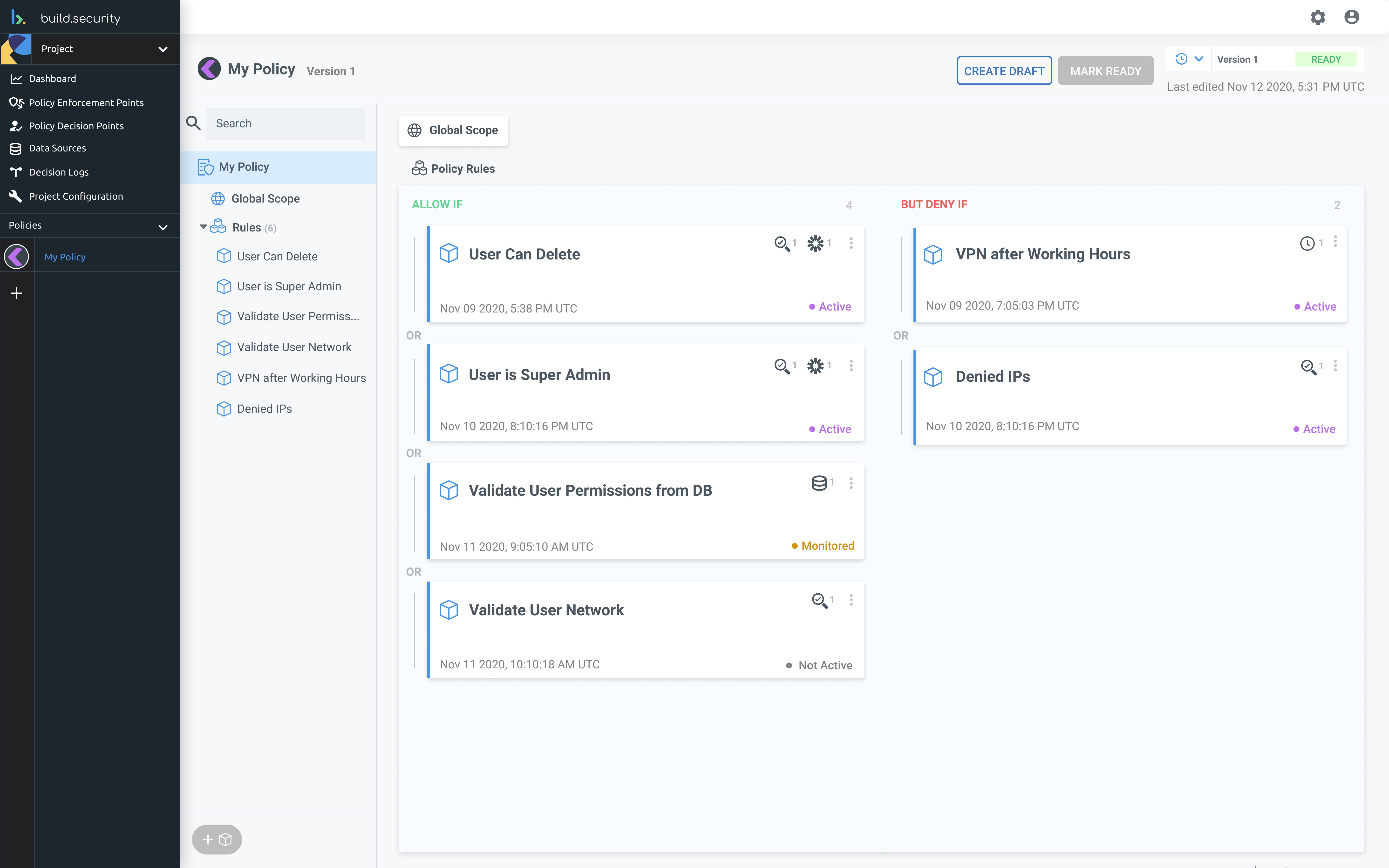
    build.security today announced it has raised $6 million to launch a platform that promises to make it simpler for developers to centralize the management of authorization controls across multiple applications.

    The goal is to enable DevOps teams to shift control over application authorization further left to advance adoption of best DevSecOps practices using a platform based on the open source Open Policy Agent (OPA) software, which enables developers to create policies that manage authorization as code.

    Company CEO Amit Kanfer said every application deployed today requires its own unique set of authorization requirements based on roles, permission models and complex hierarchies along with relevant identity, resource and context attributes. Streamlining that process requires a platform that provides a uniform approach to managing that process that is more flexible than existing approaches based on either role-based access controls (RBAC) or attribute-based access controls, said Kanfer.

    Otherwise, developers are required to build an array of complex authorization models, policy engines and enforcement points themselves to manage identities, resources and attributes. Those tasks are not only time-consuming but also highly prone to errors that leave applications vulnerable to cyberattacks. he said.

    OPA makes it easier for developers to implement fine-grained access controls using a drag-and-drop interface that decouples authorization policy from code. That approach makes it easier to declaratively make changes and updates to applications over time as more end users are added or removed, Kanfer said.

    Designed to be deployed on-premises or in the cloud, the authorization platform also provides integrations with identity providers, databases and other services that expose application programming interfaces (APIs). It will also automatically generate policy suggestions based on the runtime interactions between services.

    Historically, authorization to access applications has been poorly managed because it’s been difficult to manage manually. Business leaders are supposed to inform IT organizations when to add and delete end users. In practice, they often forget, resulting in end users still having access to applications long after they have left the company. Even when IT is informed that an end user has left a company, it can take a day for the end user to be deleted from all the applications they have been granted access over the span of their career at that organization. Shifting control over authorization left toward developers creates an opportunity to automate a process that is often haphazard at best.

    It also should allow organizations to reduce their dependency on Microsoft Active Directory (AD), which many organizations have employed to manage access to applications and files in Windows environments in favor of a centralized approach that can be more broadly applied to multiple applications.

    Authorization management may not always be at the top of the IT management agenda. However, at a time when cybercriminals are stealing credentials with more abandon than ever, the time may have finally come for IT organizations to reconsider how those credentials are managed and updated. After all, based on the number of data breaches involving stolen credentials, current approaches are clearly not working.

  • strongDM Extends Access Management as Code Efforts

    strongDM Extends Access Management as Code Efforts

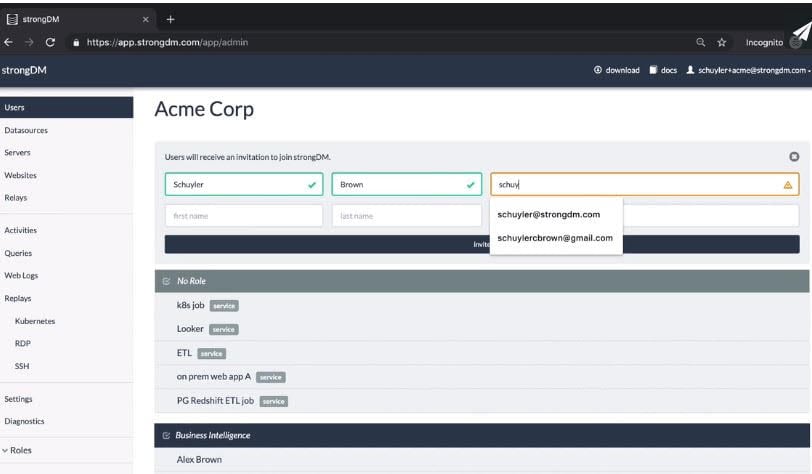
    strongDM today announced it has added an application programming interface (API) and software development kits for Go, Java, Python, Ruby and other programming languages for involving the single sign-on (SSO) capabilities of its infrastructure access management platform, in addition to adding support for command-line interfaces (CLIs) exposed by cloud service providers.

    At the same time, strongDM has integrated its namesake platform with third-party secrets management tools such as Vault from HashiCorp as well as platforms such as PagerDuty’s incident management platform and Slack messaging tools.

    The access management platform can now also support any internal web applications and database platforms including DB2i, CitusDB, Oracle 11g, 12c, and 19c, Sybase ASE and IQ.

    Finally, the company has made enhancements to existing protocols including Mongo Atlas, SSH certificate-based authentication and SSH port forwarding, and added support for Windows remote desktop protocol (RDP) network-level authentication (NLA) and integration with other SSO tools such as Auth0 and VMware Identity One.

    Company CEO Elizabeth Zalman said strongDM, unlike other SSOs, is designed from the ground up to be incorporated within a developer’s workflow. The goal is to enable developers to manage access as code in the same way they manage infrastructure as code, she said.

    In general, access management is usually the last stage of automation to be addressed by DevOps teams. However, with most DevOps teams now working from home to help combat the spread of the COVID-19 pandemic, there has been a sharp rise in the number of organizations seeking to automate access management as an alternative to managing virtual private networking (VPN) software, said Zalman.

    Historically, many IT organizations have relied on Microsoft Active Directory (AD) or the Lightweight Directory Access Protocol (LDAP) to manage access. As an alternative, strongDM has been making a case for its platform since 2015. The company recently raised an additional $17 million in funding and claims to have more than 100 customers using its platform in production environments, including Peloton, SoFi and Betterment.

    It’s unclear whether DevOps teams are extending their existing workflows to include access management. However, as DevOps teams grow weary of using custom scripts to extend those workflows, Zalman said eventually they’ll look for a more consistent approach to automating access management. A major factor in that decision is the fact that most employees won’t be coming back to the office in the same numbers they did prior to the pandemic, even after a vaccine is discovered and distributed.

    At the same time, more DevOps teams are moving to embrace best DevSecOps practices, which inevitably will encompass access management. In fact, as part of that transition, it’s probable most DevOps teams will conclude the way access is currently managed is simply too antiquated to continue.

  • Using PAM to Support the ‘Sec’ in DevSecOps

    Using PAM to Support the ‘Sec’ in DevSecOps

    Despite its reputation as slow and complex, PAM can be included in the DevOps pipeline effectively

    The introduction of DevOps practices has led to a revolution in software development. However, as companies adopt these new technologies, tools and methodologies, incorporating privileged access management (PAM) becomes increasingly complex. Nonetheless, corporate policies, industry standards and government regulations mandate that security and operations teams must manage and audit permissions and credentials for a growing number of user and service accounts. As a best practice, a least privilege access control model is a must.

    Compounding the issue is that traditional methods of securing developer environments involve manual interventions and restrictive controls that significantly hamper the agility of development and operations teams. Because of that, DevOps has eschewed PAM as too slow and complex to deploy and manage.

    Adding to the complexity, applications, virtual machines, services and workloads running in the cloud all have identities. In fact, non-human identities nowadays represent most “users” in many organizations. This proliferation of non-human identities exacerbates the difficulty of achieving least privilege.

    Like human identities, access for these identities must be strictly monitored and controlled so that unauthorized, unverified access is automatically denied. PAM solutions that support modern application-to-application password management (AAPM) approaches can achieve this. DevOps owners can take control of privileged access without impacting agility, leaving them to focus on what they do best while finally putting the “Sec” into DevSecOps.

    AAPM eliminates the need to store credentials in clear text in the application. Instead, developers introduce API calls in their code to access a vault programmatically and to check out the password. The password is stored in application memory and not written to disk. Once the application terminates, the memory is deallocated and the password is gone, leaving nothing for a threat actor to find. Using this approach, the vault secures the credentials and controls access to them. The vault can also automatically rotate passwords, making them more challenging to crack. Since dependent applications now make API calls to fetch them, DevOps teams are no longer concerned with updating their code whenever the passwords change.

    PAM and DevOps: AAPM in Action

    This is a fundamental approach to AAPM. Other options exist, however, distinguished by increasing levels of cyber-risk mitigation and operational efficiencies:

    Level 1: AAPM to Retrieve a Vaulted ID and Password

    As described, this is the traditional approach to PAM. While vaulting the passwords provides an extra layer of security by removing them from code, passwords remain the weakest form of authentication. Even with automatic password rotation, they persist until the next scheduled rotation (often days or weeks), giving an attacker ample time to attempt to crack. To check them out of the vault, each workload needs a service account. This can quickly amount to hundreds, if not thousands, of additional accounts, increasing administrative overhead and increasing the attack surface.

    Level 2: AAPM to Retrieve a Vaulted ID and SSH Key

    Human administrators and workloads present an added risk to organizations through the widespread use of shared privileged accounts for authentication. Secure Shell (SSH) keys are frequently implemented as a safer alternative, allowing the workload to check out a vaulted SSH key instead of checking out a vaulted password.

    The use of SSH keys includes similar risks and benefits to vaulted passwords. They’re also static, relying on a scheduled rotation. They, too, can be shared among developers and between workloads. Developers and IT admins are often given enough rights to create SSH keys at will without any oversight or central management. This makes them difficult to track and know how they’re being used, by whom and for what. If they’re lost or if a developer leaves, system and service availability can be impacted.

    On the positive side, however, the SSH protocol employs public-key cryptography. The SSH keys (public and private) are longer and more complex than any password. Unlike passwords, they’re not sent over the wire. All this makes them more difficult to compromise and, thus, more secure.

    That said, each workload still needs a service account to authenticate to the vault and check out an SSH key, each of which is a potential vector of attack.

    Level 3: AAPM to Retrieve Ephemeral Tokens

    Ephemeral tokens (e.g., OAuth2) can be created automatically by the vault on-demand and offer a modern form of secure access that is temporary, time-based and expires automatically. This releases DevOps from dealing with installation, configuration and rotation issues while contributing to a best-practice “just-in-time” access control approach. As with the earlier methods, however, each workload still needs a service account to authenticate to the vault to obtain a token.

    Although such tokens can persist, they’re generally short-lived for the duration of a session or transaction, greatly reducing the window of opportunity for a threat actor. 

    Level 4: AAPM Using Delegated Machine Credentials and an Ephemeral Token

    The prior methods are all characterized by a per-workload service account requirement. With a Delegated Machine Credential approach, a service account is only required per-machine.

    When the machine is enrolled in the PAM service, it establishes a mutual trust relationship. The PAM service creates a unique Delegated Machine Credential, machine identity and service account for that machine. Local workloads can then piggy-back off that machine identity, leveraging the delegated machine credential to authenticate to the vault, exchanging it for an OAUth2 bearer token it can use for subsequent API calls (e.g., to check out a password or obtain a token.) Since not all workloads are equal, OAuth scoping can limit which APIs each workload is allowed to access. Thus, by using a Delegated Machine Credential, the number of service accounts is reduced to practically zero, closing thousands of potential vulnerabilities.

    This approach also addresses the lack of desire to introduce PAM into DevOps, as I highlighted right at the start. This method can be fully automated and inserted naturally into the CI/CD pipeline.

    All these approaches give organizations more choice, based on their existing PAM maturity, risk tolerance, and compliance pressures. They ultimately allow DevOps teams to automate, simplify and centralize PAM security management while improving the organization’s security posture, without sacrificing agility.