Category: Social – X

  • How DevOps Teams Can Unlock Cloud Savings and Improve DevEx

    How DevOps Teams Can Unlock Cloud Savings and Improve DevEx

    Can DevOps engineers unlock cloud cost savings for their organization that are incremental to what cost optimization tools offer (and improve the developer experience in the process)? Absolutely. Allow me to illustrate how.

    Reserve instance buying optimization and auto-stopping are proven tactics to reduce waste, but are those the only forms of waste that exist in your cloud budget? Of course not.

    Think about all the times environments have been brought up and then stayed up longer than required. Consider all of the times a commit changed the way data is stored, which spiked the cost to operate. Or how about the times when a commit changed how memory was used, which resulted in unexpected autoscaling?

    Collaborative Cost Management

    So the question becomes, what is the most efficient way to identify and root out additional savings while also balancing governance and agility? Bottom-up, collaborative cost management may offer a solution.

    A bottom-up approach to cost management involves pushing knowledge and functionality to the edge of the application and data engineering teams that own and operate code every day. This does not mean ceding centralized cost control to developers but rather arming them with timely, actionable insights inside their everyday workflow and, where appropriate, enabling action on a self-serve basis.

    How does this work in practice? It starts by enabling engineering teams to see the costs of the various services and environments they own on a timely basis. This helps teams understand when spikes occur and provides a path they can follow to understand why the spike occurred.

    That path can involve bringing different pieces of information together for engineering teams. They’ll want to see the costs of the individual resources that power their service or environment during the selected timeframe to see what spiked and maybe even drill down further to see the cost drivers of that individual resource. They’ll likely want to see deployments and commits, at a minimum, and maybe even explore observability data as well during this timeframe.

    Once they’ve identified a root cause, to the extent it involves needing to change a configuration setting of a resource, teams may want to understand a resource’s dependents, like other resources that are linked to it as well as any other environments and services that depend on it to size up the blast radius of a potential change. From there, they may wish to view config settings for the resource.

    Collaborative Discussion

    Finally, you want to give teams the ability to take certain actions on their own and, in other cases, foster a collaborative discussion between engineering and DevOps. You can accomplish the former via self-service actions, which are simple no-code workflows in which a developer can see if the DevOps team has allowed an action to be seen by a specific team for a resource via a role-based access control (RBAC) model. These workflows connect to your existing infrastructure-as-code (IaC) or CI/CD tools to orchestrate the desired change, leveraging golden paths defined by DevOps. This approach alleviates developers’ cognitive load and TicketOps for the DevOps team. For various changes that require coordination with DevOps, your engineering teams can have a collaborative discussion on a timely basis thanks to the fresh, actionable information you’ve made available to them.

    So what does it take to actually implement this vision? It’s easier than you might realize.

    Chances are, your existing cost optimization tool cannot provide cost visibility at the level of granularity and freshness developers need – daily cost insights at the service (or data pipeline, ETL job, etc.) level. That’s okay, though. Collaborative cost management is an incremental tactic that can still leverage some of the insights in these tools.

    The easiest way to facilitate this competency across your enterprise is via an internal developer portal. Internal developer portals are living sociotechnical knowledge maps that connect various data from your tools, clouds and teams to your services and the teams that own them. They are the perfect conduit to slice cloud cost data at the service level and put it in front of application and data engineers in their everyday workflow.

    Backstage, an open source framework to build a developer portal, offers a cloud cost plugin, though it involves a time commitment to set up, and the information it makes available to your developers may be limiting in the context of this scenario. For instance, your team may be unable to see per-resource costs, individual resource cost drivers, blast radius information and config settings. You must also expend effort wiring actions to support resource changes.

    You could also try building a BI dashboard for your team to accomplish this. This would require ingesting daily cost feeds from your cloud and then allocating the cost of each resource to each environment and to each service leveraging proprietary resource<->environment<->service mappings you would build and maintain as your system evolves. You would also need to build scripts and leverage IaC and CI/CD tooling and teach your engineers how to discover, configure and execute these actions.

    However you choose to get to this destination, collaborative cost management is a powerful emerging competency that can lead to meaningful savings and improve the developer experience by empowering your teams with the knowledge and functionality they need to manage costs on a proactive and, where appropriate, self-service basis.

  • 10 Ways to Increase Productivity by Improving Your Developer Experience

    10 Ways to Increase Productivity by Improving Your Developer Experience

    Developer experience is inextricably linked to productivity. The ease with which developers can work on their code and product greatly impacts the speed and quality of software development.

    But this goes deeper than just giving them the right tools. It’s about setting up an environment where developers can thrive, an environment that prioritizes clear communication, continuous learning and collaboration among team members. It’s about cultivating a space where creativity and innovation are encouraged and where developers feel valued and motivated to do their best work, both individually and creatively as a team.

    Let’s look at 10 ways your enterprise organization can improve the developer team experience and, in turn, increase their productivity and ability to support the business objectives.

    1. Choose the Right Languages and Frameworks

    Selecting languages and frameworks that are well-suited to the project requirements and the team’s proficiency can significantly reduce development friction. It streamlines the coding, testing and debugging processes, allowing developers to focus on crafting high-quality solutions rather than grappling with syntactical nuances and unnecessary complexity. Additionally, adopting languages and frameworks with abundant resources and documentation helps to swiftly resolve issues and innovate effectively, which subsequently leads to enhanced productivity and job satisfaction among the development team.

    Picking the right language or framework really is a matter of aligning with the project’s requirements rather than choosing what is cool right now or what worked for the project a few years ago. Common languages like JavaScript, Python and Ruby are renowned for their flexibility and extensive community support, which collectively contribute to an enriched developer experience. Languages like Go, Rust and C++ are more efficient and robust but come with trade-offs around ease of use.

    2. Provide Access to Quality Developer Tools

    Developer tools that put developer experience first are a critical part of improving the overall experience for your developers.

    • Good IDEs, such as IntelliJ IDEA or Visual Studio Code, provide an enriched coding environment with features like intelligent code completion, syntax highlighting and integrated debugging.
    • Linters like ESLint or Trunk automate the process of identifying and fixing code inconsistencies and errors, ensuring code quality and reducing the likelihood of bugs.
    • Security tools, such as Snyk, are paramount for identifying vulnerabilities early in the development cycle, allowing teams to address security concerns proactively and reduce the risk of breaches. These tools aid in maintaining a secure and robust codebase, fostering confidence among developers. Other security tools, such as API gateways like Emissary-Ingress or Apigee can also help beef up security measures.
    • Kubernetes tools such as Telepresence streamline the local development process with containerization and allow developers to share their development work more efficiently with their colleagues for faster feedback loops.

    Incorporating such tools seamlessly into the development workflow enhances the development pace and the quality of the output, leading to a more gratifying and productive developer experience.

    3. Document Everything

    Proper documentation serves as a roadmap to the codebase, allowing developers to understand the software architecture, functionalities, and interaction between different components swiftly and accurately. It minimizes the cognitive load on developers by providing clear and concise information, reducing the time spent on deciphering the codebase.

    Good documentation is especially pivotal when onboarding new team members, as it accelerates their acclimatization to the codebase and workflows. This means they can contribute more effectively and quicker. It also aids in the clarification of complex concepts, system behaviors, and business logic, preventing misinterpretations and ambiguities.

    Keeping the documentation current and aligned with the code changes is equally vital. It ensures the relevance and reliability of the information provided, aiding developers in making informed and sound decisions throughout the development lifecycle. This synchronization between documentation and codebase evolution fosters a more coherent and efficient development environment, directly impacting the overall productivity of the development team.

    4. Reduce Cognitive Load

    Reducing the cognitive load on developers is paramount for enhancing productivity. One practical approach is to minimize the number of meetings, allowing developers more uninterrupted time to focus on coding and problem-solving. Unnecessary or inefficient meetings can fragment developers’ concentration, leading to decreased productivity and extended development cycles due to the time required to regain focus.

    Establish clear meeting objectives, agendas and ensure that only essential personnel are involved to make the necessary meetings more productive and less disruptive. It’s also crucial to foster an environment where asynchronous communication is encouraged, utilizing tools like Slack to allow developers to address queries and discussions at their convenience without impeding their workflow.

    5. Encourage AI Use

    AI tools and technologies can assist developers in various aspects of the software development lifecycle when used responsibly, such as code generation, bug fixing, and performance optimization, allowing for more efficient and effective development processes.

    For instance, AI-powered code completion tools, like GitHub Copilot, enable developers to write code faster and with fewer errors by providing intelligent suggestions, while AI-driven testing tools like Codacy can automate and optimize the testing process, identifying issues and vulnerabilities that might be overlooked manually. This leads to higher code quality and reliability.

    6. Foster the Freedom to Innovate

    Giving developers the freedom to explore and experiment with new ideas is fundamental in cultivating a positive developer experience. This autonomy stimulates creativity, fosters a sense of ownership and encourages developers to seek better solutions to complex problems, contributing to the continuous improvement and evolution of the product.

    In an environment that values exploration, developers are more likely to engage in learning new technologies, methodologies and best practices, elevating the collective skill set and knowledge base of the team. This continual learning cycle enables the adoption of more efficient and effective development strategies, leading to the creation of high-quality, sustainable, and forward-compatible software solutions.

    Create a supportive atmosphere where experimentation is embraced and failure is considered a stepping stone to innovation. This enhances developers’ morale and motivation, leading to increased productivity and better outcomes.

    7. Implement Developer Playbooks

    Alongside giving developers room to roam and experiment, you should give them clear guidelines for workflows that are already well-thought-out. Playbooks provide structured, reusable solutions and best practices for common tasks and challenges, eliminating the need for developers to reinvent the wheel or spend excessive time on routine activities. They serve as a valuable reference guide, offering standardized procedures, coding standards and templates, ensuring consistency and efficiency across the development life cycle.

    By reducing ambiguity and decision fatigue associated with repetitive or mundane tasks, playbooks allow developers to focus their cognitive efforts on more complex, value-adding aspects of the project. This contributes to quicker implementation and less error-prone solutions, fostering a more streamlined and focused development process.

    Implementing playbooks also facilitates knowledge transfer within the team, allowing developers to leverage collective experience and insights, leading to better-informed decisions and solutions. Having access to well-curated playbooks not only accelerates development cycles but also enhances code quality and maintainability, culminating in a more productive and satisfactory developer experience.

    8. Automate Any Repetitive Tasks

    Automation alleviates the manual effort involved in tasks such as code integration, testing, deployment and monitoring, allowing developers to concentrate more on creative problem-solving and innovation.

    Continuous integration and continuous deployment (CI/CD) pipelines exemplify effective automation, ensuring that code changes are automatically integrated, tested, and deployed to production, reducing the risk of human error and enabling quicker release cycles. Automation of testing through frameworks and tools ensures that every code modification is validated rigorously, enhancing the reliability and stability of the software.

    Moreover, automation of environment setup and configuration management through infrastructure-as-code (IaC) tools like Terraform guarantees consistent and reproducible environments, minimizing discrepancies between development, testing and production stages.

    By delegating routine tasks to automation, developers can focus their expertise and time on developing new features, optimizing existing systems and exploring new technologies, ultimately leading to improved job satisfaction and higher productivity levels.

    9. Set Clear Objectives, Then Allow Autonomy in Execution

    When developers understand the expected outcomes and the impact of their work, it instills a sense of purpose and motivation, aligning individual efforts with organizational objectives.

    Provide clarity on what needs to be achieved, but allow flexibility on how to achieve it. This approach empowers developers to leverage their expertise and insights to devise optimal solutions. Autonomy promotes problem-solving, encourages initiative and fosters a culture of continuous improvement and learning within the team.

    10. Reinforce Growth

    A learning-rich environment encourages developers to acquire new skills, adapt to evolving technologies and refine their problem-solving capabilities, thus contributing to both personal growth and the advancement of the team’s competency.

    Mentorship, on the other hand, plays a crucial role in knowledge transfer and professional development. Experienced developers sharing insights, experiences and best practices with less experienced team members accelerate learning curves and foster a collaborative and supportive team culture. This mutual exchange of knowledge enriches the skill set across the team and ensures that knowledge is retained within the organization, even as individual team members advance.

    Offering resources for learning, such as access to online courses, workshops and conferences, combined with a structured mentorship program, not only enhances the technical proficiency of the team but also improves job satisfaction and retention. In such an enabling environment, developers are more likely to be engaged, motivated and productive, driving the team to higher levels of innovation and excellence.

    Happy Developers are Productive Developers

    Really, it’s obvious: You want your team to want to come to work every day. To do that, you need to give them an environment that supports their work, allows them to think and be creative and removes unnecessary burdens. You want them to think, talk and code to build the best product possible. That is true productivity, and it only comes from giving them a great developer experience.


  • Microsoft Previews Additional Copilot Tools for Azure

    Microsoft Previews Additional Copilot Tools for Azure

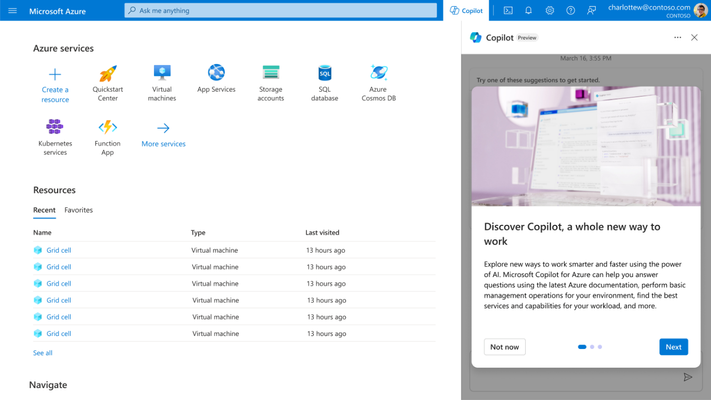
    At its Ignite 2023 conference, Microsoft this week previewed Copilot tools to simplify the management of the Azure cloud service along with a tool that streamlines the building and deploying of artificial intelligence (AI) applications on the Azure platform.

    In addition, Microsoft launched Microsoft Copilot Studio, a low-code tool that automates the process of creating data integration plugins and adding custom copilots within the Microsoft Copilot for Microsoft 365 tool that Microsoft previously launched.

    Microsoft Copilot for Azure leverages large language models (LLMs) to enable IT teams to use natural language to create, configure, discover and troubleshoot Azure services. It also enables IT teams to create complex commands, ask questions and optimize costs.

    Erin Chapple, corporate vice president for Azure Core at Microsoft, told Ignite attendees that Microsoft, along with a handful of customers, is already using Microsoft Copilot Azure to manage Azure infrastructure.

    In the long term, it’s clear that Microsoft is moving toward streamlining the building and deployment of AI applications using Azure AI Studio, a framework for invoking the AI models that Microsoft makes available on the Azure platform. The goal is to make it possible for organizations to create their own copilots based on AI models they have trained.

    It’s still early days in terms of organizations leveraging AI models to build applications, but it’s already apparent that DevOps and machine learning operations (MLOps), along with data engineering and cybersecurity best practices, will need to converge. Microsoft is making a case for Azure AI Studio as the framework that will enable IT organizations to achieve that goal.

    Of course, Microsoft is not the only provider of IT infrastructure resources with similar ambitions, but thanks to its investments in OpenAI and the acquisition of GitHub, it is furthest along in terms of defining a framework for building AI applications at scale. Last week, GitHub previewed an extension of the Copilot tools it already provides to help developers write code that leverages generative AI to automatically propose an editable plan for building an application based on natural language descriptions typed into the GitHub Issues project management software. Copilot Workspace will generate editable documents via a single click that can be used to create code that developers can then visually inspect. Any errors discovered by application developers or the Copilot Workspace platform can also be automatically fixed.

    At the same time, GitHub has extended the scope and reach of Copilot Chat to make it simpler for developers to use natural language to discover issues in their code base.

    Generative AI is already having a massive impact on the rate at which applications are developed, but that code still needs to be reviewed. Chat GPT is based on a general-purpose large language model (LLM) that is trained by pulling in code of varying quality from all across the web. As a result, code generated by the platform might contain vulnerabilities or be inefficient. In many cases, professional developers still prefer to write their own code.

    Of course, not every programming task requires the same level of coding expertise. In many instances, ChatGPT will generate, for example, a script that can be reused with confidence across a DevOps workflow. There is no shortage of mediocre developers who are now writing better code thanks to tools such as GitHub Copilot, and soon, domain-specific LLMs will make it possible to consistently write better code based on validated examples of code.

    The next challenge is going to be finding a way to manage increased volumes of code. There is no doubt that AI will be applied to the management of DevOps pipelines, but for the moment, at least, the pace at which AI is being applied to writing code is already exceeding the ability of DevOps teams to manage it.

  • Nobl9 Allies With Microsoft to Simplify SLO Creation

    Nobl9 Allies With Microsoft to Simplify SLO Creation

    Nobl9 this week revealed it has integrated its reliability center platform for managing service level objectives (SLOs) as code with the Microsoft Azure Monitor service to make it simpler to both create and track service levels.

    The Nobl9 Reliability Center provides access to dashboards for a single source of truth about the state of reliability in an application environment based on the metrics collected from the SLOs that have been defined.

    Nobl9 Chief Growth Officer Kit Merker said the integration with Microsoft Azure Monitor is the first in a series that will ultimately make it easier to define SLOs using historical data collected by third-party tools.

    The Nobl9 Reliability Center is already integrated with more than 50 DevOps, observability and incident management tools through which it collects metrics, events, logs, traces, alerts to track incidents, releases, rollbacks, runbooks and other documentation.

    Those integrations will ultimately make it simpler for IT teams to create SLOs using historical data that today are still challenging to define from scratch, noted Merker. In fact, the data tracked by Nobl9 can be used to automate remediations via those integrations, he noted.

    As more microservices-based applications are built and deployed, it’s becoming more challenging to maintain SLOs across applications that have many more dependencies than legacy monolithic applications. Each feature and application programming interface (API) added over time conspires to adversely impact performance. It‘s not so much that any given service will outright fail as much as it is determining where degradations are occurring that result in SLOs not being met.

    Ultimately, each IT team needs to provide some sort of objective benchmark that assesses their overall effectiveness at delivering application services by making it simpler to track whether SLOs are achieved and maintained. Not every service needs to necessarily meet a stringent requirement. Instead, IT teams need to have confidence in the fact that, on average, certain levels of performance are being consistently maintained.

    That’s crucial because as more organizations depend on software to deliver digital services, any disruption is likely to have a direct impact on profit and revenue. As such, the reliability of application environments has become a major concern in an era where IT teams are now trying to manage distinct services rather than individual applications.

    The challenge and the opportunity now is to find a way to proactively reduce that stress by programmatically managing SLOs as code rather than having to overprovision infrastructure resources to ensure maximum availability at the highest cost possible. At a time when more organizations are encountering economic headwinds, that’s no longer a luxury they can afford.

    Each organization will need to determine for themselves how aggressively they need to manage SLOs. Of course, SLOs as a concept have been around for decades, but with the rise of digital services that span multiple organizations, the level of reliability DevOps teams are expected to provide is now being written into business contracts. Not surprisingly, the overall level of associated stress DevOps teams are experiencing has correspondingly increased.

  • Immutable Infrastructure: The Next Step for DevOps

    Immutable Infrastructure: The Next Step for DevOps

    Immutable infrastructure, a concept that is rapidly gaining traction within the dynamic field of DevOps, offers a transformative approach to organizational security for companies of all sizes. 

    Instead of the traditional method where existing components are continuously updated and modified, immutable infrastructure advocates for an entirely different philosophy: Components are replaced wholesale with new versions and never altered after deployment. This type of paradigm shift promises a plethora of advantages, chief among them being enhanced consistency and reliability, which is a potential game-changer for DevOps practices.

    This article offers a thorough exploration of immutable infrastructure, taking a look at its core principles and examining why it’s becoming a focal point in the DevOps community. To help further bring these concepts to life, we’ll thoroughly examine the tools and techniques that are pivotal in its implementation.

    Understanding Immutable Infrastructure

    Immutable infrastructure is rapidly gaining traction in the world of cloud services and DevOps for its innovative approach to managing servers and components. Once deployed, these elements are not modified or updated; instead, new servers are created from a common image whenever changes are necessary. 

    This type of approach simplifies rollback procedures and minimizes troubleshooting, as the integrity of servers is maintained. Furthermore, this methodology, facilitated by OS-level virtualization, marks a significant departure from more traditional practices.

    And with the AI market already worth $313 billion, integrations of models and solutions will only become more popular. Integrating AI into immutable infrastructure can significantly enhance its efficiency and reliability. 

    In such systems, AI can be used to monitor and analyze system performance continuously. By applying machine learning algorithms, it can predict potential issues and automate the process of deploying new server instances before problems arise. 

    Comparing Immutable and Mutable Infrastructures

    The Immutable Approach

    Immutable infrastructure offers streamlined change tracking and rollback, with each new server or VM being easily identifiable. Its uniform configuration across servers simplifies testing and the unaltered state post-deployment reduces complexity. 

    This makes it ideal for environments with numerous interdependent elements, such as in DevOps and cloud computing, virtually eliminating configuration drift.

    Challenges With Mutable Infrastructure

    In contrast, mutable infrastructure necessitates more time for server provisioning due to manual configurations. It’s prone to various update failures and connectivity issues, with each server’s unique configuration complicating diagnostics. 

    This traditional approach struggles with unpredictability, making it less suitable for modern DevOps practices and resulting in frequent configuration drifts.

    Advantages of Immutable Infrastructure

    Opting for immutable infrastructure brings numerous benefits. Support calls are significantly reduced and security is enhanced, thanks in part to the use of machine learning to identify anomalies. 

    The implementation of safelisting rules strengthens security controls. Moreover, this approach mitigates configuration drift and negates the need for synchronization during updates, leaning on cloud platforms for swift VM management. It also ensures rapid recovery due to easy rollbacks and encourages experimentation, thus fostering innovation.

    Best Practices for Immutable Servers

    Adopting immutable servers involves several best practices all organizations would be wise to apply. Building images in a chroot environment helps isolate changes while keeping test suites lean and efficient while avoiding overburdening the change process as a whole. 

    Caching installation files near the build location optimizes update speeds, layering images on top of a base server image expedites updates, and minimizing the OS image reduces boot times and security risks. Additionally, using containers can dramatically speed up and simplify the process.

    Essential Tools for Immutable Infrastructure

    When it comes to immutable infrastructure, certain key tools have emerged as indispensable for efficiently managing and maintaining this modern approach. These tools help create, manage and deploy server images and infrastructure-as-code throughout organizations. 

    Here’s a closer look at some of these essential tools:

    Packer

    Packer is a crucial tool for creating identical machine images for various platforms from a single source configuration. This tool is instrumental in the immutable infrastructure because it allows for the creation of fixed server images that can be quickly deployed, ensuring consistency across environments.

    Terraform

    Terraform by HashiCorp is another key player, enabling users to define and provide data center infrastructure using a declarative configuration language. It helps maintain the infrastructure-as-code, which is an essential aspect of immutable infrastructure. 

    Terraform allows for safe and predictable changes to infrastructure, with efficient management of both cloud and on-premises resources.

    Docker

    Nowadays, Docker is synonymous with containerization, allowing applications to be packaged into containers—consistent, isolated environments that encapsulate all the necessary components of immutable infrastructure. 

    Docker helps to simplify the deployment process and ensures that applications run the same way everywhere, aligning perfectly with the core principles of immutable infrastructure.

    Kubernetes

    While not directly mentioned earlier, Kubernetes deserves recognition for being a powerful orchestration tool for containers, including those that are managed by Docker. Kubernetes excels in automating deployment, scaling and management of containerized applications, which aligns well with immutable infrastructure principles.

    SaltStack

    SaltStack offers configuration management and orchestration tools, standing out for its ability to manage and automate more complex and scalable infrastructures, making it suitable for environments where immutable infrastructure is implemented. SaltStack ensures that server configurations are enforced and maintained as defined, preventing drift.

    Jenkins

    An open source automation server, Jenkins plays a significant role in the continuous integration and continuous deployment, or CI/CD, pipeline. Jenkins helps to automate the various stages of the delivery pipeline, which is crucial in testing and deploying immutable infrastructures.

    Ansible

    While Ansible is generally associated with configuration management, it also excels in automated deployment. Because it doesn’t require agents on the servers it’s managing and uses a simple, human-readable YAML syntax, it’s useful for setting up and maintaining immutable servers.

    Git

    Git, a version control system, is essential for tracking changes in the configuration code, scripts and templates used to create and manage immutable infrastructure. It allows teams to manage their infrastructure-as-code, ensuring a detailed audit trail of what was changed, when and by whom.

    Ultimately, a slew of tools and platforms are available to make the transition to immutable infrastructure as seamless as possible. From container orchestration with Kubernetes to configuration management through Ansible, you have a robust array of options at your disposal. 

    Yet, when it comes to handling specification files or any form of documentation, you want an added layer of security. A robust custom document viewer with extra security features, for instance, could be an invaluable asset in this regard, offering the ideal blend of accessibility and protection while ensuring that your infrastructure is immutable and secure from prying eyes.

    Choosing the Right Tools For Your Organization

    When integrating immutable infrastructure into your operations, selecting the right mix of tools that align with your specific requirements and existing workflows is crucial. Essential factors such as compatibility, scalability and ease of use should be considered to create a robust, efficient and effective immutable environment. 

    Each of the tools highlighted above has its own strengths and is a part of a broader ecosystem designed to support the reliable, consistent and secure deployment of applications and services across organizations of all sizes. Companies can fully embrace the immutable infrastructure model by learning how to properly harness these tools, improving stability, scalability and efficiency across all of their IT operations.