Category: Features

  • DevOps with Purpose: It’s about your culture!

    DevOps with Purpose: It’s about your culture!

    Four practical tips to fostering a DevOps culture in your organization.

    This is Part Two in a four-part series. In Part One, I focused on the critical first step of defining DevOps with a purpose by thinking about DevOps in the context of your organization’s applications.

    Today, we find more and more businesses putting pressure on IT to move faster, and, if their IT department struggles to keep up, they are often willing to “go around them” and invest in a cloud or other third-party solution on their own to get what they want, when they want it (aka “shadow IT”). What the business often lacks, however, is a full understanding of the many downstream implications that come with speeding the roll out of new services such as security assessments, integrations to legacy systems, the ongoing cost to administer the solution and take on support for it, etc. It’s true that Ops teams want to control the reliability and stability of software deployments and that can often slow things down, but they do this because that’s what they are paid to do: to deliver stable, reliable, and high-performing services.

    This conflict between the business’ desire for speed and Ops’ charter for security, reliability, and performance, has been brewing for several years and it’s time for some introspection and a few tips on how we can make things better. Ultimately, progress is all about culture, and that’s why defining DevOps with a purpose must include focusing on your organization’s IT culture.

    Tip #1: Recognize the cultural challenges between the business, Dev and Ops

    Because Development sits closer to the business in the IT value chain, there’s usually less conflict between the business’ desire to move fast and Development. That isn’t to say Dev managers aren’t sometimes frustrated by how fast the business wants things given the resources available to them, but they usually are motivated and compensated to move in sync with how fast the business wants to move.

    The first tip is to take a step back and benchmark your current culture for both Dev and Ops, because only then will you be able to understand how DevOps may impact those cultures. With Dev, ask yourself, for each line of business “Are we still doing waterfall software development with one release every year or eighteen months, or have we adopted agile methodologies that enable us to deliver multiple releases throughout the year?” Based on your answers, then ask, “Is that in line with what the business wants today? Is that inline with what we think makes the most sense or are there opportunities we could bring to the business if we adopted agile more broadly?” Finally, “what would be the value to the business and cultural impact of adopting DevOps principles for continuous integration of new software development?”

    Next, ask yourself, “How focused is our Ops team on stability, reliability and clamping down on change vs. accepting (and even desiring) change? And how does this vary by line of business or application area?” (see Part 1 of this series for why that matters) If you have a risk-averse Ops culture that’s supporting a fragile infrastructure or many legacy technologies, then you may need to tackle some of those challenges first in order to help your DevOps culture evolve. I also suggest looking at your Ops culture through a compliance lens. Ask yourself, “Are we in a heavily-regulated industry that has created its own cultural challenges in terms of change approvals and auditing that we need to take into account?” Finally, what would be the value to the business and the cultural impact of adopting DevOps principles for continuous delivery of new releases?”

    One of the hallmarks of DevOps is the ability to develop smaller pieces of incremental functionality, deploy them faster (perhaps even a few times a day), and quickly roll things back if there’s an issue. This is a big leap for many IT cultures on both the Dev and Ops side so understanding where your culture is today is a critical first step.

    Tip #2: Think about how you view work

    Do you view work as tasks done by individual teams or in an end-to-end fashion (e.g. from raw materials to finished goods and customer delivery)? DevOps transformation requires focusing on work in an end-to-end manner. Your goal should be to identify where your IT organization’s bottlenecks are, with the intent  of reducing pressure at those bottlenecks to increase end-to-end flow and, therefore, output that benefits the business.

    In The Phoenix Project, the bestselling IT novel (yes, indeed an IT novel) co-authored by Gene Kim, Kevin Behr and George Spafford, the character of Brent Geller in the Ops team is an obvious bottleneck. He understands his company’s IT environment better than anyone and is consumed with both solving high-profile outages and deploying new application releases, the result is that he’s constantly putting out fires and unable to get new software released that’s desperately needed by the business. The book offers a wealth of perspective on how to embrace DevOps principles and what that means for your culture. I highly recommend it. You will likely see quite a bit of your organization in the story, I know it matched my experiences in IT very well.

    Back to Top #2, ask yourself, “Is my organization optimized around end-to-end flow or are we optimizing just at the individual workstations?” If it’s the latter, then you are probably stacking up work somewhere at one or more bottlenecks and should address those first. For example, a development project isn’t done until the code is tested and deployed. So incentivizing developers to finish code without knowing when and how it will get deployed is just going to create more work in process stacking up in your IT factory. It’s just like on an automotive line where you might  see cars with shiny paint, brand new tires and cutting edge technical design, but if the cars have no seats they simply won’t be shippable.

    You might also be saddled with a lot ‘technical debt’ – where dollars and resources are tied up maintaining existing applications and infrastructure. It may be necessary for you to focus at first on reducing technical debt in order to reduce those as bottlenecks on your support and deployment teams. Ask yourself, “What technical debt do we have and who can be charged with prioritizing and reducing it?” Treat it just like credit cards and look to reduce the ‘high interest’ debt first.

    Tip #3: Incentivize your people

    Don’t assume people will change for the “greater good” – proactively incentivize them to do so.

    If you want to change your culture and create one that’s more agile – if you want to optimize for flow versus workstations then you should incentivize to initiate the cultural change you seek. Old habits are hard to break even when we want to do things differently. As executives we have the tendency to appeal to a higher business purpose and assume the folks contributing on the front lines share the same passion for the company’s success. Often they intellectually understand these goals, but you should seek to make the change relevant to how it will improve their jobs as developers, QA team members, sys admins, and architects not just how it impacts C-level objectives.

    For example, Ops folks usually take particular pride in their indispensability, but to be indispensable they have to compromise family time, working late and on weekends to push out a big high-risk deployment. They may crave the attention and recognition for such ‘extra effort’, but at the same time they are putting more pressure on themselves and more risk on the business.

    As mentioned previously, the move toward a more agile IT means deploying with far greater frequency, and that can actually help you operate with less stress and risk. Errors and fixes are likely smaller in effort, and you will be able to roll back hick-ups much faster. Sure your folks may need to stay late occasionally, but they can do their work more often during typical working hours, reclaim their weekends and have significantly less stress and pressure than via traditional large-scale rollouts where expectations are high and so is the risk of failure, re-work, and long days. Plus, with DevOps you are actually delivering on business requirements faster – instead of deploying what was needed months ago.

    Tip #4: Make it personal: everyone is different.

    Related to Tip #3, realizing that everyone is inherently different is critical to incentivizing and empowering your IT team to transform. In most IT organizations, the responsibility is on the first line manager to know their people, understand what makes them tick and channel the right talents and motivations. Some may be seeing a move to DevOps as the ideal resume enhancement opportunity. Some may feel intimidation because they are innately risk averse. Still others may not be sure what to think especially if you have one team doing DevOps while they remain on a separate team doing things “the old way”. What’s important for managers is not to stop at how to make DevOps relevant for a role, but to consider the specific individual. Ask yourself, “How will each of my team members react to this cultural change, and how can I tap into their natural motivations to make them enablers of the change not resistors?”

    From what I’ve seen, there also is a generational aspect to DevOps cultural transofrmation. Younger employees who don’t know a world without mobile phones and grew up on social media are likely more comfortable with agile, small release deployments. Those with more experience are also more likely to think about the reasons why DevOps ‘can’t work’ and it will be key for first-line managers to engage them, listen to their concerns, and work to address them in a way that benefits the organization and realizes the wisdom of their experience.

    The bottom line for Tip #4 is that if you make it personal you will build trust and that will help you to drive transformation in your organization faster. Perhaps even consider establishing a ‘Take a Developer or Ops Team Member to Lunch Day’. By working to understand each other’s worlds, challenges, pressures and goals you can unleash a swifter cultural change within your organization.

    In Part 3 of this series I’m going to tackle tool investments and how they can help you achieve DevOps With a Purpose (or stand in the way of it).

  • Conjur up some agile, automated authorization management

    Conjur up some agile, automated authorization management

    One issue that has plagued IT since its inception is adding and removing authorized users. Most network and application security rely on somehow validating credentials to confirm that an individual is authorized to access the resources, but in a rapidly changing environment it is a serious challenge to keep authorization and authentication systems up to date. Conjur hopes to solve that problem.

    What is Conjur? In a nutshell, Conjur is an API-backed virtual appliance that makes cloud infrastructure projects possible by giving DevOps teams the ability to manage permissions and authorizations in a secure, automated, and well-audited way. In other words, Conjur allows for automated authorization management.

    Kevin O’Brien, part of the founding team at Conjur, shared some thoughts on Conjur, the issues the company seeks to address, and how Conjur can make life easier for DevOps teams. “As we’ve grown into the market, we’ve seen a lot of DevOps teams struggling with the same kind of authorizations problems, either slowing or killing cloud initiatives outright. For the ones that make it off the ground, they have to build a tangled web of handwritten scripts or hacked together key/certificate/user/access management inside of toolchains that are designed for other purposes (things like Puppet, Ansible, Docker, Chef, Salt, GitHub, etc.).”

    Conjur provides a dedicated platform for conducting authorizations without relying on insecure alternatives. Rather than trying to force old authorization technologies and ideas—like Active Directory—into a radically new environment—like an agile DevOps infrastructure, organizations can leverage Conjur.

    Conjur helps simplify and automate tasks like moving SSH keys out of insecure locations such as on-disk storage, or in Docker images, or GitHub repositories, and consolidating them on the secure, encrypted Conjur server. Conjur can manage secrets, including SSL certificates, across their entire lifecycle—from provisioning to replacement—with minimal downtime. And, Conjur maintains a comprehensive audit log of its activities.

    O’Brien relayed the story of one Conjur customer. This customer provides data analytics products for healthcare organizations, and solves complex computational problems with a focus on reducing health costs. The customer wanted to integrate DevOps concepts and culture into its business model, but ran into some stumbling blocks.

    “They were running into an issue where they wanted to begin using an AWS-based clustered genomics product, which would have allowed them to automate a large portion of their analytics, but were being told by their insurance payers that moving client data into that environment would be an impediment to doing business, because they couldn’t provide sufficiently granular access rights (the product used passwordless SSH keys),” explained O’Brien. “The insurance companies saw that as an ePHI issue, and absent a more sophisticated control and auditing, it was a no-go.”

    This company used Conjur to replace the default authorization mechanism in the project with a “Conjurized” access check, which allowed it to store the relevant keys in ephemeral storage and manage permissions through Conjur rather than by embedding them in code throughout their product set. Along with the audit capabilities, this meant that it had effectively taken a show-stopping design and circumvented it in a matter of weeks, without relying on key distribution or having to spend any time building an in-house solution.

    Conjur even has a solution dedicated to “DevOps and User Enablement.” O’Brien described it, “At a macro level, we’re solving a problem that is unique to DevOps and cloud: unlike the on-premise infrastructure of 20 years ago, protected by an Active Directory/LDAP system that handled authorization, role-based access control, and so on, there’s no way to translate that to the rapidly changing infrastructure that teams deal with today.”

    User enablement, in the end, is about driving innovation and speed. Conjur claims to make that possible (and more automated), without sacrificing security or auditability, or requiring a lot of custom work to use.

  • Chasing consistency across the wild seas of enterprise IT

    Chasing consistency across the wild seas of enterprise IT

    Despite seemingly never-ending arguments to the contrary, DevOps has firmly arrived in the enterprise. No, the question is no longer if DevOps is appropriate for the enterprise anymore – the more appropriate question is to what extent has DevOps made its impact on the typical enterprise.

    But the enterprise move to DevOps isn’t a straight line. One of the steepest, and also most common, challenges for enterprises moving toward DevOps is how diverse the IT environments in large organizations tend to be. Yet, for continuous integration, continuous delivery, and DevOps to thrive – architects, developers, test, QA and other teams all need to be operating on uniform systems – but in most enterprises that not the case.

    Yet, as the 2014 State of DevOps Report from Puppet Labs found, DevOps enterprise adoption is increasing, and that DevOps adoption was accelerating, and that high-performing IT organizations that embrace DevOps are typically more agile and reliable, deploying code 30 times more frequently and with half as many failures as non-DevOps enterprises.

    However, it’s this enterprise IT inconsistency that is one of the main reasons why DevOps gets entrenched in certain departments within large enterprises, but is then slow to expand outward throughout the rest of the organization.

    “This is a huge problem in larger enterprises, especially as DevOps practices grow beyond just isolated departmental applications. Architects have one system for prototyping; developers have a different system to code on; test and QA have their own unique ‘standard’ systems; while operations have untouchable systems for production,” Andi Mann, a VP at CA Technologies wrote in this post, Making DevOps Work in Complex Enterprise Environments, for devopsy.kinsta.cloud.

    In this roundtable, DevOps Summit Power Panel | Is DevOps Changing Enterprise IT?, both JP Morgenthal, director of cloud computing practice at Perficient, Inc., and Gordon Haff, cloud evangelist at Red Hat agree that DevOps is still in its early days and that enterprise DevOps adoption will be relatively slow, as enterprises build more consistency in their IT environments. “I think enterprise needs to mold DevOps to its needs and understand the differentiation for how to deploy that in a large multi-faceted IT department,” says Morgenthal.

    This is why DevOps in the enterprise doesn’t typically move quickly. There’s so much variance between department and team languages they use, as well as methodologies, tools, and procedures they have in place that all need to be normalized. This inconsistency across the enterprise is the enemy of broad, enterprise-wide DevOps success.

    Justin Arbuckle, former chief architect at GE Capital (currently, vice president of Europe and chief enterprise architect for Chef) created an adept analogy for the enterprise journey to DevOps and consistency with Herman Melville’s classic work Moby Dick. “The whale isn’t DevOps. In my opinion, every organization has a whale called consistency. Consistency of environments, whether it be the consistency of the images running on your service. Whether it be the consistency of the IT environments, consistency of the processes, or whatever the thing happens to be: consistency is at the center of many of the organizational challenges that we have today. So driving that consistency message, in our experience, has been absolutely critical to delivering the message as to why we need to go to sea,” he says.

    That doesn’t mean there aren’t many places where DevOps can succeed, and succeed swiftly. As Arbuckle points out, regardless of the size of the enterprise you will find there will be shared problems among groups, and in shared problems there is the shared motivation to solve these problems. “It’s about getting a bunch of people who want to work on a common set of problems and together you start showing results,” says Arbuckle.

    For instance, most every large team has security, compliance, QA and other challenges. What GE Capital did, to help solve them better, was to provide regular weekly demonstrations where everyone in the organization was invited to watch and learn how applications and systems were developed being developed. And dozens of employees from throughout the organization have attended some of the larger demos, with one hitting 80 attendees, Arbuckle says.

    “We’ve evolved this process in GE Capital called “compliance by demonstration.” Compliance by demonstration means essentially instead of waiting for some form to be filled out, and we then have to spend three months explaining to people why the answers we put down are correct, we involve everyone from the beginning. And you know what happened? The amount of support that we’re getting from that is now amazing,” says Arbuckle. “They [different teams] want to do the right thing. They don’t want to get in the way of business value. So any way that we can help them see what we’re doing is awesome,” he says.

    The key to finding those shared set of problems, teams need solved is to get everyone involved in the process early. “That’s when it becomes real. What is real is not DevOps or using a new process, rather it’s a whole bunch of people around the organization saying, “Wow, they’re moving really, really quickly and we had an interesting discussion about data portability between two geographies and they [these other teams] have a really good plan for that.”

    When it comes to moving a large enterprise to DevOps, as David Mortman, contributing analyst at Securosis puts it, there’s no right or wrong. “If your enterprise is collaborating and the teams are working together on how to improve processes, or automate what can be automated, share lessons learned and just collaborate more effectively then you are essentially practicing DevOps. And there are many ways to get down this path,” says Mortman.

    That increased level of collaboration and sharing is one of the great ways that IT, dev and ops can stop being seen as part of the enterprise bottleneck, and “start being part of the story where other parts of the organization begin to see how they can change and become better,” says Arbuckle.

    The whale isn’t DevOps. The whale is the elusive goal of getting enterprises to do things consistently, and through that consistency, add value more quickly back into the enterprise – and while that storyline may never become an American classic – it’s certainly a modern narrative worth chasing.

  • A How to Guide on Modern Monitoring and Alerting

    A How to Guide on Modern Monitoring and Alerting

    syslog-ng, riemann, collectd-notifications, elasticsearch: putting it all together

    Context

    At our organization (CCIN2P3) we are building an event-based infrastructure to push structured messages to different subsystems for alerting, reporting and storage. Using syslog-ng, each message is normalized into a structured event, optionally correlated with other messages, and conditionally routed to the next systems, including:

    • a synchronous web-dashboard,
    • different asynchronous alerting systems, and
    • a searchable storage backend.

    The events which are collected are essentially system and application logs. Here’s a few examples of interesting messages:

    puppet-agent[16528]: Finished catalog run in 44.06 seconds
    kernel: Killed process 29959, UID 42046, (hadd) total-vm:202363492kB, anon-rss:13069860kB, file-rss:60kB
    ata2.00: exception Emask 0x0 SAct 0xffff SErr 0x0 action 0x0
    EXT3-fs error (device dm-1): ext3_journal_start_sb: Detected aborted journal
    

    The unified nature of this pipeline makes it possible for a human to easily identify an event in all the available back- and frontends.

    In this post you’ll learn a way to implement this model, and achieve the following:

    • Collect system metrics
    • Monitor events for outliers
    • Normalize and Correlate these events
    • Route the events to a real-time stream processor and to a searchable storage backend

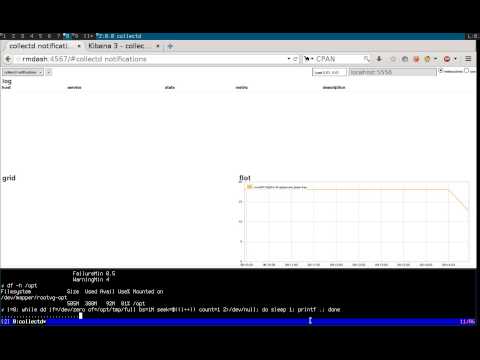
    We’ll describe the configuration files you’ll have to change, and explain the workflow that processes an event. For the impatient, we’ll illustrate the final result in a short recorded demo.

    Demo

    Realtime monitoring using riemann, syslog-ng, collectd and elasticsearch

    Requirements

    We will assume you have basic knowledge of the following tools, as well as a running instance of each:

    The tools

    Here’s a list of all the tools we’ll be using, along with a short summary, and their main functions in the pipeline:

    On the client:

    • collectd: “a daemon that receives system statistics and makes them available in a number of ways”
      • periodically poll system metrics
      • trigger notifications based on predefined thresholds
    • (any)syslog: “system error logging protocol”
      • listen for syslog messages, including collectd notifications
      • forward them to a remote destination

    On the server(s):

    • syslog-ng: “a flexible and highly scalable system logging application”
      • listen for remote notification messages
      • patterndb: create structured events by parsing the flat collectd notification messages
      • route the events to the next stages (riemann, Elasticsearch, Nagios, Email, …)
    • riemann: “aggregates events from your servers and applications with a powerful stream processing language”
      • listen for remote structured messages (protocol-buffers)
      • expose a websocket and/or sse service for subscriptions
      • send asynchronous alerts to the next stages (e.g. Nagios or Email)
    • riemann-dash: “a javascript, websockets-powered dashboard for Riemann”
      • synchronous realtime in-browser display
      • web application to subscribe to collectd streams using websockets or sse
    • elasticsearch: “a flexible and powerful open source, distributed, real-time search and analytics engine”
      • store and index all events
      • expose an API for query e.g. by Kibana
      • “You know, for search!“
    • kibana: “Elasticsearch’s data visualization engine for the browser”
      • browser-based search interface to query elasticsearch

    Architecture

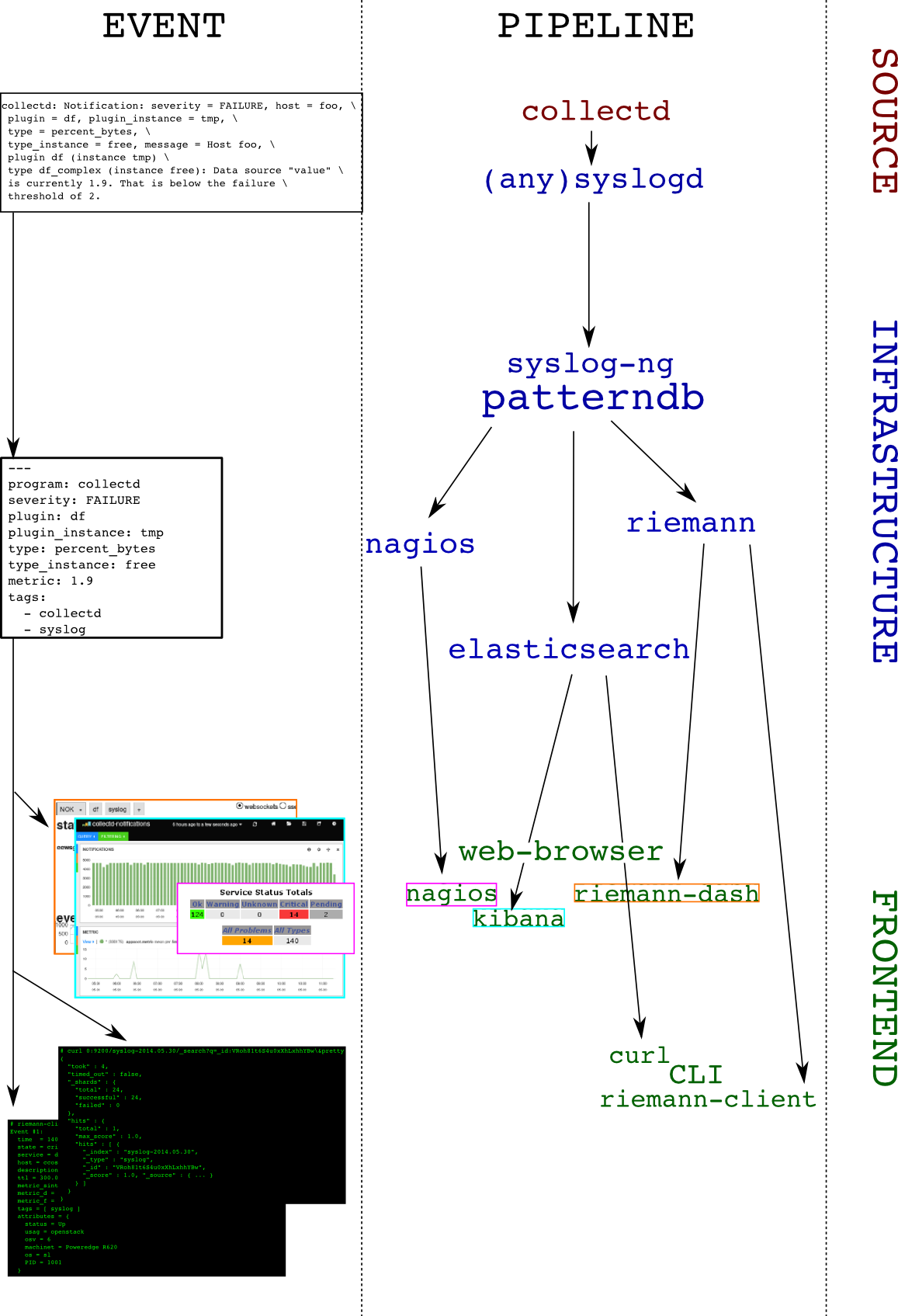
    To make things crystal-clear, we’ll choose an example: let’s track filesystem’s usage. The collectd-df plugin collects this information. Here’s a diagram depicting the dataflow: you can follow how an event is evolving from a user perspective on the left column, as it travels the pipeline (right column):

    architecture

    And the details:

    1. collectd-df plugin polls the filesystem utilization:
      df-tmp/percent_bytes-free is 1.9
    2. collectd-threshold plugin issues a notification as the failure threshold is reached: Notification: severity = FAILURE, host = foo, plugin = df, plugin_instance = tmp, type = df_complex, type_instance = free, message = Host foo, plugin df (instance tmp) type df_complex (instance free): Data source "value" is currently 1.9. That is below the failure threshold of 2.0
    3. collectd-network plugin receives this notification and sends it over to the local syslog server
    4. the local syslog server forwards the flat message to a remote destination
    5. the remote syslog-ng server receives the message and parses it using patterndb
    6. the patterndb extracts relevant values and creates a hash table (name-value pairs):
    • program: collectd
    • host: foo
    • tags: syslog, collectd
    • collectd.plugin: df
    • collectd.plugin_instance: tmp
    • collectd.type: percent_bytes
    • collectd.type_instance: free
    • collectd.thresh_type: the thresh type (above/below)
    • collectd.thresh_value: the failure thresh: 2
    • collectd.metric: the value of the current reading: 1.9

    This structured event is then routed to syslog-ng destinations, in our case riemann and elasticsearch. Both of these applications can then be used to query the event in a comprehensive manner, for example, “show me all collectd notifications concerning the plugin df and the instance tmp“

    Configuration

    Due to formatting issues, and for detailed examples on configuring the components of this solution, see the folowing link.

    Conclusion

    In this article we showed how to send collectd threshold notification messages to a central syslog-ng server, and how to extract numeric metric information from it. We also showed how to route the result to two backends, one of which can be used to view the data in real-time (riemann), and the other to query historical data (elasticsearch). This system could be extended in multiple ways, for instance:

    • by compiling a large patterndb to match multiple subsystem messages
    • by tagging important messages, and routing them to relevant destinations. For instance: “send all hardware errors to nagios“
    • by using the correlation context information to generate alerts, excluding self-healing components: “send an email if a filesystem is full and doesn’t come back to normal in less than 5 minutes”
    • by using the correlation context information to generate alerts upon reaching a threshold on the number of messages: “run this command if the same scsi device is referenced in more than 100 messages every minute”
    • send metric data to graphite

    Configuration files

    tarball

    Here‘s a transcript from a shell session working on these configuration files.

    Link to full article including configuration on github

  • Being Agile is all about controlling the flow

    Being Agile is all about controlling the flow

    For businesses, Agile is the new fashionable initiative as was E-business was in the 2000’s, Six Sigma was in the 90’s and Total Quality Management (TQM) was in the 80’s. If we look back across the spectrum of these initiatives, we need to examine how many of these initiatives met the goals the business was looking for and, more importantly, if they were fully adopted, remembering that many were derailed, did they deliver the value the business was seeking?

    Of course we cannot answer this question with generalities—it’s a spectrum. For some businesses, these initiatives were red herrings, some did not follow through to completion, but certain changes adopted as part of these initiatives had a very positive impact, while others succeeded wildly. It’s a Harvard Business Review case study as to why a business ended up at the point on the spectrum that they did.

    Clearly, one fundamental aspect that is consistent across all these initiatives is the ability for a business to embrace change. In a previous blog, “Cloud Computing, DevOps and Business Velocity,” I addressed the issue of business velocity—the rate at which an organization can embrace a particular disruptive technology change. Underestimating your business’ ability to adopt a new technology or process will most likely have a strong negative impact on the outcome. In a recent conversation with a client, the non-IT business areas has been very successful at adopting lean practices, but IT short-circuited shortly after starting. It didn’t outright fail, but after a strong start, they took a break from which they never started back up. Without a post-mortem, we don’t know why this specific initiative fell flat, but we can intimate that if something is difficult and feels unnatural, we’re more easily able to focus our attention elsewhere—think dieting and exercise programs in your own life.

    This seems to be the decade of Agility. Businesses want to be more dynamic and fluid. They want the organization to be prepared to respond to market changes more quickly, introduce new products faster, and respond to problems that occur more rapidly. To accomplish this goal, the business will have to let go of some of the ways that they do things today. They will have to re-engineer processes to be more compose-able and componentized so that they are less static. For example, a manufacturer goes through a lot of planning to deliver a new product to market. They go through steps for design, prototype, test, source, manufacture and distribute. The entire cycle may take upwards of a year and is highly automated once it reaches the manufacture stage. Tweaking the product between batches would cause  significant delays and pain because the process is static. It effectively amounts to restarting the entire cycle. So, what if they discovered that by simply elongating the body by 2 cm the product was far more useful their intended audience? In this case, agility might equate to being able to complete the design-to-manufacture process faster.

    In the previous example, this latter step of being able to tweak the product is called continuous improvement and is a key element of fostering agility. If a product isn’t selling well in the market, many companies will just abandon the product completely due to the costs associated with making the product viable. The reason being that most manufacturers consider that each product is a project and when it reaches the manufacturing stage it moves under the control of operations. That is, the creative team that includes marketing, finance, and other stakeholders view their position as “completed” with regard to getting that product to market and they then move onto other projects. With this mindset, there’s no room for the group to review the process, think about how it could have been done better and then iterate with the improvements incorporated. Hence, they just keep taking their “this is the way we do it” to the next project.

    Being agile means being able to control the flow. There’s no way to change how products come to market if there’s a culture of accepting finality once a product has reached a certain point in the cycle.

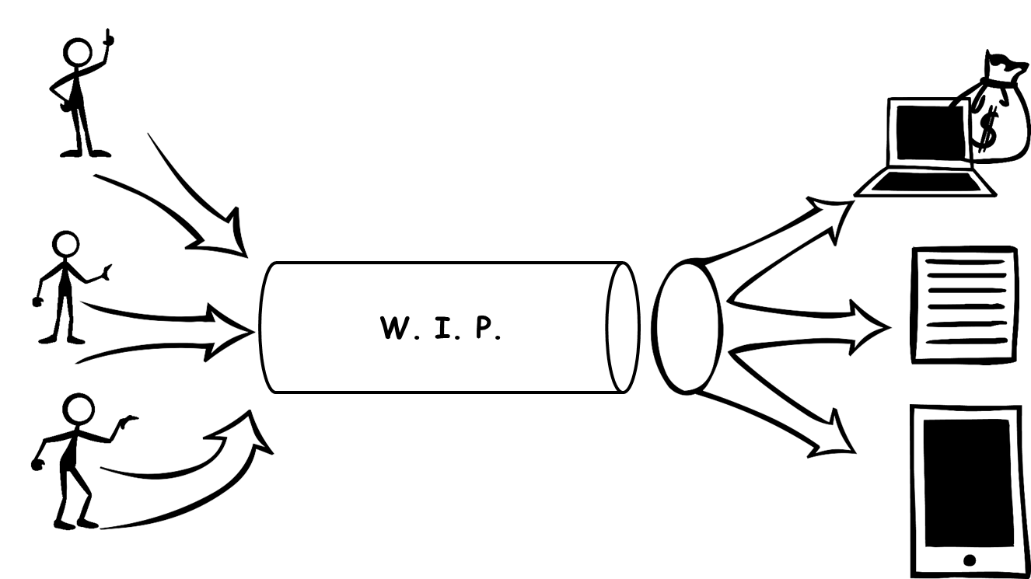
    The other aspect of controlling the flow is managing how products and services enter and exit the development pipeline.  I spend a lot of my time helping IT organizations unlock their potential to deliver by helping them to understand that there’s only so much that can be done to improve managing the work-in-progress (WIP). The only way to make gains beyond a certain point is to enable transparency with those that are responsible for inserting work into the pipeline or who are demanding that work completes and exits the pipeline at a certain time.

    The following two figures express well the reason transparency is a requirement. I believe most people would agree that managing production is a far easier task in Figure 1 than Figure 2. In Figure 1, there is one input and one expected output. Managing WIP for this pipeline is a matter of optimizing just the process for completing that one deliverable. In Figure 2, there are many more variables at work. There could be contention for resources within the pipeline to support the multiple inputs.

    wip


    wip2


    Likewise, there may be a request to reprioritize what gets completed when to meet certain business goals. Perhaps a particular report is required urgently to support a key business decision. I personally dealt with this very scenario when the business I was working for years ago was suddenly engaging in acquiring another company. All focus was transferred to producing the needed financial statements and everything else was put on the backlog. In that particular case, the CEO and CFO were the customer, so no one questioned the delays to their projects, but for many IT organizations reprioritization requests are never that clear making it very difficult to manage the control of the flow. Hence, transparency and communication between those consuming the services of the pipeline and those who own the control of the flow of the pipeline is an imperative for agility.

    Like TQM, Six Sigma, and E-Business, Agility will require changes to the fundamental way that a business operates. An analogy of this process can be as benign as a person recovering from knee surgery or as complex as recovering from a stroke depending upon what the business wants to accomplish and how they are organized currently. Along the way, people will most likely be the biggest hurdles to success.

    When change of this magnitude occurs, employees tend to become very myopic of their own situation. To mitigate this risk, it is critical that changes are reviewed with employees prior to change, during implementation and after the change is enacted. Management must gauge if employees are struggling because the complexity of the change or because they personally don’t agree with the change. The former can be overcome with education and support while the latter should be dealt with quickly through removal.

    Businesses can succeed with their Agility initiatives given they identify and mitigate key risk factors prior to starting and are willing to commit to looking critically at the way they have been operating the business. In agile software development, developers are trained to think about ways their code can break and then write unit tests to ensure that the software is sustainable in light of these possibilities. Creating an agile business means looking at ways to ensure sustainability in light of market changes, new competitors, supplier changes, and changing customer demands.

  • Four open source tools to help keep you cooking with Chef

    Four open source tools to help keep you cooking with Chef

    If you’re even a little familiar with DevOps concepts, you’ve probably heard of Chef. If you’ve started experimenting with or implementing DevOps, there’s a pretty good chance you’re using Chef. Chef is an awesome platform for managing a DevOps environment, but it isn’t perfect.

    Thankfully, missing features or gaps in the capabilities of a platform like Chef are just opportunities for other developers to step in and save the day. For some organizations, that may be a double-edged sword. It can be overwhelming to investigate the myriad options out there, and to choose tools that add value, without also adding more complexity and headaches than they’re worth.

    Let’s take a closer look at four of the most popular open source tools you can use in conjunction with Chef to make your life easier.

    1. Foodcritic

    One of the coolest things about Chef—at least from a geek humor perspective—is how the various tools and features all seem to have food-related names that play off of Chef. For example, Foodcritic.

    The goal of Foodcritic is to make it automate checks for common problems in your Chef cookbooks. The idea is to be able to analyze code quality, and identify issues that will cause Chef to have heart failure if you try to deploy them. Foodcritic ensures that your cookbook code is clean, and flags issues before you deploy them and cause Chef to blow up.

    Foodcritic can be configured to work with continuous integration tools like Travis and Jenkins as well. Doing so enables you to combine the automated checking of Foodcritic with the automated deployment pipeline of Travis or Jenkins to keep everything running smoothly.

    2. Test Kitchen

    Continuing with the Chef / food-related naming conventions, next we have Test Kitchen. Just as restaurants and food companies have test kitchens where chefs can experiment with new flavors and recipes without disrupting food production or affecting the menu, Test Kitchen offers DevOps developers a means of executing a Chef cookbook without actually running code on the Chef Server.

    Test Kitchen has drivers and plugins that allow it work with most cloud platforms and virtualization technologies, including Amazon EC2, Blue Box, CloudStack, Digital Ocean, Rackspace, OpenStack, Vagrant, Docker, LXC Containers, and more. It is also designed to support testing frameworks like Bats, shUnit2, RSpec, and Serverspec right out of the box.

    3. Berkshelf

    The food / Chef connection is a bit more of a stretch on this one, but once you understand what it does it makes more sense. A chef typically has cookbooks, and those cookbooks are stored on a bookshelf. A Chef deployment also uses cookbooks, and those cookbooks can be managed using Berkshelf. Do you see what they did there?

    Berkshelf ensures that the right versions of Chef cookbooks are being run by managing how the cookbooks are fetched and deployed to the Chef Server. While there are some unique elements to each Chef cookbook (It wouldn’t make sense to have a completely identical cookbook), there are still common elements as well. It is tedious to manually copy those common elements every time you want to use them so Berkshelf simplifies the process.

    4. Nagios

    You might be wondering if Nagios is some exotic food, or perhaps a tool used by gourmet chefs that you’ve just never heard of. It’s not. Sadly, Nagios breaks the trend of cooking or food related naming. The name Nagios is actually a recursive acronym that stands for “Nagios Ain’t Gonna Insist On Sainthood”—a reference to its original name, NetSaint, which was changed following a legal / trademark dispute.

    Nagios is also less Chef-centric than the other tools listed here. It is an IT infrastructure monitoring tool—a pioneer of sorts in the field of continuous monitoring that is gaining in popularity now. Nagios monitors your IT infrastructure for changes in order to spot problems before they occur, and alert the appropriate personnel.

    Continuous monitoring has a variety of potential benefits. The data gathered from Nagios can help reduce downtime and business losses, or help organizations plan and budget for IT upgrades. It is also an effective tool for detecting security incidents because the continuous monitoring can identify anomalous activity or unauthorized changes and issue alerts in real-time.

    If you are using Chef in your DevOps environment, check out these four tools. As great as Chef is, you might find these tools valuable in helping to streamline and maintain a stable infrastructure.

    Find out how Rally Software uses Chef to achieve business agility at a special devopsy.kinsta.cloud webinar on September 4th!

  • The DevOps Litmus Test: Is Your Company’s Culture Ready to Get Agile?

    The DevOps Litmus Test: Is Your Company’s Culture Ready to Get Agile?

    New ideas don’t come to those who are afraid of breaking the rules. Improving something usually means you’ll have to push the status quo aside and try something that hasn’t been done before. What may be a standard operating procedure will have to make way for a brand-new approach with its own set of rules and goals.

    This applies directly to DevOps, which requires changes in how departments operate, how employees interact and how problems get solved. DevOps may be an idea your company is considering, but if the culture isn’t compatible with it, DevOps will never become an active part of your day-to-day operations.

    If DevOps Is the Engine, Culture Is the Fuel

    Let’s say two employees who don’t normally work together wind up taking an unprecedented approach to solving a problem. To their surprise, this new way of working together is incredibly efficient and a big improvement over their usual methods. The two recommend this kind of collaboration to others in their respective departments when it comes to spotting problems, fixing them and preparing for future ones.

    That’s the moment when you’ll know how receptive your company is to DevOps. This kind of cultural litmus test determines whether department silos can be broken down and new avenues of teamwork can happen. No matter the company or industry, its culture is the foundation for DevOps adoption. When that culture fits, DevOps is an ideal vehicle for improved productivity, with culture being the fuel moving it forward.

    Getting the Right Cultural Fit

    In order for DevOps to happen, you need the right conditions, similar to how certain plants only grow in the right ecosystem. Team members must be able to interact in ways they may not have in the past. The right culture is one that allows flexibility, spontaneity and resourcefulness to take place.

    On the flip side, DevOps won’t work in a rigid environment where departments are siloed and methods can’t be questioned. DevOps has a slim chance of taking off in a company that wants to hold onto previously established rules about divisions between departments. Anyone who stands up to say, “That’s not how we do things,” will be a hindrance to progress. Greater benefits are in reach, but to make them a reality, a company and its employees have to be willing to make some changes and allow agile collaborations to flourish.

    DevOps Culture in the Real World

    For those who have already put DevOps in action, culture was, and continues to be, a central issue. Household names like Twitter and Netflix may be known for their DevOps practices, but many lesser-known businesses have found that their cultures identify with DevOps collaborations. The recently published e-book from Rackspace, The DevOps Mindset: Real-World Insights from Tech Leaders features interviews with a variety of DevOps practitioners. The importance of culture is a common theme throughout these discussions.

    These firsthand accounts emphasize how encouraging new ways of solving problems depends on the proper culture. As James Kenigsberg of 2U explains, “You don’t have to be in Silicon Valley to embrace the DevOps culture; anyone can do it anywhere with the right people.” Bharat Krish, CIO of HBO Latin America, also emphasizes culture as an essential factor. “When I think of a DevOps culture,” Krish says, “for me it’s building a foundation where development can happen in a more agile fashion.”

    Start with the Biggest DevOps Requirement

    Knowing that DevOps benefits one company doesn’t necessarily mean it will automatically benefit another. Company processes, structure and communication standards all play a part in determining whether DevOps is right for your business. DevOps isn’t a product that can simply be plugged in – it requires a new way of thinking about agile software deployment.

    Culture has to be at the center of a DevOps adoption, and assessing your company’s culture is a crucial first step in determining whether DevOps will be a good fit for your organization. As long as your company is flexible enough to allow some cross-departmental collaboration and silos to be broken, then prepare for DevOps to take you to new levels of productivity. You’ll find that breaking the rules isn’t such a bad thing.

  • SoftLayer Bare Metal Servers: Does the Cloud have to be virtual?

    SoftLayer Bare Metal Servers: Does the Cloud have to be virtual?

    SoftLayer announced new service level and features to their Bare Metal Servers today. Continuing their march towards delivering dedicated servers at virtual server pricing and service levels, SoftLayer announced that they will now offer setup in under 30 minutes and hourly billing options. The 30 minute set up is available on a variety of pre-configured hardware platforms with a choice of CentOS, Debian, FreeBSD, or Ubuntu operating systems.

    I had a chance to speak with Marc Jones, CTO of SoftLayer about the new offering. Jones and SoftLayer have long held the belief that a hypervisor is not necessary for a cloud. In fact by giving customers their own dedicated hardware, it is SoftLayer’s view that they are providing a superior platform for their customers cloud requirements. The SoftLayer bare metal servers are integrated into the entire SoftLayer/IBM platform including storage, virtual and other assets.

    Two areas where virtual hypervisor based cloud solutions did offer an advantage perhaps was the time to get up and running and the flexibility of on demand computing billing.  Those are the two areas SoftLayer is hitting head on with this latest offering.

    By having pre-configured hardware specs, it makes it much easier for SoftLayer to spin up the server.  Imagine these different server configurations already mounted in a data center. Now when an order is placed it is just a matter of installing OS and other required software.  This could be done via scripts. In fact Jones mentioned that SoftLayer uses a variety of tools like Chef/Puppet and some home grown tools to accomplish server configuration. This automation is what is allowing SoftLayer to offer 30 minute set ups.

    The configurations available and the hourly rates for them are as follows:

    Processor Cores Core Speed RAM Storage Price/hour
    Intel 1270 4 3.4GHz 8GB 2x1TB SATA $0.46
    Intel 1270 4 3.4GHz 32GB 2x400GB SSD $1.09
    Intel 2620 12 2.0GHz 32GB 4x1TTB SATA $1.24
    Intel 1270 16 2.0GHz 64GB 4x1TB SATA $1.30


    Depending on who you speak to, spinning up a new server on AWS or other public cloud providers can take as little 10 minutes. So that is still significantly faster than having a dedicated server provisioned on SoftLayer. But really is there such a big penalty in waiting less than 30 minutes versus 10 minutes? In exchange you are getting a dedicated piece of hardware. Also from an hourly price perspective, the bare metal server option is still more expensive. But again with this latest release SoftLayer is moving closer to approaching virtual, hypervisor based IaaS levels.

    Jones said that further refinements and improvements will hopefully see SoftLayer continue to narrow the gap between speed of setup and pricing with virtual cloud offerings. But he firmly believes that the advantages to having your own server outweigh the shrinking set up gap and pricing difference.

    Another big plus in the SoftLayer model is its integration with IBM’s offerings. Blue Mix, IBM’s PaaS offering runs on SoftLayer. In fact most of IBM’s cloud offerings are powered by SoftLayer. As part of this SoftLayer is opening up 15 new data centers with the 6th of these in Melbourne, Australia opening today.

    To be sure there are critics who say that without the hypervisor, SoftLayer’s flavor of cloud is not “true” cloud. But as the old saying goes, if it quacks like a duck, walks like a duck, it must be a duck.  With hourly pricing, rapid fulfillment, scalability and more, bare metal servers is more than enough cloud with some distinct advantages.

  • Internet of Things (IoT) poses challenges for DevOps and security

    Internet of Things (IoT) poses challenges for DevOps and security

    One of the hottest things in tech today is the Internet of Things (IoT).  Everything will be connected including every gadget, kitchen appliance, wearable device and vehicle. But one of the biggest areas for IoT are controllers embedded into just about everything. These controllers will report back, generating reports and information that can be analyzed and acted upon.  IDC says technology and services revenues rooted in components, processes, and IT support for the IOT will reach US$7.3 trillion by 2017, up from US$4.8 trillion in 2012. When you are throwing around numbers in the trillions that is no small feat.

    New IoT implementations require projects (such as application development and backend integration, for example) that many enterprise customers don’t have the resources or custom development experience for. Vendors such as Microsoft and AT&T are responding with IoT consulting services. These vendors must be flexible to meet the needs of enterprise customers whose IoT can include machines and devices from a variety of makers. As such the bigger vendors are generally agnostic towards partnering  with otherwise competing vendors in order to pool the necessary resources to complete an IoT project.

    When management contracts a vendor / consultant for this kind of engagement, a DevOps mindset really helps to ensure the new IoT ‘glove’ fits the existing IT and information security ‘hand’. As challenges appear, a DevOps approach utilizing best practices is the best way to meet them.

    A common challenge with IoT projects is the disconnect between management desires and IT realities. IoT projects often begin because management has a goal to receive specific information. Many IoT projects involve installing controllers in business and manufacturing to retrieve data from their IoT. The controllers themselves are of course hardware. This of course is a challenge to traditional DevOps approaches. By its very nature IoT is dealing with hardware that is difficult to upgrade. Of course more and more it is the software that is driving the innovation

    “In many cases, management may hear good things from a competitive company they know who uses a specific controller device that they really like,” says Jerry Irvine, CIO, Prescient Solutions. Management may request that the vendor pull in that maker and product and that IT work with them to make it work. Unfortunately, IT will often find that the device is not compatible with the proprietary systems they use. Then the business will often ask them to find a compatible substitute and may still want it by a given deadline. This is not how anyone should acquire controllers.

    The best practice solution is for the enterprise to have an R&D team including IT set up to work in an on-going fashion to provide requirements for the IT environment and the business function. “In this way, IT and executive management can proactively and consistently look for new offerings with compatible features and functionality,” says Irvine.

    Another way DevOps can help in IoT projects is to maintain the environment in the least customized way possible. When a vendor puts in a controller, they will certainly be able to customize it to provide the specific reports and functionality that the customer wants. If the customer wants to go beyond the standard reports and capabilities however it now can pose a challenge to automation and further development.

    The issue is that when the enterprise needs to apply updates to the hardware, device software, or management application, the vendor must customize that as well, and the updates come at a hefty premium rather than standard (gratis) with the product. The best practice solution, says Irvine, is for the enterprise to take the entire report that the controller can provide standard, and customize the data from the report on the end afterwards. Customize as little as possible.

    Security is another challenge for IoT projects. The fact that these devices are connected via the Internet can make them a target for hackers. Companies deploying controllers should ask themsevles “how sensitive is the data that IoT devices and wireless communications will handle, and how dangerous can the IoT machine or device be? ” If developers/IT and operations can say with a certainty that the IoT application will never handle extremely sensitive data such as credit card numbers, and that the IoT device is not a car, dangerous machinery, or a potentially dangerous medical device, for example, then of course security is less of a concern. But part of goal of DevOps should be how do we build security organically into the device, software and process.

    John Pescatore, Director of Emerging Security Trends, the SANS Institute. IT and management says we will have to limit what IoT applications can do. If the application must use sensitive data, it has to be encrypted and the end device has to have enough processing power to do encryption or it cannot be part of this application. Likewise, for security of life and death critical applications, there is a part of the DevOps model that does not make sense. That part is the “build a little/fail a little/fix” type model of the evolution and perfection of the device. “Letting your customers find failures in MRI machines or 787 Dreamliners is not a good idea,” says Pescatore.

    So how do we reconcile the DevOps model, along with security when building components for the IoT? The challenges are there, but they can be overcome when we are talking about trillions of dollars at stake.

  • Using DevOps to Achieve Business Agility – A Webinar with Rally Software and Chef

    Using DevOps to Achieve Business Agility – A Webinar with Rally Software and Chef

    We are kicking off our devopsy.kinsta.cloud webinars with a real blockbuster! Join Colin Campbell of Chef and Jonathan Chauncey and Jeff Smith of Rally Software as they discuss:

    Using DevOps to Achieve Business Agility

    In today’s digital economy, leading companies are turning to software to deliver new services in response to customer demand and competition. Technology can enable and expedite innovation, but it requires business leaders, software developers and IT operations teams to closely collaborate around shared goals, at new speeds, and with the flexibility to change on a dime to customer needs and market shifts. In this webinar, Rally Software, a leading global provider of enterprise-class software and services solutions, will discuss how it has institutionalized DevOps and how it uses Chef to support its speed-focused approach to delivering business agility. You’ll learn firsthand how Rally automates its virtualized infrastructure, accelerates application development and tightens customer feedback loops.

    Date and Time: Thursday, September 4 at 11am PT/2pm ET

    Register at: http://devops.megameeting.com/registration/?id=1949-232488

    The webinar will be hosted by devopsy.kinsta.cloud and moderated by devopsy.kinsta.cloud editor-in-chief, Alan Shimel.  Speakers include:

    •  Jonathan Chauncey, developer at Rally Software. He’s been involved in Web application development for almost 10 years, four of which have been at Rally. His technical interests include: automation, testing, clojure, Ruby and search.

    • Jeff Smith, development manager at Rally Software. He’s been involved in Web application development for almost 20 years, 11 of which have been at Rally. His technical interests include: test automation, continuous deployment and infrastructure automation.

    • Colin Campbell, director of patterns and practices at Chef. He has worked on advanced model-based testing and analysis techniques for a number of years in industry. He is currently involved in developing and documenting Chef best practices and design patterns.

    Registration is required to attend the webinar. You can register here.

    pic-chef-logorally-software-social-image