Category: Features

  • DevOps Chat: Huw Price, Smart Automation Is Key

    DevOps Chat: Huw Price, Smart Automation Is Key

    Before the new year, I had a chance to sit down and chat with Huw Price, Vice President, Application Delivery, CA Technologies. Given Huw’s title what do you think we spoke about? You guessed it, automation. Actually there is more to it than that. Automation for automation’s sake alone is not necessarily a good thing. As Huw points out, smart automation is key.

    Huw and I will be participating in a full webinar on the topic of Smart Automation and how to build it on January 24th. You can register for this free webinar here.

    As usual with our DevOps Chats, below is a streaming audio player with our interview and below that is a transcript of our conversation. Enjoy!

    Alan Shimel:                Hi, everyone, it’s Alan Shimel, Editor in Chief at devopsy.kinsta.cloud here for another DevOps chat. Today’s guest on DevOps Chat is Huw Price of CA Technologies. Huw, welcome to DevOps Chat.

    Huw Price:                  Hi, Alan, nice to be here.

    Alan Shimel:                Nice to have you here, Huw. Huw, if you wouldn’t mind, if you could give our audience a little bit – I said you worked at CA, but what’s your title and what are you responsible for over at CA?

    Huw Price:                  Yeah, I’m a VP at CA. I was the managing director of Grid Tools, which venture you may have heard of, where we specialized in all things test data, and laterally we moved into all things test case optimization and into test automation. My role at CA – I’m kind of an evangelist QA specialist practitioner, and it’s actually fitting quite well with the DevOps land of trying to improve quality whilst improving speed at the same time, which is a bit of a magic trick. But it can be done and it needs some new thinking.

    I would say that over the years, it used to be cost was the top driver for businesses, but now due to the pressure of business, it’s all about competition and it’s all about getting stuff to market quickly, and you can’t have poor quality code going out to customers because they’ll just move to someone else. And I think that’s really what’s kind of driving a lot of our thinking at CA at the moment.

    Alan Shimel:                Absolutely, and it is somewhat counterintuitive when they tell you you could go faster but have higher quality. And I’ll even throw one more improbably into it – and be more secure by doing that.

    Huw Price:                  Yeah, that’s an interesting area. I think actually what I’m finding now is that I’m a big fan of doing everything in parallel, the days of sequentially waiting for one team to hand stuff off to the other, and what we’re finding is things like performance testing and security testing are kind of job one, and you need to build those in almost as functional requirements as you’re designing your software really. That sort of hopping from one piece of functionality or requirement to another seems to have vanished. It’s all hands to the pump I think at the moment is what I’m finding out there.

    Alan Shimel:                It is a bit of a Chinese fire drill, as they say. But out of chaos comes order, and that’s kind of the good news. Working with you and your team we’re actually doing a webinar after the New Year, in January, and it’s titled “How To Build the Right Automation.” And you and I were talking a little bit offline, of course, and the idea that you just automate for automation’s sake, maybe that was a couple years ago, but now we’re trying to be smarter about designing what’s to be automated and how we do it. Can you share with our audience a little bit of maybe your insight into that?

    Huw Price:                  Yeah, I think so. Automation’s got a bit of a bad press, and to be honest, I think rightly so, it’s considered very fragile. You only need a small change, a pop-up appearing on a screen, some kind of slight delay in a network and some of the automation breaks. And then everyone looks for the results and you spend days and days actually finding out that the program is fine or the functionality is fine, but it was actually the automation script that was wrong. That’s the first problem.

    And the other one is the time it takes to build the automation in that it’s not uncommon for automation to be built three months after a sprint is finished, which of course means you’re automating something that doesn’t exist any more, which is not very continuous. And the value of what you’re actually doing is pretty poor. I think that is kind of the backdrop of where people have been.

    They’ve moved towards test-driven development, behavior-driven development etcetera, but they still have the problem that actually maintaining the automation scripts, even if they’re key word or Gherkin, it’s still an issue. Because, you know, requirements don’t exist any more, just change requests exist, and a change request means you’ve got to go back through all of your existing automation and say, “Do I have to change all these automation scripts, which ones do I change, which ones are duplicates, which ones make no sense?” And that is a massive amount of work.

    I’ll just give one example. There was a bank in Canada, and basically for every single requirement change, they would go through every automation script by hand to see if it needed to be changed. So one change request took one tester all day to see if it impacted any existing automation scripts. So that’s just one change request. So how many testers do you have, how many automation guys do you need, how many change requests can you fit through that very narrow pipe. I think that’s where people, even with some of the new techniques – and I’ve got to say that the automation frameworks are becoming better. They’re becoming more structured; they’re becoming more malleable key word based. But they still don’t really address the problem of if I make a change to a requirement how quickly can I update my automation framework.

    Alan Shimel:                Excellent.  Huw, I want to talk to you a little bit about the go to market with your group. You’re obviously probably dealing with mostly large enterprises, how does a large enterprise realize they have this problem? Is the problem one where, “Geez, we need help automating,” and they haven’t even cut across the threshold of “we need to be smarter about automation” because they’re still at just the “we need automation.” Or is it organizations who have already, let’s say, dabbled with automation and are now realizing, “Wait a second, this is just a giant cluster waste of time.”

    Huw Price:                  Yeah.

    Alan Shimel:                “And we need help being smarter about automation.”

    Huw Price:                  I think the answer is yes to all of them. Even within the same organization – and I can think of one we’re dealing with at the moment – you get such a sort of disparate set of skill sets, capabilities, maturity models, and quite often we’ll go into a large company and introduce teams to each other and say, “Do you realize you have a really nice sort of key word driven framework sitting over here with a very clear object library, which you’ve got all this work and you’re going off and building yet another selenium framework, maybe you guys should talk to each other.” I just find that we do a lot of sort of introducing companies to other people in the same company.

    Alan Shimel:                Sort of like matchmaking, huh? Matchmaking all that stuff. Interesting.

    Huw Price:                  I’d like to add on that, certainly what I do and members of my team and other people in the business are doing, we are genuinely hunting for best practice here. This is not about us selling software any more, the market is moving so quickly and this ability to be a sort of lightening rod of best practice amongst other companies, genuinely it’s quite fun and we’re enjoying it, and we do share around what we’re finding out in the market in terms of what’s good, what people are struggling with, and hopefully we’re bringing not just software to the market, it’s more some best practice thinking as well, and I think that’s quite interesting.

    I’ve got to say that chatting with you when we met in Vegas, I learned a couple of things from you. And I find that when I talk to pretty much everyone. And I’m trying to feed that back, whether that’s by webinars or with the direction of how we build the software. We’re trying to just keep pushing the boundaries, keep communicating, keep thinking. It’s kind of fun. We’re really enjoying it at the moment.

    Alan Shimel:                Absolutely. I always tell people these are interesting times to be in the IT world, there’s just so much change happening – and change I think in a good way. New tools and trends and ways of doing things, it is fun, it really is fun.

    Huw Price:                  I’m going to take a slight tangent here. I was listening to an agile coach talking and I agreed with 80 percent of what he said, and disagreed with 20 percent. But then I challenged him and said, “Can you tell quickly whether an agile team is good or bad?” And he said, “If they’re having fun, that’s generally good.” And I know everyone is into hero culture at the moment, charging around trying to get the release out the door at the last minute. That’s what we’re trying to focus on is move away from the hero culture and actually getting that fun back into – you know – solving challenging problems and automating as much as possible and joining stuff up and getting feedback loops going and all that kind of fun things. So it is, as you say, very interesting times.

    Alan Shimel:                Sure. Steve, let me ask you a – and I’m not being facetious but a real question – can we have too much automation?

    Huw Price:                  Actually, that’s interesting. I did a presentation at Star West and I talked about risk based testing. It’s actually kind of touched on an interesting subject here. The reality is, if you have a very stable system and you’ve got a bunch of very experienced programmers, you know, you run it through a code quality engine and it’s very solid and stable, and they also understand all of the data that flows in and out of it – the reality is that actually you might need a very minimal amount of automation to test that.

    If you’ve got something which is highly, highly active – I’ll mention an Indian company, they’ve got one API which brings in 150,000 new customers a day. That API, I mean, that is staggering. 150,000. This is to do with the 4G rollout across India. That API, you know, I would be automating the hell out of that. I would have so many automation scripts around that. I would have docker images spun up in every different direction, I would have visualization wrapped around it, I would have negative testing up the wazoo, so that if you make a change – performance testing, blaze meet up, whatever it takes, to make sure that that baby, when you make the slightest change, you don’t mess with it — because if it’s down for ten minutes, that’s 5,000 customers. So I think people maybe should start thinking a little more sort of holistically and higher up in terms of the different levels of risk associated with it. I think that’s one thing.

    So I think that’s one thing, and then the other one is the speed at which you can automate. The reality is that what we do, we will generate – we’re very much into building a model of what the system should do. You could potentially build all your automation scripts before you’ve actually built the application. I was doing some work with Eggplant the other day and we actually generated a whole bunch of Eggplant scripts based off a Microsoft PowerPoint of what the system should do. So in other words, before the developers started, we’ve actually created the automation framework.

    Now, if that takes 15 minutes, great. If it took 3 days, then it’s a little bit of a tradeoff. So I think this balancing things up based on risk, and also the technology that you have to hand, is probably the two criteria you should start thinking about.

    Alan Shimel:                Agreed, agreed. Steve, as I had told you offline, the time here goes incredibly quick and we’re coming up on our 15-minute outside limit. I just wanted to bring you back home to the webinar in wrapping up. I believe our webinar is scheduled for in the latter half of January, and it is called “How To Build the Right Automation.” For people who are listening right now, give me two or three points why they really should make it their business to attend the webinar.

    Huw Price:                  I think firstly they’ve got to understand what they’re automating. If you look at most automation scripts, you’re probably only covering about five percent of the functionality. We would look to automatically generate 85 to 90 percent of the functionality of the system in either the same time or less time, so I think that’s firstly. To really understand coverage, I think that’s important.

    The other one then is to think about that actually automation is not just about the scripts themselves, it’s about getting the right test data and the right – I’m going to use the phrase visualization, whether that’s service visualization or message visualization or sort of network visualization or visualization environments. So trying to create an environment such that your automation is actually testing the bit that you really want to test. If you think of an end to end test, to get to something like a share trade close where you might have 200 functional logic gates I need to test, is actually really difficult, because you’ve got to have all of the right bits around your automation to make sure that you’re testing the right stuff.

    So better automation in terms of the design and also the assets around the automation to make sure that you’re actually testing the correct stuff. I think that’s probably what I’m going to focus on during the webinar.

    Alan Shimel:                Got it, got it. Well, obviously on devopsy.kinsta.cloud we’ll be publishing links to the registration page for people who want to join us on that webinar. It sounds like it could be – it sounds like it could be a great one if folks are interested.

    Huw Price:                  And it’s lots of demos. I’ll do a couple of slides, but I prefer to do demos.

    Alan Shimel:                Oh, that’s greatest.

    Alan Shimel:                Yeah, most techies love to see stuff.

    Huw Price:                  Actually, we’ll drive right in here.

    Alan Shimel:                They’ll give you a slide, but anything beyond that they’re just like, “Show me stuff, show me stuff.”

    Huw Price:                  All right, so let’s stay tuned to devopsy.kinsta.cloud. I would imagine we’ll probably have the landing page up within the next week or two as we head into the holidays.

    Alan Shimel:                Well, Huw price, I’m going to ask you one last question – not a curveball or anything, but I usually ask a lot of our guests this – for our audience listening, one book that you would highly, highly recommend they read.

    Huw Price:                  Actually there’s a book called Model Based Testing. What we’re discovering is that people are now moving pretty much – they’re realizing that without a model it’s very difficult to proceed. And there’s a book called, it’s actually an adjunct book to the Model Based Testing Course. We’re massing this out to our customers now to kind of reset their thinking. Everything we do in life is a model, everyone’s making decision gates, logic gates, risk based profiles, and this is going down really well. People are really taking the time to read it. What I’ll do is during the webinar I’ll put up the pages so people can go and get it. I can’t remember the exact title. It’s called Model Based Testing – The Course Guide, or something like that. But I highly recommend that.

    Alan Shimel:                Excellent. Huw Price, thank you so much for being our guest on this episode of DevOps Chats.

    Huw Price:                  Oh, it’s a pleasure.

    Alan Shimel:                Thank you, it was our pleasure and we look forward to the upcoming webinar, “How to Build the Right Automation,” including demos, and we’ll have more information on that. And we hope to have you back on DevOps Chat soon, Huw.

    Huw Price:                  Great, all the best. Thanks so much.

    Alan Shimel:                All right. This is Alan Shimel for devopsy.kinsta.cloud and DevOps Chat. Thanks very much, everyone, and we’ll see you on the next DevOps Chats.
    — Alan Shimel

  • The One Simple Reason to Consider Clustering

    The One Simple Reason to Consider Clustering

    As you may know, I’m pretty interested in the newest round of clustered computing these days. I’m digging in pretty deep to see how well-suited it is to the enterprise, and how it is best used/architected/implemented.

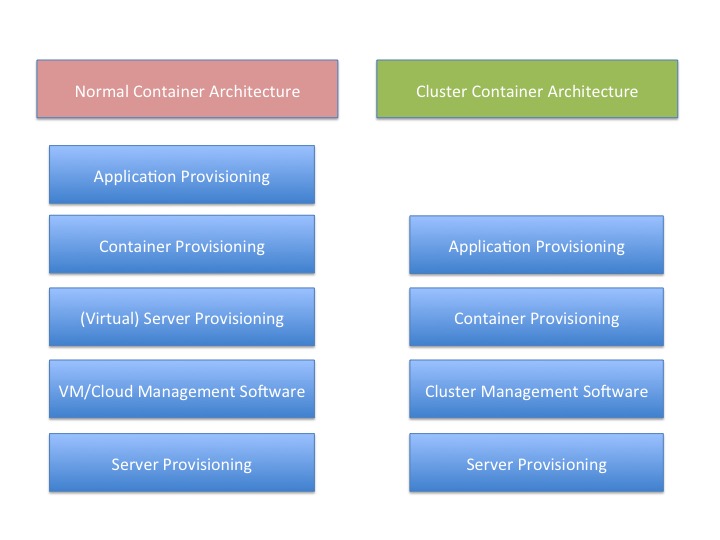
    There is a reason for that, and I think this graphic probably gives it away:

    You’ll note that “container provisioning” is in there. It doesn’t need to be. If your environment is running without containers at this time, then simply remove that block from both sides of the diagram and remove container from the titles.

    The fact is that there is one less step in any provisioning environment short of one app, one server.

    And remember that this abstraction doesn’t touch on storage provisioning, AAA or OS upgrades at two different levels (or in some scenarios three).

    And that’s a big deal. Not just because you have one less layer for deployment, you also have one less layer for maintenance, one less layer for security, one less layer for logging … It’s a big deal. As I’ve mentioned before, we have increased the complexity of the operations environment to the point that some form of DevOps is nearly required to keep a modern or cutting-edge data center running smoothly. The newest round of clustering solutions removes one layer from the architecture stack, reducing that complexity a little bit. Of course, it is just a slowing in the growth of complexity, but it’s better than a “Damn the torpedoes, full speed ahead!” approach to complexity.

    The thing is that clustering software has been around for a very long time—I was briefed back when VMware was just making a name for itself about a clustering solution that was aimed at gaming sites. I never wrote about it because VMware stole the thunder, and the company couldn’t reference any customers except gambling websites—not exactly an easy comparison to make with enterprise environments. This briefing was my first, but clustering existed long before that, even.

    But this round is different than most recent clustering solutions. It focuses on resources and scheduling, not on making a special-purpose large-sized computer. This round of clustering software makes a large computer that looks to apps like Linux. That’s a far more useful abstraction, if it works without a ton of overhead.

    And the overhead is what I’ll be digging into over the next few weeks.

    But yes, I think it’s a great idea. Give me a big old expandable Linux box, make it look exactly like Linux to my apps and let’s see what it means for app growth.

    — Don Macvittie

  • Sauce Labs Streamlines DevOps with Sumo Logic

    Sauce Labs Streamlines DevOps with Sumo Logic

    Log management and analysis is a crucial element of effective DevOps. In an effort to work more effectively and efficiently at the same time, gathering and analyzing feedback provides essential input that organizations can use to correct issues and enhance performance. There are a variety of log management tools out there, but Sauce Labs solved its log management and analysis challenge with Sumo Logic.

    devopsy.kinsta.cloud recently had a chance to sit down with Joe Alfaro, VP of Products for Sauce Labs, to talk about the decision to go with Sumo Logic’s software-as-a-service (SaaS)-based log management solution.

    Prior to making the switch to Sumo Logic, Sauce Labs was using an ELK stack for log management. Alfaro explained that the ELK stack was tedious to maintain. “Our ELK-based solution required constant care and feeding. We were always having to make sure we had enough disk space and we were always fixing bugs or adding new features. We had a small team dedicated to management of this solution. In addition, it was difficult to bring developers up to speed on the tool, since documentation was not always kept up to date and there were no training materials.”

    The effort required to troubleshoot and maintain the tool itself got in the way of Sauce Labs’ ability to use the tool to debug production issues, and used precious developer resources that were needed elsewhere. Sauce Labs decided it needed a new tool—something that was very flexible and cloud-based, so the company wouldn’t need to worry about maintenance or storage.

    To find this new tool, Sauce Labs did proof-of-concept testing with a handful of well-known vendors: Graylog, Loggly, Splunk and Sumo Logic. Alfaro was emphatic about the Sumo Logic experience. “Implementation was ridiculously easy. We were up and running within a day,” he said, adding, “Sumo won out as it has the combination of: ease of use, includes all of the features we wanted, is cloud-based and within our budget.”

    The switch to Sumo Logic has also helped the company streamline its DevOps practices. Sumo Logic provides a communication tool between the developers and ops engineers, acting as a common language that allows DevOps teams to work together to identify the root of problems quickly and easily.

    Alfaro shared that the bridge between Dev and Ops provided by Sumo Logic has led to improved service, as well as savings in both time and cost. “It also finds patterns in our logs that lead to better analysis in discovering problems. This machine-learning-like pattern discovery is invaluable to getting to the root is issues. These days we spend minutes finding problems rather that the hours or days we used to spend in the past, before Sumo. This leads to more uptime and more developer productivity.”

    Of course, your mileage may vary. Graylog, Splunk and other log management and analysis tools are formidable in their own right. If you’re in the market for a new log management solution, though, Sumo Logic should be on your short list for consideration. If your results are anything like Sauce Labs’ results, it would be a crazy move not to check out Sumo Logic.

    — Tony Bradley

  • Addressing Container Security Challenges

    Addressing Container Security Challenges

    From month to month or even week to week, more organizations are developing with containers. The concept of containers isn’t all that new, but the dramatic rise in adoption of container technologies and the support from major tech vendors and platforms has helped containers become mainstream quickly. As with most emerging technologies, now that containers are hot there is a greater focus on some of the security issues of containers. So devopsy.kinsta.cloud worked with leading vendors to address that issue.

    A new report from devopsy.kinsta.cloud, sponsored by Aqua Security and Microsoft, examines the weaknesses of containers and that the security concerns introduced by using containers, and provides a look at some of the approaches to addressing those issues. “Containers: Security Challenges and How to Address Them” contains insights from DevOps and containers experts to help you understand the challenges and how to solve them.

    The report explains, “There is a general lack of awareness of existing container security concerns and best practices. Organizations need to understand the security issues that arise due to the differences in how VMs and containers function. Enterprises need to prepare for the glut of additional files that need protection with containers and the unwieldy nature of third-party libraries that containers use. Businesses also must consider configuration mistakes including those that grant root status to containers or simply make containers overly complex. Most importantly, organizations that adopt containers need to accept responsibility for security them, and should expect to keep tabs on new container vulnerabilities as the industry discovers them.”

    “Containers add a layer of obscurity that reduces visibility,” warns Amir Jerbi, CTO of Aqua Security. “You have an operating system running a container engine, which in turn runs containers. The OS is not aware what containers are running—it only sees the container engine. The container engine knows what containers are running, but has no clue what the containers are actually doing. So, if you’re running a host-based security tool to monitor the OS, you will not see what containers are running and what they’re doing.”

    Thankfully, there are solutions and best practices you can employ. The report describes how to use a combination of preventive measures, active detection and active response to protect container environments. It also covers some of the approaches to creating a more secure container in the first place using concepts such as isolating the containers with virtualization, as Microsoft does with Hyper-V Containers.

    “What’s really important about Hyper-V Containers is that rather than trying to close existing holes, now we can implement a solution that is secure by default and already meets compliance requirements,” explains Taylor Brown, principal lead program manager at Microsoft.

    You can download the free report from devopsy.kinsta.cloud by clicking here: “Containers: Security Challenges and How to Address Them.”

    — Tony Bradley

  • What Do We Do When Everything is Automated?

    What Do We Do When Everything is Automated?

    Recently, I came across a study the caused me to think beyond the day-to-day world of code-slinging in which I live. According to the study conducted by Center for Business and Economic Research at Ball State University in Indiana:

    “Almost 88 percent of job losses in manufacturing in recent years can be attributable to productivity growth, and the long-term changes to manufacturing employment are mostly linked to the productivity of American factories.”

    Just translate the term “productivity of American factories” into the word “automation” and you get the picture. Other workers are not taking jobs away from the gainfully employed, machines are.

    This is not a new trend. It’s been going on since before Eli Whitney invented the cotton gin. Industry creates machines that do the work of humans faster, cheaper, with more accuracy and with less failure. That’s the nature of industry; nothing new here. However, what is new is rate by which the displacement of human beings from the workforce in happening.

    The Bureau of Labor statistics projects that by 2024 the U.S. economy will need 50 percent less car mechanics, 42 percent less telephone operators, 26 percent less postal clerks and 20 percent less parking enforcement officers. Or, to put it another way, cars will be better at self-repair, call routing technology will get better at conducting verbal conversations with humans, self-service postal machines will get better at taking care of human transactions in the post office and parking meters will know how to write tickets.

    Here’s another another point to ponder. As the quality and reliability of self-driving vehicles improve, it’s not far-fetched to imagine self-driving trucks becoming the norm on the nation’s highways. How many truck drivers will be displaced once self-driving trucks are everywhere?

    Also, think about this: As Uber and Lyft mature in the business landscape and self-driving cars become commonplace, the ride-share companies will replace human driven vehicles with self-driving vehicles. Then, Uber or Lyft will start to offer a pricing model that is flat fee for 24/7 service with unlimited mileage. So, to keep it personal, imagine Uber/Lyft offering me a deal in which I pay $150 a month to have all my driving needs taken care of. Or, I can continue to pay the $400 it costs me for my car lease and insurance coverage (yes, I lease a modest vehicle). Which way do you think I will go? Spend $400 for the pain of driving in a car in LA traffic or spend $150 to get where I need to go while I read a book in the back seat? Me? I’d fork the car over in a New York minute.

    As if this isn’t startling enough, try this one out: Walk down your street. See all those cars parked on the side of the road. In the near future, using the Uber/Lyft automation scenario, they won’t be there any longer. Any car made will be used 24/7. All this translates into less cars doing more work. And less demand for cars means less cars being made. Less cars being made means less people working making cars. You get the picture.

    What about software? Let’s take a scenario that is part of my day-to-day coding world, logging. In the old days, you’d log to a file on disk. Over time, that log file got so large that a human would need to move the file manually onto an archive disk so as to not eat production space. Somebody comes along and says, “Hey, I can write a piece of code that watches the size of the log file and moves it automatically when the file gets too big.” So much for the person doing the manual file move. But, still, you had to keep adding capacity to the archive machine, which typically meant a human walking down to the server room and twiddling with some hardware. Then a someone has a great idea, “Let’s use this thing called cloud storage as a back-end for a log collection service. We’ll leverage the elastic capacity features of cloud storage and write out logs to that service. Hell, why make a service? We’ll subscribe to an existing one and save the development costs.” Thus, no more humans needed to monitor capacity, move files, write incidental scripts—any of it. In terms of logging, a bunch of automation is doing the work a lot of humans used to do. Is this progress? Might be. But the trend is unmistakable, so much so that I have no problem imagining a future in which 90 percent of work that used to be done by humans is done by low-cost, automated, robotic, labor.

    We’ve always been on our way to automating everything. The only difference between then and now is that now we are really, really close to full automation. Asking the question, “What will we do when everything is automated?” is no longer fantastic, it’s essential.

    So what will we do?

    “Simple,” you say. “We’ll retrain the displaced workers.” Really? Many of us in the software game know that notion of retraining is a joke. If you are not constantly learning the new stuff, you are out of work. For a knowledge worker, continuous learning is an ongoing requirement for commercial viability. And, the baseline from which you are learning is very high. In other words, you need to know a lot to get the basics of how to write a deployment script in Ansible that runs against AWS. And, even as you are learning that basic technique, somebody is already creating a technology that will make the technique you are learning obsolete.

    So back to the question, what do we do?

    First, let’s do the obvious. When near total automation has the result that there is no longer any work for most humans to do, we need to come up with other means of survival. Survival in the modern world means having money to live on. Charles Murray suggests in the Wall Street Journal that we plan to implement Universal Basic Income. Finland is starting a pilot project based on the idea. Other countries are experimenting too. Universal Basic Income is a program in which citizens of a state are provided with a base income on which to live. Some programs vary basic income according to income produced otherwise. The common thread is an understanding that jobs are not plentiful and that depending on one for survival is not realistic.

    The notion of Universal Basic Income is not that new. It’s been around since the 1960’s, proposed by folks such as Milton Friedman as the negative income tax.

    Second, we need to address the elephant in the living room: the birth rate. In the old days when agriculture and small, private farming was a major industry in the United States, having a large family made sense. You needed your family members to work the land. As the Industrial Revolution created demand for factory workers regardless of age, large families still made economic sense. But now the trend is that we need less people to do more. Thus, having large families becomes counterproductive to the economy overall. Yes, there are certain sensibilities out there that encourage large families and adherents to such thinking have large families as a matter of choice. Still, many families end up with large families for reasons other than intention. It just sorta happens.

    Thus, to ensure that humans have a chance at a viable existence in a fully automated world, implementing effective family planning policy and practice becomes as useful to the society of the near future as the anti-smoking efforts that started in the 1960s does today. I am not advocating draconian, government mandated family planning. We cannot legislate family size anymore than we could smoking behavior. Rather, we need to create a social condition in which the wisdom of the idea prevails.

    Finally, we need to address the need for human dignity in a fully automated world. For better or worse, we need to accept that in the near future the traditional relationships between demand, productivity and income no longer may be applicable. The old days of human workers making stuff and getting paid for their product or labor are coming to an end. Yet, one of the intangible benefits of the old days was the dignity and satisfaction that went with pulling your weight and earning your keep. Being able to provide for yourself and your family defined your worth in your own eyes as well as those around you. This need for dignity will remain no matter how the technical and economic landscapes evolve.

    When I started to doing the research for this piece, I asked others in the know to respond to the prospect of a world that is fully automated. One the people I talked to was Phillipe Kahn, founder of Borland, Starfish Software, LightSurf Technologies and most recently, Fullpower Technologies. Here is his response:

    “I remember being in India and watching a construction site: Lots of people, elephants, activity. I asked, ‘Why don’t you all use bulldozers and tractors and prefabricated concrete parts?’ The answer was enlightening: ‘How would this community make a living with dignity?’ That’s the whole paradox that we are dealing with: Productivity versus dignity for communities that could be unemployed for generations.”

    There is a difference between work and labor. Work is an activity a human does to give one’s life meaning. Labor is what a human does to survive. In the old days work was your avocation, labor was your vocation. Some humans were fortunate enough to have their activities be both avocation and vocation. Others went to work in factories, farms and offices to earn a buck. They pursued other interests at other times. But whether you sang in the New York City Opera full time or in the choir on Sunday morning, the dignity of your work, bringing music to the ears of other humans, was in full force.

    So, the final part of answering the question, “What do we do when we’ve automated everything?” is this: Preserve the dignity of the person and the community. A fully automated world will be a wealthy world unless we blow it up. Productivity produces wealth. That’s the way it is. Regardless of who is or what is the owner of the wealth—government, corporation or private citizen—sharing will become more important than ever. Concretely, this means allocating a significant amount of money to people and organizations that do work that has little or no commercial value, but extraordinary amounts of human value. When it comes to commercial value, the machines will have that end of the economy covered and then some. However, stuff that has little commercial value—curing low occurrence diseases, space exploration, academic research, expanding the arts—this is where human activity can excel.

    In the old days we had a notion called the commonwealth, that shared space where our individual assets grew. We shared some to get some. In the automated future it might have another name. But no matter the name, it will be a place where humans work with dignity in communities and most labor is the left to automated robotics. If not, the common thread of our individual survival might indeed be nothing more than alms for the poor while automation creates wealth for a few.

    — Bob Reselman

  • Lessons Learned: We’re Still Killing Ourselves with Innovation

    Lessons Learned: We’re Still Killing Ourselves with Innovation

    Since the widespread acceptance of virtual machines (VMs), we’ve been on a racetrack with changing technology, with little opportunity to stop and digest lessons learned. That’s not to say organizations haven’t done a good job of learning from experience and mistakes both; rather, the lessons learned are too frequently obsoleted by The Next Big Thing.

    While I have an abiding interest in several areas of DevOps, we’ll focus on one I’ve spent a lot of time around recently: provisioning.

    All Roads Lead to Rome

    Road signs for Rome
    Image Credit: Melanie Bateman via Flicker

    At this point in time, you can provision to VMs, “the cloud” (note that from an automated provisioning perspective this is anything but homogeneous, but the fiction helps here for a moment), containers, clusters and clustered container managers. While all end up giving you a working machine that has IP access, how each goes about it is different.

    That is a problem for automation, unless a company goes all-in on one of the above. Containers were going to save us from custom configurations based upon target—and largely have—but in DevOps they still leave us with an underlying deployment infrastructure that must handle where that container will land. The infrastructure doesn’t define itself, unless we teach it to, and that is still very much tied to the target. Anyone who has used both AWS and Azure knows that even two cloud environments can look very different to get up and running with automation.

    Server deployment tools are steadily growing their capabilities and are adopting the ability to spin up cloud instances alongside their ability to handle hardware/VMs. That’s a good thing, but it’s still relatively new.

    The thing is, we in DevOps are trying to do the exact same thing in every case: get a server configured far enough that our application provisioning tool (Puppet, Chef, Salt, whatever) can pick it up and get the server populated with our applications. One goal, many paths, and it is a rare organization these days that is taking only one of those paths.

    Plan Ahead, Forge Ahead

    The rate of change is not showing signs of slowing down—the re-emergence of clustering software in the light of containers is proof of that. I’m stoked about the idea of clustering, simply because it can take a layer out of an increasingly complex environment, but it changes the way we deploy yet again, offering new software, configurations and APIs.

    The defense mechanism I recommend is to look at what is available, consider how it does or will fit into your architecture and plan for it. DevOps is the area of IT most affected by these changes, so that’s where the planning should take place. But like all topics DevOps, this requires a lot of communication with Dev and stakeholders to make certain the platforms being considered are the ones that will best serve the needs of the company. But supporting all of the possible deployment mechanisms in a DevOps environment means investment in scripting and apps that do the same job for different targets. While that may be doable today if you are blessed with tons of DevOps man-hours, I cannot say often enough that it is building technical debt. Each of those different deployment mechanisms will need to be maintained moving forward, and while the idea of DevOps is always relatively simple, it has been my experience that the reality means some pretty complex code/script feats are necessary to make it work successfully and reliably.

    So build a list of platforms you aim to support, start working toward that list, then revisit in six months or so to make sure nothing has changed. Considering that the needs of most organizations change continually in light of technical advances, and the markets are changing from those same technical advances, six months is a good timeline for revisiting. Any longer than that and you may find yourself with a list of things to support that isn’t accurate and misguides DevOps automation efforts; any sooner than that and you will find you are shifting priorities too frequently to adequately support large installations.

    It’s About the Business

    In the end, for the vast majority of IT, the goal is simply to support the business in an efficient and secure manner. Find out what your organization needs and then go out and make it work. Our industry is lucky enough to have a metric ton of smart people, so making it work is not the issue; pinning down the goals is.

    And keep rocking it. For every error, there are a bazillion successes we don’t jump up and down celebrating, so do the same with those errors. Learn the lessons and move along. Pretty soon you’ll have fully automated deployment on the newer platforms most-suited to the organization, serving up the apps the organization needs.

    — Don Macvittie

  • Mesos: Security Awareness and Considerations

    Mesos: Security Awareness and Considerations

    binaryAs regular readers know, I’ve been digging into Mesos quite a bit these days and, for the most part, enjoying the entire ecosystem that has grown up around it. There are some very cool possibilities when organizing servers into one massive platform for application (or micro-service) delivery. While there is a bit of a learning curve, I wouldn’t say it is as bad as the application provisioning tools out there, and there is the ability to scale and manage apps while maintaining but a single reference architecture.

    But every technology has its issues that we need to be honest and open about if they are to be successful in the enterprise. Mesos is no exception.

    Most open-source projects start out with, “If we just did X, Y and Z, we could do this cool thing!” and only afterward consider the security needs of the target audience. This is kind of the nature of the beast, and Mesos is no exception. The Mesos team is currently on the path to enterprise-grade security from little (or optional) security, but for right now, here are things to consider to help make your Mesos installation secure.

    According to Ben Hindman, Mesosphere co-founder and co-creator of Apache Mesos: “For folks that were running without authentication, we didn’t want to break their clusters when they upgraded. Authentication will be on by default after sufficient time for frameworks to get upgraded. We enable a mixed mode where some frameworks can authenticate and others don’t exactly to support this upgrade path.”

    The thing is, the default upon installation of Mesos at this time is to have no—I repeat no—authentication for frameworks, and no limitation on what those frameworks can see. If you use command line switches, you can modify this default behavior, but the default is still to be wide open where frameworks are involved. The point of this blog is to urge you to use those command line switches if at all possible in your environment.

    It is industry standard to do the exact opposite of what Mesos does—to offer an option to turn off security—but to have it turned on by default. And while it makes initial pilot deployments more difficult, that is precisely what Mesos needs (and, judging from Ben’s comment above, plans) to do.

    The following items, taken together, create the core problem:

    1. By default, Mesos allows frameworks to register without authentication (see link labeled “command line switches” ,above). Normally, some form of authentication is required. Increasingly, OAuth access control is being utilized. See Stormpath or DigitalOcean for examples of API Authentication design.
    2. Mesos uses “roles” to determine which frameworks have access to what resources. By default, a framework can register for any role.
    3. Persistent disks (such as your database or your contracts directory) can be resources assigned in Mesos. Access is controlled by role only (last bullet point before version history), to make them available to multiple apps on multiple frameworks. This also makes access available to any framework that assumes the same role as those with access.
    4. Mesos can distribute agents to each node in the cluster as needed via the mesos fetcher. So distribution of agents, which would be a limiting factor to this weakness, is actually easy—a framework can request that its agents be downloaded to any server in the cluster, on demand.
    5. There is a public framework development guide.

    So with a default Mesos installation, and any machine that can hit the REST API for frameworks, I can register a framework of my own construction. The Mesos system has automated approval of registration, so there is no human decision-making involved; registration (called scheduler subscription) implies approval if authorization is not enabled, and the response includes registration information. Considering that the frequency of adding frameworks should be minimal, this is a good place to have a human involved in the process. Note that older framework development using libmesos.so could also abuse this default, but that route is harder, and thus less likely to be utilized. My new framework can supply roles that exist in other frameworks, and I can then gain access to these static resources simply by waiting for Mesos to hand me the correct resources. These resources could include any persistent disk assigned to that role, with read/write access (because the current incarnation of Mesos only supports read/write). This came to my attention while working on Mesos with Marathon, but is possible simply with Mesos.

    Again, this is a known issue and the Mesos team is slowly moving toward resolution. But for now, users need to lock down their own implementation if their environment will allow it.

    The workaround is easy enough, there are command line options to turn on authentication for frameworks, and to limit which frameworks can use what roles. But you have to turn both on—they are off by default—and looking through the logs on my Mesos cluster, it does not appear that framework registration is logged with default logging settings. Note that role management has overhead, but when applied to frameworks is not a large security burden unless operations is constantly adding/removing frameworks from the system (which is highly unlikely). Also remember that the reason the system is currently designed to work both ways is that some frameworks do not yet support authentication, so testing with this feature turned on is a must before rolling it out in production.

    Do I rate the risk from this issue to be huge? Honestly, it depends upon your implementation. If the Mesos cluster in question is putting sensitive information on a persistent disk, the risk is potentially high. If the cluster in question is not, there is still risk from the architecture design and lack of authentication, but the data available—and how it is protected outside of Mesos—determines how hazardous an attack would be. The ability to modify the configurations of running applications is a further concern; HTTP redirections alone could be troublesome.

    In short, the existence of this transition period is going to make me more aware of the security implications of everything else in Mesos, simply because it shows a failure to follow common practices and might indicate that other places in the project suffer similar security design decisions, though the move toward fixing authentication will make me less hypercritical.

    Note that I wanted to get this info out there, thus have not yet taken the time to explore exploiting this issue on my cluster. Implementation almost always provides different information/issues than researching offers, as it is a different stage of the process. I will update when I have time to make a pair of frameworks, one “normal” and one “attacker,” to test with. In security, it is always best to test out issues first, but these are well-enough documented, I opted for notifying the community before embarking on a potentially lengthy proof.

    It is not the point of this post to imply that Mesos should be avoided. The point is to advise you that the “Command Line Switches” link (above) should be followed, read and the guidelines for turning on authentication should, at a minimum, be implemented. I would recommend limiting roles also, but at a minimum, turn on authentication for frameworks and test if it works in your environment.

    I’d like to thank Ben Tomhave, Security Architect at New Context, for helping me out on some of these points. If there is any error in my analysis, it is mine alone, but the blog is far better for his assistance.

    — Don Macvittie

  • Continuous Integration vs. Delivery vs. Deployment: What’s the Difference?

    Continuous Integration vs. Delivery vs. Deployment: What’s the Difference?

    “Continuous” is one of the most popular words in the DevOps lexicon. What does it really mean, and what is the difference between continuous delivery, continuous deployment and continuous integration? Keep reading for some perspective.

    Like many technological concepts, continuous integration, continuous delivery and continuous deployment are terms that DevOps teams tend to use without defining them precisely. For that reason, it’s worth taking a closer look at what each of these terms actually means.

    Continuous Integration

    Continuous integration can really mean one of two things, depending on the context.

    In the narrower sense, continuous integration refers to the work done by a continuous integration server, such as Jenkins or Bamboo. A continuous integration server automatically tests code written by individual developers to make sure it can be merged into the main code base. By automating this process, continuous integration servers help developers to write and test small chunks of code on an ongoing basis, which minimizes the risk that a code change could cause serious problems and force developers to revert their application to an earlier state.

    In a broader sense, continuous integration means the constant integration of changes to an application at all stages of the delivery chain. This includes but is not limited to the automated integration testing and code merging performed by an integration server. In this broader definition, continuous integration can include the integration of new design concepts to the delivery pipeline, for example. It also can involve other types of software testing beyond just automated integration tests.

    Continuous Delivery

    In most definitions, continuous delivery refers to the process of delivering software updates to users on a nearly constant basis. Continuous delivery is made possible by continuous integration and other optimizations at earlier stages of the development process. But the definition of continuous delivery gets a little cloudy when you start comparing it to continuous deployment.

    Continuous Deployment

    What’s the difference between continuous delivery and continuous deployment? For some DevOps teams, nothing. People tend to use these terms interchangeably. In fact, they are usually simply abbreviated as “CD,” leaving it up to the listener to decide what the speaker is actually talking about when he hears the term during a conversation about DevOps.

    Some developers draw a distinction between continuous delivery and continuous deployment, however. For example, Mirco Hering writes that continuous delivery requires that the DevOps team manually release updates to users. In contrast, the continuous deployment pipeline is fully automated; users get updates as soon as they are written and tested, with no manual intervention by developers.

    This distinction is a good way to think about the difference between the closely related concepts of continuous delivery and continuous deployment. It’s a distinction that will become increasingly important as technologies such as Docker make it easier to automate application deployment by allowing DevOps teams to drop new container images into production.

    What Does Continuous Mean, Anyway?

    It’s worth mentioning, too, that the word “continuous” is usually something of an exaggeration when used by DevOps folks. It implies that software changes roll down the pipeline in a totally constant, never-stopping fashion.

    That is an exaggeration. Integration, delivery and deployment are almost never completely continuous. In practice, a “continuously” integrated application is likely to be rebuilt and delivered something like every 24 hours, not every single time a code change reaches the end of the pipe.

    That rhythm is still a lot faster, and closer to continuous, than the “waterfall” delivery pipelines that were common before the introduction of DevOps. But it’s still important to understand that, even with all of the automation tools available today, software development is rarely completely continuous.

    — Chris Tozzi

  • DOES San Francisco 2016: Adrian Cockroft On Retaining Talent

    DOES San Francisco 2016: Adrian Cockroft On Retaining Talent

    Another one of the over 50 video interviews we did at DevOps Enterprise Summit 2016 is our discussion with Adrian Cockroft. Adrian is was one of the last presenters at DOES this year, but that was a good enough reason to stick around until the end. Adrian’s presentation was on the challenges in retaining talent at high tech organizations.

    Before we dive into the talent conversation though, Adrian talks a bit about his own journey from Netflix where he pioneered so much of what we see in the DevOps market today. After Netflix, Adrian joined Battery Ventures, where he had the opportunity to go visit with numerous large organizations and find out what was working for them and what their challenges were. He was able to use that information to help guide Battery in which companies they should invest in to add to their portfolio. After several years at Battery, Adrian has recently left to join AWS where he will once again be directly involved as the VP of Cloud Architecture.

    But as I said earlier, Adrian’s presentation (truth be told he only had one slide or so, it was more of him speaking) was about the lack of enough qualified people to fill the ranks. This pressure results in successful companies having to “grow” their existing talent. But as Adrian points out the very act of letting this talent grow also leads them to move on. As they become more prominent in the field they are more likely to be recruited away. So how do you retain talent? Adrian tells us some of the things Netflix did to keep their engineers. Of course what Netflix did does not translate to many traditional organizations though.

    Obviously, monetary compensation helps an awful lot. But there are things beyond money (sometimes). Things like giving people titles like distinguished engineer for example.

    Adrian also brought up the example of Brent in the Phoenix project. How by giving him a different role, you not only remove the bottle neck, but also keep him happy in his new role.

    As usual, it was great listening and learning from Adrian. His reputation as one of the leading lights in the DevOps space is well earned and well deserved. Enjoy the conversation!

    devopstvsquareYou can see over 50 video interviews we did at DOES 2016 on our YouTube channel, DevOpsTV.

    — Alan Shimel

  • Docker On Windows, One Engineering System, Microsoft Uses DevOps To Reinvent Itself

    Docker On Windows, One Engineering System, Microsoft Uses DevOps To Reinvent Itself

    While at DOES San Francisco 2016 last week I had a chance to sit down with two presenters who work at Microsoft. One is someone I have interviewed before at both DOES and here on devopsy.kinsta.cloud, Sam Guckenheimer, Product Owner of Microsoft Visual Studio Cloud Services. Joining Sam and I is Ed Blankenship, Product Manager at Microsoft for Visual Studio Team Services. We had a wide ranging discussion on Microsoft’s own DevOps journey including the move to one engineering system, to SaaS based systems, security and finally Docker on Windows.

    Ed and Sam presented at DOES on Microsoft’s move to a single engineering system that now serves over 62,000 users within Microsoft alone! Sam also did a Lean Coffee session on security and compliance. All in all it was a great discussion with Sam and Ed. I know it is a bit long at 17+ minutes, but have a listen and enjoy.

    Also if you are interested in Docker on Windows, please check out this free and easy hands on lab Microsoft has made available to our readers here. The lab allows you to install Docker on Windows 10 and more. You don’t need anything on your end it is all self-contained in a web browser.

    You can see some of the other 50 videos we recorded from this years DOES San Francisco event on our YouTube channel, DevOpsTV.

    — Alan Shimel