Category: Features

  • GitLab Updates CI/CD Platform to Improve Dev Productivity

    GitLab Updates CI/CD Platform to Improve Dev Productivity

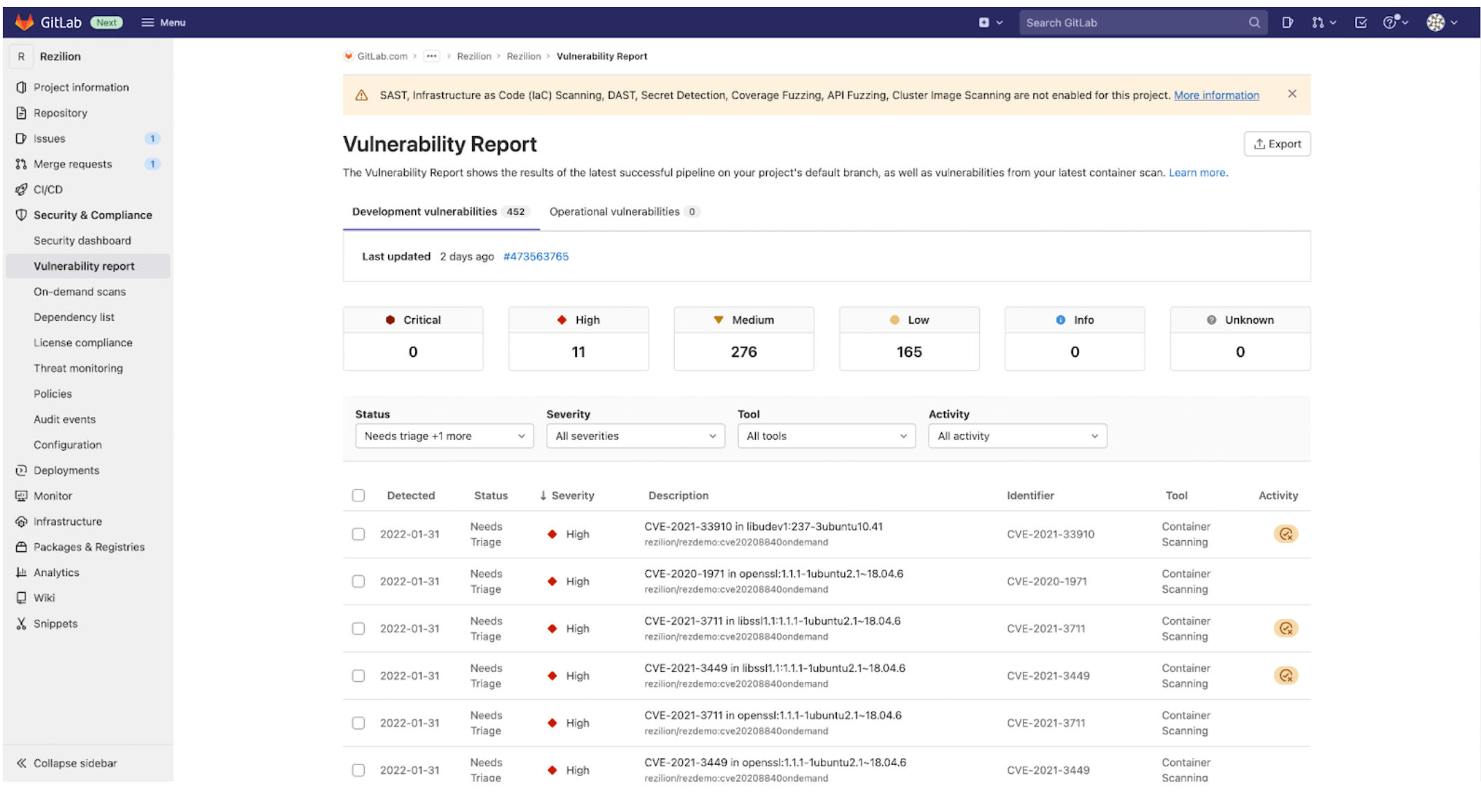
    GitLab has made available a 14.9 update to its namesake continuous integration/continuous delivery (CI/CD) platform that adds epic-linking, integrated security training, rule mode for scanning result policies and a revamped design, among other capabilities. The updated environment makes it easier to discover the state of the application development projects, GitLab said.

    Cindy Blake, director of product marketing at GitLab, said these updates are part of an ongoing effort to embed technologies within the CI/CD platform that will make applications both more secure and compliant with various mandates before they are deployed in a production environment.

    For example, DevOps teams can now take advantage of a user interface through which they can use a rule mode to design and edit policies without the need to access YAML files directly.

    GitLab has also partnered with Kontra and Secure Code Warrior to provide content that will drive security training functionality. This content can be accessed via the GitLab platform whenever a vulnerability is discovered.

    The overall goal is to make it simpler for organizations to shift left because expecting every developer to become a security expert is not especially realistic, noted Blake. The ability to automate many of the security tasks that developers face is a way of showing empathy for the daunting challenges they face.

    In general, as application development becomes more complex, GitLab is moving toward making its CI/CD platform more accessible to a wider range of organizations, including those that might only be starting to embrace DevOps best practices. The epic-linking capability, for example, makes it easier to identify “related”, “blocking,” or “blocked” relationships to better track and manage epic dependencies across GitLab groups.

    The two biggest challenges organizations face today are securing their software supply chains and improving the overall productivity of the developers. In most cases, those two goals are tightly coupled; every minute a developer spends on security is one less minute they spend writing code. In fact, many organizations are finding that, in addition to salary and benefits, many developers are using the level of friction they will encounter when building and deploying applications as a guide to decide which organizations they want to work for. As a result, many organizations are now looking to modernize their application development and deployment environments with an eye toward attracting the best developer talent.

    At the same time, of course, organizations are looking to improve the productivity of the developers they do have. In the age of digital business transformation, there are many more application development initiatives being launched. The challenge organizations face is that hiring and retaining developers remains a major challenge.

    It’s not clear how eager organizations are to replace their existing CI/CD platforms. However, the pressure to improve the overall developer experience is mounting at a time when organizations are increasingly dependent on software. Arguably, going forward, the ability of any organization to compete will be dependent on the productivity of application development teams. Platforms and tools that get in the way of enabling organizations to build and deploy more secure software faster will be discarded.

  • Designing Your DevOps Ecosystem for Multi-Cloud

    Designing Your DevOps Ecosystem for Multi-Cloud

    As companies grow and expand to become global enterprises, IT infrastructure inevitably becomes more complex. When it comes to cloud computing, that usually means maintaining multiple clouds. There are many reasons for using different cloud service providers (CSPs)—some by choice and others by mandate. 

    For instance, a large enterprise with operations around the world may choose to use an in-country cloud vendor to be closer to the customer, therefore reducing latency and increasing application performance for operations in that country. Alternately, in some countries, data residency laws require that certain kinds of data reside on cloud providers within the country’s borders, which means companies with local operations can only use a cloud provider in that country. Both circumstances lead companies to maintain multiple clouds to facilitate operations at scale. Additionally, a company may decide to use two or more cloud providers as part of a fallback strategy to automatically reroute network traffic to another provider if a major outage occurs.   

    Regardless of whether the use of multiple CSPs is a choice or a mandate, enterprise IT leaders—and DevOps teams in particular—need to think strategically about multi-cloud environments and design their software delivery ecosystem from the outset to accommodate a multi-cloud strategy. 

    Best Practices for Multi-Cloud Environments

    An effective multi-cloud DevOps strategy is essential for allowing businesses to easily scale application delivery across many different cloud assets and is therefore vital for enterprises operating globally. To create an effective strategy, consider these best practices.

    Use a Centralized Software Delivery Platform

    With many CSPs—each with different requirements and tools—companies too often create siloed software development and delivery teams by vendor (AWS, Azure, GCP, etc.) or functional role (security, compliance, etc.). To avoid this pitfall and maintain control and visibility across all cloud providers, it’s important to implement a centralized software delivery platform, ideally one that’s environment agnostic. This will give your DevOps leaders the intelligence and insight they need to manage the entire software delivery ecosystem across multiple clouds anywhere in the world. At the same time, automated delivery processes can ensure quality checks and other milestones aren’t missed regardless of the cloud destination and that reporting, analytics and metrics from a centralized platform can identify and eliminate bottlenecks across different clouds. 

    Use Cloud-Agnostic Tools

    Most cloud vendors have their own tools. However, maintaining a multi-cloud environment using vendor-specific tools can lead to lock-in and which can be costly and time-consuming to remediate. Too often, when companies move to the cloud, they use a set of vendor-specific tools for their software delivery processes. That works well initially, but as the company scales and requires a multi-cloud approach, the teams either find themselves heavily siloed without visibility across the whole ecosystem or there is significant technical debt that needs to be overcome. To avoid this, companies need to plan for the use of cloud-agnostic development and deployment tools from the outset so you can easily shift applications to different cloud providers as necessary to keep pace with changing business needs.

    Create Cloud-Agnostic Templates

    As developers assess and use tools and applications for different clouds, environments and use cases, they can create templates and abstracts to share lessons learned across teams, increase productivity and speed development cycles regardless of the destination CSP. For enterprises with more advanced DevOps practices, self-service capabilities—like a shared module catalog—can further speed development processes. 

    Make the Most of a Multi-Cloud Environment

    Once your enterprise has embraced a multi-cloud approach and the DevOps systems and processes are in place to efficiently deploy applications across different CSPs, a multi-cloud environment can be used to your strategic advantage—to increase flexibility, speed software delivery and reduce costs. Here’s how:

    Align Application Destinations to Specific Clouds

    When you’re not dealing with the confines of country-specific cloud providers, IT and DevOps leaders can strategically align applications to specific cloud providers by region or country to reduce latency, optimize workloads or take advantage of specific service offerings from a particular CSP.

    Use Application Features in Different Clouds

    This concept is a great way for DevOps to leverage a multi-cloud architecture. If an application is run in one cloud and you want to add a feature that uses an application from a different cloud in your IT footprint, you can create a multi-cloud cluster using the same underlying cloud database to support both workloads. In this scenario, a production node resides in cloud A and runs in parallel to the read-only node in cloud B. This helps developers avoid the headaches that come with custom scripting as well as the costs of maintaining a backup and restore scenario.

    Reduce Costs and Improve Performance with Cloud Arbitrage

    This strategy is somewhat new, but it’s becoming more and more mainstream as competition increases among cloud providers. Here, you use a multi-cloud cluster to shift your workloads among several cloud providers to optimize your cloud environment and take advantage of negotiated discounts, specialized support, higher availability, lower latency or other unique features offered by a specific CSP.

    To keep pace with our rapidly changing world, enterprise-scale organizations must be able to manage software delivery across multiple clouds. If your DevOps systems and processes aren’t designed for flexible development and delivery across different CSPs, you could limit your ability to adjust and successfully manage major disruptions or scale to take advantage of new opportunities.

  • What We Don’t Know is Dangerous

    What We Don’t Know is Dangerous

    Pop quiz: How many database management systems (be they RDBMS or NoSQL or even flat file) do you have running in your overall organization? Not actual databases, but management systems?

    How many containers do you have that are exposed to the internet, directly or indirectly? Not container management systems, because you’re only running a couple of those and they’re all relatively new, but actual containers?

    The questions could go on and on. Not too long ago, because there was an identifiable cost associated with it, cloud inventory management became a popular thing – finding and removing cloud instances, services and storage that were no longer necessary became a part of normal operations for organizations that had even a mid-sized cloud presence.

    But now, we have sprawl all over the place. So let’s extend inventory management to all software, and get rid of what isn’t needed on a regular basis … because it does indeed build up quickly.

    Yes, there are a few companies out there trying to do just this, and I encourage you to check them out. I have not, because our inventory at Ingrained Tech is manageable without that level of overhead. Our development and ops time is limited, so we keep a tight rein on what is out there and the maintenance it requires.

    But for larger organizations, the more you have out there, the larger attack surface and potential data sieves you have in place. So make sure if it isn’t needed, it’s gone. In the age of containers, this actually requires a fair amount of investigation; first, a list of all containers part of an ongoing project (and in even a mid-sized company, “They’re all together for each app,” won’t create this list because random containers are out there, too). And then a list of all containers not associated with a known project that can be gone through and usage determined.

    It’s not glamorous. It’s a bit of a slog. It’s in the organization’s best interests, though, and the slog should motivate your teams to put a policy in place to manage container life cycles. Like notes in Docker files that say when the container is no longer needed, or what it is needed for, so future you can easily get rid of it without stress.

    If you are in a containerized environment, this problem is growing almost by the day. Seriously. On our last project, we had 12 active containers before we pared it down to the five we needed long-term. The others were R&D along the way or tools we were using before focusing on a different method of achieving the same goals. Since we’re a small team, we just cleaned up when the project was coming into focus, but a larger org needs to be more focused on cleaning things up as they go.

    Meanwhile, those assets are letting customers get to your org, and allowing employees to manage the systems. Keep rocking it, and just remember to pick up, particularly after cutting-edge new projects, but also occasionally as just a normal cleanup step.

  • Lapsus$ Shames Okta/Sitel | Bitcoin Nukes Climate | EU DMA E2EE FAIL

    Lapsus$ Shames Okta/Sitel | Bitcoin Nukes Climate | EU DMA E2EE FAIL

    Welcome to The Long View—where we peruse the news of the week and strip it to the essentials. Let’s work out what really matters.

    This week: Okta and Sitel under fire over Lapsus$ hack, Greenpeace and others call for bitcoin change, and Europe still hates encryption. (more…)

  • GitLab Allies With Rezilion to Add Workload Analysis Tool

    GitLab Allies With Rezilion to Add Workload Analysis Tool

    Rezilion has integrated its workload analysis tool with the continuous integration (CI) framework provided by GitLab. The move is part of an effort to make it simpler for developers to discover issues such as vulnerabilities before they upload code into a repository.

    Sam White, a senior product manager for GitLab, said this integration will provide developers with an instant feedback loop that will enable them to address a wide range of issues before their code is ever reviewed. Rather than experiencing the shame of, for example, missing a vulnerability, the Rezilion platform enables developers to quickly write code while relying on a code analytics tool to surface common mistakes that they can remediate as they see fit, he added.

    Rezilion CEO Liran Tancman added that the proprietary workload composition analysis engine, dubbed Unison, on which the Rezilion platform is based makes it feasible to shift more responsibility for application security further left without requiring developers to become cybersecurity experts.

    Unison automatically creates a model of all the applications that include the underlying infrastructure and runtime environments. It reverse-engineers and maps that environment in memory to dynamically track the inventory, provenance, runtime execution, exposure and interdependencies between each piece of code and can generate a software bill of materials (SBOM).

    The code that is most in need of immediate attention is also surfaced directly with the GitLab user interface, said Tancman. That capability can reduce remediation time of the vulnerability backlog an organization might be working through by as much as 70% over time, he added. Rezilion enables organizations to achieve that goal because non-exploitable vulnerabilities are marked as “false positives” that shouldn’t hold back a release.

    Tancman said that without this level of automation it would be extremely challenging for an organization to implement a set of DevSecOps best practices. It might take developers years to attain the level of cybersecurity training that would be required in the absence of the automation enabled by the Unison engine, he noted.

    Historically, the relationship between application developers and cybersecurity teams has been tense. Cybersecurity teams tend to put off code review until it’s about to be deployed in a production environment. It’s not uncommon for an application to be pulled at the last minute because of a vulnerability discovered by a cybersecurity team. In some instances, that vulnerability is a legitimate concern but in others, it turns out to be a false positive because the flagged piece of code isn’t actually included in the application.

    By providing developers with a workload composition analysis tool within the context of a CI framework, GitLab is trying to reduce the level of friction that the process tends to create between developers and cybersecurity teams.

    It may be some time before most organizations fully master DevSecOps, but it’s clear that merely telling developers they will be held accountable for application security without providing the appropriate tools isn’t going to make applications any more secure.

  • Techstrong Live! Days, DC: Upskilling DevOps, Cloud-Native and Cybersecurity

    Techstrong Live! Days, DC: Upskilling DevOps, Cloud-Native and Cybersecurity

    DevOps and cloud-native are key for organization looking to accelerate their digital transformation journeys. Techstrong Live! Days, a two-day, in-person event, explores the latest DevOps, cybersecurity and cloud-native technologies and trends that are shaping the way we do business. The first stop of the Techstrong Live! Days conference tour will take place in Washington, DC on April 13-14 at the Convene Event Center. The in-person event offers educational sessions, demos and hands-on training sessions (certification available) led by top industry experts.

    Day One: DevOps/Cloud-Native Live!

    DevOps/Cloud-Native Live! is day one of the conference. The agenda for day one features a mix of topics, including API security, Kubernetes, DevSecOps, cloud security, observability and more.

    The sessions include keynote presentations, educational talks and hands-on training with leading DevOps and cloud-native tools.

    DevOps/Cloud-Native Live! features an outstanding lineup of innovators, practitioners and thought leaders, including:

    • John Willis, senior director of the Global Transformation Office at Red Hat
    • Mike Rothman, president at Securosis
    • Jennifer Minella, founder and principal advisor, security architecture at Viszen Security
    • Sanjeev Sharma, senior vice-president, head of emerging tech and platform engineering at Truist
    • Andi Mann, CTO at Qumu
    • Steve Klugherz, vice-president of engineering at Qumu
    • Tracy Bannon, software architect and DevOps advisor at The MITRE Corporation
    • Charlene O’Hanlon, COO at Techstrong Group
    • Mitch Ashley, principal at Techstrong Research

    Day Two: Cybersecurity Live!

    Cybersecurity Live! is day two of the conference. The agenda for day two features a mix of topics, including AppSec, software supply chain security, SBOM adoption, cloud security, DevSecOps, cybersecurity threats, 5G security and more.

    The sessions include keynote presentations, educational talks and hands-on training on forensics/hacking (certification available) and API security. By attending and participating for a full day at Cybersecurity Live!, attendees will receive a certificate in-person or via email granting seven contact hours for the appropriate CEU/CPE Credits.

    Cybersecurity Live! features an outstanding lineup of security experts, including:

    • Aaron Rinehart, co-founder and CTO at Verica
    • Stephen Hendrick, vice-president of research at Linux Foundation
    • JC Herz, CEO at Ion Channel
    • Adam Fisher, principal security engineer at Salt Security
    • Carlos Asuncion, senior solutions engineer at Salt Security
    • Mike Rothman, president at Securosis
    • Charlene O’Hanlon, COO at Techstrong Group
    • Tunde Oni-Daniel, head of technology operations and engineering at OneMain Financial
    • Mike Jones, founder at H4UNT3D HACKER
    • Saad Farooq, customer success/support engineer at Traceable AI
    • Dan Gordon, director, technical evangalism at Traceable AI
    • Mark Franklin, API security solution engineer at Traceable AI
    • Brian Mengwasser, vice-president at MarketPlace & Apps Design, DISH Wireless

    Attendees will also have the opportunity to attend networking receptions each day to connect with other IT professionals, exchange ideas and learn from one another. Breakfast, lunch and snacks will also be provided to all attendees.

    Join us at Techstrong Live! Days in Washington, DC to level up your existing skills, discover new cloud-native and DevOps tools, improve the security of your APIs and network with experts and peers.

    For more information on DevOps/Cloud-Native Live! and to register, please visit the DevOps/Cloud-Native Live! website.

    To learn more about Cybersecurity Live! and to register, please visit the Cybersecurity Live! website.

  • Rocket Software Extends DevOps Reach to IBM I Platforms

    Rocket Software Extends DevOps Reach to IBM I Platforms

    Rocket Software has added support for the IBM I platform as part of its relaunch of a DevOps platform that also runs on IBM mainframes.

    Chris Wey, president of the data modernization business unit at Rocket Software, said the Rocket DevOps continuous integration/continuous delivery (CI/CD) platform will make it possible for organizations that employ both IBM I midrange platforms and mainframes to modernize application development and deployment using a common framework.

    Modernization of application development on mainframes has been occurring for some time. A survey of more than 500 U.S. IT professionals conducted by Rocket Software found 44% of respondents employ multiple DevOps tools, but slightly less than a quarter (24%) have a comprehensive DevOps platform in place.

    Rocket Software is expanding its DevOps reach to include the IBM I platform because organizations that rely on this platform have the same pressing need as other organizations to more quickly build applications, said Wey.

    It’s not clear to what degree organizations are still building new applications for what have become venerable IBM platforms. A Rocket Software survey found that while 82% of respondents are migrating workloads to the cloud, only 4% reported they are migrating completely to the cloud. The bulk of most mission-critical applications running on mainframes are online transaction processing (OLTP) applications that require a level of processing capability that still can’t be easily matched using any other platform. There are plenty of instances where certain classes of workloads have been migrated off the mainframe to run on lower-cost platforms. However, there are still many enterprise applications that continue to run faster on mainframes than they could on any other platform.

    In most cases, Wey noted, organizations will be deploying and updating applications across hybrid cloud computing environments for years to come. The immediate challenge they face is a lack of DevOps skills among the IT teams that manage IBM I systems and mainframes, he added.

    Rocket Software also provides access to a set of application development tools for building modern applications on IBM platforms. Most recently, the company added support for an open source Python software development (SDK) that IBM created for the Python programming language to the Rocket Open AppDev for Z framework for building mainframe applications.

    The overarching goal is to make IBM platforms more accessible to a wider range of application developers and DevOps professionals that today mainly work on distributed computing platforms, noted Wey.

    One way or another, the divide that has existed between legacy platforms and distributed computing systems is continuing to narrow. Many organizations are trying to lower the total cost of IT by centralizing management of both these classes of systems versus continuing to hire and retain separate IT teams.

    The IBM I platform traces its lineage back to AS/400 systems that were first launched in 1988 as an integrated midrange minicomputer rival to VAX/VMS systems from Digital Equipment Corporation (DEC). Fast-forward more than 30 years later and there still are many IBM I platforms running long after VAX/VMS systems have all but disappeared.

  • What Donuts Teach Us About DevOps and Delivery Risk

    What Donuts Teach Us About DevOps and Delivery Risk

    Today, most DevOps teams do not think too much about their approach to risk. Usually, the typical attitude focuses on what to add to reduce risk further. In other words, “Can we add more tests? Can we deploy more carefully?” More tests, more processes and less risk are all obviously good things. Or are they?

    As a programmer, I’ve seen a lot of projects where there are so many tests and so many processes that they actually become counterproductive. Those ‘overheads’ presumably do reduce risk, but nobody knows by how much. I call this attitude ‘blind risk avoidance.’ This line of avoidant thinking usually builds up over time as we react to failures. It’s a very natural reaction.

    But when risk avoidance becomes your standard modus operandi, your delivery cycle gets slower and slower over time. Your team starts to feel they are trapped in molasses but, as time goes on, they not only gradually train themselves to tolerate this but to actively justify that it’s a good thing. In the meantime, nobody pays attention to the fact that your software is losing a competitive edge and that you’re being out-innovated and out-executed by others. Nobody pays enough attention to engineering team attrition; losing people as they drop off, one-by-one to move to more modern software development teams with less baggage. The ultimate conundrum lies here: If you move too fast, you break things. But if you move too slowly, your business and your team are doomed.

    So what is the optimal approach for DevOps teams to take when it comes to risk? The truth is, neither extreme is desirable. Blind risk avoidance leads to a failure of value delivery. On the other hand, blindly ignoring risk means crashing and burning.

    The ideal balance lies in not avoiding risk entirely or ignoring the reality of risk. Instead, a sensible middle ground can be found in taming risk.

    Moving forward, DevOps teams and developers must focus on taming risk to deliver software confidently with data-driven actions, speed and quality. 

    Automation Can Reduce Operational Overhead

    Taming risk should become a larger part of DevOps culture. One of the most famous ways this approach has been adopted is by Google’s site reliability engineering (SRE) team. 

    Google’s SRE team embraces two key principles when it comes to taming risk: Automation for reduced operational overhead and structured and rational decision-making for better, data-driven choices.

    To explore this mindset of risk-taming at Google, let’s dive into how the SREs use automation to slash waste, save time and reduce repetitious, low-value tasks and tests. 

    At Google, SREs are software engineers with an extremely low tolerance for repetitive, reactive work. (Aren’t we all?) But here’s the difference at Google: Thanks to a workplace culture of taming risk, operations that do not add value to a service are avoided or automated away.

    The vast majority of DevOps teams hold the same beliefs as Google: That automation cuts down on waste and saves everyone time.

    We all know automation allows for lower operational overhead, frees up software engineers to proactively assess and improve the services they support and boosts team morale. No one wants to spend their time or energy on repetitive, low-value tasks. Automation frees up DevOps teams to expend their energy on what matters most: Continuous quality.

    Bottom line? Automation is integral to the idea of taming risk. Automation of repetitive, low-value tasks is the perfect way to embrace a mindset of taming, not avoiding or ignoring risk entirely.

    Data-Driven Decisions

    Another way that Google’s SRE team tames risk is through structured and rational decision-making based on data. 

    Data-driven decisions are crucial to the success of any software engineering team, project or mission. Without proper data and feedback, there’s no way for software engineers to make the best, most calculated decisions and mitigate risks. 

    A data-driven decision methodology can—and should—be applied to DevOps testing cycles. 

    Another key aspect of data-driven decisions that speaks directly to the concept of taming risk? Service level objectives (SLOs).

    A service level objective is an element of a service level agreement that measures the performance of the service provider. SLOs are created (and agreed upon) between the service provider and the customer and help to mitigate disputes between providers and customers.

    Now, let’s take the concept of SLOs and apply them to engineering and QA teams.

    In traditional organizations, engineering and QA are forced to interact intentionally with a healthy amount of tension. One team produces software and the other team tears this software down. While this kind of necessary and healthy conflict between teams can lead to better results, the inherent push and pull between engineering and QA can create an excess of interorganizational infighting.

    Engineering teams will always advocate for more velocity or blind ignorance of risk, above all else. On the flip side, QA will always advocate for quality, or blind avoidance of risk, above all else.

    Of course, neither side is entirely correct (nor incorrect).

    Instead, the solution to this tension lies somewhere in the middle: The taming of risk, not ignorance or avoidance of risk. This is where an SLO, or the numeric target that represents ‘somewhere in the middle,’ comes into play. For engineering teams focused on velocity and QA teams focused on quality, creating an SLO—a happy medium to work toward with regard to risk—will create a more balanced workplace culture. In short, this approach can be considered a taming of risk.

    ‘Donut’ Slow Velocity

    Now, we’re finally going to get to the donuts. To demonstrate how embracing a mindset of taming, not avoiding, risk can create better, happier and faster DevOps teams, let’s take a look at Krispy Kreme Donuts.

    Krispy Kreme churns out millions of delicious, hot, glazed donuts every single day. However, during production, it’s inevitable that one or more of those donuts will be flawed. (I know, you’re asking, “Is there really such a thing as a flawed donut?!” For the purposes of this analogy, let’s say yes, there is.)

    One common donut defect occurs when the donuts bunch up on the production line and clog it.  Now, let’s assume this common error is caused by the speed of the line. If the Krispy Kreme team attempts to solve this problem by pushing the line even faster, tolerance gets smaller and the risk of even more smashed, defective donuts only rises. That’s certainly not a solution to this issue.

    On the other hand, if the Krispy Kreme team slows down the donut production line speed, there will be a smoother—albeit slower—operation.

    Is Krispy Kreme better served by slowing down its entire production line and sacrificing its velocity to eliminate the risk of a potential defective donut? Of course not! 

    If that’s not true, then is Krispy Kreme better served by cranking up their production line speed to go as fast as possible, regardless of the risk of defective donuts? Again, of course not!

    For sweet success, Krispy Kreme must embrace a mindset of taming risk. By baking careful measurement and an iterative feedback loop into their donut production process, Krispy Kreme is better able to create delicious, high-quality donuts at an optimal speed, producing some flawed donuts. This balance of speed with quality creates the best economic outcome and the mindset and measurement allow for a constant evolution to risk-taming in the future. As the production line changes, the optimal speed also needs to evolve.

    DevOps teams should take this same approach. Tame the risk without sacrificing speed and quality. ‘Donut’ slow velocity to fix a few minor issues!

    If you’re still not convinced, here’s another way to think about taming risk that is decidedly less delicious than warm, glazed donuts: Taxes. 

    The IRS balances velocity and accuracy during tax season as they process millions of tax reviews. While suspect returns are flagged for audits, the IRS simply cannot catch every single flawed tax return. It’s not economical or even possible to run detailed audits on every single problematic tax return, every single year.

    So, instead, the IRS tames its risk with automation and data-driven decisions. The IRS focuses on creating and using methods to detect patterns that correlate with flawed tax returns. Then, once these data-driven problem returns are detected by automation, experts can devote their precious time and mental energy to tackle the biggest of the problematic returns. 

    Again, this approach to taming risk creates an inherent balance between quality and speed and allows for an evolution of the process as economic activities and laws evolve.

    Whether you love eating donuts or doing your taxes, the bottom line is clear. Most organizations need to balance potential risks with maintaining speed, quality and team morale. DevOps teams are no different. 

    How to Tame Risk in DevOps Teams

    So how can we, as DevOps teams, tame the risk?

    The basic idea here is to do smarter testing, not just more testing. The good news is that if you have a reasonable level of automation, the data coming out of your existing automation can make your testing smarter. Approaches like predictive test selection can let you spend your computer hours more meaningfully, allowing you to improve speed and quality at the same time. Approaches like flaky test insights can let your precious engineering resources focus on the most impactful effort to improve the quality of tests.

    The Power of Taming Risk

    What is the right balance between speed and quality? This is the constant question DevOps teams face. But, here’s how I answer this riddle: Taking calculated risk is the most logical and rational approach in the workplace.

    It’s easy to avoid risk. Anyone can skirt around potential pitfalls by avoiding new solutions and sticking to the same old methodologies. But it’s so much more satisfying to take a calculated risk rather than ignore or avoid the risk outright. 

    If you want to improve the velocity and the happiness of your DevOps team, it’s time to embrace a new mindset: Tame the risk, gain control.

  • Harness Acquires ChaosNative to Meld Chaos Engineering, DevOps

    Harness Acquires ChaosNative to Meld Chaos Engineering, DevOps

    Harness this week announced it acquired ChaosNative as part of a plan to more deeply integrate chaos engineering with DevOps workflows.

    At the same time, the company added a Harness Service Reliability Management (SRM) and Harness Security Testing Orchestration capability to its continuous integration/continuous delivery (CI/CD) platform.

    Chaos engineering, as a discipline, refers to experiments on a software system that test its resiliency in the face of an unplanned outage. The goal is to deliberately make resources unavailable to see how the application environment either adjusts or whether it fails.

    ChaosNative’s LitmusChaos platform, which manages these chaos engineering tasks, was donated to the Cloud Native Computing Foundation earlier this year.

    Scott Sanchez, chief marketing officer for Harness. said the company plans to shift chaos engineering further left as part of an effort to enable developers to test the resiliency of their applications before they are deployed in a production environment.

    It’s still early days where adoption of chaos engineering within DevOps workflows is concerned. Many IT leaders’ performance is measured based on the stability of application environments. The idea that they should deliberately break something as part of an effort to make an application more resilient requires a shift in mindset, noted Sanchez.

    However, once IT leaders start to appreciate how chaos engineering actually improves the availability of applications it’s only a matter of time before the practice becomes more widely implemented, he added.

    In the meantime, Harness is looking to automate more of the lower-level tasks that today’s DevOps teams often manually manage. Harness SRM enables DevOps teams to automatically track service level objectives (SLOs) that are attached to specific pipelines within the Harness CI/CD platform.

    The Harness STO module, meanwhile, makes it simpler to orchestrate security testing across multiple pipelines.

    In general, there is now more focus on the productivity of DevOps teams as the number of applications that are being built simultaneously increases. The challenge, however, is not just the number of applications but also the dependencies that exist between them.

    Harness is making a case for a CI/CD platform that automates DevOps tasks by employing, for example, machine learning algorithms to identify which applications are most likely to fail before a build is completed. The goal is to reduce the amount of time DevOps teams waste waiting for builds to complete only to discover that the application almost immediately failed.

    The time, effort and cost of maintaining a DevOps platform will naturally vary as the overall environment becomes more complex. However, as DevOps processes become more automated, the platforms themselves become more accessible to a wider range of organizations. Today, the effort required by a DevOps to set up and then support a CI/CD environment is often considerable.

    Nevertheless, as more organizations rely on custom applications to drive digital business processes, it’s only a question of when and to what degree DevOps best practices will be more widely adopted. After all, the total cost of application downtime is only going to rise in the age of digital transformation.

  • Turnover, Documentation and Missing Links

    Turnover, Documentation and Missing Links

    When employee turnover spikes, IT in general and DevOps teams in particular need to be prepared.

    At the time of this writing, the stock market is roiling, and DevOps compensation is bouncing up. This has an impact on turnover because many in DevOps (and nearly all senior positions) have compensation that includes stock—stock that may be down significantly or that is currently at high risk of going down. This causes two types of movement—those leaving an organization to avoid further loss in their compensation and those who are leaving their current gig to join an organization whose stock is down. Combined with those who leave for a role with a larger base salary, there are those who are leaving to earn more and those who are leaving to avoid more loss. IT budgets ballooned during the pandemic but those, too, are deflating, so while we have a worker, not a position shortage, there will be pressure from both sides.

    So, why is this geek going on about employment, compensation and available positions?

    Simple: Because DevOps is not any better at documentation than any other flavor of IT. In tightly-run shops, documentation is available and maintained. In most shops, it is spotty at best. In some, it is downright nonexistent. This has forever been true in IT and, if anything, it is more true because the early stages of DevOps implementation result in a massive amount of change.

    People leaving in an environment with less-than-stellar documentation can be a problem. What tools are used? Where are they located? What’s the login for these SaaS tools? Etc., etc., etc. If turnover means you’re losing entire DevOps teams in relatively short order, this can become a nightmare relatively quickly. And that nightmare is very real for everyone left behind and those that are coming in. Someone has to go figure it out; IT management has to let the rest of the business know that retention issues are causing backlogs. Everyone not tasked with figuring it out has to pick up slack for those who are … you get the picture.

    Take the hour or four and document what you have. It doesn’t have to be comprehensive, it just has to list what tools, where they are, who at the organization is responsible for credentials at any SaaS vendors and under what circumstances the tools are used. If each team documents their own stuff, even in a shared toolchain environment, comparing the documents will uncover little details one missed that another did not.

    Let’s face it, we have—for better or worse—moved largely to a world where loyalty is based on compensation. Much like mercenaries, most IT employees are always listening for a better offer. So the organization, while acknowledging this fact, needs to take steps to minimize the negative impacts of turnover. New ideas and suggestions to change things are all good and you don’t want to interfere with that aspect of turnover. But anything that impedes the organization’s ability to deliver should be addressed beforehand. And that means documentation so remaining and new employees can get up to speed quickly and take ownership rapidly and with confidence.

    And keep rocking it. Whether you are looking for a new gig or not, keep the apps you are responsible for running—and document them. You’ve contributed to the success of your organization; don’t slack off while moving along. And don’t hate those that are moving along. Not all of us base our loyalty on compensation, but we do all allow compensation to influence our decisions (unless you are working for free and I missed it?) Keep rocking, no matter your status. And don’t hesitate to tell interviewers that you helped your last organization achieve success.