Category: Editorial Calendar

  • VMware Unveils IT Automation Tools Suite

    VMware Unveils IT Automation Tools Suite

    VMware over the last two years has been making steady advances in automating the management of IT. At the VMworld Europe 2017 conference VMware unveiled a vRealize Suite 2017 offering that combines the latest releases of vRealize Operations, vRealize Automation, vRealize Business for Cloud and vRealize Log Insight software into a single offering designed to optimize lifecycle management across a software-defined data center (SDDC).

    Mahesh Kumar, senior director of product marketing for cloud management at VMware, says the driving force behind the development of vRealize Suite 2017 is to enable the automation of IT operations in support of an IT organization’s larger DevOps strategy.

    The elements of VMware vRealize have been upgraded as follows:

    • vRealize Operations 6.6 adds tools to help organizations analyze workload placement decisions to automate the balancing of workloads across clusters and data stores. It includes a predictive distributed resource scheduler (pDRS) and native VMware vSAN management and monitoring capabilities.
    • vRealize Automation 7.3 adds support for Admiral 1.1, the lightweight container management portal that VMware previously announced. Virtual Container Host instances generated by VMware vSphere Integrated Containers, Docker hosts, and for Docker volumes can employ vRealize Automation to create and attach volumes to containers. It also delivers increased support for VMware NSX network virtualization software.
    • vRealize Business for Cloud 7.3 is now being exposed as a tab in vRealize Operations 6.6 to better drive cost efficiencies by making operational and cost metrics readily available. It also delivers improved insights into the costs of Amazon Web Services (AWS) and Microsoft Azure public clouds alongside VMware-based private clouds.
    • vRealize Log Insight 4.5 now provides integration with vRealize Operations to provide root-cause analysis of logs and metrics.

    Resistance to IT automation continues to decline. Many IT operations professionals naturally are concerned that IT automation will lead to unemployment. But managing IT operations at the present level of scale required simply can’t be accomplished using manual processes. In addition, developers are voting with their code to employ public clouds that have already been automated. IT teams who want to make a case of continuing to deploy application workloads in a local data center need to be able to provide a cloud-like experience, which can be accomplished only by employing automation. Kumar notes that VMware is trying to arm IT administrators with the analytics required to make a financial case for continuing to deploy applications on instances of VMware running on-premises or in a public cloud.

    Most IT organizations today are focused on automating disparate deployments of IT infrastructure and software. While that represents an advance over manual processes, many of those same organizations now are wrestling with various islands of automation. VMware is trying to unify automation across all the compute, storage and networking technologies it delivers to fashion an SDDC that enables IT organizations to be more agile. Longer term, however, IT organizations that employ stacks of software other than VMware will need to find a way to automate DevOps across heterogeneous IT environments.

    — Mike Vizard

  • Differentiating Between CI Pipelines and DevOps Assembly Lines

    Differentiating Between CI Pipelines and DevOps Assembly Lines

    “What’s in a name?” wrote the greatest Bard who ever lived.

    All I can say is, he lived in simpler times, when DevOps and the confusing world of continuous integration (CI), continuous deployment (CD), CI/CD, the other CD, application release automation (ARA), pipelines, assembly lines, etc., didn’t exist.

    The biggest challenge today is that vendors use overloaded terms to describe completely different use cases. CI vendors claim to support CI/CD, even though the “D” here is just a deployment to a development environment and not staging or production. ARA vendors claim to enable continuous delivery, even though they do not include critical steps such as infrastructure provisioning, security patches or configuration management.

    The terms “pipelines” and “assembly lines” are relatively new. Multiple vendors have recently announced pipelines and assembly lines, and the differences aren’t obvious at first glance. So let’s do a deep dive.

    What are CI Pipelines?

    Continuous integration has evolved tremendously over the last few years. What started as a simple process of automating build and unit tests for each code change has evolved into a pretty complex workflow.

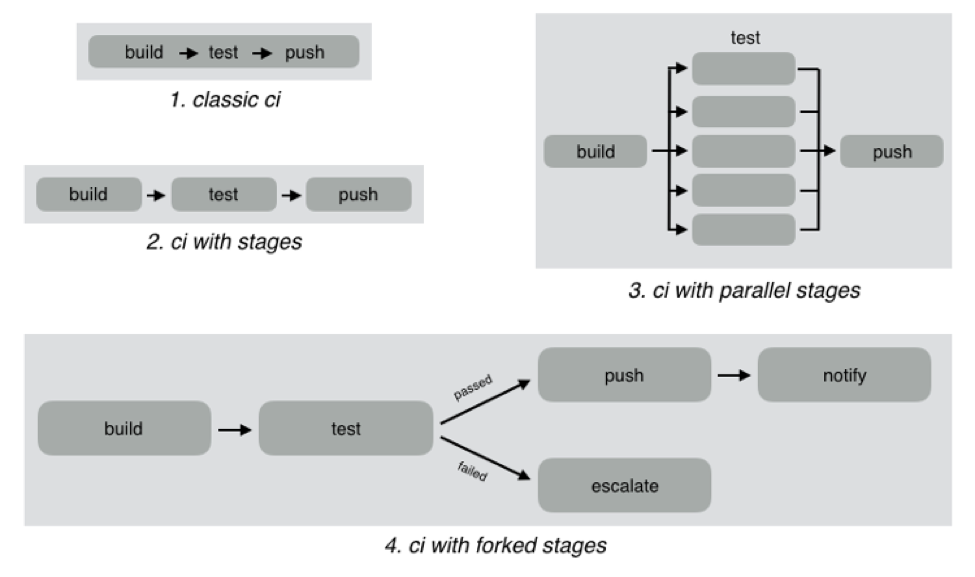
    As an example, look at the different CI workflows shown below:

    In classic CI, all build and test instructions were included in a single blob and instructions were executed serially. If all instructions executed successfully, CI was successful, and if anything failed, then it was marked failed. Almost all CI providers, until recently, offered just classic CI.

    However, as CI became mainstream, developers wanted to define more complex workflows with decision trees and parallelism. CI pipelines support this complexity, such as:

    • Defining the CI workflow in stages, so you can get results from a stage faster without having to wait for the entire workflow to finish. This also enables scenarios such as running a basic test group and only running the extended test suite if the basic tests pass.
    • Running stages in parallel, so you can split tests or test your code against different environments or language versions, and get faster feedback.
    • Forking your CI logic based on the results of a stage.

    While CI pipelines are a huge improvement over classic CI, they are still limited to developer-focused workflows. Jenkins, Teamcity, Shippable, Gitlab and CircleCI all support some form of CI pipelines.

    What are DevOps Assembly Lines?

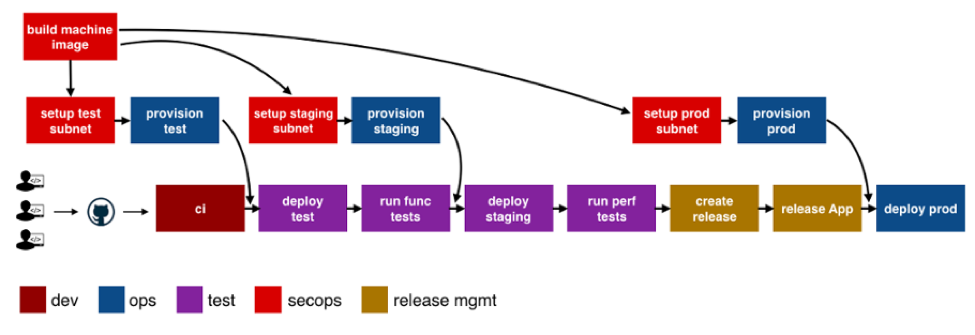
    DevOps assembly lines are focused on automating and connecting activities performed by several teams, such as CI for devs, infrastructure provisioning and configuration management for ops, test automation for test, security patching for SecOps, semantic versioning and approval gates for release managers, deployments for multiple environments, and so on.

    Today, most organizations use various tools for automating specific DevOps activities. However, the DevOps toolchain is fragmented and gluing it together to achieve continuous delivery is a challenging task.

    Most teams adopt one of the following approaches:

    • Using cultural collaboration as the glue between silos. As an example, when a new application version is available, the test team creates a JIRA ticket and assigns to ops. Ops then copies the application version information into their deployment scripts and run them.
    • Writing ad-hoc scripts to trigger one activity from another, including passing state information through intermediate storage such as S3. In this case, the DevOps engineer would likely write a Jenkins job that runs automated tests, and then pushes application version information to S3. Another Jenkins job polls the S3 bucket, and when a change is detected, runs the deployment scripts.

    The first approach introduces inefficiency and unnecessary human-dependent steps. The second approach is better, but only works well for small teams working on a single application. It creates a Frankenstein of spaghetti automation when you have many applications or even a single application with microservices.

    DevOps assembly lines address this problem by focusing on gluing together these various DevOps activities into streamlined, event-driven workflows with the ability to easily share state and other information across activities.

    The following image shows a typical assembly line for a single application or service:

    See the difference? The CI pipeline is just ONE activity in the assembly line. Each of the boxes in the picture above is a pipeline, just for different activities! Each has specific needs with respect to tools integration, runtime, configuration, notifications, etc. In addition, each pipeline is owned by a different team, yet needs to interact with other pipelines and exchange information. For example, if the ops team changes provisioning scripts for staging environment, the test team needs to redeploy the application and run performance tests.

    A DevOps assembly line is, therefore, a “pipeline of pipelines.”

    DevOps assembly lines need to support the following:

    • Ability to easily define workflows across multiple pipelines.
    • Versioned and reusable workflows, enabling rapid changes and scaling for multiple applications and/or microservices.
    • Integrations with all popular source control systems, clouds, artifact repositories, DevOps tools, languages, services, etc.
    • Runtime to execute every pipeline, including pre-installed tools and CLIs, and the ability to use the right runtime, depending on pipeline type.
    • Accelerators/playbooks for common pipelines and tools.
    • Ability to pass state and other information while triggering dependent pipelines.
    • Automatic triggers or manual approval gates between each pipeline.
    • Configurable notifications for each stage of every pipeline.
    • Release automation features such as semantic versioning of packages.
    • Audit trails for each pipeline, with the ability to go back or forward to a specific state.
    • Abstraction of all sensitive information like passwords, tokens, keys, etc. for security reasons.
    • Roles and permissions restricting assembly line and pipeline actions.
    • Manage DevOps infrastructure, including spinning VMs and containers up and down as required.
    • Visibility into each pipeline and stage, including logs, status and versioned data.
    • Metrics and Analytics across pipelines to help identify bottlenecks.

    In short, DevOps assembly lines help automate and scale end-to-end workflows across all teams and tools, enabling continuous delivery.

    About the Author / Manisha Sahasrabudh

    Manisha Sahasrabudhe is co-founder and vice president of product management at Shippable. Prior to Shippable, Sahasrabudhe was senior program manager at Microsoft. She can be found online at Linkedin.


  • The Right DevOps Tools for Value Stream Velocity

    The Right DevOps Tools for Value Stream Velocity

    Think of DevOps tools as stepping stones to releasing new functionality into the hands of your customers faster and more frequently. Working together, tools automate processes and help companies become modern software factories. But isolated tools, like a lone rock in the middle of a river, are much less useful.

    Disparate tools may help an individual or a team do their job, but they impede the progress of the larger organization. To achieve desired efficiency across the application life cycle, companies may waste time and amass technical debt by integrating tools with scripts.

    The other answer is that organizations get restrictive. They may establish a “center of excellence” for DevOps that prescribes a toolchain that works together, but are those tools going to be the best fit for all individuals and teams, supporting an agile mindset?

    The ideal scenario is for a DevOps toolchain to become an integrated, dynamic continuous delivery powerhouse where “best fit” tools work in concert to enable better performing teams and better customer experiences.

    Start with the Right Tools for the Job

    DevOps teams are focusing on automating and streamlining all aspects of the application life cycle. It makes sense to choose the tool that’s best for the job. And teams should feel free to experiment and take advantage of new tools emerging every day that solve new problems or do a better job solving existing problems.

    Typical areas of DevOps tool investment include:

    • Planning and managing development work
    • Managing, tracking and documenting all code changes
    • Building, managing and deploying containers
    • Automating iterative builds/continuous integration
    • Developing and deploying to cloud platforms
    • Automating the deployment of applications into environments at all stages
    • Provisioning, configuring and monitoring environments
    • Managing all types of testing with the right requirements and data
    • Validating security before vulnerabilities become a problem
    • Promoting better agile team collaboration
    • Monitoring and managing an application in production

    These tool categories each serve a vital role in the application life cycle. However, there remains a significant lack of coordination and shared knowledge across the DevOps toolchain to generate the value stream velocity that can keep businesses competitive and customers engaged. For example, if a testing function is isolated, it becomes a black hole of activity and often a bottleneck to delivery.

    Build the Smarter DevOps Toolchain

    When teams can visualize, orchestrate and track the continuous delivery value stream from development through production, the pipeline becomes an intelligent entity of its own. How is the pipeline performing? How is it adding value to the organization? How do you improve the pipeline?

    For example, by integrating the planning and management solutions as part of the value stream, you can keep track of the user stories—including where they are deployed, what tests have been done and the results. Bi-directional integration enables automatic updates in the planning/management tool. Layer in collaboration tool integrations, and dev teams can get instant feedback and respond more quickly, shifting quality left.

    The result: real-time information and the ability to plan and prioritize more effectively. Release and development teams now have a shared view and understanding of release status and business implications.

    The testing function is another area where tools can work better together. Instead of sequential and separate functional, integrated, performance, API or security testing, you can build a testing workflow that runs in parallel, automatically promotes tasks, monitors progress and sends feedback of testing status. This can include orchestrating the generation of the right test cases, test data and virtual services for the app under test. With all the testing knowledge gathered in one place, it’s easy to see testing gaps and determine the risk of a release.

    Launch DevOps Mission Control

    A control center that manages the continuous delivery value stream can help teams not only manage the health and schedule of an active release more effectively, but it can also provide the visibility and analytics to help teams iteratively improve.

    There are a number of tools on the market that look beyond the silos of the application life cycle to connect and extract value from an end-to-end toolchain. As you assess tools that can enable a dynamic value stream, ensure they have capability in these five areas:

    1. Plug and play integrations: Does the tool support common DevOps plug-ins? How easy is it to integrate tools, whether they are open source, commercial or home grown?
    2. Full pipeline visibility: Does it enable orchestration and tracking of all releases at all stages—planning, development, test and production—including feedback loops and planning for the next release?
    3. Continuous quality: Does it support a shift-left testing model to ensure testing happens continuously and rigorously? Does it help you prioritize your testing and automate risk assessment for your releases?
    4. Business value alignment: Does it provide intelligence about the app content in the pipeline? Can you see what code is deployed where in the pipeline and its status? Can you map how the content of a release aligns to business priorities?
    5. Actionable analytics: Does it extract meaningful data points from pipeline operation to provide analytics that support real-time decisions, as well as inform improvements over time? Can you get insights into release and pipeline performance, testing coverage and speed, release readiness, team productivity, and so on?

    With intelligent integration of your DevOps toolchain you can increase your value stream velocity and deliver the best quality apps—every single time.

    — Patricia Johnson

  • DevOps, Continuous Delivery – It’s All About Automation

    DevOps, Continuous Delivery – It’s All About Automation

    I spent a large portion of my career in the networking industry, marketing routers, switches and other gear that makes the internet work. Networking—like many industries—is currently undergoing a revolution that is in large part driven by software. Functions that used to be delivered as a standalone device can now run in software (not unlike the apps on your smartphone); and software is also being relied on more to make decisions about how traffic is routed through the network.

    I still read up on the networking industry occasionally, and if you’re looking for an expert opinion or just good journalism in this space, you’d be hard-pressed to find a better source than Craig Matsumoto. Craig wrote an interesting opinion piece called “NFV, SDN, Big Data – It’s All About Automation.” You don’t have to know what those acronyms mean to understand the premise.

    What’s interesting is that the same premise can be applied to many of the things that promise to make software development easier, faster and cheaper. DevOps, continuous delivery, continuous testing—all rely on automation to be successful.

    DevOps, of course, requires more than just automation—as it’s also a cultural shift—but automation plays a huge role. The three main components of successful DevOps are commonly cited as tools (or technology), process and people (or culture). Automation is the primary goal of the first two: tools that enable you to automate previously manual tasks, and then establishing the processes that allow you to take advantage of this automation.

    The same can be said of continuous delivery or continuous testing. Continuous testing relies on being able to automatically generate test cases, automatically create virtualized testing environments and create automated calls for testing.

    The premise of a modern software factory also relies on automation. Any modern factory, whether it’s producing cars or toothbrushes, strives to improve efficiencies by eliminating as many manual tasks as possible.

    The fact that software development and operations are lagging behind other industries in terms of automating the production of its goods (i.e., software) is maybe a bit ironic, given that software development is typically seen as more technologically advanced.

    However, it’s also a result of the maturity of the industry and that fact that coding, by its nature, cannot be automated. But the tasks that surround the actual writing of code certainly can be automated, and that’s what the modern software factory promises. The more you can automate, the more successful you will be in delivering quality software faster, with reduced risk and costs.

    Automation seems to bring with it concerns about employment—that is, there is a not-unfounded fear that it’s possible to automate oneself out of a job. However, there was an interesting study that came out, focusing on the automobile industry—one of the most well-known examples of factory automation. The study concluded that:

    In the last six years, (2010–2015), according to the IFR (International Federation of Robotics), US industry has installed around 135,000 new industrial robots. The principal driver is automation in the car industry. During this same period, (2010–2015), the number of employees in the automotive sector increased by 230,000.

    Essentially, automation not only improved production velocity and quality, it also resulted in a net increase in employment.

    The message is clear: Automate what you can and only rely on manual tasks for what you must. If you focus on automating your software development life cycle, not only will you be able to deliver software faster, cheaper and with better quality, but you also will be well on your way to achieving continuous delivery and DevOps.

    — Brendan Hayes

  • Where Does the Database Fit into Continuous Delivery?

    Where Does the Database Fit into Continuous Delivery?

    Continuous delivery (CD) is increasingly becoming the norm in software development, with companies releasing updates more and more frequently. Those that aren’t are exploring how they can catch up. But in all of this push to DevOps and CD, it’s vital not to forget the database. Changes to applications or web services often require changes to the database, which means companies need an end-to-end process that spans both application and database development if they want to successfully embrace CD.

    However, many companies still work in silos, with applications and databases developed separately. So while the ability to deploy application changes across environments is relatively common, supporting databases in a truly elastic environment remains a major challenge for organizations.

    To find out the current state of database DevOps, and how it can be included in CD, Redgate surveyed 1,000 SQL Server professionals across the world. While we found companies were keen on implementing DevOps, with 80 percent saying they will have adopted it within the next two years, only 20 percent are currently applying DevOps practices such as version control, continuous integration or automated deployment to their databases.

    The Need for Change

    This isn’t because companies don’t recognize the need for database DevOps—37 percent said they are deploying database changes either more than once a week or daily, demonstrating a requirement for automation. Indeed, the main driver for adopting DevOps in this area is to increase the speed of database changes (cited by 26 percent of respondents), followed by freeing up developers for more added value work (17 percent).

    Companies also recognize the drawbacks of continuing traditional, siloed database development practices—26 percent said it increased the risk of failed deployments or downtime when introducing changes. This was followed by slow development and deployment cycles and an inability to respond quickly to changing business requirements (both 18 percent). Sixteen percent also cited poor visibility of the change management process as another issue. This shows the vital importance of fast, successful database changes and deployments to business today.

    For companies with 5,001-10,000 employees, slow development and release cycles were seen to be more of a drawback than application downtime, while for organizations with more than 10,000 employees, the inability to respond quickly to changing business requirements was deemed to be a slightly more significant downside.

    Moving to DevOps for the Database

    As well as understanding the business need, the survey showed that organizations are now better structured to enable continuous delivery for database changes. The old picture of companies made up of silos of developers and database administrators that don’t work together, for example, is far from the truth. Seventy-five percent of companies had teams that included developers who were working across databases and applications, with just 25 percent having dedicated database developers. In 60 percent of companies, developers were responsible for building database deployment scripts. Fifty-eight percent of companies said the integration between the two was either good (38 percent) or great (20 percent), meaning teams work together on a planned or ad hoc basis. Just 12 percent classed integration as poor, with DBAs working in silos.

    However, the research highlights two challenges to overcome:

    Different processes and tools—Despite the levels of integration within organizations, there is still a gap between how companies operate and automate when it comes to applications and databases. For example, while 81 percent of respondents use version control for their applications, just 58 percent apply it to database development. Thirty-nine percent use continuous integration for applications, yet only 20 percent apply the same practice to their database. Clearly, there is still more that can be done to bring the two together through common practices and the use of third party tools.

    The skills gap—The greatest obstacle to moving to an overall DevOps way of working was a perceived lack of appropriate skills (cited by 21 percent of respondents), ahead of a lack of alignment between the development and operations teams (20 percent). Only 9 percent said that their executive leadership didn’t support the shift.

    When it came to integrating database changes into the DevOps process, consistency was top of the list of obstacles, with 32 percent believing that synchronizing application and database changes would be the biggest challenge, followed by overcoming different approaches to application and database development (25 percent). Perhaps unsurprisingly, 19 percent also mentioned preserving and protecting business critical data as the largest obstacle to overcome.

    It’s Happening Sooner Than You Think

    The good news is that many companies are confident they can quickly overcome the process and skills challenges. When asked how long they estimated it would take their organization to move from traditional database development practices to a fully automated process for deploying database changes, more than half (51 percent) said it could be done within a year, with 20 percent believing it could be achieved in six months.

    Digging down into the data, those that have already adopted DevOps in other processes are much more confident the switch can be achieved quickly. Sixty-eight percent of this group cite 0 to 12 months as the time it would take to move to a fully automated database development process, compared to 28 percent of those who had no plans to adopt DevOps practices. In fact, 43 percent of this latter group cited more than two years as their estimate.

    Our research shows that organizations recognize the potential of applying DevOps to the database to gain all of the advantages CD brings. They see that it speeds up software development, frees developers to do more value-added work and increases the rate at which database changes are delivered.

    At a time when organizations need to operate in a faster, more seamless manner to thrive in ever more competitive markets, introducing DevOps and CD to the database can transform their development process. To read more about the research and the “State of Database DevOps,” download the full management report.

    About the Author  / Matt Hilbert

    Matt Hilbert is a technology writer at Redgate Software with 20 years’ experience working for lots of the world’s biggest tech companies – and many of the smallest. He has a particular fascination for emerging technologies and is on a continuing mission to decompile, untangle, and explain techspeak to a wider audience, and excite people about the endless possibilities technology offers.

  • Foster Creative Workers, not Assembly Lines

    Foster Creative Workers, not Assembly Lines

    Why do we keep building assembly lines of creative people?

    Why do tech companies still structure their developer workforces around ideas invented during the industrial revolution over a century ago? It’s ignorant, lazy and, worst of all, it pisses everyone off. Most of these archaic ideas must die if we are to take fully enlightened advantage of the impending internet revolution.

    Internet Revolution? What?

    Before I explain my thoughts about what old ideas are holding our workers back. it is important to understand the one big similarity between the workers of the industrial age and developers of today. Both are the backbone of an exploding economy that has changed nearly everything about the way we live. Without these two types of workers, both revolutions (industrial and internet) would collapse. But this is where the similarity ends.

    For me, the most important difference between the two is that developers are highly creative and highly skilled, and are required to be highly intelligent workers. This creative worker requires a very different environment to ensure “productivity.”

    Let’s dive deeper into this idea, and see if we can uncover the problems with sticking to century-old concepts.

    ‘Work’ in the Industrial Revolution

    In 1913, Henry Ford installed the first assembly line for the mass production of automobiles. From there the industrial revolution exploded. Quality of life boomed. Life-changing products became affordable. Life expectancy increased. Everything was going up and up. (Except, of course, animals and the environment, but I’m going to stay on the subject of work.)

    The industrial revolution redefined the way we measure work. The world moved to a strict schedule of productivity, and was no longer tied to the weather or the sun. Hans Rosling shows it the best here.

    But more than 100 years have passed. We are very clearly going through another work revolution, yet we still cling to the archaic concepts of the Industrial Revolution. The nature of the work we need is drastically different. Ideas about 9-to-5 work hours, productivity, vacation and work/life balance just don’t apply to the work we are trying to do today.

    This was work back then, done by people who could do the task without creativity.

    If Henry Ford lived today, what would he do? Would he make an assembly line of computers on which programmers would write line of code and pass it down the line to the next programmer, who would do the same, until you had a complete application? If you think that’s stupid, why are we working like that? Here is a bug, go fix it! Shouldn’t we be reinventing these 100-year-old concepts instead of applying them as they are?

    Industrial Revolution ‘Work’ Causes an Unhappy Workforce

    Before the Industrial Revolution, most manufactured products were made individually by hand. A single craftsman or team of craftsmen would create each part of a product.

    Now that most assembly lines are automated, today’s work requires individuals to be craftspeople once again. We no longer hire developers just to tell them what to do and how to do it. Developers, like all creatives, don’t like to be told what to do. Creative workers like to be given a problem and they love creating a solution.

    We no longer need to make sure that our employees are working. We need to make sure that they are inspired.

    Take, for instance, the job of an overseer/manager. In the industrial age, this type of person made sure everyone was on task and meeting quotas. They were task masters, and they were often feared. Today, small startups rarely hire task masters (or as we now call them, project managers) to ensure worker productivity right out of the gate. Even if a company does hire PMs, they are no longer micromanagers; they are process optimizers. They make sure that the team is fully informed about what problems need to be solved so they can reach their highest creative potential. Today, if a tech company goes down the route of micromanagement, it loses its most talented people. This change tells us something: Today’s tech workers want to be engaged. They want to solve problems. They want to work for the sake of the creativity.

    No More 9 to 5 and Hourly Rate

    An hourly rate only makes sense when you need someone to complete the same task x times a day. If you need to assemble a thousand cars a month, then you need to make sure you can guarantee numbers. This makes hiring and firing simple: If workers can’t fill their quota, then they are replaced with those who can.

    If you work in the tech industry today, it’s obvious why the above concept is idiotic. Ask any creative worker—software developer or otherwise—when they are most productive and if it helps to be given tasks and blindly assume deadlines. They will quickly tell you that what matters most is the breakthrough, and that could happen at any time of the day. I can’t tell you how many breakthroughs I’ve had on weekends, or in the last thoughts before sleep. And once the breakthrough happens, we developers furiously code toward the finish line to test the validity of our breakthrough. No one needs to tell us to get the work done. We WANT to get the work done and we understand the business requirements; don’t worry, we won’t slip—assuming, of course, that the work is engaging and interesting.

    Let’s separate the concept from the workforce for a second. No painter sells his or her art based on the hours spent creating it. The price is based upon the value of the work in of itself. We give an intrinsic value to the final product.

    A developer could make a million-dollar contribution in a single day. Another developer could make a series of contributions over two years that made it possible for that one developer’s million-dollar solution. Both are equally valuable and necessary.

    The creative workforce should be valued similarly. It is impossible to measure productivity-ensuring work eight hours a day, five days a week. A million-dollar contribution achieved in a single day or over two years—both are equally valuable and necessary. Neither can be reached by giving tasks. They can only be reached by giving problems, and as much time as it takes to solve that problem.

    Creative Problem-Solving

    In a task-based scenario one software engineer might fix a bug quickly, but then it crashes the system next time it runs. In a problem-solving scenario, the creative thinker would figure out that this particular bug is a symptom of a large underlying problem that needs to be fixed to prevent an even larger failure. This type of creativity we seem to attribute to the arts alone. However, engineering is not different: Here is what the founder of YC, Paul Graham, who said in his amazing book, “Hackers and Painters”:

    “Like painting, most software is intended for a human audience. And so hackers, like painters, must have empathy to do really great work.”

    We must remember that just like making a new product is creativity, writing code at its core is creative work. After all, it is not the application of the paint that is creativity. It is how you decide to apply the paint that takes a creative mind. Similarly, it is not the act of coding that is important. It is how you code that is the creative part. In software development, the creativity scale may vary per problem, but if the creative aspect is not nurtured then we encourage mere task completion.

    How Do We Fix These Problems?

    First, we must work on our definitions. Now that we understand where the crux of the problem is, we can start re-engineering how we communicate our concepts of success and failure. I discuss my ideas about this in my previous article, “4 Inspiration-Killing Concepts That Need Redefining.”

    See you there.

    About the Author / Devrim Yasar

    devrim_yasarDevrim is the CEO of Koding, a San Francisco-based software development automation platform vendor. Connect with him on LinkedIn and Twitter.

     

  • 4 Essential Practices to Succeed at ChatOps

    4 Essential Practices to Succeed at ChatOps

    We know enterprises are embracing messaging apps and incorporating so-called “ChatOps” into their workflow. ChatOps is, potentially, a powerful way to facilitate more swift decision-making and problem-solving and to receive quick, expert guidance. “With the rise of cloud services that can be easily deployed, and increased awareness and importance given to productivity and collaboration within the workspace, enterprise chat is gaining priority,” says Narain Muralidharan, a market analyst at online customer support software and help-desk software maker Freshdesk.

    As most readers are aware, ChatOps has been fueled by the growth of tools such as HipChat, HuBot, Slack and others for chat-style and instant collaborative software development and project management. But these tools also execute scripts and automate tasks and get workflow approvals to deploy code, kick off software tests and more. As an added bonus, within the chat application exists a clear record of all discussions and scripts executed—something very handy for root cause analysis and troubleshooting.

    With all of that in mind, how are enterprises embracing chat?

    Chatting Down Silos

    “At Threat Stack, we’ve long embraced Slack as a collaboration tool that removes silos within the organization and helps busy operations teams to move quickly and have a fully informed view,” says Pete Cheslock, senior director of Ops and Support at Threat Stack. “We’re seeing this migration toward ChatOps with our customers.”

    Bhaskar Roy, head of growth at Workato, sees chat being embraced at companies ranging from small businesses to Fortune 500 firms. “There are groups in large enterprises who are adopting different chat products and are always looking for what they can do to make chat the center of all communication. When we talk to these companies we find that they believe that chat is a more natural, human, fast way to communicate—which can help in getting things done faster,” Roy says. Chat, he adds, is becoming a “command center for business apps. [Organizations] are using chat to get information from various applications and are looking for ways where they can easily interact with the application from the comfort of their chat/conversational interface.”

    According to the most recent VictorOps State of On-Call survey, ChatOps continues to grow, with 40 percent saying they practice ChatOps during event remediation. That’s up significantly from 28 percent last year.

    Getting the Most Out of ChatOps

    With the tremendous growth in ChatOps, what practices have enterprises learned to bring the most success? Below we list the four essential practices that will help organizations succeed in their ChatOps engagements:

    Embrace adoption: “The main problem that enterprises have in chat penetration internally is adoption. People are resistant to change, and it is usually difficult to change user behavior, especially in the way people work every day,” says Muralidharan. “Some practices are set in stone, like emailing or the good old face-to-face meetings. Start small with pilot teams, get buy in, and create evangelists within the company. A lot can be gained by having a top-down approach to adoption; hence, management buy-in is very crucial.”

    Fine-tune notifications: “The biggest problem that we see is that bots and app notifications that are being pumped into the chats today are making things very noisy, resulting in loss of productivity overall,” says Roy. “What we believe is needed is utilizing bots to enhance the overall individual productivity, where people are notified only for things that are urgent, relevant and something that they need to act on right away. And bots are intelligent so that they understand and learn based on user interactions and are proactively prompting / helping as and when required.”

    Adopt a DevOps mentality: Eric Sigler, head of DevOps at PagerDuty, suggests that “to make the most of chat within your enterprise, it is important to adopt a ‘DevOps mentality,’ where individual teams are more responsible for, and empowered to maintain, their own services. Without this, it’s too easy for teams to ‘throw things over the wall’ and for ChatOps-based tooling to remain restricted to a limited set of users.

    “Existing infrastructure teams need to be a part of this ride as well,” he adds. “If they don’t take the time to understand how their engineers—their user base—want to interact with the tooling and invest in ‘making the easy things easy, and the hard things possible,’ then ChatOps-style tools will get relegated to shiny demos with little practical utility.”

    Avoid DevOps fatigue. Chat alerts can be nagging distractions throughout the day, sucking worker concentration and clamoring for their time. “Customizing notification preferences in your chat client can help enterprises reap the benefits of chat. By personalizing notifications, it ensures that they see the most important chats and are accessible when it matters, but still have the ability to focus without being disrupted by constant pings,” Sigler says.

    What Does the Future Hold for Enterprise Chat?

    What does the future of ChatOps look like? Most of the experts we spoke with say it’s bright. “In an age of digital transformation where slow is the new down, conversationally driven interaction with software is going to play an important role for collaboration and increased agility,” says Sigler. “Overall for founders, hackers and investors, there’s room to innovate when it comes to humans and bots, and there’s a lot of really poor user experiences and bad workflows out there that can be improved by thinking about them through the constraints chat provides.”

    — George V. Hulme

  • 7 Best Practices for Continuous Delivery Success

    7 Best Practices for Continuous Delivery Success

    Continuous delivery refers to the development of software in short and ongoing build-test-release cycles along the deployment pipeline. Repeated testing of processes and scripts before deployment to production means most errors are discovered early on and have minimal impact. Plus, finding and fixing such errors is much easier with fewer changes per release—software is released faster and more frequently with fewer deployment problems due to a heavy focus on visibility, instant feedback and incremental changes.

    To accomplish this, companies must have a straightforward and repeatable deployment process. Most reliable, of course, is an automated deployment pipeline that can feed into any environment.

    We have identified seven continuous delivery best practices that are supported by a set of complementary task-specific tools, in what’s known as the “DevOps toolchain,” to automate the process from end to end and minimize human error.

    Version-Control Everything

    The native code deployment process generally includes a built-in safety net, preventing out-of-process, locally generated artifacts from entering the production environment. Every change a developer makes must be documented in the source control repository or it is not included in the build process. If a developer copies an artifact generated locally to a test environment, the next deployment will override this out-of-process change.

    This insistence on having a single source of truth—and a reliable one—creates a stable foundation for all development processes. However, the processes are only as strong as their weakest link. That’s why the primary golden rule for effective continuous delivery is to version-control everything. What works well for code also will preserve the integrity of configuration, scripts, databases, website html and even documentation.

    Build Binaries Once

    Not every organization’s build process is the same or uses the same tools, but every build process in a single organization must be completely consistent. Whether the build is a single file deployed to an automated test environment or a complex build with several different possible deployment versions, each build version should happen exactly the same way and result in unique binary artifacts.

    This one-time-only compiling eliminates the risk of untracked differences due to various deployment environments, third-party libraries or different compilation contexts or configurations that will result in an unstable or unpredictable release. Save the compilation phase output (the binaries) to a binary repository, from which the deployment process can retrieve the relevant artifacts.

    Deploy the Same Way Every Time

    An inconsistent deployment process can become a source of configuration drift across environments, especially with the rapid releases common in a continuous delivery system. As a result, valuable time and effort are wasted in identifying and addressing difficulties arising from the application working in one environment and not another.

    For a reliable process in all environments, then, the same set of steps must be repeated from start to finish. This ensures the same results in lower environments, with more frequent deployments (such as integration, QA, etc.), as in higher environments (pre-production and production), with fewer deployments.

    Smoke Test

    Smoke testing deployments is a very rapid way to make sure that the most crucial functions of a program work and will pass basic diagnostics. This non-exhaustive software testing (of all elements, such as services, database, messaging bus, external services, etc.) does not provide the same fine-grain comprehensiveness as full test suites; however, it can be run frequently and quickly, often in a matter minutes (rather than hours or days). This allows for a much quicker turnaround on what can become very time-consuming and basic issues.

    The faster the feedback loop works (especially with automated test tools such as Telerik, QTP, TestComplete), the higher the final product’s quality will be and the quicker it will reach its release-ready state.

    Deploy into a Production-like Environment

    Each new deployment (using, for example, IBM uDeploy, CA Release Automation, XebiaLabs, Automic) should be made into an environment that mimics as closely as possible the actual final production environment. This includes infrastructure, operating system, databases, patches, network topology, firewalls and configuration. By validating software changes in this type of detailed pre-production environment, mismatches and last-minute surprises can be effectively eliminated and applications can be released safely to production at any time.

    Instant Propagation

    Continuous delivery by definition must be an ongoing process of building, testing and releasing. Every check-in to a source control repository should trigger compiling (if needed) and packaging by a build server. This, in turn, should automatically initiate certain predefined testing until the software can either be marked as releasable or returned to development.

    Continuous integration tools (e.g., Jenkins / CloudBees, Bamboo, TeamCity) ensure that cascade of actions along the delivery pipeline is consistent, automatic and instant. Thus, development teams merge developed code and get feedback from automated test tools many times a day, for a more efficient deployment and update process.

    Include the Database

    No list of continuous delivery best practices would be complete without advising that the database be managed using the same basic protocols that ensure secure and reliable source code, task, configuration, build and deployment management. However, many times this is neglected because the database is unlike other software components or compiled code that are easily copied from development to testing to production. Yet, the database is actually a repository of the most valued and irreplaceable asset—our data—and preserving it accurately is imperative to continuous delivery.

    Although the database poses several unique challenges, specialized database tools such as enforced database source control (for all environments), a database build automation tool and database release and verification processes can ensure a stable resource in your DevOps chain.

    Considering these seven continuous delivery best practices will allow you to create a deployment pipeline with increased productivity, faster time to market, reduced risk and increased quality.

    The key to ensuring a quick, robust and accurately repeatable continuous delivery is, as we have seen, automation, deployment consistency, comprehensive testing and database version control. With these fail-safes in place, pushing the “release to production” button can be done much more often and with much more confidence.

    About the Author / Yaniv Yehuda

    yaniv-e1404303491389Yaniv Yehuda is the co-founder and CTO of DBmaestro, an enterprise software development company focusing on database development and deployment technologies. Yaniv is a DevOps expert who spent the last couple of years raising awareness about the challenges surrounding database development and deployment, and how to support database continuous delivery. Connect with him on LinkedIn and Twitter.
     

  • How to Bridge the Developer Gap

    How to Bridge the Developer Gap

    It’s time to bring cloud application development back into the organization and bridge the developer gap by training your own people.

    For years, companies have outsourced many IT functions, treating computing as a commodity, perhaps thanks in large part to Nick Carr’s publication, “IT Doesn’t Matter.” Carr predicted that computing would become a utility. And while spinning up new servers in the cloud might be almost as simple as switching on a light, the functions specific to your business—your competitive DNA—aren’t flipping on automatically. Not even close.

    Computing is not a commodity. It’s the cognitive engine of your business. The companies that are killing it right now view their computing environments the way we look at the human brain and nervous system. Their businesses generate, collect and process signals, and act on the intelligence influenced by those signals. Case in point: GE is building its own operating system—a central nervous system for its industrial applications. This is large-scale cognition.

    You would not outsource your brain or spinal cord. You couldn’t survive without those crucial components of your overall nervous system. Yet for decades, companies outsourced key functions—technology and processes for understanding their businesses—because they didn’t think of technology as a core competency.

    Now that they’re bringing it back in-house, companies are faced with another problem: a looming developer gap. The majority (64 percent) of IT professionals and executives taking part in the Cloud Foundry’s 2016 Identifying the Developer Gap report agreed that the developer shortage is a real threat. Most respondents (57 percent) state that this shortage has already impacted their ability to hire skilled people.

    Every new technology comes with a labor gap. The way to close the cloud application skills gap is to bring the knowledge back into the organization—to train people who are part of the central nervous system of your business.

    Business computing in the digital world is not just a faster way to process paper. When you think of your organization as an organism and integrate intelligence from all its parts, you behave more intelligently. Building apps to enable that integration is the difference between treating computing as a commodity vs. cognition.

    Our study showed that by a nearly 2:1 margin, companies are choosing training over hiring or outsourcing as the preferred method for addressing a shortage of skills in their own companies. I have had multiple conversations with CIOs in the last two months in which they have said, “We have this working with a team of 40 developers. Now we need to make it work for 1,000. We aim to certify over 200,000 developers on Cloud Foundry in the next three years.”

    The best way to bridge this developer gap is to train your own people. Think of them as essential parts of the whole. Enable them to use technology to adapt and streamline your business so you can compete in the digital world.

    About the Author / Sam Ramji

    samramjiSam Ramji is CEO of the Cloud Foundry Foundation. A 20-year veteran of the Silicon Valley and Seattle technology scenes, Sam brings a wealth of business, product and open source experience to the foundation. He was head of strategy for API powerhouse Apigee, designed and led Microsoft’s open source strategy, and drove product strategy for BEA WebLogic Integration. Previously he held a range of software engineering positions at firms including Broderbund, Fair Isaac and Ofoto. He is a member of multiple industry advisory boards and volunteers with the Sierra Club. Sam is happiest in the mountains, where he loves to hike, run and play with his dog. In his spare time, he likes to play guitar, read fantasy and sci-fi novels, and spend time with his wife. Connect with him on Twitter.
  • A DevOps Checklist for Traditional Service Providers

    A DevOps Checklist for Traditional Service Providers

    As companies such as Amazon and Google rapidly innovate to deliver new services, traditional service providers recognize that change is necessary to keep up with shifting customer expectations. Given the pace at which technology continues to morph, creating better, faster and more innovative solutions is a necessity, and if this isn’t achieved, even longtime customers will eventually look elsewhere.

    For younger businesses, taking a collaborative approach to IT and product development often comes naturally as it’s built into the company’s DNA. However, for more established service providers, adapting to this new way of doing business can prove challenging. Traditional service providers have spent years perfecting their technology and require multiple layers of review prior to rollout. While these checks and balances are in place to ensure a level of quality customers have relied on for years and expect to receive from traditional providers, it also can hinder their ability to react quickly to client demands. However, the adoption of the principles embedded in DevOps can allow traditional service providers to work more like a startup by accessing their technology and human skills in a new way, while also continuing to deliver products which meet the expectations of their established customers.

    Now the question is, how can traditional services providers successfully implement this DevOps approach? While it can (and has been) done successfully, there are five critical steps that need to be taken into account:

    1) Establish a clear goal. The most important step is the first: Management must have a clear understanding of what they are looking to accomplish with the DevOps transition. Service providers have a long legacy of well-defined, reliable services, so all changes must complement their current product offerings and live up to the quality their customer base has come to expect. If an overall goal is not defined, customers will be left confused and disappointed, and ultimately, there will be no impact on the bottom line.

    2) Set a timeline. While creating an unrealistic timeline is never advised, it is critical to set an aggressive, pragmatic and adjustable one. As mentioned above, without aggressively pushing forward, an organization will find itself continuously playing catch up to its competitors. The timeline is meant to push an initiative forward even when there are setbacks or changes that need to be made along the way. The right timing is a balancing act: too fast and you have a poorly crafted product rollout; too slow and you are stuck behind the competition. The key metric to measure progress is the degree of evolution to the DevOps model within key stakeholder organizations. If solutions are delayed due to existing processes, then either the scope of the team needs to be adjusted to encompass those processes or the goal needs to be changed so they are no longer an issue.

    3) Collect necessary resources. Typically, the biggest gap that needs to be filled to move forward is with human resources. For many established companies, having design and architecture skills—core capabilities needed to develop a new product—hasn’t been a priority. Creating the right team that consists of new talent that have these missing skills, along with the addition of current employees who have a more intimate understanding of the company and customer, is a critical aspect in making sure this more collaborative and innovative approach to solution development and delivery works. And it doesn’t stop once the team is created, it is important to continue to foster an environment that encourages the new team to work together and promote their process within the broader organization.

    4) Create benchmarks. To ensure the established timeline is being met and that there is an opportunity to change course if necessary, it is important to set clear deliverables at various stages of the process. These benchmarks must look to what people are doing today, not just the end goal. Initial measures should focus on the pace at which progress is being made, and later, focus on the end products being delivered.

    5) Get the entire company on board. Changing an embedded philosophy isn’t easy, especially one that has worked well for so long. No matter the organization there is almost always resistance on some level when fundamental changes are being made. It is up to leadership and the DevOps team(s) to demonstrate internally and externally that the changes being made are not just for the sake of change, but in the end will benefit the entire company, as well as the customer.

    While taking a deeper look at an organization’s “people, process, technology and information” and moving to a new mindset doesn’t happen overnight or come without its hiccups, the status quo is no longer sufficient to compete. The reality is, a more collaborative and faster delivery model is necessary to be successful in tomorrow’s marketplace.

    About the Author / Tim Pearson

    timpearsonTim Pearson is the director of product line management at Ciena. In his role, Tim leverages DevOps practices to break barriers in network delivery to meet the demands of mobile, VR and video applications.  Driven by challenge and fueled by deep industry knowledge, he has built a reputation for developing innovative business and product strategies to drive growth and open new markets. Tim holds a Bachelor degree in Electrical Engineering from Memorial University, a Masters degree in Management Science from the University of Waterloo and an MBA from the MIT Sloan School of Management. Connect with him on LinkedIn and Twitter.