Category: Continuous Deployment

  • 2024—Year of the Linux Desktop? ChromeOS Reflects its Inner Penguin ¦ GNOME Rethink

    2024—Year of the Linux Desktop? ChromeOS Reflects its Inner Penguin ¦ GNOME Rethink

    Welcome to The Long View—where we peruse the news of the week and strip it to the essentials. Let’s work out what really matters.

    This week: Can the Linux desktop installed base ever break the mythical 10% barrier? Google has been refactoring ChromeOS, and GNOME is working on new window manager ideas. (more…)

  • How GitHub Actions Simplifies Your CI/CD Workflow

    How GitHub Actions Simplifies Your CI/CD Workflow

    In today’s fast-paced world, being able to deploy applications quickly is essential for success. However, setting up a CI/CD pipeline can be a tedious and time-consuming task. Fortunately, GitHub Actions can help simplify and automate your workflow, making it easier than ever to get your applications up and running in no time. In this blog post, we’ll take a look at how to set up a React application with GitHub Actions and explore the benefits of using this tool for your CI/CD needs.

    Continuous Integration and Continuous Deployment

    Continuous integration (CI) and continuous deployment (CD) are essential components of any product development workflow. CI is the process of automatically building and testing code changes, while CD is the process of automatically deploying code changes to a production environment. Both CI and CD help to ensure that code changes are deployed quickly and efficiently, with minimal errors.

    Setting up a CI/CD pipeline can be a tedious and time-consuming task, particularly if you are not familiar with the required tools and technologies. However, using GitHub Actions can help to simplify and automate your CI/CD workflow, making it easier and faster to deploy your code changes.

    GitHub Actions is a powerful tool that can be used to automate many different tasks, including building, testing and deploying code changes. In addition, GitHub Actions can be used to trigger other actions in response to specific events, such as when a code change is pushed to a remote repository. This makes it an ideal tool for automating your CI/CD workflow.

    There are many advantages to using GitHub Actions for CI/CD. First, it is easy to set up and use, even if you are not familiar with the underlying technology. Second, it integrates seamlessly with GitHub, making it easy to track and manage code changes. Finally, it is highly customizable, allowing you to tailor the automation process to meet your specific needs.

    Setting up a React Application

    React is a popular JavaScript library for building user interfaces. Setting up a React application is not complicated, but there are a few important steps you need to follow.

    1. Choose your development environment. You can use create-react-app to set up a development environment with all the necessary dependencies and scripts.
    2. Install React and ReactDOM. React is the library that handles rendering of UI components while ReactDOM takes care of interaction with the DOM.
    3. Create a component file. In this file, you will write your UI code using JSX syntax.
    4. Include the component file in your HTML page. Now you can see your component rendered on the page!

    Development Mode and Production Mode

    In software development, there are two primary modes that code can be run in: development mode and production mode. Development mode is typically used by developers when they are actively working on code. In this mode, code is usually not optimized and may include debugging features that help developers identify and fix errors. Production mode, on the other hand, is used when code is ready to be deployed to end-users. In production mode, code is typically optimized for performance and security.

    One of the benefits of using GitHub Actions is that it makes it easy to manage both development and production workflows from a single platform. With GitHub Actions, you can create separate workflows for development and production, or you can create a single workflow that automatically detects whether code is being pushed to a development or production branch. This flexibility can simplify your CI/CD pipeline and help you avoid errors that can occur when manually managing multiple workflow files.

    To learn more about how to use GitHub Actions to simplify your CI/CD pipeline, check out the following resources:
    – [GitHub Actions documentation](https://help.github.com/en/articles/about-github-actions)
    – [Tutorial: Use GitHub Actions to deploy a static website](https://help.github.com/en/articles/configuring-a-workflow#creating-a-workflow-file)
    – [CI/CD with GitHub Actions blog post](https://blog.github.com/2019-08-08-introducing-github-actions/)

    Setting up GitHub Actions

    Setting up GitHub Actions is simple and only requires a few steps.

    First, you’ll need to create a new file in your project’s root directory called “.github/workflows/ci.yml”. You can name this file whatever you like, but for the purposes of this article we’ll call it “ci.yml”.
    In this file, you’ll need to specify the language your project is written in and the name of the action you want to run. For example, if your project is written in JavaScript and you want to run the “lint” action, your file would look like this:

    name: CI
    on: [push]
    jobs:
    build:
    runs-on: ubuntu-latest
    steps:
    – uses: actions/checkout@v2
    – name: Use Node.js ${{ matrix.node-version }}
    uses: actions/setup-node@v1
    with:
    node-version: ${{ matrix.node-version }}

    Breakdown of the Actions File

    In the “ci.yml” file, there are three main sections: “name”, “on”, and “jobs”. The “name” section is where you specify the name of your CI workflow. The “on” section is where you specify the events that will trigger your workflow to run. In this example, the workflow will run every time code is pushed to any branch. The “jobs” section is where you define the actual jobs that make up your workflow. In this example, there is only one job called “build”.

    The “build” job has two steps. The first step checks out the code from GitHub. The second step runs a Node.js linter on the code to check for syntax errors. If any errors are found, they will be displayed in the GitHub UI.

    You can also add additional jobs to your workflow, such as testing or deployment jobs. For example, you could add a job that automatically deploys your code to a staging environment whenever code is pushed to the development branch. This would allow you to test new features in a safe environment before deploying them to production.

    Adding additional jobs can help simplify your CI/CD pipeline by automating more of the process. This can free up time for other tasks, such as writing documentation or working on other features.

    Running the Action

    Assuming you have already set up a workflow file (ci.yml) and added a job to it, running the workflow is simple. All you need to do is push some code to your GitHub repository and the workflow will automatically run.

    You can also manually run a workflow by going to the Actions tab of your GitHub repository and clicking the “Run Workflow” button. This can be useful for debugging purposes or if you want to run a particular job without pushing code.

    If you want to see the output of a workflow, you can go to the Jobs tab and click on the job that you want to see. This will show you the log output of the job as it ran.

  • VW CEO Fired for Dev Fails | Fiber Shortage Hits | Google Fires Blake Lemoine

    VW CEO Fired for Dev Fails | Fiber Shortage Hits | Google Fires Blake Lemoine

    Welcome to The Long View—where we peruse the news of the week and strip it to the essentials. Let’s work out what really matters.

    This week: Herbert Diess is out at VW because software is hard (yo), fiber optic cable is hard to find, and the guy who said LaMDA was sentient is dumped by Google. (more…)

  • Rust in Linux 5.20 | Deepfake Hiring Fraud | IBM WFH ‘New Normal’

    Rust in Linux 5.20 | Deepfake Hiring Fraud | IBM WFH ‘New Normal’

    Welcome to The Long View—where we peruse the news of the week and strip it to the essentials. Let’s work out what really matters.

    This week: Linus says next release will support Rust, FBI warns scammers are getting hired in deepfake interviews, and 80% of IBM staff stay at home. (more…)

  • The Age of Software Supply Chain Disruption

    The Age of Software Supply Chain Disruption

    The software supply chain is swiftly becoming a widespread attack vector, and securing it is now in the spotlight. Software supply chain attacks have become a given in 2022, reports Darktrace.

    SolarWinds, Kaseya and GitLab are just a few examples of organizations that have been vulnerable to attack in recent years. We’ve also witnessed an increasing number of exploits, like Log4j and Log4Shell that have the potential to affect billions of devices. What these instances have in common is they leverage vulnerabilities in open source software and third-party dependencies commonly used in the software delivery process — meaning one corrupt package could have broad encompassing impacts on the tech industry at large.

    I recently chatted with Doug Dooley, COO, Data Theorem, about the consequences of today’s intricate software supply chains. “The software supply chain problem is bad, but it’s only going to get worse in the next five years,” he said. According to Dooley, application security requires a continuous context of how the app functions at runtime in a software ecosystem—otherwise, it will continue to miss gaping holes in the big picture.

    Understanding Software Supply Chain Disruption

    Most people understand what a traditional product supply chain is—it encompasses all the components involved to bring a product to the end consumer, from raw materials to manufacturing, distribution and retail locations. But, amid the pandemic and recent international conflict, we’ve witnessed how brittle this chain is. If you shut down one of these components, all consumers feel the effect, resulting in everything from gas hikes to baby food shortages. A full 61% of organizations were hit by supply chain attacks in 2021.

    In software, the supply chain can be thought of similarly—there are many components involved between a software product and the end consumer. The developer writes code, integrates third-party libraries and frameworks, puts it in source code systems, pushes it to test environments and eventually deploys it to production. And often, DevOps has the view of this whole picture.

    “DevOps has become some of the most powerful people in the business,” said Dooley. “They can take a business person’s idea and turn it into reality in the form of an application.”

    Third-party exposures can create huge disruptions in this above workflow. This could take the form of insecure libraries, underlying cloud vulnerabilities or API vulnerabilities, says Dooley. “Customers will embed APIs in the software stack—to them, it’s a black box.” There’s also the potential for misconfigured S3 buckets, which continually leak millions of records. More serious application security threats include remote code execution, which can invoke a detrimental loss of control.

    Why Now?

    So, why the sudden peak in software supply chain-related security incidents? After all, open source software, APIs and third-party vendors have been around for decades. Well, according to Dooley, there are several factors at play here.

    For years, the Silicon Valley mantra has been to ‘move fast and break things.’ Take Netflix engineering, for example, which is constantly evolving services and releasing dozens of changes per day. According to Dooley, such rapid application development often means that security is following development rather than preceding it or becoming integrated into the process, à la DevSecOps. This could lead to what he calls an “ambulance chaser moment.”

    The attack surface is heightened as the number of third-party suppliers and dependencies increases. The average company has 254 SaaS apps, Productiv data found. Also, on the attacker side, we’re seeing increasing levels of automation and sophistication. “You only have to be right one time when attacking,” said Dooley. “The deck is stacked in an attacker’s favor.”

    Strengthening The Chain

    The software supply chain issue is a complex problem that won’t be solved by any single action. However, Dooley offered several tips for companies to consider as they confront this broad problem:

    • Source code analysis and vendor management. It’s important to vet partners and have a process to audit new software by scanning for common vulnerabilities and exposures (CVEs). Yet, source code analysis falls short in many areas, admitted Dooley, as it is unlikely you will be able to view the source code behind cloud API calls and production behavior doesn’t always match documentation.
    • Continuous runtime security monitoring. New exploits are being found constantly. Thus, organizations require a continuous defensive posture at runtime, even if they were found to be secure in development. Continuous full-stack discovery must consider many third-party components, like SDKs, open source code, mobile apps, web services, cloud services, APIs and identity and access management, explains Dooley.
    • Increased transparency with SBOMs. More widespread use of software bills of materials (SBOMs) will be critical to increasing transparency across the industry. Just as nutrition facts describe the food we eat, SBOMs spell out the internal makeup of software components. “We’re trying to get to a place where we get more transparency into the software we depend on,” Dooley said.
    • Rapid vulnerability detection. Have a good handle on the attack surface. Businesses will want to collect an accurate inventory of what can be attacked.
    • Build protection around the “crown jewels.” Sometimes, you must prioritize which steps to take first. Dooley reiterated that securing applications that interface with customer data is critical, as these are the “crown jewels”—leaks here could have serious consequences around regulatory penalties and brand reputation.

    Caution: Heavy Lifting Required

    “The moment you ship a piece of software, you’ve taken on a risk,” said Dooley. But at the same time, if you’re not creating digital interfaces, you’re missing out on massive opportunities.

    Reusing code and open source packages have become necessary to maintain agility to help continuously release digital products. “Even if you build everything from scratch, you’re still reusing a lot,” said Dooley. “Without it, you’d never get to market.” While these tools enable unprecedented speed, we can’t overlook the potential vulnerabilities that may lie within the software supply chain.

    With its unique window into the software deployment and automation process, the DevOps sphere will undoubtedly have a role to play in protecting this paradigm. “Let’s push for more transparency and disclosure,” said Dooley. “But don’t hang your hat on that to make your program great—if you really care about this problem, you’ll have to do some heavy lifting in the real world.”

  • Armory Aims to Turn Continuous Delivery Into a Service

    Armory Aims to Turn Continuous Delivery Into a Service

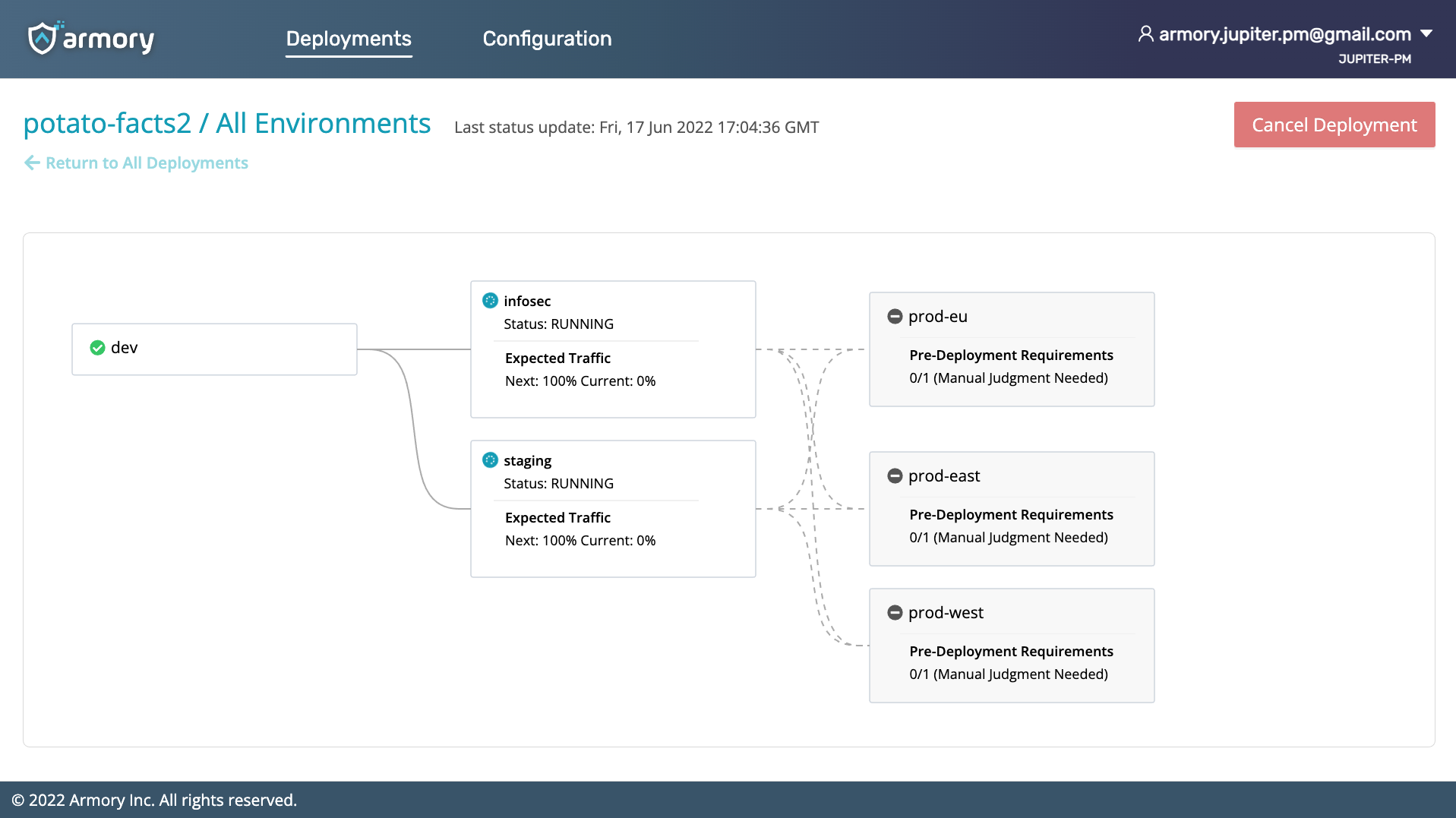
    Armory this week made generally available a continuous delivery-as-a-service (CDaaS) offering that promises to make it simpler for a much wider range of organizations to programmatically deploy applications.

    The Armory Continuous Deployment-as-a-Service platform has been available in beta since March. It differs from Armory’s existing open source Spinnaker continuous delivery (CD) platform in that it is based on a proprietary declarative platform that is designed to integrate with third-party continuous integration platforms.

    Armory CEO Jim Douglas said the goal is to meet organizations that have invested in CI where they are versus requiring them to rip and replace their entire DevOps platform. The company is still committed to providing a curated instance of Spinnaker, but it’s become apparent there are many organizations that want to experience the benefits of a more opinionated CD platform that is more accessible via a cloud service, he added.

    The Armory Continuous Deployment-as-a-Service offering applies many of the best practices that have emerged for the Spinnaker CD platform without requiring organizations to have a dedicated team in place to just manage the CD platform, noted Douglas. IT teams can start using the service to deploy applications in less than 30 minutes, he noted.

    The first edition of Armory Continuous Deployment-as-a-Service is optimized for deploying microservices-based applications on Kubernetes clusters, but Armory will soon extend the reach of the service to platforms running monolithic applications, said Douglas. The company also plans to make available an on-premises edition, he added.

    In either scenario, IT teams will be able to engage in everything from canary testing of deployments to automatic rollbacks in the event an application fails, said Douglas.

    The number of organizations that routinely make use of a CD platform is still relatively small. Historically, each platform used to run applications has been unique, so automating delivery has been problematic. CI platforms, in some cases, have been extended using custom scripts to automate application delivery, but those efforts don’t typically scale across an extended enterprise.

    Douglas said that as more IT teams start to build and deploy microservices-based applications, it’s only a matter of time before CD becomes a more distinct IT discipline. The challenge is enabling IT organizations to achieve that goal without necessarily having to hire a small army of site reliability engineers (SREs). There will still be plenty of DevOps teams that will prefer to deploy Spinnaker, but Douglas said there will also be plenty of instances where a less complex approach to CD will suffice.

    It’s hard to say whether there might soon be varying levels of DevOps platform services that organizations might invoke depending on the complexity of the project and their own internal cultural preferences. However, as the pace of application development continues to accelerate, the need to automate CD will become a more pressing issue. There may be many ways to achieve that goal, but if history is any indication, the path of least resistance is likely to be via the cloud.

  • The Missing Link in Continuous DevOps Cycles

    The Missing Link in Continuous DevOps Cycles

    Delivering software quickly, reliably and safely is at the heart of technology transformation and organizational performance regardless of industry. As part of overall technology transformation, many companies are recognizing the benefits of applying DevOps methodologies to areas outside of software development, such as general product development, IT expansion and scaling and new business processes. However, some organizations—and even software development teams—may be missing a crucial step in the product development life cycle. 

    The Missing DevOps Link

    DevOps methodologies are nothing new. In fact, part of the reason organizations are adopting DevOps practices for initiatives outside of software development is because of its tested and proven success when it comes to developing and deploying new processes and features. The exact steps involved in DevOps processes can be debated by reasonable people, but there are three generally agreed-upon factors involved: Continuous integration (CI), continuous deployment (CD) and continuous release (CR). 

    Continuous Integration

    CI refers to a strategy of constantly updating products with new features and code on a regular basis. The cadence of the updates varies from weekly to monthly, but the strategy remains the same: Detect problems early before they can snowball and impact further development down the line. 

    Continuous Delivery

    CD is related to continuous integration but is focused on the delivery stage. CD is executed when new features and development updates are deployed to production. The most critical factor of CD is consistent management of the product’s end environment. To maintain the consistent functionality of a product in the end-user environment, it must be regularly deployed and tested to ensure performance doesn’t suffer as a result of product updates and new features.

    Continuous Release

    CR is the final step before the product development life cycle starts over again. CR refers to the practice of continually releasing new product updates, features and capabilities to end users. The tricky part of CR is that you must execute CI and CD flawlessly to ensure the end user doesn’t experience any bugs or issues caused by an update. 

    But what’s missing? The answer lies in continuous exploration (CE). 

    Why CE is Critical to Product Development Success

    CI, CD and CR are often-discussed product development strategies, but they don’t tell organizations where to start with the DevOps life cycle. To begin developing new products or features, organizations must first identify what exactly they’re building and for whom. As I often say to my product team, you need to get the kitchen ready before you can cook a great meal, but you need to know what meal you’re making before you start cooking the wrong thing.

    CE refers to the continuous exploration of a company’s markets, target audiences and customers to understand their requirements and preferences. This may sound like the job of a marketing department, not product developers, but the two should work together in a coordinated fashion that helps to achieve both teams’ goals. For example, product development teams don’t know what new product features their customers love, which ones they hate or which ones they really need. On the other hand, marketing teams don’t know how to market products if they don’t understand the ins and outs of the new features and how they can be of service to customers. 

    Even departments within an organization that don’t develop products can benefit from CE. For example, if an organization is pursuing a cloud migration of on-premises software, they will likely hire an expert consultant or vendor to help them execute their cloud vision rather than developing their own cloud environment.

    However, simply moving all of the on-premises systems and data to the cloud at once could be a catastrophe. What if you migrate systems and processes to the cloud and they suddenly stop working? Unless you’ve performed the migration at a gradual pace by following CI, CD, CR and CE strategies, you don’t know what, specifically, is causing the system error in the cloud.

    In the same vein, by performing CE internally, organizations can determine which processes and on-premises systems would benefit most from cloud capabilities and execute the migration accordingly. This not only prioritizes technology transformation initiatives based on the needs of the business but may also let the business know which on-premises systems may no longer be needed in a cloud environment.

    Many organizations interested in improving customer experience (CX) and internal processes by leveraging DevOps strategies would benefit greatly from leveraging CE. Products and businesses processes should be designed to meet the needs of customers and drive bottom-line revenue. So, it stands to reason that the first step in meeting the needs of customers is understanding those needs. This cannot be done without CE as the foundational building block of product development life cycles.