Category: DevOps at IBM

  • Automated Multiplatform Deployment for DevOps

    Automated Multiplatform Deployment for DevOps

    In a simpler world, every CI/CD pipeline would need to support only one deployment platform.

    In the real world, multiplatform deployment (which means deploying an application to run on multiple OS platforms) is a must-have for many organizations. We live in an age of diverse operating systems and deploying for only one platform is often not an option.

    With that challenge in mind, let’s take a look at best practices for achieving multiplatform deployment in DevOps.

    Dealing with Multiplatform

    Maybe you’re designing a container-based multiplatform app from scratch. Perhaps you’re thinking of converting a traditional, monolithic, client-server application to microservices with continuous delivery. Or, it may just be time to expand your existing DevOps delivery pipeline to include multiple platforms. The truth is that sooner or later, most DevOps teams will need to understand and deal with multiplatform deployment and how it impacts continuous delivery and continuous integration.

    What are the basic problems DevOps teams face in orchestrating automated deployment for multiple platforms? Let’s look at the key issues involved in multiplatform deployment, and the most effective ways to deal with those issues within the context of an automated DevOps continuous delivery chain.

    But first, we’ll consider one of the most basic distinctions in multiplatform architecture.

    Multiplatform, Single-Tier

    In the single-tier model, the same stand-alone application is deployed to multiple platforms. This is, of course, the standard model for releasing traditional desktop applications. The update process for many of those applications, however, has shifted toward frequent, automatic push updates to the point where it now constitutes a form of continuous delivery. This is typically the case for web browsers, for desktop office suites and for more specialized applications. It is also the rule for stand-alone mobile apps.

    Multiplatform, Multi-Tier

    In multi-tier and multiplatform deployments, different platforms have different roles, and the elements of the program deployed to a platform depend on its role. Typically, this involves some sort of client-server architecture, with the client part of the application installed on mobile and/or desktop devices, and the server functionality deployed in a cloud or hybrid cloud environment, or an on-premises server. At the enterprise level, on-premises hardware is likely to consist of one or more mainframes.

    We’ll focus mostly on multi-tier applications; much of what’s covered here should, however, also be relevant to single-tier multiplatform deployments.

    Designing for Multiplatform Deployments: Overall Architecture

    Fundamental decisions about application architecture will inevitably have a major impact on your deployment strategy. Key members of your DevOps team should ideally be active participants in decisions regarding overall architecture; at the very least, your team needs to be kept up to date on the design process.

    This is particularly true when the application has a hybrid backend, with key tasks split between cloud services and on-premises hardware, since the allocation of tasks is likely to shift as the design team develops a better understanding of both the resources required for those tasks and the load-handling ability of each platform.

    Example: Cloud Transactions, Mainframe Database

    Suppose, for example, that you have a very large and complex database that includes both customer and transaction records. It must be maintained on a mainframe because it includes legacy elements, or for security reasons, because of company policy, or (as is often the case) for all three reasons. Your application is likely to involve a high volume of transactions and other customer traffic, most of which will be stored in the database. In order to shift traffic away from the mainframe, customer interactions will be processed in the cloud, with transaction data initially stored in a cloud database, then transferred to the mainframe database.

    • Will the cloud database represent an actual field-for-field subset of the mainframe database, or will data need to be cleaned up and parsed before it’s transferred to the mainframe?
    • Will you be porting database code from the mainframe to the cloud, or creating a cloud-native database (i.e., COBOL vs. SQL)?
    • Will all user access be through the cloud interface, or will the app switch between the cloud and direct access to the mainframe, depending on the load?

    Questions like these are likely to have a major effect, not just on microservice and code-level design, but also on deployment strategies, since they will determine such things as how closely database microservices must be coupled on the two platforms.

    Designing for Multiplatform Deployments: Platform-Specific Issues

    In order to design a multiplatform application at the end-user and backend microservice levels, and deploy it using automated tools, it is crucial to have a clear and detailed understanding of the resources available on each platform, and of the dependencies they require.

    For the frontend, this may mean maintaining separate versions of your app for Android, iOS, Windows, OSX and Linux. For the cloud-based parts of your back end, you may be able to work in a relatively standardized container environment. Even here, however, you will need to be familiar with the resources and requirements of the specific cloud provider.

    On mainframes, you will need to have a good working knowledge of the mainframe environment, including the operating system and the available resources. This is a necessity for native mainframe operating systems such as z/OS, and it is still largely true if you intend to use a virtualized OS such as Linux on Z, since it is likely to have significant interaction with the underlying system resources.

    Designing for Multiplatform Deployments: Automating the Pipeline

    Keeping track of platform-related issues and managing their impact on your continuous delivery pipeline may seem like a formidable task, but it doesn’t have to be that difficult.

    The key is to develop an adequate understanding of the platforms involved, to incorporate that understanding into your automated tools and all of the target platforms into your automated delivery chain. This means (for example) automated testing across platforms, dependency checking for each platform, coordinated deployment and integrated monitoring.

    A variety of tools, both open source and proprietary, are available for all of these purposes and they can often be integrated into an automated continuous delivery system.

    Integrated Tools for Multiplatform Deployment

    There are, however, considerable advantages to using a highly integrated suite for fully orchestrated deployment. For example, if you are working with IBM Z, UrbanCode provides you with an integrated suite of DevOps tools that is fully integrated into the z/OS ecosystem. It is an agent-based system that includes tools for design of automation processes, multiplatform deployment, dependency checking, inventory and integrated monitoring; and it is specifically designed to manage multi-tier deployments.

    The advantage of working with a highly integrated deployment suite such as UrbanCode is that you do not need to spend time learning what to automate, learning how to automate it or putting together the basic automation infrastructure. You can concentrate on managing the specific automation components and settings your continuous delivery system needs. When you are dealing with a large, complex and business-critical platform such as a mainframe, an automated deployment suite that is highly integrated with that platform, can be an extraordinarily valuable (and time-saving) resource.

    Automated multiplatform deployment for DevOps may be challenging, but it’s eminently possible. The tools are there, and you can make it work.

    — Michael Churchman

  • Why and How to Collect KPIs for Z DevOps

    Why and How to Collect KPIs for Z DevOps

    It can sometimes feel frustrating to try to figure out how to do DevOps. That’s because DevOps is not about tools—there are lots of different tools that can help you succeed at DevOps. Nor is it about any really specific set of practices; although DevOps prioritizes things like automation and communication, it does not prescribe specific processes for enabling them.

    Instead, DevOps is really just about cultural values, which is a rather vague guideline for people who want to do DevOps. In this sense, DevOps can make practitioners feel a little lost, because they’re unsure how to measure whether they are succeeding on their journey toward DevOps.

    The fact that DevOps ultimately boils down to culture does not mean there are not specific points of information you can track and analyze to help assess progress on your DevOps journey. The specific metrics you’ll analyze will vary depending on your circumstances and the systems you use, of course. But to provide an example of how you can evaluate DevOps progress in the real world, let’s take a look at which types of key performance indicators (KPIs) you might focus on when doing Z DevOps.

    What Is Z DevOps?

    Z DevOps refers to a DevOps practice within the IBM Z ecosystem. Although Z is not typically the first technological niche to come to most people’s minds when they think of DevOps, the fact is more than half of enterprise transactions continue to run on IBM mainframes. The vast majority of structured business data also resides on these systems.

    Thus, bringing mainframe software delivery up-to-speed with DevOps culture is an important priority for many organizations. That’s what Z DevOps is all about.

    KPIs for Z DevOps

    Whether you’re just starting on your Z DevOps journey, or have been doing DevOps-based software delivery on the mainframe for a long time already, there are a variety of KPIs you can track to help assess how effectively your DevOps strategy is working, and find ways to make it even better. Remember, DevOps is all about continuous improvement and never settling for the current state of affairs.

    Deployment Speed: DevOps prioritizes faster software delivery. For that reason, being able to track how quickly you push out new software releases or updates is critical for measuring your DevOps success. In DevOps circles, this KPI is sometimes called Mean Time to Delivery, or MTTD.

    Keep in mind that truly continuous releases (meaning releases that are literally constant) are an unachievable goal. But by tracking your current deployments per week or month, you can measure how your deployment speed changes over time.

    Deployment Success Rate: Software deployments can fail for a variety of reasons, and achieving 100% success is not practical for most organizations. But you still want to strive to maximize your deployment rate. Anything around 90% is impressive in many cases. So, track how many deployments succeed and fail.

    Deployment Scale: Deployments vary greatly in size. One deployment might contain a few minor performance tweaks. Another might involve major interface or feature overhauls. In order to contextualize other deployment-related KPIs, it’s important to measure deployment scale by collecting information about the scale of your typical deployment.

    Scale in this context can be difficult to measure precisely, but basic metrics to track include information like how much new code is a part of each deployment, or which percentage of a deployment entails new features as opposed to bug fixes for existing features.

    Test Failure Rates: In most DevOps delivery pipelines, you will rely heavily on tests (especially automated tests) to verify that software is ready for delivery before it is deployed. When tests fail more often than expected, it can be a sign that developers are working too quickly or need more feedback about code quality. Tracking test failure rates can help you assess these issues and take action in order to minimize failures and keep deployments running on schedule.

    Team Performance: In addition to tracking overall speed and performance, it’s important to be able to track these KPIs on a per-team basis. Again, DevOps is all about culture, and some teams might need more help than others in embracing DevOps culture. By tracking deployment performance on a per-team basis, you are in a better position to identify teams that need more help, as well as those doing well and can serve as an example for others.

    Inter-Team Communication: Since DevOps is all about transparency and efficient communication across the entire IT organization, communication activity between different teams is another useful KPI to track. The data you collect on this front could include things such as emails or Slack messages exchanged between teams, or even meetings or phone calls. This data is not a perfect reflection of how effectively different teams engage with each other, but it provides some useful insight.

    Collecting DevOps KPIs for Z

    If you are doing Z DevOps, one challenge you’ll face is  many generic DevOps tools weren’t initially designed to work in the Z ecosystem. They were designed for other types of infrastructure and environments.

    That doesn’t mean the tools you need to do Z DevOps don’t exist, however. You just need to look beyond generic DevOps guides to find them.

    When it comes to collecting KPIs for Z DevOps, the go-to tool is UrbanCode Velocity. In addition to helping to automate and standardize the software delivery process for the Z ecosystem by providing release automation templates and tooling, UrbanCode Velocity lets you collect and track the various metrics that are important for taking stock of your Z DevOps operation.

    Because UrbanCode Velocity supports KPIs based on data gathered from Z DevOps pipelines, it can help to standardize your entire DevOps workflow, not just your Z DevOps effort.

    — Chris Tozzi

  • The Competitive Advantages of Modern SCMs

    The Competitive Advantages of Modern SCMs

    Source code management (SCM) is not a new concept. It has been in existence since around 1980, when Revision Control System (RCS), one of the first major SCMs, was released.

    But that doesn’t mean SCM today is the same as it was decades ago. Modern SCM tools do much more than their predecessors. They handle not just application code, but all the configuration scripts and templates used to build and support the infrastructure that applications rely on.

    Here is an explanation of what a modern SCM can do for you, and why it’s important from a business perspective to have a modern SCM.

    What Do SCM Tools Do?

    SCM tools, also known as version control systems (VCSs), at their most basic level, provide a history of all changes to one or more files and directories within a repository. These tools are most effective on text-based files such as source code and configuration files, as they can show line-by-line differences. While some tools can do specific binary file types (such as Microsoft Word documents), typically, binary files are stored intact, and each change results in a whole new copy being saved.

    An example of what metadata is tracked in the history (CLI-based example):

    $ p4 changes

    Change 2 on 2019/04/19 by dev@desktop ‘deletion of library.dll’

    Change 1 on 2019/04/18 by dev@jenkins ‘Initial commit’

    …

    You can display what has actually changed in each file (GUI-based example):

    Distributed vs. Centralized SCM

    There are actually three models of SCM tools: local-only, centralized and distributed.

    There is currently no modern SCM tool that runs local-only. Modern SCMs have evolved beyond a local-only architecture.

    Centralized SCM tools work by having every change committed directly back to the source server that is the authority for whatever is being worked on. There is code hosted on the local workstation, but any and all changes are tracked on the server. This model was dominant in the late 1980s and is still extremely popular in many large enterprises. The benefit of having everything centralized is all changes are tracked, and it is easy to stay in sync with the authoritative repository that leads to very few conflicting merges. The downside is a constant connection to the network is required to get any work done.

    Distributed SCM tools came out of obscurity in the early 2000s with their biggest proponent: Linux kernel development. Linux kernel development had evolved into a globally dispersed team, and not all members had the bandwidth or always-on connectivity needed to continue to use their centralized SCM toolset. The biggest benefit of the distributed model is each workstation has a complete copy of the entire repository and can locally branch, tag, revert and commit changes. At certain points (often daily, sometimes weekly), each developer syncs their local repository with the remote repository (which can loosely be called the authoritative version). The biggest downside is a much higher likelihood of conflicting changes being applied to files in the repository if there isn’t a lot more coordination around the process. It isn’t enforced with locks like it is in a centralized model.

    Why Use SCM Tools?

    Reproducibility and traceability. Period. It really is that simple.

    With SCM tools embedded in your development and support lifecycles, you can produce the code used for any version at any time, which will let you reproduce the binaries that were running in production. In addition, you can trace back to who actually changed the line of code that either fixed the defect or broke the world.

    Let’s go through a few scenarios where this can make all the difference.

    1. Fixing an ABEND from a Job that Only Runs Quarterly

    It’s 3 a.m., and you receive a phone call from operators saying your job has ABENDed, and their normal remediation steps didn’t fix it.

    Without SCM in place, you can only work with the code you have. You are in the middle of refactoring it, so it is in no shape to go anywhere near production–leading to meetings full of apologies and late nights spent working.

    With SCM, you check the tags in the repository and pull the latest production build, fix it, test it, push it to production and have the job back up and running before others make it into the office. Then, you can create a new tag, and there is a record of what was done.

    2. Discovery in a Lawsuit for an Event that’s Six Years Old

    This is pretty straightforward. We live in a world where companies love to sue each other, and your legal team will appreciate your ability to reproduce things as they were so you can prove what does or doesn’t work as expected, or does or doesn’t include whatever patented code the other side claims. No one likes to lose a default judgement.

    3. Client Finds a Bug in the Older Release They Still Run

    This applies to managed offerings or when the client installs the software on their own; there is always that one client who for some reason can’t upgrade.

    In this case, inside your SCM tool, as a best practice you would create a branch every time you do a release of your product. On that release branch, you can easily make code changes and rebuild and distribute the new, updated binaries of a version that was originally released two presidents ago, without having any impact on other customers or your own production deployments.

    Timeline of Popular SCM Tools

    There are dozens of version control tools and discussing the evolution of each one would fall far beyond the scope of this publication. However, there are a few key SCM tools that have led the way in establishing standards and norms for the industry. Their history is outlined here.

    1. Unix

    Concurrent Version System (CVS) was the first widely used SCM tool in the Unix ecosystem. It was a pioneer in the centralized approach when it was released in 1990. CVS is heavily based on RCS (to the point that most RCS repositories were seamlessly converted).

    Microsoft had a tool called Visual Source Safe (VSS) that it supported and distributed from the mid-1990s through the early 2000s. VSS was good for the typical mid-sized source code repository. Microsoft did not use VSS internally, as their internal needs were too complicated and their code repositories were too large for the tool.

    2. Cross-Platform SCMs: Perforce, ClearCase and SVN

    Perforce was the dominant source management tool used within Microsoft for decades. Perforce supported the level of complexity Microsoft and other large enterprises had around tagging and branching. It was also cross-platform like other popular tools such as PVCS, which helped it support development across all facets of a large enterprise’s infrastructure, from mainframes to Unix to Linux to Windows.

    Rational ClearCase (later bought by IBM) was heavily used by larger enterprises across all platforms, especially when mission-critical systems that leveraged big iron hardware and service-oriented architecture were involved. While ClearCase was a centralized system, it had several features that were unique and valuable to distributed teams, including dynamic views, which could be remotely mounted, and true code-level integration with Rational ClearQuest to track exactly what was changed in each defect and request. These concepts were revolutionary, but required large and reliable network interconnections, which is why distributed systems have become more commonplace today.

    While enterprises were adopting PVCS, Perforce or ClearCase, many open source, web-scale and smaller organizations were adopting Subversion (SVN), released in 2000. It built on CVS’s success and specifically addressed a couple of major annoyances with CVS’s architecture, which included repository-wide versions (which allowed a more consistent approach to versioning applications), as well as atomic commits (meaning the entire change is applied at once—if any of it fails, then the entire change is rolled back).

    Rational Team Concert, which emerged in 2008, represented another important point in the evolution of SCMs. It was cloud compatible and offered features (such as build management) that extended beyond just version control.

    The Git Revolution

    The world of SCM changed significantly with the introduction of Git, which was released in 2005.

    Initially developed by the Linux kernel development team, Git built on the lessons learned from a previous product the team used, called BitKeeper. Git is a truly distributed SCM tool and is now the dominant SCM tool for all new development. Git is multi-platform and has the largest mindshare across organizations of all sizes.

    Git has a much larger ecosystem around it than previous SCM tools enjoyed, and multiple vendors offer solutions that are built on it. Git is the default tool for most modern continuous integration tools, such as Jenkins.

    Using Modern SCMs with z/OS

    On the mainframe, SCMs developed in parallel to other platforms, but remained entirely separate in their implementation. Products such as Endevor, ChangeMan and ISPW were born as Library Managers, but were later used for version control. Still, the core technology that powers them is over 20 years old. They have remained substantially unchanged throughout their lives.

    Recently, however, with the rise in popularity of of hybrid applications and the adoption of lean/agile development processes, the legacy SCMs have come under increasing pressure to modernize. The vendors who produce these products have belatedly tried to bolt on modern capabilities; and where this has been proven impossible or impractical, they have elected to integrate with Git. However, since Git is now fully supported on the z/OS platform, organizations requiring the capabilities of a modern SCM are able to use Git without the hindrance or cost of a legacy SCM.

    You might think developers who work on legacy platforms such as mainframes, have to abandon their entire environments in favor of modern ones in order to take advantage of modern SCMs. Fortunately, that is not the case. Tools such as Dependency Based Build (DBB) bridge the divide between mainframe apps and modern SCMs. DBB lets mainframe developers use Git to manage source code for z/OS COBOL applications. It also supports Groovy for managing builds.

    Git, and the build tools that integrate with it, have become the go-to SCM solution for virtually all developers today, on most platforms. With the rapid uptake of Git already on Z, and tools like DBB available, it is clear Git is also going to become the dominant SCM for the z/OS development.

    As teams modernize their practices to handle the explosion in the sheer number of applications being built and the infrastructure automation scripts that support them, moving to an agile development methodology or trying to take advantage of DevOps practices such as continuous integration (CI) is impossible without a modern SCM tool to push all the changes through.

    Modern SCM tools are the foundational building block every technology team needs to successfully support all aspects of an application’s lifecycle.

    — Vince Power

  • Shift-Left Testing, Continuous Integration and the Mainframe

    Shift-Left Testing, Continuous Integration and the Mainframe

    “Mainframe” is one of the oldest terms in tech. “Shift-left” is much newer.

    You may not think, then, that mainframes and shift-left testing have much in common. But you’d be wrong. Shifting testing to the left can deliver tremendous benefits, even in the context of mainframe applications.

    Let us explain.

    What Is Shift-Left Testing?

    Shift-left testing refers to the practice of performing more tests earlier in the software development lifecycle.

    Traditionally, most testing occurred just before software was deployed into production environments. Testing code at this stage is useful for ensuring it will behave as expected in production, but it comes with drawbacks.

    The biggest drawback of traditional testing is problems are difficult to fix if they are not discovered until just before software is ready to be deployed. At that point, addressing a problem within the code requires determining where specifically the problem exists within the code, removing that code from the application and replacing it with updated code—all without breaking other parts of the application that depend on the original code.

    Shift-left testing helps to address this problem by encouraging software delivery teams to perform tests earlier—typically, starting right after individual units of code are written. Being able to test earlier and more often is especially important in software delivery pipelines based on continuous integration/continuous delivery (CI/CD), where the goal is to roll out application changes on a nearly continuous basis.

    Since bugs that aren’t detected until just before release can take a long time to fix, a lack of shift-left testing puts organizations at risk of not being able to achieve the main goal of CI/CD due to constant delays caused by software quality problems. In addition, shift-left testing reduces the amount of overall end-to-end testing you have to perform.

    You Still Test on the Right

    It’s important to note tests performed earlier in the pipeline don’t replace the testing done just before deployment. They complement them and reduce the chance of having problems go undetected until right before deployment. In this sense, the term shift-left can be a bit misleading; it’s not really about shifting all testing to the left of the delivery cycle, as much as it is starting tests earlier, while continuing to test on the right of the pipeline as well.

    Shift-Left Testing and Continuous Integration on the Mainframe

    Shifting testing to the left makes it easier to fix code problems within virtually any type of application delivery pipeline based on CI/CD. But it can deliver especially critical benefits for software delivery teams striving to bring mainframe applications up to speed with CI/CD.

    There are a few primary reasons why. One is mainframe applications are usually written using older programming languages that were not designed to help developers avoid mistakes. This isn’t to say mainframe languages are especially prone to errors; they’re not. But compared to a language such as Python, which is designed to enforce good coding habits, a language like COBOL doesn’t exactly require programmers to be highly disciplined when they’re typing out their code. Thus, it’s especially important to be able to catch bugs earlier within code written in a mainframe language.

    Another factor is mainframe applications are often part of legacy codebases. When you’re dealing with code and dependencies that are decades old in some cases, you’re at a greater risk of ending up with software quality problems, despite your best efforts. Here again, detecting those problems earlier rather than later means they can be fixed without interrupting the entire CI/CD process.

    Finally—and most important—is the fact that in some cases, there is a large disconnect in terms of skill set and familiarity with mainframe code between software quality engineers and mainframe programmers.

    Your typical QA engineer today didn’t grow up with z/OS and may have limited experience troubleshooting software problems. Given the QA team is typically responsible for running pre-deployment tests, this can pose a problem in the event that QA detects issues with a mainframe application that it has no idea how to troubleshoot, let alone fix. By shifting testing to the left, it’s easier to give developers faster feedback so that they can fix bugs more quickly.

    How to Shift Mainframe Application Testing to the Left

    If you thought mainframes had nothing to gain from the shift-left testing movement, you might also think there aren’t many tools out there to help you do shift-left testing for mainframes.

    Fortunately, that’s not true at all. For unit testing, IBM offers Z Unit, a unit-testing tool for z/OS programs. Z Unit is included in Z Open Unit Test and IBM Developer for z Systems. Using these tools, Z developers can automatically generate unit tests for batch and CICS programs as part of their daily work. These tests can be stored in any standard SCM and can be executed independent of their environment.

    You can even test mainframe apps on non-mainframe hardware using Z Development and Test Environment. The platform creates virtual Z environments on x86 systems so developers can write, build and test their mainframe applications on any standard commodity server or development box.

    Conclusion

    Whether your mainframe applications are decades old or have been written from scratch in just the past few years, there’s nothing stopping you from taking advantage of shift-left testing to help validate them. Doing so will make it easier to achieve CI/CD effectively for your mainframe application, which keeps your software delivery team and your end-users alike happier by reducing bugs and delays.

    Check out the Z Open Unit Test demo.

    — Chris Tozzi

  • Discovering Business Logic in z/OS Applications

    Discovering Business Logic in z/OS Applications

    Change is constant, and it is the responsibility of those who manage information to adapt. As the economy grows and changes, and as our society implements new regulations and phases out older regulations, our applications need to change with them. We present two capabilities available from IBM that can enhance your ability to manage changes in your applications.

    These two capabilities are IBM Application Discovery and Delivery Intelligence (ADDI), and IBM Operational Decision Manager (ODM).

    Before we begin, let’s talk about business logic and some of the challenges organizations face with its implementation in applications. The consistent application of policies within an organization’s applications is a complex problem. Often, policy implementations are done in multiple places within an application, which can complicate maintenance of those policies when we introduce updates. Ideally, we would like our policies to be updated as we make changes, but this is not always possible.

    Within an organization, there is also a separation between stakeholders who make decisions about business logic and those who implement and maintain that business logic within the applications. In addition to timely updates, there is also a significant benefit for an organization in improving stakeholders’ ability to view and understand the business logic currently in place in the application.

    The goal here is to show you how we can use ADDI and ODM to:

    • Implement policies quickly and consistently across the organization
    • Improve application understanding and transparency
    • Assist business stakeholders in the ownership of their decisions
    • Easily migrate existing systems to achieve these goals

    Introduction to ADDI and ODM

    ADDI is an analytical platform that allows you to analyze your existing mainframe applications to see how they operate and to understand the potential impact of changes to the application. We’ll be using this platform to identify business logic within the application and determine the extent of its implementation.

    ODM is a tool that allows us to take the business logic we identify with ADDI and centralize the critical components of the logic. By centralizing these components within ODM, business analysts can understand the implementation of policies and easily update those same policies without requiring changes to the underlying application.

    Extracting Business Logic with ADDI

    ADDI searches your code base to identify critical business variables and business rules. You can further optimize this search through the addition of keywords and concepts with which you are particularly concerned. ADDI then utilizes an intelligent search algorithm to identify parts of your code that contain or are impacted by variables and their derivatives.

    A dashboard further allows you to determine the precedence of those occurrences so you can focus attention on computational or conditional steps, or other aspects depending on the needs of your project. The screenshot below shows this dashboard, including sliders, which allow you to indicate your preference for each aspect of the search.

    Figure 1: Fine-tuning critical elements of your logic search.

    The ADDI tool allows you to search for code snippets that match critical variables and allows you to correlate those snippets with the corresponding business rules and variables. You can also include links to external documents that may provide additional information about the implementation of a policy or explain the procedure for complex calculations.

    Centralizing Business Logic with ODM

    Once you’ve been able to identify all the relevant code snippets within your application and correlate each with the related business rules, you can use ODM to centralize the management of these policies. ODM doesn’t just provide a place to centralize your business rules, it also provides:

    • Agility: By decoupling policies from the application, change can be implemented faster.
    • Auditability: By logging who and what was changed, you have a complete audit log for all changes.
    • Transparency: Policies are written in natural language, making it easier for stakeholders to understand the specific implementation of a business rule.

    A simple policy might be written similar to the one below:

    if

    ‘the vehicle’ has anti lock brakes

    and ‘the state of residence’ is “NJ”

    then

    Add a 2% discount to ‘the coverage quote’, reason: “Anti-lock Brakes Discount.”

    For more complex policies, you can also define the policy in a tabular form to define source values, target values and ranges for multiple conditions. All of this makes it easy to maintain business logic and update it when necessary.

    Let’s walk through a sample scenario using the policy above. We’ll assume our application is integrated with ODM for its business logic. As a business, we’ve decided to increase the discount for anti-lock brakes to 4% as part of a marketing campaign or to make our organization more competitive.

    In a traditional application, we’d need to identify any code used to calculate discounts, update all those instances and then thoroughly test and validate our changes before redeploying our application. This process could take a significant amount of time and reduce our competitive advantage.

    Using the tools above, once the decision is approved, a policy administrator updates the policy in ODM. The change is saved, validated and redeployed, all with a complete audit trail. Following deployment, the application is immediately updated to apply a 4% discount for all drivers in New Jersey with anti-lock brakes on their vehicles.

    As we’ve seen, the tools used in this post make it easy to understand your code and prepare for digital transformation. They save you from having to analyze code manually, reducing risk and accelerating enterprise modernization.

    — Mike Mackrory

  • Achieving Open and Integrated Development with IBM Z

    Achieving Open and Integrated Development with IBM Z

    “DevOps” and “mainframe” are not words you often hear in the same sentence. Yet, the reality is that even in our current age of DevOps, mainframes remain the mainstays of many companies’ IT infrastructure.

    That’s why it’s critical for organizations to find ways to bring mainframe software delivery up to speed with modern DevOps practices, which emphasize collaboration, agility and continuous deployment of software to meet quality and time-to-market pressures. It’s also essential to be able to de-silo software delivery teams with a unified pipeline that includes common, modern source code management (SCM) and other tooling.

    This is one area where the IBM Z Open Development environment can deliver real value. Built with the goal of supporting modern source code managers such as Git, IBM Z Open Development helps make a common DevOps pipeline, including mainframe teams, more practical through use of modern, open SCM, plus other essential features for developers.

    Keep reading for details on how Z Open Development works and what it can do to make mainframes DevOps-friendly.

    IBM Z Open Development: Making Developers’ Lives Easier

    There is a looming shortage of mainframe developers as the current experts retire; according to BMC’s 2018 mainframe survey, staffing and skills shortage is the second top concern for the mainframe ecosystem. This is not an ideal situation for organizations that rely heavily on mainframes. To solve it, organizations must allow all developers to work on mainframe software, instead of relying on mainframe specialists.

    With Z Open Development, developers are armed with the capabilities they need to integrate mainframe work with a common DevOps pipeline that employs a modern, shared SCM. They also have the ability to perform program analysis, edit, build and debug in a way that is similar to other development platforms.

    Git is the de facto SCM for the open source community, and enterprises are also embracing Git as the standard SCM for distributed software delivery. Z Open Development makes key Git features such as full Isolation and true parallel development, a reality for mainframe development teams.

    Traditional mainframe library managers don’t offer these features; hence, they don’t overcome the isolation that separates mainframe development from development for other platforms. Z Open Development tackles this problem by offering IBM Dependency Based Build and provides enterprises a standardized implementation of Git.

    Essentially, Z Open Development is purpose-built IDE for developing and maintaining z/OS application components with a modern SCM that supports parallel development. It provides integrated development and build automation, which can be joined with a common DevOps pipeline. This provides a path to migrate traditional mainframe library managers to modern source code management systems such as Git and Rational Team Concert.

    Key Features

    Z Open Development is a neat and lean offering that can help development teams transform their software delivery around a common, automated delivery pipeline. Z developers can join a platform-neutral, continuous integration and deployment pipeline that is inclusive of z/OS. However, Z Open Development offers other attractive features that developers require:

    1. Dependency-Based Build

    IBM’s Dependency Based Build (DBB) allows clients to set up the build for COBOL, PL/I and other traditional z/OS languages just as they would other distributed languages through the use of modern scripting languages. By following the same model as distributed languages, and using standard scripting languages such as Groovy, the z/OS build can be easily added to the same CI/CD pipeline and managed by the same skills building the pipeline today. This ability to use the same CI/CD pipeline coordinator (such as Jenkins) removes the separation and allows for the creation of one coordinated pipeline. This includes being able to standardize on the approval flows, using the same quality gates and supporting the integration of the multiple parts of the application together.

    DBB extends the Groovy language with an additional set of java APIs to allow access to run MVS, TSO and ISPF commands, as well as a facility to run existing JCL. DBB also provides a set of open source samples including a configuration-based build that can be used within your own organization, with minimal modifications.

    With its GroovyZ capability, DBB also supports the ability to do automation in the pipeline for any additional configuration required. Since it’s Groovy, existing automation created for other platforms can easily be reused for z/OS.

    2. Modern Editors

    Developers can use modern editors for COBOL, JCL and PL/I to develop their applications. These editors are familiar and provide syntax highlighting and source code assistance to make coding a breeze.

    3. Visual Program Analysis

    Developers can check out the graphical views of the logical flow of any program they are working on for better program understanding. Developers can also access the graphical view of data flow within their program to identify different data elements and understand how they are populated and modified.

    4. IBM z/OS Debugger

    Z Open Development comes with the powerful Eclipse-based, source-level IBM z/OS debugger, which can be used to debug 24 and 31-bit z/OS applications written in COBOL and PL/I. Developers can modify variables during debugging while also being able to insert breakpoints during or prior to debugging. The visual debug capability provides developers with a graphical view of the execution flow through their program.

    5. Simplified Integration

    DBB integration with the editor enables developers to compile the programs using the same scripts defined for the pipeline build, which includes copying files with any dependencies to a specified host, running a build process and returning errors.

    If the shared, modern SCM for the DevOps pipeline is Rational Team Concert (RTC), Z Open Development also offers RTC integration.

    6. The Foundation for Z Open Unit Test

    In addition to all of the above, Z Open Development lays the foundation for Z Open Unit Test, a unit testing tool for z/OS applications built on the Z Unit capability. Thus, Z Open Development allows developers to streamline and automate not just their SCM process, but also unit testing. Note that the Z Unit capability is also offered in IBM Developer for z Systems.

    Empowering the Endangered

    DevOps is based on the idea of eliminating silos to have a more collaborative approach to application development for more efficient and predictable output.

    Mainframes have long been isolated, which places them in opposition to the fundamentals of DevOps. Z Open Development arms developers with the capabilities they need to build and maintain mission-critical software while still leveraging a shared DevOps pipeline that includes Git and Jenkins. It offers an easy first step to DevOps adoption and equips DevOps teams with the power to develop mainframe applications with familiar, shared skills and tools.

    — Twain Taylor

  • Going Cloud-Native with IBM Z as a Hybrid Cloud Platform

    Going Cloud-Native with IBM Z as a Hybrid Cloud Platform

    When people use the phrase “they don’t make ‘em like that anymore,” 100-year-old bridges, Jon Snow’s sword and American muscle cars often come to mind. If the topic of discussion happens to be computer technology, however, mainframes are without a doubt the Valyrian steel of the enterprise and lucky for us, are still in production today. While the cloud computing concept as we know it has been around for only about a decade, mainframes have been delivering on-demand access to compute and storage resources that are safe, scalable, highly available and resilient for half a century.

    Big Iron Advantage

    In today’s enterprise scenario, the mission to gain an edge over the competition in terms of pure horsepower can be elusive, to say the least. Although 20% of the easy enterprise workloads have moved to cloud platforms, it is estimated a large amount of data and applications continue to be run on-premise as enterprises determine their hybrid cloud strategy. Far from being irrelevant, mainframe architecture now finds itself at the center of this digital battle, causing disruption and giving its users a much-coveted and undeniable edge over the competition. In addition to running over 8,000 VMs on a single system, mainframes offer some of the most scalable storage in the industry.

    In case that isn’t enough, couple that with pervasive encryption, multi-factor authentication, a co-processor dedicated to cryptography and the most trusted and secure Linux environment in the industry today. What you get in the end is a major breakthrough with regard to cloud limitations that many early adopters of cloud technology found out about the hard way. These limitations are especially true with regard to cybersecurity, and though private clouds help alleviate these risks to an extent, IBM Z removes these risks by enabling all-encompassing encryption.

    Enabling the Hybrid Cloud

    While most people were skeptical of mainframes making a comeback until about a year ago, the majority seem to have changed their tune. There are two reasons for this: One is IBM’s new take on the mainframe, called IBM Z; and the other reason is its applications with regard to the hybrid cloud. Hybrid basically refers to organizations using a broad combination of public, private, IaaS and Paas in the same application solution. Mainframes are proving an important part of hybrid infrastructure thanks to the massive compute, storage and scalability features they can deliver.

    Another advantage mainframes have in a hybrid environment is simplicity. Every engineer knows the more moving parts, the higher the risk of a breakdown, and the same holds true for the hybrid cloud. In a complex, multi-cloud environment that often spans more than one public cloud and a variety of on-prem resources, the more discrete devices involved in a network, the higher the risk of something failing. With a mainframe like the IBM Z, you have one device that delivers broad functionality at high efficiency and low cost. And it does it for a few decades, without complaining.

    IBM Z and the Cloud

    IBM’s Z models are lean, mean, transacting machines. Recent innovations in hardware and software design have made it possible to run not just native mainframe apps, but also most Linux-based operating systems and applications on these systems. IBM Z also features machine learning and AI frameworks, as well as support for Apache SparkML, TensorFlow and languages such as Scala and Python. Capable of running more than 12 billion fully encrypted transactions per day on a single machine and 850 million on IBM’s skinny version, the z14 has a 35% capacity increase for workloads compared to the z13, and it’s being touted as the most powerful transaction machine in existence today.

    Combining mainframes and cloud platforms in today’s hybrid environments may sound like old wine in a new bottle, but it effectively gives you the best of both worlds–the scalability of the cloud, along with the power, security and dependability of the mainframe. Additionally, the mainframe’s ability to house both data and applications on the same device, while dedicating processors to specific operations independently, make it ideal for ensuring speed in such complex and distributed environments. IBM Z also features a multiple processing structure that makes it ideal for dealing with the varying bandwidth needs of modern applications. It can process Java workloads up to 50% faster than x86 servers.

    Cost Efficiency

    Forty-four of the top 50 banks in the world run on IBM Z servers right now. They understand that running their applications on a mainframe provides security and scalability for a compelling return on investment. Large enterprise systems have had a perception of being expensive, but when you factor in such things as space, power and cooling efficiency, as well as the number of personnel required to administer the system, the total cost of ownership is a value-add when leveraging Z in your hybrid cloud strategy.

    — Twain Taylor

  • CAP Theorem No Match for Mainframes

    CAP Theorem No Match for Mainframes

    One of the biggest problems in modern distributed computing is data management. These days data are spread out all over the place. As a result, getting the data you need, exactly when you need it, becomes a problem. Wider distribution creates more network latency. If you have a system in which some machines are in California and others are in New York, logic dictates it’s going to take more time for data to travel coast to coast than from within the same geolocation. It’s a matter of common sense.

    The data management problems created by distributed systems became more pronounced with the growth of the internet, which is, by nature, highly distributed. Eric Brewer, a computer scientist at the University of California, Berkeley, published a paper in 1999 that describes the dynamics of data management in a distributed system as a set of immutable constraints. Brewer published the work as the CAP principal. Three years later Seth Gilbert and Nancy Lynch at MIT proved the principal to be a theorem. Today, the CAP theorem is a central consideration when designing and implementing applications at web-scale.

    Simply put, the CAP theorem asserts that when your data is distributed over a variety of machines and geolocations, if you want the latest, most accurate data, you’re going to have to wait. And, if you don’t want to wait, the data you get will probably be stale. However, if data resides on a single machine, then everything changes. In such a case, you can have the latest data on demand, at any time.

    Of course, having a single data source implies having a machine that supports the demands of web-scale. Sadly, the x86 machine has yet to be made that can fit the bill. But a mainframe can. And, not only can it handle an enormous operational load, under the right set of circumstances it also can be a cost-effective way to meet the need at hand.

    Allow me to elaborate.

    The CAP Theorem Explained

    Before we go into the details as to why a mainframe computer such as an IBM Z or LinuxONE can make the problems presented by the CAP theorem go away at a reasonable price, let’s look at the theorem itself.

    Essentially, the CAP theorem asserts that of the three aspects of data management in a distributed system—consistency (C), availability (A) and partition tolerance (P)—you can have only two at any point in time.

    Figure 1: The CAP theorem dictates that of the three aspects of data management in a distributed system, only two are available at any point in time.

    In other words, if you want the latest information (consistency) from your data source immediately (availability), that information needs to be stored in a single, fail-safe location (partition tolerance). If you want to spread the data out over many machines (partition tolerance), either the data will be accurate at some point in time but not immediately (consistency) or you can have data immediately but it might be stale, awaiting an update to the most recent state (availability).

    The CAP theorem is more than theoretical. It has an actual operational impact on companies. A telling example is a problem that Netflix experienced when implementing its Monet system.

    Netflix Gets CAP-Ped

    Back around 2018, Netflix decided to implement an internal ad management tool under design using GraphQL, an open source API specification originated at Facebook that was becoming popular in many companies that operate at web-scale. In fact, GraphQL is still growing in popularity. So Netflix decided to take the plunge toward adopting GraphQL with an internal project named Monet.

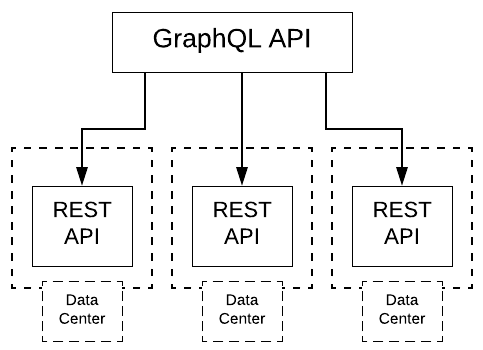
    The way Netflix decided to implement Monet was to have the GraphQL API server act as a facade for existing RESTful APIs. The thinking was to reap the benefits provided by GraphQL, yet reuse as much existing code as possible. The idea was good, the actual deployment fell short. Once Monet was put into production, it ran dog slow.

    It turns out the REST APIs were distributed among a variety of data centers (see Figure 2). Network latency was killing them.

    Figure 2: Initially Netflix’s Monet system queried data from a variety of data centers.

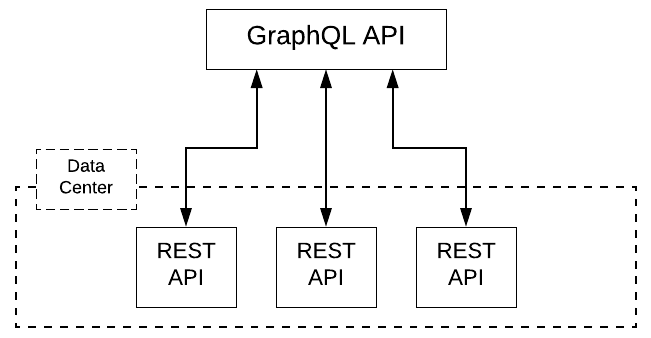
    The company’s solution was to bring all the REST APIs into a single data center (see Figure 3).

    Figure 3: Netflix improved Monet’s performance by moving all RESTful APIs into a single data center.

    The result? Once all data resided in the same data center, performance improved dramatically. It makes sense. Shorter distance to travel means less latency in the system overall.

    Now, how this relates to the CAP theorem is interesting. Remember, according to CAP, as partitioning goes down (P), consistency (C) and availability (A) go up. So, while it’s true that Netflix was not using a single machine as a data source, moving everything into a single data center created what one could consider a single virtual data source. Yes, there might be latency issues within the data center. But, rack-to-rack latency is nowhere near as high as the latency between geolocations. We’re talking the difference of 1 to 10 milliseconds as opposed to hundreds, if not thousands, of milliseconds.

    In Netflix’s case, the company addressed the constraints imposed by the CAP theorem by reducing the breadth of partition at the geolocation level. All the data lived in the same data center. Imagine if partition size could be reduced at the machine level. What if instead of having data distributed among many machines within the same data center, data actually resided within a single machine? Partition size would be reduced to one. Then, applications could have the latest data immediately. All that’s needed is a single machine that can handle the load. This is where using a mainframe comes into play.

    Mainframes Are Built for Big Data and Agile DevOps

    Mainframes since their inception were intended to be able to store and process enormous amounts of data. Today 80% of the world’s data still resides on mainframes. As mentioned in a previous article about this topic, one mainframe can process 2.5 billion transactions daily. That’s the equivalent of 100 Cyber Mondays in a single day. That’s a lot of computing power easily equivalent to more than a few racks of commodity hardware in a data center. In fact, in some situations, one mainframe can provide the computing power found in an entire data center.

    So, let’s go back to the Netflix problem. What if instead refactoring those distributed RESTful APIs into a single data center, the time and money spent was used to refactor those RESTful APIs into a single mainframe? Yes, there are some technical hurdle to overcome, but considering the running Linux on a mainframe is standard these days, it’s not as if we’re talking transforming a bunch of Python code into COBOL. Databases from standard RDBMS such as DB2, Oracle to the NoSQL MongoDB can run perfectly well on a mainframe. There’s work to be done, but reinventing the wheel is not one of the tasks. Using a mainframe is a viable solution except for one sticky little problem: The conventional thinking is that using a mainframe is prohibitively expensive. Thus, the bias toward racks of commodity hardware or simply going with a cloud service.

    Mainframes as a Cost-Effective Solution

    The general perception in most IT shops is only big banks, insurance companies, governments and large-scale manufacturers use mainframe computers. They’re just too expensive for small to medium-size business. While many mainframes come with a price tag that can exceed $1 million, there are still surprisingly affordable models. For example, an entry-level IBM z114 will run about $75,000.

    If you’re a company spending $50,000 a month on AWS or Google Cloud computing resources, then for the $600,000 a year cost you’re spending on a cloud provider and the latency that comes with it, your company can well afford not only an entry-level IBM Z system to handle a production load, but also a second one to serve as backup, should failure occur.

    In terms of system administration, just about all the tools commonly used to support modern CI/CD processes today in the DevOps world have corresponding equivalents for mainframe implementation. As with any adoption of unfamiliar technology, there is a learning curve. But, again, we’re not reinventing the wheel. The tools, resources and expertise exist. Adoption is just a matter of following standard change management practices typical in medium-to-large-size companies that are well-positioned and use a mainframe to take advantage of implementing a cost-effective, no-partition data source strategy.

    Integrating Mainframe Technology into a DevOps-Driven Ecosystem

    Mainframes are capable of doing DevOps in an open, agile and collaborative fashion. The tools, resources and expertise required to support a mainframe’s participation in CI/CD processes exist today. For example, Zowe is an open source software framework that provides solutions that allow development and operations teams to securely manage, control and develop on the mainframe like any other platform. DB2 DevOps Experience for z/OS is one of the first commercial products built on Zowe. It allows IT the control over the mainframe database, its business rules and standards, while allowing development teams the ability to work independently using self-services and integration with modern CI/CD tools to speed their application release time with better quality and development practices.

    When you think about it, in certain mission-critical situations, using a mainframe to have the latest data at any time not only makes sense from a technological point of view, but it’s also attractive in terms of return on investment. The trick is to be able to identify the right use case. Of course, if you have a situation in which 90% of your users are in California and you have a mainframe situated in Bangalore, the laws of physics will apply. Moving the bits from the mainframe to user will take time. But, if you have situations in which user and data are in continental proximity, using a mainframe as a standard data source begins to look very attractive.

    Again, having the right use case is key. But, everything else being equal, using a mainframe for sensitive, data-driven applications warrants significant consideration.

    Putting It All Together

    The constraints on distributed computing imposed by the CAP theorem remain a challenge to those who design and implement large applications at web-scale. The “pick two” limitation CAP imposes can be an annoyance for simpler websites that provide content intended for the general consumer. But, for large scale, data-intensive applications, having accurate data immediately is not optional, it’s essential. Thus, using mainframe technology to create a no-partition data infrastructure becomes a viable way to address the limitations imposed by the CAP theorem. Under the right conditions, making a mainframe the central repository for your application’s data provides a significant return on investment hard to match when compared to commodity-based cloud providers.

    The nice thing about using a mainframe is when it comes to the CAP theorem, you still only get to pick two, but the two you get to pick are consistency and availability. In the scheme of things, those are the two that count.

    — Bob Reselman

  • IBM Extends z/OS Toward DevOps Again

    IBM Extends z/OS Toward DevOps Again

    A few months ago, I wrote about the release of Zowe, the first Open Source project based on z/OS. Zowe is a framework for including z/OS in your applications with less pain than we have traditionally suffered. IBM supported this project as part of its view that enterprises need to have interoperability between platforms.

    This belief also drove IBM’s recent announcement of new pricing models, along with enhanced cloud and container support that will help users tie mainframe access directly into the DevOps toolchain.

    First, let’s cover the pricing. IBM has brought “Pay as you grow” type pricing to the mainframe. While owning a mainframe means you are already expending funds, the new model is designed to simplify licensing and adjust what you are paying based upon actual consumption. It’s not a revolutionary idea, but it is wholly new to the mainframe scene and places mainframe pricing in the same pre-determinable model as cloud. IBM signed on some of z/OS’s biggest developers to offer similar pricing with Broadcom, BMC and Compuware either joining with IBM or offering similar programs.

    And Containers!

    But that’s not the exciting part for those of us in DevOps. The exciting part is the announcement of IBM z/OS Container Extensions. The ability to drop standard containers onto a z/OS partition and use them as an interface to traditional mainframe data/subsystems is huge from a DevOps perspective. This puts both the processing power of the mainframe and the stable data/subsystems into the DevOps cycle by allowing containers to be treated like any other container. Of course, I haven’t (and due to current work requirements probably won’t) played with it, so I’m likely glossing over some issues that users will run into, the potential is staggering. To finally have mainframe access that fits into the DevOps toolchain like any other system would is huge, and shows that IBM is listening to the market. I’ll be following along to see how it rolls out; I’ve got a fair number of associates working in mainframe shops who will keep me posted, but if you roll out Container Extensions, please let me know how it went.

    Cloud Interop?

    I’m less excited about IBM z/OS Cloud Broker. This announcement talks about the ability to spin up z/OS environments in IBM Cloud Private. It seems to me that this is counter to most users’ needs, but I can see that some larger z/OS environments might well have asked for it—rather than pull in another mainframe just for seasonal bumps, the ability to provision in the cloud is appealing. However, the number of organizations that fall into this category is small, though important from an “IBM customer” perspective, so it makes sense that the company went this route, but it’s less about new technology and more about giving important customers a tool to avoid large “forklift” upgrades, IMO.

    And Containers!

    I’m still thrilled to see Container Extensions. I’m looking forward to following where that goes. IBM has been pretty open about the fact that this is a road it is on, not a destination, so no doubt Container Extensions is just a stop along the way. But if it makes it easier for today’s crop of developers and DevOps engineers to access the mainframe sitting in their DC, I’m all for it, and can’t wait for the next stop on this road.

    — Don Macvittie

  • Mainframes: The Cloud Before the Cloud

    Mainframes: The Cloud Before the Cloud

    Here’s something to think about: Despite the fact that IBM stopped manufacturing personal computers in 2005, deciding instead to focus on higher margin business services, the company continues to produce mainframes and by all estimates will continue manufacturing them well into the future. The question is, why? The answer: because there is still significant demand for this type of hardware.

    The fact is that a mainframe is a monster when it comes to computation and processing transactions. One mainframe can process 2.5 billion transactions daily. That’s the equivalent of 100 Cyber Mondays in a single day. To give you a clearer idea of the immensity of scale, keep in mind that Cyber Monday sales in 2018 were $7.9 billion. This translates into a mainframe being able to handle a bit more than three-quarters of a trillion dollars in transactions each day, which is almost twice the yearly GDP of Austria!

    As I said, the mainframe is a workhorse. Yet, its power and potential are hidden from most people who work in the modern cloud. This is surprising because there’s a good argument to be made that, given its power and scalability, coupled with its support for a large number of concurrent users, the mainframe was the cloud before there ever was a cloud. However, the technology is practically unknown among younger developers, mostly due to cultural reasons and a lack of historical awareness. That more people are not taking advantage of the tremendous opportunities at hand is a misfortune. When it comes to mainframe computing, there’s a lot of interesting tech to be learned and a good amount of money to be made. It’s just a matter of increasing awareness to do this. A good place to start is to redefine the narrative.

    Allow me to elaborate.

    A Special Club

    When mainframes appeared on the commercial landscape, few people interacted with computers and even fewer worked with them directly as programmers or system administrators. Just as in a modern data center, the machines were isolated in climate-controlled rooms to which few had access. Access to the actual physical machine was restricted to a special few. But unlike today, when restricted access is due more to security concerns because there are a lot more people around who are potential black hats, back then access was also restricted due to the exclusivity of the profession.

    In the 1950s, 1960s and well into the 1970s, not just anybody could program or be a systems administrator. You could go to a technical school to learn to become a computer operator, which meant you could work at a terminal as a bank teller or travel agent. Or you could learn to become a data processing clerk and work in a back office at a brokerage firm. But to learn to program, you had to go to college. Then after college, you had to go to work for a company or organization that actually used computers in day-to-day operations. These were banks, insurance companies, major manufacturers such as General Motors and General Electric, airlines, very large retailers and government. Computing was a club and you had to be well-educated to get in and be well-liked by the organization to keep your membership. Yes, there were the outliers—Gates, Allen, Joy, Wozniak and Jobs—but for most people, the career path to being a programmer was college and then into big business or government.

    As a result, computing had an air of mystery and magic to it. Remember, until the mid-1980s, most people had never touched a computer. It was the stuff of moon landings and election night predictions on network TV. Then the PC came along and changed everything. Within 10 years computers became commonplace. Even elementary schools had them—at least, those that had the budget and foresight. The power that business applications such as the spreadsheet program Lotus 1-2-3 brought to small business motivated even the dry cleaner on Main Street to plunk down the thousands of dollars it cost to buy a PC. The productivity boost was worth it. Also, since the dry cleaner actually owned the machine, the dry cleaner’s kid could learn to program on the box unencumbered, when it wasn’t being used during business hours. Remember, the Microsoft DOS operating system that shipped on every IBM-compatible PC came bundled with the programming language BASIC. You didn’t need to go to college to learn to program; all you needed was a book.

    So, PC programming took off. Instead of having to go through the effort required to get into the special club the mainframe programmers belonged to, PC programmers started their own clubs and anybody could get in. All you had to do was show up. PC programming became a meritocracy. Also, it became extremely lucrative work. There were a lot of PCs being shipped and the appetite for applications to run on them was enormous. The unlikeliest of people, such as Lotus Software founder Mitch Kapor and his sidekick, Grateful Dead lyricist John Perry Barlow, became wealthy, thanks to the PC.

    The PC became cool and programming for it became cooler. But there was a fact that got obscured as the popularity of the personal computer grew: Compared to the mainframe, the PC was a toy—a productive toy, a liberating toy, but a toy nonetheless, very much in the same way that a go-kart is a toy compared to a Formula One race car.

    Feature for feature, the mainframe ate the personal computer’s lunch. The IBM System/370 Extended Architecture Mainframe released in 1983 was a 31-bit machine that could support up to 8MB of memory with a processor running at 38 MHz. By comparison, the IBM PC-XT, also released in 1983, was an 8-bit machine that shipped with 128KB of RAM and an 8088 processor that ran at a speed of 4.77 MHz.

    But, as the saying goes, “You should never underestimate the value of cool,” and the PC was very cool. It got a lot of attention while the mainframe stayed hidden away in climate-controlled rooms in the basements of banks and insurance companies. Yet, the mainframe was more powerful, and whereas the PC was meant to meet the needs of a single user, a mainframe can service thousands.

    Built to Scale Built from Inception

    Mainframe computers from the start were designed to support hundreds (if not thousands) of users. However, more importantly, mainframes were and are designed to support millions of concurrent transactions. When you think about it, while it’s possible for a high number of user requests to exhaust CPU utilization in a typical commodity machine—which is the reasoning for being able to scale up CPU count by increasing VM allocation in the cloud-based computing cluster—the real burden on the CPU is not so much the request count but the computing burden that each request incurs. For example, one request getting a .JPG of a cat will incur nowhere as much burden as a request that needs to convert an audio file in .WAV format to MP3.

    The need to alleviate request burden has been around since bank tellers working in the various branches of a big bank had to make deposits and withdrawals at the same time. Mainframe engineers addressed the problem decades ago. Technologies such as batch processing and message queues, which make computational activity asynchronous and are optimized to fully utilize CPU capacity efficiently, were and are commonplace in the mainframe landscape.

    IBM’s 360 mainframes supported batch processing in its OS/360 system starting in 1964. Batch processing allows thousands of instructions to be performed on terabytes of data at pre-scheduled times (usually “off-hours”), all without human intervention.

    Message queuing allows processes to take data in the form of a message stored in a message queue and perform computational activity according to the data in the message. Processing is performed independent of a request in an asynchronous manner. When processing is complete, a new message is created and sent on to another queue, where another process will do more processing or create a notification indicating that work is complete. IBM MQSeries was an early message-queuing technology first used in 1993 at State Street Bank well before the internet became commonplace.

    The reason that support for user and transactional concurrency was possible in mainframes is due to a technology that is commonplace in today’s cloud environment but was unheard of among PC users back in the days when most data was exchanged between standalone PCs using floppy disks. That technology is virtualization.

    Virtualization Takes Mainframe Computing to the Next Level

    Today we take virtualization—the capability to have software simulate hardware—for granted. Without it, we couldn’t have native cloud providers such as Amazon Web Services, Google Cloud and Microsoft Azure. These services rely on virtualization to provide the segmentation and computational isolation required to meet the needs of the modern computing. Yet, as essential as virtualization is in the world of commodity cloud computing, putting a layer of virtual machines on a commodity PC is a fairly recent event in the history of computing. VMWare, VirtualBox and KVM became mainstream in the mid-2000s. On the other hand, virtualization has been part of mainframe technologies since the mid-1960s. Virtual memory appeared in the mainframe in 1965. Machine virtualization was introduced on the IBM 370 mainframe in 1972 and is still an important part of the mainframe computing experience today.

    Every single person who logs onto the mainframe when working in a native mainframe operating system gets an identical address space. You can think of each address space as a standalone virtual mainframe system. These address spaces are created instantly and are protected from interfering with each other. Also, many companies create logical partitions of their hardware called LPARs (logical partitions). The logical partitions are controlled by a native firmware hypervisor called PR/SM (pronounced Prism).

    The value that LPARS provide is a further separation between environments. This means not only can you separate users, but you can also create distinct computing environments such as those created when virtualizing X86 machines. For example, you can have a shared development environment as well as environments for testing, staging and production. You can allocate resources and security access to a particular environment based on need, just like you would in a data center full of commodity machines. This means you can configure production systems to be more secure and have higher execution priority and more resources such as memory. In fact, according to the U.S. government, from a security perspective, virtual machines created on the mainframe are considered distinctly separate machines.

    LPARs running on the same hardware or different hardware under the native mainframe z/OS operating system can be linked together as a Sysplex for redundancy and to easily provide additional capacity. Dynamic Virtual IP Addressing (DVIPA) is used to dynamically route IP traffic across multiple LPARs in a Sysplex. This is analogous to being able to tie together a variety of web servers behind a load balancer or organize them within a Kubernetes cluster. Being able to tie computers together is an important feature for making systems scalable. Also, linking computers across geographic regions increases performance. It’s always faster to work with a machine that’s closer to you than one that’s further away. As mentioned earlier, being able to scale systems up and down is a key feature of cloud-based computing. Dynamic connection, which is part of mainframe architecture, is critical for scaling to work.

    The important thing to understand is that the stuff we consider to be modern in terms of the machine virtualization that we rely upon to make the cloud work has been in play for years on the mainframe. Also, virtualization on the mainframe makes it possible for programmers and system administration staff to work in a variety of operating systems and programming languages as we’ve come to expect in commodity cloud instances. Machine virtualization allows mainframes to support Linux. Whether the computing environment is virtualized Linux or native mainframe, developers can code in Java, C/C++, Python, Perl and a variety of other languages, including something as new as Swift. But, then again, the mainframe was always intended to support many programming languages.

    Even back in the ’60s and ’70s, programmers could write in COBOL, PL/I, job control language (JCL) and Customer Information Control System (CICS). Also, writing low-level code in Assembler has always been possible. Clearly, the versatility that modern developers enjoy programming in a variety of languages in a cloud environment has been part of mainframe computing for a while. Yet, the benefit has never been at the forefront of developer awareness. Maybe it’s time to change the narrative.

    Changing the Narrative About Mainframe Computing in the Cloud

    As I stated at the beginning of this article, IBM continues to make mainframes because there’s a growing demand for the technology—particularly as smartphones and IoT devices proliferate worldwide. Netflix might be spinning up containers on a commodity machine in a data center to let you view past episodes of “Orange is The New Black.” But when it comes time to pay for your Lyft ride using your iPhone, that credit card transaction will most likely be processed on a mainframe that’s providing service via some sort of API gateway.

    There is little benefit to arguing that mainframes should or can be used interchangeably with commodity servers. That’s like saying a fleet of automobiles can be used interchangeably with a city bus. You can do it, but it doesn’t make much sense. Each technology has benefits that when used together, make the overall transportation system more efficient. The trick is to understand where and how the technologies fit together in the big picture. In this case, the big picture is the cloud.

    The old narrative around mainframe technology is based on perceptions that are no longer applicable. The modern mainframe is no more centralized than the single building that houses a regional data center. In terms of programming languages, mainframes moved beyond FORTRAN and COBOL decades ago. Current mainframe virtualization technology makes it possible to run programs written in just about any programming language. And, mainframe emulators, such as ZD&T, make it possible to get the hands-on experience necessary to get familiar working in a mainframe environment.

    The Perceptions of the Past are No Longer Applicable

    The modern mainframe is a powerful resource that provides extraordinary benefits for cloud computing. The new narrative is that the mainframe is modern, adaptable and well-suited to accommodate a very high volume of transactions at lightning-fast speeds. And, it’s a good way to make good money.

    As the current workforce (which is admittedly aging) approaches retirement, a new breed of mainframe developer will be needed to continue the work of making the mainframe a mission-critical resource in the modern cloud. In addition to understanding the essentials of mainframe computing, these developers will need to be well-versed with the modern tools and techniques that drive cloud computing. It’s an investment that I’ve urged many up-and-coming developers to make.

    Putting It All Together

    Let me share a piece of personal history: A while back I needed to do some programming. So, I went to my desk, logged into my system, wrote some code and ran it. It worked like a charm! I saved my work, finishing up just in time for dinner. A while later, it was again time to program. I went back to my desk, logged into the system and coded away. Just another day of slinging the code, right? Well, not really.

    My first coding session was in 1975. “A while later” is today. Forty-four years have passed. Back then, I was working on a mainframe that was 50 miles away. Today, I logged into an online programming environment that was also miles away, maybe even halfway around the world. That’s how it is with cloud computing: The resources are any way at any time.

    Interestingly, despite the passage of a significant amount of time, my current developer experience is not that different than the one I had decades ago. It’s still just me and a terminal. Back then, the terminal was a screen full of green characters. Today, my terminal is able to accommodate a variety of media and input devices. But, at the other end of the wire, who knows what’s going on? For all I know, I might still be connecting to the same mainframe I used back in 1975. Which is my point.

    Much of what we consider new and wonderful about cloud computing today has actually been around for a while in mainframe technology. In many ways, the mainframe was the cloud before the cloud. And, it’s still a powerful resource for what we have come to know as modern cloud computing. Given its power, versatility, scalability and support for modern DevOps tooling, the mainframe is a perfect resource for today’s and tomorrow’s cloud computing infrastructure. It’s a computing resource that we’ll do well to take advantage of as we move forward in our development efforts on an increasingly connected planet.

    — Bob Reselman