Technical debt is accumulated as unmanaged flags accrue in an application’s code. And the associated marginal gain (i.e. each unmanaged flag added) directly impacts the amount of time and resources needed for testing. This can lead to more serious issues with the affected development, performance/testing and product processes becoming more expensive.
As software teams grow and become more agile, it’s important to ensure a feature flag solution can scale. But it’s imperative that best practices and techniques are followed to avoid the technical debt accumulated by poor flag lifecycle strategy. This post will cover best practices for avoiding technical debt management when using feature flags.
Strategic feature flag planning to avoid technical debt
Sometimes, an ad hoc fix is necessary that can easily be resolved through an additional feature flag. All too often though, scenarios come up where teams feel pressured with time or resource constraints and resort to implementing feature flag gated code without a second thought. While this is somewhat of a normal byproduct of software development, planning is essential and a fundamental precursor to long-term success with feature flags.
The time taken to plan prior to implementation assists in feature flag due diligence. Teams should ask themselves:
What will the flag be used for?
What team will use the flag?
How long will the flag be in use?
The questions were listed in descending order. It’s important to realize this as each question helps filter flags, with the first dividing flags based on its high-level use and the last providing more granular detailed information. This preparation is critical to avoid the hassle of technical debt management later.
How to Name Feature Flags to Avoid Technical Debt
With these questions answered we can now begin naming flags. Companies have style guidelines for writing code, and should append these with its use of feature flags. Before creating a flag, cement the naming convention to be used; this will standardize the practice and help onboard future employees. Like variables, flag names are best left at the intersection of descriptive and terse (i.e. short and sweet).
Some feature flag management solutions provide a namespace. This is the first funnel or way to search flags later on. A namespace should be used to identify how a flag will be used. For example, a set of flags should be defined to the namespace “releaseFlags” allowing for a separate group of “abTestFlags.”
Once a flag has been created with a namespace, a label can denote which teams are using a flag. Since multiple labels can be applied in a flag management UI, it allows multiple teams to associate themselves with each flag.
The description of a created flag provides verbose details, like flag creation date, or necessary information related to a dependency on another flag. This information is the last and most granular bit of the flag’s information.
Best Practices in Flag Lifecycle Management
Review flags often. Flag management solutions can display and filter which flags are on, off or experiencing no traffic through an interface. But teams must be vigilant about removing flags and have a well-defined clean up process.
Integration with tools like JIRA can help monitor and associate a ticket with the lifespan of each flag. Once a notification is sent that the flag is to be removed (e.g. the A/B test has finished, canary deployment was successful, etc.), the ensuing removal process is easily outlined from previously established naming conventions.
After reviewing a flag’s description, dependencies can be noted and dealt with accordingly. we can review dependencies on all other associated flags. Referring back to the labels will delegate work as the responsible team will be notified to remove the flag from the code base.
And where in the code should they look? Developers turn to the flag’s namespace, although it may exist across multiple tech stacks defined within an application. This is where an additional dashboard should be leveraged, specifically one that displays the environments and code languages a flag has been used in. With all of this information in place, it’s fairly easy to notify the responsible party and search within an IDE for all instances of the flag.
Summary
Naming conventions are the next most important element in feature flag management. Using an inverted pyramid mechanism helps define and sort flags from its highest tier of grouped buckets (i.e. type of flag) to its lowest where detailed information is defined.
Managing flags throughout their lifecycles avoids the incurred technical debt they create. By constantly monitoring flag usage, teams can establish hard deadlines to clean up flags in code. Technical debt management – and the cleanup process – is simplified by sorting through knowledge communicated in naming conventions (in reverse order they were performed).
These processes should be defined by a strategic feature flag plan, set up to avoid flags’ technical debt. If followed diligently, teams can leverage the unrealized gains to drive product innovation and ensure processes will scale.
The following is a guest post written by Carlos Schults.
Being able to disable code in production is a power that many developers aren’t aware of. And that’s a shame. The ability to switch off some portions—or even complete features—of the codebase can dramatically improve the software development process by allowing best practices that can shorten feedback cycles and increase the overall quality.
So, that’s what this post will cover: the mechanisms you can use to perform this switching off, why they’re useful and how to get started. Let’s dig in.
Why Would You Want to Disable Code?
Before we take a deep dive into feature flags, explaining what they are and how they’re implemented, you might be asking: Why would people want to switch off some parts of their codebase? What’s the benefit of doing that?
To answer these questions, we need to go back in time to take a look at how software was developed a couple of decades ago. Time for a history lesson!
The Dark Ages: Integration Hell
Historically, integration has been one of the toughest challenges for teams trying to develop software together.
Picture several teams inside an organization, working separately for several months, each one developing its own feature. While the teams were working in complete isolation, their versions of the application were evolving in different directions. Now they need to converge again into a single, non conflicting version. This is a Herculean task.
That’s what “integration hell” means: the struggle to merge versions of the same application that have been allowed to diverge for too long.
Enter the Solution: Continuous Integration
“If it hurts, do it more often.” What this saying means is that there are problems we postpone solving because doing so is hard. What you often find with these kinds of problems is that solving them more frequently, before they accumulate, is way less painful—or even trivial.
So, how can you make integrations less painful? Integrate more often.
That’s continuous integration (CI) in a nutshell: Have your developers integrate their work with a public shared repository, at the very least once a day. Have a server trigger a build and run the automated test suite every time someone integrates their work. That way, if there are problems, they’re exposed sooner rather than later.
How to Handle Partially Completed Features
One challenge that many teams struggle with in CI is how to deal with features that aren’t complete. If developers are merging their code to the mainline, that means that any developments that take more than one day to complete will have to be split into several parts.
How can you avoid the customer accessing unfinished functionality? There are some trivial scenarios with similarly trivial solutions, but harder scenarios call for a different approach: the ability to switch off a part of the code completely.
Feature Flags to the Rescue
Defining Feature Flags
There are many names for the mechanisms that allow developers to switch a portion of their code off and on. Some call them “feature toggles” or “kill switches.” But “feature flags” is the most popular name, so that’s what we’ll use for the remainder of this post. So, what are feature flags?
Put simply, feature flags are techniques that allow teams to change the behavior of an application without modifying the code. In general, flags are used to prevent users from accessing and using the changes introduced by some piece of code, because they’re not adequate for production yet for a number of reasons.
Disable Code: What Are the Use Cases?
We’ll now cover some of the most common use cases for disabling code in production.
Switching Off Unfinished Features
As you’ve seen, one of the main use cases for feature flags is preventing users from accessing features that aren’t ready for use yet.
That way, programmers developing features that are more complex and take a longer time to complete aren’t prevented from integrating their work often and benefiting from it.
Enabling A/B Testing
The adoption of feature flags enables the use of several valuable practices in the software development process, one of which is A/B testing.
A/B testing is a user experience research technique that consists of comparing two versions of a website or application to decide which one to keep. It entails randomly splitting users into two groups, A and B, and then delivering a different version of the application to each group. One group might receive the current production version, which we call the “control,” whereas the second group would receive the candidate for the new version, called the “treatment.”
The testers then monitor the behavior of both groups and determine which of the versions achieved better results.
Feature flags are a practical way to enable A/B testing because they allow you to quickly and conveniently change between the control and treatment versions of your application.
Enabling Canary Releases
If you deliver the new version of your app to your entire userbase at once, 100 percent of your users will be impacted if the release is bad in some way. What if you could gradually roll out the new version instead? You’d first deploy to a small subset of users, monitoring that group to detect issues. If something went wrong, you could roll it back. If everything looked fine, you could then gradually release the version for larger groups.
That’s a canary release in a nutshell. It’s another powerful technique that feature flags might help with.
Customizing Features According to Users’ Preferences
It’s not uncommon to have to customize your application according to the needs of specific users, and there are several ways in which software teams can accomplish that—some more efficient, and others less so (companies that create separate branches or entire repositories for each client come to mind).
This is another area where feature flags could help, allowing teams to dynamically switch between different versions of the same functionality.
Disable Code in Production 101
How do you go about disabling code? That’s what we’re going to see now, in three increasingly sophisticated phases.
First Stage: The Most Basic Approach
We start with an approach that’s so primitive, it maybe shouldn’t be considered a feature flag at all. Consider the pseudocode below:
calculateAdditionalWorkHours(Employee employee, Date start, Date end) {
In the code above, we’re just commenting out the old version of some method and replacing it with a new version. When we want the older version to be used, we just do the opposite. (Well, I said it was primitive.) This approach lacks one of the most fundamental properties of a feature flag—the ability to change how the application behaves without changing its code.
However, it plants the seed for more sophisticated approaches.
Second Stage: Taking the Decision Out of the Code
The previous approach didn’t allow developers to select the desired version of the feature without changing the code. Fortunately, that’s not so hard to do. First, we introduce a logical variable to determine which version we’re going to use:
calculateAdditionalWorkHours(Employee employee, Date start, Date end) {
Then, we use some mechanism to be able to assign the value to the variable from an external source. We could use a configuration file:
var useNewCalculation = config[newCalculation];
Passing arguments to the application might be another option. What matters is that we now have the ability to modify how the app behaves from the outside, which is a great step toward “true” feature flagging.
Keep in mind that the code examples you see are all pseudocode. Using your favorite programming language, there’s nothing stopping you from starting with this approach and taking it up a notch. You could, for instance, use classes to represent the features and design patterns (e.g., factories) to avoid if statements.
Stage 3: Full-Fledged Feature Flag Management
The previous approach might be enough when your application has only a small number of flags. But as that number grows, things start to become messy.
First, you have the issue of technical debt. Manually implemented feature flags can create terribly confusing conditional flows in your codebase. That only grows worse with new flags being introduced each day. Additionally, they might make the code harder to understand and navigate, especially for more junior developers, which is an invitation for bugs.
Another problem is that as the number of flags grows, it becomes more and more common to forget to delete old, obsolete ones.
The main problem of a homegrown approach is that it doesn’t give you an easy way to see and manage all of your flags at once. That’s why our third and final stage is a single piece of advice: Instead of rolling out your own feature flags approach, adopt a third-party feature flag management system.
Feature Flags Are a CI/CD Enabler
We’ve covered the mechanisms developers can use to disable portions of their codebase in production without having to touch the code. This capability is powerful and enables techniques such as A/B testing and canary releases, which are all hallmarks of a modern, agile-based software development process.
The names for the techniques might vary—feature flags, feature toggles, feature flipper, and so on. The way in which the techniques are implemented can also vary—from a humble if statement to sophisticated cloud-based solutions.
But no matter what you call them, you can’t overstate the benefit these mechanisms offer. They’re an enabler of Continuous Integration, which is essential for any modern software organization that wants to stay afloat.
Carlos Schults is a .NET software developer with experience in both desktop and web development, and he’s now trying his hand at mobile. He has a passion for writing clean and concise code, and he’s interested in practices that help you improve app health, such as code review, automated testing, and continuous build.
So how do plugins come into this picture? As you may know Jenkins and CloudBees CI are largely the sum of the plugins that have been installed. A lot of these plugins come with their own configuration, which is used to customize their behavior or define what they integrate with.
Below is an example of a YAML configuration for the Kube Agent Management Plugin. This is a plugin which is used for configuring the Kubernetes Pod template for worker agents.
CloudBees has been working hard at delivering Configuration as Code (CasC) for CloudBees CI. A significant milestone has been reached this week with full support for all Tier 1 plugins for Configuration as Code. This key milestone coincides with Configuration as Code becoming generally available (GA) for CloudBees CI at the end of May. But before we talk about this milestone let’s first talk about what configuration as code is in general.
Configuration as Code Introduction
A key concept in cloud native DevOps is Everything as Code.
In the Everything as Code world that we live in now, you can use code-management tools to deal with complex things like configuring and customizing your applications and infrastructure. This allows you to make use of tools like version control, code comparison and replication for things that you would traditionally have to configure using a point-and-click user interface.
CloudBees CI and Jenkins are no exception to the Everything as Code model. As anyone who has set up a new Jenkins instance knows, this can be a detailed, time-consuming process, especially when you’re using the Manage Jenkins UI to do everything.
Configuration as code considerably simplifies the configuration of CloudBees CI. With configuration as code, you can turn complex configurations into easily-replicated, human-readable code files (YAML). You can manage those configuration files with source control tools likeGitHub.
Tier 1 Plugin Support
Tier 1 plugins consist of both Verified & Proprietary plugins – 124 plugins to be exact. Enabling Configuration as Code support for all of them was a large undertaking but a necessary one as it made the management and governance of all them dramatically simpler. We also added test cases to make sure that future changes to the plugins don’t unexpectedly break configuration as code functionality.
Documentation for CloudBees CI Configuration as Code
Currently, CloudBees does not support configuration as code for Tier 2 plugins. These are also referred to as Compatible Plugins. Out of the 112 Tier 2 plugins we have work planned to add support for Configuration as Code for 38 of these plugins. The remainder either do not require any configuration or already support configuration as code. The work to enable support for the Tier 2 plugins is planned for release in the fall of 2020. Tier 2 plugin enablement will be released piecemeal, so certain Tier 2 plugins will be released much earlier.
Community Credit
CloudBees CI Configuration as Code is built on top of open source Jenkins Configuration as Code. We would like to recognize all of the work which has been done in the open source community on this feature.
Any feedback or questions regarding CloudBees Configuration as Code in general or support of Tier 1 plugins is always welcome.
The following is a guest post by Robert Kelley, Director of Delivery Engineering at IHG, based on his session at CloudBees Connect. His full presentation is available below.
You may not necessarily recognize the company name IHG – the company I work for – but I bet you’ve heard of our brands and stayed in our hotels. They include household names like Holiday Inn, InterContinental, Crown Plaza and many more. IHG stands for the InterContinental Hotels Group and we’re one of the world’s largest hospitality groups in the world. IHG operates 6,000 hotels in more than 100 countries. And we’re growing fast: IHG currently has 1,900 hotels in the pipeline for opening.
It takes a lot of software to run a global operation of this size, especially one that’s growing so rapidly. IHG employs hundreds of engineers around the globe to build and deploy the business applications and systems that keep our company competitive and growing. As the director of delivery engineering at IHG, which is our DevOps program, I’m tasked with empowering these developers with the tools and processes they need to be productive and successful at their jobs, helping translate their work into business success for IHG.
That’s a tall order for any engineering organization and ours is no exception. But we’ve forged ahead on our DevOps journey, starting by putting together a business case and setting some high-level goals and ambitions for our teams. Our list includes adding more automation and certification to our delivery flows, improving our processes and gaining more transparency and visibility into performance. Of course, we want to support innovation to keep our business ahead of the competition.
After finalizing our goals, we “took them to market,” which in our case meant sharing them with the software development community here at IHG. What could go wrong, you might ask?
Well, right out of the gate we discovered there were significant differences among the teams, their cultures and their tools and processes. The disparity left us struggling to bridge the gap between where we wanted the teams to go, and where they thought they were going. This was going to be a tougher journey than we expected. We had to fail fast and learn quickly.
Rethinking standardization
It became clear we needed to rethink our approach and how we engaged our development community. Recognizing that one size doesn’t fit all, we decided to take more of a consultative or service mindset, focusing more on people and engaging our developer community. After all, we have a lot of smart developers with great ideas that represent an incredible value opportunity.
Our approach features a comprehensive communications plan designed to motivate developers to embrace DevOps. We’re looking at gamification strategies, for example, that would make it fun for people to engage with the program, share their accomplishments and track progress toward reaching their goals. We also want to help team members reduce the amount of time they need for build and deploy processes, so we’re introducing more automation, including developing a semiautomated onboarding process.
Moreover, we’re involving developers in a transparent governance process – one that’s not simply a rulebook handed down and controlled by a third party or some other group in the organization, but one that’s shared and co-developed by our teams. Everybody’s represented in the governance process. Teams from application development, testing and quality, infrastructure and operations, security – and of course the DevOps group – all have a voice and work together to define quality gates and other requirements. It’s a true “voice of the customer” approach that puts developers’ needs first.
Supporting developers
To tame the complexity of our environment, we’ve taken steps to achieve some consistency around things like testing, merge processes and build and deploy routines. However, we never want to hamstring developers by over-defining process flows, so instead we provide teams with simplified workflow or pipeline templates that should work for just about any application.
I’m proud to report that our teams have been making huge progress along our DevOps journey. We’ve helped build about 40 pipelines for dev teams and we’re working on even more. Performance is up: Teams are now able to move a new version of an application to production in less than 30 minutes, compared to taking a week previously. And it now takes less than two hours to deliver applications to eight datacenters worldwide, with no downtime.
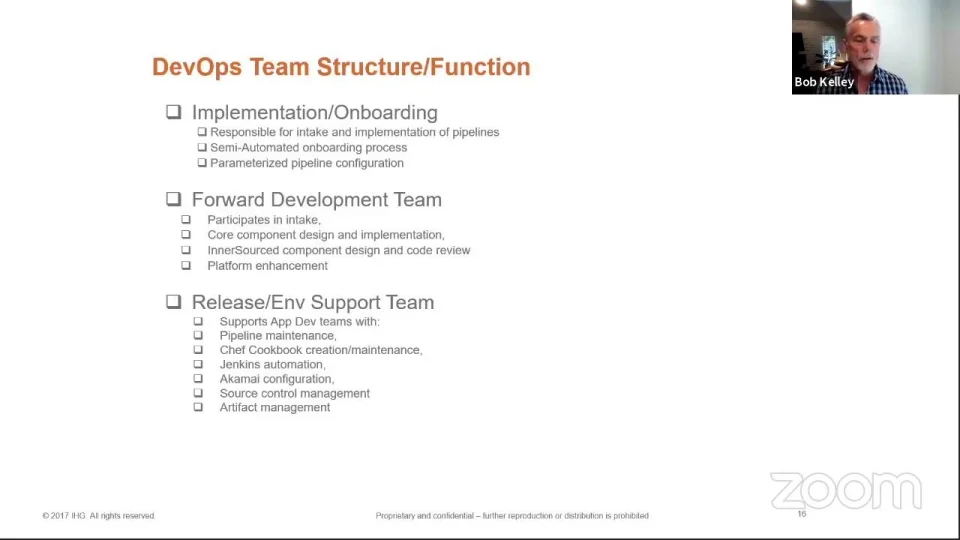
We’re also tapping the insights of our developer community by creating an InnerSourcing model where virtually anybody who has a good idea can add it to our code base to benefit the whole organization.
This is just a small sampling of our recent successes. And it’s all happening without micromanaging our developer community. The way we look at it, we’re here to enable and guide our teams, not dictate their choice of tools and processes. By allowing for a diversity of approaches – by embracing not replacing – DevOps is empowering developers at IHG to unleash their creativity and help drive IHG’s next round of growth.
Agile development has been around for years, but not everybody is doing it the right way. Just ask Elisabeth Hendrickson, who until recently was vice president of quality assurance at Pivotal Labs, a leader in agile software development and now a division of VMware.
Hendrickson’s career in the software industry spans a few decades and includes stints as a technical writer, developer, and test automation specialist. The variety of jobs has been a good thing, she says, giving her a holistic view of the industry and a deeper appreciation of each step of the development lifecycle.
Hendrickson started on her journey to agile software development after spending several years working for companies that developed software the traditional way, where the roles of code writing and quality testing were rigidly separated. She noticed that despite extensive testing, quality problems persisted. “It looked like QA was doing an incredible job,” she says. “They were finding and fixing all these bugs, so you think you would get better quality.”
Not so, Hendrickson says. “What’s happening is they’re finding the bugs so late in the cycle that it’s too late to fix them all.” Based on that experience, she wrote an award-winning paper debunking the notion that you can correct poor engineering simply by testing more.
In her search of a better way to do quality assurance, Hendrickson crossed paths with Rob Mee, co-founder of Pivotal Labs. “I had been learning about agile software development and I was intrigued by everything he said,” Hendrickson says. It wasn’t long before the future VP of QA joined Mee’s company. The move completely changed her perspective. “This is what software development is supposed to feel like,” she recalls thinking. “I never looked back.”
Agile Creativity
At Pivotal, she came to realize that agile software development was all about getting ideas into the code base in a way that was quickly “shippable,” thus allowing for fast feedback. She saw how waterfall-type approaches, with their multiple stages and signoffs, were actually just a series bottlenecks that slowed innovation. By contrast, agile software development – when done correctly – smooths the path from innovation to delivery. Agile practices were there to support human creativity, not about “process for process’ sake.”
Although organizations have now widely embraced the concept of agile software development, Hendrickson believes one of agile’s core tenets – early feedback – has been forgotten by many, with potentially dire consequences. “Agile done badly can be dangerous,” she says. “If you don’t have any form of feedback and you’re just focusing on being fast, you will end up shipping software that doesn’t work.”
How do you know you’re doing agile right? Hendrickson boils it down to what she calls the “Agile Acid Test.” There are three parts to it:
Delivering a continuous stream of value. This doesn’t mean developing faster, but rather sooner. You put capabilities into the hands of customers more frequently, in smaller chunks, and get feedback faster.
At a sustainable pace. Delivering software more frequently doesn’t work if it’s not sustainable for the team. “Doing a death march every month doesn’t work,” Hendrickson says.
While adapting to the changing needs of the business. As the world shifts, your organization needs to shift with it. Agile software development makes sure you don’t build software products that nobody wants.
Delivering software continuously at a sustainable pace enables you to get the feedback you need to “steer towards value,” Hendrickson says. That’s why she’s always focused on delivering sooner, not faster. And when you think about it more broadly, she says, that’s a strategy that could benefit the whole business.
What else is on Elisabeth Hendrickson’s mind? Tune into DevOps Radio Episode #75 to learn about how she motivates development teams, thrives in a traditionally male industry, and avoids one of the worst mistakes you can make in agile software development.
What’s it like delivering modern software today? We posed that question to eight DevOps leaders from a diverse range of industries and development organizations. They were all participants in panel discussions I moderated at CloudBees Connect – held virtually this year. Needless to say, there were no short answers to our questions, but here’s a sampling of some key issues they’re focused on.
Balancing speed with security, compliance and quality. DevOps leaders say they constantly wrestle with getting the best of both worlds. Many err on the side of caution, but also take advantage of automation to embed security safeguards throughout the lifecycle without diminishing speed. “We want to empower our customers and our engineers, but we need to delight our auditors,” says Jennifer Hansen, director of product management and delivery experience at Capital One.
Standardization versus empowerment. You need both to thrive in today’s environment, panelists say. “The key is to find that sweet spot between maintaining a structure that your organization needs and giving developers the freedom to drive innovation,” says Daniel Ritchie, distinguished engineer at Broadridge Financial Solutions. Some standardization is helpful, and many programs have adopted common patterns and core toolsets to boost efficiency, but not at the expense of best in class tools that the developers want to use most.
Sanmat Jhanjhari, lead DevOps engineer, Nationwide Building Society agrees. “Nationwide believes in empowering people and creating an environment that you have [what we call] accountable freedom…that’s one of the key pillars of [our] leadership framework.”
“We really want them to be involved in the pipeline construction and to tell us what they need rather than for us to describe or define what they should be doing,” says Bob Kelley, director of delivery engineering, IHG.
Culture not tools. People and culture – more so than tools – are the key to building great software for customers. That’s why continued learning and skills development is a prime focus of Capital One’s Hansen. “We’re trying to create a shared experience and responsibility across everybody on our team.”
Scaling up. Organizations large and small need headroom to grow. Even smaller companies are preparing for the day they’ll need broad-reaching capabilities. Says Adam Robertson, head of DevOps at Pinger: “We’re building the foundational elements so we’re ready when we reach enterprise scale.”
Embracing the future. Leaders say they are enthusiastically embracing the latest development approaches and technologies, including microservices architectures and containerization in the cloud.
Winning over management. Convincing C-suite execs that DevOps is worth the investment can be tough. Jimmy McNamara, software engineering product manager at Fidelity Investments, says the best way to overcome resistance is to “use data to show real outcomes. It’s about articulating a vision of value and demonstrating that in a very tangible way.”
Driving collaboration. Leaders have adopted different techniques for promoting collaboration among developers. Some have created open source communities within the company, complete with templates and global libraries, to help developers contribute code and allow other teams to benefit from the contributions.
Move slow so you can move fast. Leaders say the best way to build momentum across teams is to first establish a consensus, so everyone has shared ownership and feels empowered at the same time. That may take time, they say, but if you invest upfront, you’re going to reap returns faster, longer and better later. “Instead of dictating to teams, we need to create consensus up front,” says Aoife Fitzmaurice, architect for enterprise cloud computing at Fidelity Investments. “If a certain choice wasn’t correct, let’s work together to make the right choice.”
Harvesting best practices. The diversity of practices across engineering teams can be a strength to development organizations, Fidelity’s McNamara says. DevOps can serve as a “central consultancy” that can “harvest their best practices” to empower the whole organization.
What else is on the minds of DevOps leaders today? Listen to both panel discussions – captured in the award-winning CloudBees podcast, DevOps Radio, to dig deeper into the reality of delivering modern software today:
Episode 73: Live from CloudBees Connect – The Reality of Delivering Modern Software: Part 1 Listen Now
Episode 74: Live from CloudBees Connect- The Reality of Delivering Modern Software: Part 2 Listen Now