Category: Blogs

  • Ansible Tower in the Software Development Lifecycle

    Ansible Tower in the Software Development Lifecycle

    Ansible Tower is used in a variety of different ways, from traditional configuration management, to custom application deployment, to the orchestration of zero-downtime rolling updates. Companies like Gawker Media use Ansible to deploy their sites more than 10 times an hour. NASA uses Ansible to update security vulnerabilities and to patch manage nasa.gov weekly. Enterprises that make money delivering applications via the web find that Ansible Tower excels at removing IT bottlenecks, automating repetitive tasks, and accelerating the delivery of applications to market.

    For IT operations, rolling updates with zero downtime is a very common orchestration pattern that has been discussed at length, but let’s take a look at how Ansible Tower fits earlier into the software development lifecycle and removes bottlenecks in operations, as well as in in development and test.

    Ansible Tower offers a number of benefits in the SDLC, specifically to:

    • Drive consistency between environments
    • Enable self-service
    • Improve automated testing

    ansible1

    Development

    A typical day in the life of an application developer may be to: check out code, make changes, test locally, check in changes.

    During the course of this work, the development environment may become infected with small configuration tweaks and hand-crafted software stacks that differ dramatically from the environment that production code is ultimately deployed to.

    In fact, a common problem in many organizations is that the development environment may not exactly (or even closely) match what’s in QA, Stage, and Release.  Generally, the further away from production you get, the less and less the environments look the same. (Not just the obvious examples like software library versions, but more subtle items like configuration settings, authentication details, etc.).

    Inconsistency between code and the software stack that supports the application is a common cause of software errors and resulting production downtime.  With Ansible, a playbook captures the desired state of the stack and even the entire environment. Ansible Tower provides a push-button interface that templates how a playbook should be run — deploying consistently and with repeatability.

    With Ansible Tower, a playbook is run from a job template, which specifies the parameters and environment details of how to run the playbook, with all of the parameters and options you would normally pass via the Ansible command line. There is no concern that the user will mistype an option or parameter to Ansible, potentially deploying to the wrong environment or with the wrong playbook arguments since the template is triggered via the push of a button (or API.)

    ansible2


    Not only do these templates drive consistency between deployments — each time the button is pressed the same result is expected — but they also encourage a tremendous amount of playbook reuse: Multiple job templates can be created that launch the same identical playbook with different parameters. This enables the same playbook to be used between environments or stages of release. The job template can use the same playbook, but target different inventories (corresponding to different stages of release or different environments), pass different options, even use different credentials.

    This drives consistency between releases, even across different stages, by ensuring that the same steps to automate provisioning and deployment are followed between each stage.

    ansible3
    Screenshot of how to use different job templates with the same playbook, passing different parameters from the user to deploy into different environments

    When combined with the the role-based access control capabilities of Ansible Tower, playbooks can be deployed at the push of a button, but in a controlled and easily-audited way. This allows an organization to spread the power of Ansible to any of its users. Even users unfamiliar with Ansible can run playbooks that others have written.

    These features are commonly used to enable self-service provisioning of development environments by the developers themselves.

    Typically, developers manually construct a development environment that starts out only loosely coupled to the production software stack and deviates further and further over time. Alternatively, developers are forced to request a new development environment from operations teams, usually incurring delays that proliferate throughout the software development lifecycle and lead to late deployments, missed deadlines, and lost business.

    Tower enables developers to check out and provision their own development environment, built from scratch and 100% consistent with the software stack used in test, stage, and production — because it is built with the same playbook. Developers log into Ansible Tower and, under RBAC, see only the job templates that they have permission to access and deploy.

    ansible4
    Developers do not require any knowledge of Ansible or the playbook. They can provide new parameters and options, specifying perhaps the release tag of the application to be deployed or fine tuning the deployment to fit within the constraints of the environment. The playbook handles provisioning the new servers (e.g. by calling out to VMware or Amazon Web Services), deploying and configuring the software stack, and the actual application under development. The developer presses a few buttons in Ansible Tower, goes and gets a cup of coffee, and then returns to a newly 100% provisioned environment. Tear down and re-provisioning is a snap, so a new environment for pristine development can be deployed at any time.

    QA

    A typical day for QA might look like this: Program a CI tool to automatically build the codebase periodically, deploy to a test environment, run tests, report results.

    At most shops, some of this work is generally automated, usually building the latest code and the deploying the latest code artifacts into test. Deployment of the application stack may not be automated (or easily refreshed between test cycles), leading to the same consistency problem as in development,or worse, because test environments and artifacts are potentially reused between test cycles. Here again, the reuse of playbooks between environments through the Ansible Tower job template will promote consistency between stages of release.

    Additionally, the same Ansible Tower self-service capability that can be provided to developers can also be provided to testers. QA may write their own playbooks for automated testing and Ansible Tower can be used to delegate responsibility to QA staff who are not Ansible experts or aren’t comfortable running Ansible on the command line.

    In addition to  self-service, it is very common to use Ansible Tower in conjunction with a Continuous Integration system in QA to automate not only application deployment in test, but provisioning of the application stack to refresh the test environment between tests.This way, Ansible Tower provides a complete RESTful API that powers the Ansible Tower user interface and makes it possible to programmatically invoke Ansible Tower to do any function that can be performed via point and click in the UI. In this way, a CI tool like Jenkins can be connected to Tower to launch job templates for automated testing. Jenkins is configured to call the Ansible Tower API to launch a specific job template that invokes an Ansible playbook to provision a new QA environment, deploy and configure the appropriate software stack, the correct version of the application, and the test suite. Automated testing can be performed and the environment decommissioned, all within one or more playbook runs.

    Just as in development, this ensures that the test environment is consistent with all release stages — that what is being tested is the same as what was developed and what is being deployed into production. Test environments can quickly be provisioned and deployed 100% from scratch, improving your ability to test and to speed up the application to production delivery.

    When used in conjunction with with a CI tool like Jenkins, the combination is more powerful than with a CI tool alone: Jenkins can kick off Ansible playbooks to provision environments and deploy the latest code as part of any Jenkins CI job, but under the framework of role-based access control, inventory management, and aggregated job output that Ansible Tower provides.

    As you adopt Ansible Tower into Operations, consider also the benefits of Ansible and Ansible Tower throughout your software development lifecycle. Apply automation to eliminate bottlenecks through every stage of release and accelerate the delivery of your applications to market.

    Let me know how you are using Ansible Tower in your efforts – we want your input!

    For more information, check out these resources:

    About the Author/ Dave Johnson

    davejohnsonDave Johnson, Senior Technical Director, Ansible. Dave started his career at Red Hat prior to its IPO, ultimately building and leading the sales engineering organization that penetrated the US Oil & Gas, Electronic Design Automation, and Managed Service Provider markets.Prior to joining AnsibleWorks, Dave held executive positions at rPath and Bronto Software, leading engineering and services organizations that spearheaded the transformation of innovative custom solutions into repeatable Products.Dave holds a B.S. in Electrical Engineering and a B.S. in Computer Engineering from North Carolina State University.  Contact info: @thisdavejohnson, Linkedin

  • Ignition Partners brings a little bit of Seattle to the Bay area for Microsoft Build

    Ignition Partners brings a little bit of Seattle to the Bay area for Microsoft Build

    Ignition Partners is throwing a party! Along with four of our portfolio companies – Chef, Cloudera, Couchbase and Xamarin – we will host a special reception in connection with the Microsoft Build Developers Conference 2015.

    The event will be held on Wednesday, May 29th from 6 p.m. to 9 p.m. at the Press Club, 20 Yerba Buena Lane, San Francisco, near Moscone Center, where Build is taking place.

    With two of our three managing partners at Ignition Partners – Frank Artale and John Connors, having deep roots with both Microsoft and the Seattle area, the idea is that along with our 4 portfolio companies, we will bring a little bit of our Seattle heritage to the party and the conference.

    We will highlight the two major Seattle-based enterprise Cloud platforms, Microsoft’s Azure and Amazon Web Services. Ignition is working on behalf of its portfolio companies, especially cloud-oriented companies based in the San Francisco Bay Area, to build our profile in Seattle with these cloud market makers.

    The networking event will offer an opportunity for open access to the cloud decision makers within Microsoft and to create synergies that may lead to new projects. Attendees will be able to network with thought leaders and gain insight into both the Microsoft and Amazon ecosystems.New companies able to offer products and services that work with or on Azure may leverage new and untapped business opportunities, beyond those found in the San Francisco market.

    See you at the Press Club, and remember, it’s all about the build!

    About the Author/Rachel Chalmers

    rachelchalmersRachel Chalmers joined Ignition as a principal in 2013. She sources deals in enterprise and cloud infrastructure, “big data” and the “Internet of Things”; advises portfolio companies and provides counsel on industry trends.

    Prior to Ignition, Rachel worked for 13 years at the 451 Group, an independent technology industry analyst firm focused on the business of enterprise IT innovation. She was most recently the company’s vice-president of research, overseeing all work on enterprise infrastructure software. Coverage areas included hypervisors, operating systems, provisioning and automation, application development, performance monitoring and lifecycle management. While at 451, Rachel was among the first analysts to cover Opsware, BladeLogic, VMware, Splunk and Cloudera.

    Before becoming a technology analyst, Rachel was a journalist in the U.S. and Australia. She helped launch Computer Week, later PC Week Australia, and was the Internet editor for Computerwire, where she wrote about software and open-source technologies.

    Rachel received a BA degree in English from the University of Sydney and a master’s in philosophy, with a focus on Anglo-Irish literature, from Trinity College, Dublin. She is an advisor to the Ada Initiative, a non-profit that supports women in open technology and culture.

  • A True Story: DevOps(Sec) Manages Out Elective Risks

    A True Story: DevOps(Sec) Manages Out Elective Risks

    A True Story

    There are over 2000 developers in Bill’s organization.  He is a C-level executive for one of the largest insurance companies in North America. Bill boosted developer productivity by 15% last year after taking a closer look at the company’s software supply chain. And this approach isn’t unique to Bill’s organization.  Many high performance IT and DevOps teams are adopting proven supply chain principles to accelerate software delivery.

    Origins, Quality and Integrity

    The concept was rather simple and straightforward.  Bill’s team recognized that they were consuming hundreds of thousands of open source and third-party software components to build their applications.  But at the same time, they did not apply much scrutiny to the origin, quality, age, or integrity of those components.  Developers simply selected components at-will that met their functional requirements and helped them meet the next delivery deadline.

    Secrets of the Free-For-All

    Deeper analysis of their practice revealed that the free-for-all component sourcing methods were leading to quality, efficiency, and productivity issues.  Here is what Bill found:

    • The company had downloaded an average of 27 versions of over 100 different binary artifacts over a one year period.  Bill knew this meant the quality of their applications was being impacted through the use of outdated software components.
    • The company had also downloaded 13,203 software components with known security vulnerabilities — and 65% of those included alerts earlier than 2014.  Without quality controls in place, Bill recognized they were sourcing in elective and avoidable risks that would impact the integrity of their application, grow their technical debt, and lead to more rework down the road to replace the flawed components.

    Removing Complexity

    Bill decided to take action.  He knew that to accelerate innovation, he needed to remove complexity from the company’s software supply chain.  He enacted three moves to eliminate waste and complexity within the open source and third-party components being used:

    1. Automate the scrutiny of software suppliers to minimize risk and bloat.
    2. Enable real-time traceability and visibility to components used across the development lifecycle, in order to improve response times when defects were discovered – cutting back from days/weeks to minutes!
    3. Reducing complexity, rework and risk by standardizing on specific components types (e.g., web frameworks, logging frameworks, encryption modules), using fewer and more current artifact versions, and managing out elective security risks.

    Want to hear the rest of the story?

    The same principles that Bill applied to his business that boosted developer productivity by 15% are being discussed by Gene Kim (@RealGeneKim), author of The Phoenix Project, and Joshua Corman (@JoshCorman), CTO of Sonatype, on April 30th.  Both Gene and Josh are huge fans of marrying DevOps practices with leading supply chain management principles that enable developers to maximize throughput of features from “code complete” to ‘in production,” without causing chaos.

    If you’re looking to achieve similar goals, be sure to join Josh and Gene for this April 30th, 1pm ET, discussion.


    josh corman, gene kim

  • Nine Common Ops Mistakes (and How to Prevent Them)

    Nine Common Ops Mistakes (and How to Prevent Them)

    Constant change is a reality for any growing, dynamic organization. Being receptive to change helps us quickly innovate and learn, yet at the same time, poorly-managed change can create instability and downtime. Ask any engineer what the number one cause of downtime in their systems is, and they’ll say change – software changes, network changes, configuration changes. While it would be nice to avoid this instability by working on completely static systems, to cope with the needs of modern technology businesses,  operations teams must learn to better manage change by preventing common ops mistakes before they compromise systems.

    Arup Chakrabarti, operations engineering manager and my colleague at PagerDuty, stopped by Heavybit Industries, a community workspace for developer-focused entrepreneurs, to discuss the biggest mistakes an operations team can make and how to head them off:

    1. Getting It Wrong in Infrastructure Setup

    • Creating Accounts
      A lot of people use personal accounts when setting up enterprise infrastructure deployments. Instead, create new accounts using corporate addresses to enforce consistency.
      Be careful storing passwords. Keeping them in your Git repository could require you to wipe out your entire Git history at a later date. It’s better to save passwords within configuration management so they can be plugged in as needed.
    • Selecting Tools
      Another important consideration with new deployments is selecting your tools wisely. Leverage PaaS tools as long as possible so you can focus on acquiring customers instead of building infrastructure. And don’t be afraid to employ “boring” products like Java. Well-established, tried-and-true tech can let you do some really cool stuff.

    2. Poorly Designed Test Environments

    • Keep Test and Production Separate
      Don’t mingle your test and production environments. Be sure to set up test environments with different hosting and provider accounts than what you use in production. At the same time, make sure your test environments resemble production infrastructure as best as possible.
    • Virtual Machines
      Are you performing local development? There’s no way around it: applications will run differently on local machines and in production. To simulate a production environment as closely as possible, create VMs with a tool like Vagrant.

    3. Incorrect Configuration Management

    • Infrastructure-as-code
      Essentially, infrastructure-as-code is the process of building infrastructure in such a way that it can be spun up or down quickly and consistently. Server configurations are going to pose problems regardless of where your infrastructure is running, so you have to be prepared to restore your servers in as little time as possible. Ansible and Chef are two tools that makes infrastructure-as-code deployment super-simple for ops teams.Whatever tool you use, as a rule of thumb, it’s best to limit the number of automation software tools you’re using. Each one is a source of truth in your infrastructure, which means it’s also a point of failure.

    4. Deploying the Wrong Way

    • Consistency matters
      Every piece of code must be deployed in as similar a fashion as possible. Standardizing deployment practices takes time and effort, but eliminating variability and the potential for human error is essential for success. And that applies to rollbacks, too— anyone with deploy rights should also be able to easily roll back any code they ship.
    • Orchestrate your efforts
      Powerful automation software can certainly help enforce consistency, but automation tools are only appropriate for big deployments. When you’re getting started, Arup suggests running development using Git and employing an orchestration tool, such as Capistrano for Rails, Celery for Python or Ansible and Salt for both orchestration and configuration management.

    5. Not Handling Incidents Correctly

    • Have a process in place
      Creating and documenting an incident management process is absolutely necessary, even if the process isn’t perfect. Be sure to review the incident-management document on an ongoing basis, too. Incident response should be defined relative to the severity of the incident— a minor latency blip and a total downtime event have different response workflows and expectations.
    • Put everyone on-call
      It’s becoming less and less common for companies to have dedicated on-call teams – instead, everyone who touches production code is expected to be reachable in the event of downtime. This requires a platform that can notify different people in different ways. What really matters is getting a hold of the right people at the right time.

    6. Neglecting Monitoring and Alerting

    • Start anywhere
      The specific tool you use for monitoring is less important than just putting something in place. At PagerDuty, we use StatsD in concert with Datadog; open-source tools like Nagios can be just as effective. For application performance management, you might also look at a tool like New Relic or AppDynamics. There are hundreds of great monitoring tools out there, but the important thing is to get something in place and make sure you’re alerting on the exceptions that matter to you.
    • Check externally
      If uptime is important to you (and let’s face it, it always is), make sure you’re also running some sort of external check on your service or site, with a tool like NodePing or Ghost Inspector.

    7. Failing to Maintain Backups

    • Systematizing backups and restores
      Just like monitoring and alerting, backing up your data is non-negotiable. Scheduling regular backups to S3 is an industry-standard practice today, and always have one more backup method than you think you need.And backups are useless if you can’t restore from them! At least once a month, try restoring your production dataset into a test environment to confirm that your backups are working as designed.

    8. Ignoring High Availability Principles

    • “Multiple” is the key.
      Having multiple servers at every layer, multiple stateless app servers and multiple load balancers is a no-brainer. Only with multiple failover options can you truly say you’ve optimized for HA.
    • Datastore design matters, too.
      With multimaster data clusters like Cassandra, individual nodes can be taken out with absolutely no customer-facing impact. Clustered datastores are ideal in fast-moving deployment environments for this reason.

    9. Falling Into Common Security Traps

    • Relying solely on SSH
      Use gateway boxes instead of SSH on your database servers and load balancers. You can run proxies through these gateways and lock traffic down if you suspect an incursion.
    • Not configuring individual user accounts
      When an employee leaves your organization, it’s nice to be able to revoke his or her access expediently. But there are other reasons to set people up with user accounts to your various tools. Someone’s laptop may get lost. An individual might need his password reset. It’s a lot easier to revoke or reset one user password than a master account password.
    • Failing to activate encryption in dev
      Making encryption a part of the development cycle helps you catch security-related bugs early in development. Plus, forcing devs to think constantly about security is simply a good practice.

    These are just a few of the mistakes that operations teams can potentially make when managing change. There are millions more out there that you’re likely to run across, but these nine mistakes tend to be the most commonly seen, even at larger companies like Amazon and Netflix. By putting these best practices in place, you’ll help set your team up to effectively manage change.

  • Redefining the state of quality with mobile apps

    Redefining the state of quality with mobile apps

    While many organizations are looking to agile methods to deliver mobile apps faster, they are also facing challenges in embracing the methodology across the organization. The keystone of agile for mobile apps is the focus on “the state of quality,” or the need to know if your code works, so will your app. The major problem that so many organizations are facing is this: DevOps teams are doing agile for mobile halfway. They perform nightly builds but no one is aware of the state of quality.

    What’s limiting visibility into the state of quality? There are three factors:

    1. First, unstable or limited test automation capabilities impacts the number of non-unit tests that can be run. Test automation capabilities are often similar to a slice of Swiss cheese – it looks good but there are definitely holes.
    2. Secondly, unstable development environments cause for workarounds, such as non-scalable scripting or skipping over major factors that impact a test environment, such as weak connections to wifi. Stabilizing a development environment is so crucial to the rest of the agile mobile app development lifecycle, while workarounds are not a sustainable solution.
    3. Finally, out of cycle tests are impacting the quality Many times, organizations keep test sections, like load testing, out of the lifecycle because of complexity. That means there’s never true insight into the state of quality during the mobile app lifecycle.

    To figure out how to know where the quality stands on any given day, organizations need to take a “no code left behind” type process. Continually embedding quality into the mobile app lifecycle will assure working code and working apps.

    Here are steps to achieve this:

    • Cut out the Swiss cheese: Combat limited test automation by implementing a wide and stable automation that meets requirements. Set those requirements before selecting an automation engine:
      1. Do you need to interact with the device or just the app?
      2. Do you need to analyze what is on the screen?
      3. Do you need self-recovery in case the system crashes?
    • Staff Accordingly: Devices are unstable by definition. Humans are more stable. Organizations can make an environment stable by staffing it accordingly, making someone available to handle testing.
    • Leverage the hybrid cloud: Create an always-on test lab with a person to take care of it. This reduces traps like USB connectivity issues, breach of security guidelines, Mac support, etc. Staffing an outlier to manage a test lab WILL break your cycle.
    • Bring it In-Cycle: Out-of-cycle test sections will also break your cycle. Build an environment that supports a variety of test cases and brings the outliers in such as different network conditions, multiple devices connected at the same time, capacity issues and the ability to always ready for load or security testing.
    • Educate the organization: In embracing Continuous Quality, educate your staff on the benefits and power of using automated testing in the cloud and the results that they will see experience with their own work.

    An environment that’s open and integrated and offers the least amount of limitations possible will allow DevOps to generate creativity from a comfortable place and give visibility into the state of quality. Continuous Quality is the only way to ensure your apps are working well and are released faster.

    About the Author/Yoram Mizrachi

    Yoram-Mizrachi-ws-newYoram Mizrachi is the CTO of Perfecto Mobile. Yoram brings to Perfecto Mobile a wealth of experience in networking, security and mobile telecommunications. Yoram founded Perfecto Mobile after serving as the CTO of Comverse Mobile Data Division. In this capacity, Yoram handled a variety of technological aspects in mobile applications, WAP and location-based services.  In 1999, Yoram was the CTO (and founder) of Exalink, which was later acquired by Comverse for $550 million. Prior to founding Exalink, Yoram held several technology-related positions in the fields of communication and cryptography.


  • Enterprise DevOps: Standardize for Security

    Enterprise DevOps: Standardize for Security

    Etsy is a shining example of the success that can be achieved with continuous delivery (CD). By 2014 Etsy had doubled its deployment rate, deploying more than 50 times a day. Today the site deploys API changes in 18 seconds and launches a new website every 150 seconds.

    That’s speed, to be sure. Speed that very few enterprises need or want to achieve. But that doesn’t mean that Etsy and CD don’t have valuable lessons for the enterprise, because one of the reasons CD and Etsy succeeds is because of the underlying principle of standardization.  

    Whether it’s standardization of tools or of processes – or both – it is standardization that eventually drives such speed. The use of the same tools and the same processes over and over hones them until they’re an optimized, lean delivery machine. That standardization has other, benefits, too that are as beneficial – maybe moreso – to the enterprise than the speed it eventually brings.

    Standardization of delivery processes in the enterprise, especially when extended to such concerns as security and the network, result in direct and indirect benefits. Directly, standardization allows security and even network infrastructure to ensure that corporate policies are implemented. If all infrastructure – application and network alike – should only be hosting certain services (like HTTP and SSH) and not others, standardization can help enforce that. Template-based (or policy-based, if you prefer) automation along with an “infrastructure as code” approach can assist in ensuring that basic security and network policies are put into place for every application deployed. Customization can (and should) be allowed and encouraged as extensions to the core templates (or policies) deployed during the app deployment process.

    Indirectly, standardization on a common toolset and processes will reduce the stress on network and security operations that comes from trying to implement common policies across a conga line of solutions. There’s no getting around the reality that many enterprises employ sometimes twenty or more “middle boxes” that provide everything from security to monitoring to performance and scalability services. Each one must be provisioned and configured during the app deployment process. This is not a trivial problem. 26% of organizations cited “security policies that are too complex and can’t be enforced with the current network security processes and controls” as a significant challenge in a 2014 ESG survey.  Establishing a standardized template that encapsulates common (required) policy implementations can go along way toward addressing the challenges network security professionals face when trying to secure applications across a growing portfolio of both applications and network services.

    app-cprThis level of standardization is not easily achieved. There is no easy button, and that’s one of the reasons DevOps can be a desirable approach in the enterprise to addressing these kinds of problems. It isn’t just about achieving phenomenal speed, but rather achieving consistency through the standardization of processes and methods used to deploy security policies and controls that can improve the stability and the security of the entire application and network environment.

    DevOps is, in relation to network and security operations, more about CPR for infrastructure services than it is speed. Consistency through standardization. Predictability through automation. Repeatability through templates and by treating infrastructure as code.

    DevOps is an approach to operations and inter-operations that can have just as many benefits in the enterprise as it does for web-scale and startups born in the cloud. The same standardization that benefits Etsy by giving it extreme speed can benefit enterprises by endowing it with extreme security.

  • Welcome to the ADC (After DevOps Connect) era of DevOps and Security

    Welcome to the ADC (After DevOps Connect) era of DevOps and Security

    I was speaking with Britta Glade of RSA Conference after our DevOps Connect conference at RSA Conference Monday.  She congratulated us on putting together a great day of tracks and sessions (kudos to Gene Kim and Josh Corman).  But then she said something else that really struck me to my core.  She said after today there is no longer any question about security working with DevOps.

    Think about it.  Three years after Josh and Gene first presented Rugged DevOps at RSA Conference. After so many papers, articles, presentations and tracks, it has finally sunk in.  Security will embrace DevOps, Security will be better because of DevOps and as importantly, DevOps will be better because of Security.

    It is very fulfilling to know that this event we produced (along with Mark Miller and theNexus Community) was what finally pushed this over the finish line. For me personally it really represents one of the fundamental reasons I was so attracted to DevOps.

    It was 4 or so years ago that I first met Gene Kim and over a bottle or two of wine he explained to me what DevOps was about and what he was working on with the Phoenix Project.  While DevOps may seem primarily about Dev and Ops to some, for me it was about making security work better. It seemed like such a no brainer that of course security should embrace DevOps.

    But it was not that easy.  The besieged security industry faced with a never ending barrage of breaches and a continually escalating threat environment could not accept that automation, acceleration, velocity would also allow us to shift security left, leaving us more secure and more compliant. Many security people dug in their heels and said no, this wouldn’t work and they didn’t take the time to really explore it.

    Monday all of that changed.  Security folk came out in droves to see people like Jez Humble (many people in the audience weren’t really familiar with Jez when he first took the stage, but they were enthralled with him by the time he stepped off. Jez finished to a standing room only crowd of close to 700. They heard Damon Edwards and Alex Honor talk. Though they were also unfamiliar to the crowd, their message resonated to the core.

    When Julie Tsai of Walmart took the stage the audience heard how a “unicorn” like Wal-Mart used Agile and DevOps to be more secure. Terri Pots of Raytheon and Jessica Davita of Microsoft re-enforced the message that security needs to embrace this approach. I loved Jessica’s security org chart.  Chris Corriere who writes here on devopsy.kinsta.cloud, Dr. Aaron Cois of Carnegie-Mellon also had great sessions.

    Then names familiar to the crowd, Gene Kim and Josh Corman kicked it off with a great talk on Software Supply Chains.  Nick Galbreath had a great session. David Mortman delivered a terrific talk, Dan Cornell on web app security and more.  For me the perfect ending was when my friend Rich Mogull took the stage and demonstrated his Squirrel Monkey toolset. Rich’s scripts that he wrote himself showed how we could use automation to make our security better and easier.  People were stunned.

    Throughout the day, the buzz that was coming down the big hallway was that there were some great things happening over at the DevOps tracks. People from the Cloud Security Alliance meeting next door were hopping over to check it out. Other people joined in.  By the end of the day we had given out all of the materials we had prepared.

    By now I know you are wishing you were there.  The good news is the entire event was videotaped. We will have videos and slides of all of the presentations shortly so stay tuned.

    We are already starting to plan next year’s event. Also, the call for speakers is now open for DevOps Connect: Rugged DevOps event @InfoSecurity Europe June 4th.  But after Monday DevOps and security will never be the same again.  No longer can security deny that they must be part of DevOps. We are and should be. We are now in the ADC (After DevOps Connect) era.

  • The Top Ten ORA Messages Explained

    The Top Ten ORA Messages Explained

    In the past, data managers operating Oracle data systems had to rely on an unrelenting number of manuals and booklets to figure out how to efficiently maneuver around Oracle errors. The age of Google has transformed this quest, making the lives of countless developers far less painstaking. Now those facing an error that just does not seem to want to go away are also faced with a wealth of resources on the other side of a web search.

    Several websites have dedicated databases and Oracle writers that work exclusively on developing content to streamline Oracle troubleshooting for individual errors. But why stop there? We compiled a list of the ten most searched Oracle errors on the Internet.

    1. Invalid or Nonexistent Column Name – ORA 00904

    This is a simple fix. The error is triggered by either an invalid or missing column name. An ORA-00904 can be evaded by making sure to begin a column name with a letter, only use alphabetical, numerical or special characters (and using quotations with other characters), and not exceeding thirty characters in length.

    2. Unhandled Exceptions in PLSQL Code – ORA 06512

    The description for this won’t bring much information; just an “ORA-06512: at line ” will show up. So what does it mean? The stack being unwound by unhandled exceptions in your coding brings about the error. There are a couple of options to managing this. You can correct whatever is causing the unhandled error, or you can write an exception handler for the error. However, due to the complexity of this, it may be best to refer to your database administrator for more help.

    3. Failed to Connect with Listener – ORA 12154

    For this error, the connecting name could not be located in the naming method repository, or for some reason the repository could not be found. There are a multitude of actions available to correct this, primarily involving the verification of file names, net service names and syntax.

    4.  Executing SQL Statement that Doesn’t Exist – ORA 00942

    The basis of this message stems from attempting to execute a SQL statement that either references a table or view that does not exist or that you cannot access. You will need to check to see if the table exists, and if it does not you will need to create the table or view. If you don’t have access, speak with an administrator about this issue.

    5.  Invalid Username and/or Password – ORA 01017

    The ORA-01017 is an error not exclusive to Oracle. All it means is that the username/password combination entered was incorrect. Checking your system parameters to make sure the ID is aimed at the proper location, and just simply re-entering the login information from there should do the trick.

    6. Missing Expression Error – ORA 00936

    Another quick syntax fix! This message is triggered from a required clause being left out, such as the SELECT statement being entered without an incomplete expression, or when a reserved word like SELECT TABLE is misused.

    7. “Invalid Number” Error – ORA 01722

    This error is being thrown due to a failed attempt to convert a character string to a number. This will happen because arithmetic functions in Oracle can only contain numeric data, and only numeric data can be added to or subtracted from dates. Find the invalid data, which sometimes can be hidden if part of a sub query, and correct it to fit within the Oracle numeric parameters.

    8. Arithmetic or Numeric Value Mistake – ORA 06502

    The ORA-06502 is triggered when a numeric, string, conversion, constraint or arithmetic error occurs. Many times this will result from assigning a value to a numeric variable that is larger than the variable permits, or from assigning a non-numeric value to a numeric-only variable.

    9.  Invalid Character Error – ORA 00911

    This is a syntax error that is about as straightforward as it can get. The cause stems from a number of mistakes, such as starting an identifier with a character other than a letter or number, or not enclosing identifiers with special characters in double quotes.

    10.  Improper Clause for SQL Command – ORA 00933

    The final error on our list, another syntax error, derives from an improper clause ending an SQL statement. For instance, an ORDER BY clause cannot be used to create an ordered view in Oracle, but perhaps the error was triggered when the ORDER BY clause was attached to a CREATE VIEW statement. Also, additional indented lines can trigger the problem.

    Concluding thoughts

    These are the most searched errors either because they are the most commonly occurring ones, or because they are difficult to resolve. The fortunate thing about Oracle is that so many errors derive from simple syntax mistakes that do not require a great deal of knowledge to mend. Of course, as you have seen with this list, working past them and preventing them requires a strong base understanding of how to operate efficiently within Oracle by keeping track of parameters and the proper protocol for actions.

    The other prominent set of Oracle errors come from issues involving the network that Oracle is accessed through. By establishing a strong rapport with your network administrator and keeping aware of the details of your network (memory space on drives, who can access what, etc.) these kinds of errors can largely be circumvented.

    While this list is not exhaustive by any means, it should help in not just providing brief descriptions and solutions for the ten errors mentioned, but also by putting you in the proper mindset to take on other Oracle errors beyond the list and work to operate your data with a superior adeptness.


    About the Author/Judd Robins:

    Judd-TekstreamAs Executive Vice President, Judd is instrumental in driving the overall direction and revenue growth of the consulting services division of TekStream Solutions. He works collectively with his team to launch territory campaigns to increase customer awareness, excel in quality of solution delivery, and established a presence in the region as a leading Gold Oracle Partner for Enterprise Portal and Enterprise Content Management technologies.

    You can get in touch with Judd on Twitter | LinkedIn

  • 31 Reference Architectures for DevOps and Continuous Delivery

    31 Reference Architectures for DevOps and Continuous Delivery

    At QCon London, David Farley (@davefarley77) told the audience that “continuous delivery changes the economics of software delivery”.  I could not agree more.

    If you have been drawn to the evangelists like David Farley, Jez Humble, and Gene Kim, you’ll know that high performance IT organizations are seeing a massive payoff in their continuous delivery investments.  Industry leaders big and small are sharing noticeable results:

    • 8x more frequent production deployments
    • 50% lower change failure rates
    • 12x faster service restoration times when something went wrong

    5 Principles

    How are they achieving these results?  They are following a few key principles that David and Jez outlined in their seminal book, Continuous Delivery (highly recommended).  The principles outlined in their book and in David’s QCon presentation are as follows:

    • Deliver fast
    • Automate almost everything
    • Keep everything in version control
    • Build quality In
    • Empower the team 

    Reference Architectures for DevOps and Continuous Delivery

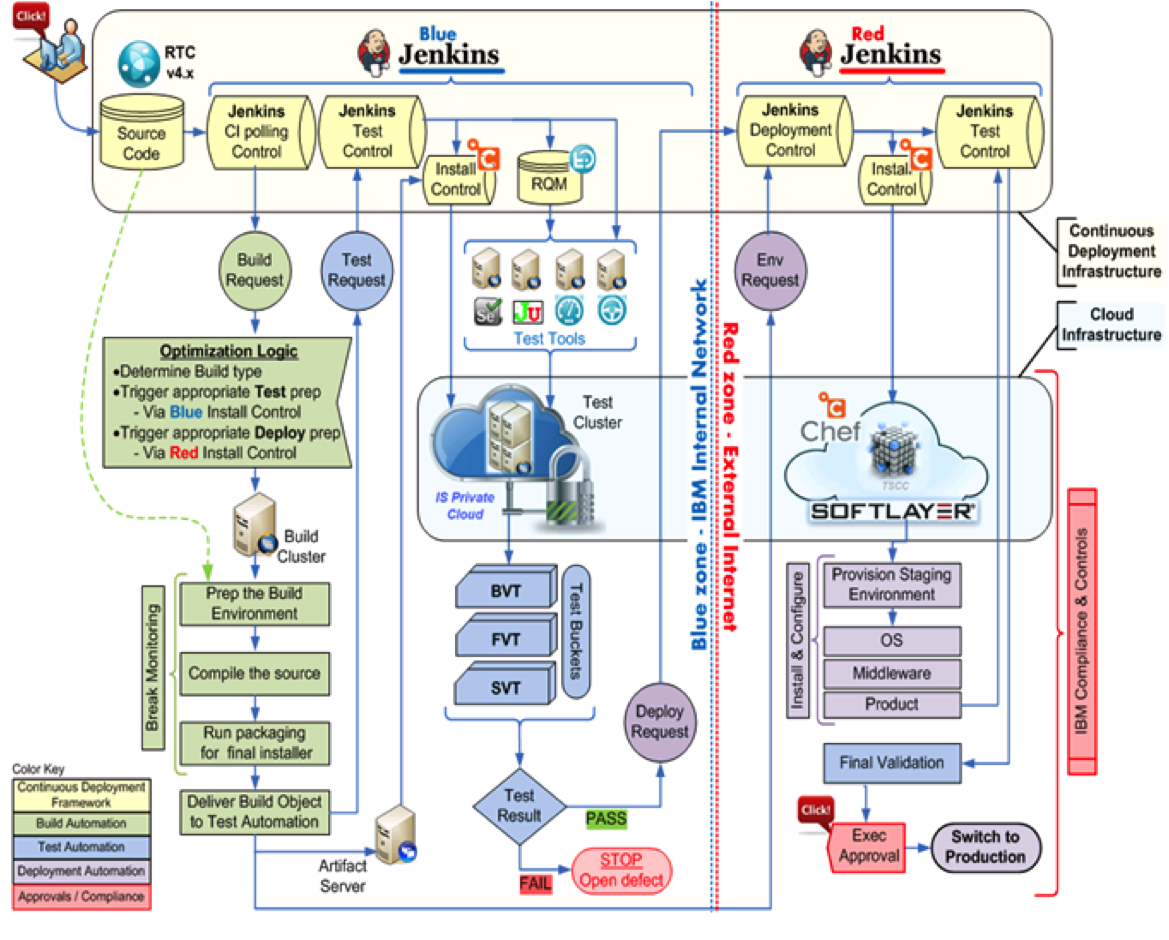
    In their book, they also provide insight to continuous delivery tool chains and processes which highlight build tools, CI platforms, testing suites, artifact repositories, and many other components. There are numerous examples of reference architectures available, and each of them vary in levels of detail, tools highlighted, and processes followed.  Yet, there is a constant theme among the tool sets: Jenkins, Maven, Nexus, Subversion, Git, Docker, Puppet/Chef, Rundeck, and Sonar seem to show up time and again.

    To help you along your continuous delivery and DevOps journey, I have compiled a set of 31 reference architectures created by users across the continuous delivery and DevOps communities.

     CD and DevOps tool chain

    Each architecture is accompanied by a link to the original presentation or blog where the architecture was referenced to ensure you have access to the full context of the discussion. You can also freely download the presentation from SlideShare where we now have over 7,000 views.

    Offer to help others: If you have a reference architecture to share, please consider posting a link to it in the comments section below.  I am sure others would love to see it and learn from it.

  • Illumio Hopes To Cater Security To Continuous Delivery And DevOps Shops

    Illumio Hopes To Cater Security To Continuous Delivery And DevOps Shops

    Since coming out of two years of stealth development back in October, the data center security gurus at Illumio have been building momentum in the drive to break out of the confines of the traditional network-centric security model to make it easier to secure IT in the face of distributed computing, continuous delivery and DevOps patterns. This week, the firm got a big boost in the way of $100 million in Series C financing and continued forward movement with some new tweaks to its Adaptive Security Platform (ASP).

    Designed with DevOps patterns in mind. Illumio’s ASP is meant to be a continuous delivery system for dynamic policy enforcement within application traffic across everything from bare metal servers to VMs and containers within the data center and public cloud infrastructure.  According to Alan Cohen, chief commercial officer for Illumio, the idea is to build security attuned to the infrastructure as code movement in IT.

    “Security has been tied to the infrastructure for the  last twenty years–not just client-server, but also right back to the mainframe. And as  we’ve created software infrastructure–software models for applications and compute processes, whether its storage  or network or servers that can be spun up or spun down  or moved very rapidly–the security industry hasn’t  adapted well because its still very hardware, choke-point  centric,” he says. “The industry hasn’t done anything to adapt to distributed compauting and continuous delivery. (When vendors do make adjustments) they’re just running something on software but it operates as it did before.

    The announcement this week adds further capabilities for the platform to segment the continuous delivery of that enforcement down to the process level within workloads, so that as any part of the application changes, the platform automatically adapts security policies on all impacted workloads.

    “So let’s say  you have an application that’s a credit card processing application and it uses a certain database. You may have two instances of that database running on a single host. One is for PCI and one is not,” says Cohen. “Through our virtual enforcement  node we can segment and separate those two workloads and  effectively provide  a layer three layer  for firewall at the process level on an individual host.”

    The added segmentation of dynamic security enforcement gives DevOps shops a greater degree of flexibility in securing microservices environments.

    “When you  talk about microservices there’s two things to think about,” says PJ Kirner, chief technology officer and founder of Illumio. “One is that they’re small and process-oriented, and the other one is they exist for a short amount of time.  Both those aspects are important to consider for security. The fact that it needs to adapt quickly to all of these ephemeral workloads that are spinning up, spinning down to accomplish your goals.”