Category: Blogs

  • How Fast Is Fast Enough?

    How Fast Is Fast Enough?

    One of the primary goal of DevOps is the ability of an organization to bring an idea to market faster. But how fast is fast enough? Do they need to improve time to market by 10%, 20%, 50%..90%? Do all applications need to ultimately be released within hours? In order to compete do we all have to be the Etsy or the Netflix’s of the world?

    Unfortunately there is no simple answer. Optimal application delivery speed (aka time to market) varies drastically across industries, markets, organizations, and even within an organization’s own application portfolio. Remember “two speed IT”.

    In other words there is no “one fit for all” when it comes to speed. Yet defining your optimal speed – goal – is critical to your DevOps success. Without it, its almost impossible to provide a vision, measure progress, and fundamentally change the way you delivery software. For example, IT is very good at measuring costs. In fact they measure costs from every way to Sunday. As a result, cost takeout becomes the fundamental value metric for service delivery – “how low can you go to delivery the same service”. Similarly, if speed and agility is the goal then we must start with measuring our current velocity and then setting (realistic) goals for the future state.

    The Definition of Speed

    Before we go about trying to determine an applications optimal speed it is important that we first agree on the definition of speed. We like to think that speed is a fairly simple concept, but its amazing how mis understood it is.

    Many organizations new to DevOps simply equate speed to release cycles. They believe that if they increase the number of cycles then they are improving their time to market. Unfortunately it does not work that way. Improvement in release frequency is a natural outcome of going faster (as we will see in the example below) but not the driver of speed.

    True cycle time is measured from end to end – when the idea enters the development funnel to the time it is released to the end user. In other words it’s the Work In Progress (WIP) time for that particular piece of code and any improvement in speed is the reduction of this WIP time.

    For example, a healthcare client recently shared with us that it takes them just 20 days to develop a medium size enhancement. For them, their cycle time was 20 days per enhancement. But on further inspection we found that it takes 20 days to determine requirements, 10 days for setting up environments (while using cloud), another 15 days for testing, 10 days for moving code from one environment to another, and a whopping 15 days for approvals. When we added all that up, we discovered that their true time to market (speed) for that enhancement was just over 90 days.

    Once we were able to define speed in tsurehis context, it opened up an entire new world of dialogue within the organization. Now instead of optimizing 20 days, they have another 70 days of activities to pick on. Even if they were to shave just a mere 1/3 of the 70 days (cue automation with some simple processes engineering) they would be able to improve their time to market to 65 days. And as an added bonus, the team instead of just delivering 4 enhancements per year (90 days x 4) they can now deliver 5 enhancements (65 days x 5) much faster.

    By defining speed in such broad terms, it not only gives IT teams a glimpse at the big picture but also visibility into areas of wastes, opportunities for true end to end improvement, and a platform for collaboration.

    Now that we have our definition right, lets get on to answering the million dollar question,

    How fast should I be (what is my optimal speed)?

    The simple answer is fast enough to delight the customer and beat the competition. But to determine at what point you are able to achieve this goal is a bit more complicated.

    Most organizations try to answer this question by looking inward. They perform a detailed value stream mapping exercise, determine cycle time for each activity, identify bottlenecks, and then triangulate how fast they can go if they eliminate some of the key bottleneck.

    Unfortunately, speed is not a function of how fast can you go (IT view) but a function of potential benefits (business / market view). More precisely, your optimal speed is directly depended on the additional benefits the business will enjoy (additional revenue, higher customer acquisition, better customer retention etc.) as a result of greater velocity.

    To help understand this relationship between benefit and speed better, ask yourself the following three questions,

    1. If we were to reduce our cycle time (from idea to production) by 10%, 20%, 30%, 40% etc., what is the incremental benefit to the business
    2. Can we quantify this benefit?
    3. How sensitive is this benefit to speed? Are they inversely proportionate, is there a benefit / speed plateau?

    By doing so, there is a good chance that most applications will fall within one of the three scenarios.

    1. Benefit and Speed Are Directly Proportional

    For some businesses, speed is king. The faster you can deliver a product the greater the incremental benefit. Consumer facing apps (Facebook, Linked In etc.) focused on revenue generation / customer acquisition work well in this scenario. For these applications, there is essentially no speed limit. The rule of thumb is step on the gas and get out of my way.

     Figure A How Fast Is Fast Enough

    Optimal Speed: No speed limit, step on the gas


    1. Benefit Improves But Only To A Certain Point

    Most SaaS applications (SFDC, Workday etc.) fall within this category. At a certain point the incremental benefit diminishes as speed increases. In other words, users like the regular updates and upgrades but to a certain point. Change too much too fast and you end up delivering little additional value. In this case, there is an optimal speed and any investment in speed after that is a waste of money.

    Figure B How Fast Is Fast EnoughOptimal Speed: Limit your speed to the point where benefits plateau

    1. Benefit and Speed Are Adversely / Not Related

    This is the opposite of A, where speed has an adverse / no impact on benefit. Here users prize stability and status quo over anything else. Changes are welcomed but need to be few and far between. Many on-prem legacy applications fall into this category. Imagine if your ERP provider published a new update (mini upgrade) every day. It would wreak havoc to the organization. If this happened to your general ledger system, you would never be able to close your books. If you find yourself in this category it is best to go pick a different application.

    Figure C How Fast Is Fast EnoughOptimal Speed: None, stability is prized over changes


    Two Caveats

    The graphs are a great representation of the various options but there are two caveats that every organization should be aware of, cost and competition.

    Cost: The speed limit makes little sense if the cost of getting to that speed is greater than the incremental benefit potential. After all, like any other IT project ROI is key in deciding if DevOps is worth investing in.

    Competition: Ultimately…competition holds the trump card. No matter what your charts say and / or your cost model shows, if the competition is going faster…you have no choice but to match that speed or better yet, beat that speed. Which is why we urge many of our clients to invest into DevOps early, set the benchmark, and build a competitive advantage.

    Happy speeding!!

    About the Author/Mustafa Kapadia

    Mustafa-KapadiaMustafa Kapadia is Service Line Leader for IBM’s DevOps practice, a business advisory practice focused on helping large enterprises transform their software & application delivery. Through DevOps, organizations can get software to market faster, with better quality, less defects, reduced risk and shortened lead times.

    Prior to joining IBM, Mustafa was a management consultant with Deloitte’s Strategy & Operations practice. He lives in San Francisco Bay Area, is an avid blogger (when time permitting), a speaker, and and advisor to start ups.

    You can follow Mustafa on LinkedIn: https://www.linkedin.com/in/kapadiamustafa and Twitter: https://twitter.com/mkapadiatweets
  • Creating Dev Environments With Docker Compose

    Creating Dev Environments With Docker Compose

    down-the-rabbit-holeThe Slack notification popped up on my phone at 2pm Friday afternoon. “Argh. This is never good” I thought to myself. The message said “do you know anything about Vagrant?”. It was from a client of mine and I knew their environment well enough to know that this question was going to go down a rabbit hole the likes of which would leave Lewis Carroll awestruck. To compound matters, I was in the middle of nowhere, halfway between Las Vegas and Phoenix. I found a place to pull off, overlooking a vast, expansive maze of canyons and riverbeds leading nowhere and everywhere at once. I thought to myself “how fitting” as I started to reply on my phone.
    When launching a startup, there is no rule other than “find out what the
    customer is willing to pay for, then build it”. My client, Roger, had nailed it. His next message confirmed this as I read “I’ve been beating my head against a wall for two days trying to get this Vagrant image running. I’ve got new developers starting next week and need to get them a dev environment setup”. Roger had just discovered startup rule #2: “nothing can prepare you for the panic of success”. craft beerHis current environment was very solid: running in AWS, everything was deployed via OpsWorks to both staging and production environments. It works great… if you’re the only one in staging. It wasn’t going to support multiple developers changing code simultaneously, so he was looking at Vagrant for a solution. Each developer needed mongodb, elasticsearch, redis, and two node.js servers: one for the api and one for the web ui. Vagrant images are great, but I’ve often found them to be most valuable when hand-curated, like craft beer. They are also difficult to share as it requires shuttling large vm images around between developers.
    After reviewing the error logs, I could tell he was facing issues with security permissions between the vagrant image and the host OS. I decided I wanted to try something different. I wanted to try building it out using Docker containers. I had a feeling I could accomplish the same results with Docker, plus the added benefits of the entire environment being stored as config files in a git repo. Small, concise, version controlled, portable… I was liking this idea more and more. I sold him on the idea as well as buying enough time to get back to civilization where I could work on the idea (though the overlooking view was pretty inspirational).
    Scenic Overlook
    Back at the office, I broke open my laptop. I was familiar enough with Docker, but had a suspicion that Compose would help me tie the disparate pieces together. I started with the node.js servers. It was easy enough to kickstart them using a Dockerfile. (NOTE: I could have done this in compose as well, but had a feeling that I would want some extra flexibility later so I created separate Dockerfiles for them.)
    FROM: node:latest
    EXPOSE 3000
    Next, I created the docker-compose.yml file to define the environment. I was able to define all of the containers (minus my previously created node.js servers) using images from Docker Hub.
    web:
      build: ./web
      ports:
        - “3000:3000"
      volumes:
        - ./code/web:/srv/www
      command: node /srv/www/server.js
    
    api:
      build: ./api
      ports:
        - "3000:3000"
      volumes:
        - ./code/api:/srv/www
      command: node /srv/www/server.js
    
    redis:
      image: redis
    
    mongodb:
      image: tutum/mongodb
      ports:
        - "27017:27017"
      environment:
        MONGODB_PASS: password
    
    elasticsearch:
    image: elasticsearch
    ports:
    - "9200:9200"
    - "9300:9300"
    
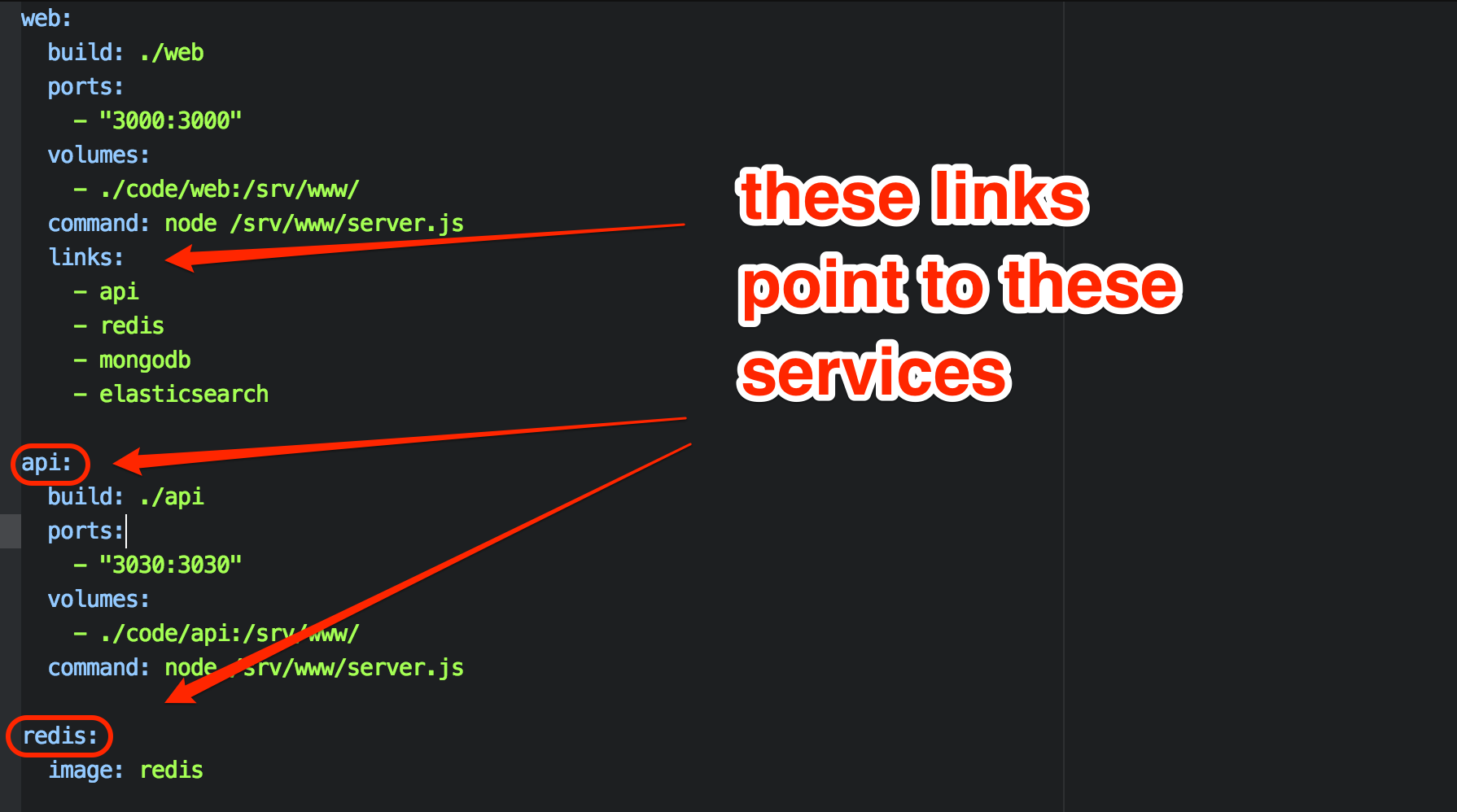
    Once this was done, I created links in the web container. This creates environment variables and hostfile entries in the web container, allowing the web container to access the elasticsearch container via the hostname “elasticsearch”, and the mongodb container via the hostname “mongodb”, etc…
      links:
        - api
        - redis
        - mongodb
        - elasticsearch
    
    Docker Compose links
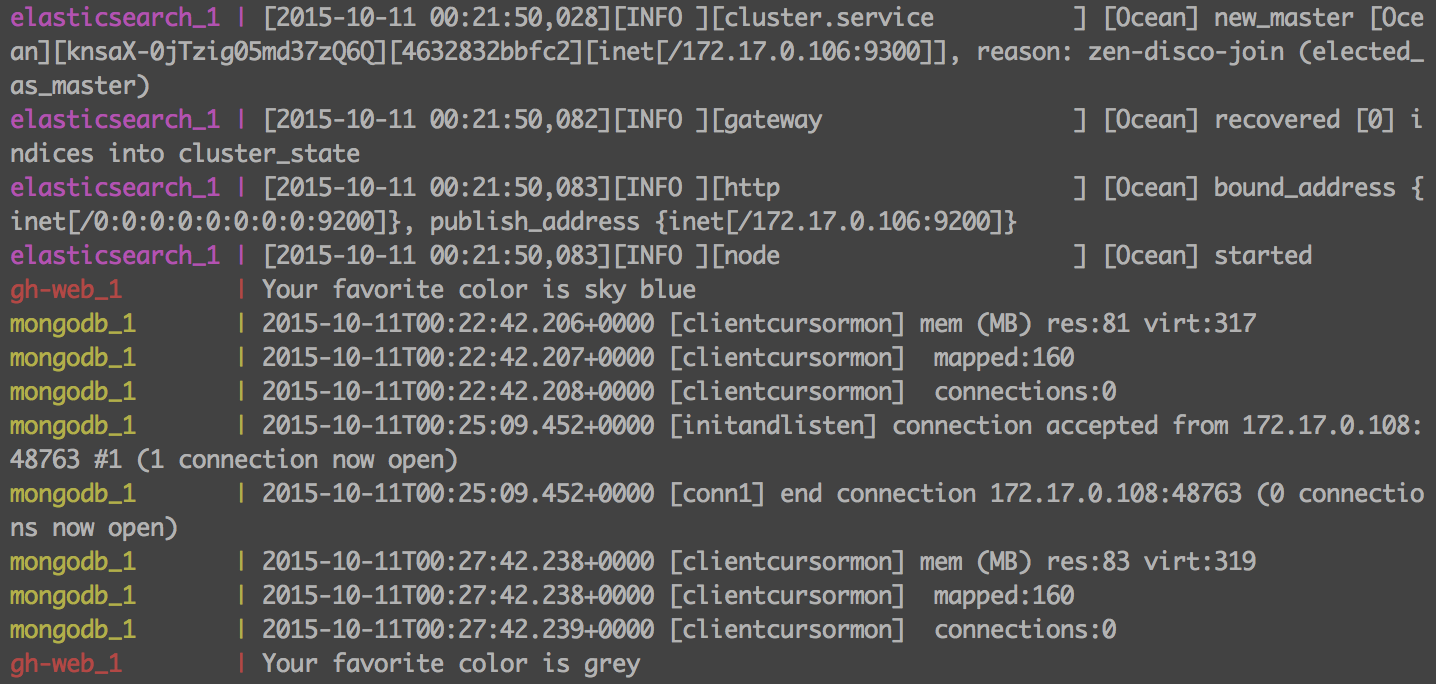
    The environment was complete, and I brought it up with the “docker-compose up” command. The added benefit of this environment is that the docker-compose terminal window maintains a steady stream of logs from all of the containers in a central window. This allows the developer to view the logs realtime, without having to hunt for them.
    Docker container logs
    VirtualBox portsThe only real stumbling block was in the use of VirtualBox. I created the environment on OS X. Since OS X can’t run Docker natively, it all runs in a VirtualBox machine on my workstation. This meant that I needed to go into VirtualBox and setup port forwarding for the required ports (3000, 3030, 27017, 9200, 9300,6379) so that I can access the services locally.
    Including time spent learning the basics of Compose, the entire environment was up in 2 hours. By using Docker, Roger’s new developers will be able to clone the config from a repo and be up and running in minutes regardless of whether they are developing on OS X, Windows, or Linux. Future additions to the repo can be shared by all by continuing to update the repo.
    Interested in trying it out for yourself? All the code described can be found in my git repo at https://github.com/rekibnikufesin/docker-compose. Be sure to let me know your thoughts in the comments or via twitter @wfbutton!
  • State of On-call Survey 2015 – Help Needed!

    State of On-call Survey 2015 – Help Needed!

    Last year, we launched the first ever State of On-call Report. We asked about tools, setting up on-call rotations, what team members are involved and what happens after the incident gets resolved…among other things. We got 500 responses and in the process, learned a lot about what people are doing to handle the challenge of on-call management.
    A few key takeaways from 2014’s results…

    soc_2014
    In an effort to see if on-call is getting any better for anyone, we’re conducting the survey again this year. Because what fun is data if you can’t start picking out patterns, checking out year-over-year changes and looking for trends?

    Our predictions for this year’s results…

    • less folks are using homegrown monitoring and on-call systems because more options are now available off the shelf
    • more organizations will report as having moved their infrastructure (or large parts of it) to the cloud
    • an increase in the adoption of DevOps practices, especially when it comes to sharing the load of being on-call
    • ChatOps will play a bigger role in how organizations do their incident management
    • runbooks and collaboration will continue to be the two biggest factors in solving problems faster
    • a decrease in the number of people saying on-call is getting worse (hopefully!)

    sooc_2015_480

    If you’d like to help the cause, we’d love for you to spend a few minutes answering questions about being on-call. Click on the image above or here to begin the survey. We’ll be choosing one lucky winner from all the respondents to win a BB-8 from Sphero.

    Check back in December when we release the 2015 State of On-call Report. We’ll be hosting a webinar with DevOps.com, presenting the results. Stay tuned and thanks in advance for your help!

  • HomeOps – Learning DevOps At Home

    HomeOps – Learning DevOps At Home

    When I took a job as Technology Evangelist for StackEngine, my wife’s first question was, “Why would someone pay to fly you around the country and talk about how you work?” My youngest son put a finer point on it, “Yeah Dad, we love you and we don’t listen when you talk about work!”

    I tried to explain Lean principles. That went over like a lead balloon. I tried a more human approach in explaining John Willis’ Karojisatsu post and the rampant stress and depression in the operations industry. They felt sorry for those people, but still didn’t see 100’s of folks crowding in a room to hear about it.

    How am I going to foster organizational change when my own family doesn’t care? I needed a way to communicate my ideas so anyone could approach them.

    So, I started doing a single load of laundry each day.

    LaundryOps

    Really it was pretty obvious looking back. My wife typically did our laundry each Sunday. We could either stay at home most of the day, or we could put it off and stress about running out of clean underwear. It’s the perfect metaphor for the problems with large batches.

    The following Sunday my wife noticed there was about a third of a load in the hamper. She said, “Hey, there’s no laundry to do today, let’s go to the water park this morning before it gets crowded.”

    My wife was pleased. The kids were thrilled. I was thinking, “Hmmm, this continuous delivery model is interesting.” I was also thinking that single piece flow provides supporting precedent.

    LaundryOps – Continuous Delivery

    In their seminal book Continuous Delivery (CD), Humble and Farley stress that CD makes the working environment more humane.

    Lean principles say that I should identify what variable I am trying to impact. This tenant is expressed as the measurement pillar from the CALMS acronym coined by Willis and Damon Edwards.

    My goal was to maximize quality family time. It was not to conserve water or energy. We have done a great deal more hiking, swimming and other fun things because our weekend is full two days.

    Laundry Ops – Reasoning About Change

    So, if I practice continuous delivery, and do a load a day, what happens when I go on a trip and come back with 5 days worth of clothes?

    Well, the first time I panicked! It was apparent that CD did not apply to special situations. I needed to break process. But, after considering the pile of clothes, I realized that doing a large load today and tomorrow would bring the system back to equilibrium the following day.

    Adopting CD thinking for our laundry exposed a stunning amount of spare capacity in our “softener, detergent, laundry cycle” or SDLC for short. I did, however, recognize the inclination to regress to my comfort zone at the first sign of trouble in the new process.

    I need to evolve my thinking about the batch size of work.

    Often during the software delivery life cycle (huh, SDLC too) a developer/project manager/stakeholder thinks: “I will do this one more thing before deploying.” This is often because the current deploy process is highly manual, risky or time-consuming. Certainly none of those things were true of laundry.

    I need to find ways to make deploys easier, safer and repeatable.


    ClosetOps – Unexpected Consequences

    Doing one load per day rather than many on Sunday led to a number of other interesting results that all apply to software delivery.

    ClosetOps – Cash Flow

    If our clothes are not in the hamper, washer or dryer, then where are they? Turns out our closets were burgeoning. At this point my wife said, “I wonder how much money is in there?” So we went through her closet with It’s Deductible and learned the answer was about $3500. Retail we estimate $8500. We figured our house contained about $30,000 in clothing. Today that estimate is about $13,000.

    We released $17,000 of cash in roughly one year.

    Today, in your source control management (SCM) system, you have weeks or months of features, bug fixes and innovation building up. You have paid the salary of the developers, testers, project managers et al who contributed to the effort. Because you are waiting for some date long in the future to release those features, how much cash is in your closet … er … SCM?

    ClosetOps – Tools and Costs

    Too often DevOps is boiled down to tools. For laundry, our use of a low water low energy washing machine and gas dryer means that even though we run them every day, there is no significant impact on our energy and water bills.

    Choosing a tool should be done only in the context of the measures being optimized.

    Back in the Real World

    In my real job as Director of DevOps, customer satisfaction was the bottleneck to sales. We would work for months behind the curtain to produce a beautiful custom web site. Except it wasn’t what the customer wanted. And it was weeks late. And it was way over budget. And making any changes took far too long.

    We changed three things:

    • We instituted a weekly show-and-tell meeting and delivered the site to the project manager for their approval in the production environment.
    • We automated the developer environment and matched it exactly to the production environment.
    • We ensured from the first day of the project that any committed work by the developer was available to be seen by the project manager

    We achieved wild success:

    • Project manager wanted the account manager involved. Account managers brought customers with them. The value chain was fully represented.
    • Customers were thrilled to be part of the process
    • Site launches were a non-event. We had been launching daily or more for months while under construction.
    • Making updates and changes to the site became trivial

    Customer satisfaction measurably improved:

    • Account managers more new business with the confidence we could deliver.
    • Account managers won repeat business from existing customers who appreciated our transparency and delivery.

    SuckOps – DevOps Sucks

    My wife has a number of allergies. If I vacuum the house each day, her quality of life increase dramatically. Since wife maintenance is cheaper than wife repair, I was doing this duty and I was tired of the 30 minutes a day it took. In reality, vacuuming was happening every 3 to 4 days.

    SuckOps – Automating to the Right Degree

    Santa Claus brought us a Roomba last Christmas. It is possible to set this particular model up so that it automatically vacuums sections of the house each day.

    I have never bothered to fully automate this process.

    It turns out that manually setting the towers is easy. These fences are so easy to move that it was not worth the effort to fully automate vacuuming. So each day I close a couple of doors and turn it on. I then set up towers and move it to the living room and leave for work.

    When our kids get home, they reset the towers and run it in their bedrooms, hallway and kitchen. I set it up to cover the office and dining room at night.

    SuckOps – Tools Enable Collaboration

    Notice that the job of vacuuming is now shared with my kids. My wife can run the vacuum too since she does not have to be in the house with the running vacuum. The tool has enabled us to share this chore.

    Choosing tools that foster collaboration between traditional silos is a key factor in tearing down the wall of confusion.

    SuckOps – Quality Through Repetition, Not Control

    The Roomba does not do the same high quality job as our Dyson. However, because it does it far more often, the overall effect is that our house is more allergen free.

    Again, adhering to the key metric: improving the livability of the house for my wife, we can clearly see Santa brought us DevOps with this automation tool.

    Santa gets DevOps.

    Back in the Real World

    The automated development environments allowed the Ops team to share the configuration with developers in a way developers were used to seeing. This is often referred to as Infrastructure as Code https://devops.com/2014/05/05/meet-infrastructure-code/.

    By the third week of using this tool (Vagrant + Chef), some developers were making requests in the code to change the configuration. This fostered a closer working relationship between the developers and operators.

    Because development of the site was closely coupled to delivery of the site, quality of the deployment process was achieved through simple repetition.

    The key pay off, however, was the ability of any developer to work on any customers project with a single command. This one outcome saved a measured 8 hours per week for each engineer!

    PaintOps – My Family Understands Me

    Does my family understand DevOps? Yup.

    Traditionally to paint the interior of our home we would take a couple of days off, buy tons of supplies, move furniture, stress out, eat out … It underscores the problems of large batches again.

    My wife suggested that instead of trying to get it done over 4th of July holiday as we had originally discussed that we instead just painted a bit each weekend when time allowed.

    Measuring Time

    The project took roughly 30% longer total time than it would have. It spanned about 2.5 months. However, time was not the key measure of success. Stress was. Once we go through the first several batches and understood set up and tear down (drop clothes, moving furniture, washing brushes) I would often come home in the evening to find my wife painting a wall.

    My wife was able to deliver paint any time she felt like it.

    Software engineers working under a continuous delivery paradigm can deliver features whenever the feature is ready.

    PaintOps – Surprisingly Lower Costs

    The cost of the project was about 10% smaller than the traditional way. This was due to our ability to easily estimate the amount of paint to buy for a small batches very accurately.

    Market fluctuation in the price of paint (sales) kept this number from being closer to 15%. There was a certain discipline in not buying a very large quantity of paint when the price was temporarily lower.

    PaintOps – A Small Bit of Chaos

    Having our living room half old and half new for a couple of weeks is something we could tolerate. Its part of our family culture.

    Any paradigm shift in how work is done must match the culture of the organization.

    Culture must evolve with, or even before, new models for work can be attempted.

    Back in the Real World

    A DevOps journey is always a work in progress. We constantly change the way we use tools, the tool, the process etc. This means we occasionally miss a deadline, delete a production server or a root file system.

    As part of a cultural shift, the business understood that we were in a far better place than 11 months ago. This shift was enabled by many small wins that built trust over time. Our culture had to be that each mistake came with an effort to ensure it never happened again.

    A bit of chaos is necessary to constantly improve. Measuring the impact of each change justifies the cost of mistakes.

    HomeOps – Food for Thought

    When staring at a DevOps transformation, many executives and leaders are frustrated by the lack of a manual. There is no prescriptive way to do DevOps like there is for ITIL or ISO compliance.

    The reason for this is that the only prescription of DevOps is to continuously improve the system by which you deliver value to your customer.

    Find something small in your life that you want to improve. Measure it based on the metrics that define “improve.” Change behaviors or introduce a tool and note the difference in your metrics. React accordingly. Repeat.

    Choosing small problems leads to solving large ones over time. Soon enough you will feel ready to tackle a problem in your professional life.

    You are now free to DevOps.

    (See Boyd present on HomeOps at DevOps Connect: CD Summit the afternoon of Oct 8 at Austin Convention Center. Tickets are sold out but walk ups are welcome and there is room)

  • Ten things you need to know before starting a career in DevOps

    Ten things you need to know before starting a career in DevOps

    So you’re considering a shift to DevOps, Forbes recently reported that highly skilled DevOps specialists with just a high school degree earn a median salary of $106,734. A recent study of IT salaries revealed that 46% of companies plan on hiring DevOps in the coming year.

    The DevOps space is red hot but here’s the skills you need, and what you should expect to encounter, in a  career in DevOps.

    What is DevOps?

    DevOps is a culture shift or a movement that encourages great communication and collaboration (aka teamwork) to foster building better-quality software more quickly with more reliability.

    It is also an automation process that allows quick, safe and high quality software development and release while keeping all the stakeholders in the loop.

    What DevOps is not

    DevOps is not a person, a role, or a title. You are not a DevOps engineer, even though you may call yourself one. DevOps is not about using a specific set of tools and it most definitely is not about renaming your Ops team the DevOps team.

    Understand continuous delivery

    Continuous delivery is an automated process for building software that expedites its release. It allows you to deploy a feature or upgrade rapidly, and with minimum manual intervention. The goal is more frequent, and far less risky small changes, to get dramatically faster and more focused feedback.

    The ability to communicate is a must

    Sharing and empathy is central in DevOps as it is in life. Knowledge not shared with the team is useless and will just create a bottleneck. Empathy for everyone on the team and their tasks is also crucial. You must have empathy for the challenges that each role brings to create a harmonies workplace.

    Bring a wide business understanding

    A DevOps specialist must be able to see the big picture in terms of processes, needs, and constraints.  You have to be very familiar with all sides; Development, Operations, Sales, Product, etc. and you must know how they all work together to achieve the organizations goals.

    Be prepared for late nights

    DevOps means becoming ever more agile and responding to a client’s needs in real time. Critical events often occur in large and complicated systems. Hence, don’t be shocked if you get a 2 am call in the case of a crises.

    Questions you can expect to be asked in an interview

    According to Mike Baukes, if the interviewer wants to make sure you understand the framework you’ll be working with, they may ask “how does HTTP work? How does a web page appear in a browser?” Baukes advises that you may get a question like “How would you prepare for a migration from one platform to another?”, “Tell me about the worst-run/best-run outage you’ve been a part of. What made it bad/well-run?” or “What is the purpose of a post-mortem meeting?” and “Do you know how to learn from mistakes?”

    Programs you need to know

    Learn tools like Jenkins, Ansible, Chef and Puppe. It is well worth doing it on your own time and with your own dime, hands-on experience with actual tools and projects and an understanding of best practices can be more valuable than a college degree.

    What you need to know about operations

    If you’re coming from the developer side, obsessively get involved in everything your team does involving operations — deployment, scale, etc. If your team doesn’t do any of that for any number of reason, go over to the operations team and sit in on a few deployments.

    Understand the databases role

    Your database holds your companies most valuable asset, you must understand how the database and DBAs fit into the DevOps process so that the database does not become the weak link holding back the entire application development.

    Ultimately DevOps is knowledge, concepts and best practices. It gives an edge to every developer or operations who practices it over those who don’t. It might not be something to do as a full time job, but any developer with DevOps experience will find themselves at the focal point in any organization striving to improve its processes, and hence position themselves to climb the ladder quicker.

    About the Author/Yaniv Yehuda

    unnamedYaniv Yehuda is the co-founder and CTO of DBmaestro, an enterprise software development company.

  • Enough monitoring. Act!

    Enough monitoring. Act!

    Or How I learned to stop worrying and love the auto-remediation

    These days StackStorm – and other approaches to auto-remediation and event driven automation more generally – are getting broadly adopted.

    Everyone from Facebook through Netflix and WebEx (yeah users!) are not just better “managing” their 2am pages (although that’s cool too PagerDuty) – they are exterminating them.  

    And as they adopt StackStorm for remediation inevitably a discussion emerges about monitoring vs. fixing.  Why?  

    At some level it is because of the excellent work that has been done recently in response to monitoring sucks.  Thanks Sensu, thanks SignalFX, NewRelic, DataDog, AppDynamic, Splunk, the entire ELK stack, and the other >150 monitoring solutions I’ve left out.  

    But at another level it is because of OODA tells us that all that observing and orienting is only as good as the decisions and actions you take.   

    OODA

    The thing is, even though folks gradually are coming to realize that good event-driven automation INCLUDES the D in it – and does not purely rely on the smarts of monitoring since with event driven automation it is possible to run a routine that validates events before acting upon them, most people still miss the fundamental insight of ODDA.  And it is an insight that is crucial especially if you, like those users above and many folks in the world of active cyber-defense, are going hand to hand with smart actors and otherwise are in a world in which what goes wrong is changing.  

    Here is that perhaps non-intuitive insight that, again, I’ve learned from folks that live the OODA against tricky actors (human and the entropy of scale and creeping complexity) everyday:  

    Make your false positives and the creation and control of your actions cheap and you can move fast to fix, way before a root cause analysis (RCA) would typically have completed.  

    Some of the tips that even the wikipedia on ODDA repeats for actual war fighters utilizing the ODDA is “embrace the chaos” – don’t wait to know what is happening before your act because the pace of your actions is itself a key determinate in whether you triumph or not.  

    One way to think of it is that you have a budget from O through A and the total of those steps is your Mean Time To Recover (MTTR).  

    If you spend all of your MTTR budget on O and O then your D and A will be too little, too late.

    Returning to the world of infrastructure and DevOps – here are some drivers pushing us all to focus more on the D and the A and to obsess less over the O and the other O:

    • Docker and containers and cloud itself.  Now compute can be ephemeral (sometimes).  Same deal with lots else that can be software defined.  Even storage! (hi Nexenta ;))
    • Imperative stuff exposed via APIs and declarative systems.  Yes, this is a StackStorm plug. U R surprise?  Check it – when Netflix knows that there is a happy API there that will do the care and feeding of their Cassandra reliably even when AWS is doing an AWS entropy dance, they can obsess slightly less over RCA and more over making sure StackStorm has the resources it needs to fix and fix and fix and fix again before any of us start noticing Netflix acting strange.  (You want to see how Netflix auto-remediates their Cassandra environment?  Hands on tutorial with code samples here. )
    • Infrastructure as code.  Without infrastructure as code the cost of changing the integrations and automations that live inside of event driven automation can be astronomical.  In the world of legacy run book, needing to tweak an automation to respond to RIAK burps instead of Cassandra burps is a bunch of perfectly performed mouse clicks (intentional irony) OR a nice set of proprietary code.  In our world – all the glue, the rules, and the workflows are themselves just code.  
    • And – sorry to extend the point but this is crucial – the code is YAML or maybe just whatever scripts you have lying around or maybe the configuration management system you have already deployed.  A system like StackStorm can start with the bunch of scripts you already have – those that, along with a lot of human activity comprise your D and A – and ingest them. (yum, yum, Java, Python, Bash and Ruby)   And then those scripts, those configuration management systems, all of it plus your monitoring and more are there for you to tie into a system that automates the entire OODA loop.  And then the good stuff happens because you have incredibly fast MTTR (and even proactive MTTR, preventing the outage before it occurs).  
    • Workflow.  With workflow you can see what is happening.  Especially if exposed via FLOW (another pitch, I know).  But not just FLOW and not just StackStorm.  The return of workflows is real and widespread.  Read a good overview of many of the projects published this Spring on DevOps.com here.  
    • Feedback loop  Maybe goes without saying – but once you automate your entire OODA and have it as code – you can iterate better on it.  And that’s especially true if you take every single transaction from O through A and log it.  How could you do it? Don’t worry, works out of the box with StackStorm.  Or just set up a unique execution ID on every event and pass that through to each interpretation of the event via your rules engine and then keep that ID as you get the multiple workers in your highly resilient workflow system to start executing and then use that ID as well when doing post-hoc reporting; and don’t forget the APIs, GUIs and CLI as well.  Or just grab StackStorm – it is open source after all.

    In conclusion – OODA is a great frame of reference.   However we in DevOps seem to be overly obsessed with the O and the O whereas those that first articulated OODA – those folks using OODA in combat – focus at least as much on D and A.  

    To me this not only implies do the D and A faster and better (via automation) – it also implies that we may not need yet another monitoring project.  The world can stop reinventing monitoring for now, we have 157 projects at least.

    Instead – let’s turn to figuring out how to lower the cost of false positives and the cost of automating ever changing environments – so we can iterate faster and faster – staying farther ahead of the entropy monster and the real monsters trying to steal and corrupt what we build.  

    If you like this sort of discussion and want to learn how Facebook, WebEx, LinkedIn, and coming up in a few weeks – Netflix is doing it – you may want to join the Event Driven Automation Meet-up which I help organize with my friend Brian Sherwin, LinkedIn SRE and author of the remediation system Nurse.  Netflix has been kind enough to agree to host the next one at their new offices nearby to their old offices in the South Bay here in the Bay Area.  Even if you don’t think you can make it, we try to share content via this meet-up and whenever possible we also stream the sessions.  

    Also, at the risk of being “too vendory”, StackStorm is the leading open source project and company dedicated to event driven automation and specifically auto-remediation – we stormers and the broader StackStorm community are here to work with you, to support you, to get you good code and to pick your brain and to ask for your PRs, feedback, integrations and automations (aka packs).  So grab some code, join our Slack based community, and let’s get going.  

  • DevOps Chat: Carol Carpenter, CEO ElasticBox on the Real Value of DevOps

    DevOps Chat: Carol Carpenter, CEO ElasticBox on the Real Value of DevOps

    Carol-93I recently sat down with Carol Carpenter, CEO of ElasticBox.  We just released the results of the survey we partnered on with ElaticBox on the “Real Value of DevOps”.  There were some great takeaways in this survey for leaders looking to lead the transformation in DevOps.  Carol and I discussed these takeaways and other relevant topics.  Below is the streaming MP3 file, as well as the transcript of our conversation below that.

    [soundcloud url=”https://api.soundcloud.com/tracks/227014073″ params=”color=ff5500&auto_play=false&hide_related=false&show_comments=true&show_user=true&show_reposts=false” width=”100%” height=”166″ iframe=”true” /]


    Alan Shimel:                Hi. This is Alan Shimel, and this is another DevOps Chat for the Leadership Suite, at DevOps dot com. Thank you for joining in. Our guest today is Carol Carpenter, CEO of Elastic Box. Carol, welcome to DevOps Chats.

    Carol Carpenter:        Thank you Alan. It’s great to be here.

    Alan Shimel:                So Carol, well, you and I know each other, but for our audience, just quickly, just in case they’re not familiar with Elastic Box, can you give us a little background?

    Carol Carpenter:        Sure. So Elastic Box is a cloud application manager. We enable companies to deploy any application through any infrastructure, or private or public cloud, so that businesses can actually deliver code faster. We help companies, like Netflix, T&A, Cytobank and more orchestrate the deployment and management of applications.

    And many of these companies have seen their application life cycles increase by 10X, in terms of speed, and time to deploy, and time to market. And the secret sauce of in terms of speed Elastic Box is our reusability. And the way we orchestrate is through a reusable architecture of, what we call, boxes that enable IT operations, dev-ops, and even end user’s application, for supervision on demand, infrastructure in one click, and access to a sophisticated service catalog.

    Alan Shimel:                Fantastic. And Carol, we just recently announced you had sponsored a survey that we did here at DevOps dot com, with some research, on the real value of DevOps. And, of course, people can download the survey from the Elastic Box site, and read about it here on DevOps dot com.

    But I wanted to ask you, what as the reasoning behind doing some survey research?

    Carol Carpenter:        Well, you know, there’s a lot of discussion about dev-ops. We’re seeing many new titles and organizations recruiting for dev-ops, and yet when we would talk to customers and prospects, there was still ambiguity about the role itself – who’s actually doing what?

    And what is the real value of the investment – both in terms of people, time – open source or not? Where is the real value in return on those investments? And we wanted to try to understand, and delve into that area, and understand better – what’s really happening in dev-ops? Who is spending this time there? And what’s the ROI?

    Alan Shimel:                And Carol, for these DevOps Chat for the Leadership Suite, we’re really talking to CIOs, CTOs, VPs – upper management. What, if you can, as a CEO yourself, what would you say were some of the biggest or most important takeaways for leaders within the survey?

    Carol Carpenter:        Alan, great question. You know there were a few key takeaways, and I think you and I were both surprised by a few of them. I think, to start with, as a leader you look at what are we investing? How are we spending our money? And what is our return?

    The ROI analysis I think is still very early and immature around dev-ops, and we have lots of hypotheses about that. But it was surprising because there has been a lot of effort, and energy, and investment that’s gone into dev-ops tools. I mean – look at how many dev-ops vendors there are right now in the market.

    And yet, the actual impact and measurability remains largely subjective and I don’t know – over 50 to 60 percent of the respondents said, I don’t know, when asked about Hoover Trucks. That as like the big, number one insight, that surprised me.

    I think some of the other takeaways are a little bit less surprising, but nonetheless reinforcing of what’s happening in dev-ops today. So number one, when we asked about the team sizes and functions, Alan, what we saw is that, dev-ops, while over 50 percent of the respondents said – yeah, dev-ops is my primary function.

    You know another 41 percent said they had another title, and it was IT Ops. And then another 42 percent said their secondary function is around security, and that’s pretty interesting. But what it reminds us is that dev-ops is still a very nascent, growing area, and that these people are wearing lots of hats.

    And so we, as a vendor partner to dev-ops teams and others who are trying to work with them, you realize like they are spread very thin, and that dev-ops teams are being asked to do work that – what used to be traditional IT Ops, in addition to work that’s now kind of develop or deployment work, and be this communication bridge across these different groups.

    Alan Shimel:                I agree. I mean, Carol – and you and I have gone over the survey in-depth, obviously. To me, the biggest takeaway from leadership is what you hit on first, which is – we really don’t know the true ROI yet of a lot of these dev-ops practices, and tools, and patterns if you will.

    I think, gut, right – and so many executives, as you know, Carol, go with their gut, right? And if their gut tells them that automation is good, that dev-ops can help, that more releases, higher-functioning IT directly results in higher profits, and higher productivity.

    And so they’re going on their gut, and they’re going on what seems logical. But a lot of people just haven’t done the – the bean counters haven’t jumped in there yet and done the real statistical analysis, to really show us – yes. This is the ROI. Yes. This is the return where you’re going to get it, and this is how much more profitable.

    We’ve seen people sort of bite at the edges, if you will. But from a leadership point of view, especially in more risk adverse verticals, I’m surprised more people haven’t asked that. The other thing that I thought, Carol, from a leader’s perspective as really something to keep in mind was, so many – and I think it’s a fallacy.

    So many people think of, open source, as free. Yes, you don’t pay for the software, but when you look at the total cost of ownership, it’s not free. It may be cheaper than commercial software and maybe not. I’ve seen studies go both ways. But I think, from a leader’s point of view, they have to remember that just because we’re using open source “free” software doesn’t mean that it’s free throughout the total life cycle of it. Make sense?
    Carol Carpenter:        Oh yeah. I absolutely saw that in _____ as well, and I think the other point, as a leader looking at dev-ops and what kind of investments you make – I think the promise of dev-ops is to reduce the silo between development and operation cycles. That’s how the title emerged.

    And yet, one of the findings is around dev-ops tools lacking sufficient integration for the end to end delivery and ongoing management. And so I think what we’ve seen is – yes, great pockets of success in automating one portion of the pipeline.

    And we saw a large number of those comments are doing automated testing around continuous integration, and continuous delivery. But what you’re seeing is – while that’s working is – across the whole end-to-end tool chain, like there still are these little silos. And I think what we will see evolve over the next coming year, is more integration, more glue in terms of platforms, to bring them together, in these various dev-ops projects.

    Alan Shimel:                I think you’re dead on Carol. I think what we’re seeing right now is the first generation of dev-ops tools, making their way into the marketplace, and they themselves are almost siloed, right, where they don’t necessarily work with each other.

    Carol Carpenter:        That’s right. I mean what we saw was, when people were looking at their investments and their responses in the surveys – all right. There’s _____ control. There’s container platforms. There’s CICD. They’ve invested a lot in configuration management, and there’s automated tools for that, and some people have invested in it.

    And it’s still disparate, so I agree with you. I think we’re going to see continued maturation of this market.

    Alan Shimel:                Yeah. I think you’ll see a second generation of tools that maybe seek to stitch together a lot of these first-gen tools and, frankly, that’s somewhere where Elastic Box plays too, right?

    Carol Carpenter:        Absolutely. We like to think of ourselves, Elastic Box, as elastic glue. We’re the glue to bring together a lot of these dev-ops initiatives into an end-to-end integrated delivery and management platform.

    Alan Shimel:           Absolutely. Carol, so we talked that there were a lot of surprises or things that we didn’t expect in the survey. What would you say was the biggest surprise for you?

    Carol Carpenter:        Well, I think that the biggest surprise was around the lack of measurability and lack of understanding the ROI of the dev-ops investments, either in terms of people, time, resources, or money. And I’d say the second one is that when we asked about the dev-ops tools that they are using, that CICD came to the very top.

    And, on the one hand, you could say – okay. That’s not a surprise. People have been trying to automate testing for a long time. But CICD is a step beyond that, and that was surprising to me that that’s the biggest driver still. I guess, based upon the noise and what we hear every day in the market, I expected that there would have been another dev-ops initiative would have risen to the top, such as, you know [Crosstalk] –

    Alan Shimel:                Like configuration management?

    Carol Carpenter:        Management or monitoring, which obviously there’s very, very strong monitoring tools, or security and compliance, or even containerization. And maybe it’s because of the press and media and we’re so bombarded by a lot of the initiatives, that we think that that’s where the money is going, and where people are spending time and energy.

    And yet, automated deployment and testing and CICD are still at the top.

    Alan Shimel:                Absolutely, and I think – I mean, what we see here at DevOps dot com bears it out. Look, there’s money being spent across the board in dev-ops tool sets right now, but CICD certainly are some of the biggest ones. Carol, believe it or not, we’ve already gone over 12 minutes, and we try to keep these short, and we need to wrap it up.  But I wanted to ask you the same question I ask every attendee here on the DevOps Chats, and that is, for our leaders out there listening, if they had to read one book which would really help them the most, what would be your suggestion?

    Carol Carpenter:        Gosh, there are so many great books. I would recommend the Phoenix Project. Have you read that, Alan?

    Alan Shimel:                Oh, as well, yeah. That’s what got me into dev-ops. I met Gene Kim about four or five years ago when the Phoenix Project was a manuscript,

    Carol Carpenter:        It’s just game changing, right? The Phoenix Project – it gives you an orientation and a framework around how to attack process challenges, and how to attack the full delivery, you know, the whole life cycle of soft ware or any process. Really, really insightful, and you know, obviously, it’s written in a parable format, so it makes it very enjoyable and easy to read.

    Alan Shimel:                Absolutely. It’s an easy read. Well, Carol Carpenter, CEO of Elastic Box, much continued success at Elastic Box, and again, the survey that we’ve done with Elastic Box and the real value of DevOps, is available if you go to Elastic Box, and you can find it at DevOps.com as well.

    I’m interested in anyone’s feedback obviously on it. Carol, we hope to have you back again in the future, and thanks so much for being today’s guest. 

    Carol Carpenter:        Thank you, Alan.

    Real Value of DevOps

  • To Be Continuous: Shipping Velocity and Team Structure

    To Be Continuous: Shipping Velocity and Team Structure

    In this segment of To Be Continuous, Edith Harbaugh and Paul Biggar talk about shipping velocity and it’s affect on team structure.

    Edith Harbaugh, CEO LaunchDarkly

    Edith is CEO and cofounder of LaunchDarkly, a continuous delivery tool of “feature flags as a service.” LaunchDarkly powers software teams to quickly launch, measure and control their features.


    Paul Biggar, CEO CircleCIPaul is the CEO and founder of CircleCI, a continuous integration and deployment platform that automates development workflows and IT operations, allowing developers to ship quality software significantly faster.


    [soundcloud url=”https://api.soundcloud.com/tracks/226489524?secret_token=s-Xkrrb” params=”auto_play=false&hide_related=false&show_comments=true&show_user=true&show_reposts=false&visual=false” width=”100%” height=”166″ iframe=”true” /]


    Paul: Okay, so one of the things we wanted to talk about this week was the idea of shipping velocity and how it’s affected by team structure, sort of miscellaneous factors that aren’t part of continuous delivery.

    Edith: Yeah, I mean, can you explain a little bit more about what you mean by velocity first?

    Paul: Sure, so velocity is a sort of nebulous term that they use a lot in product management and that sort of thing to indicate how quickly, or the sort of through-push with which engineers and product teams are able to put through code.

    One thing that isn’t particularly clear, and there’s this amazing blog post by a guy called Phil Calcado who worked at SoundCloud, and he talked about the idea that even though that they had a very high velocity, they weren’t able to ship features very, very quickly, so often it would take 60 days to ship a feature even though no one got blocked.

    The idea of shipping quickly, is a combination of velocity and latency, and it depends on your kind of business goals, whether you need to ship correctly or you just need to keep the through-put up.

    Edith: Well, do you think part of the issue with SoundCloud might have been that they were trying to do too large features? I mean, that’s somebody’s first reaction when they hear it takes 60 days.

    Paul: So in the blog post what he said is first someone would spec out something, and then they’d put onto the next person’s queue, and that would be maybe a designer who’d drop wire frames, and then the wire frames would end up on an engineer’s queue to implement it, and in between someone doing work and someone else doing work, there would be, sometimes, you know, 10 or 11 days of just waiting for it to get to the front of that person’s backlog.

    So it wasn’t so much, you know, are you biting off more than you can chew, it’s just the process wasn’t particularly set up to be able to ship things very quickly.

    When he got in there, the first thing he did is he said, “Oh, you’re not doing continuous delivery,” or “You aren’t doing continuous deployment,” so he turned on continuous deployment and got that set up, and it was a 66-day process before he finished, and when he got continuous deployment set up it was a 65-day process.

    Edith: So all that work to save a single day.

    Paul: Right. Well, it was more about, the discussion was about how it wasn’t really about, continuous delivery. It wasn’t really about the time that people were spending on certain things, the vast majority of it was the time that was spent waiting on it.

    Edith: Yeah, that takes me back a lot to the whole idea of just in time manufacturing and lean.

    The whole idea of lean was to reduce waste, and one area of waste is time.

    Like if you have people on a factory line who are waiting for the next part, or you know, stuff queuing up, then you’re being very wasteful.

    Paul: I think this is how people, I think that that’s the thing that the backlog is intended to fix, that you’re never waiting for things because there’s always something in the backlog that needs to get done.

    But what isn’t considered as part of that is something is sitting in the backlog, for five days, 10 days, two weeks or whatever waiting for someone to address it, then the speed with which you can get a feature out increases dramatically, or decreases dramatically, I guess.

    Edith: Well, that’s the whole idea behind the Toyota factory line is that they, the just in time delivery meant that there was always a part right then, not before and not after.

    Paul: Right, okay. But right when they’re ready. But you couldn’t say, “I need a car now.” I think it’s not really optimized around the idea of how quickly something goes from one end to the other.

    It’s more optimized around how quick, or how much, how little waste that you can have in the system itself, which means, in this case, how much developer, engineer, or designer engineer and project manager time is being spent doing nothing.

    And I think you can certainly reduce that time to very, very low without necessarily optimizing the speed that which it takes to assemble a car, which is something that you need, really, to get to market quickly, and that sort of thing.

    Edith: Yeah, and it’s a trade off. You know, I went to a talk that the former CTO of Yammer gave, Adam Pisoni, and he talked about how on projects they always had an extra engineer. Like if they thought a project would take four engineers, they would actually put five on it.

    Paul: Right, right.

    Edith: For precisely that reason, that they never wanted anybody to be sitting around blocked. So they would rather take the cost of an extra engineer, just so there was always somebody to do the next task.

    Paul: Right. And so there’s an interesting thing about how teams are structured in that. In the Yammer example, they have teams, and teams do a project, or do a particular feature, and I presume that they’re cross-functional, there’s a couple of designers, couple of engineers, whatever.

    A different way to structure it is to have teams that are aligned on a particular, by what they do, and you have the engineers who are sitting at the front of the front-end queue, or who work on the front-end rather than work on a particular project which has components of front-end and back-end.

    And you end up with a very different structure, or it’s obviously a very different structure, but you end up with a different ability to ship, depending on how you’re, depending on what you’re trying to do, and what’s the most important thing for your organization, also how your organization is staffed.

    So the backlog works very well if you’re short-staffed in any particular area, and so you spend a lot of time prioritizing so that the people, maybe you’re short on design time, so that the design time is spent really, really well, but it doesn’t necessarily allow you to turn around a feature from start to finish and get it out to your customers incredibly quickly.

    Edith: Yeah, and that’s a decision that different organizations make. Some organizations say, “We’d rather have 100% utilization, even if it means our features take longer.”

    Paul: Right. My feeling is that most organizations don’t actually make that decision consciously.

    Edith: It’s implicit.

    Paul: Right. Oh. So, what do you mean by that?

    Edith: Oh, well so I worked at a lot of big enterprises, and my saying was always,

    The lack of a decision sometimes is a decision.

    Like, we’re not going hire an extra designer to unblock a lot of people, so therefore our feature’s are always just gonna be gated by that.

    Paul: So when you say it’s implicit, you mean that, I guess you kinda mean the same thing as I do, that people aren’t really thinking about the advantages or the disadvantages of the structure of particular teams.

    Edith: Yeah, that people are just kinda, they say, “Oh, everybody looks busy,  and why does a feature take 65 days?”

    Paul: So one of the structures that I really liked, there was a talk at Heavybit, and I think it’s on the Heavybit website by Peter van Hardenberg from Heroku.

    Edith: Oh, he’s so great.

    Paul: So in the talk he talked about that at Heroku they have product teams that are around specific areas. And the product teams have two engineers and a PM, and maybe a designer and that’s kind of roughly it.

    Teams have like two to five people, and they’re focused on a particular area, so they do the prioritization within their areas, they do the support and the ops within their specific features, and then they’re able to trade-off, or they’re very, very close to the problem.

    They have then project managers who are working to protect them from other areas, or bleeding into other areas, but also working to solve their particular problems, rather than necessarily one backlog for the entire, maybe the entire platform or the entire web, or something along those lines.

    Edith: So basically, little small start-ups within a bigger company.

    Paul: Yes, and I think actually that’s how they structured it at the start. I remember them saying that there was a, they would actually have presentations to the board, and that each of the teams was structured, the project manager was like a CEO, and they actually like gave presentations to the board, and I think that didn’t necessarily last very long, but I think that was the initial idea behind it.

    Edith: Yeah, we did something very similar at TripIt. We had a, you know, we would have a new project we wanted to do. We were trying to do TripIt offers, and we had a project team just for that, and that’s what they did.

    And the idea was that they could focus. I’ve also heard of people who do stuff completely different. Like I talked to a guy who ran an agile shop and every project had to be a week long, and nobody had any ownership whatsoever.

    So he set it at, and not even like ownership in the way we would think of it. He said our front-end people were back-end, people were mobile, also.

    Thank you for listening, the entire Heavybit podcast can be found here.

  • Building a compelling business case for continuous delivery

    Building a compelling business case for continuous delivery

    Companies are striving to deliver better customer experiences by delivering higher quality software, faster. In order to do so, many organizations have come to realize that the traditional approach to IT management is insufficient. Development and Operations teams can no longer work in departmental siloes; they must work collaboratively towards shared goals if they are to serve the needs of the business effectively. The business too must learn to communicate feedback and work with Development and Operations teams to close the loop on what features their customers most need. With methodologies like Continuous Delivery and DevOps, service design and delivery teams work together to continuously improve services based on their performance, enabling new services to be brought to market much faster. However, switching to a DevOps model is not like flicking on a light switch; it takes time and careful strategic planning.

    How do you identify opportunities for improvement in your value delivery stream? Here are some places to start:

    • Infrastructure-as-Code – where there is standard hardware, virtual machine configurations, version controlled configurations and auditable, repeatable automated code changes.

    • Automated Testing – going from labor-intensive manual testing to fast, scalable and repeatable testing

    • To use manufacturing parlance, maximize throughput – take the typical worker utilization scenario where everyone is busy all the time. There is also more work in progress (and more waiting and waste) as opposed to maximizing throughput where people may be less busy but all are focused on the same goal and more useful work is getting done.

    The logic is easy to follow when you consider that shorter development cycles result in faster feedback loops, which in turn reduce waste and cost. But in the real world, IT budgets remain conservative and any new expenditure, whether it be on tools, equipment or a new approach to development, requires business justification. Successful business cases for Continuous Delivery improvements span Development, Operations, and the Business.

    Tune in Tuesday, October 6th at 1pm to hear from Kurt Bittner, Principal Analyst at Forrester and Andrew Philips of XebiaLabs for a live webinar that will help you understand how to create a successful business case for Continuous Delivery, the potential return of investment, how to measure the benefits and how to track these benefits over time. The webinar will highlight:

    • How methodologies like Continuous Delivery and DevOps can reduce the cost of compliance and the cost associated with security risks
    • How to estimate the value of these improvements that reduce cycle time by removing bottlenecks and barriers to delivery
    • How to estimate the value Continuous Delivery creates by growing or accelerating revenues
    • Real life examples of the benefits organizations have achieved through Continuous Delivery


    About the Author/Heather Moses, Vice President of Marketing

    HeatherMosesHeather heads marketing for XebiaLabs. In this role, Heather drives global marketing strategy and operations for the Company. As part of the senior leadership team, Heather is responsible for market direction, brand evolution and market outreach best practices.

  • Re-thinking DevOps tools for Continuous Deployment success

    Re-thinking DevOps tools for Continuous Deployment success

    Gartner predicts that 25% of Global 2000 companies will be actively implementing DevOps methodologies in their organizations by 2016. As DevOps goes mainstream, it may be time to re-think some of the implementation techniques that have worked in small companies and in non-production uses. The common assumptions that are often applied to make a continuous integration process work are generally not valid in production real-world datacenters. Common assumptions include:

    • Dedicated resources are available for separate dev and test environments
    • Pools of virtual machines are sufficient for executing regression and QA tests
    • Testing environments mimic production environments
    • Tool chaining is sufficient to implement DevOps workflows

    Let’s consider each of the above assumptions and how they impact success in real production environments.

    Dedicated resources for separate dev and test environments

    In any large organization, it is prohibitively expensive to maintain separate and dedicated infrastructure for development and test environments. In our experience, any organization with more than five or so development teams will need to have a better way to manage and share development, test and QA infrastructure. This means that they will not be able to just trigger regression tests directly from build completions. They will need to first ensure that they have access to the resources needed for test execution. We believe that DevOps tools need to also incorporate reservation and scheduling capability for shared and constrained physical and virtual infrastructure.

    Pools of virtual machines for sufficient for executing tests

    DevOps tools are mainly focused on automating the process of developing, testing and running applications in homogeneous pools of virtual or physical servers. In these environments, it is possible for the DevOps tool to depend on the virtualization environment, PaaS tool, or OS for the server pool (such as CoreOS) to provide execution and deployment. Unfortunately, delegating the scheduling (or lack thereof) to the virtualization or OS tool does not work in large production environments and is certainly not going to provide enough control for regression testing that needs to mimic real world datacenter infrastructure. This can become a severe limitation of DevOps tools. We believe that a more complete DevOps toolset must incorporate workflow orchestration that allows the developers to have control over how applications are executed onto the target virtual environment in each step of the DevOps process.

    Testing environments mimic production environments

    Global 2000 datacenters are not homogeneous. They are typically hybrid infrastructures where applications are deployed across a combination of traditional, virtual and public cloud computing. In addition, production network topologies are typically complex and require configuration to support applications. Ignoring this complexity in development and testing will result in applications that fail to transition to production successfully. Most continuous integration tools are not capable of controlling deployment into this more complex environment. This explains why most DevOps projects today stop at “continuous integration” and never get all the way to “continuous deployment” into production. DevOps tools need to have the capability of controlling not just the deployment of applications, but the configuration of the hybrid infrastructure on which those applications will run – and this needs to result in test infrastructure configurations that really do mimic production infrastructure.

    Tool chaining is sufficient to implement DevOps workflows

    The prevalent solution to a continuous deployment process is to chain DevOps tools together end to end from development to deployment. This creates problems because each tool must have a point to point integration with the tools on either side of it in the process flow. By the time an IT shop strings them all together, there is often no complete solution. Eventually they will find that the next tool in the chain has only one (or zero) options because it doesn’t have the specific integrations needed for all of the tools already selected.

    More critically though, simply chaining tools together ignores the three key problems described above. A true end-to-end solution should not just chain development, test, QA and deployment tools together, but should also incorporate:

    • Reservation and scheduling of resources prior to initiating the next step in the DevOps process;
    • Workflow orchestration capability that controls placement of applications onto an appropriate mix of virtual or physical servers; and
    • Automation capability for configuring the target infrastructure and network topology before running applications.

    We believe that we will see customers augmenting their existing DevOps tools as they move into full continuous deployment, with additional software that can provide each of the above capabilities.

    About the Author/Joan Wrabetz

    Joan's image croppedJoan Wrabetz is the CTO for QualiSystems. Most recently, she was theVP and CTO for the Emerging Product Division of EMC. Joan received her MBA at the University of California, Berkley, and MSEE at Stanford, and a BSEE at Yale. She has held teaching positions at the University of St. Thomas, St. Mary’s University and the University of St. Thomas, St. Mary’s University. Joan holds patents in load balancing, distributed systems, and machine learning classification and analytics. Her experience inclues: founder and CEO of Aumni Data, CEO of Tricord Systems, Vice President and General Manager for SAN operations at StorageTek, Founder and CEO of Aggregate Computing, Management and senior technical positions at Control Data Corporation and SRI International, Partner with BlueStream Ventures.