Category: Blogs

  • Four Metrics for Driving Cultural Change in DevOps Teams

    Four Metrics for Driving Cultural Change in DevOps Teams

    Everyone wants to optimize a team’s performance, but it’s not enough to just talk about it. To truly impact your team’s performance, you need to take a page from operationally mature DevOps teams and use metrics to gain valuable insight into your team’s work, enhance their capacity and drive cultural change.

    The right data allows managers to make quick decisions with confidence and minimal risk. It also lets managers see the actual outcome of those decisions, in turn allowing them to shape their team’s direction going forward and to create a happier, healthier and more productive team dynamic. However, making the shift to data-driven decision making requires more than just increased monitoring. It requires a cultural change.

    Below are four key metrics DevOps teams should be monitoring, as well as the impact each metric can have on a team’s culture and performance.

    1. Use Time to Response to Establish a Culture of High Achievement
      Time to response (also called time to acknowledgement) depends on individual team members. Incident responders might not always have control over the root cause of a particular incident, but they are always in control of how quickly they acknowledge and respond. Hold team members accountable for their response time by setting internal targets and having high expectations.Most operationally mature companies use IT operations management tools to enforce a response time target. These tools allow managers to set an incident response time window, making sure the next person in line is alerted if an incident isn’t responded to. Tracking escalations also gives managers valuable data about their team.
    2. Manage Expectations With Escalations
      For an organization using an IT operations management tool, an escalation is often an exception – it’s a sign that a responder either wasn’t able to acknowledge an incident in time or that the responder didn’t have the tools or skills to address it. While escalation policies are a necessary and valuable component of incident management, teams should ideally focus on driving the number of escalations down. Managers can gauge their team’s performance by tracking the number of incidents escalated over time, and using that data to determine whether their targets need to be adjusted.That said, there are some situations where an escalation is part of standard operating practice. For example, you might have a NOC, first-tier support team or even auto-remediation tool that triages or escalates incoming incidents based on their content. For these situations, it’s important for managers to track what types of alerts should be escalated and what normal numbers should look like for those alerts.
    3. Combat Alert Fatigue With Raw Incident Count
      As an organization grows, incident counts often grow, as well. However, as a team becomes more efficient and mature, the incidents per responder should lower or, at the very least, stay constant.Implementing IT operations management tools can help teams lower their raw incident counts by helping to weed out low-quality alerts, automate common fixes and build runbooks. They can also help break down incident count by team or service, putting incidents in context with the rest of the organization. This ensures that team members are maximizing their time on attacking alerts that matter and building new features, instead of getting mired in alert fatigue.
    4. Gauge Operational Readiness With Mean Time to Resolution
      Time to resolution, or how long it takes a team to resolve an incident, is the highest standard in operational metrics. The baseline for time to resolution can vary from organization to organization, depending on complexity environment, organization of responsibility, even the industry in which a company operates.Tracking time to response allows managers to determine their norm mean time to resolution and ensure their teams are able to work through the challenges of a major incident.

    Use These Metrics to Foster Intelligent Change

    It’s no secret that downtime is expensive, both in loss of revenue and customer trust. Metrics like the ones discussed are put in place to combat downtime and increase reliability, yet it can be easy for teams to become too focused on numbers and past performance.

    It’s important for team members to not lose sight of the business goals and why they’re tracking those metrics in the first place. It’s also important for managers to avoid over-analyzing the past. Metrics measure what has already happened, and, while they can tell a lot about a team’s previous performance, they should be used as a tool to a better future and not a means of assigning blame.

    Metrics are a means to an end, and having more information than you need won’t help you improve your team and refine your business. Keeping the emphasis on subsequent action is the key to using metrics to drive cultural changes.

  • 9 more open source DevOps tools we love

    9 more open source DevOps tools we love

    A while back we ran an article by Tomer Levy of Logz.io about 9 open source DevOps Tools that we loved. Of course how can you pick just 9 among so many worthy choices?  So we wanted to revisit the open source DevOps tools space and add another 9 tools to the list.  In a few months we will be adding more open source DevOps Tools to the list as well. In the meantime here are 9 more must have open source DevOps Tools that we love:

    Kubernetes1. Kubernetes is an open source orchestration system for Docker containers. It handles scheduling onto nodes in a compute cluster and actively manages workloads to ensure that their state matches the users declared intentions. Using the concepts of “labels” and “pods”, it groups the containers which make up an application into logical units for easy management and discovery.Originally developed and owned by Google,Kubernetes was offered to the Cloud Native Computing Foundation to seed other complementary technologies to enable a set of common container technologies. It is an integral part of CoreOS’s Tectonic product, in addition to being tightly coupled with Mesos and the Mesosphere DCOS.Kubernetes offers the promise of Google-like container usage for everyone. It seems no matter what the basic container technology we use, it is being used with many of the container-based PaaS stacks today

    Chef_HORl_CCan_Reg2. Chef – From the official what is: “Chef is a systems and cloud infrastructure automation framework that makes it easy to deploy servers and applications to any physical, virtual, or cloud location, no matter the size of the infrastructure. Each organization is comprised of one (or more) workstations, a single server, and every node that will be configured and maintained by the chef-client. Cookbooks (and recipes) are used to tell the chef-client how each node in your organization should be configured. The chef-client (which is installed on every node) does the actual configuration.

    More than the above though, for many Chef along with Puppet Labs and Jenkins are the heart and soul of DevOps tools. Moving beyond its original configuration management mission today Chef represents the move to “everything as code” while still maintaining its open source commitment. Chef Delivery, Chef Compliance move Chef into the realm of a tool that is involved in the entire DevOps workflow.

    PL_logo_horizontal_RGB_lg3. Puppet – The Romulus to Chef’s Remus, Puppet Labs is one of the founding members of the DevOps movement. Built on open source and still fully supporting its open source heritage going forward, Puppet like Chef has moved beyond  its original mission of configuration management and automation of single machines or instances to orchestration of your entire stack.

    From Puppet’s open source doc, Why Puppet

    Puppet has been developed to help the sysadmin community move to building and sharing mature tools that avoid the duplication of everyone solving the same problem. It does so in two ways:

    • It provides a powerful framework to simplify the majority of the technical tasks that sysadmins need to perform
    • The sysadmin work is written as code in Puppet’s custom language which is shareable just like any other code.

    This means that your work as a sysadmin can get done much faster, because you can have Puppet handle most or all of the details, and you can download code from other sysadmins to help you get done even faster. The majority of Puppet implementations use at least one or two modules developed by someone else, and there are already hundreds of modules developed and shared by the community.

    Maven_logo.svg4. Maven – a Yiddish word meaning accumulator of knowledge, Maven was originally started as an attempt to simplify the build processes in the Jakarta Turbine project. There were several projects each with their own Ant build files that were all slightly different and JARs were checked into CVS. We wanted a standard way to build the projects, a clear definition of what the project consisted of, an easy way to publish project information and a way to share JARs across several projects.

    The result is a tool that can now be used for building and managing any Java-based project. We hope that we have created something that will make the day-to-day work of Java developers easier and generally help with the comprehension of any Java-based project.

    Maven’s primary goal is to allow a developer to comprehend the complete state of a development effort in the shortest period of time. In order to attain this goal there are several areas of concern that Maven attempts to deal with:

    • Making the build process easy
    • Providing a uniform build system
    • Providing quality project information
    • Providing guidelines for best practices development
    • Allowing transparent migration to new features

    gradle_logo5. Gradle – the yin to Maven’s yang, Gradle and Maven are much like Puppet and Chef. In this case though Gradle was born out of frustration with Maven and other tools.  From the Gradle, Inc. site:

    Gradle was founded by Hans Dockter who was working in Enterprise software development and ran into an intractable build problem. At the time he was using Apache Maven. After three days and nights of exhaustive research, he discovered that the problem could not be fixed with the tool at all. Hans vowed to cure this problem for himself, for his team, his company, and for developers everywhere. He was joined in this mission by founder CTO Adam Murdoch.  After releasing Gradle the open source project out into the wild in April of 2008, Hans and Adam then hired all of the key contributors whom they met along the way.  These included world renown Gradle experts from companies like Thoughtworks, Typesafe, and Pivotal.

    Many developers and shops today use one or the other of these open source tools.

    6. Mattermost (& Zulip) Today is all about ChatOps. In many organizations it is replacing email as the primary communication method between teams and even outside members now. While there are plenty of commercial solutions in this space like HipChat and Slack, there are some worthy open source tools available as well. One of the biggest advantages to these open source solutions is you don’t have to use a hosted version if you are worried about control, governance or security issues. You can install these on your own server and maintain yourself if that is your preference.  Here are two of the leading open source ChatOps tools:

    mattermostMattermost – is an open source Slack alternative. The company behind it is a Y Combinator funded startup with founders who come from Microsoft Office engineering. Frustrated that in using a SaaS hosted chat program they were locked out of their own data unless they paid to use the app they set out to create their own self-hosted app and so Mattermost was born. Not sure where the commercial element ill join this, perhaps open core type premium features? Support? Time will tell.

    zulip-icon-512x512Zulip – Acquired and then released as open source under an Apache license by DropBox, Zulip is a modern take on ChatOps.  Not based on IRC and XMPP, Zulip features: Threaded group conversations, One-on-one and group private conversations, Persistence, History, Full-history search, Team presence and buddy list, Inline image, video, and tweet previews, Drag-and-drop file uploads, Stream-wide announcements, Emails for important missed messages, Desktop notifications, Audible notifications, Hotkeys, Emoji, Code, Lightweight markup,  Message editing, Invite-only streams, Starred messages, Integrations, API, Mobile apps, Desktop apps

    7. OWASP – A developers and DevOps best security friend, OWASP has become the place for web application security. Their mission is to make software security visible, so that individuals and organizations worldwide can make informed decisions about true software security risks. OWASP is actually an umbrella for a number of different projects including tools, lists (OWASP top 10) and groups.  Their website says it best:

    OWASPThe OWASP Foundation came online on December 1st 2001 it was established as a not-for-profit charitable organization in the United States on April 21, 2004 to ensure the ongoing availability and support for our work at OWASP. OWASP is an international organization and the OWASP Foundation supports OWASP efforts around the world. OWASP is an open community dedicated to enabling organizations to conceive, develop, acquire, operate, and maintain applications that can be trusted. All of the OWASP tools, documents, forums, and chapters are free and open to anyone interested in improving application security. We advocate approaching application security as a people, process, and technology problem because the most effective approaches to application security include improvements in all of these areas. We can be found at www.owasp.org.

    OWASP is a new kind of organization. Our freedom from commercial pressures allows us to provide unbiased, practical, cost-effective information about application security. OWASP is not affiliated with any technology company, although we support the informed use of commercial security technology. Similar to many open-source software projects, OWASP produces many types of materials in a collaborative and open way. The OWASP Foundation is a not-for-profit entity that ensures the project’s long-term success.

    8. Zabbix (& Observium) – OK so lots of people have grown to hate Nagios. There are still lot of people who use Nagios too. That being said, we wanted to highlight some open source options in the network and application monitoring space.  Two we like are Zabbix and Observium.

    zabbix_logo_500x131Zabbix – The basic work sphere of Zabbix LLC is development of open source software for monitoring of networks and applications. Apart from that the company offers a wide range of professional services designed to fit every customer’s unique business demands including implementation, integration, custom development and consulting services as well as various training programs.

    Zabbix team’s mission is to make a superior monitoring solution available and affordable for all.

    The company’s flagship product is Zabbix, one of the most popular open source monitoring software in the world. It is already used by a vast number of companies, who have chosen it due to real scalability, high and robust performance, ease of use and extremely low costs of ownership.


    observiumlogoObservium – is a low-maintenance auto-discovering network monitoring platform supporting a wide range of device types, platforms and operating systems including Cisco, Windows, Linux, HP, Juniper, Dell, FreeBSD, Brocade, Netscaler, NetApp and many more. Observium focuses on providing a beautiful and powerful yet simple and intuitive interface to the health and status of your network.

    Professionally developed and maintained by a team of experienced network engineers and systems administrators, Observium is a platform designed and built by its users. Observium Community is available free to everyone and recieves updates and features twice annually. Observium Professional adds priority access to daily updates and new features for a small yearly fee.

    cucumber9. Cucumber – OK raise your hand if you use Cucumber. It is one of the best kept secrets in the business. I am constantly amazed out how many developers and DevOps folks mention this open source tool. It’s actually several tools as their are different versions for different languages with each one having a slightly different feature set.

    For those of you who don’t know, “Cucumber has revolutionalized the software development lifecycle by melding requirements, automated testing and documentation into a cohesive one: Plain text executable specifications that validate the software.”

    So those are our latest 9 open source DevOps tools we love. We know there are more.  Leave comments with worthy choices for our next article.

  • DOES 15 videos – Adrian Cockcroft

    DOES 15 videos – Adrian Cockcroft

    At this years DevOps Enterprise Summit we were very happy to partner with Gene Kim’s IT Revolution and Electric Cloud to conduct on site interviews with just about all of the speakers from this years conference, as well as many other attendees. All in all DevOps.com conducted something like 86 video interviews over the 3 days of the Summit.

    Over the coming weeks we will be highlighting some of the best of the best here for you. We will present them in different formats.Some will have commentary around their sessions, others will feature background info on the topic and speaker and finally we will have updated info for some of the others.

    In that vein I wanted to lead off the series with this interview of none other than Adrian Cockcroft of Battery Ventures and formerly Netflix. My conversation with Adrian touches on really just three questions:

    1. What was his presentation about: Systems integration or systems thinking. It offered an inside look at the Netflix culture and talent density.
    2. what did he think of DOES 2015 – Adrian is on the program committee though by his own admission he was a bit pre-occupied on other business this year to help too much. But like many who attended Adrian is was really impressed at how deep the penetration into different verticals were.
    3. What does he see in the next 3-5 years for DevOps? Adrian says that companies that don’t adopt DevOps ways run the risk of disappearing.

    if the short 7 minute interview above wasn’t enough, here is Adrian’s complete session at DOES 15 (warning it is 31 minutes long)


  • Where DevOps goes to dine

    Where DevOps goes to dine

    The Distributed Cafe
    It’s not when you get it, but that you get it


    Here are some other ROELBOB’s you might like

    RoelBob150x120


    A Containers Angst

    The Pink Slip

    Systems Orchestration


    Hot off the Press – Other great DevOps.com content

    HotPress

    The DevOps Dozen

    DevOps Must Also Mean OpsDev


    Upcoming DevOps.com Events

    Events

    DevOps Connect: cdSummit SoCal

    Webinar: Testing Infrastructure as Code with Security: 5 Practical Tips

    — ROELBOB

  • What approach to application hardening is right for your organization?

    What approach to application hardening is right for your organization?

    There’s no shortage of readily available hacker tools and techniques and stories in the news about mobile app hacks for both the iOS and Android platforms.

    Fortunately, security solutions providers have responded swiftly and there are many approaches that one can leverage to harden an app that is “out in the wild.”

    For those of you who may not be familiar with the term, hardening is a key step at the end of any secure software development lifecycle process which:

    • Confirms that the app is running as designed at runtime
    • Thwarts hackers’ efforts to reverse engineer the app back to source code

    Which hardening approach is right for your app? To the uninformed purchaser, simple obfuscators are attractive because they are low in cost, require little training and are quick to implement. However, given the sophistication of today’s hackers, it is important for app developers to look beyond the surface and take a more strategic approach to choosing an application hardening solution.

    Below are four key factors that IT Security professionals should consider when evaluating application hardening solutions:

    #1: Value of your applications

    A key factor to consider is the level of investment your company is making in an app in terms of R&D and maintenance costs.

    • If valuable proprietary intellectual property such as algorithms or monetizable content is embedded within the app, you should consider the potential revenue loss to your company if the app is successfully hacked.
    • If the app processes sensitive information such as financial transactions, account information or authorization credentials, you should consider the potential loss of revenue through fraud and potential collateral damage that could occur if the app is hacked or Trojanized. Collateral damage may include penalties for non-compliance with regulations, expenditures on security upgrades, and even costs associated with crisis management communication campaigns to manage adverse publicity and restore brand value.

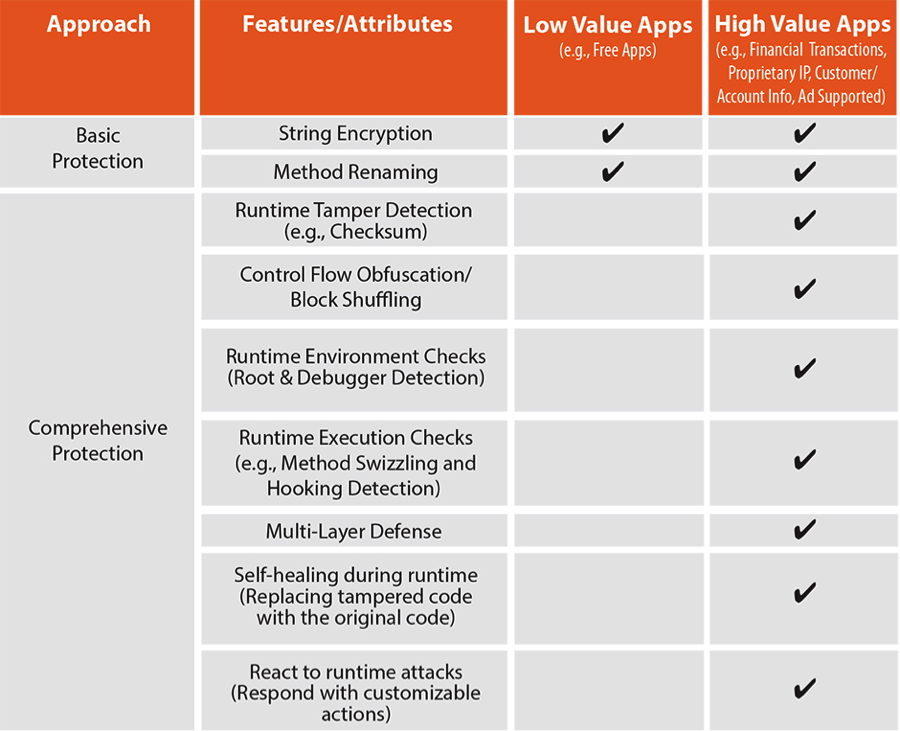
    There is a prevalent belief that encryption and basic obfuscation techniques in and of themselves are adequate measures to protect apps against hacking. String encryption and variable renaming form a beneficial security layer, but they are inadequate when used in isolation.

    Also, it is important to understand that not all obfuscation and encryption tools are created equal. Obfuscation is often confused with simple method renaming techniques and basic string obfuscation technologies, which can be quickly broken and easily reversed. Further, any encryption wrapper that applies the same measures of protection across all the apps it secures can be easily broken by determined hackers. Remember that once a wrapper technology is broken, every application secured by that vendor will be compromised.

    See chart 1 below for recommended protection techniques for Low and High Value apps

    Chart 1: Recommended Protection Techniques

    chart1

    #2: Scale and Sophistication of Attacks Your Apps Will Likely Face
    Minimal protections against counterfeiting and repackaging are built into the app distribution ecosystem — including measures such as:

    • Detection of jailbreak or root conditions that enable side-loading of applications, many of which are Trojanized.
    • Monetization libraries to confirm that only legitimate applications are downloaded through an app store and that they are correctly purchased or licensed. However, these libraries can and are often breached by cybercriminals.
    • Audit processes to validate that only legitimate and harmless apps are placed in the app store. Audit mechanisms to block illegitimate apps from distribution to users are far from perfect, as seen by recent iOS malware, including XcodeGhost.

    Consequently, it is important to determine the scale and sophistication of attacks that you anticipate for your applications, and validate that the security solution you rely on is capable of meeting the challenge. For small-scale developers with free- or ad-supported apps, typically basic application protection will suffice, even though ad revenue may be subverted through Trojanization.

    In contrast, for business-critical enterprise applications, it is safe to assume that an organized army of hackers will be actively looking for ways to subvert your app as quickly and as comprehensively as possible. Since such attacks are designed to be covert, it can take weeks or even months until evidence of a successful hack surfaces. For that reason, measures of defense against attacks have to be complemented by measures of detection and reaction. For example, deeply instrumenting an app to detect attempted attacks and react with functions such as “phone home” can provide long-lasting and durable protection.

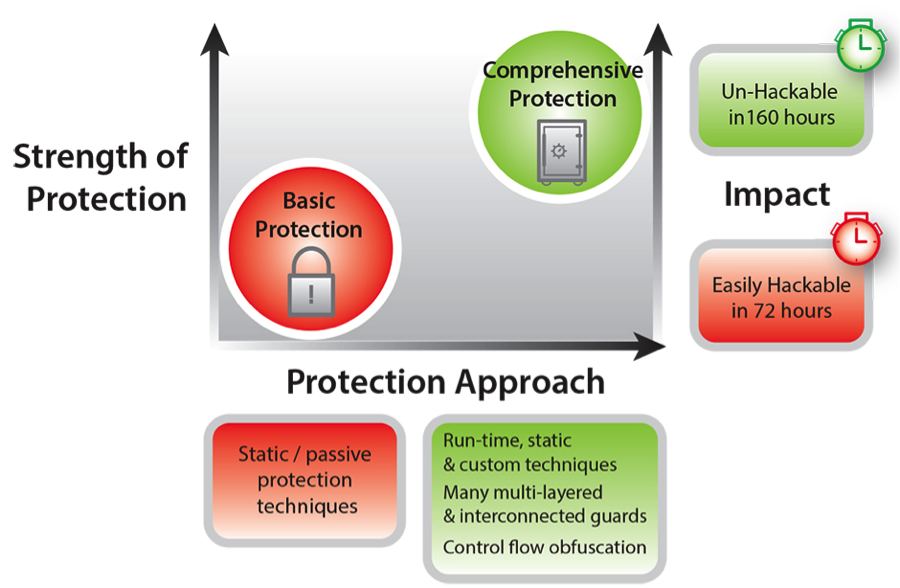
    Consider the recent benchmarking study that analyzed an Android Java mobile payment application that was hardened with a comprehensive protection solution against the same application with a Basic Java protection solution. Key findings from the study appear in the chart below:

    Chart 2: Strength of Protection of Basic and Comprehensive Hardening Techniques

    chart2

    Attacks that systemically compromise the underlying libraries an app relies on are the fastest growing class of attacks – and presently the most dangerous. This makes it imperative that high value apps are able to verify the pristine nature of their entire execution environment before unlocking sensitive functionality. Obfuscation solutions that focus solely on variable renaming or string encryption can deter static reverse engineering but are not able to protect against the full spectrum of high-intensity attempts to compromise the app.

    #3: Agility and Portability

    The portable device ecosystem, spanning smartphones and tablets and wearable devices, is among the fastest growing and fastest evolving. In stark contrast to the PC ecosystem — which is dominated by only a few chipset and operating system combinations, the portable ecosystem is a combinatorial nightmare of chipsets, OSs, programming technologies and hardware functionality.

    Because it is likely that mobile platforms will continue to evolve at their current breakneck and unpredictable pace, choosing a solid security partner with a history of innovation- that can keep pace with evolving ecosystems- is crucial. Additionally, selecting a security tool that is designed for cross-platform portability and extensibility will go a long way in helping you adapt to new platforms that become available.

    #4: Overhead and Performance Impact

    Memory footprint, power consumption and performance are important considerations in portable devices, where resources are limited and battery life is precious. All security technology will impose an additional memory footprint in storage and at run-time. It will also impose process overhead in terms of programming effort, compilation complexity and run-time execution characteristics.

    That said, more sophisticated application hardening solutions can offer a stronger trade-off between performance impact and protection strength relative to free- or low-cost solutions. For example, brute-force simple obfuscation can quickly cause memory bloat and diminish execution speed, while basic check summing can adversely impact run-time performance while retaining single points of protection failure.

    When apps are deployed to millions or billions of users, and/or where transaction volumes are expected to be high, it is crucial that the security solution chosen be as robust and reliable as your own app code. Obfuscating sections of the code that are sensitive to performance degradation, such as computation-intensive functions or graphics rendering routines, has an impact on runtime performance. It’s paramount to choose a protection solution that offers tunable performance vs. security tradeoff measures, and provides developers better control on size and performance of their code.

    The rise of mobile computing and soaring app usage has companies of every size and caliber scrambling to keep up. With customer loyalty and revenues at stake, developers are scrambling to release cutting-edge apps with little thought for long-term security considerations. In these conditions, it is tempting to treat code hardening as a checkbox and select the cheapest, most readily downloadable tool to do the job – but let the buyer beware. If you take the time to assess the value of your applications and the available options, you’ll realize that if you have a high value app and focus solely on cost, you are likely to be “penny wise and pound foolish.”

    About the Author/Patrick Kehoe

    PatrickPatrick joined Arxan in January 2014 as Chief Marketing Officer. Mr. Kehoe has over twenty years of experience building and managing sales and marketing capabilities for software, hardware, and service providers in the High Tech industry. Over the past three years, he held leadership positions at Siemens Enterprise Communications (SEN) – a global provider of communications software and services. Most recently he was responsible for North American marketing and partner business, where he oversaw the development of the strategic plan and drove Market Awareness, Pipeline Generation, and Sales results. Previously, he managed SEN’s Global Marketing Strategy, Intelligence, and Operations. Prior to SEN, Mr. Kehoe held positions at Booz Allen Hamilton and MarketBridge, a Sales and Marketing Professional Services Firm, where his clients included: IBM, SAP, Symantec, and VeriSign. Among other areas of focus, he was responsible for market expansion, new product marketing, digital marketing, and social media. Mr. Kehoe has a track record of success in North America, Europe, South America, and Asia, and has spoken at conferences and corporate events on a variety of sales and marketing topics. He holds a degree in Computer Science from Vanderbilt University and a MBA from the Darden Graduate School of Business, University of Virginia.

  • Ancestry.com Brings BlazeMeter into the Fold

    Ancestry.com Brings BlazeMeter into the Fold

    In order to gather and organize your lineage and the branches in your family tree, Ancestry has spent more than a generation (the company was born in 1983) wading through the 16B+ images and records buried in historical society data, government archives, and information caches of like organizations, groups, and communities the world over.

    Data in hand, Ancestry transcribed it and converted it into a searchable format for your investigation so you can connect the dots from great, great aunt Tildy to great, great, great grandpa Jebediah. “These historical records date back to the 11th century and form more than 30K collections that include birth, marriage, and death records as well as military service, immigration, and even incarceration records,” says Norman Warren of the Ancestry Performance Team, Ancestry.

    Ancestry’s platforms enable it to unite descendants and the curious with true tales from 70M family trees that subscribers build up by adding their own branches. Interestingly, Ancestry data now relies on a million plus DNA samples and counting.

    “Our servers respond to more than 75M searches per day,” says Warren, who coaches Ancestry’s teams in refining load testing practices as they release new testing scripts before and after sprints and based on their individual development timing.

    Load Testing Before & After

    When the Ancestry team went looking for deeper, broader load testing capabilities, they were hoping to add routine testing across the site 365-days a year. The folks at Ancestry wanted a malleable solution that would invite them to apply JMeter to vertical load testing and permit them to cut costs for load testing by leveraging the advantages of open source testing tools.

    Ancestry had been using a load testing approach that did not allow Warren’s teams to use home-brewed scripts. But in order to benefit from a testing solution that did embrace such scripts, Ancestry had to ensure a flow of updated quality scripts from every applicable internal group. Because Ancestry ultimately opted for JMeter and BlazeMeter, that presented challenges such as JMeter and BlazeMeter learning curves, the need for users to make JMeter requests in parallel, and Ancestry apps that are harder to script.

    Growing pains accompanied BlazeMeter adoption including the pains of stretching to embrace different devops teams in order to retrieve testing scripts. By pointing out the advantages of the new testing paradigm, making the argument for time saved by site wide load testing, and providing training in JMeter, Ancestry made the leap to the BlazeMeter supported approach. “BlazeMeter provided excellent JMeter training while we evangelized for teams to own their scripts,” says Warren.

    Ancestry solved its technical and learning curve challenges with steps including installing the JMeter Webdriver Set plugin and learning to debug and test scripts before they would run optimally in the BlazeMeter cloud service.

    “We had to work to get adoption, but it was well worth the effort to build accountability over different sections of the site. We now ask teams to take ownership of their own scripts to review, modify, or emulate user traffic flows,” says Warren.

    Results

    “BlazeMeter enabled more frequent load testing at a competitive cost and good site-wide load testing with the ability to add loads to stacks or to stop loads on one of the stacks during the test,” says Warren.

    BlazeMeter helped the Ancestry teams to foster a strong confidence that they could support heavy traffic loads at their most hectic times. “The BlazeMeter team helped us to translate the metrics we use for measuring traffic into a number of concurrent users for loading the site. In this way, BlazeMeter helped us to measure load test results against a baseline, such as traffic on our most recently busiest day,” says Warren.

    Ancestry leveraged BlazeMeter’s swift feedback about site throughput and the response times of each page to speed site responsiveness for each user. Ancestry was able to predict and automate the flows that are most commonly used by customers in order to streamline processes and speed the user experience even more.

    “We created a new baseline from new site wide load tests of additional traffic flows by loading flows incrementally using a special BlazeMeter feature that enables us to dynamically add more concurrent users in the midst of a load test,” explains Warren.

  • DevOps Impact on IT Operations Management

    DevOps Impact on IT Operations Management

    Most of the focus of the DevOps movement is on the application development to deploy cycle, and that’s appropriate.  When folks talk about the IT Ops side of DevOps, you’ll hear talk about IT process management tools like Puppet, Chef, and Ansible that are used to automate the deployment, update and remediation of software and VMs.  Yet, DevOps is widely acknowledged to be more than just one process—it is a culture of collaboration, enabled by automation that results in high quality outcomes.  As such, more IT disciplines are looking at how to apply DevOps principles to their domain.  These domains include those that can be put under the umbrella of IT operations management (ITOM): network engineering and operations, disaster recovery, and infrastructure operations management.  Many of these disciplines and organizations are currently highly siloed in traditional IT organizations, and tool suites are from an era that precedes the current emphasis on API automation.  Some may wonder whether these IT arenas can adapt and adopt DevOps.  The more pertinent question may be “can IT organizations afford not to?”

    ITOM is a huge topic, and there’s no way to do an exhaustive treatment of how DevOps is impacting it in one article.  However, we can at least take a look from a couple of angles.  The first angle is to consider DevOps impact in terms of functional areas of operational management.  ITOM can be roughly broken down into managing provisioning, capacity, availability and performance.  Of these, provisioning is probably the area where DevOps has had the most impact.  This only makes sense, since without automated provisioning of infrastructure and application components, it would be very hard to achieve the continuous processes that are a hallmark practice of DevOps teams. The trend of all IT infrastructure to become “software-defined” aligns with this provisioning automation movement.

    Once we stray outside of provisioning, the reach of DevOps becomes more sparse.  In the win column for DevOps is Application Performance Management (APM).   Five years ago, there was a tremendous dissatisfaction level felt by engineers trying to understand application performance.  So much so that a #monitoringsucks meme developed.  Since then, APM has significantly modernized and moved profoundly towards DevOps-friendly approaches.  Open Source Software (OSS) options such as the ELK stack (ElasticSearch + Logstash + Kibana) are seeing increasing adoption.  Meanwhile, commercial SaaS offerings from New Relic, AppDynamics, BMC and Riverbed are offering nextgen, highly API-enabled options.  Note that even though APM is considered a category of ITOM, it’s certainly the most dev-centric.

    Infrastructure monitoring has lagged by comparison.   The typical operations center arranges itself in a multi-level skills hierarchy.  Practices are shaped around monolithic, GUI-driven tools, and manual processes are the norm.  In fact, it’s fair to say that much of the institutional knowledge in many ITOM practices is literally “muscle memory.”  That is to say, knowing where to click on the screen.  Stovepipes of these hierarchies are formed around different types of infrastructure–compute, storage and network.  Collaboration between stovepipes is the exception, and ‘hot potato’ troubleshooting routines are the rule.  Rather than emanating from organizational DNA, collaboration often requires top-down pressure, usually to respond to crises. On the tools side, monolithic, enterprise software deployments and appliance-based architectures are common.  These products have been primarily designed to deliver a GUI experience.  Their APIs are usually second or third class citizens from the vendor point of view, and aren’t meant for end-users.  Rather, APIs primarily exist for vendor to vendor partnership integration and high cost custom integration projects. Clearly, this picture is not DevOps nirvana—so how is DevOps impacting it?  The answer is, so far, incrementally.

    One of the clear signs that an IT arena is getting primed for DevOps is cloud and open source disruption, and by disruption, I mean going beyond narrow, point tools to general purpose platforms.   Those same open source tools used for APM are making their way into systems management, and to a lesser degree in network management.  We’re also starting to see “green shoots” of change in systems and network management tools, with new SaaS offerings, though we’re far from a tipping point in these segments.  However, an interesting challenge for true conversion to cloud-based DevOps approaches is the need to address a Big Data problem.  The amount of data generated by IT infrastructure and networking equipment is now so voluminous that traditional systems and approaches can’t keep pace.  Legacy systems that have their architectural provenance in the 1990’s are based on scale-up models, and were never built for today’s data volumes.  Even cloud-based solutions may not necessarily be scoped to address IT Big Data. Until ITOM faces this technology challenge broadly, it will remain an impediment to transformational change.

    About the Author/Alex Henthorn-Iwane

    AlexAlex Henthorn-Iwane is the Vice President of Marketing at Kentik . Henthorn-Iwane has more than 20 years of experience bringing new technologies in networking, security and software to global markets. Henthorn-Iwane leads the global marketing strategy for Kentik and help the company bring its innovative story and solutions to network-dependent organizations around the world.

    Prior to joining Kentik, Henthorn-Iwane was VP of Marketing at QualiSystems, where he oversaw worldwide marketing at the industry’s leading supplier of DevOps cloud orchestration software for hybrid IT infrastructure, and Packet Design Inc., a provider of network management software founded by serial entrepreneur Judy Estrin. Prior to that, he held product management roles at CoSine Communications, Corona Networks, Lucent Technologies and Livingston Enterprises.

    Through his roles at QualiSystems, Packet Design, CoSine Communications, Corona Networks and Lucent Technologies he has acquired expertise in cloud computing and the opportunities presented through virtualization. He has written for Embedded Computing, Virtual Strategy Magazine, Datamation, SDN Central, Datacenter Knowledge and InformationWeek.

    Connect with him on LinkedIn, Twitter, or SlideShare.

  • Can We Stop Talking About DevOps?

    Can We Stop Talking About DevOps?

    I first heard the term DevOps from a friend in the software business when I was working at Dell HQ in Round Rock, TX. He recommended that I read The Phoenix Project, by Gene Kim, Kevin Behr and George Spafford. I did read it and I found it a fascinating story, but as a long-time network administrator (to oversimplify as much as possible) and having never been involved in developing software, I wasn’t quite sure how it applied to me. It was enough to pique my interest though and drove me to volunteer at a DevOpsDays event in Austin. Within weeks I left Dell and joined a small software company, where I could have a better chance of getting my arms around this slippery pig called DevOps and more hands-on practice with the related tools and techniques.

    So imagine my surprise when a year later, the same old friend who introduced me to DevOps suggested that the end-goal of a DevOps transformation should be that we stop talking about DevOps. Uh-oh, I thought, he’s lost the plot. But he made his case by pointing out that adding testers to dev teams–a typical step in any Agile transformation–doesn’t result in new devtest or agiledev teams, they remain simply “dev teams”. Once a business/group has fully internalized the Agile or DevOps values and behaviors, he argued, ‘working in an Agile or DevOps way’ becomes simply ‘working’. This is why many DevOps promoters, myself included, have a negative reaction to seeing ‘DevOps’ in job titles, job descriptions, or department names. While it simplifies the job of identifying which job candidates have a DevOps mindset or skillset, it effectively excuses everyone else in the organization from taking responsibility for change. “Doing DevOps” becomes the job of a particular individual, team or department instead of a philosophy internalized by the organization.

    Of course the horse is already out of the barn on that one. Each year we see an increase in the number of businesses advertising for DevOps Engineers, forming DevOps departments or listing DevOps among the required skills for a position. It doesn’t matter whether we think this is a good thing or bad thing, evolution will take its course and there’s little we can do to stop it. What we can do is observe, acknowledge and adapt. Sure, the dangers are real. A DevOps department can easily become just a third silo or the DevOps Engineer might become the scapegoat for everything that goes wrong between development and operations. But if a DevOps Engineer, VP of DevOps or DevOps department can form, contribute to and/or nurture an environment of increased empathy, faster feedback and continual growth, that’s awesome; put the focus there. Don’t spin your wheels arguing that they just “don’t get it” or “they’re doing it wrong”.     

    I’ve spent the past couple years researching, promoting and attempting to practice this thing we call DevOps. While it’s widely believed that DevOps is impossible to define, I am firmly in the camp of those who believe that empathy is, to quote Jeff Sussna, “the essence of DevOps”. Just as the sales team needs to have empathy for its customers, everyone in the value chain needs to have empathy for each other. I’m aware that many people find this term too “touchy-feely”, but the business benefit of more harmonious interaction between one’s teams and between the organization and its customers is clear. The faster and more effective one is at converting solutions into real value for customers, the more successful one will be in the market. Thus being empathetic isn’t just being a good citizen, it’s being a good businessperson.

    Taking it a step further, someone on Twitter recently suggested that “DevOps has nothing to do with technology”. The statement seemed ridiculous on its face. After all, the term ‘DevOps’– literally a portmanteau formed from the words ‘developers’ and ‘operations’–was coined by Patrick Dubois, a technologist intent on improving the process of building and deploying software. But as I thought about it I started to understand. As the DevOps movement has evolved, the most fundamental components its promoters have identified, from Gene Kim’s “Three Ways” (Systems Thinking, Amplify Feedback Loops, Culture of Continual Experimentation and Learning), to John Willis and Damon Edwards’ CAMS (Culture, Automation, Measurement, Sharing), to Dave Zweiback’s ICE (Inclusivity, Complex Systems, Empathy), are primarily about how people work. It doesn’t matter if one is building software or running a school, DevOps principles are sound.

    I recently tweeted the observation that “anyone who attempts to define DevOps in a paragraph is trying to sell you something”, adding “not necessarily a bad thing, just buyer beware”. This wasn’t a criticism of tool providers; many tools, from build automation to log monitoring, are essential to an effective DevOps transformation. It was a reminder that the problems and solutions DevOps is concerned with are complex and nuanced. There is no prescribed toolset or checklist of actions one can take to be successful; an effective DevOps transformation requires thoughtful, committed action across the whole range of people, practices and products one uses in their work. It might take months or years of practice, but maybe one day we can all stop talking about DevOps.  

  • To Be Continuous: Does your company have to be all in to do Continuous Delivery?

    To Be Continuous: Does your company have to be all in to do Continuous Delivery?

    In this segment of To Be Continuous, Edith Harbaugh and Paul Biggar talk about the spectrum of continuous delivery and where continuous delivery will and will not work.

    Edith Harbaugh, CEO LaunchDarkly

    Edith is CEO and co-founder of LaunchDarkly, a continuous delivery tool of “feature flags as a service.” LaunchDarkly powers software teams to quickly launch, measure and control their features.


    Paul Biggar, CEO CircleCIPaul is founder of CircleCI, a continuous integration and deployment platform that automates development workflows and IT operations, allowing developers to ship quality software significantly faster.


    [soundcloud url=”https://api.soundcloud.com/tracks/231204216?secret_token=s-45TTy” params=”auto_play=false&hide_related=false&show_comments=true&show_user=true&show_reposts=false&visual=false” width=”100%” height=”166″ iframe=”true” /]


    Edith: So Paul, does one have to be all in to do continuous delivery?

    Paul: So I think the obvious answer is no. And in particular, you know that the answer must be no because nobody starts at all-in, or at least if you’re starting a new project you can be all in, and many projects are not all-in.

    So someone starts somewhere and they say, “Now we are going to do continuous delivery in some way,” and so they have to go from zero to full continuous delivery along some way.

    Edith:

    People have this conception that continuous delivery just means pushing any time you want, and a lot of very old school development shops did that. They would just hot patch and production constantly.

    Paul: Right. So, I mean, are we calling that continuous delivery? I feel that the idea of SSH-ing into the server is not continuous delivery somehow.

    Edith: But people have this misconception because they’re like, “Oh, I had a continuous delivery before this was a thing,  I just patched it production.”

    Paul: I’m going to put a lot of money on the line here and say that if you define continuous delivery as “I SSH into the production server,” then you are not doing continuous delivery right. In fact, you are doing it considerably wrong.

    Edith: What exactly are you doing wrong then? What steps are you skipping?

    Paul:

    The whole point is that you have this automated process for releasing software. And SSH-into the production server is the very opposite of that.

    That’s not to say you shouldn’t do it in the occasional emergency. And occasionally, if we have some sort of catastrophe, we will SSH into the production server, replace some code, execute some code on the server to keep things as they are and prevent customers from noticing or from things from going down.

    But that isn’t the same as a continuous delivery pipeline or a release workflow, or an automated release workflow, which is essentially what continuous delivery is.

    Edith: So continuous delivery isn’t just shipping stuff out to production, it’s more having all the processes behind it.

    Paul: It’s very much the process. So when you think about can you be a little bit continuous delivery, I think what you’re looking at saying is there a lightweight version where we get some benefits of the continuous delivery as we go between all and nothing?

    Edith: Can you be, do you have to be all in, or can you be a little bit continuous?

    Paul:

    I think the very obvious instance of a little bit continuous is where you deliver the code where you have the automated release process builds some sort of artifact and then someone manually deploys that by a single click.

    Or, in fact, where a build happens and test happens and the remaining automated release process is triggered by a human saying, “Now we are going to release,” and then everything else is scripted, and so they just have one input, which is now.

    Edith: Oh, that’s really interesting. So do you think to truly be continuous it has to all be completely automated with everything always pushed?

    Paul: No, no. I don’t think so. I think it largely depends on the size of the team and that sort of thing. But I’ve seen a couple of examples where our customers were asking for particular things, and it indicated that they had sort of semi-continuous workflows.

    And one example of that is a team that only wants to do continuous delivery during work hours.

    Edith: Yeah.

    Paul: And there was another team, which only wanted to do continuous delivery at midnight because that was the only time that they didn’t have enough customers on their site to be able to clear the caches.

    Edith: Yeah.

    Paul: Now if they wanted to go to complete continuous delivery they would have to say, “We are going to clear a subset of the caches,” or have some other caching policy that allows us to continue or that allows us to deploy at any time, but where they are is basically were semi-continuous.

    Edith: I had a really interesting chat with Douglas Squirrel, who actually listened to our podcast, and he does a lot of consulting for companies in England, and he said he goes to a lot of companies that have all the tooling to be continuous.

    Paul: Okay.

    Edith: But they don’t actually use it.

    Paul: And what does that mean exactly?

    Edith: They have set-up continuous integration, they could, in theory, deploy whenever they wanted but they still, for whatever reason, still cling to their old schedules.

    Paul: Okay. So, I was looking at this very interesting article on the First Round Capital blog.

    Edith: Oh Jocelyn’s.

    Paul: Yes, that sounds right.

    Edith: Jocelyn Goldfein, who is at Facebook, right?

    Paul: Yes, that’s right. Yes. So, what she talked about was this idea that delivery schedules are useful in certain contexts. And in some cases velocity matters, and that’s kind of the Facebook case, and in some cases predictability matters a lot more. And if you’re delivering enterprise software, for example.

    An enterprise is not going to allow you to continuously deliver your product into their firewall or into their enterprise. What they’re going to want is every quarter a new thing.

    Multiple times a year preferably, but each time you release to them it creates a new workflow, and they want to be able to audit it and see a change log and validate that things are, they might have a change process internally.

    And so it’s not necessarily going to be a good idea to continuously deliver there. But a team that is building for that can do a continuous delivery process internally where they produce all of the artifacts and they do a complete release on every single push. Even if that is not released.

    Edith:

    There are a lot of reasons why an enterprise doesn’t want to take new features constantly, and a lot of it comes down to training. If there are big new features that need to be rolled out to people then they have to take on the cost of training.

    Paul: Right.

    Edith: It was actually interesting. I chatted with a guy from Square and he talked about how they really try to limit the amount of pushes they put out to the actual cashiers.

    Paul: Okay.

    Edith: Because of the training cost. I mean, a cashier at a coffee shop is doing a gazillion other thing and they can’t just suddenly pop up some new functionality and expect them to grok it or even take a tour.

    Paul: Right. That’s an interesting idea.

    Edith: So, although they have all the processes in place to do a lot of changes, to do continuous delivery, they actually really limit what they push out to the true end users.

    Paul: And it’s funny that the people who have far, far more users, someone like Facebook, can just do those changes because they don’t necessarily value an individual user on a…

    Edith: You’re walking down a path.

    Paul: No, I’m not saying that they don’t value their users. It is safe to piss off an individual user. Less so for someone like Square. And as you go up the value chain, the more they’re paying you or the more involvement they have to have in the product decisions, the less able you are to piss them off.

    Edith: Facebook is actually a fascinating example because at any time they’re going to be pissing off somebody. It’s just a matter of, it’s kind of like Apple.

    Ya know?

    Paul: Right.

    Edith: They’re always pissing off somebody, it’s just who.

    Paul: Did you hear about today at Facebook where all the feature flags went on?

    Edith: It was LinkedIn.

    Paul: Oh, was it LinkedIn? Okay.

    Edith: Ya. Well, it probably has happened to everybody that’s done feature flags. There’s the day that that happens.

    Paul: Right.

    Edith: And, it’s ugly, yet. Facebook is fascinating. I actually, I wrote a blog post about Facebook and how they use feature flags. They have a product called Gatekeeper.

    Paul: Right.

    Edith: That controls everything, everything. And after they had a huge PR disaster, i think it was in 2011, with their news feed, they actually do really care if they piss off a lot of people.

    Paul: Right, right.

    Edith: And that’s why they implemented Gatekeeper where they do a lot of 1% roll-outs.

    Paul: So, I remember when I was setting up Circle I sat down and talked to my friend who worked at Facebook and talked about their workflow and that sort of thing, and their release process was that code got released on Tuesdays and everyone who was releasing code, or who had code in that bit that was going out, had to be available during the release process.

    And the release process didn’t turn on any features because that was all done by Gatekeeper, but the code itself had to go out. And they had to validate that everything stayed the same and everyone had to be there. And so they had a fairly continuous delivery process but were still, manually there was a release going out.

    Edith: Well ya. You want to have some sort of enforcement that people look at stuff and care.

    Paul: Care in what sense?

    Edith: So, the example I heard about also at Facebook is it’s so large that there’s just no way that all the groups can coordinate with each other. So literally what they do is when they roll stuff out with Gatekeeper they roll it out internally to Facebook-only employees and that’s how they find out if stuff breaks. It’s not like at a smaller company like CircleCI.

    Paul: Right. But there’s a difference between the code being rolled out and the feature being rolled out.

    And they don’t do, I don’t know what the story is nowadays, but at the time they certainly didn’t do continuous delivery on code. Or continuous releases or whatever you might call it.

    Edith: I don’t actually work at Facebook, but what I did hear was that– that they just literally can’t coordinate. When you’re a small company you can still coordinate in a HipChat or a Slack room like, “Hey, we’re pushing this now, start looking for changes.”

    Paul: Right.

    Edith:

    But with Facebook, the only way they know if something is broken is if somebody complains.

    Paul: So there’s an interesting discussion about microservices at AWS. I guess they didn’t call them microservices at the time, but having fully service oriented architecture.

    So, one of the things they talked about is how when you roll, or when you continuously deploy a service, you might break other services. So, the thing that actually breaks may not be in any way related to the people who’s alarms start going off. And, in fact, there may be multiple steps away from who’s alarms are going off.

    Edith: Google has a similar system, and I heard that they monitor 200 plus different metrics. And one of the ones they monitor is just do people say, “Gmail sucks more?” on Twitter.

    Paul: Oh. Interesting.

    The thing that I’m getting at in terms of how little or much can you continuously deliver is, if you are Google or you’re Facebook and you have the monolithic code repos, the thing that you’re releasing is it’s not the same release process as someone like Amazon who has what I would describe as pure, continuous delivery.

    Every service does it’s own continuous delivery and your dependencies may be changing at any time and you don’t actually know what’s going on. Versus Facebook, we are taking this multi-gigabyte binary and we’re uploading it to a set of servers, and sure, we’re slowly releasing and maybe we’re doing that multiple times a week or multiple times a day.

    But it’s not quite the same as Amazon releasing every 11 seconds. And I think we can see, even between these multiple large companies who have incredibly advanced release process, that you could say that they are clearly at different spectrums along continuous delivery.

    Edith: So, what do you think is suitable for, let’s say, a medium company with, let’s say, 10 developers?

    Paul: I mean, there’s a lot of different things going in. Who is your customer base? What is the level of safety that you need? Let’s suppose that it’s a consumer web app. If it’s a consumer web app, I would expect that that company should be continuously delivering all the time. Especially if it’s slightly okay to break things.

    Edith: Yeah.

    Paul: Or at least, you break things you can kind of roll them back or whatever within a couple of minutes. A team of that size might not have the resources to make their continuous delivery process perfect. But it seems likely that they would have more success shipping with continuous delivery than shipping without it. So lower risks, higher velocity. That sort of thing.

    Edith: It’s funny how continuous delivery has permeated even the VC world. Jason Lemkin, the guy behind SaaStr,

    Paul: Right.

    Edith: He tweeted yesterday that one of his due diligence questions was how,”How often can you roll back, and does it work?”

    Paul: Right.

    Edith: And it’s funny that I think of that as a very technical thing, like, “can you roll back?” But to the VC is seen as a sign of technical sophistication.

    For more on Continuous Delivery and to find out about new episodes you can follow the show on Twitter at @continuouscast.