Category: Blogs

  • Passion in the Workplace

    Passion in the Workplace

    Unbridled Passion


    Here are some other ROELBOB’s you might like

    RoelBob150x120


    A Unit Testing Dillema 

    The Pink Slip

    Another Pink Slip


    Hot off the Press – Other great DevOps.com content

    HotPress

    Successful technology leaders will embrace the citizen developer

    Your DevOps subculture


    Upcoming DevOps.com Events

    Events

    DevOps Connect: cdSummit SoCal

    — ROELBOB

  • CIOs Must Fight for Relevance in Face of Tech Storms

    CIOs Must Fight for Relevance in Face of Tech Storms

    The past two decades have seen their share of technological disruption – retail, books, music, newspapers, and traditional data centers by – virtualization and cloud computing. With the impact of cloud computing and mobile BYOD trends on traditional IT departments, there has been an ongoing discussion in recent years about whether or not CIOs and IT leaders are still, or will remain, strategically relevant to the enterprise.

    All considered, it’s not an unreasonable question. In many ways, it’s as if traditional IT systems and data centers have been thrown into maintenance mode, while investments pour into cloud, mobile, social media, and data analytics. It’s not just that the importance of the physical data center itself is changing, or that applications are increasingly subscription services rather than bits running on-premises, it’s that increasingly CIOs and IT leaders are left out of the IT buying decisions.

    Some of this is showing up in spending trends. According to the Gartner Worldwide IT Spending Forecast, global IT spending will hit $3.5 trillion this year. That’s a top line 5.5% decline from last year. Most of that downward move, however, is attributed to US dollar currency fluctuations, rather than real demand disintegration. In constant currency, global IT spending in 2015 is projected by Gartner to grow at 2.5%. Gartner also expects communications services to be the largest IT spending segment this year, and global mobile phone shipments remain strong.

    In the first quarter of 2015, according to IDC, cloud infrastructure sales increased more than 25%, annually, to almost $6.3 billion. During that time, public cloud spending rose to $3.9 billion, up 25.5%, while private cloud sales rose 24.4% to $4.2 billion.

    That growth far outdoes that of the broad enterprise software market. Gartner expects enterprise budgets for data center systems in local spending to remain stable for the year, with users expected to extend life cycles and defer replacements to counter price increases related to the strong US dollar. Enterprise software also will decline 1.2 percent this year, but much of that also can be attributed to the strong dollar as well as SaaS revenue being subscription-based.

    While a lot of this stagnant to reduced IT spending this year can be attributed to less expensive cloud services, lower CAPEX associated with SaaS pricing, much of it can be attributed to technology spending shifting from centralized IT departments to other segments of the business, such as marketing and human resources. Even more individual users and business managers can choose cloud services for personal productivity software and small workgroups, all of which generally flies under IT radar.

    Despite all of these trends having been underway for a number of years now, many organizations still haven’t been able to adapt. It seems not too long ago that IT reigned supreme over every device, server, and data connection in the enterprise. They approved who used what where, and what was production. They dictated where data were stored and how they were secured. And anyone who wanted to use anything information technology-related had to go through the IT department. Those days are gone.

    What all of this is certainly doing is changing the dynamic between the “business” and IT. Many of these cloud services bought outside the control of IT run unmanaged, and the result is that IT doesn’t see what users are doing and what they need, so they can’t add value this way to their enterprise users.

    This lack of transparency into what technology users are actually using to get work done actually increases the complexity of systems and obfuscates IT from being able to do everything it needs to do to keep relevance. There’s no long-term technology strategy; there’s no panoramic view into all of changes in how people are using new technologies to understand IT opportunities that perhaps are being missed; and lastly there’s no way to enforce security and compliance policies.

    What all of this means for IT leaders is that it’s up to them to remain relevant in the years ahead. They’re going to have to find ways to provide value to their internal customers, whether that’s by helping them to build solutions on their own or enhancing apps and services that internal business managers chose themselves. They must help them to find the best external services for their need and create the most friction-free, cost-effective, efficient solutions that optimize end user experiences as well as corporate data. Today, it’s more about end user experience than it is large databases, applications, and ERP rollouts. It’s more about cultivating data than centralizing everything into monolithic databases. And it’s more about helping orchestrate users with mobile, social, and cloud than it is storage and data centers.

    It’s about maintaining relevancy in the technological storms that are pounding IT departments today. In the upcoming months, we are going to run periodic stories and Q&As that aim to show business leaders exactly what they need to know to ride through the disruption.

  • The Internet of Things

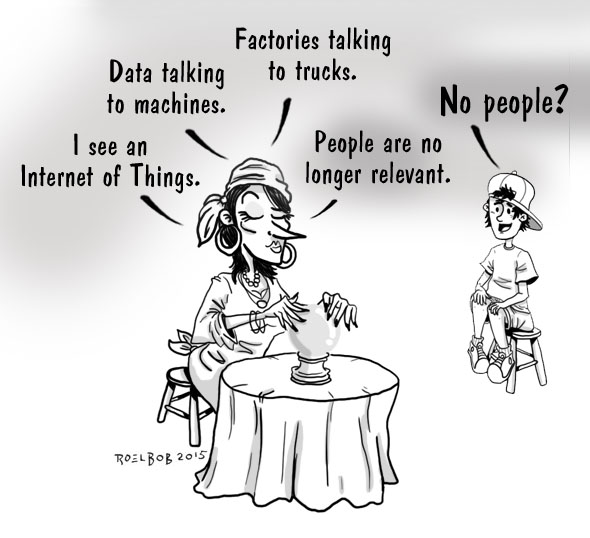
    The Internet of Things

    Internet of Things


    Here are some other ROELBOB’s you might like

    RoelBob150x120


    A Unit Testing Dillema 

    The Pink Slip

    Another Pink Slip


    Hot off the Press – Other great DevOps.com content

    HotPress

    Successful technology leaders will embrace the citizen developer

    Your DevOps subculture


    Upcoming DevOps.com Events

    Events

    DevOps Connect: cdSummit SoCal

    Security automation for DevOps

    — ROELBOB

  • To Be Continuous: Continuous Delivery and Mobile Development

    To Be Continuous: Continuous Delivery and Mobile Development

    In this segment of To Be Continuous, Edith Harbaugh and Paul Biggar talk with Kevin Henrikson about about succeeding with Continuous Delivery and mobile development. This podcast is brought to you by Heavybit, a 9-month program for developer startups.

    Screen Shot 2015-11-30 at 11.31.57 AMKevin is partner director of engineering at Microsoft where he manages the Outlook teams.


    Edith Harbaugh, CEO LaunchDarklyEdith is CEO and co-founder of LaunchDarkly, a continuous delivery tool of “feature flags as a service.” LaunchDarkly powers software teams to quickly launch, measure and control their features.


    Paul Biggar, CEO CircleCIPaul is founder of CircleCI, a continuous integration and deployment platform that automates development workflows and IT operations, allowing developers to ship quality software significantly faster.


    [soundcloud url=”https://api.soundcloud.com/tracks/235452076?secret_token=s-a8Rxo” params=”auto_play=false&hide_related=false&show_comments=true&show_user=true&show_reposts=false&visual=false” width=”100%” height=”166″ iframe=”true” /]


    Paul: All right, Kevin. So, what’s your favorite thing about Continuous Delivery?

    Kevin: Good question. So, Acompli started kind of the approach, when we first started was just a couple people. And our deal was like, “Hey, you’re trying to get this thing to work, send emails.” So it was like, keep checking it in, get closer and closer to kind of the definition of it was working.

    And then as we started to experiment farther out, we said, you know, “What’s the right sprint cadence?” And we’d come from kind of traditional enterprise companies, where, you know you ship every six weeks or every four weeks and we’re like, oh, we can go faster.

    People are doing this agile thing. It’s like two week sprints, and we tried two weeks and realized that most of the work came in on Thursday afternoon or Friday kind of thing, ’cause the end of the second week and so what if we just do one week then most of that work will come in, you know, the first Friday. And sure enough, it worked, right? So 80% of the work still comes in on the last day or kind of completes on the last day or gets to the point of ready. And so, what we liked is that it gave us a much smaller kind of chunk of deliverable, right.

    So, like the train keeps moving but the size of what’s on the actual boxcars is smaller and so if you have a problem, it’s easier to roll back, easier to fix.

    Or if you have a problem, you can just patch it quickly ’cause you’re used to moving quickly.

    Edith: Wow. Okay.

    Kevin: So unlike in a traditional world where you ship something every six weeks, you’re like oh, we made a mistake, we need to go patch this. Like, the patch felt like an exception and you’re like, your muscle memory for patching was not there, right? So you’re like do we do it now? Is it worth it?

    And then it’s like well, if you’re five weeks in and you discover that thing, it’s like well, the six-week thing is out there where with, if you’re shipping every week, you’re like oh let’s patch it. We shipped yesterday? We just click the button again, and it builds and it goes. So you’ve built the muscle memory to move quickly, right. And so I think, what I like the most, kind of going back to the specific question, is just the fact that it lets you get good things done quickly, but also correct mistakes quickly.

    Edith: Wow. So this is a good time for you to introduce yourself.

    Kevin: Cool. So, Kevin Henrikson. I currently manage the Outlook, kind of non-Windows teams at Microsoft. So Outlook for iOS, Android, and Mac. Previously, I was VP of Engineering at Acompli, which was a mobile startup, focused on iOS and Android.

    Edith: Yeah so you had a lot of good thoughts right then. One of the things I wanted you to talk more about is why do you think 70-90% of the work is always on the last day?

    Kevin: Yeah, I think people are kind of deadline driven. I think generally they want to work until the last minute and I think software development ends up being this thing where you’re never done. And so the only way to define done is to actually draw a line and say this is done and then still some things miss that line. And so the tighter you give the window for things to get done, the more often they’ll hit that window because you’ve kind of broke things into smaller chunks.

    And also, because software’s kind of this long-lasting thing that never is kind of done done that you end up with, if the chunks are small, people are able to estimate and think is that going to take me a day? Very rarely does somebody think something’s going to take them a day that takes months.

    But very often, like if you think something will take months, it may take many, many months. Because it’s hard to guess, there’s so many variables, so many things are going to change in the environment, turn what you’re doing before you get there.

    So, I think the short answer is if you start with a smaller window and more discrete small tasks, those tasks are easier to estimate, they’re easier to consume, they’re easier if you get disturbed, like oh I’m going to go down and get a soda, or somebody asks me a random question ’cause some fire comes up, I can kind of make it up because I was only expecting to spend half my day working on that anyways.

    So, I think that kind of works out in our favor.

    Paul: So, there’s an implication with what you said there, that the tasks sort of grew because it was two weeks,, rather than–

    Kevin: Yes.

    Paul: So, I guess the phrasing is, when it was two weeks, was it that a one-week task had grown to two weeks? Or was it that things got cut when it got shrunk down to one week, and you ended up with technical debt, or something along those lines?

    Kevin: I think it was a couple combinations. I think if you feel like you have two weeks to work on a task, you’ll spend more time polishing or potentially doing things that aren’t on the critical path to getting it done.

    And I think that’s natural, right? Like, maybe it is you’re paying off too much technical debt, right? In the start-up world, you have to have that lever. And even just in general software development, like, you have to have a lever. We’re not launching the space shuttle here. There’s room for some wiggle room and imperfection.

    And I think breaking it into small pieces lets people focus on, “Hey, I’m only gonna do this” and “I have this much time to do it.” Where you say, “Hey, it’s got two weeks,” you may be deep into the second week and saying, “You know, I just don’t like my approach. I’m gonna change it.” And you basically end up throwing away a week’s of work, whereas, if you’re thinking that “Hey, the deadline’s coming in a week,” you’re gonna make that kind of epiphany, like, “Oh, I made a mistake,” or “I’ve taken the wrong path” much quicker.

    So, I think it allows you to break your decision-making and optimize on getting it done, because the window is kind of quickly approaching, being a one-week spread versus two.

    Edith: This might sound like Seven-Minute Abs, but why not two-day sprints?

    Kevin: Yeah, so I think in two days we– or one-day sprints, right, how do you continue to make it faster? So, for us, there was sort of one artificial gate, which was the fact that you really can’t ship quicker than about a week with Apple.

    And even then, it sometimes slips by, because, you know, four or five days, and then during a peak season, if there’s lots of apps, like a Christmas holiday, or around a platform update, you’ll see a spike in the review times. So, Apple kind of, and we run iOS app first before we port it to Android. So that ended up driving us towards a little bit to a week. Cause it was like, if you shipped on Monday, the app would get in the store some time end of that week. And that was a natural cadence to start the next one.

    So, it’s really hard without pushing the emergency release button, which Apple only lets you do once or twice a year, to ship more than once a week. And then, we kind of let the rest of the team fall behind that. If you’re only shipping the app once a week, let’s keep the new chunks of new work, or big bug fixes to that path on our service.

    The way our architecture is, and we can talk about that more, we spend as much, you know, 77% of the logic of the app is down deep in the service, because that we can update all the time. So, when we push a release and don’t wanna fix something, we fix from the service the same day.

    Edith: Interesting.

    Kevin: So, that allows us to have a much more agile approach, because the service is constantly being updated, but the app is kind of gated in one-week chunks.

    Paul:

    So, what you’re saying is that the biggest impediment to your shipping frequently is Apple.

    Kevin: The platform, yeah. The platform, basically, Apple’s– And specifically, it’s the fact that Apple has a review process, which is great. That Apple review process generally keeps the bar of apps better and puts some good discipline inside of the wider range of development, people that are coming to the Apple platform.

    But, it also, when you wanna move quickly, you can’t. The platform itself kind of enforces this four to seven-day lag in shipping.

    Paul: So, you’re now running teams that are shipping on non-Apple platforms. Did you guys make any changes to your release cadence as a result of that?

    Kevin: Yeah, so I think on Android, for example, we still kind of keep to the one-week junk of we plan a sprint. Build for a week. Release to our beta group or dog freed users, and then release to production. But Android gives you this advantage where you can do percent-based rollout.

    So, with Android, we end up releasing usually two or three times a week. So, you’ll release kind of The Release on Monday, at like 1-2%, kind of walk that out three, five, 10%. Usually at five or 10%, you can pick some new signal of crash or behavior that you wanna adjust, make a hot fix, push another release, start at 10%, 20%. Oh, you see another one you wanna tweak at 20%. And finally, from 20 or 30, you end up going all the way forward.

    Paul: Do those Android users help you on the other platforms, as well? Are they finding crashes that also exist on the other platforms?

    Kevin: Today we’re 100% native on both, so there’s no shared code between iOS and Android from the mobile app perspective. Obviously from the service, it’s 100% shared code. So, what we’ve actually done in the past, is when we launch a new feature that we think is either controversial, or has a high chance of risk, for example, when we launched iMap support.

    We launched generic iMap support on Android first, knowing that we could patch it quickly, and adjust if things went wrong, simply because there was no way to test the millions of random iMap servers in the world and get any kind of focus. When we talked to Gmail or Yahoo, or– Single point.

    Paul: That’s really interesting, actually, the idea that because the rollout, or the sort of safety features are only supported on Android, that people will end up building features there first.

    Edith: How deliberate did you have to be about putting stuff in the service, versus in the apps? Was this the lesson that you learned?

    Kevin: So, we had always thought of the service as the place where we always wanted to do as much of the logic that could break us– You just don’t wanna do it twice. You don’t wanna implement active sync twice. You don’t wanna implement an iMap stat twice.

    And it also allowed us to pick a protocol between our cloud service and the mobile app. It was optimized for mobile. So, think of the API, the shape of the API looks closer to the screen of the app. There’s a request for “Get my inbox,” and then make a change. Where, if you think of iMap, or the mirror out of email protocols, that we talk today, they don’t have that very linear type of approach of “Give me this screen. Give me that screen.”

    They’re thought of in a way where you’re going to sync all the mail down to your desktop client, and then manipulate it locally, and then sync changes back up in some either connected or disconnected state. So, the service was basically set to put complex logic, but also to allow us to get leverage, ’cause everything we could build in the service was one less thing we’d have to do twice on the client, because we picked a path that we didn’t support. We didn’t basically have a lot of shared clip or clients, essentially none, just the API.

    Paul: And it’s the same service that sits behind all the different clients?

    Kevin: Yes, so we have a single cloud service that basically powers both the iPhone client and the Android clients.

    Edith: It’s interesting, so at TripIt we had a lot of similar issues. Like, we were at one time one of the biggest, a lot of our users are Gmail.

    Kevin: Okay, awesome.

    Edith: People would sync their Gmail with us, and their calendars. Did you find there was a difference between the you or the app experience that Andoid and iOS wanted? How much did you bifurcate that?

    Kevin:

    Sure, so, a lot of people ask is like, “Hey, did you launch a feature first on Android or iOS, “or do you always have to make them “come out identical?” My answer to that is pretty simple. Most normal people carry one phone. They’re either an Android user or an iPhone user.

    So, they don’t know that you released it first on Android or iPhone, because they don’t carry both phones. So, we think of that, from a feature point of view, that when they’re done, then we ship it. Now, if we’re trying to line a press event around something, we’ll wanna make sure they’re both there before we do the press event. One may come out a day or two before the other. But, generally speaking, we don’t try to, you know, legislate you have to do it this way, ’cause it works on iPhone.

    In fact, we actually took a different approach, where we said, We wrote it one way on iPhone and then we went to Android. It wasn’t just like, “Oh go port all the screens over.” It was like, “What would this screen look like for an Android user?”

    So, we want our apps on the mobile device, and most mobile users wanna look at an app and feel like it fits in with the rest of their phone. So, the way that an Android navigation works, the way that people use the back button, or not, is very different on iPhone and Android. The fact that there’s widgets, and the way the widgets are exposed on Android, and the way that those people want to integrate deeper into the platform.

    Those kind of things we let go with the platform. Our view is write it in native code, ’cause it allows us to take advantage, and move quickly to the platform-specific features. But it also lets us tailor the experience, and the UI and UX to whatever that user base wants.

    Paul: It’s interesting that’s, that you talk about it that way, because in the old days, kind of ten years ago, when people were making multi-platform applications, there was a tendency of people to try to make it all match the same, the Firefox is an example here, or Chrome one of those tools that people use on all platforms, was designed to look the same on every machine, even though people didn’t have that machine.

    I think one of the nice things that’s happened with the mobile ecosystem is people have thrown away that concept, and they’ve made it feel actually native for each of the platforms.

    Kevin: Yeah, and I think that also goes to feature set, right? Like, you would think that the traditional app is like, “Oh, if it works this way on Mac, “or on Windows, or on the web, you would expect kind of 100% feature parity between all those platforms. And today on mobile, we go and select where you actually use it. There’s features that exist in mobile only.

    Because mobile has all this additional context of your location and where you are, and what you’re doing. Are you running? Are you driving? There’s other sensors in the devices today that allow you to build specific features that are richer. So, we always thought of a commonality.

    So, rather than sending more emails, send better email, right. Don’t say, “I’m running late.” Say, “I’m running late and I’m here,” and send a quick tap of a button to put the map and show you that, “Oh, I’m 20 minutes away,” or, “I’m on the train,” or, “I’m at the train station,” so that people can understand you don’t have to type out how many minutes it’s gonna take. You don’t know. Or, you walk in, or you drive in–

    Edith: Plus, people lie all the time. Like, “I’m on my way” has a pretty loose meaning of anywhere from “I might leave my house in 30 minutes” to–

    Kevin: And depending on the context, right? What that person’s thinking, so yeah, good point.

    For more on Continuous Delivery and to find out about new episodes you can follow the show on Twitter at @continuouscast.


  • Why NoOps is a DevOps disaster waiting to happen

    Why NoOps is a DevOps disaster waiting to happen

    Ever since the first hunks of Big Iron hit the streets, we’ve been struggling (and failing) to keep up with the demand for software applications.

    Now it’s getting harder. Not only do we have to satisfy an insatiable appetite for new apps and services, but the nature of the business palate is changing. Business now demands a continuous flow of software innovation over back-office application support – or using the haute cuisine analogy – they want IT to serve a classy degustation menu versus just warming up a ready-made TV dinner.

    All this bodes well for the fast iterative style agile, with fully autonomous development teams empowered to increase the rate of software deployments.

    Sound great, but what does this mean for IT Ops?

    Many would argue that IT Ops is a completely defunct or redundant function. Even credible analysts and thought leaders have touted NoOps (No IT Operations) as a viable option. Some even suggesting that it accelerates DevOps collaboration since by removing the Ops function you remove all friction.

    There appears some validity to these arguments. After all, if developers can codify operational functions into their activities, why do we need the disciple?  Perhaps this logic explains why for some, IT Operations as a function is becoming disenfranchised; no longer having a voice into critical digital transformation initiatives – or if it does, just the sound of “No” – the last deployment bottleneck.

    The death of IT Ops has been greatly exaggerated

    All this NoOps thinking is flawed for a couple of reasons.

    Firstly, however operationally awesome developers think they are, building resilience, maintainability and supportability is not always top-of-mind. Worse still, these elements might be neglected if management is fixated on rewarding developers according to ‘speeds and feeds’. Secondly, even if these elements are addressed, they’re often conducted at the end of development cycles or bolted on after problems are discovered – that’s like baking a cake, forgetting the sugar, and then trying to compensate with a sickly sweet chocolate sauce.

    In reality, great operations engineers are best equipped to help incorporate operational excellence into all practices. After all they have years of experience supporting every new wave of technology – from Mainframes to Microservices. What must change, however, is how their expertise is developed and shared.

    • Become cloud connoisseurs – Like our development colleagues, operations’ emphasis will shift from on-premise to cloud. This means ensuring Ops expertise is fully leveraged to support the business nirvana of delivering high-quality digital customer engagement at scale. So if you’re an IT operations professional still configuring QoS policies on routers or manually provisioning development environments, it’s probably time to skill-up in PaaS, Amazon EC2 and containers. Either that or go and find a gig with a cloud service provider.
    • Embed Ops In Dev – This means being less separatist and silo’d and more inclusive and unified. Rather than focus on technical diagnostics and reacting to failures, the new operations professional will apply systems thinking to holistically look at how business applications and the all-important customer experience can be improved. This is easier said than done with skeptical development teams, so it’s essential that monitoring feedback is automatically shared and incorporated into all practices – like for example, agile sprints
    • Embrace Lean thinking – this involves being less interrupt-driven – fixing one technical problem after another, to working side-by-side with other teams to ensure a constant flow of value is delivered to business with all waste removed. As with our development colleagues, elements of agile (and common sense) thinking will come to the fore – with terms like “never done” and continuous improvement becoming established elements of the new operations and performance management mantra.

    Perhaps the biggest change IT Operations will undergo is how it interfaces with other teams. Here, IT Ops will morph into providing sets of easily accessible and repeatable processes other teams will use to bake quality into everything developed and tested. To this end, operations will transform from a separate “keeping the technical lights on” function, to a high-value to a craft that outfits the software factory and staff with new capabilities they need to ensure speed and quality at scale.

    The new age of Agile Operations “craftsmen”

    For IT Operations this means letting go of many traditional admin tasks – not just running things, but participating in crafting new automated processes. So rather than routinely monitoring applications in production, the Ops in DevOps will ensure this capability is available in pre-production. Rather than mundanely provisioning servers from change requests, new teams will equip the organizations with a complete release environments that support program level goals.

    Operating as DevOps “craftsmen” makes complete sense because it moves expertise out from behind the production curtain. The organizational focus of IT operations positively changes too — from being technically good at describing and fixing problems, to being awesome at prescribing improvements that drive better business outcomes.

    Great organizations exploit their business models with flawless operational execution. With these models now being constantly re-shaped by software applications, IT Operations is more important than ever. Relegating it with NoOps thinking isn’t an option.


  • DevOpsQA NJ Meetup –  Jenkins Workflow Tech Talk

    DevOpsQA NJ Meetup – Jenkins Workflow Tech Talk

    DevOpsQA NJ just held oIMG_5444ur November Meetup on Jenkins Workflow with Kishore Bhatia and Isaac Cohen from CloudBees  as speakers.   The venue was provided by  ROKITT at a state-of-the-art office space with breathtaking views of NYC.   Even though it was heavily raining outside, there was a great turnout of veteran and new members.     

    We kicked off with a fun speed networking over pizza and drinks provided by TEKSystems.  Following that, I did an introductory session on Transformation thru Automation via Jenkins talking about 10 steps to get a head start on continuous integration and deployment.  The steps include Identifying Bottlenecks, setting up a common repository, automating of the build, unit testing, environment configuration, test data management, regression testing and reporting.   

    Next, Kishore and Isaac gave an introduction to Jenkins Workflow followed by a detailed demo.  IMG_5445

    Kishore started off with a famous saying by Marc Andreessen, co-founder of Netscape –  “Software is eating the world”.   More and more things are getting automated and every business is becoming a software business.   We are automating Ops so that we can do more Ops and automating Manual QA so that we can do real (valuable) Manual QA (e.g. exploratory testing).  

    Jenkins is the tool that orchestrates all the SDLC steps from code commit to binary delivery. There are currently 1183 plugins for Jenkins with new one developed every week.   With today’s plugins, you
    have to create atomic jobs that then call each other, which ends up hard to visualize how the ensemble works, especially when you have a lot of different projects.

    Workflow was designed tIMG_5449o automate and scale pipeline steps and tools and solve common pipeline problems such as Parallelism, Branching, Looping, Restarts, Checkpoints, Manual Input, etc.   Jenkins Workflow is mostly open source with some advance features offered via enterprise edition by CloudBees.  Workflows can be defined in one concise script, with a groovy-based DSL and 15 simple keywords.

    Isaac took over to give the Workflow Demo.  He explained that stages will be the different steps of the pipeline. The workflow script doesn’t have to be written directly in the jenkins job, but as an external file in your source code repository. New DSL can be c
    reated to abstract the individual actions like source code checkout, build, test, etc. It will be possible to share this DSL in your jenkins and with the world, as well as download and use other people’s DSLs to leverage their code and avoid writing it yourself. Checkpoints can be combined with notification methods like email to get the input directly from the notified person. The multibranch Workflow system will support branching, any new branch in git will create a new workflow in Jenkins.  Jenkins will scan all the GitHub repositories and add all the projects with Jenkins files automatically, as well as scan new projects and add them automatically in Jenkins.

    IMG_5450At the end of the session,  Kishore and Isaac gave us a glimpse of Jenkins 2.0 release which includes focus on Continuous Delivery use cases and UI/UX improvements.

    If you would like to learn more about Jenkins Workflow, you can reach Kishore at kbhatia@cloudbees.com  or Isaac  at icohen@cloudbees.com .   For more information about CI/CD transformation you can reach me at tanya.kravtsov@rokittech.com

    At the end we had a great Q&A session and a very warm open discussion.   Looking forward to our next session.

  • Raising the Bar on DevOps for Enterprise Systems

    Raising the Bar on DevOps for Enterprise Systems

    What do you do when you are a leader in DevOps solutions for Enterprise Systems and you practice what you preach? You raise the bar to continually improve your offerings and share thought leadership about where the future lies for clients as they navigate the world of continuous delivery in a climate of digital disruption.

    The primary reason why most companies adopt DevOps is to reduce cycle times and to improve responsiveness to the market. This is accomplished by breaking down organizational and role-based silos and by allowing people across the end-to-end software lifecycle to work more closely together. While culture is the most tricky part of a DevOps transformation, tools play a major role in enabling information to rapidly flow across people and lifecycle phases, reducing manual and error prone steps, and alerting people of issues as early as possible so they can be addressed. A key feedback loop comes from development in small batches, where frequent compile, build, deploy, and test cycles, allow you to discover issues within hours of the code having been written.

    Over the last month, IBM has made major announcement improving our DevOps for Enterprise Systems solution to help our customers to more easily realize the value of DevOps. Here is a summary of the many announcements we have made.

    • Integrated Suite: We announced the new Enterprise COBOL Suite, which provides one integrated suite of five tools targeting developers and systems programmers. The suite of tools allow you to do performance analysis, analyze abends, code and do unit testing, debug problems and manage complex files and data sets. Click here to see for the next level of details.
    • Frequent build and release: Many customers have concerns that a transformation to DevOps may drive up their MIPS cost with frequent compile, build, deploy, and test cycles. To mitigate this concern, we announced the Enterprise COBOL VU Edition consisting of Enterprise COBOL for z/OS V5.2. This edition allows you to increase your compiles up to a factor of 10x without an increase in your MIPS cost.
    • Integration Platform: In the blog All aboard the z/OS release train – Aqua is coming, my colleagues Kenichi Yoshimura (@kyosh1107) and Joe Winchester (@JoeWinchester) discussed how Explorer for z/OS Aqua has been expanded into an integration platform across the DevOps lifecycle, with initial capabilities for Development (RDz and PD Tools), Operations (CICS Tools), and Runtime (CICS Explorer). The Aqua release improves the user experience for application developer and system programmers, makes installation easier by allowing all of the above rich client tools to be installed using one installer, and makes deployment easier through push-to-client technology.
    • Drinking our own Champagne: We have also built a brand new continuous build, deploy and test infrastructure that is shared across our tools running on our integration platform, Aqua. This allows us to build, deploy and test plug-ins across our integration platform to ensure that they are compatible before we make them available to you. This means higher productivity for our development teams and better quality for our customers.

    The whole intent behind offering a suite of products with continuously improved end-to-end integration is to enable teams to realize the value of their DevOps investments more quickly. While we will continue to bring our “A” game to the Agile software delivery court,  I am interested in what innovations you see coming that would increase IT’s value to the business.

    About The Author

    Per KroPer Kroll is Director of DevOps for Enterprise solution in IBM zSystems Software unit, where he oversees offerings management, development and support. Per also co-leads a DevOps transformation of 2,000 developers within IBM zSystems Software unit. Per has focused on helping organizations improve how they develop software throughout his career. In past positions, Per drove development of the world’s most broadly adopted commercial process library (Rational Unified Process), development of a measurement framework, and lead an open source project centered on agile best practices. Per has also managed development organizations spanning a dozen countries, support, product marketing and product management organizations. Per has authored more than 30 articles and 2 books, sold in more than 30,000 copies and translated to 6 languages.

    Follow Per Kroll on Twitter: @perkroll and LinkedIn: https://www.linkedin.com/in/perkroll

  • Avoiding Database Migration Pitfalls with Continuous Software Delivery

    Avoiding Database Migration Pitfalls with Continuous Software Delivery

    When people talk about continuous software delivery, they often focus on the delivery mechanism itself, such as automation tooling or branching strategies. What is frequently overlooked is the simple truth that continuous software delivery is worthless without continuous service availability. In other words, if you’re going to frequently update your service, your customers shouldn’t frequently experience disruptions.

    Despite all good intentions, the cause of many unintentionally-disruptive deployments are database migrations. This makes sense, as all other components of a service infrastructure are fairly easy to swap out or to roll back. Software directory symlinks can be easily changed, EC2 instances can be easily started, DNS entries can be easily updated, but performing a breaking change on a multi-million row table in a database that’s under heavy load? Not so easy.

    Successful Migrations

    There are three necessary requirements for a database migration to be considered a success:

    1. The delivery of the service was not disrupted or degraded
    2. The database migration must be repeatable (re-entrant)
    3. The software version can be rolled back to the previous release if needed

    The first seems obvious, but can be surprisingly difficult to achieve. The chief reason for this lies in the vagaries of how different database technologies, and even versions of the same technology, handle things like table locking during an ALTER statement. The other reason is a hidden complexity within your application code. For example, a JOIN statement that causes a frequent query to be blocked by a seemingly unrelated table change.

    The second criteria means that if a migration fails for some reason, it cannot leave the data in such a state that the migration cannot be run again – essentially, running the same migration twice should not result in a negative outcome.

    The third criteria absolutely precludes ever doing a “one way” release where rollback is made impossible due to data destruction. It’s okay to have a release that rules out rolling back several releases; without that, the database would become a giant pile of discarded data. That said, it’s never a good idea to paint yourself into a corner with a release that you cannot possibly revert.

    Avoiding Service Disruption

    The simplest way to avoid service disruptions is to never perform a database migration. But, that just isn’t feasible, so how do we avoid stepping on a landmine during a migration?

    First and foremost, implement a policy of strict database migration reviews. This doesn’t need to be burdensome or time consuming. It just means that someone who is best equipped to understand the impact to the database technology actually gets eyes-on the migration before it is run. This is a role often served by your database administrator, chief architect or most senior developer.

    Another good idea is to set up a hook in your code versioning repository, or a test that’s part of your build process, that examines database migrations and looks for certain keywords – and the lack of other keywords. For example, it might “fail the build” if it finds an ALTER TABLE statement that is not accompanied by the word CONCURRENT.

    If you’re dealing with a lot of legacy code, or a monolithic application with significant complexity, then there are two very important safeguards you can put in place: load testing and SQL statement logging.

    Load testing means having a development environment setup where you can apply a database migration to a database that is under load, i.e., experiencing a level of usage that roughly approximates your production database load and which contains an amount of data similar to production. Then, while your database migration is running, you can run an application smoke test or similar to see if production-like load combined with the migration results in any unexpected slowness or errors.

    Remember, all database migrations are fast when they are the only thing running on your database, and faster yet when the testing database is a tiny fraction of the size of the real thing. Going into production feeling confident that a migration took only ten milliseconds to complete on a half-empty database with zero active connections is a fool’s errand.

    When you have a poorly-understood or monolithic application, it can be a very enlightening experience to enable SQL statement logging on your production database server. Remember that MyISAM table that never seems to change and against which it should be safe to run a giant blocking migration? SQL statement logging might reveal that every single page load executes a long-forgotten JOIN statement that scans that entire MyISAM table. Or that the user login process looks in that table for reasons nobody can remember. This is also an area where using a solid application performance tool like New Relic can make a very big difference.

    Repeatable Database Migrations

    This one sounds simple but can actually be a bit tricky to implement. Consider the following scenario, you have a table that contains three columns: id (integer), username (string) and password (string).

    As it currently stands, the passwords are stored in plaintext in the database, and your application does a simple string comparison between what the user enters and the results of a SELECT statement. The next version of your application is going to hash the password entered by the user, and compare the hash against a hash returned from the database by SELECT.

    There are two possible ways of getting from where you are now, to where you want to be – one is dangerous, and the other is safe.

    The dangerous way would be to create a database migration that iterates through the password column and replaces each plaintext value with a hash of that value. Basically a SELECT; md5(); UPDATE; loop. This is dangerous for a number of reasons:

    If the migration stops before completing, the database will be left in an unusable state where neither the old nor new code can make use of the entire table.

    1. If the migration fails to complete for any reason, it cannot be run again without corrupting all the previously-migrated values.
    2. If the new code has to be reverted to the old code for any reason, the table is now in a state that cannot be used by the old code.

    The safe, and repeatable way of performing this migration actually involves three releases:

    Version 2.0 migration adds a new column (pass_hash) and migrates password to it, and new application code must INSERT and UPDATE to both

    1. Version 2.1 application code must now use only the pass_hash column, and ignore the password column.
    2. Version 2.2 migration removes the password column, and new application code continues to use only the pass_hash column.

    You can rollback from the first release (2.0), as all the original, unencrypted password data still exists in the database, and the previous code release won’t care about the new column (pass_hash) being present. You can also run that first migration multiple times – just have it remove the pass_hash column if it exists prior to creating it.

    Next, you deploy code (2.1) that makes use of the new column only. You might be tempted to bundle the database cleanup migration with it, but don’t – if you need to rollback for any reason, you won’t be able to if you’ve removed the password column. It’s always a good idea to delay breaking changes, like a column deletion or dropping a table, by at least one release.

    And finally, run a migration (2.2) that drops the password column, if it exists. That latter condition is so you can run the overall migration more than once if needed. If the password column exists, remove it; otherwise, merrily continue with the rest of the release. Note that at this point in time, the live application code is ignoring the password column entirely. This is important, since the current application code will be using the database while your migration is running. In other words, any migration must be safe to run under both the current and the about-to-be-deployed code version.

    In case you hadn’t already guessed, this approach to migrations does take a bit more conscious thought and effort than the old, dangerous way. You’ll need to keep track of “deprecated” bits of your database for future removal. And you’ll need to occasionally write code to intelligently update two columns or tables in lockstep, and then remember to remove that code in the future. That said, it’s definitely worth it in the long run when you’re able to release frequently with zero downtime.

    Release Rollback

    Nothing produces longer outages and greater negative customer impact than being unable to rollback or revert a release. If you’ve accidentally deployed a major bug into production, you want to quickly revert to the previous version that didn’t have that bug, and then reproduce and fix the bug at your leisure in your development environment. Being unable to reproduce the bug in your development environment is not a valid reason to fail to rollback a release, and it’s an entirely separate discussion apart from migrations.

    The essence of rolling back is speed. It must be a fast and reliable process. The number one way to ensure it is anything but fast and reliable is to have a breaking or one-way database migration in the release you wish to roll back. Thus, anytime you are creating a new database migration, ask yourself two simple questions:

    1. What would happen if I ran this migration with the current application version?
    2. What would happen if I ran this migration twice?

    If it would change the database in a way that would cause the current application version to explode, then it needs fixing. And if it would change the database in such a way that it can’t be run again, then it needs fixing.

    The End Results?

    In a nutshell, this approach to migrations means that each migration will be very small and very simple. Expect to get from state A in your database to state B via many safe steps, instead of one giant, dangerous step. Your customers, and your application uptime, will thank you!

    About the Author/Nate Lindstrom, VP solutions engineering

    highres_250316251Nate Lindstrom is the VP of solutions engineering for NS1, an intelligent DNS and traffic management platform with data driven architecture and a unique Filter Chain routing engine. NS1 is purpose-built for the most demanding, mission-critical applications on the Internet. NS1’s comprehensive platform technology leverages infrastructure, application, and network data to make intelligent routing decisions in real time, ensuring optimal application performance and reliability.


  • System Redundancy at the Distributed Cafe

    System Redundancy at the Distributed Cafe

    ...at the Distributed Cafe, 24/7 availability
    24/7 up time no matter what!


    Here are some other ROELBOB’s you might like

    RoelBob150x120


    A Unit Testing Dillema 

    The Pink Slip

    Another Pink Slip


    Hot off the Press – Other great DevOps.com content

    HotPress

    Successful technology leaders will embrace the citizen developer

    Your DevOps subculture


    Upcoming DevOps.com Events

    Events

    DevOps Connect: cdSummit SoCal

    Security automation for DevOps

    — ROELBOB