Category: Blogs

  • Don’t Look at This! IT’S A SECRET!

    Don’t Look at This! IT’S A SECRET!

    To continue the discussion about secrets after perusing this excellent report by GitGuardian—last time I went a little nuts about the number of secrets exposed in IT folks’ personal repositories. And it is a lot. I mean a lot of secrets. But you know what is scarier than, “A lot of secrets are leaked in personal repositories of people rushing to get this week’s sprint in”? The fact that 30,000 secrets were leaked via corporate public repositories in 2020. That’s thirty thousand.

    This is not some poor DevOps person in a rush to meet deadlines and with no real security support for personal repositories who dropped some secrets into a public personal repository.

    This is a system set up by your organization that should have security awareness, should be getting scanned regularly and that should never be a source of information for hackers. Instead, it is a source of information, perhaps even critical information, that hackers can easily snag. Because there are secrets in this public repository.

    The first step to avoiding this problem is to acknowledge that IT can’t serve every need, and ask business units (BUs) to come forward with any apps they’ve developed behind your back so that (non-invasive) security can be applied to those apps.

    You’ll either get some apps, or people won’t trust you and you won’t get any. In the latter case, truthfully explain about secrets hiding in public repositories and ask them to validate their own. It’s the best you can do if people won’t share what they’ve done, and there are still people out there that think IT involvement is a huge impediment to their software. ::Shrug:: As long as you can get them to check their apps for vulnerabilities, it shouldn’t matter too much. But I’m more concerned about getting the secrets, so I won’t debate the centralized-versus-distributed-app philosophies in this blog beyond saying, For secrets, if you can get them to scan/clean them up, the question of who is managing the app and the process isn’t very important.

    I’m still shaking my head—30,000! That is more than 100 secrets checked into public, corporate repositories each day (on average, of course). Please, go through your org, make sure you are not contributing to this total. That is wild; even if you account for the fact that if an app has one secret out there, it probably has multiple; even assuming each vulnerable app had four, that’s still 7,500 apps exposing secrets in the most preventable way possible.

    So, if you’re not certain about your public repos, go get certain. The ROI on “a few minutes for a scan, or a couple hours for a person to search for them” versus “our AWS secret was compromised,” or, “our API key was discovered and abused,” is pretty high.

    And keep rocking it. The sheer volume of apps out there is part of the shared-secrets problem, as is the growth in use of secrets as automation and DevOps have taken over. But you’ve got the solution, just make sure they’re not hanging out there in a public repo. And then go back to doing what keeps the business alive.

  • Why IT Should Focus on Quality Over Velocity

    Why IT Should Focus on Quality Over Velocity

    Quality assurance (QA) isn’t a new phrase for developers. Most know it as a staple part of the software process that is crucial for producing quality code. But throughout the pandemic, with extreme pressure for businesses to digitally transform quickly, it’s a discipline at risk of being dismissed by organizations and tech leaders as a last-minute, box-ticking exercise – but at what cost? Many have neglected QA in search of that quick app launch or new digital service, leading to an unwanted surprise or customer disappointment when the apps and features don’t work.

    We all know the old adage: ‘quality over quantity,’ but when considering software development, CIOs should have quality over velocity in mind. Although producing software at speed is clearly a necessity for business success–whether startups pivoting during a pandemic or enterprises keeping up with these nimbler competitors–QA must become more than a forgotten principle for internal IT teams. To achieve the necessary standards at the speed required, tech leadership must embed QA as a specified requirement of any software project, rather than an afterthought.

    Quality Assurance = Customer Satisfaction

    Quality assurance is about monitoring the software development process and method to ensure that the output adheres to the project requirements, as well as industry security and compliance standards. With QA at the core, businesses can gain a better understanding of the status of their product, which allows them to assess, improve and consistently enhance its output for better outcomes and know whether the output meets the business requirements.

    In order to draw out a strategy that ensures quality at each step, businesses need to understand their customers’ needs, user journey, expected target markets, and how they expect the software to perform. Without this, businesses will struggle to not only meet and ensure customer requirements but also business goals and expectations.

    Without QA, it is difficult for businesses to assess the functionality of the product or service and it becomes extremely difficult to track critical defects that become costly to address once found post-production. Poor QA can also lead to several other challenges, including delayed product releases, unhappy customers, reduced brand reputation and increased technical debt.

    Quality Shouldn’t be Assumed

    In its infancy, software development took on the best practices used in the hardware/manufacturing industry, which largely relies on assessing quality at the end of the product life cycle before release. As a result, much of the technology sector adopted outdated strategies which then became common practice. In fact, there are still hundreds of CIOs and CTOs I speak to that expect QA processes to be an add-on at the end of the software development process.

    Many technical leads believe it’s developers who drive quality in a software project throughout its life cycle. And this is true, to an extent – there are some fantastic, talented developers out there! But this perspective can teach bad habits and can mean QA is an expectation of individual developers rather than a specified requirement for the entire project.

    That’s because it’s easy to forget that developers aren’t quality engineers; those are, in fact, two entirely separate roles that should be working side-by-side throughout any digital project. A developer’s role involves writing and maintaining the source code, which usually includes implementing unit and integration testing to ensure that the code matches the requirements. However, they are not involved in performing functional and non-functional testing or reporting defects to the development team.

    It’s a People Problem

    Any business embarking on a digital project based on software needs both developers and QA testers—you can’t have one without the other. But tech leaders can struggle to hire both good developer talent and QA engineers—whether due to expense or lack of availability of skilled workers. Recruitment is a lengthy and costly process, especially when recruiting skills that are already in high demand.

    In light of this landscape and paired with the impacts of the COVID-19 pandemic, which has caused many businesses to slim down their in-house teams, IT departments are increasingly stretched. This means processes like QA, which many companies don’t view as a necessity or a priority, can be neglected. But putting quality assurance at the heart of the software life cycle can actually save time, helping to avoid clearing code with errors that will end up coming back to be updated.

    Ultimately, businesses don’t just need to build software, they need to improve it and make it work and evolve with its needs and goals. Quality assurance makes this possible.

  • NS1 Touts a Common Delivery Platform for Devs and Ops

    NS1 Touts a Common Delivery Platform for Devs and Ops

    NS1 has extended the capabilities of its DNS and network management platform with the release of NS1 Connect. The platform is designed to serve as a delivery platform that integrates developer and network operations teams’ tasks for the creation and management of applications across highly distributed cloud-native and on-premises environments.

    While DevOps teams typically rely on dozens of tools for the deployment of software and the management of the network connections on which the software runs, NS1 was created to—among other things—reduce the number of different tools DevOps teams require by improving visibility, automation and management for these processes.

    In this way, NS1 Connect provides a unified API framework to automate DNS, traffic optimization and network services management across heterogeneous networks, Sanjay Ramnath, vice president of products at NS1, told DevOps.com. NS1 Connect’s reach covers internal and external applications deployed via on-premises, cloud or hybrid infrastructure. This enables NetOps and DevOps teams to integrate NS1 solutions into their infrastructure and CI/CD pipelines with lower complexity and enables NetOps teams to accelerate management and minimize the risk of misconfiguration, Ramnath said. “Prior to this, teams had to deal with complex manual processes or disparate API frameworks that slowed down their ability to develop, deploy and deliver applications.”

    In his talk, Your Business Depends on Eliminating Boundaries Between Applications, Users, Infrastructure, and Data during INS1GHTS 2021, NS1’s annual user conference, Ramnath described how a number of NS1 products and services are integrated into a single platform under the NS1 Connect umbrella. They include cloud-native network services for DNS, DHCP and IPAM (DDI), edge-to-cloud networking for NS1’s managed DNS, dedicated DNS, private DNS and DNS for China and application traffic automation for VPN traffic steering, pulsar active traffic steering and general traffic management. Other commonly used network services are provided as well, including IP address management that can be centralized across the network, said Ramnath.

    The idea was to remove many of the roadblocks DevOps teams face when seeking to deploy on highly distributed infrastructures. “The goal here is to remove some of those boundaries and barriers that are talked about on the infrastructure side,” says Ramnath. “[This helps to make sure] that our control plane is centrally provided and centrally consumable as a cloud solution and that our products can be deployed wherever they are needed in a zero-touch way, in a lightweight fashion, making sure that we are aligned with cloud-native operations.”

    The need to maintain low latency across distributed infrastructures is also key. As David Coffey explained during the conference in The Future of Application Traffic Intelligence and Automation session, low latency is essential for creating “that great experience for users.”

    “Low latency is not an attribute of this feature, it is a top, tier-one priority for people to accomplish, but it’s an incredibly complicated aspect, given all of the frameworks that are out there—the tools, the DevOps capabilities and the components required to support and deploy these modern-day applications,” said Coffey. “That’s what enables application companies to deliver that low latency and treat it as an attribute in the system; not having to go out of their way to create this. We want to enable all developers to embed this into their system—and we can provide them with a degree of success for delivering that great experience to their customers and to their networks.”

  • Why You Should Embrace Incidents and Ditch MTTR

    Why You Should Embrace Incidents and Ditch MTTR

    The cliché is that everyone in IT hates incidents, and the natural reaction when assembling incident response metrics is to look for numbers that you can lower over time. Fewer incidents and shorter incident response times must be better, we think. You might already be familiar with the common metrics associated with these goals, including mean time-to-resolution (MTTR) and total incident count.

    As it turns out, however, these metrics actually work against your company’s resilience goals. To understand why, let’s look at the industry that birthed most of our modern incident management practices and has learned the most about how to properly apply them: the airline industry.

    What the Airlines Can Teach Us

    From the 1950s to the 1990s, the airline industry built and refined best practices for incident management that we have since simplified and that have been widely adopted across the tech industry. What’s often termed “modern incident management” simply means the predictable and repeatable approach to handling unexpected disasters and the learnings-driven remediation steps that are prized when building a DevOps or SRE practice.

    One of the most important findings to come out of this research is the somewhat surprising fact that incidents weren’t being declared often enough. Instead, incident reports were created and the carefully assembled response and cataloging process was only followed after catastrophic events, which meant earlier opportunities to catch the underlying problem during a less severe incident were being missed.

    So why did an industry with such incredibly high stakes take so long to realize that more incidents were actually a good thing? You guessed it: a misguided desire to decrease the incident count. In chasing this goal of “lowering the number,” pilots and mechanics were often reluctant to file incident reports for anything less than the most critical situations, which meant the powerful, learnings-focused response and remediation process was only triggered in response to relatively rare and critical situations.

    This is a textbook example of Goodhart’s Law in action. To paraphrase, Charles Goodhart posited that any metric created will ultimately become the goal. In other words, if the incentives are aligned to reduce incidents, no matter how good your response and learning process is, it will only be executed in the most dire and unavoidable circumstances. After discovering this, the industry rapidly moved their focus towards expanding the use of the incident process by working to expand the spectrum of situations that could be classified as incidents with the goal of triggering the formal incident response process more often, distributing learnings for more incidents of lower relative severity and, yes, ultimately resetting the goal to increase the number of incidents.

    This approach effectively turned Goodhart’s Law to the airlines’ advantage—any effort to game the metric(s) meant more learning, not less. Filing incidents became directly and heavily incentivized and these metrics were never used as a justification for punitive action. This resulted in the safest decade of commercial aviation on record, with over 12 billion passengers traveling and no fatal accidents.

    What IT Can Learn About Successful Incident Response

    As technology companies, there is much for us to learn from this exercise in achieving resilience versus chasing “lower numbers.” The primary learning is this: increasing your incident count by incentivizing the use of your incident management process for more non-critical incidents—likely your SEV2s and below—and focusing your metrics and incentives on that goal, is likely the best way to reduce your overall count of catastrophic failures.

    For most companies, this means putting MTTR on the back burner and instead focusing on making the incident process itself more accessible throughout your company and across your organizations. It means leaders should talk about impactful and recent postmortems publicly and that postmortem distribution should be a priority; it should also be something that’s measured. Most importantly, it means opening up the incident management process more widely. Ideally, everyone at your company should have access to systems that allow them to file incidents, read incidents in progress and review postmortems from previous incidents.

    I like to reference the “big red button” philosophy of factory floors, where the decision-making power to declare an incident is in the hands of every employee. An unsafe situation shouldn’t be up for discussion, debate or approval before being acted on, even if the situation is later determined to be less severe than originally thought. The context of why that incident was filed—why that big red button was pressed—may prevent larger, more catastrophic failures in the future.

    So if you’re just getting started building out an incident management practice at your company, or you’ve been chasing MTTR metrics and focusing on pushing your incident count down as a primary goal, consider taking these learnings to heart and creating a positive incident culture with positive metrics meant to encourage and reward incident responders and reporters. Your company’s future depends on it.

  • Engineering Applications for DevOps (Part 6)

    Engineering Applications for DevOps (Part 6)

    This blog series explains how to engineer applications for DevOps.

    Topics covered in this blog series include:

    • Factors used to decide whether an application is a good candidate for DevOps.
    • Practices to engineer designs for DevOps.
    • DevOps applied to enterprise apps and software services.
    • DevOps applied to COTS systems.
    • DevOps applied to manufactured (embedded) systems software.
    • Five levels of application maturity.

    This blog covers five levels of application maturity. You can read part one here, part two here, part three here, part four here and part five here.

    Five Levels of Application Maturity

    Why is it that younger applications are more mature than older applications? DevOps works best with incremental changes rather than large complex changes that are time-consuming to change, build, test and deploy. DevOps also works best in ephemeral cloud computing infrastructures that can be scaled up and down quickly depending on short-term workload demands of supporting build, test and deployment requirements.

    While existing applications will eventually be modernized to take advantage of the cloud, greenfield applications should be designed to exploit recent advancements in cloud-based platforms and application delivery.

    The following paragraphs describe the characteristics of five levels of application maturity.

    Spaghetti applications are older, monolithic legacy application designs that tend to be large and complex, like a big messy bowl of spaghetti. This complexity occurs partly because these older apps accumulate a massive amount of code and patches over time and partly because the architectural approaches at the time they were conceived did not have modular, cloud-oriented requirements in mind. Spaghetti applications are the least capable of taking advantage of cloud infrastructures.

    Modular applications emphasize architecture designs that separate application components into functionally independent, interchangeable modules, such that each contains everything necessary to execute only one aspect of the desired functionality.

    A module interface expresses the elements that are provided and required by the module. The elements defined in the interface are detectable by other modules. Modules often use a design style known as service-oriented architecture (SOA), where services are self-contained black boxes that provide capabilities to the other application modules, as a service, through a network protocol. SOA may be confused with microservices architecture.

    There are key differences between SOA and microservices architecture that are important to DevOps. Microservices are preferred over SOA architecture because microservices are more fine-grained and restricted in what they can do. SOA uses an enterprise service bus for communication, whereas microservices use more lightweight stateless protocols and APIs managed as a product.

    Changes to SOA modules usually require a new application release, while a change to a microservice usually only requires the microservice to be replaced. Migration of modular applications to the cloud may require rework to take advantage of cloud features such as autoscaling.

    Cloud-ready applications that use the twelve-factor application modular design principles are more advanced. These modular designs emphasize declarative formats for automation, clean contracts with the underlying operating system and portability between execution environments. Deployment on modern cloud platforms obviates the need for servers and systems administration, minimizing divergence between development and production and enabling continuous deployment for maximum agility.

    These characteristics and capabilities enable the application to scale up without significant changes to tooling, architecture or development practices. Cloud-ready applications can be easily mapped to virtual machines (VMs) available through cloud infrastructure services (IaaS) for VMs based on VMware vSphere or Microsoft Hyper-V.

    Cloud-ready apps do not require rearchitecting or refactoring. They offer least-effort migration to the cloud with a lower availability rate. However, workloads such as legacy databases, third-party applications and homegrown business applications that are typically not designed for clustering or high availability suffer from a single point of failure.

    Cloud-ready apps are expensive to maintain. This is primarily due to the way they consume computing, storage and network resources, even when idle. Each component of an app runs in a dedicated VM with no scope for optimization. Upgrading or patching results in downtime and makes maintenance complex and expensive. Ultimately, cloud-ready apps derive less value from the cloud than cloud-optimized or cloud-native applications.

    Cloud-optimized applications take advantage of managed services offered by cloud providers. For example, instead of running a database in a VM, they consume database-as-a-service (DBaaS). Cloud-optimized apps typically target the platform-as-a-service (PaaS) delivery model of the cloud. They are portable and can be deployed in IaaS or PaaS. This reduces the deployment footprint, offering flexibility to IT teams. These apps are elastic, with the ability to easily scale in and scale out which results in optimal utilization of resources. Upgrading, patching and maintaining cloud-optimized apps is more manageable when compared to cloud-ready apps.

    The downside of cloud-optimized apps is the learning curve involved in migrating to the cloud. Developers, operators and system administrators will have to learn new ways of deploying and managing workloads. Line-of-business applications with access to source code are great candidates for being cloud-optimized apps. They can be redesigned and rearchitected to take advantage of the cloud. Cloud-optimized apps can integrate and interoperate with cloud-ready applications.

    Cloud-native applications are the most recent iteration of applications that are born in the cloud. They take full advantage of the cloud by exploiting capabilities such as elasticity, event-driven resource optimization and faster release cycles. Apps that are in the early stages of design and architecture are perfect candidates for cloud-native.

    Cloud-native applications are designed as federated microservices, packaged and deployed as containers and managed through modern DevOps processes. When your organization needs to scale to thousands of services in the cloud, microservices application architectures offer major benefits over monolithic modular architectures, including the following:

    • Separate microservices are better suited to different technology stacks.
    • Federated microservices enable independent deployment of different parts of the system.
    • Isolated deployments add to the resilience and fault-tolerance of the system.
    • Scaling characteristics may be different for each microservice.
    • APIs are used as connectors.
    • Stateless protocols help assure seamless recovery.
    • Event-driven programming reduces overhead and process latency.
    • Antifragile practices inoculate against unanticipated failure modes.

    The target deployment environment for cloud-native applications includes containers-as-a-service (CaaS) and functions-as-a-service (FaaS). This breed of apps delivers ultimate scalability and availability. Combined with continuous integration and continuous deployment, software is delivered rapidly, which accelerates time-to-market. It brings closed-loop feedback among developers, testers, operators and end users.

    Cloud-native apps demand new skills of containerization, microservices and build and release management. However, the ROI is higher when compared to other app models. Greenfield applications that are still in the design phase are ideal for adopting the cloud-native pattern.

    Diverse Applications for Cloud Migrations

    Large enterprises moving to the cloud will deal with a diverse set of applications. Through hybrid connectivity and integration, spaghetti, modular, cloud-ready, cloud-optimized and cloud-native applications will co-exist and interoperate with each other. If you are after the benefits of modularity, make sure you do not trick yourself into a microservices-only mindset.

    Explore the in-process modularity features or frameworks of your favorite technology stack. You will get support to enforce modular design instead of having to just rely on conventions to avoid spaghetti code. Then, make a deliberate choice whether you want to incur the complexity penalty of microservices. Sometimes you have no choice, but often, you can find a better way forward.

    What This Means

    This blog is one of a series that explained how to engineer applications to be most suitable for DevOps. Topics covered in this blog series include:

    • Factors used to decide whether an application is a good candidate for DevOps.
    • Practices to engineer designs for DevOps.
    • DevOps applied to enterprise apps and software services.
    • DevOps applied to COTS systems.
    • DevOps applied to manufactured (embedded) systems software.
    • Five levels of application maturity.

    This blog covers five levels of application maturity. You can read part one here, part two here, part three here, part four here and part five here.

    For more information regarding how to engineer applications for DevOps refer to my book Engineering DevOps.

  • Visualize Logs to Get More Value from Data

    Visualize Logs to Get More Value from Data

    Why do you keep logs? Regardless of the type of logs we’re talking about, you keep them because you expect them to provide some value for the organization. Maybe the logs will help you improve profitability; perhaps they will help you recover from downtime or perhaps they are expected to alert you to a security incident in progress. If you’re a system administrator or someone tasked with infrastructure reliability and maintenance, you’d agree that logs are critical. They represent the source of truth you go to for information about your server status and activity, website traffic, application performance and much more.

    No matter the intended purpose of logs or how you use them, the information in these logs should be easy to access and interpret. Today’s complex systems generate enormous amounts of log data, making it almost impossible to dig through tons of data in raw text files to find important information. Finding valuable information is immensely difficult in text logs but not in the visual world. This is precisely where log visualization comes into play. What if the data in your logs could transform into graphic shapes and patterns? Wouldn’t it be much easier and faster to decipher information from log data and understand it better?

    What are Logs, and What are They Used For?

    Before going any further, let’s make sure everyone is on the same page about the meaning of logs. A log is a textual, timestamped record that tells us what happened and when. DevOps engineers have to rely on a combination of logs from various system components and data sources to understand why an event occurred, and perhaps even predict future events.

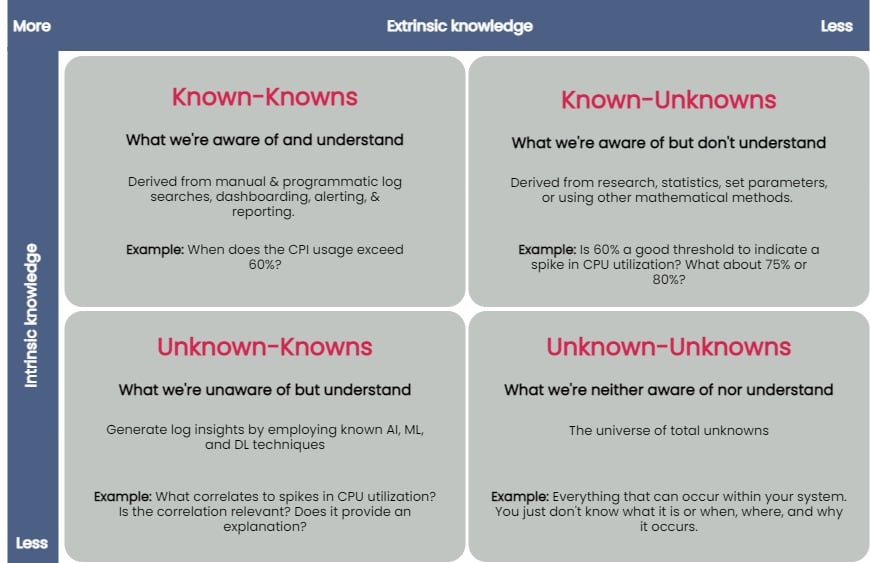
    logs value unknown


    You can taxonomize knowledge extracted from log data into four key groups: known-knowns, known-unknowns, unknown-knowns and unknown-unknowns. Manual and programmatic log searches, dashboarding, alerting and reporting manually extracted log fields are common ways to extract and analyze known-knowns. These methods assume that the engineer is already familiar with the data and knows where to look for answers. You can use statistics or other mathematical means to algorithmically resolve the known-unknowns, such as search terms and thresholds. The unknown-knowns are taken care of using AI/ML/DL techniques that generate log insights such as event correlations, log pattern clustering and known anomaly detection. But what about the unknown-unknowns?

    Uncovering Unknown-Unknowns

    With raw text logs, it’s relatively simple for engineers to conduct machine searches or set alerts upon encountering certain specific errors or specific types of behavior. However, to search through logs or even set up alerting parameters requires you to know what you’re looking for. If you have no idea what kind of errors or threshold limits for which you need to be alerted, it’s impossible to set these up.

    Modern applications are incredibly complicated, and one can not honestly understand everything about how they work or even always ask the right questions when things go wrong. But if an engineer reviewing logs doesn’t even know what to search for, it becomes impossible to figure out without an assistance tool like a purpose-built log visualization solution.

    For the most part, none of the techniques used to uncover the known-knowns, known-unknowns, and unknown-knowns of log data can help reveal the unknown-unknowns. An effective way of unraveling them is to rely on human intelligence to explore the unknown-unknowns space. Supplementing human intellect with a purpose-built log visualization tool can significantly help analyze the unknown-unknowns. Once you’ve recognized the unknown-unknowns, you can quickly feed this knowledge back into the appropriate, less esoteric groups (known-knowns, known-unknowns and unknown-knowns) and get more value from your log data.

    A good log visualization tool can aid in gathering knowledge from unknown-unknowns and can inform proactive log analysis or fast reactive log analysis use cases. Current log analysis practices center around reactiveness; the focus is to minimize and resolve issues after a problem has occurred. Using a log visualization tool, you can quickly isolate subtle and anomalous changes within a system by visualizing patterns generated from log data and exploring unknown-unknowns before an incident occurs.

    Current log visualizations are limited in display log count distribution and its variations. They do not visualize other log attributes or log combination attributes.

    All the UIs shown have similar function usage and displays. Drilling into an example of UI windows gives one the feeling of a typical log analytics practice. The figure below annotates different log analysis functions in the labeled, boxed area. None-visual log analytics functions such as search, tag, and log display are all required time-range input.

    log metrics annotate UI

    An ideal log visualization tool should not rely on just one information type. Log data is multifaceted. A log visualization tool can only begin to be valuable when it lets you focus on as many facets of log data as you can derive.

    Log Visual Pattern Discrimination

    The power of log visualizations comes from humans’ ability to recognize visual patterns. It’s hard to spot a pattern among raw log data, but it becomes easier once you can visualize that data.

    When an experienced DevOps operator looks at a log visualization, they can easily see where the anomaly is, even with no previous understanding of how the system works or where the anomaly might be coming from.

    Visualizations allow engineers to identify visual patterns and quickly understand what is going on in the system—whether it’s a hack in progress or an error causing a poor user experience. Visualizations are compelling, as they help shed light on important events, even if the engineer has no idea where to look or had no idea there was a hack going on in the first place.

    For instance, consider a scenario where a complex system generates millions of logs daily. Suppose we were to establish a baseline of the number of logs the system would generate when functioning normally. In that case, we’d have to take a daily count over a couple of weeks, or at least a month, to deduce a good-enough baseline.

    Even if we derive an acceptable baseline, we’d have to keep recording daily counts and compare it with this baseline to detect an anomaly. Doing this can be time-consuming and counterproductive as you might end up discovering an anomaly when it’s already too late to take any action.

    Once we plot logs daily on a graph, we can immediately figure out the baseline by observing it visually. Once we’ve visually established a baseline, we can instantly identify anomalies when we see values plotted above or below that established baseline. The following image visualizes logs ingested over ten days, illustrating how simple it is to establish baselines and identify when a system is doing something outside its usual behavior. This graph can deduce the baseline to be around 38,000 log records, with anything above denoting abnormal behavior within the system.

    log visualization

    Better Log Visualizations

    There are a few essential criteria for creating good log visualization analytics. They are:

    Use original log data. Data strategy is important. Most log data is unstructured by default, and many organizations tend to convert it to structured data before doing anything else with it. Doing so is a mistake, as you can lose vital pieces of information in the process. Good visualizations should be based directly on the logs exactly as the system produces them.

    Log data consistency. The format for the visualization should be consistent because if there are constantly changing variables, it becomes harder for humans involved to spot patterns.

    Choose robust log attributes and use them wisely. Instead of using just one log attribute for visualization (such as time distributed log density), you should look at visualizing more facets. Doing so gives analysts a better grasp of—and an intuitive understanding of—the log data set. For example, multiple pictures of an elephant taken from different angles help people understand elephants better than showing them only a single photo of an elephant taken from one angle. Similarly, if we break down logs by each of their attributes and then plot their frequency, we can better visualize how a system is performing. However, the attributes you pick are critical to providing valuable visualizations.

    With modern systems becoming even more complex, deciphering logs and uncovering unknown-unknowns will never be easy. The time is right to introduce new log visualization techniques to handle these unknown-unknowns. With log visualization becoming more user-friendly, you no longer need to count on people to be familiar with log interpretation or be aware of statistical, mathematical or AI techniques to analyze log data. Visualizing log data is not just a decision-making aid to human intelligence, discriminating between what is and isn’t acceptable and quickly identifying and remediating issues—the knowledge gained from unraveling the unknown-unknowns also helps advance AI/ML and automation techniques used to ascertain the knowns of your log data.

  • Engineering Applications for DevOps (Part 5)

    Engineering Applications for DevOps (Part 5)

    This blog series explains how to engineer applications for DevOps.

    Topics covered in this blog series:

    • Factors to decide whether an application is a good candidate for DevOps.
    • Practices to engineer designs for DevOps.
    • DevOps applied to enterprise apps and software services.
    • DevOps applied to COTS systems.
    • DevOps applied to manufactured (embedded) systems software.
    • Five levels of application maturity.

    This blog covers DevOps applied to manufactured (embedded) systems software. You can read part one here, part two here, part three here and part four here.

    DevOps Applied to Manufactured (Embedded) Systems Software

    In the late 1970s (yes, forty years ago!) as a young engineer, I was given an assignment to figure out how to accelerate the software development and delivery cycles for an innovative packet switch called SL-10, (predecessor to the more recent model called Data Packet Node [DPN]) manufactured by Northern Telecom. Each SL-10 “node” consisted of millions of lines of original embedded software source code and custom hardware configured with many interconnected processors and protocols interfacing with other nodes, host devices, and terminal devices.

    Given the complexity of the system and lack of automated build, test and deployment tools, it was taking more than twelve months to generate each release of the system, and there typically were lots of bugs even after the release. Without knowing much about DevOps (the word “DevOps” was not invented for another twenty-nine years), we proceeded to implement a continuous delivery system that included automated build, test and delivery tools and workflows.

    The result was remarkable. Lead times for releases to manufacturing were reduced more than tenfold, from twelve months to one month, and quality, measured as defects found by customers per release, also reduced tenfold. This dramatic shift in performance and capabilities made it possible for the engineering and manufacturing teams to accelerate the rate of innovation and trample the competition. The SL-10 product, and its rebranded DPN version, quickly dominated the connection-oriented packet switch market, and it became the pride of the Nortel corporation and the Canadian nation. Even cooler, I got a nifty president’s pin and promotion which paved the way for my career that led to writing a book and this series of blogs! If this real-life example is not sufficient to demonstrate that DevOps can be applied to manufactured embedded software products, then I don’t know what is.

    There have been many other examples published that show how DevOps practices applied to embedded manufactured systems have reaped similar benefits. A notable example was published in 2013 by Gary Gruver in A Practical Approach to Large-Scale Agile Development: How HP Transformed LaserJet FutureSmart Firmware.

    That is not to say that DevOps applied to manufactured software embedded systems is the same as applying DevOps to enterprise applications or COTS systems. A paper published on the CloudBees blog, Five Aspects that Make Continuous Delivery for Embedded Different, explained some of the key DevOps practices used with embedded systems.

    DevOps Benefits for Embedded Systems

    Benefits of DevOps for embedded systems are summarized as follows:

    • Retrofitting the huge code base typically found in legacy embedded software systems into a DevOps model is not easy. It is likely to be expensive, but it is almost guaranteed to be a worthwhile effort, especially if you have a longer-term vision and intend for your product to stay competitive in the future.
    • Developers of embedded software need access to massive amounts of computer resources for testing their real-time embedded code on powerful hardware simulators.
    • Developers and testers need access to physical product hardware to run their binaries for system tests that cannot be run on simulators alone. Lab-as-a-service (LaaS) systems that orchestrate testing topologies of real devices can improve sharing of critical resources. LaaS systems provide a test framework that can be integrated through APIs into a continuous delivery pipeline.
    • Long build and test processes may need to be reengineered to reduce serialized lead times into quicker build times made possible by scaling build and test resources.
    • Long compliance and conformance test processes for embedded systems need to be accelerated with automation and resource scaling.
    • Focus on continuous delivery rather than continuous deployments in which shippable product versions are frequently delivered to manufacturing for verification, but the frequency of deployments to end customers is determined by other business factors.

    What This Means

    This blog is one of a series explaining how to engineer applications to be most suitable for DevOps. This blog series explains how to engineer applications for DevOps including:

    • Factors to decide whether an application is a good candidate for DevOps.
    • Practices to engineer designs for DevOps.
    • DevOps applied to enterprise apps and software services.
    • DevOps applied to COTS systems.
    • DevOps applied to manufactured (embedded) systems software.
    • Five levels of application maturity.

    This blog covers DevOps applied to manufactured (embedded) systems software. You can read part one here, part two here, part three here and part four here.

    For more information regarding how to engineer applications for DevOps refer to my book Engineering DevOps.

  • Integrating z/OS Systems for Cross-channel Experiences

    Integrating z/OS Systems for Cross-channel Experiences

    Integrating z/OS Systems to Enable a Seamless Cross-channel Customer Experience

    Many industries where customer experience is the critical differentiator run on z/OS systems. That includes retail, financial services, transportation, hospitality, government, and more. As a result, integration of z/OS systems into any customer-oriented application or with front-end applications is essential.

    Just how important is the issue? More than two-thirds of companies now primarily compete based on customer experience.  That’s up from 36% ten years ago. Companies like Jet Blue and The Ritz-Carlton Hotel Company have historically been known for their exceptional customer service. And eyewear provider Warby Parker, widely appreciated for its customer experience, is known for a legendary example of above and beyond service when an executive returned a pair of glasses to the home of a customer who had left the glasses on an Acela train ride.

    Beyond multi-channel to omni-channel

    Many businesses offer multiple ways for customers to interact with their company. It is not unusual for a company to support interactions via the web, in-person, mobile, voice, text, and chat. That way, every customer can use their preferred method to ask questions, review account information, check on an order status, get information, search, place orders, and more.

    What differentiates one company from another is when a business offers a seamless cross-channel customer experience. Often called omni-channel, a seamless cross-channel experience is a multi-channel approach to serving customers that offers an integrated and cohesive customer experience no matter how or where a customer reaches out.

    We’ve all experienced the siloed approach that treats each channel separately. You’re doing something online such as placing an order, checking the status of a service request, or inquiring about your account. An issue occurs such as a phone line dropping, your mobile phone’s screen is too small to carry out the task, or you simply want to talk to someone in person. You switch from mobile to Web, or phone to in-store, and there is no connection or carryover between what you have already done and now. You need to reenter information, answer the same questions, and walk through the same steps.

    In contrast, the interaction with a business that delivers a seamless cross-channel experience is much different. An agent on the phone knows you’ve had trouble placing an order online, the in-store representative is expecting you to drop off an item for repair, and when you log into your account online, you are taken to the part of the process you were at on your mobile device.

    Integration is the key

    Omni-channel customer experience seamlessly integrates the different communication channels that businesses use to communicate with customers. Customer demand for a seamless cross-channel experience is pushing businesses to change. The number of companies investing in an omni-channel customer experience has jumped from 20% in 2010 to more than 80% in 2020.

    As a result, z/OS users are racing to adapt to the new realities of the omni-channel customer experience. Users expect that data and applications will be as readily available on mobile devices, the web, or via phones as they are on desktop clients.

    Developing a seamless cross-channel user experience can mean a significant amount of new application coding. What’s needed is a way to easily transform proven applications and system-of-record data using modern APIs to accelerate the delivery of new services and meet changing customer expectations.

    To tightly integrate z/OS systems for such efforts requires the embracement of modern application development methodologies. That includes providing developers with solutions that let them retain the decades of efforts that went into the core applications running on their z/OS systems while building new applications that tap into these systems.

    Businesses must make available to their developers the commonly used open-source development, workflow automation, and CI/CD tools to the z/OS environment to accomplish this. Such a strategy will help businesses speed the development of new applications to meet changing demands of their customers. It allows a business to leverage the data and applications on its z/OS systems and create innovative new applications.

    Developing new customer applications while retaining the core business functions, processes, and data on the z/OS systems ensures that all front-end access makes use of a single source of truth about the customer. There is only one record associated with each customer. Such integration of z/OS systems thus makes it much easier to keep all the channels aligned and lets businesses deliver the prized and highly desired seamless cross-channel customer experience.