Category: Blogs

  • The Graph Donates $48M to Advance GraphQL Platforms

    The Graph Donates $48M to Advance GraphQL Platforms

    The Graph, a provider of indexing and query tools based on the GraphQL language designed for blockchain platforms, today announced it has given $48 million to The Guild, a group of developers advancing an open source application programming interface (API) platform to further development of GraphQL-based technologies.

    Administered via The Graph Foundation, a nonprofit consortium that oversees the development of an open source graph database dubbed ONgDB, the agreement also calls for members of The Guild to contribute to the development of indexing and query tools being advanced by The Graph over the next four years.

    Eva Beylin, director of The Graph Foundation, said the goal is to fund the development of projects that leverage GraphQL, an open source data query and manipulation language for application programming interfaces (APIs) originally developed by Facebook, to create subgraphs used on blockchain platforms like Ethereum to index data in a way that is more accessible to developers.

    The open source community that is starting to evolve around blockchain platforms, also known as Web3, is now a major contributor to a range of GraphQL projects, noted Beylin. Those blockchain platforms are now being used to drive decentralized finance (DeFi) applications that do not rely on any single platform to process transactions. Those platforms are being employed by both startup and incumbent providers for financial services around the globe.

    It remains to be seen, however, how the GraphQL community will address security concerns. GraphQL APIs can easily suffer from broken object-level authentication issues just like any other API. The issue is a single GraphQL query could exfiltrate much more information than a typical API request. If the GraphQL provider does not have granular authorization checks for each particular method and resource, a GraphQL endpoint could become a major vulnerability.

    Cybercriminals also tend to launch brute-force attacks against APIs. With REST APIs, that malicious behavior is easier to catch with standard web application firewalls (WAFs) because it’s easier to notice hundreds of peculiar malformed requests. However, with GraphQL, a brute-force attack is harder to detect. It’s easier to limit this type of nefarious traffic with REST APIs by assigning access parameters to each resource and handling authorization checks one at a time.

    It’s not likely GraphQL APIs will replace REST APIs overnight. However, as the backend platforms for managing GraphQL APIs become more robust, the number of these APIs being used in a production environment by DevOps teams will dramatically increase—assuming there are no objections from cybersecurity teams.

    In the meantime, the open source community is clearly starting to rally around GraphQL, which should result in innovations applicable across a wide range of use cases. The challenge now is not only determining which type of API to employ and when, but also deciding whether any existing legacy APIs need to be replaced. One way or the other, however, the managing and securing of APIs—like it or not—is only going to become that much more challenging in 2022.

  • Log4j Puts Effective IT Operations at Center Stage

    Log4j Puts Effective IT Operations at Center Stage

    News of the Apache Log4j vulnerability exploit is striking fear into the hearts of both software makers and users. Log4j is the most popular Java logging service used today, with over 400,000 GitHub downloads and has been embedded in most internet services and products from companies all over the world, including Apple, Amazon, Cloudflare, Steam, Tesla, Twitter and Baidu, just to name a few.

    Exploiting this vulnerability is simple and allows threat actors to control Java-based web servers and launch remote code execution (RCE) attacks. New variations of the original exploit are being introduced rapidly—over 60 in less than 24 hours. The attack surface grows by the minute. Good credential management and advanced authentication will not help as this exploit is pre-authentication, which means an attacker doesn’t need to authenticate to your web applications to attack. Your web server is vulnerable.

    The good news is your organization likely has a team of seasoned IT operations pros that can help protect against the worst of Log4j’s devastation.

    How IT Operations Can Protect Against Log4j Vulnerabilities

    Step One: Find Log4j Wherever it Exists

    You need to investigate every internet-facing application, website and system that you own or use. This includes self-hosted installations of vendor products and cloud-based services. Focus on systems that are internet-facing that contain sensitive data. Once you’ve completed assessing your hosted apps and vendor systems, move on to endpoint applications. Java-based apps like WebEx, Minecraft, Citrix and many more.

    Step Two: Patch, Patch, Patch

    Patch in the same order as above: Internet-facing applications, websites and systems. If no patch is yet available for your apps and systems, uninstall.

    The pandemic has forced many endpoints into workers’ home environments, which creates extra challenges for patching those endpoints and keeping them compliant. Operations teams can’t rely on work-from-home folks to patch their own systems, even if they’re given clear instructions. Many of them will just ignore those directions, so you need to adopt systems that enforce continuous compliance.

    Step Three: IT Operations is Essential

    Communicate with your senior leaders. They should be in the know about this one! Senior leadership needs to position their IT operations teams among their most vital employees. Don’t think this is going to go away any time soon—we’re just starting to get a glimpse of what is being tried out there in the wild. Buckle up. 


  • U.S. Govt. CX EO | Mozilla Revenue | Log4j Latest

    U.S. Govt. CX EO | Mozilla Revenue | Log4j Latest

    Welcome to The Long View—where we peruse the news of the week and strip it to the essentials. Let’s work out what really matters.

    This week: Improving U.S. government CX, how much money Mozilla makes, and the latest on the Log4j/Log4Shell débâcle.

    EO: “Transforming Federal Customer Experience”

    First up this week: The Biden–Harris administration makes an executive order directing its Federal agencies to make 36 specific customer experience (CX) improvement commitments. Much of this involves using technology to improve what DevOps teams would call UX—but government doesn’t like the language of “users.”

    Analysis: Customer-centricity FTW

    Remarkably, a lot of interaction with government still involves paper forms. But this EO shouldn’t merely be about putting existing processes online. Work also needs to be done to solve the underlying complexity and fragmentation of services: Focusing on CX is a helpful frame.

    Brett Samuels: Biden to sign order to streamline government services

    [The] executive order [is] intended to cut back on the bureaucracy around government services for the public such as renewing passports, applying for loans or changing names. [It] affects 36 “customer experience improvement commitments” across 17 federal agencies, [targeting] travel, retirement, business, health and updating personal information.
    …
    For example … to renew their passports online rather than dealing with print forms. [It] will create a single portal for … student loan debt, and small-business owners will have a more streamlined process for … loans, grants and certifications.
    …
    Survivors of natural disasters will also no longer be required to complete forms with several agencies when applying for assistance … and they will be able to file smartphone photos and use virtual inspections when filing claims. [That] could be critical as natural disasters become increasingly devastating, as evidenced by the tornadoes that ravaged Kentucky over the weekend, killing dozens of people and destroying communities.


    Is this a technology problem? Yes, in part—but it’s also a government problem, argues Jennifer Pahlka:

    Surely laws like the 21st Century IDEA Act … which required agencies to … “eliminate or consolidate websites or web pages that are duplicative or overlapping … and ensure that each website or digital service is designed around user needs,” made life easier for the customers of those agencies? What’s that you say? You’re not sure you’ve noticed that? Turns out you’re not alone.
    …
    An EO is one of the many mechanisms our government has at its disposal for what I like to call “magic words.” [But there’s a] gap between magic words and the changes they are supposed to compel. [Failures] happen at such a staggering scale they have become entirely expected.
    …
    We tend to assign the blame … to government technology [but] at some point, you can only improve the customer experience by addressing [underlying] complexity. … Most of the Kafka-esque nightmares people get stuck in happen because each service sees only the burden they impose, and not [what] the customer experiences.


    If, like me, you’re inherently cynical about government efficiency, you’d expect this effort to be a huge failure. But let’s not be too cynical: Warning of “the hazards of selection bias,” here’s ShanghaiBill:

    In the olden days, I took half a day off work to go to DMV and renew my DL. Now I can do it online in 5 minutes. … I pay my property tax online. I renew my business licenses online. I incorporated online.


    $500 Million per Year—But for How Long?

    The Mozilla Foundation has unveiled its revenue forecasts for this year. As in previous years, Mozilla makes the lion’s share of its cash from Google—by making it the default search engine. But there are new revenue sources.

    Analysis: And not a moment too soon

    The future of the browser market should be a strategic focus for DevOps teams. Mozilla’s Googley cash cow might not last. It’s often assumed the maker of Chrome keeps Mozilla alive so it can point to Firefox as “competition.” But with Microsoft’s browser Edging up the usage charts, that might no longer be true.

    Frederic Lardinois: Mozilla expects to generate more than $500M in revenue

    For 2021, the organization forecasts revenue of more than $500 million. What’s maybe most important, though, is that Mozilla’s new products like its Mozilla VPN service, Firefox Relay Premium, Pocket and other commercial initiatives are slowly but surely starting to pay off.
    …
    But for all intents and purposes, Mozilla remains fully dependent on Google for the time being. Diversifying its revenue sources is really the only way for Mozilla to decrease its reliance on a search deal with a company that is both a competitor, thanks to its dominant Chrome browser, and is increasingly out of alignment with Mozilla’s overall philosophy.
    …
    There is a window here for a non-Chrome browser, with users increasingly skeptical about Google’s motivations and Microsoft’s Edge team making a few missteps in recent months. Yet at the same time, Mozilla’s efforts to bring sponsored suggestions and ads to Firefox haven’t necessarily endeared the organization to its own users either.


    Why is Google funding its competitor? u/SerAaron:

    Google is Mozilla’s biggest donor. … It’s basically to avoid any monopoly allegations—so they can point to Firefox and say “look, we have competition”.

    Mozilla takes their money, sure, but … they don’t sell data, and they aren’t beholden to Google.


    But don’t count on that cash continuing to flow, says Maelwryth:

    That money is probably under threat now with Edge going for the market. Why give Mozilla hundreds of millions to show competition when you have actual competition from Microsoft?


    Log4j/Log4Shell Seems Worse Every Time We Look

    The list of popular DevOps tools vulnerable to Log4Shell grows by the hour. Merely finding your exploitable services can be an impossible task—let alone patching them.

    Analysis: Defense in depth is key

    Searching for and patching your vulnerable code is not enough. You’re also going to need to shore up your network defenses, by auditing internet-visible services and by tightening your application firewall rules. And—ironically—keep a close eye on your logs for signs of attempted exploits and IoCs.

    Steven J. Vaughan-Nichols: We Are in So Much Trouble

    Log4j is used a lot. And, when I say a lot, I mean it’s used in hundreds of applications [including] Druid, Dubbo, Flink, Flume, Hadoop, Kafka, Solr, Spark, Struts, Apple iCloud, … LogStash, GrayLog2, … Steam, Twitter, and … VMware.
    …
    Log4Shell is both easy to exploit and can be used to grab complete control of vulnerable servers. … Even as you’re reading this, odds are decent you’re being attacked. [But] even if you patch it in your systems, it’s all too likely to be hiding in other applications.
    …
    Log4Shell may be the worst security problem in a generation. … This is going to be a long, hard ride.


    Hyperbole? Even December 25 isn’t close enough for government work. Catalin Cimpanu:

    The US Cybersecurity and Infrastructure Security Agency has told federal civilian agencies to patch systems affected by the Log4Shell vulnerability by Christmas Eve. … Federal agencies have ten days … to test which of their internal apps and servers utilize the Log4j Java library, check if systems are vulnerable to the Log4Shell exploit, and patch affected servers.
    …
    Despite being a recent vulnerability, it is already considered one of the worst security flaws ever discovered, primarily due to its near-ubiquitous use among enterprise software makers, its simple and easy-to-use exploit, and the ability to hijack systems remotely. … Days after being disclosed, the vulnerability has been massively abused. … The first attacks were seen on December 1.


    There’s always another shoe. Here’s Teri Robinson:

    Maybe Log4j vulnerabilities are like rats—for every one that’s visible, multiple others scurry beneath the surface. … Apache said the fix addressing “CVE-2021-44228 in Apache Log4j 2.15.0 was incomplete in certain non-default configurations,” according to … CVE 2021-45046.


    The Moral of the Story: In the end, the love you take is equal to the love you make.


    You have been reading The Long View by Richi Jennings. You can contact him at @RiCHi or tlv@richi.uk.

    Image: Bernd Dittrich (via Unsplash)

  • AWS Outage and App Resiliency: Did a Roomba Replace the Canary?

    AWS Outage and App Resiliency: Did a Roomba Replace the Canary?

    Canaries were once sent into coal mines as an early warning sign against danger—for me, it was my Roomba failing to automatically search out dog hair and clean the floor under my sons’ dining room chairs. Cloud-enabled apps also were acting “weird”. Some were down, while others were just slow—although, in my view, slow may as well be down; who has the tolerance to wait for an application to load?

    What caused this headache felt across the internet? An AWS disruption.

    In the days since the December 7 outage, I’ve had a number of conversations with CIOs, colleagues and other industry analysts and many of our shared concerns remain unanswered. Here are a few quick thoughts on the latest us-east-1 outage.

    Understanding AWS SLAs

    It’s important to remember that AWS requires instances/apps be deployed across two or more regions for redundancy and resiliency. And an SLA is not only a way for service consumers to gauge the value they’re getting for their money, it’s also the contractual agreement between a cloud service provider (CSP) and a customer. It outlines the uptime, availability and performance standards to which a cloud service will adhere. It may also specify that the service provider’s helpdesk will respond to an outage within a set amount of time. Amazon has very clear SLAs. If a customer receives less than 99.99% uptime in a given month, the company will provide credits to their account.

    However, there are three things to keep in mind:

    A 99.99% uptime agreement still means you are willing to tolerate services being down for almost four and a half minutes per month (53 minutes per year), and you must architect your AWS instances and applications in a way that meets the AWS SLAs. The third point is that, in AWS’s view, the outage wasn’t their fault.

    Outages Don’t Just Impact Startups and Organizations With Poor Planning Practices

    The cloud allows organizations to regularly make budget versus resiliency decisions. However, the recent AWS outage didn’t just impact born-on-the-web startups. Mature businesses like Disney, McDonald’s and Amazon itself were impacted by the outage. These technology-first companies aren’t sacrificing budget over resiliency. They understand that they are technology companies—they have large IT budgets that represent this priority and were still blindsided.

    The recurring question is why all these organizations were crippled by a single Amazon region going down? Was it poor architecture? Did these AWS customers not fully understand AWS’ SLAs? Did they choose budget over resiliency? 

    Amazon as an Enterprise Platform

    Adam Selipsky’s keynote and industry analyst Q&A at re:Invent 2021 made it clear that AWS is completely focused on the enterprise. Amazon understands the needs of the DevOps community, but they are still working on developing their approach to the enterprise. Google Cloud recognized the same shortcomings in its own organization and brought Thomas Kurian from Oracle to build up the company’s enterprise and IT industry persona.

    Everyone in the technology industry understands that outages and slow performance happen, but they expect service providers to provide best practices and avoid downtime. In response to Selipsky’s re:Invent keynote, Linda Jojo, executive vice president of technology and chief digital officer for United Airlines, said that the airline settled on a “one cloud” approach. Surely United Airlines can’t tolerate regular downtime.

    My View

    December 7, 2021 won’t live in infamy for AWS; we have seen plenty of other outages.

    Application resiliency is still an emerging area of focus. In the past, the focus was on platform and data center uptime; however, in many cases, developers have no control over the infrastructure. Therefore, teams need to focus on the resiliency of an application and assume that the underlying IaaS (cloud infrastructure) will fail for one reason or another.

    In addition, Amazon needs to offer more opinionated offerings. Disaster recovery and failover should be built into every level of AWS. Software companies shouldn’t be forced to sign up for multi-region deployments, but AWS should at least be prescriptive with best practices that advise such a practice.

  • Extending GitOps to the Enterprise

    Extending GitOps to the Enterprise

    GitOps is a relatively new term, but it continues to gain momentum as more organizations embrace the paradigm. In DevOps, GitOps lands on the software engineering side of the development and operations continuum. Even though GitOps is more likely to be adopted by smaller organizations, larger enterprises can successfully implement GitOps with just a few tweaks to the overarching framework.

    Let’s start at the beginning. Wouldn’t it be great if we could combine DevOps and GitOps approaches and use the Git distributed version control system as the ultimate source of truth? Then, when there’s a dispute over the correct state, people know where to go for the correct version.


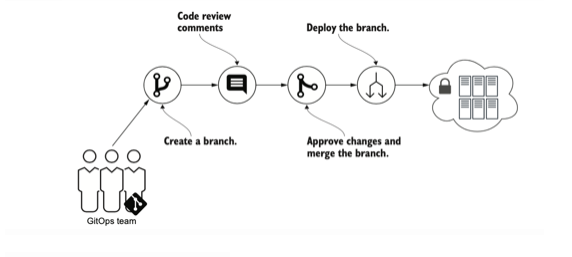
    In GitOps, the system’s desired configuration is stored in a revision control system such as Git. Any difference between the desired state stored in Git and the system’s actual state indicates to DevOps teams that not all changes have been deployed. These changes can be reviewed and approved through standard revision control processes such as pull requests (PRs). When a PR is approved and merged to the main branch, an operator software process is responsible for changing the system’s current state to the desired state based on the configuration in Git.

    GitOps doesn’t require a particular set of tools, but the tools must:

    1. Operate according to the desired system state stored in Git.
    2. Detect differences between the desired and actual states.
    3. Perform required operations on the infrastructure to synchronize the actual and desired states. 

    In an ideal implementation of GitOps, manual changes to the system are not permitted and all changes to configuration must be made to files stored in Git. The infrastructure and operations engineers’ roles in a GitOps model shift from performing infrastructure changes and application deployments to developing and maintaining GitOps automation and helping teams review and approve changes through Git. 

    GitOps is great for non-critical environments, but enterprises are less likely to adopt GitOps due to a number of challenges facing GitOps users.

    Challenges with GitOps

    GitOps is applicable only to a subset of the software development life cycle (SDLC). This is important because GitOps tools are sometimes marketed as a one-size-fits-all solution that will solve all release problems—this is simply not true. First, GitOps requires that your deployment artifacts are already there. This means that tasks such as

    • Compiling code
    • Running unit/integration tests
    • Security scanning
    • Static analysis

    are not a concern of GitOps tools and are assumed to already be in place. GitOps also doesn’t address promotion of releases between environments.

    Auditability

    A default GitOps process is not fully auditable because of force push. Force push essentially allows users to remove any unwanted blocks of commits from Git history on the central repository.

    Business Approvals

    PRs are a typical approval model used in GitOps. Developers make changes, create PRs and then an approver may accept that PR. This would be recorded and a change would be deployed. A PR-based approval model assumes peers are already using Git and are familiar with PRs. 

    Generally this works great until we need to include business approvals. Business personnel may not be familiar with Git or PRs. If a team needs business approvals, they have to build a process on top of GitOps. This drastically increases lead time. 

    Governance 

    GitOps is dependent on a pure PR-approval based model, one in which the PR approver is responsible for reviews. After a PR is approved, there is no way to enforce enterprise policy rules. Enterprises need to control what end users can do on specific clusters to ensure those clusters are in compliance with policies to meet governance, legal requirements or enforce best practices.

    An Enterprise Approach to GitOps

    However, there are ways to solve this problem at the enterprise level.

    Alerting on Drift Detection 

    Enterprise customers get alerted whenever there is a drift in their repository and, based on that, customers can choose to approve or reject the drift. If rejected, the merged PR should be reverted to the previous state to ensure that Git is in sync with the desired state of the cluster.

    Use a Pipeline for Promotion of Releases Between Environments

    To promote an artifact between environments, users would have the ability to use a pipeline with deployment stages, performance monitoring and log analysis/approvals. 


    Let’s say the developer commits the source code and the GitOps deployment happens in the QA environment. The PR can be automatically approved upon meeting the policy standards set by the company. Then it can be pushed to a production environment.

    Governance 

    There are many reasons why developers and platform engineers integrate policy-as-code into their current GitOps processes. For one, this strategy helps to accelerate application development and deployment because it helps solve many of the change management hurdles that slow development pipelines.

    On the development side, policy-as-code helps app developers understand and abide by the company’s configuration, security and compliance policies. For example, a developer may not remember—or may have no reason to know—when deploying a load balancer onto Kubernetes in AWS is or is not sanctioned. Policy-as-code solves this problem automatically.

    The ability to run policies during GitOps deployments and adhere to those policies as a part of the deployment and upon any violations—alert, audit, notify and automatically roll back the changes from Git to the previous successful compliant state so that Git remains in sync with the cluster.

    GitOps + AIOps

    There is a notion that once GitOps is in place, everything will work seamlessly with no problems. Not so much; it is important to continually monitor deployment state to ensure everything stays as it should. That is where AIOps comes into picture.

    GitOps enables DevOps and development teams to see any manifest change, infrastructure change or artifact change. Post-deployment, the GitOps operator can instantly understand the changes in the service health, see what caused those changes and automate the process of investigating them using AIOps. If any severe anomalies are found, the operator can determine the current state of the system and, should anything differ, revert to the previous compliant Git commit. 

  • NetApp Survey Shows Hybrid Cloud is Maturing

    NetApp Survey Shows Hybrid Cloud is Maturing

    A small survey of 79 midsized to large enterprises conducted by NetApp suggests enterprise IT organizations might finally be embracing hybrid cloud computing beyond use cases involving backup and recovery.

    The survey finds 20% of respondents are currently employing both on-premises and cloud resources to support the same workload in a production environment, with another 17% planning to do so within 24 months.

    Darnell Fatigati, senior product marketing manager for hybrid cloud at NetApp, noted that a hybrid approach to cloud computing will dominate with more than three-quarters of respondents reporting their organization plans to operate a hybrid cloud environment for the foreseeable future. Only 17% expect their organization to eventually migrate all their IT environments to the cloud.

    A major factor in the decision to not migrate all workloads to the cloud is the amount of data gravity that legacy applications running in on-premises IT environments exert, noted Fatigati. The amount of effort required to successfully migrate terabytes and even petabytes of data into the cloud is simply too great, he added.

    The primary benefits of hybrid cloud computing cited by survey respondents are faster innovation (26%), increased responsiveness (25%) and increased collaboration (22%). Survey respondents also noted they are looking to improve infrastructure flexibility and scale (27%), optimize costs (21%) and improve data accessibility (13%). Data protection involving disaster recovery, backup and archiving remains the most widely employed use case for hybrid cloud, with 29% either employing it today or planning to do so in the next 24 months.

    Most hybrid cloud computing environments today consist of multiple clouds and on-premises IT environments that are managed in isolation from one another. The fact that more organizations are now starting to deploy the same workload across both a cloud service and an on-premises IT environment has significant implications for DevOps teams that will be required to manage those workloads. Most DevOps workflows today do not span multiple platforms. However, as more organizations become impacted by the occasional cloud outage, the level of resiliency enabled by hybrid cloud computing is becoming a higher priority.

    In many cases, the shift to hybrid cloud computing was accelerated by the COVID-19 pandemic that drove many organizations to increase the number of workloads deployed in the cloud. Now, heading into 2022, those same organizations are looking to reduce IT costs by centralizing IT management as much as possible, noted Fatigati. Each time an IT organization adds a new platform, the tooling and personnel required to manage that platform increase the total cost of IT for any organization. Much of the shift to hybrid cloud is being driven by C-level executives looking to reduce those costs.

    It may be a while before most enterprise IT organizations are able to deploy workloads across multiple platforms. However, as both cloud and on-premises IT environments continue to evolve and as more platforms deployed in local data centers are increasingly managed using a cloud operating model, the way those platforms are accessed on demand will continue to converge. In fact, there may come a day when the term cloud computing itself disappears from the IT lexicon as every IT platform, by default, leverages one type of cloud or another.

  • Low-Code: Bridging the Gap Between DevOps and Business

    Low-Code: Bridging the Gap Between DevOps and Business

    The need to innovate faster, manage multiple environments, optimize an application’s life cycle and achieve continuous delivery are aspirational goals that a successful DevOps team strives for. But there are loads of challenges, as meeting these goals increases the pressure on DevOps teams to adopt improved application architecture, new tools and developer workflows.

    The overarching principle of DevOps is continuous effort, including continuous business planning, collaborative development, continuous testing, continuous release and deployment, continuous monitoring and collaborative customer feedback. This is where low-code development platforms are emerging as an integral way to empower DevOps teams.
    If you look closely, ​​low-code and DevOps share common benefits: The ability to offer faster, scalable and complex applications consistently to meet business needs.

    However, many DevOps teams still rely on conventional manual coding and automation. Low-code can also supplement the talent shortage by enabling folks without extensive programming experience to develop and deploy applications faster.

    How Low-Code Platforms Impact DevOps

    Automated Application Deployment: Low-code platforms increase the speed of DevOps while also reducing the overall complexity by providing a unified platform to enable the cultural shift. From managing version control to validating builds, low-code platforms do all the heavy lifting for your developers. With low-code, you can deploy almost anything in a single click—user interface, workflows, database and/or integration components.

    Clutter-Free DevOps: Low-code platforms allow you to integrate with different programming tools using APIs, SOAP and REST web services.

    Hassle-Free Migration: Organizations can keep their legacy systems alive longer by making their functionality available to many other systems. Consider developing an Android and iOS mobile application on top of your existing CRM system. While your core system maintains, a low-code platform allows you to develop add-ons or new apps on top of it. Furthermore, because low-code platforms provide easy-to-use tools, citizen developers may participate in the migration process.

    Maintenance at Scale: With low-code, you don’t have to worry about updating apps over time because the platform designer always updates and refines the stored interfaces—and, as a result, your application—without even bothering you.

    Enterprise-Grade Security: Security is a top consideration when building scalable apps. Low-code platforms enable your IT and DevOps teams to manage data and user access. Each user can be provided with access to only the information and functionality that they require based on their roles and responsibilities.

    Compliance and Security: Legitimate low-code platforms adhere to the Global Compliance Assurance Standards, as well as ISAE and ISO certifications. Security should be a top priority for your platform, which will serve clients from a variety of businesses, including government entities. Besides integrating robust security and governance features, make sure that your platform has also implemented an ISO/IEC 27001-compliant information security management system (ISMS).

    Democratizing IT: Bringing Business and DevOps Together

    A major challenge for DevOps is to constantly meet the changing needs of the business. The invariably dynamic nature of processes demands continuous optimization, which turns out to be a bottleneck for business, especially if IT can’t deliver applications on time. To make this whole approach scalable, low-code platforms provide multiple environments for your business and DevOps team to test, build, deploy and modify applications collaboratively.

    A comprehensive low-code platform offers the means of both visual programming and coding capability. For usability reasons, these tools are clearly separated and presented to the development team in a way that allows citizen developers and business users—who are most commonly the domain experts—to use the visual components while developers can work on adding custom code to extend the capabilities of the application.

    While a complex app can only be developed by an experienced professional developer, modifying the look and feel of an app or building/modifying basic functionality can be carried out by business users/citizen developers.

    Moving IT Up the Value Chain From Executor to Enabler

    IT teams are now viewed as critical to enabling their businesses to achieve greater productivity and profitability. By providing a self-serve model using a low-code platform, you can enable citizen developers to build custom apps, employees to use portals at their convenience and create dashboards to improve everyone’s visibility, among other value-adds.

    The key is to provide your teams with the right set of tools with the right level of access while still enabling IT to manage and monitor these low-code applications’ reach. For DevOps and IT ­leaders, it provides an opportunity to empower businesses with strategic insights and recommend solutions that best suit business goals, mitigating risks and offering budgeting strategies, rather than just being a facilitator of technology.

  • Overcoming Challenges to Automating DevSecOps

    Overcoming Challenges to Automating DevSecOps

    In the last few years, DevSecOps has been widely adopted among organizations looking to get proactive with their security. Traditionally, development teams would continuously implement and deploy new applications into the enterprise and security was an additional bolt-on at the end. 

    However, as the threat posed by cybercrime has increased, organizations have been ‘shifting left’ with their security and weaving it into the beginning of the development life cycle. 

    This offers significantly increased security benefits and means software vulnerabilities can be identified and remediated before they are exposed to the enterprise. The one drawback is around the additional time this takes. As a result, many organizations are also looking to automate their DevSecOps processes. 

    Automation is a critical feature of DevSecOps as it improves efficiency, cuts costs and can streamline operations. However, to get the most out of DevSecOps automation so it delivers real value to the organization, there are several challenges that must be considered first. But what are these challenges and how can they be overcome?

    How to Approach DevOps Security Automation

    When you first move to security automation, you’ll find some security tasks that can easily be automated and others that are harder to fit in. DevSecOps teams will need to use many tools to cover all their bases, but no one wants teams checking lots of different tool outputs. Making it easier to see what’s going on and where risk lies by consolidating security tools and results in a central platform is the way to go. This makes life easier by giving a single pane of glass. Everyone generally agrees that DevOps teams must adopt cybersecurity best practices, but testing takes time. Development teams don’t have time to learn, use and check lots of security tools on top of their existing workload. Automated solutions get to work without any real need for maintenance or management. These solutions trigger tools to work at the right time depending on the outcomes found without any manual input needed. This gives you and your team valuable time back to focus on other important matters.

    Fitting DevSecOps Into Secure CI/CD Pipelines

    The goal of CI/CD pipelines is fast delivery of build and release steps, typically through automation. A key goal of DevSecOps is to alert someone to a new problem as early in that automated process as possible. You need to develop solutions that don’t overwhelm CI/CD pipelines, yet allow flexibility for differing tech stacks, security tools and environments. What you need to ask is, have the latest changes caused any new and important security issues that should be reported before going live?

    Doing DevSecOps Without Constant CI/CD Changes

    Trying to manually run security tools on your entire application source code each day can be time-consuming and hinder your ability to keep up with daily changes. For security checks to keep pace with code delivery in a CI/CD environment, security automation is a must. Security products need to integrate into the development pipeline and enable both the development and security team to work together instead of just throwing things over the fence to each other. 

    Focusing on Issues Raised for Faster Remediation

    All the artificial intelligence and machine learning (AI/ML) in the world isn’t going to remove non-issues better than a manual triage, so here we recommend being resigned to getting stuck. Treat the first run of a set of security tools as a normal security test. Expect hundreds of issues and be prepared to go through them and mark the false positives, duplicates and issues that just aren’t important right now. But do this with the expectation that you’re creating a baseline against which your future pipeline scans can be measured so you’re only alerted to new important issues. By automatically managing and recording the lists of real issues existing in every DevSecOps pipeline run, we can then concentrate on the differences. These new issues need to be flagged and then made easily visible and actionable for all teams.

    Running Multiple Security Tools in CI/CD

    DevSecOps includes setting up many automated security tools to cover the many types of security issues that need to be checked for. Many organizations run multiple security tools. However, as the number of security tools grows and the DevSecOps processes become more complex, many companies then realize the hardest challenge is to make sense of all of the test results within a short period of time. For some companies, this task of bringing together the results from all of these tools is a full-time job, and one ripe for automation. 

    Triaging Security Issues

    False positives and nonsense issues are consistent problems for using security tools. Removing these gives better results and increases the chances that development teams will have a better relationship with DevSecOps processes. Organizations should build a list of issues that don’t need to be actioned and also use automated security tools to flag new issues and differentiate them from the previous backlog of issues. Automating the ‘best fixes’ across all issues also speeds up fix times, while reducing the workload on security teams. 

    Mapping Security to Development Processes

    Dev and DevOps teams are under pressure to get pipelines running smoothly and don’t want security slowing things down or complicating it. By automating security testing in such a way that it can easily handle changes in repos and containers, organizations can overcome this challenge without compromising security. 

    Risk Prioritization

    DevSecOps will increase the number of issues found as well as the speed with which they should be handled. In reality, only a small number of issues will pose a massive risk to the business. Being able to pinpoint the really big issues in real-time helps security know the big risks are being covered and allows developers to focus on the real issues, not lots of small bugs. You can also intelligently determine the changes in risk for quick and automated decisions in the CI/CD pipeline without slowing down the development team.

  • Red Hat Brings Ansible Automation to Microsoft Azure Cloud

    Red Hat Brings Ansible Automation to Microsoft Azure Cloud

    Red Hat this week announced that a private preview of the Red Hat Ansible Automation Platform is now available on the Microsoft Azure Cloud.

    Tom Anderson, vice president of Red Hat Ansible automation, said making the Red Hat instance of the open source automation framework available on Azure is the first step toward making it possible for IT teams to use the IT automation framework across multiple clouds.

    The goal is to make it simpler for IT teams to bridge multiple IT environments using a common framework to automatically configure everything from operating systems to security platforms across a hybrid cloud computing environment.

    Ansible is emerging as a de facto standard for automating IT environments largely because it provides an IT team with a declarative approach to automating IT processes. An IT team can write a playbook that describes their desired state for a platform without having to know anything about its current state.

    Interest in IT automation has soared as the number of workloads being deployed in the cloud and on-premises IT environments have steadily increased. The simple truth is that many organizations can’t keep pace with the rate at which applications are built and deployed because they are unable to hire and retain enough IT staff. The challenge is that writing a playbook to automate any IT process requires a fair amount of expertise that many organizations lack. There are, however, now large numbers of existing templates that organizations can reuse.

    Anderson also noted that security concerns will also force the IT automation issue. Many of the application workloads running in cloud computing environments are misconfigured because they were provisioned by developers that have little to no security expertise. A playbook greatly reduces the chances an application workload will be misconfigured in the cloud without having to turn every developer into a security expert, Anderson explained.

    Ultimately, IT automation frameworks reduce the level of friction that often exists between developers and the rest of the IT operations team in a way that actually serves to increase developer productivity, added Anderson.

    Regardless of how IT organizations automate IT processes, it’s now a question of the rate at which that goal will be achieved rather than if. DevOps teams, of course, have always been at the forefront of automation, but now it’s clear that as IT environments become more complex, IT organizations are embracing automation more aggressively. Most of those initial efforts are focused on repetitive, tedious and manual IT tasks, but the potential to automate IT processes at levels of unprecedented scale has never been greater.

    In fact, many organizations may soon discover it’s difficult to retain IT professionals without investing in automation. After all, the most talented IT professionals will not want to work for an organization that requires them to always manually configure IT resources. Many IT teams might also discover that automation frameworks like Ansible are the gateway to embracing additional DevOps best practices. The challenge, of course, is finding the time to get started automating processes when there are so many immediate issues that IT teams can’t ignore.