Category: Blogs

  • Bionic Extends Application Security Posture Management Platform

    Bionic Extends Application Security Posture Management Platform

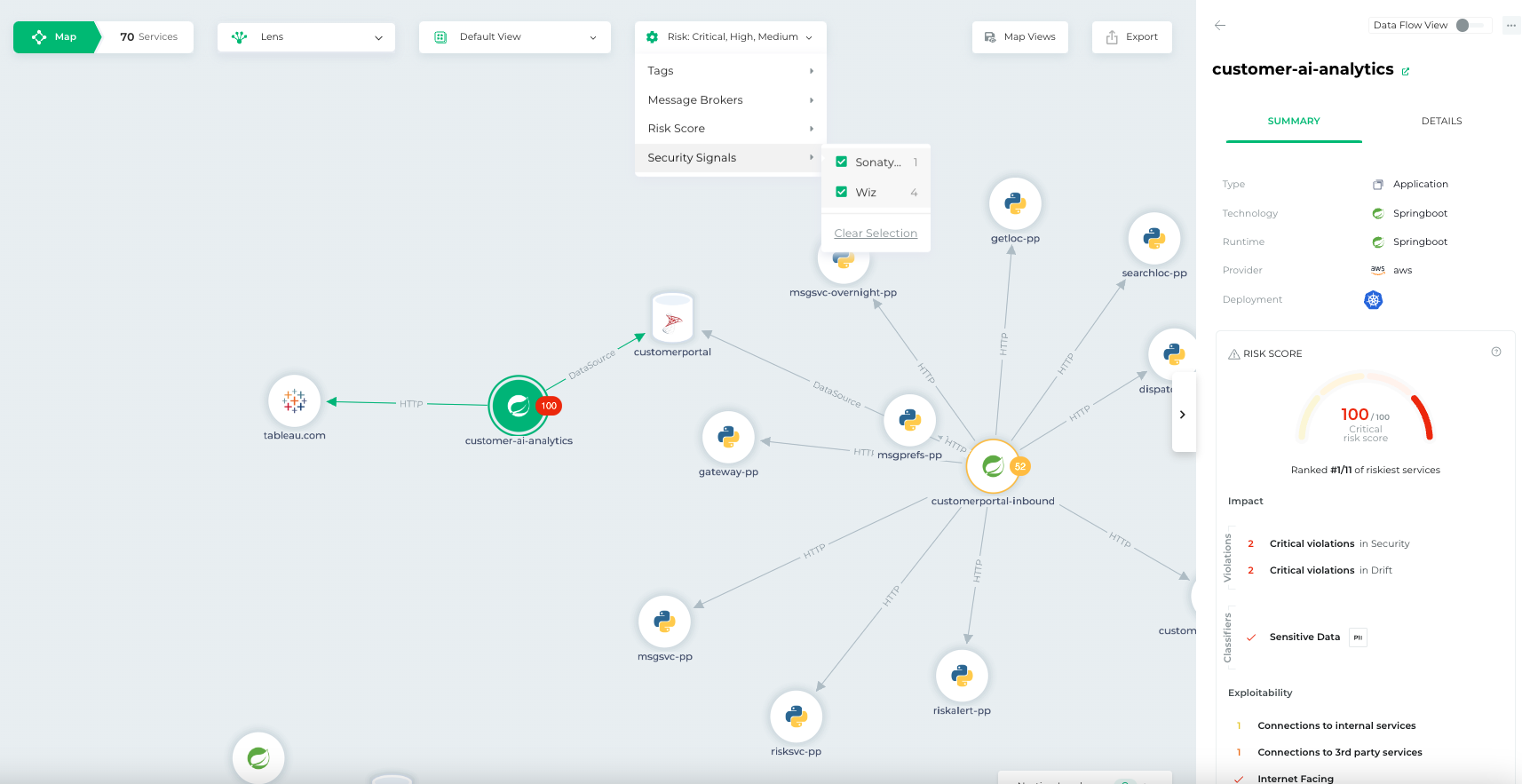
    Bionic this week added a pair of tools to its application security posture management (ASPM) platform that make it simpler to triage threats based on severity and attach a risk score.

    Josh Cho, senior director of global systems engineering at Bionic, said the Bionic Signals and Business Risk Scoring tools ingest data from third-party security tools to provide analytics capabilities. The first two vendors with which Bionic has integrated its ASPM platform are Wiz and Sonatype.

    The goal is to partner with additional vendors that provide unique cybersecurity capabilities that don’t compete with one another, said Cho.

    The agentless Bionic ASPM platform enables organizations to manage application risks by continuously collecting data from services and their dependencies, application programming interfaces (APIs) and DevOps data flows both in pre-production environments and after applications are deployed. Bionic then assesses any changes made to those environments based on a set of cybersecurity policies it provides. If an issue is discovered, the platform will create an alert informing the appropriate development team of best practices that eliminate the issue.

    While there is a lot of effort being made to shift more responsibility left toward application developers, there is often not enough cybersecurity context provided, said Cho. Bionic’s ASPM platform aggregates data from multiple tools to enable DevSecOps teams to better prioritize their remediation efforts, he added.

    It’s not clear how much organizations have embraced DevSecOps best practices, but one of the issues that needs to be addressed is the often-conflicting alerts generated by the various tools being used. Bionic is making a case for an ASPM platform that synthesizes data from multiple sources to streamline DevSecOps workflows.

    One way or another, more organizations will be embracing DevSecOps to better secure their software supply chains as more regulations are mandated. The challenge they face today is that most application developers—and the DevOps teams that support them—don’t have a lot of cybersecurity expertise. As a result, it becomes difficult to discern which vulnerabilities require immediate attention and which can be addressed in a regular update. In some instances, an alert generated by a cybersecurity team may not even been relevant—because the application in question is not internet-facing or the impacted module has not been loaded.

    In fact, it’s that very lack of context that often results in application developers disregarding the alerts generated by cybersecurity teams. Whenever there is a breach, however, cybersecurity teams always demand to know why their alert was ignored.

    No developer, of course, deliberately sets out to build and deploy vulnerable applications. In the race to meet delivery deadlines, there are always going to be tradeoffs. The issue then becomes keeping track of the cybersecurity technical debt that accumulates over time. An ASPM solution provides a means to keep track of that debt to enable DevSecOps teams to keep the risk in perspective.

  • Survey Sees Value But Limited Understanding of Platform Engineering

    Survey Sees Value But Limited Understanding of Platform Engineering

    Platform engineering is emerging as method for managing DevOps at scale, but a survey suggested that many organizations are still not clear on the concept.

    A survey of 100 DevOps engineers, platform engineers, developers, site reliability engineers and IT managers conducted by Civo, a cloud service provider, found 85% of respondents work for organizations that have partially or fully embraced a DevOps culture, with nearly two-thirds (65%) identifying platform engineering as the next evolution of DevOps. Nearly, a third (30%) of respondents work for organizations that are already currently evaluating whether they should adopt platform engineering.

    Overall, the survey found 50% of the respondents at organizations that have adopted platform engineering reported improved standardization, with 43% also seeing faster product delivery.

    However, only 41% of the respondents in DevOps roles that were familiar with platform engineering said they had a moderate to high level of familiarity with the concept.

    Saiyam Pathak, director of technical evangelism at Civo, said the survey makes it clear that, in terms of understanding how platform engineering best practices should be implemented, there is need for more clarity. Many organizations initially adopted DevOps to spur innovation, so any approach to centralization shouldn’t come at the expense of developer productivity, he noted.

    Historically, DevOps adoption of DevOps workflows in most organizations has been driven from the bottom up. As a result, it’s fairly common for multiple application development teams within an organization to have adopted multiple DevOps platforms to manage workflows. Advocates for platform engineering are making a case for eliminating many of those redundant platforms in favor of, for example, a single continuous integration/continuous delivery (CI/CD) platform that serves as a corporate standard.

    At the core of those efforts is the assumption that centralization will reduce costs by eliminating redundancy. At a time when more organizations than ever are sensitive to the cost of IT, there is always going to be a natural tendency to rationalize platforms. Challenges arise, however, when centralization results in a loss of flexibility. Many of the teams adopt DevOps because they want to be able to add and replace tools as they see fit. If there is a corporate standard that narrows their tool options, those teams may start to look for ways to do an end-run around the corporate standard.

    The philosophical IT battle between advocates for centralization and proponents of decentralization has been around since the first PCs showed up in enterprise IT environments. As always, organizations need to strike a balance between both extremes, said Pathak.

    It’s not clear how much platform engineering might accelerate the pace at which applications are built and deployed, but the total cost of DevOps should decline as various tools and platforms are consolidated. The challenge, of course, is that centralizing DevOps workflows is likely to disrupt the application development workflows on platforms that may about to be rationalized.

    Regardless of what platforms become the corporate standard, the one thing that is certain is the cultural challenges associated with successfully making that transition will loom large within most organizations.

  • How IT Services Can Embrace Platform Engineering

    How IT Services Can Embrace Platform Engineering

    We are all familiar with DevOps as a newer approach to software development. The concept is designed to enable developers and IT operations teams to work together. Platform engineering, on the other hand, is a more mature, older approach that has become new again.

    Platform engineering, at its core, is the concept of productizing your internal development platforms to make it easier for developers to work. It is an emerging technology approach that can help accelerate the delivery of applications and the pace at which they produce business value. More recently, companies have grown their complex software architectures which have created silos for the teams that manage these various architectures. There may be multiple teams with various specialized skill sets and a single DevOps engineer who takes care of the continuous integration (CI) jobs to deploy and release to production.

    Now let’s imagine that you have 10 squads that focus on building and maintaining different applications. Now all of these teams are building and operating 10 different platforms to run their applications, which creates inefficiency across the teams and reinforces silos. In this scenario, teams may spend half of their time building and maintaining the platforms instead of delivering business value. This creates a large cognitive load on developers.

    This model becomes very hard to scale. Even though you have these squads managing their own infrastructure and platforms, you may find gaps because there is no centralized standard. So how do platform engineering concepts help with these complex landscapes and boost efficiency?

    The Consulting Mindset

    Platform engineers take all of the tools used to run an application across your various teams and standardize their usage. This enables self-service capabilities for your engineering organizations. Platform engineering can help centralize how you are deploying and running your applications across a complex software landscape. This includes not only the standardization of tools being used but also documentation and processes.

    Establishing platform teams requires a consulting mindset and thinking about what resources, services and components can be centralized to better serve the rest of the organization. Some may refer to this as the center of excellence (COE) model, or simply IT for IT. This boosts efficiency and cuts down the time to delivery by providing a central set of tools and platforms for your engineering organization. Many may see platform engineering as a cost center, but the ROI is higher-quality releases, a standardized way of developing and delivering software and shorter delivery times.

    Applying This Concept to IT Services Firms

    In my consulting days, I worked for firms that focused on delivery for the Salesforce platform. We often had complex projects that we needed to deliver for large enterprise customers who had multiple applications integrating into their CRM. Each project team often had a different way of delivering and developing based on the customer’s needs. This created specialized skill sets, but we had no standard way of developing and delivering. Investing in a platform engineering team to support the delivery organization can add immense benefits for large consulting firms, enabling them to standardize the tools and platforms being used to run and deliver applications at scale.

    Having a centralized place for your developers to go for process, documentation and tools to help them build and run applications can increase the speed at which they deliver. The efficiencies gained in having a smoother self-service flow for your developers and cutting down the delivery time are worth the investment. It brings significant long-term value that the customer will experience long after the engagement is completed, which can greatly impact future considerations for your firm.

    IT services firms should find ways to align and centralize their technologies with platform engineering concepts. You may not be able to exactly build out an internal developer platform, but adopting some of the core concepts will help you be more efficient as an organization. For example, if you are an IT services firm specializing in delivering applications on the Salesforce platform, look for extensible DevOps platforms that can support your development organizations.

    Also, look for ways to enable a self-service workflow to make it easier for your developers to work and scale. This may include investing in a platform engineering function to support the rest of the delivery organization. By establishing platform engineering concepts, you will be able to cut down the delivery time and create consistency in how you deliver and deploy applications for your customers.

  • Must You Collect All That?

    Must You Collect All That?

    It is interesting that we no longer consider teams that super-tool their apps as being slightly ‘off’ or, working in a field where systems were mission critical, even life-and-death. Now, we all are collecting and reporting data points in real-time across not just the SDLC, but across the entire environment. It is wild the amount of data available to the average DevOps team about what is going on with their applications. But it’s not all being used.

    No, seriously, it is unreal. Let me offer two anecdotes that explain why I know you’re not using it all.

    Most of my regular readers know that I worked at F5 for years, the first couple on the DevCentral team, doing the Dev part. Their flagship product, the BIG-IP, collected an incredible amount of super-granular data. I am not exaggerating when I say an incredible amount. They had data points from the wire up to the traffic routes through the load balancing algorithm to nodes. And it was (and likely still is) all available to users via APIs. Whatever data was needed about traffic passing through the BIG-IP or the nodes behind the BIG-IP and the connections in between users and those nodes, you could get.

    One of my projects was to offer a simplified interface to the APIs. They were complex and granular, and customers wanted fast and easy, so I was publishing code that worked as an intermediate layer.

    Note: F5’s APIs, like everyone else’s, are far more advanced today than they were then, and it is easier to do what you need to do because they took the “create a user layer” part seriously. It’s complex machinery so it still has complex APIs, but accessibility is way up from those early days.

    Anyway, BIG-IP collected so much data that I could not name all of the fields, let alone when each one was pertinent. I gave up trying after a while, because if a board-level engineer needed a data point, the idea at the time was “Why not expose it?” so ‘number of connections to a given node’ under this algorithm was hidden among things like ‘microseconds to connect to DNS on that connection’ (I’m making those up; it’s been years). Some were terribly useful to end users and others were not. All were accessed in the same way, and learning by experimenting was the only real way to tell the difference.

    Users did not need all of that data. Users did not need the complexity and obfuscation created by supporting all of that unnecessary data.

    My other example is a massive system of interconnected IoT devices that were centrally connected/controlled with a private, specialized network to manage them (actually, there were several different networks on several different mediums, and that matters where data points are concerned).

    When setting this system up, we estimated about half a million IoT devices with capabilities that ranged from passive monitoring to active controllers of physical devices. Four different communications mechanisms, a couple dozen different devices, every major (and a couple minor) databases and command-and-control software on every major OS, managing from a handful to hundreds of thousands. And all of these were super-tooled because the IoT network was mission-critical. Our databases and the infrastructure to support/protect them were a major part of our data center budget because of the amount of data.

    The amount of data was a flood. The management software was developed by different companies with different transports and endpoints in mind, meaning each had a different dataset. Once all of the networks were running satisfactorily, our next immediate project was to create a unified dataset for reporting and troubleshooting. I was in charge of IT, but the top-level person–because each of those half a million devices was a physical install–was a physical engineer. We fought non-stop about what was important. I was trying to map and convert datapoints between systems; he was trying to maximize data available for reporting up. He often said, “Well no, we don’t need that today, but we might.” This put us in a zone where “number of devices on this system” was on par with “attenuation of the communications line to the nodes on this physical subnet.” Totally unworkable, and our compromise was to put together a small IT team to put a layer over all that raw data and offer an intelligent interface side-by-side with data dumps.

    We are there again today. I hear many of my friends in the enterprise space saying, “Because of ML, we might need that data and storage is cheap.” I disagree. Storage is an overhead that is wasted if you are not actively using the data. We are past the “all data is good data” craze; it’s time to adapt. Useful data that expands insights is all you need tooling for. Report data that will help solve problems, and if the team finds tomorrow that it needs a data point that is not currently collected, it can be added in.

    There is room for debate here–the rate of change for ML systems (please stop calling them AI; they’re not, yet, and we’ll need that word when they are cognizant) means that there is a reasonable argument for “all of the data.” And I’m not proposing limiting data collection. Honestly, application security specifically and enterprise IT security overall has benefitted from datapoint sharing between formerly separate market spaces. If the SCA scan shows X framework is used, then the IAST can narrow down tests to those that look at X and not its competitors, for example. But honestly, don’t drown yourself in a data lake when all you need is a fish tank where you can see all the guppies.

    And keep rocking it. Even if you entered IT two years ago, you are now a seasoned vet and things have changed–beyond all of our expectations, I’d say. Yet you’re still plugging away, keeping the enterprise running. Don’t stop—just try to keep the data hoarding to a reasonable level and make sure the data you have is being used, whether as useful feeds to an ML tool or as consumable information for other people/systems.

  • Mendix Embraces DevOps for Next Era of Low-Code App Development

    Mendix Embraces DevOps for Next Era of Low-Code App Development

    Mendix, a subsidiary of Siemens, today updated its namesake low-code application development platform to add support for DevOps workflows and make it simpler for developers to compose applications and embed artificial intelligence (AI) capabilities.

    Sheryl Koenigsberg, vice president of product marketing for Mendix, said Mendix 10 makes it possible to use Git repositories for version control along with Mendix Pipelines, currently in beta. Mendix Pipelines is a continuous integration/continuous delivery (CI/CD) environment that will be embedded in the low-code platform. In addition, Mendix is adding support for Webhooks that can be used to integrate Mendix with existing CI/CD platforms.

    Mendix has also added a Solutions Kit, now generally available, to make it possible to customize applications in a way that ensures those changes will be preserved as application environments are upgraded.

    There is also now a Portfolio Manager tool to track projects and a connector for integration with the Jira project management software from Atlassian.

    Later this year, Mendix will also make generally available Adaptation Insights to provide insights into application extensions.

    In the future, developers will be able to leverage an extensibility framework to tailor the Mendix Studio Pro integrated development environment (IDE) by adding their own plugins, wizards, editors and third-party integrations. Later this year, Mendix 10 will also add, in beta, a version of its Studio Pro IDE for MacOS.

    The Mendix approach to composability is also being extended to incorporate AI. The company is adding Mendix Assist, a bot that generates validation logic for data entry. This module is the second AI capability that Mendix has developed after previously previewing Mendix Chat, a tool based on a large language model created using Mendix data that will be integrated into the Mendix integrated development environment (IDE) later this year. Mendix Assist will be incorporated into Mendix Chat.

    Mendix is also developing additional LLMs for creating applications and will as part of its commitment to composability plans to make it possible to integrate third-party AI services and LLMs into the Mendix Runtime to create “smart apps.” AI models will be converted to the Open Neural Network Exchange (ONNX) format, an open standard for machine learning models, to provide that capability.

    In addition, Mendix is adding support for event-driven architectures via Business Events and an Event Broker, to build more complex applications.

    Other capabilities being added to Mendix 10 include updated REST and database connectors, support for visual data filters, rich properties and design controls, a Start from Spreadsheet tool, end user survey tools, a PDF document generator and a revamped set of governance and risk assessment tools.

    Finally, Mendix is adding a Terraform module to make it simpler to deploy its low-code platform on the Amazon Elastic Kubernetes Service (Amazon EKS) in addition to providing a reference implementation for building private clouds to develop applications using the Mendix Cloud service.

    As AI-infused low-code applications are developed faster, it’s not clear to what degree organizations are prepared to embrace the inevitable disruption that will ensue. However, the one thing that is clear is that the DevOps workflows used to deploy these applications at scale will soon be put to the ultimate test.

  • Design for DevOps: Using AI in App Design and Enhanced CI/CD Pipelines

    Design for DevOps: Using AI in App Design and Enhanced CI/CD Pipelines

    In my recent article Revolutionizing the Nine Pillars of DevOps with AI-Engineered Tools, I explained that design-for-DevOps practices, a DevOps pillar, involves designing software in a way that supports the DevOps model and CI/CD pipelines. This can include aspects like microservices architecture, modular design and considering operability and deployability from the earliest stages of design.

    In this article, I explain how AI can be used in the software design phase to enhance the performance of DevOps and CI/CD pipelines.

    AI-Assisted Code Review and Quality Assurance: AI-engineered tools such as DeepCode and Kite can detect bugs and security vulnerabilities in the codebase and suggest improvements.

    Infrastructure-as-Code (IaC): IaC tools such as Terraform, Ansible or Chef enable automation and standardization of the IT infrastructure and enhance the efficiency of DevOps pipelines by supporting rapid, consistent and repeatable deployments and rollbacks.

    Serverless Architectures: Developers can build and run applications without thinking about servers. This means less time spent on managing infrastructure, updating servers and debugging system issues. AWS Lambda, Google Cloud Functions and Azure Functions are all examples of serverless computing platforms.

    Containerization and Orchestration: Tools like Docker provide an easy way to package and distribute applications across various environments using containers. Kubernetes, on the other hand, can help manage these containerized applications at scale. Containerization and orchestration help maintain consistency across environments, simplify scaling and speed up the CI/CD process.

    Microservices Architecture: Small, independently deployable services can significantly improve the speed of development and deployment cycles as well as the reliability of applications.

    A/B Testing and Feature Flagging: Aided by AI-engineered tools, A/B testing and feature flagging can help to test new features in production with a small subset of users, making the release process less risky and more controllable.

    AI-Powered Performance Optimization: Tools like Akamas use machine learning to autonomously optimize the configuration of software applications, dramatically improving the performance and efficiency of CI/CD pipelines.

    AI-Driven Test Automation: AI-engineered tools can help automate the testing process. They can predict which tests are likely to fail and need to be executed first, optimize test suites and automatically generate tests.

    Adopt Observability: Use AI-powered tools for monitoring, logging and tracing to gain a comprehensive overview of the system. This data-driven approach can provide insights that can lead to performance improvements.

    Predictive Analytics: Tools that use AI can predict possible failures in the development process or in the software itself, which saves resources and helps developers anticipate and mitigate problems before they occur.

    Challenges and Solutions

    Challenges faced when implementing each of these strategies, and recommended solutions for overcoming them are described below.

    AI-Assisted Code Review and Quality Assurance: Developers may resist due to fear of relying too heavily on automation and skepticism about the accuracy of the tools. Begin with smaller, non-mission-critical projects and gradually scale up. Continuous training and iterative feedback improve the accuracy of the tools.

    Infrastructure-as-Code (IaC): The learning curve can be steep and managing IaC can require new skills. Invest in training your team or consider hiring experts. Start with simpler projects and scale up.

    Serverless Architectures: Debugging can be difficult and there can be concerns about vendor lock-in. Use application performance monitoring tools specifically designed for serverless environments. To address vendor lock-in concerns, use abstraction and containerization methods.

    Containerization and Orchestration: Containers require a different mindset and skillset compared to traditional virtualization. The initial setup and learning curve of Kubernetes can be steep. Training or hiring specialists is key. Starting with smaller projects can help in getting familiar with this new way of managing applications.

    Microservices Architecture: Implementing microservices can add complexity, especially around inter-service communication, data consistency and managing multiple databases. Use tools and practices designed for microservices such as service meshes and API gateways. Also, ensure each service is as decoupled and cohesive as possible.

    A/B Testing and Feature Flagging: This requires a mature deployment pipeline, and managing feature flags can be complex. Tools that manage feature flags can simplify this process. It is also essential to ensure a strong culture of testing and to have good monitoring and rollback capabilities in place.

    AI-Powered Performance Optimization: The accuracy and effectiveness of these tools depend heavily on the quality and comprehensiveness of the data they receive. Ensuring good data hygiene practices and comprehensive observability measures is crucial.

    AI-Driven Test Automation: AI testing tools can be seen as a black box, and their effectiveness is heavily dependent on the quality of the data they are trained on. As above, good data practices and thorough understanding of how these tools work is necessary.

    Adopt Observability: Implementing observability can require significant changes to application design and development practices. Start small with key applications or services and gradually increase scope. Training or hiring for the necessary skills is also important.

    Predictive Analytics: Building effective predictive models requires high-quality, comprehensive data and skilled data scientists. Invest in data management and data science capabilities. Using pre-built models and tools can help to get started.

    Roadmap to AI-Assisted DevOps Culture

    Implementing these strategies can be complex and vary significantly depending on the specific context and needs of an organization. The following is a generalized roadmap that can serve as a starting point.

    Step One: Assessment and Planning

    Conduct a thorough assessment of your current state, including the technologies in use, the skills of your team and the specific needs and goals of your business. Prioritize the strategies that are most likely to deliver value for your organization, taking into consideration the investment required and the readiness of your team. Create a detailed plan for implementing each strategy, including milestones and metrics for success.

    Step Two: Build Skills and Infrastructure

    Based on your plan, invest in the necessary training for your team. This could involve in-house training, hiring new team members with specific skills or contracting with external consultants or service providers. At the same time, start building the necessary infrastructure. This could involve setting up new servers, purchasing software or services or configuring existing resources.

    Step Three: Pilot Implementation

    Begin by implementing the chosen strategies on a small scale, ideally in a non-critical project or environment. Monitor the progress closely, gathering data on the impact of the changes and any problems that arise.

    Step Four: Review and Iterate

    After the pilot implementation, conduct a thorough review of the outcomes. Based on this review, iterate on your strategies and plan.

    Step Five: Scale Up

    Once you are confident in the effectiveness of your strategies, begin scaling up.

    Step Six: Continuous Improvement

    Regularly review your progress, keep an eye on new developments in the field and be prepared to adjust your strategies as needed.

    Benefits

    Implementing the roadmap as described will bring several benefits to the organization:

    • Improved Efficiency: Automation and streamlined processes, reduces manual effort and leads to increased productivity and more efficient use of resources.
    • Enhanced Quality: By using AI-assisted tools for code review, testing and performance optimization, the quality of the software can be significantly improved.
    • Increased Agility: Strategies like IaC, serverless architectures and microservices make it easier to adapt to changing requirements and market conditions.
    • Greater Reliability: By implementing robust testing, monitoring and rollback capabilities, the reliability of the software is enhanced.
    • Better Decision Making: By adopting data-driven strategies like observability and predictive analytics, the organization gains deeper insights into its processes and outcomes.
    • Risk Reduction: Through A/B testing, feature flagging and predictive analytics, potential issues can be identified and addressed before they cause problems.
    • Skills Development: Investing in an organization’s people has many lasting benefits.
    • Competitive Advantage: Adopting leading-edge practices and technologies will create competitive advantages.

    Summary

    This article provided guidance on crucial strategies for optimizing application design and development processes to enhance DevOps CI/CD pipelines. AI-enhanced strategies included AI-assisted code review, IaC, serverless architectures, containerization, microservices, A/B testing, AI-powered performance optimization, AI-driven test automation, observability and predictive analytics. Each of these strategies, while powerful, poses unique challenges such as resistance to adoption, complex learning curves and data dependency. Solutions to address these challenges focused on the importance of training, initiating less complex projects, maintaining good data hygiene practices and potentially hiring specialists.

    To practically implement these strategies, an example roadmap starts with an initial assessment and planning phase to understand the existing status and prioritize strategies. This is followed by skill development, a pilot implementation phase, a review and iteration phase, finally scaling up successful strategies. A successfully executed roadmap promises benefits such as improved efficiency, enhanced quality, increased agility, greater reliability, better decision-making, risk reduction, skills development and a competitive edge. The implementation of this roadmap necessitates careful planning, continuous learning and iterative improvement but holds the potential for a transformative impact on the organization, truly embodying the principle of ‘Design for DevOps.’

  • OutSystems Embraces Generative AI to Speed App Dev

    OutSystems Embraces Generative AI to Speed App Dev

    OutSystems, via a Project Morpheus initiative, intends to leverage generative artificial intelligence (AI) technologies to make it possible to automatically generate an application that developers will then use low-code tools to customize for specific use cases.

    In the meantime, the company is extending an existing alliance with Microsoft to provide a connector that integrates its namesake low-code platform with instances of ChatGPT. These instances are made available via Microsoft’s Azure OpenAI cloud service to make it possible to build a low-code application in a matter of minutes.

    Rodrigo Coutinho, director of data science for OutSystems, said that as generative AI continues to evolve, it will become possible for developers to use a natural language interface to create an application. However, there will also be plenty of instances where end users still prefer to access applications via a graphical user interface that developers build using low-code platforms, he noted.

    An application editor will also provide ongoing suggestions for everything from how the user interface is designed to the way data is managed.

    Developers will also be able to verify how code functions using the OutSystems visual language. In addition, The OutSystem compiler will be able to deterministically detect threats and code patterns produced by generative AI platforms that will include Google, Amazon and others alongside Microsoft.

    Ultimately, citizen and junior developers will be able to build sophisticated applications that previously would have required the skills of a professional developer, noted Coutinho.

    It’s not clear how much developers will embrace a low-code platform to build software. However, the one thing that is certain is the whole process of defining requirements before an application can be built will soon become obsolete as the building of an application becomes more iterative and involves developers working alongside subject matter experts, added Coutinho.

    It may awhile before that vision of application development is realized, but the pace at which applications are built and deployed is clearly about to accelerate. The impact of all that code will naturally vary, but it’s already apparent that the cost of building many applications may soon drop to almost zero. Developers will soon be spending more time on making sure workflows are logical than writing actual code, noted Coutinho.

    In addition to relying more on AI to build software, organizations should also rely more on AI to deploy it at unprecedented levels of scale. The days when application development projects were measured in months, sometimes years, is coming to an end. AI platforms will enable organizations to experiment at will because the time and effort required to build and deploy a new iteration of an application will be virtually nil.

    Of course, no one can predict what impact all that code will have on society as we know it. But the only limit going forward may soon be what our collective imaginations can conceive than the level of developer expertise that can be marshalled at any given time.

  • How Automation Enables Remote Work

    How Automation Enables Remote Work

    In recent years, the world has witnessed a significant shift towards remote working, largely driven by global events such as the COVID-19 pandemic. This transformation has necessitated the adoption of new tools and strategies, with automation emerging as a key enabler of effective remote work.

    So, what does automation mean in this context? Well, it’s the use of technology to carry out tasks with minimal human intervention. It’s a powerful tool that can streamline processes, boost efficiency and cut down on errors, making it an invaluable resource for companies navigating the complexities of remote work.

    The Rise of Remote Work

    According to McKinsey, a whopping 58% of Americans now have the opportunity to work from home (WFH) at least one day per week. And 35% have the opportunity to WFH for the totality of their work responsibilities.

    This shift has brought numerous benefits to both employers and employees. For employees, it means more flexibility, less commuting and a better work-life balance. For employers, it broadens the talent pool, cuts overhead costs and can even boost productivity. However, remote working also presents unique challenges, such as:

    ● Communication Barriers: In a remote work setup, maintaining clear and effective communication can be a challenge. Without face-to-face interactions, messages can be misunderstood or overlooked. This can lead to confusion, mistakes and a lack of cohesion within the team.

    ● Difficulty in Tracking Productivity: When employees are working from different locations, it can be difficult for managers to monitor their productivity. Traditional methods of tracking work, such as observing employees’ work hours, are not effective in a remote work setup.

    ● Maintaining Team Cohesion: Building and maintaining a strong team culture can be more challenging when employees are working remotely. Without regular in-person interactions, employees may feel isolated and disconnected from the team.

    ● Cybersecurity Concerns: Remote work often involves using personal devices and home networks, which may not have the same level of security as office networks. This can expose companies to increased cybersecurity risks.

    The Role of Automation in Remote Working

    Now, let’s delve into the ways automation plays a pivotal role in remote work.

    Automation and Communication
    In a remote work setup, effective communication is paramount. Automation tools such as Slack and Microsoft Teams facilitate better communication by automating tasks like scheduling meetings, sending reminders and translating messages.

    These tools can also automate the process of organizing and archiving conversations, making it easier to retrieve information when needed. Additionally, they can automate the process of updating team members about project changes or important announcements. These features ensure that all team members are on the same page, enhancing collaboration, reducing the chances of miscommunication and ultimately leading to a more cohesive and efficient team.

    Automation and Human Resources
    Automation in human resources (HR) is a game-changer in remote work settings. HR automation software can streamline recruitment, automating resume sorting, interview scheduling and follow-up emails. It can also enhance onboarding, automating welcome emails and account setups.

    Performance management can be improved with automated feedback collection and goal tracking. Furthermore, e-learning platforms can automate training assignments, progress tracking and certification issuance. This ensures a consistent, efficient and effective HR process regardless of location, enhancing the remote work experience.

    Automation and Project Management
    Project management can be a challenge in remote teams due to the lack of face-to-face interaction. Automation tools like Asana and Trello simplify this process by automating task assignments, tracking progress and generating reports.

    These tools can also automate the process of setting deadlines, sending reminders for upcoming tasks and notifying team members about changes in project plans. This allows managers to keep track of projects in real time, ensures that deadlines are met and helps in identifying potential issues early on, making project management more efficient and effective.

    Automation and Employee Monitoring
    Monitoring employee productivity and performance is crucial in a remote work setup. Automation tools like Time Doctor and Toggl track time spent on tasks, providing valuable insights into productivity.

    These tools can automate the process of generating productivity reports, tracking breaks and even monitoring website and app usage. This data can be used to identify bottlenecks, improve processes and ultimately increase productivity. It also allows managers to provide constructive feedback and tailor their management strategies to individual employees’ work habits.

    Automation and Cybersecurity
    Cybersecurity is a critical concern in remote work setups, which often involve multiple devices and networks. Automation plays a key role in maintaining security by detecting threats, installing updates and performing backups. Cybersecurity tools can automate the process of scanning for viruses, blocking malicious websites and encrypting data.

    They can also automate the process of updating security protocols and alerting users about potential security threats. This ensures that data remains secure, protecting companies from potential security breaches and giving employees peace of mind to focus on their work.

    Final Thoughts

    Automation plays a crucial role in enabling effective remote work. By increasing efficiency, reducing errors and saving costs, automation not only makes remote work possible but also profitable. As the future of work continues to evolve, we should expect to see more and more of the remote working processes being handled by automation tools.

  • Five Great DevOps Job Opportunities

    Five Great DevOps Job Opportunities

    DevOps.com is now providing a weekly DevOps jobs report through which opportunities for DevOps professionals will be highlighted to better serve our audience.

    Our goal in these challenging economic times is to make it easier for DevOps professionals to advance their careers.

    Of course, the pool of available DevOps talent is still relatively constrained, so when one DevOps professional takes on a new role it tends to create an opportunity for others.

    The five job postings shared this week are selected based on the company looking to hire, the vertical industry segment and, naturally, the pay scale being offered.

    We’re also committed to providing additional insights into the state of the DevOps job market. In the meantime, for your consideration:

    Indeed.com

    PEAR Health Labs
    Remote
    DevOps Manager
    $150,000 to $175,000

    Dice.com

    SR Partners
    Dallas, Texas
    DevOps Architect
    $140,000 to $160,000

    SimplyHired

    Reynolds & Reynolds
    Tallahassee, Florida
    Senior Software Architect
    $106,000 to $135,000

    LinkedIn

    Genesys
    Oakdale, Connecticut
    Senior Software Engineer: DevOps
    $93,600 to $194,400

    CareerBuilder.com

    Patterned Learning AI
    Remote
    DevOps Engineer
    $60,000 to $70,000