Category: Blogs

  • 4 Things to Consider When Integrating Generative AI

    4 Things to Consider When Integrating Generative AI

    Generative AI has emerged as one of the most influential innovations of the past two decades. ChatGPT gained 100 million users in record time, and new generative AI-powered point solutions emerge every day.

    Considering the current state of VC funding, the surge of investment dollars in AI companies is remarkable. Microsoft’s $13 billion investment in OpenAI and AWS’ $4 billion investment in Anthropic (who themselves just raised a $850 million Series C round) demonstrate the tremendous excitement around Generative AI and how it will shape the future of tech.

    As newer companies like Adept and Cohere are emerging, existing SaaS companies are integrating generative AI capabilities into their products and services. However, in the race to join the hype, many companies are building first and strategizing later. Before diving headfirst into building a generative AI solution, companies should carefully consider a few crucial factors, including model selection, usage tracking, monetization and customer transparency.

    1. AI Model Selection: To Build or to Buy?

    Companies must first consider whether to build a generative AI model from scratch, or whether to use a pre-existing model from one of the major AI vendors. This decision depends on the level of customization and control desired, as well as the resources and expertise available.

    Building a from-scratch model is likely infeasible due to the inaccessibility of the necessary hardware. The GPUs needed for cutting-edge model training and inference are currently only built by NVIDIA, and there is stiff competition and long lead times for any company looking to acquire the product. What’s more, large cloud and AI companies like OpenAI, Google, Meta and Tesla already have built systems with up to 100,000 of these chips. New companies looking to enter the scene would face a steep climb to assemble the infrastructure needed to even begin to compete with the current classes of models.

    Small or new companies do not have the funding or time to invest in building their own infrastructure or generative AI models, so a key business decision is to select the best vendor and model for the use case. While ChatGPT is the most well-known, there are other specialized models that can be better suited for certain use cases. For example, OpenAI’s DALL-E is built for image generation, while Anthropic’s Claude 2 is built to perform better with specialized tasks such as legal and math and to handle long-form inputs.

    Regardless of the AI vendor you choose, you will be charged based on your usage with them, which, by extension, is your customers’ usage. Tracking this usage is critical to your generative AI solution becoming profitable.

    2. Metering AI Service Usage: The Key to Success

    Implementing usage metering for generative AI services is crucial at both the individual user level and at the global or system-wide level. This is because usage tracking is valuable to all business functions and is a critical element of any modern PLG strategy.

    For example, customer-facing teams can leverage usage data to proactively track account health and to contextually recommend new solutions and approaches. Usage history provides valuable intelligence to account teams for up-selling, cross-selling, and contract renewal. Product teams can identify usage patterns and customer segments, as well as areas of friction or improvement for new feature development.

    Usage data also plays a major role in developing pricing plans that align with customer expectations and overall market trends. It can be used to inform pricing plan development and optimization to ensure the rates are sensible for the level of consumption and value being realized. Without tracking usage, this becomes a guessing game or a futile exercise in “gut feel.”

    Usage data is imperative to calculating your internal costs. Vendors commonly charge according to a usage-based model for these generative services–per word, per token or per generation are some common models. In any case, having accurate, granular usage data is a must-have for calculating internal costs and, in turn, customer-facing pricing.

    3. Monetizing Generative AI Services: Usage-Based Pricing Strategy

    In the rush to beat competitors to market and offer generative AI services to customers, do not neglect to lay the groundwork for monetization from day zero. It is much easier and more efficient to build with monetization in mind from the start than it is to backtrack and try to monetize a service once it has been offered, particularly when usage-based pricing is involved.

    Usage-based pricing has emerged as the optimal pricing strategy in the AI domain. This is because service usage varies over time for each customer. These services are priced by the vendors according to a usage-based pricing model. Since the backend costs of the service are elastic, the frontend, customer-facing pricing should also be elastic.

    As a roadmap to monetization, follow these steps:

    -Meter service usage to understand segments and patterns

    -Calculate internal costs of usage using vendor pricing

    -Using the information from steps 1 and 2, build customer-facing pricing

    -Track revenue and margins and continue to iterate with pricing as needed

    4. Customer Transparency: On-Demand Access to Usage and Billing Data

    Prioritizing transparency and clear communication with customers is non-negotiable. Ensuring that usage and billing data can be seen at any point in the billing cycle helps foster trust between the company and its users and eliminates billing surprises when the invoice is delivered.

    Adopting Transparent Communication Builds Trust With Customers

    Invest in creating a customer-facing application, portal or experience that allows for on-demand access to usage and billing data. The beauty of combining this level of visibility with usage-based pricing is that customers are empowered to pay for only what they use while viewing usage statistics on demand and modulating usage as needed in real-time to keep the spend within an acceptable range.

    In practice, usage data is available on a per-query level from the vendor’s APIs. For example, for any generation action, OpenAI will show the precise number of tokens consumed for both the prompt and response, as well as all details around the model type and context needed to identify the per-token rate from the vendor pricing. It is important to collect this data and build a user-friendly way to display it back to customers in an app, portal, or website that allows for on-demand access and browsing.

    Conclusion

    While planning to build a product with generative AI, take all of the above factors into account. Do not make the mistake of racing to deliver a technology solution without also considering the business implications and monetization strategy. With all the hype, excitement and investment around generative AI in 2023, it is akin to a modern-day gold rush. Don’t show up to the gold rush without a shovel.

  • What is Just-In-Time (JIT) Permission Management, and Why is it Essential?

    What is Just-In-Time (JIT) Permission Management, and Why is it Essential?

    Have you ever experienced the frustration of discovering an unexpected charge on your bank statement for a forgotten gym membership? Perhaps you kept it active “just in case” you wanted to exercise someday. Similarly, always-on privileged access, also known as “standing privileges,” can lead to similar challenges. 

    Surprisingly, 77% of organizations provide unrestricted access to employees who do not require it. However, maintaining an always-on approach does not necessarily facilitate their work; instead, it creates opportunities for security breaches that can go unnoticed. In fact, in 2022 alone, 55% of organizations fell victim to cyberattacks where hackers exploited privileged credentials, a critical attack vector as identified by Verizon. 

    This article explores the concept of just-in-time (JIT) permission management and its significance in providing the necessary security and efficiency for access control in organizations. We will delve into various types of JIT management, including automated JIT, and discuss the best practices for its implementation within your business. 

    Understanding Just-In-Time (JIT) Permission Management

    JIT, also known as just-in-time access, is a cybersecurity practice that adheres to the principle of least privilege. It grants users access to resources, such as applications and systems, only for a limited period when it is specifically needed. Once the designated time expires, users lose access to these resources. This methodology not only limits a user’s access timeframe but also reduces the chances of attackers infiltrating your cloud security perimeter. 

    With the increasing number of applications, services, users and resources in the cloud, 45% of breaches in 2022 were cloud-based, making JIT an essential requirement. While traditional privileged access management (PAM) processes, such as session management, are effective for on-premises environments, JIT is particularly suitable for controlling access across cloud resources. 

    Types of JIT Permission Management

    JIT permission management can be implemented in different ways, including: 

    Ephemeral: This approach involves creating a one-time account to fulfill the user’s access requirements, which is then disabled or deleted. 

    Temporary: Users can request elevated privileges on their existing accounts when necessary. 

    Justification-based: Users must provide a valid justification for requiring privileged access, based on predetermined policies. A privileged account and credentials are created and rotated using a central vault in this “broker and remove” access model. 

    The Importance of Automated Just-In-Time Access 

    Managing JIT permissions manually can be akin to playing a never-ending game of whack-a-mole, with constant access requests popping up across your organization. Can you realistically allocate sufficient time and personnel to grant and revoke access throughout the day, especially considering the resource constraints faced by 59% of organizations that struggle to deploy zero-trust? 

    In contrast, automated JIT platforms alleviate the challenges posed by manual permission management. These platforms validate, monitor and revoke access without requiring human intervention. By offering features such as auto-expiring permissions and comprehensive reporting capabilities, automated JIT platforms empower users to self-serve permission requests while maintaining your organization’s security posture. Entrusting permission management to an automated JIT platform minimizes human error, reduces the attack surface, eliminates bottlenecks and ultimately preserves productivity. 

    Benefits of Automated JIT

    Automated JIT not only eases the burden on your IT and security teams but also provides several other advantages: 

    Enhanced security posture: Compromised or stolen credentials were the most common attack vector in 2022, according to IBM’s Cost of a Data Breach report. By eliminating the need for standing privileges, automated JIT significantly reduces the risk of privilege abuse and breached identities. 

    Improved business productivity: With an automated JIT approval workflow, you can bid farewell to manual review cycles, waiting times and human error. You can grant access at scale, tailored to specific tasks, significantly improving operational efficiency. 

    Compliance adherence: Automated JIT enables you to meet compliance and customer requirements, such as SOC2, by enforcing zero trust and least privilege access. These platforms include auditing and reporting features that provide visibility into all sessions and privileges, ensuring compliance with regulations like SOC2 and PCI-DSS. 

    Enabling JIT Access: Best Practices 

    To successfully enable and implement JIT access, consider the following best practices: 

    Identify and inventory: Begin by identifying the accounts and assets with the most privileges, particularly those belonging to administrators, which pose the highest risk. Implement JIT access control for these accounts first and then gradually extend it throughout the organization. 

    Use RBAC and ABAC: Utilize role-based access control (RBAC) and attribute-based access control (ABAC) as supplementary solutions to define granular policies and circumstances for elevated access. Categorize accounts, differentiate their rights, and create control policies that users must satisfy to gain access. 

    Define and enable temporary access: Apart from justification-based access, establish criteria for users requesting temporary access, including which accounts are eligible and the duration of access. Implement time-based controls, such as granting access to specific resources during predefined days and times. 

    Record and audit activity: An automated access management solution enables you to log all access activities, receive alerts for suspicious behavior, and record JIT-privileged access. Maintaining a comprehensive digital paper trail is essential for auditing, governance, and compliance with regulations such as SOC2 and PCI-DSS. 

    Assign responsibility: Delegate responsibilities to employees and determine who will review permission requests. Properly training employees on granting and revoking access, especially during critical incidents like “break glass” and “on-call” situations, minimizes the risk of incidents. Automated JIT facilitates configuring access flows for these scenarios, helping resolve incidents promptly and eliminating bottlenecks. 

    Use short-lived (ephemeral) credentials: Regularly rotate credentials manually to invalidate them, preventing hackers from exploiting stolen passwords. Employ a centralized vault with the highest level of security clearance to manage these credentials effectively. 

    Employ an automated access management tool: Simplify cloud access management by leveraging solutions like Apono, which enforces an automated JIT approach. By using such tools, you can streamline processes, reduce over-privileges, and ensure that permissions are never overlooked, safeguarding your organization from unnecessary risks. 

  • RBAC

    While troubleshooting a production issue in your Kubernetes cluster, you notice that a critical application pod is repeatedly crashing. In the pod’s logs, you see an error message indicating “Permission Denied.” After further investigation, you discover that the issue is related to security authorization. What could be a likely cause of this problem?

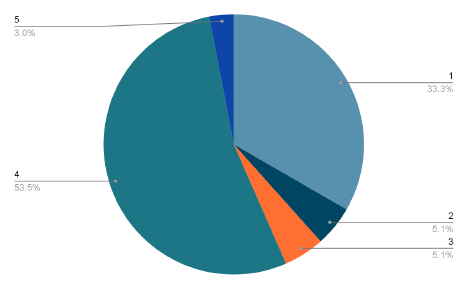
    Correct Answer: 4) Modifying RBAC (Role-Based Access Control) rules

    99 people answered this question with 54% getting it right.

    In the realm of Site Reliability Engineering (SRE) and DevOps, maintaining a robust and secure Kubernetes cluster is crucial. When your production environment faces an issue like a critical application pod repeatedly crashing, it can be an alarming situation, particularly when the logs reveal a daunting “Permission Denied” error message. In this blog article, we’ll explore how proper Role-Based Access Control (RBAC) can address this issue and ensure a stable and secure environment.


    The “Permission Denied” Dilemma

    When you encounter the dreaded “Permission Denied” error in your pod’s logs, it’s essential to recognize that this error is often related to authorization and access control issues. Kubernetes relies on RBAC to manage these aspects, which is similar to user roles in an operating system but tailored for the unique requirements of containerized environments.


    The Importance of RBAC

    RBAC, in Kubernetes, allows you to define who (or which entities) can perform operations on cluster resources and what operations they can perform. These entities could be service accounts, users, or groups. Proper RBAC ensures that only authorized entities can access specific resources, limiting potential vulnerabilities and unauthorized access.


    Identifying the Cause

    The first step in addressing the “Permission Denied” issue is identifying the root cause. The error message typically appears when a pod lacks the necessary permissions to access a resource. This can include accessing the file system, interacting with another service, or making changes to a cluster configuration.


    Role-Based Access Control (RBAC)

    In the context of Kubernetes, RBAC is the primary mechanism for controlling authorization and access to resources. Roles and RoleBindings are used to define what actions a user, group, or service account can perform within a specific namespace.

    ClusterRoles and ClusterRoleBindings extend this to control access across namespaces within the entire cluster.


    Modifying RBAC Rules

    Once you’ve identified the issue as an RBAC problem, the next step is to modify the RBAC rules to rectify the situation. This process can include several actions:

    • Role Adjustment: Review the role associated with the pod’s service account.
    • Ensure it grants the necessary permissions for the actions the pod needs to perform. You may need to add or adjust permissions in the role to allow the pod to function correctly.
    • RoleBindings: Check the RoleBindings to ensure that the service account associated with the crashing pod is correctly bound to the role. If it isn’t, the service account won’t inherit the permissions defined in the role.
    • ClusterRole Modifications: In some cases, you may need to modify ClusterRoles for broader permissions across namespaces or cluster-wide resources. However, exercise caution when changing ClusterRoles, as this can impact the security of your entire cluster.
    • Resource Verification: Double-check that the “Permission Denied” issue relates to RBAC. Sometimes, other factors like file system permissions may be at play.
    • Ensure that you’re addressing the correct problem.

    Common Mistakes to Avoid

    When dealing with RBAC, it’s vital to avoid common mistakes that can lead to security vulnerabilities or disrupt your cluster’s operation:

    • Overly Permissive Roles: Granting excessive permissions through RBAC rules can introduce security risks. Ensure roles are appropriately scoped to limit access to only what’s necessary.
    • Neglecting to Review RBAC: RBAC is not a one-time setup. As your applications evolve, so do their requirements for permissions. Regularly review and update RBAC rules to ensure they align with your application’s needs.
    • Lacking RBAC Auditing: Monitoring and auditing RBAC is critical to identifying suspicious or unauthorized activities. Implement robust RBAC auditing tools to track access and changes.

    Conclusion

    In the world of SRE and DevOps, addressing “Permission Denied” errors in Kubernetes is a common challenge. By understanding the importance of Role-Based Access Control

    (RBAC) and how to modify RBAC rules effectively, you can resolve these issues,

    ensuring the stability and security of your cluster. Properly managing RBAC not only solves immediate problems but also contributes to a more secure and resilient production environment, which is essential for effective demand generation and business continuity.

  • Maximizing Data Insights: How OLAP Empowers Modern Data Stacks

    Maximizing Data Insights: How OLAP Empowers Modern Data Stacks

    In the era of big data and cloud computing, online analytical processing (OLAP) has fallen out of favor. As modern data warehouses evolved to accommodate larger volumes of data and claims faster processing capabilities, OLAP fell out of fashion as a notion emerged that it would struggle to manage the combinatorial explosion. The focus shifted toward runtime querying engines. Instead of using predefined or pre-aggregated OLAP cubes, many business intelligence (BI) and analytics tools used their own data modeling applications that worked directly with raw data.

    However, in recent times, there has been a realization that OLAP, when implemented intelligently, can be highly beneficial even in the context of a massive scale of data and cloud computing. Modern OLAP leverages advanced technologies and optimizations that overcome any previous limitations. Besides being cost-effective, especially for cloud implementations, it delivers real performance advantages.

    Modern OLAP systems are designed to handle large datasets efficiently. One of the key strengths of OLAP lies in its ability to provide real-time or near-real-time insights, enabling businesses to make data-driven decisions with greater agility. The multidimensional data model of OLAP cubes facilitates instant query response, empowering users to derive valuable insights from complex data sets without compromising on query performance.

    Consider These Advantages of Using OLAP in Modern Data Stacks

    Performance: As data volumes continue to grow, OLAP remains a powerful technology to extract valuable insights and unleash the true potential of modern data stacks and cloud environments. OLAP’s multidimensional data model with pre-aggregation cubes enables efficient data processing and analysis, delivering faster insights and sub-second query responses. Modern algorithms further enhance performance, allowing organizations to handle large-scale data workloads without worrying about data explosion problems.

    Unique OLAP Capabilities: Some domains, like finance, have an inherent need to preserve crucial OLAP capabilities even with the growing data storage and compute requirements for which they make a move to modern data stacks and cloud environments. Moving to the cloud enables data scalability, addressing the challenges of handling vast data volumes. However, they cannot afford to compromise on essential OLAP functionalities such as advanced hierarchies, like parent-child relationships, and alternate hierarchies with weighted rollups.

    These capabilities are indispensable, especially in the world of financial analytics, regardless of how modern and advanced the new data stack may be. By leveraging OLAP in the cloud, organizations can continue to analyze and explore data with complex hierarchies efficiently, ensuring accurate and in-depth financial insights without sacrificing the flexibility and analytical power that OLAP provides.

    Cloud Architecture and Cost Effectiveness: OLAP in cloud architecture presents a powerful and forward-looking solution that combines the benefits of OLAP technology with the scalability and cost-effectiveness of cloud computing. By harnessing the cloud’s resources, OLAP can efficiently process and analyze large volumes of data, thus meeting the growing demands of modern businesses.

    Once OLAP cubes are constructed and populated, they provide a highly efficient and aggregated representation of the data. These pre-aggregated structures accelerate query performance, enabling teams to access insights in real-time or near-real-time. BI teams can seamlessly integrate existing tools with the OLAP model, fostering a cohesive and familiar analytics environment. It empowers decision-makers to explore data interactively, drill down into details, and gain valuable insights.

    One of the primary advantages of OLAP in the cloud is its cost-effectiveness. OLAP technology, being primarily based on pre-aggregation, drastically reduces runtime querying compute cost, as answers to business queries are already pre-computed and stored in an aggregated structure. At querying time, OLAP tools have to look for right answers from the aggregated structure—not the cloud data storage—and return the query response, which results in much less compute cost as compared to runtime aggregation compute cost. It truly enables build once, query many times culture. Apart from this, businesses can leverage the cloud’s elasticity to scale computing and storage resources up or down as their data requirements fluctuate. This adaptability ensures companies can handle peak workloads without overprovisioning and reducing unnecessary expenses.

    Universal Semantic Layer: A USL approach ensures consistent data definitions and analytics across the organization, reducing data discrepancies and improving data governance. A common understanding of the data enables better communication among teams and results in a smooth implementation of a data-driven decision-making process.

    At the same time, using a USL means that multiple business intelligence tools and reporting platforms can connect to and leverage the same semantic model. Hence, various parts of the organization can continue to work with their familiar BI interfaces while accessing common underlying data.

    OLAP lends itself naturally to delivering on a powerful universal semantic layer. The concept of dimensions, measures, hierarchies and calculations forms the foundation of an OLAP semantic model. OLAP semantic models also accommodate complex calculations, custom expressions or formulas required for complex business-specific logic. These components provide a powerful way to structure and organize data, making it more accessible and intuitive for business users who need to derive insights from the data.

    If we consider typical sales data, product categories, geographic regions and time periods could be dimensioned. Measures, on the other hand, would be sales revenue, profit margins, quantities sold or any other KPIs. Hierarchies allow data to be analyzed at different levels of granularity. Users may roll up or drill down to view data at different time intervals such as year, quarter, month, day, etc.

    USL and OLAP models are designed to shield business users from the underlying complex data modeling and schemas. They can work with filters, dimensions and measures that are business-focused representations of the data using familiar business terms while abstracting technical intricacies. They can view and explore data through intuitive hierarchies, filters and measures aligned with their business processes and KPIs.

    Conclusion

    OLAP in cloud architecture represents a forward-looking, fast and cost-effective solution. It capitalizes on the cloud’s scalability and pay-as-you-go model to process vast amounts of data efficiently, while its pre-aggregated structures and real-time capabilities empower business intelligence teams to gain valuable insights seamlessly. With its agility, OLAP in the cloud is well-positioned to meet the challenges of the future, providing organizations with a competitive edge with data-driven decision-making.

  • OpsMX Adds Deployment Firewall to Ensure Compliance

    OpsMX Adds Deployment Firewall to Ensure Compliance

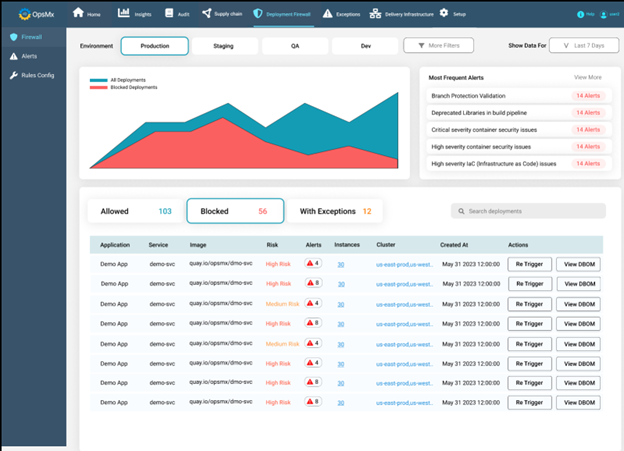
    OpsMx today added a deployment firewall to its Deploy Shield portfolio for securing continuous integration/continuous delivery (CI/CD) platforms.

    The deployment firewall automatically applies rules to ensure DevOps teams comply with mandates such as the payment card industry data security standard (PCI DSS) or the Health Insurance Portability and Accountability Act (HIPAA). It then evaluates a release against a checklist of policies and blocks any deployments into a production environment unless a specific exception has been defined. In those instances, DevOps teams can also set an alert to address that issue at a later date.

    In addition, DevOps teams can extend those rules defined by OpsMX to address specific compliance requirements.

    The checklist includes making sure vulnerability scams have been run, tracking when the manifest was last updated, confirming that operational controls are being followed, checking whether images have been modified and evaluating the infrastructure being employed and performing an analysis of the performance impact.

    A simulation feature also allows developers to check their release for compliance before it is time to deploy.

    OpsMx CEO Gopal Dommety said the goal is to streamline the effort that is required to meet multiple compliance mandates as the pace at which applications are being developed and deployed continues to increase.

    Today there are simply too many data silos for DevOps teams to manage, with each one presenting yet another opportunity to run afoul of a compliance mandate, he added. The overall goal is to reduce the cognitive load being placed on developers as more responsibility for compliance is shifted left, noted Dommety.

    The deployment firewall currently supports DevOps platforms such as Jenkins, Argo and Spinnaker, with support for GitHub Actions and GitLab to follow.

    OpsMX claims its overall customer base has increased by more than 60% in the first half of this year, with customers including Google, Cisco and Western Union. In addition to Deploy Shield, the company provides a Delivery Bill of Materials (DeliveryBOM) tool to capture a consolidated record of every step in the application software delivery and deployment process. Security checks, approvals, policy enforcement and audits are tracked via one tool. In addition, the company provides tools for managing the deployments of software via either the Argo or Spinnaker CD platforms.

    It’s now only a matter of time before various regulations that apply to the building and deploying applications become more stringent. Tolerance for sloppy application development processes is dropping as legislative bodies increasingly determine that software development practices are a big cybersecurity problem that threatens national security and the global economy.

    Organizations that fail to comply with those regulations will be subject to even heftier fines than the ones that already exist. In many cases, that may slow down the rate at which applications are deployed unless DevOps teams find ways to manage compliance-as-code more effectively as part of a larger DevSecOps workflow.

    When it comes to DevSecOps, progress tends to be slow in most organizations, but as more tools become available to automate various tasks, it’s now only a matter of time before software supply chains are more tightly secured. Hopefully, the pace at which those advances are being made will occur faster than cybercriminals can exploit the vulnerabilities that today are too numerous to manually track.