Category: IT as Code

  • Senser Extends AIOps Reach to Manage SLOs and SLAs

    Senser Extends AIOps Reach to Manage SLOs and SLAs

    Senser is extending the reach of its artificial intelligence for IT operations (AIOps) platform to now include an ability to define and maintain service level agreements (SLAs) and service level objectives (SLOs).

    SLOs are a set of internal performance goals that require access to telemetry data from service level indicators (SLIs), while an SLA is a formal commitment to maintaining specific levels of service.

    Senser CEO Amir Krayden said the company’s AIOps platform collects data from SLIs and then applies predictive AI models to enable IT teams to achieve SLOs and SLAs. The Senser AIOps platform leverages extended Berkeley Packet Filter (eBPF) and graph technology to gain visibility into the entire IT environment versus requiring IT teams to deploy agent software. Machine learning algorithms are then used to aggregate and analyze that data to define thresholds for predicting performance in addition to recommending benchmarks for tracking SLOs and SLAs.

    That approach provides a single source of truth for identifying the actual level of service being provided based on a topology of the infrastructure, network, applications and application programming interfaces (APIs) that makes it possible to identify the root cause of issues and the potential impact of an outage for degradation of performance.

    IT teams have been attempting to achieve and maintain SLAs and SLOs for decades, but given all the dependencies that exist in a distributed computing environment, it’s difficult to achieve that goal. Senser is making a case for applying AI within the context of a platform for automating the management of IT to define and maintain SLOs and SLAs to make it possible to consistently manage SLAs and SLOs in a way that reduces the level of cognitive load that would otherwise be required. Senser is also working toward adding generative AI capabilities to provide summaries that explain what IT events have occurred.

    Collectively, the goal is to provide IT teams with a more efficient holistic approach to monitoring and observability that legacy platforms are not going to be able to achieve and maintain, said Krayden.

    At the core of that capability is eBPF, a technology that allows software to run within a sandbox in the Linux microkernel. That capability enables networking, storage and observability software to scale at much higher levels of throughput because they are no longer running in user space. That’s especially critical for any application that needs to dynamically process massive amounts of data in near-real-time.

    As the number of organizations running the latest versions of Linux continues to increase, more hands-on experience with eBPF will be gained. IT teams may not need to concern themselves with what is occurring in the microkernel of the operating systems, but they do need to understand how eBPF ultimately reduces the total cost of running IT at scale.

    Ultimately, the goal is to reduce the current level of complexity that today makes effectively managing highly distributed computing environments all but impossible for IT teams to manually maintain in an era where the pace at which applications are being built and deployed only continues to accelerate.

  • Hybrid Cloud in 2024: Trends and Predictions

    Hybrid Cloud in 2024: Trends and Predictions

    Hybrid cloud environments are becoming increasingly pivotal for DevOps teams, primarily due to their ability to bridge the gap between the rapid deployment of public cloud resources and the security and control of private cloud infrastructure. This blending of environments provides DevOps teams with flexibility and scalability, which is crucial for operating continuous integration and continuous deployment (CI/CD) in large enterprises.

    In a hybrid cloud setup, DevOps teams can swiftly deploy and test new applications in a cost-effective and scalable public cloud environment. Once the applications are ready for production, they can be seamlessly transitioned to a private cloud or on-premises environment, where they benefit from enhanced security and control. This allows DevOps teams to optimize their workflows, reduce time to market, and respond more effectively to business needs.

    The hybrid cloud also enables a more collaborative and agile working environment. DevOps teams can leverage various tools and platforms available in the public cloud while ensuring that sensitive data and critical applications are securely managed in the private cloud. This both enhances operational efficiency and improves compliance with data governance and regulatory requirements. These benefits will make hybrid cloud an indispensable asset for DevOps teams in 2024 and beyond.

    What is a Hybrid Cloud?

    Let’s start with a brief definition. A hybrid cloud is a computing environment that combines a public cloud and a private cloud by allowing data and applications to be shared between them. This combination allows businesses to enjoy the best of both worlds, leveraging the scalability and cost efficiencies of public cloud platforms while enjoying the security and control offered by private cloud infrastructure.

    This hybrid cloud model provides businesses with more deployment options and greater flexibility to scale computing resources. It also helps in reducing capital expenditure and improving security by allowing sensitive data to be stored on a private cloud. A hybrid cloud strategy enables businesses to allocate resources efficiently, keeping less critical applications on the public cloud, while mission-critical applications run on the private cloud.

    Current State of Hybrid Cloud Computing

    The hybrid cloud market is in a state of rapid growth and evolution. As businesses increasingly recognize the benefits of a hybrid approach, the adoption of hybrid cloud strategies is on the rise.

    In a world where digital transformation is the norm, hybrid cloud computing has emerged as a key enabler. It offers the flexibility needed to adapt quickly to changing business conditions, the scalability to handle sudden increases in workload, and the security to protect sensitive data. These benefits have made hybrid cloud a cornerstone of digital transformation strategies.

    However, the journey to hybrid cloud is not without its challenges. Businesses are grappling with issues related to data security, compliance, integration, and management. There are also complexities related to workload portability, interoperability, and the need for skilled resources. Despite these challenges, the adoption of hybrid cloud continues to grow as businesses seek to leverage its benefits to drive innovation and competitive advantage.

    Emerging Trends in Hybrid Cloud for 2024

    Increased Adoption Across Industries

    Many industries, including the banking and finance sector, healthcare, retail, manufacturing, and even the government sector, are seeing increased adoption of hybrid cloud strategies. This trend is driven by the need for greater agility and flexibility, better cost management, and improved security and compliance.

    In the healthcare sector, for example, hybrid cloud is enabling the integration of disparate systems, facilitating the sharing of patient data, and supporting telehealth initiatives. In the banking sector, it is helping to manage risk, improve customer experiences, and drive innovation. In retail, hybrid cloud is supporting omnichannel strategies, personalizing customer experiences, and improving supply chain efficiency.

    Advancements in Cloud Technology

    The hybrid cloud landscape in 2024 will be shaped by advancements in cloud technologies. Technologies like containers and Kubernetes are simplifying the deployment and management of applications, making it easier for businesses to adopt a hybrid cloud strategy. The rise of serverless computing is also contributing to the growth of hybrid cloud by eliminating the need to manage servers and allowing developers to focus on writing code.

    Furthermore, advancements in networking technologies are making it easier to connect and integrate public and private clouds. The emergence of 5G is expected to further accelerate the adoption of hybrid cloud by providing the high-speed connectivity needed to support real-time applications.

    Integration of AI and Machine Learning

    The integration of artificial intelligence (AI) and machine learning (ML) into hybrid cloud environments is a trend that is rapidly gaining momentum. One key aspect of this integration is the ability to use AI for better resource management within the hybrid cloud. AI algorithms can analyze patterns in data usage and application performance, allowing for more efficient allocation of resources across public and private cloud environments.

    Furthermore, AI and ML are also facilitating better data management and analytics. Cloud-based services are making AI/ML more accessible to businesses of all sizes. By integrating these technologies, businesses can unlock insights from vast amounts of data stored across different cloud environments.

    Predictions for Hybrid Cloud in 2024

    Growth in Edge Computing Integration

    By 2024, the integration of edge computing with hybrid cloud architectures is expected to grow significantly. Edge computing brings data processing closer to the location where it is needed, optimizing response times and saving bandwidth. 

    In a hybrid cloud context, this means that organizations can process critical data at the edge, in real-time, while still leveraging the cloud for less time-sensitive tasks. This integration is particularly beneficial for industries like manufacturing and autonomous vehicles, where real-time data processing is crucial. The combination of edge and hybrid cloud computing enables businesses to harness the power of cloud computing while maintaining the speed and efficiency of edge processing.

    Improved Security and Compliance Measures

    In 2024, we anticipate significant advancements in the security and compliance aspects of hybrid cloud environments. As these environments become more complex, the need for robust security measures that span both public and private clouds is crucial. Enhanced encryption techniques, more sophisticated identity and access management systems, and advanced threat detection tools will become standard. 

    Additionally, we expect to see the development of more streamlined compliance benchmarks and frameworks designed specifically for hybrid cloud architectures, simplifying the process of adhering to various regulatory standards and ensuring data privacy and protection across multiple platforms.

    Innovations in Cloud Management Platforms

    The year 2024 is likely to witness substantial innovations in cloud management platforms, driven by the need to manage complex hybrid cloud environments more efficiently. These platforms will offer enhanced capabilities in terms of automation, orchestration, and unified management across multiple cloud services. 

    The use of AI and machine learning for predictive analysis, resource optimization, and proactive problem resolution will become more prevalent. These platforms will also provide better tools for cost management and analytics, giving businesses a more granular understanding of their cloud usage and enabling more cost-effective decision-making.

    Customizable and Flexible Cloud Solutions

    As hybrid cloud environments continue to evolve, 2024 will likely see a rise in more customizable and flexible cloud solutions tailored to specific business needs. Providers will offer a range of options that allow businesses to mix and match services from both public and private clouds, creating highly personalized cloud environments. 

    This customization will extend to aspects like security, performance, and compliance, allowing businesses to fine-tune their cloud infrastructure to their specific requirements. Such flexibility will be particularly beneficial for businesses in niche markets or those with unique operational needs, enabling them to leverage the power of cloud computing without compromising on their specific requirements.

    Conclusion

    By 2024, hybrid cloud computing will have significantly evolved, becoming a critical component in the digital transformation strategies of various industries. This technology offers a blend of public and private cloud benefits, crucial for DevOps teams in terms of flexibility, scalability, and security. The integration of advanced technologies like AI, machine learning, and edge computing will enhance resource management, data analytics, and real-time data processing. Additionally, the hybrid cloud’s role in ensuring agility, better cost management, and compliance is expected to drive its wider adoption across sectors like healthcare, banking, retail, and government.

    The landscape will also see advancements in security and compliance, with sophisticated measures spanning both cloud types and cloud management platforms will evolve to include AI and machine learning for more efficient operations. Customizable and flexible cloud solutions will become prevalent, allowing businesses to tailor their cloud environments according to specific needs. Overall, hybrid cloud in 2024 will be a strategic enabler, equipping businesses with the necessary tools and capabilities to thrive in an increasingly digital world.

  • Sonar Adds Secrets Detection to Code Analysis Portfolio

    Sonar Adds Secrets Detection to Code Analysis Portfolio

    Sonar has added a secrets detection capability to its portfolio of tools for analyzing code and DevOps workflows.

    Designed to be applied to both finding secrets in code repositories and as applications are developed using an integrated development environment (IDE), this capability is being added to SonarLint, SonarQube and the managed SonarCloud service to identify, for example, passwords, application programming interface (API) keys, encryption keys, tokens, database credentials and other private information.

    Sonar co-CEO Olivier Gaudin said the goal is to eliminate secrets that are accidentally or maliciously stored in source code to improve software supply chain security.

    While it’s important to discover secrets in codebases, Sonar is making a concerted effort to make it simpler for developers to discover secrets before they find their way into a codebase that is one step away from a production environment, noted Gaudin. The SonarLint static analysis tool the company provides can now discover secrets in microseconds using the syntactic and semantic analysis engines the company has now extended, he added. No developer is going to wait five to 10 minutes for a code scan to be completed, said Gaudin.

    A Learn as You Code tool also explains how each secret found in a code segment poses a security risk. The overall goal is not only to remove secrets but, ultimately, reduce the number of instances where secrets are discovered in code, said Gaudin.

    Most organizations today are at varying stages of embracing DevSecOps best practices to improve software supply chain security. It’s not clear how readily secrets management is being embraced as part of those modernization efforts, but as cybercriminals routinely scan for application secrets stored in clear text that can be used to compromise application security, the need to encrypt secrets becomes a higher priority.

    There is, of course, no shortage of tools for detecting secrets. Sonar is now simply making a case for managing secret detection as part of a larger effort to reduce vulnerabilities in code that cybercriminals can exploit. That approach should help reduce the total cost of securing a software supply chain at a time when forthcoming regulations are going to make organizations that deploy software more accountable for application security.

    In the meantime, thanks to the rise of generative artificial intelligence (AI), the volume of code that needs to be scanned will likely exponentially increase. The issue with general-purpose AI platforms such as ChatGPT is they were trained using code of varying quality that often contains vulnerabilities that are now sometimes incorporated into the code they generate. On the plus side, however, many developers have little to no application security expertise, so it’s just as feasible that ChatGPT will create more secure code than a human developer. Regardless of how the code was created, however, no one will know for sure how secure it is without scanning it first.

    Hopefully, as AI progresses, the quality of the code being generated will only continue to improve. Until then, DevOps teams should continue to assume all code is suspect until proven otherwise.

  • Massdriver Adds Cloud Cost Controls to Internal Developer Platform

    Massdriver Adds Cloud Cost Controls to Internal Developer Platform

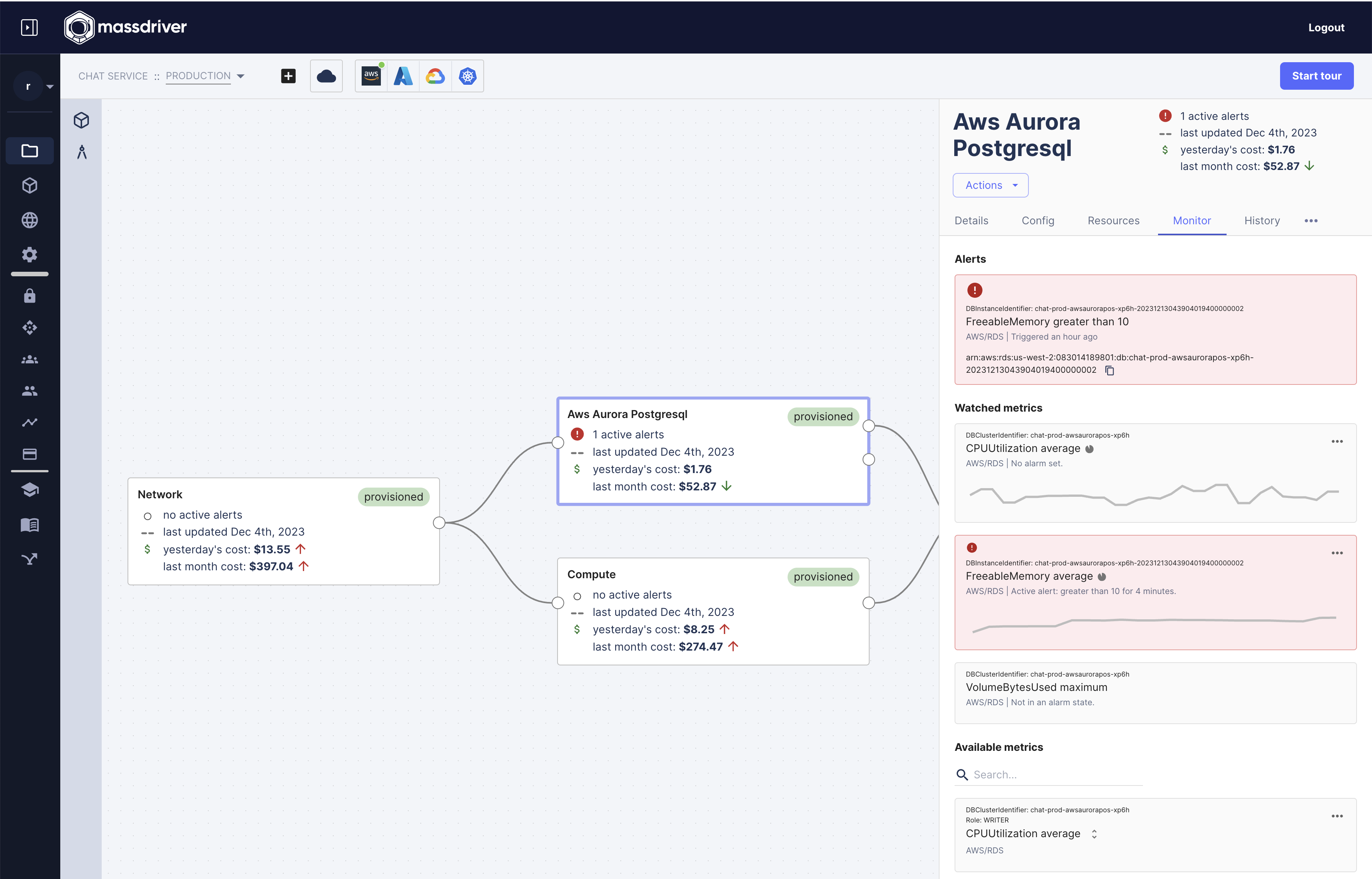
    Massdriver has made available tools for tracking cloud costs and generating a cloud infrastructure bill of materials (Cloud IBOM) to internal developer platforms (IDPs) as part of an ongoing effort to streamline platform engineering workflows.

    The Cloud IBOM makes it possible, with a few clicks, to map hybrid cloud resources such as databases, machine learning pipelines and serverless computing frameworks.

    Massdriver CEO Cory O’Daniel said collectively, these tools reduce expenses by preventing misconfigurations that result in unexpected costs. Rather than solely providing a summary of costs incurred, the tools provided by Massdriver surface how much cloud services are going to cost at the time the developer is invoking them, he noted.

    In the absence of that context, developers will nearly always overprovision cloud resources to ensure maximum availability regardless of cost, says O’Daniel. The overall goal is to help organizations reduce the total cost of IT by providing developers with insights into costs in real-time, he added.

    Earlier this year, the company launched an IDP that comes with platform engineering tools that, for example, make it possible for DevOps teams to build a catalog of infrastructure components that developers can access within the context of guardrails they define. The platform also includes observability and visualization tools that make it simpler to track metrics and monitor the usage of cloud resources.

    Massdriver is making a case for an IDP that provides built-in tools and workflows that enable organizations to embrace platform engineering as a methodology for managing DevOps workflows at scale. The goal is to reduce the level of expertise required to build and deploy applications in cloud computing environments, said O’Daniel. One of the primary reasons there are not more applications running in the cloud today is that these environments are still too complex to successfully manage, he added. An IDP abstracts away that complexity within a set of workflows that have been vetted by a DevOps team, he added.

    There are, of course, multiple approaches to building an IDP, but rival approaches require too much effort to set up and maintain, said O’Daniel. A proprietary platform provides a more turnkey approach that doesn’t require DevOps teams to either build their own or customize an open source platform, he added.

    It’s not clear at what pace organizations are embracing platform engineering, but there is a clear need to strike a balance between delivering IT services managed by a centralized team and the desire a developer might have to embrace new tooling whenever they see fit. Today, too much responsibility for provisioning IT environments has been pushed left toward developers who now have less time than ever to write code.

    There is, naturally, no guarantee that reducing the cognitive load for developers will increase productivity. Building applications requires streaks of inspiration, but, in theory, an IDP should provide more time for inspiration to strike. DevOps teams, as part of that effort, should be continuously working toward eliminating any bottlenecks that have emerged in their DevOps workflows.

  • ScienceLogic Unveils Revamped AIOps Platform

    ScienceLogic Unveils Revamped AIOps Platform

    Via an early access program, ScienceLogic this week made available a Hollywood update to its artificial intelligence for IT operations (AIOps) platform that, among other capabilities, provides root cause analysis capabilities that can be invoked via a natural language interface.

    For the first time, this release of the ScienceLogic SL1 platform incorporates predictive and generative AI technologies the company gained with the acquisition of Zebrium in 2022.

    Michael Nappi, chief product officer for ScienceLogic, said Zebrium provided ScienceLogic with an AI model that surfaces insights in a way that is simpler for IT teams to understand and act on. In addition to recommending automated workflows to run, the platform gives IT teams the option to automatically run them when, for example, there is an IT incident that an existing workflow has been defined to address, he added. Each organization will need to determine its level of comfort in automating those processes based on the level of potential risk to the business, noted Nappi.

    In addition, the SL1 user interface displays IT operational information at the business service level to provide IT teams with a guided experience that makes it simpler to prioritize tasks based on their relevance to the business, noted Nappi. There is also now an SL1 toolkit that DevOps teams can use to build or customize PowerPacks templates for monitoring specific processes and services.

    Finally, SL1 is now integrated with Slack and WebEx to streamline collaboration across IT teams. Previously, the platform only supported Microsoft Teams.

    In effect, SL1 now provides IT teams with a cockpit through which they can invoke AI to autonomously manage a wide range of tasks, said Nappi.

    It’s not clear how much advances in AI might one day soon democratize the management of IT, but it is clear the level of expertise required to manage complex IT environments is declining. The overall goal is to reduce dependency on IT professionals, such as software engineers, who are hard to find and retain.

    The rate of change being made to complex IT environments is now also occurring faster than IT teams can track without the aid of AI, noted Nappi. ScienceLogic, in the longer term, is working toward making it possible to interact with a chatbot in real-time to enable IT teams to meet that challenge, he noted.

    Each IT organization will need to decide for itself how heavily to rely on AI to manage IT functions, but in time, many IT professionals are not going to want to work for organizations that don’t provide some level of AI to reduce the level of toil they regularly encounter today. Rather than having to manually perform a series of monotonous tasks, AI should enable IT professionals to act more like supervisors in an IT environment.

    It may be a while before that aspiration is fully realized, but in the meantime, IT teams would be well-advised to start identifying which tasks will soon be automated using AI because roles and responsibilities will evolve. The challenge and the opportunity now is determining how IT teams can add more value to the business as those transitions occur.

  • RBAC For Your CI/CD Pipeline: Why and How

    RBAC For Your CI/CD Pipeline: Why and How

    Role-based access control, or RBAC, is an approach to managing access and permissions in a system based on the roles of individual users. This concept is integral to information security and access control strategies, where specific roles are assigned to users and each role has its permissions and restrictions.

    RBAC is a powerful tool to ensure that only authorized users can access specific resources, perform certain tasks, or make changes within a system. It eliminates the need for assigning permissions to each user individually, simplifying the administration of security policies.

    In the context of a CI/CD pipeline, RBAC means providing access rights to various stages of the pipeline according to user roles. For instance, a developer may have access to the code repository and the ability to initiate builds, while a deployment manager may have permission to push changes to the production environment.

    In this article, we’ll explain why RBAC is so important for CI/CD pipelines, and provide general guidelines and best practices for implementing RBAC into your pipeline.

    Why Do You Need RBAC in Your CI/CD Pipeline? 

    The adoption of DevOps and CI/CD practices has revolutionized the way software is developed and deployed. However, this has also raised new security challenges. One of them is maintaining control over who has access to what in the CI/CD pipeline. That’s where RBAC comes in.

    Preventing Unauthorized Access

    RBAC is critical for preventing unauthorized access in the CI/CD pipeline. It ensures that only users with the appropriate roles can make changes to the code, initiate builds, or deploy to production.

    By defining specific roles and assigning them to users, it’s possible to provide fine-grained control over access to various parts of the pipeline. This can significantly reduce the risk of unauthorized users making changes that they shouldn’t, whether unintentionally or maliciously.

    Minimizing Insider Threats

    Insider threats are a significant concern for any organization. These can come from disgruntled employees, careless staff, or even hackers who’ve managed to gain access to an insider’s account.

    RBAC can help minimize the risk of insider threats by limiting what each user can do within the CI/CD pipeline. If a user’s account is compromised, RBAC ensures that the attacker can only do what the compromised user is authorized to do. In other words, they won’t have free rein over your entire pipeline.

    Ensuring Accountability and Auditability

    Another benefit of RBAC is that it can facilitate accountability and auditability. When every user action is tied to a specific role, it’s easier to track who did what, when and why.

    This can be particularly helpful in a post-incident investigation. If something goes wrong, you can quickly identify who had access to the affected parts of the pipeline and narrow down the list of potential culprits. Similarly, during an audit, you can easily demonstrate who has access to what, helping to satisfy compliance requirements.

    Compliance with Regulations

    Speaking of compliance, many industry regulations and standards require organizations to implement strict access control measures. RBAC can help you meet these requirements by providing a clear and manageable way to control access to your CI/CD pipeline.

    For instance, regulations such as the GDPR, HIPAA and PCI-DSS all require organizations to limit access to sensitive data. By implementing RBAC, you can ensure that only authorized users can access, modify, or delete sensitive data in your pipeline, helping you stay on the right side of the law.

    How to Implement an RBAC Mechanism Across Your CI/CD Pipeline

    To effectively implement role-based access control (RBAC) in your CI/CD pipeline, it’s essential to integrate an RBAC mechanism that aligns with the specific tools and technologies in use. This requires a combination of technical setup and policy enforcement. 

    Here are the key steps involved in adding RBAC to a large-scale CI/CD pipeline:

      1. Integration with identity providers (IdP): Begin by integrating your RBAC system with an existing identity provider, like LDAP, Active Directory or OAuth provider. This ensures that user identities and roles are centrally managed and consistently applied across all stages of the CI/CD pipeline.
      2. Role definition and assignment: Utilize your CI/CD platform’s native RBAC features or incorporate third-party RBAC management tools. Define roles such as developer, QA tester, security auditor, operations, etc., in the system.
      3. Refine access control: After creating the roles, define permissions at a granular level. For instance, Developers might have ‘read’ and ‘write’ access to the source code repositories but only ‘read’ access to the deployment configurations.
      4. Tool-specific configuration: For tools like Jenkins, GitLab CI or CircleCI, use their specific RBAC configuration options to set up these permissions. Leverage the APIs of your CI/CD tools to programmatically manage access, and utilize plugins or extensions that enhance RBAC capabilities.
      5. Separate environments: Physically or logically separate different environments (like development, staging, production) and apply distinct RBAC rules for each. Implement conditional access policies, where access to critical environments like production can require additional authentication or approvals.
      6. Enable temporary elevated access: Allow temporary elevation of access rights under controlled conditions, such as during incident management or critical deployments, with automatic reversion to standard privileges after a set time.
      7. Continuous monitoring and adjustment: Regularly audit access logs and monitor for unusual activities. Tools like Splunk or ELK stack can be used for monitoring and alerting on RBAC-related events.

    Best Practices for Implementing RBAC in CI/CD 

    Here are a few best practices that can help you implement RBAC more effectively and securely.

    Adopt the Principle of Least Privilege

    The principle of least privilege (PoLP) is a critical aspect of RBAC. It states that a user should be given the least amount of privileges necessary to perform their job functions. This minimizes the risk of accidental or intentional misuse of privileges.

    To implement PoLP, you should start by conducting a thorough audit of the current permissions in your CI/CD pipeline. Identify any over-privileged accounts and rectify them. Additionally, ensure that every new account is created with the least amount of privilege necessary.

    Automate RBAC Enforcement

    One of the challenges with RBAC is ensuring that the defined roles and permissions are consistently enforced. Manual enforcement can be time-consuming and prone to errors. Automating RBAC enforcement can help overcome these challenges.

    Automation can be achieved using scripts or specialized software. These tools can automatically assign roles and permissions based on predefined rules. They can also monitor the system for any deviations from the defined roles and permissions, alerting the relevant personnel when such deviations occur.

    Implement Strong Authentication Methods

    Authentication is the process of verifying the identity of a user or system. It’s the first line of defense against unauthorized access. Authentication comes one step before RBAC — first verify a user is who they say they are, and then RBAC provides the relevant authorization.

    Strong authentication methods can include multi-factor authentication, biometrics, or digital certificates. These methods provide an additional layer of security by requiring more than just a username and password to access the system.

    In addition, it’s important to ensure that the authentication process is secure. This includes encrypting sensitive data, protecting against brute-force attacks, and regularly updating and patching the authentication system.

    Maintain Comprehensive Audit Trails

    Audit trails are records of activity in the CI/CD pipeline. They provide visibility into who did what, when, and why. Audit trails can help detect unauthorized activity, investigate incidents, and demonstrate compliance with regulations. They can also provide valuable insights into the effectiveness of the RBAC system and highlight areas that may need improvement.

    Most user identity systems provide built-in audit trails of RBAC activity. In addition, you should log all user activity in the CI/CD pipeline, including successful and unsuccessful authentication attempts, changes to roles and permissions, and any deviations from the defined roles and permissions.

    Regularly Review and Update the RBAC System

    Finally, it’s important to regularly review and update the RBAC system. This includes reviewing the defined roles and permissions, the effectiveness of the enforcement mechanisms and the completeness of the audit trails.

    Regular reviews and updates can help ensure that the RBAC system remains effective and relevant. They can also help identify and address any emerging threats or vulnerabilities.

    In conclusion, implementing RBAC in your CI/CD pipeline can help ensure secure and efficient operations. By following the best practices outlined in this article, you can create a robust and effective RBAC system. Remember, the goal is not just to prevent unauthorized access but also to enable authorized access securely and efficiently.

  • Atlassian Delivers on Generative AI Promise for DevOps and ITSM

    Atlassian Delivers on Generative AI Promise for DevOps and ITSM

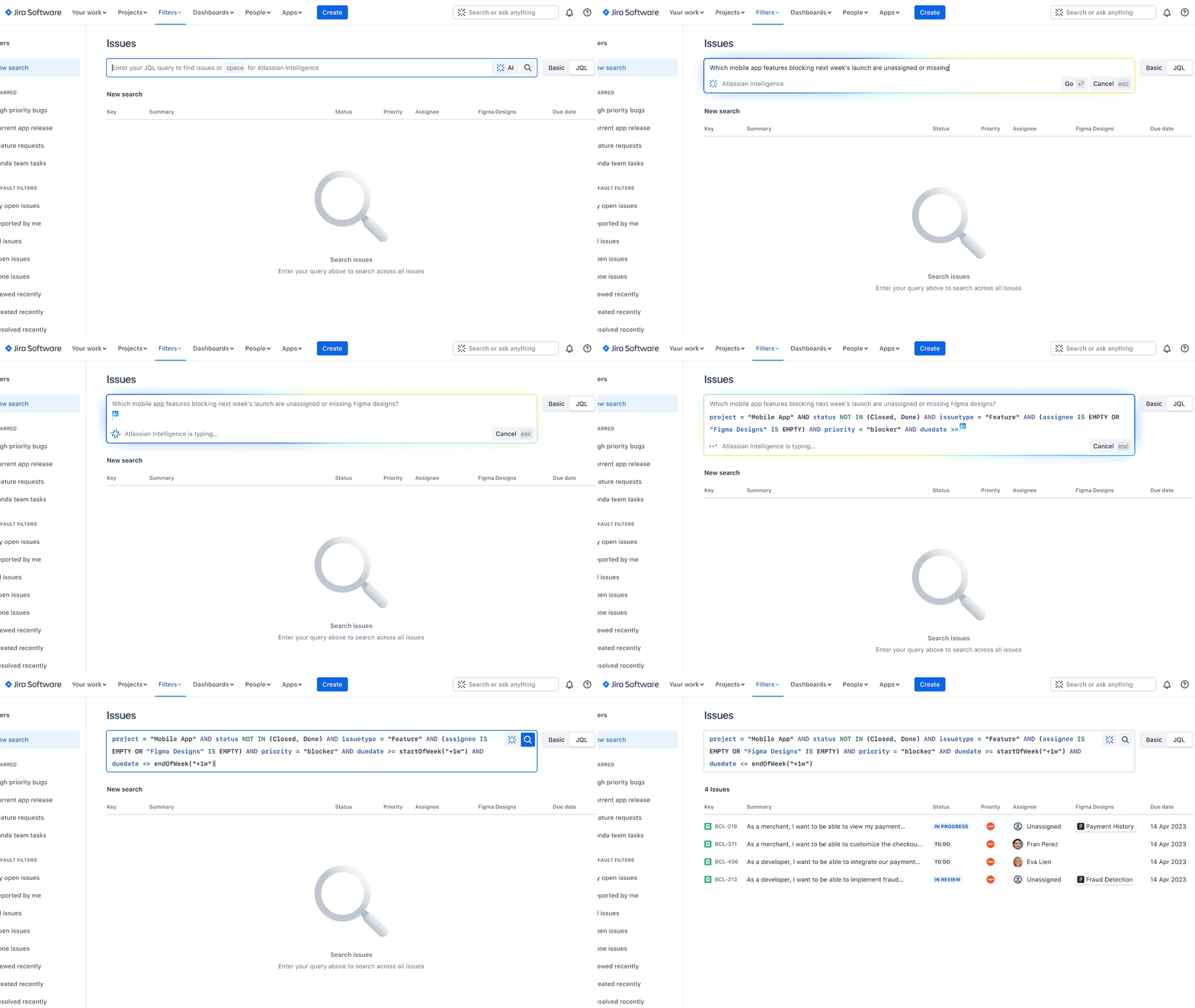
    During a virtual Unleash event, Atlassian today announced its generative artificial intelligence (AI) capabilities are now generally available across its Jira and Confluence suite of tools for managing IT and DevOps workflows.

    In addition, Atlassian also committed to adding generative AI capabilities to its Bitbucket continuous integration/continuous deployment (CI/CD) platform to enable DevOps teams to review pull requests and leave comments automatically with suggested changes around syntax and code conventions via a natural language interface. Developers will also be able to autogenerate pull request descriptions from commit messages.

    Matt Schvimmer, head of products for the Agile and DevOps division of Atlassian, said the capabilities provided by Atlassian Intelligence will reduce the level of toil and stress DevOps teams experience at a time when the velocity at which applications are being developed and deployed only continues to increase.

    Atlassian reported nearly 10% of its more than 265,000 customers have already leveraged Atlassian Intelligence since the launch of the beta program. Organizations, for example, can instantly create user stories within Jira Software tickets, change the tone of a customer response within Jira Service Management, create summaries, launch workflow requests via prompts and generate a starting point for a test plan in Confluence.

    Natural language capabilities, currently available for Confluence, will shortly be generally made available for Jira. An ability that promises to help demystify company-specific concepts, jargon or acronyms is also available now in beta, with support for Jira Software and Jira Service Management to shortly follow.

    There is little doubt at this juncture that AI will be pervasively applied across both ITSM and DevOps workflows. As those advances are made, it should also become feasible to reduce the level of toil these teams regularly encounter. At the same time, the level of scale at which ITSM and DevOps workflows can be effectively managed should also increase substantially.

    Each organization will need to decide how quickly to incorporate AI into those workflows, but hopefully, the level of burnout experienced by IT personnel will be sharply reduced as more tasks are automated. Less clear is the impact AI will have on the size of IT teams required to provide those services, but for the foreseeable future, there will always be a need for some level of human supervision.

    In the longer term, the war for IT and DevOps talent that has been waged now for multiple decades should diminish as managing these workflows becomes more accessible, noted Schvimmer. Organizations will not need to rely so much on the expertise of a handful of specialists, he added.

    Organizations, however, would be well-advised to make sure AI is embraced from both the bottom up and the top down to ensure optimal adoption, said Schvimmer.

    In the meantime, IT teams should take an inventory of the processes that are likely to be automated by AI today with an eye toward restructuring teams as more tasks are automated. Ultimately, the goal should be to let machines handle the tasks they do best to enable the IT staff to provide services that deliver more value to the business.

  • Vulnerability Management for DevOps Teams: A Practical Guide

    Vulnerability Management for DevOps Teams: A Practical Guide

    Vulnerability management is a process that includes the identification, categorization, prioritization and resolution of security vulnerabilities in software systems. It involves a continuous cycle of protection to ensure that your digital assets are secure and your operations are running smoothly.

    With the rapid evolution of technology, fast-moving cloud-native systems and evolving cyber threats, it’s critical to stay ahead of the game. The goal is to close the gap between the discovery of vulnerabilities and their resolution, thereby minimizing the window of opportunity for potential attacks.

    Vulnerability management is not just about finding and fixing vulnerabilities. It’s also about understanding the nature of the vulnerabilities and the potential impact they could have on your network and systems. This understanding informs the prioritization process, helping teams decide which vulnerabilities need immediate attention and which ones can be addressed later. See this blog post for an in-depth review of vulnerability management.

    Why is Vulnerability Management Important for DevOps Teams?

    With the DevOps approach, development and operations teams work together throughout the software life cycle. This collaboration results in faster development times and more reliable software. However, the fast development cycle also introduces new security challenges. This has given rise to the DevSecOps paradigm, where developers, operations teams, and security experts collaborate during all stages of the development lifecycle.

    Here are a few reasons vulnerability management is a critical part of DevSecOps practices:

    Early Detection of Vulnerabilities

    DevOps teams are under constant pressure to deliver high-quality software quickly. However, the speed of delivery should not compromise the security of the software. Vulnerability management helps DevOps teams identify vulnerabilities early in the development process. This early detection allows teams to address security issues before they become serious problems.

    Early vulnerability detection is not just about finding vulnerabilities; it’s also about understanding the potential impact of those vulnerabilities. It involves analyzing the vulnerabilities to determine their severity and the risk they pose to the system. This analysis informs the prioritization process, ensuring that the most critical issues are addressed first.

    Building Continuous Security Into CI/CD Pipelines

    Integrating vulnerability management directly into continuous integration/continuous deployment (CI/CD) pipelines is essential for maintaining continuous security. CI/CD pipelines automate the steps in software delivery, from code integration to deployment, ensuring faster and more consistent releases. By embedding vulnerability management into these pipelines, DevOps teams can automatically scan for and address security vulnerabilities at each stage of the software development life cycle.

    Incorporating vulnerability management tools into CI/CD pipelines allows for automatic scanning of code repositories, container images, and even infrastructure-as-code (IaC) configurations for known vulnerabilities. This integration means that any security issues are identified as soon as code is committed or containers are built, not just at the deployment stage. The advantage of this approach is twofold: It reduces the risk of deploying vulnerable software, and it allows developers to fix issues in their context of development, making the process more efficient.

    Cost-Effective Development and Operations

    Implementing vulnerability management can lead to cost savings for DevOps teams. By identifying and resolving vulnerabilities early in the development process, teams can avoid the high costs associated with fixing security issues after the software has been deployed. In addition, vulnerability management can help prevent costly security breaches that could damage the company’s reputation and result in financial loss.

    Moreover, vulnerability management can contribute to more efficient operations. By systematically managing vulnerabilities, teams can avoid wasting time and resources on low-priority issues. Instead, they can focus their efforts on addressing the most critical vulnerabilities.

    Enhancing Cross-Team Collaboration

    Vulnerability management can also enhance cross-team collaboration within the DevOps environment and between DevOps and security teams. By providing a clear framework for identifying, categorizing, prioritizing and resolving vulnerabilities, it fosters a shared understanding of security issues among team members. This shared understanding can facilitate communication and cooperation, ultimately improving the software product’s security posture.

    Strategies for Integrating Vulnerability Management Into DevOps Processes

    Adopt a ‘Shift-Left’ Approach

    The ‘shift-left’ approach is a strategy that involves shifting the security measures to the early stages of the DevOps pipeline. Traditionally, security checks and vulnerability assessments were conducted toward the end of the development cycle, often leading to late discovery of security flaws and vulnerabilities.

    By shifting these security measures to the left, i.e., to the earlier stages of the development cycle, DevOps teams can catch and fix security vulnerabilities early on. This approach aligns well with the DevOps philosophy of early error detection and continuous improvement.

    Automation of Vulnerability Scanning and Detection

    Automation is at the heart of DevOps. It allows for rapid, reliable and consistent processes, freeing up the team to focus on what they do best – delivering quality code and features. Automation should also extend to vulnerability management.

    Automating vulnerability scanning and detection means integrating security tools into the DevOps pipeline that can automatically scan the code, detect vulnerabilities and even suggest fixes. This approach ensures that security checks are not skipped or forgotten and that vulnerabilities are dealt with promptly.

    Security as Code

    Another strategy for integrating vulnerability management into DevOps processes is embracing the principle of security-as-code. This principle treats security infrastructure and configurations as code, allowing them to be part of the DevOps pipeline.

    By adopting security-as-code, DevOps teams can ensure that the security configurations and infrastructure are always up-to-date and follow the best practices. Like the rest of the code, security configurations can be version-controlled, reviewed, tested and automatically deployed.

    Collaboration Between Security and DevOps Teams

    One of the key tenets of DevOps is collaboration between different teams. In a DevSecOps paradigm, this collaboration extends to the security team as well. Integrating vulnerability management into DevOps processes fosters close collaboration between the security and DevOps teams.

    The security team can provide valuable insights into the security landscape, vulnerability management tools and best practices. On the other hand, the DevOps team can ensure that these insights and tools are integrated into the DevOps pipeline.

    Continuous Monitoring and Feedback Loop

    Continuous monitoring is crucial for effective vulnerability management. Continuous monitoring ensures that the security state of the system is always known and that any changes or vulnerabilities are promptly detected. The feedback loop ensures that the insights gained from monitoring and vulnerability assessments are fed back into the development process, leading to continuous improvement in security.

    Regular Training and Awareness

    Finally, regular training and awareness are crucial for integrating vulnerability management into DevOps processes. DevOps teams should be trained in security best practices, threat landscape, and use of vulnerability management tools.

    Regular training ensures that the team stays up-to-date with the latest security trends and vulnerabilities. Awareness sessions can help the team understand the importance of security and vulnerability management, encouraging them to take an active role in securing the system.

    Conclusion

    In conclusion, integrating vulnerability management into DevOps processes is not only possible but crucial for secure and reliable systems. Adopting a shift-left approach, automating vulnerability scanning and detection, embracing security-as-code, fostering collaboration, implementing continuous monitoring and feedback and ensuring regular training and awareness are some of the strategies that can help achieve this integration. 

    Remember, vulnerability management is an ongoing process that requires commitment, collaboration and continuous improvement.

  • PagerDuty Previews Generative AI Copilot for ITSM

    PagerDuty Previews Generative AI Copilot for ITSM

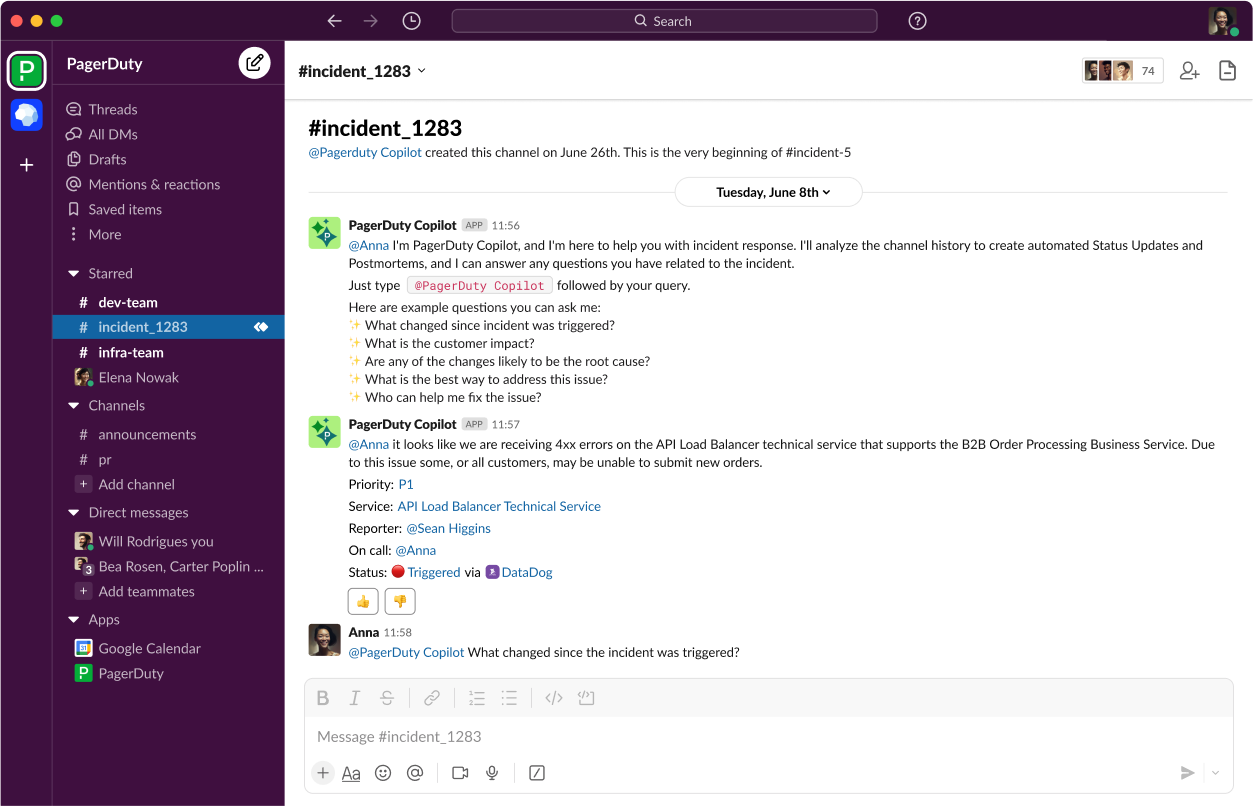
    Under an early access program, PagerDuty, Inc. is making available a tool that brings generative artificial intelligence (AI) capabilities to its IT service management (ITSM) platform.

    Jonathan Rende, senior vice president of products for PagerDuty, said PagerDuty Copilot for the PagerDuty Operations Cloud extends previous investments in machine learning algorithms the company has made as part of an ongoing effort to apply AI to ITSM.

    Designed to be invoked via Slack, PagerDuty Copilot makes use of multiple large language models (LLMs) to automate tasks ranging from providing summarization of IT incidents to creating code to automate workflows. PagerDuty plans to transparently swap LLMs in and out of its platforms as AI advances continue to be rapidly made, noted Rende.

    PagerDuty Copilot provides a level of abstraction for invoking AI models along with appropriate guardrails that make it simpler to manage IT operations without IT teams needing to have AI expertise, said Rende.

    The overall goal is to boost the productivity of IT operations teams by eliminating much of the drudgery and toil that conspires to make working in IT tedious, noted Rende. AI technologies are not likely to replace the need for IT personnel as much as they will enable IT teams to focus on tasks that add more value to the business, he added.

    It’s now only a matter of time before generative AI capabilities are pervasively applied across both ITSM and DevOps workflows. Less clear is the impact those capabilities will have on the best practices currently relied on to manage those workflows as more tasks are automated. Ultimately, however, AI should make it easier for more organizations to embrace those best practices as the level of skill and expertise required to manage IT at scale is reduced.

    In addition, the whole concept of issuing tickets to manage tasks tracked by a central system of record may need to evolve simply because AI has automated requests for service. There will naturally need to be some system of record for tracking requests. Still, ultimately that process will be managed via copilots rather than by a ticket created by an end user that is then tracked via an ITSM platform.

    Savvy IT teams, in the meantime, are already moving to determine which tasks and workflows will be automated in anticipation of AI becoming more widely embedded in ITSM and DevOps platforms. Roles and responsibilities within IT teams will inevitably evolve as AI increasingly automates mainly mundane tasks, such as creating reports that many IT professionals would rather not spend time writing.

    The biggest IT management platform challenge in the future might not necessarily be adjusting to AI as much as it will be orchestrating requests that are likely to be generated by multiple types of copilots that have been embedded into almost every application.

    One way or another, AI is about to transform how IT operations are managed. As disruptive as those advances will be, AI, more importantly, will also enable organizations to manage IT at levels of scale that were previously unimaginable.

  • Key Cost Optimization Strategies for Multi-Cloud Environments

    Key Cost Optimization Strategies for Multi-Cloud Environments

    In today’s ever-changing technology landscape, businesses are realizing the advantages of multi-cloud environments. These environments allow organizations to tap into various cloud platforms and use their services as required. This change signifies a shift away from relying on just one cloud provider. Businesses now embrace the flexibility and adaptability that come with using multiple clouds simultaneously.

    In complex multi-cloud environments, it is crucial to manage costs effectively. It is important to strategically optimize costs while considering your organization’s specific needs. By utilizing tools, implementing processes and continuously monitoring costs, you can save money while still reaping the benefits offered by different cloud providers.

    What is Multi-Cloud?

    A multi-cloud environment describes a setup in which companies or individuals utilize cloud computing platforms or providers to fulfill their computing requirements. In a multi-cloud setup, organizations have the ability to integrate both public clouds (such as Amazon Web Services, Microsoft Azure or Google Cloud Platform) and private clouds (on-premises or hosted private clouds) to establish a diverse and adaptable computing infrastructure. Rather than relying on one cloud provider, multi-cloud strategies distribute workloads across several cloud environments. Rather than depending on a single cloud provider, a multi-cloud strategy involves distributing workloads across various cloud environments.

    Benefits and Challenges

    Multi-cloud environments offer organizations numerous benefits, including flexibility, reliability, scalability and cost optimization. When organizations distribute their workloads across various cloud platforms, they reduce the chances of downtime or service disruptions due to a single provider failure. This guarantees uninterrupted availability and minimizes any potential impact on business operations.

    It is quite challenging to manage a multi-cloud environment for several reasons. Organizations must tackle challenges related to governance, cost management, integration and compatibility. To overcome these obstacles effectively, it is important to implement a well-defined strategy with efficient management tools.

    Since each cloud provider comes with its own set of tools, APIs and policies, ensuring consistent governance across different cloud platforms is challenging. Since different cloud providers have differing pricing structures, it is quite difficult to monitor and optimize costs in a multi-cloud environment.

    Analyzing and understanding each provider’s cost model is necessary when tracking usage patterns across different platforms. Integrating services from different cloud providers into a cohesive system architecture can be challenging due to compatibility issues. Careful planning and expertise are needed to achieve seamless integration without conflicts or performance problems.

    The Importance of Cost Optimization in Multi-Cloud Environments

    In today’s evolving technology landscape, businesses need to make the most of various cloud environments to fully utilize their cloud capabilities. However, great power entails great responsibility and cost optimization is a critical aspect that should not be overlooked.

    As businesses expand their cloud presence across multiple providers, optimizing costs becomes necessary to maximize ROI and stay competitive in today’s fast-paced market. In a multi-cloud environment, organizations typically use several cloud platforms simultaneously, including Amazon Web Services (AWS), Microsoft Azure, and Google Cloud Platform (GCP), to reduce expenses and maximize efficiency by comparing the services, features, and pricing models offered by each of the providers.

    Multi-cloud environments offer opportunities for cost optimization by allowing organizations to choose the cost solutions tailored to their specific needs. With access to pricing models and options offered by providers businesses can optimize their expenditure based on workload requirements.

    Optimizing Costs in Multi-Cloud Environments

    To optimize costs in multi-cloud setups, one must carefully analyze and manage expense factors across providers and services. It involves understanding cost structures, pricing models and usage patterns while considering workload requirements to choose cost-effective options for different tasks. Achieving these financial benefits requires efficient resource allocation and minimizing unnecessary expenses.

    This section discusses the key strategies for optimizing costs in a multi-cloud environment.

    Automating Resource Management

    You can optimize costs in a multi-cloud environment by automating the management of resources. Efficiently optimizing costs in cloud environments relies heavily on automating resource management. This enables organizations to monitor usage levels and resources dynamically as required, effectively implement cost-saving policies and ensure optimal utilization of cloud services without the need for human intervention.

    ​Organizations can automate their processes and tasks to streamline their operations, thereby saving time and reducing the risk of overspending on unnecessary resources. To effectively handle resources, it is crucial to have monitoring tools that offer real-time observations on usage patterns and performance metrics. These tools enable businesses to identify underutilized resources, which can then be automatically shut down or adjusted in size as required.

    Automation also involves implementing automatic resource allocation capabilities based on demand fluctuations. By scaling up or down depending on workload requirements, organizations can optimize costs by ensuring they only pay for the resources they truly need at any given time.  By implementing these automated policies, organizations are able to enforce cost optimization practices. For example, by establishing guidelines for assigning metadata tags to resources, organizations gain visibility and control over expenditure across various cloud platforms.

    Additionally, scheduling non-production environments to automatically shut down during off-business hours can significantly reduce costs. By turning off development and testing environments when they’re not in use, companies can avoid paying for resources during periods of low activity.

    Analyzing Costs in Multi-Cloud Environments

    While analyzing costs in a multi-cloud environment is challenging, it is a crucial strategy for your organization to make the most of its resources and avoid unnecessary expenses. It’s important to understand usage patterns and expenditures to optimize costs effectively. Start by gaining visibility into spending across all clouds. Use cost management tools provided by the cloud platforms or consider third-party solutions that consolidate data. This helps track costs at a detailed level and identify areas of high expenses. Analyze usage patterns to find instances that can be resized or turned off when not needed. By adjusting resources based on demand, overprovisioning can be avoided and unnecessary costs reduced.

    Here are the key steps to analyze costs in a multi-cloud environment:

    • Identify and categorize workloads
    • Track usage patterns and cost
    • Analyze the usage patterns of your workloads
    • Automate cost optimization
    • Incorporate cost analysis into your decision-making process
    • Review cost optimization strategy regularly

    Use Spot Instances

    In multi-cloud environments, using spot instances is crucial for cost optimization. These instances are available from cloud providers at a much lower price than on-demand or reserved instances, leading to substantial cost savings for organizations. With spot instances, you can take advantage of unused or idle capacity on cloud providers’ infrastructure, resulting in substantial cost savings. Being strategic with spot instances provides economical access to compute resources. Cloud providers offer discounted spare resources in the absence of regular customer demand, making it favorable compared to on-demand or reserved instances. Use on-demand or reserved instances for critical tasks while employing spot instances for less critical workloads. To optimize costs, you should leverage on-demand, spot and reserved instances, i.e., a mix of all of them.

    Right-Sizing and Efficient Resource Allocation

    Rightsizing is a key strategy for cost optimization that reduces costs and enhances performance in multi-cloud environments, leading to substantial savings. One of the most important steps in this regard is capturing comprehensive data on resource utilization (CPU, memory, storage and network utilization). By identifying over-provisioned or underutilized instances, organizations can optimize resource allocation. Automated tools simplify this process by monitoring and recommending adjustments. Consolidating workloads into fewer instances and leveraging virtualization technologies or containerization platforms further improves performance and scalability.  Right-sizing and resource allocation are two key techniques that can help optimize costs in a multi-cloud setup.

    Here are the key strategies at a glance:

    • Analyzing workload requirements
    • Selecting the appropriate instance types
    • Regularly review and adjust resource allocations based on actual usage patterns
    • Implementing auto-scaling and load-balancing mechanisms
    • Utilizing resource tagging and monitoring tools for cost visibility
    • Right-sizing resources on demand
    • Automated scaling strategies

    Conclusion

    By implementing key strategies such as using reserved instances or savings plans, automating resource management, implementing rightsizing techniques, leveraging spot instances, optimizing data transfer and storage, applying automation and orchestration principles, practicing financial governance and budget management and keeping an eye on future optimizations, businesses can effectively control their cloud spending and ensure they are making the most of their multi-cloud investments while minimizing costs.

    However, it’s important to acknowledge that cost optimization in cloud environments comes with its own set of challenges. Managing costs can be quite challenging for cloud environments despite their flexibility and scalability. From dealing with pricing models to facing a lack of visibility across clouds, there are obstacles that need to be overcome.

    With careful planning and implementation combined with ongoing monitoring and review processes, organizations can mitigate the challenges and truly harness the power of multi-cloud. Your organization should adhere to the key strategies outlined in this article to take advantage of the benefits of multi-cloud while ensuring optimal costs in their cloud spending.