Category: IT as Code

  • GitGuardian Allies With CyberArk to Better Protect App Secrets

    GitGuardian Allies With CyberArk to Better Protect App Secrets

    GitGuardian this week revealed it has allied with CyberArk to streamline secrets detection and management by making it easier to share insights.

    Ziad Ghalleb, product marketing manager for GitGuardian, said the two companies have integrated their respective platforms using open source software that integrates GitGuardian Secrets Detection and CyberArk Conjur Cloud, a software-as-a-service (SaaS) platform for managing and rotating secrets as needed.

    In addition, CyberArk Conjur Cloud is now integrated with HasMySecretLeaked, a tool for discovering if a specific secret has been exposed on GitHub. That capability enables DevSecOps teams to periodically cross-reference secrets and credentials against a private database of secrets known to have been publicly exposed.

    GitGuardian claims to have uncovered more than 20 million publicly exposed secrets on the GitHub repository. While GitGuardian provides tools to discover exposed secrets, organizations rely on the CyberArk platform to manage secrets and remediate issues that arise when they are left exposed.

    The immediate challenge is to find ways to integrate secrets detection within the context of larger ecosystems, said Ghalleb. In the longer term, GitGuardian is working toward embedding its tool into integrated development environments (IDEs) to surface exposed secrets as developers build software, said Ghalleb.

    Naturally, there is a lot more focus on secret detection, and secrets management is getting more attention as more organizations review their software supply chain processes in the wake of a series of high-profile security breaches. For many organizations, however, it’s still early days as far as adopting DevSecOps best practices to secure those software supply chains, but it’s clear more responsibility for application security is shifting left toward developers and the DevOps teams that support them.

    Unfortunately, too many developers still hard-code secrets in plain text into applications to create shortcuts as software is developed. Many forget to remove those secrets before an application is deployed in a production environment. Once an application is deployed in a production environment, it may be months before anyone discovers an issue—if it’s discovered at all.

    In the meantime, cybercriminals are becoming more adept at using scanning tools to discover secrets and then exploiting them to compromise applications after they have been deployed.

    Hopefully, DevOps teams will implement DevSecOps best practices to address those issues before any fines are levied. But the challenge, as always, is ensuring application security without adversely impacting the rate at which software is currently being built.

    It’s only a matter of time before more stringent regulations require organizations to revisit the security of software supply chains. Countries around the world are drafting legislation that would hold organizations much more accountable for the security of the applications they build and deploy. As more fines are eventually levied, the tolerance for leaving secrets exposed in applications is only going to decline.

    Secrets discovery and management is, of course, only one aspect of application security, but the more these issues are addressed before applications are deployed the less stressful cybersecurity becomes.

  • F5 Looks to Streamline Application Networking

    F5 Looks to Streamline Application Networking

    At its AppWorld 2024 conference this week, F5 announced a software-as-a-service (SaaS) edition of its NGINX application networking portfolio, which are now all available under a single enterprise license.

    Shawn Wormke, general manager for NGINX, said NGINX One will eliminate much of the friction enterprise IT teams currently encounter when implementing NGINX Plus, NGINX Open Source, NGINX Unit, NGINX Gateway Fabric and the Kubernetes Ingress Controller the company provides.

    As part of that effort, F5 is also now making available a unified console across its application networking portfolio that promises to streamline the management of the F5 application networking portfolio.

    Currently available under an early access program, NGINX One creates an as-a-service platform through which enterprise IT organizations can invoke and pay for these capabilities on an as-needed basis, said Wormke. The overall goal is to reduce the total cost of application networking by eliminating the need for IT teams to integrate the various elements of NGINX One on their own, he added.

    In general, application networking has become more complex with the rise of cloud-native applications based on microservices. By reducing the cognitive load required to network those applications, it becomes simpler to make network operations a more natural extension of DevOps workflows, noted Wormke.

    Most organizations have some level of experience with application networking using proxy servers, but as application environments have become more complex, the need for gateways and ingress controllers to provide these capabilities at scale has become more apparent. As a result, more IT organizations are starting to revisit how they are structured. There may always be a need for dedicated networking specialists to manage the physical network underlay, but as other networking services become more integrated with DevOps workflows, responsibility for some networking services is starting to shift further left toward DevOps teams that will either deploy these capabilities themselves or take advantage of a SaaS platform such as NGINX One. The overall goal is to be able to dynamically provision application networking services without having to wait for a network administrator to provision them.

    There are, of course, a lot of approaches to application networking that are now emerging. Regardless of how application networking evolves, however, the rigidity that has characterized the delivery of network services for decades should finally start to fade away. Today, outside of a cloud computing environment, it’s still common for IT teams to provision virtual machines or Kubernetes pods in hours only to wait days or even weeks for network connectivity to be provisioned. As IT environments become more hybrid and more workloads are pushed to the edge, there is a clear need for a more agile approach.

    Each organization will need to decide how best to approach application networking across legacy monolithic applications, microservices and event-driven applications at a time when IT environments have become much more complex to manage. The challenge, as always, is reducing as much friction as possible without unduly raising the total cost of IT to a point where it becomes unsustainable.

  • Five Great DevOps Job Opportunities

    Five Great DevOps Job Opportunities

    devopsy.kinsta.cloud is now providing a weekly DevOps jobs report through which opportunities for DevOps professionals will be highlighted to better serve our audience.

    Our goal in these challenging economic times is to make it easier for DevOps professionals to advance their careers.

    Of course, the pool of available DevOps talent is still relatively constrained, so when one DevOps professional takes on a new role it tends to create an opportunity for others.

    The five job postings shared this week are selected based on the company looking to hire, the vertical industry segment and, naturally, the pay scale being offered.

    We’re also committed to providing additional insights into the state of the DevOps job market. In the meantime, for your consideration:

    Dice.com

    Travelers
    Hartford, Connecticut
    DevOps Tech Lead
    $133,500 to $220,300

    Indeed.com

    Lawrence Berkeley National Laboratory
    San Francisco, California
    Identity and Access Management DevOps Engineer
    $126,900 to $214,140

    SimplyHired.com

    Workday
    Pleasanton, California
    Software Development Engineer
    $112,500 to $204,000

    LinkedIn

    IBM
    Denver, Colorado
    DevOps Engineer
    $110,100 to $161,100

    CareerBuilder.com

    Cognizant Technology Solutions
    Oakdale, New Jersey
    DevOps Manager – Technology Modernization
    $95,500 to $212,600

  • OX Security Optimizes DevSecOps to Improve Application Security

    OX Security Optimizes DevSecOps to Improve Application Security

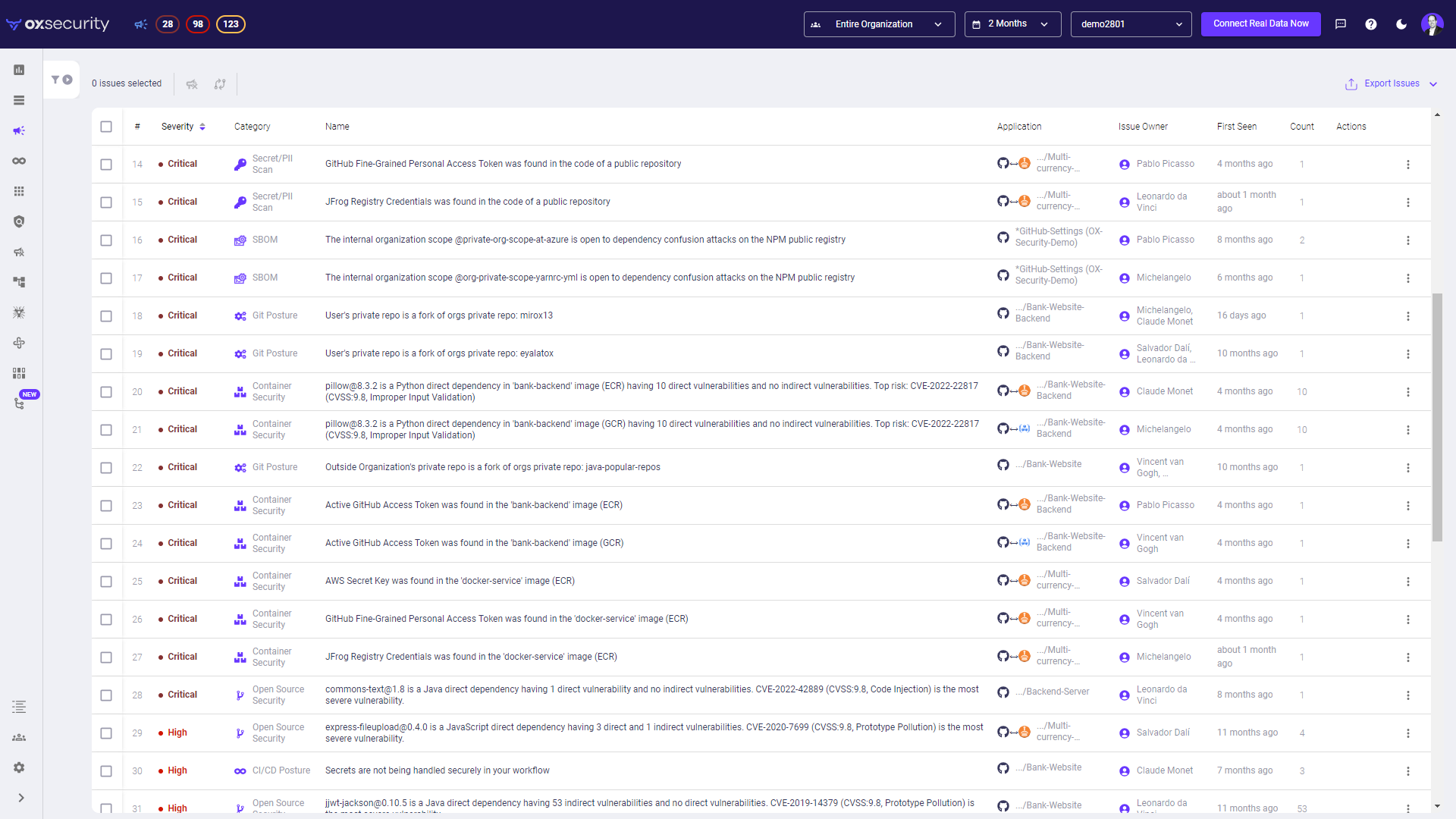
    OX Security this week updated its application security posture management (ASPM) platform to enable DevSecOps teams to instantly identify applications running in production environments that are running code that could be potentially exploited.

    The ASPM platform from OX Security leverages large language models (LLMs) to identify vulnerabilities. The latest version adds an ability to confine the number of alerts generated to instances of code that can actually be exploited.

    OX Security CEO Neatsun Ziv said that approach reduces the number of alerts that would otherwise be generated by 99% to enable DevSecOps teams to focus their limited resources on the 1% of alerts that represent an actual risk to the business. OX Security achieves that goal in part because its scanners are integrated with source control, continuous integration/continuous delivery (CI/CD) platforms, registries and cloud computing environments.

    The overall goal is to reduce the amount of manual effort currently required to consistently maintain DevSecOps best practices.
    The primary reason many vulnerabilities are never addressed is that DevSecOps teams are simply overwhelmed by alerts. Most of the alerts generated by a cybersecurity team are not immediately relevant because either the vulnerability is not present in the application running in a production environment or the application doesn’t connect to the internet.

    The OX Security platform makes it possible to identify application security issues that need to be prioritized because it has been confirmed a vulnerability exists that can be exploited, said Ziv.

    No matter how precise the alert process becomes, a DevSecOps team will still need to manage it, added Ziv. However, as the alerts generated become more relevant, it should become easier to bridge the historic divide between application developers and cybersecurity teams. Too many developers routinely ignore vulnerabilities identified by cybersecurity teams simply because previous efforts to identify the actual severity they represent have ultimately been a waste of their time.

    The challenge just about any organization encounters when trying to better secure their software supply chains is, not surprisingly, getting application developers to buy into the DevSecOps process. Most developers are going to actively resist any approach to remediating vulnerabilities that takes time away from building new applications. Most of them only allocate about 10% of their time or less to remediating vulnerabilities. As such, it’s incumbent on a DevSecOps team to find ways to address application security issues in ways that don’t adversely impact developer productivity.

    Organizations could mandate that vulnerabilities be remediated. In fact, there is a growing body of regulations that will require organizations to do just that unless they can prove the vulnerability in question cannot be exploited. The only way to effectively make that case will be to rely more on automation to document that the code running in a production environment is actually secure.

    In the meantime, developers should expect to see their code scrutinized more than ever. Of course, the better part of valor is to ensure that as many vulnerabilities as possible are never introduced.

  • Cycode Discloses GitHub Actions Vulnerability in Google Bazel Project

    Cycode Discloses GitHub Actions Vulnerability in Google Bazel Project

    Cycode today revealed it discovered a command injection vulnerability in the way the GitHub Actions continuous integration/continuous delivery (CI/CD) platform was used to update the open source Bazel project that many organizations employ to build and test software.

    The vulnerability, now remediated, could have been used to create a backdoor through which malicious code could have been inserted into a codebase that is managed by Google.

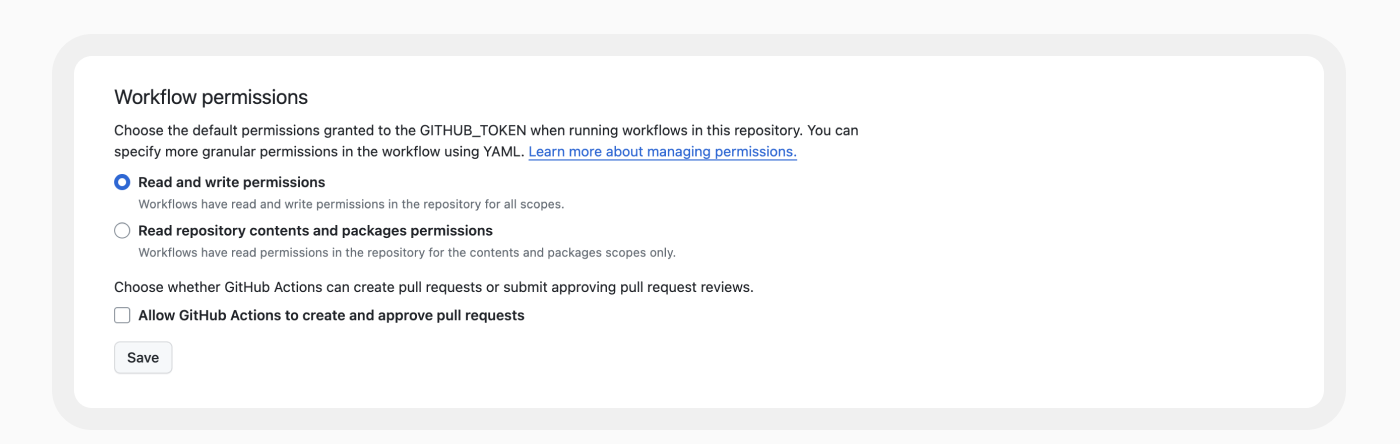
    Cycode researchers shared their discovery with Google, which has since updated the way it employs GitHub Actions to manage the Bazel codebase. Specifically, Google updated the base permissions to embrace least privilege principles to resolve the vulnerability discovered by Cycode.

    The vulnerability was discovered using RAVEN, an open source tool for scanning CI/CD platforms for vulnerabilities that Cycode makes available.

    Elad Pticha, senior security researcher for Cycode, said the vulnerability is the latest example of an instance of an open repository for building software that has been shown to be potentially vulnerable to an attack on a software supply chain that could theoretically impact any number of downstream applications and projects, including Kubernetes, Angular and platforms and services provided by Uber and LinkedIn.

    A Custom Actions capability that enables application development teams to create their own workflows presents any cybercriminal attempting to compromise of software supply chain with a tempting target, noted Pticha. A few changes to lines of code in a workflow can translate into thousands or even millions of lines of code, many of which an organization may never detect. Out of 3.4 million workflows examined by Cycode, nearly all (99%) make use of one or more Custom Action.

    Cycode has previously identified dozens of vulnerabilities in open source projects by mainly focusing on vulnerabilities within workflows. This latest research shows those vulnerabilities extend to indirect dependencies, such as Custom Actions, noted Pticha.

    Each DevOps team should review its own workflows for similar vulnerabilities at a time when more cybercriminals than ever are intent on compromising software supply chains. While many organizations have embraced DevSecOps workflows to improve application security, there is a natural tendency to overlook vulnerabilities that might exist in the workflows used to build and deploy software. The challenge is that DevSecOps workflows are still immature. A recent survey of 500 U.S. CISOs, AppSec directors and DevSecOps team members conducted by Cycode found 78% admitted application security attack surfaces are unmanageable, with 90% acknowledging relationships between their security and development teams need to improve.

    It’s not apparent if the vulnerability discovered by Cycode was actually ever exploited, but as most cybersecurity professionals know, if it can be imagined, someone has tried it. As such, any organization that uses Bazel might be well-advised to conduct a code review.

    In the meantime, it’s already apparent that regulations pertaining to securing software supply chains are only going to become more stringent in the months ahead. In the wake of the executive order from the Biden administration requiring federal agencies to lock down their software supply chains, it’s now only a matter of time before similar requirements are baked into legislation and various other regulations are implemented. The challenge and the opportunity now is to get ahead of this issue before a mandate with a hard deadline that can’t be ignored winds up disrupting the entire software development life cycle.

  • Azure Cost Optimization: A Complete Guide

    Azure Cost Optimization: A Complete Guide

    Microsoft Azure is one of the “big three” cloud providers, and is a primary part of IT expenditure for many companies. Azure cost optimization is a strategy that involves managing and controlling Azure costs to ensure efficient usage and spending. It requires a thorough understanding of where and how your resources are being used, as well as insight into the various pricing options available.

    Azure cost optimization involves implementing best practices related to managing cloud costs, such as turning off resources when not in use, choosing the right-sized resources, taking advantage of Azure discounts and more. By optimizing these aspects, you can ensure that you are only paying for the resources you need and are using them efficiently.

    Azure cost optimization is an ongoing strategy that involves constant monitoring and adjustments as your usage and needs evolve. This means that you need to be proactive and vigilant in your cost management efforts, regularly reviewing your usage patterns and making adjustments as necessary.

    Why is Azure Cost Optimization Important?

    As organizations migrate more and more of their workloads to the cloud, the costs associated with Azure usage can quickly escalate if not properly managed. This can lead to budget overruns and decreased profitability.

    By leveraging Azure cost optimization strategies, businesses can gain greater control over their Azure spending. This not only helps in reducing costs but also enables businesses to more accurately predict their future cloud spending. This can be a major advantage when it comes to financial planning and budgeting.

    Moreover, Azure cost optimization can also lead to improved operational efficiency. By ensuring that resources are used efficiently, businesses can avoid wasted spend and focus their resources on the tasks that truly add value to their operations. This can lead to increased productivity and better overall performance.

    Azure Cost Optimization Tools

    Azure provides several free tools designed to help customers optimize their cloud spending. These tools provide insights into your usage patterns, help you identify potential cost savings, and guide you in implementing best practices for cost management.

    Azure Cost Management and Billing

    Azure Cost Management and Billing provides detailed insights into your Azure spending. It allows you to track your spending by resource, location, service, and more, enabling you to identify where your money is going.

    With Azure Cost Management and Billing, you can set up budgets to control your spending and set up alerts to notify you when you’re nearing your budget limits. You can also analyze your spending trends over time, which can be useful for forecasting future costs.

    Azure Advisor

    Azure Advisor provides personalized recommendations based on your usage and configurations, helping you optimize your resources for cost, performance, security and reliability.

    Azure Advisor can identify unused or underutilized resources you can shut down or resize to save money. It also provides recommendations for purchasing reserved instances or using Azure Hybrid Benefit, which can lead to significant cost savings.

    Azure Pricing Calculator

    The Azure Pricing Calculator is a tool for estimating the cost of Azure services before you use them. You can input your expected resource usage, and the calculator will provide an estimate of the costs.

    This tool can be especially useful when you’re planning a new workload or considering a migration to Azure. By understanding the potential costs upfront, you can make more informed decisions and avoid surprises.

    Azure Monitor

    Azure Monitor is a comprehensive service that provides insights into your application performance, infrastructure, and network. While primarily used for performance monitoring, it can also provide valuable insights for cost optimization.

    For example, Azure Monitor can help you identify overutilized or underutilized resources, enabling you to make adjustments to optimize your costs. It can also help you track your resource usage over time, providing insights into your spending patterns.

    Azure Resource Graph

    Lastly, Azure Resource Graph is a service that enables you to explore your Azure resources at scale. It provides a unified view of your resources across all your subscriptions, making it easier to manage and optimize your resources.

    With Azure Resource Graph, you can quickly identify resources that are not in use or are underutilized, allowing you to reduce unnecessary spending. It also enables you to visualize your resource usage, helping you understand your spending patterns better.

    6 Strategies for Azure Cost Optimization

    Now that we are familiar with the basics of cost optimization on Azure and the tools the platform provides, let’s review some strategies that can help you optimize and reduce costs in Azure.

    1. Right-Sizing Azure Resources

    One of the simplest yet most impactful strategies for Azure cost optimization is to right-size your Azure resources. This involves matching your business requirements with the appropriate Azure resources in terms of type, size and quantity.

    Too often, organizations over-provision their Azure resources, which leads to unnecessary expenditures. By right-sizing, you ensure that you’re only paying for what you need. This can be achieved by closely monitoring your Azure resources usage, identifying any underutilized resources, and scaling them back accordingly.

    Remember, Azure provides a range of resource types, each with its own set of capabilities and costs. Always cross-verify whether the selected resource is the most cost-effective one for your specific use case. For instance, if your application doesn’t require high compute power, choosing a lower-tier virtual machine could significantly reduce your costs.

    2. Utilizing Azure Budgets and Alerts

    Azure Budgets and Alerts are powerful tools for cost management. They provide you with the ability to set a budget for your Azure spending and receive alerts when your spending approaches or exceeds your budget.

    Setting up an Azure budget is a proactive approach to cost management. It allows you to allocate your finances effectively and avoid any unexpected charges. Furthermore, with Azure alerts, you can instantly get notified when your consumption is nearing your budget. This gives you ample time to adjust your usage or increase your budget, preventing any service disruptions due to overspending.

    Moreover, Azure Budgets and Alerts are highly customizable. You can create multiple budgets for different scopes (like management groups, subscriptions, or resource groups), set your alert conditions, and even automate actions based on these alerts using Azure Logic Apps.

    3. Tagging and Resource Organization

    Azure tagging and resource organization is another crucial strategy for Azure cost optimization. Tags are user-defined key-value pairs that you can assign to your Azure resources. They help you categorize and manage your resources based on your business needs.

    By effectively tagging your Azure resources, you can gain visibility into your resource consumption at a granular level. This can help you identify any high-cost resources, track your spending by project, department or environment, and make informed decisions about cost optimization.

    Organizing your resources into logical groups can also simplify management and governance. For instance, you can group your resources based on their life cycle or purpose and apply consistent policies and access controls across the group. This not only improves security and compliance but also helps in identifying any redundant resources that can be eliminated to save costs.

    4. Utilizing Storage Tiers Based on Usage Requirements

    Another effective strategy for Azure cost optimization is to utilize different storage tiers based on your usage requirements. Azure Storage provides three access tiers – hot, cool and archive, each designed for different types of data.

    The Hot tier is for data that is frequently accessed and requires low latency. It has higher storage costs but lower access costs. The Cool tier is for infrequently accessed data, offering lower storage costs but higher access costs. Finally, the Archive tier is the most cost-effective solution for long-term retention of rarely accessed data.

    By carefully analyzing your data usage patterns and selecting the right storage tier, you can significantly reduce your Azure storage costs. Moreover, Azure offers automatic tiering options like blob-level tiering and life cycle management policies, which can further optimize your storage costs based on your data lif ecycle.

    5. Leveraging Azure Hybrid Benefit

    If you’re an existing Microsoft customer, leveraging Azure Hybrid Benefit can be a game-changer for your Azure cost optimization. Azure Hybrid Benefit allows you to bring your on-premises Windows Server and SQL Server licenses with software assurance to Azure, offering significant cost savings.

    With Azure Hybrid Benefit, you can run Windows Server and SQL Server workloads on Azure at a reduced rate, providing substantial savings as compared to pay-as-you-go prices. Furthermore, Azure is the only cloud provider that offers such benefits, making it an ideal choice for businesses looking to optimize their cloud costs while leveraging their existing Microsoft investments. Azure Hybrid Benefit is starting to support software from other companies, including Oracle and Red Hat.

    6. Regularly Reviewing and Optimizing Subscriptions

    Lastly, regularly reviewing and optimizing your Azure subscriptions is a must for Azure cost optimization. This involves keeping track of your Azure usage and costs, identifying any inefficiencies and making necessary adjustments.

    Azure provides several tools like Azure Cost Management and Azure Advisor that can help you gain insights into your Azure spending and offer personalized recommendations for cost optimization. For instance, Azure Advisor can identify idle resources that can be shut down to save costs or suggest reserved instances for predictable workloads to avail discounts.

    Moreover, consider exploring Azure Cost Management Power BI App for advanced reporting and analysis of your Azure spend. It offers a rich set of visuals and filters that can help you uncover deep insights into your cost data and drive cost efficiency.

    In conclusion, while Azure offers a plethora of services and capabilities, managing costs effectively requires strategic planning and continuous monitoring. By implementing the above strategies, you can ensure that you’re making the most out of your Azure investments while keeping your costs under control.

  • CloudBolt Commits to Applying AI to FinOps

    CloudBolt Commits to Applying AI to FinOps

    CloudBolt Software today revealed it plans to infuse artificial intelligence (AI) into the financial operations (FinOps) capabilities it provides via its IT management platform over the coming year.

    Kyle Campos, chief product and technology officer for CloudBolt, said given the inherent complexity of modern IT environments, there is a need to apply machine learning algorithms and other forms of AI to enable IT organizations to apply policies in real-time to reduce costs. That capability is especially critical in cloud computing environments where services are often invoked by developers with little to no oversight, he noted.

    FinOps is a discipline that promotes a shared responsibility for an organization’s cloud computing infrastructure and costs. Rather than having disparate procurement teams working in silos to identify and approve costs, business, financial and IT leaders establish policies and best practices for usage that are programmatically enforced. The FinOps Foundation, an arm of the Linux Foundation, has been defining a set of FinOps best practices, but many organizations still lack the discipline required to implement them. One of the major reasons organizations lack this discipline is that many of them have been allowing application developers to provision cloud resources themselves. It’s not until the bill comes due at the end of the month that finance teams realize there is an issue when there is a sudden spike in costs.

    Rather than deploying a separate platform to manage FinOps, CloudBolt is making a case for integrating a framework for managing FinOps within the same platform IT teams use to manage those IT environments. That approach makes it possible to apply FinOps policies in a way that ensures best practices for controlling costs are implemented without creating yet another silo within an IT organization, said Campos.

    Running application workloads in the cloud is fundamentally different than running them in an on-premises IT environment where costs are largely fixed. Not many developers have much of an appreciation for the additional storage and cybersecurity expenses that are generated every time a new workload is added. As a result, many organizations lack visibility into the total cost of cloud computing until the monthly bill arrives. By then, it’s too late for IT teams to have any impact on the outcome.

    In the face of ongoing economic uncertainty, more organizations are clearly moving to reduce cloud computing costs more aggressively. In an ideal world, IT teams would be able to instantly see what impact any change to an IT environment will have on costs as part of any scenario planning exercise, said Campos.

    While most organizations would like to reduce their cloud costs, it’s just as important to ensure that the bills being incurred are predictable. Finance teams don’t appreciate surprises, no matter how important an application may be. IT leaders are now being held more accountable than ever to make sure cloud computing costs meet expectations from one month to the next. The challenge now is finding a way to inject controls in IT environments long after applications have already been deployed.

  • Snyk Acquires Helios to Extend Reach of ASPM Platform

    Snyk Acquires Helios to Extend Reach of ASPM Platform

    With its acquisition of Helios, Snyk plans to add an ability to capture application runtime data to extend the capabilities of its application security posture management (ASPM) platform.

    Manoj Nair, chief product officer for Snyk, said Snyk AppRisk will soon provide real-time insights into runtime environments using a Helios observability platform that provides them with deeper insights into issues that need to be resolved. That capability will provide developers with additional context as more responsibility for application security continues to shift left toward application development teams, he added.

    Armed with that insight, it then becomes simpler to prioritize remediation efforts based on the level of risk a vulnerability actually represents to the organization, said Nair. That’s critical to close a longstanding divide between cybersecurity and application development teams that, in the absence of any real ability to determine the severity of a vulnerability, results in developers wasting what limited time they have to allocate to remediation, he noted.

    Nair said the overall goal is to enable organizations to deploy more secure applications while minimizing adverse impacts on developer productivity.

    Snyk last year acquired Enso Security to add an ASPM platform to its portfolio that serves as the foundation upon which Snyk AppRisk was built. It also includes Insights, a Snyk tool that makes use of multiple types of artificial intelligence (AI) models to identify, prioritize and fix vulnerabilities.

    There’s often not a lot of love lost between cybersecurity teams and application developers who typically don’t have a lot of cybersecurity expertise. Most of the issues that cybersecurity teams are tasked to address start with mistakes made by developers that cybersecurity teams then need to convince developers to allocate time to fix.

    Thanks to the rise of DevSecOps best practices, the overall security of software supply chains is improving, but there is still a long way to go before application security truly improves. The one thing that is certain is the level of accountability for vulnerabilities is only going to rise as more stringent regulations go into effect in the months and years ahead.

    In the meantime, DevSecOps teams should assume there will be many more vulnerabilities to remediate. Developers are increasingly using generative AI tools to write code. The challenge is general-purpose large language models (LLMs), such as the one used to drive ChatGPT, were trained using examples of code of varying quality collected from across the web. A lot of the code these platforms generate, not surprisingly, contains vulnerabilities that many developers will not immediately recognize without the aid of some type of scanning tool.

    At the same time, cybercriminals are becoming more efficient at discovering and exploiting vulnerabilities that exist in applications that have already been deployed in production environments. DevSecOps teams should expect that, as a result, more zero-day vulnerabilities requiring immediate attention will soon be discovered.

    One way or another, the percentage of time allocated to application security issues is only going to increase. The only thing left to determine is how best to go about reducing the time and effort needed to make applications as secure as possible.

  • Five Great DevOps Job Opportunities

    Five Great DevOps Job Opportunities

    devopsy.kinsta.cloud is now providing a weekly DevOps jobs report through which opportunities for DevOps professionals will be highlighted to better serve our audience.

    Our goal in these challenging economic times is to make it easier for DevOps professionals to advance their careers.

    Of course, the pool of available DevOps talent is still relatively constrained, so when one DevOps professional takes on a new role it tends to create an opportunity for others.

    The five job postings shared this week are selected based on the company looking to hire, the vertical industry segment and, naturally, the pay scale being offered.

    We’re also committed to providing additional insights into the state of the DevOps job market. In the meantime, for your consideration:

    SimplyHired.com

    D2 Consulting
    Springfield, Virginia
    DevOps Engineer
    $150,000 to $180,000

    Indeed.com

    Mariner Finance
    Remote
    DevOps Engineer
    $120,000 to $150,000

    ZipRecruiter

    Cogility Software
    Irvine, California
    DevOps Engineer
    $110,000 to $140,000

    CareerBuilder.com

    BAE Systems
    Manassas, Virginia
    DevOps Engineer
    $92,290 to $156,860

    Dice.com

    Rackner
    Falls Church, Virginia
    Software DevOps Engineer
    $90,000 to $140,000