Applications are the lifeblood of a modern business, and uptime is crucial — even more so during a pandemic. The COVID-19 crisis has shown us that we can adapt to a new normal. It has also shown us that customers will take their business elsewhere if an application experience does not meet their expectations.
The pandemic has put business-critical applications under unprecedented strain, and has forced organizations across all industries to rethink their business continuity plans when it comes to keeping their applications up and running. In these troubled times, it has often fallen on the humble site reliability engineers (SREs) to keep applications available and to ensure that they are delivering the best possible user experience.
SREs as First Responders: Paramedics for Your Applications
When unforeseen events occur that cause issues with your applications, it’s the SREs who come to your aid. SREs are your first responders — the paramedics for your applications. They are the team on call to administer life-saving CPR to your applications to keep them alive.
During outages, SREs know what to look for, how to interpret what they see and quickly understand what’s wrong. By monitoring your application’s vital signs, SREs can relay crucial information to your developers and infrastructure team so that they can decide which corrective surgery to perform to restore the application’s health.
SREs are the sutures that connect the developers and infrastructure teams with the product team to ensure that your applications are available and provide the intended functionality for your end users — always.
SREs as Wellness Coaches: Preventive Care Providers for Your Applications
Thomas Edison said that genius is 1% inspiration and 99% perspiration. It’s the same for SREs: They don’t become the heroes of the hour without extensive preparation. SREs are not only the paramedics for your applications during sudden and unexpected events, but they are also the wellness coaches who take preventative healthcare seriously.
Like wellness coaches, SREs define and develop strategies and action plans to improve the overall wellness of applications to prevent them from crashing. They set up regular application monitoring for early detection of issues so that they can proactively formulate a plan to restore application health.
The skill of SREs lies in their ability to wear multiple hats and translate business goals into corresponding technical details. They understand the business risk of application failure and work tirelessly on models to quantify it. And then they work with developers and product teams to understand what should be measured as a precursor to failure. They set and maintain service-level objectives (SLOs) aligned with business needs and monitor them constantly to spot and analyze trends.
SREs determine error budgets so that they will know how bad things can be before an issue becomes a problem. And, when something is trending out of scope, they help diagnose which services are causing the issue, define corrective actions and set the thresholds that enact auto-scaling to meet fluctuation in demand.
A Thousand Salutes in a Hundred Languages
SREs are, by definition, the proactive enforcers of business continuity. Their role is quite literally to prevent disasters from affecting the business by anticipating the unanticipated. They spend their days (and nights) looking at architectures and applications to assess what can go wrong and to determine how problems can be mitigated. In a pandemic, it is so often the emergency and preventive work of the SRE team that saves the business.
SREs are, indeed, the unsung heroes, and we should salute them. So, SREs across the world — thank you, dankie, gracias, merci, danke, dhanyavād, grazie, Xièxiè, dziękuję, спасибо, ευχαριστώ, arigatô, obrigado, mulţumesc. Have you thanked your SRE today?
Last year, the average business lost $13 million to cybercrime, which is 12% more than in 2017 and 72% more than in 2014. When Tanium recently asked IT decision makers how they planned to reduce that risk in 2020, they reported making multi-million dollar investments across operations and security. Over the last two years, they increased operations budgets by 11% and allocated 18% more funding to security teams.
However, despite massive budget increases, both operations and security teams continue to struggle. Only half of the teams that Tanium surveyed said they had full visibility into their environments’ vulnerabilities and risks (51%), and less than half said they had full visibility into all of the hardware and software connected to their networks.
Businesses are investing more in tools than ever before, but the issue isn’t more investment — it’s the right investment. “More tools” aren’t bringing siloed IT teams closer together, and aren’t achieving the kind of total visibility and control of all endpoints needed for effective risk mitigation.
Here are some ways to reconsider the crucial collaboration between IT operations and security teams.
Find Areas to Align
While just 27% of the enterprises we consulted on these issues would describe their IT teams as “embedded,” as many as 67% said that coordination among teams is extremely challenging. Aligning the security and operations teams is one way to overcome this challenge. Different teams using different tools and receiving different data sets have little room for compromise, but teams united by a common toolset are not only more likely to collaborate; they are also better resourced to mitigate risk and protect valuable data. As teams do away with the point tools and invest in coordinated, platform-based solutions, their ability to easily verify the quality of their data, trust their vulnerability scans and remediate threats at scale will significantly improve.
Prioritize Visibility Across the Environment
While most IT decision makers (80%) believed they could instantly act on the results of their own vulnerability scans, fewer than half (49%) thought they had full visibility into all the hardware and software assets. But without full visibility, the vulnerability scans are merely good enough, and unable to account for areas managed by other teams. That false confidence is even worse in IT departments that have a rift between security and operations.
If businesses fail to gain a view of the entire environment, it could take them two weeks longer to patch IT vulnerabilities (37 business days versus 27.8 business days for teams with a healthy relationship).By implementing an end-to-end view of the entire environment, both teams will be able to gain the visibility of the computing devices they need to protect organizational data.
Reduce Complexity Between Teams
More tools lead to a more complex environment. Tanium’s research showed that IT operations and security purchased an average of five new tools each within the last two years, and large organizations reported using as many as 40 to 50 point solutions. It’s no wonder why this happens: As new problems emerge, each team seeks a new solution based on that individual problem, ultimately creating an environment too difficult to manage. To keep an organization nimble and responsive, ITOps and security must work together to select solutions that are capable of solving the range of problems that both teams face, and agree on what data is most important.
Create a Culture of Improved IT Hygiene
As many as 80% of the organizations we spoke to said that maintaining IT hygiene was the most challenging task for IT operations and security teams. Once the entire department begins to prioritize the fundamentals, response times will improve and prevention and detection methods will sharpen.
Conclusion
Businesses that do not take these steps are vulnerable to disruption. It is essential that IT operations and security teams unite around a common set of actionable data and are empowered to ask questions about the state of every endpoint across the enterprise, retrieve data on their current and historical state, and execute change as necessary. These teams must come together from day one to maintain performance and security within their organizations — or continue to face the threat of cyberattacks, outages and other business-crippling disruptions.
A developer in their natural habitat is often spotted in a state of deep concentration, coding awesome features to tight deadlines. Feature-building is often our favorite part of the job, and really, it’s the fundamental outcome of the software development life cycle (SDLC).
However, as we have discussed before, many of us are still prioritizing features over security best practices. After all, in most organizations, it is set up to be someone else’s job and adequate security training for us is limited. Penetration testing and static analysis scanning tools (SAST) are just part of the overall process to mitigate security risks, operating rather independently from what we do — until the code bounces back to us for hotfixes, of course.
It’s at that moment that many developers think, “Do the pentesters hate me?”
These interactions often define a team and culture. The concerning thing is, the lack of communication, understanding and overall collaboration has created tension, at least on the side of the developer.
Think about it: Imagine you’ve spent a few hundred hours sculpting a marvelous statue, and then someone comes along with a hammer and starts smashing bits off it after they’ve told you its foundations are not up to scratch. That’s the perceived dynamic between a tester and developer — the latter has their software darlings slaughtered by an outsider that hasn’t labored through the process with them; instead, they’ve extended the workload and delayed the satisfaction of shipping code.
Having moved into the security space long ago, I can see both sides of the story. And no, pentesters don’t hate developers. The pentester is in all likelihood, overworked and under a lot of pressure. As such, a constant stream of common security bugs that could be quite easily fixed at the code level take up time, resources and headspace away from the really serious issues.
I always saw pentesters as kind of like parents. They want you to do well, and when you don’t they’re not mad, just disappointed.
Now that I’ve put that (perhaps slightly unfair) image in your mind, let’s explore this a little deeper. What has caused this world view among developers?
Resentment for Being Told What to Do
Nobody likes feeling as though they’ve done a bad job, or that someone doesn’t like their work. Sadly for developers, when static analysis and pentest results come back to them, it can feel like a report card. They’ve been given low grades, but at the end of the day, their bosses assess them on the features they’ve built and the time they’ve delivered them, not whether there were vulnerable elements in the software or not.
For the poor pentester, this is a case of “don’t shoot the messenger.” It’s nothing personal — they are tasked with finding bugs, and they found them. Granted, at a person-to-person level, maybe some pentesters are grumpier than others, but they’re not (or shouldn’t be) out to crucify development teams. It would be far easier for both teams if they were on the same page with what constitutes security best practice. Developers are not expected to be perfect; realistically, the testing team is there to protect them from shipping vulnerable code.
Minor Issues vs. Higher Priorities
It’s true, a developer’s highest priority will always be the building of features, and in this crazy world of rapid digitization, it will have to be done at speed. While some coders have a personal interest in security and secure coding, the general sentiment is that security is “someone else’s problem,” which inevitably includes pentesters.
Most common vulnerabilities are indeed minor issues to remediate — once known, the fixes are simple to execute for things like cross-site scripting (XSS) and SQL injection. The problem is, many developers don’t realize they’re introducing them in the first place, and these seemingly minor issues are the small window of opportunity an attacker needs to cause devastating problems for a company. According to Akamai, between November 2017 and March 2019, SQL injection vulnerabilities accounted for 65% of all web-based attack vectors. For a vulnerability that has had a known fix for more than 20 years, that is a sobering statistic.
Some pentest teams do assist in the remediation of security bugs, but others will provide a report of the bad news and expect developers to work through hotfixes, even if they have moved onto a different project by the time this happens. And in some cases, the development team may be faced with a report that includes bugs they can’t (or shouldn’t be expected to) fix. It still has to be part of the findings, and again, not taken personally.
The “happy medium” for this would be pentesters, security personnel and development managers acting in more of a mentor role to ensure the team has what they need in terms of effective training and tools, giving individual coders the best chance to succeed and code securely from the very beginning of the SDLC. Both teams really should be meeting half-way to ensure security is considered from the start, as part of a healthy DevSecOps practice.
Lack of Knowledge vs. False Positives
Static analysis is an element of the security process in the SDLC, and static analysis scanning tools (SAST) play a fundamental role. And yes, false positives are an issue with these and other types (DAST/IAST) of scanners. It’s an annoyance in what is already a slow process, requiring manual code review and putting pressure on both developers and pentesters alike. Pentesting personnel have taken time to meticulously set up custom rules to avoid inaccurate readings and provided company-specific guidance, yet some false readings slip through and end up in front of a head-scratching developer.
This process isn’t perfect, but the other problem is that many developers lack enough knowledge to mitigate a lot of common vulnerabilities on a consistent basis. With security training rare in tertiary education, and on-the-job training varying in its effectiveness, it stands to reason that there may be some overconfidence at play as well (and it’s not their fault, we as an industry need to get better at equipping them with what they need).
Remediation Tasks
Sometimes, there is an assumption by overworked engineers that pentesters are just hanging in the wings, waiting for the moment to strike by testing an application and raining on the development team’s parade. They are over-testing, they’re nitpicking, they’re creating extra work.
The only problem with that is they, too, are overworked (more so, in fact, the cybersecurity skills shortage is at dire levels and getting worse) and simply don’t have the time to test without reason. They are not the sole decision-makers in prioritizing testing; it could have been requested by senior leadership, a customer, as part of a security audit or even determined as a result of a bug bounty program.
For a developer, being pulled off current feature-building sprints to work on security fixes is annoying — especially if it’s not their work. Perhaps a previous team did the last update, or another vendor. However, security is everyone’s problem. That doesn’t mean every developer has to take ownership of security bugs as though they have made them all themselves, but they do need to come to the party in terms of security being a shared responsibility.
Where to from Here?
Sometimes, a mindset shift can be all it takes to make significant headway in solving a problem. We’ve talked about the rather frosty reaction a developer has to less than favorable pentest results, but what if they could turn it into a challenge? Perhaps they could think of the pentester as a friendly competitor; someone they can beat at their own game. After all, a security-aware developer that can eliminate common bugs as they write code is going to make their job much more difficult. By contrast, a developer with no focus on security is going to be comprehensively bested by their pentester counterparts when they can easily break their software.
Pentesters and developers may not be joined in harmony 100% of the time, but their relationship can be vastly improved when an organization addresses security as a key priority, and empowers teams with the right knowledge and tools to succeed — especially developers. It comes down to whether a company-wide, positive security culture is a priority, and if we are to fight the (currently) losing battle against common vulnerabilities, it absolutely should be.
Logi Analytics launched a tool that promises to make it easier to design, build and embed interactive dashboards and data visualization within applications.
Company CEO Steven Schneider said Logi Composer helps ease the task of creating data visualizations within the context of a DevOps workflow.
Based on technology Logi Analytics gained via its acquisition of Zoomdata last year, Logi Composer enables DevOps teams to create interactive self-service dashboards for end users as part of a microservices architecture based on Docker containers, he said.
To help achieve that goal, Logi Composer includes support for a range of Smart Data Connectors constructed as a set of microservices to access databases and other things.
Schneider said as applications evolve developers increasingly are being required to embed business intelligence (BI) functionality within their application. However, he noted, most end users don’t want to move data into a separate BI application to analyze trends when they could be surfaced more easily within an application they are already using.
The challenge has been finding a way to provide developers with a set of tools for building self-service visualizations in a modular fashion that makes them easier to build, maintain and update, he said.
Of course, developers have been adding visualizations to applications for years. But most of those visualizations don’t let end users interrogate data—users now expect to be able to manipulate visualizations with a modern application at a much deeper level, said Schneider.
Data visualization is a critical aspect of every digital business transformation initiative. As organizations look to digitize more processes in the wake of the COVID-19 pandemic, the need for more robust data visualization capabilities within applications has become more acute. Most end users are unable to make sense of massive amounts of data without the aid of visualization tools.
It’s unclear to what impact embedding BI capabilities within applications will have on standalone BI applications. There may always be analysts who want to pull data from multiple application sources to analyze trends. However, the bulk of users are likely to have their BI requirements met within an application that includes connectors to pull in external data when required. Applications that don’t include data visualization capabilities are not likely to be widely employed by users.
Ultimately, embedded data visualization will reduce reliance on both spreadsheets and standalone BI applications. However, like most substantial changes to end user behavior, it may be a while before that cultural shift takes hold.
In the meantime, DevOps teams should expect to see a lot more analytics functionality being embedded within applications. The challenge now is finding a way to streamline the development and deployment of those modules within the context of a larger application development project.
Ossification is an issue in IT, and always has been. It is borne largely out of staff and management knowing what to expect from existing software/infrastructure, and the deep product knowledge that allows teams to make existing systems do what is needed. But this becomes a series of rocks that the ship of progress smacks into.
Contrary to popular belief, DevOps and other new methodologies are not immune to this problem. Quite the contrary, we’ve spoken with people that say “We’re a Jenkins shop,” which sounds exactly like “We’re an Oracle shop” of a decade ago. The wave just ushered in new tools, it didn’t change tendencies. OK, it did more than usher in new tools, but it didn’t change tendencies.
So, it’s time for a friendly reminder: Review what you are doing, review cloud usage, review tools in the toolchain, review methodologies, review security posture (which has suffered in this environment for far too many shops) and review customer satisfaction.
Many organizations used the push of Agile and DevOps to update stagnant parts of the infrastructure and development toolsets. Don’t let them become stagnant again. Just as you don’t want change for the sake of change, you don’t want to stay with one tool or methodology just because it is comfortable.
This isn’t some easy task that I — or anyone else, no matter how much they try to tell you differently — can dictate to an organization. There isn’t a handy list, because no two organizations are exactly the same. Not in toolsets, not in culture and not in appetite for risk. The only thing we can offer is guidance to look closely at where you are, what’s available in a given area — Application Release Orchestration, for example — and evaluate the available tools just like you were making a fresh choice and did not have a tool in place. Then do the same for processes. Is this the best process for what we’re trying to achieve? Are there tweaks we can make to it? Should we completely change the process to take in changes in environment that have happened since we adopted this process?
Finally, if you don’t have someone responsible for monitoring cloud costs, appoint someone. Get them the tools, help them understand where the money is going and what cloud-based server usage is. Could these servers be spun down outside of business hours? Could we follow the sun better by staggering cloud data centers in which cloud servers are active, rather than hosting them always in one location or leaving them on 24/7 in multiple locations? Is one team using a cloud feature no one else is? If so, how does it apply, and are the other teams not using it because they don’t need it, or is there some other solution they’ve adopted?
Basically, question everything. We’re launching a new project that will be a simple dynamic app. Make a few selections from a limited list, get a summary of what you should do and why. It is all really quite simple. Should we host in a web page or make it a standalone mobile app? If mobile app, what tools for development and what targets? Integration of Git — should it be local or on one of the big providers? Do we want any team member to trigger builds on commit or do we want someone managing branch merging before-hand?
These are all things we already do on other projects, but we’re digging in and seeing what could be better. What could we improve, and what would the rewards for that improvement be? It takes a bit of time and some discussion. We’re confident we’ll burn through it in the next day or so and come up with a plan for development and architecture that best suits the app, but is informed by where we’re at now. It’s been a fun exercise, to be honest. If nothing else, it gave us a strong reminder that any given cloud provider’s “simple” pricing is not that simple, and we need to pay more attention to app characteristics versus fees.
You’ve rocked it this far, even kept the lights on during the great shift to working from home. Don’t stop improving the environment though, find innovative ways to make it better and keep clipping along.
As Andy Warhol once said, “They always say time changes things, but you actually have to change them yourself.” This more than ever resonates with the change that companies have found themselves experiencing of late. The more the world embraces digital methods of work, the more that change becomes paramount to a successful workflow. It is crucial to adapt, whether that means throwing out the old or bringing in the new — or a mix of both.
The current global pandemic has forced companies to reconsider how they operate, and it’s no different for their development teams who now find themselves distributed. So the question becomes: How do you go about using this time as an opportunity to optimize your team’s workflow?
By making the necessary changes, you can not only increase productivity, but also make your team happier. As the saying goes, “Happy devs, happy life.” Let’s look at automation, independence and understandability as key components of your digital transformation.
What’s Killing Your Team’s Productivity
The Problem: Too Much Bureaucracy
Being too dependent on management or your colleagues is often a bottleneck at many companies, especially larger traditional ones. When we were all in offices, this problem could be mitigated more easily — but today, things are shifting toward more ownership, and having everyone distributed means you need to be able to get the job done yourself.
The Solution: Shift-Left
Bureaucracy shouldn’t be in place just for bureaucracy’s sake. While the goal of those processes are typically risk mitigation and governance, DevOps advocates have been arguing that modern tools and techniques allow shifting-left much of that burden directly onto developers. Use this time to empower developers to build in alternative safeguards relying on automation, self-service and measurement instead of change boards and forms.
The Problem: Status Meetings
Status meetings are the bane of all developers’s lives. Nobody will argue that they’re not important, but who wants to sit through meetings when you can be spending time elsewhere? — for instance, at your desk, sipping a nice cup of coffee while working on your code and finding that elusive bug.
The Solution: Asynchronous Communications
What used to be done with lots of in-person status meetings doesn’t always translate well to a video conference — water cooler talk just isn’t the same via teleconference. While it’s important to try and maintain that personal touch, it’s even more important to enable asynchronous communication methods as much as possible — both free-form (such as email) as well as structured (such as ticket management). Moving to this new mode of operation requires developers to be more independent. This is another place where automation can play a huge role, formalizing tribal knowledge into scripts and tools, making them easily accessible for all.
The Problem: Lack of Data
How many hours have you spent staring into the great abyss of code, hoping and praying that you’ll be able to deploy soon? You’re not alone, we’ve all been there, done that. Waiting for deployments is par for the course of living life as a dev. The source of this long wait? A small, missing piece of data. And this need for data creates what I like to call the engineer’s dilemma: Is it better to fly slow but have the data I need, or fly fast but perhaps be making worse decisions due to a lack of data? The Solution: Understandability
Understandability tools allow quick access to data in real time. This results in shorter, more efficient workflows, which in turn improves team velocity and code quality substantially. Understandability is not the same thing as observability. Think of it like this: Observability helps teams quickly identify where a problem is, but you still need a tool that can quickly fetch the data in order to solve the problem. In other words, if data is the new oil, go find the understandability tool that you think is the best drill.
Conclusion
Change is not a concept most like. But now that it’s happening anyway, it creates an opportunity to introduce a healthier, more productive workflow. Grab that cup of coffee and ask yourself: What change would benefit us most? Find it, implement it and watch as your distributed teams become a smooth-sailing ship in no time.
Companies today are under heavy pressure to deliver software faster and with more quality than their competitors. A set of good features and their reach to customers can increase only when the company releases software updates frequently. As a result, organizations are embracing DevOps and CI/CD approaches to improve their ability to plan, build, test and release applications and features to market quickly with quality and at scale. IDC predicts the worldwide DevOps software market will reach $8 billion by 2022, up from $3.9 billion in 2017.
The buzz around continuous integration, continuous deployment and continuous delivery is more than ever today, but in practice, the actual usage of CI/CD seems to be less. It can be because of the shortage of skill set required in DevOps or companies still practicing traditional software development methodologies. Enterprises are not understanding the amount of money they are leaving on the table by missing CI/CD and DevOps automation practices.
For many companies, DevOps is something they have to try because their competition is doing so or because it is a trend. This is a desperate attempt without understanding the consequences and basic understanding of DevOps principles.
For the most part, it is a disparate set of tools that customers have to connect together for their software delivery that creates chaos around. On the other hand, it is difficult to choose the right tools and understand what are the best practices. That’s why we are starting to see a trend of DevOps companies delivering a unified toolset so that customers have a complete solution out of the box —without having to worry about finding many different solutions from different vendors.
What Is CI/CD?
Whenever a developer commits and pushes changes to the repository, the CI system will rebuild the branch and run all related test cases to verify that new changes won’t break the existing application and functionalities.
Continuous delivery is an extension of continuous integration that helps you deploy your application with a click of a button. It means deploying changes every time they pass CI tests. With this, you can easily automate your build and testing phase and most of your release process as well.
With continuous deployment, developers will be able to release or deploy software automatically into the production environment. In this stage, no manual code check-ins happen into the app. Code is automatically tested through the CI process for issues, and if none are found, then the code is deployed.
Why CI/CD?
CI/CD serves as the best practice for testing and deployment of applications. For the purpose of quality assurance, making CI/CD the single channel to deploy code is the best practice. DevOps teams should ensure that everything is going through the CI/CD pipeline so that the code in testing and production are the same. This will also reduce human error and avoid deploying other versions not being tested by mistake.
One of the biggest reasons for companies to practice CI/CD today is faster software delivery, which leads to more frequent updates to customers. It makes them feel happy and a constant improvement with frequent releases will ensure enhanced customer satisfaction. This is a competitive advantage because it allows companies to deliver new features more often. It can help companies stay ahead of competitors.
Passing code through the CI/CD pipeline ensures that any changes made adhere to the established standards before moving to the next stage in the delivery pipeline. Any failure or discrepancy prevents the advancement of such changes to the next step until it is rectified. This simply means this approach of CI/CD ensures that bad code does not get into the production. CI/CD promotes the fail fast, learn fast and deliver fast approach. When you have automated CI/CD in place, the code is run through the CI/CD process constantly with each commit by developers which allows bugs to be caught quickly — it is easier to isolate the bug since each small change is tested separately.
What Is the CI/CD Pipeline?
A CI/CD pipeline is a deployment pipeline workflow that is integrated with automation. When conducted well, it will minimize manual handoffs and errors to enhance the feedback loops throughout the software delivery life cycle, allowing development teams to deliver smaller chunks of releases within a shorter time.
The CI/CD pipeline is now mainstream among software companies, and it has become the backbone of the modern DevOps environment. While DevOps lays principles and standards related to the culture aspect, CI/CD focuses on the automation, flow, process and tools. CI/CD scenario has changed with the introduction of containerization and microservices. Now, every cloud vendor has support and integration with tools such as Docker and Kubernetes that help the CI/CD pipeline to scale.
Stages of the Continuous Delivery Pipeline
Test Automation and CI: This is the important stage where the new features and prototypes are prepared, coding is done and then the code is integrated with the base. With the use of a CI server, the unit tests and packaging is done.
Build Automation: This is the stage where the artifacts are pushed by developers (i.e., Dependencies, Docker image) to the registry (i.e., Amazon ECR or Docker hub or any container registry).
Alpha Deployments: In this stage, developer checks-in changes. It is the place for developers to carefully see the changes they’ve made and how they interact with each other and affect other systems. Also, here developers can be able to see if they broke anything in the master branch.
Beta Deployments: This is the stage where testers carry out manual testing. Manual testing is still required to see the perfection of CI tools. This gives the DevOps team the guarantee that the condition of the application is good and will work definitely as desired when deployed.
Production Deployments: Here comes the final stage, where the app goes live.
What Is the Market Saying About CI/CD?
The search volume has gradually increased in the world for the keyword “CI CD Pipeline” on Google.
When Mabl, a test automation company surveyed 500 software testers, 53% of the people said their team uses continuous integration, while 38% embrace continuous delivery and only 29% have adopted continuous deployment.
A DevOps related survey from Codefresh showed that a third of companies had automated more than half of their workloads, but only 1% were all the way there. Almost no one has automated the entire CI/CD process. A plurality of engineering teams have automated less than 10% of the process.
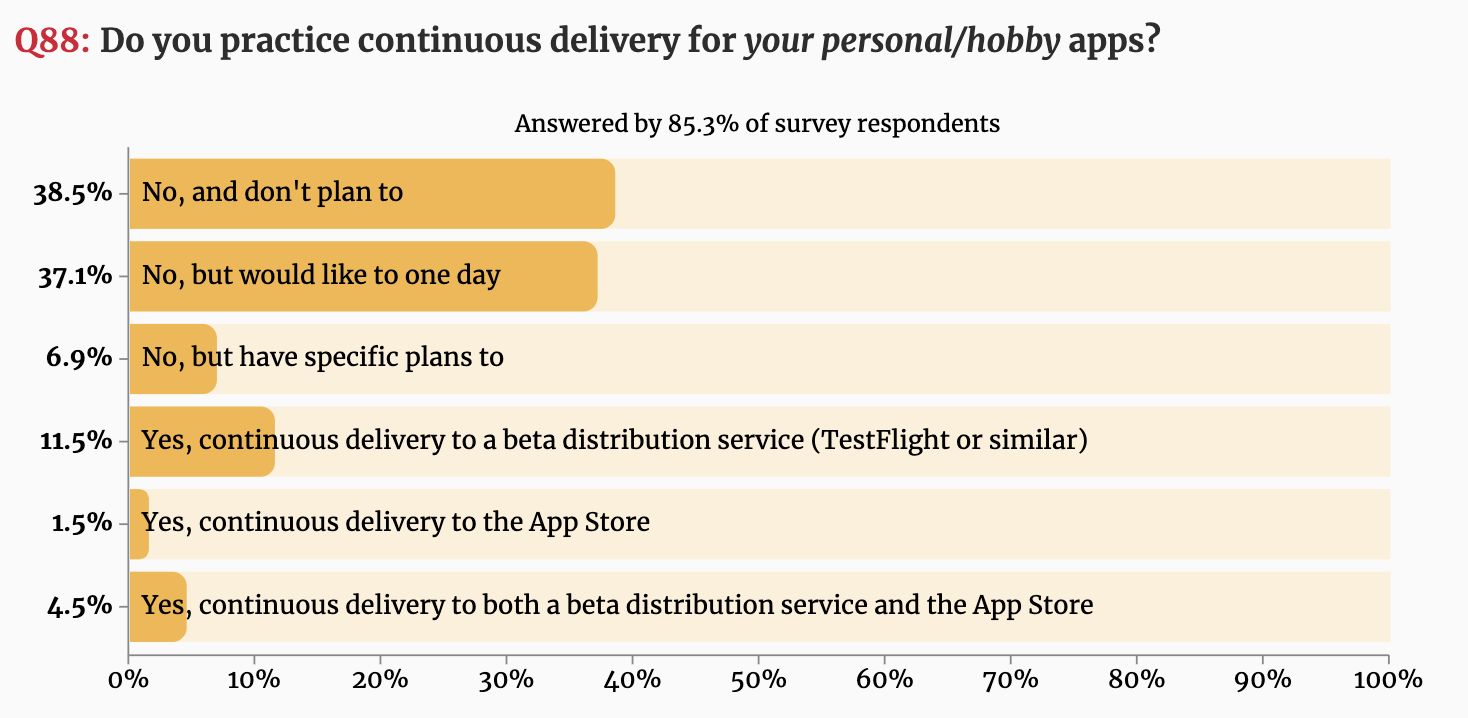
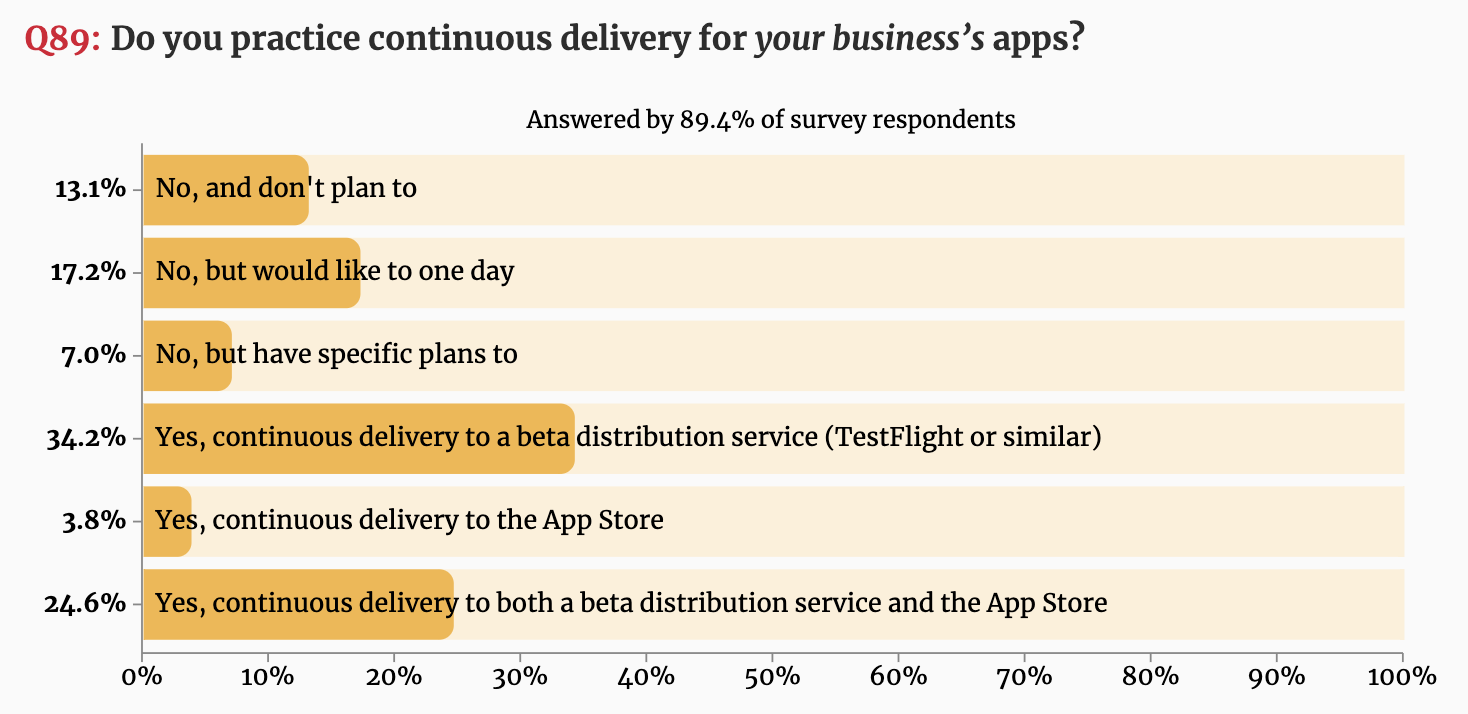
The iOS Developer Community Survey is the largest survey of Apple platform developers ever undertaken, where 2,290 people filled in the questionnaire in which CI/CD questions were also a part of the survey.
Below are the results that showed a majority of developers are practicing CI/CD when it comes to business apps.
Figure 1: Do you practice continuous delivery for your personal/hobby apps?Figure 2: Do you practice continuous delivery for your business’s apps?
The way forward: Companies will not be able to fully take advantage of containers and DevOps unless they embrace the use of a proper deployment pipeline. Companies will start offering pre-built pipelines to customers, something like JFrog pipelines. There is a need for a unified platform that has all the tools needed to support a CI/CD system — automation (Pipelines), binary repository management (Artifactory), security (Xray), release/deployment (Distribution), etc. JFrog provides a unified platform.
Codefresh conducted a survey and published the results of the survey of 130 developers at the KubeCon + CloudNativeCon Europe 2019 conference — and the results were a bit shocking. It showed that nearly a third (32%) don’t use any continuous integration or continuous delivery (CI/CD) platform at all. Sixty percent of the survey respondents said their organization has yet to take full advantage of automation to accelerate software development and deployment.
The Market Radar Report by GigaOm is a recent research on the enterprise CI/CD solutions where the author compares the leading CI/CD solutions in the industry and rates them depending on different valuation criteria. According to the results, JFrog, Codefresh and GitLab are outperformers as shown below.
The CI/CD solutions considered were AWS, CircleCI, CloudBees, CodeFresh, GitLab, IBM, JFrog, Micro Focus, Microsoft, Red Hat and Xebia Labs. You can download the free analyst comparison report here: GigaOm Radar For Enterprise CI/CD.
CI/CD is one of the DevOps best practices because it ensures proper alignment between developers and operations. While it enhances automation, developers can push code changes more reliably and frequently. At the same time, the operations team can see greater stability because environments have standard configurations, and rollback procedures are automated. To win the CI/CD game, both dev and ops teams need to develop consensus on the right tools and approaches that are beneficial for the business growth in the long run.
Cloud and DevOps Go Hand in Hand
You can’t do DevOps without the cloud. DevOps won’t have much value without it, and the cloud won’t do much without DevOps.
Cloud computing has many definitions, the fundamental explanation of the cloud can be defined as a system that enables and supports the provisioning of infrastructure. Thus, it allows it to be described as code or templates, facilitating the creation of repeatable processes. That is also the basic principle of DevOps, automating the processes/tasks in the software development life cycle to the fullest extent.
One of the biggest benefits of cloud for CI/CD is the dynamic nature of cloud infrastructure. This is perfect for the ephemeral and bursty nature of CI/CD workloads. Cloud resources can automatically scale up and down based on CI/CD workloads. This allows huge management and cost benefits for enterprises. Enterprise companies don’t need to have their own servers to maintain, they need to increase these servers as CI/CD workloads increase or waste server resources when they are idle.
Regardless of how your organization defines the cloud technologies and, despite which DevOps routes you travel to achieve digital transformation with the cloud integration, the aesthetics of cloud technologies and services can be easily amalgamated in the DevOps dictionary because they radically complement DevOps principles and processes.
For DevOps implementation, Agile principles serve as a driver, as there are shorter release cycles and automation to deliver fast and achieve the deadlines. To implement continuous practices, cloud computing is a great facilitator, since resources are available quickly for all the activities involved in development and application lifecycle management. Agile principles, along with cloud computing and DevOps practices, enable high developer productivity and faster growth in organizations.
With secured cloud gateways, users get the ability to access enterprise resources easily from anywhere and with any device, without compromising on the security of the network. Letting users access your network from their devices might sometimes seem scary, but the modern cloud platforms have much more to offer, they come with built-in security stacks to help provide administrators with the tools they need to manage and support security.
DevOps coupled with cloud tech has enormous benefits for businesses employing them:
Increased developer productivity and collaboration.
Faster time to market through quick and easy access to development environments.
Help to automate different repetitive tasks so that developers can focus on the tasks that matter.
Cloud complexity and system maintenance can be incredibly reduced by automation and infrastructure as code approaches.
Increase security with modern cloud platforms and principles that serve to eliminate the manual error.
Help to eliminate downtime through cloud-based continuous business operations. Developers can build stateless applications with automation, which will increase the availability and failover ability, along with increasing business reliability and improved customer satisfaction.
Scale to new heights — one of the main reasons businesses employ cloud and DevOps is to scale their infrastructure and applications as and when needed.
Cloud Deployment Models
When the cloud provider entirely hosts organization’s applications and data, it is a public cloud. With just having an internet connection, the employees of the company employing public cloud can access the applications.
A private cloud is when the resources of an organization such as storage, compute and networking resources exist in a provider’s data center. Companies prefer private cloud mainly because of security and for storing highly sensitive data when it comes to running applications.
One more modern approach is the hybrid cloud; it is a combination of private and public cloud services. According to the traffic and demand considerations, organizations can make the change. Some customers may have on-prem CI/CD systems. Some of these CI/CD systems can expand their workloads to the cloud in a hybrid setup. This can allow them to realize the benefits of cloud now and not have to do a complete migration.
Mainly, when there is high demand, workloads can be run in the public cloud, and then when things get back to normal, return to the private cloud. This approach reduces the overhead cost spent on cloud resources. Additionally, the key point is, sensitive information, data and critical applications can be kept in the private cloud. In contrast, less-sensitive data and applications can be stored and run in the public cloud.
Choosing DevOps Cloud Solutions
If cloud is like an instrument, then DevOps is the musician who plays it.
Cloud computing and DevOps play a vital role and are interlocking parts of the IT strategy. Together, cloud and DevOps help IT shift its emphasis from “How far and long can we go without an outage?” to “How often we can deliver new and stable functionality/feature?” or “How fast/quickly can we deploy a new service?”
Businesses today are looking for ways to digital transformation with the help of the cloud, DevOps and automation practices. Considering the competition in the cloud space, it is overwhelming to see so many vendors and get confused on what to choose.
Here, in the State of DevOps Cloud Solutions 2020, you can see a high-level overview of the cloud DevOps platform solutions available today, and what you should expect from vendors in your cloud DevOps journey.
In recent weeks, there have been a slew of organizations announcing that their work from home policies will be extended through the end of the year such as is the case with Google and Facebook, or perhaps indefinitely such as Twitter and Square.
It’s good news to many technology workers who, according to a recent CNBC|SurveyMonkey survey, prefer remote work (25%). Also, a recent survey, produced by Cybersecurity Insiders on behalf of Pulse Secure, found that 38% of U.S. companies experienced gains in productivity. In this survey, 84% of respondents believe they will institute broader and permanent work from home policies beyond the novel coronavirus crisis.
What does the work from home policies mean for organizations going forward? When it comes to security and compliance, it means quite a bit. According to the Cybersecurity Insiders survey, 69% of respondents are concerned about work from home (WFH) risks, especially due to low user awareness training, poorly secured home and public WiFi networks, use of personal devices and sensitive data leakage.
A full 78% of respondents expressed their desire to enforce the same level of security controls for remote users as they do for on-premises users. While 65% allow access from personal, unmanaged devices, two-thirds of security professionals anticipate malware, phishing, unauthorized user and device access, and unpatched/at-risk systems to be the most exploitable WFH attack vectors.
“Sixty-three percent expressed that remote work could impact compliance mandates that apply to their organization; especially GDPR, PCI-DSS, HIPAA and those with data breach notification,” the report found.
Interestingly, about three-fourths of those organizations surveyed said they have more than 76% of their employees working from up — that’s up from 25% in 2019. Still, a third of those surveyed said their organization is ill-prepared or not prepared to support remote working. Yet, 75% of businesses transitioned to remote working within 15 days.
“Surprisingly, less than a third expressed cost or budget problems, demonstrating the urgency to support their business. Additionally, more than half (54%) expressed that COVID-19 has accelerated migration of users’ workflows and applications to the cloud,” stated the report.
How are survey respondents securing their staff who work from home? The survey found the most common to be endpoint security, firewalls, virtual private networks and multi-factor authentication.
The 2020 Remote Work-From-Home Cybersecurity Report is based on a survey of 413 security decision makers, conducted in May of this year, within multiple industries, including financial services, healthcare, manufacturing, high-tech, government and education.
Interestingly, the work from home movement may also give a boost to the gig economy, as gig economy work moves from lower-paying taskwork to professional gig work. A recent report, How the Gig Economy is Reshaping Tech Careers and IT Itself, highlighted data that shows 72% of all gig projects were in large enterprise and professional services firms throughout 2018 and 2019, compared with 52% two years prior.
“This rapid growth is spurred by workers’ interest in flexible careers as well as businesses’ interest in convenience and efficiency. There are signs that the gig economy is finding many adherents overseas as well,” stated the report.
Whether or not the work from home movement is real or long-term is no longer the question, it’s for how long and how far the trend goes. Enterprise technology leaders had soon prepare for a much more remote and loosely connected workforce.
As a career developer and now a chief technology officer, I am experiencing firsthand how COVID-19 has forced us all into new ways of working. I’m also aware that these new ways may be with us for a while. Last month Gartner announced that 74% of companies intend to shift some percentage of their workforce to permanent work from home status.
The fears many technology leaders have is that working from home will disrupt the processes in place for coworkers to communicate and collaborate. I would argue that DevOps overcomes those challenges by design. Organizations have become increasingly confident in DevOps with research from Global Market Insights finding “DevOps Market size exceeded $4 billion in 2019, and is poised to grow at over 20% CAGR between 2020 and 2026.” Companies that hold onto practices that are less agile will find they hamper velocity and allow competitors to vault ahead in a rapidly changing digital environment.
A study by the software developer CA Technologies — now part of Broadcom — found that more agile companies achieve 60% higher revenue and profit growth than their peers. In another study of agile companies, this one from industry research firm Gartner, 74% of respondents reported better alignment between IT and the business.
DevOps and Agile go hand-in-hand toward greater organizational success.
Software Developers Feel the Need for Speed
Developers working remotely will thrive on the unimpeded workflows and synchronous collaboration DevOps makes possible, even while separated. Today, when customers are consuming more digital services than ever, the traditional development methods just don’t meet the speed required. In a recent xMatters survey of 300 consumers, 90% said they are using digital services — from grocery and takeout food delivery to videoconferencing and banking. Eighty two percent said they will continue to do so even after the pandemic is history. Customers previously accustomed to brick and mortar services now have high expectations for uptime, performance and feature sets for digital services, so leaders will have to embrace DevOps to continually improve the user experience.
One Team One Dream
Given the various specializations within organizations, embracing DevOps must often begin by bridging the unique cultures of each team, including development, quality assurance, security and customer success. One way to do that is to establish shared Service Level Indicators and Service Level Objectives with a focus on customer experience. For example, working toward five nines digital service availability, sub-second website page loads and same-day security patch deployments as common goals will aid in the formation of a cohesive unit. Additionally, the team should feel executive-level DevOps buy-in, which should manifest itself in optimal technologies and appropriate alignment of talent.
DevOps Developers Are Hot, Don’t Let Them Burn Out
Developers with experience working in a DevOps organization have always been in demand, and the rapid adoption of digital services is making these software professionals even more valuable. According to a recent LinkedIn report, DevOps is the single most recruited position on the platform today. Attracting and retaining these skilled workers can be extremely challenging.
One way to increase retention is to foster a culture that respects work-life balance. When surveying consumers about the impact COVID-19 had on the adoption of digital services, xMatters simultaneously asked 300 IT professionals about the impact this mass-scale adoption was having on them. Unfortunately, 88% said their work-life balance had deteriorated. Most DevOps teams were already accustomed to being on-call 24/7; so if they’re feeling COVID-19 has pushed them over a line, burnout is a real risk. It’s essential to recognize this and act on it. Providing DevOps teams with the right tools to automate CI/CD in a secure way, even while working remotely, goes a long way.
Time for DevOps to Shine
The changes driven by the pandemic will have long-lasting effects on the frequency with which we use digital services to live and work. Customer experience will remain paramount and those metrics will be increasingly visible at the executive level. We will also see a greater focus on lean practices and cost reduction. I can think of no approach that does more to meet consumer expectations, address fiscal challenges and increase employee satisfaction than DevOps does.
As developers, the prospect of working for a big company might bring about feelings of oppression, rather than opportunity. Envisaging endless team syncs, pointless meetings and processes wrapped up in bureaucracy inside a set of procedures. It’s easy to imagine why some are put off. For many though, the fear comes from the thought of being lost in a corporate structure where input is not valued, and skills are wasted.
But every day, as developer concepts become further rooted into corporate behaviors, the line between the two worlds continues to blur. Products are no longer dreamed up in product silos, but from agile teams made up of a diverse cross section of a company. Marketing has dropped drip campaigns in favor of A/B testing, rapid iterations of messaging and data-driven analytics. Big companies no longer mean old school thinking, but fast-changing, inclusive places to really make an impact and be heard.
Working within the Scaled Agile Framework (SAFe) with an agile architecture of microservices helps us to do our jobs, but the learnings we’d like to share in this article are universal. An organization may not require the SAFe methodology, but the experiences and methods of working can be applied to many roles and are based on three fundamental questions every developer should ask themselves.
How Do I Plan My Day?
As with any role, a good start for us is knowing that the previous day went well; that the code we wrote meets the standards required for deployment. Before that, our individual microservices teams will meet to discuss immediate priorities. We let one another know what’s top of mind for us, and any issues we might be facing — and we resolve them together before a midday Scrum meeting.
The Scrum meeting involves the Scrum master, product owner and the developer team and gives us a chance to give feedback and dive into the wider challenges or blockers we’re facing with our own tasks. We might be thought of as solitary creatures, but we actually tend to solve problems together. So, while we have ownership of our own tasks, problem solving comes from collaboration.
Whether working within the agile framework or not, communication is a huge part of our lives. Our advice to developers everywhere is to be vocal about the need to engage within their organizations. And to business IT decision makers, we know that not every firm has the deep pockets to fund a dedicated DevOps team to implement new tools, change culture or break down silos, but there are many communications and open source DevOps tools that boost collaboration and improve workflows — most are well-known to developers. So, give them the chance to explore how they might bring efficiencies to their work. Help them help the business and maybe suggest trialing some new tools.
How Do I Upskill on the Job?
Developers are problem solvers. We love the opportunity to help each other overcome challenges. Peer-to-peer communication doesn’t just allow us to get back on course quicker, it lets different teams share knowledge and pitch in to solve problems. We don’t mind being transparent with our peers when we face an issue – in fact, we quite like it, as the offshoot of working together often leads to new skills and technical knowledge.
Learning the interactions between each microservice, for example, helps us map out the architecture and understand how our own work fits into the bigger picture. The more we talk, the more we see where bottlenecks might occur — and the better equipped we are to achieve larger objectives. As we have complete ownership of our services, from initial coding to deployment, it is our duty to ensure our services perform as they should in production.
This ownership is something all developers should aim for. Even when working in a more rigid waterfall approach, opportunities to collaborate should be seized and encouraged — even if the only payoff is personal development. Implementing a system of peer code reviews, for example, not only delivers more robust releases, it fosters a collaborative mindset.
Do I Need to Be in this Meeting?
Working with SAFe methodology allows the job to be broken down into iterations linked to business objectives. The most significant of these is determined by meetings that occur every four months, where goals are set and roadmaps established to achieve them. Engineering teams then divide up the features that will be passed on to the developer teams, who break them down into two-week sprints.
The sprints are what the developer teams work to, under direction from the Scrum masters and product owners. Breaking iterations into smaller sprints ensures we have defined goals, which keep meetings and interactions on track (i.e., daily Scrum meetings and bi-weekly sprint meetings). Without this focus, there’s a risk of derailing the prep required to focus on writing and reviewing code. If we need a discussion about certain features, we make sure to identify exactly who needs to be in that meeting. Above all, we’re all about optimizing our time together. The longer we spend away from our desks, the less time we have to perform our core roles.
Whatever your part in the software development lifecycle, never be afraid of asking the question, “Do I need to be here?” Your energies may be best used elsewhere.
As you can see, these three questions are critical to developers but can be applied to just about any role in just about any organization. Planning, learning and focusing – seems we’re not so different after all.
This article was co-authored by Tomasz Rumpca, Java developer and team lead at Finastra. Tomasz works on FusionFabric.cloud, Finastra’s open development platform solution. He is passionate about Java-related technologies and building user-friendly software. Outside of work, he enjoys spending time outdoors with his friends and family.