Category: Enterprise DevOps

  • DevOps’ Cultural Myths and Logical Fallacies

    DevOps’ Cultural Myths and Logical Fallacies

    Remember that guy you knew in college who was working on his fifth or sixth degree with no plans to stop? At some point the idea of real work must have terrified him, and instead what appealed to him was a continual state of learning. If you have the funding to master five or six disciplines, and perhaps not the ambition to get going in any one of them, why not stay and explore the next one?

    But if you work in IT, chances are you did not stay in college for more than a few areas of study, and since you entered the work force, your future options dwindled down to two: become a specialist (deep thinking in a singular discipline, but not too broad) or become a generalist (broad thinking across multiple disciplines, not too deep in any one of them).

    Managers tend to start their careers as specialists who do so well they are promoted to manager, where their career shifts and they become generalists. From time to time they dabble in a particular area of study to speak the lingo, use the right buzz words and understand what is coming, but the role they play is inherently generalist, as they are forced to deal with a number of topics beyond the realm of any one particular area of study.

    We tend to associate the title “architect” as being the specialist who is deep in an area we are forced to contend with. Examples might include, “We need to hire a network architect, or a database architect, or a software architect …” the list continues. When we do this, we have certain expectations. We are looking for the “guru” who can solve our network problems or database problems or security problems—wherever the skill set was that caused us to hire this specialist. If our new employee cannot solve our problems, we begin the search for another who can solve them.

    But the candidate has expectations as well: The network guy may have a little knowledge about databases but does not expect to have to perform at the level of his peers in that discipline. If we hire a network guy and then ask him to do everything in every other discipline, we are the ones out of line and he will likely flee our employment in haste, calling us crazy on the way out.

    The Cultural ‘Frankenstein’

    To create a true master of the multiple disciplines that exist within IT would require creating a modern Frankenstein in networks, servers, operating systems, storage, database, middleware, software and mobility. And, of course, this list is not limited to one expression of each type, but indeed multiple expressions of each type. So for example, our database discipline likely includes deep expertise in Oracle, DB2, SQL Server, NoSQL, MySQL … you name it. If it is popular or relevant to our current stack, our Frankenstein must know that one.

    As DevOps has gained in popularity, we have conflated certain aspects of it and driven ourselves off the highway of logic. Too often, proponents have taken the concept of co-location from the agile beginnings of DevOps and applied it to the operational endings of DevOps. Taking down silos is mistakenly applied to co-locating IT operational staff. This conflation occurs billed as the panacea it once was to co-locating business staff, with the developers producing products for them. In the strictly agile context, this works well. Applying it to IT personnel on the back half of delivery is the least effective means of creating Frankensteins. Co-location is a good way to share ideas, from user back and forth to innovator. In general, sharing ideas between a network guy (with limited interests outside his discipline) and middleware guy (who could care less how the network is configured in detail) has limited success.

    These operational IT disciplines do interact, but only as they have need, which is significantly less than having to sit in the cube 4 feet away from a counterpart involved in a differing discipline. Co-location is not the cure for breaking down silos or increasing communication—common backbones are. Imagine the example of the medical profession: A hospital provides the common backbone for the neurosurgeon, the orthopedic surgeon and the heart surgeon. These disciplines are inherently separate, and if you have a particular illness, you are going to want the one who specializes in the thing you need done. While each doctor understands general health aspects, they specialize for a reason—a reason you want and need—when it is your time to seek help.

    The hospital provides the common facility, the common support staff, the common electronic systems and tools we use. Our medical records are stored in one place, no matter what type of treatment we seek, so each specialist has to enter them there and can read them there. But distinctions by practice remain. There is a special surgical floor for heart surgeries, where they do not conduct orthopedic work or neurosurgical work. The tools may be slightly different; the medical journals are. The training is different. The experience is different. And none of these skills transfer by osmosis of co-location if you put all three doctors in one central cubical cluster. It takes years to get where they are. The same is true of our IT specialists.

    If instead of co-location we looked more at common systems for moving, documenting and articulating change. If we gave limited access to our DevOps tooling to the specialists, confined to the niche they have expertise in, then instead of co-location we could have remote-work-concurrence. Experts from all over the country could work on the movement of change without ever physically seeing each other, but with full visibility into what is happening in real time through a common lens. Network operations center (NOC) personnel remain physically in the NOC, but can see the entire stack from that location and change only their portion as changes are required from there.

    It is the common backbone of DevOps systems that breaks down the silos of change transparency and change participation. Prior to DevOps we were all using different tools to move change and track change. With DevOps we can begin to articulate change and document it, in the same tool or interface. Meaningful access is granted only to the portions of tools and only where it is needed. Database guys have full access to that platform and nobody else does (other than to see it). The same model works for every other specialty. And before you know it, you have a concert—or rather a symphony of moving parts—instead of disjointed sounds no one can comprehend.

    Organizations that hold to the idea that staff will become Frankensteins, equipped with deep skills in all areas because they share cubicle clusters, would do better buying lotto tickets. Where the culture will require attention is in demonstrating to the impacted teams why participating in the common backbone approach has merit for each of them. For engineers who have never had to use “something different” before, this takes work, but is the real win.

    When complete, what has truly happened is a conversion to a culture of unity. The work of the genius is still protected in this method; in fact, it is amplified as now it is visible to the entire organization. So even the prima donnas should be happy with the approach. And the ability to orchestrate change never will have been so high, with so much real-time interaction, as after the embrace of a common backbone of DevOps systems. This should offer executives new insights into product creation and evolution. In this sense, the cultural changes reach from top to bottom of the organization, and they are achievable.

    To continue the conversation, feel free to contact me.

  • FLAP, Part 1: Server Provisioning

    FLAP, Part 1: Server Provisioning

    We have reached the state where end-to-end data center provisioning is a reality. It’s early yet, so there is a certain amount of work involved, but today a DevOps team essentially can turn on the automation and move on to other DevOps priorities. It takes some effort, depending upon the solution chosen, but the end result is an infrastructure that provides for installation of operating system (OS), hardware (if needed) and apps, along with configuration of the whole, at the push of a button.

    There are a number of solutions ready for your data center today, and this three-part series will explore them. In the first part, we’ll talk about server provisioning—the part that takes you from uninstalled server or virtual to a functioning OS configured for your environment. The following two articles will cover application provisioning and merging the two to achieve FLAP. (Yes, I made up FLAP. Use it or not, as you see fit.)

    Disclaimer: I work for a vendor in this space. While I do not believe that impacts my objectivity, I will note where my employer is mentioned, and leave it to the reader to decide if I’m blinded to some items/issues based upon my association.

    Server Provisioning: What and Who

    A server provisioning system takes a physical or virtual server from nothing to fully installed OS. This layer of FLAP is fundamental to automating the entire process. If the system has to be installed manually, using tools and scripts to install applications just doesn’t offer the overall benefit as when the entire process is automated.

    For this discussion, we will be sticking with the major provisioning tools out there. To be sure there are more, and I have information about them, but for this short blog post, we’ll stick with the ones that hold something special—market share, history, integrations, associations—that make them a good long-term bet. Our list is alphabetical, and does not show preference by ordering.

    Cobbler

    Cobbler is one of the original server automation tool sets, and definitely has the history and stability to warrant your attention. For shops that use a lot of Fedora and CentOS, Cobbler in combination with Spacewalk is particularly appealing, as we’ll talk about later. Support includes most Linux distributions. Users have created ways to include Windows in the list of installable OSes, but there is not yet an official solution for Windows.

    Cobbler is integrated with Ansible, Spacewalk, Saltstack, Puppet(user created), and older versions of Satellite. There is some amount of concern about Cobbler’s future growth, simply because Red Hat moved Satellite off of Cobbler with release 6.0, though Red Hat still supports Cobbler. It is too soon after the split to predict how this will fall out, but currently it seems to have motivated the Cobbler core team to do more. Users concerned should check GitHub analytics to see what the trends are for committers and commits at the time they are evaluating (good advice for all of these products, but more pertinent for one where there is a question of its future).

    Cobbler’s hardware support is better than most, and in terms of application support it is a pure-play server automation tool; there is no support for applications at all—application provisioning is expected to deal with that aspect.

    Foreman

    Foreman is an open source project that is currently enjoying the sponsorship of Red Hat, but support is not limited to Red Hat OSes. In fact, Foreman will install just about any flavor of Linux, and can target most physical/virtual/cloud platforms. Using WDS, Foreman can also install Windows.

    One of the big strengths of Foreman is its interoperability—it doesn’t much care which application provisioning tool you are using. It is integrated into Satellite (with Puppet), and has support for all of the other major application provisioning tools. This means that no matter what you’re using to get your apps installed, Foreman is worth looking at for getting your servers installed.

    Like most products out there, Foreman provides CLI, API and GUI. They’re relatively stable in relation to the market, simply because Foreman implemented them earlier than most competitors, and is constantly improving them.

    In short, if you are in an environment that has a wide selection of OS, architecture and application requirements, Foreman should be at the top of your short list. For more focused solutions (in terms of OS, whether or not cloud, or application provisioning tools), it makes more sense to compare specific features/functionality with some of the more focused tools in this list.

    MaaS

    MaaS was the sleeping giant of the automation world, but it does indeed look as though it is awakening. MaaS is part of Canonical’s Ubuntu project, so there is plenty of backing, but historically its goals have been modest and its documentation more so. That changed some time over the summer/fall, and MaaS is showing increased support for OSes, better documentation and a more focused attempt to get the word out. If you are primarily an Ubuntu shop, it is well worth considering.

    Like most of the products in this offering, MaaS uses PXE to get the machines into its system, and then uses predefined images that have been imported (Ubuntu images don’t need importing) to install a machine from bare metal/virtual to working OS. MaaS proclaims support for CentOS, RedHat, SuSE, Ubuntu and Windows. For those unfamiliar with the space, that’s an impressive list. But the last time this author used MaaS, it was still only Ubuntu, so I cannot comment on the level/quality of support for each of the OSes. Due diligence should involve testing with those OSes your organization needs.

    The weakest part of some installers is non-standard hardware, such as RAID controllers, specialized network cards and the like. MaaS supports these components and includes UCS support in its packaging. Directly mentioning UCS support is only to be found with MaaS and Stacki, so if you’re a UCS shop, it is worth considering.

    In addition to CLI, MaaS touts an API and a GUI. These are important tools in the DevOps sense, because the API lets you tie MaaS into your automation architecture, and the GUI helps find issues specific to MaaS and its domain. Particularly interesting is the collection of logs that show install results and operations results clearly for each server.

    The one major drawback to MaaS is its limited application provisioning support—it is well-integrated with Juju, but none of the other big names in the space.

    In short, for Ubuntu shops using Juju, this is the tool to put at the top of your short list. For everyone else, the tool is viable, but should be considered against the features/functionality of other tools.

    Razor

    Razor is Puppet’s newer bare metal installer. It is young yet, and there are still issues to be worked out, but the large cadre of developers that are dedicated to Puppet say that Razor will continue to improve as time moves on. At current it directly supports most flavors of Linux and Windows installations. The catch to Razor is on the other end: It is designed to work with Puppet, and support for other application provisioning tools is low—indeed, is limited to user-designed solutions. Needless to say, because it is sponsored by Puppet, it is expected that official work in this area will remain slow, as it is not a priority.

    Razor does not have a dedicated GUI; instead, it uses Puppet’s GUI to report results. As with integration, this is okay for Puppet shops but pretty much eliminates Razor from consideration for other shops. (More on this in a future blog in this series.)

    Because Razor is new, there are a couple of serious caveats with the product. First, install is one of the worst in the market, with a lot of pre-install steps, a lot of install steps, and configuration of an array of underlying systems by hand. Second, each currently installed server that you do not want Razor to re-install must be entered into Razor manually on the command line. This is so limiting in a generalized data center environment (where Puppet shines) that you can expect this limitation to be resolved quickly.

    In short, for Puppet shops that do not see their application provisioning tool changing, this is the tool to put at the top of your short list. For other shops, it’s worth looking at competitors first, simply because Razor requires Puppet.

    Stacki

    Stacki is an open source project sponsored by StackIQ (as promised, this is my employer). Having roots that stretch back more than a decade, Stacki specializes in RedHat/CentOS installations with additional support for clustered software. As of this writing, CoreOS and Ubuntu have been added to Stacki’s list of supported OSes, and expect that list to grow over time.

    The biggest appeal of Stacki is the variety of ways to get systems under management. All of these apps will auto-detect a new server on the network, grab it and install it. Stacki adds the ability to list just the servers that should be clean-installed in a spreadsheet, the next time each of those machines boots they will be installed, but no other machine will. While there are ways in all of these systems to simulate this functionality—you can add exceptions to the “install all machines that boot on this subnet” rule via the command line in Razor, for example—using a spreadsheet to affirmatively manage what machines are to be installed and how gives an offline bulk way of managing installations and re-installations.

    As of this writing, Stacki does not have an API, and only with commercial add-ons can a GUI be had, but expect one or both of these things to change as the community begins guiding development efforts. Stacki is optimized to spin out hundreds of servers in minutes or hours instead of weeks or months, utilizing a peer-to-peer parallel installer to service installations faster as more servers come online. While it works as well as others in smaller environments, it really comes to its own when there are a large number of servers under management. On the initial installation front, while the other systems in this list require hand-installing and/or configuring prerequisites and sub-systems, Stacki comes as an ISO with a UI that asks a few questions and configures everything.

    Stacki has been used with most (Ansible, Puppet, Saltstack) of the major application provisioning tools this series of blogs will consider, making it versatile on the application side of the equation.

    Overall, if you’re a Red Hat shop that uses CentOS a lot—particularly a larger shop—Stacki should be the first stop on your short list. For everyone else, the tool is viable, but should be considered against the features/functionality of other tools.

    Stay tuned for part two of this series, which will cover application provisioning.

  • Tales Of DevOps Discovery: Q&A from the Field

    Tales Of DevOps Discovery: Q&A from the Field

    DevOps is a buzzed-about industry term, yet many companies are still trying to figure out how to start the journey to a DevOps transformation. Each organization’s journey will be different, but planning and starting the journey always should include assessing the current state of a company’s software delivery process, quantifying the objectives and plotting the “route.” This begins with a discovery process.

    This multipart series will review questions commonly asked during the DevOps discovery process, highlight common answers and provide examples of the resulting guidance. It will show that DevOps is really about optimizing software development and delivery on the planes of process, tools and technology, across multiple stakeholders. Based on experience with a broad cross-section of real-world organizations, the series draws on actual interactions that have led to successful DevOps transformations.

    Starting the Discovery

    Often, organizations embarking on a DevOps transformation want to “pass go” and get straight to, “Tell us how to do it!”  Some initial statements frequently heard are:

    • “We already do and understand [CI, CD, etc.], don’t waste time reviewing that.”
    • “We are practicing [Scrum, ITIL, Six Sigma…]; we are just like everyone else, so there is no need for interview or discovery.”
    • “We don’t need to discuss [process, culture, or technology], just tell us what tools we need.”

    The eagerness to “just go” helps fuel excitement for the transformation; however, it is important to slow the rush to a solution and start with the basics. This includes:

    • Setting a baseline definition of practices: Agile, continuous integration, continuous delivery and DevOps are highly talked-about industry practices that often have multiple definitions and are misunderstood, which fosters resistance or ends up being implemented poorly.
    • Starting with foundational discovery: Ask the most fundamental questions about the current state of the organization’s delivery process and the objectives of the DevOps transformation. These questions must be asked of each stakeholder, including the Business, Development, Quality Assurance (QA), Change Management and Operations.

    Taking these initial steps can be like pulling teeth, yet they spawn insightful discussion, surface key differences in perspective and begin the process of gaining alignment between stakeholders. With alignment among the stakeholders, shared priorities become clear and actionable.

    Once stakeholders align on both the current state and objectives and identify shared priorities, only then is it possible to plot a “route” for the DevOps transformation. At this point a mission statement can be formed, which will act as the North Star or guiding light for the journey. For example, a resulting mission statement may be one of the following:

    • We will increase the stability of our releases while increasing Developer, QA and Operations productivity and job satisfaction. This will improve our ability to retain employees, satisfy customers and be more competitive.
    • We will do this for our existing and new mobile and web products through the use of iterative development, continuous integration, test automation and continuous delivering applications to a production-like environment.
    • We, as Development, QA and Operations, will work as one toward this common objective.
    • We will transform incrementally, empirically establishing best practices and expertise within teams and sharing them across the organization.

    The mission statement may seem like a trivial part of the process, but in reality it is absolutely vital to achieving the cross-fictional buy-in necessary for DevOps. It works to not only outline the strategy, but also gives the teams something to refer back to during the transformation process.

    The other key step to starting the transformation, defining DevOps and related terms, will be discussed in the next post.

    About the Author/Brian Dawson

    BrianDawson-headshot-1200x1200[1]Brian is currently a DevOps evangelist and practitioner at CloudBees, where he helps the community and customers in implementation of Agile, CI, CD and DevOps practices. Prior to CloudBees Brian spent 22-plus years as a software professional in multiple domains including QA, Engineering and Management. Most recently he led an Agile Transformation Consulting practice helping organizations small and large implement CI, CD and DevOps.

    Prior to CloudBees, Brian worked at CollabNet, VA Software, Sony Computer Entertainment, Sega, Namco and Apple. His roots are as a C/C++ developer, but his primary job has always been gathering and distributing knowledge and using shared solutions to solve unique problems.

  • Multi-Speed IT versus Bimodal IT

    Multi-Speed IT versus Bimodal IT

    I wanted to continue our revue of the recent IBM InterConnect conference in Las Vegas last month. We kicked off the revue with the release of our first videos from the show on Monday. Since then we just updated the YouTube playlist of videos available with a new batch. We will be adding to these in the coming days. For this article I wanted to zero in on a topic that I find interesting and have explored before, namely Multi-Speed IT versus Bimodal IT.

    I know that Gartner has led the way in popularizing the term Bimodal IT. Many people have adopted the term to mean that some legacy parts of the IT organization will not be able to operate at the speed of some of the newer DevOps empowered parts of the org. can work at. So it is OK for the different parts to operate at different speeds. You have in essence more than bimodal, but almost bifurcated IT.

    My problem with this scenario starts with the Bi in Bimodal. Bi signifies two, as if there were just two parts in this equation. One moves at one speed and the other moves at another speed. In real life there are more than two parts to the organization moving at different speeds. So multi-speed is much more appropriate than Bimodal.

    My problem goes beyond just comparing two to many though. I have a problem with thinking legacy systems cannot benefit from DevOps, Agile, Lean, etc.  As we have seen, even Big Iron mainframes can be made faster with DevOps. So while different parts of the IT organization can move at different speeds and will naturally do so, it doesn’t mean that legacy systems of record for instance cannot be speeded up using DevOps.

    In my view of multi-speed IT the entire organization is more like the gears in a Swiss watch. Different gears of different sizes, moving at different speeds, but all of them orchestrated to mesh together like a fine timepiece.

    This brings me back to InterConnect. I had a chance to discuss this very issue with a few people who know a thing or two about mainframes and DevOps.  Below is my conversation with Hayden Lindsey, VP of DevOps for Enterprise Systems at IBM:

    As you can see Hayden shares many of my views on this subject, but probably even goes a bit further than me calling the premise of Bimodal IT “snake oil”.

    Hayden was not the only person I spoke to at InterConnect about this subject either. I had a great conversation with Rosalind Radcliffe, distinguished engineer, enterprise systems at IBM (and one of my favorite interview subjects).  Here is what Rosalind had to say:

    While this interview covered topics other than multi-speed IT, I have also interviewed Rosalind before on this subject. Rosalind and I actually did a podcast/DevOps chat on this subject as well.  You can listen and read along to that one here.

    The multi-speed IT versus bimodal IT isn’t just something that IBM sees though. While at InterConnect I also had a chance to sit down with Ralph Van Beek of Rabobank. A Netherlands based bank with operations throughout the world.

    Ralph tells us of Rabobank’s DevOps journey in which multi-speed IT plays a big role.

    If all of this multi-speed IT versus bimodal IT is not enough for you, we also did a good Google Hangout on this same issue prior to IBM InterConnect 2016. Finally, Sanjeev Sharma, author of DevOps for Dummies, wrote a good piece on this subject right here on devopsy.kinsta.cloud that you might find very useful if you are as interested in this subject as I am.

    So that should be enough on this subject to satisfy just about everyone. But if you have something to add to this topic please leave a comment or submit your own article to me here at editor@devops.com.

  • IT Organization: Blend, Don’t Divide

    IT Organization: Blend, Don’t Divide

    Bi-modal is the new normal, but the best way to approach this is to blend operations, not create separate groups.

    There’s been much ado lately about the transition of enterprise IT from traditional, steady operations to a highly agile and services-based operation. Companies of all sizes are moving to the cloud and adopting DevOps, yet many must maintain legacy systems for years to come. Pundits and analysts such as Gartner suggest that CIOs need to split their organizations into two: the Mode 1 group (traditional, “lights on” operations) and Mode 2 (the business-innovating group). In fact, Gartner is so bullish on this idea that the research firm is predicting that 72 percent of enterprises will be operating in a bimodal structure by 2017.

    Yet dividing and conquering won’t work. By creating two separate groups, with likely two different leaders, there’s bound to be tension and turf wars. Overlap of duties will happen, and higher costs may result. Regardless, the two groups will still need to work together—but may have little incentive to do so.

    Let’s take a step back. Bimodal is just another name for transitions that IT organizations have been through many times in the past: analog vs. digital, mainframe vs. client/server, batch vs. interactive, native vs. web-based, on-premises vs. cloud and so on. Creating walls between existing and emerging processes and technologies doesn’t make much sense. It’s possible to manage “old” and the “new” requirements and projects in tangent.

    Instead of creating walls, Mode 1 and Mode 2 processes can coexist and employees with different perspectives can help each other as the company transitions to its next phase of innovation. Over time, the entire organization will shift to the most progressive, efficient and business-aligned way of delivering IT.

    IT organizations should think more holistically about building cross-functional teams made up of the best members to serve that team’s particular purpose. Those teams may have mobile app developers and DevOps managers sitting side by side with network engineers and system architects who have developed deep specialties in enterprise databases and data center infrastructure over many years. There may be Waterfall teams and DevOps teams, and individuals managing cloud providers working closely with data center managers implementing converged infrastructure. It all begins with the business requirements and designing a strategy that is inclusive of both required legacy systems and future, cloud-based initiatives.

    But wait, aren’t the most progressive companies Mode 2 from top to bottom? The answer is no. Companies such as Amazon, Google, Netflix, Facebook, Apple and LinkedIn are IT innovators that also manage solid and stable internal environments.

    It was only in mid-2015 that Apple announced its migration of the Siri application platform to the Apache Mesos platform. This didn’t happen overnight. The team responsible for Siri realized that it could cut costs and increase flexibility for ongoing support and development. It was an evolutionary move focused on front-end scalability and allowing a clustered approach for scale and management—arguably a very Mode 2 approach. That said, it’s also widely known that the data sources for Siri are a mix of traditional RDBMS and No-SQL—massive data repositories handling millions of transactions 24/7. These platforms require Mode 1, utility-grade availability constructs.

    LinkedIn is another innovator running a distributed architecture that blends Mode 1 technologies (data layer and business engines) with Mode 2 clusters focused on presentation of new and existing initiatives.

    Ways to Blend Effectively

    Here are some ways to approach a blended IT organization that incorporate both Mode 1 and 2 technologies and processes without building walls:

    1. Create a best-of-breed environment. Evaluate your applications and create an architecture plan. Identify existing applications that require modernization. Create a clear picture of the gap between current and desired state. Build an architecture for your applications that leverages one or more platforms that can adapt to your application architecture goals, both present and future.
    2. Balance out your weakness. Most large companies in traditional industries will be heavier on the Mode 1 orientation regarding skill sets, tools and processes. To jump-start a transition toward Mode 2 operations, consider hiring people from software startups with ample experience developing, scaling and maintaining cloud-based systems under rapid time frames. These are the people whose failures bring the perspective necessary to empathize with your Mode 1 teams. They might even appreciate the Mode 1 team’s experience.

      Conversely, if your organization is already a strong Mode 2 operation, know that scaling your business will require you to embrace Mode 1 skills to maintain reliability and consistent user experience as demand grows unpredictably. Ideally, find someone with a large enterprise background that has experience delivering reliability for new, web-scale applications.

    1. Don’t force new methods. DevOps, a technique for infrastructure management in support of rapid delivery of applications services that is generally considered to be well-suited for Mode 2 applications, may not retrofit to every situation. For example, one can write code to manage infrastructure systems that expand and contract with the proliferation of application containers. While well-suited for the container-based application model, many of the coding concepts associated can be too complex for scripting the deployment of a multi-tier Mode 1 application. The layers and complexities of the scripting don’t provide enough return on the time invested to justify the upfront efforts. Leveraging a purpose-built automation engine or simply deploying manually likely makes more sense today. Choose the technique that best serves the initiative, not the one that seems the newest and coolest.

    Rather than getting hung up on how to reorganize IT departments, a better use of time is to determine how to blend the best of the old and the new. IT organizations today are frequently in a state of transition, given the pace of new technological developments. By merging tried-and-true tools and practices that deliver stability with the latest innovations for web-scale business models, companies can move quickly in their respective markets without sacrificing business longevity.

    About the Author/Steve McDonald

    Steve McDonald StrataCloudSteve McDonald is Vice President of Product at StrataCloud, developer of a platform for software-defining enterprise data centers. Over the past 15-plus years, McDonald has led cross-functional teams in the delivery of innovative business initiatives, most recently at Softchoice, where he a managed a team of business development and pre-sales professionals in the United States and Canada focused on the profitable growth of the entire Cisco portfolio as well the networking category overall.

  • Evolving to Continuous Testing

    Evolving to Continuous Testing

    As agile development practices mature and DevOps principles infiltrate our corporate cultures, organizations are realizing the distinct opportunity to accelerate software delivery. However, when you speed up any process, immature practice areas such as testing and roadblocks become much more pronounced. It’s the difference between driving over a speed bump at 5 mph vs. 50 mph … at 50 mph, that speed bump is going to be quite jarring.

    Accelerating any business process will expose systemic constraints that shackle the entire organization to its slowest moving component. In the case of the accelerated software development life cycle (SDLC), testing has become the most significant barrier to taking full advantage of more iterative approaches to software development. For organizations to leverage these transformative development strategies, they must shift from test automation to continuous testing.

    Drawing a distinction between test automation and continuous testing may seem like an exercise in semantics, but the gap between automating functional tests and executing a continuous testing process is substantial. This gap will be bridged over time as the process of delivering software matures. Both internal and external influences will drive the evolution of continuous testing. Internally, agile, DevOps and lean process initiatives will be the main drivers that generate the demand for change. Externally, the expense and overhead of auditing government and industry-based compliance programs will be the primary impetus for change.

    A Roadmap for Testing

    Any true change initiative requires the alignment of people, process and technology—with technology being an enabler and not the silver bullet. Yet there are some basic technology themes we must explore as we migrate to a true quality assurance process. In general, we must shift from a sole focus on test automation to automating the process of measuring risk. To begin this journey, we must consider the following:

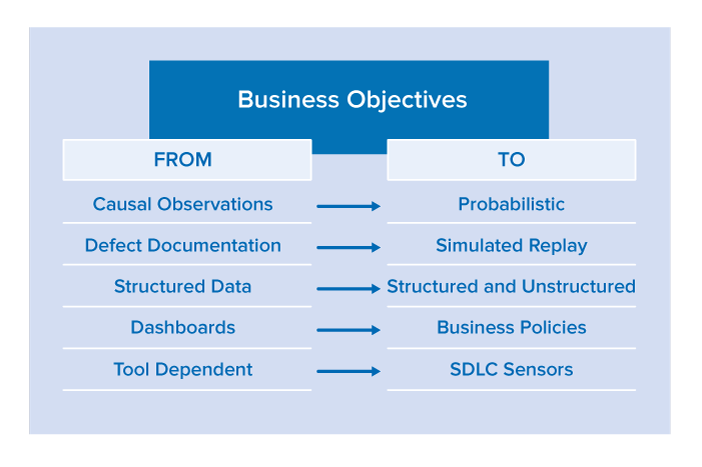
    Driven by business objectives, organizations must shift to more automated methods of quality assurance and away from the tactical task of testing software from the bottom up.
    graphic

    From Causal Observations to Probabilistic Risk Assessment

    With quality assurance (QA) traditionally executing manual or automated tests, the feedback from the testing effort is focused on the event of a test passing or failing—this is not enough. Tests are causal, meaning that tests are constructed to validate a very specific scope of functionality and are evaluated as isolated data points. Although these standalone data points are critical, we must also use them as inputs to an expanded equation for statistically identifying application hot spots.

    The SDLC produces a significant amount of data that is rather simple to correlate. Monitoring process patterns can produce very actionable results. For example, a code review should be triggered if an application component experiences all of the following issues in a given continuous integration build:

    • Regression failures greater than the average
    • Static analysis defect density greater than the average
    • Cyclomatic complexity greater than a prescribed threshold

    From Defect Documentation to Simulated Replay

    The ping-pong between testers and developers over the reproducibility of a reported defect has become legendary. It’s harder to return a defect to development than it is to send back an entrée from a world-renowned chef. Given the aggressive goal to accelerate software release cycles, most organizations will save a significant amount of time by just eliminating this back and forth.

    By leveraging Service Virtualization for simulating a test environment and/or virtual machine record and playback technologies for observing how a program executed, testers should be able to ship development a very specific test and environment instance in a simple containerized package. This package should isolate a defect by encapsulating it with a test, as well as give developers the framework required to verify the fix.

    From Structured Data to Structured and Unstructured

    The current tools and infrastructure systems used to manage the SDLC have made significant improvements in the generation and integration of structured data (e.g., how CI engines import and present test results). This data is valuable and must be leveraged much more effectively (as we stated above in the “From Causal Observations to Probabilistic” section.

    The wealth of unstructured quality data scattered across both internal and publicly-accessible applications often holds the secrets that make the difference between happy end users and unhappy prospects using a competitor’s product. For example, developers of a mobile application would want constant feedback on trends from end user comments on:

    • iTunes app store
    • Android app store
    • Stackoverflow
    • Twitter
    • Facebook
    • The company’s release announcements
    • Competitors’ release announcements

    This data is considered unstructured since the critical findings are not presented in a canonical format: parsing and secondary analysis are required to extract the valuable information. Although these inputs might be monitored by product marketers or managers, providing these data points directly to development and testing teams—in terms that practitioners can take action on—is imperative.

    From Dashboards to Business Policies

    In a Continuous Everything world, quality gates will enable a release candidate to be promoted through the delivery pipeline. Anything that requires human validation clogs the pipeline. Dashboards require human interpretation—delaying the process.

    Dashboards are very convenient for aggregating data, providing historical perspectives on repetitive data, and visualizing information. However, they are too cumbersome for real-time decision making because they do not offer actionable intelligence.

    Business policies help organizations evolve from dashboards to automated decision making. By defining and automatically monitoring policies that determine whether the release candidate is satisfying business expectations, quality gates will stop high-risk candidates from reaching the end user. This is key for mitigating the risks inherent in rapid and fully-automated delivery processes such as Continuous Delivery.

    From Tool Dependent to SDLC Sensors

    Let’s face it—it’s cheap to run tools. And with the availability of process intelligence engines, the more data observations we can collect across the SDLC, the more opportunities will emerge to discover defect prevention patterns.

    Given the benefit of a large and diverse tool set, we need to shift focus from depending on a single “suite” of tools from a specific vendor (with a specific set of strengths and weaknesses) to having a broad array of SDLC sensors scattered across the software development life cycle. And to optimize both the accuracy and value of these sensors, it’s critical to stop allowing tools to be applied in the ad hoc manner that is still extremely common today. Rather, we need to ensure they are applied consistently and that their observations are funneled into a process intelligence engine, where they can be correlated with other observations across tools, across test runs and over time. This will not only increase the likelihood of identifying application hot spots, but will also decrease the risk of false negatives.

    About the Author/Wayne Ariola

    Wayne Ariola (1)Wayne Ariola, Chief Strategy Officer, leads the development and execution of Parasoft’s long-term strategy. He leverages customer input and fosters partnerships with industry leaders to ensure that Parasoft solutions continuously evolve to support the ever-changing complexities of real-world business processes and systems. Ariola has contributed to the design of core Parasoft technologies and has been awarded several patents for his inventions. A recognized leader on topics such as service virtualization, SOA and API quality, quality policy governance, and application security, Ariola is a frequent contributor to publications including software test & performance, SOA World, and ebizQ—as well as a sought-after speaker at key industry events. Ariola brings more than 20 years strategic consulting experience within the technology and software development industries.

  • Resurrecting the CMDB Through a Singular Path to Production

    Resurrecting the CMDB Through a Singular Path to Production

    Change consistency (or the predictability of how change is deployed) followed by change transparency (or the visibility into the state of change at any stage in the software development life cycle [SDLC]) are two key benefits of embracing a highly functioning enterprise-class DevOps set of services. Most organizations are attempting to transform themselves from a widely varied manual delivery system to an automated, template-based delivery model that DevOps relies upon.

    Along this journey a key fact soon emerges: We cannot allow “manual” tweaks to our environments and maintain the predictability, visibility or the stability we want. To be truly consistent, process must be fully automated. A process that relies upon human interaction (whether planned or unplanned), is subject to human variability that can impact its success. In short, we do not want a deployment process that has humans coming along after it, to “clean it up.”

    Thus a key principle of DevOps, is that it becomes “the singular path to production.” We want all changes going in to production to have gone through our DevOps systems and processes. Our goal becomes to reduce and eliminate human reliance in every interaction. As an example, we automate test execution, then test evaluation, then test gated change progression. We use “smart” deployment technologies to overwrite what is different in the destination environment, forcing it into compliance with our stated version of changes that “should” be there.

    In effect, we “step on” variations, overwriting them every time we initiate a deployment. This quickly teaches our freestyle engineers who make changes on the fly that their work will get “stepped on” with each new deployment (perhaps daily or hourly). Most engineers quickly get the hint that to preserve their work, they need to include it in the deployment process itself (updating the proper configuration file, or adding the right series of steps in the deployment execution automation itself). Otherwise, they will face a daily onslaught of repetitive tasks that inevitably will overwhelm them.

    In this sense, a properly implemented DevOps system is “self-cleaning.” Paired with an executive mandate to have all change go into production through DevOps, another benefit emerges that may bring the CIO glee. Just a few years ago, IT organizations were bent on the idea of documenting change (therefore understanding it better) through the means of a configuration management database (CMDB). Those projects tended to be large, costly, and doomed to minimal success. Typically, the CMDB effort was great for 90 days after its first instantiation, then over six months its data became “suspect,” then after a year or two its data became prehistoric and close to useless.

    The simple truth is, engineers (of nearly every variety) are toxically allergic to documentation. Asking engineers to have the human discipline of keeping up with documentation is like asking the sun not to shine. No matter what set of inducements is offered, or punishments threatened, the engineer simply remains toxically allergic to documentation and its maintenance (probably a DNA thing).

    Industry tried to solve this problem by producing “discovery tools,” or tools that could determine automatically what our state of change was environment by environment. The idea being that if we ran discovery tools on regular intervals we could at least renew our CMDB baseline from time to time. It was an improvement, but discovery still lacks context for change and often is not thorough enough to generate real value beyond asset location and basic configuration.

    Enter DevOps, which inherently has an artifact database capability to track versions of builds, deployments and releases over time. DevOps understands the need for artifact identification, articulation, compilation and history. Most early DevOps tooling has some form of it built into the products. But this is where a perfect storm becomes possible.

    If our DevOps systems have achieved transparency; that is, if we are able to connect the context of change outlined from ideation (in the business requirements) through production release (including the history of testing, etc.) by version, we now have a great deal of wealth we could plug into a resurrected CMDB. And we could maintain the CMDB automatically (requiring no engineers to have to do manual things to keep it up to date). Our CMDB becomes a repository, or master repository of the artifacts of change we implement through DevOps.

    This is more than just baseline or the ability to establish a “golden copy” of what change should look like. It is the ability to establish “relative” golden copies by development version while it progresses through environments of even highly complex SDLC systems. We have thus increased the value of a CMDB exponentially beyond its use in just production, but can integrate it, into the SDLC process and watch change become documented in real time no matter how fast or how often we move change.

    This should be groundbreaking. Even if the CIO has burned all his funding and political capital on a former CMDB project that has had less-than-desirable results, he or she can salvage what is left of it and quietly use DevOps to resurrect the CMDB, making it an integrated step of moving change. Once the CIO has demonstrated success doing this, he or she can offer this reclamation project to the business and begin exploring ways of creating CMDB valuation to the business (beyond asset location and valuation).

    What emerges is a DevOps-centric CMDB. DevOps, having become the singular path to production, has both insight and context into all change progression and simply updates the CMDB (master artifact repository) as needed automatically. In this way, an integrated CMDB becomes part of the DevOps continuum. And perhaps the greatest benefit or win is the simultaneous recognition of engineer’s allergy to documentation already baked into this sustainable solution. I would call that win-win—or, at least, a recognition of reality.

    To continue the conversation, feel free to contact me.


  • Trusting Continuous Delivery

    Trusting Continuous Delivery

    DevOps, continuous delivery and the pipeline for faster software development are fundamentally different from traditional software development. It’s such a different approach and a different culture that it can take some time before Dev and Ops teams embrace and trust it—a necessary step for DevOps to make progress in any organization. By mixing containers and their value proposition into DevOps, this new software creation and deployment paradigm can readily foster that trust.

    What Continuous Delivery Brings

    DevOps and continuous delivery offer application development using containers, providing the required level of trust to get over that hump and move things forward. According to David N. Blank-Edelman, a DevOps veteran and currently technical evangelist at Apcera, the following container features lead to trust because they answer Dev and Ops concerns:

    • Containers are resource-friendly replacements for virtual machines, built to encase the coder’s development environment
    • Containers are the complete package format replacement, possessing everything you need to run an app
    • Containers create an abstraction that enables development and its results to sit in a host in any of a number of infrastructures including on-premise and inside any of several public cloud providers
    • Containers are the fastest means to launch short-lived, purpose-built testing sandboxes as part of a continuous integration process
    • Containers are the end result of a build pipeline (artifact-to-workload)
    • Containers form the boundary for loosely coupled components as part of a larger app or service. Such is the case, for example, when each part of a microservice-based app lives in its own container

    According to Blank-Edelman, the aforementioned features imbue trust because they satisfy the following Dev and Ops queries:

    • Is the container allocated to use only the resources it should?
    • What resides in that container / workload?
    • Where did that container come from? Is it OK from a security, coding and business requirements perspective?
    • Where is the container permitted to live and run such as in what cloud, environment, country, and in proximity to other containers technically?
    • Can the container communicate with only the things it should such as other containers and any hypervisor or other management resource? “If I move the container to another location, do the answers to these same questions still apply?” asks Blank-Edelman.

    Though these questions express concerns in direct and simple language, experienced DevOps engineers who have felt the frustration of building development processes and attendant infrastructure understands these are difficult questions to satisfy. Without modern containerization efforts to sustain DevOps, development and production goals grow further out of reach.

    The Importance of Policies

    As containers undergird DevOps and continuous delivery, policies support containers. Developers input changes and innovations in code to the continuous delivery pipeline. Developers then respond to the needs of the growing code in a nurturing fashion, fixing errors and enabling new features. This pipeline works when automation, together with each progressive step in the development process, lays a foundation for the next step in a predictable and reliable manner.

    “Here’s where it gets tricky: First, not only do you have to be able to answer the trust-related questions for each step, but it is entirely possible (and entirely likely in an enterprise environment) that different people/teams will share control of and input to each step on that path,” says Blank-Edelman. With so much collaborative effort in play juggling all these pieces, policies are necessary to configure these steps, address networking and other elements, and control the component parts of the process ahead of time and everywhere along the way.

    Policies that make particularly good container watchdogs include those that set steps in the DevOps/continuous delivery pipeline apart, hemming them in on all sides. “Just like having your papers in order makes for an easier border crossing when you travel abroad, so, too, does having your policies reflect the trust required to move from one step to another,” says Blank-Edelman.

  • How to Kick-Start Your DevOps Adoption

    How to Kick-Start Your DevOps Adoption

    A recent survey by CA Technologies found Australian organizations are below par in terms of implementing measures to adopt and achieve successful DevOps strategies.

    According to Ashok Vasan, vice president of DevOps Solutions Strategy at CA Technologies Asia Pacific and Japan, organizations are generally aware of the DevOps methodology and its value, but they either don’t know how to start or they’ve begun but then failed to move to rapid or broad adoption.

    A lot of companies ask CA about the prerequisites for a successful DevOps adoption, he said. It needs to be considered as more than just an IT change, and success requires an understanding and acknowledgement that the business side must lead the transition.

    Starting the DevOps Adoption Journey

    The business perspective is about launching new products or services and gaining market share. To do that, companies will ask IT to not only deliver certain facilities, but deliver them quickly, so the business should see the adoption of DevOps as a first step in achieving those goals. If senior executives are looking at a particular strategic initiative, there is a greater possibility of getting the required resources across the organization, including IT.

    Ideally, that first project will be relatively small, yet visible and significant to the rest of the organization.

    It is important to establish a common set of goals and shared objectives, covering areas including development, testing, APIs, product management and product marketing. “Everybody needs to be measured in the same goal,” said Vasan.

    Then it is time to look at the IT capabilities and activities needed to make it happen. Where are the bottlenecks? What can be automated? How should testing be performed?

    The next step is to identify the weakest link in the existing product or service chain, and work to improve that. If the release process is the bottleneck, then automating that is a good early step to take. Vasan has seen speed improvements of 70 percent to 80 percent from the introduction of release automation.

    One of the main reasons for the improvement is that release management can be a complex task, and automation reduces the incidence of errors, sometimes to the point of practically eliminating them. No errors means no time is wasted on remediation, so significant time savings are possible.

    Reduced downtime is obviously a benefit to the business, but it can even pay dividends in terms of employees’ work/life balance. Making the release process quicker and smoother means there is no need to do it overnight, on weekends or during holidays.

    Indeed, there is a very high return on automation efforts in general, he said. It is important to realize that it doesn’t matter how strong the rest of the links are: For example, even if the marketing people are doing everything expected of them, if a new app receives low user ratings, the organization has failed.

    Successful DevOps Needs More than Tools

    Back on the IT side, a technology platform should be designed and implemented so the people involved have the right tools, the right scalable technology and so on. A commitment to tooling is necessary to realize the benefits of DevOps, Vasan said. But it’s not just about tech, he warned, but rather a combination of the right processes, the right technology and the right people skills for successful DevOps adoption.

    Where an organization is struggling to gain traction with DevOps, Vasan recommends making sure that the process really is business-led; checking that the right employees have been assigned and the right vendors and consultants engaged; ensuring good project management practices; using the lessons learned from initial projects to inform the rest of the organization (possibly by establishing a DevOps center of excellence to spread the word to other divisions and projects); and using an enterprise scorecard to help keep everyone on the same journey.

    The rate of change demanded by today’s environment can be an issue for some organizations, said Vasan, but Australian banks have been very progressive and have done a lot to deliver world-class IT products.

    Even outside of the banking industry, “there are pockets of [DevOps] excellence … that can serve as examples for others in Australia.” There are “exciting” things happening in the government sector, he added.

    CA is working to pass on to a wider audience the experience and best practices developed by pioneers in the DevOps field. “We have seen how companies have started to work in all these [technical] areas, and we take these experiences to our customers.”

  • First We Fixed Dev, But Let’s Not Forget About Ops

    First We Fixed Dev, But Let’s Not Forget About Ops

    Since its beginning in 2008, DevOps has gone from an underground rebellion by developers to a mainstream movement with representatives in every industry and at every scale. You can see the change just by looking at how people attending DevOps events dress: the black T-shirts are still there, but these days there are lots of suits and ties as well. Another hallmark of this success is companies trying to fit DevOps into their existing conceptual frameworks—hence, the plethora of “ITIL and DevOps” papers out there.

    Despite all this success, though, the DevOps movement is still young. Of course, things move fast in IT, but we aren’t talking about a technology or a technique that can be adopted rapidly and spread very widely. Committing to DevOps is a major cultural shift for organizations, and that takes time. Some organizations have been doing DevOps for five years and have fully re-engineered their processes around this new approach, but most are still only at the beginning of their DevOps journey. As William Gibson said, “The future is here; it’s just not evenly distributed.”

    First Things First: Speed Up Releases

    The early phase of DevOps adoption focuses on activities around releasing code to production, because that was the bottleneck that the DevOps movement was originally created to break. While it still may be too soon to declare victory, it’s safe to say the improvement in the release process is enormous. Today, any new project that does not propose to implement DevOps principles would have to have a very good reason and explanation.

    Notice that qualification about new projects. It’s easy to adopt DevOps methodologies and expectations in a greenfield situation; however, it is much harder in a brownfield project, where previous cultural norms have been expressed in tooling and processes that are hard to change in-flight. The good thing is that over time, the old way of doing things will die off naturally, as code bases get re-engineered, ported and replaced. Eventually, every project will be a DevOps project.

    DevOps image

    Are We Running So Fast That Others Can’t Keep Up?

    DevOps, however, is not just about release and deployment. It also covers operation of what has been deployed. It’s right there in the name, after all! Coming from an operations background, though, there can be a feeling that DevOps is not for “people like me.” Some simplistic interpretations of DevOps focus on the sometimes adversarial relationship between Dev and Ops, forgetting that good Ops people are just as incentivized as Devs to get Devs more involved in Ops.

    One of the difficulties that arise when engineers try to “do the DevOps” without involving Ops is that Ops are not ready to join in. When Dev are doing non-agile releases on an 18-month cycle, Ops have a certain set of assumptions about what a release represents for them. Doing these sorts of monolithic releases is a major pain for Ops for a while, but there will be plenty of time to get ready for it, and other required activities can be scheduled around that release.

    One of those important dependencies is preparing the monitoring and management of the code that is being deployed. What needs to be instrumented, where do those feeds need to go, what needs to be in place to make sense of those feeds when they arrive, who needs to jump when one of the feeds goes red, and so on. There is a lot going on in the NOC that Devs are not always aware of.

    If Devs suddenly show up with a more Agile cadence of a release every couple of weeks, Ops are simply not going to be able to adapt their existing tools and process on the fly to that new cadence. When you have months of lead time, it’s feasible to write and modify extensive sets of rules and filters to make sense of monitoring data, filter out the cruft, and route the remainder correctly. When your lead time on a release is measured in days or hours—not so much.

    Devs should remember that “infrastructure as code” also includes debugging that code. Adopting release automation, containerization or whatever will be the next cool tool will not solve the problem on its own. Bridget Kromhout has a wonderful articulation of this mechanism:

    Containers will not fix your broken culture. Microservices won’t prevent your two-pizza teams from needing to have conversations with one another over that pizza. No amount of industrial-strength job scheduling makes your organization immune to Conway’s Law, which states that “organizations which design systems … are constrained to produce designs which are copies of the communication structures of these organizations.

    Leaving aside the communications barriers that all too often still exist between Dev and Ops, one of the constraints that Ops teams have to deal with is that Ops is segmented into many different teams, each of which deals only with one area or one technology. These days, though, problems tend to have symptoms that cross these domain boundaries, and so operations teams have to communicate with each other.

    The historical ways of doing this are not very efficient, relying on ticket ping-pong, escalations, war-rooms and good old blame-storming. What do you think happens if you suddenly accelerate a system like that? The answer is that it just torques itself into scrap.

    Completing the DevOps Culture Shift

    The good news is that others have been where you are now, and there are both tools and techniques that can help you operate what you have developed. In common with the rest of the DevOps movement, it’s as much a cultural shift as a technological one. Ops teams need to start thinking of operations in a new way.

    One aspect of that change is the ongoing shift to immutable architecture, also known as puppies vs. cattle. Another is to enable efficient communication across support domains. Today, like in the parable of the blind men and the elephant, support teams often get hold of different bits of the problem, misidentifying them because they only have partial information, and therefore cannot truly resolve the problem. Nobody really has a complete view of the whole elephant, except perhaps for some savant who can be reached only after many escalations—and really has better things he or she should be doing.

    If Ops teams can work side by side with Dev, on the other hand, there is a virtuous cycle that becomes possible, with efficient operations removing even more friction from the development process. Communications are the key, whether that means machine-to-machine feeds, human-to-human conversation or machine-to-human interaction. Organizations that get this right reap enormous rewards in both Dev and Ops.


    Dominic Wellington serves as Moogsoft’s Chief Evangelist