Category: DevOps Toolbox

  • Twitter/Bluesky ADX Algorithm | Cloud Energy Use ‘Tripled’ | Apple Staff are Revolting

    Twitter/Bluesky ADX Algorithm | Cloud Energy Use ‘Tripled’ | Apple Staff are Revolting

    Welcome to The Long View—where we peruse the news of the week and strip it to the essentials. Let’s work out what really matters.

    This week: Bluesky—Twitter’s research spinout—opens its ADX algorithm, Irish data center electricity worries grow, and Apple employees are the latest to rise up against hybrid working. (more…)

  • Internal Developer Portal: What it Is and Why You Need One

    Internal Developer Portal: What it Is and Why You Need One

    One main advantage of the cloud is that it offers developers flexibility and a self-service solution. Instead of having to contact the central infrastructure team whenever a dev team needs a new server or a cluster, the dev team can do it themselves through a simple web UI. This change drastically improves productivity. But there’s a caveat: Most companies don’t actually want to use the default portals provided by cloud providers. There are a few reasons for this: Security, simplicity or the need for custom, company-specific options, to name a few. That’s why we now see a move toward internal developer portals. In this post, you’ll learn what internal developer portals are and how they can make your developers’ lives easier. 

    What is an Internal Developer Portal?

    An internal developer portal is a self-service application and data store that lets developers and managers track and organize everything their engineering teams build and operate.

    Imagine that you need to create a new microservice. Your developers will first need to provision infrastructure for it; for that, they’ll use a cloud provider portal. Next, they’ll need to create new CI/CD pipelines or modify existing ones. Then, they’ll probably need to implement some changes to existing components like the API gateway and database. Lastly, they’ll probably need to add some documentation or make their new microservice visible to the rest of the company.

    Overall, they’ll need to touch a few different UIs or portals. Now, imagine they can do all of that from one place. That’s what we call an internal developer portal. It’s a self-service portal that lets developers catalog and understand relationships, ownership, resources, external service data and anything else they need to understand and operate their software.

     Why Does an Internal Developer Portal Matter?

    Now that we know what an internal developer portal is, let’s take a step back and discuss why internal developer platforms (IDPs) are on the rise. The main reason is because of the increased complexity of both software and infrastructure. Especially when we’re talking about cloud-based microservices environments, it’s challenging even for senior engineers to keep track of all dependencies and things that must happen every time changes are needed. Microservices architectures are heavily decentralized. Although you’ll still see the typical three-tier software architecture, in most cases, it’s no longer easy to tell by looking at a random component where it fits in the bigger picture just by its name or server location.

    Natural Evolution

    The second reason is that it’s simply a natural next step in the evolutionary process for self-service portals. Old-school, on-premises-based environments barely had any self-service capabilities. Do you remember how difficult that was? To request a new server, you had to email the central infrastructure team. If you were lucky, you’d get what you needed in a matter of hours or days. But more often than not, it took a week or two. And if you made some mistake in the initial request, that would cost you an extra week (or more) of waiting. More advanced companies? Even when they created some custom self-service solutions, these were limited. Often, it wasn’t much more than an online form to be processed by the infrastructure team which often became a bottleneck for all dev teams.

    When most companies started moving to the cloud, they began to see the benefits of self-service platforms. The ability to create servers ad hoc within a matter of minutes led to increased developer productivity, faster time-to-market and better quality software. But again, cloud-provider platforms are suitable for managing cloud infrastructure; you need more than that for a complete solution. Your developers can be more effective at creating and changing cloud infrastructure, but everything else was still done separately. And that’s how we naturally evolved into the demand for internal developer portals. To bring even more flexibility and clarity while increasing your dev teams’ productivity, you need to take the next step in the self-service platform evolution and combine all the things developers need into one internal developer portal.

    Clarity 

    Also, from a business perspective, internal developer portals bring clarity and offer a good overview of all your infrastructure and software development efforts. Even if you’re in the cloud and your dev teams can manage the infrastructure as they choose, you still need some control and oversight—for example, to avoid wasting money on test servers that developers forgot to delete. Sure, you can get simple reporting from your standard cloud-provider portal, but what if you’re using multiple cloud providers or have a hybrid-cloud environment? An internal developer portal can benefit both developers and their managers. Long story short: IDP portals are the future of software development.

    What Can an IDP Actually Do?

    How do you create an IDP for your company? You can build your own from scratch, use some OSS offerings or go for ready-to-use products.

    Build Your Own

    The first option would give you the most flexibility and ability to perfectly tailor the solution to your needs and the needs of your developers. However, building your own IDP from scratch is almost like building your own operating system from scratch. It requires a lot of work which could negate the main benefits that IDP is supposed to bring. You want to implement IDP to increase developer productivity and decrease time-to-market, but it would take you months to build it and years to maintain it to keep it working properly with constantly changing cloud APIs.

    Open Source IDP

    The next option is open source IDPs. Since IDPs are, in general, quite complicated pieces of software, there aren’t many options to choose from. The two most popular are Backstage and Gimlet. Backstage is more of a DIY platform for building developer portals, which means you’ll still need to spend quite a lot of time creating something that actually benefits your company. Gimlet is quite popular, too, but it focuses on Kubernetes-based environments. Both are great tools—don’t get me wrong—but if you’re looking for something ready to use and feature-rich, consider the third option.

    Ready-to-Use Solutions

    The last option is to use a ready-to-use product. Ready-to-use solutions combine the IDP functionality with incident response capabilities as well as metrics, dependencies visualization and filtering across multiple clouds.

    Internal developer portals are gaining popularity for good reason. In fact, many companies have been trying to build IDPs for years without even knowing the solution had a name. This is because an IDP-like solution will naturally evolve in any company that cares about developer experience and moving faster. The problem is that it usually takes years to come up with a single solution that fulfills all their needs. Another problem is that most of these organically created internal developer portals focus only on the tech side and skip the business needs. That’s why a purpose-built tool can be much easier and faster to implement while also doing its job much better.

  • Smoothing the Transition From REST to GraphQL

    Smoothing the Transition From REST to GraphQL

    Since its open source release in 2015, GraphQL has taken the development world by storm. GraphQL, the query language originally developed by Facebook, is a big boon for frontend developers, as it enables you to grab the exact data you need with a single request. This solves the problems of over-fetching and under-fetching, which classical REST APIs are prone to. GraphQL also offers a nice developer experience with a consistent schema and documentation. Some are even treating GraphQL as a convenient meta layer to aggregate multiple underlying services and abstract their interfaces with simple commands.

    For these reasons and more, many development teams are considering switching from REST to GraphQL. Even enterprises are beginning to use GraphQL in large production environments. But, how can these teams make the switch without breaking existing integrations? How can we ensure that things like developer experience, security, and access control all remain stable?

    I recently met with Anant Jhingran, the co-founder of StepZen, to discover tips for transitioning from REST to GraphQL. According to Jhingran, most organizations see the benefit in adopting GraphQL but are hesitant to forgo years of investment into RESTful architectures. But according to Jhingran, it’s rarely a case of “either/or”—more often, he sees projects running both styles simultaneously or layering one on top of the other. Below, we’ll explore some things to keep in mind as you invest in GraphQL.

    The Decade of Developers

    We’ve reached ubiquity of web APIs among companies big and small. “APIs have turned out to be phenomenal for software supply chains,” said Jhingran, the former CTO of Apigee. They help share data between partners and can enable platform ecosystems to thrive. Jhingran describes how within the last decade, APIs and API management have peaked to near-ubiquity in terms of adoption.

    But not all APIs behave the same way. Although representational state transfer (REST) is the most popular style, it’s still quite a general architectural guideline for web APIs—how the data comes out of each service is still highly nuanced. The structure of requests and responses are different from service to service, causing developer experience hangups at scale.

    GraphQL, on the other hand, “is a fantastic way of structuring data,” said Jhingran. With a single call, you can return the explicit information that the client requires in an expected format. For an e-commerce application, for example, this might be customer information, order numbers and delivery status. Displaying this all with one call is an awesome experience for frontend developers. And, GraphQL APIs are easy to explore and navigate since the schema is baked in. This improves upon REST APIs, where documentation may not always match the actual production implementation.

    “This decade is the decade of developers,” said Jhingran. Satisfying developer experience has become more mission-critical as enterprises work to increase their footprint in the cloud marketplace and GraphQL is part of this movement. “For people who build apps, it’s just better,” said Jhingran.

    But just because frontend teams clamor for the ease of use of GraphQL doesn’t mean backend teams can easily restructure their entire framework around it. Doing it right requires many skills, and the journey can be arduous, explained Jhingran.

    It’s Rarely REST Vs. GraphQL

    REST and GraphQL are often pitted against one another to the point that they seem like polar opposites. But in practice, teams often use GraphQL to build on top of APIs already in place. Jhingran describes the most common pattern as “GraphQL comes in as a layer that connects the dots between various REST APIs.” Either GraphQL is consumed directly or as a REST layer above GraphQL. “It could go either way,” he said.

    GraphQL is a fantastic data infrastructure tier as it can mix and match database backends. It could, in essence, become the new plumbing upon which applications are constructed. But while GraphQL may be excellent for internal construction, the name of the game is stability when externalizing services to the outside world. With REST, the big goal is to decrease broken clients and ensure high-grade security for each resource. Therefore, Jhingran foresees certain use cases where using a REST wrapper around GraphQL services to deliver fixed JSON responses would be preferred.

    Another point is that GraphQL is not only relegated to appeasing frontend developers—it has some backend potential, too. “GraphQL is an opportunity to reimagine frontend and GraphQL is an opportunity to reimagine backend infrastructure,” said Jhingran. This concept has weight nowadays, as Netflix engineers, for example, use GraphQL as a backend for microservices architecture.

    Making the Transition From REST to GraphQL

    Not all apps are going to be transformed on day one. Teams may encounter cultural resistance to new technologies. Interface redesigns, especially for those external apps which are exposed to third parties, must also require extra precaution to maintain app compatibility to avoid breaking change.

    Thus, it may take time to transition effectively. “Getting it started versus getting it right are not the same thing,” said Jhingran. He said people who get started with GraphQL may struggle for months due to competing best practices and tools. For example, Jhingran identified two main perspectives when approaching GraphQL: Programming and declarative.

    • Programming: Teams use GraphQL libraries such as Apollo to program their way out of your GraphQL endpoint. In this approach, you just start writing. It’s quick to get started, said Jhingran, but you end up describing everything you do and encountering many contingencies along the way.
    • Declarative: The other option is a more declarative approach—instead of telling the system how, you tell it what to do. For example, this subsystem should do X, this subsystem should do Y and so on. According to Jhingran, adopting tooling with declarative snippets to create GraphQL endpoints is “better in the short and long run.”

    GraphQL Security

    A March 2022 report from Salt Labs found a shocking 681% increase in API-based cyberattacks over the previous 12 months. There are many concerns surrounding API security right now—these valuable endpoints are prone to broken access control, data overexposure and over-permissive states.

    As I’ve covered previously, GraphQL security is a bit nuanced compared to REST. Within the REST paradigm, you can easily assign permissions and rate limit calls per resource. But with GraphQL, it’s not that simple. Since you can batch multiple queries, callers have much more power at their fingertips, and hackers might abuse such power if the proper authorization isn’t in place.

    Companies may rightly worry about opening another can of worms with GraphQL. But according to Jhingran, these worries are all solvable. A comprehensive GraphQL endpoint will likely require another layer to uniquely segment authorization to retain a least-privilege model for all resources and backend endpoints.

    Future of GraphQL

    To date, GraphQL has gained modest prominence. But, Jhingran foresees an incoming inflection point in the next two to three years. “The dominoes are beginning to fall,” he said.

    Now that the market is saturated with APIs, characteristics outside of functionality will be what sets a service apart and gives it a competitive edge. This includes things like performance, security and developer experience, the latter of which makes GraphQL an attractive proposition. This, paired with the explosion in GraphQL tools, will undoubtedly help developers perform their jobs better.

    Looking to the future, Jhingran predicts increased usability and abstraction in how developers work with GraphQL. He compared it to how disjointed pages on the web became interconnected and searchable with links. We see similar thinking happening in the world of APIs, he explained, in which the disjointed APIs require a better connection. Similar to how Google simplified search, he foresees GraphQL and the tools that work with it helping to decrease cognitive load by abstracting complexity with declarative commands.

  • vFunction Tool Uses AI to Help Convert Monolithic Java Apps

    vFunction Tool Uses AI to Help Convert Monolithic Java Apps

    vFunction today added the ability to employ artificial intelligence (AI) to automatically assess the level of effort required to convert a monolithic Java application into a set of microservices.

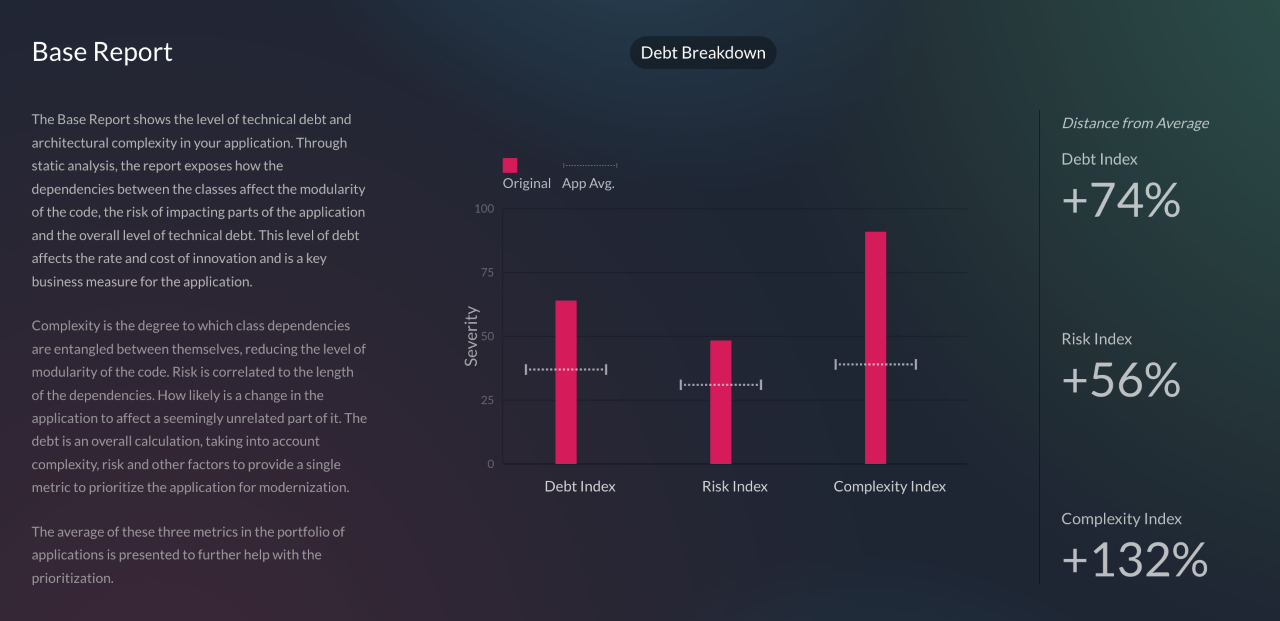
    Bob Quillin, chief ecosystem officer for vFunction, said the goal is to make it simpler for IT teams to more effectively employ the company’s vFunction Application Transformation Engine by using a vFunction Assessment Hub that assesses the level of technical debt involved.

    Legacy monolithic Java applications tend to have a lot of technical debt and dependencies that make them a challenge to convert into microservices, he noted. Most simpler Java applications have either already been converted or are in process, Quillin added.

    The vFunction Assessment Hub enables IT teams to better predict the outcome of refactoring a Java application to better prioritize which Java application should be converted first based on, for example, the level of scalability that can be achieved, said Quillin. Current assessment approaches involve a lot of manual effort and which typically requires organizations to hire external contractors to perform, he added.

    An AI-based approach reduces the total cost of creating a business case and constructing a roadmap for modernizing existing Java applications, said Quillin. The vFunction Assessment Hub measures application complexity based on code modularity and dependency entanglements and then assesses the level of risk changes might have on the stability of the application based on the depth and length of the dependency chains. It then surfaces benchmarks for debt, risk and complexity in addition to identifying aging frameworks that could create security risks and licensing issues.

    Thus far most organizations have been content to lift and shift Java applications into the cloud without modernizing them. The application simply now runs on infrastructure that is managed by an external cloud service provider. That approach does little to improve the scalability of a monolithic Java application, noted Quillin. The goal should be to convert that Java application into a set of microservices that run natively in the cloud, he added.

    The vFunction Assessment Hub is already being used within a Java Refactoring Service for the Azure cloud provided by Microsoft that is based on agent software to analyze code and the vFunction Application Transformation Engine.

    In general, organizations are embracing microservices to build applications that are both more scable and resilient. In the event a microservice becomes unavailable, requests for services are rerouted to another microservice to make sure the application degrades gracefully, rather than simply crashing altogether. The challenge, of course, is that the dependencies that can exist between hundreds of microservices can be more challenging to manage over time than those of the monolithic application being replaced.

    It’s not likely that microservices-based applications will entirely replace monolithic applications any time soon, but the bulk of new applications are being built on top of a microservices-based framework. As such, many DevOps teams are now managing a broad mix of monolithic and microservices-based applications across IT environments that become increasingly more complex to manage with each passing day.

  • Database Migration From Microsoft Azure to Snowflake on AWS: Part 2

    Database Migration From Microsoft Azure to Snowflake on AWS: Part 2

    In part one of this blog series, we looked at our approach to migration by leveraging the Azure data factory, tuning the performance of Data Factory Pipeline, using Parquet files and increasing computing power. 

    In this blog, we’ll look at some of the challenges encountered during the migration, cost-saving actions and our approach to data validation.

    Challenges Encountered 

    • Data Factory export failed for tables if the column name had spaces or special characters. In such cases, aliases were used (replacing spaces with an underscore) for column names and the query method was used as a source.
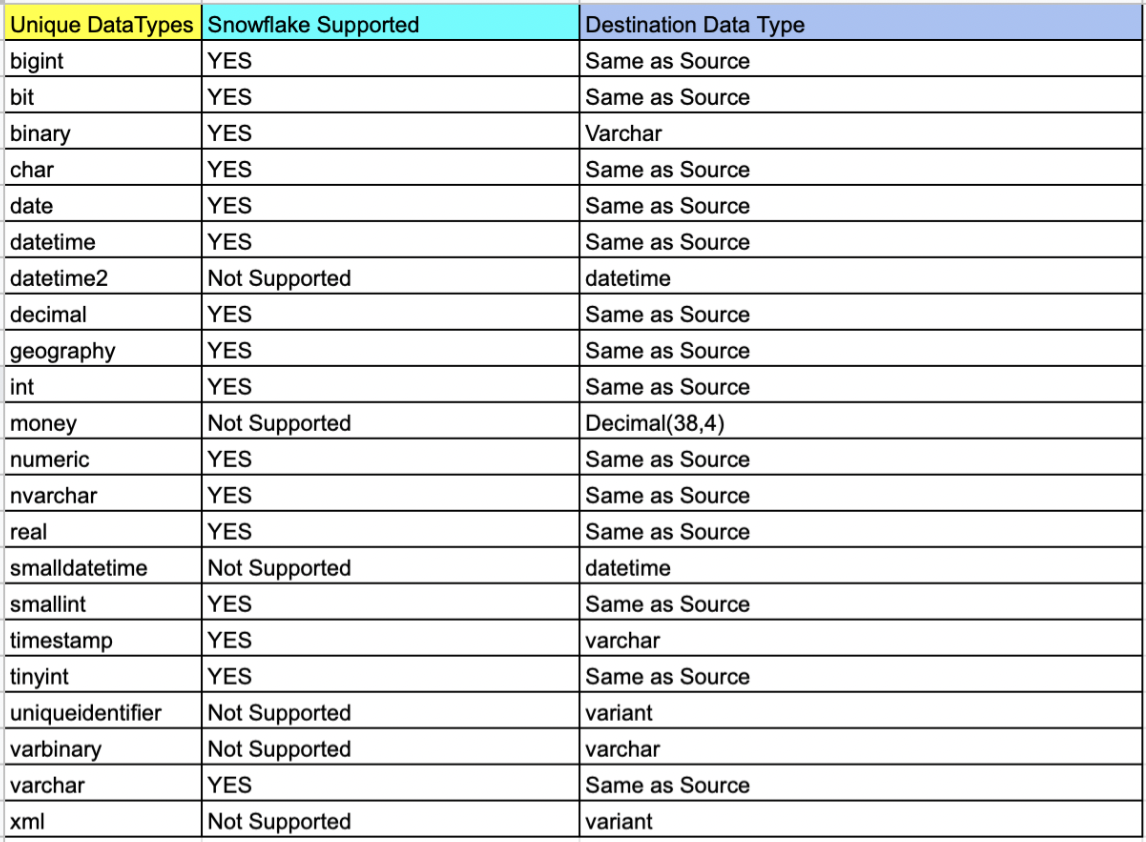
    • Data Factory export failed for the column data type “Geography” and had to be cast to varchar and then exported to Blob.
    • Some column names in SQL server were keywords in Snowflake, which didn’t allow it to migrate. For example, ‘LOCALTIME’ is a column name in SQL but is also a keyword in Snowflake, and it is addressed using inverted commas as escape characters (“”) while creating the Snowflake table.
    • During ingestion into Snowflake, the flat files were named after tables, listing files based on the name pattern. For example, if we wanted to list the file with table name test_1, Snowflake would list all the files starting with the name test_1. It is essential to make sure that each file name is unique.
    • If the file to be ingested was incorrect with respect to the table, Snowflake did not return any error messages or warnings. It simply ingested the file and put NULL wherever column mapping was not found.
    • While creating the tables, if the column name had spaces, escape characters were used so that the same spaces could be maintained. But for ingestion of such columns, the column mapping from a flat file would be the same aliases that were used in the source query.
    • Triggers and compute columns were not supported in Snowflake and had to be eliminated while creating the tables.
    • Also, data types that did not exist in the Snowflake schema had to be changed, keeping in mind the correctness of data.

    Cost-Saving Actions

    • Use of the Parquet file facilitated a compression rate of up to 75%. The 800GB of data was compressed to 234GB in multiple files which reduced the storage cost of Blobs.
    • Detailed POC and analysis discovered that Snowflake ingestion was optimal with Small for moderate sized tables and Medium for large sized tables which kept Snowflake costs in check.
    • Self-hosted IR saved on the data pipeline operating cost as the compute power of Azure VM was used.

    Cost Estimation 


    Data Validation

    The vital part of the project was ensuring that the integrity and correctness of the data were maintained during the migration process. As a part of standard DataOps best practices, a thorough data validation activity was performed to make sure that the data stayed meaningful and remained of use to drive business decisions.

    The approach to data validation was two-fold:

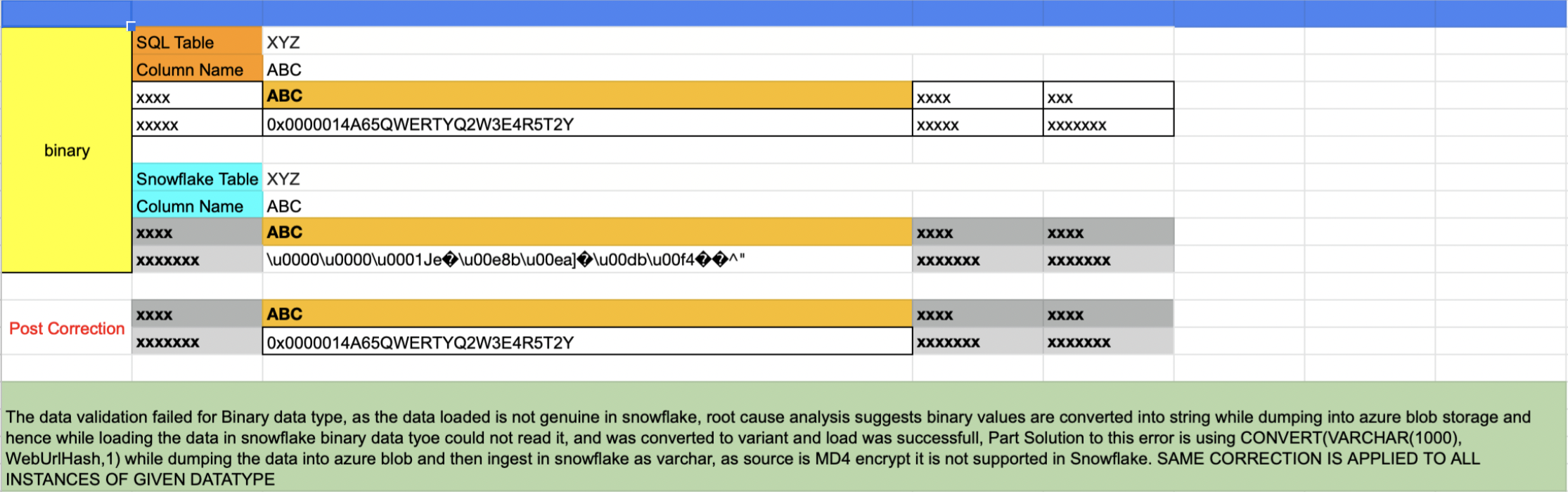
    In the first approach, all the distinct data types in the SQL server that were part of the db migration were listed and sampled randomly across one row per data type. The same row was fetched from Snowflake and matched.

    List of tables based on data type

    select table_catalog,table_schema,table_name,COLUMN_NAME,* from
    INFORMATION_SCHEMA.COLUMNS
    where DATA_TYPE = 'money' and TABLE_NAME not like 'sys%'

    Issues like that shown below were uncovered in this validation process and were corrected for all instances of the data type.

    The second approach involved writing an automated script that accomplished the following results (More details can be found here):

    • Script touched each table of each database
    • A set of five records were randomly sampled from both sides and matched
    • If the tables were empty, it was recorded as tables with zero records
    • If the sample sets did not match the script, it wrangled the sets and sorted them one column at a time. If the sample matched the script, it was recorded. This wrangle took care of the scenario wherein the first n number of columns had duplicate records
    • Any failed validation attempt would be visible in a generated log report:

    Validation Started for Table: Test1

    —-> Validation Passed for table Test1

    Validation Started for Table: Test2

    —-> Validation Passed for table Test2

    Validation Started for Table: Test3

    —-> Table has 0 records

    Validation Started for Table: Test4

    —-> Validation Failed for table Test4

    Validation Started for Table: Test5

    —-> Validation Passed for table Test5

    ============= Report =============

    # Total Number of Tables Scanned: 5

    # Tables with 0 records: 1

    # Passed: 3

    # Failed: 1

    # Percentage 60.5556123

  • Libbpf Vs. BCC for BPF Development

    Libbpf Vs. BCC for BPF Development

    If you’re into Linux development, you’ve probably heard BPF mentioned over the last few years. BPF stands for Berkeley Packet Filter, and the technology has a large number of use cases. BPF apps can get deep access into an operating system and enable you to perform tasks such as high-performance load balancing, DDoS mitigation and more simply and easily.

    Libbpf and BCC-Tools are both sets of tools to help with BPF development. However, both of these have their own strengths and weaknesses. In this guide, you will learn in detail about the two tool collections and understand when to use them.

    What is BCC?

    BCC stands for BPF Compiler Collection and is one of the oldest ways to develop BPF applications. It helps you embed your BPF code into your user-space program in the form of a plain string. When the user-space program is executed by the kernel, BCC invokes its embedded Clang/LLVM, pulls in system-wide kernel headers and compiles the program on the spot. 

    Since BCC compiles BPF programs on the host machine, it ensures that the memory layout your BPF program expects is precisely the same as that of the target host.

    BPF programs are designed to be injected directly into a kernel, so BCC tools seem to be the perfect solution for developing BPF applications. However, they have proven to be bulky in the modern context due to their heavy reliance on the Clang/LLVM combination, which is resource-intensive. This has led to the need for a better, more modern solution to developing BPF apps.

    What is Libbpf?

    Libbpf is one of the hottest new BPF tools on the market. It is usually coupled with BPF CO-RE (which stands for compile once, run everywhere). BPF CO-RE enables you to generate binaries that run on multiple kernel versions.

    The idea behind Libbpf is to make BPF development as similar to other forms of development as possible. With BPF CO-RE, Libbpf does this by compiling BPF programs into small binaries that can be deployed to multiple deployment hosts. Libbpf does the setup work like loading and verifying programs, creating maps, attaching to hooks, etc., which enables developers to focus on more critical tasks at hand, such as program performance and correctness.

    Libbpf aims to eliminate the overheads associated with BPF app development and deployment by reducing the dependency on system-wide kernel headers as well as Clang/LLVM libraries for compilation on runtime.

    Libbpf Vs. BCC: Key Takeaways

    Now that you understand how each of these tools works, let’s compare some key benchmarks to learn when to use them.

    Dependency Management

    BCC relies on kernel header packages that need to be installed on the target host machines. While it is not a problem in most cases, it can get difficult to set up and maintain if you are working on multiple machines. 

    Libbpf, on the other hand, eliminates this issue by relying on a vmheader file. This file includes multiple kernel types which helps you to remove dependency from system-wide kernel headers.

    Compilation Style

    For programs written with BCC, compilation occurs at runtime. To facilitate this, such programs require Clang/LLVM be present on the host machine. This adds to the code footprint of your programs.

    Furthermore, the Clang/LLVM libraries are resource-intensive. Complete libraries need to be available and run at compile time, even for small programs. This can upset a perfectly balanced BPF workload on the host machine.

    On the other hand, Libbpf enables you to generate binaries that are compiled once and can be run anywhere. You do not need any system-wide dependencies to be present on the target machine for running such apps. Hence, it reduces the overall application size as well as resource consumption on runtime.

    Error Detection

    For apps developed with BCC tools, errors are detected only at runtime since that is when the programs are compiled. This leads to a rather sluggish development experience compared to apps developed using Libbpf. Since Libbpf enables compilation while developing, finding and fixing bugs is easier.

    Final Thoughts

    In this guide, we walked you through what Libbpf and BCC tools are and compared them based on some important aspects of application development and delivery. 

    All in all, Libbpf appears to best BCC tools in most aspects. BCC tools offer fast prototyping and experimentation possibilities, but when it comes to production deployments, BCC tools turn out to be a rather expensive choice compared to Libbpf. 

    You can learn more about why BCC became the popular alternative and how it was eventually replaced by Libbpf here. Even if you currently use BCC tools for your apps, you can easily migrate to Libbpf by following a few simple steps. And, in most cases, it is better to opt for Libbpf than BCC tools for a better development experience and application performance.

  • Self-Service Helps Devs Solve Cloud Security and Compliance

    Self-Service Helps Devs Solve Cloud Security and Compliance

    Organizations that need compliance must follow a growing number of security standards—PCI, HIPAA, SOC 2 and GDPR just to name a few. Every new standard gives rise to an exhaustive list of hard-to-implement security controls.

    Cloud providers like AWS have tried to help, but there is still a lot left for developers to do to secure their infrastructure. Cloud providers give you the raw materials necessary to remain compliant, but you’ll have to learn how to use them.

    It may be easier to envision the scale of the compliance challenge by working through an example. PCI DSS is a typical security standard. When moving to the cloud, you’ll have to figure out how to take your compliant infrastructure and implement it using cloud technologies.

    PCI has several requirements regarding network architecture and firewall barriers. For example, specification 1.1.4 calls for a “firewall at each internet connection and between any demilitarized zone (DMZ) and the internal network zone.”

    Segmentation is the goal. Your network can’t allow traffic to move freely to wherever it wants. You need to set up rules and carefully guard sensitive areas of the system.

    In AWS, we’d suggest implementing this requirement using a mixture of services. Testing, staging and production regions of your application should each be in their own VPC. You’ll also need intelligent use of Security Groups, identity and access management (IAM) and instance profiles. Lock everything down and only open the necessary ports. A web application firewall (WAF) should protect the perimeter.

    IaaS services like RDS and Elasticsearch should be isolated via security group. Platform services like Dynamo, S3, SQS and Secrets Manager should be isolated via IAM. Lambda has one leg in the security group and another in IAM.

    PCI control 6.1 states that you must have a mechanism in place to identify security vulnerabilities within your compliant systems. How can you accomplish this in AWS?

    Automation is your best friend in application security. As the speed of development increases, security must keep up. And while there will always be a place for humans to dig into applications through penetration testing to find tricky vulnerabilities, automation will help you find the low-hanging fruit.

    AWS Inspector is an API-based service that will proactively scan and assess your application for vulnerabilities and warn you about them. This is an automatic process once it is set up, but it requires an administrator to choose what to test.

    Other tools exist to automate application security, such as Wazuh. As with AWS Inspector, there is effort involved in setting it up, initially. But once you complete the configuration, you’ll have a constant security scan running to find vulnerabilities before they reach production. And should some slip in, the scans will continue to search and find vulnerabilities before attackers exploit them.

    PCI Requirement 7 states that you must “restrict access to cardholder data by business need to know.” You’ll need to know who has access to what within your application and when they can access it.

    Restricting access in a cloud environment can be challenging because you require administrators to configure the services that your application needs to work. How can you limit access while allowing the admins to do their jobs?

    Orchestrating access control will require careful use of AWS Security Groups, IAM and federated tokens. Give your admins a token for access that expires quickly. Whitelist trusted IPs for access only to the areas of your environment that are necessary for the user’s role.

    The whitelist of IPs and the security groups will need to be kept up-to-date to make sure no holes open when personnel changes. Keep a tight grip on access control in your cloud environment.

    PCI Requirement 10 outlines the need to track and monitor all access to network resources and cardholder data. As your cloud environment grows, you’ll need more help to keep tabs on changes and user activity.

    AWS CloudTrail can be used to track user activity and API usage. But you’ll have to make sure that CloudTrail can’t be disabled without your knowledge to hide someone’s illicit activity. AWS IAM and Config services can be used to make sure CloudTrail can’t be disabled and to alert you if it is.

    CloudTrail can cover user activity, but what about infrastructure changes? You may need to bring in another tool, such as ELK, to track changes to your infrastructure. You can then marry the data from CloudTrail and ELK into a single SIEM for dashboarding.

    From this example and just these few requirements, you can see that the cloud is not a “push-button” solution.

    And this is only one example. Remaining compliant with SOC 2, HIPAA, GDPR, NIST and a host of other standards will require the same careful planning and execution.

    Planning for Compliance

    First, your team must stitch together many different software tools that help with compliance. Second, you must run periodic scans on your infrastructure and security controls after you provision your resources which essentially place Band-Aids on top of the holes you’ve created. Instead, applying controls during the provisioning process places a secure foundation under your developers’ code.

    DevOps teams try to maintain control over infrastructure and application deployment processes to avoid any mistakes from developers. Suddenly, developing software in the cloud begins to look the same as developing on-premises—delays, disappointment and frustration.

    Three things lead to successful cloud compliance:

    1. Careful planning and execution
    2. Automation to provision the necessary controls while you build your infrastructure
    3. Ongoing maintenance to adapt to changing regulations and standards

    You can help developers unlock the power and agility of cloud development while remaining compliant. But you must enable self-service for them as much as possible while maintaining security and compliance. The only way is to give them control of doing things they want while hiding low-level details that can get them in trouble.

  • mabl Makes Move to Automate Accessibility Testing

    mabl Makes Move to Automate Accessibility Testing

    mabl today made available in beta an automated accessibility testing capability that it added to its software-as-a-service (SaaS) platform for testing applications.

    Dan Belcher, mabl co-founder, said given the increased accessibility requirements included in various compliance mandates, there is a greater need to address these issues as early as possible in the application development life cycle. Otherwise, organizations could find they are liable for failing to comply with accessibility requirements outlined in, for example, versions 2.0 and 2.1 of the Web Content Accessibility Guidelines (WCAG).

    At the same time, providers of applications that don’t address accessibility are also likely to find themselves called out on public social media forums, noted Belcher. The damage to brand reputation can be considerable, he added.

    The SaaS platform mabl created makes it possible to create reusable tests using a low-code engine dubbed axe-core. Those tests can then be inserted, as appropriate, into a DevOps workflow. That approach allows a dedicated testing team to create tests in a way that doesn’t need to occur on a DevOps platform, said Belcher.

    Regardless of regulatory requirements, Belcher said there is a clear need to include end users with disabilities within a digital universe that continues to rapidly expand. Unfortunately, as a whole, the software industry is only just starting to make accessibility a first-class concern, he added.

    The goal should be to enable fast feedback via accessibility regression tests that address, for example, contrast check, said Belcher. However, it’s not likely those tests are going to eliminate the need for periodic audits by accessibility subject matter experts as an application continues to evolve, he noted. Those reviews would address everything from the user interface to the overall performance impact, noted Belcher. It may possible, however, to one day address 50% of the accessibility issues identified in the WCAG guidelines via automation, he noted. Scanning code as it is being developed will prevent a backlog and a buildup of accessibility debt that would be much more costly to address after an application is deployed, added Belcher.

    In general, Belcher said, it’s not likely automation is ever going to entirely eliminate the need for dedicated testing teams. Testing platforms such as mabl are designed to enable a finite testing resource to keep pace with an accelerated rate of application development, he added.

    Accessibility is, for all intents and purposes, a subset of any comprehensive software quality review. The sooner development teams realize that fact the less likely they will find themselves apologizing in the future for not coming to that realization earlier.

  • What Should Elon Musk Do? | Passwordless Future: Tense | WebKit iOS Monopoly Ends?

    What Should Elon Musk Do? | Passwordless Future: Tense | WebKit iOS Monopoly Ends?

    Welcome to The Long View—where we peruse the news of the week and strip it to the essentials. Let’s work out what really matters.

    This week: Everyone has Twitter advice for Elon, passwordless vision is vacuous, and Apple prevented from forcing Safari. (more…)

  • Russian Dev Exodus | Puppet IPO FAIL | Intel 18A Ahead of Sched.

    Russian Dev Exodus | Puppet IPO FAIL | Intel 18A Ahead of Sched.

    Welcome to The Long View—where we peruse the news of the week and strip it to the essentials. Let’s work out what really matters.

    This week: More than 100,000 tech workers leave Russia, Perforce buys Puppet, and Intel moves faster than planned. (more…)