Category: DevOps Practice

  • LaunchDarkly Previews Generative AI Testing Tool for Feature Management

    LaunchDarkly Previews Generative AI Testing Tool for Feature Management

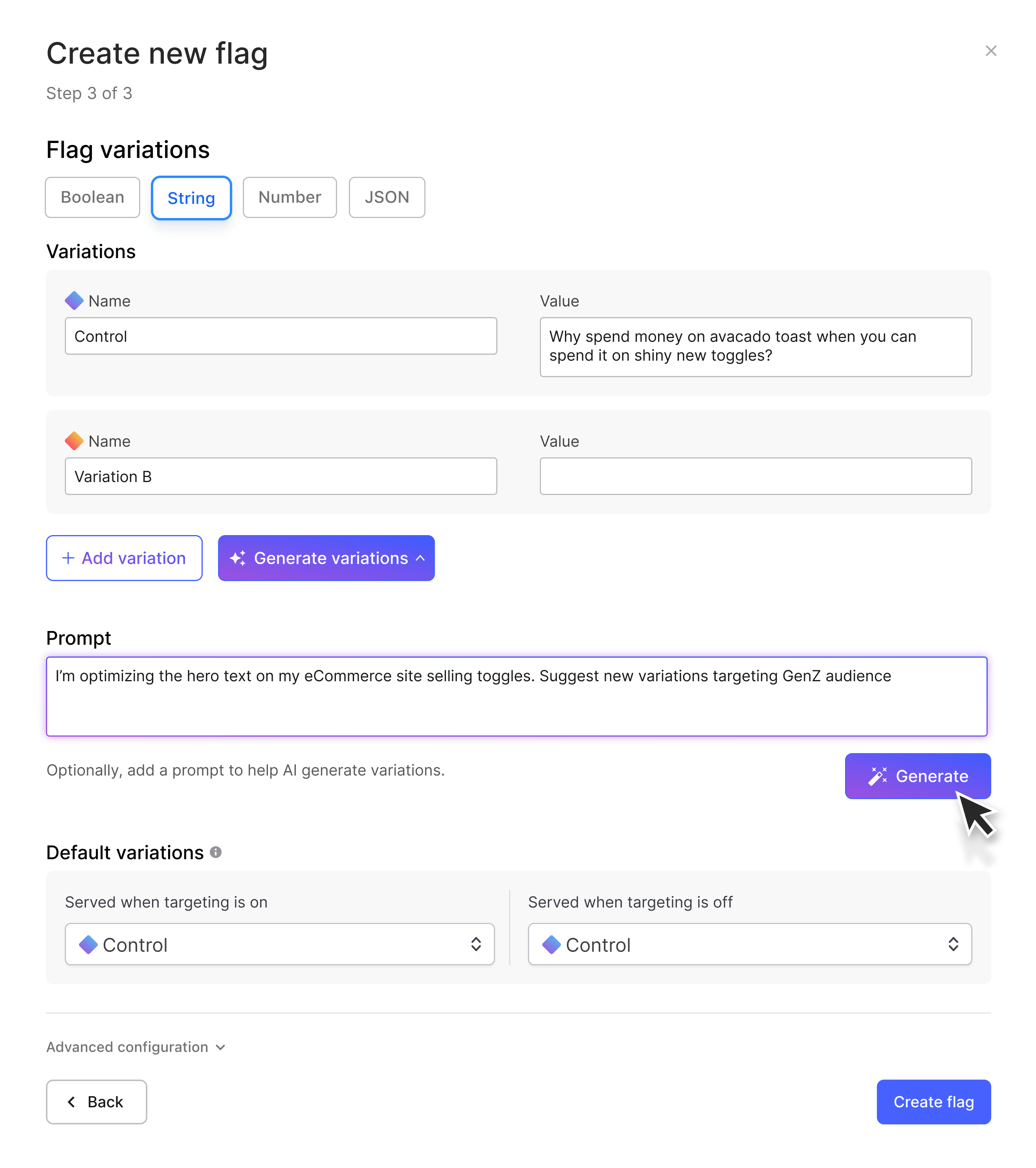
    At the AWS re:Invent 2023 conference, LaunchDarkly today previewed an ability to leverage generative artificial intelligence (AI) capabilities to create experiments for its feature management platform.

    Based on the Bedrock foundational large language models (LLMs) made available via AWS, this extension to the company’s Product Experimentation platform promises to make it simpler to use historical data to create a wider range of offerings that might be made available within an application.

    LaunchDarkly is making a case for a SaaS platform that can be used to centrally manage features across multiple workflows and platforms.

    Robert Neal, director of engineering for LaunchDarkly, said the company is now extending its testing capabilities using a managed Bedrock service provided by AWS that will enable leveraging generative AI to define a testing hypothesis more easily. That should also make it possible to involve more stakeholders in an iterative testing process within the context of a set of well-defined guardrails, he added.

    As more organizations start to deliver different tiers of digital services at varying price points, there is a clear need to be able to restrict access to those digital services. Application development teams have been employing feature management since the 1970s to isolate the development of various components into a branch that can be worked on and tested without impacting the primary build the application is based on.

    Feature management enables development teams to experiment with adding new capabilities in a way that doesn’t disrupt the application. When a project is completed, that branch is then usually merged into the primary build or can be deployed as a microservice that might be invoked via an application programming interface (API) by other modules with the application or another external application.

    At the core of that capability are what are known as feature flags, also known as feature toggles or feature switches, that make it possible to dynamically turn services on or off based on who is accessing them. Rather than being limited to the application development process, those feature flags are now being employed in production environments to enable the continuous delivery of multiple types of digital services to various classes of users of an application. A feature flag management platform enables an organization to keep track of all the flags being employed to keep the overall application environment consistent.

    It’s still early days in terms of understanding the extent to which generative AI can be applied to DevOps workflows, but it’s clear many of the manual processes that conspire to slow down the pace at which applications are built and deployed are going to be either reduced or outright eliminated. Each DevOps team will naturally need to determine for itself to what degree DevOps workflows can be automated using AI, but the overall pace at which applications can be built and deployed is going to clearly accelerate. The challenge now will be finding ways to keep pace with a rate of application development that is about to exponentially increase.

  • Couchbase Adds Columnar Database to DBaaS Environment

    Couchbase Adds Columnar Database to DBaaS Environment

    At the AWS re:Invent 2023 conference today, Couchbase, Inc. announced it added a columnar database based on the JSON file format to its database-as-a-service (DBaaS) portfolio to enable organizations to build real-time analytics applications.

    Scott Anderson, senior vice president for product management and business operations at Couchbase, said the Capella columnar database is designed to be integrated with the company’s JSON-based document database via a database change protocol (DCP) that Couchbase has embedded within its DBaaS environment.

    Deployed on cloud services from Amazon Web Services (AWS), the overall goal is to reduce the level of friction that IT teams would otherwise encounter when integrating a document database with a columnar database optimized to process analytics using columns rather than the rows typically associated with a relational database.

    That approach gives IT teams the ability to use a schemaless database architecture that provides an alternative to employing disparate databases that would need to be deployed and then integrated using extract, transform and load (ETL) processes to move data from one database to the other, noted Anderson.

    Capella columnar also uses the same SQL++ language as the company’s document database to streamline queries in addition to supporting Capella iQ, a copilot based on generative artificial intelligence (AI) that enables queries to be crafted in natural language.

    In addition, Capella columnar provides connectors to move data from Amazon DynamoDB, Amazon DocumentDB, Amazon Relational Database Service (Amazon RDS) and other data sources deployed on the AWS cloud.

    In the longer term, Couchbase is also planning to add vector capabilities to its DBaaS environment to make it simpler to securely extend generative AI models, said Anderson.

    In general, document databases have been widely adopted because they provide developers with an alternative to legacy database platforms that they can download and deploy themselves. The Capella DBaaS platform further simplifies that process via a managed service through which Couchbase assumes operational responsibility for managing databases. The columnar database extends that capability using a columnar database that can drive analytics capabilities to deliver a more personalized application experience, noted Anderson.

    It’s not clear to what degree organizations will ultimately wind up relying on as-a-service platforms, but since the start of the COVID-19 pandemic, the shift to this approach to consuming IT resources has increased significantly. As a result, the way internal IT teams are organized is shifting as lower-level tasks are either automated or handled by an external IT team that works for a vendor.

    Regardless of how databases are managed, however, there remains a need to integrate the data operations (DataOps) processes used to manage them with the DevOps workflows used to build modern applications. Each organization will need to determine how much economic sense it makes for them to manage that data versus relying on an external services provider. The challenge when relying on an external service provider is, as always, integrating that service into an existing IT environment.

  • Lineaje Allies With Persistent Systems on Open Source Software Remediation Service

    Lineaje Allies With Persistent Systems on Open Source Software Remediation Service

    Lineaje this week revealed it has partnered with Persistent Systems to provide a managed service for remediating open source vulnerabilities that leverages artificial intelligence (AI) technologies.

    Persistent is extending an existing open source software maintenance service by incorporating a Lineaje platform that makes use of machine learning algorithms to analyze software bill of materials (SBOMs) to provide recommendations for fixing code and surface remediations such as updates that should be applied.

    Lineage CEO Javed Hasan said Persistent Systems is augmenting that capability with a dedicated team of specialists that IT organizations can contract to maintain open source code along with previous investments the managed service provider has made in large language models (LLMs) that add generative AI capabilities.

    Options for the services range from simply identifying issues that an internal IT team should address to a white glove offering through which Persistent Systems ensures all open source components are continuously updated.

    In the wake of an executive order issued by the Biden administration that requires federal agencies to better secure their software supply chains, more attention is being focused on the inherent cybersecurity risks associated with employing open source software to build applications. Many open source projects are led by a handful of maintainers that often lack the time and skills required to ensure the components they employ have not, for example, been compromised by malware that might find its way into downstream applications.

    Those maintainers are not being paid, so cybersecurity patches to open source software might not be readily made available, and even when they are, many organizations lack the skills and resources required to apply them in a timely manner. The majority of known vulnerabilities within application environments are still unpatched. Many IT teams are also reluctant to upgrade components for fear of breaking applications that have dependencies that are often difficult to track.

    It’s not known how much of the open source software that many developers routinely incorporate into their applications might contain vulnerabilities that could be exploited, but the level of technical debt that has accrued over the last several decades is considerable. While only a small percentage of those vulnerabilities have been exploited, cybercriminals are becoming more adept at discovering them.

    Hopefully, more contributions to open source projects will improve the overall state of application security, but in the meantime, it’s clear organizations will need to rely more on AI to drive DevSecOps workflows as ever-increasing amount of open source software continues to be relied on to build applications, said Hasan.

    The challenge, of course, is identifying which vulnerabilities, if exploited, will have the biggest impact on the organization. After all, at this point, it’s not possible to defend every application so the focus needs to be on prioritizing remediation efforts based on their actual severity rather than a general rating.

    In the meantime, DevSecOps teams would be well-advised to have incident response plans in place for remediating breaches involving both known and zero-day vulnerabilities that, in addition to being all but inevitable, can now be exploited within minutes of being discovered.

  • How DevOps Teams Can Unlock Cloud Savings and Improve DevEx

    How DevOps Teams Can Unlock Cloud Savings and Improve DevEx

    Can DevOps engineers unlock cloud cost savings for their organization that are incremental to what cost optimization tools offer (and improve the developer experience in the process)? Absolutely. Allow me to illustrate how.

    Reserve instance buying optimization and auto-stopping are proven tactics to reduce waste, but are those the only forms of waste that exist in your cloud budget? Of course not.

    Think about all the times environments have been brought up and then stayed up longer than required. Consider all of the times a commit changed the way data is stored, which spiked the cost to operate. Or how about the times when a commit changed how memory was used, which resulted in unexpected autoscaling?

    Collaborative Cost Management

    So the question becomes, what is the most efficient way to identify and root out additional savings while also balancing governance and agility? Bottom-up, collaborative cost management may offer a solution.

    A bottom-up approach to cost management involves pushing knowledge and functionality to the edge of the application and data engineering teams that own and operate code every day. This does not mean ceding centralized cost control to developers but rather arming them with timely, actionable insights inside their everyday workflow and, where appropriate, enabling action on a self-serve basis.

    How does this work in practice? It starts by enabling engineering teams to see the costs of the various services and environments they own on a timely basis. This helps teams understand when spikes occur and provides a path they can follow to understand why the spike occurred.

    That path can involve bringing different pieces of information together for engineering teams. They’ll want to see the costs of the individual resources that power their service or environment during the selected timeframe to see what spiked and maybe even drill down further to see the cost drivers of that individual resource. They’ll likely want to see deployments and commits, at a minimum, and maybe even explore observability data as well during this timeframe.

    Once they’ve identified a root cause, to the extent it involves needing to change a configuration setting of a resource, teams may want to understand a resource’s dependents, like other resources that are linked to it as well as any other environments and services that depend on it to size up the blast radius of a potential change. From there, they may wish to view config settings for the resource.

    Collaborative Discussion

    Finally, you want to give teams the ability to take certain actions on their own and, in other cases, foster a collaborative discussion between engineering and DevOps. You can accomplish the former via self-service actions, which are simple no-code workflows in which a developer can see if the DevOps team has allowed an action to be seen by a specific team for a resource via a role-based access control (RBAC) model. These workflows connect to your existing infrastructure-as-code (IaC) or CI/CD tools to orchestrate the desired change, leveraging golden paths defined by DevOps. This approach alleviates developers’ cognitive load and TicketOps for the DevOps team. For various changes that require coordination with DevOps, your engineering teams can have a collaborative discussion on a timely basis thanks to the fresh, actionable information you’ve made available to them.

    So what does it take to actually implement this vision? It’s easier than you might realize.

    Chances are, your existing cost optimization tool cannot provide cost visibility at the level of granularity and freshness developers need – daily cost insights at the service (or data pipeline, ETL job, etc.) level. That’s okay, though. Collaborative cost management is an incremental tactic that can still leverage some of the insights in these tools.

    The easiest way to facilitate this competency across your enterprise is via an internal developer portal. Internal developer portals are living sociotechnical knowledge maps that connect various data from your tools, clouds and teams to your services and the teams that own them. They are the perfect conduit to slice cloud cost data at the service level and put it in front of application and data engineers in their everyday workflow.

    Backstage, an open source framework to build a developer portal, offers a cloud cost plugin, though it involves a time commitment to set up, and the information it makes available to your developers may be limiting in the context of this scenario. For instance, your team may be unable to see per-resource costs, individual resource cost drivers, blast radius information and config settings. You must also expend effort wiring actions to support resource changes.

    You could also try building a BI dashboard for your team to accomplish this. This would require ingesting daily cost feeds from your cloud and then allocating the cost of each resource to each environment and to each service leveraging proprietary resource<->environment<->service mappings you would build and maintain as your system evolves. You would also need to build scripts and leverage IaC and CI/CD tooling and teach your engineers how to discover, configure and execute these actions.

    However you choose to get to this destination, collaborative cost management is a powerful emerging competency that can lead to meaningful savings and improve the developer experience by empowering your teams with the knowledge and functionality they need to manage costs on a proactive and, where appropriate, self-service basis.

  • 10 Ways to Increase Productivity by Improving Your Developer Experience

    10 Ways to Increase Productivity by Improving Your Developer Experience

    Developer experience is inextricably linked to productivity. The ease with which developers can work on their code and product greatly impacts the speed and quality of software development.

    But this goes deeper than just giving them the right tools. It’s about setting up an environment where developers can thrive, an environment that prioritizes clear communication, continuous learning and collaboration among team members. It’s about cultivating a space where creativity and innovation are encouraged and where developers feel valued and motivated to do their best work, both individually and creatively as a team.

    Let’s look at 10 ways your enterprise organization can improve the developer team experience and, in turn, increase their productivity and ability to support the business objectives.

    1. Choose the Right Languages and Frameworks

    Selecting languages and frameworks that are well-suited to the project requirements and the team’s proficiency can significantly reduce development friction. It streamlines the coding, testing and debugging processes, allowing developers to focus on crafting high-quality solutions rather than grappling with syntactical nuances and unnecessary complexity. Additionally, adopting languages and frameworks with abundant resources and documentation helps to swiftly resolve issues and innovate effectively, which subsequently leads to enhanced productivity and job satisfaction among the development team.

    Picking the right language or framework really is a matter of aligning with the project’s requirements rather than choosing what is cool right now or what worked for the project a few years ago. Common languages like JavaScript, Python and Ruby are renowned for their flexibility and extensive community support, which collectively contribute to an enriched developer experience. Languages like Go, Rust and C++ are more efficient and robust but come with trade-offs around ease of use.

    2. Provide Access to Quality Developer Tools

    Developer tools that put developer experience first are a critical part of improving the overall experience for your developers.

    • Good IDEs, such as IntelliJ IDEA or Visual Studio Code, provide an enriched coding environment with features like intelligent code completion, syntax highlighting and integrated debugging.
    • Linters like ESLint or Trunk automate the process of identifying and fixing code inconsistencies and errors, ensuring code quality and reducing the likelihood of bugs.
    • Security tools, such as Snyk, are paramount for identifying vulnerabilities early in the development cycle, allowing teams to address security concerns proactively and reduce the risk of breaches. These tools aid in maintaining a secure and robust codebase, fostering confidence among developers. Other security tools, such as API gateways like Emissary-Ingress or Apigee can also help beef up security measures.
    • Kubernetes tools such as Telepresence streamline the local development process with containerization and allow developers to share their development work more efficiently with their colleagues for faster feedback loops.

    Incorporating such tools seamlessly into the development workflow enhances the development pace and the quality of the output, leading to a more gratifying and productive developer experience.

    3. Document Everything

    Proper documentation serves as a roadmap to the codebase, allowing developers to understand the software architecture, functionalities, and interaction between different components swiftly and accurately. It minimizes the cognitive load on developers by providing clear and concise information, reducing the time spent on deciphering the codebase.

    Good documentation is especially pivotal when onboarding new team members, as it accelerates their acclimatization to the codebase and workflows. This means they can contribute more effectively and quicker. It also aids in the clarification of complex concepts, system behaviors, and business logic, preventing misinterpretations and ambiguities.

    Keeping the documentation current and aligned with the code changes is equally vital. It ensures the relevance and reliability of the information provided, aiding developers in making informed and sound decisions throughout the development lifecycle. This synchronization between documentation and codebase evolution fosters a more coherent and efficient development environment, directly impacting the overall productivity of the development team.

    4. Reduce Cognitive Load

    Reducing the cognitive load on developers is paramount for enhancing productivity. One practical approach is to minimize the number of meetings, allowing developers more uninterrupted time to focus on coding and problem-solving. Unnecessary or inefficient meetings can fragment developers’ concentration, leading to decreased productivity and extended development cycles due to the time required to regain focus.

    Establish clear meeting objectives, agendas and ensure that only essential personnel are involved to make the necessary meetings more productive and less disruptive. It’s also crucial to foster an environment where asynchronous communication is encouraged, utilizing tools like Slack to allow developers to address queries and discussions at their convenience without impeding their workflow.

    5. Encourage AI Use

    AI tools and technologies can assist developers in various aspects of the software development lifecycle when used responsibly, such as code generation, bug fixing, and performance optimization, allowing for more efficient and effective development processes.

    For instance, AI-powered code completion tools, like GitHub Copilot, enable developers to write code faster and with fewer errors by providing intelligent suggestions, while AI-driven testing tools like Codacy can automate and optimize the testing process, identifying issues and vulnerabilities that might be overlooked manually. This leads to higher code quality and reliability.

    6. Foster the Freedom to Innovate

    Giving developers the freedom to explore and experiment with new ideas is fundamental in cultivating a positive developer experience. This autonomy stimulates creativity, fosters a sense of ownership and encourages developers to seek better solutions to complex problems, contributing to the continuous improvement and evolution of the product.

    In an environment that values exploration, developers are more likely to engage in learning new technologies, methodologies and best practices, elevating the collective skill set and knowledge base of the team. This continual learning cycle enables the adoption of more efficient and effective development strategies, leading to the creation of high-quality, sustainable, and forward-compatible software solutions.

    Create a supportive atmosphere where experimentation is embraced and failure is considered a stepping stone to innovation. This enhances developers’ morale and motivation, leading to increased productivity and better outcomes.

    7. Implement Developer Playbooks

    Alongside giving developers room to roam and experiment, you should give them clear guidelines for workflows that are already well-thought-out. Playbooks provide structured, reusable solutions and best practices for common tasks and challenges, eliminating the need for developers to reinvent the wheel or spend excessive time on routine activities. They serve as a valuable reference guide, offering standardized procedures, coding standards and templates, ensuring consistency and efficiency across the development life cycle.

    By reducing ambiguity and decision fatigue associated with repetitive or mundane tasks, playbooks allow developers to focus their cognitive efforts on more complex, value-adding aspects of the project. This contributes to quicker implementation and less error-prone solutions, fostering a more streamlined and focused development process.

    Implementing playbooks also facilitates knowledge transfer within the team, allowing developers to leverage collective experience and insights, leading to better-informed decisions and solutions. Having access to well-curated playbooks not only accelerates development cycles but also enhances code quality and maintainability, culminating in a more productive and satisfactory developer experience.

    8. Automate Any Repetitive Tasks

    Automation alleviates the manual effort involved in tasks such as code integration, testing, deployment and monitoring, allowing developers to concentrate more on creative problem-solving and innovation.

    Continuous integration and continuous deployment (CI/CD) pipelines exemplify effective automation, ensuring that code changes are automatically integrated, tested, and deployed to production, reducing the risk of human error and enabling quicker release cycles. Automation of testing through frameworks and tools ensures that every code modification is validated rigorously, enhancing the reliability and stability of the software.

    Moreover, automation of environment setup and configuration management through infrastructure-as-code (IaC) tools like Terraform guarantees consistent and reproducible environments, minimizing discrepancies between development, testing and production stages.

    By delegating routine tasks to automation, developers can focus their expertise and time on developing new features, optimizing existing systems and exploring new technologies, ultimately leading to improved job satisfaction and higher productivity levels.

    9. Set Clear Objectives, Then Allow Autonomy in Execution

    When developers understand the expected outcomes and the impact of their work, it instills a sense of purpose and motivation, aligning individual efforts with organizational objectives.

    Provide clarity on what needs to be achieved, but allow flexibility on how to achieve it. This approach empowers developers to leverage their expertise and insights to devise optimal solutions. Autonomy promotes problem-solving, encourages initiative and fosters a culture of continuous improvement and learning within the team.

    10. Reinforce Growth

    A learning-rich environment encourages developers to acquire new skills, adapt to evolving technologies and refine their problem-solving capabilities, thus contributing to both personal growth and the advancement of the team’s competency.

    Mentorship, on the other hand, plays a crucial role in knowledge transfer and professional development. Experienced developers sharing insights, experiences and best practices with less experienced team members accelerate learning curves and foster a collaborative and supportive team culture. This mutual exchange of knowledge enriches the skill set across the team and ensures that knowledge is retained within the organization, even as individual team members advance.

    Offering resources for learning, such as access to online courses, workshops and conferences, combined with a structured mentorship program, not only enhances the technical proficiency of the team but also improves job satisfaction and retention. In such an enabling environment, developers are more likely to be engaged, motivated and productive, driving the team to higher levels of innovation and excellence.

    Happy Developers are Productive Developers

    Really, it’s obvious: You want your team to want to come to work every day. To do that, you need to give them an environment that supports their work, allows them to think and be creative and removes unnecessary burdens. You want them to think, talk and code to build the best product possible. That is true productivity, and it only comes from giving them a great developer experience.