Category: DevOps Practice

  • Five Great DevOps Job Opportunities

    Five Great DevOps Job Opportunities

    devopsy.kinsta.cloud is now providing a weekly DevOps jobs report through which opportunities for DevOps professionals will be highlighted to better serve our audience.

    Our goal in these challenging economic times is to make it easier for DevOps professionals to advance their careers.

    Of course, the pool of available DevOps talent is still relatively constrained, so when one DevOps professional takes on a new role it tends to create an opportunity for others.

    The five job postings shared this week are selected based on the company looking to hire, the vertical industry segment and, naturally, the pay scale being offered.

    We’re also committed to providing additional insights into the state of the DevOps job market. In the meantime, for your consideration:

    Indeed.com

    Sony Electronics
    New York, New York
    DevOps Engineer
    $125,000 to $135,000

    SimplyHired.com

    Fiddler AI
    Palo Alto, California
    DevOps Engineer
    $120,000 to $152,000

    CareerBuilder.com

    Leidos
    DevOps Engineer
    Olivette, Missouri
    $120,000 to $125,000

    LinkedIn

    Capital Group
    Irvine, California
    DevOps Engineer
    $92,423 to $147,877

    Dice.com

    CA-One Tech Cloud
    Austin, Texas
    DevOps Engineer
    $80,000 to $100,000

  • Sauce Labs Adds Visual Testing Tool to Platform

    Sauce Labs Adds Visual Testing Tool to Platform

    Sauce Labs has added native visual regression testing capabilities to its testing platform to enable DevOps teams to streamline workflows.

    Marcus Merrell, vice president of technology strategy for Sauce Labs, said Sauce Visual provides the ability to test user interfaces without requiring DevOps teams to acquire, maintain and integrate a separate tool.

    The overall goal is to make it possible to test functions and user interfaces in parallel by adding a single line of code to a DevOps workflow, he added. Updates to the visual presentation of a page are automatically highlighted, with any visual inconsistencies automatically surfaced. In comparison, a standalone visual testing tool increases the time it takes to execute a test suite, noted Merrell.

    Sauce Visual natively uses the same tools as the rest of the Sauce test automation platform, and can be integrated into any continuous integration/continuous delivery (CI/CD) workflow. At launch, Sauce Visual is compatible with Java/JUnit, Java/TestNG, WebDriverIO, Selenium, Appium (web) and Cypress testing tools with support for Playwright, Puppeteer, TestCafe, Espresso, and XCUITest forthcoming.

    The Sauce Labs approach also serves to reduce the total cost of application testing at a time when the number of applications organizations are building and deploying only continues to increase exponentially, said Merrell.

    In general, organizations are attempting to strike a balance between shifting responsibility for testing too far left toward developers that typically lack testing expertise and the need to verify application experiences are delivered as expected. Many organizations have shifted more responsibility for testing toward developers in the hope of improving code quality and reducing the number of vulnerabilities that might find their way into a production environment. The challenge is those efforts have also increased the level of cognitive load developers need to carry at the expense of having more time to write application code.

    Of course, in time, artificial intelligence (AI) tools will make it easier to generate test scripts, but there is still going to be a need for testers who were not involved in the writing of code to validate it, noted Merrell. The difference is those testers will not necessarily need to be rocket scientists as the process of creating tests becomes more automated, he added.

    Testing user interfaces is especially problematic for developers because many of them don’t have a lot of expertise in the business functions that the application they are building enables. In addition, there are often minute changes to user interfaces that developers are not always going to discern.

    As always, one of the first things that tends to be reduced whenever a developer falls behind schedule is testing. In a recent Sauce Labs survey found more than two-thirds (67%) admitted they pushed code into a production environment without testing, with more than a quarter (28%) acknowledging they do so on a regular basis.

    The assumption is that if any issues do arise, they can be addressed via the next update to the application. End users, however, are less tolerant of that approach when, in the age of digital services, an alternative application is readily available.

  • Hitting the Accelerator for Change: How Open Source Drives Software-Defined Cars

    Hitting the Accelerator for Change: How Open Source Drives Software-Defined Cars

    Every new car on the road today contains hundreds of millions of lines of code, and that’s a good thing because the technological functions they enable add greatly to the car’s ultimate value. For over 100 years, automotive consumers coveted cars because of their paintwork, their leather interiors and the speeds they can travel. But now, their real and perceived value is influenced by technology features. Technologies such as electric vehicles, self-driving and other software-defined services are what drive the value of the car—and it’s no longer too nerdy to describe cars as ‘software-defined.’

    Navigating the Road to the Future

    For car manufacturers and their suppliers, the challenges of the software-defined car are already very much in focus. Original equipment manufacturers (OEMs) have been hiring new workers and re-training existing ones to navigate these challenges, such as cybersecurity and connected technologies. Ten years ago, OEMs such as Renault and Volkswagen had few in-house software engineers. Fast forward to today, and both companies have numerous resources focusing on software.

    Software will soon become ever more central to the vehicles we drive, and that will soon drive us, as vehicles become more connected, autonomous, shared and electric (CASE). In the next few years, autonomous vehicles will soon be handling tens of terabytes of data per day, gathered by sensors such as LIDAR and cameras. Customers are increasingly expecting smartphone-esque features, which involves keeping pace with the very latest apps and technologies.

    Combined with features such as passenger entertainment systems and remote diagnostics, the requirement for software and processing power in vehicles is going to grow at an ever-increasing pace. Open-source software can provide automakers with the power to keep up.

    You Must Shift Gears

    Inevitably, these processing power requirements will require a seismic shift in the way OEMs work. Currently, OEMs are struggling to maintain existing systems‒while at the same time attempting to develop new platforms. It’s a hangover from years in which vehicles were not connected or had extremely basic connected services. This has led to a situation where it’s difficult to upgrade the software at pace due to the requirements and constraints of the hardware.

    There are lessons for car-makers in the smartphone world. Think about how a software update can be applied across multiple different smartphones. An iOS update works just as well across a new device or a device from four years ago. One iPhone will see multiple updates, adding new features and boosting security.

    For car manufacturers, this won’t be an easy shift: The industry needs more defined standards to allow an easier interface between hardware and software. The industry also needs to reconsider how it develops hardware and how this relates to software. These challenges will require a new way of thinking for car manufacturers as they transition to a world where time cycles are critical. I believe that cross-industry collaboration is needed to accelerate the development of autonomous vehicles.

    Keep an Eye on Moving Parts

    Complexity is building at an increasingly rapid pace in the car industry, and this shows no sign of slowing down. In a report on the industry, McKinsey noted that the average complexity of individual software projects in the automotive sector has grown by 300% over the last decade. By 2025, the number of lines of code in the average luxury car will have doubled from today’s figure of 100 million lines of code, according to a prediction by Volkswagen‒which is already more than a military aircraft like the F-35. In full-self-driving cars, the figure could potentially reach a billion lines of code, analysts believe.

    It’s not just the software that is becoming more complex, the hardware is too. Modern vehicles already have up to 150 Electronic Control Units (ECUs), often scattered through the vehicle, close to sensors. Increasingly, manufacturers are moving towards a model where these ECUs are combined and consolidated, connected by an ethernet network. As the amount of data vehicles deal with increases, it’s unlikely that all of this will be directly uploaded to cloud servers; instead, much of it will be processed inside the vehicle before ‘edited highlights’ are uploaded to the cloud for processing.

    This has important implications for vehicle maintenance and also poses cost issues. Car manufacturers face challenges when it comes to managing the ever-growing complexity of their systems while trying to keep annual recurring costs down.

    Watch the Hacker Threat

    The need for cybersecure vehicles is also growing, particularly as we see self-driving vehicles enter the fray. In 2015, two security experts showed off a hack where they were able to ‘switch off’ a Jeep driving at 70mph down an American highway. It marked the dawn of the ‘hackable’ car—although the seeds of this were sown decades earlier when the first ‘connected’ components were unveiled in the 80s and were not built to be resilient to hackers. A 2021 report on global automotive security was damning, saying, “There have been 110 Common Vulnerabilities and Exposures (CVEs) that year related to the automotive industry, 33 in 2020 alone compared to 24 in 2019.”

    Ultimately, the automotive industry faces increasing regulation in the face of these threats. As governments begin to regulate software within the automotive industry, those designing the products and software will become more accountable.

    Open Source and Safety … Always

    For car manufacturers, there are also important issues related to functional safety—unsurprising when you are dealing with a device that weighs a ton or more. This directly impacts software development, with additional costs for any system that has an impact on driver or passenger safety.

    Car manufacturers need to learn from the aviation industry, where systems related to safety are rigidly separated from those that are not, reducing costs due to compliance.

    It’s often difficult to reuse existing software in cars today, as it can require porting to a different configuration. Costs can rise, not in a linear fashion, but exponentially. How much money will it cost to write, implement and test 100 million lines of code ‒ or a billion? This is the challenge manufacturers are facing. When it comes to managing these costs, open source will become ever more important and not only will allow the reuse of existing software, but will enable other manufacturers to contribute to said software.

    Software-Defined Cars

    The future is rushing towards us at speed—and in it, cars are increasingly software-defined. In this future, open source offers OEMs a highly attractive solution to the considerable hurdles ahead, from safety issues to cybersecurity. Open source will unleash the power of the ambitions of the car industry—not just to compete with the tireless innovation of other industries, such as mobile, but to exceed it. For consumers, cars are already the most complex devices they own: and they could be the most innovative. The flexibility and scalability of open source will allow car-makers to free their imagination and create the innovative, software-driven car of the future.

  • Vulnerability Management for DevOps Teams: A Practical Guide

    Vulnerability Management for DevOps Teams: A Practical Guide

    Vulnerability management is a process that includes the identification, categorization, prioritization and resolution of security vulnerabilities in software systems. It involves a continuous cycle of protection to ensure that your digital assets are secure and your operations are running smoothly.

    With the rapid evolution of technology, fast-moving cloud-native systems and evolving cyber threats, it’s critical to stay ahead of the game. The goal is to close the gap between the discovery of vulnerabilities and their resolution, thereby minimizing the window of opportunity for potential attacks.

    Vulnerability management is not just about finding and fixing vulnerabilities. It’s also about understanding the nature of the vulnerabilities and the potential impact they could have on your network and systems. This understanding informs the prioritization process, helping teams decide which vulnerabilities need immediate attention and which ones can be addressed later. See this blog post for an in-depth review of vulnerability management.

    Why is Vulnerability Management Important for DevOps Teams?

    With the DevOps approach, development and operations teams work together throughout the software life cycle. This collaboration results in faster development times and more reliable software. However, the fast development cycle also introduces new security challenges. This has given rise to the DevSecOps paradigm, where developers, operations teams, and security experts collaborate during all stages of the development lifecycle.

    Here are a few reasons vulnerability management is a critical part of DevSecOps practices:

    Early Detection of Vulnerabilities

    DevOps teams are under constant pressure to deliver high-quality software quickly. However, the speed of delivery should not compromise the security of the software. Vulnerability management helps DevOps teams identify vulnerabilities early in the development process. This early detection allows teams to address security issues before they become serious problems.

    Early vulnerability detection is not just about finding vulnerabilities; it’s also about understanding the potential impact of those vulnerabilities. It involves analyzing the vulnerabilities to determine their severity and the risk they pose to the system. This analysis informs the prioritization process, ensuring that the most critical issues are addressed first.

    Building Continuous Security Into CI/CD Pipelines

    Integrating vulnerability management directly into continuous integration/continuous deployment (CI/CD) pipelines is essential for maintaining continuous security. CI/CD pipelines automate the steps in software delivery, from code integration to deployment, ensuring faster and more consistent releases. By embedding vulnerability management into these pipelines, DevOps teams can automatically scan for and address security vulnerabilities at each stage of the software development life cycle.

    Incorporating vulnerability management tools into CI/CD pipelines allows for automatic scanning of code repositories, container images, and even infrastructure-as-code (IaC) configurations for known vulnerabilities. This integration means that any security issues are identified as soon as code is committed or containers are built, not just at the deployment stage. The advantage of this approach is twofold: It reduces the risk of deploying vulnerable software, and it allows developers to fix issues in their context of development, making the process more efficient.

    Cost-Effective Development and Operations

    Implementing vulnerability management can lead to cost savings for DevOps teams. By identifying and resolving vulnerabilities early in the development process, teams can avoid the high costs associated with fixing security issues after the software has been deployed. In addition, vulnerability management can help prevent costly security breaches that could damage the company’s reputation and result in financial loss.

    Moreover, vulnerability management can contribute to more efficient operations. By systematically managing vulnerabilities, teams can avoid wasting time and resources on low-priority issues. Instead, they can focus their efforts on addressing the most critical vulnerabilities.

    Enhancing Cross-Team Collaboration

    Vulnerability management can also enhance cross-team collaboration within the DevOps environment and between DevOps and security teams. By providing a clear framework for identifying, categorizing, prioritizing and resolving vulnerabilities, it fosters a shared understanding of security issues among team members. This shared understanding can facilitate communication and cooperation, ultimately improving the software product’s security posture.

    Strategies for Integrating Vulnerability Management Into DevOps Processes

    Adopt a ‘Shift-Left’ Approach

    The ‘shift-left’ approach is a strategy that involves shifting the security measures to the early stages of the DevOps pipeline. Traditionally, security checks and vulnerability assessments were conducted toward the end of the development cycle, often leading to late discovery of security flaws and vulnerabilities.

    By shifting these security measures to the left, i.e., to the earlier stages of the development cycle, DevOps teams can catch and fix security vulnerabilities early on. This approach aligns well with the DevOps philosophy of early error detection and continuous improvement.

    Automation of Vulnerability Scanning and Detection

    Automation is at the heart of DevOps. It allows for rapid, reliable and consistent processes, freeing up the team to focus on what they do best – delivering quality code and features. Automation should also extend to vulnerability management.

    Automating vulnerability scanning and detection means integrating security tools into the DevOps pipeline that can automatically scan the code, detect vulnerabilities and even suggest fixes. This approach ensures that security checks are not skipped or forgotten and that vulnerabilities are dealt with promptly.

    Security as Code

    Another strategy for integrating vulnerability management into DevOps processes is embracing the principle of security-as-code. This principle treats security infrastructure and configurations as code, allowing them to be part of the DevOps pipeline.

    By adopting security-as-code, DevOps teams can ensure that the security configurations and infrastructure are always up-to-date and follow the best practices. Like the rest of the code, security configurations can be version-controlled, reviewed, tested and automatically deployed.

    Collaboration Between Security and DevOps Teams

    One of the key tenets of DevOps is collaboration between different teams. In a DevSecOps paradigm, this collaboration extends to the security team as well. Integrating vulnerability management into DevOps processes fosters close collaboration between the security and DevOps teams.

    The security team can provide valuable insights into the security landscape, vulnerability management tools and best practices. On the other hand, the DevOps team can ensure that these insights and tools are integrated into the DevOps pipeline.

    Continuous Monitoring and Feedback Loop

    Continuous monitoring is crucial for effective vulnerability management. Continuous monitoring ensures that the security state of the system is always known and that any changes or vulnerabilities are promptly detected. The feedback loop ensures that the insights gained from monitoring and vulnerability assessments are fed back into the development process, leading to continuous improvement in security.

    Regular Training and Awareness

    Finally, regular training and awareness are crucial for integrating vulnerability management into DevOps processes. DevOps teams should be trained in security best practices, threat landscape, and use of vulnerability management tools.

    Regular training ensures that the team stays up-to-date with the latest security trends and vulnerabilities. Awareness sessions can help the team understand the importance of security and vulnerability management, encouraging them to take an active role in securing the system.

    Conclusion

    In conclusion, integrating vulnerability management into DevOps processes is not only possible but crucial for secure and reliable systems. Adopting a shift-left approach, automating vulnerability scanning and detection, embracing security-as-code, fostering collaboration, implementing continuous monitoring and feedback and ensuring regular training and awareness are some of the strategies that can help achieve this integration. 

    Remember, vulnerability management is an ongoing process that requires commitment, collaboration and continuous improvement.

  • PagerDuty Previews Generative AI Copilot for ITSM

    PagerDuty Previews Generative AI Copilot for ITSM

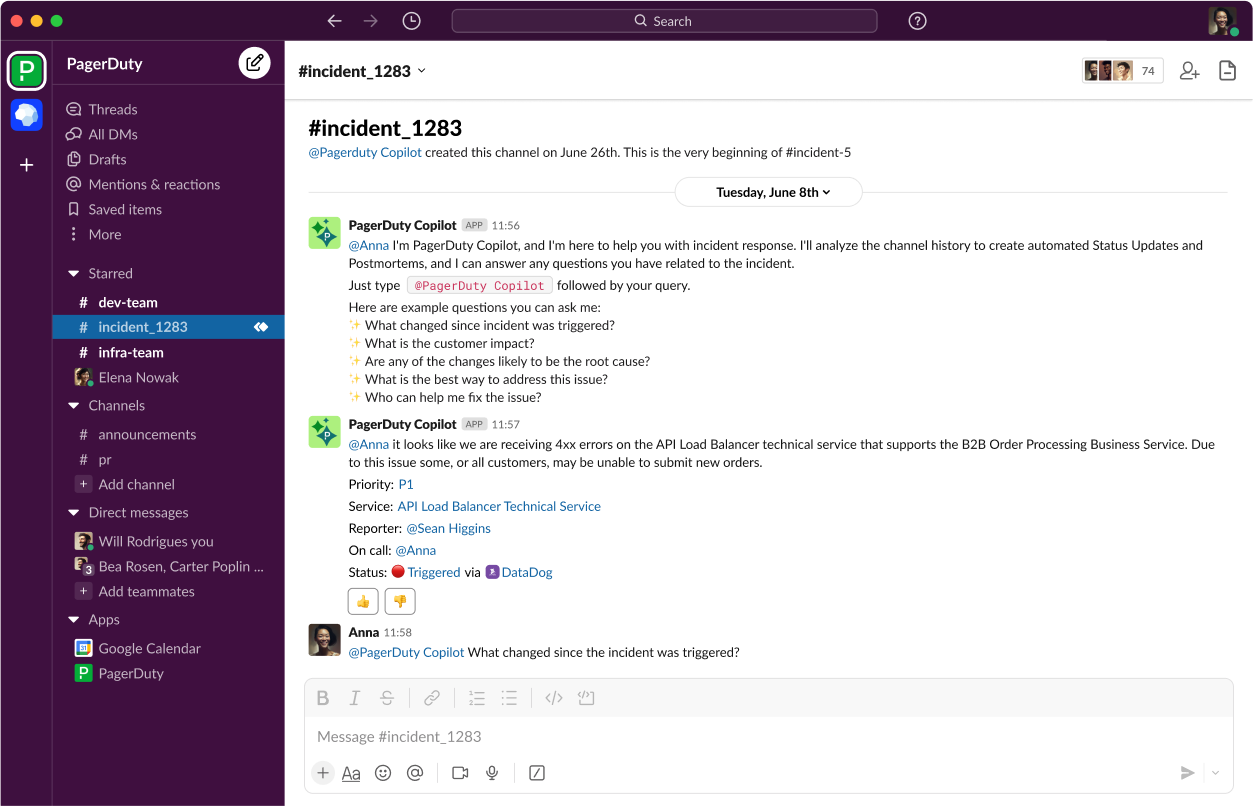
    Under an early access program, PagerDuty, Inc. is making available a tool that brings generative artificial intelligence (AI) capabilities to its IT service management (ITSM) platform.

    Jonathan Rende, senior vice president of products for PagerDuty, said PagerDuty Copilot for the PagerDuty Operations Cloud extends previous investments in machine learning algorithms the company has made as part of an ongoing effort to apply AI to ITSM.

    Designed to be invoked via Slack, PagerDuty Copilot makes use of multiple large language models (LLMs) to automate tasks ranging from providing summarization of IT incidents to creating code to automate workflows. PagerDuty plans to transparently swap LLMs in and out of its platforms as AI advances continue to be rapidly made, noted Rende.

    PagerDuty Copilot provides a level of abstraction for invoking AI models along with appropriate guardrails that make it simpler to manage IT operations without IT teams needing to have AI expertise, said Rende.

    The overall goal is to boost the productivity of IT operations teams by eliminating much of the drudgery and toil that conspires to make working in IT tedious, noted Rende. AI technologies are not likely to replace the need for IT personnel as much as they will enable IT teams to focus on tasks that add more value to the business, he added.

    It’s now only a matter of time before generative AI capabilities are pervasively applied across both ITSM and DevOps workflows. Less clear is the impact those capabilities will have on the best practices currently relied on to manage those workflows as more tasks are automated. Ultimately, however, AI should make it easier for more organizations to embrace those best practices as the level of skill and expertise required to manage IT at scale is reduced.

    In addition, the whole concept of issuing tickets to manage tasks tracked by a central system of record may need to evolve simply because AI has automated requests for service. There will naturally need to be some system of record for tracking requests. Still, ultimately that process will be managed via copilots rather than by a ticket created by an end user that is then tracked via an ITSM platform.

    Savvy IT teams, in the meantime, are already moving to determine which tasks and workflows will be automated in anticipation of AI becoming more widely embedded in ITSM and DevOps platforms. Roles and responsibilities within IT teams will inevitably evolve as AI increasingly automates mainly mundane tasks, such as creating reports that many IT professionals would rather not spend time writing.

    The biggest IT management platform challenge in the future might not necessarily be adjusting to AI as much as it will be orchestrating requests that are likely to be generated by multiple types of copilots that have been embedded into almost every application.

    One way or another, AI is about to transform how IT operations are managed. As disruptive as those advances will be, AI, more importantly, will also enable organizations to manage IT at levels of scale that were previously unimaginable.

  • Key Cost Optimization Strategies for Multi-Cloud Environments

    Key Cost Optimization Strategies for Multi-Cloud Environments

    In today’s ever-changing technology landscape, businesses are realizing the advantages of multi-cloud environments. These environments allow organizations to tap into various cloud platforms and use their services as required. This change signifies a shift away from relying on just one cloud provider. Businesses now embrace the flexibility and adaptability that come with using multiple clouds simultaneously.

    In complex multi-cloud environments, it is crucial to manage costs effectively. It is important to strategically optimize costs while considering your organization’s specific needs. By utilizing tools, implementing processes and continuously monitoring costs, you can save money while still reaping the benefits offered by different cloud providers.

    What is Multi-Cloud?

    A multi-cloud environment describes a setup in which companies or individuals utilize cloud computing platforms or providers to fulfill their computing requirements. In a multi-cloud setup, organizations have the ability to integrate both public clouds (such as Amazon Web Services, Microsoft Azure or Google Cloud Platform) and private clouds (on-premises or hosted private clouds) to establish a diverse and adaptable computing infrastructure. Rather than relying on one cloud provider, multi-cloud strategies distribute workloads across several cloud environments. Rather than depending on a single cloud provider, a multi-cloud strategy involves distributing workloads across various cloud environments.

    Benefits and Challenges

    Multi-cloud environments offer organizations numerous benefits, including flexibility, reliability, scalability and cost optimization. When organizations distribute their workloads across various cloud platforms, they reduce the chances of downtime or service disruptions due to a single provider failure. This guarantees uninterrupted availability and minimizes any potential impact on business operations.

    It is quite challenging to manage a multi-cloud environment for several reasons. Organizations must tackle challenges related to governance, cost management, integration and compatibility. To overcome these obstacles effectively, it is important to implement a well-defined strategy with efficient management tools.

    Since each cloud provider comes with its own set of tools, APIs and policies, ensuring consistent governance across different cloud platforms is challenging. Since different cloud providers have differing pricing structures, it is quite difficult to monitor and optimize costs in a multi-cloud environment.

    Analyzing and understanding each provider’s cost model is necessary when tracking usage patterns across different platforms. Integrating services from different cloud providers into a cohesive system architecture can be challenging due to compatibility issues. Careful planning and expertise are needed to achieve seamless integration without conflicts or performance problems.

    The Importance of Cost Optimization in Multi-Cloud Environments

    In today’s evolving technology landscape, businesses need to make the most of various cloud environments to fully utilize their cloud capabilities. However, great power entails great responsibility and cost optimization is a critical aspect that should not be overlooked.

    As businesses expand their cloud presence across multiple providers, optimizing costs becomes necessary to maximize ROI and stay competitive in today’s fast-paced market. In a multi-cloud environment, organizations typically use several cloud platforms simultaneously, including Amazon Web Services (AWS), Microsoft Azure, and Google Cloud Platform (GCP), to reduce expenses and maximize efficiency by comparing the services, features, and pricing models offered by each of the providers.

    Multi-cloud environments offer opportunities for cost optimization by allowing organizations to choose the cost solutions tailored to their specific needs. With access to pricing models and options offered by providers businesses can optimize their expenditure based on workload requirements.

    Optimizing Costs in Multi-Cloud Environments

    To optimize costs in multi-cloud setups, one must carefully analyze and manage expense factors across providers and services. It involves understanding cost structures, pricing models and usage patterns while considering workload requirements to choose cost-effective options for different tasks. Achieving these financial benefits requires efficient resource allocation and minimizing unnecessary expenses.

    This section discusses the key strategies for optimizing costs in a multi-cloud environment.

    Automating Resource Management

    You can optimize costs in a multi-cloud environment by automating the management of resources. Efficiently optimizing costs in cloud environments relies heavily on automating resource management. This enables organizations to monitor usage levels and resources dynamically as required, effectively implement cost-saving policies and ensure optimal utilization of cloud services without the need for human intervention.

    ​Organizations can automate their processes and tasks to streamline their operations, thereby saving time and reducing the risk of overspending on unnecessary resources. To effectively handle resources, it is crucial to have monitoring tools that offer real-time observations on usage patterns and performance metrics. These tools enable businesses to identify underutilized resources, which can then be automatically shut down or adjusted in size as required.

    Automation also involves implementing automatic resource allocation capabilities based on demand fluctuations. By scaling up or down depending on workload requirements, organizations can optimize costs by ensuring they only pay for the resources they truly need at any given time.  By implementing these automated policies, organizations are able to enforce cost optimization practices. For example, by establishing guidelines for assigning metadata tags to resources, organizations gain visibility and control over expenditure across various cloud platforms.

    Additionally, scheduling non-production environments to automatically shut down during off-business hours can significantly reduce costs. By turning off development and testing environments when they’re not in use, companies can avoid paying for resources during periods of low activity.

    Analyzing Costs in Multi-Cloud Environments

    While analyzing costs in a multi-cloud environment is challenging, it is a crucial strategy for your organization to make the most of its resources and avoid unnecessary expenses. It’s important to understand usage patterns and expenditures to optimize costs effectively. Start by gaining visibility into spending across all clouds. Use cost management tools provided by the cloud platforms or consider third-party solutions that consolidate data. This helps track costs at a detailed level and identify areas of high expenses. Analyze usage patterns to find instances that can be resized or turned off when not needed. By adjusting resources based on demand, overprovisioning can be avoided and unnecessary costs reduced.

    Here are the key steps to analyze costs in a multi-cloud environment:

    • Identify and categorize workloads
    • Track usage patterns and cost
    • Analyze the usage patterns of your workloads
    • Automate cost optimization
    • Incorporate cost analysis into your decision-making process
    • Review cost optimization strategy regularly

    Use Spot Instances

    In multi-cloud environments, using spot instances is crucial for cost optimization. These instances are available from cloud providers at a much lower price than on-demand or reserved instances, leading to substantial cost savings for organizations. With spot instances, you can take advantage of unused or idle capacity on cloud providers’ infrastructure, resulting in substantial cost savings. Being strategic with spot instances provides economical access to compute resources. Cloud providers offer discounted spare resources in the absence of regular customer demand, making it favorable compared to on-demand or reserved instances. Use on-demand or reserved instances for critical tasks while employing spot instances for less critical workloads. To optimize costs, you should leverage on-demand, spot and reserved instances, i.e., a mix of all of them.

    Right-Sizing and Efficient Resource Allocation

    Rightsizing is a key strategy for cost optimization that reduces costs and enhances performance in multi-cloud environments, leading to substantial savings. One of the most important steps in this regard is capturing comprehensive data on resource utilization (CPU, memory, storage and network utilization). By identifying over-provisioned or underutilized instances, organizations can optimize resource allocation. Automated tools simplify this process by monitoring and recommending adjustments. Consolidating workloads into fewer instances and leveraging virtualization technologies or containerization platforms further improves performance and scalability.  Right-sizing and resource allocation are two key techniques that can help optimize costs in a multi-cloud setup.

    Here are the key strategies at a glance:

    • Analyzing workload requirements
    • Selecting the appropriate instance types
    • Regularly review and adjust resource allocations based on actual usage patterns
    • Implementing auto-scaling and load-balancing mechanisms
    • Utilizing resource tagging and monitoring tools for cost visibility
    • Right-sizing resources on demand
    • Automated scaling strategies

    Conclusion

    By implementing key strategies such as using reserved instances or savings plans, automating resource management, implementing rightsizing techniques, leveraging spot instances, optimizing data transfer and storage, applying automation and orchestration principles, practicing financial governance and budget management and keeping an eye on future optimizations, businesses can effectively control their cloud spending and ensure they are making the most of their multi-cloud investments while minimizing costs.

    However, it’s important to acknowledge that cost optimization in cloud environments comes with its own set of challenges. Managing costs can be quite challenging for cloud environments despite their flexibility and scalability. From dealing with pricing models to facing a lack of visibility across clouds, there are obstacles that need to be overcome.

    With careful planning and implementation combined with ongoing monitoring and review processes, organizations can mitigate the challenges and truly harness the power of multi-cloud. Your organization should adhere to the key strategies outlined in this article to take advantage of the benefits of multi-cloud while ensuring optimal costs in their cloud spending.

  • Coexisting With AI: The Future of Software Testing

    Coexisting With AI: The Future of Software Testing

    If 2023 was the year of artificial intelligence (AI), then 2024 is going to be the year of human coexistence with the technology. Since the release of Open AI’s ChatGPT in November 2022, there has been a steady stream of competing large language models (LLMs) and integrated applications for specific tasks, including content, image processing and code production. It’s no longer a question of if AI will be adopted; we have moved on to the question of how best to bring this technology into our daily lives. These are my predictions for the software quality assurance testing industry for 2024.

    Automated testing will become a necessity, not a choice.

    Developers will lean heavily on AI-powered copilot tools, producing more code faster. That means huge increases in the risk profile of every software release. In 2024, testers will respond by embracing AI-powered testing tools to keep up with developers using AI-powered tools and not become the bottleneck in the software development life cycle (SDLC).

    The role of the tester will increase and evolve.

    While AI is helping software engineers and test automation engineers produce more code faster, it still requires the highly skilled eye of an experienced engineer to determine how good and usable the code or test is. In 2024, there will be a high demand for skilled workers with specific domain knowledge who can parse through the AI-generated output and determine if it’s coherent and useful within the specific business application. Although this is necessary for developers and testers to start trusting what the AI generates, they should be wary of spending inefficient amounts of time constructing AI prompts, as this can ultimately lead to decreased levels of performance. For instance, a developer could easily spend most of their time validating the AI-generated output instead of testing the release that will be deployed to users.

    Being able to distinguish between when to rely on AI and when to forego AI’s help will be key to streamlining the workflow. Eventually, we’re going to start seeing AI-powered testing tools for non-coders that focus on achieving repeatability, dependability and scalability so that testers can truly use AI as their primary testing tool and ultimately boost their productivity.

    The rise of protected, offline LLMs and the manual tester.

    As enterprise companies show signs they don’t trust public LLMs (e.g., ChatGPT, Bard, etc.) with their data and intellectual property (IP), they’re starting to build and deploy their own private LLMs behind secured firewalls. Fine-tuning those LLMs with domain-specific data (e.g., banking, health care, etc.) will require a great volume of testing. This promises a resurgence in the role of the manual tester as they will have an increasingly important role to play in that process since they possess deep domain knowledge that is increasingly scarce across enterprises.

    As we stand on the brink of 2024, it is evident that the synergy between artificial intelligence and human expertise will be the cornerstone of software quality engineering. Human testers must learn to harness the power of AI while contributing the irreplaceable nuance of human judgment. The year ahead promises to be one where human ingenuity collaborates with AI’s efficiency to ensure that the software we rely on is not only functional but also reliable and secure. There will likely be a concerted effort to refine these collaborations, ensuring that AI serves as a reliable support rather than an overpromised solution.

  • 2024: The Year of Testing

    2024: The Year of Testing

    Caveat: I currently cover DevOps – including test – and security – including the *AST. This does give me a viewpoint that others may not have, and also potentially gives me blinders that others may not have. I am not generally a predictor but a reader of direction. Proclamations like this are rare for me and are shorter-term/more tactical than the grab bag of predictions usually seen this time of year.

    I was thinking about this one this morning; the direction of travel of traditional and security testing is very similar at the moment. We are seeing the vast complexity of the overall space and the rapid growth of automation come together to once again make all testing a topic worthy of consideration.

    I loved test-driven development (TDD). I can’t speak for others, but RPC/API is just a cool way to implement centralized functionality, and TDD is almost mandatory to develop APIs and the clients that call them. There is no UI to distract or have separate requirements in API development; there is a stated function and correct or incorrect behavior. To a computer scientist, this is predictable beauty. TDD made it more than predictable—it made it a trail through the woods. “We know it needs to do X, Y and Z, with the only side effects being A,” can be detailed with tests to prove that is what it does, and then look to prove the “It doesn’t have other side effects” part. And you can do it all while developing—no need for dev/test iterations. Like any IT solution, it isn’t a great fit for everything, but even if it isn’t called TDD, it is nearly impossible to develop API-based solutions without some level of TDD.

    The thing is, TDD is absolutely a developer’s tool. Developers and DevOps pretty much must use it to turn out usable APIs. The test team only has a use for a subset of those tests. Because if the dev team did it right, they passed all the TDD tests, and the test team’s role in that scenario is to look closely at what the developers might have missed. Integration is often beyond the control of an individual dev and/or API, for example, because many different clients may be integrating with it. Test teams, in a true TDD shop, fill the gaps with meaningful tests that evaluate the overall application quality.

    Security testing—at least static application security testing (SAST) and increasingly dynamic application security testing (DAST)—are also becoming a core part of the development process. This is as it always should have been. It is far easier to fix a security flaw (or any flaw) at the design/early code stage than in a testing process after deployment. The quality of security testing inputs is also increasing, making it far more viable. And finally, the tools are being effectively integrated. Being a developer who did a lot of security work because we often needed it and had no one to do it, I will say I get a little rush about being told right in my IDE about the security risks in my code. I write, I see, I revise where necessary, and I turn out better code. All without having to pause for security or bang heads over policy.

    To date, all this testing is separate, but I suspect, having vaguely the same location in the process of development, that testing will all occur together and the markets may even start to merge a bit—though merger of security testing and functional/performance testing tools is a bit of a stretch, it is more possible than in the past. In most orgs, even though developers have an increasing stake in both sets of testing, the target purchasers are still two different groups—security versus test—with different priorities. That’s why I think they aren’t likely to merge any time soon.

    While AI in most technology spaces is currently experiencing the same level of FUD as XML, Java, JavaScript or low-code was in the past, all super-hyped tools in tech do have a sweet spot. Security and testing are in that sweet spot for AI. Both in test generation and in results evaluation, it does it better, faster and with more coverage while giving staff a concrete set of results to pore over and improve security posture and/or code quality. I cannot say loudly enough that in terms of enabling the steps in the SDLC that have suffered from a lack of resources and timeline to write, execute and evaluate tests, AI is a game-changer.

    So, all of these things together mean that 2024 is a good time to take a hard look at your testing environment(s) and architecture, both traditional testing and security testing. Now that AI has made advanced automation a fact, it is time to consider implementing the level of testing we always knew we should have but never had the resources. Build it right into the build process and make it part of the organizational DNA—just like Agile is.

    If you could hire a specialist who would paw through your code and give you a list of the 25 things you need to fix first, you would do it. That is, essentially, what modern testing tools are. They can do more tests, evaluate more issues and side effects and filter down to the “No—this is really important!” list without costing the team a ton of time.

    And keep rocking it. We’re all sitting on bugs and vulnerabilities. I do hope we are way past denying that fact. Apps are big old complex monsters; these days, sometimes built from generations of technologies cobbled together. Of course they have issues. Even yours. So let’s take steps to clean it up, just a little bit. And keep clipping along.