Traditionally, we have seen development—and, by extension, DevOps—as having a less-than-cordial relationship with network operations (NetOps). Since the goals of the two groups are sometimes at cross purposes—DevOps wants access to make everything run automated, and NetOps wants to control a production environment so that it is stable—we’ve naturally talked in those terms.
I’m a developer who learned other skills, including operations, along the way. I can manage to get things done on F5 Networks or Cisco Systems gear, but I’ve sat with true experts while they worked their magic and have a lot of respect for the NetOps crowd. So this topic has always been of interest to me.
Now, according to a recent survey conducted by F5 Networks, we can see that the animosity we have all been lead to believe is there really isn’t. There is also a press release here, and surprisingly, it offers more information from the survey than the blog does.
There is a ton of interesting data about rate of automation, views of other teams and deployments in the survey results, making it well worth a read-through.
While DevOps and NetOps remain at odds regarding how much pipeline access should be available via self-service and automation, for the most part both groups view the other as on the right track. Eighty-two percent of DevOps and 76 percent of NetOps agree that each other prioritizes “the right things.” Clearly, there is common ground across the digital divide in at least goals and focus, if not always in the organizational chart.
This, to me, says that DevOps is having the proper impact on the organization. That what’s important is getting prioritized on both sides of the pipeline. Or it says that this was always the case, and DevOps has had little impact. Historical surveys, however, seem to indicate that there was not always this level of belief between the two groups.
Interestingly enough, there has been a lot written about whether your DevOps methodology should be operations- or development-driven, but networking has always been a bit off to the side. Not the type of operations that historically is discussed in DevOps; it sat with teams such as Security and QA working with DevOps but not generally a part of the DevOps teams.
The results here would indicate that network automation is occurring at a healthy clip (makes a guy want to look at vendor APIs again, and see what’s changed to enable this fact), and if the majority of DevOps people are saying the NetOps team is focused on what’s important, likely the integration into DevOps is further along than pundits have portrayed.
Though the results indicate that many DevOps teams want more access and control of network operations than they have, this is likely the natural outgrowth of the different views these teams have always had. Network operations’ goal is rock-solid infrastructure. DevOps’ goal is speedy delivery. These two things can be at odds relatively easily.
I’m hoping that F5 offers us more access to data than a blog and a press release, but honestly what is in those two is enough to get you pondering about the state of NetDevOps (or whatever we’re calling it this week) versus the perception.
Disclaimer: I am a former F5 employee, and have a positive view of the company and its products. My wife is also F5’s Principal Technical Evangelist, and had a hand in this survey. While this doesn’t impact writing about survey results, you’ve been informed.
“We’re no longer an airline. We’re a software company with wings,” claims Veresh Sita, CIO, Alaska Airlines. The success of today’s businesses rests on software. It is an integral part of infrastructure, so we need to always ask, “How can it be better? More reliable? More secure?”
Nathen started his talk by stating that “automation at scale is required for high velocity IT,” making the point that in today’s environment, you can’t wait months between deployments. Enterprises are moving to continuous integration/continuous deployment, and he advocates for continuous automation.
To implement automation at scale, you have to start with a dynamic infrastructure by:
Provisioning and setting up environments
Implementing dynamic scaling of compute resources
Migrating legacy workloads to the cloud
Deploy in multi-cloud and hybrid-cloud environments
Support heterogeneous environments
Several speakers of All Day DevOps talked about automation, and all of them said a critical step is to treat infrastructure as code. According to Nathen, this means that to programmatically provision and configure components, such as servers, databases, firewalls, etc., you also have to treat it like any other code base. This includes version control and automated testing, but also:
Automated, full-stack application policies
Package and service installation
Versionable, testable and repeatable workflow
Scalable application policies
Management of interdependencies across nodes
When you treat your infrastructure as code and deliver at scale, you can scale elegantly from one to tens of thousands of managed nodes across multiple complex environments.
For software to be effective, users have to trust that it will do what they expect it to do. This is true from handheld calculators to self-driving cars, and it is also true when we automate our development and operations. Nathen advocates that we have to build a pipeline to production that creates faith in us that our code is ready for production. This pipeline must:
Test the code/verify locally
Verify in pipeline with automated testing
Approve with another engineer (aka code review or Nathen’s “four eye rule”)
Build an artifact
Deploy into acceptance environment to automatically test the artifact
Ask someone else, “Do we want to ship this?”
Ship the code with a click of a button
Union (bring together dependencies and run tests)
Rehearsal
Delivered (ship to customers)
What does the future hold?
Infrastructure automation is NOT enough. Why? Auditors show up to audit your infrastructure and applications. The problem is, they use different tools—Excel spreadsheets, notebooks, PDFs, etc. This makes it very difficult to audit. Nathen advocates managing compliance documents as code, too. When we translate compliance into code, it can be executed as part of the pipeline so we can test for compliance throughout the entire life cycle.
Finally, Nathen stresses the need to have application automation, too. Modern applications look like infrastructure as code.
Developers can make applications that operations can deliver and run in production. This makes it easier to consume, run, and keep applications healty. Operable applications need to be:
Isolated
Immutable
Configurable
Built on a common interface for monitoring health
Rebuildable from sources
Reside in common packaging
Maintain runtime independence
As enterprises implement infrastructure, application, and compliance automation, it creates a freedom for people to focus, and people are the key.
Nathen notes that, “DevOps is a cultural revolution and professional movement, focused on how we build and operate high velocity organizations, born from the experiences of its practitioners.” He underscores that people are the future of automation. Automation places the priority on people, which enables great companies and great products.
You can watch Nathen’s entire talk online here, where you can dig deeper into this subject. If you missed any of the other 30-minute long presentations from All Day DevOps, they are easy to find and available free of charge here. Finally, be sure to register you and the rest of your team for the 2017 All Day DevOps conference here. This year’s event will offer 96 practitioner-led sessions (no vendor pitches allowed). It’s all free and online on Oct. 24.
Jenkins World 2017 is right around the corner. The conference will be held in San Francisco Aug. 28-31 and will be the biggest event of the year for Jenkins users, with approximately 2,000 people expected to be in attendance! You will not want to miss out on this event, full of learning and networking opportunities.
Need some help convincing your manager why you should attend? No problem—we have laid out all the reasons why attending would be beneficial to you and your company. Once you have convinced your manager to attend, don’t forget to register today! (As a media sponsor for Jenkins World, we are providing a special offer for our readers. Register with this promotional code and get 20 percent off your registration: JWDEVOPSCUST.
Educational Value
Jenkins World will be offering more than 60 educational sessions given by real Jenkins experts—a chance to learn from the most experienced users. Did we mention that you can also receive a free Jenkins exam with the purchase of a full conference registration? Imagine the benefits for both your résumé and team.
At the conference, you’ll be able to take advantage of great training sessions to better enhance your Jenkins capabilities. The training sessions include Jenkins Certification Training, Introduction to Jenkins, DevOps Leader Certification Training and DevOps Test Engineering Certification Training. We recommend highlighting to your manager what sessions you will want to attend in advance. Check out the full agenda here.
Jenkins World is offering keynotes from many industry leaders. Be sure to emphasize to your manager the importance of hearing from the very best in the Jenkins community, live on stage and in the breakout sessions. From Jenkins founder Kohsuke Kawaguchi to CloudBees CEO Sacha Labourey and featured speaker Jez Humble, your manager will greatly appreciate the knowledge you bring back to the office from listening to such experienced industry experts.
Networking Opportunities
The Jenkins World conference will provide numerous networking opportunities. Learn what similar problems and challenges other organizations are facing in the industry. Make it known to your manager that you will be exposed to people like you, with like business needs and challenges, that you will be able to connect with.
Prove ROI
When convincing your manager to let you attend, it is first important to make them aware of the potential ROI of this opportunity. Detail exactly your expenses including airfare, hotels and meals. This will better help your manager understand the exact cost to send you to Jenkins World. Make sure you also present how this knowledge will help push you and your team forward, ultimately propelling your entire organization forward. The ROI will be evident – make that clear! (And the ROI just got better, because devopsy.kinsta.cloud readers can use this discount code and get 20 percent off: JWDEVOPSCUST.)
We hope this provides enough information to help you convince your manager to let you attend! We have also created an email template to use when sending all this over to your manager for review. Once you have successfully convinced your boss, go register!
It is pretty much standard DevOps process that when a server instance starts having problems, you simply kill it and start another. This is in line with the idea that servers are cattle and there isn’t a ton of difference between them.
But it creates a problem that no amount of CI/CD or automated provisioning can overcome. That’s the blindness problem. CI and CD miss some bugs, simply because of the wild variations possible in inputs when humans are involved, or unique issues of hardware or platform that DevOps tries to ignore as much as possible. While our tooling cannot be so over-arching that we have data points on everything, and we can track down problems to the routine that is causing them, a service degrading performance or outright crashing is indicative of one of those blind spots.
If you’ve been in a highly dynamic DevOps environment, you know this is no simple problem. But it is one we have to resolve, because killing and restarting is simply masking a problem. Indeed, it is this very process that turned Cloudbleed from a simple and understandable programmer error into front page news. They knew their servers would occasionally have memory over-runs, even crashing on occasion; they would just spawn another instance and keep moving along. The ability to create another so easily reduced their desire/need to fix the underlying problem. But the problem was bigger than they knew.
The problem we face is, of course, how much time and work is invested in monitoring, and how do we know what’s really important. This problem gets worse when you have an instance that stops responding, or starts hogging resources. Getting it offline is imperative, but re-creating the issues that caused it to go off the rails may not be so easy. In fact, often it is not at all easy.
Long term, we need a way to pick up the exact problem area, create a bug report and get it back into the Dev/CI/CD system that is reliable. Short term, don’t ignore errors in production unless you know exactly what is going wrong.
Sure, it’s easy to kill and/or restart an instance to “recover” from an error. It’s easy to chuck your app on the public internet without any security, too. Just because it’s easy doesn’t make it a good idea.
So watch those logs, don’t mask problems and stay on top of it all, even if the complexity sometimes has you reeling a bit. Because application reliability might be impacted—and application availability is, in the end, the whole point.
Shift-left testing, risk based testing, early testing and technical debt reduction are all predicted to be some of the most sought-after trends in product development life cycle. All of these can be achieved with continuous testing through DevOps, as it emphasizes quicker transitioning of quality products to production environment at a reduced business risk.
Software Engineer in Test (SEiT) or Software Developer in Test (SDiT) was long-spoken earlier and now implemented as part of DevOps culture. As the software side of the organization moves to continuous testing practices, so, too must the product side of the organization. External market forces including competition, innovation quotient, faster time to market, scalability and lean process initiatives definitely play a role in driving the continuous testing trend.
From a technical standpoint, test environment creation, full test coverage, regression testing and integration testing of multiple endpoints are key parameters to ensure a faultless production environment when a new feature is added.
Adopting Testing Tools for DevOps Implementation
Continuous testing implementation not only includes adoption of right tools and test automation, but also a cultural change to incorporate testing at each stage of the agile development life cycle. It will involve changes right from test planning, test scenarios creation, automation feasibility analysis to test execution.
Teams need to be restructured in an agile setup to align testers closer to developers and operations teams, and have common goals for product/software delivery. This involves changing the culture and organization structure, which generally takes a longer gestation time. Test management tools such as JIRA and TestNG can help expedite this structuring, as both parties would be aware of the product features that need to be delivered and can view the progress at all times. There also are various open-source tools, including Selenium, Appium, Python robot framework/pytest and JMeter, that aptly meet the needs of agile testing.
Regression testing generally takes up the bulk of the time, as new features need to be tested every time they are added to avoid critical failures. Hence, automating regression tests have become an imperative as part of continuous testing. JUnit, which is a unit testing framework, promotes test-driven development and early code quality improvement. Bamboo can run tests in parallel batches and support hundreds of build agents providing an early feedback to developers. Automation scripts for test data cleanup, load and execution saves the testing effort of the operations team. Selenium test automation framework for web applications is one of the most famous tools for continuous testing, as it works with a host of programming languages including Java, C#, Groovy, Perl, PHP, Python and Ruby. Appium is another tool used frequently for cross platform mobile application testing.
Ensuring an Effective Product Release
Testing UI components and functionality of a product through API-based test automation is another important phase in continuous testing. API test scenario creation also generally needs involvement from the ops team. Considering virtualization of devices, along with applications or services, will accelerate test setup environments. Device virtualization using Raspberry pi helps in testing end–to-end use cases in IoT scenarios. Network virtualization for performance testing ultimately helps improve uptime and reduce outages.
The orientation of continuous testing with continuous integration and continuous delivery pipeline within an enterprise will determine the long-term success and standing of the final product in the market, from a quality perspective.
About the Author / Urvashi Babaria
Urvashi Babaria is a Product manager at eInfochips working in new age areas like IoT, DevOps and CloudOps. She is a techno commercial marketer with nine years of experience in product and project management, business analysis and transformation. She has keen interest in areas of data science including visualization, analytics and modeling. Connect with her on LinkedIn.
Howard stepped off the elevator and into the lobby. His eyes were puffy and felt like someone had scrubbed them with sand paper. Looking around the office, he made a beeline for the coffee machine. It was one of those fancy jobs where you use a touch screen to select all the different flavors, textures and aromas. Howard thought they all came out tasting like boiled socks. As the last few drops of black sludge dripped into the mug, Lisa peeked her head around the side of the machine.
“Getting ready for stand up?” Lisa asked, eyeing Howard’s coffee.
“Getting ready for life.” Howard grumbled as he headed towards the stairs. “You coming?”
“To stand up, yes. To life, not until I have some of this delicious coffee-flavored oatmeal. See you upstairs.” Lisa said, putting a cup into the machine and starting to make her first of 30 mandatory selections.
Howard strolled into the Operations area, starting to feel a little more human with some coffee in him. Looking around, he spotted Paul hunched over his keyboard, typing furiously. His desk was in its standard form of disarray. Empty Diet Coke cans covered the desk, with a few crumpled in the middle like fallen soldiers on a battlefield, the other cans standing around the crumpled ones in mock solemnity. The keyboard was one of those mechanical DAS keyboards with the blue keys, so it made clicking noises as Paul’s fingers danced across them.
“Good morning Paul.” Howard said as he lumbered to a stop beside Paul. Paul raised one hand in a warding off gesture.
“Can’t have any more interruptions or I’ll never get this done. See you in five minutes at the stand up.” Paul said without looking up. With that, his hand flew back to the keyboard to join the other, like a juggler taking in another bowling pin and seamlessly integrating it with the ones he is already juggling.
Howard nodded and shuffled off to large Kanban board on the wall of the Operations bay. It was a large screen projecting the digital board onto the wall via a small Raspberry Pi. Howard was quite proud of this board. It had taken some time to convince the team that they could use Kanban in such an interrupt-driven world as Product Operations. The team went through several iterations before coming to the current board on the wall and even now they were willing to make changes.
All new tickets for the team funneled into the backlog column on the left side of the board. These were automatically marked as untriaged. The team would review these tickets in the morning stand up and then prioritize them as a team. This excluded emergency tickets which were closely inspected. Emergency tickets would enter directly into the Expedited Lane of the board, and the team would swarm them until completed. Those tickets were almost exclusively the domain of outages and customer impacting events. New tickets filtered in through either email or the BOT in the Operations Slack room.
The team began gathering around the board to review and prioritize the tickets in the backlog. Howard noticed that there were a few tickets in the active column that he didn’t recognize. He made a mental note to ask the team about this after they “walked the board.” The team took turns reading the new tickets in the backlog, and they discussed the work effort, blockers, dependencies and perceived priority of each. The tickets were then rearranged to be in order of priority with highest on top. Next they worked from left to right, with each person explaining the tickets they were responsible for.
“I noticed that there are a couple tickets in here that were not there yesterday and were not covered in the triage. How did that happen?” Howard asked before everyone drifted back to their desks.
Chris Fallon, known simply as Snark to everyone else, spoke up. “Those are the ‘important people’ tickets, boss. They are the ones we get from the constant ‘drive-bys’. You know, when an exec or a sales person steps into your cube and tells you that this is going to be the next big thing that makes millions.”
“Wait a minute.” Howard said, turning to look at Snark. “I thought we all agreed that we would only take tickets in via the backlog, unless it’s an emergency.”
Snark laughed, “Yeah, well, they seem to think their poor planning and ineptitude is somehow synonymous with being my emergency.”
Howard took a deep breath and said, “OK, we can’t do this or it undermines the process. When this happens, it’s like the person standing over your desk is saying their time is more valuable than yours. That is simply not true. Let’s take the guidelines we all agreed upon for expedited tickets and print them out. We will put them up on the wall and the next time someone comes up with a ‘favor to ask’ point them to the rules. If they still don’t let up on you, point them to me. We have to be fair, though.”
Howard thought for a long moment and said, “OK, here is what we will do. We will hold daily traffic court for anyone that puts in a ticket. This is completely optional, of course, but if the person feels like it is an emergency, and yet doesn’t meet the qualifications, they can come to the stand up the next morning and plead their case. If it seems like the need is real, the team can agree to put that item above all the other items to be next pulled into the Kanban process. This doesn’t mean we swarm it like an outage, but they do get to the top of the pile. Thoughts?”
Everyone silent for a moment, and then the agreed. Everyone but Snark, who continued to look up at the ceiling, apparently deep in thought. At last he lowered his eyes to the group and said, “This will work, IF you get the right people on board first AND you support all of us in sticking to the rules.”
Howard nodded and said, “I already have a mental list of the people we will need on board. I’ll get that taken care of today. Can you write this up and get it up next to the Kanban board?”
“I’m on it.” Snark said, and turned with the rest of the team to leave.
The concept of the traffic court ended up paying dividends in ways Howard hadn’t counted on. It turned out that, much like regular traffic tickets, people didn’t want to invest their time to come in and argue the case with the court. Instead, they decided to take the easier route of just paying the fine. This was their opportunity cost; time over money was the same as time over prioritization. There were cases where people would show up and win or lose their case. In the end, Howard and the Operations team began to understand who was just wanting to jump line and who had a genuine need. It was no surprise that each type tended to be repeat offenders. Over time, the ones exhibiting negative recidivism, began to learn that their behaviors were time-consuming and not being validated. Their behavior didn’t change but how they actively interacted with the team did and thus the outcome was still the one Howard’s team wanted.
Trying to integrate applications on your own can eat your project alive. A seemingly simple project may look harmless when you start, but in the end do-it-yourself software delivery tool integrations can devour your entire software process.
The problem may be that building simple integrations appears easy. How hard can an integration be? But let’s look at what typically happens with integrations down the road using the example of one developer’s story.
A developer needs to send defects from Zendesk to JIRA, so he builds a one-way integration based on a workflow action (just a trigger). Soon enough, he realizes he is now managing two tools, and keeping them updated has become a big issue—a very manual process and a huge time-sink. So he designs something to support two-way updates. But that’s just the beginning; each tool changes every few months and an integration that seemed so simple on the surface becomes very complicated.
Then our developer tries to modify a simple JIRA workflow. Again, it seems straightforward, but it’s not, because the tools involved are constantly changing. There are complexities with workflows, and organizations undertake endpoint system upgrades. As a result, one change to the tool breaks everything he’s done. On top of this, it’s difficult now for him to know the hierarchy or how one item relates to another.
He starts to consider some of the challenges he’s facing. He needs to consider how the description is written in each tool. They are all different, so how does he make sure he conveys the information correctly every time? And each “simple” integration seems to create more pain points, creating auditability and traceability problems. Meanwhile, he has to manage other tools that are continually added to the mix.
He’s taken a look at both API and custom-tool approaches. He’s found that API integrations are brittle or they become too popular and then have to be maintained for an entire organization. But the alternative—custom tools—typically fall apart quickly.
And what happens when our developer decides to leave the company? There’s no one left who knows how to maintain the integrations he created. Meanwhile, new tool replacements mean someone has to build new integrations—and the puzzle becomes even more complicated.
This short scenario illustrates the unexpected challenges developers face in creating and maintaining integrations. The cost of building and maintaining tool integrations in an always-evolving landscape is deceptively high. And when an integration fails and the organization suffers critical downtime, costs (and tempers) skyrocket.
Many of the common pitfalls are readily evident, such as rich text problems, but the following three areas may be the most challenging to developers addressing integration issues and can’t be easily avoided:
Endpoint system upgrades and schema changes
Workflow rules and differences
Relationships
Endpoint system upgrades and schema changes: Much of the time, a different team from the one that developed an integration will perform the upgrade. Perhaps a new field was added. Regardless, simple changes to APIs can blow up an integration. API responses may change formats or the expected values for a field may change. When the team upgrades the system the URL may change, so avoiding duplicates is tough. So, too, is ensuring that the change is seamless. Changing some of the underlying features could result in unexpected behavior (and it will be hard to detect where the problem actually is). It may be that JIRA made API changes that caused custom select fields and comments to fail when using the “old way”; however, other features may continue to work as expected, making this failure silent.
Workflow rules and differences: Workflows are the complexities between systems. It is hard enough to reconcile teams, let alone the tools they use. Tools may require you to enter required fields, and this can constantly change. And workflows may not match up at all. How can you handle these differences without bouncing field values and allowing complex mappings to reconcile these? What happens when a system has a special action to change a status and fields are required at the same time, but the other system is open and doesn’t reflect this?
Because of these issues, it is critical to get the teams being integrated (e.g. testing and development) to discuss workflows and where the two teams align. These teams need to understand where workflows overlap so they can undertake proper integrations.
Relationships: These are not always apparent. As you grow and want traceability, you need to have synchronized relationships. How does this requirement trace to a test? How will you manage those relationships? The tools don’t match the way they manage relationships. Some allow one value, others multiple. Some allow relationships across projects and types, others are more restrictive. In addition to the rules of the system, how do you know what items to link once you have synchronized the artifacts? What happens if only one side of the link is synchronized or the items are not synchronized in the order that you expected?
Getting this all right requires intelligent systems that can look at one system and translate properly to another
Avoiding Integration Pitfalls
The first obvious step in avoiding pitfalls is to identify what they will be and when they’ll pop up. To do this, focus not just on the current problem, but also on the future. Consider the bigger picture, understanding that systems constantly change and teams work differently so there will be additional layers of complexity in any integration project down the road.
As such, my best advice is for development organizations to focus on the software their organizations are counting on them to deliver, not creating and managing tools to build that software. Put internal resources to work in IT areas where you can create competitive advantage for your company. And consider using third parties to address issues such as integrations.
About the Author / Shawn Minto
Shawn Minto is the senior director of Technical Services and Support at Tasktop and one of the original team members working with CEO and co-founder, Mik Kersten, on Mylyn prior to Tasktop’s founding. Shawn began his career at Tasktop as a software engineer, working on all aspects of the product and directly with our customers to support their needs. Currently he works with customers to understand their tool environments and offers suggestions on how to best leverage Tasktop through deployments and support. In his free time, he enjoys being outside, cooking, and renovation projects. Connect with him on LinkedIn and Twitter.
You know the feeling: You’ve put in hours of work developing a new feature. It has gone through QA, been tested and passed all stakeholder inspections, and now you’re ready to deploy. Despite your experience and preparation, you have a pit in your stomach. What if something goes wrong and it brings your app to its knees? What if it doesn’t function in your production environment the way it’s supposed to? We’ve all been there. Fortunately, we also have some ways to help.
Electric Cloud CTO Anders Wallgren recently participated on a webinar with Gene Kim, CTO, researcher and co-author of “The Phoenix Project” and “The DevOps Handbook.” Hosted by devopsy.kinsta.cloud Editor in Chief Alan Shimel, the webinar addresses lessons learn from large-scale DevOps transformations, the business value of DevOps and some of the best tips and tricks for fighting deployment anxiety. We pulled out the top five tips and tricks from Kim and Wallgren for making deployment worries a thing of the past.
Tip 1: Automate Your Deployment
A theme throughout the webinar from both Kim and Wallgren was “automation.” One of the big reasons for this is that typically, when you automate your deployments, you’re also automating the diagnosis of problems in those deployments. You can’t always just rely on the exit code of a command-line tool to tell you whether something went right or went wrong. To help keep your deployments healthy, you’ll want to do testing along the way, possibly as a blue-green deployment or a partial deployment. However, if you don’t have automation behind that, it can be difficult to get that accomplished at speed. Without automation, you may start to rely on heroic efforts by individuals—so that every time you are doing a deployment, someone is having to do a figurative tightrope-walk to get everything accomplished. This creates a tough environment for your employees, and can lead to extensive downtime (and lost profits).
Tip 2: Enable Self-Service Deployments to Any Infrastructure
You’re probably wondering why this is a separate topic from automated deployments. That’s because the majority of deployments that occur in a given release pipeline aren’t going into production. Most deployments end up in testing environments (for performance testing, regression testing or just developer testing). It’s also important that you give your engineers the ability to use the same deployment methodology (artifacts, process definition, environment definition, etc.) regardless of the location to where they are deploying. From a cost perspective, allowing QA to test on a local Kubernetes cluster might be more cost-effective for your enterprise than running tests on Amazon Container Service. But, allowing teams to use the same approved automation as part of every deployment—to any location—means a more thoroughly rehearsed and therefore less anxiety-inducing deployment.
The ability to do self-service deployments also gives your teams the ability to move substantially faster when they need to deploy something for testing by avoiding the need to open a ticket and get your Ops teams involved. By allowing self-service deployments, you can avoid the process of running around to find the right person to accomplish the deployment you need to run, and empower your organization to react and build more autonomously across different groups. The result is better-tested and built deployments (resulting in lower deployment stress and fewer errors).
Tip 3: Self-Service Environments
We’re continuing to roll with the theme of automation, but this time we’re talking about self-service environments. More often than not, we’re working with complex distributed apps. This means things such as a containerized microservice application, DBMSs, messaging, key value stores, legacy applications and third-party vendors that we need to integrate with—all things that make our deployments complicated. Being able to consistently provision complex environments is a very important part of being able to successfully recreate a deployment as you promote the application through its life cycle.
It’s important to make sure that your engineers, and in particular, your QA and development engineers, have easy access to environments and that they’re not standing around waiting for access. When you don’t have the ability to get VMs or containers provisioned and configured correctly to receive your application, you run into problems. One of these problems is that your ability to test rapidly just became much more difficult. When you can’t get a near-production quality environment stood up in a few minutes, it means that your bug fix that requires just a few lines of code could potentially take weeks to test. Suddenly you need to requisition a set of VMs to test on (which could take weeks) and another day or two to do the deployment, and only then can you complete your tests. Things become painfully slow. And, when it comes to testing and fixing bugs, slow equals stress.
Tip 4: Artifact Repositories
Want to feel more confident about your releases? Look at your artifact repositories. Use of a shared artifact repository in production environments has been shown to be a good are a really good predictor of deployment success. If you’re not versioning your binaries, and have little insight into where binaries are coming from and how they were built, it can lead to failed deployments.
It may not be easy or simple to get your artifact repositories in line, but it’s a labor that will pay massive dividends in the long term. Electric Cloud worked with a massive online mortgage company that had the challenge of deploying large artifacts (gigabytes) into multiple data centers. To get everything up to speed, it was necessary to transfer those artifacts out of their build and test infrastructure and into their pre-production and production infrastructure. Because of the size of the artifacts and concerns about worldwide availability for the files, Electric Cloud worked with this financial services company to use Amazon S3 as the backing store for the repository server to create a long-term solution that is flexible and scalable.
Tip 5: Security and Auditability
If you work in a regulated industry, already know the heartburn auditability and governance can cause. Security is one of—if not the single—most important aspect of many application delivery pipelines. The reality is, we are just beginning to scratch the surface of the problems we will see the in the future when it comes to infrastructures getting hacked. So what’s our tip? Again, it comes back to automation. At ElectricCloud, there is a saying: Automation is auditing, automation is documentation.
The idea behind this is that by automating your deployment tasks, you are essentially creating a very real and tangible paper trail that shows what you intend to do (the automation definition) and a report of exactly what happened (the automation logs). When you rely on manual deployments, you suddenly take an aspect of repeatability and predictability out of your workflow. At that point, you are forced to report based on people’s spreadsheets, emails and memories. This is one of those things that doesn’t become a big deal until it’s a really big deal, and—to borrow another saying—an ounce of prevention is worth a pound of cure. In the case of auditability and security, being able to retrace your steps because your steps are always the same is a fairly foolproof method to making your audits much more smooth.
To provide a real-world example for how automation can make auditing and security much less painful, one of ElectricCloud’s clients is an aerospace customer with very stringent and demanding security standards. In the past, at the end of each release, it would have a two-week process where everybody had to sit down and compile a list of every single check-in deployed as part of that release. They had to understand where it got built and exactly how it was tested, and then assemble all of that information in a report. It was an extremely time-consuming, but seemingly necessary process. However, by automating many of the steps in the pipeline, the audit response effort went from a two-week process to just a few hours. They accomplished this because 99 percent of the information they needed was in the automation system and was simply scraped as part of process. The task went from manually pulling that data to just getting into it consumable formats.
Summary
By now you’ve certainly seen a theme emerge in our recommendations for reducing the stress of deployments—namely, automate! By putting effort into automation and streamlining your pipeline, you can take what was once a very labor-intensive and sometimes stomach-churning process and make it much more enjoyable. Not only will this save you time and money in the long run, but it will also allow you to focus on building better software, doing more deployments and focusing on the tasks that bring your business and your customers real value.
For more details on how you can relieve your deployment anxiety, and to hear the rest of the discussion focusing on the lessons learned from large-scale enterprise DevOps transformations and the business value of DevOps, watch the full replay.
About the Author / Sam Fell
Sam Fell is the Head of Marketing at Electric Cloud, responsible for driving awareness and demand for our DevOps Release Automation and Acceleration solutions. For 20 years, Sam has helped companies achieve success by marketing, selling, and implementing DevOps Release Automation, IT Change Management and Application Performance Management solutions. Prior to joining Electric Cloud, Sam held leadership roles at BMC, CA, Marimba and Nimsoft. Follow him on Twitter and connect with him on LinkedIn.
As cloud and DevOps have heated up, enterprise need for cloud portability and deeper DevOps integration have become pretty clear. The need for portability to avoid cloud lock-in has been a desire of enterprise cloud users from day one. A variety of people are attempting to address this need, but the market is still very much evolving.
In the area of DevOps integration, the two topics currently causing struggles are security and networking. Continuous deployment inevitably requires both to be part of the DevOps package, and those are the newest additions to the field, so it is still maturing.
Enter appOrbit
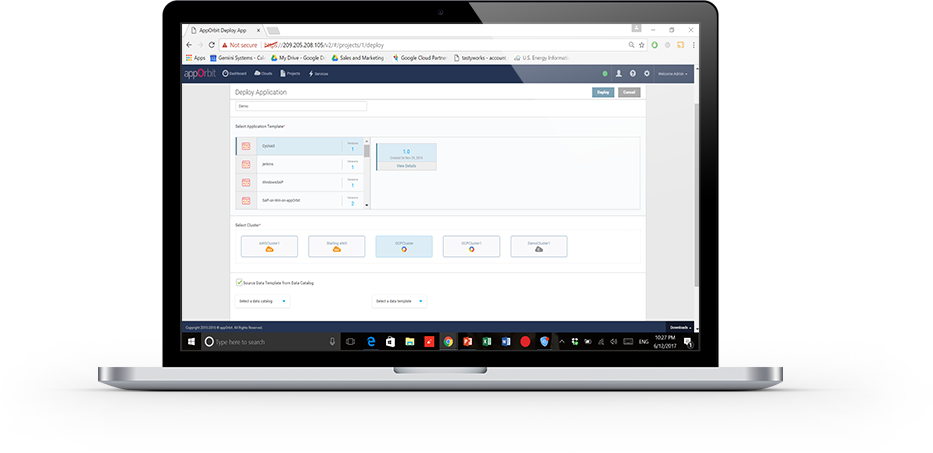
appOrbit recently came out of stealth mode with an overarching architecture to enable hypercloud and extend the DevOps process across the entirety of the dev/test/deploy ecosystem. The idea is to offer a platform that doesn’t care what languages or deployment tools you use, or even what databases you’ve tossed data into, and covers the process from first line of code to management and monitoring post-deployment.
That’s a big claim, so I got on the phone with appOrbit to poke around a bit. Better would be to take the time and use the toolset, but I’ll settle for our questions about the traditional weak spaces in the process, and about how they achieve some of the company’s claims. For now.
My first impression was that this was application release automation/application release management (ARA/ARM), and Rahul Ravulur, CEO of appOrbit told me I wasn’t far off; I just wasn’t thinking big enough. A large part of the process is ARA, but additionally, appOrbit worries about networking, security policy and long-term monitoring and management, all while offering deployment portability.
Finally, the End Game is in Sight
From the beginnings of the Ops side of the DevOps movement (what I like to call devOPS), the end goal was pretty obvious: to improve the entirety of the process. It was clearly going to take time—good network engineers are wizards that can make a network do astounding things—and we had to figure out how to make that more repeatable. On the DEVops side, repeatable was relatively painless: We already did a predefined sequence of steps over and over; the point was to break them into smaller iterations and automate what was ripe for automation. Much of Ops was the same, but networking and security had many more variables to take into account, and less history of “here’s a prescribed sequence, do it.”
If appOrbit can do as it claims—and its customer list includes some customers I’ve worked with that probably wouldn’t be there if the product was vaporware—then we’re seeing the culmination start. The culmination will include limitless portability, sort of a “we don’t care where you deploy, just tell us and we’ll do it”; it will include development tool agnosticism—“We don’t care what tools you used, we’ll deploy it”; and it will include complete solutions—“We’ll move your data, we’ll move your app, we’ll configure the target network, we’ll run the security checks relevant to the target platform.” It sounds like appOrbit has traveled quite far down that path already.
What, Exactly, Did You Intend?
One interesting bit appOrbit talked to me about and I’d like to take out for a spin is the idea of adding “intents” to security and networking. Tell it what you’re after, and through a combination of built-in functionality and plug-ins it will deploy your application as you intended. For things like opening a port, this seems pretty straightforward, but security and networking are complex topics. What is/isn’t covered by security policies/intents? What if my intent is for the system to create a VPN, lock down all the ports, then open just a few and connect the VPN back into the data center over an encrypted port? Who manages certs? Where does it get the credentials to get back into the data center? What happens if I take this whole VPN-based deployment and decide to put it inside the data center after all? Do I have to rework the networking intents to remove the VPN? The questions are endless.
But assume this is the beginning of a road that truly can end up with “deploy anywhere, and deploy as you intended.” That’s what we’ve been waiting for, and it’s inevitable, so I for one am glad to see us set off meaningfully down the path.
Improvement Makes Movement
The mere act of someone talking about having pulled all this together will be good for customers. Ravulur’s stress that “a lot of what we do is ARA” will no doubt make ARA vendors step up their attempts to be as inclusive as appOrbit is, and the market will move forward. appOrbit’s use case of “legacy app migration” without changing the app alone offers an avenue for enterprises to begin to move to new platforms. That in and of itself will be a help to the huge number of enterprises that want to move to a more modern environment but aren’t ready or able to rewrite entire systems. And again, it will spur on competitors—in this case in the application provisioning space, most likely—to try and implement similar functionality in a relatively short time frame.
Beyond Hope
In a nutshell, I hope that appOrbit can do all that it claims, but even if it falls short in some areas (I honestly have only touched on a few of the areas it has pulled together; there’s a lot here), it is a step forward, and I think the company will drive the market more toward the end goal of application portability from both the Dev and deployment sides, while automating a more complete solution.
To me, that’s all good. Not everyone is pure cloud, and a far fewer number want to be pure public cloud brand X. The automation tools I’ve been knee-deep in all have been massively complex under the covers, and no doubt this one is, too; simplifying automation so it is easy to adapt to a given environment is a huge part of the task these tools perform. Figuring out the weaknesses is what we customers have to do, but in the end, we’re moving forward.
I, for one, will look for a chance to play with appOrbit’s toys, validate some of its claims, and see how well it suits enterprise needs. But I don’t have a timeline, so if you’re interested, you should check them out yourself.
This article’s purpose is to compare the “big two” in the log analytics world—Splunk and the ELK Stack. But before we go into details, a short introduction to the competitors is required.
Splunk is the “Google for log files” heavyset enterprise tool that was the first log analysis software and has been the market leader ever since. The open-source ELK Stack of Elasticsearch, Logstash and Kibana is an up-and-coming rival that is a consolidated data analytics platform. The two compete in terms of features, usability and cost.
Overview
Splunk and the ELK Stack use two different approaches to solve the same problem. People typically choose one or the other based on how their organizations are structured and how much time they want to devote to log analytics. Splunk takes a pile of data and allows people to search through the information to extract what they need. ELK requires more work and planning in the beginning, but the value extraction is easier at the end.
The three key components of Splunk are its forwarder, which pushes data to remote indexers; indexer, which has roles for storing and indexing data and responding to search requests; and search head, which is the front end of the web interface where these three components can be combined or distributed over servers. Splunk also supports the integration of its functionalities in applications via SDKs. Common use cases include operational monitoring, security and user behavior analytics. Splunk is a paid service wherein billing is generated by indexing volume.
The ELK Stack is a set of three open-source products—Elasticsearch, Logstash and Kibana—all developed and maintained by Elastic. Elasticsearch is NoSQL database that uses the Lucene search engine. Logstash is a data processing and transportation pipeline used to populate Elasticsearch with the data (though also it supports other destinations including Graphite, Kafka, Nagios and RabbitMQ). Kibana is a dashboard that works on top of Elasticsearch and facilitates data analysis using visualizations and dashboards.
Both Splunk and the ELK Stack can be used to monitor and analyze infrastructure in IT operations as well as for application monitoring, security and business intelligence.
ELK vs. Splunk
Loading Data
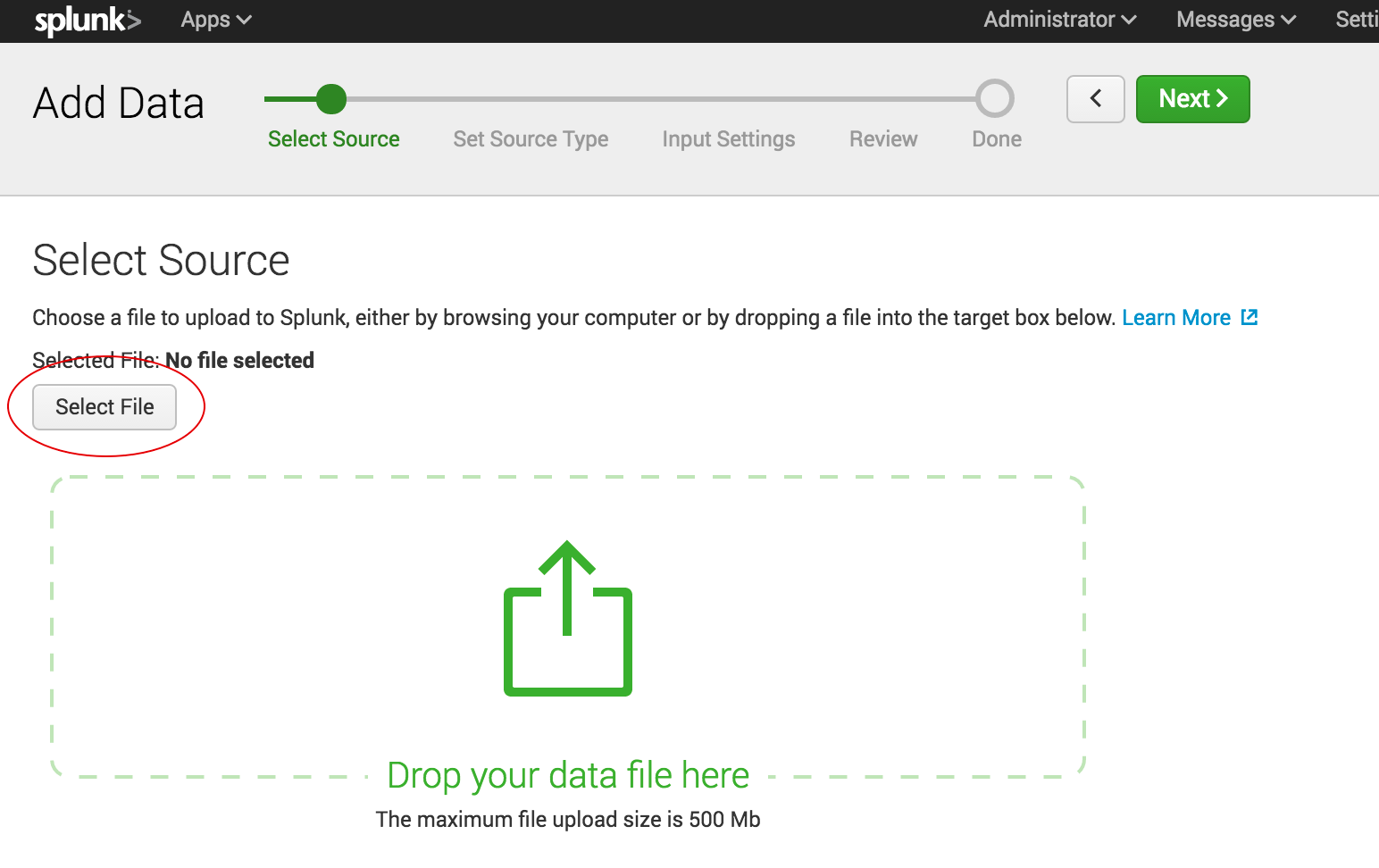
Shipping data to Splunk is fairly easy. After installation, the forwarders come pre-configured for a wide selection of data sources such as files and directories, network events, windows sources and application logs, and they are used to import data into Splunk as shown:
In the ELK Stack, Logstash is used to ship data from the source to the destination. However, Logstash needs to be configured so that each field is identified before the data is shipped to Elasticsearch. This kind of configuration can be tricky for those who do not work with scripting languages (such as Bash, Python or Ruby), but there is good support online that can be found quite easily.
Visualizations
The Splunk web UI includes flexible controls that allow you to edit and add new components to your dashboard. Management and user controls can be configured differently for multiple users, with each having a customized dashboard. Splunk also supports visualizations on mobile devices with application and visualization components that are easy to customize using XML.
Kibana is the visualization tool in the ELK Stack, and like Splunk, the platform supports the creation of visualizations such as line charts, area arts and tables and the presentation of them in a dashboard. The search filter is always shown above the different views: If a query is used, it is automatically applied on elements of the dashboard. Splunk also has a similar option, but it involves configuration in XML. Still, Kibana does not support user management, but hosted ELK solutions provide it out of the box.
Search Capabilities
The search function is a key capability of any log management platform. Both the Splunk and ELK Stack’s web UIs support searching using a dedicated search field. The query syntax on Kibana is based on the Lucene query syntax while Splunk uses its own Splunk Search Processing Language (SPL). Those familiar with scripting languages may already be familiar with Lucene while SPL is proprietary and must be learned.
One other difference is that Splunk offers dynamic data exploration to help users to find and extract everything as a searchable field when formatted in a manner that allows searching for non-configured fields. Elasticsearch fields, on the other hand, need to be defined in advance to use aggregation over the log properties.
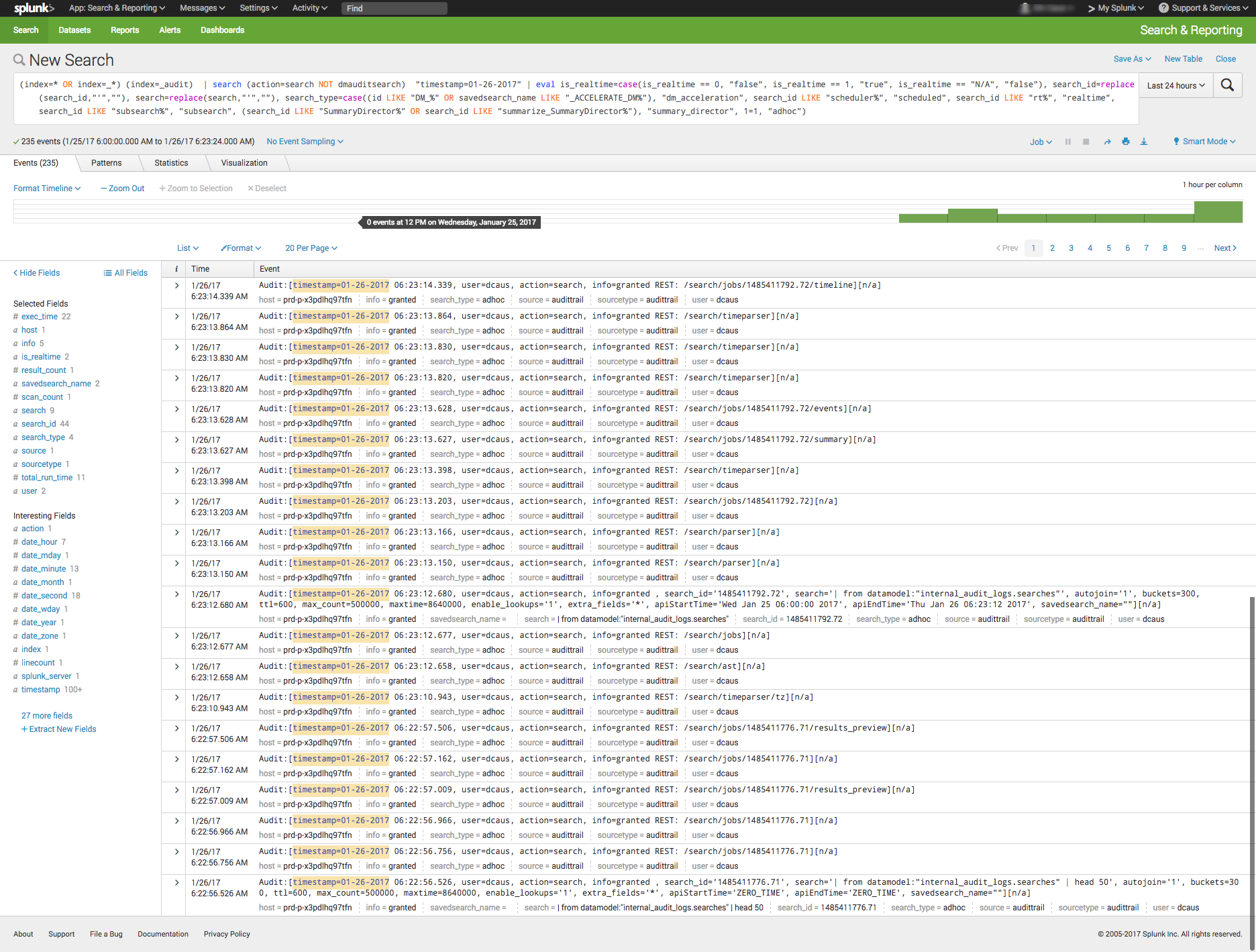
Here is one example of a query for each platform.
Kibana:
(beat.hostname: ES1 AND metricset.name: process) AND (system.process.username: root OR system.process.username: admin)
Splunk:
(index=* OR index=_*) (index=_audit) | search ( action=search NOT dmauditsearch ) "06:54"
The difference between SPL syntax and Lucene queries is that SPL supports the search pipeline (as in the example above) in which consecutive commands are chained together using a pipe character that allows the output of one command to be used as the input of the next one. Lucene query syntax is more straightforward and can work to generate the output from the query without additional transforming.
Traction and Community Support
Both Splunk and ELK Stack have large communities of users and supporters. ELK also has its own clear and extensive documentation for each separate tool, making it easy to get started. In addition, Elastic itself offers educational sessions worldwide.
In addition to having good documentation and a forum, Splunk, too, has customer and support platforms that offer various professional services. Splunk’s education program and instructors are available virtually or on site.
The Learning Curve
The ELK Stack’s learning curve is flat for what it’s meant to do. Elastic offers paid courses, but there is a lot of free material online due to the popularity of the open-source platform.
For Splunk, the learning curve is moderate in size, especially when carrying out more specialized analyzes. The company offers a trial period with extensive documentation, but the advanced Splunk educational courses are fairly expensive.
User Management
The ELK Stack provides role-based security as a separate paid tool. Splunk and managed-ELK services offer user management out of the box with user auditing included.
Pricing Levels
As already mentioned, Splunk is proprietary software with a price tag. After one integrates several data sources with the platform, the cost will increase greatly as data is continuously generated.
The open-source ELK Stack is free, but the true picture is not so black and white. The cost of the platform’s hardware and maintenance also adds up. To lower the cost of using ELK, features, plugins and tools must be developed.
Vendor Lock-In
Splunk’s high price tag comes with the benefit of offering an overall, well-rounded product. Users might be locked into a vendor, but that one vendor is all that is needed to do nearly anything. The open-source ELK Stack is seemingly free, but it does not provide many functionalities such as alerting out of the box—and it costs money to develop and maintain them.
One way to look at the Splunk-versus-ELK discussion is to frame it as the old Microsoft-versus-Linux debate. If you like Microsoft, you will probably prefer Splunk. If you like Linux, you will likely want to use the ELK Stack.
Final Thoughts
When one decides between these solutions, the ultimate choice should reflect not only on the platform but also on the customer’s specific needs.
Both Splunk and the ELK Stack are currently popular. But what might the future hold?
Splunk (Blue) vs. Elasticsearch (Red) on Google Trends
According to Google Trends, the ELK Stack has now overtaken Splunk in terms of the proportion of Google searches. But ELK’s traction does not stop there. As mentioned earlier, Splunk self-reports 12,000 total users. Elasticsearch is reportedly downloaded 500,000 times every single month. In IT departments, then, it is far more likely to meet people who are familiar with ELK than with Splunk, meaning that the adoption rate of the ELK Stack could “snowball” and increase even more in the future whenever ELK users join new companies or teams. People tend to use whatever software they already know or is already being used.
It’s clear that many functionalities are being added to the open-source ELK Stack. This, in turn, is shrinking the gap between it and Splunk. hose features currently found only in Splunk are likely to be added to ELK at some point in time.
So, if a more mature product is what you need, go with Splunk. But if you like a product that is more flexible, ELK is the way. Either way, it’ll be interesting to see how these two continue to compete.







 Shawn Minto is the senior director of Technical Services and Support at
 Sam Fell is the Head of Marketing at Electric Cloud, responsible for driving awareness and demand for our DevOps Release Automation and Acceleration solutions. For 20 years, Sam has helped companies achieve success by marketing, selling, and implementing DevOps Release Automation, IT Change Management and Application Performance Management solutions. Prior to joining Electric Cloud, Sam held leadership roles at BMC, CA, Marimba and Nimsoft. Follow him on
 appOrbit recently came out of stealth mode with an